Search Results: "pere"

3 April 2013

Petter Reinholdtsen: Isenkram 0.2 finally in the Debian archive

Today the Isenkram package finally made it into the archive, after lingering in NEW for many months. I uploaded it to the Debian experimental suite 2013-01-27, and today it was accepted into the archive. Isenkram is a system for suggesting to users what packages to install to work with a pluggable hardware device. The suggestion pop up when the device is plugged in. For example if a Lego Mindstorm NXT is inserted, it will suggest to install the program needed to program the NXT controller. Give it a go, and report bugs and suggestions to BTS. :)

1 April 2013

Lisandro Damián Nicanor Pérez Meyer: On the road to Qt 5: Qt 4.8.4 and qtchooser uploaded to experimental

I have just uploaded Qt 4.8.4 to experimental. Apart from being the newest upstream release of the 4 series, it adds the basic support for coexisting with Qt 5. Because of this support it will need to go trough the NEW queue though, so we will need to be patient.

Developers will be interested in qtchooser, the tool that allows to switch between Qt 4 and 5 development apps. It has also been uploaded to experimental.

Of course, all this has been possible thanks to the efforts of the wonderful Qt/KDE team =)

Update: our efficacious FTP masters have already made Qt pass the NEW queue. Thanks a lot!

26 March 2013

Petter Reinholdtsen: Change the font, save the world (and save some money in the process)

Would you like to help the environment and save money at the same time, without much sacrifice? A small step could be to change the font you use when printing. Three years ago, Ars Technica reported how the University of Wisconsin-Green Bay changed their default front from Arial to Century Gothic to save money. The Century Gothic font uses 30% less toner than Arial to print the same text. In other word, you could cut your toner costs by 30% (or actually, increase your toner supply life time by more than 30%), by simply changing the default font used in your prints. But it is not quite obvious how much one will safe by switching. The University of Wisconsin-Green Bay said it used $100,000 per year on ink and toner cartridges, according to a report from TwinCities.com, and expected to save between $5,000 and $10,000 per year by asking staff and students to use a different font. Not all PDFs and documents are created internally, and those from external sources will most likely still use a different font. Also, the Century Gothic font is slightly wider than Arial, and thus might use more sheets of paper to print the same text, so the total saving depend on the documents printed. But it is definitely something to consider, if you want to reduce the amount of trash, decrease the amount of toner used in the world, and save some money in the process.

24 March 2013

Petter Reinholdtsen: Typesetting a short story using docbook for PDF, HTML and EPUB

A few days ago, during a discussion in EFN about interesting books to read about copyright and the data retention directive, a suggestion to read the 1968 short story Kod mus by Tore ge Bringsv rd came up. The text was only available in old paper books, and thus not easily available for current and future generations. Some of the people participating in the discussion contacted the author, and reported back 2013-03-19 that the author was OK with releasing the short story using a Creative Commons license. The text was quickly scanned and OCR-ed, and we were ready to start on the editing and typesetting. As I already had some experience formatting text in my project to provide a Norwegian version of the Free Culture book by Lawrence Lessig, I chipped in and set up a DocBook processing framework to generate PDF, HTML and EPUB version of the short story. The tools to transform DocBook to different formats are already in my Linux distribution of choice, Debian, so all I had to do was to use the dblatex, dbtoepub and xmlto tools to do the conversion. After a few days, we decided to replace dblatex with xsltproc/fop (aka docbook-xsl), to get the copyright information to show up in the PDF and to get a nicer <variablelist> typesetting, but that is just a minor technical detail. There were a few challenges, of course. We want to typeset the short story to look like the original, and that require fairly good control over the layout. The original short story have three parts/scenes separated by a single horizontally centred star (*), and the paragraphs do not contain only flowing text, but dialogs and text that started on a new line in the middle of the paragraph. I initially solved the first challenge by using a paragraph with a single star in it, ie <para>*</para>, but it made sure a placeholder indicated where the scene shifted. This did not look too good without the centring. The next approach was to create a new preprocessor directive <?newscene?>, mapping to "<hr/>" for HTML and "<fo:block text-align="center"><fo:leader leader-pattern="rule" rule-thickness="0.5pt"/></fo:block>" for FO/PDF output (did not try to implement this in dblatex, as we had switched at this time). The HTML XSL file looked like this:
<?xml version='1.0'?> 
<xsl:stylesheet xmlns:xsl="http://www.w3.org/1999/XSL/Transform" version='1.0'>
  <xsl:template match="processing-instruction('newscene')">
    <hr/>
  </xsl:template>
</xsl:stylesheet> 
And the FO/PDF XSL file looked like this:
<?xml version='1.0'?> 
<xsl:stylesheet xmlns:xsl="http://www.w3.org/1999/XSL/Transform" version='1.0'>
  <xsl:template match="processing-instruction('newscene')">
    <fo:block text-align="center">
      <fo:leader leader-pattern="rule" rule-thickness="0.5pt"/>
    </fo:block>
  </xsl:template>
</xsl:stylesheet> 
Finally, I came across the <bridgehead> tag, which seem to be a good fit for the task at hand, and I replaced <?newscene?> with <bridgehead>*</bridgehead>. It isn't centred, but we can fix it with some XSL rule if the current visual layout isn't enough. I did not find a good DocBook compliant way to solve the linebreak/paragraph challenge, so I ended up creating a new processor directive <?linebreak?>, mapping to <br/> in HTML, and <fo:block/> in FO/PDF. I suspect there are better ways to do this, and welcome ideas and patches on github. The HTML XSL file now look like this:
<?xml version='1.0'?> 
<xsl:stylesheet xmlns:xsl="http://www.w3.org/1999/XSL/Transform" version='1.0'>
  <xsl:template match="processing-instruction('linebreak)">
    <br/>
  </xsl:template>
</xsl:stylesheet> 
And the FO/PDF XSL file looked like this:
<?xml version='1.0'?> 
<xsl:stylesheet xmlns:xsl="http://www.w3.org/1999/XSL/Transform" version='1.0'
  xmlns:fo="http://www.w3.org/1999/XSL/Format">
  <xsl:template match="processing-instruction('linebreak)">
    <fo:block/>
  </xsl:template>
</xsl:stylesheet> 
One unsolved challenge is our wish to expose different ISBN numbers per publication format, while keeping all of them in some conditional structure in the DocBook source. No idea how to do this, so we ended up listing all the ISBN numbers next to their format in the colophon page. If you want to check out the finished result, check out the source repository at github (future/new/official repository). We expect it to be ready and announced in a few days.

17 March 2013

Petter Reinholdtsen: Skolelinux 6 got a video review from Pcwizz

Via twitter I just discovered that Pcwizz have done a video review on Youtube of Skolelinux / Debian Edu version 6. He installed the standalone profile and the video show a walk-through of of the menu content, demonstration of a few programs and his view of our distribution. There is also some really nice quotes (transcribed by me, might have heard wrong). While looking thought the Graphics menu:
"Basically everything you ever need in a school environment."
And as a general evaluation of the entire distribution:
"So, yeah, a bit bloated. It kept all the Debian stuff in there, just to keep it nice and GNU. So, I do not want to go on about it, but lets give it 7 out of 10. I am not going to use it. That is because I am not deploying a school network. There may be some mythical feature to help you deploy Skolelinux on a school network."
To bad he did not test the server profile, and discovered the PXE installation option. It make it possible to install only the main server from CD, and the rest of the machines via the net, and might be considered the mythical feature he talk about. :) While looking through the menus, there is also this funny comment about the part of the K menu generated from the Debian menu subsystem:
"[The K menu] have a special Debian section for software that no-one is going to look at, because it contain lots of junky stuff that you actually don't need in the education distribution, but have just been included because it isn't stripped out for some reason."
I guess it is yet another argument for merging the Debian menu and Gnome/KDE desktop menu entries into one consistent menu system instead of two incomplete and partly inconsistent menu systems. The entire video is available below for those accepting iframe embedding: <iframe allowfullscreen="allowfullscreen" frameborder="0" height="315" src="http://www.youtube.com/embed/wPzTZ61Pcuc" width="560"></iframe>

8 March 2013

Petter Reinholdtsen: First Skolelinux / Debian Edu Squeeze update released

Last Sunday, 2013-03-03,, Holger Levsen announced the first update of Skolelinux / Debian Edu based on Debian Squeeze. This is the first update since the initial release 2012-03-11. This is the release announcement email from Holger:
Hi, it's my pleasure to announce the immediate availability of Debian Edu 6.0.7+r1 ("Debian Edu Squeeze"). Debian Edu 6.0.7+r1 is an incremental update to Debian Edu 6.0.4+r0, containing all the changes between Debian 6.0.4 and 6.0.7 as well Debian Edu specific bugfixes and enhancements. See below (in this mail) for the full list of (edu) changes. Please see http://www.debian.org/News/2012/20120311 for more information on "Debian Edu Squeeze". Images are available for download at http://ftp.skolelinux.org/skolelinux-cd/ md5sums:
1fe79eb4f0f9ae1c58fc318e26cc1e2e debian-edu-6.0.7+r1-CD.iso
a6ddd924a8bd9a1b5ca122e8fe1c34ec debian-edu-6.0.7+r1-DVD.iso
ac6c72cd7925ccec51bfbf58e2a7c69c debian-edu-6.0.7+r1-source-DVD.iso sha1sums:
a4b58233b672a99c7df8dc24fb6de3327654a5c3 debian-edu-6.0.7+r1-CD.iso
9b524915e0ff2aa793f13d93123e5bd2bab2dbaa debian-edu-6.0.7+r1-DVD.iso
43997614893fc5e9e59ad6ce066b05d07fd836fa debian-edu-6.0.7+r1-source-DVD.iso These images are suitable for amd64+i386. Changes for Debian Edu 6.0.7+r1 Codename "Squeeze", released 2013-03-03:
  • sitesummary was updated from 0.1.3 to 0.1.8
    • Make Nagios configuration more robust and efficient
    • Comply with 3.X kernel
  • debian-edu-doc from 1.4~20120310~6.0.4+r0 to 1.4~20130228~6.0.7+r1
    • Minor updates from the wiki
    • Danish translation now complete
  • debian-edu-config from 1.453 to 1.455
    • Fix /etc/hosts for LTSP diskless workstations. Closes: #699880
    • Make ltsp_local_mount script work for multiple devices.
    • Correct Kerberos user policy: don't expire password after 2 days. Closes: #664596
    • Handle '#' characters in the root or first users password. Closes: #664976
    • Fixes for gosa-sync:
      • Don't fail if password contains "
      • Don't disclose new password string in syslog
    • Fixes for gosa-create:
      • Invalidate libnss cache before applying changes
      • Multiple failures during mass user import into GOsa
      • gosa-netgroups plugin: don't erase entries of attribute type "memberNisNetgroup". Closes: #687256
      • First user now uses the same Kerberos policy as all other users
    • Add Danish web page
  • debian-edu-install from 1.528 to 1.530
    • Improve preseeding support and documentation
End-user documentation in English is available at http://wiki.debian.org/DebianEdu/Documentation/Squeeze/ - translations to French, Italian, Danish and German are available in the debian-edu-doc package. (Other languages could use your help!) If you want to contribute to Debian Edu, please join our mailinglist debian-edu@lists.debian.org!
I am very happy to see the fruits of a year of hard work. :)

5 March 2013

Lisandro Dami&aacute;n Nicanor P&eacute;rez Meyer: My Debian freeze experience (so far)

This is the first freeze in which I'm involved with upload rights. And it turned out to be a quite interesting ride so far, so I thought it would be nice to write about it.

As some of you may know, I'm a part of the Qt/KDE team. Before the freeze I was mostly involved in leaf packages, with some patch here or there, nothing fancy. And then the freeze came...

Bugs in Qt

...and bugs appeared in Qt. But they didn't get solved, even if the patches were there. Due to personal reasons, the manpower in Qt/KDE land decreased below normal levels (which were already low).

I took the time to review them, apply them in a local branch, build and test the fixes. I did a Qt upload before, but it was a team-consented one. This time there was not much reaction in our IRC channel as it used to be, so I was doubting if going ahead or not. I asked Ana, my great friend and former sponsor, for an opinion on the subject, and she gave me a really important advice: the patches were looking good and there is one really big true: if something get's broken, it can be fixed with a later upload.

You might be asking yourself why I was that afraid of doing the upload. Well, when one maintains such a medular package for many users one has to be careful And I also got used that those "big ones" like Qt where normally handled by hand skilled people. Do not take me wrong here, it's not that those people where keeping them for themselves, it's knowing that one does not has the same skills nor experience as them.

But again, no one was able to upload and I had the chance and will to do another upload if needed, so off it went. That was Qt 4:4.8.2-2.

Then new experiences followed: asking a buildd maintainer for a giveback, asking the Release Team for an unblock (more on this later), etc. While sponsoring me, Ana gave me another excellent advice which I always keep in my mind:

You can't know **everything** about Debian.

And that also includes a not so technical skill: communicating with other teams. But finally we got this new version of Qt in testing. Cool :-)

Of course, new bugs appeared, and my lack of skills (and sometimes, time) where replaced by team work: Pino looking at patches and Sune contacting upstream. The eleven uploads that followed are a nice example of team work, even if I was the one who signed and did the uploads. Whoever uses Qt must know that these wonderful people (including those who are not so active nowadays like Modestas or Fathi) have done lots to bring the better to their users.Thank you guys!

Be careful, they might bite you back!

Coming back to the non-technical skills, sometimes you have to communicate with other teams in Debian. And each team is (naturally) a separate world: possibly different people, different goals, etc. Of course, we share the goal to make Debian the best experience we can, but we do not necessarily agree on the paths to achieve so.

During the freeze, there is a team that gets lots of pressure, and not by chance: the Release Team. They handle a very important task, which is to ride the freeze to get to a release. OK, that's what everyone knows. Now, one thing is knowing that and another is really understanding what does that means.

Of course I was in the first group. From the outside, communicating with the RT was a kind of "special art", and not an easy one. I have even been advised to not ask for more than one or two unblocks per weekend, as they might "bite me back". So I put on my flamesuit on and... launched reportbug release.debian.org.

Now I'm really happy to say that my experience was far from what I described above. And yes, I had the chance to even disagree on some stuff. But remember: non-technical skills, a.k.a. social skills. Once I started to know what was going on inside the RT (joining #debian-release was a big help for that) I learnt some nice tips to approach them. Please allow me to list some of them:

  • Remember: you are the maintainer of the package, they are like gatekeepers that are there to help us coordinate to do a release. But they don't maintain the code, you do that. So try to be verbose when needed, explain the changes and don't forget a nice diff. They need to understand what is going on: they can't read your mind.
  • They are human beings too: not everyday might be their best day (the same goes for you too!). And they are under the pressure of a release. Be patient, that finally pays off.
  • Does your changes seem not so clear? try to improve them.
  • The package has a lot of changes but you really feel they are needed? Try to explain that as good as you can.
  • Try to put yourself in their position: do we really want this? If in doubt, there is a nice way to know what they think: a pre-approval bug.
I want to make a stop in this last point. A pre-approval bug it's an unblock bug in which you edit the subject to add "pre-approval" in it. Easy, isn't it? It gives you the opportunity to know what the RT thinks before doing the upload. In other words: it gives you the chance to communicate and do things in the best possible way for all the parts involved.

I've have also seen pre-approval bugs that were really not needed. But to learn where the threshold of what can be directly uploaded and what deserves a pre-approval bug is you need to know the guidelines the RT gives you. Do you still have doubts? fire a pre-approval bug and try to be clear.

Of course, this are all fruits of my experience with the RT during this time. If the RT thinks different from what I'm writing here, please stand up: we are hear to listen to you and learn :-)

As a side note, I think I should file a wishlist bug to include the pre-approval bug option in reportbug. Yes, I'm lazy :-)

Summing up

Overall this was a very nice and positive experience. We are not done yet. Are we really done at some point? Let's hope not, because this is where the fun comes from :-)

3 March 2013

Petter Reinholdtsen: Frikanalen - Complete TV station organised using the web

Do you want to set up your own TV station, schedule videos and broadcast them on the air? Using free software? With video on demand support using free and open standards? Included a web based video stream as well? And administrate it all in your web browser from anywhere in the world? A few years now the Norwegian public access TV-channel Frikanalen have been building a system to do just this. The source code for the solution is licensed using the GNU LGPL, and available from github. The idea is simple. You upload a video file over the web, and attach meta information to the file. You select a time slot in the program schedule, and when the time come it is played on the air and in the web stream. It is also made available in a video on demand solution for anyone to see it also outside its scheduled time. All you need to run a TV station - using your web browser. There are several parts to this web based solution. I'll mention the three most important ones. The first part is the database of videos and the schedule. This is written in Django and include a REST API. The current database is SQLite, but the plan is to migrate it to PostgreSQL. At the moment this system can be tested on beta.frikanalen.tv. The second part is the video playout, taking the schedule information from the database and providing a video stream to broadcast. This is done using CasparCG from SVT and Media Lovin' Toolkit. Video signal distribution is handled using Open Broadcast Encoder. The third part is the converter, handling the transformation of uploaded video files to a format useful for broadcasting, streaming and video on demand. It is still very much work in progress, so it is not yet decided what it will end up using. Note that the source of the latter two parts are not yet pushed to github. The lead author want to clean them up a bit more first. The development is coordinated on the #frikanalen IRC channel (irc.freenode.net), and discussed on the frikanalen mailing list. The lead developer is Benjamin Bruheim (phed on IRC). Anyone is welcome to participate in the development.

27 February 2013

Petter Reinholdtsen: Dr. Richard Stallman, founder of Free Software Foundation, give a talk in Oslo March 1st 2013

Dr. Richard Stallman, founder of Free Software Foundation, is giving a talk in Oslo March 1st 2013 17:00 to 19:00. The event is public and organised by Norwegian Unix Users Group (NUUG) (where I am the chair of the board) and The Norwegian Open Source Competence Center. The title of the talk is The Free Software Movement and GNU , with this description:
The Free Software Movement campaigns for computer users' freedom to cooperate and control their own computing. The Free Software Movement developed the GNU operating system, typically used together with the kernel Linux, specifically to make these freedoms possible.
The meeting is open for everyone. Due to space limitations, the doors opens for NUUG members at 16:15, and everyone else at 16:45. I am really curious how many will show up. See the event page for the location details.

15 February 2013

Josselin Mouette: The DPL game

Following the DPL game call for players, here are my nominations for the fantastic four (in alphabetical order) :
  1. Luca Falavigna
  2. Tollef Fog Heen
  3. Yves-Alexis Perez
  4. Christian Perrier
These are four randomly selected people among those who share an understanding of the Debian community, a sense of leadership, and the ability to drive people forward with solutions.

Petter Reinholdtsen: Frikart - Free Garmin maps for European countries based on OpenStreetmap

If you, like me, want an updated a map for your Garmin GPS, there is now a great source of free maps available from Frikart. To download a map, just click on the country you are interested in, and download the map type you want. There are 8 different maps available, using different colours and data selection. Pick one of Roadmap, Topo Summer, Topo Winter, Roadmap II, Topo Summer II, Topo Winter II, "Trails - overlay map" and "Cross country - overlay map" (see the web page for descriptions). The maps are updated weekly, so if you find something wrong in the map you can just edit the OpenStreetmap map source (anyone can contribute) and fetch a fixed map a week later. :)

12 February 2013

Petter Reinholdtsen: "Electronic" paper invoices - using vCard in a QR code

Here in Norway, electronic invoices are spreading, and the solution promoted by the Norwegian government require that invoices are sent through one of the approved facilitators, and it is not possible to send electronic invoices without an agreement with one of these facilitators. This seem like a needless limitation to be able to transfer invoice information between buyers and sellers. My preferred solution would be to just transfer the invoice information directly between seller and buyer, for example using SMTP, or some HTTP based protocol like REST or SOAP. But this might also be overkill, as the "electronic" information can be transferred using paper invoices too, using a simple bar code. My bar code encoding of choice would be QR codes, as this encoding can be read by any smart phone out there. The content of the code could be anything, but I would go with the vCard format, as it too is supported by a lot of computer equipment these days. The vCard format support extentions, and the invoice specific information can be included using such extentions. For example an invoice from SLX Debian Labs (picked because we ask for donations to the Debian Edu project and thus have bank account information publicly available) for NOK 1000.00 could have these extra fields:
X-INVOICE-NUMBER:1
X-INVOICE-AMOUNT:NOK1000.00
X-INVOICE-KID:123412341234
X-INVOICE-MSG:Donation to Debian Edu
X-BANK-ACCOUNT-NUMBER:16040884339
X-BANK-IBAN-NUMBER:NO8516040884339
X-BANK-SWIFT-NUMBER:DNBANOKKXXX
The X-BANK-ACCOUNT-NUMBER field was proposed in a stackoverflow answer regarding how to put bank account information into a vCard. For payments in Norway, either X-INVOICE-KID (payment ID) or X-INVOICE-MSG could be used to pass on information to the seller when paying the invoice. The complete vCard could look like this:
BEGIN:VCARD
VERSION:2.1
ORG:SLX Debian Labs Foundation
ADR;WORK:;;Gunnar Schjelderups vei 29D;OSLO;;0485;Norway
URL;WORK:http://www.linuxiskolen.no/slxdebianlabs/
EMAIL;PREF;INTERNET:sdl-styret@rt.nuug.no
REV:20130212T095000Z
X-INVOICE-NUMBER:1
X-INVOICE-AMOUNT:NOK1000.00
X-INVOICE-MSG:Donation to Debian Edu
X-BANK-ACCOUNT-NUMBER:16040884339
X-BANK-IBAN-NUMBER:NO8516040884339
X-BANK-SWIFT-NUMBER:DNBANOKKXXX
END:VCARD
The resulting QR code created using qrencode would look like this, and should be readable (and thus checkable) by any smart phone, or for example the zbar bar code reader and feed right into the approval and accounting system. The extension fields will most likely not show up in any normal vCard reader, so those parts would have to go directly into a system handling invoices. I am a bit unsure how vCards without name parts are handled, but a simple test indicate that this work just fine. Update 2013-02-12 11:30: Added KID to the proposal based on feedback from Sturle Sunde.
10 February 2013

Petter Reinholdtsen: Sleep until morning - home automation for the kids

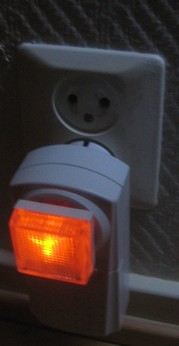
With kids in the house, one challenge is getting them to sleep during the night and wake up when it is morning. I mean, when I believe it is morning, and not two hours earlier. In our household we have decided that 07:00 is the turning point, but getting the kids to sleep until 07:00 is a small challenge every day. They have adapted quite well, and rarely wake up at 05:00 any more, but some times wake up at times like 05:50, 06:15, 06:30 or 06:45, and it is hard to put the awake one to bed again without disturbing and waking the rest. And I understand perfectly well that they fail to sleep until 07:00 some times, as there is no way for them to know if it is before or after the magic moment without coming and asking us parents. But yesterday I came up with a method to solve this problem. It involve home automation. A few years ago I bought a Tellstick and RF switches at the local Clas Ohlson shop, allowing me to control lights and other electrical gadgets using my Linux server. When I moved from the old flat to a small house, I put away all this equipment as most of the lighting in the house was not using wall sockets and thus not easy to connect to the gadgets I had. But recently I bought a Tellstick Net to be able to read sensor input as well as control power sockets. I want to control ovens in the basement to avoid the pipes to freeze, and monitor the humidity to detect flooding. The default setup for Tellstick Net is to be controlled by the vendor web service, which to me is a security problem, but it is also possible to build ones own firmware with local access instead of being controlled by a Swedish company, thanks to the release of the GPL licensed firmware source code. I plan to get that running before I let it control anything important. But while working on this, one idea to make it easier for the kids came to me yesterday. We can set up a night light controlled by the computer, and turn it automatically on at 07:00. The kids can then check the light in the morning to know if they are supposed to get up or not. They joined me in setting everything up, and I repeated the concept several times before bed times to make sure they remembered to check the light before getting up in the morning. We tested it this morning, and all the kids stayed in bed until after 07:00, and every one of them commented on the fact that the "morning light" was turned on and signalled that the morning had arrived. So this look like a success, and I am excited to see how this develops the next few days. :) I really hope this can allow us all to sleep a bit longer in the morning. A nice advantage of this setup is that we can remote control when to tell the kids to get up. We do not have to wait until 07:00, and can also delay it if we want to.

2 February 2013

Petter Reinholdtsen: Bitcoin GUI now available from Debian/unstable (and Ubuntu/raring)

My last bitcoin related blog post mentioned that the new bitcoin package for Debian was waiting in NEW. It was accepted by the Debian ftp-masters 2013-01-19, and have been available in unstable since then. It was automatically copied to Ubuntu, and is available in their Raring version too. But there is a strange problem with the build that block this new version from being available on the i386 and kfreebsd-i386 architectures. For some strange reason, the autobuilders in Debian for these architectures fail to run the test suite on these architectures (BTS #672524). We are so far unable to reproduce it when building it manually, and no-one have been able to propose a fix. If you got an idea what is failing, please let us know via the BTS. One feature that is annoying me with of the bitcoin client, because I often run low on disk space, is the fact that the client will exit if it run short on space (BTS #696715). So make sure you have enough disk space when you run it. :) As usual, if you use bitcoin and want to show your support of my activities, please send Bitcoin donations to my address 15oWEoG9dUPovwmUL9KWAnYRtNJEkP1u1b.

24 January 2013

Russell Coker: Power Supplies and Wires

For some time I ve been wondering how the wire size for power supplies limits the power. So I ve done some quick calculations to determine if it s a problem. The first type that is of interest are the Inverters that are used to convert 12VDC to 240VAC (mains power) to allow electric devices to be operated in a car. I ve seen some reports from dissatisfied user about Inverters not supplying as much power as expected and I ve had problems with my 150W Inverter not always supplying my Thinkpad (which definitely doesn t draw 150W). The second type is phone chargers as charging a phone in a reasonable amount of time is always a problem. Inverter Rating Fine Print vs Laptop PSU My Thinkpad Power Supply claims Efficiency Level IV which according to the US EPA document describing the efficiency marking protocol for external power supplies [1] means that it is at least 85% efficient when supplying 50W+. The peak output of the PSU is 4.5A at 20V which is 90W peak output, 90/0.85 == 106W power drawn. One would hope that wouldn t be a problem from a 150W PSU. But the fine print on the PSU says that it can provide 110W continuously and 150W for 10 minutes. So according to my calculations I m within 4W of overloading the PSU if my Thinkpad uses full power. It also says that it is designed for 13.8V input. I have no idea how the performance of the Inverter changes as the supply Voltage changes between the 12.6V that a 6 cell lead-acid battery is designed to provide and the 13.8V charge from the car alternator. But I have had occasions when my Inverter stopped working correctly presumably due to being unable to supply as much current as my Thinkpad draws. As an aside I measured the Voltage in my car (with the engine off) at 12.85V from the cigarette lighter socket and 13.02V directly from the battery. I wonder if there is some sort of overload protection on the cigarette lighter which has a side effect of reducing the Voltage. Resistance in wires reduces the Voltage, but all Voltage meters are designed to have a high resistance to prevent that from being an issue. If anyone has an explanation for the 0.17Volt drop then please write a comment! Can a Car Provide 130W from the Cigarette Lighter socket? If the Inverter is also 85% efficient (and it might be less as it has no indication of efficiency on the box) then when supplying 110W it would draw 110/0.85 == 129.4W (I ll round it up to 130W). The power in Watts is equal to the Voltage multiplied by the current in Amps (W=V*I). Therefore I=W/V so if the car battery was at 12.85V then 130W/12.85V == 10.12A will flow. The current that goes through a circuit is equal to the Voltage divided by the resistance (see the Wikipedia page on Ohm s law for more information). This also means that the resistance equals the Voltage divided by the current. 12.85V/10.12A == 1.27 Ohms. Note that this is the resistance of the entire circuit, all the wires going to the battery, the circuitry inside the Inverter, and the internal resistance of the battery. The Inverter s cable is 1M long (2 meters of wire) and each wire is about 3.5mm in diameter including the insulation which means that the copper wire is probably equivalent to a single core conductor that is about 1mm in diameter. According to one of the online guides to resistance [2] wire that is 1.02mm in diameter will have a resistance of 0.02 Ohms per meter which gives a resistance of 0.04 Ohms. 0.04 Ohms is 3% of the total resistance of the circuit which doesn t seem like it will be a real problem. In practice I ve noticed that the connector gets extremely hot when it s in use while the cable doesn t get warm enough to notice. I suspect that the quality of the connector limits the power that is available but I don t have an easy way of measuring this. Inverters that are rated at 300W are designed to attach directly to the battery. An Inverter that is rated at 300W would draw 300W/0.85 == 352W from the battery. That needs 352W/13.02V == 27.04A and therefore a circuit resistance of 13.02V/27.04A == 0.48 Ohms total resistance. I wonder whether dirt on the battery terminals would give a significant portion of that. Phone Charging I ve also been wondering about why mobile phones take so long to charge, and now I ve finally done the calculations. The latest standard for mobile phones is to use USB for charging. The Wikipedia page about USB says that the standard is for USB 2.0 to supply up to 500mA at 5V +-5%. That means 0.5A*5V == 2.5W +- 5%. If we assume that the internal power supply in a phone is also 85% efficient then that means 2.5*0.85 == 2.125W going to the battery. My Samsung Galaxy S3 has a battery which is rated at 7.98Wh. According to the Wikipedia page about Lithium Ion batteries the charge/discharge efficiency is 80% to 90% I ll assume that it s 85% for further calculations. If the battery in the phone is 85% efficient and the phone is doing nothing but charging then the charge time for a regular USB port would be 7.98Wh/0.85/2.125W == 4.42 hours (4 hours 25 minutes) of charge time. That probably means something closer to 5 hours to totally charge the phone while it s running. There are dedicated charging ports for USB which can supply up to 1.5A. The 3rd party charger which came with my phone was rated at 1A and would hopefully be capable of completely charging the phone in less than 3 hours (but in practice isn t). It s interesting to note that MacBooks expose the amount of current drawn from a USB port with a GUI, so it should be possible to measure a phone charge rate by connecting it to a MacBook (which is cheaper than cutting up a phone cable). My old Samsung Galaxy S has a battery which is rated at 5.55Wh, by the same calculations it would take slightly more than 3 hours to charge on a standard USB port or 1.5 hours on my newest USB charger. In practice it has never got anywhere close to that, I presume that the phone is designed to draw less than 500mA. Phone Cable Resistance The charger that came with my Galaxy S has a cable that is about 1.75M long, the cable is flat and measures just over 1mm thick and about 2mm wide. Presumably the wire is equivalent to a single core that s about 0.4mm in diameter thus giving it a resistance of about 0.134 Ohm per meter, or 1.75*2*0.134 == 0.469 Ohm for the cable. The charger is rated at 0.7A. To supply 0.7A at 5V the resistance would be 5V/0.7A == 7.143 Ohm so about 6.6% of the total resistance of the circuit would be in the wire from the charger to the phone. The charger that came with my Galaxy S3 has a round cable that s just over 3mm thick and about 90cm long. If each wire in the cable is equivalent to a solid wire that is 0.912mm in diameter then it would be 0.0264 Ohm per meter of wire or 0.9*2*0.0264 == 0.0475 Ohm. The total circuit resistance would be 5V/1A == 5 Ohm. So 0.0475 Ohm is less than 1% of the circuit resistance. Voltage Drop The Voltage across a part of a circuit is proportional to the resistance (see the Wikipedia page on Series and Parallel Circuits for a good explanation). Basically this means that if 1% of the resistance of a circuit is in the wire then 1% of the Voltage drop will also be in the wire, so if we have a 5V supply with my Galaxy S3 cable then each of the two wires in the cable will have a difference of about 0.025V between the ends and the phone will receive a supply of 4.95V, the difference isn t something that is worth worrying about. But the cable from my Galaxy S has a resistance equivalent to 6.6% of the circuit resistance which means that the theoretical charge time will be 6% longer than it might be or 6% more current will be drawn from the mains than should be needed. Conclusion The charger that came with my Samsung Galaxy S isn t much good. Wasting 6.6% of the power in the wire is unreasonable. Phones keep getting more power hungry and batteries keep getting larger. There are third party phone batteries and external batteries that are charged by USB which have more than twice the capacity of the stock phone batteries this means more than twice the charge time. This problem will keep getting worse. The problem of a phone in active use drawing more power than the charger can provide (and running out of battery while on the charger) seems likely to stay with us. So while an Android phone has the potential to be a great little embedded server it seems that hacking the power supply is going to be a required first step for realising that potential. The decision to make 5V the USB power standard was reasonable at the time as it was the voltage used for most things on the motherboard. The decision to use USB as the phone charging standard was also reasonable, it allows phones to be charged anywhere. The combination of those two decisions isn t good for the user. If a higher Voltage such as 12V was used then 5* the power could be supplied through the same wires at the same level of efficiency. It would be really good if cars came with built in Inverters and supplied 240VAC or 110VAC depending on the region they were manufactured for. It s becoming a fairly common feature to have a cigarette lighter port in the car boot as well as at least two ports inside the car. When a car has three sockets and only one device to actually light cigarettes (which I suspect is only provided to fill an empty socket) it s very obvious that people want to connect random devices. Also having USB charging ports inside the car would be a really good idea (one for each seat would be good for Ingress).

22 January 2013

Petter Reinholdtsen: Welcome to the world, Isenkram!

Yesterday, I asked for testers for my prototype for making Debian better at handling pluggable hardware devices, which I set out to create earlier this month. Several valuable testers showed up, and caused me to really want to to open up the development to more people. But before I did this, I want to come up with a sensible name for this project. Today I finally decided on a new name, and I have renamed the project from hw-support-handler to this new name. In the process, I moved the source to git and made it available as a collab-maint repository in Debian. The new name? It is Isenkram. To fetch and build the latest version of the source, use
git clone http://anonscm.debian.org/git/collab-maint/isenkram.git
cd isenkram && git-buildpackage -us -uc
I have not yet adjusted all files to use the new name yet. If you want to hack on the source or improve the package, please go ahead. But please talk to me first on IRC or via email before you do major changes, to make sure we do not step on each others toes. :) If you wonder what 'isenkram' is, it is a Norwegian word for iron stuff, typically meaning tools, nails, screws, etc. Typical hardware stuff, in other words. I've been told it is the Norwegian variant of the German word eisenkram, for those that are familiar with that word. Update 2013-01-26: Added -us -us to build instructions, to avoid confusing people with an error from the signing process. Update 2013-01-27: Switch to HTTP URL for the git clone argument to avoid the need for authentication.

Jon Dowland: Decisions, Decisions

Pere Ubu, or James with Echo & the Bunnymen?

21 January 2013

Petter Reinholdtsen: First prototype ready making hardware easier to use in Debian

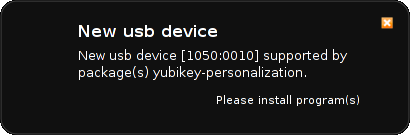
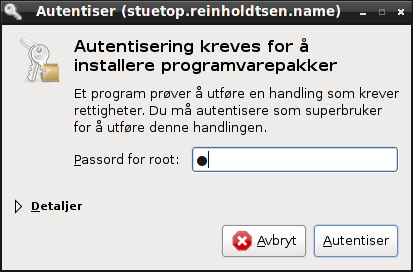
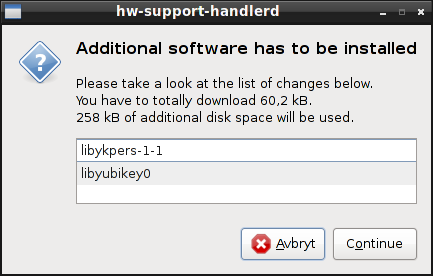
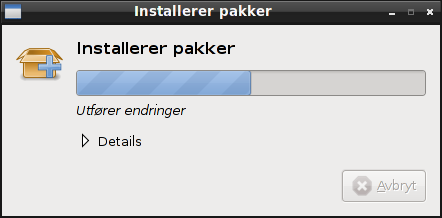
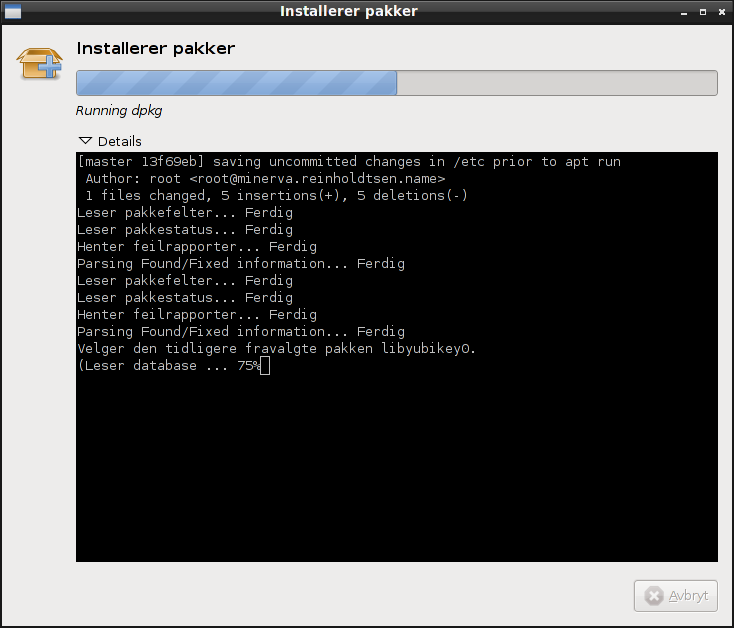
Early this month I set out to try to improve the Debian support for pluggable hardware devices. Now my prototype is working, and it is ready for a larger audience. To test it, fetch the source from the Debian Edu subversion repository, build and install the package. You might have to log out and in again activate the autostart script. The design is simple: I still need to come up with a better name for the system. Here are some screen shots showing the prototype in action. First the notification, then the password request, and finally the request to approve all the dependencies. Sorry for the Norwegian Bokm l GUI.


The prototype still need to be improved with longer timeouts, but is already useful. The database of hardware to package mappings also need more work. It is currently compatible with the Ubuntu way of storing such information in the package control file, but could be changed to use other formats instead or in addition to the current method. I've dropped the use of discover for this mapping, as the modalias approach is more flexible and easier to use on Linux as long as the Linux kernel expose its modalias strings directly. Update 2013-01-21 16:50: Due to popular demand, here is the command required to check out and build the source: Use 'svn checkout svn://svn.debian.org/debian-edu/trunk/src/hw-support-handler/; cd hw-support-handler; debuild'. If you lack debuild, install the devscripts package. Update 2013-01-23 12:00: The project is now renamed to Isenkram and the source moved from the Debian Edu subversion repository to a Debian collab-maint git repository. See build instructions for details.

19 January 2013

Petter Reinholdtsen: Thank you Thinkpad X41, for your long and trustworthy service

This Christmas my trusty old laptop died. It died quietly and suddenly in bed. With a quiet whimper, it went completely quiet and black. The power button was no longer able to turn it on. It was a IBM Thinkpad X41, and the best laptop I ever had. Better than both Thinkpads X30, X31, X40, X60, X61 and X61S. Far better than the Compaq I had before that. Now I need to find a replacement. To keep going during Christmas, I moved the one year old SSD disk to my old X40 where it fitted (only one I had left that could use it), but it is not a durable solution. My laptop needs are fairly modest. This is my wishlist from when I got a new one more than 10 years ago. It still holds true.:) You will notice that there are no RAM and CPU requirements in the list. The reason is simply that the specifications on laptops the last 10-15 years have been sufficient for my needs, and I have to look at other features to choose my laptop. But are there still made as robust laptops as my X41? The Thinkpad X60/X61 proved to be less robust, and Thinkpads seem to be heading in the wrong direction since Lenovo took over. But I've been told that X220 and X1 Carbon might still be useful. Perhaps I should rethink my needs, and look for a pad with an external keyboard? I'll have to check the Linux Laptops site for well-supported laptops, or perhaps just buy one preinstalled from one of the vendors listed on the Linux Pre-loaded site.

18 January 2013

Petter Reinholdtsen: How to find a browser plugin supporting a given MIME type

Some times I try to figure out which Iceweasel browser plugin to install to get support for a given MIME type. Thanks to specifications done by Ubuntu and Mozilla, it is possible to do this in Debian. Unfortunately, not very many packages provide the needed meta information, Anyway, here is a small script to look up all browser plugin packages announcing ther MIME support using this specification:
#!/usr/bin/python
import sys
import apt
def pkgs_handling_mimetype(mimetype):
    cache = apt.Cache()
    cache.open(None)
    thepkgs = []
    for pkg in cache:
        version = pkg.candidate
        if version is None:
            version = pkg.installed
        if version is None:
            continue
        record = version.record
        if not record.has_key('Npp-MimeType'):
            continue
        mime_types = record['Npp-MimeType'].split(',')
        for t in mime_types:
            t = t.rstrip().strip()
            if t == mimetype:
                thepkgs.append(pkg.name)
    return thepkgs
mimetype = "audio/ogg"
if 1 < len(sys.argv):
    mimetype = sys.argv[1]
print "Browser plugin packages supporting %s:" % mimetype
for pkg in pkgs_handling_mimetype(mimetype):
    print "  %s" %pkg
It can be used like this to look up a given MIME type:
% ./apt-find-browserplug-for-mimetype 
Browser plugin packages supporting audio/ogg:
  gecko-mediaplayer
% ./apt-find-browserplug-for-mimetype application/x-shockwave-flash
Browser plugin packages supporting application/x-shockwave-flash:
  browser-plugin-gnash
%
In Ubuntu this mechanism is combined with support in the browser itself to query for plugins and propose to install the needed packages. It would be great if Debian supported such feature too. Is anyone working on adding it? Update 2013-01-18 14:20: The Debian BTS request for icweasel support for this feature is #484010 from 2008 (and #698426 from today). Lack of manpower and wish for a different design is the reason thus feature is not yet in iceweasel from Debian.

Next.

Previous.