Search Results: "ms"

19 January 2026

Jonathan Dowland: FOSDEM 2026

I'm going to FOSDEM 2026! I'm presenting in the Containers dev room. My talk is Java Memory Management in Containers and it's scheduled as the first talk on the first day. I'm the warm-up act! The Java devroom has been a stalwart at FOSDEM since 2004 (sometimes in other forms), but sadly there's no Java devroom this year. There's a story about that, but it's not mine to tell. Please recommend to me any interesting talks! Here's a few that caught my eye: Debian/related: Containers: Research: Other:

Francesco Paolo Lovergine: A Terramaster NAS with Debian, take two.

After experimenting at home, the very first professional-grade NAS from Terramaster arrived at work, too, with 12 HDD bays and possibly a pair of M2s. NVME cards. In this case, I again installed a plain Debian distribution, but HDD monitoring required some configuration adjustments to run smartd properly.A decent approach to data safety is to run regularly scheduled short and long SMART tests on all disks to detect potential damage. Running such tests on all disks at once isn't ideal, so I set up a script to create a staggered configuration and test multiple groups of disks at different times. Note that it is mandatory to read the devices at each reboot because their names and order can change.Of course, the same principle (short/long test at regular intervals along the week) should be applied for a simpler configuration, as in the case of my home NAS with a pair of RAID1 devices.What follows is a simple script to create a staggered smartd.conf at boot time:
#!/bin/bash
#
# Save this as /usr/local/bin/create-smartd-conf.sh
#
# Dynamically generate smartd.conf with staggered SMART test scheduling
# at boot time based on discovered ATA devices
# HERE IS A LIST OF DIRECTIVES FOR THIS CONFIGURATION FILE.
# PLEASE SEE THE smartd.conf MAN PAGE FOR DETAILS
#
#   -d TYPE Set the device type: ata, scsi[+TYPE], nvme[,NSID],
#           sat[,auto][,N][+TYPE], usbcypress[,X], usbjmicron[,p][,x][,N],
#           usbprolific, usbsunplus, sntasmedia, sntjmicron[,NSID], sntrealtek,
#           ... (platform specific)
#   -T TYPE Set the tolerance to one of: normal, permissive
#   -o VAL  Enable/disable automatic offline tests (on/off)
#   -S VAL  Enable/disable attribute autosave (on/off)
#   -n MODE No check if: never, sleep[,N][,q], standby[,N][,q], idle[,N][,q]
#   -H      Monitor SMART Health Status, report if failed
#   -s REG  Do Self-Test at time(s) given by regular expression REG
#   -l TYPE Monitor SMART log or self-test status:
#           error, selftest, xerror, offlinests[,ns], selfteststs[,ns]
#   -l scterc,R,W  Set SCT Error Recovery Control
#   -e      Change device setting: aam,[N off], apm,[N off], dsn,[on off],
#           lookahead,[on off], security-freeze, standby,[N off], wcache,[on off]
#   -f      Monitor 'Usage' Attributes, report failures
#   -m ADD  Send email warning to address ADD
#   -M TYPE Modify email warning behavior (see man page)
#   -p      Report changes in 'Prefailure' Attributes
#   -u      Report changes in 'Usage' Attributes
#   -t      Equivalent to -p and -u Directives
#   -r ID   Also report Raw values of Attribute ID with -p, -u or -t
#   -R ID   Track changes in Attribute ID Raw value with -p, -u or -t
#   -i ID   Ignore Attribute ID for -f Directive
#   -I ID   Ignore Attribute ID for -p, -u or -t Directive
#   -C ID[+] Monitor [increases of] Current Pending Sectors in Attribute ID
#   -U ID[+] Monitor [increases of] Offline Uncorrectable Sectors in Attribute ID
#   -W D,I,C Monitor Temperature D)ifference, I)nformal limit, C)ritical limit
#   -v N,ST Modifies labeling of Attribute N (see man page)
#   -P TYPE Drive-specific presets: use, ignore, show, showall
#   -a      Default: -H -f -t -l error -l selftest -l selfteststs -C 197 -U 198
#   -F TYPE Use firmware bug workaround:
#           none, nologdir, samsung, samsung2, samsung3, xerrorlba
#   -c i=N  Set interval between disk checks to N seconds
#    #      Comment: text after a hash sign is ignored
#    \      Line continuation character
# Attribute ID is a decimal integer 1 <= ID <= 255
# except for -C and -U, where ID = 0 turns them off.
set -euo pipefail
# Test schedule configuration
BASE_SCHEDULE="L/../../6"  # Long test on Saturdays
TEST_HOURS=(01 03 05 07)   # 4 time slots: 1am, 3am, 5am, 7am
DEVICES_PER_GROUP=3
main()  
    # Get array of device names (e.g., sda, sdb, sdc)
    mapfile -t devices < <(ls -l /dev/disk/by-id/   grep ata   awk ' print $11 '   grep sd   cut -d/ -f3   sort -u)
    if [[ $ #devices[@]  -eq 0 ]]; then
        exit 1
    fi
    # Start building config file
    cat << EOF
# smartd.conf - Auto-generated at boot
# Generated: $(date '+%Y-%m-%d %H:%M:%S')
#
# Staggered SMART test scheduling to avoid concurrent disk load
# Long tests run on Saturdays at different times per group
#
EOF
    # Process devices into groups
    local group=0
    local count_in_group=0
    for i in "$ !devices[@] "; do
        local dev="$ devices[$i] "
        local hour="$ TEST_HOURS[$group] "
        # Add group header at start of each group
        if [[ $count_in_group -eq 0 ]]; then
            echo ""
            echo "# Group $((group + 1)) - Tests at $ hour :00 on Saturdays"
        fi
        # Add device entry
        #echo "/dev/$ dev  -a -o on -S on -s ($ BASE_SCHEDULE /$ hour ) -m root"
        echo "/dev/$ dev  -a -o on -S on -s (L/../../6/$ hour ) -s (S/../.././$(((hour + 12) % 24))) -m root"
        # Move to next group when current group is full
        count_in_group=$((count_in_group + 1))
        if [[ $count_in_group -ge $DEVICES_PER_GROUP ]]; then
            count_in_group=0
            group=$(((group + 1) % $ #TEST_HOURS[@] ))
        fi
    done
 
main "$@"
To run such a script at boot, add a unit file to the systemd configuration.
sudo systemctl  edit --full /etc/systemd/system/regenerate-smartd-conf.service
sudo systemctl enable regenerate-smartd-conf.service
Where the unit service is the following:
[Unit]
Description=Generate smartd.conf with staggered SMART test scheduling
# Wait for all local filesystems and udev device detection
After=local-fs.target systemd-udev-settle.service
Before=smartd.service
Wants=systemd-udev-settle.service
DefaultDependencies=no
[Service]
Type=oneshot
# Only generate the config file, don't touch smartd here
ExecStart=/bin/bash -c '/usr/local/bin/create-smartd-config.sh > /etc/smartd.conf'
StandardOutput=journal
StandardError=journal
RemainAfterExit=yes
[Install]
WantedBy=multi-user.target

Russell Coker: Furilabs FLX1s

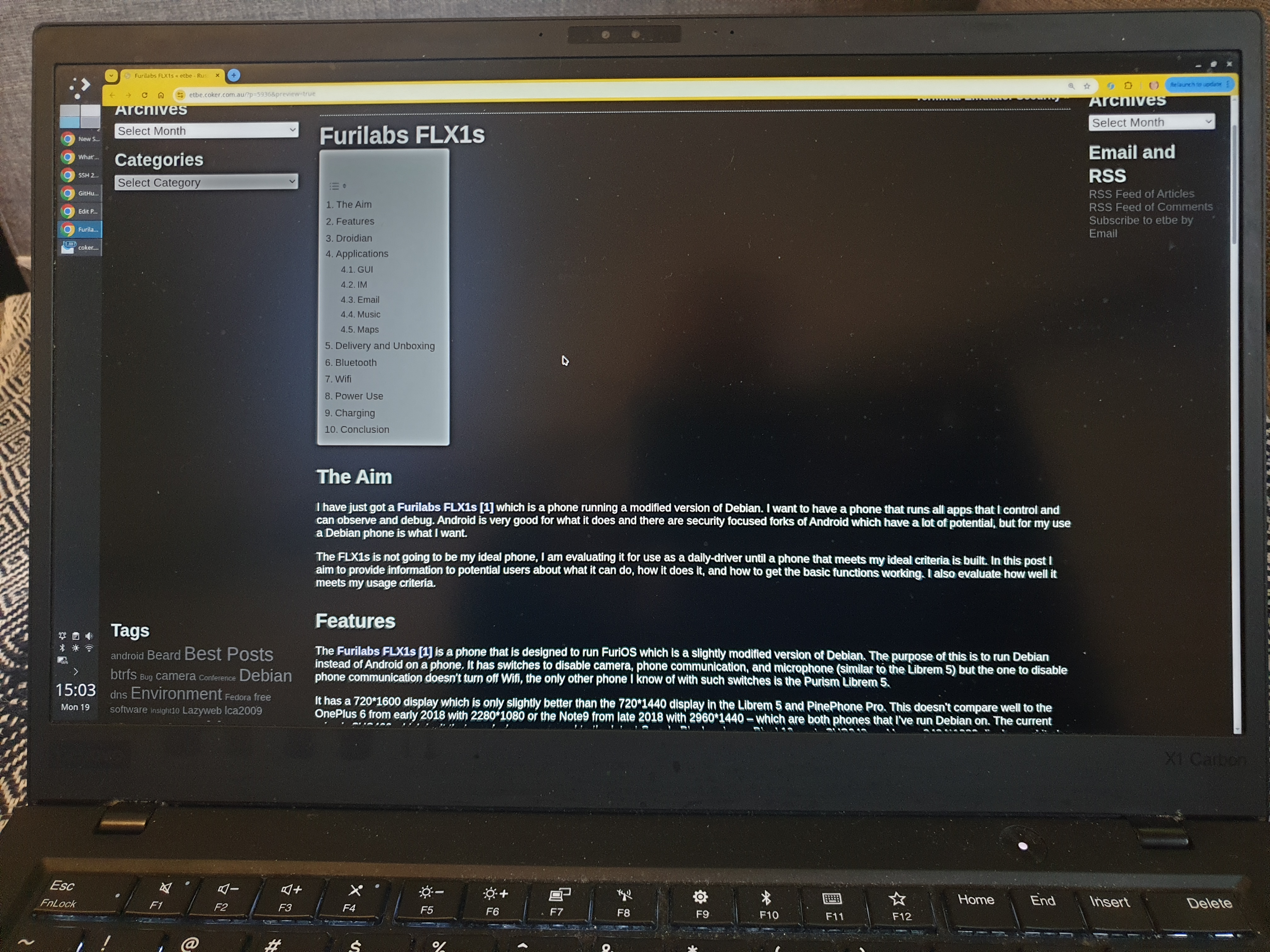
The Aim I have just got a Furilabs FLX1s [1] which is a phone running a modified version of Debian. I want to have a phone that runs all apps that I control and can observe and debug. Android is very good for what it does and there are security focused forks of Android which have a lot of potential, but for my use a Debian phone is what I want. The FLX1s is not going to be my ideal phone, I am evaluating it for use as a daily-driver until a phone that meets my ideal criteria is built. In this post I aim to provide information to potential users about what it can do, how it does it, and how to get the basic functions working. I also evaluate how well it meets my usage criteria. I am not anywhere near an average user. I don t think an average user would ever even see one unless a more technical relative showed one to them. So while this phone could be used by an average user I am not evaluating it on that basis. But of course the features of the GUI that make a phone usable for an average user will allow a developer to rapidly get past the beginning stages and into more complex stuff. Features The Furilabs FLX1s [1] is a phone that is designed to run FuriOS which is a slightly modified version of Debian. The purpose of this is to run Debian instead of Android on a phone. It has switches to disable camera, phone communication, and microphone (similar to the Librem 5) but the one to disable phone communication doesn t turn off Wifi, the only other phone I know of with such switches is the Purism Librem 5. It has a 720*1600 display which is only slightly better than the 720*1440 display in the Librem 5 and PinePhone Pro. This doesn t compare well to the OnePlus 6 from early 2018 with 2280*1080 or the Note9 from late 2018 with 2960*1440 which are both phones that I ve run Debian on. The current price is $US499 which isn t that good when compared to the latest Google Pixel series, a Pixel 10 costs $US649 and has a 2424*1080 display and it also has 12G of RAM while the FLX1s only has 8G. Another annoying thing is how rounded the corners are, it seems that round corners that cut off the content are a standard practice nowadays, in my collection of phones the latest one I found with hard right angles on the display was a Huawei Mate 10 Pro which was released in 2017. The corners are rounder than the Note 9, this annoys me because the screen is not high resolution by today s standards so losing the corners matters. The default installation is Phosh (the GNOME shell for phones) and it is very well configured. Based on my experience with older phone users I think I could give a phone with this configuration to a relative in the 70+ age range who has minimal computer knowledge and they would be happy with it. Additionally I could set it up to allow ssh login and instead of going through the phone support thing of trying to describe every GUI setting to click on based on a web page describing menus for the version of Android they are running I could just ssh in and run diff on the .config directory to find out what they changed. Furilabs have done a very good job of setting up the default configuration, while Debian developers deserve a lot of credit for packaging the apps the Furilabs people have chosen a good set of default apps to install to get it going and appear to have made some noteworthy changes to some of them. Droidian The OS is based on Android drivers (using the same techniques as Droidian [2]) and the storage device has the huge number of partitions you expect from Android as well as a 110G Ext4 filesystem for the main OS. The first issue with the Droidian approach of using an Android kernel and containers for user space code to deal with drivers is that it doesn t work that well. There are 3 D state processes (uninterrupteable sleep which usually means a kernel bug if the process remains in that state) after booting and doing nothing special. My tests running Droidian on the Note 9 also had D state processes, in this case they are D state kernel threads (I can t remember if the Note 9 had regular processes or kernel threads stuck in D state). It is possible for a system to have full functionality in spite of some kernel threads in D state but generally it s a symptom of things not working as well as you would hope. The design of Droidian is inherently fragile. You use a kernel and user space code from Android and then use Debian for the rest. You can t do everything the Android way (with the full OS updates etc) and you also can t do everything the Debian way. The TOW Boot functionality in the PinePhone Pro is really handy for recovery [3], it allows the internal storage to be accessed as a USB mass storage device. The full Android setup with ADB has some OK options for recovery, but part Android and part Debian has less options. While it probably is technically possible to do the same things in regard to OS repair and reinstall the fact that it s different from most other devices means that fixes can t be done in the same way. Applications GUI The system uses Phosh and Phoc, the GNOME system for handheld devices. It s a very different UI from Android, I prefer Android but it is usable with Phosh. IM Chatty works well for Jabber (XMPP) in my tests. It supports Matrix which I didn t test because I don t desire the same program doing Matrix and Jabber and because Matrix is a heavy protocol which establishes new security keys for each login so I don t want to keep logging in on new applications. Chatty also does SMS but I couldn t test that without the SIM caddy. I use Nheko for Matrix which has worked very well for me on desktops and laptops running Debian. Email I am currently using Geary for email. It works reasonably well but is lacking proper management of folders, so I can t just subscribe to the important email on my phone so that bandwidth isn t wasted on less important email (there is a GNOME gitlab issue about this see the Debian Wiki page about Mobile apps [4]). Music Music playing isn t a noteworthy thing for a desktop or laptop, but a good music player is important for phone use. The Lollypop music player generally does everything you expect along with support for all the encoding formats including FLAC0 a major limitation of most Android music players seems to be lack of support for some of the common encoding formats. Lollypop has it s controls for pause/play and going forward and backward one track on the lock screen. Maps The installed map program is gnome-maps which works reasonably well. It gets directions via the Graphhopper API [5]. One thing we really need is a FOSS replacement for Graphhopper in GNOME Maps. Delivery and Unboxing I received my FLX1s on the 13th of Jan [1]. I had paid for it on the 16th of Oct but hadn t received the email with the confirmation link so the order had been put on hold. But after I contacted support about that on the 5th of Jan they rapidly got it to me which was good. They also gave me a free case and screen protector to apologise, I don t usually use screen protectors but in this case it might be useful as the edges of the case don t even extend 0.5mm above the screen. So if it falls face down the case won t help much. When I got it there was an open space at the bottom where the caddy for SIMs is supposed to be. So I couldn t immediately test VoLTE functionality. The contact form on their web site wasn t working when I tried to report that and the email for support was bouncing. Bluetooth As a test of Bluetooth I connected it to my Nissan LEAF which worked well for playing music and I connected it to several Bluetooth headphones. My Thinkpad running Debian/Trixie doesn t connect to the LEAF and to headphones which have worked on previous laptops running Debian and Ubuntu. A friend s laptop running Debian/Trixie also wouldn t connect to the LEAF so I suspect a bug in Trixie, I need to spend more time investigating this. Wifi Currently 5GHz wifi doesn t work, this is a software bug that the Furilabs people are working on. 2.4GHz wifi works fine. I haven t tested running a hotspot due to being unable to get 4G working as they haven t yet shipped me the SIM caddy. Docking This phone doesn t support DP Alt-mode or Thunderbolt docking so it can t drive an external monitor. This is disappointing, Samsung phones and tablets have supported such things since long before USB-C was invented. Samsung DeX is quite handy for Android devices and that type feature is much more useful on a device running Debian than on an Android device. Camera The camera works reasonably well on the FLX1s. Until recently for the Librem 5 the camera didn t work and the camera on my PinePhone Pro currently doesn t work. Here are samples of the regular camera and the selfie camera on the FLX1s and the Note 9. I think this shows that the camera is pretty decent. The selfie looks better and the front camera is worse for the relatively close photo of a laptop screen taking photos of computer screens is an important part of my work but I can probably work around that. I wasn t assessing this camera t find out if it s great, just to find out if I have the sorts of problems I had before and it just worked. The Samsung Galaxy Note series of phones has always had decent specs including good cameras. Even though the Note 9 is old comparing to it is a respectable performance. The lighting was poor for all photos. FLX1s
Note 9
Power Use In 93 minutes having the PinePhone Pro, Librem 5, and FLX1s online with open ssh sessions from my workstation the PinePhone Pro went from 100% battery to 26%, the Librem 5 went from 95% to 69%, and the FLX1s went from 100% to 99%. The battery discharge rate of them was reported as 3.0W, 2.6W, and 0.39W respectively. Based on having a 16.7Wh battery 93 minutes of use should have been close to 4% battery use, but in any case all measurements make it clear that the FLX1s will have a much longer battery life. Including the measurement of just putting my fingers on the phones and feeling the temperature (FLX1s felt cool and the others felt hot). The PinePhone Pro and the Librem 5 have an optional Caffeine mode which I enabled for this test, without that enabled the phone goes into a sleep state and disconnects from Wifi. So those phones would use much less power with caffeine mode enabled, but they also couldn t get fast response to notifications etc. I found the option to enable a Caffeine mode switch on the FLX1s but the power use was reported as being the same both with and without it. Charging One problem I found with my phone is that in every case it takes 22 seconds to negotiate power. Even when using straight USB charging (no BC or PD) it doesn t draw any current for 22 seconds. When I connect it it will stay at 5V and varying between 0W and 0.1W (current rounded off to zero) for 22 seconds or so and then start charging. After the 22 second display the phone will make the tick sound indicating that it s charging and the power meter will measure that it s drawing some current. I added the table from my previous post about phone charging speed [6] with an extra row for the FLX1s. For charging from my PC USB ports the results were the worst ever, the port that does BC did not work at all it was looping trying to negotiate after a 22 second negotiation delay the port would turn off. The non-BC port gave only 2.4W which matches the 2.5W given by the spec for a High-power device which is what that port is designed to give. In a discussion on the Purism forum about the Librem5 charging speed one of their engineers told me that the reason why their phone would draw 2A from that port was because the cable was identifying itself as a USB-C port not a High-power device port. But for some reason out of the 7 phones I tested the FLX1s and the One Plus 6 are the only ones to limit themselves to what the port is apparently supposed to do. Also the One Plus 6 charges slowly on every power supply so I don t know if it is obeying the spec or just sucking. On a cheap AliExpress charger the FLX1s gets 5.9V and on a USB battery it gets 5.8V. Out of all 42 combinations of device and charger I tested these were the only ones to involve more than 5.1V but less than 9V. I welcome comments suggesting an explanation. The case that I received has a hole for the USB-C connector that isn t wide enough for the plastic surrounds on most of my USB-C cables (including the Dell dock). Also to make a connection requires a fairly deep insertion (deeper than the One Plus 6 or the Note 9). So without adjustment I have to take the case off to charge it. It s no big deal to adjust the hole (I have done it with other cases) but it s an annoyance.
Phone Top z640 Bottom Z640 Monitor Ali Charger Dell Dock Battery Best Worst
FLX1s FAIL 5.0V 0.49A 2.4W 4.8V 1.9A 9.0W 5.9V 1.8A 11W 4.8V 2.1A 10W 5.8V 2.1A 12W 5.8V 2.1A 12W 5.0V 0.49A 2.4W
Note9 4.8V 1.0A 5.2W 4.8V 1.6A 7.5W 4.9V 2.0A 9.5W 5.1V 1.9A 9.7W 4.8V 2.1A 10W 5.1V 2.1A 10W 5.1V 2.1A 10W 4.8V 1.0A 5.2W
Pixel 7 pro 4.9V 0.80A 4.2W 4.8V 1.2A 5.9W 9.1V 1.3A 12W 9.1V 1.2A 11W 4.9V 1.8A 8.7W 9.0V 1.3A 12W 9.1V 1.3A 12W 4.9V 0.80A 4.2W
Pixel 8 4.7V 1.2A 5.4W 4.7V 1.5A 7.2W 8.9V 2.1A 19W 9.1V 2.7A 24W 4.8V 2.3A 11.0W 9.1V 2.6A 24W 9.1V 2.7A 24W 4.7V 1.2A 5.4W
PPP 4.7V 1.2A 6.0W 4.8V 1.3A 6.8W 4.9V 1.4A 6.6W 5.0V 1.2A 5.8W 4.9V 1.4A 5.9W 5.1V 1.2A 6.3W 4.8V 1.3A 6.8W 5.0V 1.2A 5.8W
Librem 5 4.4V 1.5A 6.7W 4.6V 2.0A 9.2W 4.8V 2.4A 11.2W 12V 0.48A 5.8W 5.0V 0.56A 2.7W 5.1V 2.0A 10W 4.8V 2.4A 11.2W 5.0V 0.56A 2.7W
OnePlus6 5.0V 0.51A 2.5W 5.0V 0.50A 2.5W 5.0V 0.81A 4.0W 5.0V 0.75A 3.7W 5.0V 0.77A 3.7W 5.0V 0.77A 3.9W 5.0V 0.81A 4.0W 5.0V 0.50A 2.5W
Best 4.4V 1.5A 6.7W 4.6V 2.0A 9.2W 8.9V 2.1A 19W 9.1V 2.7A 24W 4.8V 2.3A 11.0W 9.1V 2.6A 24W
Conclusion The Furilabs support people are friendly and enthusiastic but my customer experience wasn t ideal. It was good that they could quickly respond to my missing order status and the missing SIM caddy (which I still haven t received but believe is in the mail) but it would be better if such things just didn t happen. The phone is quite user friendly and could be used by a novice. I paid $US577 for the FLX1s which is $AU863 by today s exchange rates. For comparison I could get a refurbished Pixel 9 Pro Fold for $891 from Kogan (the major Australian mail-order company for technology) or a refurbished Pixel 9 Pro XL for $842. The Pixel 9 series has security support until 2031 which is probably longer than you can expect a phone to be used without being broken. So a phone with a much higher resolution screen that s only one generation behind the latest high end phones and is refurbished will cost less. For a brand new phone a Pixel 8 Pro which has security updates until 2030 costs $874 and a Pixel 9A which has security updates until 2032 costs $861. Doing what the Furilabs people have done is not a small project. It s a significant amount of work and the prices of their products need to cover that. I m not saying that the prices are bad, just that economies of scale and the large quantity of older stock makes the older Google products quite good value for money. The new Pixel phones of the latest models are unreasonably expensive. The Pixel 10 is selling new from Google for $AU1,149 which I consider a ridiculous price that I would not pay given the market for used phones etc. If I had a choice of $1,149 or a feature phone I d pay $1,149. But the FLX1s for $863 is a much better option for me. If all I had to choose from was a new Pixel 10 or a FLX1s for my parents I d get them the FLX1s. For a FOSS developer a FLX1s could be a mobile test and development system which could be lent to a relative when their main phone breaks and the replacement is on order. It seems to be fit for use as a commodity phone. Note that I give this review on the assumption that SMS and VoLTE will just work, I haven t tested them yet. The UI on the FLX1s is functional and easy enough for a new user while allowing an advanced user to do the things they desire. I prefer the Android style and the Plasma Mobile style is closer to Android than Phosh is, but changing it is something I can do later. Generally I think that the differences between UIs matter more when on a desktop environment that could be used for more complex tasks than on a phone which limits what can be done by the size of the screen. I am comparing the FLX1s to Android phones on the basis of what technology is available. But most people who would consider buying this phone will compare it to the PinePhone Pro and the Librem 5 as they have similar uses. The FLX1s beats both those phones handily in terms of battery life and of having everything just work. But it has the most non free software of the three and the people who want the $2000 Librem 5 that s entirely made in the US won t want the FLX1s. This isn t the destination for Debian based phones, but it s a good step on the way to it and I don t think I ll regret this purchase.

Dima Kogan: mrcal 2.5 released!

mrcal 2.5 is out: the release notes. Once again, this is mostly a bug-fix release en route to the big new features coming in 3.0. One cool thing is that these tools have now matured enough to no longer be considered experimental. They have been used with great success in lots of contexts across many different projects and organizations. Some highlights: Some of the above is new, and not yet fully polished and documented and tested, but it works. In mrcal 2.5, most of the implementation of some new big features is written and committed, but it's still incomplete. The new stuff is there, but is lightly tested and documented. This will be completed eventually in mrcal 3.0: mrcal is quite good already, and will be even better in the future. Try it today!

17 January 2026

Simon Josefsson: Backup of S3 Objects Using rsnapshot

I ve been using rsnapshot to take backups of around 10 servers and laptops for well over 15 years, and it is a remarkably reliable tool that has proven itself many times. Rsnapshot uses rsync over SSH and maintains a temporal hard-link file pool. Once rsnapshot is configured and running, on the backup server, you get a hardlink farm with directories like this for the remote server:
/backup/serverA.domain/.sync/foo
/backup/serverA.domain/daily.0/foo
/backup/serverA.domain/daily.1/foo
/backup/serverA.domain/daily.2/foo
...
/backup/serverA.domain/daily.6/foo
/backup/serverA.domain/weekly.0/foo
/backup/serverA.domain/weekly.1/foo
...
/backup/serverA.domain/monthly.0/foo
/backup/serverA.domain/monthly.1/foo
...
/backup/serverA.domain/yearly.0/foo
I can browse and rescue files easily, going back in time when needed. The rsnapshot project README explains more, there is a long rsnapshot HOWTO although I usually find the rsnapshot man page the easiest to digest. I have stored multi-TB Git-LFS data on GitLab.com for some time. The yearly renewal is coming up, and the price for Git-LFS storage on GitLab.com is now excessive (~$10.000/year). I have reworked my work-flow and finally migrated debdistget to only store Git-LFS stubs on GitLab.com and push the real files to S3 object storage. The cost for this is barely measurable, I have yet to run into the 25/month warning threshold. But how do you backup stuff stored in S3? For some time, my S3 backup solution has been to run the minio-client mirror command to download all S3 objects to my laptop, and rely on rsnapshot to keep backups of this. While 4TB NVME s are relatively cheap, I ve felt that this disk and network churn on my laptop is unsatisfactory for quite some time. What is a better approach? I find S3 hosting sites fairly unreliable by design. Only a couple of clicks in your web browser and you have dropped 100TB of data. Or by someone else who steal your plaintext-equivalent cookie. Thus, I haven t really felt comfortable using any S3-based backup option. I prefer to self-host, although continously running a mirror job is not sufficient: if I accidentally drop the entire S3 object store, my mirror run will remove all files locally too. The rsnapshot approach that allows going back in time and having data on self-managed servers feels superior to me. What if we could use rsnapshot with a S3 client instead of rsync? Someone else asked about this several years ago, and the suggestion was to use the fuse-based s3fs which sounded unreliable to me. After some experimentation, working around some hard-coded assumption in the rsnapshot implementation, I came up with a small configuration pattern and a wrapper tool to implement what I desired. Here is my configuration snippet:
cmd_rsync    /backup/s3/s3rsync
rsync_short_args    -Q
rsync_long_args    --json --remove
lockfile    /backup/s3/rsnapshot.pid
snapshot_root    /backup/s3
backup    s3:://hetzner/debdistget-gnuinos    ./debdistget-gnuinos
backup    s3:://hetzner/debdistget-tacos  ./debdistget-tacos
backup    s3:://hetzner/debdistget-diffos ./debdistget-diffos
backup    s3:://hetzner/debdistget-pureos ./debdistget-pureos
backup    s3:://hetzner/debdistget-kali   ./debdistget-kali
backup    s3:://hetzner/debdistget-devuan ./debdistget-devuan
backup    s3:://hetzner/debdistget-trisquel   ./debdistget-trisquel
backup    s3:://hetzner/debdistget-debian ./debdistget-debian
The idea is to save a backup of a couple of S3 buckets under /backup/s3/. I have some scripts that take a complete rsnapshot.conf file and append my per-directory configuration so that this becomes a complete configuration. If you are curious how I roll this, backup-all invokes backup-one appending my rsnapshot.conf template with the snippet above. The s3rsync wrapper script is the essential hack to convert rsnapshot s rsync parameters into something that talks S3 and the script is as follows:
#!/bin/sh
set -eu
S3ARG=
for ARG in "$@"; do
    case $ARG in
    s3:://*) S3ARG="$S3ARG "$(echo $ARG   sed -e 's,s3:://,,');;
    -Q*) ;;
    *) S3ARG="$S3ARG $ARG";;
    esac
done
echo /backup/s3/mc mirror $S3ARG
exec /backup/s3/mc mirror $S3ARG
It uses the minio-client tool. I first tried s3cmd but its sync command read all files to compute MD5 checksums every time you invoke it, which is very slow. The mc mirror command is blazingly fast since it only compare mtime s, just like rsync or git. First you need to store credentials for your S3 bucket. These are stored in plaintext in ~/.mc/config.json which I find to be sloppy security practices, but I don t know of any better way to do this. Replace AKEY and SKEY with your access token and secret token from your S3 provider:
/backup/s3/mc alias set hetzner AKEY SKEY
If I invoke a sync job for a fully synced up directory the output looks like this:
root@hamster /backup# /run/current-system/profile/bin/rsnapshot -c /backup/s3/rsnapshot.conf -V sync
Setting locale to POSIX "C"
echo 1443 > /backup/s3/rsnapshot.pid 
/backup/s3/s3rsync -Qv --json --remove s3:://hetzner/debdistget-gnuinos \
    /backup/s3/.sync//debdistget-gnuinos 
/backup/s3/mc mirror --json --remove hetzner/debdistget-gnuinos /backup/s3/.sync//debdistget-gnuinos
 "status":"success","total":0,"transferred":0,"duration":0,"speed":0 
/backup/s3/s3rsync -Qv --json --remove s3:://hetzner/debdistget-tacos \
    /backup/s3/.sync//debdistget-tacos 
/backup/s3/mc mirror --json --remove hetzner/debdistget-tacos /backup/s3/.sync//debdistget-tacos
 "status":"success","total":0,"transferred":0,"duration":0,"speed":0 
/backup/s3/s3rsync -Qv --json --remove s3:://hetzner/debdistget-diffos \
    /backup/s3/.sync//debdistget-diffos 
/backup/s3/mc mirror --json --remove hetzner/debdistget-diffos /backup/s3/.sync//debdistget-diffos
 "status":"success","total":0,"transferred":0,"duration":0,"speed":0 
/backup/s3/s3rsync -Qv --json --remove s3:://hetzner/debdistget-pureos \
    /backup/s3/.sync//debdistget-pureos 
/backup/s3/mc mirror --json --remove hetzner/debdistget-pureos /backup/s3/.sync//debdistget-pureos
 "status":"success","total":0,"transferred":0,"duration":0,"speed":0 
/backup/s3/s3rsync -Qv --json --remove s3:://hetzner/debdistget-kali \
    /backup/s3/.sync//debdistget-kali 
/backup/s3/mc mirror --json --remove hetzner/debdistget-kali /backup/s3/.sync//debdistget-kali
 "status":"success","total":0,"transferred":0,"duration":0,"speed":0 
/backup/s3/s3rsync -Qv --json --remove s3:://hetzner/debdistget-devuan \
    /backup/s3/.sync//debdistget-devuan 
/backup/s3/mc mirror --json --remove hetzner/debdistget-devuan /backup/s3/.sync//debdistget-devuan
 "status":"success","total":0,"transferred":0,"duration":0,"speed":0 
/backup/s3/s3rsync -Qv --json --remove s3:://hetzner/debdistget-trisquel \
    /backup/s3/.sync//debdistget-trisquel 
/backup/s3/mc mirror --json --remove hetzner/debdistget-trisquel /backup/s3/.sync//debdistget-trisquel
 "status":"success","total":0,"transferred":0,"duration":0,"speed":0 
/backup/s3/s3rsync -Qv --json --remove s3:://hetzner/debdistget-debian \
    /backup/s3/.sync//debdistget-debian 
/backup/s3/mc mirror --json --remove hetzner/debdistget-debian /backup/s3/.sync//debdistget-debian
 "status":"success","total":0,"transferred":0,"duration":0,"speed":0 
touch /backup/s3/.sync/ 
rm -f /backup/s3/rsnapshot.pid 
/run/current-system/profile/bin/logger -p user.info -t rsnapshot[1443] \
    /run/current-system/profile/bin/rsnapshot -c /backup/s3/rsnapshot.conf \
    -V sync: completed successfully 
root@hamster /backup# 
You can tell from the paths that this machine runs Guix. This was the first production use of the Guix System for me, and the machine has been running since 2015 (with the occasional new hard drive). Before, I used rsnapshot on Debian, but some stable release of Debian dropped the rsnapshot package, paving the way for me to test Guix in production on a non-Internet exposed machine. Unfortunately, mc is not packaged in Guix, so you will have to install it from the MinIO Client GitHub page manually. Running the daily rotation looks like this:
root@hamster /backup# /run/current-system/profile/bin/rsnapshot -c /backup/s3/rsnapshot.conf -V daily
Setting locale to POSIX "C"
echo 1549 > /backup/s3/rsnapshot.pid 
mv /backup/s3/daily.5/ /backup/s3/daily.6/ 
mv /backup/s3/daily.4/ /backup/s3/daily.5/ 
mv /backup/s3/daily.3/ /backup/s3/daily.4/ 
mv /backup/s3/daily.2/ /backup/s3/daily.3/ 
mv /backup/s3/daily.1/ /backup/s3/daily.2/ 
mv /backup/s3/daily.0/ /backup/s3/daily.1/ 
/run/current-system/profile/bin/cp -al /backup/s3/.sync /backup/s3/daily.0 
rm -f /backup/s3/rsnapshot.pid 
/run/current-system/profile/bin/logger -p user.info -t rsnapshot[1549] \
    /run/current-system/profile/bin/rsnapshot -c /backup/s3/rsnapshot.conf \
    -V daily: completed successfully 
root@hamster /backup# 
Hopefully you will feel inspired to take backups of your S3 buckets now!

Ravi Dwivedi: My experiences in Brunei

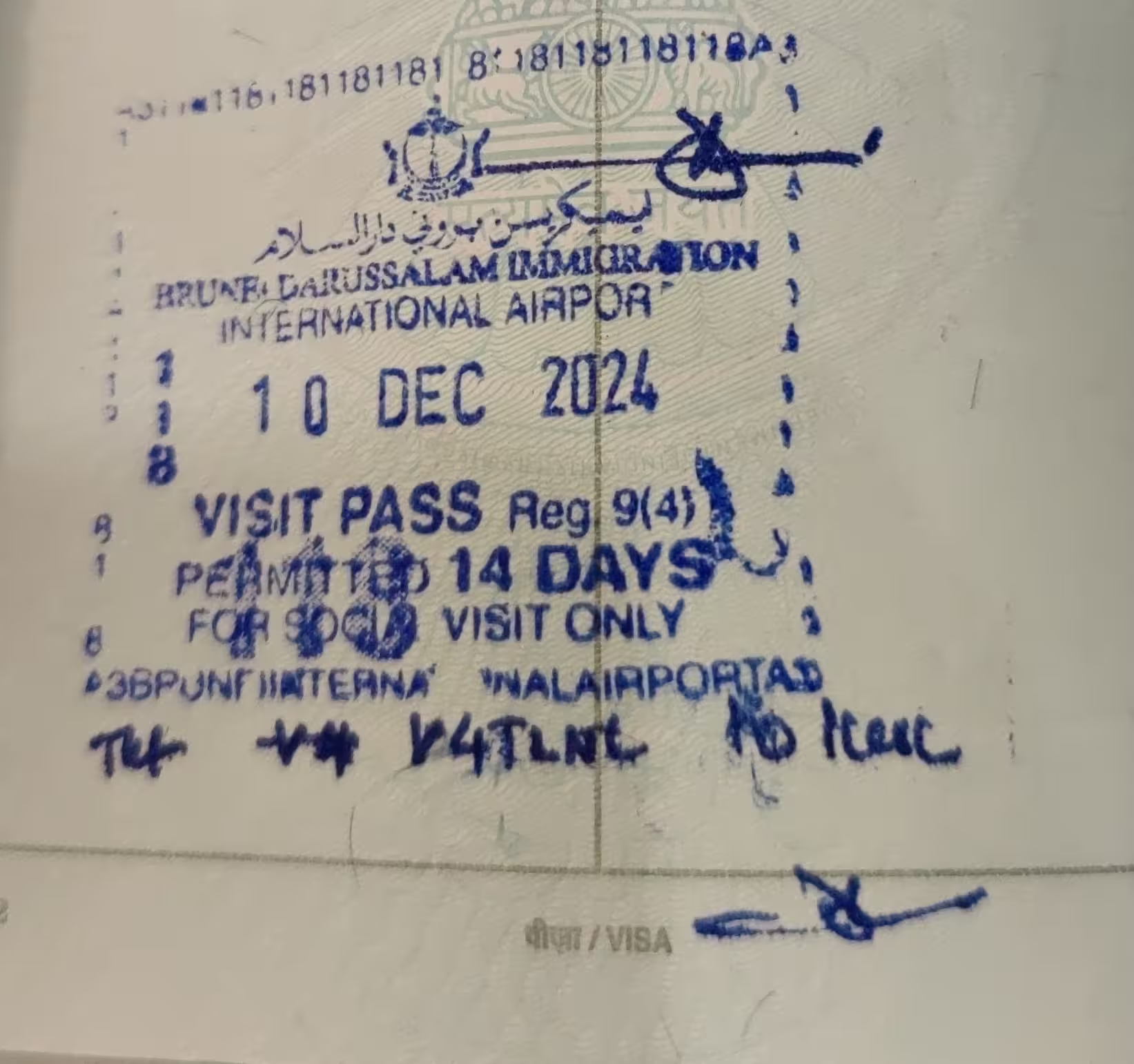
This post covers my friend Badri and my experiences in Brunei. Brunei officially Brunei Darussalam is a country in Southeast Asia, located on Borneo island. It is one of the few remaining absolute monarchies on Earth. On the morning of the 10th of December 2024, Badri and I reached Brunei International Airport by taking a flight from Kuala Lumpur. Upon arrival at the airport, we had to go through the immigration, of course. However, I forgot to fill my arrival card, which I filled while I was in the queue for my immigration. The immigration officer asked me how much cash I was carrying of each currency. After completing the formalities, the immigration officer stamped my passport and let me in. Take a look at Brunei s entry stamp in my passport.
Brunei entry stamp Brunei entry stamp on my passport. Picture by Ravi Dwivedi, released under CC-BY-SA 4.0.
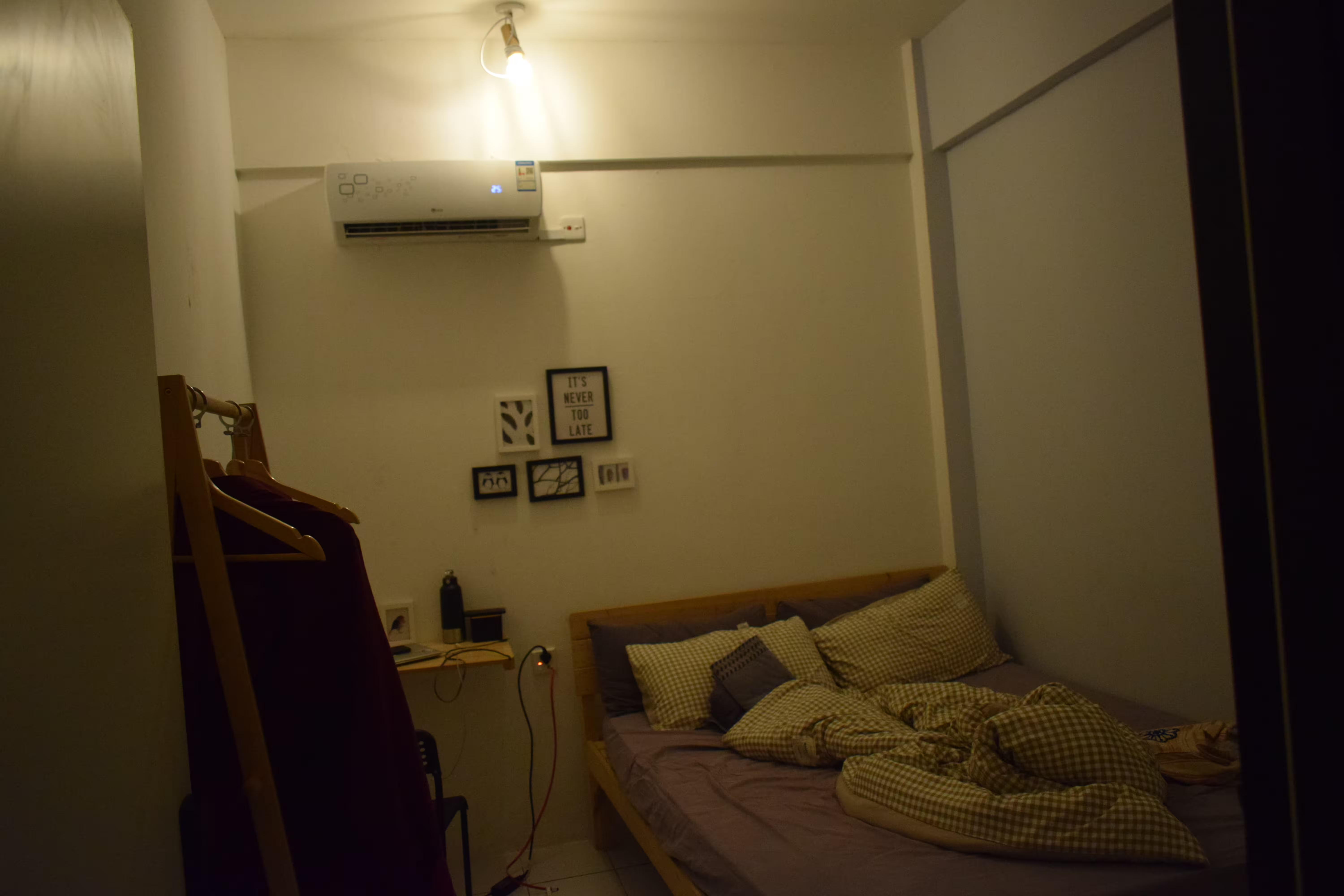
We exchanged Singapore dollars to get some Brunei dollars at the airport. The Brunei dollar was pegged 1:1 with the Singapore dollar, meaning 1 Singapore dollar equals 1 Brunei dollar. The exchange rate we received at the airport was the same. Our (pre-booked) accommodation was located near Gadong mall. So, we went to the information center at the airport to ask how to get there by public transport. However, the person at the information center told us that they didn t know the public transport routes and suggested we take a taxi instead. We came out of the airport and came across an Indian with a mini bus. He offered to drop us at our accommodation for 10 Brunei dollars ( 630). As we were tired after a sleepless night, we didn t negotiate and took the offer. It felt a bit weird using the minibus as our private taxi. In around half-an-hour, we reach our accommodation. The place was more like a guest house than a hotel. In addition to the rooms, it had common space consisting of a hall, a kitchen and a balcony.
Our room in Brunei Our room in Brunei. Picture by Ravi Dwivedi, released under CC-BY-SA 4.0

Upon reaching the place, we paid for our room in cash, which was 66.70 Singapore dollars (4200 Indian rupees) for two nights. We reached before the check-in time, so we had to wait for our room to get ready before we entered. The room had a double bed and also a place to hang clothes. We slept for a few hours before going out at night. We went into Gadong mall and had coffee at a caf named The Coffee Bean & Tea Leaf. The regular caffe latte I had here been 5.20 Brunei dollars. On another note, the snacks we got us from Kuala Lumpur covered us for the dinner. The next day 11th of December 2024 we went to a nearby restaurant named Nadj for lunch. The owner was from Kerala. Here we ordered: So, our lunch cost a total of 12.80 Brunei dollars (825 rupees). The naan was unusually thick, and didn t like the taste. After the lunch, we planned to visit Brunei s famous Omar Ali Saifuddien Mosque. However, a minibus driver outside of Gadong Mall told us that the mosque would be closed in half-an-hour and suggested we visit the nearby Jame Asr Hassanil Bolkiah Mosque instead.
Jame' Asr Hassanil Bolkiah Mosque Jame Asr Hassanil Bolkiah Mosque. Picture by Ravi Dwivedi, released under CC-BY-SA 4.0

He dropped us there for 1 Brunei dollar per person. The person hailed from Uttar Pradesh and told us about bus routes in Hindi. Buses routes in Brunei were confusing, so the information he gave us was valuable. It was evening, and we had an impression that the mosque and its premises were closed. However, soon enough, we stumbled across an open gate entering the mosque complex. We walked inside for some time, took pictures and exited. Walking in Bandar Seri Begawan wasn t pleasant, though. The pedestrian infrastructure wasn t good. Then we walked back to our place and bought some souvenirs. For dinner and breakfast, we bought bread, fruits and eggs from local shops as we had a kitchen to cook for ourselves. The guest house also had a washing machine (free of charge) which we wanted to use. However, they didn t have detergent. Therefore, we went outside to get some detergent. It was 8 o clock, and most of the shops were closed already. Others had had detergents in large sizes, the ones you would use if you lived there. We ended up getting a small packet at a supermarket. The next day 12th of December we had a flight to Ho Chi Minh City in Vietnam with a long layover in Kuala Lumpur. We had breakfast in the morning and took a bus to Omar Ali Saifuddien Mosque. The mosque was in prayer session, so it was closed for Muslims. Therefore, we just took pictures from the outside and took a bus for the airport.
Omar Ali Saifuddien Mosque Omar Ali Saifuddien Mosque. Picture by Ravi Dwivedi, released under CC-BY-SA 4.0

When the bus reached near the airport, the bus went straight rather than taking a left turn for the airport. Initially, I thought the bus would just take a turn and come back. However, the bus kept going away from the airport. Confused by this, I asked other passengers if the bus was going to the airport. The driver stopped the bus at Muara Town terminal 20 km from the airport. At this point, everyone alighted, except for us. The driver went to a nearby restaurant to have lunch. I felt very uncomfortable stranded in a town which was 20 km from the airport. We had a lot of time, but I was still worried about missing our flight, as I didn t want to get stuck in Brunei. After waiting for 15 minutes, I went inside the restaurant and reminded the driver that we had a flight in a couple of hours and needed to go to the airport. He said he will leave soon. When he was done with his lunch, he drove us to the airport. It was incredibly frustrating. On a positive note, we saw countryside of Brunei that we would have seen otherwise. The bus ride cost us 1 Brunei dollar each.
A couple of houses with trees in the background. A shot of Brunei s countryside. Picture by Ravi Dwivedi, released under CC-BY-SA 4.0.
That s it for this one. Meet you in the next one. Stay tuned for the Vietnam post!

16 January 2026

Kentaro Hayashi: Budgie Desktop 10.10 is out, but not for me yet :(

Introduction I'm one of a Budgie Desktop user since 2020. (Budgie Desktop 10.5 or so) Recently Budgie Desktop 10.10 had been available from Debian experimental. I've tried it and realized that not for me yet.

What is the requirement for desktop environment
  • Screen sharing with specifying the specific window/application for web meeting
  • Sharing keyboard input smoothly with deskflow
  • Switch focus with mouse movement
  • and ...

Is Budgie Desktop 10.10 suitable? Short answer: No, not yet. It seems that Budgie Desktop 10.10 (wayland) lost the functionality - screen sharing with specifying the specific window/application for web meeting. Of course, you can share your screen itself. It also can't sharing keyboard input smoothly with deskflow. Both of them seems that they are supported in GNOME? or KDE?. In contrast to Budgie Desktop 10.9 (X11), Budgie Desktop 10.10 seems missing effective wayland + xdg-desktop-portal support for them yet. It might be supported in the future release, but it might be 11.x.

Alternatives? Budgie Desktop 10.x will come into maintenance mode, so they will not be fixed in 10.x releases (guess). buddiesofbudgie.org Switching DE might be an option - GNOME or KDE. but I don't have much the energy to make the transition for now. I decided to take the conservative option and go back to 10.9. Note that if you upgrade to Budgie Desktop 10.10, it is hard to downgrade to Budgie Desktop 10.9 because python3-gi, python3-gi-cairo dependency blocks budgie-desktop. See https://bugs.debian.org/cgi-bin/bugreport.cgi?bug=1120138 for details. #1120138 - budgie-extras: Several applets are incompatible with pygobject 3.54/libpeas 1.36.0-8 - Debian Bug report logs As a dirty hack, you can modify python3-gi dependency and install it as your own risk for downgrading.

Conclusion It was still too early to adopt Budgie Desktop (wayland) for me. I'll stay with Budgie Desktop 10.9 for a while. That said, it's unclear how long Budgie Desktop 10.9 will remain unstable and usable. There might be a case that sticking to Budgie Desktop 10.9 might be problematic when other packages are updated. When that happens, I'd like to reconsider this issue again.

Jonathan Dowland: Ye Gods

Via (I think) @mcc on the Fediverse, I learned of GetMusic: a sort-of "clearing house" for Free Bandcamp codes. I think the way it works is, some artists release a limited set of download codes for their albums in order to promote them, and GetMusic help them to keep track of that, and helps listeners to discover them. GetMusic mail me occasionally, and once they highlighted an album The Arcane & Paranormal Earth which they described as "Post-Industrial in the vein of Coil and Nurse With Wound with shades of Aphex Twin, Autechre and assorted film music." Well that description hooked me immediately but I missed out on the code. However, I sampled the album on Bandcamp directly a few times as well as a few of his others (Ye Gods is a side-project of Antoni Maiovvi, which itself is a pen-name) and liked them very much. I picked up the full collection of Ye Gods albums in one go for 30% off. Here's a stand-out track: On Earth by Ye Gods So I guess this service works! Although I didn't actually get a free code in this instance, it promoted the artist, introduced me to something I really liked and drove a sale.

Freexian Collaborators: Monthly report about Debian Long Term Support, December 2025 (by Santiago Ruano Rinc n)

The Debian LTS Team, funded by [Freexian s Debian LTS offering] (https://www.freexian.com/lts/debian/), is pleased to report its activities for December.

Activity summary During the month of December, 18 contributors have been paid to work on Debian LTS (links to individual contributor reports are located below). The team released 41 DLAs fixing 252 CVEs. The team currently focuses on preparing security updates for Debian 11 bullseye , but also looks for contributing with updates for Debian 12 bookworm , Debian 13 trixie and even Debian unstable. Notable security updates:
  • libsoup2.4 (DLA-4398-1), prepared by Andreas Henrikson, fixing several vulnerabilities.
  • glib2.0 (DLA-4412-1), published by Emilio Pozuelo Monfort, addressing multiple issues.
  • lasso (DLA-4397-1), prepared by Sylvain Beucler, addressing multiple issues, including a critical remote code execution (RCE) vulnerability (CVE-2025-47151)
  • roundcube (DLA 4415-1), prepared by Guilhem Moulin, fixing a cross-site-scripting (XSS) (CVE-2025-68461) and an information disclosure (CVE-2025-68460) vulnerabilities
  • mediawiki (DLA 4428-1), published by Guilhem, fixing multiple vulnerabilities could lead to information disclosure, denial of service or privilege escalation.
  • While the DLA has not been published yet, Charles Henrique Melara proposed upstream fixes for seven CVEs in ffmpeg: https://code.ffmpeg.org/FFmpeg/FFmpeg/pulls/21275.
  • python-apt (DLA 4408-1), prepared by Utkarsh Gupta, in coordination with the Debian Security Team and Julian Andres Klode, the apt s maintainer.
  • libpng1.6 (DLA-4396-1), published by Tobias Frost, completing the work started the previous month.
Notable non-security updates:
  • tzdata (DLA-4403-1), prepared by Emilio, including the latest changes to the leap second list and its expiry date, which was set for the end of December.
Contributions from outside the LTS Team:
  • Christoph Berg, co-maintainer of PostgreSQL in Debian, prepared a postgresql-13 update, released as DLA-4420-1
The LTS Team has also contributed with updates to the latest Debian releases:

Individual Debian LTS contributor reports

Thanks to our sponsors Sponsors that joined recently are in bold.

14 January 2026

Gunnar Wolf: The Innovation Engine Government-funded Academic Research

This post is an unpublished review for The Innovation Engine Government-funded Academic Research
David Patterson does not need an introduction. Being the brain behind many of the inventions that shaped the computing industry (repeatedly) over the past 40 years, when he put forward an opinion article in Communications of the ACM targeting the current day political waves in the USA, I could not avoid choosing it to write this review. Patterson worked for a a public university (University of California at Berkeley) between 1976 and 2016, and in this article he argues how government-funded academic research (GoFAR) allows for faster, more effective and freer development than private sector-funded research would, putting his own career milestones as an example of how public money that went to his research has easily been amplified by a factor of 10,000:1 for the country s economy, and 1,000:1 particularly for the government. Patterson illustrates this quoting five of the home-run research projects he started and pursued with government funding, eventually spinning them off as successful startups: Patterson identifies principles for the projects he has led, that are specially compatible with the ways research works at universitary systems: Multidisciplinary teams, demonstrative usable artifacts, seven- to ten-year impact horizons, five-year sunset clauses (to create urgency and to lower opportunity costs), physical proximity of collaborators, and leadership followed on team success rather than individual recognition. While it could be argued that it s easy to point at Patterson s work as a success example while he is by far not the average academic, the points he makes on how GoFAR research has been fundamental for the advance of science and technology, but also of biology, medicine, and several other fields are very clear.

13 January 2026

Simon Josefsson: Debian Libre Live 13.3.0 is released!

Following up on my initial announcement about Debian Libre Live I am happy to report on continued progress and the release of Debian Libre Live version 13.3.0. Since both this and the previous 13.2.0 release are based on the stable Debian trixie release, there really isn t a lot of major changes but instead incremental minor progress for the installation process. Repeated installations has a tendency to reveal bugs, and we have resolved the apt sources list confusion for Calamares-based installations and a couple of other nits. This release is more polished and we are not aware of any known remaining issues with them (unlike for earlier versions which were released with known problems), although we conservatively regard the project as still in beta. A Debian Libre Live logo is needed before marking this as stable, any graphically talented takers? (Please base it on the Debian SVG upstream logo image.) We provide GNOME, KDE, and XFCE desktop images, as well as text-only standard image, which match the regular Debian Live images with non-free software on them, but also provide a slim variant which is merely 750MB compared to the 1.9GB standard image. The slim image can still start a debian installer, and can still boot into a minimal live text-based system. The GNOME, KDE and XFCE desktop images feature the Calamares installer, and we have performed testing on a variety of machines. The standard and slim images does not have a installer from the running live system, but all images support a boot menu entry to start the installer. With this release we also extend our arm64 support to two tested platforms. The current list of successfully installed and supported systems now include the following hardware: This is a very limited set of machines, but the diversity in CPUs and architecture should hopefully reflect well on a wide variety of commonly available machines. Several of these machines are crippled (usually GPU or WiFI) without adding non-free software, complain at your hardware vendor and adapt your use-cases and future purchases. The images are as follows, with SHA256SUM checksums and GnuPG signature on the 13.3.0 release page. Curious how the images were made? Fear not, for the Debian Libre Live project README has documentation, the run.sh script is short and the .gitlab-ci.yml CI/CD Pipeline definition file brief. Happy Libre OS hacking!

Aigars Mahinovs: Sedan experience (BMW i5)

Two years of midsize electric sedan experience This February (2026) marks a full 10 years since I started working for BMW, and a key employment bonus is the ability to drive a company car on special two-year leasing terms. Just before the new year 2026 started, I said goodbye to my latest company car. After driving the BMW i4, I switched to the BMW i5. In terms of power, it was a downgrade as I switched from the maximum power i4 M50 xDrive (all-wheel drive, 600 hp) to the i5 eDrive40 (rear-wheel drive, 340 hp). Did I regret that? Not for a single second! After driving 60,000 km in the last two years with the BMW i5, I was really sad to let it go -- it was the best car I have ever driven. Simple as that. Read more (16 min remaining to read)

Louis-Philippe V ronneau: Reducing the size of initramfs kernel images

In the past few years, the size of the kernel images in Debian have been steadily growing. I don't see this as a problem per se, but it has been causing me trouble, as my /boot partition has become too small to accommodate two kernel images at the same time. Since I'm running Debian Unstable on my personal systems and keep them updated with unattended-upgrade, this meant each (frequent) kernel upgrade triggered an error like this one:
update-initramfs: failed for /boot/initrd.img-6.17.11+deb14-amd64 with 1.
dpkg: error processing package initramfs-tools (--configure):
 installed initramfs-tools package post-installation script subprocess returned
 error exit status 1
Errors were encountered while processing:
 initramfs-tools
E: Sub-process /usr/bin/dpkg returned an error code (1)
This would in turn break the automated upgrade process and require me to manually delete the currently running kernel (which works, but isn't great) to complete the upgrade. The "obvious" solution would have been to increase the size of my /boot partition to something larger than the default 456M. Since my systems use full-disk encryption and LVM, this isn't trivial and would have required me to play Tetris and swap files back and forth using another drive. Another solution proposed by anarcat was to migrate to systemd-boot (I'm still using grub), use Unified Kernel Images (UKI) and merge the /boot and /boot/efi partitions. Since I already have a bunch of configurations using grub and I am not too keen on systemd taking over all the things on my computer, I was somewhat reluctant. As my computers are all configured by Puppet, I could of course have done a complete system reinstallation, but again, this was somewhat more involved than what I wanted it to be. After looking online for a while, I finally stumbled on this blog post by Neil Brown detailing how to shrink the size of the initramfs images. With MODULES=dep my images shrunk from 188M to 41M, fixing my issue. Thanks Neil! I was somewhat worried removing kernel modules would break something on my systems, but so far, I only had to manually load the i2c_dev module, as I need it to manage my home monitor's brightness using ddcutil.

Freexian Collaborators: Debian Contributions: dh-python development, Python 3.14 and Ruby 3.4 transitions, Surviving scraper traffic in Debian CI and more! (by Anupa Ann Joseph)

Debian Contributions: 2025-12 Contributing to Debian is part of Freexian s mission. This article covers the latest achievements of Freexian and their collaborators. All of this is made possible by organizations subscribing to our Long Term Support contracts and consulting services.

dh-python development, by Stefano Rivera In Debian we build our Python packages with the help of a debhelper-compatible tool, dh-python. Before starting the 3.14 transition (that would rebuild many packages) we landed some updates to dh-python to fix bugs and add features. This started a month of attention on dh-python, iterating through several bug fixes, and a couple of unfortunate regressions. dh-python is used by almost all packages containing Python (over 5000). Most of these are very simple, but some are complex and use dh-python in unexpected ways. It s hard to avoid almost any change (including obvious bug fixes) from causing some unexpected knock-on behaviour. There is a fair amount of complexity in dh-python, and some rather clever code, which can make it tricky to work on. All of this means that good QA is important. Stefano spent some time adding type annotations and specialized types to make it easier to see what the code is doing and catch mistakes. This has already made work on dh-python easier. Now that Debusine has built-in repositories and debdiff support, Stefano could quickly test the effects of changes on many other packages. After each big change, he could upload dh-python to a repository, rebuild e.g. 50 Python packages with it, and see what differences appeared in the output. Reviewing the diffs is still a manual process, but can be improved. Stefano did a small test on what it would take to replace direct setuptools setup.py calls with PEP-517 (pyproject-style) builds. There is more work to do here.

Python 3.14 transition, by Stefano Rivera (et al.) In December the transition to add Python 3.14 as a supported version started in Debian unstable. To do this, we update the list of supported versions in python3-defaults, and then start rebuilding modules with C extensions from the leaves inwards. This had already been tested in a PPA and Ubuntu, so many of the biggest blocking compatibility issues with 3.14 had already been found and fixed. But there are always new issues to discover. Thanks to a number of people in the Debian Python team, we got through the first bit of the transition fairly quickly. There are still a number of open bugs that need attention and many failed tests blocking migration to testing. Python 3.14.1 released just after we started the transition, and very soon after, a follow-up 3.14.2 release came out to address a regression. We ran into another regression in Python 3.14.2.

Ruby 3.4 transition, by Lucas Kanashiro (et al.) The Debian Ruby team just started the preparation to move the default Ruby interpreter version to 3.4. At the moment, ruby3.4 source package is already available in experimental, also ruby-defaults added support to Ruby 3.4. Lucas rebuilt all reverse dependencies against this new version of the interpreter and published the results here. Lucas also reached out to some stakeholders to coordinate the work. Next steps are: 1) announcing the results to the whole team and asking for help to fix packages failing to build against the new interpreter; 2) file bugs against packages FTBFSing against Ruby 3.4 which are not fixed yet; 3) once we have a low number of build failures against Ruby 3.4, ask the Debian Release team to start the transition in unstable.

Surviving scraper traffic in Debian CI, by Antonio Terceiro Like most of the open web, Debian Continuous Integration has been struggling for a while to keep up with the insatiable hunger from data scrapers everywhere. Solving this involved a lot of trial and error; the final result seems to be stable, and consists of two parts. First, all Debian CI data pages, except the direct links to test log files (such as those provided by the Release Team s testing migration excuses), now require users to be authenticated before being accessed. This means that the Debian CI data is no longer publicly browseable, which is a bit sad. However, this is where we are now. Additionally, there is now a fail2ban powered firewall-level access limitation for clients that display an abusive access pattern. This went through several iterations, with some of them unfortunately blocking legitimate Debian contributors, but the current state seems to strike a good balance between blocking scrapers and not blocking real users. Please get in touch with the team on the #debci OFTC channel if you are affected by this.

A hybrid dependency solver for crossqa.debian.net, by Helmut Grohne crossqa.debian.net continuously cross builds packages from the Debian archive. Like Debian s native build infrastructure, it uses dose-builddebcheck to determine whether a package s dependencies can be satisfied before attempting a build. About one third of Debian s packages fail this check, so understanding the reasons is key to improving cross building. Unfortunately, dose-builddebcheck stops after reporting the first problem and does not display additional ones. To address this, a greedy solver implemented in Python now examines each build-dependency individually and can report multiple causes. dose-builddebcheck is still used as a fall-back when the greedy solver does not identify any problems. The report for bazel-bootstrap is a lengthy example.

rebootstrap, by Helmut Grohne Due to the changes suggested by Loongson earlier, rebootstrap now adds debhelper to its final installability test and builds a few more packages required for installing it. It also now uses a variant of build-essential that has been marked Multi-Arch: same (see foundational work from last year). This in turn made the use of a non-default GCC version more difficult and required more work to make it work for gcc-16 from experimental. Ongoing archive changes temporarily regressed building fribidi and dash. libselinux and groff have received patches for architecture specific changes and libverto has been NMUed to remove the glib2.0 dependency.

Miscellaneous contributions
  • Stefano did some administrative work on debian.social and debian.net instances and Debian reimbursements.
  • Stefano did routine updates of python-authlib, python-mitogen, xdot.
  • Stefano spent several hours discussing Debian s Python package layout with the PyPA upstream community. Debian has ended up with a very different on-disk installed Python layout than other distributions, and this continues to cause some frustration in many communities that have to have special workarounds to handle it. This ended up impacting cross builds as Helmut discovered.
  • Rapha l set up Debusine workflows for the various backports repositories on debusine.debian.net.
  • Zulip is not yet in Debian (RFP in #800052), but Rapha l helped on the French translation as he is experimenting with that discussion platform.
  • Antonio performed several routine Salsa maintenance tasks, including fixing salsa-nm-sync, the service that synchronizes project members data from LDAP to Salsa, which had been broken since salsa.debian.org was upgraded to trixie .
  • Antonio deployed a new amd64 worker host for Debian CI.
  • Antonio did several DebConf technical and administrative bits, including but adding support for custom check-in/check-out dates in the MiniDebConf registration module, publishing a call for bids for DebConf27.
  • Carles reviewed and submitted 14 Catalan translations using po-debconf-manager.
  • Carles improved po-debconf-manager: added delete-package command, show-information now uses properly formatted output (YAML), it now attaches the translation on the bug reports for which a merge request has been opened too long.
  • Carles investigated why some packages appeared in po-debconf-manager but not in the Debian l10n list. Turns out that some packages had debian/po/templates.pot (appearing in po-debconf-manager) but not the POTFILES.in file as expected. Created a script to find out which packages were in this or similar situation and reported bugs.
  • Carles tested and documented how to set up voices (mbrola and festival) if using Orca speech synthesizer. Commented a few issues and possible improvements in the debian-accessibility list.
  • Helmut sent patches for 48 cross build failures and initiated discussions on how to deal with two non-trivial matters. Besides Python mentioned above, CMake introduced a cmake_pkg_config builtin which is not aware of the host architecture. He also forwarded a Meson patch upstream.
  • Thorsten uploaded a new upstream version of cups to fix a nasty bug that was introduced by the latest security update.
  • Along with many other Python 3.14 fixes, Colin fixed a tricky segfault in python-confluent-kafka after a helpful debugging hint from upstream.
  • Colin upstreamed an improved version of an OpenSSH patch we ve been carrying since 2008 to fix misleading verbose output from scp.
  • Colin used Debusine to coordinate transitions for astroid and pygments, and wrote up the astroid case on his blog.
  • Emilio helped with various transitions, and provided a build fix for opencv for the ffmpeg 8 transition.
  • Emilio tested the GNOME updates for trixie proposed updates (gnome-shell, mutter, glib2.0).
  • Santiago helped to review the status of how to test different build profiles in parallel on the same pipeline, using the test-build-profiles job. This means, for example, to simultaneously test build profiles such as nocheck and nodoc for the same git tree. Finally, Santiago provided MR !685 to fix the documentation.
  • Anupa prepared a bits post for Outreachy interns announcement along with T ssia Cam es Ara jo and worked on publicity team tasks.

12 January 2026

Gunnar Wolf: Python Workout 2nd edition

This post is an unpublished review for Python Workout 2nd edition
Note: While I often post the reviews I write for Computing Reviews, this is a shorter review requested to me by Manning. They kindly invited me several months ago to be a reviewer for Python Workout, 2nd edition; after giving them my opinions, I am happy to widely recommend this book to interested readers. Python is relatively an easy programming language to learn, allowing you to start coding pretty quickly. However, there s a significant gap between being able to throw code in Python and truly mastering the language. To write efficient, maintainable code that s easy for others to understand, practice is essential. And that s often where many of us get stuck. This book begins by stating that it is not designed to teach you Python ( ) but rather to improve your understanding of Python and how to use it to solve problems. The author s structure and writing style are very didactic. Each chapter addresses a different aspect of the language: from the simplest (numbers, strings, lists) to the most challenging for beginners (iterators and generators), Lerner presents several problems for us to solve as examples, emphasizing the less obvious details of each aspect. I was invited as a reviewer in the preprint version of the book. I am now very pleased to recommend it to all interested readers. The author presents a pleasant and easy-to-read text, with a wealth of content that I am sure will improve the Python skills of all its readers.

Dirk Eddelbuettel: RcppAnnoy 0.0.23 on CRAN: Several Updates

annoy image A new release, now at version 0.0.22, of RcppAnnoy has arrived on CRAN, just a little short of two years since the previous release. RcppAnnoy is the Rcpp-based R integration of the nifty Annoy library by Erik Bernhardsson. Annoy is a small and lightweight C++ template header library for very fast approximate nearest neighbours originally developed to drive the Spotify music discovery algorithm. It had all the buzzwords already a decade ago: it is one of the algorithms behind (drum roll ) vector search as it finds approximate matches very quickly and also allows to persist the data. This release contains three contributed pull requests covering a new metric, a new demo and quieter compilation, some changes to documentation and last but not least general polish including letting the vignette now use the Rcpp::asis builder. Details of the release follow based on the NEWS file.

Changes in version 0.0.23 (2026-01-12)
  • Add dot product distance metrics (Benjamin James in #78)
  • Apply small polish to the documentation (Dirk closing #79)
  • A new demo() has been added (Samuel Granjeaud in #79)
  • Switch to Authors@R in DESCRIPTION
  • Several updates to continuous integration and README.md
  • Small enhancements to package help files
  • Updates to vignettes and references
  • Vignette now uses Rcpp::asis builder (Dirk in #80)
  • Switch one macro to a function to avoid a compiler nag (Amos Elberg in #81)

Courtesy of my CRANberries, there is also a diffstat report for this release.

This post by Dirk Eddelbuettel originated on his Thinking inside the box blog. If you like this or other open-source work I do, you can sponsor me at GitHub.

Daniel Lange: Resizing Xterm fonts with Ctrl+ and Ctrl+

Xterm misses the convenient option to resize the fonts with Ctrl+<plus> and Ctrl+<minus> like xfce4-terminal or gnome-terminal do out of the box. This feature can be added on Debian systems by dropping a configuration snippet into /etc/X11/Xresources/x11-xterm-fontsize:
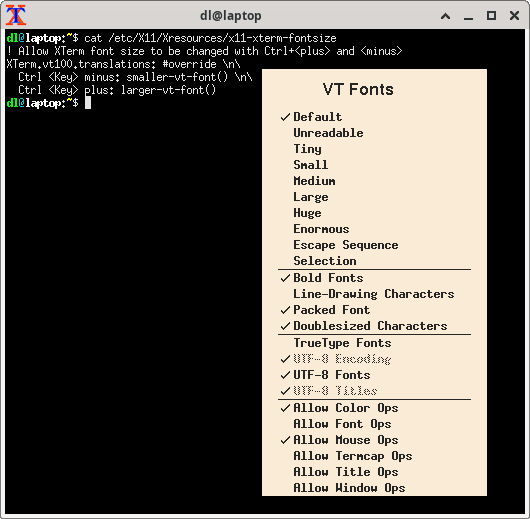
! Allow XTerm font size to be changed with Ctrl+<plus> and <minus>
XTerm.vt100.translations: #override \n\
Ctrl <Key> minus: smaller-vt-font() \n\
Ctrl <Key> plus: larger-vt-font()
Any new X session will inherit this configuration and Ctrl+<plus> and Ctrl+<minus> will work to adjust the font size (and taking the window size along). The font sizes that Xterm iterates through can be viewed on the Ctrl-<right click> context menu: Screenshot of an Xterm window with the context menu displayed NB: The context menu allows to switch the fonts on systems where the above snippet has not (yet) been installed. So good enough for a one-off. Credits: Stack Overflow/Ask Ubuntu, Matthew Hoener.

Daniel Kahn Gillmor: AI as a Compression Problem

A recent article in The Atlantic makes the case that very large language models effectively contain much of the works they're trained on. This article is an attempt to popularize the insights in the recent academic paper Extracting books from production language models from Ahmed et al. The authors of the paper demonstrate convincingly that well-known copyrighted textual material can be extracted from the chatbot interfaces of popular commercial LLM services. The Atlantic article cites a podcast quote about the Stable Diffusion AI image-generator model, saying "We took 100,000 gigabytes of images and compressed it to a two-gigabyte file that can re-create any of those and iterations of those". By analogy, this suggests we might think of LLMs (which work on text, not the images handled by Stable Diffusion) as a form of lossy textual compression. The entire text of Moby Dick, the canonical Big American Novel is merely 1.2MiB uncompressed (and less than 0.4MiB losslessly compressed with bzip2 -9). It's not surprising to imagine that a model with hundreds of billions of parameters might contain copies of these works. Warning: The next paragraph contains fuzzy math with no real concrete engineering practice behind it! Consider a hypothetical model with 100 billion parameters, where each parameter is stored as a 16-bit floating point value. The model weights would take 200 GB of storage. If you were to fill the parameter space only with losslessly compressed copies of books like Moby Dick, you could still fit half a million books, more than anyone can read in a lifetime. And lossy compression is typically orders of magnitude less in size than lossless compression, so we're talking about millions of works effectively encoded, with the acceptance of some artifacts being injected in the output. I first encountered this "compression" view of AI nearly three years ago, in Ted Chiang's insightful ChatGPT is a Blurry JPEG of the Web. I was suprised that The Atlantic article didn't cite Chiang's piece. If you haven't read Ted Chiang, i strongly recommend his work, and this piece is a great place to start. Chiang aside, the more recent writing that focuses on the idea of compressed works being "contained" in the model weights seems to be used by people interested in wielding some sort of copyright claims against the AI companies that maintain or provide access to these models. There are many many problems with AI today, but attacking AI companies based on copyright concerns seems similar to going after Al Capone for tax evasion. We should be much more concerned with the effect these projects have on cultural homogeneity, mental health, labor rights, privacy, and social control than whether they're violating copyright in some specific instance.

11 January 2026

Dirk Eddelbuettel: RApiDatetime 0.0.10 on CRAN: Maintenance

A new maintenance release of our RApiDatetime package is now on CRAN, coming just about two years after the previous maintenance release. RApiDatetime provides a number of entry points for C-level functions of the R API for Date and Datetime calculations. The functions asPOSIXlt and asPOSIXct convert between long and compact datetime representation, formatPOSIXlt and Rstrptime convert to and from character strings, and POSIXlt2D and D2POSIXlt convert between Date and POSIXlt datetime. Lastly, asDatePOSIXct converts to a date type. All these functions are rather useful, but were not previously exported by R for C-level use by other packages. Which this package aims to change. This release avoids use of and which are now outlawed under R-devel, and makes a number of other smaller maintenance updates. Just like the previous release, we are at OS_type: unix meaning there will not be any Windows builds at CRAN. If you would like that to change, and ideally can work in the Windows portion, do not hesitate to get in touch. Details of the release follow based on the NEWS file.

Changes in RApiDatetime version 0.0.10 (2026-01-11)
  • Minor maintenance for continuous integration files, README.md
  • Switch to Authors@R in DESCRIPTION
  • Use Rf_setAttrib with R 4.5.0 or later

Courtesy of my CRANberries, there is also a diffstat report for this release.

This post by Dirk Eddelbuettel originated on his Thinking inside the box blog. If you like this or other open-source work I do, you can sponsor me at GitHub.

Russell Coker: Terminal Emulator Security

I just read this informative article on ANSI terminal security [1]. The author has written a tool named vt-houdini for testing for these issues [2]. They used to host an instance on their server but appear to have stopped it. When you run that tool you can ssh to the system in question and without needing a password you are connected and the server probes your terminal emulator for vulnerabilities. The versions of Kitty and Konsole in Debian/Trixie have just passed those tests on my system. This will always be a potential security problem due to the purpose of a terminal emulator. A terminal emulator will often display untrusted data and often data which is known to come from hostile sources (EG logs of attempted attacks). So what could be done in this regard? Memory Protection Due to the complexity of terminal emulation there is the possibility of buffer overflows and other memory management issues that could be used to compromise the emulator. The Fil-C compiler is an interesting project [3], it compiles existing C/C++ code with memory checks. It is reported to have no noticeable impact on the performance of the bash shell which sounds like a useful option to address some of these issues as shell security issues are connected to terminal security issues. The performance impact on a terminal emulator would be likely to be more noticeable. Also note that Fil-C compilation apparently requires compiling all libraries with it, this isn t a problem for bash as the only libraries it uses nowadays are libtinfo and libc. The kitty terminal emulator doesn t have many libraries but libpython is one of them, it s an essential part of Kitty and it is a complex library to compile in a different way. Konsole has about 160 libraries and it isn t plausible to recompile so many libraries at this time. Choosing a terminal emulator that has a simpler design might help in this regard. Emulators that call libraries for 3D effects etc and native support for displaying in-line graphics have a much greater attack surface. Access Control A terminal emulator could be run in a container to prevent it from doing any damage if it is compromised. But the terminal emulator will have full control over the shell it runs and if the shell has access needed to allow commands like scp/rsync to do what is expected of them then that means that no useful level of containment is possible. It would be possible to run a terminal emulator in a container for the purpose of connecting to an insecure or hostile system and not allow scp/rsync to/from any directory other than /tmp (or other directories to use for sharing files). You could run exec ssh $SERVER so the terminal emulator session ends when the ssh connection ends. Conclusion There aren t good solutions to the problems of terminal emulation security. But testing every terminal emulator with vt-houdini and fuzzing the popular ones would be a good start. Qubes level isolation will help things in some situations, but if you need to connect to a server with privileged access to read log files containing potentially hostile data (which is a common sysadmin use case) then there aren t good options.

Next.

Previous.