Search Results: "John Goerzen"
26 February 2009
Go read
Terah s post. Sometimes a 2-year-old just has a way of making me feel so glad I m a dad.
23 February 2009
Last week, Scott James Remnant posted a series of Git Sucks on his blog, starting with this one
here, with follow up entries
here and
here. His problem? To quote Scott, I want to put a branch I have somewhere so somebody else can get it. That s the whole point of distributed revision-control,
collaboration. He thought this was a mind-numbingly trivial operation, and was frustrated when it wasn t a one-line command in git.
Part of the problem here is that for most git workflows,
most people don t actually use git push . That s why it s not covered in the git tutorial (this was a point of frustration for Scott). In fact, in most large projects, the number of people need to use the scm push command is a very small percentage of the developer population, just as very few developers have commit privileges and are allowed to use the svn commit command in a project using Subversion. When you have a centralized repository, only the privileged few will given commit privileges, for obvious security and quality control reasons.
Ah, but in a distributed SCM world, things are more democratic anyone can have their own repository, and so everyone can type the commands git commit or bzr commit . While this is true, the number of people who need to be able to publish their own branch is small. After all, the overhead in setting up your own server just so people can pull changes from you is quite large; and if you are just getting started, and only need to submit one or two patches, or even a large series of patches, e-mail is a far more convenient route. This is especially true in the early days of git s development, before web sites such as
git.or.cz,
github, and
gitorious made it much easier for people to publish their own git repository. Even for a large series of changes, tools such as
git format-patch and
git send-email are very convenient for sending a patch series, and on the receiving side, the maintainer can use
git am to apply a patch series sent via e-mail.
It turns out that from a maintainer s point of view, reviewing patches via e-mail is often much more convenient. Especially for developers who are just starting out with submitting patches to a project, it s rare that a patch is of sufficiently high quality that it can be applied directly into the repository without needing fixups of one kind or another. The patch might not have the right coding style compared to the surrounding code, or it might be fundamentally buggy because the patch submitter didn t understand the code completely. Indeed, more often than not, when someone submits a patch to me, it is more useful for indicating the location of the bug more than anything else, and I often have to completely rewrite the patch before it enters into the e2fsprogs mainline repository. Given that, publishing a patch that will require modification in a public repository where it is ready to be pulled just doesn t make sense for many entry-level patch submitters. E-mail is in fact less work, and more appropriate for review purposes.
It is only when a mid-level to senior developer is trusted to create high quality patches that do not need review that publishing their branch in a pull-ready form really makes sense. And that is fairly rare, and why it is not covered in most entry-level git documentation and tutorials. Unfortunately, many people expect to see the command scm push in a distributed SCM, and since git pull is a commonly used command for beginning git users, they expect that they should use git push as well not realizing that in a distributed SCM, push and pull are not symmetric operations. Therefore, while most git users won t
need to use git push , git tutorials and other web pages which are attempting to introduce git to new users probably do need to do a better job explaining why most beginning participants in a project probably don t need their own publically accessible repository that other people can pull from, and which they can push changes for publication.
There is one exception to this, of course, and this is a developer who wants to get started using git for a new project which he or she is starting and is the author/maintainer, or someone who is interested in converting their project to git. And this is where bzr has an advantage over git, in that bzr is primarily funded by Canonical, which has a strong interest in pushing an on-line web service, Launchpad. This makes it easier for bzr to have relatively simple recipes for sharing a bzr repository, since the user doesn t need to have access to a server with a public IP address, or need to set up a web or bzr server; they can simply take advantage of Launchpad.
Of course, there are web sites which make it easy for people to publish their git repositories; earlier, I had mentioned
git.or.cz,
github, and
gitorious. Currently, the git documentation and tutorials don t mention them since they aren t formally affiliated with the git project (although they are used by many git users and developers and the maintainers of these sites have contributed a large amount of code and documentation to git). This should change, I think. Scott s frustrations which kicked off his git sucks complaints would have been solved if the Git tutorial recommended that the easist ways for someone to publicly publish their repository is via one of these public web sites (although people who want to set up their own server certainly free to do so).
Most of these public repositories probably won t have much reason to exist, but they don t do much harm, and who knows? While most of the repositories published at github and gitoriuous will be like the hundreds of thousands of abandoned projects on Sourceforge, one or two of the new projects which someone starts experimenting on at github or gitorious could turn out to be the next Ruby on Rails or Python or Linux. And hopefully, they will allow more developers to be able to experiment with publishing commits on their own repositories, and lessen the frustrations of people like Scott who thought they needed their own repositories; whether or not a public repository is the best way for them to do what they need to do, at least this way they won t get as frustrated about git.

Related posts (automatically generated):
- Git and hg John Goerzen recently posted about Git, Mercurial and Bzr that...
- Batches of patched batches of patches I found the following from the Risks Digest, authored by...
Last week, Scott James Remnant posted a series of Git Sucks on his blog, starting with this one
here, with follow up entries
here and
here. His problem? To quote Scott, I want to put a branch I have somewhere so somebody else can get it. That s the whole point of distributed revision-control,
collaboration. He thought this was a mind-numbingly trivial operation, and was frustrated when it wasn t a one-line command in git.
Part of the problem here is that for most git workflows,
most people don t actually use git push . That s why it s not covered in the git tutorial (this was a point of frustration for Scott). In fact, in most large projects, the number of people need to use the scm push command is a very small percentage of the developer population, just as very few developers have commit privileges and are allowed to use the svn commit command in a project using Subversion. When you have a centralized repository, only the privileged few will given commit privileges, for obvious security and quality control reasons.
Ah, but in a distributed SCM world, things are more democratic anyone can have their own repository, and so everyone can type the commands git commit or bzr commit . While this is true, the number of people who need to be able to publish their own branch is small. After all, the overhead in setting up your own server just so people can pull changes from you is quite large; and if you are just getting started, and only need to submit one or two patches, or even a large series of patches, e-mail is a far more convenient route. This is especially true in the early days of git s development, before web sites such as
git.or.cz,
github, and
gitorious made it much easier for people to publish their own git repository. Even for a large series of changes, tools such as
git format-patch and
git send-email are very convenient for sending a patch series, and on the receiving side, the maintainer can use
git am to apply a patch series sent via e-mail.
It turns out that from a maintainer s point of view, reviewing patches via e-mail is often much more convenient. Especially for developers who are just starting out with submitting patches to a project, it s rare that a patch is of sufficiently high quality that it can be applied directly into the repository without needing fixups of one kind or another. The patch might not have the right coding style compared to the surrounding code, or it might be fundamentally buggy because the patch submitter didn t understand the code completely. Indeed, more often than not, when someone submits a patch to me, it is more useful for indicating the location of the bug more than anything else, and I often have to completely rewrite the patch before it enters into the e2fsprogs mainline repository. Given that, publishing a patch that will require modification in a public repository where it is ready to be pulled just doesn t make sense for many entry-level patch submitters. E-mail is in fact less work, and more appropriate for review purposes.
It is only when a mid-level to senior developer is trusted to create high quality patches that do not need review that publishing their branch in a pull-ready form really makes sense. And that is fairly rare, and why it is not covered in most entry-level git documentation and tutorials. Unfortunately, many people expect to see the command scm push in a distributed SCM, and since git pull is a commonly used command for beginning git users, they expect that they should use git push as well not realizing that in a distributed SCM, push and pull are not symmetric operations. Therefore, while most git users won t
need to use git push , git tutorials and other web pages which are attempting to introduce git to new users probably do need to do a better job explaining why most beginning participants in a project probably don t need their own publically accessible repository that other people can pull from, and which they can push changes for publication.
There is one exception to this, of course, and this is a developer who wants to get started using git for a new project which he or she is starting and is the author/maintainer, or someone who is interested in converting their project to git. And this is where bzr has an advantage over git, in that bzr is primarily funded by Canonical, which has a strong interest in pushing an on-line web service, Launchpad. This makes it easier for bzr to have relatively simple recipes for sharing a bzr repository, since the user doesn t need to have access to a server with a public IP address, or need to set up a web or bzr server; they can simply take advantage of Launchpad.
Of course, there are web sites which make it easy for people to publish their git repositories; earlier, I had mentioned
git.or.cz,
github, and
gitorious. Currently, the git documentation and tutorials don t mention them since they aren t formally affiliated with the git project (although they are used by many git users and developers and the maintainers of these sites have contributed a large amount of code and documentation to git). This should change, I think. Scott s frustrations which kicked off his git sucks complaints would have been solved if the Git tutorial recommended that the easist ways for someone to publicly publish their repository is via one of these public web sites (although people who want to set up their own server certainly free to do so).
Most of these public repositories probably won t have much reason to exist, but they don t do much harm, and who knows? While most of the repositories published at github and gitoriuous will be like the hundreds of thousands of abandoned projects on Sourceforge, one or two of the new projects which someone starts experimenting on at github or gitorious could turn out to be the next Ruby on Rails or Python or Linux. And hopefully, they will allow more developers to be able to experiment with publishing commits on their own repositories, and lessen the frustrations of people like Scott who thought they needed their own repositories; whether or not a public repository is the best way for them to do what they need to do, at least this way they won t get as frustrated about git.
Related posts (automatically generated):
- Git and hg John Goerzen recently posted about Git, Mercurial and Bzr that...
- Batches of patched batches of patches I found the following from the Risks Digest, authored by...


18 February 2009
Yesterday, I posted
part 1 of how to think about compression. If you haven t read it already, take a look now, so this post makes sense.
Introduction
In the part 1 test, I compressed a 6GB tar file with various tools. This is a good test if you are writing an entire tar file to disk, or if you are writing to tape.
For part 2, I will be compressing each individual file contained in that tarball individually. This is a good test if you back up to hard disk and want quick access to your files. Quite a few tools take this approach rdiff-backup, rdup, and backuppc are among them.
We can expect performance to be worse both in terms of size and speed for this test. The compressor tool will be executed once per file, instead of once for the entire group of files. This will magnify any startup costs in the tool. It will also reduce compression ratios, because the tools won t have as large a data set to draw on to look for redundancy.
To add to that, we have the block size of the filesystem 4K on most Linux systems. Any file s actual disk consumption is always rounded up to the next multiple of 4K. So a 5-byte file takes up the same amount of space as a 3000-byte file. (This behavior is not unique to Linux.) If a compressor can t shrink enough space out of a file to cross at least one 4K barrier, it effectively doesn t save any disk space. On the other hand, in certain situations, saving one byte of data could free 4K of disk space.
So, for the results below, I use du to calculate disk usage, which reflects the actual amount of space consumed by files on disk.
The Tools
Based on comments in part 1, I added tests for lzop and xz to this iteration. I attempted to test pbzip2, but it would have taken 3 days to complete, so it is not included here more on that issue below.
The Numbers
Let s start with the table, using the same metrics as with
part 1:
| Tool |
MB saved |
Space vs. gzip |
Time vs. gzip |
Cost |
| gzip |
3081 |
100.00% |
100.00% |
0.41 |
| gzip -1 |
2908 |
104.84% |
82.34% |
0.36 |
| gzip -9 |
3091 |
99.72% |
141.60% |
0.58 |
| bzip2 |
3173 |
97.44% |
201.87% |
0.81 |
| bzip2 -1 |
3126 |
98.75% |
182.22% |
0.74 |
| lzma -1 |
3280 |
94.44% |
163.31% |
0.63 |
| lzma -2 |
3320 |
93.33% |
217.94% |
0.83 |
| xz -1 |
3270 |
94.73% |
176.52% |
0.68 |
| xz -2 |
3309 |
93.63% |
200.05% |
0.76 |
| lzop -1 |
2508 |
116.01% |
77.49% |
0.39 |
| lzop -2 |
2498 |
116.30% |
76.59% |
0.39 |
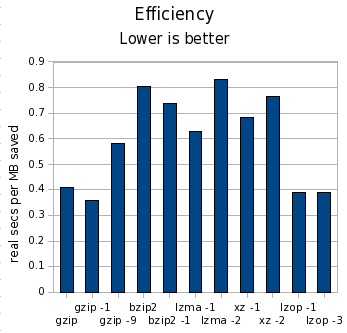
As before, in the MB saved column, higher numbers are better; in all other columns, lower numbers are better. I m using clock seconds here on a dual-core machine. The cost column is clock seconds per MB saved.
Let s draw some initial conclusions:
- lzma -1 continues to be both faster and smaller than bzip2. lzma -2 is still smaller than bzip2, but unlike the test in part 1, is now a bit slower.
- As you ll see below, lzop ran as fast as cat. Strangely, lzop -3 produced larger output than lzop -1.
- gzip -9 is probably not worth it it saved less than 1% more space and took 42% longer.
- xz -1 is not as good as lzma -1 in either way, though xz -2 is faster than lzma -2, at the cost of some storage space.
- Among the tools also considered for part 1, the difference in space and time were both smaller. Across all tools, the difference in time is still far more significant than the difference in space.
The Pretty Charts
Now, let s look at an illustration of this. As before, the sweet spot is the lower left, and the worst spot is the upper right. First, let s look at the compression tools themselves:
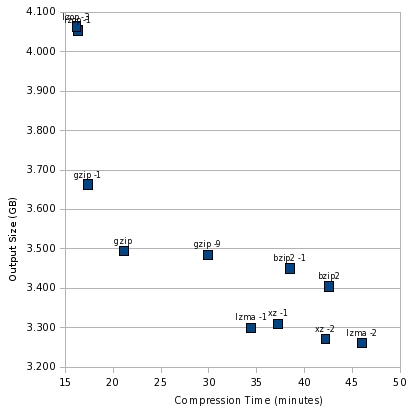
At the extremely fast, but not as good compression, end is lzop. gzip is still the balanced performer, bzip2 still looks really bad, and lzma -1 is still the best high-compression performer.
Now, let s throw cat into the mix:
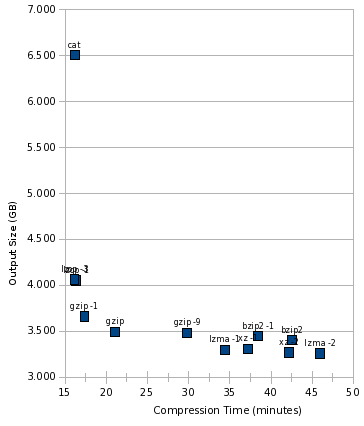
Here s something notable, that this graph makes crystal clear: lzop was just as fast as cat. In other words, it is likely that lzop was faster than the disk, and using lzop compression would be essentially free in terms of time consumed.
And finally, look at the cost:
What happened to pbzip2?
I tried the parallel bzip2 implementation just like last time, but it ran extremely slow. Interestingly, pbzip2 < notes.txt > notes.txt.bz2 took 1.002 wall seconds, but pbzip2 notes.txt finished almost instantaneously. This 1-second startup time for pbzip2 was a killer, and the test would have taken more than 3 days to complete. I killed it early and omitted it from my results. Hopefully this bug can be fixed. I didn t expect pbzip2 to help much in this test, and perhaps even to see a slight degradation, but not like THAT.
Conclusions
As before, the difference in time was far more significant than the difference in space. By compressing files individually, we lost about 400MB (about 7%) space compared to making a tar file and then combining that. My test set contained 270,101 files.
gzip continues to be a strong all-purpose contender, posting fast compression time and respectable compression ratios. lzop is a very interesting tool, running as fast as cat and yet turning in reasonable compression though 25% worse than gzip on its default settings. gzip -1 was almost as fast, though, and compressed better. If gzip weren t fast enough with -6, I d be likely to try gzip -1 before using lzop, since the gzip format is far more widely supported, and that s important to me for backups.
These results still look troubling for bzip2. lzma -1 continued to turn in far better times and compression ratios that bzip2. Even bzip2 -1 couldn t match the speed of lzma -1, and compressed barely better than gzip. I think bzip2 would be hard-pressed to find a comfortable niche anywhere by now.
As before, you can download
my spreadsheet with all the numbers behind these charts and the table.
17 February 2009
and the case against bzip2
Compression is with us all the time. I want to talk about general-purpose lossless compression here.
There is a lot of agonizing over compression ratios: the size of output for various sizes of input. For some situations, this is of course the single most important factor. For instance, if you re Linus Torvalds putting your code out there for millions of people to download, the benefit of saving even a few percent of file size is well worth the cost of perhaps 50% worse compression performance. He compresses a source tarball once a month maybe, and we are all downloading it thousands of times a day.
On the other hand, when you re doing backups, the calculation is different. Your storage media costs money, but so does your CPU. If you have a large photo collection or edit digital video, you may create 50GB of new data in a day. If you use a compression algorithm that s too slow, your backup for one day may not complete before your backup for the next day starts. This is even more significant a problem when you consider enterprises backing up terabytes of data each day.
So I want to think of compression both in terms of resulting size and performance. Onward
Starting Point
I started by looking at the
practical compression test, which has some very useful charts. He has charted savings vs. runtime for a number of different compressors, and with the range of different settings for each.
If you look at his first chart, you ll notice several interesting things:
- gzip performance flattens at about -5 or -6, right where the manpage tells us it will, and in line with its defaults.
- 7za -2 (the LZMA algorithm used in 7-Zip and p7zip) is both faster and smaller than any possible bzip2 combination. 7za -3 gets much slower.
- bzip2 s performance is more tightly clustered than the others, both in terms of speed and space. bzip2 -3 is about the same speed as -1, but gains some space.
All this was very interesting, but had one limitation: it applied only to the gimp source tree, which is something of a best-case scenario for compression tools.
A 6GB Test
I wanted to try something a bit more interesting. I made an uncompressed tar file of /usr on my workstation, which comes to 6GB of data. My /usr contains highly compressible data such as header files and source code, ELF binaries and libraries, already-compressed documentation files, small icons, and the like. It is a large, real-world mix of data.
In fact, every compression comparison I saw was using data sets less than 1GB in size hardly representative of backup workloads.
Let s start with the numbers:
| Tool |
MB saved |
Space vs. gzip |
Time vs. gzip |
Cost |
| gzip |
3398 |
100.00% |
100.00% |
0.15 |
| bzip2 |
3590 |
92.91% |
333.05% |
0.48 |
| pbzip2 |
3587 |
92.99% |
183.77% |
0.26 |
| lzma -1 |
3641 |
91.01% |
195.58% |
0.28 |
| lzma -2 |
3783 |
85.76% |
273.83% |
0.37 |
In the MB saved column, higher numbers are better; in all other columns, lower numbers are better. I m using clock seconds here on a dual-core machine. The cost column is clock seconds per MB saved.
What does this tell us?
- bzip2 can do roughly 7% better than gzip, at a cost of a compression time more than 3 times as long.
- lzma -1 compresses better than bzip2 -9 in less than twice the time of gzip. That is, it is significantly faster and marginally smaller than bzip2.
- lzma -2 is significantly smaller and still somewhat faster than bzip2.
- pbzip2 achieves better wall clock performance, though not better CPU time performance, than bzip2 though even then, it is only marginally better than lzma -1 on a dual-core machine.
Some Pretty Charts
First, let s see how the time vs. size numbers look:
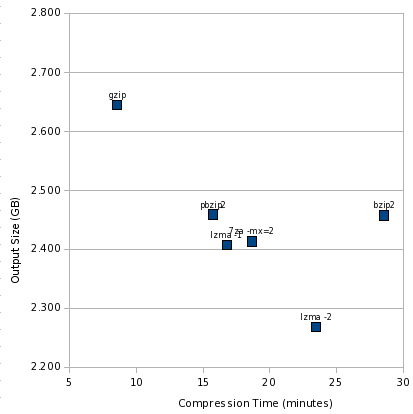
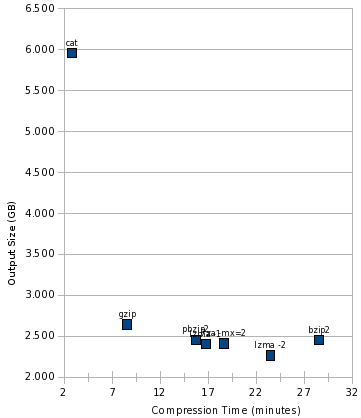
Like the other charts, the best area is the lower left, and worst is upper right. It s clear we have two outliers: gzip and bzip2. And a cluster of pretty similar performers.
This view somewhat magnifies the differences, though. Let s add cat to the mix:
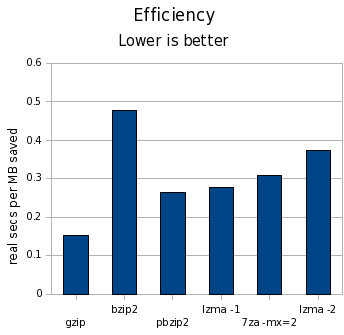
And finally, look at the cost:
Conclusions
First off, the difference in time is far larger than the difference in space. We re talking a difference of 15% at the most in terms of space, but orders of magnitude for time.
I think this pretty definitively is a death knell for bzip2. lzma -1 can achieve better compression in significantly less time, and lzma -2 can achieve significantly better compression in a little less time.
pbzip2 can help even that out in terms of clock time on multicore machines, but 7za already has a parallel LZMA implementation, and it seems only a matter of time before /usr/bin/lzma gets it too. Also, if I were to chart CPU time, the numbers would be even less kind to pbzip2 than to bzip2.
bzip2 does have some interesting properties, such as resetting everything every 900K, which could provide marginally better safety than any other compressor here though I don t know if lzma provides similar properties, or could.
I think a strong argument remains that gzip is most suitable for backups in the general case. lzma -1 makes a good contender when space is at more of a premium. bzip2 doesn t seem to make a good contender at all now that we have lzma.
I have also made
my spreadsheet (OpenOffice format) containing the raw numbers and charts available for those interested.
Update
Part 2 of this story is now available, which considers more compression tools, and looks at performance compressing files individually rather than the large tar file.
12 February 2009
Last July, I
wrote about video uploading sites. Now that I m starting to get ready to post video online, some public but a lot of it just for friends or family, I ve taken another look. And I m disappointed in what I see.
Youtube has made the biggest improvements since then. Now, they can handle high-definition video, an intermediate HQ encoding, and the standard low-bandwidth encoding. Back then, there was no HD support, and I don t think any HQ support either.
There are two annoying things about Youtube. One is the 10 minute limit per video file, though that can be worked around. The other is the really quite terrible options for sharing non-public videos. In essence, the only way to do this is to, on each video, manually select which people you want to be able to see it. If suddenly a new person gets a Youtube account, you can t just give them access to the entire back library of videos. What I want it to tell Youtube that all people in a certain GROUP should have access, and then I can add people to the group as needed. That s a really quite terrible oversight.
Vimeo, on the other hand, has actually gotten worse. Back a year ago, they were an early adopter on the HD bandwagon. Now that they ve introduced their pay accounts, the free accounts have gotten worse than before. With a free Vimeo account, you can only upload 1 HD video a week. You also get dumped in the 4-hour encoding line, and get the low-quality encoding. Yes, it s noticeable, and much worse than Youtube HQ, let alone Youtube HD. You have no time limit, but a 500MB upload limit per week.
The sharing options with Vimeo are about what I d want.
blip.tv seems about the same, and I m still avoiding them because you have to pay $100/yr to be able to keep videos non-public.
Then there s viddler. I am not quite sure what to make of them. They seem to be, on the one hand, Linux fans with a clue. On the other hand, their site seems to be chock full of get-rich-quick and real estate scheme videos, despite a ToS that prohibits them. They allow you to upload HD videos but not view them. They have a limit of 500MB per video file, but no limits on how many files you can upload or the length of each one, and the sharing options seem good.
So I m torn. On the one hand, it would be easy to say, I ll just dump everything to viddler. On the other hand, are they going to do what Vimeo did, or worse, start overlaying ads on all my videos?
Any suggestions?
10 February 2009
We recently bought a Canon Vixia HG20 camcorder. The HG20 records in AVCHD format (MPEG-4 h.264) at up to 1920 1080. To get from the camcorder to a DVD (or something we can upload to the web), I need some sort of video editing software. This lets me trim out the boring bits, encode the video for DVD, etc.
Background
In addition to DVD creation and web uploading, I want the ability to burn high-definition video discs. 1920 1080 is significantly higher resolution than you get from a DVD. There are two main ways to go: a blu-ray format disc, or an AVCHD disc. A blu-ray disc has to be burned onto BD-R media, which costs about $5 each, using a blu-ray burner, which costs about $200. AVCHD discs use the same h.264 encoding that the camcorder does, meaning they have better compression and can be burned onto regular DVD+R media, fitting about 30 minutes onto a DVD. Moreover, it is possible to move AVCHD files directly from a camcorder to an AVCHD disc without re-encoding, resulting in higher quality and lower playing time. The nicer blu-ray players, such as the PS3, can play AVCHD discs.
AVCHD seems pretty clearly the direction the industry is moving. Compared to the tape-based HDV, ACVHD has higher quality with lower bitrates, better resolution, and much greater convenience. Hard disk or SD-based AVCHD camcorders are pretty competitive in terms of price by now too, often cheaper than tape-based ones.
The downside of AVCHD is that it takes more CPU power to process. Though as video tasks are often done in batch, that wouldn t have to be a huge downside. The bigger problem is that, though all the major video editing software claims to support AVCHD, nobody really supports it well yet.
The Contenders
Back when I got my first camcorder in about 2001 the one that I m replacing now you pretty much had to have a Mac to do any sort of reasonable consumer or prosumer-level video editing. We bought our first iMac back then to work with that, and it did work well with the MiniDV camera.
Today, there s a lot more competition out there. The Mac software stack has not really maintained its lead some would even say that it s regressed and the extremely high cost of buying a Mac capable of working with AVCHD, plus Final Cut Express, makes that option completely out of the question for me. It would be roughly $2500.
Nobody really supports AVCHD well yet, even on the Mac. Although most programs advertise support of smart rendering a technique that lets the software merely copy unchanged footage when outputting to the same format as the input none of them have smart rendering that actually works with AVCHD source material. Though this fact is never documented, though discussed on forums.
Another annoyance, having used Final Cut Express in the past, is that with these programs you can t just go to the timeline and say delete everything between 1:35 and 3:52 ; you have to go in and split up clips, then select and delete them. They seem to be way too concerned about dealing with individual clips.
I briefly used Cinelerra on Linux to do some video editing. It s a very powerful program, but geared at people that are far more immersed in video editing than I. For my needs, it didn t have enough automation and crashed too much and that was with MiniDV footage. It apparently does support AVCHD, but I haven t tried it.
I ve tried three programs and considered trying a fourth. Here are my experiences:
Ulead/Corel VideoStudio Pro X2
Commonly referenced as the go to program for video editing on Windows, I started with downloading the Free Trial of it from Corel. Corel claims that the free trial is full-featured all over on their website, but I could tell almost instantly that it wasn t. I wound up buying the full version, which came to about $65 after various discounts.
I wanted to like this program. Its output options include AVCHD disc, Blu-ray disc, DVD+R, and the like. Its input options include MiniDV, AVCHD, ripping from DVD, ripping from Bluray, and just about every other format you can think of. And it heavily advertised proxy editing , designed to let you edit a scaled-down version of AVCHD video with a low-CPU machine, but refer back to the original high-quality footage for the output.
It didn t pan out that way.
The biggest problem was the constant crashing. I really do mean constant. It probably crashed on me two dozen times in an hour. If you are thinking that means that it crashes pretty much as soon as I can get it re-opened, you d be correct. Click the Play button and it hangs. Click a clip and it hangs. Do anything and it hangs.
It did seem to work better with the parts of the source that had been converted to a low-res version with Smart Proxy, though it didn t eliminate the hangs, just reduced them. And every time I d have to End Task, it would forget what it had already converted via Smart Proxy even if I had recently saved the project and have to start over from scratch.
I spent some time trying to figure out why it always thought my project was 720 480 even when it was 1920 1080, and why the project properties box didn t even have an option for 1920 1080. After some forum searching, it turns out that the project properties box is totally irrelevant to the program. Yay for good design, anyone?
VideoStudio Pro X2 does have good output options, allowing combination of multiple source files onto a single DVD or AVCHD disc as separate titles. Unfortunately, its DVD/AVCHD rendering process also yes hangs more often than not.
The documentation for VideoStudio Pro X2 is of the useless variety. It s the sort of thing that feels like it s saying The trim tool is for trimming your clips without telling you what trimming your clips means, or making it obvious how to remove material from the middle of a clip.
The proxy editing feature isn t what it should be either. Instead of being something that just automatically happens and Works in the background, you have to manage its queue in the foreground and it forgets what it was doing whenever the program hangs.
On the rare occasion when pressing Play did not cause a hang, the AVCHD footage played back at about 0.5fps far, far worse than PowerDirector manages on the same machine. Bits that had been rendered for proxy editing did appear to play at full framerate.
I have applied for a refund for this purchase from Corel under their 30-day return policy, and have already uninstalled it from my disk. What a waste.
CyberLink PowerDirector 7 Ultra
This was the second program I tried, and the one I eventually bought. Its feature set is not quite as nice as Corel s, especially when it comes to versatility of output options. On the other hand, it feels done. It only crashed two or three times on me apparently that s GOOD on Windows? Things just worked. It appears to have proxy editing support, but it is completely transparent and plays back with a decent framerate even without it. It can output to AVCHD, Bluray, and DVD, though smart rendering doesn t work with AVCHD source material.
Its weakness compared to the Corel package is that it doesn t have as many options for formatting these discs. You can have only one title on a disc, though you can have many chapters. You have some, but not much, control over compression parameters. The same goes for exporting files for upload to the web or saving on your disk.
The documentation is polished and useful for the basics, though not extensive.
Overall, this package works, supports all the basics I wanted from it, so I m using it for now.
Adobe Premiere Elements 7
I downloaded the trial of this one too. I opened it up, and up popped a dialog box asking what resolution my project would be, interlacing settings, etc. I thought YES now that s the kind of program I want. As I tried out the interface, I kept thinking the same. This was a program not just for newbies, but for people that wanted a bit more control.
Until it came to the question of output. Premiere Elements 7 was the only package I looked at that had no option to burn an AVCHD disc. DVD or Blu-ray only. That s a deal-breaker for me. There s no excuse for a program in this price range to not support the only affordable HD disc option out there. So I didn t investigate very much farther.
Another annoying thing is that Adobe seems to treat all of their software as a commercial. I m a user, not an audience, dammit. I do not want to buy some photoshop.net subscription when I buy a video editing program. I do not want to see ads for stuff when I m reading PDFs. LEAVE ME ALONE, ADOBE.
I just felt sleazy even giving them my email address, let alone installing the program on my system. I think I will feel like a better person once I reboot into Windows and wipe it off my system.
Pinnacle Studio 12
Another program that comes highly rated. But I never installed it because its minimum system requirements state that it needs an Intel Core 2 Quad 2.66GHz or higher for 1920 1080 AVCHD editing. And I have only a Core 2 Duo 2.66GHz half the computing horsepower that it wants. And since they offer no free trial, I didn t bother even trying it, especially since PowerDirector got by fine with my CPU.
Conclusions
This seems to be a field where we can say all video editing software sucks; some just suck a little less. I m using PowerDirector for now, but all of the above programs should have new versions coming out this year, and I will be keeping a close eye to see if any of them stop being so bad.
8 February 2009
Last week, we got a new HD camcorder. Jacob has really enjoyed watching video of himself on TV. He wants to watch it over and over. He ll start cackling when it gets close to the parts he thinks are funny. He ll jabber about it That Jacob funny! Sometimes when he hears a question that I asked him on the video, he ll answer it for himself now.
Today, I woke up feeling like vomiting. I haven t yet, but it s been really close. Terah and I explained to Jacob that my tummy hurts. Jacob came over to me and said kiss it! , and kissed me. (If he gets hurt, he wants a kiss where it hurts.)
I ve been in bed sometimes, at the desk sometimes, and at the couch sometimes. It s one of these annoying things where I can t sleep, but the only way I can not feel like vomiting in bed makes me sore after awhile, and sitting at the desk or reading something only works for a little while.
As I was sitting at the desk, Jacob came in and wanted to watch some train videos. See old train! See old train IN SNOW! He usually sits on my lap, his squirmy 2-year-old self, and watches the videos off Youtube. Today I told him he would have to be very still, and he did a very good job of it.
Later he saw me on the couch. Dad sleeping, he said. He gave me a hug, then said, I sleep there too. For about a minute, he had his head on the pillow facing me, with a big smile on his face. Then he was off to find a book or something. Dad have ouchies.
It s very sweet to see his sense of compassion developing already. Even if the bounciness sometimes made my stomach more queasy.
6 February 2009
This is a giant rant with a small point at the end. So be warned.
Earlier this week, I booted up Windows for the first time in a few months. About 2 minutes after it came up, just after I had started up an app, it informed me that it desperately needed to restart because it had applied some updates, and unless I clicked cancel, it would. So I restarted.
The Saga Begins
Then I opened up the program for my negative scanner. This device has an infrared dust-detection system that is not well supported in SANE. I can insert a 6-frame negative, it will load it in, identify where the 6 frames are, and scan it at 4000 DPI. So anyhow, I opened it up and started scanning. Surprisingly, it was REALLY SLOW. Normally it takes about 3 minutes per frame, and I could tell it wasn t going to do that. It sounded as if the computer couldn t keep up with the scanner.
I tried to get Windows to tell me if it was talking to the scanner at USB 2.0 speeds, but this information was nowhere to be found. So I went down under my desk and moved some USB devices to different ports. Got back up from under the desk, and:
BLUE SCREEN OF DEATH was there.
Reboot. Scanner now works at normal speed. So I started it scanning, then went off to watch the Purdue game with Terah. Came back a little while later, expecting it to be ready for the next negative, only to manage to catch it in the nick of time before it helpfully rebooted my machine again due to yes more updates. So I saved, rebooted, and finally scanning worked after that. Also I disabled automatic installation of updates.
A Turn For The Worse
A few days later, I was getting expecting a new camcorder, and I was planning to use Windows for video editing. Originally, my hard disk had Windows, a Windows emergency recovery partition, and Linux on it. When I upgraded my motherboard and added a SATA HDD, I moved almost all of Linux to it. So there was now a lot of free space on that original drive, and the recovery partition is useless with the new motherboard anyhow.
So I figure: delete that recovery partition, and expand the NTFS partition to take up the whole of the disk. Easy enough, right?
So I do this, and much to my annoyance, Windows now refused to boot. It would just hang. No boot menu, no splash screen. Just hang. Linux saw and could access the NTFS partition just fine.
So I went hunting for my XP install CD. Finally found it. Boot off the thing. It spends 5 minutes loading drivers for all sorts of things I don t have off the CD, then promptly crashes, saying inaccessible boot device. A hunch or two later and I m twiddling bits in the BIOS to try to get it to see my SATA DVD burner properly. No luck. I finally download the drivers for my chipset from Gigabyte, have to use Wine to extract them, then scrounge up a working floppy to put them on. Reboot. Blue screen again but a different one. Twiddle some more bits in the BIOS. Reboot. Success! Recovery console is mine!
I run chkdsk, and fixboot, which everybody in the forums says will fix this.
Neither made any difference at all, but the recovery console could see the NTFS partition just fine. Grumble.
More googling, and I try testdisk for Linux. It twiddled some bits on the NTFS boot sector and my partition table. Reboot. And UGH. Now Linux won t even boot and Grub won t start. Download Debian live CD. Boot from it. Inspect disk with fdisk. Turns out testdisk just renumbered my partitions. Restore the previous numbering: Windows on partition 2, Linux /boot on partition 5. Save, reboot. Grub is back. Linux boots. Try Windows. And .
Still hangs, but this time only after saying that HAL.DLL is missing or corrupt.
Reboot into Linux. HAL.DLL is right there where it should be, and at the size it should be. Ponder this for a bit.
I then tried looking at boot.ini. On a lark, I wondered if deleting the recovery partition meant that boot.ini no longer considers Windows to be partition 2, even though that s what the partition table says. Change it to partition 1, save. Reboot. SUCCESS IS MINE! WINDOWS BOOTS! Only 4 hours after expanding its partition.
I told some friends about this trouble booting. What on earth did you do, John? I expanded the NTFS partition. And the response: Ahh. That ll do it.
Expanding a partition is something we do routinely on Linux. Even on running production servers. Even WHILE THEY RE RUNNING. And I never have a problem like this. And even if I did, I wouldn t have to use some tool written FOR A DIFFERENT OS to fix it.
Argh.
The Problems Multiply
A few days later, I got a new Canon Vixia HG20 camcorder. It shoots in
AVCHD format 1920 1280@60i, h.264, which is a standard format for hard disk or SD card HD camcorders. I needed some basic video editing software that would let me do simple edits and burn a BDMV or AVCHD disc onto DVD+R formats that Blu-ray players can play, yet are cheap to make.
After poking around, I decided to download the free trial of Ulead/Corel VideoStudio Pro X2. The free trial supposedly was the full version of the program, though it quite obviously wasn t after installing it. So I bought the full version and was greeted by about an 800MB download instead of the 120MB full version free trial download.
Now here s the thing about VideoStudio Pro X2. IT S CRAP. It has crashed on me at least two dozen times, usually when I click the Play button. Its interface is really clunky. There s no way to mark a start and an end point, and say just delete everything between there, regardless of what clips they re in. The AVCHD disc creator wants to re-encode the entire project, even though it s ALREADY IN AVCHD. Though you can work around that by exporting the entire project to an AVCHD *FILE* which is smart enough not to re-encode it then making a disc from that.
The project properties likes to say I m editing 720 480 even when I m editing 1920 1080, and doesn t even have a box for 1920 1080. Though after some Googling, it turns out that the project properties settings are irrelevant anyway. Yay for good design?
So after all this crashing, I went out and did some more Googling. I found this
lovely quote:
In short, every application I and our Labs tester tried iMovie, Pinnacle Studio, Ulead Video Studio, Sony Vegas and Avid Liquid at best could open but barely play some clips, and more often simply hung or crashed.
So what we have here is a whole culture of mediocrity. Everybody advertises that they work with AVCHD, yet nobody actually WORKS with AVCHD. And this is the format that the industry is rapidly moving to for HD HDV s days are quite numbered.
26 January 2009
A little while back, Terah was leaving the house one morning. On that particular morning, we had an unusually intense even for Kansas wind. It caught the storm door and whipped it around with such force that it bent the metal arm that goes into the pneumatic plunger, and even bent the bracket that the arm connects to. It was not possible to un-bend either of them with household tools, even with dad s help.
So I went to the hardware store and picked up a replacement. But I had been putting off actually replacing it because, well, the door almost closed automatically and there were more important things to get to.
Until yesterday. I got out the tools and went to work. Jacob was around and took an interest in the activity. I was stretched out on the floor on my stomach working with the drill to try to get out some extremely tight screws without stripping them. And Jacob, at one point, got down on the floor on his stomach right beside me, and proudly announced I (am) like dad!
Terah was working on something nearby, and noticed this, and went for the camera. Unfortunately, I had left its CF card in my digital audio recorder. She found the other card, and was hurrying to put it in so she could get the cute picture. Even more unfortunately, she inserted it sideways.
CF slots have 50 tiny pins in the space of 1.7 inches. The slots normally force the card to align properly, but not when the card is put in sideways. It slid back and bent a pin back. The slot is thus unusable.
I was going in to town anyway to pick up my bike from the bike shop, so I stopped at Moler s Camera on the way. This is my favorite camera shop it s the sort of place where you take a seat at the counter while they help you. I showed the sales guy the camera and he knew off the top of his head that the cost to fix it is $206. Which is pretty much in line with reports on the Internet.
The old camera is a Canon Digital Rebel XTi (EOS 400D). It s over 2 years old, so out of warranty, but I wasn t planning to upgrade soon. On the other hand, the camera shop estimated that they could buy the XTi from me for about $150 to $200, considering its condition, and a new XSi (EOS 450D) is $570 at B&H. So about $200 to fix the old one, or about $400 cost to us to get a new one and the next model up, which uses SD instead CF, and thus will never have a bent pin again. With that kind of cost, we decided to spring for the XSi. Plus, it would take about a month to get the repair on the XTi.
So there you have it. The wind can be expensive and cause camera upgrades.
25 January 2009
A few months ago, I
asked for suggestions for magazines to subscribe to. I got a lot of helpful suggestions, and subscribed to three: The New Yorker, The Atlantic, and The Economist.
Today, I m reviewing the only one of the three that I m disappointed in, and it s The Economist. This comes as something of a surprise, because so many people (with the exception of Bryan O Sullivan) recommended it.
Let s start with a quote from the issue that found its way to my mailbox this week:
A crowd of 2m or more is making its way to Washington, DC, to witness the inauguration of Mr Obama. Billions more will watch it on television. [link]
Every issue, I see this sort of thing all over. An estimate, or an opinion, presented as unquestioned fact, sometimes pretty clearly wrong or misleading. For weeks before Jan. 20, and even the day before, the widely-reported word from officials was that they had no idea what to expect, but if they had to guess, they d say that attendance would be between 1-2 million. In the end, the best estimates have placed attendance at 1.8 million.
Would it have killed them to state that most estimates were more conservative, and to cite the source of their particular estimate? That s all I want, really, when they do things like this.
I knew going into it that the magazine (to American eyes) essentially editorializes throughout, and I don t have a problem with that. But it engages in over-generalization far too often and that s just when I catch it. This was just a quick example from the first article I read in this issue; it s more blatant other places, but quite honestly I m too lazy to go look some more examples up at this hour. I do remember, though, them referring to members of Obama s cabinet as if they were certain to be, back before Obama had even announced their pick, let alone their confirmation hearings happening.
One of my first issues of The Economist had a lengthy section on the global automobile market. I learned a lot about how western companies broke into markets in Asia and South America. Or at least I think I did. I don t know enough about that subject to catch them if they are over-generalizing again.
The end result is that I read each issue with a mix of fascination and distrust; the topics are interesting, but I can never really tell if I m being given an accurate story. It often feels like the inside scoop, but then when I have some bit of knowledge of what the scoop is, it s often a much murkier shade of gray than The Economist s ever-confident prose lets on.
Don t get me wrong; there are things about the Economist I like. But not as much as with the New Yorker or the Atlantic, so I ll let my subscription lapse after 6 months but keep reading it until then.
22 January 2009
Our power alone cannot protect us, nor does it entitle us to do as we please. . . Our security emanates from the justness of our cause; the force of our example; the tempering qualities of humility and restraint.
- Barack Obama, inaugural speech, Jan. 20, 2009
This, right here, is why, for the first time in my life, I actually feel good about an American president. Why I have hope about our government for the first time in years. Why I m glad I used a vacation day to sit on the couch and watch TV yesterday.
On the occasion, once every 4 or 8 years, that is a celebration of American strength, power, and pride, we see our new president speaking of humility, of peace, of moral leadership, this is something remarkable.
Past presidents have used occasions such as these to speak of crushing our enemies, of wanting people dead or alive, of grand government promises that turned out to triple the national debt.
Obama spoke of extending the hand of friendship to anyone that would unclench their fist.
He spoke that we had kicked the can down the road too far, and now we ve reached the end of the road. We have to stop thinking that we can have everything: low taxes, expensive programs, and a large military, simply by mortgaging our future.
And he leveled with us: we all are in this together, and all have to work to make it better.
Conventional politicians assumed it would be political suicide to say even half of what Obama has said. Yet he went out there and did it.
He was blasted during the campaign by people on both sides of the political spectrum for being just words . He s the first presidential candidate that meant what he said about bringing Americans, and their representatives, together. The shock in Washington has he invited gasp! both an openly gay bishop and an anti-gay evangelical minister to give prayers was telling. It s as if people were saying, Wait, he really MEANT that?
Yes, he did. Let s hope he can pull it off.
And as Rev. Lowry concluded with his benediction:
With your hands of power and your heart of love, help us then, now, Lord, to work for that day when nations shall not lift up sword against nation, when tanks will be beaten into tractors, when every man and every woman shall sit under his or her own vine and fig tree and none shall be afraid, when justice will roll down like waters and righteousness as a mighty stream. . .
Let all those who do justice and love mercy say Amen. (amen) Say Amen! (Amen!) Say Amen! (AMEN!)
18 January 2009
It s been quite the day.
This evening, Jacob had a new first. He requested I read him an owner s manual for his bedtime story. Yes, I m sure years from now, he will still remember how to operate a Motorola W376g cell phone. He had found the manual in its box and had been carrying it around, reading it to himself for days already. I can feel him following in my footsteps - I remember pulling the car manual out of the glove box on long trips and reading it. For fun.
So yes, Jacob chose an owner s manual over nice children s bedtime books involving caterpillars.
This morning, I set out on what would be a 43-mile bike ride - home to Wichita. It was about 28F when I left. I had been wanting to ride from home to Wichita for some time now, and finally found the right day. The wind was at my back (mostly), the sun was shining (I even got burned a bit), and the ride was fun. It took me about 4.5 hours, including the 1.5 hours I spent for lunch and other breaks. I didn t take a completely direct route, but that was intentional.
This is my second-farthest ride in a day, behind the time I rode 55 miles in a day
for charity. But it is the farthest I ve gone in winter.
I was taking the bike to the bike shop for its free 6-month tuneup. So I even had the perfect excuse to ride it. I hope to ride it back home if the weather is cooperative.
As for the third milestone, while I was riding to Wichita, Barack Obama and Joe Biden were riding a train to Washington. I recorded it, and have been watching it this evening. Remembering all they said during the campaign, seeing how they act it really does give me some hope in this country s government, some hope that some important things will be accomplished in the future. One TV commentator pointed out that the Bush administration carefully avoided using the word recession as long as they possibly could, while Obama is trying as hard he can to be straight and direct with people about the situation. I appreciate that. What a milestone the next few days represent for the country.
3 January 2009
I ve owned two different GPSs in the past: a Garmin GPS III, and the Garmin eMap. Both are based on similar underlying firmware.
This week, I did some research on more modern GPS units and decided to buy a Garmin nuvi 500. Here s my review.
Overview
The Garmin nuvi 500 is one of only two models in the nuvi line that are waterproof. The nuvi 500 and 550 are both designed as hybrid units: useful both in the car and outdoors. The 500 includes street-level maps (they appear to be the same quality as Google) for the entire United States, detailed topographical maps for the entire United States, and a global basemap. It also includes a microSD slot (or is it miniSD - I forget) for additional maps that you can buy anything from marine maps to other countries.
It also includes a default POI (points of interest) database containing over 5 million points: restaurants, gas stations, parks, hospitals, you name it. Most contain an address and a phone number in additional to the coordinates. Unlike GPS units that you find built in to some cell phones, this is all stored on flash memory on the unit: no Internet connection required. The nuvi 500 is a portable yellow pages, topographical map, and incredibly detailed street atlas all in one.
Car Use
The nuvi 500 comes with a car charger and suction cup windshield mount in the box. (It doesn t come with an AC charger, but it can charge over USB.) It also comes with yay a user-replaceable battery. The windshield mount is very sturdy and I am happy to have one that isn t permanent.
In the car, the device performs admirably. I have read some other reviewers that have compared its routing to other GPSs and found that the nuvi generally picks the same route as Google, and almost always a better route than other GPSs. If you deviate from the selected route, it automatically re-calculates a new route for you. It will show you the next turn coming up, and has either 3D or flat map displays.
There s a one-touch where am I feature. It displays your current coordinates, some sort of street address suitable to read to someone ( 1234 S. Main or I-95 exit 43 type of thing), along with buttons to show you the nearest police stations and hospitals.
The unit also features multi-stop routing. You can either tell it where all you re going in a defined order, or tell it all your stops and let it create an optimal route. This feature works, but it your stops are close by (and involve some of the same roads), it may wind up skipping some stops thinking you ve made your first one.
The speaker announces upcoming maneuvers, though it doesn t have a synthesizer for street names. It s also supposed to work with Bluetooth headsets, though I haven t tested that feature.
I found the map quality to be excellent. It seems to be on par with Google (in fact, I think both use data from Navteq). I was surprised with how many country dirt roads and side roads it knows about and of course, regular city streets are all on there, with one-way indications and the whole lot. In fact, the quality of coverage was so good that I was surprised when it missed roads or got things wrong. Out in rural areas, or small towns, this happens from time to time: it thought that an abandoned railbed was an unnamed road and wanted me to drive on it (it was clearly not drivable), and in some other cases also thought some abandoned roads were still drivable. I don t think this is a device issue though; it s an underlying data issue, and everyone else probably has the same problem.
Its arrival time estimates are quite accurate, and its interface is smooth and easy.
It has some optional accessories I haven t tried, such as real-time traffic reports from wireless sources, boating mode, etc.
Outdoor and Geocaching Mode
Our other main use for the device is outdoor hiking and geocaching. It really shines here. It has special support for the GPX files from geocaching.com. The device supports paperless caching . Not only can it put caches on the map, but if you download the GPX file for your caches, you ll also get the full description, hint (behind a separate button, of course), most recent 5 logs, and the like right there on your screen. You can also log your finds on the device, and upload a file from it to geocaching.com later to log them on the site. This is an incredible time saver over my old method: printing out a bunch of maps, downloading waypoints to the eMap, taking notes, then logging things later.
I found outdoor mode not quite as refined as the auto mode, however. It kept forgetting that I wanted to use an arrow as my current position indicator (the default hiking boots for walking mode didn t provide an accurate enough direction indication for my tastes). Finally realized that saying don t ask me about the configuration was the key to getting it to remember the configuration. It sometimes took a surprisingly long time to realize we weren t standing still any longer.
On the other hand, the quality of the GPS receiver was amazing. It even got a strong signal in my house. And I wasn t even sitting at a window. The topographical maps are a nice addition, and the breadcrumb mode is always helpful when geocaching and hiking, too.
My natural way of holding it meant that I accidentally turned it off a few times, because I had a finger holding it right over the power button. But it powers back up and re-obtains the signal quite rapidly.
The different modes (automobile, outdoor, bicycle, and scooter) are mainly different collections of settings: 3D map or flat, what indicator to use, to navigate off-road or along roadways, to ignore one-way indications or heed them, etc.
PC link
The nuvi 500 has a USB port. Plug it into the PC, and you see its internal flash drive, vfat formatted. You can upload and download GPX files there, store photos if you like. Be careful what you mess with though, because its built-in maps and system data are also on that drive. If you have the SD card inserted, that will also be presented to your computer when you plug the device in. Garmin has some Windows software to make it easier to upload/download stuff, but I haven t tried it.
Annoyances
As you can tell, I really like this GPS, but there are a few things about it that annoy me.
The #1 thing that annoys me isn t actually the GPS itself, but Garmin s website. I went to register the device online, but it wouldn t let me because I don t have the Windows-only browser plugin on my Linux machine, and it wanted to talk to the GPS for some reason. I went to send them a support request about that, only to discover after I had typed in the request that their email us form is broken in Firefox on all platforms. Bad show, Garmin.
The on-screen keyboard (it s a touch-screen device with only one hard button for power) isn t QWERTY layout; it s alphabetical layout, and it makes me inefficient when entering data. I found myself logging my finds on the unit, but taking notes about them on paper because that was faster. Garmin has a feature listed on their website for a toggle between QWERTY and alphabetical layout, which they apparently offer on only their more expensive GPSs. What? There is no reason to not but that in all your firmware.
The device lacks a few features I was used to on my GPS III and eMap. It doesn t support any kind of real-time position indication to the PC; all communications is just accessing stored data on the internal flash drive. I used to think that was a nice feature, but in reality, I haven t used it in years. It also lacks the display of the exact location of each GPS satellite, though the incredible quality of its receiver means that I don t really care any more. (I used to use that information to help figure out which window to put it by if in a car/train or something.)
It also lacks the level of configuration that was present in the settings screens on the older units. There s no battery saver mode (sample every 5 seconds when going at a constant velocity instead of every 1) like the older units had. The sun and moon screen likewise is gone, but added is awareness of timezones; the Nuvi 500 can show you the local time at your present position synced up with the GPS satellites.
The compass is not the most helpful screen, though after some practice, it is functional. The documentation about it is confusing, but really the thing that was more confusing was this: in walking mode, the arrow that indicates what direction you re walking in updates faster than the arrow that indicates what direction you should be walking in. Once I realized what was going on there, it was easier to use.
The compass does tell you what your bearing is, in degrees, but only when you are not seeking a destination. It will not tell you the bearing to the destination, though you can estimate it from the simulated compass face on the display. When seeking a specific point, especially through terrain with obstacles such as trees, it is useful to be able to use a compass for the final approach because a GPS unit can t tell you which direction it s pointed only which direction it s moving, so when you re not moving or moving slowly, it s not helpful.
I did some experimentation today with the compass screen, as well as my real compass, and was able to navigate to my destination rather precisely using the combination of them. That said, a more functional compass screen would still be better.
Conclusion
Overall, I m very happy with the nuvi 500. It s not the same as a top-of-the-line device in either the outdoor or automotive category, but on the other hand, it s cheaper and more convenient than buying two devices with similar features. The geocaching features are excellent, the build quality is excellent as well. The system is stable and performs well. (Some other reviews worried about whether the case is solid enough; it seems quite solid to me.) I wish there were a faster way to toggle between 3D and flat map views, and forgetting about my walking mode icon is annoying, but other than that I have very little to complain about. Garmin s geocaching features (found on this unit and several other in their lineup) is great.
2 January 2009
Today, Terah and I set out for some
geocaching. Jacob s daycare was back in session (he goes twice a week), but we both had the day off. Jacob enjoys geocaching, but he does make it a lot slower. So we dropped him off at day care today, and headed off. We were also scouting out good places for future tent camping along the way. We didn t know exactly where we d manage to go, so I had downloaded over 100 geocaches to my new GPS, prepared for many options!
Not long after we found our second cache (in Canton, KS), Terah asked, Did you hear that hissing from the tire? No . We were about 5 miles from town. I happened to have an air tank with me (because of a different tire with a slow leak). I shot some air in it, and we made it to Canton Service just fine. They fixed both tires, and my uncle who was there getting tire work done himself was quite surprised to see us pull in bright and early at about 9:00!
After our tire was fixed, we headed northeast. We found some more caches, and drove around the two lakes near Herington, KS. We saw hundreds of geese perched on the icy lake and hiked a bit in the area to find a cache. Then it was on to Council Grove for lunch.
I do believe this is the first time we have ever walked into a place that looks like a restaurant and only after we are seated realize that we re in a museum.
Council Grove has an amazing historic downtown the most history per capita of any town in the west! the travel information AM station proudly proclaims, with 25 historic sites and a population of 2500. Got a chuckle at that one. We drove by the oldest continuously operating restaurant west of the Mississippi (it was closed), so we turned around and stopped at the Trail Days Bakery and Cafe that we had passed a few blocks back. We walked in the side door, into what looked like a meticulously-restored old house. We were seated at a table, given menus, and the waiter explained, By the way, you re eating in a cafe that s also a museum. Please feel free to look around, and don t miss the basement and upstairs, too!
So it turned out that the Trail Days Bakery and Cafe is in the historic Terwilliger House. The house was about to be razed, when Shirley and Ken McClintock heard about it and tried to get some people interested in saving it. When nobody else stepped up, they did they formed a non-profit, and with a lot of hard work from themselves and others, managed to
restore it from its state as a run-down gas station to its former beauty. They operate the cafe as a way to raise funds for the preservation of the house and the other historic buildings they have moved to the site to restore. Oh, and Shirley and Ken were our cooks and waiters today!
We showed up there at about 1PM, right at the tail end of the lunch rush. Another couple happened to be there at about the same time. They were traveling across Kansas from west to east, specifically avoiding the interstates so they could see the small towns along the way. We got to talking about geocaching and their home town near Colorado. Then we got to talking to Shirley about the music CDs that they had for sale and the history of the place, and the Ken told us all about the Native American pictograph that they had discovered carved into the wood in the house. By the time we left, we had probably been there almost two hours.
Oh, by the way, Terah had ham and beans ( just like mom used to make , she said), and I had what can be best described as a sloppy joe made out of bison meat. Both were good, but eating in this beautiful old house was even nicer.
Then we drove down the road a bit to the old apothecary. Yes, it s still a drugstore in every sense of the word: you can get your prescriptions filled there, and they also still have the original soda fountain (dating back to 1920 if memory serves), serving up all the stuff you used to find in a drugstore. We chose somewhat boring items, I guess: Terah had a chocolate shake (the made-in-front-of-you-fresh kind), and I had a root beer float. So, what would have been a quick lunch in a different town turned into a few hours in Council Grove thanks to a very helpful leaky tire this morning that threw us off schedule!
After that, a few more caches on the way back towards home. We picked up Jacob, and he and I found the last cache of the day which he, of course, loved. Then home.
We only found 8 caches, but had a lot of fun.
29 December 2008
Old train! Smoke inside.
That s what Jacob said today when he saw an old steam locomotive at the old Union Station in Wichita, KS. Never mind that it s been sitting there for decades he s got that concept of smoke coming out of steam engines down, and apparently realizes that for smoke to come out of them, it must start out inside them. But I don t think I ve ever heard anyone talk about a steam engine in a more cute way. Two is a fun age.
Today I needed to return a power supply to Circuit City, so Jacob and I made a day of it. He came with me to town (yes, us country folk go to town ). We returned the power supply, then ate lunch at a Mexican place. Jacob would call it a chips and salsa place. Today he drank from a straw for the first time, and loved it so much that I think he got more liquid than food in him over lunch. Oh well.
After that, we went to the eye cream (ice cream) store - Cold Stone Creamery. Whenever Jacob hears talk of Wichita, he comments with something like Go ichita. Eat eye cream. Go town. Jacob ate his entire kid-sized chocolate ice cream with sprinkles. He loves sprinkles.
While we were eating ice cream, I asked him, After you are done, would you like to see skyscrapers or trains? NO! Eat eye cream! I don t think he quite got the after bit, so I asked him again in the car after we were done eating. His eyes lit up. SEE KYCRAPER!! So we drove to downtown Wichita and saw the skyscrapers. (Yes, I am aware that other cities have much taller buildings. It doesn t matter when you re 2.) We got out of the car and he got to touch a few of them. In fact, the only way I got him back into the car without a meltdown was by pointing out the train crossing above the road on a bridge, and the fact that he d still be able to see it from in the car.
That, of course, led to us needing to see trains. I drove him up the ramp to be trackside by the old Wichita Union Station. There weren t any trains going past right then, but he did get to see the locomotives at the Great Plains Transportation Museum through the fence.
We started to head home, but he really wanted to see the train again. So we stopped at the park in Newton to see the old ATSF locomotive there. By that point, it was waaaay past naptime and we narrowly averted a fit when I informed him that no, we could not go inside the adjacent grain elevators.
So all told, I think Jacob had a fun day with his dad.
Now, in case there is any doubt out there about what kind of child Jacob is, I should point out the things he notices in church lately.
First off, when we get into the sanctuary, we sit in the back. But first thing he said lately when we walked in was TWO THERMOSTATS! Yes, he saw two thermostats at opposite ends of the room up front, pointed right at them, and was very excited. He also notices the organ speakers ( oran peaker ), big cross , ceiling fans, and now furnace vents . Yes, furnace vents.
At the Christmas Eve service, there was a candlelight part. He loved it. Daddy hold fire! A few people nearby smiled. While we sang Silent Night, he really wanted to blow out the candle. When it was time, I said OK Jacob, now you can blow it out. A very excited Fffffffffffffffff followed, and several people nearby were chuckling by then. I also let Jacob put the candle in the box on our way out. He said, I put fire in box. I did it!
28 December 2008
There s been quite the activity around
this book lately.
Pat Eyler of On Ruby published
an interview with the three of us RWH authors. It apparently got some very positive comments on Reddit.
Over on Amazon, the book is continuing its streak of 5-star reviews. When I see a review there titled Finally a Haskell book that I could understand , I am very glad that we took the time to write Real World Haskell. It is great to know that people find it useful.
Some of you may know that the book is licensed under a Creative Commons license. This is most certainly not common in the publishing world these days, and O Reilly took a risk by letting us do it. We had tremendous community participation while we were writing it, and O Reilly is quite pleased with the sales so far. I hope that this bodes well for future books released under such a license.
26 December 2008
For Christmas, I got Terah a Sandisk Sansa m240 MP3 player off Woot. A very basic and small device, but just what she needs.
There s a catch. It appears to only recognize ID3 tags in v1 format. (Some online sources claims it also recognizes v2.3, but not v2.4, but my testing shows it doesn t.)
It turns out that very few, if any, modern media management tools support ID3v1. I tried Rhythmbox, Listen, Banshee, Amarok, and several others. Not one of them even had an option for ID3 version. A couple had an option for what to use when encoding from CD if I knew the magic undocumented gstreamer incantation. But they promptly deleted the ID3v1 tag whenever the information for the track was modified.
I eventually wound up writing a script for Terah to run that calls eyeD3 to convert the tags to v1. But with all the devices out there that grok v1 only, I am really rather shocked at the lack of software support for it these days.
24 December 2008
This afternoon, I finally decided to upgrade my main server from Debian etch to lenny. Lenny is still testing, but is nearing release. This server is colocated with
Core Networks, and I have no physical or console access to it. (Well, I can request the IP KVM if needed.) It also hadn t been rebooted in over 200 days.
The actual upgrade itself was incredibly smooth. For those of you that don t use Debian, you might be interested to know that you can upgrade a running system in-place. A reboot is not even strictly necessary, though you won t get kernel updates without it.
There was a bit of config file tweaking for Exim and Apache, a small bit for PHP, and that was it for the entire thing.
EXCEPT for the two things that always really bug me: Horde/IMP and Ruby/Rails. Horde has the most annoying upgrade process of any web app I ve used lately. You first go through reading two different upgrade docs. To upgrade imp, you pipe some SQL commands into a PostgreSQL psql process (only they only document the mysql command line). Ditto for horde. But for Turba, the address book, you have to run a PHP program from the command line. Only it doesn t work from any place in your PATH, so you have to divine a location to copy it to, run it from there, hack up the database stuff in it, then remember to delete it.
And that concludes the documented upgrade process. Only surprise it s not done. At this point, you ll get weird PHP warnings all over your screen. Then you google them, and find you have to log in to the web app as an administrator, and run three different upgrade procedures from within it, each of which requires you to copy and paste a config file to disk.
A far cry from the WordPress single-click upgrade. And this is easier than Horde/IMP upgrades I ve done in the past.
The other annoying thing is Ruby on Rails. I run one Rails app, Redmine, and it s always annoying. You ve got to get all sorts of these gems just right. Today they decided they didn t like my new PostgreSQL driver for Ruby, but they weren t exactly obvious about it. Try upgrading the Gems, and surprise AFTER they are upgraded, they say that I need a newer rubygems than s in Debian. Oooookaaayy . restore gems from backup, google some more, find a patch, apply it, hack for awhile, and finally it works. But I have no idea why.
So, overall, kudos to all the Debian developers for a smooth upgrade process. I hope I can say that about Horde and Rails in the future.
Oh, and by the way, I did reboot the server. It came right up with the new kernel an OS, no problem.
17 December 2008
So today, I discovered that MoinMoin has an all or nothing attachment setting: either everyone with write permission to a page can upload attachments, or uploading attachments is disabled for the entire site. No exceptions. Period.
Not only that, but there is no maximum attachment size setting unless the attachment was uploaded embedded in a ZIP file. How s that for irony?
Not wanting to have my railroad site turn into a file trading site, I don t really want to let everyone upload attachments.
Oh, also MoinMoin doesn t maintain a history of attachments. So if somebody drives by and vandalizes an attachment, you get to . restore the original version from tape. Yay?
So I decided I d look back at MediaWiki, which has better attachment controls.
I still had my test installation, so I went to use it. I edited the main page. I wanted to read about the markup, so I clicked the Editing help link. Whoops, broken link. It links to Help:Editing on the local wiki. Which MediaWiki does not install for you. I asked about it on #mediawiki. The answer was: copy from mediawiki.org. OK, fine. How? Cut and paste. Yes, that s right. Every time a new version of MediaWiki comes out, you get to cut and paste dozens of pages from mediawiki.org to your wiki, or else you ll have outdated help. Yay?
The MediaWiki folks on IRC seem to like it this way. Not everyone wants the same help. Fine, but provide a sane default for those that don t care.
Who thought running a wiki would be so hard?
Update: since yesterday, I went to moinmo.in and fixed the ThemeMarket page to reflect what versions a MoinMoin theme works with. I m happy to help out with fixing Free Software though I don t really have time to add fundamental features like working syntax help links on this particular project.
Next.
Previous.