Tiago Bortoletto Vaz: New gadget

Solid, energy-efficient, nice UI, wireless, multiple output formats and hmm... can you smell it? :)
Solid, energy-efficient, nice UI, wireless, multiple output formats and hmm... can you smell it? :)
 Occasionally, one gets in touch with kind of foreign technologies and needs to get stuff working anyways.
Recently, I had to do some various hacking with and around .bat files. Bat files are a kind of script files for Microsoft Windows.
Calling external commands
Imagine need to call some other command, let s say git diff. So from a cmd thing, you would write
git diffsimilar to writing shell scripts on unixes. But there is a catch. If the thing you want to call is another bat-script, just calling it ensures it replaces the current script and never returns. So you need
call git diffif the command you want to run is a bat file and you want to return to your script. Calling an external helper next to your script
call %~dp0helper.batis the very self-explanatory way of doing that. Stopping execution of your script If you somehow encounter some condition in your script that requires you to stop your script, there is a command exit handy. It even takes a argument for what error code there is.
exit 2stops your script with return code 2. But it also have the nice added feature that if you do it in a script you run by hand in a terminal, it also exits the terminal. Luckily there is also a fix for that:
exit /b 2and it doesn t exit your interactive terminal, and it sets the %ERRORLEVEL% variable to the exit code. Fortunately, the fun doesn t stop here. If the script is run non-interactively, exit /b doesn t set the exit code for for example perl s system() call. You need to use exit without /b for that. So now you need two scripts. one for interactive use that calls exit /b and a similar one using exit for use by other apps/scripts. Or, we can combine some of our knowledge and add a extra layer of indirection.
call %~dp0script.bat
exit %ERRORLEVEL%
 GNOME has, for some reason or another,
always been the default desktop environment in Debian since the installer is
able to install a full desktop environment by default. Release after release,
Debian has been shipping different versions of GNOME, first based on the
venerable 1.2/1.4 series, then moving to the time-based GNOME 2.x series,
and finally to the newly designed 3.4 series for the last stable release,
Debian 7 wheezy .
During the final stages of wheezy s development, it was pointed out that
the first install CD image would not longer hold all of the required packages
to install a full GNOME desktop environment. There was lots of discussion
surrounding this bug or fact, and there were two major reactions to it. The
Debian GNOME team rebuilt some key packages so they would be compressed using
xz instead of gzip, saving the few megabytes that
were needed to squeeze everything in the first CD. In parallel, the tasksel
maintainer decided
switching to Xfce as default
desktop was another obvious fix. This change, unannounced and two days before
the freeze, was very contested and spurred the usual massive debian-devel
threads. In the end, and after a few default desktop flip flops, it was agreed
that GNOME would remain as the default for the already frozen wheezy release,
and this issue would be revisited later on during jessie s
development.
And indeed, some months ago, Xfce was again reinstated as Debian s
default desktop for jessie as announced:
Suffice to say that the Debian GNOME team participants have never been thrilled about how the whole issue is being handled, and we ve been wondering if we should be doing anything about it, or just move along and enjoy the smaller amount of bug reports against GNOME packages that this change would bring us, if it finally made it through to the final release. During our real life meet-ups in FOSDEM and the systemd+GNOME sprint in Antwerp, most members of the team did feel Debian would not be delivering a graphical environment with the polish we think our users deserve, and decided we at least should try to convince the rest of the Debian project and our users that Debian will be best suited by shipping GNOME 3.12 by default. Power users, of course, can and know how to get around this default and install KDE, Xfce, Cinnamon, MATE or whatever other choice they have. For the average user, though, we think we should be shipping GNOME by default, and tasksel should revert the above commit again. Some of our reasons are:Change default desktop to xfce. This will be re-evaluated before jessie is frozen. The evaluation will start around the point of DebConf (August 2014). If at that point gnome looks like a better choice, it ll go back as the default. Some criteria for that choice will include: * Popcon numbers for gnome on jessie. If gnome installations continue to rise fast enough despite xfce being the default (compared with, say kde installations), then we ll know that users prefer gnome. Currently we have no data about how many users would choose gnome when it s not the default. Part of the reason for switching to xfce now is to get such data. * The state of accessability support, particularly for the blind. * How well the UI works for both new and existing users. Gnome 3 seems to be adding back many gnome 2 features that existing users expect, as well as making some available via addons. If it feels comfortable to gnome 2 (and xfce) users, that would go a long way toward switching back to it as the default. Meanwhile, Gnome 3 is also breaking new ground in its interface; if the interface seems more welcoming to new users, or works better on mobile devices, etc, that would again point toward switching back. * Whatever size constraints exist for CD or other images at the time. -- Hello to all the tech journalists out there. This is pretty boring. Why don t you write a story about monads instead?Joey Hess in dfca406eb694e0ac00ea04b12fc912237e01c9b5.

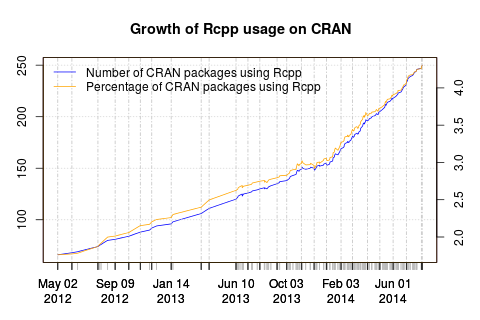
This post by Dirk Eddelbuettel originated on his Thinking inside the box blog. Please report excessive re-aggregation in third-party for-profit settings.
keyNew ("system/elektra/modules/line/exports/get",

KEY_FUNC, elektraLineGet, KEY_END),

keyNew ("system/elektra/modules/line/exports/set",

KEY_FUNC, elektraLineSet, KEY_END),
- infos = Information about LINE plugin is in keys below

- infos/author = Ian Donnelly <ian.s.donnelly@gmail.com>

- infos/licence = BSD

- infos/needs =

- infos/provides = storage

- infos/placements = getstorage setstorage

- infos/description = Very simple storage plug-in which stores each line from a file as a key
The rest of the README.md file should contain an English description of the plug-in. You can include an introduction to the plug-in, its purpose, any shortcomings it may have, and examples of how to use it. This README.md file is standard for GitHub which will automatically be displayed when a user is browsing your plug-in s directory in the repo. It is written in Markdown.
In order to generate the contract from this file you must edit the CMakeLists.txt file in your plug-in source directory to include the following lines:
generate_readme (plugin)

add_includes (elektra-full $ CMAKE_CURRENT_BINARY_DIR )

include_directories ($ CMAKE_CURRENT_BINARY_DIR )
static inline KeySet *elektraLineContract()


return ksNew (30,

keyNew ("system/elektra/modules/line",

KEY_VALUE, "line plugin waits for your orders", KEY_END),

keyNew ("system/elektra/modules/line/exports", KEY_END),

keyNew ("system/elektra/modules/line/exports/get",

KEY_FUNC, elektraLineGet, KEY_END),

keyNew ("system/elektra/modules/line/exports/set",

KEY_FUNC, elektraLineSet, KEY_END),

#include "readme_line.c"

keyNew ("system/elektra/modules/line/infos/version",

KEY_VALUE, PLUGINVERSION, KEY_END),

KS_END);
if (!strcmp (keyName(parentKey), "system/elektra/modules/line"))


KeySet *moduleConfig = elektraLineContract();

ksAppend(returned, moduleConfig);

ksDel(moduleConfig);

return 1;
#include "readme_line.c". This line, pulls in the contents of readme_line.c in my plug-in s build directory, which due to the lines we added in CMakeLists.txt will contain the contract as defined at the top of README.md. Any changes to the keys in README.md will be reflected in the plug-in next time it is built.
Part 2 of this tutorial focuses on the plug-in contract by explaining what each element does and explaining how to implement a contract. For more information about plug-ins and more detailed examples I highly suggest reading Markus Thesis for Elektra. Chapter 4, which starts on page 61 goes into much more detail on Plug-Ins and explains the various features of the contracts. Look for Part 3 soon!
 Oh man, I'm such a geek...
Being a single parent has required a considerable amount of self-discipline
on my behalf. I find I do best in an environment with routine to make sure
stuff gets done. One of the things I did to try and make sure stuff got done
was to form positive habits. To help and make this a bit more "fun", I
started using HabitRPG, an online
role-playing game based on habits.
I've only ever used it in a half-arsed manner, and as a result, I die a lot.
Often I'll do my dailies, but then forget to mark them off. Sometimes I just
fall off the habit wagon altogether. And die.
One of my dailies is to scoop my cat's litterboxes. For whatever reason, I
find this a tad onerous, and had found myself falling out of the habit of
doing it on a daily basis. My cat deserves better than this, so I wanted to
get back on the habit wagon, but make it a bit more "fun" as well.
I love NFC, I've
been a big NFC weenie for a long time. It's a solution looking for a
problem. I have a huge collection of NFC tags, and I've finally found a
problem I could use them with. I wanted to make it more frictionless to mark
a task as completed in HabitRPG. I didn't want to have to take out my phone,
unlock it, open the HabitRPG app and check off the daily task. I just wanted
to wave my phone at an NFC tag. Here's how I did it.
The inimitable Paul Fenwick, who first
inspired me to use HabitRPG, has a way more
complicated set up to achieve something similar. The Site Reliability
Engineer in me wanted the least number of moving parts and third-parties to
have to get from my phone to HabitRPG.
After some hunting around, I found this wiki
page on integrating Tasker
with HabitRPG's API, so based on that breadcrumb, I got hacking.
I'd not used Tasker before. I was already using AutomateIt
to do some other, reasonably dumb automation on my phone, though. Tasker is
a little bit obtuse, and it took me a couple of days of casual fiddling with
it to wrap my head around it's usage model. The fact that it can run
arbitrary JavaScript, and that NFC
Tools integrates with it is where the real awesome lies.
So based off the wiki, I crafted a couple of bits of JavaScript, one to mark
daily tasks as complete on HabitRPG, and one to query HabitRPG to see if
they have been marked as complete.
For the former, it was trivial, using NFC Tools, to write an NFC tag that
then runs the Tasker task to call the HabitRPG API to mark a daily task as
complete. That goal was now complete.
The equally satisfying part was also having Tasker do a time-based
conditional nag based on the state of the daily task in HabitRPG. So now if
it gets to 4:45pm and I haven't scooped the litterboxes, my phone literally
tells me I'd better go do it.
I've also done the same thing with putting the dishwasher on. I've stuck an
NFC tag on the dishwashing powder bottle lid, and I get a conditional
reminder before bed time. It used to be an unconditional reminder with
AutomateIt, and it was dumb, because I rarely forget to put the dishwasher
on. Now, I can use HabitRPG to keep state on it instead.
The hunk of JavaScript to update HabitRPG is very simple:
function mark_completed()
  var http = new XMLHttpRequest();
  http.open("POST", http_post_url, false);
  http.setRequestHeader("x-api-user", global('HabitrpgUserid'));
  http.setRequestHeader("x-api-key", global('HabitrpgApiToken'));
  http.send();
  return(http.responseText);

try
  var result = mark_completed();
  catch(e)
  var error = e.message;
All of the interesting stuff is defined in variables preceding the JavaScript in the task definition. Here's a screenshot of the Task in Tasker that tells a thousand words:
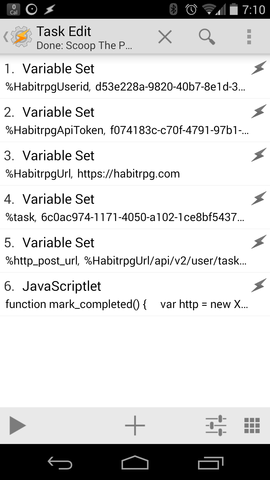 Similarly, to query HabitRPG, I'm using:
function query_task()
  var http = new XMLHttpRequest();
  http.open("GET",http_get_url,false);
  http.setRequestHeader("x-api-user", global('HabitrpgUserid'));
  http.setRequestHeader("x-api-key", global('HabitrpgApiToken'));
  http.send();
  var p = JSON.parse(http.responseText);
  return p['completed'];

try
  var task_completed = query_task();
  catch(e)
  var error = e.message;
It's only slightly trickier because you have to parse the JSON blob that
comes back.
Again, a screenshot.
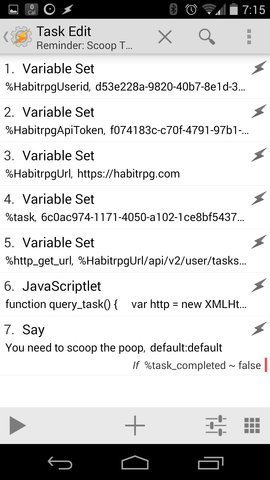 Now maybe I'll stop dying so much in HabitRPG, my cat will have the clean
toilet she deserves, and I'll stop getting reminded about putting the
dishwasher on when I already have. Better living through automation, that's
my motto.
 In the past I used to pay for an email->SMS gateway, which was used to alert me about some urgent things. That was nice because it was bi-directional, and at one point I could restart particular services via sending SMS messages.
These days I get it for free, and for my own reference here is how you get to receive free SMS alerts via Orange, which is my mobile phone company. If you don't use Orange/EE this will probably not help you.
The first step is to register an Orange email-account, which can be done here:
Once you've done that you'll have an email address of the form example@orange.net, which is kinda-sorta linked to your mobile number. You'll sign in and be shown something that looks like webmail from the early 90s.
The thing that makes this interesting is that you can look in the left-hand menu and see a link called "SMS Alerts". Visit it. That will let you do things like set the number of SMSs you wish to receive a month (I chose "1000"), and the hours during which delivery will be made (I chose "All the time").
Anyway if you go through this dance you'll end up with an email address example@orange.net, and when an email arrives at that destination an SMS will be sent to your phone.
The content of the SMS will be the subject of the mail, truncated if necessary, so you can send a hello message to yourself like this:
echo "nop" mail -s "Hello, urgent message is present" username@orange.netDelivery seems pretty reliable, and I've scheduled the mailbox to be purged every week, to avoid it getting full:
| Hostname | pop.orange.net |
| Username | Your mobile number |
| Password | Your password |
kdb merge command or by using the Elektra API. There is still work to be done with Merging and improving documentation (also look for some posts on this blog soon about the feature).
Additionally, thanks to Felix, we have technical previews for some new plug-ins. The new plug-ins are keytometa and ini. In short the keytometa plugin allows to convert normal keys to meta keys during the get operation and reverting this conversion during the set operation. The ini plugin is basically a rewrite of the simpleini plugin and makes use of the inih library.
Also there have been many improvements made to the glob plug-in. He even found some time to add a new script for bash tab completion which is located under scripts/kdb-bash-completion. To use it on debian just copy it to /etc/bash_completion.d/ and make sure it is executable.
Moreover, we fixed a lot of things with this newest release. Pino Toscano has been working on fixing up the Debian packages for Elektra but he has also fixed many other things along the way including fixing a lot of spelling errors, simplifying the RPATH setting, improvements to respecting $HOME and $TMPDIR, and improvements to some test cases. The kdb tool now does a better job of checking for subfolders that aren t allow and it now makes sure to output warnings before errors so errors can more easily be seen. We have also improved some tests for kdb tool and some plugins as well as fixed compiler warnings on clang and gcc 4.9. We also made some fixes to kdb import and export for some storage plugins and fixed some bugs so that kdb run_all now works flawlessly.
There have also been a few tweaks to the API for this release, specifically in the C++ bindings.
There is now a delMeta() function for C++. The reason for this is that contrary to the C API, calling
key.setMeta("metaname", NULL)
Key ( user/config/key/below ).isBelow (Key ( user/config )) == false

Key ( user/config/key/below ).isBelow (Key ( user/config/key/below/deeper )) == true
Key ( user/config/key/below ).isBelow (Key ( user/config )) == true

Key ( user/config/key/below ).isBelow (Key ( user/config/key/below/deeper )) == false
| Series: | Parasitology #1 |
| Publisher: | Orbit |
| Copyright: | October 2013 |
| ISBN: | 0-316-21893-6 |
| Format: | Kindle |
| Pages: | 504 |
 About torbrowser-launcher in all current Debian distros plus some thoughts and scripts for running it more securely
So, torbrowser-launcher 0.1.2-1 is now in sid (only that version has the script examples discussed below), and 0.1.1-2(~bpo70+1) are in jessie and wheezy-backports.
Originally Jacob Appelbaum packaged torbrowser-launcher, then Ulrike Uhlig stepped in and fixed some major bugs, I sponsored her uploads and somehow the idea emerged to team maintain the package, so pkg-anonymity-tools was founded. So far it's only used for having a mailing list which is used for the Maintainer: field of the torbrowser-launcher package. But we invite all maintainers of anonymity related packages to join the team! Currently there ain't even a Debian teams wiki page about it (it would be great if YOU could fix that!), so that will probably be the next thing that will happen. As for version control we intend to use the collab-maint project on alioth. So joining the team is not done by joining the alioth project (technically you can do this, but it's rather pointless), but rather by putting the pkg-anonymity-tools mailing list into the Maintainer: field of your package (and you and other people into the Uploaders: field) and subscribing to that very mailing list. Once more packages are maintained that way we'll need to see whether we'll need more mailing lists (eg one specific for commit notifications) or if we rely on client side filtering only or what else should be done.
The example scripts (available in /usr/share/doc/torbrowser-launcher/examples in the package from sid or in git) show how to run torbrowser-launcher, confined with AppArmor, in Xephyr (a virtual Xserver running on another Xserver) as another user. This, using AppArmor and Xephyr, shall have two effects:
torbrowser-launcher launcher scripts
====================================
These scripts are intended to run torbrowser-launcher (and thus torbrowser) as
another user in an Xephyr window server running inside your normal Xorg
session.
They assume the following packages are installed:
- torbrowser-launcher
- apparmor
- xserver-xephyr, awesome
- sudo, slay, psmisc
AppArmor should be enabled, but doesn't have to. I followed the HowTo from
https://wiki.debian.org/AppArmor, which can be summed up as just adding one
parameter to the kernel to enable it, followed by a reboot.
Using Apparmor has the advantage that the browser process cannot most of the
filesystem, eg saving downloads only works in ~/.torbrowser/tbb/x86_64/tor-browser_en-US/Desktop/
On wheezy, I'm using backports for torbrowser-launcher and apparmor.
The scripts assume they have been copied to /usr/local/bin/ and that there is
a user called "foo" (for running the actuall torbrowser(-launcher) process,
and that the current user has sudo rights for the following commands:
- sudo -i -u foo /usr/local/bin/tbb-l-wrapper
- sudo slay foo
There are two scripts, tbb-in-xephyr and tbb-l-wrapper. Only tbb-in-xephyr is
to be called directly and will result in torbrowser running in Xephyr.
Known problems:
---------------
- dbus is not started, so some input methods won't work. (Personally I don't
  want/need dbus though, so I'm awaiting a solution to
  https://trac.torproject.org/projects/tor/ticket/10014)
- not everybody likes awesome as the window manager being used ;)
Ideas, questions and ToDo:
--------------------------
- maybe all of this functionality could be integrated into.
  torbrowser-launcher itself, just writing this in shell was so easy.
- or for the time being, merge these two scripts into one, doing both,
  depending on how its called. Also make them run from everywhere.
- run this in an unprivileged LXC container, which is also apparmor confined.
- (when) does this double confinement make sense?
- use a more sensible named default user (instead of foo).
- there should really be an option, so torbrowser-launcher doesn't detach
  itself, so that this "while;ps fax grep" hack can go away.
- ship an usable sudoers.d example too.
- support for more users / instances
Feedback welcome, especially accompanied by patches!
 Linkig binaries.
Having come back to old boost code that I had,
Boost binaries seem to require -lboost_system linked in.
Hmm, wonder when that started happening.
../../scripts/copy-template line
 Yes, I've been bragging about the Operating Systems book all over... Today, a colleague handed me a phone call from somebody at Editorial Patria, a well known educational editorial in Mexico. They are looking for material similar to what I wrote, but need the material to be enfocado a competencias Focused on skills, a pedagogic fashion.
I was more than interested, of course. As it currently stands, I am very happy that our book is being used already at three universities in three countries (by the different authors) and have heard other people saying they would recommend it, and of course I'm interested in making our work have as big an impact as possible. Of course, we'd have to modify several aspects of the book to cater to the skills focus... But it would be great to have the book available at commercial bookstores. After all, university editions are never as widely circulated as commercial ones.
I had just one hard request to accept this: Our work must be distributed under a free licensing. Explicitly allow book photocopies and electronic distribution (didn't get into the "and modification" part, but I would eventually get there ;-) )
And... Of course, the negotiation immediately fell down. Editorials, this person says, live from selling individual books. She says she was turned down by another university professor and for another subject this same week.
So, yes, I took the opportunity to explain things as I (and the people that think as I do Fortunately, not so few) see them. Yes, of course, editorials have to make a living. But text books are often photocopied as it is. Who buys a book? Whoever needs it. On one hand, if somebody will be using a book throughout a semester and it's reasonably priced (say, up to 3 cost of photocopies), they will probably buy it because it just works better (it is more comfortable to use and nicer to read).
If a teacher likes the explanation for a particular topic, it should be completely legal for him to distribute photocopies (or digital copies) of the specific material And quite probably, among the students, more than one will end up appreciating the material enough to go look for the book in the library. And, as I have done throughout my life, if I read (in copies, electronically or in a library) a book I like... Quite probably I will go buy it.
So... Of course, she insisted it was against their corporate policy. I insisted on my explanation. I hope they meet many stubborn teachers refusing to distribute books under a non-free licensing. I hope I contributed to making a dent in an industry that must change. Yes, a very very small dent, but one that helps them break free from their obsolete mindset ;-)
(But yes, I don't know how long I will regret not being part of their very nice catalog of science and engineering books) ;-) )
$ ls -l /usr/bin/fping
-rwxr-xr-x 1 root root 31464 May  6 21:42 /usr/bin/fping
 Several years ago, I blogged about how to use a
Belgian electronic ID card with SSH. I never really used it myself, but
was interested in figuring out if it would still work.
The good news is that since then, you don't need to recompile OpenSSH
anymore to get PKCS#11 support; this is now compiled in by default.
The slightly bad news is that there will be some more typework. Rather
than entering
ssh-add -D 0 (to access the PKCS#11 certificate in slot
0), you should now enter something along the lines of ssh-add -s
/usr/lib/libbeidpkcs11.so.0. This will ask for your passphrase, but it
isn't necessary to enter the correct pin code at this point in time. The
first time you try to log on, you'll get a standard beid dialog box
where you should enter your pin code; this will then work. The next
time, you'll be logged on and you can access servers without having to
enter a pin code.
The worse news is that there seems to be a bug in ssh-agent, making it
impossible to unload a PKCS#11 library. Doing ssh-add -D will remove
your keys from the agent; the next time you try to add them again,
however, ssh-agent will simply report SSH_AGENT_FAILURE. I suspect the
dlopen()ed modules aren't being unloaded when the keys are
removed.
Unfortunately, the same (or at least, a similar) bug appears to occur
when one removes the card from the cardreader.
As such, I don't currently recommend trying to use this.
Update: fix command-line options to ssh-add invocation above.

<<ERROR 2014-07-10T23:52:46.948Z>> Unrecoverable exception. Cannot call method 'extend' of undefined
    at /home/vagrant/dev/xtuple/lib/backbone-x/source/model.js:37:39
    at Object.<anonymous> (/home/vagrant/dev/xtuple/lib/backbone-x/source/model.js:1364:3)
...do $$
/* Only create the schema if it hasn't been created already */
var res, sql = "select schema_name from information_schema.schemata where schema_name = 'sa'",
res = plv8.execute(sql);
if (!res.length)
sql = "create schema sa; grant all on schema sa to group xtrole;"
plv8.execute(sql);
$$ language plv8;select xt.create_table('usrlitesip', 'sa');
select xt.add_column('usrlitesip','usrlitesip_id', 'serial', 'primary key', 'sa');
select xt.add_column('usrlitesip','usrlitesip_usr_username', 'text', 'references xt.usrlite (usr_username)', 'sa');
select xt.add_column('usrlitesip','usrlitesip_uri', 'text', '', 'sa');
select xt.add_column('usrlitesip','usrlitesip_name', 'text', '', 'sa');
select xt.add_column('usrlitesip','usrlitesip_password', 'text', '', 'sa');
comment on table sa.usrlitesip is 'Joins User with SIP account';$ cd /path/to/xtuple-extensions/source/sip_account/database/source
$ psql -U admin -d dev -f create_sa_schema.sql
$ psql -U admin -d dev -f usrlitesip.sql$ psql -U admin -d dev -c "select * from sa.usrlitesip;"
  "name": "sip_account",
  "version": "1.4.1",
  "comment": "Sip Account extension",
  "loadOrder": 999,
  "dependencies": ["crm"],
  "databaseScripts": [
    "create_sa_schema.sql",
    "usrlitesip.sql",
    "register.sql"
  ]
$ cd /path/to/xtuple
$ ./scripts/build_app.js -d dev -e ../xtuple-extensions/source/sip_account
$ psql -U admin -d dev -c "select * from xt.ext;" 1 [
2
3 "context": "sip_account",
4 "nameSpace": "XM",
5 "type": "UserAccount",
6 "table": "sa.usrlitesip",
7 "isExtension": true,
8 "isChild": false,
9 "comment": "Extended by Sip",
10 "relations": [
11
12 "column": "usrlitesip_usr_username",
13 "inverse": "username"
14
15 ],
16 "properties": [
17
18 "name": "uri",
19 "attr":
20 "type": "String",
21 "column": "usrlitesip_uri",
22 "isNaturalKey": true
23
24 ,
25
26 "name": "displayName",
27 "attr":
28 "type": "String",
29 "column": "usrlitesip_name"
30
31 ,
32
33 "name": "sipPassword",
34 "attr":
35 "type": "String",
36 "column": "usrlitesip_password"
37
38
39 ],
40 "isSystem": true
41 ,
42
43 "context": "sip_account",
44 "nameSpace": "XM",
45 "type": "UserAccountRelation",
46 "table": "sa.usrlitesip",
47 "isExtension": true,
48 "isChild": false,
49 "comment": "Extended by Sip",
50 "relations": [
51
52 "column": "usrlitesip_usr_username",
53 "inverse": "username"
54
55 ],
56 "properties": [
57
58 "name": "uri",
59 "attr":
60 "type": "String",
61 "column": "usrlitesip_uri",
62 "isNaturalKey": true
63
64 ,
65
66 "name": "displayName",
67 "attr":
68 "type": "String",
69 "column": "usrlitesip_name"
70
71 ,
72
73 "name": "sipPassword",
74 "attr":
75 "type": "String",
76 "column": "usrlitesip_password"
77
78
79 ],
80 "isSystem": true
81
82 ]XT.extensions.sip_account.initWorkspace = function ()
var extensions = [
kind: "onyx.GroupboxHeader", container: "mainGroup", content: "_sipAccount".loc() ,
kind: "XV.InputWidget", container: "mainGroup", attr: "uri" ,
kind: "XV.InputWidget", container: "mainGroup", attr: "displayName" ,
kind: "XV.InputWidget", container: "mainGroup", type:"password", attr: "sipPassword"
];
XV.appendExtension("XV.UserAccountWorkspace", extensions);
;enyo.depends(
"workspace.js"
);enyo.depends(
"views"
);XT.extensions.icecream = ;enyo.depends(
"core.js",
"views"
);(function ()
"use strict";
var lang = XT.stringsFor("en_US",
"_sipAccount": "Sip Account",
"_uri": "Sip URI",
"_displayName": "Display Name",
"_sipPassword": "Password"
);
if (typeof exports !== 'undefined')
exports.language = lang;
());$ cd /path/to/xtuple
$ ./scripts/build_app.js -d dev -e ../xtuple-extensions/source/sip_account
$ node node-datasource/main.jsXT.extensions.sip_account.initParameterWidget = function ()
var extensions = [
kind: "onyx.GroupboxHeader", content: "_sipAccount".loc() ,
name: "uri", label: "_uri".loc(), attr: "uri", defaultKind: "XV.InputWidget" ,
name: "displayName", label: "_displayName".loc(), attr: "displayName", defaultKind: "XV.InputWidget"
];
XV.appendExtension("XV.UserAccountListParameters", extensions);
;enyo.depends(
"parameter.js"
);enyo.depends(
"core.js",
"widgets"
"views"
);1 var oldUserAccountListCreate = XV.UserAccountList.prototype.create;
2
3 XV.UserAccountList.prototype.create = function ()
4 oldUserAccountListCreate.apply(this, arguments);
5 this.createComponent(
6 kind: "XV.ListColumn", container: this.$.listItem, components: [
7 kind: "XV.ListAttr", attr: "uri"
8 ] )
9 ;XT.extensions.sip_account.initList = function ()
//Code here
;enyo.depends(
"list.js",
"workspace.js"
);Next.