Jamie McClelland: Trusted Mobile Device: How hard could it be?
I bought a new phone. After my experiences with signal and the helpful comments readers gave regarding the ability to run android and signal without Google Play using microg I thought I would give it a shot.
Since microg reports that signature spoofing is required and comes out-of-the-box with omnirom I thought I'd aim for installing omnirom's version of Android 6 (marshmallow) after years of using cyanomgenmod's version of Android.
The Nexus line of phones seemed well-supported by omnirom in particular (and the alternative ROM community in general) so I bought a Nexus 5x.
I carefully followed the directions for installing omnirom however when it came time to boot into omnirom, I just got the boot sequence animation over and over again.
Frustrated, I decided to go back to cyanogenmod and see if I could use one of the microg recommended methods for getting signature spoofing to work. The easiest seemed to be Needle by moosd but alas no such luck with Marshmallow. Someone else forked the code and might fix it one day. I then spent too much time trying to understand what xposed is before I gave up understanding it and just tried to install it (woops, looks like the installer page is out of date so instead I followed sketchy instructions from a forum thread). Well, to make a long story short it resulted in a boot loop.
So, I decided to return to omnirom. After reading some vague references to omnirom and supersu, I decided to flash both of them together and voila, it worked!
Next, I decided to enable full disk encryption. Not so fast. After clicking through the screens and hitting the final confirmation, my phone rebooted and spent the next 5 hours showing me the omnirom boot animation. Somehow, powering down and starting again resulted in a working machine, but no disk encryption.
After much web searching, guessing and trial and error, I fixed the problem by clicking on the SuperSU option to "Full unroot" the device (I pressed "no" when prompted to attempt to restore stock image). Then I rebooted and followed the directions to encrypt the device. And it worked! Hooray!
I had to reboot and re-flash the supersu to regain su privileges.
All was great.
The first root action I decided to take was to install the cryptfs program from f-droid because using the same password to decrypt your device as you use to unlock the screen seems either tedious or insecure.
That process didn't work so well. I got a message saying: use this command from a root shell before you reboot:
vdc cryptfs changepw <password>. I followed the advice, carefully typing in my 12 character password which includes numbers and letters.
Then, I happily did what I expected to be my last reboot when, to my horror, I was prompted to decrypt my disk with ... a numeric-only keypad.
That wasn't going to work. At this point I had already spent 5 days and about 8 hours on this project. Sigh. So, I started over.
Guess what? It only took me 25 minutes but, it seems that cryptfs is broken. Even with a numeric password it fails. Ok, I guess I need a long pin to unlock my phone. This time it only took my 15 minutes to wipe and re-install everything.
There are only two positive things I can think of:
- TWRP, which provides the recovery image, is really great. Everytime something went wrong I booted into the TWRP recovery image and could fix anything.
- I'm starting to get used to the error on startup warning me that "Your device is corrupt. It can't be trusted and may not work properly." It's a good thing to remember about all digital devices.
 Here is my monthly update covering what I have been doing in the free software world (
 With days beginning to shorten toward fall, my house is in initial power
saving mode. Particularly, the internet gateway is powered off overnight.
Still running electric lights until bedtime, and still using the inverter
and other power without much conservation during the day.
Indeed, I had two laptops running cpu-melting keysafe benchmarks for much
of today and one of them had to charge up from empty too. That's why the
house power is a little low, at 11.0 volts now, despite over 30 amp-hours
of power having been produced on this mostly clear day. (1 week average is
18.7 amp-hours)
September/October is the tricky time where it's easy to fall off a battery
depletion cliff and be stuck digging out for a long time. So time to start
dusting off the conservation habits after summer's excess.
With days beginning to shorten toward fall, my house is in initial power
saving mode. Particularly, the internet gateway is powered off overnight.
Still running electric lights until bedtime, and still using the inverter
and other power without much conservation during the day.
Indeed, I had two laptops running cpu-melting keysafe benchmarks for much
of today and one of them had to charge up from empty too. That's why the
house power is a little low, at 11.0 volts now, despite over 30 amp-hours
of power having been produced on this mostly clear day. (1 week average is
18.7 amp-hours)
September/October is the tricky time where it's easy to fall off a battery
depletion cliff and be stuck digging out for a long time. So time to start
dusting off the conservation habits after summer's excess.
 At this year's
  It's not often that an artist touches you deeply, but
  The documentation for the
  It has been a while that I have been contacted by a recruiter, and the last few ones were fairly decent conversations, where they made an effort to research me first, and even if they did not get everything right, they still listened, and we had a productive talk. But four days ago, I had another recruiter reach out to me, from a company I know oh so well: one I
 A maintenance release of the
  During this year s
  For those who couldn t attend the ESSLLI or the course, here are the course materials:
 I read this tweet a couple of weeks ago:
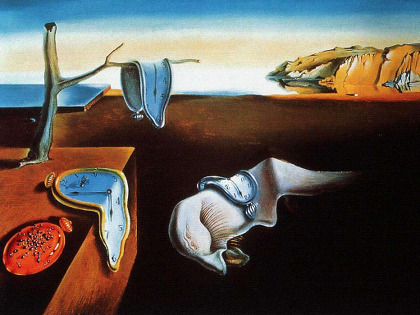 For centuries man has hunted, he brought the animals to pasture, cultivated fields and sailed the seas without any kind of tool to measure time. Back then, the time was not measured, but only estimated with vague approximation and its pace was enough to dictate the steps of the day and the life of man. Subsequently, for many centuries, hourglasses accompanied the civilization with the slow flow of their sand grains. About hourglasses, Ernst Junger writes in Das Sanduhrbuch 1954 (no English translation): This small mountain, formed by all the moments lost that fell on each other, it could be understood as a comforting sign that the time disappears but does not fade. It grows in depth .
For the philosophers of ancient Greece, the time was just a way to measure how things move in everyday life and in any case there was a clear distinction between quantitative time (Kronos) and qualitative time (Kair s). According to Parmenides, time is guise, because its existence
<
For centuries man has hunted, he brought the animals to pasture, cultivated fields and sailed the seas without any kind of tool to measure time. Back then, the time was not measured, but only estimated with vague approximation and its pace was enough to dictate the steps of the day and the life of man. Subsequently, for many centuries, hourglasses accompanied the civilization with the slow flow of their sand grains. About hourglasses, Ernst Junger writes in Das Sanduhrbuch 1954 (no English translation): This small mountain, formed by all the moments lost that fell on each other, it could be understood as a comforting sign that the time disappears but does not fade. It grows in depth .
For the philosophers of ancient Greece, the time was just a way to measure how things move in everyday life and in any case there was a clear distinction between quantitative time (Kronos) and qualitative time (Kair s). According to Parmenides, time is guise, because its existence
< After upgrading an Ubuntu 14.04 ("trusty") machine to the latest 16.04