There are several reasons why someone would want to build a custom kernel for their Android phone. In my case, this is because I wanted performance counters (those used by the
perf tool that comes with the kernel source). In
Julian Seward s case, he wanted swap support to overcome the limited memory amount on these devices in order to run valgrind. In both cases, the usual suspects (AOSP, CyanogenMod) don t provide the wanted features in prebuilt ROMs.
There are also several reasons why someone would NOT want to build a complete ROM for their Android phone. In my case, the Nexus S is what I use to work on Firefox Mobile, but it is also my actual mobile phone. It s a quite painful and long process to create a custom ROM, and another long (but arguably less painful thanks to ROM manager) process to backup the phone data, install the ROM, restore the phone data. And if you happen to like or use the proprietary Google Apps that don t come with the AOSP sources, you need to add more steps.
There are however tricks that allow to build a custom kernel for the Nexus S and use it with the system already on the phone. Please note that the following procedure has only been tested on two Nexus S with a 2.6.35.7-something kernel (one with a stock ROM, but unlocked, and another one with an AOSP build). Also please note that there are various ways to achieve many of the steps in this procedure, but I ll only mention one (or two in a few cases). Finally, please note some steps rely on your device being rooted. There may be ways to do without, but I m pretty sure it requires an unlocked device at the very least. This post doesn t cover neither rooting nor unlocking.
Preparing a build environment
To build an Android kernel, you need a cross-compiling toolchain. Theoretically, any will do, provided it targets ARM. I just used the one coming in the Android NDK:
$ wget http://dl.google.com/android/ndk/android-ndk-r6b-linux-x86.tar.bz2

$ tar -jxf android-ndk-r6b-linux-x86.tar.bz2

$ export ARCH=arm

$ export CROSS_COMPILE=$(pwd)/android-ndk-r6b/toolchains/arm-linux-androideabi-4.4.3/prebuilt/linux-x86/bin/arm-linux-androideabi-
For the latter, you need to use a directory path containing prefixed versions (such as
arm-eabi-gcc or
arm-linux-androideabi-gcc), and include the prefix, but not gcc .
You will also need the
adb tool coming from the Android SDK. You can install it this way:
$ wget http://dl.google.com/android/android-sdk_r12-linux_x86.tgz

$ tar -zxf android-sdk_r12-linux_x86.tgz

$ android-sdk-linux_x86/tools/android update sdk -u -t platform-tool

$ export PATH=$PATH:$(pwd)/android-sdk-linux_x86/platform-tools
Building the kernel
For the Nexus S, one needs to use the Samsung Android kernel tree, which happens to be unavailable at the moment of writing due to the kernel.org outage. Fortunately, there is a clone used for the
B2G project, which also happens to contain the necessary cherry-picked patch to add support for the PMU registers on the Nexus S CPU that are needed for the performance counters.
$ git clone -b devrom-2.6.35 https://github.com/cgjones/samsung-android-kernel

$ cd samsung-android-kernel
You can then either start from the default kernel configuration:
$ make herring_defconfig
or use the one from the B2G project, which enables interesting features such as oprofile:
$ wget -O .config https://raw.github.com/cgjones/B2G/master/config/kernel-nexuss4g
From then, you can use the
make menuconfig or similar commands to further configure your kernel.
One of the problems you d first encounter when booting such a custom kernel image is that the bcm4329 driver module that is shipped in the system partition (and not in the boot image) won t match the kernel, and won t be loaded. The unfortunate consequence is the lack of WiFi support.
One way to overcome this problem is to overwrite the kernel module in the system partition, but I didn t want to have to deal with switching modules when switching kernels.
There is however a trick allowing the existing module to be loaded by the kernel: compile a kernel with the same version string as the one already on the phone. Please note this only really works if the kernel is really about the same. If there are differences in the binary interface between the kernel and the modules, it will fail in possibly dangerous ways.
To use that trick, you first need to know what kernel version is running on your device.
Settings > About phone > Kernel version will give you that information on the device itself. You can also retrieve that information with the following command:
$ adb shell cat /proc/version
With my stock ROM, this looks like the following:
Linux version 2.6.35.7-ge382d80 (android-build@apa28.mtv.corp.google.com) (gcc version 4.4.3 (GCC) ) #1 PREEMPT Thu Mar 31 21:11:55 PDT 2011
In the
About phone information, it looks like:
2.6.35.7-ge382d80

android-build@apa28
The important part above is
-ge382d80, and that is what we will be using in our kernel build. Make sure the part preceding
-ge382d80 does match the output of the following command:
$ make kernelversion
The trick is to write that
-ge382d80 in a
.scmversion file in the kernel source tree (obviously, you need to replace
-ge382d80 with whatever your device has):
$ echo -ge382d80 > .scmversion
The kernel can now be built:
$ make -j$(($(grep -c processor /proc/cpuinfo) * 3 / 2))
The
-j part is the general rule I use when choosing the number of parallel processes
make can use at the same time. You can pick whatever suits you better.
Before going further, we need to get back to the main directory:
$ cd ..
Getting the current boot image
The Android boot image living in the device doesn t contain only a kernel. It also contains a ramdisk containing a few scripts and binaries, that starts the system initialization. As we will be using the ramdisk coming with the existing kernel, we need to get that ramdisk from the device flash memory:
$ adb shell cat /proc/mtd awk -F'[:"]' '$3 == "boot" print $1 '
The above command will print the mtd device name corresponding to the boot partition. On the Nexus S, this should be
mtd2.
$ adb shell

$ su

# dd if=/dev/mtd/mtd2 of=/sdcard/boot.img bs=4096

2048+0 records in

2048+0 records out

8388608 bytes transferred in x.xxx secs (xxxxxxxx bytes/sec)

# exit

$ exit
In the above command sequence, replace
mtd2 with whatever the previous command did output for you. Now, you can retrieve the boot image:
$ adb pull /sdcard/boot.img
Creating the new boot image
We first want to extract the ramdisk from that boot image. There are various tools to do so, but for convenience, I took
unbootimg, on github, and modified it slightly to seemlessly support the page size on the Nexus S. For convenience as well, we ll use
mkbootimg even if
fastboot is able to create boot images.
Building
unbootimg, as well as the other tools rely on the Android build system, but since I didn t want to go through setting it up, I figured a minimalistic way to build the tools:
$ git clone https://github.com/glandium/unbootimg.git

$ git clone git://git.linaro.org/android/platform/system/core.git
The latter is a clone of
git://android.git.kernel.org/platform/system/core.git, which is down at the moment.
$ gcc -o unbootimg/unbootimg unbootimg/unbootimg.c core/libmincrypt/sha.c -Icore/include -Icore/mkbootimg

$ gcc -o mkbootimg core/mkbootimg/mkbootimg.c core/libmincrypt/sha.c -Icore/include

$ gcc -o fastboot core/fastboot/ protocol,engine,bootimg,fastboot,usb_linux,util_linux .c core/libzipfile/ centraldir,zipfile .c -Icore/mkbootimg -Icore/include -lz
Once the tools are built, we can extract the various data from the boot image:
$ unbootimg/unbootimg boot.img

section sizes incorrect

kernel 1000 2b1b84

ramdisk 2b3000 22d55

second 2d6000 0

total 2d6000 800000

...but we can still continue
Don t worry about the error messages about incorrect section sizes if it tells you we can still continue . The
unbootimg program creates three files:
boot.img-mk, containing the mkbootimg options required to produce a working boot image,boot.img-kernel, containing the kernel image,boot.img-ramdisk.cpio.gz, containing the gzipped ramdisk, which we will reuse as-is.
All that is left to do is to generate the new boot image:
$ eval ./mkbootimg $(sed s,boot.img-kernel,samsung-android-kernel/arch/arm/boot/zImage, boot.img-mk)
Booting the image
There are two ways you can use the resulting boot image: one-time boot or flash. If you want to go for the latter, it is best to actually do both, starting with the one-time boot, to be sure you won t be leaving your phone useless (though recovery is there to the rescue, but is not covered here).
First, you need to get your device in the fastboot mode, a.k.a. boot-loader:
$ adb reboot bootloader
Alternatively, you can power it off, and power it back on while pressing the volume up button.
Once you see the boot-loader screen, you can test the boot image with a one-time boot:
$ ./fastboot boot boot.img

downloading 'boot.img'...

OKAY [  0.xxxs]

booting...

OKAY [  0.xxxs]

finished. total time: 0.xxxs
As a side note, if
fastboot sits waiting for device , it either means your device is not in fastboot mode (or is not connected), or that you have permissions issues on the corresponding USB device in /dev.
Your device should now be starting up, and eventually be usable under your brand new kernel (and WiFi should be working, too). Congratulations.
If you want to use that kernel permanently, you can now flash it after going back in the bootloader:
$ adb reboot bootloader

$ ./fastboot flash boot boot.img

sending 'boot' (2904 KB)...

OKAY [  0.xxxs]

writing 'boot'...

OKAY [  0.xxxs]

finished. total time: 0.xxxs

$ ./fastboot reboot
Voil .
 Hope a few of my readers got it from the title of this blog post.
And maybe many others didn't. So let's talk about "Stop Making Sense".
You're warned: nothing to do with free software...or running, this
time. This is all about music.
Music from the 80's.
"Stop Making Sense" is indeed, in my opinion, one of the best achieved
musical movie. It is simple: it features a gig by the Talking Heads,
back in 1983, when this band was among the most innovative ones that
ever appeared in the late 70's.
And I finally managed to take time to actually buy the DVD and see it
again as I didn't see it since 1985.
For many people, Talking Heads is the incredible person that's David
Byrne. That's certainly true for some parts (and this is what lead to
their split in 1991), but the movie really gives credit to all members
of the band, either the "regular" ones (Tina Weymouth, Chris Frantz,
Jerry Harrison) or the tour musicians (Bernie Worrell, Alex Weir,
Steven Scales, Lynn Mabry, Edna Holt).
The construction of the movie is simple: it just starts with Byrne
bringing a music box on an empty stage, with his acoustic guitar and
playing an incredible tense "Psycho Killer" (there are so many
different version of that mythical piece but this one is among the
best). Then Tina joins for a not-so-often played "Heaven" and brings
her so inimitable bass line (I count Tina among my very favourite bass
player, immediately after Tony Levin). At the end of the piece, the
crew quietly brings a full drum set, then Chris Frantz joins, smiling
as ever, and the rhythm increases with "Thank you for sending me an
angel".
Then Jerry Harrison joins, to make the original Heads line-up for a
really funky "Found a Job", where Jerry shows that he was THE Heads
lead guitar (and Tina is still keeping the foundations so strong).
Continuing the increasing tension, the rest of the musicians join for
Slippery People, then Burning Down the House ("Who's got a
match?"). All this culmminates in a crazy joggin on stage during "Life
During Wartime" and Byrne performing incredible and stellar movements
on stage. THis one surely makes the band entirely exhausted. How can
they survive this?
The few next songs are a little bit less stunning (oh, well, "Making
Flippy Floppy" still features a dream bass line)...until
a really special "Once in a Lifetime" that...has just to be seen (SAME
AS IT EVER WAS), then
a break
where....the Tom Tom Club (namely Chris, Tina and the rest of the
band) perform a giant "Genius of Love", so funky.
All this is indeed meant for Byrne to prepare for his top appearance,
in "Girlfriend is Better", in a giant suit, that makes his head over
his long neck yet more...strange. This leads to a crazy "Take me to
the River" which has always been the top of the Heads shows during the
80's and a tireless encore on "Crosseyed and Painless".
The movie ends up and you nearly never had a breath. So, yes, if you
think you enjoy the Heads music and have never seen that movie, just
try doing it once. That's how music was in the 80's..and, doh, these
folks were so good! By the way, all parts of the movie can be seen on
YouTube in case you just want to see what *I* enjoy.
Ah, and yes I share the love of the Heads with Danese "we never meet
often enough" Cooper, by the
way. We once made a promise ourselves to sing Psycho Killer in karaoke
if we're happy (and drunk) enough to meet again before we're too old for
this..:-).
Hope a few of my readers got it from the title of this blog post.
And maybe many others didn't. So let's talk about "Stop Making Sense".
You're warned: nothing to do with free software...or running, this
time. This is all about music.
Music from the 80's.
"Stop Making Sense" is indeed, in my opinion, one of the best achieved
musical movie. It is simple: it features a gig by the Talking Heads,
back in 1983, when this band was among the most innovative ones that
ever appeared in the late 70's.
And I finally managed to take time to actually buy the DVD and see it
again as I didn't see it since 1985.
For many people, Talking Heads is the incredible person that's David
Byrne. That's certainly true for some parts (and this is what lead to
their split in 1991), but the movie really gives credit to all members
of the band, either the "regular" ones (Tina Weymouth, Chris Frantz,
Jerry Harrison) or the tour musicians (Bernie Worrell, Alex Weir,
Steven Scales, Lynn Mabry, Edna Holt).
The construction of the movie is simple: it just starts with Byrne
bringing a music box on an empty stage, with his acoustic guitar and
playing an incredible tense "Psycho Killer" (there are so many
different version of that mythical piece but this one is among the
best). Then Tina joins for a not-so-often played "Heaven" and brings
her so inimitable bass line (I count Tina among my very favourite bass
player, immediately after Tony Levin). At the end of the piece, the
crew quietly brings a full drum set, then Chris Frantz joins, smiling
as ever, and the rhythm increases with "Thank you for sending me an
angel".
Then Jerry Harrison joins, to make the original Heads line-up for a
really funky "Found a Job", where Jerry shows that he was THE Heads
lead guitar (and Tina is still keeping the foundations so strong).
Continuing the increasing tension, the rest of the musicians join for
Slippery People, then Burning Down the House ("Who's got a
match?"). All this culmminates in a crazy joggin on stage during "Life
During Wartime" and Byrne performing incredible and stellar movements
on stage. THis one surely makes the band entirely exhausted. How can
they survive this?
The few next songs are a little bit less stunning (oh, well, "Making
Flippy Floppy" still features a dream bass line)...until
a really special "Once in a Lifetime" that...has just to be seen (SAME
AS IT EVER WAS), then
a break
where....the Tom Tom Club (namely Chris, Tina and the rest of the
band) perform a giant "Genius of Love", so funky.
All this is indeed meant for Byrne to prepare for his top appearance,
in "Girlfriend is Better", in a giant suit, that makes his head over
his long neck yet more...strange. This leads to a crazy "Take me to
the River" which has always been the top of the Heads shows during the
80's and a tireless encore on "Crosseyed and Painless".
The movie ends up and you nearly never had a breath. So, yes, if you
think you enjoy the Heads music and have never seen that movie, just
try doing it once. That's how music was in the 80's..and, doh, these
folks were so good! By the way, all parts of the movie can be seen on
YouTube in case you just want to see what *I* enjoy.
Ah, and yes I share the love of the Heads with Danese "we never meet
often enough" Cooper, by the
way. We once made a promise ourselves to sing Psycho Killer in karaoke
if we're happy (and drunk) enough to meet again before we're too old for
this..:-).
 Continuing on my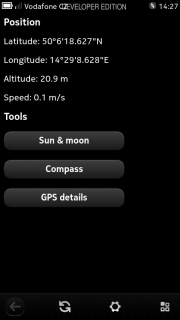
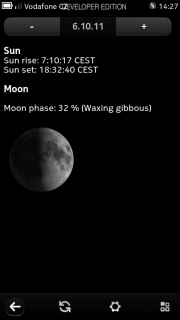
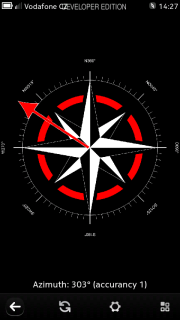
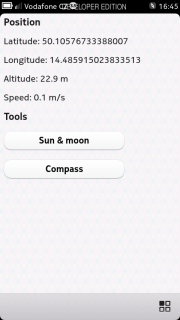
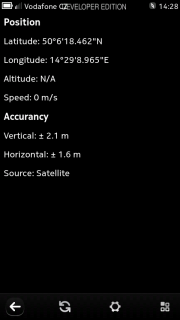 PS: Some numbers look weird (altitude and speed), though I'm pretty sure this is what phone reports me.
 Using
Using  Every once in a while I try out latest Debian/sid
  Fixing the Sandbrige MacBook Air display initialization
We left our hero with Debian installed on the MacBook Air, but with
the display getting scrambled as soon as the i915 driver loaded.
As was reported to Matthew, the problem is as simple as a lack of
the right mode for the eDP panel in the machine. This mode is supposed
to come from the panel EDID data, but for some reason the driver
wasn t able to query the EDID data, and so it decided to try some
random panel timings it dug out of the VBT tables, which are generally
supposed to be used by LVDS panels. Apple helpfully stuck valid data
there, but for some other panel one that is 1280x800 pixels instead
of the 1366x768 pixel panel in the MacBook Air.
I heard rumors that some machines would get a black screen when the
i915 driver loaded. I was fortunate my machine simply displayed a
1366x768 subset of the programmed 1280x800 mode. A bit of garbage on
the right side, and a few scanlines missing at the bottom. Quite
workable, especially after I ran fbset -yres 768 to keep the console
in the visible portion of the screen.
DDC failure
Looking through the kernel logs, the Intel driver tries to access the
EDID data and times out, as if DDC is just completely broken. This is
rather unexpected; the eDP spec says that the panel is required to
support DDC and provide EDID. Now, we ve seen a lot of panels which
don t quite live up to the rigorous eDP specifications, but it s a bit
surprising from Apple, who generally do VESA stuff pretty well.
We ve heard reports about panels reporting invalid EDID data, or EDID
data which didn t actually match the panel (causing us to prefer the
VBT data on LVDS machines). But I ve not heard of an eDP panel which
didn t have anything hanging off of the DDC channel.
But X works fine?
During early debugging, I happened to start X up. Much to my surprise,
X came up at the native 1366x768 mode. Digging through the kernel logs
after that, I discovered that EDID was successfully fetched from the
eDP panel while X started up.
At this point, I knew it was all downhill the EDID data was
present, it just wasn t getting picked up during the early part of the
driver initialization when the console mode is initialized.
eDP power management
The CPU is given complete control over the power management of the eDP
panel; sequencing through various power states and waiting appropriate
amounts of time when things change. Given the goal of keeping power
usage as low as possible, this makes a huge amount of sense.
The eDP spec is quite clear though, without power, the panel will not
respond to anything over the aux channel, and that includes EDID
data. The eDP panel power hardware in the Sandybridge chip has a special
mode for dealing with this requirement. If the panel is not displaying
data, you can supply power for the aux channel stuff by setting a
magic bit in the panel power registers.
When initializing the frame buffer, the kernel driver turns off the
panel completely so that it has all of the hardware in a known state
(yeah, this is not optimal, but that s another bug). When X started,
the panel was already running with the console mode.
Given the difference between these two states EDID querying with
the panel off failed, while EDID querying with the panel on worked, it
seemed pretty clear that the panel power wasn t getting managed
correctly. So, it seemed pretty clear that the magic power the panel
bit wasn t getting turned on at the right times.
Getting the power turned on.
I stuck a check inside all of the aux channel communication functions
to see where things were broken. This pointed out several places
missing the panel power calls. This wasn t quite sufficient to get
EDID data flowing. The remaining problem was that the code wasn t
waiting long enough after turning the panel power on before starting
the aux channel communication. A few msleep calls and huzzah! EDID at
boot time and the console had the right mode.
Making it faster
However, it turns out that the driver does this a lot, and the msleeps
required were fairly long the eDP panel wants a 500ms delay from
turning the panel power off before you can turn it back on.
I fix this by simply delaying the panel power off until things were
idle for a long time. Now mode setting goes zipping through, and a
few seconds later, the bit to force panel power on gets turned off.
Getting these bits for yourself
I ve pushed out the code to my (temporary) kernel repository
git://people.freedesktop.org/~keithp/linux
in the fix-edp-vdd-power branch. I d love to hear if you ve tried this
on either a MacBook Air or any other eDP machine from Ironlake onwards.
Fixing the Sandbrige MacBook Air display initialization
We left our hero with Debian installed on the MacBook Air, but with
the display getting scrambled as soon as the i915 driver loaded.
As was reported to Matthew, the problem is as simple as a lack of
the right mode for the eDP panel in the machine. This mode is supposed
to come from the panel EDID data, but for some reason the driver
wasn t able to query the EDID data, and so it decided to try some
random panel timings it dug out of the VBT tables, which are generally
supposed to be used by LVDS panels. Apple helpfully stuck valid data
there, but for some other panel one that is 1280x800 pixels instead
of the 1366x768 pixel panel in the MacBook Air.
I heard rumors that some machines would get a black screen when the
i915 driver loaded. I was fortunate my machine simply displayed a
1366x768 subset of the programmed 1280x800 mode. A bit of garbage on
the right side, and a few scanlines missing at the bottom. Quite
workable, especially after I ran fbset -yres 768 to keep the console
in the visible portion of the screen.
DDC failure
Looking through the kernel logs, the Intel driver tries to access the
EDID data and times out, as if DDC is just completely broken. This is
rather unexpected; the eDP spec says that the panel is required to
support DDC and provide EDID. Now, we ve seen a lot of panels which
don t quite live up to the rigorous eDP specifications, but it s a bit
surprising from Apple, who generally do VESA stuff pretty well.
We ve heard reports about panels reporting invalid EDID data, or EDID
data which didn t actually match the panel (causing us to prefer the
VBT data on LVDS machines). But I ve not heard of an eDP panel which
didn t have anything hanging off of the DDC channel.
But X works fine?
During early debugging, I happened to start X up. Much to my surprise,
X came up at the native 1366x768 mode. Digging through the kernel logs
after that, I discovered that EDID was successfully fetched from the
eDP panel while X started up.
At this point, I knew it was all downhill the EDID data was
present, it just wasn t getting picked up during the early part of the
driver initialization when the console mode is initialized.
eDP power management
The CPU is given complete control over the power management of the eDP
panel; sequencing through various power states and waiting appropriate
amounts of time when things change. Given the goal of keeping power
usage as low as possible, this makes a huge amount of sense.
The eDP spec is quite clear though, without power, the panel will not
respond to anything over the aux channel, and that includes EDID
data. The eDP panel power hardware in the Sandybridge chip has a special
mode for dealing with this requirement. If the panel is not displaying
data, you can supply power for the aux channel stuff by setting a
magic bit in the panel power registers.
When initializing the frame buffer, the kernel driver turns off the
panel completely so that it has all of the hardware in a known state
(yeah, this is not optimal, but that s another bug). When X started,
the panel was already running with the console mode.
Given the difference between these two states EDID querying with
the panel off failed, while EDID querying with the panel on worked, it
seemed pretty clear that the panel power wasn t getting managed
correctly. So, it seemed pretty clear that the magic power the panel
bit wasn t getting turned on at the right times.
Getting the power turned on.
I stuck a check inside all of the aux channel communication functions
to see where things were broken. This pointed out several places
missing the panel power calls. This wasn t quite sufficient to get
EDID data flowing. The remaining problem was that the code wasn t
waiting long enough after turning the panel power on before starting
the aux channel communication. A few msleep calls and huzzah! EDID at
boot time and the console had the right mode.
Making it faster
However, it turns out that the driver does this a lot, and the msleeps
required were fairly long the eDP panel wants a 500ms delay from
turning the panel power off before you can turn it back on.
I fix this by simply delaying the panel power off until things were
idle for a long time. Now mode setting goes zipping through, and a
few seconds later, the bit to force panel power on gets turned off.
Getting these bits for yourself
I ve pushed out the code to my (temporary) kernel repository
git://people.freedesktop.org/~keithp/linux
in the fix-edp-vdd-power branch. I d love to hear if you ve tried this
on either a MacBook Air or any other eDP machine from Ironlake onwards.

 It took me longer than expected!
 I ve been trying to get the perfect full-page background without using JavaScript since a while. I tried with CSS3 but, obviously for IE <9 was a pain in the ass, even for older Firefox' releases. So I decided to go with the plain-CSS option:

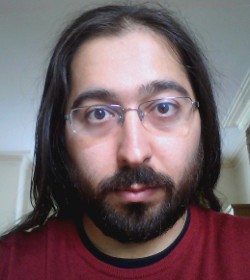 Even though Enrico is not smiling on this picture, he s one of the friendliest Debian person that I know. I always enjoy his presentations because he can t refrain from inserting jokes or other funny tricks.
  That said he s serious too, there s lots of good stuff that he has developed over the years (starting with Debtags) and he has put a lot of effort in reforming the New Maintainer process. Read on to learn more about his various projects.
Raphael: Who are you?
Enrico: Hi, I m Enrico Zini, a DD from Italy. I m 35 and I work as a freelance Free Software developer. One of my historical roles in Debian is taking care of Debtags, but that is not all I do: my paid work led me to write and maintain some weather forecast related software in Debian, and recently I gained a Front Desk hat, and then a DAM hat.
Raphael: How did you start contributing to Debian?
Enrico: It was 2001, I was at uni, I was using Debian. At some point I wanted to
learn packaging so I read through the whole Policy from top to bottom.
Then I thought: why package only for myself? . There were many DDs at
my uni, and it only seemed natural to me to join Debian as well.
Evidently this was also natural for Zack [Note from editor: Stefano Zacchiroli], who had become DD 6 months
earlier and didn t hesitate to advocate me.
I found the Policy and the Developer s Reference to be very interesting
things to read, and I welcomed my AM s questions as an excuse to learn
more. I completely understand those people who have fun trying to answer
all the questions in the NM templates while they wait for an AM.
With my super DAM powers I can see that my AM report was submitted on
October 16, 2001 by my AM Martin Michlmayr, and that James Troup created
my account 9 days later, on October 25.
Raphael: You have a special interest in the New Maintainer (NM) Process
since you are a Debian Account Manager (DAM) and a member of the NM Frontdesk.
Thanks to your work the process is much less academic/bureaucratic than it
used to be. Can you remember us the main changes?
Enrico: One of the first things I noticed when I become a Front Desk member is
that there was a tendency to advocate people too early, thinking by
the time they ll get an AM, they ll know enough .
Unfortunately, this didn t always work, and once the real NM process
started it would turn into a very long and demotivating experience both
for the applicant and for the AM. So we tried
That said he s serious too, there s lots of good stuff that he has developed over the years (starting with Debtags) and he has put a lot of effort in reforming the New Maintainer process. Read on to learn more about his various projects.
Raphael: Who are you?
Enrico: Hi, I m Enrico Zini, a DD from Italy. I m 35 and I work as a freelance Free Software developer. One of my historical roles in Debian is taking care of Debtags, but that is not all I do: my paid work led me to write and maintain some weather forecast related software in Debian, and recently I gained a Front Desk hat, and then a DAM hat.
Raphael: How did you start contributing to Debian?
Enrico: It was 2001, I was at uni, I was using Debian. At some point I wanted to
learn packaging so I read through the whole Policy from top to bottom.
Then I thought: why package only for myself? . There were many DDs at
my uni, and it only seemed natural to me to join Debian as well.
Evidently this was also natural for Zack [Note from editor: Stefano Zacchiroli], who had become DD 6 months
earlier and didn t hesitate to advocate me.
I found the Policy and the Developer s Reference to be very interesting
things to read, and I welcomed my AM s questions as an excuse to learn
more. I completely understand those people who have fun trying to answer
all the questions in the NM templates while they wait for an AM.
With my super DAM powers I can see that my AM report was submitted on
October 16, 2001 by my AM Martin Michlmayr, and that James Troup created
my account 9 days later, on October 25.
Raphael: You have a special interest in the New Maintainer (NM) Process
since you are a Debian Account Manager (DAM) and a member of the NM Frontdesk.
Thanks to your work the process is much less academic/bureaucratic than it
used to be. Can you remember us the main changes?
Enrico: One of the first things I noticed when I become a Front Desk member is
that there was a tendency to advocate people too early, thinking by
the time they ll get an AM, they ll know enough .
Unfortunately, this didn t always work, and once the real NM process
started it would turn into a very long and demotivating experience both
for the applicant and for the AM. So we tried  There was another question recently on StackOverflow that I had meant to
discuss in a follow-up post here. User deltanovember asked
There was another question recently on StackOverflow that I had meant to
discuss in a follow-up post here. User deltanovember asked
 I've said it before: I think MySQL is a toy, and I want as little to
do with it as possible.
Unfortunately, since the KDE PIM suite depends on akonadi, which
depends on a database, which was initially implemented against MySQL,
not having MySQL installed on a Debian machine if you want to use the
KDE PIM suite, for the longest time, wasn't even possible. Today it is,
but it requires some manual steps:
I've said it before: I think MySQL is a toy, and I want as little to
do with it as possible.
Unfortunately, since the KDE PIM suite depends on akonadi, which
depends on a database, which was initially implemented against MySQL,
not having MySQL installed on a Debian machine if you want to use the
KDE PIM suite, for the longest time, wasn't even possible. Today it is,
but it requires some manual steps:
 Dpkg work
When I came back from Debconf, I merged my implementation of
Dpkg work
When I came back from Debconf, I merged my implementation of