Search Results: "ina"

28 November 2016

Stefano Zacchiroli: last week to take part in the Debian Contributors Survey

Debian Contributors Survey 2016 About 3 weeks ago, together with Molly and Mathieu, we launched the first edition of the Debian Contributors Survey. I won't harp on it any further, because you can find all relevant information about it on the Debian blog or as part of the original announcement. But it's worth noting that you've now only one week left to participate if you want to: the deadline for participation is 4 December 2016, at 23:59 UTC. If you're a Debian contributor and would like to participate, just go to the survey participation page and fill in!

27 November 2016

Dirk Eddelbuettel: anytime 0.1.1: More robust

CRAN just accepted the newest release 0.1.1 of anytime, following the previous five releases since September. anytime is a very focussed package aiming to do just one thing really well: to convert anything in integer, numeric, character, factor, ordered, ... format to POSIXct (or Date) objects -- and to do so without requiring a format string. See the anytime page, or the GitHub README.md for a few examples, or just consider the following illustration:
R> library(anytime)
R> anytime("20161107 202122")   ## all digits
[1] "2016-11-07 20:21:22 CST"
R> utctime("2016Nov07 202122")  ## UTC parse example
[1] "2016-11-07 14:21:22 CST"
R> 
Release 0.1.1 robustifies two aspects. The 'digits only' input above extends what Boost Date_Time can parse and relies on simple-enough pre-processing. This operation is now more robust. We also ensure that input already of class Date is simply passed through by anydate() or utcdate(). Last but not least we added code coverage support, which oh-so-predictably lead us to game this metric to reach the elusive 100% coverage. The NEWS file summarises the release:

Changes in anytime version 0.1.1 (2016-11-27)
  • Both anydate() and utcdate() no longer attempt to convert an input value that is already of type Date.
  • The string splitter (needed for the 'all-digits' formats extending Boost Date_time) is now more defensive about the input argument and more robust. Thanks to Bob Jansen for the heads-up (PR #30 closing issue #29).
  • Code coverage reporting has been added (PR #31).

Courtesy of CRANberries, there is a comparison to the previous release. More information is on the anytime page. For questions or comments use the issue tracker off the GitHub repo.

This post by Dirk Eddelbuettel originated on his Thinking inside the box blog. Please report excessive re-aggregation in third-party for-profit settings.

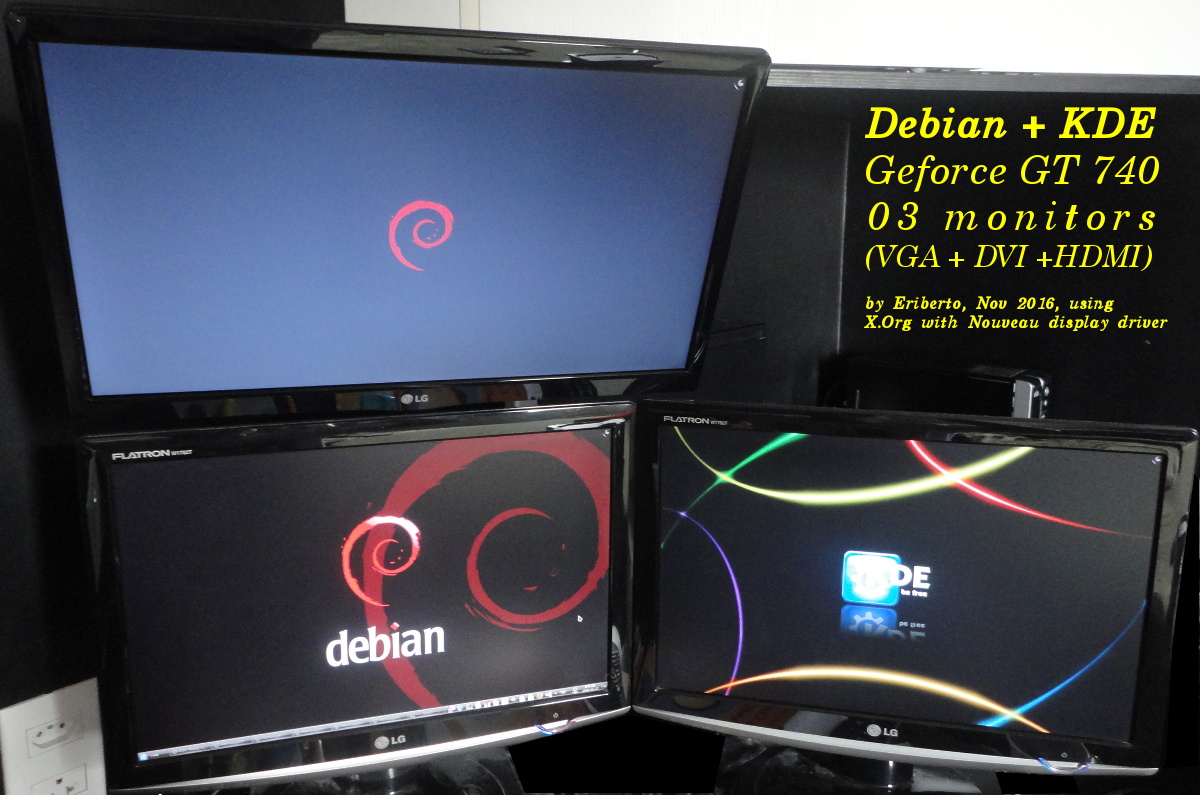
Eriberto Mota: Debian with three monitors under low cost graphics interface

Since 2008 I use two monitors in my desktop. Yesterday I bought a new graphics interface and a third monitor. Some time I was looking for a low cost graphics interface. Ok, I am using GeForce GT 740 which has three output ports: VGA, DVI and HDMI. In Brazil this interface card can be found around R$ 400 (US$ 117, but my card was US$ 87 in Brazilian Black Friday). In Amazon.com, it is between US$ 51 and US$ 109. The chosen manufacturer was Zotac, but all GT 740 and 750 will work fine (I tested the GT 750 too). The GeForce GT 740 was imediatelly recognised by Debian Jessie with kernel Linux 4.7.0 from Backports (it is my default, so I didn't test with original 3.16 kernel). The driver used was the default X.Org Nouveau. I use KDE and the management was easy. I hope this post can help people interested in use 3 monitors. Enjoy! 03-monitors

25 November 2016

Julian Andres Klode: Starting the faster, more secure APT 1.4 series

We just released the first beta of APT 1.4 to Debian unstable (beta here means that we don t know any other big stuff to add to it, but are still open to further extensions). This is the release series that will be released with Debian stretch, Ubuntu zesty, and possibly Ubuntu zesty+1 (if the Debian freeze takes a very long time, even zesty+2 is possible). It should reach the master archive in a few hours, and your mirrors shortly after that. Security changes APT 1.4 by default disables support for repositories signed with SHA1 keys. I announced back in January that it was my intention to do this during the summer for development releases, but I only remembered the Jan 1st deadline for stable releases supporting that (APT 1.2 and 1.3), so better late than never. Around January 1st, the same or a similar change will occur in the APT 1.2 and 1.3 series in Ubuntu 16.04 and 16.10 (subject to approval by Ubuntu s release team). This should mean that repository provides had about one year to fix their repositories, and more than 8 months since the release of 16.04. I believe that 8 months is a reasonable time frame to upgrade a repository signing key, and hope that providers who have not updated their repositories yet will do so as soon as possible. Performance work APT 1.4 provides a 10-20% performance increase in cache generation (and according to callgrind, we went from approx 6.8 billion to 5.3 billion instructions for my laptop s configuration, a reduction of more than 21%). The major improvements are: We switched the parsing of Deb822 files (such as Packages files) to my perfect hash function TrieHash. TrieHash which generates C code from a set of words is about equal or twice as fast as the previously used hash function (and two to three times faster than gperf), and we save an additional 50% of that time as we only have to hash once during parsing now, instead of during look up as well. APT 1.4 marks the first time TrieHash is used in any software. I hope that it will spread to dpkg and other software at a later point in time.vendors. Another important change was to drop normalization of Description-MD5 values, the fields mapping a description in a Packages files to a translated description. We used to parse the hex digits into a native binary stream, and then compared it back to hex digits for comparisons, which cost us about 5% of the run time performance. We also optimized one of our hash functions the VersionHash that hashes the important fields of a package to recognize packages with the same version, but different content to not normalize data to a temporary buffer anymore. This buffer has been the subject of some bugs (overflow, incompleteness) in the recent past, and also caused some slowdown due to the additional writes to the stack. Instead, we now pass the bytes we are interested in directly to our CRC code, one byte at a time. There were also some other micro-optimisations: For example, the hash tables in the cache used to be ordered by standard compare (alphabetical followed by shortest). It is now ordered by size first, meaning we can avoid data comparisons for strings of different lengths. We also got rid of a std::string that cannot use short string optimisation in a hot path of the code. Finally, we also converted our case-insensitive djb hashes to not use a normal tolower_ascii(), but introduced tolower_ascii_unsafe() which just sets the lowercase bit ( 0x20) in the character. Others For a more complete overview of all changes, consult the changelog.
Filed under: Debian, Ubuntu

Michael Stapelberg: Debian package build tools

Personally, I find the packaging tools which are available in Debian far too complex. To better understand the options we have, I created a diagram of tools which are frequently used, only covering the build step (i.e. no post-build quality assurance checks or packaging-time helpers): debian package build tools When I was first introduced to Debian packaging, people recommended I use pbuilder. Given how complex the toolchain is in the pbuilder case, I don t understand why that is (was?) a common recommendation. Back in August 2015, so well over a year ago, I switched to sbuild, motivated by how much simpler it was to implement ratt (rebuilds reverse build dependencies) using sbuild, and I have not looked back. Are there people who do not use sbuild for reasons other than familiarity? If so, please let me know, I d like to understand. I also made a version of the diagram above, colored by the programming languages in which the tools are implemented. The chosen colors are heavily biased :-). debian package build tools, by language To me, the diagram above means: if you want to make substantial changes to the Debian build tool infrastructure, you need to become an expert in all of Python, Perl, Bash, C and Make. I know that this is not true for every change, but it still irks me that there might be changes for which it is required. I propose to eliminate complexity in Debian by deprecating the pbuilder toolchain in favor of sbuild.

24 November 2016

Dirk Eddelbuettel: RcppExamples 0.1.8

A new version of the RcppExamples package is now on CRAN. The RcppExamples package provides a handful of short examples detailing by concrete working examples how to set up basic R data structures in C++. This version takes advantage of the updated date and datetime classes in Rcpp 0.12.8 (which are optional for now and being phased in while we deprecate the old ones). A NEWS extract follows:

Changes in RcppExamples version 0.1.8 (2016-11-24)
  • Updated DateExample to show vector addition available under Rcpp 0.12.8 when the (currently still phased in and optional) new Date(time) classes are used via the define in src/Makevars,.win; with fallback code for older versions
  • Other minor edits to DESCRIPTION and README.md

Courtesy of CRANberries, there is also a diffstat report for the most recent release.

This post by Dirk Eddelbuettel originated on his Thinking inside the box blog. Please report excessive re-aggregation in third-party for-profit settings.

23 November 2016

Joachim Breitner: microG on Jolla

I am a incorrigibly in picking non-mainstream, open smartphones, and then struggling hard. Back then in 2008, I tried to use the OpenMoko FreeRunner, but eventually gave up because of hardware glitches and reverted to my good old Siemens S35. It was not that I would not be willing to put up with inconveniences, but as soon as it makes live more difficult for the people I communicate with, it becomes hard to sustain. Two years ago I tried again, and got myself a Jolla phone, running Sailfish OS. Things are much nicer now: The hardware is mature, battery live is good, and the Android compatibility layer enables me to run many important apps that are hard to replace, especially the Deutsche Bahn Navigator and various messengers, namely Telegram, Facebook Messenger, Threema and GroupMe. Some apps that require Google Play Services, which provides a bunch of common tasks and usually comes with the Google Play store would not run on my phone, as Google Play is not supported on Sailfish OS. So far, the most annoying ones of that sort were Uber and Lyft, making me pay for expensive taxis when others would ride cheaper, but I can live with that. I tried to install Google Play Services from shady sources, but it would regularly crash.

Signal on Jolla Now in Philadelphia, people urged me to use the Signal messenger, and I was convinced by its support for good end-to-end crypto, while still supporting offline messages and allowing me to switch from my phone to my desktop and back during a conversation. The official Signal app uses Google Cloud Messaging (GCM, part of Google Play Services) to get push updates about new posts, and while I do not oppose this use of Google services (it really is just a ping without any metadata), this is a problem on Sailfish OS. Luckily, the Signal client is open source, and someone created a LibreSignal edition that replaced the use of GCM with websockets, and indeed, this worked on my phone, and I could communicate. Things were not ideal, though: I would often have to restart the app to get newly received messages; messages that I send via Signal Desktop would often not show up on the phone and, most severe, basically after every three messages, sending more messages from Desktop would stop working for my correspondents, which freaked them out. (Strangely it continued working from their phone app, so we coped for a while.) So again, my choice of non-standard devices causes inconveniences to others. This, and the fact that the original authors of Signal and the maintainers of LibreSignal got into a fight that ended LibreSignal discontinued, meant that I have to change something about this situation. I was almost ready to give in and get myself a Samsung S7 or something boring of the sort, but then I decided to tackle this issue once more, following some of the more obscure instructions out there, trying to get vanilla Signal working on my phone. About a day later, I got it, and this is how I did it.

microG So I need Google Play Services somehow, but installing the real thing did not seem to be very promising (I tried, and regularly got pop-ups telling me that Play Services has crashed.) But I found some references to a project called microG , which is an independent re-implementation of (some of) of the play services, in particular including GCM. Installing microG itself was easy, as you can add their repository to F-Droid. I installed the core services, the services framework and the fake store apps. If this had been all that was to do, things would be easy!

Play Store detection work arounds But Signal would still complain about the lack of Google Play Services. It asks Android if an app with a certain name is installed, and would refuse to work if this app does not exist. For some reason, the microG apps cannot just have the names of the real Google apps. There seem to be two ways of working around this: Patching Signal, or enabling Signature Spoofing. The initially most promising instructions (which are in a README in a tarball on a fishy file hoster linked from an answer on the Jolla support forum ) suggested patching Signal, and actually came both with a version of an app called Lucky Patcher as well as a patched Android package, but both about two years old. I tried a recent version of the Lucky Patcher, but it failed to patch the current version of Signal.

Signature Spoofing So on to Signature Spoofing. This is a feature of some non-standard Android builds that allow apps (such as microG) to fake the existence of other apps (the Play Store), and is recommended by the microG project. Sailfish OS s Android compatibility layer Alien Dalvik does not support it out of the box, but there is a tool tingle that adds this feature to existing Android systems. One just has to get the /system/framework/framework.jar file, put it into the input folder of this project, run python main.py, select 2, and copy the framework.jar from output/ back. Great.

Deodexing Alien Dalvik Only that it only works on deodexed files. I did not know anything about odexed Android Java classes (and did not really want to know), but there was not way around. Following this explanation I gathered that one finds files foo.odex in the Android system folder, runs some tool on them to create a classes.dex file, and adds that to the corresponding foo.jar or foo.apk file, copies this back to the phone and deletes the foo.odex file. The annoying this is that one does not only have to do it for framework.jar in order to please tingle, because if one does it to one odex file, one has to do to all! It seems that for people using Windows, the Universal Deodexer V5 seems to be a convenient tool, but I had to go more manually. So I first fetched smali , compiled it using ./gradlew build. Then I fetched the folders /opt/alien/system/framework and /opt/alien/system/app from the phone (e.g. using scp). Keep a backup of these in case something breaks. Then I ran these commands (disclaimer: I fetched these from my bash history and slightly cleaned them up. This is not a fire-and-forget script! Use it when you know what it and you are doing):
cd framework
for file in *.odex
do
  java -jar ~/build/smali/baksmali/build/libs/baksmali.jar deodex $file -o out
  java -jar ~/build/smali/smali/build/libs/smali.jar a out -o classes.dex
  zip -u $(basename $file .odex).jar classes.dex
  rm -rf out classes.dex $file
done
cd ..
cd app
for file in *.odex
do
  java -jar ~/build/smali/baksmali/build/libs/baksmali.jar deodex -d ../framework $file -o out
  java -jar ~/build/smali/smali/build/libs/smali.jar a out -o classes.dex
  zip -u $(basename $file .odex).apk classes.dex
  rm -rf out classes.dex $file
done
cd ..
The resulting framework.jar can now be patched with tingle:
mv framework/framework.jar ~/build/tingle/input
cd ~/build/tingle
./main.py
# select 2
cd -
mv ~/build/tingle/output/framework.jar framework/framework.jar
Now I copy these framework and app folders back on my phone, and restart Dalvik:
devel-su systemctl restart aliendalvik.service
It might start a bit slower than usually, but eventually, all the Android apps should work as before. The final bit that was missing in my case was that I had to reinstall Signal: If it is installed before microG is installed, it does not get permission to use GCM, and when it tries (while registering: After generating the keys) it just crashes. I copied /data/data/org.thoughtcrime.secretsms/ before removing Signal and moved it back after (with cp -a to preserve permissions) so that I could keep my history. And now, it seems, vanilla Signal is working just fine on my Jolla phone!

What s missing Am I completely happy with Signal? No! An important feature that it is lacking is a way to get out all data (message history including media files) in a file format that can be read without Signal; e.g. YAML files or clean HTML code. I do want to be able to re-read some of the more interesting conversations when I am 74 or 75, and I doubt that there will be a Signal App, or even Android, then. I hope that this becomes available in time, maybe in the Desktop version. I would also hope that pidgin gets support to the Signal protocol, so that I conveniently use one program for all my messaging needs on the desktop. Finally it would be nice if my Signal identity was less tied to one phone number. I have a German and a US phone number, and would want to be reachable under both on all my clients. (If you want to contact me on Signal, use my US phone number.)

Alternatives Could I have avoided this hassle by simply convincing people to use something other than Signal? Tricky, at the moment. Telegram (which works super reliable for me, and has a pidgin plugin) has dubious crypto and does not support crypto while using multiple clients. Threema has no desktop client that I know of. OTR on top of Jabber does not support offline messages. So nothing great seems to exist right now. In the long run, the best bet seems to be OMEMO (which is, in essence, the Signal protocol) on top of Jabber. It is currently supported by one Android Jabber client (Conversations) and one Desktop application (gajim, via a plugin). I should keep an eye on pidgin support for OMEMO and other development around this.

Tanguy Ortolo: Generate man pages for awscli

No man pages, but almost The AWS Command Line Interface, which is available in Debian, provides no man page. Instead, that tool has an integrated help system, which allows you to run commands such as aws rds help, that, for what I have seen, generates some reStructuredText, then converts it to a man page in troff format, then calls troff to convert it to text with basic formatting, and eventually passes it to a pager. Since this is close to what man does, the result looks like a degraded man page, with some features missing such as the adaptation to the terminal width. Well, this is better than nothing, and better than what many under-documented tools can offer, but for several reasons, it still sucks: most importantly, it does not respect administrators' habits and it does not integrate with the system man database. You it does not allow you to use commands such as apropos, and you will get no man page name auto-completion from your shell since there is no man page.Generate the man pages Now, since the integrated help system does generate a man page internally, we can hack it to output it, and save it to a file:
Description: Enable a mode to generate troff man pages
 The awscli help system internally uses man pages, but only to convert
 them to text and show them with the pager. This patch enables a mode
 that prints the troff code so the user can save the man page.
 .
 To use that mode, run the help commands with an environment variable
 OUTPUT set to 'troff', for instance:
     OUTPUT='troff' aws rds help
Forwarded: no
Author: Tanguy Ortolo <tanguy+debian@ortolo.eu>
Last-Update: 2016-11-22
Index: /usr/lib/python3/dist-packages/awscli/help.py
===================================================================
--- /usr/lib/python3/dist-packages/awscli/help.py       2016-11-21 12:14:22.236254730 +0100
+++ /usr/lib/python3/dist-packages/awscli/help.py       2016-11-21 12:14:22.236254730 +0100
@@ -49,6 +49,8 @@
     Return the appropriate HelpRenderer implementation for the
     current platform.
     """
+    if 'OUTPUT' in os.environ and os.environ['OUTPUT'] == 'troff':
+        return TroffHelpRenderer()
     if platform.system() == 'Windows':
         return WindowsHelpRenderer()
     else:
@@ -97,6 +99,15 @@
         return contents
+class TroffHelpRenderer(object):
+    """
+    Render help content as troff code.
+    """
+
+    def render(self, contents):
+        sys.stdout.buffer.write(publish_string(contents, writer=manpage.Writer()))
+
+
 class PosixHelpRenderer(PagingHelpRenderer):
     """
     Render help content on a Posix-like system.  This includes
This patch must be applied from the root directory with patch -p0, otherwise GNU patch will not accept to work on files with absolute names. With that patch, you can run help commands with an environment variable OUTPUT='troff' to get the man page to use it as you like, for instance:
% OUTPUT='troff' aws rds help > aws_rds.1
% man -lt aws_rds.1   lp
Generate all the man pages Now that we are able to generate the man page of any aws command, all we need to generate all of them is a list of all the available commands. This is not that easy, because the commands are somehow derived from functions provided by a Python library named botocore, which are derived from a bunch of configuration files, and some of them are added, removed or renamed. Anyway, I have been able to write a Python script that does that, but it includes a static list of these modifications:
#! /usr/bin/python3
import subprocess
import awscli.clidriver
def write_manpage(command):
    manpage = open('%s.1' % '_'.join(command), 'w')
    command.append('help')
    process = subprocess.Popen(command,
            env= 'OUTPUT': 'troff' ,
            stdout=manpage)
    process.wait()
    manpage.close()
driver = awscli.clidriver.CLIDriver()
command_table = driver._get_command_table()
renamed_commands = \
     
        'config': 'configservice',
        'codedeploy': 'deploy',
        's3': 's3api'
     
added_commands = \
     
        's3': ['cp', 'ls', 'mb', 'mv', 'presign', 'rb', 'rm', 'sync',
               'website']
     
removed_subcommands = \
     
        'ses': ['delete-verified-email-address',
                'list-verified-email-addresses',
                'verify-email-address'],
        'ec2': ['import-instance', 'import-volume'],
        'emr': ['run-job-flow', 'describe-job-flows',
                'add-job-flow-steps', 'terminate-job-flows',
                'list-bootstrap-actions', 'list-instance-groups',
                'set-termination-protection',
                'set-visible-to-all-users'],
        'rds': ['modify-option-group']
     
added_subcommands = \
     
        'rds': ['add-option-to-option-group',
                'remove-option-from-option-group']
     
# Build a dictionary of real commands, including renames, additions and
# removals.
real_commands =  
for command in command_table:
    subcommands = []
    subcommand_table = command_table[command]._get_command_table()
    for subcommand in subcommand_table:
        # Skip removed subcommands
        if command in removed_subcommands \
                and subcommand in removed_subcommands[command]:
            continue
        subcommands.append(subcommand)
    # Add added subcommands
    if command in added_subcommands:
        for subcommand in added_subcommands[command]:
            subcommands.append(subcommand)
    # Directly add non-renamed commands
    if command not in renamed_commands:
        real_commands[command] = subcommands
    # Add renamed commands
    else:
        real_commands[renamed_commands[command]] = subcommands
# Add added commands
for command in added_commands:
    real_commands[command] = added_commands[command]
# For each real command and subcommand, generate a manpage
write_manpage(['aws'])
for command in real_commands:
    write_manpage(['aws', command])
    for subcommand in real_commands[command]:
        write_manpage(['aws', command, subcommand])
                         'sync', 'website'] 
This script will generate more than 2,000 man page files in the current directory; you will then be able to move them to /usr/local/share/man/man1. Since this is a lot of man pages, it may be appropriate to concatenate them by major command, for instance all the aws rds together

21 November 2016

Mike Gabriel: Please Welcome D0n1elT to the FLOSS World

TL;DR; If you run a FLOSS development project and you notice D0n1elT appearing on your IRC channel, please give him a warm welcome. D0n1elT is a young man highy talented in various FLOSS related topics already. He probably needs some guidance at the beginning and I hope he won't be too shy to ask for it. But you can be sure: your channel has been joined by someone you should consider as a future resource. The Long Story During the last two weeks I had the great pleasure of supervising a fine young man (very young, still, indeed) in all sorts of IT topics. This young man turned out to be so skilled and interested in various FLOSS related areas, I really want to introduce him to all of you. The young man's real name is Daniel Teichmann. On IRC he may appear under his nick: D0n1elT. His GnuPG Fingerprint is: 6C6E 7F8F F7E8 B22E FC76 E9F7 8A79 028F DA56 7C6C. Daniel goes to a local school here in Nothern Germany, near where I live. He attends the 9th grade at his school, and as common for students of his age and grade, practical training was scheduled for the last two weeks. Daniel had originally applied for practical training at some other business near his place of living (which is quite far off from the school, actually). However, that company cancelled his training position two work days before the training was supposed to start. Daniel's teacher rang me up and asked for help. He advertised Daniel as someone who is far advanced in IT topics compared to his co-students. "He even writes his own programs (in Java and C++)." Spontaneously, Andreas Buchholz (CEO of LOGO EDV-Systeme GmbH) and I decided to accept Daniel as a trainee. Without having met him, with no application interview beforehand. The deal was: Daniel comes to Andreas business location in Kiel (40-50km away from Daniel's place of living) and I (working as freelancer for LOGO on a regular basis) do the supervising part. On day one and two, as a warm-up, Daniel installed a Debian Edu Main Server, worked himself through GOsa, LDAP, SSH, GnuPG, Jabber and IRC and configured two routers. All topics were new to him and I could hardly think of new tasks to give to him. As means of communication we set up a Jabber account, then an IRC account (as backup). However, it turned out that Daniel really got a hang of IRC over the next couple of days, so we used that as primary communication channel. Daniel had already programmed various projects in Java (whereas I have never touched Java, so far :-( ). He has written plugins for Minecraft servers. He knows well how to implement object oriented coding models. His coding style looks very good and clean (esp. for someone who has never head a nitpicking code reviewer). He started coding at the age of 9. Instead of diving into Java (where I would not have been of much help, anyway) I decided to provide him with some really basic and Unix-like knowledge: Bash scripting. I wanted to see how he handles another "language" and how he applies his Java knowledge to a lower level, syntactically weaker language. Guess what, he managed that assignment very well. Working on Impressive Display At Daniel's school we run substitute teacher info screens based on a fancy Bash script, named impressive-display, and the impressive PDF viewer. The Impressive Display tool is available in Debian testing/unstable under the same name. So over the next couple of days we worked on Impressive Display. Daniel contributed so many new code passages, conceptual ideas and security concerns, that I decided to make him co-copyright holder. Every change contributed by him received intensive testing before committing to Git. While working on Impressive Display, collaborating with Daniel via Git was a mere pleasure. In his spare time Daniel likes watching Github tutorials. Quite extraordinary. The result is a new major release of Impressive Display: Version 0.3.1 (bumped up from 0.2.3). We added the feature of handling info screen farms based on PXE boot images. It is now possible to configure as many different info screens as needed within the same PXE bootable chroot. Furthermore, Impressive Display now has a PDF presentation (written in LaTeX Beamer) that documents how to setup your own info screens. The PDF presentation is the default PDF that comes up when you start Impressive Display directly after installation. Investigating other Realms We also took a deeper look at remote desktop stuff, one of my most favourite topics. By that impulse Daniel set up his first Vserver machine at some hosting provider. He figured out how to run X2Go Server on that machine with an XFCE desktop. Next step was to run the irssi instance from his notebook inside a screen session on the Vserver. Some days later, Daniel PM'ed me: "I have an IRC bouncer now...". Quintessence It was a great pleasure meeting this young, highly curious and already highly skilled young man over the past two weeks. Daniel, it was an asset to me working with you. You are such a fast learner when it comes to getting accustomed to new working environments, it is amazing. I cannot deny having observed the tendency of preferring rather geeky tools. I was highly delighted, that What's-That and Facebook are nothing that rocks you so much. Unfortunately, all of the above makes you quite unique and non-mainstream among people of your age. My wish for you (and the FLOSS world) is that you start getting in touch with other (FLOSS) developers, maybe of your age, maybe older, and that you (if this is what you want) become an asset to the world of Free Software. The Free Software world can be a world where technical, political and spiritual work become one with friendship among people. Take care and farewell! I am sure, we will meet again. light+love Mike Gabriel (aka sunweaver on IRC and debian.org)

Gustavo Noronha Silva: A tale of cylinders and shadows

Like I wrote before, we at Collabora have been working on improving WebKitGTK+ performance for customer projects, such as Apertis. We took the opportunity brought by recent improvements to WebKitGTK+ and GTK+ itself to make the final leg of drawing contents to screen as efficient as possible. And then we went on investigating why so much CPU was still being used in some of our test cases. The first weird thing we noticed is performance was actually degraded on Wayland compared to running under X11. After some investigation we found a lot of time was being spent inside GTK+, painting the window s background. Here s the thing: the problem only showed under Wayland because in that case GTK+ is responsible for painting the window decorations, whereas in the X11 case the window manager does it. That means all of that expensive blurring and rendering of shadows fell on GTK+ s lap. During the web engines hackfest, a couple of months ago, I delved deeper into the problem and noticed, with Carlos Garcia s help, that it was even worse when HiDPI displays were thrown into the mix. The scaling made things unbearably slower. You might also be wondering why would painting of window decorations be such a problem, anyway? They should only be repainted when a window changes size or state anyway, which should be pretty rare, right? Right, that is one of the reasons why we had to make it fast, though: the resizing experience was pretty terrible. But we ll get back to that later. So I dug into that, made a few tries at understanding the issue and came up with a patch showing how applying the blur was being way too expensive. After a bit of discussion with our own Pekka Paalanen and Benjamin Otte we found the root cause: a fast path was not being hit by pixman due to the difference in scale factors on the shadow mask and the target surface. We made the shadow mask scale the same as the surface s and voil , sane performance. I keep talking about this being a performance problem, but how bad was it? In the following video you can see how huge the impact in performance of this problem was on my very recent laptop with a HiDPI display. The video starts with an Epiphany window running with a patched GTK+ showing a nice demo the WebKit folks cooked for CSS animations and 3D transforms. After a few seconds I quickly alt-tab to the version running with unpatched GTK+ I made the window the exact size and position of the other one, so that it is under the same conditions and the difference can be seen more easily. It is massive. Yes, all of that slow down was caused by repainting window shadows! OK, so that solved the problem for HiDPI displays, made resizing saner, great! But why is GTK+ repainting the window even if only the contents are changing, anyway? Well, that turned out to be an off-by-one bug in the code that checks whether the invalidated area includes part of the window decorations. If the area being changed spanned the whole window width, say, it would always cause the shadows to be repainted. By fixing that, we now avoid all of the shadow drawing code when we are running full-window animations such as the CSS poster circle or gtk3-demo s pixbufs demo. As you can see in the video below, the gtk3-demo running with the patched GTK+ (the one on the right) is using a lot less CPU and has smoother animation than the one running with the unpatched GTK+ (left). Pretty much all of the overhead caused by window decorations is gone in the patched version. It is still using quite a bit of CPU to animate those pixbufs, though, so some work still remains. Also, the overhead added to integrate cairo and GL rendering in GTK+ is pretty significant in the WebKitGTK+ CSS animation case. Hopefully that ll get much better from GTK+ 4 onwards.

20 November 2016

Steinar H. Gunderson: Nageru documentation

Even though the World Chess Championship takes up a lot of time these days, I've still found some time for Nageru, my live video mixer. But this time it doesn't come in form of code; rather, I've spent my time writing documentation. I spent some time fretting over what technical solution I wanted. I explicitly wanted end-user documentation, not developer documentation I rarely find HTML-rendered versions of every member function in a class the best way to understand a program anyway. Actually, on the contrary: Having all sorts of syntax interwoven in class comments tends to be more distracting than anything else. Eventually I settled on Sphinx, not because I found it fantastic (in particular, ReST is a pain with its bizarre variable punctuation-based syntax), but because I'm convinced it has all the momentum right now. Just like git did back in the day, the fact that the Linux kernel has chosen it means it will inevitably grow a quite large ecosystem, and I won't be ending up having to maintain it anytime soon. I tried finding a balance between spending time on installation/setup (only really useful for first-time users, and even then, only a subset of them), concept documentation (how to deal with live video in general, and how Nageru fits into a larger ecosystem of software and equipment) and more concrete documentation of all the various features and quirks of Nageru itself. Hopefully, most people will find at least something that's not already obvious to them, without drowning in detail. You can read the documentation at https://nageru.sesse.net/doc/, or if you want to send patches, the right place to patch is the git repository.

19 November 2016

Dirk Eddelbuettel: BH 1.62.0-1

The BH package on CRAN was updated to version 1.62.0. BH provides a large part of the Boost C++ libraries as a set of template headers for use by R, possibly with Rcpp as well as other packages. This release upgrades the version of Boost to the upstream version Boost 1.62.0, and adds three new libraries as shown in the brief summary of changes from the NEWS file which follows below. Special thanks to Kurt Hornik and Duncan Murdoch for help tracking down one abort() call which was seeping into R package builds, and then (re-)testing the proposed fix. We are now modifying one more file ever so slightly to use ::Rf_error(...) instead.

Changes in version 1.62.0-1 (2016-11-15)
  • Upgraded to Boost 1.62 installed directly from upstream source
  • Added Boost property_tree as requested in #29 by Aydin Demircioglu
  • Added Boost scope_exit as requested in #30 by Kirill Mueller
  • Added Boost atomic which we had informally added since 1.58.0

Courtesy of CRANberries, there is also a diffstat report for the most recent release. Comments and suggestions are welcome via the mailing list or the issue tracker at the GitHubGitHub repo.

This post by Dirk Eddelbuettel originated on his Thinking inside the box blog. Please report excessive re-aggregation in third-party for-profit settings.

Keith Packard: AltOS-Lisp-2

Updates to Altos Lisp I wrote a few days ago about a tiny lisp interpreter I wrote for AltOS Really, it's almost "done" now, I just wanted to make a few improvements Incremental Collection I was on a walk on Wednesday when I figured out that I didn't need to do a full collection every time; a partial collection that only scanned the upper portion of memory would often find plenty of free space to keep working for a while. To recap, the heap is in two pieces; the ROM piece and the RAM piece. The ROM piece is generated during the build process and never changes afterwards (hence the name), so the only piece which is collected is the RAM piece. Collection works like:
chunk_low = heap base
new_top = heap base
For all of the heap
    Find the first 64 live objects above chunk_low
    Compact them all to new_top
    Rewrite references in the whole heap for them
    Set new_top above the new locations
    Set chunk_low above the old locations
top = new_top
The trick is to realize that there's really no need to start at the bottom of the heap; you can start anywhere you like and compact stuff, possibly leaving holes below that location in the heap. As the heap tends to have long-lived objects slowly sift down to the beginning, it's useful to compact objects higher than that, skipping the compaction process for the more stable area in memory. Each time the whole heap is scanned, the top location is recorded. After that, incremental collects happen starting at that location, and when that doesn't produce enough free space, a full collect is done. The collector now runs a bunch faster on average now. Binary Searches I stuck some linear searches in a few places in the code, the first was in the collector when looking to see where an object had moved to. As there are 64 entries, the search is reduced from 32 to 6 compares on average. The second place was in the frame objects, which hold the list of atom/value bindings for each lexical scope (including the global scope). These aren't terribly large, but a binary search is still a fine plan. I wanted to write down here the basic pattern I'm using for binary searches these days, which avoids some of the boundary conditions I've managed to generate in the past:
int find (needle)  
    int l = 0;
    int r = count - 1;
    while (l <= r)  
        int m = (l + r) >> 1;
        if (haystack[m] < needle)
            l = m + 1;
        else
            r = m - 1;
     
    return l;
 
With this version, the caller can then check to see if there's an exact match, and if not, then the returned value is the location in the array where the value should be inserted. If the needle is known to not be in the haystack, and if the haystack is large enough to accept the new value:
void insert(needle)  
    int l = find(needle);
    memmove(&haystack[l+1],
        &haystack[l],
        (num - l) * sizeof (haystack[0]));
    haystack[l] = needle;
 
Similarly, if the caller just wants to know if the value is in the array:
bool exists(needle)  
    int l = find(needle);
    return (l < count && haystack[l] == needle);
 
Call with Current Continuation Because the execution stack is managed on the heap, it's completely trivial to provide the scheme-like call with current continuation, which constructs an object which can be 'called' to transfer control to a saved location:
> (+ "hello " (call/cc (lambda (return) (setq boo return) (return "foo "))) "world")
"hello foo world"
> (boo "bar ")
"hello bar world"
> (boo "yikes ")
"hello yikes world"
One thing I'd done previously is dump the entire state of the interpreter on any error, and that included a full stack trace. I adopted that code for printing of these continuation objects:
boo
[
    expr:   (call/cc (lambda (return) (set (quote boo) return) (return "foo ")))
    state:  val
    values: (call/cc
             [recurse...]
             )
    sexprs: ()
    frame:   
]
[
    expr:   (+ "hello " (call/cc (lambda (return) (set (quote boo) return) (return "foo "))) "world")
    state:  formal
    values: (+
             "hello "
             )
    sexprs: ((call/cc (lambda (return) (set (quote boo) return) (return "foo ")))
             "world"
             )
    frame:   
]
The top stack frame is about to return from the call/cc spot with a value; supply a value to 'boo' and that's where you start. The next frame is in the middle of computing formals for the + s-expression. It's found the + function, and the "hello " string and has yet to get the value from call/cc or the value of the "world" string. Once the call/cc "returns", that value will get moved to the values list and the sexpr list will move forward one spot to compute the "world" value. Implementing this whole mechanism took only a few dozen lines of code as the existing stack contexts were already a continuation in effect. The hardest piece was figuring out that I needed to copy the entire stack each time the continuation was created or executed as it is effectively destroyed in the process of evaluation. I haven't implemented dynamic-wind yet; when I did that for nickle, it was a bit of a pain threading execution through the unwind paths. Re-using Frames I decided to try and re-use frames (those objects which hold atom/value bindings for each lexical scope). It wasn't that hard; the only trick was to mark frames which have been referenced from elsewhere as not-for-reuse and then avoid sticking those in the re-use queue. This reduced allocations even further so that for simple looping or tail-calling code, the allocator may never end up being called. How Big Is It? I've managed to squeeze the interpreter and all of the rest of the AltOS system into 25kB of Cortex-M0 code. That leaves space for the 4kB boot loader and 3kB of flash to save/restore the 3kB heap across resets. Adding builtins to control timers and GPIOs would make this a reasonable software load for an Arduino; offering a rather different programming model for those with a taste for adventure. Modern ARM-based Arduino boards have plenty of flash and ram for this. It might be interesting to get this running on the Arduino Zero; there's no real reason to replace the OS either; porting the lisp interpreter into the bare Arduino environment wouldn't take long.

18 November 2016

Dirk Eddelbuettel: Rcpp 0.12.8: And more goodies

Yesterday the eighth update in the 0.12.* series of Rcpp made it to the CRAN network for GNU R where the Windows binary has by now been generated too; the Debian package is on its way as well. This 0.12.8 release follows the 0.12.0 release from late July, the 0.12.1 release in September, the 0.12.2 release in November, the 0.12.3 release in January, the 0.12.4 release in March, the 0.12.5 release in May, the 0.12.6 release in July, and the 0.12.7 release in September --- making it the twelveth release at the steady bi-montly release frequency. While we are keeping with the pattern, we have managed to include quite a lot of nice stuff in this release. None of it is a major feauture, though, and so we have not increased the middle number. Among the changes this release are (once again) much improved exception handling (thanks chiefly to Jim Hester), better large vector support (by Qiang), a number of Sugar extensions (mostly Nathan, Qiang and Dan) and beginnings of new DateVector and DatetimeVectors classes, and other changes detailed below. We plan to properly phase in the new date(time) classes. For now, you have to use a #define such as this one in Rcpp.h which remains commented-out for now. We plan to switch this on as the new default no earlier than twelve months from now. Rcpp has become the most popular way of enhancing GNU R with C or C++ code. As of today, 843 packages on CRAN depend on Rcpp for making analytical code go faster and further. That is up by eightyfour packages, or a full ten percent, just since the last release in early September! Again, we are lucky to have such a large group of contributors. Among them, we have invited Nathan Russell to the Rcpp Core team given his consistently excellent pull requests (as well as many outstanding Stackoverflow answers for Rcpp). More details on changes are below.

Changes in Rcpp version 0.12.8 (2016-11-16)
  • Changes in Rcpp API:
    • String and vector elements now use extended R_xlen_t indices (Qiang in PR #560)
    • Hashing functions now return unsigned int (Qiang in PR #561)
    • Added static methods eye(), ones(), and zeros() for select matrix types (Nathan Russell in PR #569)
    • The exception call stack is again correctly reported; print methods and tests added too (Jim Hester in PR #582 fixing #579)
    • Variatic macros no longer use a GNU extensions (Nathan in PR #575)
    • Hash index functions were standardized on returning unsigned integers (Also PR #575)
  • Changes in Rcpp Sugar:
    • Added new Sugar functions rowSums(), colSums(), rowMeans(), colMeans() (PR #551 by Nathan Russell fixing #549)
    • Range Sugar now used R_xlen_t type for start/end (PR #568 by Qiang Kou)
    • Defining RCPP_NO_SUGAR no longer breaks the build. (PR #585 by Daniel C. Dillon)
  • Changes in Rcpp unit tests
    • A test for expression vectors was corrected.
    • The constructor test for datetime vectors reflects the new classes which treats Inf correctly (and still as a non-finite value)
  • Changes in Rcpp Attributes
    • An 'empty' return was corrected (PR #589 fixing issue #588, and with thanks to Duncan Murdoch for the heads-up)
  • Updated Date and Datetime vector classes:
    • The DateVector and DatetimeVector classes were renamed with a prefix old; they are currently typedef'ed to the existing name (#557)
    • New variants newDateVector and newDatetimeVector were added based on NumericVector (also #557, #577, #581, #587)
    • By defining RCPP_NEW_DATE_DATETIME_VECTORS the new classes can activated. We intend to make the new classes the default no sooner than twelve months from this release.
    • The capabilities() function can also be used for presence of this feature

Thanks to CRANberries, you can also look at a diff to the previous release. As always, even fuller details are on the Rcpp Changelog page and the Rcpp page which also leads to the downloads page, the browseable doxygen docs and zip files of doxygen output for the standard formats. A local directory has source and documentation too. Questions, comments etc should go to the rcpp-devel mailing list off the R-Forge page.

This post by Dirk Eddelbuettel originated on his Thinking inside the box blog. Please report excessive re-aggregation in third-party for-profit settings.

17 November 2016

Reproducible builds folks: Reproducible Builds: week 81 in Stretch cycle

What happened in the Reproducible Builds effort between Sunday November 6 and Saturday November 12 2016: Media coverage Matthew Garrett blogged about Tor, TPMs and service integrity attestation and how reproducible builds are the base for systems integrity. The Linux Foundation announced renewed funding for us as part of the Core Infrastructure Initiative. Thank you! Outreachy updates Maria Glukhova has been accepted into the Outreachy winter internship and will work with us the Debian reproducible builds team. To quote her words
siamezzze: I've been accepted to #outreachy winter internship - going to
work with Debian reproducible builds team. So excited about that! <3
Debian
Toolchain development and fixes dpkg: debrebuild: Bugs filed Chris Lamb: Daniel Shahaf: Niko Tyni: Reiner Herrman: Reviews of unreproducible packages 136 package reviews have been added, 5 have been updated and 7 have been removed in this week, adding to our knowledge about identified issues. 3 issue types have been updated: Weekly QA work During of reproducibility testing, some FTBFS bugs have been detected and reported by: diffoscope development A new version of diffoscope 62~bpo8+1 was uploaded to jessie-backports by Mattia Rizzolo. Meanwhile in git, Ximin Luo greatly improved speed by fixing a O(n2) lookup which was causing diffs of large packages such as GCC and glibc to take many more hours than was necessary. When this commit is released, we should hopefully see full diffs for such packages again. Currently we have 197 source packages which - when built - diffoscope fails to analyse. buildinfo.debian.net development tests.reproducible-builds.org Debian: reproducible-builds.org website F-Droid was finally added to our list of partner projects. (This was an oversight and they had already been working with us for some time.) Misc. This week's edition was written by Ximin Luo and Holger Levsen and reviewed by a bunch of Reproducible Builds folks on IRC.

Gunnar Wolf: Book presentation by @arenitasoria: Hacker ethics, security and surveillance

At the beginning of this year, Irene Soria invited me to start a series of talks on the topic of hacker ethics, security and surveillance. I presented a talk titled Cryptography and identity: Not everything is anonymity. The talk itself is recorded and available in archive.org (sidenote: I find it amazing that Universidad del Claustro de Sor Juana uses archive.org as their main multimedia publishing platform!) But as part of this excercise, Irene invited me to write a chapter for a book covering the series. And, yes, she delivered! So, finally, we will have the book presentation: I know, not everybody following my posts (that means... Only those at or near Mexico City) will be able to join. But the good news: The book, as soon as it is presented, will be published under a CC BY-SA license. Of course, I will notify when it is ready.

Urvika Gola: Reaching out to Outreachy

The past few weeks have been a whirlwind of work with my application process for Outreachy taking my full attention. When I got to know about Outreachy, I was intrigued as well as dubious. I had many unanswered questions in my mind. Honestly, I had that fear of failure which prevented me from submitting my partially filled application form. I kept contemplating if the application was good enough , if my answers were perfect and had the right balance of du-uh and oh-ah!
In moments of doubt, it is important to surround yourself with people who believe in you more than you believe in yourself. I ve been fortunate enough to have two amazing people, my sister Anjali, who is an engineer at Intel and my friend, Pranav Jain who completed his GSoC 16 with Debian.
They believed in me when I sat staring at my application and encouraged me to click that final button. When I initially applied for Outreachy, I was given a task for building Lumicall and subsequent task was to examine a BASH script which solves the DNS-01 Challenge.
I deployed the DNS-01 challenge in Java and tested my solution against a server.
Within a limited time frame, I figured things out and wrote my solution in Java and then eagerly waited for the results to come out. Going through a full cycle of : lifecycle.JPG I was elated with joy when I got to know I ve been selected for Outreachy to work with Debian. I was excited about open source & found the idea of working on the project open source fun because of the numerous possibilities of contributing towards a voice video and chat communication software.
My project mentor, Daniel Pocock, played a pivotal role in the time after I had submitted my application. Like a true mentor, he replied to my queries promptly and guided me towards finding the solutions to problems on my own. He exemplified how to feel comfortable with developing on open source. I felt inspired and encouraged to move along in my work. Beyond him, The MiniDebConf was when I was finally introduced to the Debian community. It was an overwhelming experience and I felt proud to have come so far.. It was pretty cool to see JitsiMeet being used for this video call. I was also introduced to two of my mentors , Juliana Louback & Bruno Magalh es . I am very excited to learn from them.

I am glad I applied for Outreachy which helped me identify my strengths and I am totally excited to be working with Debian on the project and learn as much as I can throughout the period. I am not a blog person, this is my first blog ever! I would love to share my experience with you all in the hopes of inspiring someone else who is afraid of clicking that final button!

Uwe Kleine-K nig: Installing Debian Stretch on a Turris Omnia

Recently I got "my" Turris Omnia and it didn't take long to replace the original firmware with Debian. If you want to reproduce, here is what you have to do: Open the case of the Turris Omnia, connect the hacker pack (or an RS232-to-TTL adapter) to access the U-Boot prompt (see Turris Omnia: How to use the "Hacker pack"). Then download the installer and device tree:
# cd /srv/tftp
# wget https://d-i.debian.org/daily-images/armhf/daily/netboot/vmlinuz
# wget https://d-i.debian.org/daily-images/armhf/daily/netboot/initrd.gz
# wget https://www.kleine-koenig.org/tmp/armada-385-turris-omnia.dtb
(The latter is not included yet in Debian, but I'm working on that.) and after connecting the Turris Omnia's WAN to a dhcp managed network start it in U-Boot:
dhcp
setenv serverip 192.168.1.17
tftpboot 0x01000000 vmlinuz
tftpboot 0x02000000 armada-385-turris-omnia.dtb
tftpboot 0x03000000 initrd.gz
bootz 0x01000000 0x03000000:$filesize 0x02000000
With 192.168.1.17 being the IPv4 of the machine you have the tftp server running. I suggest to use btrfs as rootfs because that works well with U-Boot. Before finishing the installation put the dtb in the rootfs as /boot/dtb. To then boot into Debian do in U-Boot:
setenv mmcboot=btrload mmc 0 0x01000000 boot/vmlinuz\; btrload mmc 0 0x02000000 boot/dtb\; btrload mmc 0 0x03000000 boot/initrd.img\; bootz 0x01000000 0x03000000:$filesize 0x02000000
setenv bootargs console=ttyS0,115200 rootfstype=btrfs rootdelay=2 root=/dev/mmcblk0p1 rootflags=commit=5 rw
saveenv
boot
Known issues: If you have problems, don't hesitate to contact me. Also check the Debian Wiki for further details.

Mart n Ferrari: Replacing proprietary Play Services with MicroG

For over a year now, I have been using CyanogenMod in my Nexus phone. At first I just installed some bundle that brought all the proprietary Google applications and libraries, but later I decided that I wanted more control over it, so I did a clean install with no proprietary stuff. This was not so great at the beginning, because the base system lacks the geolocation helpers that allow you to get a position in seconds (using GSM antennas and Wifi APs). And so, every time I opened OsmAnd (a great maps application, free software and free maps), I would have to wait minutes for the GPS radio to locate enough satellites. Shortly after, I found about the UnifiedNLP project that provided a drop-in replacement for the location services, using pluggable location providers. This worked great, and you could choose to use the Apple or Mozilla on-line providers, or off-line databases that you could download or build yourself. This worked well for most of my needs, and I was happy about it. I also had F-droid for installing free software applications, DAVdroid for contacts and calendar synchronisation, K9 for reading email, etc. I still needed some proprietary apps, but most of the stuff in my phone was Free Software. But sadly, more and more application developers are buying into the vendor lock-in that is Google Play Services, which is a set of APIs that offer some useful functionality (including the location services), but that require non-free software that is not part of the AOSP (Android Open-Source Project). Mostly, this is because they make push notifications a requirement, or because they want you to be able to buy stuff from the application. This is not limited to proprietary software. Most notably, the Signal project refuses to work without these libraries, or even to distribute the pre-compiled binaries on any platform that is not Google Play! (This is one of many reason why I don't recommend Signal to anybody). And of course, many very useful services that people use every day require you to install proprietary applications, which care much less about your choices of non-standard platforms. For the most part, I had been able to just get the package files for these applications1 from somewhere, and have the functionality I wanted. Some apps would just work perfectly, others would complain about the lack of Play Services, but offer a degraded experience. You would not get notifications unless you re-opened the application, stuff like that. But they worked. Lately, some of the closed-source apps I sometimes use stopped working altogether. So, tired of all this, I decided to give the MicroG project a try.

MicroG MicroG is a direct descendant of UnifiedNLP and the NOGAPPS project. I had known about it for a while, but the installation procedures always put me off. LWN published an article about them recently, and so I decided to spend a good chunk of time making it work. This blog post is to help making this a bit less painful. Some prerequisites:
  • No Gapps installed.
  • Rooted phone (at least for the mechanism I describe here).
  • Working ADB with root access to the phone.
  • UnifiedNLP needs to be uninstalled (MicroG carries its own version of it).

Signature spoofing The main problem with the installation, is that MicroG needs to pretend to be the original Google bundle. It has to show the same name, but most importantly, it has to spoof its cryptographic signatures so other applications do not realise it is not the real thing. OmniROM and MarshROM (other alternative firmwares for Android) provide support for signature spoofing out of the box. If you are running these, go ahead and install MicroG, it will be very easy! Sadly, the CyanogenMod refused allowing signature spoofing, citing security concerns2, so most users will have to go the hard way. The options for enabling this feature are basically two: either patch some core libraries H4xx0r style, or use the "Xposed framework". Since I still don't really understand what this Xposed thing is, and it is one of these projects that distributes files on XDA forums, I decided to go the dirty way.

Patching the ROM Note: this method requires a rooted phone, java, and adb. The MicroG wiki links to three different projects for patching your ROM, but turns out that two of them would not work at all with CyanogenMod 11 and 13 (the two versions I tried), because the system is "odexed" (whatever that means, the Android ecosystem is really annoying). I actually upgraded CM to version 13 just to try this, so a couple of hours went there, with no results. The project that did work is Haystack by Lanchon, which seems to be the cleaner and better developed of the three. Also the one with the most complex documentation. In a nutshell, you need to download a bunch of files from the phone, apply a series of patches to it, and then reupload it. To obtain the files and place them in the maguro (the codename for my phone) directory:
$ ./pull-fileset maguro
Now you need to apply some patches with the patch-fileset script. The patches are located in the patches directory:
$ ls patches
sigspoof-core
sigspoof-hook-1.5-2.3
sigspoof-hook-4.0
sigspoof-hook-4.1-6.0
sigspoof-hook-7.0
sigspoof-ui-global-4.1-6.0
sigspoof-ui-global-7.0
The patch-fileset script takes these parameters:
patch-fileset <patch-dir> <api-level> <input-dir> [ <output-dir> ]
Note that this requires knowing your Android version, and the API level. If you don't specify an output directory, it will append the patch name to the input directory name. Note that you should also check the output of the script for any warnings or errors! First, you need to apply the patch that hooks into your specific version of Android (6.0, API level 23 in my case):
$ ./patch-fileset patches/sigspoof-hook-4.1-6.0 23 maguro
>>> target directory: maguro__sigspoof-hook-4.1-6.0
[...]
*** patch-fileset: success
Now, you need to add the core spoofing module:
$ ./patch-fileset patches/sigspoof-core 23 maguro__sigspoof-hook-4.1-6.0
>>> target directory: maguro__sigspoof-hook-4.1-6.0__sigspoof-core
[...]
*** patch-fileset: success
And finally, add the UI elements that let you enable or disable the signature spoofing:
$ ./patch-fileset patches/sigspoof-ui-global-4.1-6.0 23 maguro__sigspoof-hook-4.1-6.0__sigspoof-core
>>> target directory: maguro__sigspoof-hook-4.1-6.0__sigspoof-core__sigspoof-ui-global-4.1-6.0
[...]
*** patch-fileset: success
Now, you have a bundle ready to upload to your phone, and you do that with the push-fileset script:
$ ./push-fileset maguro__sigspoof-hook-4.1-6.0__sigspoof-core__sigspoof-ui-global-4.1-6.0
After this, reboot your phone, go to settings / developer settings, and at the end you should find a checkbx for "Allow signature spoofing" which you should now enable.

Installing MicroG Now that the difficult part is done, the rest of the installation is pretty easy. You can add the MicroG repository to F-Droid and install the rest of the modules from there. Check the installation guide for all the details. Once all the parts are in place, and after a last reboot, you should find a MicroG settings icon that will check that everything is working correctly, and give you the choice of which components to enable. So far, other applications believe this phone has nothing weird, I get quick GPS fixes, push notifications seem to work... Not bad at all for such a young project! Hope this is useful. I would love to hear your feedback in the comments!

  1. Which is a pretty horrible thing, having to download from fishy sites because Google refuses to let you use the marketplace without their proprietary application. I used to use a chrome extension to trick Google Play into believing your phone was downloading it, and so you could get the APK file, but now that I have no devices running stock Android, that does not work any more.
  2. Actually, I am still a bit concerned about this, because it is not completely clear to me how protected this is against malicious actors (I would love to get feedback on this!).
3 comments

16 November 2016

Shirish Agarwal: The long tail in a common s man journey to debconf16 2

This is an extension of part 1 which I shared few days ago. This would be a longish one so please bear. First of all somebody emailed me this link so in the future a layover at Doha Airport will be a bit expensive from before, approx INR 700/- added to the ticket costs Moving on, Let me share an experience I shared one of the last few days I had while I was in Cape Town
Singer singing some great oldies from 60's , 70's till 90's.

Singer singing some great oldies from 60 s , 70 s till 90 s.

I had booked a place near Long Street, Cape Town using Bernelle s help. What I had not known at that time that near Long Street there are free walking tours every couple of hours. I took part in all the tours and those were nice experiences. Where they start the walk, there was the gentleman pictured above. I was amazed by this gentleman s rich voice. He strummed lot of classics from the 60 s, 70 s till the 90 s . I had two coffees and thought I was at a premium rock concert. It was a bitter-sweet experience for me because I could see that he has such prodigious talent and still he had to struggle to survive to make ends meet. I did my 2 bit but wish I could have done something more. Side note Before I forget there is one trick of feh which I use to view images without it getting very high-resolution (especially on my low-end systems) [shirish@debian] - [/run/user/1000/gvfs/mtp:host=%5Busb%3A001%2C006%5D/Card/DCIM/Camera] - [4621]
[$] feh -g 1350x1000 .
This actually makes it far far easier to traverse through the 1000 odd photos of the trip that I have in my personal archive without doing any sort of conversion methodology. Btw, it took me time but finally was able to create an album at gallery.debconf.org . Haven t been able to upload photos as came across an error which I have shared at https://lists.debconf.org/lurker/message/20161113.215659.fce58823.en.html Moving on, here s the funny story/experience I wanted to share could have been arrested ;) What happened was this. This is from the Doha Airport. I had seen big buggies (ones similar to golf carts) which was ferrying people from end of the concourse to the other. I had been walking the whole day and even with the horizontal escalators and everything, it takes a toll. I was half-tired, half-sleepy and saw a buggy stationed. From behind it looked like the buggies I had seen. As there was no place to park my behind there, I entered into the buggy and sat there. Around 15-20 minutes later a Doha cop in another buggy came to me and asked me if something had happened ? I had no clue what he was talking about. He told/shared/asked me in friendly tone whether I had committed a crime or wanted to report a crime. When I replied in negative to both, he asked then why I was sitting there. I replied it was for stretching my legs and it was the buggy which was being used to transport people from A. to B. He gently told me I had entered into the wrong one and it was actually a cop buggy. I couldn t believe it. He did go his own way as he saw I was dead-tired. After 10-15 minutes, half-believingly I came out of the buggy and to my shock the gentleman was right. There was nothing to do but solder on to find a spot in this big airport. I shared this with few friends and family and managed to elicit few laughs hence sharing. The somewhat sad one was I had met a couple with a baby. Now as shared before, Most Airports including the Doha Airport is Air-Conditioned/Climate-Controlled and is probably in mid-20 s so it was more than cold for me. The couples with the baby were from Asian sub-continent. From their clothes and the way they were, they were not very well off. I do remember them sharing that they had a death in the family and hence were going. I didn t know at that point in time that there was something called bereavement fares and if they were able to take opportunity of those tickets. But this is besides the point . The issue was that their baby had been running a high-fever and the A/C was making matters worse. I had seen a pharmacy but no clinic in the airport. It was much later I came across http://dohahamadairport.com/airport-guide/facilities-services/medical-emergencies but as can be seen on the web-page it doesn t tell whether the services are chargeable or not. I assume it would be paid, although in some of the developed/industrialized countries it is rumoured not to be for simple ailments such as the baby was going through. Have no idea if that s true or not. I also don t know how it equates with travel insurance as well as most travel insurance is also supposed to help you in situations like these. I was concerned as it was a baby and babies as all know are very very fragile. If anybody has an idea or had similar experience would like to know specifically related to International Airport environment as it has transit issues unlike in domestic airports where I don t think it would be a bit more easy. Now coming to my own inadequacies/lack of foresight which I had mentioned I will share, I had asked/queried and got to lead a Debian-installation workshop on the Open Debian Day. I had done a few earlier and had installed it a few times on my system and for my friends, relatives and some clients. The only bad experiences I had were to do with UEFI but even those in the jessie releases had got resolved quite a bit, so was pretty confident. The day before the Installfest was to happen, Mensah Nyarko Yaa Dufie (one full name) of Ghana approached me to install Debian on her system. I had some older version of the Debian DVD either 8.1 or 8.3 and had known that 8.5 had been released just a few days back. Had seen pretty fast internet (as far as downloading Debian DVD) is concerned hence asked her to wait a bit while I downloaded the newest image. I sha256summed it to make sure that the image was bit-to-bit perfect. Now I hadn t bought a pen drive/disk from India as I was under the impression that in such conferences, pen drives should not be an issue. I had asked Bernelle privately before via e-mail as well and she had assured me that some pen-drives would be available. She gave me a handful of HP pen drives. The pen drives as we came know during our usage were somewhat flaky. It would pop out/lose connection even with the slightest nudge to the lappy. Somehow I was able to transfer the image to the usb disk. As people say hindsight is 50:50 maybe it was not such a smart move on my part to download the big DVD image and maybe I should have got the netinstall iso . Be careful, the link I have just shared is of the old version, if you have good web link and want to try the newest stable netinstall head to cdimage.debian.org . Apart from that goof-up I dunno (still) of anyway to know if a copy from an .iso image to usb was successful or not and did it do correctly I did the following command sudo dd if=/path_to/debian-dvd.iso of=/dev/usb-mount-point which is usually /dev/sdb on all of my systems . Her system was a brand new HP (don t remember the model details) which she had bought just a few weeks/months before debconf. We tried a few times but it failed at installing the boot-loader stage. I asked Ritesh Raj Saraff (a friend and DD) and while he had some ideas, none of them worked. Ritesh later pointed out Steve McIntyre and shared he is part of the Debian-Installer team. At that point in time, I had no clue who Steve McIntyre was otherwise I probably would not have approached him. He quickly acquiesced to my request and shared that he would be there for the workshop. With load of my mind little bit, I apologized to mensah and asked her to be at the workshop the following day. I had no clue what was wrong at this point in time, whether it was the iso image in the usb disk or a UEFI issue. This also wasn t good for my confidence but as somebody from the Debian-Installer team was there, I was somewhat relaxed. Next day, some more people came for the Installfest. While I had made 2-3 copies, clearly it was not enough as more people came. I was in a frenzy and asked Deven Bansod, Keerthana Krishnan, Prabaharan Jaminy (the whole GSOC and Outreachy attendees) to volunteer to help out in making more iso images on usb disks. I introduced mensah to Steve McIntyre and we tried 2-3 times to get debian installed on the system but it didn t move from the same place. Ritesh shared that dd had a memory leak and hence cat was a better way to do it. So we did

$ cat debian.iso > /dev/sdb
and soon other machines had debian sporting on their desktops. But mensa s lappy wouldn t get move from the boot-loader stage. Suddenly Steve had the bright idea (light bulb moment) that maybe the .iso is corrupted/usb disk is bad or something is incomplete. We started on another usb disk. Now this is where I have a query While I don t want to compare, in Ubuntu there was an image self-checking mechanism where probably behind the scenes (backend) the checksums published in a file are compared with checksums generated by apps. which are on the .iso image. While it does extend your time, the end result is you know if there is some issue on the decompressed image on the usb disk. AFAIK we don t have anything similar. The only two things I know is the wiki page and of course the various checksums of the image as shared at http://cdimage.debian.org/debian-cd/8.6.0/amd64/iso-cd/ or http://cdimage.debian.org/debian-cd/8.6.0/amd64/iso-dvd/ If anybody knows of any movement or a bug in the BTS which I can follow for the above issue please let me know. This time Steve was able to install it without any issues. I asked him whether he had to make some specific FAT/Ex-FAT/NTFS partitions as some new UEFI-based lappies need one or more but he replied in the negative. While mensa did get her debian install, the GUI didn t come while command-prompt was available. Then Steve added backports to the sources.list, got the new kernel, new Intel/Nvidia drivers (think it was one of those hybrid models IIRC) and she was able to boot into GNOME-Debian. I didn t saw any bug-reports about checksumming state of the applications before installation but did couple of reports about badblocks support and memory checking and from action on both bug-reports it is also need of the hour (although the earlier one has been marked as won t fix :(). In this whole thing, I liked/appreciated the way Steve handled things, I intuitively understood/knew that he wasn t just part of the Debian-installer team but someone better. I can t explain it but it was there. A little investigation in the evening and it turned out that he had been Debian Project Leader for two consecutive years (2008 and 2009) . In hindsight it probably was a good thing I didn t know that before otherwise I probably wouldn t have interacted with him and it would have been my loss. To have been the DPL and still being so humble while technically being so proficient, I was amazed and didn t know what to make of it. Here i.e. in India, if somebody wins even the mohalla elections (neighbourhood elections) the person carries a big chip on her/is shoulder not just till he is on the seat but even beyond, and here was an example of a previous DPL asking time from one of the developers in a video if it s possible in the next couple of days. Lastly,last week have able to report 2 bugs upstream. The first one is of youtube-dl . It s somewhat complicated hence will not go there atm. The second and more surprising one was from nano our esteemed text-editor- Hopefully the bug will be fixed once a new version comes.
Filed under: Miscellenous Tagged: #buggy, #cop, #Debconf16, #doha airport, #Installfest, #nano, #singer, #youtube-dl, travel

Next.

Previous.