Search Results: "will"

13 August 2016

David Moreno: Disable Nginx logging

This is something that is specified clearly on the Nginx manual, but it s nice to have it as a quick reference. The access_log and error_log directives on Nginx are on separate modules (HTTP Log and Core modules respectively) and they don t behave the same way when all you want is to disable all logging on your server (in our case, we serve a gazillion static files and perform a lot of reverse proxying and we re not interested on tracking that). It s a common misconception that you can set error_log to off, because that s how you disable access_log (if you do that, the server will still log to the file $nginx_path/off). Instead, you have to set error_log to log to the always mighty black hole /dev/null using the highest level for logging (which triggers the fewest events), crit:
http  
  server  
    # ...
    access_log off;
    error_log /dev/null crit;
    # ...
   
  #...
 
If you re the possessor of the blingest of bling-bling, you can disable all logging (not only for a server block), by putting error_log on the root of the configuration and access_log within your http block and make sure you don t override that on any of the inner blocks. And you re good to go.

12 August 2016

Markus Koschany: My Free Software Activities in July 2016

Welcome to gambaru.de. Here is my monthly report that covers what I have been doing for Debian. Debian Android Debian Games Debian Java Debian LTS This was my sixth month as a paid contributor and I have been paid to work 14,7 hours on Debian LTS. In that time I did the following: Misc and QA

11 August 2016

Matthew Garrett: Microsoft's compromised Secure Boot implementation

There's been a bunch of coverage of this attack on Microsoft's Secure Boot implementation, a lot of which has been somewhat confused or misleading. Here's my understanding of the situation.

Windows RT devices were shipped without the ability to disable Secure Boot. Secure Boot is the root of trust for Microsoft's User Mode Code Integrity (UMCI) feature, which is what restricts Windows RT devices to running applications signed by Microsoft. This restriction is somewhat inconvenient for developers, so Microsoft added support in the bootloader to disable UMCI. If you were a member of the appropriate developer program, you could give your device's unique ID to Microsoft and receive a signed blob that disabled image validation. The bootloader would execute a (Microsoft-signed) utility that verified that the blob was appropriately signed and matched the device in question, and would then insert it into an EFI Boot Services variable[1]. On reboot, the boot loader reads the blob from that variable and integrates that policy, telling later stages to disable code integrity validation.

The problem here is that the signed blob includes the entire policy, and so any policy change requires an entirely new signed blob. The Windows 10 Anniversary Update added a new feature to the boot loader, allowing it to load supplementary policies. These must also be signed, but aren't tied to a device id - the idea is that they'll be ignored unless a device-specific policy has also been loaded. This way you can get a single device-specific signed blob that allows you to set an arbitrary policy later by using a combination of supplementary policies.

This is all fine in the Anniversary Edition. Unfortunately older versions of the boot loader will happily load a supplementary policy as if it were a full policy, ignoring the fact that it doesn't include a device ID. The loaded policy replaces the built-in policy, so in the absence of a base policy a supplementary policy as simple as "Enable this feature" will effectively remove all other restrictions.

Unfortunately for Microsoft, such a supplementary policy leaked. Installing it as a base policy on pre-Anniversary Edition boot loaders will then allow you to disable all integrity verification, including in the boot loader. Which means you can ask the boot loader to chain to any other executable, in turn allowing you to boot a compromised copy of any operating system you want (not just Windows).

This does require you to be able to install the policy, though. The PoC released includes a signed copy of SecureBootDebug.efi for ARM, which is sufficient to install the policy on ARM systems. There doesn't (yet) appear to be a public equivalent for x86, which means it's not (yet) practical for arbitrary attackers to subvert the Secure Boot process on x86. I've been doing my testing on a setup where I've manually installed the policy, which isn't practical in an automated way.

How can this be prevented? Installing the policy requires the ability to run code in the firmware environment, and by default the boot loader will only load signed images. The number of signed applications that will copy the policy to the Boot Services variable is presumably limited, so if the Windows boot loader supported blacklisting second-stage bootloaders Microsoft could simply blacklist all policy installers that permit installation of a supplementary policy as a primary policy. If that's not possible, they'll have to blacklist of the vulnerable boot loaders themselves. That would mean all pre-Anniversary Edition install media would stop working, including recovery and deployment images. That's, well, a problem. Things are much easier if the first case is true.

Thankfully, if you're not running Windows this doesn't have to be a issue. There are two commonly used Microsoft Secure Boot keys. The first is the one used to sign all third party code, including drivers in option ROMs and non-Windows operating systems. The second is used purely to sign Windows. If you delete the second from your system, Windows boot loaders (including all the vulnerable ones) will be rejected by your firmware, but non-Windows operating systems will still work fine.

From what we know so far, this isn't an absolute disaster. The ARM policy installer requires user intervention, so if the x86 one is similar it'd be difficult to use this as an automated attack vector[2]. If Microsoft are able to blacklist the policy installers without blacklisting the boot loader, it's also going to be minimally annoying. But if it's possible to install a policy without triggering any boot loader blacklists, this could end up being embarrassing.

Even outside the immediate harm, this is an interesting vulnerability. Presumably when the older boot loaders were written, Microsoft policy was that they would never sign policy files that didn't include a device ID. That policy changed when support for supplemental policies was added. without this policy change, the older boot loaders could still be considered secure. Adding new features can break old assumptions, and your design needs to take that into account.

[1] EFI variables come in two main forms - those accessible at runtime (Runtime Services variables) and those only accessible in the early boot environment (Boot Services variables). Boot Services variables can only be accessed before ExitBootServices() is called, and in Secure Boot environments all code executing before this point is (theoretically) signed. This means that Boot Services variables are nominally tamper-resistant.

[2] Shim has explicit support for allowing a physically present machine owner to disable signature validation - this is basically equivalent

comment count unavailable comments

Petter Reinholdtsen: Coz can help you find bottlenecks in multi-threaded software - nice free software

This summer, I read a great article "coz: This Is the Profiler You're Looking For" in USENIX ;login: about how to profile multi-threaded programs. It presented a system for profiling software by running experiences in the running program, testing how run time performance is affected by "speeding up" parts of the code to various degrees compared to a normal run. It does this by slowing down parallel threads while the "faster up" code is running and measure how this affect processing time. The processing time is measured using probes inserted into the code, either using progress counters (COZ_PROGRESS) or as latency meters (COZ_BEGIN/COZ_END). It can also measure unmodified code by measuring complete the program runtime and running the program several times instead. The project and presentation was so inspiring that I would like to get the system into Debian. I created a WNPP request for it and contacted upstream to try to make the system ready for Debian by sending patches. The build process need to be changed a bit to avoid running 'git clone' to get dependencies, and to include the JavaScript web page used to visualize the collected profiling information included in the source package. But I expect that should work out fairly soon. The way the system work is fairly simple. To run an coz experiment on a binary with debug symbols available, start the program like this:
coz run --- program-to-run
This will create a text file profile.coz with the instrumentation information. To show what part of the code affect the performance most, use a web browser and either point it to http://plasma-umass.github.io/coz/ or use the copy from git (in the gh-pages branch). Check out this web site to have a look at several example profiling runs and get an idea what the end result from the profile runs look like. To make the profiling more useful you include <coz.h> and insert the COZ_PROGRESS or COZ_BEGIN and COZ_END at appropriate places in the code, rebuild and run the profiler. This allow coz to do more targeted experiments. A video published by ACM presenting the Coz profiler is available from Youtube. There is also a paper from the 25th Symposium on Operating Systems Principles available titled Coz: finding code that counts with causal profiling. The source code for Coz is available from github. It will only build with clang because it uses a C++ feature missing in GCC, but I've submitted a patch to solve it and hope it will be included in the upstream source soon. Please get in touch if you, like me, would like to see this piece of software in Debian. I would very much like some help with the packaging effort, as I lack the in depth knowledge on how to package C++ libraries.

10 August 2016

Tom Marble: webica

webica I've just pushed the first version of my new Clojure wrapper for Selenium called webica. The reason I need webica is that I want to do automated browser testing for ClojureScript based web applications. Certainly NodeJS, PhantomJS, Nashorn and the like are useful... but these can't quite emulate the full browser experience. We want to test our ClojureScript web apps in browsers -- ideally via our favorite automated continuous integration tools.

Selenium
My new approach with the webica library is to do full Java introspection in the spirit that amazonica does for the AWS API. In fact I wanted to take it a step further by actually generating Clojure source code via introspection that can be used by Codox to generate nice API docs (which you don't get with amazonica). That, alas, was a little trickier than expected due to pesky Quine-like problems :) . If you load the library on the REPL you can get a feeling for each namespace by calling the show-functions function. I realize this approach of aggressive introspection, playing fast and loose with types and application level dynamic dispatch are crazy antipatterns. In my defense I started out playing around to see "if I could do it". After seeing the result in the form of a shell script in Clojure -- imitating lmgtfy -- perhaps webica will actually be useful! I plan to talk about webica tonight at clojure.mn -- hope to see you there!

9 August 2016

John Goerzen: Easily Improving Linux Security with Two-Factor Authentication

2-Factor Authentication (2FA) is a simple way to help improve the security of your systems. It restricts the scope of damage if a machine is compromised. If, for instance, you have a security token or authenticator app on your phone that is required for ssh to a remote machine, then even if every laptop you use to connect to the remote is totally owned, an attacker cannot establish a new ssh session on their own. There are a lot of tutorials out there on the Internet that get you about halfway there, so here is some more detail. Background In this article, I will be focusing on authentication in the style of Google Authenticator, which is a special case of OATH HOTP or TOTP. You can use the Google Authenticator app, FreeOTP, or a hardware token like Yubikey to generate tokens with this. They are all 100% compatible with Google Authenticator and libpam-google-authenticator. The basic idea is that there is a pre-shared secret key. At each login, a different and unique token is required, which is generated based on the pre-shared secret key and some other information. With TOTP, the other information is the current time, implying that both machines must be reasably well in-sync time-wise. With HOTP, the other information is a count of the number of times the pre-shared key has been used. Both typically have a window on the server side that can let times within a certain number of seconds, or a certain number of login accesses, work. The beauty of this system is that after the initial setup, no Internet access is required on either end to validate the key (though TOTP requires both ends to be reasonably in sync time-wise). The basics: user account setup and ssh authentication You can start with the basics by reading one of these articles: one, two, three. Debian/Ubuntu users will find both the pam module and the user account setup binary in libpam-google-authenticator. For many, you can stop there. You re done. But if you want to kick it up a notch, read on: Enhancement 1: Requiring 2FA even when ssh public key auth is used Let s consider a scenario in which your system is completely compromised. Unless your ssh keys are also stored in something like a Yubikey Neo, they could wind up being compromised as well if someone can read your files and sniff your keyboard, your ssh private keys are at risk. So we can configure ssh and PAM so that a OTP token is required even for this scenario. First off, in /etc/ssh/sshd_config, we want to change or add these lines:
UsePAM yes
ChallengeResponseAuthentication yes
AuthenticationMethods publickey,keyboard-interactive
This forces all authentication to pass two verification methods in ssh: publickey and keyboard-interactive. All users will have to supply a public key and then also pass keyboard-interactive auth. Normally keyboard-interactive auth prompts for a password, but we can change /etc/pam.d/sshd on this. I added this line at the very top of /etc/pam.d/sshd:
auth [success=done new_authtok_reqd=done ignore=ignore default=bad] pam_google_authenticator.so
This basically makes Google Authenticator both necessary and sufficient for keyboard-interactive in ssh. That is, whenever the system wants to use keyboard-interactive, rather than prompt for a password, it instead prompts for a token. Note that any user that has not set up google-authenticator already will be completely unable to ssh into their account. Enhancement 1, variant 2: Allowing automated processes to root On many of my systems, I have ~root/.ssh/authorized_keys set up to permit certain systems to run locked-down commands for things like backups. These are automated commands, and the above configuration will break them because I m not going to be typing in codes at 3AM. If you are very restrictive about what you put in root s authorized_keys, you can exempt the root user from the 2FA requirement in ssh by adding this to sshd_config:
Match User root
  AuthenticationMethods publickey
This says that the only way to access the root account via ssh is to use the authorized_keys file, and no 2FA will be required in this scenario. Enhancement 1, variant 2: Allowing non-pubkey auth On some multiuser systems, some users may still want to use password auth rather than publickey auth. There are a few ways we can support that:
  1. Users without public keys will have to supply a OTP and a password, while users with public keys will have to supply public key, OTP, and a password
  2. Users without public keys will have to supply OTP or a password, while users with public keys will have to supply public key, OTP, or a password
  3. Users without public keys will have to supply OTP and a password, while users with public keys only need to supply the public key
The third option is covered in any number of third-party tutorials. To enable options 1 or 2, you ll need to put this in sshd_config:
AuthenticationMethods publickey,keyboard-interactive keyboard-interactive
This means that to authenticate, you need to pass either publickey and then keyboard-interactive auth, or just keyboard-interactive auth. Then in /etc/pam.d/sshd, you put this:
auth required pam_google_authenticator.so
As a sub-variant for option 1, you can add nullok to here to permit auth from people that do not have a Google Authenticator configuration. Or for option 2, change required to sufficient . You should not add nullok in combination with sufficient, because that could let people without a Google Authenticator config authenticate completely without a password at all. Enhancement 2: Configuring su A lot of other tutorials stop with ssh (and maybe gdm) but forget about the other ways we authenticate or change users on a system. su and sudo are the two most important ones. If your root password is compromised, you don t want anybody to be able to su to that account without having to supply a token. So you can set up google-authenticator for root. Then, edit /etc/pam.d/su and insert this line after the pam_rootok.so line:
auth       required     pam_google_authenticator.so nullok
The reason you put this after pam_rootok.so is because you want to be able to su from root to any account without having to input a token. We add nullok to the end of this, because you may want to su to accounts that don t have tokens. Just make sure to configure tokens for the root account first. Enhancement 3: Configuring sudo This one is similar to su, but a little different. This lets you, say, secure the root password for sudo. Normally, you might sudo from your user account to root (if so configured). You might have sudo configured to require you to enter in your own password (rather than root s), or to just permit you to do whatever you want as root without a password. Our first step, as always, is to configure PAM. What we do here depends on your desired behavior: do you want to require someone to supply both a password and a token, or just a token, or require a token? If you want to require a token, put this at the top of /etc/pam.d/sudo:
auth [success=done new_authtok_reqd=done ignore=ignore default=bad] pam_google_authenticator.so
If you want to require a token and a password, change the bracketed string to required , and if you want a token or a password, change it to sufficient . As before, if you want to permit people without a configured token to proceed, add nullok , but do not use that with sufficient or the bracketed example here. Now here comes the fun part. By default, if a user is required to supply a password to sudo, they are required to supply their own password. That does not help us here, because a user logged in to the system can read the ~/.google_authenticator file and easily then supply tokens for themselves. What you want to do is require them to supply root s password. Here s how I set that up in sudoers:
Defaults:jgoerzen rootpw
jgoerzen ALL=(ALL) ALL
So now, with the combination of this and the PAM configuration above, I can sudo to the root user without knowing its password but only if I can supply root s token. Pretty slick, eh? Further reading In addition to the basic tutorials referenced above, consider: Edit: additional comments Here are a few other things to try: First, the libpam-google-authenticator module supports putting the Google Authenticator files in different locations and having them owned by a certain user. You could use this to, for instance, lock down all secret keys to be readable only by the root user. This would prevent users from adding, changing, or removing their own auth tokens, but would also let you do things such as reusing your personal token for the root account without a problem. Also, the pam-oath module does much of the same things as the libpam-google-authenticator module, but without some of the help for setup. It uses a single monolithic root-owned password file for all accounts. There is an oathtool that can be used to generate authentication codes from the command line.

Reproducible builds folks: Finishing the final variations for reprotest

Author: ceridwen I've been working on getting the last of the variations working. With no responses on the mailing list from anyone outside Debian and with limited time remaining, with Lunar I've decided to deemphasize it.
  1. Build path is done.
  2. Host and domain name use domainname and hostname. This site is old, but it indicates that domainname was available on most OSes and hostname was available everywhere as of 2004. Prebuilder uses a Linux-specific utility (unshare --uts) to run this variation in a chroot, but I'm not doing this for reprotest: if you want this variation, use qemu.
  3. User/group will not be portable, because they'll rely on useradd/groupadd and su. useradd and groupadd work on many but not all OSes, notably not including FreeBSD or MacOS X. su was universal in 2004.
  4. Time is not done but will probably be portable to some systems, because it will rely on date -s. Unfortunately, I haven't been able to find any information on how common date -s is across Unix-like OSes, as the -s option is not part of the POSIX standard.
  5. At the moment, I have no idea how to implement changes for /bin/sh and the login shell that will even work across different distributions of Linux, much less different OSes. There are a couple of key problems, starting with the need to find two different shells to use, because there's no way to find out what shells are installed. This blog post explains why /etc/shells doesn't work well for finding what shells are available: not everything in /etc/shells is necessarily a shell (Ubuntu has /usr/bin/screen) and not all available shells are in /etc/shells. Also, there's no good way to find out what shell is the system default because /bin/sh can be an arbitrary binary, not a symlink,and no good way to identify what it is if it is a binary. I can hard-code shell choices, but which shells? bash is obvious for Linux, but what's the best second choice?
On other topics:
  1. reprotest fails to build properly on jessie: Lunar said, and I agree, that fixing this is not a priority. I need someone with more knowledge of Debian Python packaging to help me. If I'm going to support old versions, I also need some kind of CI server, because I don't have the time or ability to maintain old versions of Debian and Python myself.
  2. libc-bin: ldconfig segfaults when run using "setarch uname26": I don't have a good solution for this, but I don't want to hard-code and maintain an architecture-specific disable. Would changing the argument to setarch work around the segfault? Is there a way to test for the presence of the bug that won't cause a segfault or similar crash?
  3. Please put adt-virt-* binaries back onto PATH: reprotest is not affected by this change because I forked the autopkgtest code rather than depending on it, so that reprotest can be installed through PyPi. At the moment, reprotest doesn't make its versions of the programs in virt/ available on $PATH. This is primarily because of the problems with distributing command-line scripts with setuptools. The approach I'm currently using, including the virt/ programs as non-code data with include reprotest/virt/* in MANIFEST.in, doesn't install them to make them available for other programs. Using one of the other approaches potentially could, but it's difficult to make the imports work with those approaches. (I haven't found a way to do it.) I think the best solution to this approach is to split autopkgtest into the Debian-specific components and the general-purpose virtualization components, but I don't have the time to do this myself or to negotiate with Martin Pitt, if he'd even be receptive. I'm also unsure at this point if it wouldn't be better for reprotest to switch from autopkgtest to using something like Ansible to run the virtualization, because Ansible has some solved some of the portability problems already and is not tied to Debian.
My goal is to finish the variations (finally), though as this has always proved more difficult than I expected in the past, I don't make any guarantees. Beyond that, I want to start working on finishing docstrings in the reprotest-specific (i.e., not inherited from autopkgtest) code, improving the documentation in general, and improving the tests.

Reproducible builds folks: Reproducible builds: week 67 in Stretch cycle

What happened in the Reproducible Builds effort between Sunday July 31 and Saturday August 6 2016: Toolchain development and fixes Packages fixed and bugs filed The following 24 packages have become reproducible - in our current test setup - due to changes in their build-dependencies: alglib aspcud boomaga fcl flute haskell-hopenpgp indigo italc kst ktexteditor libgroove libjson-rpc-cpp libqes luminance-hdr openscenegraph palabos petri-foo pgagent sisl srm-ifce vera++ visp x42-plugins zbackup The following packages have become reproducible after being fixed: The following newly-uploaded packages appear to be reproducible now, for reasons we were not able to figure out. (Relevant changelogs did not mention reproducible builds.) Some uploads have addressed some reproducibility issues, but not all of them: Patches submitted that have not made their way to the archive yet: Package reviews and QA These are reviews of reproduciblity issues of Debian packages. 276 package reviews have been added, 172 have been updated and 44 have been removed in this week. 7 FTBFS bugs have been reported by Chris Lamb. Reproducibility tools Test infrastructure For testing the impact of allowing variations of the buildpath (which up until now we required to be identical for reproducible rebuilds), Reiner Herrmann contribed a patch which enabled build path variations on testing/i386. This is possible now since dpkg 1.18.10 enables the --fixdebugpath build flag feature by default, which should result in reproducible builds (for C code) even with varying paths. So far we haven't had many results due to disturbances in our build network in the last days, but it seems this would mean roughly between 5-15% additional unreproducible packages - compared to what we see now. We'll keep you updated on the numbers (and problems with compilers and common frameworks) as we find them. lynxis continued work to test LEDE and OpenWrt on two different hosts, to include date variation in the tests. Mattia and Holger worked on the (mass) deployment scripts, so that the - for space reasons - only jenkins.debian.net GIT clone resides in ~jenkins-adm/ and not anymore in Holger's homedir, so that soon Mattia (and possibly others!) will be able to fully maintain this setup, while Holger is doing siesta. Miscellaneous Chris, dkg, h01ger and Ximin attended a Core Infrastricture Initiative summit meeting in New York City, to discuss and promote this Reproducible Builds project. The CII was set up in the wake of the Heartbleed SSL vulnerability to support software projects that are critical to the functioning of the internet. This week's edition was written by Ximin Luo and Holger Levsen and reviewed by a bunch of Reproducible Builds folks on IRC.

Shirish Agarwal: Doha and the Supreme Court of DFSG Free

Hi, I am in two minds of what to write about Doha. My job has been vastly simplified by a friend when he shared with me https://www.youtube.com/watch?v=LdrAd-44LW0 . That video is more relevant and more closer to the truth than whatever I can share. As can be seen it is funny but more sad the way Qatarians are trying to figure out how things will be and as can be seen it seems to heading towards a real estate bubble . They would have to let go of the Sharia if they are thinking of wealthy westerners coming to stay put. I am just sad to know that many of my country-men are stuck there and although I hope the best for them, I dread it may turn out the way it has turned out for many people of Indians, and especially from Kerala in Saudi Arabia. I would touch about the Kerala situation probably in another blog post as this time is exclusively for legal aspects which were discussed in Debconf. A bit of backgrounder here, one part of my family is lawyers which means I have somewhat notion of law as practiced in our land. As probably everybody knows, India was ruled by the British for around 150 odd years. One of the things that they gave while leaving was/is the IPC (Indian Penal Code) and is practiced with the common law concept. The concept means precedence of any judgement goes quite some way in framing rulings and law of the land as time goes on besides the lobbying and the politics which happens in any democracy. Free software would not have been there without the GPL The General Public License. And the license is as much a legal document as it s something that the developers can work without becoming deranged, as it is one of the more simpler licenses to work with. My own understanding of the legal, ethical and moral issues around me were framed by two-three different TV shows, books (fiction and non-fiction alike) apart from what little news I heard in family. One was M*A*S*H* (with Alan Alda and his frailness, anarchism, humanism, civil rights), the Practise and Boston Legal which does lay bare the many grey areas that lawyers have to deal with ( The Practice also influenced a lot of civil rights understanding and First amendment, but as it is a TV show, how much of it is actually practiced for lawyers and how much moral dilemma they are can only be guessed at.) . In books it is artists like John Grisham, Michael Connelly as well as Perry Mason Agatha Christie. In non-fiction look at the treasures under bombayhighcourt e-books corner and series of Hamlyn Lectures. I would have to warn that all of the above are major time-sinks but rewarding in their own way. Also haven t read all of them as time and interests are constrained but do know they are good for understanding bit of our history. I do crave for a meetup kind of scenario when non-lawyers can read and discuss about facets of law . All that understanding was vastly amplified by Groklaw.net which made non-lawyers at the very least be able to decipher and understand what is going on in the free software world. After PJ (Pamela Jones) closed it in 2013 due to total surveillance by the Free World (i.e. the United States of America, NSA) we have been thirsty. We do get occasionally somewhat mildly interesting articles in lwn.net or arstechnica.net but nowhere the sheer brilliance of groklaw. So, it was a sheer stroke of luck that I met Mr. Bradley M. Kuhn who works with Karen Sandler on Software Conservancy. While I wanted to be there for his presentation, it was just one of those days which doesn t go as planned. However, as we met socially and over e-mail there were two basic questions which I asked him which also imbibes why we need to fight for software freedom in the court of law. Below is a re-wording of what he shared . Q1. why do people think that GPL still needs to be challenged in the court of law while there are gpl-violations which has been more or less successfully defended in the court of law ? Bradley Kuhn the GPL violations is basically a violation of one or more clauses of the GPL license and not the GPL license as a whole and my effort during my lifetime would be to make/have such precedents that the GPL is held as a valid license in the court of law. Q2. Let s say IF GPL is held to be valid in the court of law, would FSF benefit monetarily, at least to my mind it might be so, as more people and comapnies could be convinced to use strong copyleft licenses such as GPLv3 or AGPLv3 . Bradley Kuhn It may or may not. It is possible that even after winning, that people and especially companies may go for weak copyleft licenses if it suits them. The only benefit would probably would be to those people who are already using GPLv3 as the law could be used to protect them as well. Although we would want and welcome companies who would use strong copyleft license such as the GPL, the future is in future and hence uncertain. Both possibilities co-exist. While Bradley didn t say it, I would add further here it probably would mean also moving from being a more offensive mode (which GPL-violations is based upon where a violation occurs and somebody either from the victim s side or a by-stander notices the violation, brings it to the notice of the victim and the GPL-volations team.) to perhaps it being defended by the DMCA people themselves, once GPL is held as a valid license in the eyes of law. Although should you use the DMCA or not is a matter of choice, personal belief system as well as your legal recourses. I have to share that the FSF and the GPL-violations team are probably very discerning when they take up the fight as most of the work done by them is pro-bono (i.e. they don t make a single penny/paisa from the work done therein.) and hence in view of scarce resources, it makes sense to go only for the biggest violators in the hopes that you can either make them agree to compensate and agree to the terms of license of any software/hardware combination or sue them and take a bigger share of the reward/compensation awarded by the Court to help the defendant and maybe some of the proceeds donated by the defendant and people like you and me to make sure that Conservancy and the GPL-violations team is still around to help the next time something similar happens.
Bradley Kuhn presenting at #Debconf 16

Bradley Kuhn presenting at #Debconf 16

Now, as far as his presentation is concerned, whose video can be seen at http://meetings-archive.debian.net/pub/debian-meetings/2016/debconf16/The_Supreme_Court_of_DFSGFree.webm , I thought it was tame. While he talked about gaming the system in some sense, he was sharing that the system debian-legal works (most-of-the-time). The list actually works because many far more brilliant people than me take time to understand the intricacies of various licenses and how they should be interpreted through the excellently written Debian Free Software Guidelines and whether the license under discussion contravenes the DFSG or is part of it. I do agree with his point though that the ftp-master/s and the team may not be the right person to judge the license in adherence to the DFSG, or her/is not giving a reason for rejecting a package to not entering into the package archive. I actually asked the same question on debian-legal and while I had guessed, it seems there is enough review of the licenses per-se as answer from Paul Wise shows. Charles Pessley also shared an idea he has documented which probably didn t get much traction as involves more work on DD s without any benefit to show for it. All in all I hope it sheds some light on why there is need to be more aware of law in software freedom. Two Organizations which work on software freedom from legal standpoint are SFLC (Delhi) headed by the charming Mr. Eben Moglen and ALF (Bangalore). I do hope more people, especially developers take a bit more interest in some of the resources mentioned above.
Filed under: Miscellenous Tagged: #Alternative Law Forum, #bombayhighcourt e-library, #Common Law, #Debconf16, #Fiction, #Hewlyn lectures, #India, #Jurispudence, #legal fiction, #real estate bubble, #SFLC.in, #Software Freedom, #timesink, Doha, Law

8 August 2016

Paul Tagliamonte: Using PKCS#11 on GNU/Linux

PKCS#11 is a standard API to interface with HSMs, Smart Cards, or other types of random hardware backed crypto. On my travel laptop, I use a few Yubikeys in PKCS#11 mode using OpenSC to handle system login. libpam-pkcs11 is a pretty easy to use module that will let you log into your system locally using a PKCS#11 token locally. One of the least documented things, though, was how to use an OpenSC PKCS#11 token in Chrome. First, close all web browsers you have open.
sudo apt-get install libnss3-tools
certutil -U -d sql:$HOME/.pki/nssdb
modutil -add "OpenSC" -libfile /usr/lib/x86_64-linux-gnu/opensc-pkcs11.so -dbdir sql:$HOME/.pki/nssdb
modutil -list "OpenSC" -dbdir sql:$HOME/.pki/nssdb 
modutil -enable "OpenSC" -dbdir sql:$HOME/.pki/nssdb
Now, we'll have the PKCS#11 module ready for nss to use, so let's double check that the tokens are registered:
certutil -U -d sql:$HOME/.pki/nssdb
certutil -L -h "OpenSC" -d sql:$HOME/.pki/nssdb
If this winds up causing issues, you can remove it using the following command:
modutil -delete "OpenSC" -dbdir sql:$HOME/.pki/nssdb

7 August 2016

Dirk Eddelbuettel: littler 0.3.1

max-heap image The second release of littler as a CRAN package is now available, following in the now more than ten-year history as a package started by Jeff in the summer of 2006, and joined by me a few weeks later. littler is the first command-line interface for R and predates Rscript. It is still faster, and in my very biased eyes better as it allows for piping as well shebang scripting via #!, uses command-line arguments more consistently and still starts faster. It prefers to live on Linux and Unix, has its difficulties on the OS X due yet-another-braindeadedness there (who ever thought case-insensitive filesystems where a good idea?) and simply does not exist on Windows (yet -- the build system could be extended -- see RInside for an existence proof, and volunteers welcome!). This release brings us fixes and enhancements from three other contributors, a couple new example scripts, more robust builds, extended documentation and more -- see below for details. The NEWS file entry is below.
Changes in littler version 0.3.1 (2016-08-06)
  • Changes in examples
    • install2.r now passes on extra options past -- to R CMD INSTALL (PR #37 by Steven Pav)
    • Added rcc.r to run rcmdcheck::rcmdcheck()
    • Added (still simple) render.r to render (R)markdown
    • Several examples now support the -x or --usage flag to show extended help.
  • Changes in build system
    • The AM_LDFLAGS variable is now set and used too (PR #38 by Mattias Ellert)
    • Three more directories, used when an explicit installation directory is set, are excluded (also #38 by Mattias)
    • Travis CI is now driven via run.sh from our fork, and deploys all packages as .deb binaries using our PPA where needed
  • Changes in package
    • SystemRequirements now mentions the need for libR, i.e. an R built with a shared library so that we can embed R.
    • The docopt and rcmdcheck packages are now suggested, and added to the Travis installation.
    • A new helper function r() is now provided and exported so that the package can be imported (closes #40).
    • URL and BugReports links were added to DESCRIPTION.
  • Changes in documentation
    • The help output for installGithub.r was corrected (PR #39 by Brandon Bertelsen)
Full details for the littler release are provided as usual at the ChangeLog page. The code is available via the GitHub repo, from tarballs off my littler page and the local directory here -- and now of course all from its CRAN page and via install.packages("littler"). Binary packages are available directly in Debian as well as soon via Ubuntu binaries at CRAN thanks to the tireless Michael Rutter. will probably have new Comments and suggestions are welcome at the GitHub repo.

This post by Dirk Eddelbuettel originated on his Thinking inside the box blog. Please report excessive re-aggregation in third-party for-profit settings.

6 August 2016

Sean Whitton: git-push-all

I maintain Debian packages for several projects which are hosted on GitHub. I have a master packaging branch containing both upstream s code, and my debian/ subdirectory containing the packaging control files. When upstream makes a new release, I simply merge their release tag into master: git merge 1.2.3 (after reviewing the diff!). Packaging things for Debian turns out to be a great way to find small bugs that need to be fixed, and I end up forwarding a lot of patches upstream. Since the projects are on GitHub, that means forking the repo and submitting pull requests. So I end up with three remotes:

origin
the Debian git server
upstream
upstream s GitHub repo from which I m getting the release tags
fork
my GitHub fork of upstream s repo, where I m pushing bugfix branches
I can easily push individual branches to particular remotes. For example, I might say git push -u fork fix-gcc-6. However, it is also useful to have a command that pushes everything to the places it should be: pushes bugfix branches to fork, my master packaging branch to origin, and definitely doesn t try to push anything to upstream (recently an upstream project gave me push access because I was sending so many patches, and then got a bit annoyed when I pushed a series of Debian release tags to their GitHub repo by mistake). I spent quite a lot of time reading git-config(1) and git-push(1), and came to the conclusion that there is no combination of git settings and a push command that do the right thing in all cases. Candidates, and why they re insufficient:
git push --all
I thought about using this with the remote.pushDefault and branch.*.pushRemote configuration options. The problem is that git push --all pushes to only one remote, and it selects it by looking at the current branch. If I ran this command for all remotes, it would push everything everywhere.
git push <remote> : for each remote
This is the matching push strategy . It will push all branches that already exist on the remote with the same name. So I thought about running this for each remote. The problem is that I typically have different master branchs on different remotes. The fork and upstream remotes have upstream s master branch, and the origin remote has my packaging branch.
I wrote a perl script implementing git push-all, which does the right thing. As you will see from the description at the top of the script, it uses remote.pushDefault and branch.*.pushRemote to determine where it should push, falling back to pushing to the remote the branch is tracking. If won t push something when all three of these are unspecified, and more generally, it won t create new remote branches except in the case where the branch-specific setting branch.*.pushRemote has been specified. Magit makes it easy to set remote.pushDefault and branch.*.pushRemote. I have this in my ~/.mrconfig:
git_push = git push-all
so that I can just run mr push to ensure that all of my work has been sent where it needs to be (see myrepos).
#!/usr/bin/perl
# git-push-all -- intelligently push most branches
# Copyright (C) 2016 Sean Whitton
#
# This program is free software: you can redistribute it and/or modify
# it under the terms of the GNU General Public License as published by
# the Free Software Foundation, either version 3 of the License, or (at
# your option) any later version.
#
# This program is distributed in the hope that it will be useful, but
# WITHOUT ANY WARRANTY; without even the implied warranty of
# MERCHANTABILITY or FITNESS FOR A PARTICULAR PURPOSE.  See the GNU
# General Public License for more details.
#
# You should have received a copy of the GNU General Public License
# along with this program.  If not, see <http://www.gnu.org/licenses/>.
# Prerequisites:
# The Git::Wrapper, Config::GitLike, and List::MoreUtils perl
# libraries.  On a Debian system,
#     apt-get install libgit-wrapper-perl libconfig-gitlike-perl \
#         liblist-moreutils-perl
# Description:
# This script will try to push all your branches to the places they
# should be pushed, with --follow-tags.  Specifically, for each branch,
#
# 1. If branch.pushRemote is set, push it there
#
# 2. Otherwise, if remote.pushDefault is set, push it there
#
# 3. Otherwise, if it is tracking a remote branch, push it there
#
# 4. Otherwise, exit non-zero.
#
# If a branch is tracking a remote that you cannot push to, be sure to
# set at least one of branch.pushRemote and remote.pushDefault.
use strict;
use warnings;
no warnings "experimental::smartmatch";
use Git::Wrapper;
use Config::GitLike;
use List::MoreUtils qw  uniq apply  ;
my $git = Git::Wrapper->new(".");
my $config = Config::GitLike->new( confname => 'config' );
$config->load_file('.git/config');
my @branches = apply   s/[ \*]//g   $git->branch;
my @allBranches = apply   s/[ \*]//g   $git->branch(  all => 1  );
my $pushDefault = $config->get( key => "remote.pushDefault" );
my %pushes;
foreach my $branch ( @branches )  
    my $pushRemote = $config->get( key => "branch.$branch.pushRemote" );
    my $tracking = $config->get( key => "branch.$branch.remote" );
    if ( defined $pushRemote )  
        print "I: pushing $branch to $pushRemote (its pushRemote)\n";
        push @  $pushes $pushRemote   , $branch;
    # don't push unless it already exists on the remote: this script
    # avoids creating branches
      elsif ( defined $pushDefault
              && "remotes/$pushDefault/$branch" ~~ @allBranches )  
        print "I: pushing $branch to $pushDefault (the remote.pushDefault)\n";
        push @  $pushes $pushDefault   , $branch;
      elsif ( !defined $pushDefault && defined $tracking )  
        print "I: pushing $branch to $tracking (probably to its tracking branch)\n";
        push @  $pushes $tracking   , $branch;
      else  
        die "E: couldn't find anywhere to push $branch";
     
 
foreach my $remote ( keys %pushes )  
    my @branches = @  $pushes $remote   ;
    system "git push --follow-tags $remote @branches";
    exit 1 if ( $? != 0 );
 

Mirco Bauer: Ethereum GPU Mining on Linux How-To

TL;DR Install/use Debian 8 or Ubuntu 16.0.4 then execute:
sudo apt-get install software-properties-common
sudo add-apt-repository ppa:ethereum/ethereum
sudo sed 's/jessie/vivid/' -i /etc/apt/sources.list.d/ethereum-ethereum-*.list
sudo apt-get update
sudo apt-get install ethereum ethminer
geth account new
# copy long character sequence within  , that is your <YOUR_WALLET_ADDRESS>
# if you lose the passphrase, you lose your coins!
sudo apt-get install linux-headers-amd64 build-essential
chmod +x NVIDIA-Linux-x86_64-367.35.run
sudo NVIDIA-Linux-x86_64-367.35.run
ethminer -G -F http://yolo.ethclassic.faith:9999/0x<YOUR_WALLET_ADDRESS> --farm-recheck 200
echo done
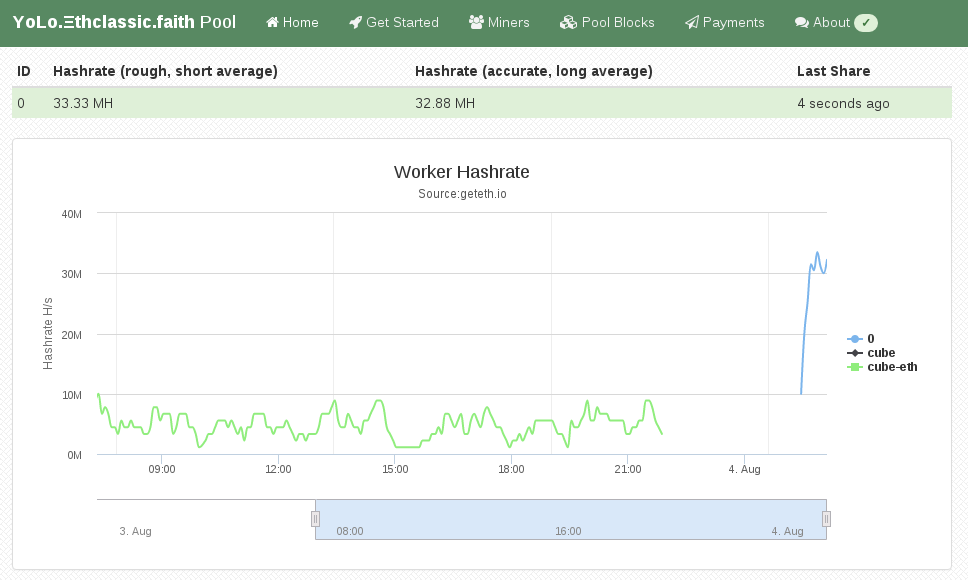
My Attention Span is > 60 seconds Ethereum is a crypto currency similar to Bitcoin as it is based on the blockchain technology. Ethereum is not yet another Bitcoin clone though, since it has an additional feature called Smart Contracts that makes it unique and very promising. I am not going into details how Ethereum works, you can get that into great detail on the Internet. This post is about Ethereum mining. Mining is how crypto coins are created. You need to spent computing time to get coins out. At the beginning CPU mining was sufficient, but as the Ethereum network difficulty has increased you need to use GPUs as they can calculate at a much higher hashrate than a general purpose CPU can do. About 2 months ago I bought a new gaming rig, with a Nvidia GTX 1070 so I can experience virtual-reality gaming with a HTC Vive at a great framerate. As it turns out modern graphics cards are very good at hashing so I gave it a spin. Initially I did this mining setup with Windows 10, as that is the operating system on my gaming rig. If you want to do Ethereum mining using your GPU, then you really want to use Linux. On Windows the GTX 1070 produced a hashrate of 6 MH/s (megahashes per second) while the same hardware does 25 MH/s on Linux. The hashrate multiplied by 4 by using Linux instead of Windows. Sounds good? Keep reading and follow this guide. You have to pick a Linux distro to use for mining. As I am a Debian developer, all my systems run Debian, which is what I am also using for this guide. The same procedure can be done for Ubuntu as it is similar enough. For other distros you have to substitute the steps yourself. So I assume you already have Debian 8 or Ubuntu 16.04 installed on your system.

Install Ethereum Software First we need the geth tool which is the main Ethereum "client". Ethereum is really a peer-to-peer network, that means each node is a server and client at the same time. A node that contains the complete blockchain history in a database is called a full node. For this guide you don't need to run a full node, as mining pools do this for you. We still need geth to create the private key of your Ethereum wallet. Somewhere we have to receive the coins we are mining ;) Add the Ethereum APT repository using these commands:
sudo apt-get install software-properties-common
sudo add-apt-repository ppa:ethereum/ethereum
sudo apt-get update
On Debian 8 (on Ubuntu you can skip this) you need to replace the repository name with this command:
sudo sed 's/jessie/vivid/' -i /etc/apt/sources.list.d/ethereum-ethereum-*.list
sudo apt-get update
Install ethereum, ethminer and geth:
sudo apt-get install ethereum ethminer geth

Create Ethereum Wallet A wallet is where coins are "stored". They are not really stored in the wallet because the wallet is just a private key that nobody has. The balance of that wallet is visible to everyone using the blockchain database. And this is what full nodes do, they contain and distribute the database to all other peers. So this this command to create your first private key for your wallet:
geth account new
Be aware, that this passphrase protects the private key of your wallet. Anyone who has access to that file and knows your passphrase will have full control over your coins. And also do not forget the passphrase, as if you do, you lost all your coins! The output of "geth account new" shows a long character/number sequence quoted in . This is your wallet address and you should write that number down, as if someone wants to send you money, then it is to that address. We will use that for the mining pool later.

Install (proprietary) nvidia driver For OpenCL to work with nvidia graphics cards, like my GTX 1070, you need to install this proprietary driver from nvidia. If you have an older card maybe the opensource drivers will work for you. For the nvidia pascal cards numbers 10xx you will need this driver package. After you have agreed the terms, download the NVIDIA-Linux-x86_64-367.35.run file. But before we can use that installer we need to install some dependencies that installer needs as it will have to compile a Linux kernel module for you. Install the dependencies using this command:
sudo apt-get install linux-headers-amd64 build-essential
Now we can make the installer executable and run it like this:
chmod +x NVIDIA-Linux-x86_64-367.35.run
sudo NVIDIA-Linux-x86_64-367.35.run
If that step completed without error, then we should be able to run the mining benchmark!
ethminer -M -G
The -M means "run benchmark" and the -G is for GPU mining. The first time you run it it will create a DAG file and that will takes a while. For me it took about 12 minutes on my GTX 1070. After that is should show a inner mean hashrate. If it says H/s that is hashes per second and KH is kilo (H/1000) and MH is megahashes per second (KH/1000). I had numbers around 25-30 MH/s, but for real mining you will see an average that is a balanced number and not a min/max range.

Pick Ethereum Network Now it gets serious, you need to decide 2 things. First which Ethereum network you want to mine for and the second is using which pool. Ethereum has 2 networks, one is called Ethereum One or Core, while the other is called Ethereum Classic. Ethereum has made a hardfork to undo the consequences of a software bug in the DAO. The DAO is a smart contract for a decentralized organization. Because of that bug, a blackhat could use that bug to obtain money from that DAO. The Ethereum developers made a poll and decided that the consequences will be undone. Not everyone agreed and the old network stayed alive and is now called Ethereum Classic short ETC. The hardfork kept its short name ETH. This is important to understand for mining, because the hashing difficulty has a huge difference between ETH and ETC. As of writing, the hashrate of ETC is at 20% compared to ETH. Thus you need less computing time to get ETC coins and more time to get ETH coins. Differently said, ETC mining is currently more profitable.

Pick a Pool Hmmmm, I want a swimming pool, thanks! Just kidding... You can mine without a pool, that is called solo mining, but you will get less reward. A mining pool are multiple computers that work on the same block to find a solution quicker than others. The pool has an aggregated hashrate that is higher than other solo miners. Each found block by anyone in this pool will be rewarded to everyone in the pool. The reward of 5 ether currently per block gets split in the same ratio of hashrate each member provides (minus the pool fee). So while you get less for a found block, you still have a steady lower income rate instead of higher with less chance of finding one (in time). Simply said: you have to find a new block faster than the others to receive the reward. If you want to mine Ethereum Classic (ETC) use one of the pools listed here (at the bottom of the page). If you want to mine Ethereum One / Core (ETH) use one of the pools listed here.

Run ethminer The instruction page of the pool website usually says how to start the miner program, but here is an example of the pool that I use (because pony!):
ethminer -G -F http://yolo.ethclassic.faith:9999/0x<YOUR_WALLET_ADDRESS> --farm-recheck 200

Profit If this guide was helpful for you, you can tip me at ethereum:0x9ec1220d2f2fadd3f0c96e3007daa827bc83fbd6 or simply run the ethminer using my wallet address for a day or two:
ethminer -G -F http://yolo.ethclassic.faith:9999/0x9ec1220d2f2fadd3f0c96e3007daa827bc83fbd6 --farm-recheck 200
Happy mining!

Norbert Preining: Debian/TeX Live 2016.20160805-1

TUG 2016 is over, and I have returned from a wonderful trip to Toronto and Maine. High time to release a new checkout of the TeX Live packages. After that I will probably need some time for another checkout, as there are a lot of plans on the table: upstream created a new collection, which means new package in Debian, which needs to go through NEW, and I am also planning to integrate tex4ht to give it an update. Help greatly appreciated here. texlive2016-debian This package also sees the (third) revision of how config files for pdftex and luatex are structured, since then we have settled down. Hopefully this will close some of the issues that have appeared. New packages biblatex-ijsra, biblatex-nottsclassic, binarytree, diffcoeff, ecgdraw, fvextra, gitfile-info, graphics-def, ijsra, mgltex, milog, navydocs, nodetree, oldstandardt1, pdflatexpicscale, randomlist, texosquery Updated packages 2up, acmart, acro, amsmath, animate, apa6, arabluatex, archaeologie, autobreak, beebe, biblatex-abnt, biblatex-gost, biblatex-ieee, biblatex-mla, biblatex-source-division, biblatex-trad, binarytree, bxjscls, changes, cloze, covington, cs, csplain, csquotes, csvsimple, datatool, datetime2, disser, dvipdfmx, dvips, emisa, epstopdf, esami, etex-pkg, factura, fancytabs, forest, genealogytree, ghsystem, glyphlist, gost, graphics, hyperref, hyperxmp, imakeidx, jadetex, japanese-otf, kpathsea, latex, lstbayes, luatexja, mandi, mcf2graph, mfirstuc, minted, oldstandard, optidef, parnotes, philosophersimprint, platex, protex, pst-pdf, ptex, pythontex, readarray, reledmac, sepfootnotes, sf298, skmath, skrapport, stackengine, sttools, tcolorbox, tetex, texinfo, texlive-docindex, texlive-es, texlive-scripts, thesis-ekf, tools, toptesi, tudscr, turabian-formatting, updmap-map, uplatex, uptex, velthuis, xassoccnt, ycbook. Enjoy.

3 August 2016

Daniel Kahn Gillmor: Changes for GnuPG in Debian

The GNU Privacy Guard (GnuPG) upstream team maintains three branches of development: 1.4 ("classic"), 2.0 ("stable"), and 2.1 ("modern").They differ in various ways: software architecture, supported algorithms, network transport mechanisms, protocol versions, development activity, co-installability, etc.Debian currently ships two versions of GnuPG in every maintained suite -- in particular, /usr/bin/gpg has historically always been provided by the "classic" branch.That's going to change!Debian unstable will soon be moving to the "modern" branch for providing /usr/bin/gpg. This will give several advantages for Debian and its users in the future, but it will require a transition. Hopefully we can make it a smooth one.

What are the benefits?Compared to "classic", The "modern" branch has:
  • updated crypto (including elliptic curves)
  • componentized architecture (e.g. libraries, some daemonized processes)
  • improved key storage
  • better network access (including talking to keyservers over tor)
  • stronger defaults
  • more active upstream development
  • safer info representation (e.g. no more key IDs, fingerprints easier to copy-and-paste)
If you want to try this out, the changes are already made in experimental. Please experiment!

What does this mean for end users?If you're an end user and you don't use GnuPG directly, you shouldn't notice much of a change once the packages start to move through the rest of the archive.Even if you do use GnuPG regularly, you shouldn't notice too much of a difference. One of the main differences is that all access to your secret key will be handled through gpg-agent, which should be automatically launched as needed. This means that operations like signing and decryption will cause gpg-agent to prompt the the user to unlock any locked keys directly, rather than gpg itself prompting the user.If you have an existing keyring, you may also notice a difference based on a change of how your public keys are managed, though again this transition should ideally be smooth enough that you won't notice unless you care to investigate more deeply.If you use GnuPG regularly, you might want to read the NEWS file that ships with GnuPG and related packages for updates that should help you through the transition.If you use GnuPG in a language other than English, please install the gnupg-l10n package, which contains the localization/translation files. For versions where those files are split out of the main package, gnupg explicitly Recommends: gnupg-l10n already, so it should be brought in for new installations by default.If you have an archive of old data that depends on known-broken algorithms, PGP3 keys, or other deprecated material, you'll need to have "classic" GnuPG around to access it. That will be provided in the gnupg1 package

What does this mean for package maintainers?If you maintain a package that depends on gnupg: be aware that the gnupg package in debian is going through this transition.A few general thoughts:
  • If your package Depends: gnupg for signature verification only, you might prefer to have it Depends: gpgv instead. gpgv is a much simpler tool that the full-blown GnuPG suite, and should be easier to manage. I'm happy to help with such a transition (we've made it recently with apt already)
  • If your package Depends: gnupg and expects ~/.gnupg/ to be laid out in a certain way, that's almost certainly going to break at some point. ~/.gnupg/ is GnuPG's internal storage, and it's not recommended to rely on any specific data structures there, as they may change. gpg offers commands like --export, --import, and --delete for manipulating its persistent storage. please use them instead!
  • If your package depends on parsing or displaying gpg's output for the user, please make sure you use its special machine-readable form (--with-colons). Parsing the human-readable text is not advised and may change from version to version.
If you maintain a package that depends on gnupg2 and tries to use gpg2 instead of gpg, that should stay ok. However, at some point it'd be nice to get rid of /usr/bin/gpg2 and just have one expected binary (gpg). So you can help with that:
  • Look for places where your package expects gpg2 and make it try gpg instead. If you can make your code fall back cleanly
  • Change your dependencies to indicate gnupg (>= 2)
  • Patch lintian to encourage other people to make this switch ;)

What specifically needs to happen?The last major step for this transition was renaming the source package for "classic" GnuPG to be gnupg1. This transition is currently in the ftp-master's NEW queue. Once it makes it through that queue, and both gnupg1 and gnupg2 have been in experimental for a few days without reports of dangerous breakage, we'll upload both gnupg1 and gnupg2 to unstable.We'll also need to do some triage on the BTS, reassigning some reports which are really only relevant for the "classic" branch.Please report bugs via the BTS as usual! You're also welcome to ask questions and make suggestions on #debian-gnupg on irc.oftc.net, or to mail the Debian GnuPG packaging team at pkg-gnupg-maint@lists.alioth.debian.org.Happy hacking!Tags: gnupg

Keith Packard: chaoskey

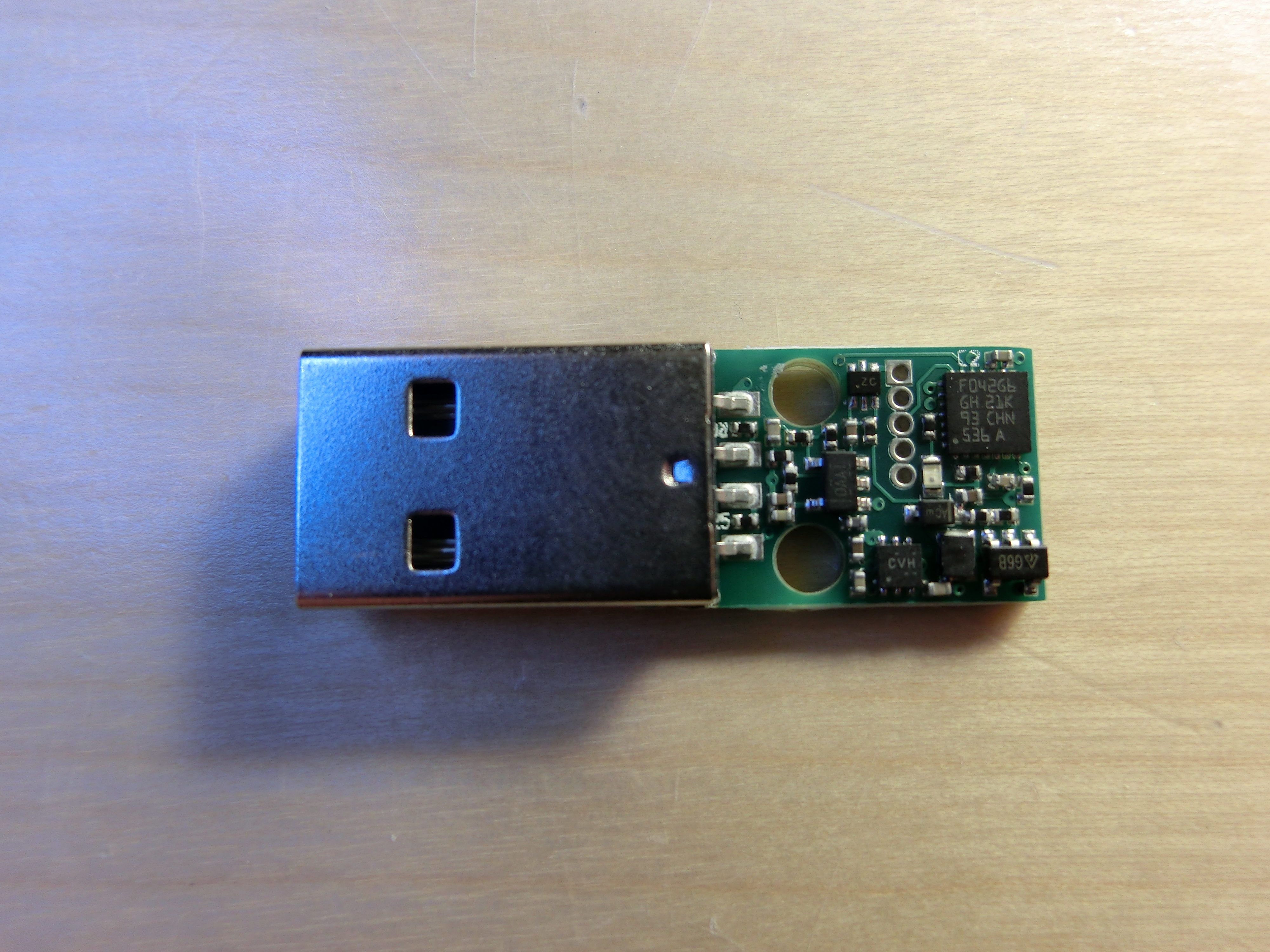
ChaosKey v1.0 Released USB Attached True Random Number Generator ChaosKey, our random number generator that attaches via USB, is now available for sale from the altusmetrum store. We talked about this device at Debconf 16 last month Support for this device is included in Linux starting with version 4.1. Plug ChaosKey into your system and the driver will automatically add entropy into the kernel pool, providing a constant supply of true random numbers to help keep the system secure. ChaosKey is free hardware running free software, built with free software on a free operating system.

Elena 'valhalla' Grandi: The Cat Model of Package Ownership

The Cat Model of Package Ownership

Debian has been moving away from strong ownership of packages by package maintainers and towards encouraging group maintainership, for very good reasons: single maintainers have a bad bus factor and a number of other disadvantages.

When single maintainership is changed into maintainership by a small , open group of people who can easily communicate and sync with each other, everything is just better: there is an easy way to gradually replace people who want to leave, but there is also no duplication of efforts (because communication is easy), there are means to always have somebody available for emergency work and generally package quality can only gain from it.

Unfortunately, having such group of maintainers for every package would require more people than are available and willing to work on it, and while I think it's worth doing efforts to have big and important packages managed that way, it may not be so for the myriad of small ones that make up the long tail of a distribution.

Many of those packages may end up being maintained in a big team such as the language-based ones, which is probably better than remaining with a single maintainer, but can lead to some problems.

My experience with the old OpenEmbedded, back when it was still using monotone instead of git and everybody was maintaining everything, however, leads me to think that this model has a big danger of turning into nobody maintains anything, because when something needs to be done everybody is thinking that somebody else will do it.

As a way to prevent that, I have been thinking in the general direction of a Cat Model of Package Ownership, which may or may not be a way to prevent some risks of both personal maintainership and big teams.

The basic idea is that the my in my packages is not the my in my toys , but the my in my Cat, to whom I am a servant .

As in the case of a cat, if my package needs a visit to the vet, it's my duty to do so. Other people may point me to the need of such a visit, e.g. by telling me that they have seen the cat leaving unhealty stools, that there is a bug in the package, or even that upstream released a new version a week ago, did you notice?, but the actual putting the package in a cat carrier and bringing it to the vet falls on me.

Whether you're allowed to play with or pet the cat is her decision, not mine, and giving her food or doing changes to the package is usually fine, but please ask first: a few cats have medical issues that require a special diet.

And like cats, sometimes the cat may decide that I'm not doing a good enough job of serving her, and move away to another maintainer; just remember that there is a difference between a lost cat who wants to go back to her old home and a cat that is looking for a new one. When in doubt, packages usually wear a collar with contact informations, trying to ping those is probably a good idea.

This is mostly a summer afternoon idea and will probably require some refinement, but I think that the basic idea can have some value. Comments are appreciated on the federated social networks where this post is being published, via email (valid addresses are on my website http://www.trueelena.org/computers/articles/the_cat_model_of_package_ownership.html and on my GPG key http://www.trueelena.org/about/gpg.html) or with a post on a blog that appears on planet debian http://planet.debian.org/.

how small is small depends a lot on the size of the package, the amount of work it requires, how easy it is to parallelize it and how good are the people involved at communicating, so it would be quite hard to put a precise number here.

I've moved away from it because the boards I was using could run plain Debian, but I've heard that after the move to git there have been a number of workflow changes (of which I've seen the start) and everything now works much better.

John Goerzen: All Aboard

Aaaaaall Aboard! *chug* *chug* And so began a trip aboard our hotel train in Indianapolis, conducted by our very own Jacob and Oliver. IMG_20160703_101438 Because, well, what could be more fun than spending a few days in the world s only real Pullman sleeping car, on its original service track, inside a hotel? IMG_20160703_101520 We were on a family vacation to Indianapolis, staying in what two railfan boys were sure to enjoy: a hotel actually built into part of the historic Indianapolis Union Station complex. This is the original train track and trainshed. They moved in the Pullman cars, then built the hotel around them. Jacob and Oliver played for hours, acting as conductors and engineers, sending their train all across the country to pick up and drop off passengers. Opa! Have you ever seen a kid s face when you introduce them to something totally new, and they think it is really exciting, but a little scary too? That was Jacob and Oliver when I introduced them to saganaki (flaming cheese) at a Greek restaurant. The conversation went a little like this: Our waitress will bring out some cheese. And she will set it ON FIRE right by our table! Will it burn the ceiling? No, she ll be careful. Will it be a HUGE fire? About a medium-sized fire. Then what will happen? She ll yell OPA! and we ll eat the cheese after the fire goes out. Does it taste good? Oh yes. My favorite! It turned out several tables had ordered saganaki that evening, so whenever I saw it coming out, I d direct their attention to it. Jacob decided that everyone should call it opa instead of saganaki because that s what the waitstaff always said. Pretty soon whenever they d see something appear in the window from the kitchen, there d be craning necks and excited jabbering of maybe that s our opa! And when it finally WAS our opa , there were laughs of delight and I suspect they thought that was the best cheese ever. Giggling Elevators IMG_20160703_205544 Fun times were had pressing noses against the glass around the elevator. Laura and I sat on a nearby sofa while Jacob and Oliver sat by the elevators, anxiously waiting for someone to need to go up and down. They point and wave at elevators coming down, and when elevator passengers waved back, Oliver would burst out giggling and run over to Laura and me with excitement. Some history IMG_20160704_161550 We got to see the grand hall of Indianapolis Union Station what a treat to be able to set foot in this magnificent, historic space, the world s oldest union station. We even got to see the office where Thomas Edison worked, and as a hotel employee explained, was fired for doing too many experiments on the job. Water and walkways Indy has a system of elevated walkways spanning quite a section of downtown. It can be rather complex navigating them, and after our first day there, I offered to let Jacob and Oliver be the leaders. Boy did they take pride in that! They stopped to carefully study maps and signs, and proudly announced this way or turn here and were usually correct. 20160702_164754_Richtone(HDR) And it was the same in the paddleboat we took down the canal. Both boys wanted to be in charge of steering, and we only scared a few other paddleboaters. Fireworks IMG_20160704_220332 Our visit ended with the grand fireworks show downtown, set off from atop a skyscraper. I had been scouting for places to watch from, and figured that a bridge-walkway would be great. A couple other families had that thought too, and we all watched the 20-minute show in the drizzle. Loving brothers By far my favorite photo from the week is this one, of Jacob and Oliver asleep, snuggled up next to each other under the covers. They sure are loving and caring brothers, and had a great time playing together. IMG_20160702_071015

1 August 2016

Charles Plessy: Amazon cloud: refreshing my skills.

For a few years I did not attempt any serious task on the Amazon cloud. It took me a bit of time to get back my automatisms and adapt myself to the changes. In particular, the cheapest instances, t2.nano, are only accessible via virtual private clouds (VPC), and it was a bit difficult for me to find how to create a simple one. Perhaps this is because all AWS accounts created after March 18, 2013, automatically have a default VPC, and everybody else who needed their own simple VPC have created it a long time ago already. In the end, this was not complicated at all. This is probably why I could not find a tutorial. In brief, one needs first to create a VPC. If it is just for spawning an instance from time to time, the IP range does not matter much. Default VPCs are using 172.31.0.0/16, so let's do the same.
CIDR_BLOCK=172.31.0.0/16
aws ec2 create-vpc --cidr-block $CIDR_BLOCK
In the command's output, there is the VPC's identifier, that I paste by hand in a variable called VPC. The same pattern will be repeated for each command creating something. One can also find the VPC's identifier with the command aws ec2 describe-vpcs.
VPC=vpc-XXXXXXXX
Then, create a subnet. Again, no need for complications, in our simple case one can give the full IP range. I cut and paste the returned identifier in the variable SUBNET. In order that the instances receive a public IP address like in default VPCs and like in the usual behaviour of the VPC-less Cloud, one needs to set the attribute MapPublicIpOnLaunch.
aws ec2 create-subnet --vpc-id $VPC --cidr-block $CIDR_BLOCK
SUBNET=subnet-XXXXXXXX
aws ec2 modify-subnet-attribute --subnet-id $SUBNET --map-public-ip-on-launch 
Then, create a gateway (paste the identifier in GATEWAY) and attach it to the VPC.
aws ec2 create-internet-gateway
GATEWAY=igw-XXXXXXXX
aws ec2 attach-internet-gateway --internet-gateway-id $GATEWAY --vpc-id $VPC
A routing table was created automatically, and one can find its identifier via the command describe-route-tables. Then, create a default route to the gateway.
aws ec2 describe-route-tables
ROUTETABLE=rtb-XXXXXXXX
aws ec2 create-route --route-table-id $ROUTETABLE --destination-cidr-block 0.0.0.0/0 --gateway-id $GATEWAY
Of course, if one does not open the traffic, no instance can be contacted from outside... Here I open port 22 for SSH.
aws ec2 describe-security-groups
SECURITY_GROUP=sg-XXXXXXXX
aws ec2 authorize-security-group-ingress --group-id $SECURITY_GROUP --protocol tcp --port 22 --cidr 0.0.0.0/0
Other novelty, now Amazon distributes some Free tools for the command line, that are more comprehensive than euca2ools. Next, I will try again the Debian Installer in the Cloud.

Uwe Kleine-K nig: Fixing Debian bug #794266

After finally being able to fix Debian bug #794266 I want to thank those who made this possible: Some time ago my colleague Bj rn offered an Arietta G25 to me. After Jochen, another colleague, helped me to solder pin headers on it, this machine served as host computer for my tests. As I didn't have a machine with the relevant RTC chip, I contacted Seiko Instruments and they provided me a few chips including oscillators. It was again Jochen who then created a break-out board from these components that I could wire to my Arietta board. Finally Wolfram Sang's i2ctransfer helped me a lot to access and so understand the chip. It's has not landed in i2c-tools.git, but I hope this will change soon given that this is a really useful tool. A big thank you to all who helped me. It was fun and would have been less so without your efforts!

Next.

Previous.