Republished by Slate. Translations available in French (Fran ais), Spanish (Espa ol), Chinese ( )
For almost 15 years, I have run my own email server which I use for all of my non-work correspondence. I do so to keep autonomy, control, and privacy over my email and so that no big company has copies of all of my personal email.
A few years ago, I was surprised to find out that my friend Peter Eckersley a very privacy conscious person who is Technology Projects Director at the EFF used Gmail. I asked him why he would willingly give Google copies of all his email. Peter pointed out that if all of your friends use Gmail, Google has your email anyway. Any time I email somebody who uses Gmail and anytime they email me Google has that email.
Since our conversation, I have often wondered just how much of my email Google really has. This weekend, I wrote a small program to go through all the email I have kept in my personal inbox since April 2004 (when Gmail was started) to find out.
One challenge with answering the question is that many people, like Peter, use Gmail to read, compose, and send email but they configure Gmail to send email from a non-gmail.com From address. To catch these, my program looks through each message s headers that record which computers handled the message on its way to my server and to pick out messages that have traveled through google.com, gmail.com, or googlemail.com. Although I usually filter them, my personal mailbox contains emails sent through a number of mailing lists. Since these mailing lists often hide the true provenance of a message, I exclude all messages that are marked as coming from lists using the (usually invisible) Precedence header.
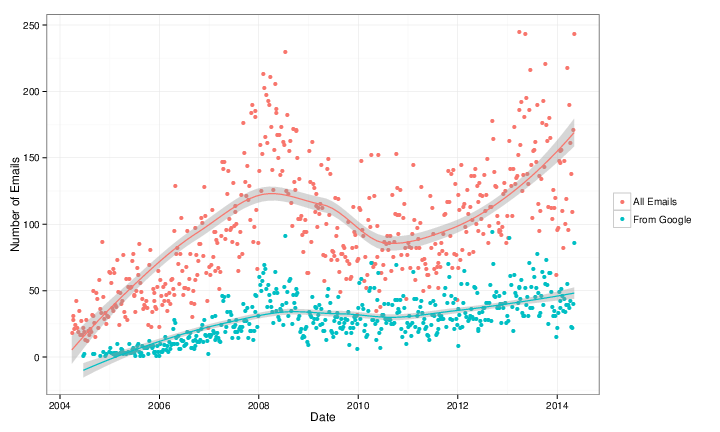
The following graph shows the numbers of emails in my personal inbox each week in red and the subset from Google in blue. Because the number of emails I receive week-to-week tends to vary quite a bit, I ve included a LOESS smoother which shows a moving average over several weeks.
From eyeballing the graph, the answer to seems to be that, although it varies, about a third of the email in my inbox comes from Google!
Keep in mind that this is all of my personal email and includes automatic and computer generated mail from banks and retailers, etc. Although it is true that Google doesn t have these messages, it suggests that the proportion of my truly personal email that comes via Google is probably much higher.
I would also like to know how much of the email I send goes to Google. I can do this by looking at emails in my inbox that I have replied to. This works if I am willing to assume that if I reply to an email sent from Google, it ends up back at Google. In some ways, doing this addresses the problem with the emails from retailers and banks since I am very unlikely to reply to those emails. In this sense, it also reflects a measure of more truly personal email.
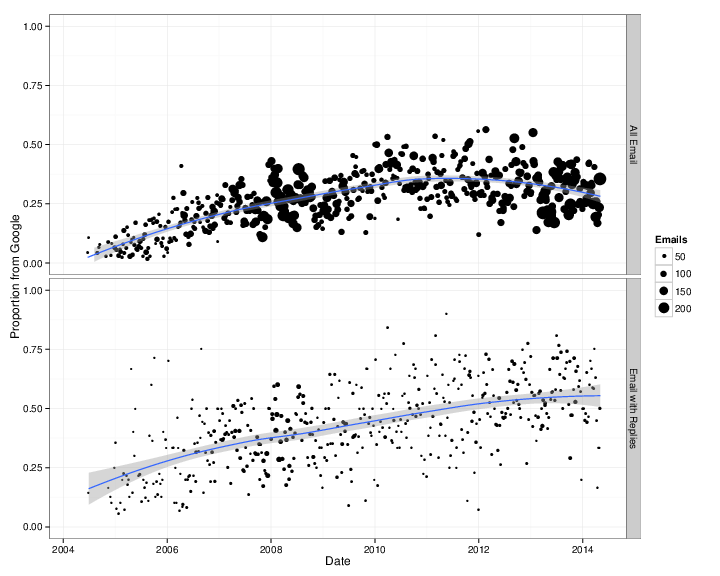
I ve broken down the proportions of emails I received that come from Google in the graph below for all email (top) and for emails I have replied to (bottom). In the graphs, the size of the dots represents the total number of emails counted to make that proportion. Once again, I ve included the LOESS moving average.
The answer is surprisingly large. Despite the fact that I spend hundreds of dollars a year and hours of work to host my own email server, Google has about half of my personal email! Last year, Google delivered 57% of the emails in my inbox that I replied to. They have delivered more than a third of all the email I ve replied to every year since 2006 and more than half since 2010. On the upside, there is some indication that the proportion is going down. So far this year, only 51% of the emails I ve replied to arrived from Google.
The numbers are higher than I imagined and reflect somewhat depressing news. They show how it s complicated to think about privacy and autonomy for communication between parties. I m not sure what to do except encourage others to consider, in the wake of the Snowden revelations and everything else, whether you really want Google to have all your email. And half of mine.
If you want to run the analysis on your own, you re welcome to the Python and R code I used to produce the numbers and graphs.
Oracle won their appeal regarding whether APIs are copyrightable. There'll be ongoing argument about whether Google's use of those APIs is fair use or not, and perhaps an appeal to the Supreme Court, but that's the new status quo. This will doubtless result in arguments over whether Oracle's implementation of Linux APIs in Solaris 10 was a violation of copyright or not (and presumably Google are currently checking whether they own any code that Oracle reimplemented), but that's not what I'm going to talk about today.
The DC15 team met Saturday at the Heidelberg
International Youth Hostel to kick
off the organisation of DebConf15. While a handful of team members
unfortunately had to excuse themselves, 18 people showed up, and the spirit
level was high.
Self-contained in beautiful surroundings
The youth hostel is the expected venue for DebConf15, which is slated to take
place in August 2015. It sleeps more than 400 people, and it features two large
conference rooms. Several smaller rooms can be used for team meetings and
impromptu birds-of-a-feather sessions.
The venue is located
a little bit outside of Heidelberg s centre, right on the side of the
Neckar river, north of the Heidelberg Zoo, west of a university
campus, and south of a sports field.
Fantastic, child-friendly DebConf venue
The large cafeteria and the plentiful outside space usable for eating, working,
chatting and playing make it a fantastic venue for DebConf. And far away from
traffic, with a play area, space to run around, and the zoo next door, it s
very suitable to families with children, too.
Become part of the team!
If you are interested in being part of the organisation of our conference, we
welcome you on our mailing
list and look forward to your contributions! There is also the
#debconf15-germany IRC channel on irc.debian.org, and we
have a list of DC15
sub-teams to give you an overview. Feel free to add yourself, or just help
out and someone will add you.
(Photos by Michael Banck and Richard Hartmann, used under the terms of the CC
by-sa licence 3.0)
As promised, today I would like to write a bit about the making of
The Hacker's Guide to Python. It has
been a very interesting experimentation, and I think it is worth sharing it
with you.
The inspiration
All started out at the beginning of August 2013. I was spending my summer,
as the rest of the year, hacking on OpenStack.
As years passed, I got more and more deeply involved in the various tools
that we either built or contributed to within the OpenStack community. And I
somehow got the feeling that my experience with Python, the way we used it
inside OpenStack and other applications during these last years was worth
sharing. Worth writing something bigger than a few blog posts.
The OpenStack project is doing code reviews, and therefore so did I for
almost two years. That inspired a lot of topics, like
the definitive guide to method decorators
that I wrote at the time I started the hacker's guide. Stumbling upon the
same mistakes or misunderstanding over and over is, somehow, inspiring.
I also stumbled upon Nathan Barry's blog and book
Authority which were very helpful to
get started and some sort of guideline.
All of that brought me enough ideas to start writing a book about Python
software development for people already familiar with the language.
The writing
The first thing I started to do is to list all the topics I wanted to write
about. The list turned out to have subjects that had no direct interest for
a practical guide. For example, on one hand, very few developers know in
details how metaclasses work, but on the other hand, I never had to write a
metaclass during these last years. That's the kind of subject I decided not
to write about, dropped all subjects that I felt were not going to help my
reader to be more productive. Even if they could be technically interesting.
pub 2048R/9C6C32C7 2014-02-16 Laura ARJONA REINA <larjona99@gmail.com> Laura ARJONA REINA <larjona@fsfe.org> Laura ARJONA REINA <laura.arjona@upm.es> Old key 0xE20474C3 no longer valid: lost secret key. (Clave antigua 0xE20474C4 ya no es v lida: clave secreta perdida.) Fingerprint=F29B A6D8 D1DC A30F 3E34 53DF 5CD1 FDE5 9C6C 32C7Please act as if it does not exist. The reason is that I cannot remember the passphrase of my master GPG key. This is why I didn t signed any of the keys of people that I met in Barcelona MiniDebconf. My geek self steem is a bit undermined, but feeling sorry for myself accomplishes nothing, so I think I will not hide problems and move on. I ll post about my new key soon. Long version The bad news The bad news are many. I generated my key in February 2014 (I generated my very first GPG Key in 2010, as an exercise, but never used it again, and in 2014 I couldn t remember the passphrase, and the paper where it was written, had got lost before). Anyway, February 2014, new GPG key. I followed the Howto in FSFE wiki in order to use my brand new FSFE SmartCard. I have to admit that I didn t understand very well how all this works, and it seems that my main mistake was to miss-understand that since I was using a smartcard, with a PIN and an Admin PIN, remembering passphrases was no longer required (only remembering the PINs). I was WRONG! PINs are for daily use with the subkeys of your card (for encryption, decryption, and signing stuff different than GPG keys), you still have the master key that is not in the card (but in a separate medium in a safe place), and for the master key we still use passphrase, and the master key is the one that allows signing keys from other people, and changing, revoking, adding subkeys, etc. So, it seems I used a random passphrase that I didn t write down and I could not remember, due to this terrible missunderstanding. Another bad news is that I didn t generate a revocation certificate (well in fact, I was going to generate just before signing the first key of another person, and then I realize that it was asking the passphrase, hence the problem). First I thought that it should ask the PIN and my smartcard setup was wrong or anything, but after reading and interchanging emails with other people more experienced than me, I realized that I should remember that passphrase. And I couldn t. So there are no revocation certificates :( Another bad news is that some (awesome) people already signed my key, and it will be difficult to meet again so they sign my new key. I was thinking about applying to the Debian new member process this summer, and I have not many opportunities to meet Debian people in person, so I gathered quite a lot signs last March in MiniDebConf Barcelona. Now I m again at the starting point (well, this is perfect excuse to try to join a Debian event soon :) I don t know how I would manage to do it, but I ll try!). The good news (Always look at the bright side of life ) The main good news is that I didn t used the GPG key for signing/encrypting important stuff: I just interchanged some encrypted mail as test with friends, and signed some mails sent to public mailing lists (for signing mails I was using the smartcard PIN so I didn t notiece the problem). The other main good news is that my key is not compromised (well, you can never be sure, but I think so). I cannot revoke it but I m quite sure nothing important depends on that key. Other good news is that I have read a lot about how GPG works and how the smartcard works, keys and subkeys and all this stuff, and I think now I understand everything quite better. I have learned (and also tried) tools as nasty, John The Ripper and rephrase to try to recover the passphrase. I didn t recover it, but at least I know that all those (free software) tools exist and how to use them :) And I have learned the lesson: to be extremely careful, test that everything works (not just try one or two things, test everything) and to not leave work for later (and for example, generate the revocation certificates just right after the keys). Next steps I ll send a message to all the friends that signed or downloaded my old GPG key apologysing and pointing to this blog post so they learn the details about why I create a new key. I ll take this opportunity to download and use the Tails (The Agnostic Incognito System, a Debian derivative which is a live system and is focused in protecting privacy and anonymity of the user). Tails will be my safe, network disconnected environment to generate the new keys and do the sensible tasks with them. I think this time I will create my main key 4096-bit long (since now I understand that the main key is not stored in the card) and the subkeys can be 2048-bit or 3072 to fit in the smarcard. Well, hands on! I ll write another blog post when my new GPG keys are ready. I hope third time s the charm! Note: Thank you to all the people that gave me advice and support (knowledge, links, moral support) about this issue. You know who you are!
There is a strange bug in Planet Debian I am seeing since
I joined. It is rather minor, but since it is an accessibility
bug, I'd like to mention it here. I have written to
the Planet Debian maintainers, and was told to figure it out myself.
This is a pattern, accessibility is considered wishlist, apparently.
And the affected people are supposed to fix it on their own.
It is better if I don't say anything more about that attitude.
hackergotchi forAnd for those where it works, it looks like:
hackergotchi for Dirk EddelbuettelStrange, isn't it? If you have any idea why this might be happening, let me know, or even better, tell Planet Debian maintainers how to fix it. P.S.: Package planet-venus says it is a rewrite of Planet, and Planet can be found in Debian as well. I don't see it in unstable, maybe I am blind? Or has it been removed recently? If so, the package description of planet-venus is wrong.
Dashkiosk is a solution to manage dashboards on multiple
displays. It comes in four parts:
I was invited to give a talk at a local conference, OS-UPIITA. I have been invited to this conference before, and will gladly be there again. But I was recently pointed at the invitation poster they are distributing (which I reproduce here for your convenience) And I must make a couple of corrections here:
| Attachment | Size |
|---|---|
| osupiita_chico.jpg | 43.74 KB |
The GNOME and many other infrastructures have been recently attacked by an huge amount of subscription-based spam against their Mailman istances. What the attackers were doing was simply launching a GET call against a specific REST API URL passing all the parameters it needed for a subscription request (and confirmation) to be sent out. Understanding it becomes very easy when you look at the following example taken from our apache.log:

May 3 04:14:38 restaurant apache: 81.17.17.90, 127.0.0.1 - - [03/May/2014:04:14:38 +0000] "GET /mailman/subscribe/banshee-list?email=example@me.com&fullname=&pw=123456789&pw-conf=123456789&language=en&digest=0&email-button=Subscribe HTTP/1.1" 403 313 "http://spam/index2.html" "Mozilla/5.0 (Windows NT 6.1; WOW64) AppleWebKit/537.36 (KHTML, like Gecko) Chrome/34.0.1847.131 Safari/537.36"As you can the see attackers were sending all the relevant details needed for the subscription to go forward (and specifically the full name, the email, the digest option and the password for the target list). At first we tried to either stop the spam by banning the subnets where the requests were coming from, then when it was obvious that more subnets were being used and manual intervention was needed we tried banning their User-Agents. Again no luck, the spammers were smart enough to change it every now and then making it to match an existing browser User-Agent. (with a good percentage to have a lot of false-positives) Now you might be wondering why such an attack caused a lot of issues and pain, well, the attackers made use of addresses found around the web for their malicius subscription requests. That means we received a lot of emails from people that have never heard about the GNOME mailing lists but received around 10k subscription requests that were seemingly being sent by themselves. It was obvious we needed to look at a backup solution and luckily someone on our support channel suggested the freedesktop.org sysadmins recently added CAPTCHAs support to Mailman. I m now sharing the patch and providing a few more details on how to properly set it up on either DEB or RPM based distributions. Credits for the patch should be given to Debian Developer Tollef Fog Heen, who has been so kind to share it with us. Before patching your installation make sure to install the python-recaptcha package (tested on Debian with Mailman 2.1.15) on DEB based distributions and python-recaptcha-client on RPM based distributions. (I personally tested it against Mailman release 2.1.15, RHEL 6) The Patch
diff --git a/Mailman/Cgi/listinfo.py b/Mailman/Cgi/listinfo.py
index 4a54517..d6417ca 100644
--- a/Mailman/Cgi/listinfo.py
+++ b/Mailman/Cgi/listinfo.py
@@ -22,6 +22,7 @@
import os
import cgi
+import sys
from Mailman import mm_cfg
from Mailman import Utils
@@ -30,6 +31,8 @@ from Mailman import Errors
from Mailman import i18n
from Mailman.htmlformat import *
from Mailman.Logging.Syslog import syslog
+sys.path.append("/usr/share/pyshared")
+from recaptcha.client import captcha
# Set up i18n
_ = i18n._
@@ -200,6 +203,9 @@ def list_listinfo(mlist, lang):
replacements[''] = mlist.FormatFormStart('listinfo')
replacements[''] = mlist.FormatBox('fullname', size=30)
+ # Captcha
+ replacements[''] = captcha.displayhtml(mm_cfg.RECAPTCHA_PUBLIC_KEY, use_ssl=False)
+
# Do the expansion.
doc.AddItem(mlist.ParseTags('listinfo.html', replacements, lang))
print doc.Format()
diff --git a/Mailman/Cgi/subscribe.py b/Mailman/Cgi/subscribe.py
index 7b0b0e4..c1c7b8c 100644
--- a/Mailman/Cgi/subscribe.py
+++ b/Mailman/Cgi/subscribe.py
@@ -21,6 +21,8 @@ import sys
import os
import cgi
import signal
+sys.path.append("/usr/share/pyshared")
+from recaptcha.client import captcha
from Mailman import mm_cfg
from Mailman import Utils
@@ -132,6 +130,17 @@ def process_form(mlist, doc, cgidata, lang):
remote = os.environ.get('REMOTE_HOST',
os.environ.get('REMOTE_ADDR',
'unidentified origin'))
+
+ # recaptcha
+ captcha_response = captcha.submit(
+ cgidata.getvalue('recaptcha_challenge_field', ""),
+ cgidata.getvalue('recaptcha_response_field', ""),
+ mm_cfg.RECPTCHA_PRIVATE_KEY,
+ remote,
+ )
+ if not captcha_response.is_valid:
+ results.append(_('Invalid captcha'))
+
# Was an attempt made to subscribe the list to itself?
if email == mlist.GetListEmail():
syslog('mischief', 'Attempt to self subscribe %s: %s', email, remote)
Additional setup
Then on the /var/lib/mailman/templates/en/listinfo.html template (right below <mm-digest-question-end>) add:
<tr>
<td>Please fill out the following captcha</td>
<td><mm-recaptcha-javascript></TD>
</tr>
Make also sure to generate a public and private key at https://www.google.com/recaptcha and add the following paramaters on your mm_cfg.py file:
replacements[''] = captcha.displayhtml(mm_cfg.RECAPTCHA_PUBLIC_KEY, use_ssl=False)to
replacements[''] = captcha.displayhtml(mm_cfg.RECAPTCHA_PUBLIC_KEY, use_ssl=True)EPEL 6 related details A few additional details should be provided in case you are setting this up against a RHEL 6 host: (or any other machine using the EPEL 6 package python-recaptcha-client-1.0.5-3.1.el6) Importing the recaptcha.client module will fail for some strange reason, importing it correctly can be done this way:
ln -s /usr/lib/python2.6/site-packages/recaptcha/client /usr/lib/mailman/pythonlib/recaptchaand then fix the imports also making sure sys.path.append( /usr/share/pyshared ) is not there:
from recaptcha import captchaThat s not all, the package still won t work as expected given the API_SSL_SERVER, API_SERVER and VERIFY_SERVER variables on captcha.py are outdated (filed as bug #1093855), substitute them with the following ones:
API_SSL_SERVER="https://www.google.com/recaptcha/api" API_SERVER="http://www.google.com/recaptcha/api" VERIFY_SERVER="www.google.com"And then on line 76:
url = "https://%s/recaptcha/api/verify" % VERIFY_SERVER,That should be all! Enjoy!
url_for is normally used to avoid hard coding of URL in Flask based
webapps. I've been using it in SILPA port written using Flask

by. But this was written long back and written as POC to show for
Santhosh author of SILPA app which even managed to go into production
:-). Recently I started organizing the code and started using
flask.Blueprint which was previously written using
flask.views.MethodView class and here I started facing problem with
old templates. I'm just gonna explain what is the difference when
using url_for with MethodView and Blueprint.
Lets have some sample code for MethodView first, this code is from
Flask documentation.
from flask.views import MethodView
class UserAPI(MethodView):
def get(self):
users = User.query.all()
...
def post(self):
user = User.from_form_data(request.form)
...
app.add_url_rule('/users/', view_func=UserAPI.as_view('users'))
url_for('users')
url_for('/')
flask.url_for(endpoint, **values)
bp = Blueprint('frontend', __name__)
@bp.route(_BASE_URL, defaults= 'page': 'index.html' )
@bp.route(_BASE_URL + '<page>')
def serve_pages(page):
if page == "index.html":
return render_template('index.html', title='SILPA',
main_page=_BASE_URL,
modules=_modulename_to_display)
elif page == "License":
return render_template('license.html', title='SILPA License',
main_page=_BASE_URL,
modules=_modulename_to_display)
elif page == "Credits":
return render_template('credits.html', title='Credits',
main_page=_BASE_URL,
modules=_modulename_to_display)
elif page == "Contact":
return render_template('contact.html', title='Contact SILPA Team',
main_page=_BASE_URL,
modules=_modulename_to_display)
else:
# modules requested!.
if page in _display_module_map:
return render_template(_display_module_map[page] + '.html',
title=page, main_page=_BASE_URL,
modules=_modulename_to_display)
else:
# Did we encounter something which is not registered by us?
return abort(404)
url_for('.serve_pages', page='/License') # for /License
url_for('.serve_pages') # which will turn in to /index.html
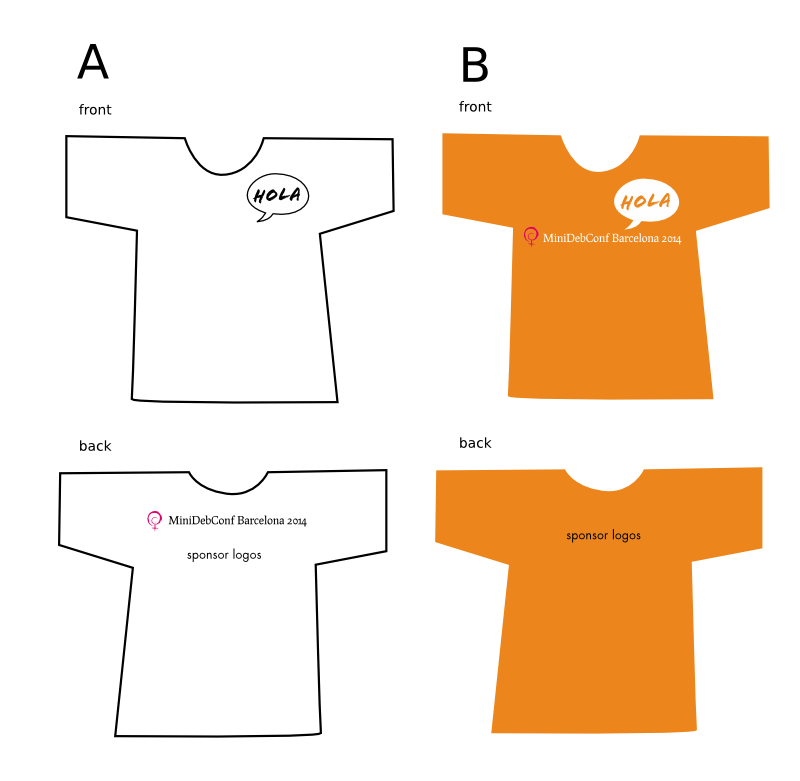
The Debian Women logo. Event name set in the font Procipio,
familiar to the Debian logo. The name is long and cannot be scaled
down much. A version with the name set in two lines can be used
in narrow space, like on a folder.
The speech bubbles could be used in a varied form. I've stated a
few important statements here. I'd like a shared list of
statements.
There must be other info on the poster as well.
The white space at the bottom is for sponsor logos.
The font I use in the speech bubbles in this draft is an Apple font
called Flood. I'd like to find a free font with similar qualities.
The statement in the speech bubble could easily be exchanged.
There are many possibilities. I like the idea of printing just
a speech bubble in the front and give people the opportunity to
write their personal statements with textile pens.
Nametags could be badges to be filled out on the spot with a pen.
I see no danger of that. They use speech bubbles and orange.
So does the telecompany Orange (if it still exists) - and Ubuntu.
By the way, I see in this small size that my new choice of
font for the speech bubbles is too weak. It needs more work.
It's been suggested I try out a brighter orange.
The color in the middle is my original choice, the one at the
top is fine, but you can almost tell no difference, when they
are not placed closely together.
The same danger of confusion will (not) be there with any orange
from "curry" to "crocus".
I show the color in the bottom because it makes it evident how
narrow the gap between these colors is - there is very tight
room for adjustments. Yellow is too bright and cheap looking,
like a discount sign color.
I've looked into other colors, but so far I've not found any
good replacement, since I no longer have any gut feeling to
hang my hat on, except for the Debian logo color - they have
to be a good match. I know I'm free to do whatever, Jonas just
reminded me, but of all the colors in the World, thinking of
Spain, I only feel orange. Not blue, not green, not purple.
Red is already used. Yellow looks cheap. A dusty palette is not
uplifting
I could choose a pink, and that would actually be fun. But pink
is not serious. Pink can't be taken seriously. Like women can't?
OK, now it's gotta be pink!
Well, I'm not really serious now.
The serious thing to do for me now will be to watch some Spanish
movies to get a new gut feeling about Spain. A dosis of Almod var
would be suitable. Alternatively I must chat with some Spanish friends.
But maybe, just maybe, the Barcelona organizers will be just as
happy with the new orange color as I am. Life can sometimes be
that easy.
So the Kelly report of the independent review into the events leading to the Co-operative Bank s capital shortfall was published yesterday. During the day, I was putting odd bits from it out in 140 characters with the hashtags #coops #kellylessons. Here they are in one more permanent place. How many of these lessons has your organisation whether a co-op or not learned?

Hey meebey, do you know RFC2812?
RFCs are a recurring pattern with a distinct number behind it and are real
references to something in the internet (collection of protocol specifications).
So I would usually fire up a browser tab, copy/paste or type RFC2812 into my
favorite search engine and click the first hit. Then I'd reply to the question
afterwards. But with Smuxi's message patters, it turns RFC2812 into a link on
which you can simply click to launch the relevant document.
Wow this is very cool, but isn't this already happening with http URLs and email
addresses? Exactly! Why shouldn't more information be used to create useful
things from it? Smuxi message patterns allow you to define text patterns that
are transformed into clickable links. This can be used for RFCs, CVEs, bug
report numbers (#XXX), git commit hashes and much more. Make good use of your
creativity!
By default Smuxi comes with built-in message patterns for:

Last week, in the spirit of always getting better, I asked Twitter how
to practice saying "um" less while speaking. Here's what I learned.
Most people suggested to practice intentionally inserting pauses instead
of saying "um". Various strategies include voice acting classes, having
a friend aid with a buzzer (presumably to help you notice), and to
record practice sessions as well as the real deal.
Nagle suggested that meditation helped
him, which makes sense to me as I've experienced meditation helping me
be more mindful in many different areas of my life, including mundane
things like noticing that I've touched something that's probably not
that clean and remembering not to touch my face until I wash them.
Wilfully directing mindfulness toward noticing how I speak is something
I'm really stoked about, though it's easy to get swept away in a default
"performance mode" in front of a crowd.
Hendrick pointed out that Cognitive
Behavioural
Therapy is
the principle behind changing speech behaviour and is a great starting
point for more research.
This is going to be really useful next time I'm practicing for a talk!
Thanks @zmagg,
@hendricklee,
@bcrypt,
@ebroder,
@mscain,
and @nagle5000 for playing.
(original Twitter
thread)
Next.