Search Results: "sto"

31 January 2016

Chris Lamb: Free software activities in January 2016

Here is my monthly update covering a large part of what I have been doing in the free software world (previously):
Debian
  • Had a talk proposal accepted (Reproducible Builds - fulfilling the original promise of free software) at FOSSASIA 16.
My work in the Reproducible Builds project was also covered in more depth in Lunar's weekly reports (#35, #36, #37, #38, #39)
LTS

This month I have been paid to work 18 hours on Debian Long Term Support (LTS). In that time I did the following:
  • Sevend days of "frontdesk" duties, triaging CVEs, etc.
  • Issued DLA 386-1 for cacti to patch an SQL injection vulnerability.
  • Issued DLA 388-1 for dwarfutils fixing a NULL deference issue.
  • Issued DLA 391-1 for prosody correcting the use of a weak pseudo-random number generator.
  • Issued DLA 404-1 for nginx to prevent against an invalid pointer deference.

Uploads
  • redis (2:3.0.7-1) New upstream stable release, also ensure that test processes are cleaned up and replacing an existing reproducibility patch with a SOURCE_DATE_EPOCH solution.
  • python-django (1.9.1-1) New upstream release.
  • disque (1.0~rc1-4) Make the build reproducible via SOURCE_DATE_EPOCH, ensure that test processes are cleaned up and that the nocheck flag is correctly honoured.
  • gunicorn (19.4.5-1) New upstream release.
  • redis (2:3.2~rc3-1) New upstream RC release (to experimental).


RC bugs


I also filed 100 FTBFS bugs against apache-log4j2, awscli, binutils, brian, ccbuild, coala, commons-beanutils, commons-vfs, composer, cyrus-sasl2, debiandoc-sgml-doc-pt-br, dfvfs, dillo, django-compat, dulwich, git-annex, grpc, hdf-eos5, hovercraft, ideviceinstaller, ircp-tray, isomd5sum, javamail, jhdf, jsonpickle, kivy, klog, libcloud, libcommons-jexl2-java, libdata-objectdriver-perl, libdbd-sqlite3-perl, libpam-krb5, libproc-waitstat-perl, libslf4j-java, libvmime, linuxdcpp, lsh-utils, mailutils, mdp, menulibre, mercurial, mimeo, molds, mugshot, nose, obex-data-server, obexfs, obexftp, orafce, p4vasp, pa-test, pgespresso, pgpool2, pgsql-asn1oid, php-doctrine-cache-bundle, php-net-ldap2, plv8, pngtools, postgresql-mysql-fdw, pyfftw, pylint-common, pylint-django, pylint-django, python-ase, python-axiom, python-biopython, python-dcos, python-falcon, python-instagram, python-markdown, python-pysam, python-requests-toolbelt, python-ruffus, pytsk, pyviennacl, ros-class-loader, ros-ros-comm, ros-roscpp-core, roxterm, ruby-celluloid-extras, ruby-celluloid-fsm, ruby-celluloid-supervision, ruby-eye, ruby-net-scp, ruby-net-ssh, ruby-sidekiq, ruby-sidekiq-cron, ruby-sinatra-contrib, seaview, smc, spatial4j-0.4, swift-plugin-s3, tilecache, typecatcher, ucommon, undertaker, urdfdom, ussp-push, xserver-xorg-video-intel & yt.

FTP Team

As a Debian FTP assistant I ACCEPTed 201 packages: abi-tracker, android-platform-build, android-platform-frameworks-native, android-platform-libcore, android-platform-system-core, animate.css, apitrace, argon2, autosize.js, bagel, betamax, bittorrent, bls-standalone, btfs, caja-dropbox, cegui-mk2, complexity, corebird, courier-authlib, cpopen, ctop, dh-haskell, django-python3-ldap, e2fsprogs1.41, emacs-async, epl, fast5, fastkml, flask-restful, flask-silk, gcc-6, gitlab, golang-github-kolo-xmlrpc, golang-github-kr-fs, golang-github-pkg-sftp, golang-github-prometheus-common, google-auth-library-php, h5py, haskell-aeson-compat, haskell-userid, heroes, hugo, ioprocess, iptables, ivy-debian-helper, ivyplusplus, jquery-timer.js, klaus, kpatch, lazarus, libatteanx-store-sparql-perl, libbrowserlauncher-java, libcgi-test-perl, libdata-sah-normalize-perl, libfsntfs, libjs-fuzzaldrin-plus, libjung-free-java, libmongoc, libmygpo-qt, libnet-nessus-rest-perl, liborcus, libperinci-sub-util-propertymodule-perl, libpodofo, librep, libsodium, libx11-xcb-perl, linux, linux-grsec-base, list.js, lombok, lua-mediator, luajit, maven-script-interpreter, midicsv, mimeo, miniasm, mlpack, mom, mosquitto-auth-plugin, moxie.js, msgpuck, nanopolish, neovim, netcdf, network-manager-applet, network-manager-ssh, node-esprima-fb, node-mocks-http, node-schlock, nomacs, ns3, openalpr, openimageio, openmpi, openms, orafce, pbsim, pd-iemutils, pd-nusmuk, pd-puremapping, pd-purest-json, pg-partman, pg-rage-terminator, pgfincore, pgmemcache, pgsql-asn1oid, php-defaults, php-jwt, php-mf2, php-redis, pkg-info-el, plr, pnmixer, postgresql-multicorn, postgresql-mysql-fdw, powa-archivist, previsat, pylint-flask, pyotherside, python-caldav, python-cookies, python-dcos, python-flaky, python-flickrapi, python-frozendict, python-genty, python-git, python-greenlet, python-instagram, python-ironic-inspector-client, python-manilaclient, python-neutronclient, python-openstackclient, python-openstackdocstheme, python-prometheus-client, python-pymzml, python-pysolr, python-reno, python-requests-toolbelt, python-scales, python-socketio-client, qdox2, qgis, r-cran-biasedurn, rebar.js, repmgr, rfcdiff, rhythmbox-plugin-alternative-toolbar, ripe-atlas-cousteau, ripe-atlas-sagan, ripe-atlas-tools, ros-image-common, ruby-acts-as-list, ruby-allocations, ruby-appraiser, ruby-appraiser-reek, ruby-appraiser-rubocop, ruby-babosa, ruby-combustion, ruby-did-you-mean, ruby-fixwhich, ruby-fog-xenserver, ruby-hamster, ruby-jeweler, ruby-mime-types-data, ruby-monkey-lib, ruby-net-telnet, ruby-omniauth-azure-oauth2, ruby-omniauth-cas3, ruby-puppet-forge, ruby-racc, ruby-reek, ruby-rubinius-debugger, ruby-rubysl, ruby-rubysl-test-unit, ruby-sidekiq-cron, ruby-threach, ruby-wavefile, ruby-websocket-driver, ruby-xmlhash, rustc, s-nail, scrm, select2.js, senlin, skytools3, slurm-llnl, sphinx-argparse, sptk, sunpy, swauth, swift, tdiary, three.js, tiny-initramfs, tlsh, ublock-origin, vagrant-cachier, xapian-core, xmltooling, & yp-tools. I additionally REJECTed 29 packages.

30 January 2016

Lunar: Only allow outgoing connections through Tor

Using Tor helps take back control of what data one decides to share online. It also helps in avoiding surveillance from the local network (think of someone listening to the public Wi-Fi) or the Internet access provider. But it is easy to make mistakes: Tor Browser, the easiest and most common way to use Tor, is just a web browser. Extra special care is required to make other applications use Tor, and it is easy to forget to change settings, let alone actual attackers. That's why using Tails is often recommended as everything is preconfigured and it requires traffic to go through Tor by various means. Qubes or Whonix also have interesting properties, but require reinstalling systems and changing habits. Meanwhile, securing the network on an already installed system can help you feel better. A potential solution to prevent connections from leaking out without going through Tor is simply to prevent all connections from leaving the computer, except the ones going to the Tor network. This can quite easily be implemented by setting up an outgoing firewall. Using the default settings, a Tor client can potentially connect to any of the 2,000 Guard relays. While there are ways to get such a list and turn it into firewall rules, we are going to use an easier solution. Because the list of Tor relays is public, censors have often used it to prevent people from connecting to the Tor network. The Tor project came up with bridges as a work-around. Bridges are entry nodes in the Tor network. For public bridges, users can only get a few bridge addresses at a time, preventing an adversary from easily blocking them at all once. When configured to use a set of bridges, Tor will only connect to their addresses. This will make our firewall much shorter. The instructions that follow should work on Debian Jessie and later versions. Adapting them to other systems should not be too hard either. We assume that Tor Browser is already installed. As we will want other applications to use Tor than just the browser, we also want to install a system-wide instance:
# apt install tor
Next, visit bridges.torproject.org to request a set of bridges: BridgeDB landing page You then need to select the type of bridges. Tor standard protocol is easy to identify as such. The Tor project has developed pluggable transports to easily disguise the traffic, but using them is outside the scope for this documentation. So lets stay with the default type of bridges: BridgeDB bridge type selection After solving a CAPTCHA, you'll get a list of addresses and fingerprints for a couple of bridges like the following one: Example bridge list from BridgeDB (blurred to protect the actual bridges To tell Tor to use these bridges, edit /etc/tor/torrc, and at the end, add something like:
UseBridges 1
Bridge 109.XXX.XXX.XXX:4XXX 2244XXXXXXXXXXXXXXXXXXXXXXXXXXXXXXXXXXXX
Bridge 37.XXX.XXX.XXX:1XXXX 9CF0XXXXXXXXXXXXXXXXXXXXXXXXXXXXXXXXXXXX
Bridge 171.XXX.XXX.XXX:4XXX 7705XXXXXXXXXXXXXXXXXXXXXXXXXXXXXXXXXXXX
Replace the actual addresses and fingerprints by those you got earlier. Now reload the daemon and make sure that it still connects to the network:
# service tor reload
# tail -f /var/log/tor/log
Tor Browser also needs to be told to use these bridges. Open the onion menu close to the location bar, and select Tor Network Settings . Tor Browser  onion menu In there, tick My Internet Service Provider (ISP) blocks connections to the Tor network and paste the list of bridges below Enter custom bridges: Tor Browser Network Settings Before we restrict outgoing connections to only use the Tor network, lets configure APT to use Tor as well so we can continue installing and upgrading packages in the future:
# apt install apt-transport-tor
The following command will reconfigure APT to use Tor to access the currently configured package repositories. It basically takes care of replacing every http:// by tor+http://:
# sed -e 's/^[^#]*\(deb\(-src\)\?\W\+\)http/\1tor+http/' -i /etc/apt/sources.list /etc/apt/sources.list.d/*.list
Lets see if it still works:
# apt update
One last thing: sometimes, we still need to bypass our restrictions and access the network directly. Some websites sadly deny access to Tor users, or we might need to login through a captive portal before being able to use a random network. To make it practical, we are going to create a new user account. This will enable us to use the desktop user switching capabilities to start a new browser or sudo for command line applications. In this example, the user is going to be named passthrough:
# adduser passthrough
Make sure to set a proper password! Now lets configure the firewall. Here we are going to use ferm which makes it fairly easy to do low-level firewall rule in a readable manner:
# apt install ferm
We want the firewall to be started at boot time. Now edit its configuration in /etc/ferm/ferm.conf. At the end, add:
# Let's block everything for both IPv4 and IPv6, except to localhost,
# already established connections and the special 'passthrough' user.
domain (ip ip6) chain OUTPUT  
    policy DROP;
    outerface lo ACCEPT;
    proto icmp ACCEPT;
    mod state state (ESTABLISHED RELATED) ACCEPT;
    mod owner uid-owner "passthrough" ACCEPT;
 
# Now for IPv4, we want to restrict output to configured Tor bridges
domain ip chain OUTPUT  
    # Don't break network autoconfiguration
    mod owner uid-owner 0 proto udp dport bootps ACCEPT;
    # Allow bridges defined in torrc by getting them directly
    # from the configuration file.
    @include "sed -n -e 's/^Bridge \([^ ]* \)\?\([0-9.]*\):\([0-9]*\).*/daddr \2 proto tcp dport \3 ACCEPT;/p' /etc/tor/torrc  ";
 
# Let's REJECT everything else so we get notice instead of timeouts
domain (ip ip6) chain OUTPUT REJECT;
Reload the firewall through:
# service ferm reload
Lets do some tests:
# ping check.torproject.org
  ping: unknown host check.torproject.org
# tor-resolve check.torproject.org
  38.229.72.22
# ping 38.229.72.22
  From 192.168.7.234 icmp_seq=1 Destination Port Unreachable
# curl https://check.torproject.org/
  curl: (6) Could not resolve host: check.torproject.org
# curl -I https://38.229.72.22/
  curl: (7) Failed to connect to 38.229.72.22 port 443: Connection refused
# curl --socks5 127.0.0.1:9050 https://check.torproject.org/
  curl: (6) Could not resolve host: check.torproject.org
# curl --silent --socks5-hostname 127.0.0.1:9050 https://check.torproject.org/   grep Congratulations
  Congratulations. This browser is configured to use Tor.
# sudo -u passthrough ping -c 1 check.torproject.org
  64 bytes from sergii.torproject.org (38.229.72.22): icmp_seq=1 ttl=54 time=148 ms
# sudo -u passthrough curl --silent https://check.torproject.org/   grep Sorry
  Sorry. You are not using Tor.
One last thing to complete the setup: for command line applications like SSH, torsocks does wonders. Just prefix your usual commands by torsocks and they should work:
# apt install torsocks
# torsocks curl --silent https://check.torproject.org/   grep Congratulations
  Congratulations. This browser is configured to use Tor.
All set! In case you ever need to turn it all off, just ask ferm to reconfigure the firewall:
# service ferm stop
But don't forget to turn it back on later!
# service ferm start
Ideally, we would have a way to automatically configure a different set of bridges for each network we connect to make it more difficult to trace the computer from network to network. But there's quite some more work to be done on various levels before that can be done in an integrated manner (torshiftchange and tordyguards are promising options). Meanwhile, be aware that you might want to keep a fresh set of bridges handy to configure them after leaving for a trip. Another downside of the setup currently is that it doesn't allow for network time synchronization. That might make the system fingerprintable by using its clock drift. To use obfs4 bridges which helps defeating censored networks, you will need two extra steps. First, install the required software:
# apt install obfs4proxy
Then add the following extra line to /etc/tor/torrc:
ClientTransportPlugin obfs2,obfs3,obfs4,scramblesuit exec /usr/bin/obfs4proxy
You can then request obfs4 bridges from BridgeDB. These changes are only required for the system-wide Tor daemon, as Tor Browser comes with obs4proxy preconfigured. Kudos to Micah for proofreading this article.

Neil McGovern: On ZFS in Debian

shutterstock_366995438I m currently over at FOSDEM, and have been asked by a couple of people about the state of ZFS and Debian. So, I thought I d give a quick post to explain what Debian s current plan is (which has come together with a lot of discussion with the FTP Masters and others around what we should do). TLDR: It s going in contrib, as a source only dkms module. Longer version: Debian has always prided itself in providing the unequivocally correct solution to our users and downstream distributions. This also includes licenses we make sure that Debian will contain 100% free software. This means that if you install Debian, you are guaranteed freedoms offered under the DFSG and our social contract. Now, this is where ZFS on Linux gets tricky. ZFS is licensed under the CDDL, and the Linux kernel under the GPLv2-only. The project views that both of these are free software licenses, but they re incompatible with each other. This incompatibility means that there is risk to producing a combined work with Linux and a CDDL module. (Note: there is arguments about if a kernel module, once loaded, is a combined work with the kernel. I m not touching that with a barge pole, as I Am Not A Lawyer.) Now, does this mean that Debian would get sued by distributing ZFS natively compiled into the kernel? Well, maybe, but I think it s a bit unlikely. This doesn t mean it s the right choice for Debian to take as a project though! It brings us back to our promise to our users, and our commercial and non-commercial downstream distributions. If a commercial downstream distribution took the next release of stable, and used our binaries, they may well get sued if they have enough money to make it worthwhile. Additionally, Debian has always taken its commitment to upstream licenses very seriously. If there s a doubt, it doesn t go in official Debian. It should be noted that ZFS is something that is important to a lot of Debian users, who all want to be able to use ZFS in a manner that makes it easier for them to install. Thus, the position that we ve arrived at is that we can ship ZFS as a source only, DKMS module. This means it will be built on the target machines, and we re not distributing binaries. There s also a warning in the README.Debian file explaining that care should be taken if you do things with the resultant binary as we can t promise it complies with the licenses. Finally, I should point out that this isn t my decision in the end. The contents of the archive is a decision for the FTP-Masters, as it s delegated. However, what I have been able to do is coordinate many conflicting views, and I hope that ZFS will be accepted into the archive soon!

Dimitri John Ledkov: Four gunmen outside

There are four gunmen outside of my hotel. They are armed with automatic rifles and pistols. I am scared for my life having sneaked past them inside. Everyone else is acting as if everything is normal. Nobody is scared or running for cover. Nobody called the police. I've asked the reception to talk to the gunmen and ask them to leave. They looked at me as if I am mad. Maybe I am. Is this what shizophrenia feels like?! Can you see them on the picture?! Please help. There are four gunmen outside of my hotel. I am not in central Beirut, I am in central Brussels.

29 January 2016

Jan Wagner: Oxidized - silly attempt at (Really Awesome New Cisco confIg Differ)

Since ages I wanted have replaced this freaking backup solution of our Network Equipment based on some hacky shell scripts and expect uploading the configs on a TFTP server. Years ago I stumbled upon RANCID (Really Awesome New Cisco confIg Differ) but had no time to implement it. Now I returned to my idea to get rid of all our old crap.

I don't know where, I think it was at DENOG2, I saw RANCID coupled with a VCS, where the NOC was notified about configuration (and inventory) changes by mailing the configuration diff and the history was indeed in the VCS.
The good old RANCID seems not to support to write into a VCS out of the box. But for the rescue there is rancid-git, a fork that promises git extensions and support for colorized emails. So far so good. While I was searching for a VCS capable RANCID, somewhere under a stone I found Oxidized, a 'silly attempt at rancid'. Looking at it, it seems more sophisticated, so I thought this might be the right attempt. Unfortunately there is no Debian package available, but I found an ITP created by Jonas. Anyway, for just looking into it, I thought the Docker path for a testbed might be a good idea, as no Debian package ist available (yet). For oxidized configuration is only a configfile needed and as nodes source a rancid compatible router.db file can be used (beside SQLite and http backend). A migration into a production environment seems pretty easy. So I gave it a go. I assume Docker is installed already. There seems to be a Docker image on Docker Hub, that looks official, but it seems not maintained (actually). An issue is open for automated building the image.

Creating Oxidized container image The official documentation describes the procedure. I used a slightly different approach.
docking-station:~# mkdir -p /srv/docker/oxidized/  
docking-station:~# git clone https://github.com/ytti/oxidized \  
 /srv/docker/oxidized/oxidized.git
docking-station:~# docker build -q -t oxidized/oxidized:latest \  
 /srv/docker/oxidized/oxidized.git
I thought it might be a good idea to also tag the image with the actual version of the gem.
docking-station:~# docker tag oxidized/oxidized:latest \  
 oxidized/oxidized:0.11.0
docking-station:~# docker images   grep oxidized  
oxidized/oxidized   latest    35a325792078  15 seconds ago  496.1 MB  
oxidized/oxidized   0.11.0    35a325792078  15 seconds ago  496.1 MB  
Create initial default configuration like described in the documentation.
docking-station:~# mkir -p /srv/docker/oxidized/.config/  
docking-station:~# docker run -e CONFIG_RELOAD_INTERVAL=600 \  
 -v /srv/docker/oxidized/.config/:/root/.config/oxidized \
 -p 8888:8888/tcp -t oxidized/oxidized:latest oxidized

Adjusting configuration After this I adjusted the default configuration for writing a log, the nodes config into a bare git, having nodes secrets in router.db and some hooks for debugging.

Creating node configuration
docking-station:~# echo "7204vxr.lab.cyconet.org:cisco:admin:password:enable" >> \  
 /srv/docker/oxidized/.config/router.db
docking-station:~# echo "ccr1036.lab.cyconet.org:routeros:admin:password" >> \  
 /srv/docker/oxidized/.config/router.db

Starting the oxidized beast
docking-station:~# docker run -e CONFIG_RELOAD_INTERVAL=600 \  
 -v /srv/docker/oxidized/.config/:/root/.config/oxidized \
 -p 8888:8888/tcp -t oxidized/oxidized:latest oxidized
Puma 2.16.0 starting...  
* Min threads: 0, max threads: 16
* Environment: development
* Listening on tcp://127.0.0.1:8888
If you want to have the container get started with the docker daemon automatically, you can start the container with --restart always and docker will take care of it. If I wanted to make it running permanent, I would use a systemd unitfile.

Reload configuration immediately If you don't want to wait to automatically reload of the configuration, you can trigger it.
docking-station:~# curl -s http://localhost:8888/reload?format=json \  
 -O /dev/null
docking-station:~# tail -2 /srv/docker/oxidized/.config/log/oxidized.log  
I, [2016-01-29T16:50:46.971904 #1]  INFO -- : Oxidized starting, running as pid 1  
I, [2016-01-29T16:50:47.073307 #1]  INFO -- : Loaded 2 nodes  

Writing nodes configuration
docking-station:/srv/docker/oxidized/.config/oxidized.git# git shortlog  
Oxidizied (2):  
      update 7204vxr.lab.cyconet.org
      update ccr1036.lab.cyconet.org
Writing the nodes configurations into a local bare git repository is neat but far from perfect. It would be cool to have all the stuff in a central VCS. So I'm pushing it every 5 minutes into one with a cron job.
docking-station:~# cat /etc/cron.d/doxidized  
# m h dom mon dow user  command                                                 
*/5 * * * *    root    $(/srv/docker/oxidized/bin/oxidized_cron_git_push.sh)
docking-station:~# cat /srv/docker/oxidized/bin/oxidized_cron_git_push.sh  
#!/bin/bash
DOCKER_OXIDIZED_BASE="/srv/docker/oxidized/"  
OXIDIZED_GIT_DIR=".config/oxidized.git"
cd $ DOCKER_OXIDIZED_BASE /$ OXIDIZED_GIT_DIR   
git push origin master --quiet  
Now having all the nodes configurations in a source code hosting system, we can browse the configurations, changes, history and even establish notifications for changes. Mission accomplished! Now I can test the coverage of our equipment. The last thing that would make me super happy, a oxidized Debian package!

28 January 2016

Holger Levsen: 20160128-reproducible-ecosystem-at-fosdem

Reproducible builds ecosystem at FOSDEM Last years FOSDEM featured one talk about Reproducible Builds, while this year there will be four at least: On Saturday, there will Reproducible and Customizable Deployments with GNU Guix by Ludovic Court s which which I definitly will be attending! And on Sunday there will three talks and I plan to attend them all: a rather general one about the Reproducible ecosystem by myself, followed by ElectroBSD - Getting a reproducible BSD out of the door by Fabian Keil and finally Reproducible builds in FreeBSD packages by Baptiste Daroussin. The FOSDEM organizers also reached out to me for an interview with me about all this reproducible stuff. I hope you'll like my answers as I enjoyed the questions ;-) But there are many more interesting talks (hundreds they say) and so I'd appreciate if you could share your pointers and explainations, whether here on planet, or on IRC or IRL!

Joachim Breitner: Dreaming of role playing

Recently, at a summer-school-like event, we were discussing pen-and-paper role playing. I m not sure if this was after a session of role-playing, but I was making the point that you don t need much or any at all of the rules, and scores, and dice, if you are one of the story-telling role players, and it can actually be more fun this way. As an example, I said, it can make sense if one of the players (and the game master, I suppose) reads up a lot about one aspect of the fantasy world, e.g. one geographical area, one cult, one person, and then this knowledge is used to create an exciting puzzle, even without any opponents. I m not quite sure, but I think I fell asleep shortly after, and I dreamed of such a role playing session. It was going roughly like this:
I (a human), and my fellows (at least a dwarf, not sure about the rest) went to some castle. It was empty, but scary. We crossed its hall, and went into a room on the other side. It was locked towards the hall by a door that covered the door frame only partly, and suddenly we could see a large Ogre, together with other foul folk not worth mentioning, hammered at the door. My group (which was a bit larger in that moment) all prepared shooting arrows at him the moment it burst through the door. I had the time to appreciate the ingenuity that we all waited for him to burst through, so that none of the arrows would bounce of the door, but it did not help, and we ran from the castle, over a field, through a forest, at the other side of which we could see, below a sleep slope, a house, so we went there. The path towards that was filled with tracks that looked surprisingly like car tracks. When we reached the spot there was no house any more, but rather a cold camp side. We saw digging tools, and helmets (strangely, baseball helmets) were arranged in a circle, as if it was a burial site. We set up camp there and slept. It occurred to me that I must have been the rightful owner of the castle, and it was taken by me from my brother and his wife, who denied my existence or something treacherously like that. When we woke up at the camp side, she were there, together with what must be my niece. My sister in law mocked us for fighting unsuccessfully at the castle, but my niece was surprised to see me, as I must have a very similar appearance to my brother. She said that her mother forbid it, but she nevertheless sneakily takes out something which looks like a Gameboy with a camera attachment and a CompactFlash card from her mothers purse, puts it in and take a photo of me. This is when I realize that I will get my castle back.
At that moment, I woke up. I somewhat liked the story (and it was a bit more coherent in my mind than what I then wrote down here), so I wanted to write it down. I quickly fetched my laptop. My friends at the summer school were a bit worried, and I promised not to mention their names and concrete places, and started writing. They distracted me, so I searched for a place of my own, lied down (why? no idea), and continued writing. I had to to touch writing on my belly, because my laptop was not actually there. I also noticed that I am back at the camp side, and that I am still wearing my back protector that I must have been wearing while fighting in the castle, and which I did not take off while sleeping at the camp side. Funnily, it was not a proper medieval amour, but rather my snowboarding back protector.
At that moment, I woke up. I somewhat liked the story (and it was a bit more coherent in my mind than what I then wrote down here), so I wanted to write it down. I quickly got up, started my laptop, and wrote it down. And this is what you are reading right now. Off to bed again, let s see what happens next.

27 January 2016

John Goerzen: Bach, Dot Matrix Printers, and Dinner

Dinner last night started out all normal. Then Jacob and Oliver started asking me about printers. First they wanted to know how an ink jet printer works. Then they wanted to know how a laser printer works. Then they wanted to know what would happen if you d put ink in a laser printer or toner in an ink jet. They were fascinated as I described the various kinds of clogging and ruining that would inevitably occur. Then these words: What other kinds of printers are there? So our dinner conversation started to resolve around printers. I talked about daisy wheel printers, line printers, dot matrix printers. I explained the type chain of line printers, the pins of dot matrix. More printers! I had to dig deeper into my memory: wax transfer printers, thermal printers, dye sublimation, always describing a bit about how each one worked except for dye sublimation, which I couldn t remember many details about. More printers! So we went onwards towards the printing press, offset printing, screen printing, mimeograph, and photocopiers. Although I could give them plenty of details about most of the printers, I also failed under their barrage of questions about offset printing. So I finally capitulated, and said should I go get my phone and look it up while you finish eating? YEAH! So I looked up the misty details of dye sublimation and offset printing and described how they worked. That seemed to satisfy them. Then they asked me what my favorite kind of printer was. I said dot matrix, because it makes the best sound. That had their attention. They stopped eating to ask the vitally important question: Dad, what sound does it make? At this point, I did my best dot matrix impression at the dinner table, to much laughter and delight. Before long, they wanted to see videos of dot matrix printers. They were fascinated by them. And then I found this gem of a dot matrix printer playing a famous Bach tune, which fascinated me also: I guess it must have all sunk in, because this morning before school Jacob all of a sudden begged to see the fuser in my laser printer. So we turned it around, opened up the back panel to his obvious excitement and then I pointed to the fuser, with its hot label. I even heard a breathy wow from him.

Russell Coker: Using LetsEncrypt

Lets Encrypt is a new service to provide free SSL keys [1]. I ve just set it up on a few servers that I run. Issues The first thing to note is that the client is designed to manage your keys and treat all keys on a server equally with a single certificate. It shouldn t be THAT difficult to do things in other ways but it would involve extra effort. The next issue that can make things difficult is that it is designed that the web server will have a module to negotiate new keys automatically. Automatically negotiating new keys will be really great when we get that all going, but as I didn t feel like installing a slightly experimental Apache module on my servers that meant I had to stop Apache while I got the keys and I ll have to do that again every 3 months as the keys have a short expiry time. There are some other ways of managing keys, but the web servers I m using Lets Encrypt with at the moment aren t that important and a couple of minutes of downtime is acceptable. When you request multiple keys (DNS names) for one server to make it work without needless effort you have to get them all in the one operation. That gives you a single key file for all DNS names which is very convenient for services that don t support getting the hostname before negotiating SSL. But it could be difficult if you wanted to have one of the less common configurations such as having a mail server and a web server on the same IP addess but using different keys How To Get Keys deb http://mirror.internode.on.net/pub/debian/ testing main The letsencrypt client is packaged for Debian in Testing but not in Jessie. Adding the above to the /etc/apt/sources.list file for a Jessie system allows installing it and a few dependencies from Testing. Note that there are problems with doing this, you can t be certain that all the other apps installed will be compatible with the newer versions of libraries that are installed and you won t get security updates. letsencrypt certonly --standalone-supported-challenges tls-sni-01 The above command makes the letsencrypt client listen on port 443 to talk to the Lets Encrypt server. It prompts you for server names so if you want to minimise the downtime for your web server you could specify the DNS names on the command-line. If you run it on a SE Linux system you need to run setsebool allow_execmem 1 before running it and setsebool allow_execmem 0 afterwards as it needs execmem access. I don t think it s a problem to temporarily allow execmem access for the duration of running this program, if you use KDE then you will be forced to allow such access all the time for the desktop to operate correctly. How to Install Keys [ssl:emerg] [pid 9361] AH02564: Failed to configure encrypted (?) private key www.example.com:443:0, check /etc/letsencrypt/live/www.example.com/fullchain.pem The letsencrypt client suggests using the file fullchain.pem which has the key and the full chain of certificates. When I tried doing that I got errors such as the above in my Apache error.log. So I gave up on that and used the separate files. The only benefit of using the fullchain.pem file is to have a single line in a configuration file instead of 3. Trying to debug issues with fullchain.pem took me a lot longer than copy/paste for the 3 lines. Under /etc/letsencrypt/live/$NAME there are symlinks to the real files. So when you get new keys the old keys will be stored but the same file names can be used. SSLCertificateFile "/etc/letsencrypt/live/www.example.com/cert.pem"
SSLCertificateChainFile "/etc/letsencrypt/live/www.example.com/chain.pem"
SSLCertificateKeyFile "/etc/letsencrypt/live/www.example.com/privkey.pem" The above commands are an example for configuring Apache 2. smtpd_tls_cert_file = /etc/letsencrypt/live/smtp.example.com/cert.pem
smtpd_tls_key_file = /etc/letsencrypt/live/smtp.example.com/privkey.pem
smtpd_tls_CAfile = /etc/letsencrypt/live/smtp.example.com/chain.pem Above is an example of Postfix configuration. ssl_cert = </etc/letsencrypt/live/smtp.example.com/cert.pem
ssl_key = </etc/letsencrypt/live/smtp.example.com/privkey.pem
ssl_ca = </etc/letsencrypt/live/smtp.example.com/chain.pem Above is an example for Dovecot, it goes in /etc/dovecot/conf.d/10-ssl.conf in a recent Debian version. Conclusion At this stage using letsencrypt is a little fiddly so for some commercial use (where getting the latest versions of software in production is difficult) it might be a better option to just pay for keys. However some companies I ve worked for have had issues with getting approval for purchases which would make letsencrypt a good option to avoid red tape. When Debian/Stretch is released with letsencrypt I think it will work really well for all uses.

26 January 2016

Hideki Yamane: ftp.countrycode.debian.org: until when we will use "ftp" for its name?

Many users use ftp.CC.debian.org as repository. Its name uses "ftp" for historical reason, but there's no reason to do so forever.

It would be better to rename repo.CC.debian.org or something, IMO.

25 January 2016

Steinar H. Gunderson: Chess endgame tablebases

A very short post: This link contains an interesting exposition of the 50-move rule in chess, and what it means for various endings. You can probably stop halfway, though; most of it is only interest for people deeply into endgame theory. Personally, I think DTZ50, as used by the Syzygy tablebases, is the best tradeoff for computer chess. It always produces the correct result (never throws away a win as a draw, or a draw as a loss), but the actual mates are of suboptimal length and look very strange (e.g., it will happily give away most of its pieces and then play very tricky endgames to mate). Then again, if you ever want to swindle against a non-optimal opponent (ie., try to make the position as hard as possible to play, to possibly convert e.g. a loss to a draw), you've opened up an entirely new can of worms. :-) Update: Eric P Smith has written a different explanation of the DTM50 metric that's probably easier to understand, although it contains less new information than the other one.

Sven Hoexter: blabladns.xyz DynDNS service

In case someone is in need of a free DynDNS service which allows you to configure AAAA recods and the TTL, you might want to look at BLABLADNS. It's rather HTTP API centric so you can configure everything with curl if you like.

Antoine Beaupr : Internet in Cuba

A lot has been written about the Internet in Cuba over the years. I have read a few articles, from New York Times' happy support for Google's invasion of Cuba to RSF's dramatic and fairly outdated report about censorship in Cuba. Having written before about Internet censorship in Tunisia, I was curious to see if I could get a feel of what it is like over there, now that a new Castro is in power and the Obama administration has started restoring diplomatic ties with Cuba. With those political changes coming signifying the end of an embargo that has been called genocidal by the Cuban government, it is surprisingly difficult to get fresh information about the current state of affairs. This article aims to fill that gap in clarifying how the internet works in Cuba, what kind of censorship mechanisms are in place and how to work around them. It also digs more technically into the network architecture and performance. It is published in the hope of providing both Cubans and the rest of the world with a better understanding of their network and, if possible, Cubans ways to access the internet more cheaply or without censorship.

"Censorship" and workarounds Unfortunately, I have been connected to the internet only through the the Varadero airport and the WiFi of a "full included" resort near Jibacoa. I have to come to assume that this network is likely to be on a segregated, uncensored internet while the rest of the country suffers the wrath of the Internet censorship in Cuba I have seen documented elsewhere. Through my research, I couldn't find any sort of direct censorship. The Netalyzr tool couldn't find anything significantly wrong with the connection, other than the obvious performance problems related both to the overloaded uplinks of the Cuban internet. I ran an incomplete OONI probe as well, and it seems there was no obvious censorship detected there as well, at least according to folks in the helpful #ooni IRC channel. Tor also works fine, and could be a great way to avoid the global surveillance system described later in this article. Nevertheless, it still remains to be seen how the internet is censored in the "real" Cuban internet, outside of the tourist designated areas - hopefully future visitors or locals can expand on this using the tools mentioned above, using the regular internet. Usual care should be taken when using any workaround tools, mentioned in this post or not, as different regimes over the world have accused, detained, tortured and killed sometimes for the mere fact of using or distributing circumvention tools. For example, a Russian developer was arrested and detained in 2001 by United States' FBI for exposing vulnerabilities in the Adobe e-books copy protection mechanisms. Similarly, people distributing Tor and other tools have been arrested during the period prior to the revolution in Tunisia.

The Cuban captive portal There is, however, a more pernicious and yet very obvious censorship mechanism at work in Cuba: to get access to the internet, you have to go through what seems to be a state-wide captive portal, which I have seen both at the hotel and the airport. It is presumably deployed at all levels of the internet access points. To get credentials through that portal, you need a username and password which you get by buying a Nauta card. Those cards cost 2$CUC and get you an hour of basically unlimited internet access. That may not seem like a lot for a rich northern hotel party-goer, but for Cubans, it's a lot of money, given that the average monthly salary is around 20$CUC. The system is also pretty annoying to use, because it means you do not get continuous network access: every hour, you need to input a new card, which will obviously make streaming movies and other online activities annoying. It also makes hosting servers basically impossible. So while Cuba does not have, like China or Iran, a "great firewall", there is definitely a big restriction to going online in Cuba. Indeed, it seems to be how the government ensures that Cubans do not foment too much dissent online: keep the internet slow and inaccessible, and you won't get too many Arab spring / blogger revolutions.

Bypassing the Cuban captive portal The good news is that it is perfectly possible for Cubans (or at least for a tourist like me with resources outside of the country) to bypass the captive portal. Like many poorly implemented portals, the portal allows DNS traffic to go through, which makes it possible to access the global network for free by using a tool like iodine which tunnels IP traffic over DNS requests. Of course, the bandwidth and reliability of the connection you get through such a portal is pretty bad. I have regularly seen 80% packet loss and over two minutes of latency:
--- 10.0.0.1 ping statistics ---
163 packets transmitted, 31 received, 80% packet loss, time 162391ms
rtt min/avg/max/mdev = 133.700/2669.535/64188.027/11257.336 ms, pipe 65
Still, it allowed me to login to my home server through SSH using Mosh to workaround the reliability issues. Every once in a while, mosh would get stuck and keep on trying to send packets to probe the server, which would clog the connection even more. So I regularly had to restart the whole stack using these commands:
killall iodine # stop DNS tunnel
nmcli n off # turn off wifi to change MAC address
macchanger -A wlan0 # change MAC address
nmcli n on # turn wifi back on
sleep 3 # wait for wifi to settle
iodine-client-start # restart DNS tunnel
The Koumbit Wiki has good instructions on how to setup a DNS tunnel. I am wondering if such a public service could be of use for Cubans, although I am not sure how it could be deployed only for Cubans, and what kind of traffic it could support... The fact is that iodine does require a server to operate, and that server must be run on the outside of the censored perimeter, something that Cubans may not be able to afford in the first place. Another possible way to save money with the captive portal would be to write something that automates connecting and disconnecting from the portal. You would feed that program a list of credentials and it would connect to the portal only on demand, and disconnect as soon as no traffic goes through. There are details on the implementation of the captive portal below that may help future endeavours in that field.

Private information revealed to the captive portal It should be mentioned, however, that the captive portal has a significant amount of information on clients, which is a direct threat to the online privacy of Cuban internet users. Of course the unique identifiers issued with the Nauta cards can be correlated with your identity, right from the start. For example, I had to give my room number to get a Nauta card issued. Then the central portal also knows which access point you are connected to. For example, the central portal I was connected to Wifi_Memories_Jibacoa which, for anyone that cares to research, will give them a location of about 20 square meters where I was located when connected (there is only one access point in the whole hotel). Finally, the central portal also knows my MAC address, a unique identifier for the computer I am using which also reveals which brand of computer I am using (Mac, Lenovo, etc). While this address can be changed, very few people know that, let alone how. This led me to question whether I would be allowed back in Cuba (or even allowed out!) after publishing this blog post, as it is obvious that I can be easily identified based on the time this article was published, my name and other details. Hopefully the Cuban government will either not notice or not care, but this can be a tricky situation, obviously. I have heard that Cuban prisons are not the best hangout place in Cuba, to say the least...

Network configuration assessment This section is more technical and delves more deeply in the Cuban internet to analyze the quality and topology of the network, along with hints as to which hardware and providers are being used to support the Cuban government.

Line quality The internet is actually not so bad in the hotel. Again, this may be because of the very fact that I am in that hotel, and I get a privileged access to the new fiber line to Venezuela, the ALBA-1 link. The line speed I get is around 1mbps, according to speedtest, which selected a server from LIME in George Town, Cayman Islands:
[1034]anarcat@angela:cuba$ speedtest
Retrieving speedtest.net configuration...
Retrieving speedtest.net server list...
Testing from Empresa de Telecomunicaciones de Cuba (152.206.92.146)...
Selecting best server based on latency...
Hosted by LIME (George Town) [391.78 km]: 317.546 ms
Testing download speed........................................
Download: 1.01 Mbits/s
Testing upload speed..................................................
Upload: 1.00 Mbits/s
Latency to the rest of the world is of couse slow:
--- koumbit.org ping statistics ---
122 packets transmitted, 120 received, 1,64% packet loss, time 18731,6ms
rtt min/avg/max/sdev = 127,457/156,097/725,211/94,688 ms
--- google.com ping statistics ---
122 packets transmitted, 121 received, 0,82% packet loss, time 19371,4ms
rtt min/avg/max/sdev = 132,517/160,095/724,971/93,273 ms
--- redcta.org.ar ping statistics ---
122 packets transmitted, 120 received, 1,64% packet loss, time 40748,6ms
rtt min/avg/max/sdev = 303,035/339,572/965,092/97,503 ms
--- ccc.de ping statistics ---
122 packets transmitted, 72 received, 40,98% packet loss, time 19560,2ms
rtt min/avg/max/sdev = 244,266/271,670/594,104/61,933 ms
Interestingly, Koumbit is actually the closest host in the above test. It could be that Canadian hosts are less affected by bandwidth problems compared to US hosts because of the embargo.

Network topology The various traceroutes show a fairly odd network topology, but that is typical of what I would described as "colonized internet users", which have layers and layers of NAT and obscure routing that keep them from the real internet. Just like large corporations are implementing NAT in a large scale, Cuba seems to have layers and layers of private RFC 1918 IPv4 space. A typical traceroute starts with:
traceroute to koumbit.net (199.58.80.33), 30 hops max, 60 byte packets
 1  10.156.41.1 (10.156.41.1)  9.724 ms  9.472 ms  9.405 ms
 2  192.168.134.137 (192.168.134.137)  16.089 ms  15.612 ms  15.509 ms
 3  172.31.252.113 (172.31.252.113)  15.350 ms  15.805 ms  15.358 ms
 4  pos6-0-0-agu-cr-1.mpls.enet.cu (172.31.253.197)  15.286 ms  14.832 ms  14.405 ms
 5  172.31.252.29 (172.31.252.29)  13.734 ms  13.685 ms  14.485 ms
 6  200.0.16.130 (200.0.16.130)  14.428 ms  11.393 ms  10.977 ms
 7  200.0.16.74 (200.0.16.74)  10.738 ms  10.019 ms  10.326 ms
 8  ix-11-3-1-0.tcore1.TNK-Toronto.as6453.net (64.86.33.45)  108.577 ms  108.449 ms
Let's take this apart line by line:
 1  10.156.41.1 (10.156.41.1)  9.724 ms  9.472 ms  9.405 ms
This is my local gateway, probably the hotel's wifi router.
 2  192.168.134.137 (192.168.134.137)  16.089 ms  15.612 ms  15.509 ms
This is likely not very far from the local gateway, probably still in Cuba. It in one bit away from the captive portal IP address (see below) so it is very likely related to the captive portal implementation.
 3  172.31.252.113 (172.31.252.113)  15.350 ms  15.805 ms  15.358 ms
 4  pos6-0-0-agu-cr-1.mpls.enet.cu (172.31.253.197)  15.286 ms  14.832 ms  14.405 ms
 5  172.31.252.29 (172.31.252.29)  13.734 ms  13.685 ms  14.485 ms
All those are withing RFC 1918 space. Interestingly, the Cuban DNS servers resolve one of those private IPs as within Cuban space, on line #4. That line is interesting because it reveals the potential use of MPLS.
 6  200.0.16.130 (200.0.16.130)  14.428 ms  11.393 ms  10.977 ms
 7  200.0.16.74 (200.0.16.74)  10.738 ms  10.019 ms  10.326 ms
Those two lines are the only ones that actually reveal that the route belongs in Cuba at all. Both IPs are in a tiny (/24, or 256 IP addresses) network allocated to ETECSA, the state telco in Cuba:
inetnum:     200.0.16/24
status:      allocated
aut-num:     N/A
owner:       EMPRESA DE TELECOMUNICACIONES DE CUBA S.A. (IXP CUBA)
ownerid:     CU-CUBA-LACNIC
responsible: Rafael L pez Guerra
address:     Ave. Independencia y 19 Mayo, s/n,
address:     10600 - La Habana - CH
country:     CU
phone:       +53 7 574242 []
owner-c:     JOQ
tech-c:      JOQ
abuse-c:     JEM52
inetrev:     200.0.16/24
nserver:     NS1.NAP.ETECSA.NET
nsstat:      20160123 AA
nslastaa:    20160123
nserver:     NS2.NAP.ETECSA.NET
nsstat:      20160123 AA
nslastaa:    20160123
created:     20030512
changed:     20140610
Then the last hop:
 8  ix-11-3-1-0.tcore1.TNK-Toronto.as6453.net (64.86.33.45)  108.577 ms  108.449 ms  108.257 ms
...interestingly, lands directly in Toronto, in this case going later to Koumbit but that is the first hop that varies according to the destination, hops 1-7 being a common trunk to all external communications. It's also interesting that this shoves a good 90 milliseconds extra in latency, showing that a significant distance and number of equipment crossed. Yet a single hop is crossed, not showing the intermediate step of the Venezuelan link or any other links for that matter. Something obscure is going on there... Also interesting to note is the traceroute to the redirection host, which is only one hop away:
traceroute to 192.168.134.138 (192.168.134.138), 30 hops max, 60 byte packets
 1  192.168.134.138 (192.168.134.138)  6.027 ms  5.698 ms  5.596 ms
Even though it is not the gateway:
$ ip route
default via 10.156.41.1 dev wlan0  proto static  metric 1024
10.156.41.0/24 dev wlan0  proto kernel  scope link  src 10.156.41.4
169.254.0.0/16 dev wlan0  scope link  metric 1000
This means a very close coordination between the different access points and the captive portal system. Finally, note that there seems to be only three peers to the Cuban internet: Teleglobe, formerly Canadian, now owned by the Indian [[!wiki Tata group]], and Telef nica, the Spanish Telco that colonized most of Latin America's internet, all the way down to Argentina. This is confirmed by my traceroutes, which show traffic to Koumbit going through Tata and Google's going through Telef nica.

Captive portal implementation The captive portal is https://www.portal-wifi-temas.nauta.cu/ (not accessible outside of Cuba) and uses a self-signed certificate. The domain name resolves to 190.6.81.230 in the hotel. Accessing http://1.1.1.1/ gives you a status page which allows you to disconnect from the portal. It actually redirects you to https://192.168.134.138/logout.user. That is also a self-signed, but different certificate. That certificate actually reveals the implication of Gemtek which is a "world-leading provider of Wireless Broadband solutions, offering a wide range of solutions from residential to business". It is somewhat unclear if the implication of Gemtek here is deliberate or a misconfiguration on the part of Cuban officials, especially since the certificate is self-signed and was issued in 2002. It could be, however, a trace of the supposed involvement of China in the development of Cuba's networking systems, although Gemtek is based in Taiwan, and not in the China mainland. That IP, in turn, redirects you to the same portal but in a page that shows you the statistics:
https://www.portal-wifi-temas.nauta.cu/?mac=0024D1717D18&script=logout.user&remain_time=00%3A55%3A52&session_time=00%3A04%3A08&username=151003576287&clientip=10.156.41.21&nasid=Wifi_Memories_Jibacoa&r=ac%2Fpopup
Notice how you see the MAC address of the machine in the URL (randomized, this is not my MAC address), along with the remaining time, session time, client IP and the Wifi access point ESSID. There may be some potential in defrauding the session time there, I haven't tested it directly. Hitting Actualizar redirects you back to the IP address, which redirects you to the right URL on the portal. The "real" logout is at:
http://192.168.134.138/logout.user?cmd=logout
The login is performed against https://www.portal-wifi-temas.nauta.cu/index.php?r=ac/login with a referer of:
https://www.portal-wifi-temas.nauta.cu/?&nasid=Wifi_Memories_Jibacoa&nasip=192.168.134.138&clientip=10.156.41.21&mac=EC:55:F9:C5:F2:55&ourl=http%3a%2f%2fgoogle.ca%2f&sslport=443&lang=en-US%2cen%3bq%3d0.8&lanip=10.156.41.1
Again, notice the information revealed to the central portal.

Equipment and providers I ran Nmap probes against both the captive portal and the redirection host, in the hope of finding out how they were built and if they could reveal the source of the equipment used. The complete nmap probes are available in nmap, but it seems that the captive portal is running some embedded device. It is confusing because the probe for the captive portal responds as if it was the gateway, which blurs even more the distinction between the hotel's gateway and the captive portal. This raises the distinct possibility that all access points are actually captive portal that authenticate to another central server. The nmap traces do show three distinct hosts however:
  • the captive portal (www.portal-wifi-temas.nauta.cu, 190.6.81.230)
  • some redirection host (192.168.134.138)
  • the hotel's gateway (10.156.41.1)
They do have distinct signatures so the above may be just me misinterpreting traceroute and nmap results. Your comments may help in clarifying the above. Still, the three devices show up as running Linux, in the two last cases versions between 2.4.21 and 2.4.31. Now, to find out which version of Linux it is running is way more challenging, and it is possible it is just some custom Linux distribution. Indeed, the webserver shows up as G4200.GSI.2.22.0155 and the SSH server is running OpenSSH 3.0.2p1, which is basically prehistoric (2002!) which corroborates the idea that this is some Gemtek embedded device. The fact that those devices are running 14 years old software should be a concern to the people responsible for those networks. There is, for example, a remote root vulnerability that affects that specific version of OpenSSH, among many other vulnerabilities.

A note on Nauta card's security Finally, one can note that it is probably trivial to guess card UIDs. All cards i have here start with the prefix 15100, the following digits being 3576 or 4595, presumably depending on the "batch" that was sent to different hotels, which seems to be batches of 1000 cards. You can also correlate the UID with the date at which the card was issued. For example, 15100357XXX cards are all valid until 19/03/2017, and 151004595XXX cards are all valid until 23/03/2017. Here's the list of UIDs I have seen:
151004595313
151004595974
151003576287
151003576105
151003576097
The passwords, on the other hand, do seem fairly random (although my sample size is small). Interestingly, those passwords are also 12 digits long, which is about as strong as a seven-letter password (mixed uppercase and lowercase). If there are no rate-limiting provisions on that captive portal, it could be possible to guess those passwords, since you have free rein on accessing those routers. Depending on the performance of the routers, you could be lucky and find a working password for free...

Conclusion Clearly, Internet access in Cuba needs to be modernized. We can clearly see that Cuba years behind the rest of the Americas, if only through the percentage of the population with internet access, or download speeds. The existence of a centralized captive portal also enables a huge surveillance potential that should be a concern for any Cuban, or for that matter, anyone wishing to live in a free society. The answer, however, lies not in the liberalization of commerce and opening the doors to the US companies and their own systems of surveillance. It should be possible, and even desirable for Cubans to establish their own neutral network, a proposal I have made in the past even for here in Qu bec. This network could be used and improved by Cubans themselves, prioritizing local communities that would establish their own infrastructure according to their own needs. I have been impressed by this article about the El Paquete system - it shows great innovation and initiative from Cubans which are known for engaging in technology in a creative way. This should be leveraged by letting Cubans do what they want with their networks, not telling them what to do. The best the Googles of this world can do to help Cuba is not to colonize Cuba's technological landscape but to cleanup their own and make their own tools more easily accessible and shareable offline. It is something companies can do right now, something I detailed in a previous article.

24 January 2016

Petter Reinholdtsen: Creepy, visualise geotagged social media information - nice free software

Most people seem not to realise that every time they walk around with the computerised radio beacon known as a mobile phone their position is tracked by the phone company and often stored for a long time (like every time a SMS is received or sent). And if their computerised radio beacon is capable of running programs (often called mobile apps) downloaded from the Internet, these programs are often also capable of tracking their location (if the app requested access during installation). And when these programs send out information to central collection points, the location is often included, unless extra care is taken to not send the location. The provided information is used by several entities, for good and bad (what is good and bad, depend on your point of view). What is certain, is that the private sphere and the right to free movement is challenged and perhaps even eradicated for those announcing their location this way, when they share their whereabouts with private and public entities.

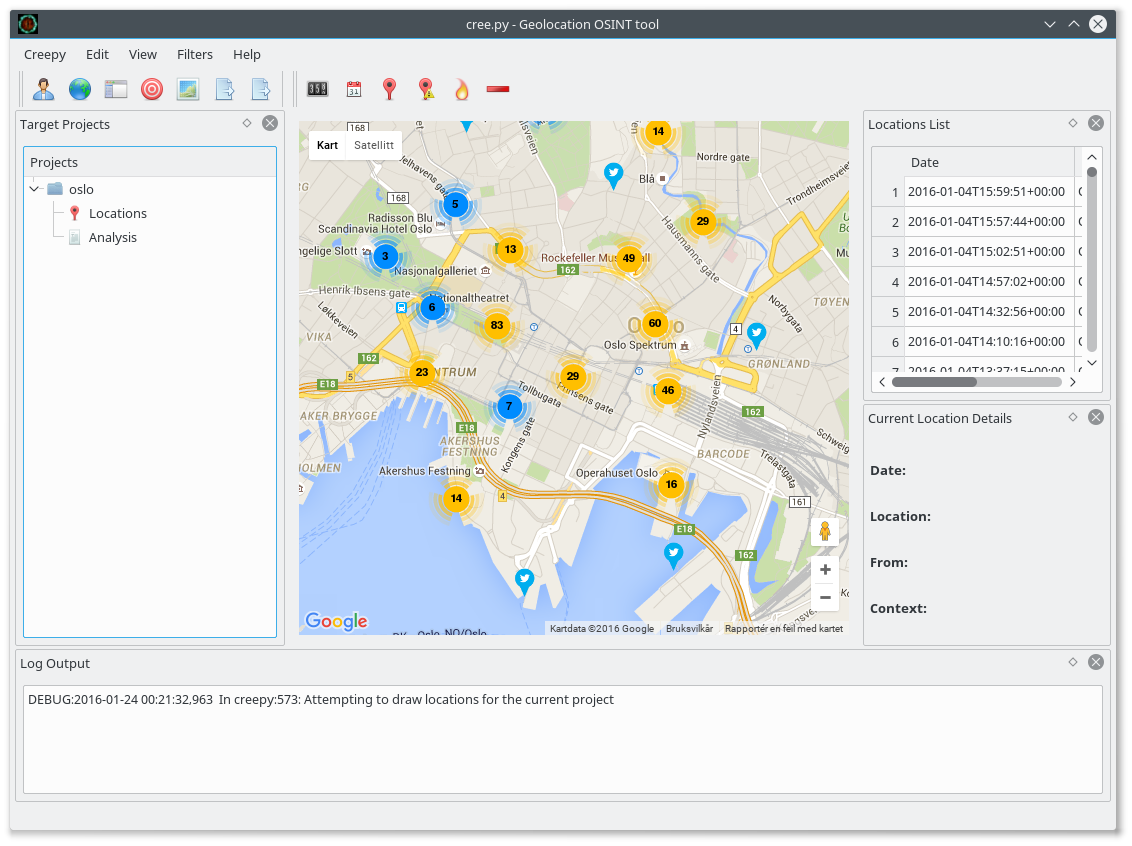
The phone company logs provide a register of locations to check out when one want to figure out what the tracked person was doing. It is unavailable for most of us, but provided to selected government officials, company staff, those illegally buying information from unfaithful servants and crackers stealing the information. But the public information can be collected and analysed, and a free software tool to do so is called Creepy or Cree.py. I discovered it when I read an article about Creepy in the Norwegian newspaper Aftenposten i November 2014, and decided to check if it was available in Debian. The python program was in Debian, but the version in Debian was completely broken and practically unmaintained. I uploaded a new version which did not work quite right, but did not have time to fix it then. This Christmas I decided to finally try to get Creepy operational in Debian. Now a fixed version is available in Debian unstable and testing, and almost all Debian specific patches are now included upstream. The Creepy program visualises geolocation information fetched from Twitter, Instagram, Flickr and Google+, and allow one to get a complete picture of every social media message posted recently in a given area, or track the movement of a given individual across all these services. Earlier it was possible to use the search API of at least some of these services without identifying oneself, but these days it is impossible. This mean that to use Creepy, you need to configure it to log in as yourself on these services, and provide information to them about your search interests. This should be taken into account when using Creepy, as it will also share information about yourself with the services. The picture above show the twitter messages sent from (or at least geotagged with a position from) the city centre of Oslo, the capital of Norway. One useful way to use Creepy is to first look at information tagged with an area of interest, and next look at all the information provided by one or more individuals who was in the area. I tested it by checking out which celebrity provide their location in twitter messages by checkout out who sent twitter messages near a Norwegian TV station, and next could track their position over time, making it possible to locate their home and work place, among other things. A similar technique have been used to locate Russian soldiers in Ukraine, and it is both a powerful tool to discover lying governments, and a useful tool to help people understand the value of the private information they provide to the public. The package is not trivial to backport to Debian Stable/Jessie, as it depend on several python modules currently missing in Jessie (at least python-instagram, python-flickrapi and python-requests-toolbelt). (I have uploaded the image to screenshots.debian.net and licensed it under the same terms as the Creepy program in Debian.)

Martin Michlmayr: QNAP TS-x09 installer available again

Debian 8.3 came out today. As part of this update, Debian installer images for QNAP TS-109, TS-209 and TS-409 are available again. These devices are pretty old but there are still some users. We dropped installer support several years ago because the installer ramdisk was too large to fit in flash. Since then, users had to install Debian 6.0 (squeeze) and upgrade from there. When squeeze was removed from the Debian mirrors recently, I received mail from a number of users. I investigated a bit and found out that we can bring back the installer thanks to XZ compression and some other changes. The installer is available for jessie and stretch.

21 January 2016

Tanguy Ortolo: Removing sam2p from Debian

Issues with sam2p and removal I have been maintaining the Debian package of sam2p for some time. Unfortunately, the upstream development of that program is no longer active, and it is using an old custom build chain that no longer works with recent version of GCC. This package is currently failing to build from source, and while I have been able to patch some issues in the past, and it may still be possible to fix it again, this is not really sustainable. I am therefore considering to remove sam2p from Debian, unless someone has a very good reason to keep it and is able and willing to maintain it.Alternative sam2p is a raster image conversion tool that can convert PNG and JPEG to EPS and PDF while keeping their compression, which is mostly useful to use them in documents compiled with LaTeX. Fortunately, the same can be done with ImageMagick. If you want to convert to EPS, you have to specify that you want EPS 2 or 3, otherwise it would produce EPS level 1 which does not provide native raster compression:
% convert debian-openlogo-raster100.png \
          eps3:debian-openlogo-raster100.eps
% convert debian-openlogo-raster100.png \
          debian-openlogo-raster100.pdf
% ls -lh
1.7K debian-openlogo-raster100.png
6.0K debian-openlogo-raster100.eps
8.8K debian-openlogo-raster100.pdf
% convert photograph.jpg eps3:photograph.eps
% convert photograph.jpg photograph.pdf
% ls -lh
657K photograph.jpg
662K photograph.eps
664K photograph.pdf
% convert scanned-document.png eps3:scanned-document.eps
% convert scanned-document.png scanned-document.pdf
140K scanned-document.png
145K scanned-document.eps
150K scanned-document.pdf
This is a bit less efficient than sam2p, as convert seems to add some fixed overhead, but it does keep the appropriate compression algorithm. See this documentation page from ImageMagick for more information. Using appropriate formats As a reminder, when writing LaTeX documents, depending on your build chain, you can use:
photographs
JPEG or EPS (converted from JPEG with ImageMagick);
raster drawings, screenshots
PNG or EPS (converted from PNG with ImageMagick);
vector graphics
PDF or EPS (convertes from SVG with Inkscape).

Zlatan Todori : FSF has also fund raising campaign

Free Software Foundation is also in process of funding and if you want them to shine still (or you simply love GNU manifesto or many other things this project has done for us in last 3 decades) then please support their fund raising campaign. Lets create GNU world!

Jonathan Dowland: Network Attached Storage

little and large little and large
I've just upgraded my home Network Storage box. Until now, it was very discreet, about the size of a car radio. It lived on one of my bookcases and I was very happy with it but it could only take 2.5" sized hard drives and I've outgrown what you can fit on them. I've ended up moving to 2x4T 3.5" drives, a Coolermaster Elite 110 case and re-using the mainboard/CPU and RAM. This is hopefully enough capacity that I don't need to look at another upgrade for a few years, and the case could take more drives if I need it to. The Elite 110 is - by Mini-ITX case terms - pretty small, but still 6 times larger in volume than the old case. In the consumer NAS market, there are plenty of appliances that takes two 3.5" drives and are much smaller than that (such as the WD MyBook Duo, or Synology DS214). Unfortunately I could not find any cases that were of this size for a DIY build. Did I miss anything obvious? (As to why I choose DIY, that could be the subject for a future post.) The full boring details of the build are on the NAS system page.

Jonas Smedegaard: IT@school

Siri and I are on a journey through India and Nepal, with the aim of learning about needs of Debian derivatives, to improve Debian and encourage closer integration.

Distribution IT@school is a distribution originally based on Debian, later rebased on Ubuntu. Next release will possibly again be a direct derivative of Debian, or maybe even - time will tell - a Debian pure blend.

Aim is education As its name indicates, IT@school is targeted at schools: The system is used in 8th - 10th grades of most (or all?) public primary schools in Kerala, Together with KEK members Anto and Fayad, Siri and I met with former and current key participants in the project where we learned about its history and current status, and discussed some differences between Ubuntu and Debian. IT@school has a strong emphasis on the educational aspect, arguably setting it apart from Skolelinux/DebianEdu which emphasizes the technical aspect of relieving teachers from admin tasks. In the early years of deployment the project faced many hardware issues - e.g. in getting sound cards to work. This was seen not as problems but as beneficial learning for the teachers facing those issues. Kerala public school system has set the standard for other states in India, but sadly political support within the state has been weak in recent years. It is hoped that next election - this April - will bring a positive change.

School book IT@school is accompagnied by a school book written specifically for use of the included tools. No explicit license is applied to the book (which means it defaults to classic copyright). Possibly it will get Creative Commons licensed. If the school book gets a DFSG-free license, several collaboration opportunities emerge: Currently the book is drafted in LibreOffice but then - due to state procedures - finalized with PageMaker. Would be interesting to setup an alternate process using only Free tools - either with Scribus or XeLaTeX. An important detail here is to ensure that the process supports malayalam script.

Curriculum Work is in progress mapping FLOSS tools to the state curriculum. I recommended to share that work publicly with a Free license, to encourage comparisons across countries, and invite collaboration e.g. with Skolelunux/DebianEdu.

Blend for SBCs Some Kerala higher education schools (sorry, don't remember which) have bought some thousands of RaspberryPi2. I suggested to create a Debian Blend for SBCs (Single Board Computers) - we will see what comes of that idea

Blend for education I also suggested to make a Debian blend around IT@school distribution itself, with its strong focus on educational content - i.e. not just as addon to technical tools but the primary purpose pulling in tools as needed.

Russell Coker: Finding Storage Performance Problems

Here are some basic things to do when debugging storage performance problems on Linux. It s deliberately not an advanced guide, I might write about more advanced things in a later post. Disk Errors When a hard drive is failing it often has to read sectors several times to get the right data, this can dramatically reduce performance. As most hard drives aren t monitored properly (email or SMS alerts on errors) it s quite common for the first notification about an impending failure to be user complaints about performance. View your kernel message log with the dmesg command and look in /var/log/kern.log (or wherever your system is configured to store kernel logs) for messages about disk read errors, bus resetting, and anything else unusual related to the drives. If you use an advanced filesystem like BTRFS or ZFS there are system commands to get filesystem information about errors. For BTRFS you can run btrfs device stats MOUNTPOINT and for ZFS you can run zpool status . Most performance problems aren t caused by failing drives, but it s a good idea to eliminate that possibility before you continue your investigation. One other thing to look out for is a RAID array where one disk is noticeably slower than the others. For example if you have a RAID-5 or RAID-6 array every drive should have almost the same number of reads and writes, if one disk in the array is at 99% performance capacity and the other disks are at 5% then it s an indication of a failing disk. This can happen even if SMART etc don t report errors. Monitoring IO The iostat program in the Debian sysstat package tells you how much IO is going to each disk. If you have physical hard drives sda, sdb, and sdc you could run the command iostat -x 10 sda sdb sdc to tell you how much IO is going to each disk over 10 second periods. You can choose various durations but I find that 10 seconds is long enough to give results that are useful. By default iostat will give stats on all block devices including LVM volumes, but that usually gives too much data to analyse easily. The most useful things that iostat tells you are the %util (the percentage utilisation anything over 90% is a serious problem), the reads per second r/s , and the writes per second w/s . The parameters to iostat for block devices can be hard drives, partitions, LVM volumes, encrypted devices, or any other type of block device. After you have discovered which block devices are nearing their maximum load you can discover which of the partitions, RAID arrays, or swap devices on that disk are causing the load in question. The iotop program in Debian (package iotop) gives a display that s similar to that of top but for disk io. It generally isn t essential (you can run ps ax grep D to get most of that information), but it is handy. It will tell you which programs are causing IO on a busy filesystem. This can be good when you have a busy system and don t know why. It isn t very useful if you have a system that is used for one task, EG a database server that is known to be busy doing database stuff. It s generally a good idea to have sysstat and iotop installed on all systems. If a system is experiencing severe performance problems you might not want to wait for new packages to be installed. In Debian the sysstat package includes the sar utility which can give historical information on system load. One benefit of using sar for diagnosing performance problems is that it shows you the time of day that has the most load which is the easiest time to diagnose performance problems. Swap Use Swap use sometimes confuses people. In many cases swap use decreases overall disk use, this is the design of the Linux paging algorithms. So if you have a server that accesses a lot of data it might swap out some unused programs to make more space for cache. When you have multiple virtual machines on one system sharing the same disks it can be difficult to determine the best allocation for RAM. If one VM has some applications allocating a lot of RAM but not using it much then it might be best to give it less RAM and force those applications into swap so that another VM can cache all the data it accesses a lot. The important thing is not the amount of swap that is allocated but the amount of IO that goes to the swap partition. Any significant amount of disk IO going to a swap device is a serious problem that can be solved by adding more RAM. Reads vs Writes The ratio of reads to writes depends on the applications and the amount of RAM. Some applications can have most of their reads satisfied from cache. For example an ideal configuration of a mail server will have writes significantly outnumber reads (I ve seen ratios of 5:1 for writes to reads on real mail servers). Ideally a mail server will cache all new mail for at least an hour and as the most prolific users check their mail more frequently than that most mail will be downloaded before it leaves the cache. If you have a mail server with reads outnumbering writes then it needs more RAM. RAM is cheap nowadays so if you don t want to compete with Gmail it should be cheap to buy enough RAM to cache all recent mail. The ratio of reads to writes is important because it s one way of quickly determining if you have enough RAM and adding RAM is often the cheapest way of improving performance. Unbalanced IO One common performance problem on systems with multiple disks is having more load going to some disks than to others. This might not be a problem (EG having cron jobs run on disks that are under heavy load while the web server accesses data from lightly loaded disks). But you need to consider whether it s desirable to have some disks under more load than others. The simplest solution to this problem is to just have a single RAID array for all data storage. This is also the solution that gives you the maximum available disk space if you use RAID-5 or RAID-6. A more complex option is to use some SSDs for things that require performance and disks for things that don t. This can be done with the ZIL and L2ARC features of ZFS or by just creating a filesystem on SSD for the data that is most frequently accessed. What Did I Miss? I m sure that I missed something, please let me know of any other basic things to do or suggestions for a post on more advanced things.

Next.

Previous.