Search Results: "spa"

30 May 2014

Jaldhar Vyas: OOH OOH Microagression!

Debian recently instituted a code of conduct which makes the astute observation that "a community in which people feel threatened is not a healthy community". So imagine my shock when I read Russell Cokers blog via Debian Planet, where commenting on a link from the intellectual powerhouse known as salon.com he said "The next logical step is to treat conservatism as a mental health problem." Being a conservative myself I immediately lost all my self-esteem and Dovecots SSL cert handling stopped working. What if I attend debconf and Coker uses his white privilege to sic Mental Health Services on me? I'm scared, so very scared and I don't know if I can continue not working on Debian Minix any longer. I demand that the Debian project, nay the world, should be OUTRAGED I'm talking spelling naughty words in hexadecimal levels of outrage and force this maniac to shut up before any more innocent flowers are brutalized by his "opinions."

28 May 2014

Hideki Yamane: no /run/systemd/private

Setting up dbus (1.8.2-1) ...
Failed to get D-Bus connection: Failed to connect to socket /run/systemd/private: Connection refused
invoke-rc.d: initscript dbus, action "start" failed.
dpkg: error processing package dbus (--configure):
subprocess installed post-installation script returned error exit status 1
Errors were encountered while processing:
dbus
Error: Timeout was reached
E: Sub-process /usr/bin/dpkg returned an error code (1)
and there is no /run/systemd/private file :-(
After reboot it, it has been created and able to upgrade. Hmm... how I can avoid this systemd related error?

27 May 2014

Jon Dowland: Nine Inch Nails, Manchester, 2014

I spent the bank holiday weekend mostly in Manchester with my brother and a couple of friends, mostly to see Nine Inch Nails perform, but also to enjoy the pleasures of the city.
the Marble Arch's ceiling the Marble Arch's ceiling
We arrived on the Sunday and after checking in headed out to get some food. I'd booked us a table at the historic Marble Arch - the pub which gives its name to the parent company Marble Beers - and produce my most favourite ales. Whenever a Marble beer ends up as a guest at one of the Newcastle real ale pubs a friend of mine (who is much more on top of this stuff than I am) lets me know and we stop off for a few. Invariably there's a crowd of a dozen or so Manchester expats in bar when we do. I reserved our table over twitter, which is a bit of a novelty for me. My two friends are ale skeptics but - due to lack of choice - we all ended up sampling the Chocolate Marble and the Ginger 5.1, which went down a storm. They are possibly converts now. There was an Earl Grey IPA too, which was nice but a bit on the strong side for sessioning.
copyright   Jonathan Dowland 2014, http://creativecommons.org/licenses/by/4.0/ click for the animated version
The gig was great - I prefer club gigs to arena gigs but the sound techs for NIN know what they are doing and the mix was great. The visuals were stunning too. Highlights for me were "The Great Destroyer" - in particular the extended, improvised 5 minute glitch-meltdown coda; the slow build of "Eraser" and "The Day The World Went Away" - played faithfully to the CD mix rather than the traditional extended live arrangement. I miss the former live arrangement, which includes a drawn out drum-backed finish, but this arrangement had a lot of force, with all four of the band bashing guitars into a pummelling wall of sound. I've heard that at least one person has taped the show and it turns out recordings have just recently surfaced for the two club gigs my brother and I attended back in 2005 and 2007 - meaning there are now widely available, high quality ROIO copies for every NIN gig I've ever been to. Afterwards we tried to find a decent club. Manchester is a lot larger than my native city and there's plenty of places to go, if you know where they are. We had originally planned to visit The Factory on Charles Street, but we didn't believe it was open on the Sunday. The Factory is Peter Hook's (formerly of Joy Division/New Order) club - occupying the former office spaces of Factory records. I've chanced in there once before as it's right across the road from the Lass O' Gowrie pub, which is the haunt of choice for HE/tech people whenever we're in Manchester for conferences.
cheesy cocktail names cheesy cocktail names
Instead we gravitated towards Dry Bar on Oldham street. By coincidence this place also has historic ties to Factory Records. However the doormen wouldn't let us in! Finally we landed at a place which had one name on the door and a different name on the inside (Jack's). Like the aformentioned Lass O' Gowrie and perhaps half of all pubs and clubs in Manchester, the place is decked out as a shrine to the former musical giants of the City, with framed pictures of Mark E Smith, the Ha ienda again, the Stone Roses in their boy-band-looks hay day, John Peel (champion of many of them) and of course Tony Wilson. I can't help but wonder whether people who live here get royally sick of that. This place served some delicious albeit clich -titled Cocktails and played a pretty good set - the obligatory Madchester throwback interlude was followed by a chunk of Northern Soul and a couple of early Rap classics. Setlist wise it was pretty much identical to that of Foundation in Newcastle, 12 years ago, no doubt because Foundation was cribbing heavily from the Ha ienda in the first place.
Record haul Record haul
Monday was dedicated to exploring and shopping. Top of my list of places to go was my pilgrimage venue Vinyl Exchange. Whilst waiting for it to open we rolled around in Affleck's Palace, which turned out to have a small record stall within. After Vinyl Exchange we chanced across another record store right across the road - Picadilly Records - which happens to be larger and focuses more on new releases. It didn't take long before we found another small, DIY record shop, then another. We tried out the Fopp branch here - more Vinyl; then Urban Outfitters - more; then an Oxfam branch - even more. I actually got Vinyl snow blind at this point. I've been controlling myself admirably and only picked up a couple of bits and pieces. My best find was Fad Gadget's sophmore album "Incontinent".

26 May 2014

Clint Adams: Starring Danny Pudi as someone from Tandaloor

For ages I've been advocating for the dissolution of the tech-ctte, one of the biggest bugs in the Constitution. However, for the longest time I was unable to suggest a suitable replacement; there will always be people whose characters are so flawed that they will appeal to authority as a matter of first recourse, and those people need some sort of forum within which to waste time. Then the circus of #727708 came about, possibly the only useful thing the tech-ctte has ever done. Suddenly it became clear to me what would be a drastic improvement: replace the entire shitshow with a close analog of the Gowachin legal system from Frank Herbert's ConSentiency universe. Sure, it wouldn't fix the structural problems of a self-selecting group, or the related problem of the wider community not understanding such basic concepts as nomocracy, conflicts of interest, separation of duties, separation of powers, accountability, responsibility, independence, oversight, due diligence, corruption, transparency, and egomania, but it would still be better in nearly every aspect. Or maybe term-limit band-aids will magically fix everything.

Clint Adams: Before the tweet in Grand Cayman

Jebediah boarded the airplane. It was a Bombardier CRJ900 with two turbofan jet engines. Run by SPARK, a subset of Ada. He sat down in his assigned seat and listened to the purser inform him that he was free to use his phone door-to-door on all Delta Connection flights. As long as the Airplane Mode was switched on. Jebediah knew that this was why Delta owned 49% of Virgin Atlantic. On the plane ride, a woman in too much makeup asked Jebediah to get the man next to him so she could borrow his copy of the Economist. The man said she could keep it and that it was old. He had stubby little fingers. She was foreign. At Terminal 2, they passed by Kids on the Fly, an exhibit of the Chicago Children's Museum at Chicago O'Hare International Airport. A play area. Jebediah thought of Dennis. The Blue Line of the Chicago Transit Authority was disrupted by weekend construction, so they had to take a small detour through Wicker Park. Wicker Park is a neighborhood. In Chicago. Jebediah looked at Glazed & Infused Doughnuts. He wondered if they made doughnuts there. Because of the meeting, he knocked someone off a Divvy bike and pedaled it to the Loop. The Berghoff was opened in 1898 by Herman Joseph Berghoff. Once he got to the Berghoff, he got a table for seven on the west wall. He eyed the electrical outlet and groaned. He had brought 3 cigarette lighter adapters with him, but nothing to plug into an AC outlet. How would he charge his device? An older gentleman came in. And greeted him. Hello, I'm Detective Chief Inspector Detweiler. Did you bring the evidence? Said the man. Jebediah coughed and said that he had to go downstairs. He went downstairs and looked at the doors. He breathed a sigh of relief. Seeing the word washroom in print reminded him of his home state of Canada. Back at the table he opened a bag, glared angrily at a cigarette lighter adapter, and pulled out a Palm m125. Running Palm OS 4.0. He noticed a third person at the table. It was the ghost of Bob Ross. , said the ghost of Bob Ross. It was good for him to communicate telepathically with Sarah Palin. This has eight megabytes of RAM, Jebediah informed the newcomer. Bob Ross's ghost right-clicked on his face and rated him one star. Jebediah looked angrily at the AC outlet and fidgeted with two of his cigarette lighter adapters. DCI Detweiler said, I had a Handspring Visor Deluxe, and pulled out a Samsung Galaxy Tab 3 8.0 eight-inch Android-based tablet computer running the Android 4.2.2 Jelly Bean operating system by Google. This also has eight megabytes of RAM, he continued. As you requested, I brought the video of your nemesis at the Robie House. Jebediah stared at the tablet. He could see a compressed video file, compressed with NetBSD compression and GNU encryption. It was on the tablet. Some bridges you just don't cross, he hissed. Meanwhile, in Gloucestershire, someone who looked suspiciously like Bobby Rainsbury opened up a MacBook Air and typed in a three-digit passcode. Across the street a wall safe slid out of the wall. And dropped onto someone's head. She closed the laptop. And went to Dumfries. Not far from the fallen safe, a group of men held a discussion. FBI: Why are we here on this junket? CIA: Where are we? DIA: We're here. JIA: This is confusing. NSA: I have to get back to that place in Germany where I don't work. ATF: We're talking about giant robots here, people. EPA: Huh? Part 2 AUD:USD 1.0645 donuts:dozen 12 Gold $1318.60 Giant robot spiders fought each other in a supermarket parking lot. Detective Seabiscuit sucked on a throat lozenge. Who are you again? he asked the toll-booth operator. I said my name is Rogery Sterling, replied the toll-booth operator. Rajry what? I said my name is Rogery Sterling, replied the toll-booth operator. Again. Where am I? Look, I'm telling you that that murder you're investigating was caused by software bugs in the software. Are we on a boat? Look at the diagram. This agency paid money to introduce, quite deliberately, weaknesses in the security of this library, through this company here, and this company here. Library, oh no. I have overdue fees. And they're running a PR campaign to increase use of this library. Saying that the competing options are inferior. But don't worry, they're trying to undermine those too. Detective Seabiscuit wasn't listening. He had just remembered that he needed to stop by the Robie House.

John Goerzen: Jacob s Pretend Train Office

5213. 5213. Silence. Train office to train 5213. More silence. Train office to train 5213. Is there an emergency? At this point, I had a decision to make. Jacob s voice was sounding a little vexed over the radio he was using to talk to me from the next room. Do I answer it, even though he had told me I was a different train number? I decided yes. So I said into my radio, What do you need, train office? An exasperated sigh came over my radio. DAD! You are train 51. If I call a different train, DO NOT ANSWER! Well. I guess now I know. Jacob has been having a lot of fun with radios lately. His favorite game is to pretend to be a train dispatcher. He ll tell me, Laura, or Oliver where to go, what track to take, what passengers to pick up, or anything else he can come up with. Sometimes one radio isn t enough he may even have two radios clipped to him in various places. We play radio hide and seek (where you use radios to give hints or tell people when you re ready to be found). We play train office. We use radios to communicate across the room sometimes, even. Pretty amazing to see him doing that. He s taken an interest in my amateur radios, too. He s been practicing under close supervision, of course how to use them, and how to properly give his callsign on the air. The boy is a natural. It s fun to watch him dive into something like that and enjoy it so much!

24 May 2014

Wouter Verhelst: kFreeBSD and ZFS

At one particular customer, increasing storage needs require that we add a large file server which should be as fast as possible. In that context, I'm currently evaluating using Debian GNU/kFreeBSD ("Debian," from now on) on ZFS. Not being hampered by a large degree of knowledge on the subject, here's a blog post with things I've learned so far. For context, the system on which we'll be installing will have 64 gigs of RAM, about two dozen SAS disks connected to a RAID controller of which I'm reasonably sure (though not 100% so) that it supports JBOD mode, and a PCIe-attached solid state storage device of several terabytes. If it turns out the RAID controller doesn't support JBOD mode, I'll probably create as many RAID0 devices as possible and hand those over to ZFS as "hard disks", instead; this wouldn't be an ideal solution, but I don't have much of a choice of hard disk attachment, unfortunately. That being said, the system on which I'm testing right now is the latest incantation of samba, an HP ProLiant ML115 server. A system with far more modest hardware specifications, it has 2G of RAM (which isn't really enough for ZFS), a single 160G SATA hard disk, and a dual-core AMD processor of about half a decade ago. And oh yes, no SSD. So for evaluating ZFS performance it's not ideal, but for evaluating Debian and ZFS features, it will do. Anyway, what I've found so far on samba: We'll see what else I learn.

23 May 2014

Emanuele Rocca: A (very) brief history of Australia

This post is mostly a sum-up of the Wikipedia page History of Australia, with some content taken from History of the British Empire. Both texts are available under the Creative Commons Attribution-ShareAlike License. I do not seem to be able to learn about a new topic without taking notes: in this case I have decided to publish my work, hoping that someone will find it useful. Some very important themes such as the Gold Rush and Australian History during the World Wars have been impudently ignored.
Indigenous Australians The ancestors of Indigenous Australians are believed to have arrived in Australia 40,000 to 60,000 years ago, and possibly as early as 70,000 years ago. By 1788, the population of Australia existed as 250 individual nations, many of which were in alliance with one another, and within each nation there existed several clans, from as few as five or six to as many as 30 or 40. Each nation had its own language and a few had multiple, thus over 250 languages existed, around 200 of which are now extinct. Permanent European settlers arrived at Sydney in 1788 and came to control most of the continent by end of the 19th century. Bastions of largely unaltered Aboriginal societies survived, particularly in Northern and Western Australia into the 20th century, until finally, a group of Pintupi people of the Gibson Desert became the last people to be contacted by outsider ways in 1984.
European explorers Terra Australis (Latin for South Land) is one of the names given to a hypothetical continent which appeared on European maps between the 15th and 18th centuries. Although the landmass was drawn onto maps, Terra Australis was not based on any actual surveying of such a landmass but rather based on the hypothesis that continents in the Northern Hemisphere should be balanced by land in the south. The first documented European landing in Australia was made in 1606 by a Dutch ship led by Willem Janszoon. Hence the ancient name "Nova Hollandia". The same year, a Spanish expedition had landed in the New Hebrides and, believing them to be the fabled southern continent, named the land: "Terra Austral del Espiritu Santo". Hence the current name "Australia". Although various proposals for colonisation were made, notably by Pierre Purry from 1717 to 1744, none was officially attempted. Indigenous Australians were less able to trade with Europeans than were the peoples of India, the East Indies, China, and Japan. The Dutch East India Company concluded that there was "no good to be done there". In 1769, Lieutenant James Cook tried to locate the supposed Southern Continent. This continent was not found, and Cook decided to survey the east coast of New Holland, the only major part of that continent that had not been charted by Dutch navigators. Cook charted and took possession of the east coast of New Holland. He noted the following in his journal:
"I can land no more upon this Eastern coast of New Holland, and
 on the Western side I can make no new discovery the honour of
 which belongs to the Dutch Navigators and as such they may lay
 Claim to it as their property, but the Eastern Coast from the
 Latitude of 38 South down to this place I am confident was never
 seen or viseted by any European before us and therefore by the
 same Rule belongs to great Brittan."
Colonisation The American Revolutionary War (1775-1783) saw Great Britain lose most of its North American colonies and consider establishing replacement territories. The British colony of New South Wales was established with the arrival of the First Fleet of 11 vessels in January 1788. It consisted of over a thousand settlers, including 778 convicts (192 women and 586 men). A few days after arrival at Botany Bay the fleet moved to the more suitable Port Jackson where a settlement was established at Sydney Cove on 26 January 1788. This date later became Australia's national day, Australia Day. Between 1788 and 1868, approximately 161,700 convicts (of whom 25,000 were women) were transported to the Australian colonies of New South Wales, Van Diemen's land and Western Australia. Early colonial administrations were anxious to address the gender imbalance in the population brought about by the importation of large numbers of convict men. In 1835, the British Colonial Office issued the Proclamation of Governor Bourke, implementing the legal doctrine of terra nullius upon which British settlement was based, reinforcing the notion that the land belonged to no one prior to the British Crown taking possession of it and quashing any likelihood of treaties with Aboriginal peoples, including that signed by John Batman. Its publication meant that from then, all people found occupying land without the authority of the government would be considered illegal trespassers. A group in Britain led by Edward Gibbon Wakefield sought to start a colony based on free settlement and political and religious freedoms, rather than convict labour. The South Australia Act [1834], passed by the British Government which established the colony reflected these desires and included a promise of representative government when the population reached 50,000 people. Significantly, the Letters Patent enabling the South Australia Act 1834 included a guarantee of the rights of 'any Aboriginal Natives' and their descendants to lands they 'now actually occupied or enjoyed'. In 1836, two ships of the South Australia Land Company left to establish the first settlement on Kangaroo Island. The foundation of South Australia is now generally commemorated as Governor John Hindmarsh's Proclamation of the new Province at Glenelg, on the mainland, on 28 December 1836. By 1851 the colony was experimenting with a partially elected council.
Development of Australian democracy Traditional Aboriginal society had been governed by councils of elders and a corporate decision making process, but the first European-style governments established after 1788 were autocratic and run by appointed governors. The reformist attorney general, John Plunkett, sought to apply Enlightenment principles to governance in the colony, pursuing the establishment of equality before the law. Plunkett twice charged the colonist perpetrators of the Myall Creek massacre of Aborigines with murder, resulting in a conviction and his landmark Church Act of 1836 disestablished the Church of England and established legal equality between Anglicans, Catholics, Presbyterians and later Methodists. In 1840, the Adelaide City Council and the Sydney City Council were established. Men who possessed 1,000 pounds worth of property were able to stand for election and wealthy landowners were permitted up to four votes each in elections. Australia's first parliamentary elections were conducted for the New South Wales Legislative Council in 1843, again with voting rights (for males only) tied to property ownership or financial capacity. Voter rights were extended further in New South Wales in 1850 and elections for legislative councils were held in the colonies of Victoria, South Australia and Tasmania. Women became eligible to vote for the Parliament of South Australia in 1895. This was the first legislation in the world permitting women also to stand for election to political office and, in 1897, Catherine Helen Spence became the first female political candidate for political office, unsuccessfully standing for election as a delegate to the Federal Convention on Australian Federation. Western Australia granted voting rights to women in 1899. Early federal parliamentary reform and judicial interpretation sought to limit Aboriginal voting in practice, a situation which endured until rights activists began campaigning in the 1940s.
Road to independence Despite suspicion from some sections of the colonial community (especially in smaller colonies) about the value of nationhood, improvements in inter-colonial transport and communication, including the linking of Perth to the south eastern cities by telegraph in 1877, helped break down inter-colonial rivalries. New South Wales Premier Henry Parkes addressed a rural audience in his 1889 Tenterfield Oration, stating that the time had come to form a national executive government:
"Australia [now has] a population of three and a half millions,
 and the American people numbered only between three and four
 millions when they formed the great commonwealth of the United
 States. The numbers were about the same, and surely what the
 Americans had done by war, the Australians could bring about in
 peace, without breaking the ties that held them to the mother
 country."
Though Parkes would not live to see it, his vision would be achieved within a little over a decade, and he is remembered as the "father of federation". The Commonwealth of Australia came into being when the Federal Constitution was proclaimed by the Governor-General, Lord Hopetoun, on 1 January 1901. Australia took part in WWI. The contributions of Australian and New Zealand troops during the 1915 Gallipoli Campaign against the Ottoman Empire had a great impact on the national consciousness at home, and marked a watershed in the transition of Australia and New Zealand from colonies to nations in their own right. The countries continue to commemorate this occasion on ANZAC Day. Australia achieved independent Sovereign Nation status after World War I, under the Statute of Westminster, which defined Dominions of the British empire in the following way:
"They are autonomous Communities within the British Empire, equal
 in status, in no way subordinate one to another in any aspect of
 their domestic or external affairs, though united by a common
 allegiance to the Crown, and freely associated as members of the
 British Commonwealth of Nations."
The parliaments of Canada, Australia, New Zealand, the Union of South Africa, the Irish Free State and Newfoundland (currently part of Canada) were now independent of British legislative control, they could nullify British laws and Britain could no longer pass laws for them without their consent. The Australia Act 1986 removed any remaining links between the British Parliament and the Australian states.

21 May 2014

Russell Coker: Why I Use BTRFS

I ve just had to do yet another backup/format/restore operation on my workstation due to a BTRFS corruption problem, but as usual I didn t lose any data. The BTRFS data integrity features work reasonably well even when the filesystem gets into a state where the kernel will only accept a read-only mount. Given that the BTRFS tag on my blog is mostly about problems with BTRFS I think it s time that I explain why I use it in spite of the problems before people start to worry about my sanity or competence. The first thing to note is that BTRFS is fairly resiliant toward errors when mounted in read-only mode. When mounting a filesystem read-write there are a number of ways in which things can break which are often due to kernel code not being able to handle corrupt metadata I don t know how much of this is inherent to the design of BTRFS and how much is simply missing features in filesystem error handling. Some of the errors that I have had weren t entirely the fault of BTRFS, I twice had to do a backup/format/restore of my workstation due to a faulty DIMM corrupting memory (that has the potential to mess up any filesystem), but I still didn t lose any data AFAIK. The next thing to note is that I don t use BTRFS when doing paid sysadmin work. ZFS is a solid and reliable filesystem and it is working really well for my clients while BTRFS has too many issues at the moment. As an aside I m not interested in any comments about the ZFS license situation from anyone who s not officially representing Oracle. I also don t use BTRFS on systems that I can t access easily. The servers I have running BTRFS are all within an hour s drive from home, while driving for an hour on account of a kernel or filesystem error is really annoying it s not as bad as dealing with a remote server where I have no direct access. Reasons to Use BTRFS The benefits of BTRFS right now are snapshots (which are good for a first-line backup) and the basic data integrity features. I ve found these features to work well in real use. According to the comparison of Filesystems Wikipedia page ZFS and BTRFS are the only general purpose filesystems (IE for disks not tapes, NVRAM, or a cluster) that support checksums for all data and compression. Given that ZFS license issues will never allow it to be included in the Linux kernel tree it seems clear that BTRFS is the next significant filesystem for Linux. More testing of BTRFS is a good thing, while there are a number of known problems that the developers are working on it seems that more testing is needed now to find corner cases. Also we need a lot of testing to find bugs related to interactions with other software. I ve recently filed bug reports against the Debian installer because it can t install to a BTRFS RAID-1 (fortunately BTRFS supports changing to RAID-1 after installation) and because it doesn t support formatting an existing BTRFS filesystem (the mkfs program needs a -f option in that case). I also sent in a patch for the magic database used by file(1) to provide more information on BTRFS filesystems (which is in Debian/testing but not Debian/Wheezy). These are the sorts of things you encounter when routinely using software that you don t necessarily notice in basic testing. As an aside the Debian installation process failed at the GRUB step when I manually balanced a filesystem to use RAID-1 while the Debian installation was in progress. I didn t file a bug report because the best advice is to not mess with filesystems while the installer is running. I ll do a lot more testing of this when the Debian installer supports a BTRFS RAID-1 installation. A final thing that we need to work on is developing sysadmin best practices and scripts for managing BTRFS filesystems. I ve done some work on scripts to create snapshots for online backups but there are issues of managing free space etc. But working out how to best manage a new filesystem is something that takes years because there are many corner cases you may only encounter after a system has been running for a long time. So I really wouldn t want to be in the situation of using a new filesystem on an important server without having practice running it on less important systems, I did that with ZFS and now have a hacky first install that I have to support for years.

20 May 2014

Laura Arjona: Some experiences, and TODO, about fonts

TL;DR I don t know much about fonts, I just use the stock ones that come with my system. From time to time I have issues with docs that others create, and use other fonts. This post is about my plans on learning a bit more and, at least, know how to solve those issues, if it s possible, while staying in the bright side (the free-software / free font side). Long version The context I use Debian, LibreOffice, sometimes Inkscape, and LaTeX. One of my favorite hashtags is #iloveplaintext, I don t know much about design in general, and fonts and typography in particular. I didn t change the fonts in my desktops (only reduced the size in the laptop, to be able to read a bit more in my low resolution screen), I rarely change the font in Writer (maybe from Liberation Serif to Liberation Sans), I never changed the font in a LaTeX document or LaTeX beamer presentation (I write boring documents, I know) and when I paste from the web, it s usually because I want to read a long article so I paste as plain text in gedit and print it or save it. So I ve never felt to learn more about fonts, it just works, and covers my needs, (or not, but I mostly could live with the issues). Then a friend in the Pump.io network, Adri n Perales, published a blog post about Typography (in Spanish) that I liked very much, and I began to think (and remember) some of the issues that I have from time to time with fonts. Issue #1: League Gothic: a free font that was not installed in my system Today, again in the Pump.io network, I discover that the FSF published a poster Privacy is impossible without free software , in SVG format, but it didn t look well when I opened it with GIMP, clearly due to some missing font. Nice that SVG format is a plain text format (XML)! So I opened the file with gedit and searched for the text string whose font was missing. It was League Gothic font, of course a free software font, but not packaged in Debian, it seems. No problem. I downloaded the font, copied the files in /usr/share/fonts and problem solved. Issue #2: Book Antiqua: a non-free font (must find equivalent) A document made with Microsoft Word that one friend sends to me so I review and resend (in PDF format) to other people. It s a leaflet, and it has text in Arial, in Tahoma, and in Book Antiqua. When I open it with LibreOffice the aspect is wrong (the substitutes are not the same size so some breaking lines and so). Book Antiqua is not free. I learned that it s an imitation of the Palatino font, and that a similar font in the free software systems is URW Palladio . In Writer (LibreOffice), I went to Tools > Options > Fonts and declared the equivalence of the two fonts, so the program would use URW Palladio as a substitute of Book Antiqua. I opened again the document and it was quite better, very similar to the original aspect. I didn t bother in changing the text in Arial or Tahoma, since the substitutes that LibreOffice used were quite good. But I bookmarked this page: A Web Designer Guide to Linux Fonts for remembering the different fonts that I can try to emulate the Windows ones. I also know that I can install the Microsoft Core Fonts for the web since they are packaged for Debian in the contrib archive. But I ll try to survive without them for now (until now, I didn t bother, why should I now that I have the substituting guide?). In other news, I got impressed that MS Core Fonts is #4 in Most downloads all over the time in SourceForge, with more than 450 million downloads \o/ Issue #3: Installing a new free font in Debian So I decided to install one of the fonts that Adri n Perales recommended in his blog post, Linux Libertine . Since it is packaged for Debian, it s super easy:
# apt-get install ttf-linux-libertine
(my LibreOffice was opened, so I closed it and opened again, and the font was there ready for use). Issue #4: Use a different font in LaTeX Well, as always, there is not one but many ways to do that in LaTeX. My intuition tells me that if there is a LaTeX package for the font that I want to use, it s probably a nice idea to just use it. So I searched about Linux Libertine in LaTeX and yes, there is a package (and you can find a very interesting font guide in The LaTeX font catalogue ). I installed the package texlive-fonts-extra, and then, I added two lines in my LaTeX document:
\usepackage libertine 
\usepackage[T1] fontenc 
Compiled, and the resultant PDF was using Libertine font instead of Computer Modern. TODO (and/or wishlist) When opening a document that uses a font not present in my system, I maybe wouldn t notice that a font is missing and I see a substitute (and maybe not the best one)!. It would be nice that the program tells the user This file uses the font X, and it seems it s not in your system. I ll use font Y as a substitute . I m not sure if there is a standard way to know which package contains a certain font. I use a web search engine to try to find out, and the websites that I linked in the article. I have to investigate and learn a bit more about free fonts equivalents to the ones that other people use, and fonts in general, so my documents are more beautiful and people gets interested to know about the tools that I use to produce them. Well, I ve written a long blog post (thanks if you read until here!), solved some issues, and try some things, but not even capturing a snapshot to show here! It seems that I m still lazy, forgive me I hope at least this #plaintext is useful for you :)
Filed under: My experiences and opinion, Uncategorized Tagged: Debian, English, Fonts, Free Software, LaTeX, libre software, LibreOffice, Moving into free software, pump.io

19 May 2014

Russell Coker: My First Ingress Anomaly

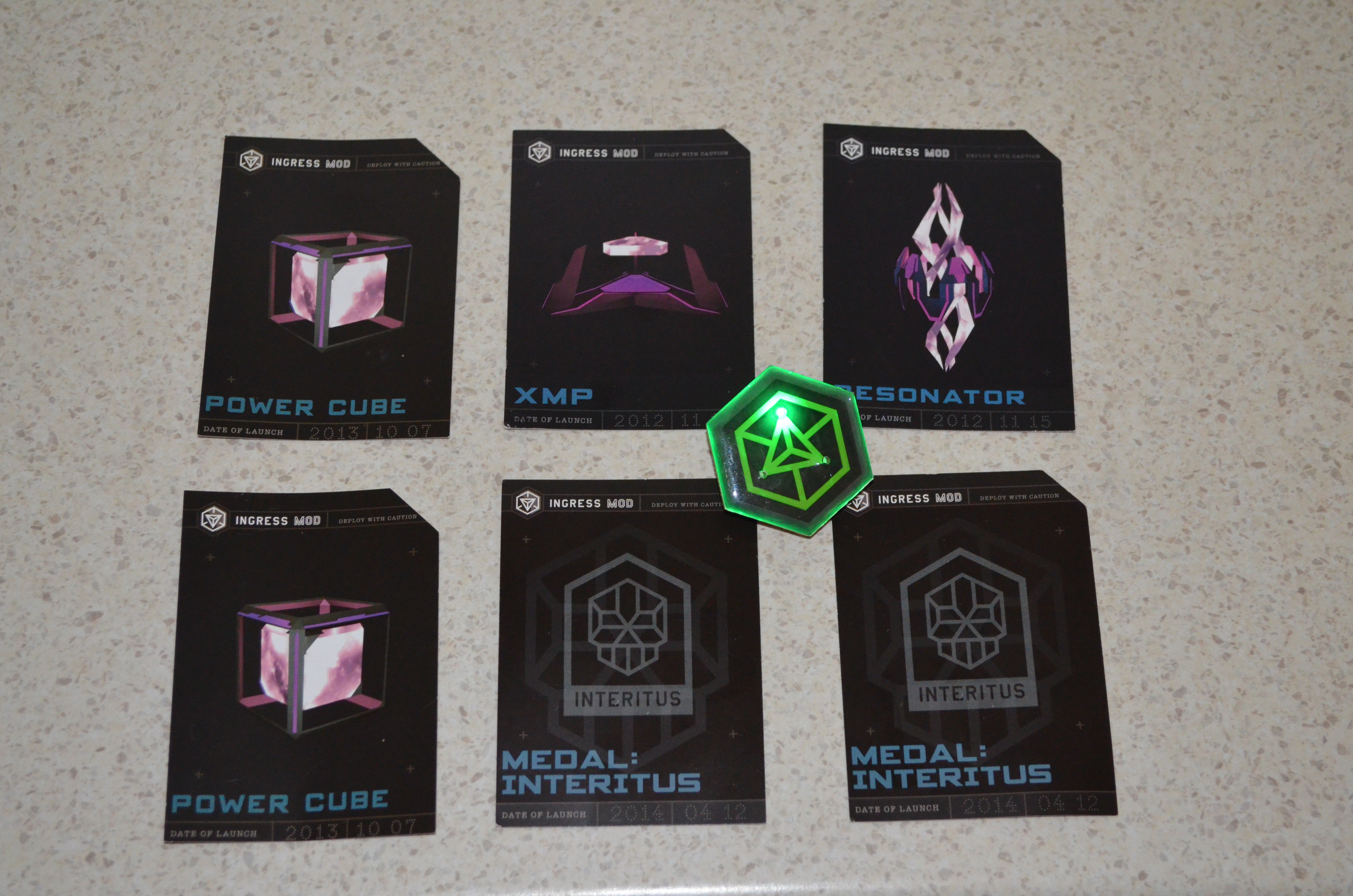
schwag from Ingress Anomaly Ingress is an Android phone game developed by Google where you have to go to various places to capture portals which are based on landmarks or places of note. There s a sci-fi back story which I haven t cared much about (my local library has a heap of good sci-fi books I don t have time to read). But if you are interested in low quality sci-fi you can start with the Youtube channel for Ingress [1]. But the best thing to do is to download the Ingress client program from the Google play store if you have an Android phone [2]. Periodically they have special events in the game called Anomalies , which usually involve many people competing to capture a small number of special portals. Usually a portal is fairly easy to capture so a high level player can easily capture a portal in at most a few minutes, but when there is a large group of players defending a portal by replacing the resonators as quickly as they are destroyed it becomes more challenging. I m not going to try to explain this properly as I presume that readers either already know or don t care. The Wikipedia page about Ingress has more information. On Saturday there was an Anomaly where the main city was Melbourne. My team (Enlightened) won the event in Australia but apparently the event in the US at the same time was won by the other team (Resistance). I had hoped that our event would be similar to some of the ones I ve seen on the Ingress Report (a fictional news service on youtube) in which actors from the sci-fi videos about Ingress attended. But unfortunately it seems that the actors stay in the US. Every player who was registered for the anomaly received a gift pack that contained three cards and a badge. The picture above shows the cards that my wife and I received along with one of our badges. The badges are green for Enlightened and blue for Resistance (the in-game colors) and have three flashing LEDs the photo has one of the LEDs lit up. The three cards have passcodes which can be redeemed for in-game items, the XMP, Power Cubes, and Resonators weren t that useful (10 not particularly rare items that I could get through 10 minutes of game playing). The Medal cards are for in-game badges showing the anomalies that we have played at, but they are bronze badges which again aren t much use as nothing less than silver will help in leveling up. Overall it was a good experience, we won, had a good after-party (with free snacks and one free drink per person), and the badges are nice. I recommend attending if there s an event in your area, and note that you don t need to be a high level player to attend, even L6 players were able to contribute.

Matthew Garrett: The desktop and the developer

I was at the OpenStack Summit this week. The overwhelming majority of OpenStack deployments are Linux-based, yet the most popular laptop vendor (by a long way) at the conference was Apple. People are writing code with the intention of deploying it on Linux, but they're doing so under an entirely different OS.

But what's really interesting is the tools they're using to do so. When I looked over people's shoulders, I saw terminals and a web browser. They're not using Macs because their development tools require them, they're using Macs because of what else they get - an aesthetically pleasing OS, iTunes and what's easily the best trackpad hardware/driver combination on the market. These are people who work on the same laptop that they use at home. They'll use it when they're commuting, either for playing videos or for getting a head start so they can leave early. They use an Apple because they don't want to use different hardware for work and pleasure.

The developers I was surrounded by aren't the same developers you'd find at a technical conference 10 years ago. They grew up in an era that's become increasingly focused on user experience, and the idea of migrating to Linux because it's more tweakable is no longer appealing. People who spend their working day making use of free software (and in many cases even contributing or maintaining free software) won't run a free software OS because doing so would require them to compromise on things that they care about. Linux would give them the same terminals and web browser, but Linux's poorer multitouch handling is enough on its own to disrupt their workflow. Moving to Linux would slow them down.

But even if we fixed all those things, why would somebody migrate? The best we'd be offering is a comparable experience with the added freedom to modify more of their software. We can probably assume that this isn't a hugely compelling advantage, because otherwise it'd probably be enough to overcome some of the functional disparity. Perhaps we need to be looking at this differently.

When we've been talking about developer experience we've tended to talk about the experience of people who are writing software targeted at our desktops, not people who are incidentally using Linux to do their development. These people don't need better API documentation. They don't need a nicer IDE. They need a desktop environment that gives them access to the services that they use on a daily basis. Right now if someone opens an issue against one of their bugs, they'll get an email. They'll have to click through that in order to get to a webpage that lets them indicate that they've accepted the bug. If they know that the bug's already fixed in another branch, they'll probably need to switch to github in order to find the commit that contains the bug number that fixed it, switch back to their issue tracker and then paste that in and mark it as a duplicate. It's tedious. It's annoying. It's distracting.

If the desktop had built-in awareness of the issue tracker then they could be presented with relevant information and options without having to click through two separate applications. If git commits were locally indexed, the developer could find the relevant commit without having to move back to a web browser or open a new terminal to find the local checkout. A simple task that currently involves multiple context switches could be made significantly faster.

That's a simple example. The problem goes deeper. The use of web services for managing various parts of the development process removes the need for companies to maintain their own infrastructure, but in the process it tends to force developers to bounce between multiple websites that have different UIs and no straightforward means of sharing information. Time is lost to this. It makes developers unhappy.

A combination of improved desktop polish and spending effort on optimising developer workflows would stand a real chance of luring these developers away from OS X with the promise that they'd spend less time fighting web browsers, leaving them more time to get on with development. It would also help differentiate Linux from proprietary alternatives - Apple and Microsoft may spend significant amounts of effort on improving developer tooling, but they're mostly doing so for developers who are targeting their platforms. A desktop environment that made it easier to perform generic development would be a unique selling point.

I spoke to various people about this during the Summit, and it was heartening to hear that there are people who are already thinking about this and hoping to improve things. I'm looking forward to that, but I also hope that there'll be wider interest in figuring out how we can make things easier for developers without compromising other users. It seems like an interesting challenge.

comment count unavailable comments

18 May 2014

Benjamin Mako Hill: Installing GNU/Linux on a 2014 Lenovo Thinkpad X1 Carbon

I recently bought a new Lenovo X1 Carbon. It is the new second-generation, type 20A7 laptop, based on Intel s Haswell microarchiteture with the adaptive keyboard. It is the version released in 2014. I also ordered the Thinkpad OneLink Dock which I have returned for the OneLink Pro Dock which I have not yet received. The system is still very new, challenging, and different, but seems to support GNU/Linux reasonably well if you are willing to run a bleeding edge version and/or patch your kernel and if you are not afraid to spend an afternoon or two tweaking things. What follows are my installation notes for Debian testing (jessie) when I installed it in early May 2014. My general impressions about the laptop as a GNU/Linux system and overall are at the end of this write-up.
System Description The X1 Carbon I ordered included the 512GB SSD, the 14.0 inch WQHD (2560 1440) 260 nit touchscreen, and the maximum 8GB of memory. I believe the rest is not particularly negotiable but includes a 720p HD Camera, a 45.2Wh battery, and an Intel Dual Band Wireless 7260AC with Bluetooth 4.0. For those that are curious Here is the output of lspci on the system:
00:00.0 Host bridge: Intel Corporation Haswell-ULT DRAM Controller (rev 0b)
00:02.0 VGA compatible controller: Intel Corporation Haswell-ULT Integrated Graphics Controller (rev 0b)
00:03.0 Audio device: Intel Corporation Haswell-ULT HD Audio Controller (rev 0b)
00:14.0 USB controller: Intel Corporation Lynx Point-LP USB xHCI HC (rev 04)
00:16.0 Communication controller: Intel Corporation Lynx Point-LP HECI #0 (rev 04)
00:16.3 Serial controller: Intel Corporation Lynx Point-LP HECI KT (rev 04)
00:19.0 Ethernet controller: Intel Corporation Ethernet Connection I218-LM (rev 04)
00:1b.0 Audio device: Intel Corporation Lynx Point-LP HD Audio Controller (rev 04)
00:1c.0 PCI bridge: Intel Corporation Lynx Point-LP PCI Express Root Port 6 (rev e4)
00:1c.1 PCI bridge: Intel Corporation Lynx Point-LP PCI Express Root Port 3 (rev e4)
00:1d.0 USB controller: Intel Corporation Lynx Point-LP USB EHCI #1 (rev 04)
00:1f.0 ISA bridge: Intel Corporation Lynx Point-LP LPC Controller (rev 04)
00:1f.2 SATA controller: Intel Corporation Lynx Point-LP SATA Controller 1 [AHCI mode] (rev 04)
00:1f.3 SMBus: Intel Corporation Lynx Point-LP SMBus Controller (rev 04)
BIOS/Firmware The BIOS firmware is non-free and proprietary as it the case with all ThinkPads and nearly all laptops. According to this thread there is a bug in the default BIOS that means that suspend to RAM is broken in GNU/Linux. You can get updated BIOS at the Lenovo s ThinkPad X1 Carbon (Type 20A7, 20A8) Drivers and software page by looking in the the BIOS section. Honestly, the easiest approach is probably to download the Windows BIOS Update utility (documentation is here) which you can use to run the BIOS update from within Windows before you install GNU/Linux. If that s not an option (e.g., if you ve already installed GNU/Linux) the best method is to download the bootable CD ISO from the same page. Of course, since the X1 Carbon has no optical media, you have to find another way to boot the CD image. I struggled to get the ISO to boot from USB using the usually reliable dd method. This message suggest that the issue had to do with the El Torito wrapper:
I had to dump the eltorito image from the ISO they provide, after that I was able to dd the resulting image to a flash drive and the bios update went well, no cdrom needed.
I updated to version 1.13 of the BIOS which fixes the suspend/resume bug. By the time you read this, there may be newer versions that fix other things so check the Lenovo website.
Installing Debian I installed Debian testing using the March 19, 2014 Alpha 1 release of the Debian Installer for Jessie (currently testing). I installed in graphical mode. With the WQHD screen, everything was extremely tiny but it worked flawlessly. I downloaded the amd64 net install image from the normal place and installed the rest of the system using the built-in Ethernet port which required no firmware or extra drivers. I did the normal dd if=FILENAME.iso of=/dev/sdX method of getting the installer onto the a USB stick to boot. I turned off restricted boot in BIOS first. In general, the latest version of the Debian installation guide is always a good source of guidance on installing Debian. I used the Debian installer wizard to partition and selected Use entire disk and partition it for LVM and encrypted data which kept the UEFI partitions around. The system installed with no errors or issues and booted up normally afterward. The grub menu is hilariously narrow on the WQHD screen. If you want to use the built-in wireless and/or Bluetooth, you will need to install the non-free iwlwifi firmware package. It is very lame that we still have to do this to use hardware we have purchased.
What Works and Doesn t The following stuff works the first time I booted into the GNOME 3 desktop and logged in:
  • The WQHD 2560 1440 screen
  • The touchscreen
  • Both the TrackPoint and the touchpad
  • Built-in e1000e Ethernet using the dongle
  • The keyboard plus the adaptive row of F1-F12 keys.
  • External monitor using the full HDMI or mini-DisplayPort connectors
  • Audio (both speakers and microphone)
  • The camera/webcam
The following stuff works if you install non-free firmware:
  • Internal Wireless
  • Bluetooth 4.0
The following stuff works with qualifications:
  • Suspend to RAM Works once you have updated the firmware.
  • The adaptive keyboard The F1-F12 keys work but the button that theoretically lets you switch to different sets of function buttons (e.g., volume, brightness) does nothing.
  • Disabling the touchpad There is a BIOS option to disable the touchpad. It works in Windows and does nothing at all in GNU/Linux.
I have not tried:
  • The fingerprint reader
Disabling the touchpad As a long-term ThinkPad user, I love the TrackPoint pointing stick. If you plan on using this, the built-in touchpad is incredibly aggravating because it is very easy to brush against it while using the TrackPoint. In BIOS, there is an option to disable the touchpad. Although this works in Windows, it does absolutely nothing in GNU/Linux. Part of the issue is that, unlike the older X1 Carbon and other ThinkPads, there are no TrackPoint buttons. Instead of buttons, there are regions at the top of the touchpad which are configured, in software, to act like buttons. If you want to be able to click, the touchpad can never be truly turned off. This is not problem unique to the Haswell X1 Carbon and a number of people have been struggling with this issue on other Lenovo laptops. Essentially, what you need to do is configure your touchpad so that the buttons are where you want them and so that it ignores any input for the purposes of cursor movement. There are a few ways of doing this but this answer from an askubuntu.com question has the solution I ended up using:

Open file /usr/share/X11/xorg.conf.d/50-synaptics.conf for edit.

Find Section InputClass which the following line is Identifier Default clickpad buttons .

Edit option for SoftButtonAreas to values 64% 0 1 42% 36% 64% 1 42%, this is size of the right and middle button.

Enable option AreaBottomEdge and change value to 1, this will disable touchpad movement.

If everything done right, your class should looks like:

Section "InputClass"
     Identifier "Default clickpad buttons"
     MatchDriver "synaptics"
     Option "SoftButtonAreas" "64% 0 1 42% 36% 64% 1 42%"
     Option "AreaBottomEdge" "1"
EndSection
Essentially, the first Option line will create a middle button that is 32% of the width and 42% of the height, and a right button that is 32% of the width and 42% of the height. The synaptics manpage (man synpatics) will give you more detail on the general way this works. Of course, something does feel very wrong about editing a file in /usr/share.
Fixing the Adaptive Keyboard The most wild feature of the laptop is the adaptive keyboard strip. The strip is a back-lit LCD that looks almost like E Ink screen and acts as a touchscreen keyboard. The default mode gives you the F1-F12 keys. If you press the keys (since they aren t buttons, you just put your finger on top of them) they act like normal F-keys. You can Ctrl-Alt-F1, etc., to switch to virtual terminals out of the box. There are four modes: Function (i.e., normal F-keys), Home, Web, and Chat. The last three overlap quite a bit (e.g., they all have brightness and volume). You can play with an example on the Lenovo homepage. In Windows, switching programs will apparently change these keys so that an appropriate set of buttons is shown for the application you are using. You can also change these keys manually with a big Fn button at the far left of the adaptive keyboard strip. As I write this this, released kernels do not support the adaptive keyboard Fn button which means you cannot use anything other than the F-keys out of the box. I believe it also means that resuming from suspend to RAM breaks these keys. That said, Shuduo Sang from Canonical has released several versions of a patch to to the thinkpad_acpi kernel module which adds support for the Home mode. The other modes (web and chat) do not seem to be supported. The latest version of the patch is on on the Linux Kernel Mailing List and the relevant commits are:
330947b save and restore adaptive keyboard mode for suspend and,resume
3a9d20b support Thinkpad X1 Carbon 2nd generation's adaptive keyboard
Although this is not supported in Debian testing at the time of writing, a bug was filed in Debian and quickly fixed by Ben Hutchings in Debian kernel version 3.14.2-1 which is currently in sid/unstable. As a result, if you install the latest version kernel from Debian unstable (3.14.2-1 or later), the adaptive keyboard just works. If you aren t using Debian and if kernel you are using does not have support, you might be patching your kernel.
General Impressions As I have described in my interview with The Setup, I have been a user of ThinkPad X-series laptops for many years. This is my sixth X-series ThinkPad. Overall, I quite like the hardware! Once things mature a little bit, I think that this will be a great laptop for running GNU/Linux. That said, I ordered the laptop without realizing that the X1 Carbon had gone through a major revision! The keyboard was quite a suprise. I think that changing a system so radically without changing the model name/number is a very bad move on Lenovo s part. There are two remaining issues with the system I m still struggling with: (1) the keyboard layout is freaky and weird, and (2) the super high resolution screen breaks many things. The quality of the keyboard itself is great and worthy of the ThinkPad name. That said, there are two ways in which it is strange. The first is the adaptive keyboard strip. Overall, it works surprisingly well and I think it is a clever idea. My sense is that the strip is more annoying in Windows because it changes out from under you all the time. In GNU/Linux, only manual changing of modes is supported. This, in my opinion, is a feature. I do miss the real feedback you get from pressing keys but for F-keys and volume-keys that I don t use often this isn t too important. On the downside, I have realized several times that I had been holding down a button for several seconds and not noticed. The more annoying issue with the keyboard is the way that the other keys have moved around. Getting rid of the CapsLock is wonderful! How has this taken so long? Replacing it with a split Home and End keys is nuts. I ve remapped the Home and End to put Control back where it should be. My right Control to now Home but I still don t have an End key. The split Backspace and Delete is not a problem for me. The tilde/apostrophe is in a very bad place. There is no Insert, Print Screen/SysRq, Scroll Lock, Pause/Break or NumLock. They are all just gone. Surprisingly, I haven t missed any of them. The second issue is the 2560 1440 resolution on the 14 inch screen. I use a 27 inch external monitor with the same native resolution laptop but, by my arithmetic, the pixel density on the laptop is 210 DPI instead 109 DPI on the external monitor. The result is the scaling problem and it s a huge pain that seems mostly unsolved on any operating system. Fonts and widgets that look good on the laptop look huge on my external monitor. Stuff that looks good on my external monitor looks minuscule on the laptop. I routinely move windows between my laptop screen and my large monitor. Until I find a display system that can handle this kind of scaling effectively, this requires changing font size and zooming all the time. At the moment, I m shrinking and expanding my font size using the built in hot keys in Emacs, Gnome Terminal, and Firefox/Iceweasel. I love the high resolution screen but the current situation is crazy-making. Finally, this setup will not get you into the Church of Emacs and it s not about to find its way onto the FSF s list of endorsed hardware. For one, I paid the Windows tax. Beyond that, there is the non-free BIOS and the need for non-free firmware to use the wireless and Bluetooth. This is standard for ThinkPads but it isn t getting any easier to swallow. There are alternatives in the form of Gluglug s X60 laptops running CoreBoot, Lemote Yeelong laptops, Bunnie Huang s Novena and others that are better in these regards. I am very excited for these projects but, for a number of reasons, these just weren t an option for the laptop I use for my research computing.

15 May 2014

Russell Coker: Mobile Phones and Cognitive Costs

I previously wrote about the case for a Basic Income in Australia [1]. Since then I read an interesting article by Rutger Bregman in the Dutch site The Correspondent discussing the benefit that such Basic Income schemes have given in various places [2], he makes a great case for giving a Basic Income to poor people. However I believe that it should be provided to everyone. I believe that government payments shouldn t be means tested because the proportion of the population who earn more than the cutoff is usually very small (IE it doesn t save much money), because the money will be recovered from wealthy people in tax, and because the bureaucracy involved in determining who is eligible involves spending tax money to pay bureaucrats and costing everyone time in dealing with the process. The concept of an Attention Economy has been getting some interest recently. But discussions of it seem to be mostly concerned with the needs of fairly wealthy people, how to advertise to them, how to filter out unwanted ads for them, etc. But the costs in attention can be even worse for people on low incomes or social security because they have many attention costs that could be solved by money. Many common essential purchases (EG soap, basic foods, and purely functional clothes) can become difficult decisions if saving a few dollars is important. The amount of thought involved in buying such items can result in someone who s not well off having little energy to concentrate on other things. I think that to have an effective social security system we need to consider how much cognitive effort is being required of people who are receiving benefits. Last month I wrote yet another review of mobile phone plans in Australia [3]. Every time I do this it takes a significant amount of time because the Telcos devise overly complex plans to make it difficult to compare their offerings. It seems that they aim to make their offerings somewhat competitive if you can interpret them but confusing enough to allow many (most?) of their customers to pay needlessly high bills. I could just pick a random telco and pay whatever it takes, spending an extra $10 or $20 per month isn t such a big deal for me. Even though I advise a number of my relatives on the cheapest phone plan it s probably only barely saving enough money to be worth the effort, a major motivation for me is being stubborn and not wanting telcos to rip people off. The Importance of Mobile Phones A mobile phone seems to be essential for most people. Mobile phones are used for making medical appointments and for applying for work, so in almost every case some of the financial assistance paid to a job seeker or person on a disability pension will go towards mobile phone costs. The aims of the social security benefits seem to clearly involve a phone service. Given that most people who receive social security payments spend some of that money on mobile phone bills the government has a direct financial interest in not having such money wasted on needlessly expensive phone plans. As we also don t want to have people on social security spending time and attention trying to find the best phone plan it makes sense to have the government help manage this process. Good communications is regarded as essential to education and economic development. A huge amount of taxpayer money was spent on the NBN (and then wasted by Tony Abbott when he cancelled the original plans) for these benefits. Good phone access is also an issue of personal safety. While it is possible to call emergency services from a mobile phone that doesn t have a valid SIM there are probably few people who keep a spare phone charged for that purpose. Also there are a variety of issues that can impact life or health which can best be resolved by calling friends or relatives. Free Phones I think that the best solution to these problems is for the government to directly pay mobile phone bills. If we are going to have a Basic Income then the government should make the base payment for mobile phone calls for every resident, if not then the government should make the base payment for everyone who receives any form of social security payment. Obviously the amount of data that could be transferred over a 3G network is greatly in excess of the amount that any plans allow and offering true unlimited calling leads to people using mobile phones as baby-monitors, so some limits are necessary. But the government could cheaply pay for a phone plan that exceeds the requirements of most people and then allow anyone who wants more data or calls to pay extra. Which Plan? The cheapest all-inclusive mobile phone plan in recent times was Kogan who charged $299 per annum for 6G of data per month and unlimited calls. The cheapest current offer for unlimited calls seems to be Lebara s $30 per month offer which includes 2G of data. My observation is that people who use 3G Internet just for phone use (as opposed to tethering a laptop or providing home Internet), who use a home Wifi network for installing Android programs and don t play Ingress tend to use a lot less than 1G of data per month. I would use between 400M and 700M per month if I wasn t playing Ingress and didn t use my phone as a Wifi access point. In terms of call volume, 600 minutes a month should be enough to cover the basic needs of most people judging by the number of plans on offer with limits smaller than that. As a current Lebara offer is $30 per month for unlimited calls and 2G of data (and there are similar offers from other telcos), it should be possible for a telco to offer 600 minutes of calls and 1G of data for less than $15 per month. When the government is paying (no bad debts) and many of the users will use much less than the quota such a plan should be profitable at $10 per month or less. Implementation The way to implement this would be to start with a tender that has a hard requirement for the minimum amount of service provided. This would include the number of minutes per month for calls, the number of SMS sent, and the amount of data transfer. To avoid excessive billing (a standard telco scam) there should be a requirement that fees for extra use not exceed some small multiple of the base rate, for example if the government was paying $10 for 600 minutes of calls and 1G of data the excess usage charges could be capped at 3 cents per meg and 5 cents per minute (3* the base rate) which would be profitable for the telco but not a scam. If the telcos act in a market driven competitive manner they will compete to provide the most attractive offerings for $10 per month. If the build cost of the NBN had been invested at government bond rates (for any of the rates used for current bonds) then it would pay for the mobile phone bills for every resident forever, so the cost of providing phones for everyone is in the range of government telecommunications programs. If people who are working were to pay an extra $10 in tax and people who are on social security had their benefits reduced by $10 then that would be a great deal if it saved them the $20 or more that most people spend on a basic phone plan. Government Phone Delays A friend who s a single mother pays for an unlimited mobile phone plan because calls to the social security office are usually kept on hold for more than an hour. It s likely that she could save money over the course of a year by paying for a cheaper plan and just dealing with the occasional big bill, but she needs to budget carefully and feels that she can t take that risk. It seems stupid that government phone delays (partly caused by cutting funds for staff) cause increased expenses for people who are receiving social security payments. If the government implemented a smart queuing system that allowed them to call people back instead of making them wait on hold then it would save money overall. So there are obviously other ways that the government can save money on phone calls and time for everyone.

Paul Tagliamonte: Linode pv-grub chaining

I've been using Linode since 2010, and many of my friends have heard me talk about how big a fan I am of linode. I've used Debian unstable on all my Linodes, since I often use them as a remote shell for general purpose Debian development. I've found my linodes to be indispensable, and I really love Linode. The Problem Recently, because of my work on Docker, I was forced to stop using the Linode kernel in favor of the stock Debian kernel, since the stock Linode kernel has no aufs support, and the default LVM-based devicemapper backend can be quite a pain. I tried loading in btrfs support, and using that to host the Docker instance backed with btrfs, but it was throwing errors as well. Stuck with unstable backends, I wanted to use the aufs backend, which, dispite problems in aufs internally, is quite stable with Docker (and in general). I started to run through the Linode Library's guide on PV-Grub, but that resulted in a cryptic error with xen not understanding the compression of the kernel. I checked for recent changes to the compresson, and lo, the Debian kernel has been switched to use xz compression in sid. Awesome news, really. XZ compression is awesome, and I've been super impressed with how universally we've adopted it in Debian. Keep it up! However, it appears only a newer pv-grub than the Linode hosts have installed will fix this. After contacting the (ever friendly) Linode support, they were unable to give me a timeline on adding xz support, which would entail upgrading pv-grub. It was quite disapointing news, to be honest. Workarounds were suggested, but I'm not quite happy with them as proper solutions. After asking in #debian-kernel, waldi was able to give me a few pointers, and the following is very inspired by him, the only thing that changed much was config tweaking, which was easy enough. Thanks, Bastian! The Constraints I wanted to maintain a 100% stock configuration from the kernel up. When I upgraded my kernel, I wanted to just work. I didn't want to unpack and repack the kernel, and I didn't want to install software outside main on my system. It had to be 100% Debian and unmodified. The Solution Left unable to run my own kernel directly in the Linode interface, the tact here was to use Linode's old pv-grub to chain-load grub-xen, which loaded a modern kernel. Turns out this works great. Let's start by creating a config for Linode's pv-grub to read and use.
sudo mkdir -p /boot/grub/
Now, since pv-grub is legacy grub, we can write out the following config to chain-load in grub-xen (which is just Grub 2.0, as far as I can tell) to /boot/grub/menu.lst. And to think, I almost forgot all about menu.lst. Almost.
default 1
timeout 3
title grub-xen shim
root (hd0)
kernel /boot/xen-shim
boot
Just like riding a bike! Now, let's install and set up grub-xen to work for us.
sudo apt-get install grub-xen
sudo update-grub
And, let's set the config for the GRUB image we'll create in the next step in the /boot/load.cf file:
configfile (xen/xvda)/boot/grub/grub.cfg
Now, lastly, let's generate the /boot/xen-shim file that we need to boot to:
grub-mkimage --prefix '(xen/xvda)/boot/grub' -c /boot/load.cf -O x86_64-xen /usr/lib/grub/x86_64-xen/*.mod > /boot/xen-shim
Next, change your boot configuration to use pv-grub, and give the machine a kick. Should work great! If you run into issues, use the lish shell to debug it, and let me know what else I should include in this post! Hack on!

14 May 2014

C.J. Adams-Collier: Configuring voice service on a Cisco 2801 Integrated Services Router via Asterisk

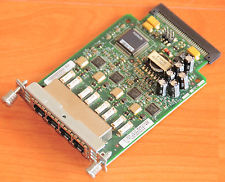
So I ve configured voice service a number of times, but never using Cisco equipment. There s a business starting up here on Orcas Island and they need a number of lines voice and fax service. I had a spare 2801 router laying around and heard that it s possible to provision voice service using these machines. So I looked on eBay for a module that will provide more than two FXS ports and decided on the VIC-4FXS. When it was delivered, I installed it and booted the router. It told me that it needed a PVDM DSP Module, so I got one of those as well. It has arrived. I have installed it. Now when I boot the router, I don t get a warning or an error. configure the router to send outbound calls to the SIP server configure the router to send inbound calls to FXS ports 2,3,4 in round robin
trunk group FXSlines
!
voice-port 0/2/1
 trunk-group FXSlines
!
voice-port 0/2/2
 trunk-group FXSlines
!
voice-port 0/2/3
 trunk-group FXSlines
configure the router to send inbound calls to the correct ports on the VIC-4FXS
dial-peer voice 1 pots
 preference 7
 destination-pattern 3602987792
 translate-outgoing called 10
 port 0/2/0
 forward-digits all
!
dial-peer voice 2 pots
 preference 2
 destination-pattern 3602987793
 translate-outgoing called 10
 port 0/2/1
 forward-digits all
!
dial-peer voice 3 pots
 preference 3
 destination-pattern 3602987794
 translate-outgoing called 10
 port 0/2/2
 forward-digits all
!
dial-peer voice 4 pots
 preference 4
 destination-pattern 3602987795
 translate-outgoing called 10
 port 0/2/3
 forward-digits all
configure the router to accept inbound calls from the asterisk call server
voice service voip
 allow-connections sip to sip
 no supplementary-service sip moved-temporarily
 no supplementary-service sip refer
 fax protocol t38 ls-redundancy 0 hs-redundancy 0 fallback cisco
 sip
  registrar server expires max 3600 min 3600
  localhost dns:8.8.8.8
configure the asterisk call server to send inbound calls to the router On asterisk call server, edit sip.conf to register with SIP server on cisco router at 172.16.78.209:
[fhvoice]
type=peer
insecure=port,invite
context=fhvoice
disallow=all
allow=ulaw
language=en
canreinvite=no
host=172.16.78.209
qualify=20000
dtmfmode=rfc2833
On asterisk call server, edit extensions.conf and add extensions to the incoming context:
exten => 3602987792,1,Dial(SIP/fhvoice/$ EXTEN ,30)
   same => n,Hangup()
exten => 3602987793,1,Dial(SIP/fhvoice/$ EXTEN ,30)
   same => n,Hangup()
exten => 3602987794,1,Dial(SIP/fhvoice/$ EXTEN ,30)
   same => n,Hangup()
exten => 3602987795,1,Dial(SIP/fhvoice/$ EXTEN ,30)
   same => n,Hangup()
configure the asterisk call server to accept outbound calls from the router

Olivier Berger: Using RDFAlchemy together with RDFLib s SPARQLStore to query DBPedia and process resources in OO way

I ve been searching for interesting ways to manipulate RDF graphs in Python, to create an application that would handle Linked Data Resources in an OO-way, i.e. using Python classes and not tables/sets/lists of triples. The data will be persisted in graphs in a triple store, accessed through a SPARQL enpoint. In this post, I ll illustrate how I managed to tie RDFLib s SPARQLStore plugin and RDFAlchemy to reach a rather nice looking result.
RDFLib provides tools to manipulate graphs, but most of the examples I found didn t load Graph instances from SPARQL, and generally used SPARQLWrapper results (tables) manually. Here comes a first tool to the rescue : SPARQLStore, which allows to dynamically query a remote SPARQL endpoint when navigating an RDFLib graph. I couldn t find a lot of documentation about it, but I found some hints in slide 51 of the excellent presentation by Tatiana Al-Chueyr Linking the world with Python and Semantics. Now, I know how I can manipulate the RDFLib Graphs queried from a remote SPARQL endpoint with the usual methods, I m still not satisfied, because I want OO stuff, not lists of (predicate, object) tuples. Here comes the second tool, RDFAlchemy, which allows to create descriptor classes mapping RDF Resources to Python classes. Here again, there isn t much docs available, but I found the excellent tutorial by Ted Lawless Reading and writing RDF for VIVO with RDFAlchemy. Now we can put the 2 pieces together, modulo a few precautions : the SPARQLStore plugin of RDFLib will generate SPARQL queries everytime a graph is navigated, whereas RDFAlchemy expects the graph to be in memory (at least AFAIU). So we ll have to manually pre-load the contents of the graphs that we need for all the attributes of the descriptor classes. I ve written an example code that illustrates this by trying to query french films in Wikipedia. Here s a copy of the gist. Attention, it will query DBPedia a lot, so pay attention to the bandwidth and memory if you change parameters. It isn t perfect, and I still need to investigate benefits and limitations of the approach. On clear limitation is the number of SPARQL queries made on the endpoint, instead of a smarter pre-loading. Also, on a side note, during tests I could spot a few issues with SPARQLStore, which seems lagging behind probably not used by so many people. The RDFAlchemy project doesn t seem to be in great health, mostly unmaintained from what I can see (and notice that I linked to the GitHub clone/fork that seemed to be the latest maintained while the original author s seems dead), but nevertheless, the code works with a more recent RDFLib, so that s not so bad. Stay tuned for more adventures in Linked Data land in Python.

Joey Hess: how I wrote init by accident

I wrote my own init. I didn't mean to, and in the end, it took 2 lines of code. Here's how. Propellor has the nice feature of supporting provisioning of Docker containers. Since Docker normally runs just one command inside the container, I made the command that docker runs be propellor, which runs inside the container and takes care of provisioning it according to its configuration. For example, here's a real live configuration of a container:
        -- Exhibit: kite's 90's website.
        , standardContainer "ancient-kitenet" Stable "amd64"
                & Docker.publish "1994:80"
                & Apt.serviceInstalledRunning "apache2"
                & Git.cloned "root" "git://kitenet-net.branchable.com/" "/var/www"
                        (Just "remotes/origin/old-kitenet.net")
When propellor is run inside this container, it takes care of installing apache, and since the property states apache should be running, it also starts the daemon if necessary. At boot, docker remembers the command that was used to start the container last time, and runs it again. This time, apache is already installed, so propellor simply starts the daemon. This was surprising, but it was just what I wanted too! The only missing bit to make this otherwise entirely free implementation of init work properly was two lines of code:
                void $ async $ job reapzombies
  where
        reapzombies = void $ getAnyProcessStatus True False
Propellor-as-init also starts up a simple equalivilant of rsh on a named pipe (for communication between the propellor inside and outside the container), and also runs a root login shell (so the user can attach to the container and administer it). Also, running a compiled program from the host system inside a container, which might use a different distribution or architecture was an interesting challenge (solved using the method described in completely linux distribution-independent packaging). So it wasn't entirely trivial, but as far as init goes, it's probably one of the simpler implementations out there. I know that there are various other solutions on the space of an init for Docker -- personally I'd rather the host's systemd integrated with it so I could see the status of the container's daemons in systemctl status. If that does happen, perhaps I'll eventually be able to remove 2 lines of code from propellor.

13 May 2014

Lars Wirzenius: Obnam 1.8 (backup program)

I have just tagged Obnam (my backup program) 1.8 in git, and built and uploaded Debian packages to code.liw.fi and Debian unstable. NEWS snippet below. Version 1.8, released 2014-05-13 Security issues: Bug fixes:

Vasudev Kamath: Enabling DNSSEC for copyninja.info

Recently I've been seeing lot of posts about DNSSEC on Internet and I thought I should configure my domain to be secured by DNSSEC. copyninja.info domain is now secured with DNSSEC you can verify this by DNSSEC analyzer by Verisign and DNSViz online tool or by installing DNSSEC validator addon for your browser. There are good amount of tutorials and guides available to enable DNSSEC for your domain, still I want to note down steps I followed to here for the record (of course it will be helpful for me if I forget it ;-)) First step will be installing bind9 and dnssec-tools package, if you use aptitude installing dnssec-tools will pull down the bind9 unless you have configured aptitude to not install the Recommends. Next setting up the zone file for your domain, for this first make a copy of /etc/bind/db.local as /etc/bind/db.example.com, replace example.com with your domain name. Now you need to add your zone records to the zone file. Next edit the /etc/bind/named.conf.local file and add following lines
zone "example.com"  
    type master;
    file "/etc/bind/db.copyninja.info";
    allow-transfer  secondary; ;
 ;
Here replace secondary with your secondary DNS servers, if you don't have one you can ommit this but its always recommended to have secondary DNS servers for a zone, in cases when primary fails. After this we need to enable DNSSEC on bind, this is done by editing the file /etc/bind/named.conf.options. Add following lines into options section.
dnssec-validation yes;
dnssec-enable yes;
dnssec-lookaside auto;
A more explanation on this can be found on Linux Journal article. Now its time to create DNSSEC keys and sign your zone, more about different DNSSEC keys and records can be found in the Linux Journal Article on implementation. I used zonesigner utility from dnssec-tools which does job of signing and including KSK and ZSK keys into bind configuration which otherwise should be done manually. Here is the command line I used for generating keys, thanks to Jonas for this.
mkdir -p /etc/bind/keys
zonesigner -algorithm RSASHA256 -keydirectory /etc/bind/keys\
       -dsdir /etc/bind/keys -archivedir /etc/bind/keys/archive \
       /etc/bind/db.example.com
Here we store our keys into /etc/bind/keys directory, and use RSASHA256 algorithm for key generation which is more stronger than the default used RSASHA1 (atleast thats what Jonas told me). This will create ZSK and KSK for the signing zone and creates a signed zone file db.example.com.signed in same directory as original zone file. Now all you need to do is replace the zone file from db.example.com to db.example.com.signed in file directive with your named.conf.local file.
Note that this keys expire after 30 days so you need to resign your zone before 30 days. For resigning just run zonesigner from /etc/bind/keys. You can setup cron job to do this periodically.
zonesigner -zone example.com /path/to/db.example.com
Our signed zone is ready but we are not done yet! For DNSSEC to work others should trust your signed record for this you need to register your public keys with registrar for your domain and this can be done via your domain provider (in my case this is Gandi). You need to check your domain name providers documentation on how to do this. For Gandi users there is a nice documentation.

Next.

Previous.