Search Results: "dom"

28 September 2008

Bastian Blank: Xen update

I found a machine which is not so ancient and did some tests with Xen on it.
Kernels First was some tests with different Linux kernels and hypervisors (3.2 and 3.3). I have to say the overall compatibility got better. As unpriviledged domain (DomU) only one of the kernels failed, the one from Etch (2.6.18-6-xen-686) on the x86_64 hypervisor because of missing setup code. For the operation as priviledged domain (Dom0) it looks not so good. The 2.6.18 from Xen 3.1 works mostly, the Lenny-targeted 2.6.26 is a little bit picky about the hardware and seems to work better in the 64bit variant, the 2.6.18 from 3.3 is old but rock-stable.
Stub domain Xen 3.3 adds the possibility to move a the qemu which provides the emulated hardware for full virtualized domains in its own (paravirtualized) domain. The documentation is not really complete and the whole thing rather fragile. Error messages from the emulation domain are swallowed and depending on the config it also likes to crash. It wants a new service, a filesystem backend, which is implemented in a root process in the dom0, even if it is not needed for operation. This service is not configurable, exports anything in /exports and allows writing, the code have similar quality then qemu.

Jonathan McDowell: Which data contract?

I bought an EEE 901. More on that later.

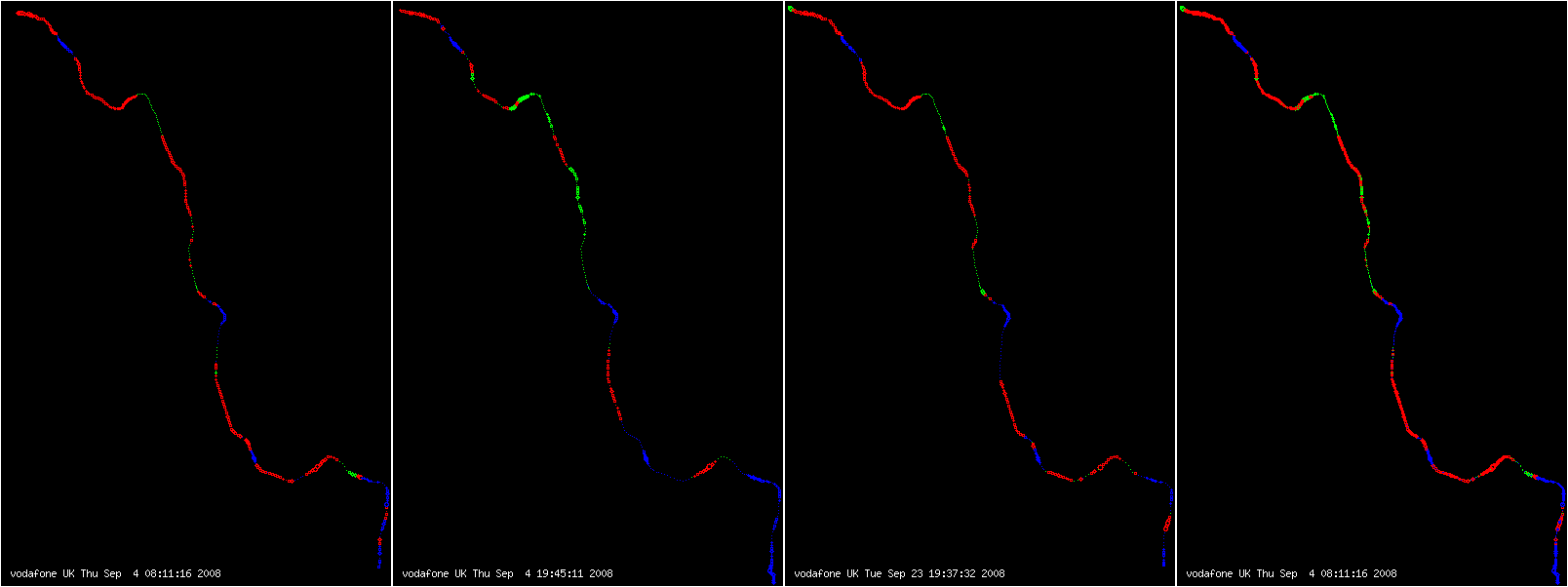
For the past few weeks I've been trying to work out which "mobile broadband" provider to go with for my daily commute. It's a train journey from the north coast of Northern Ireland to Belfast and goes through some sparsely populated areas, so I wasn't expecting to get anything that would provide 3G all the way. However I do want a provider that can do their best to keep a session up for the journey, handing over between 2G + 3G as necessary. Coverage maps/checkers aren't too bad if you just want to check a static point, but really even then it's better to actually try the provider in the location yourself. So, armed with a bluetooth GPS (Bl eNEXT BN-909GR), an Option GT 3G Quad PCMCIA card and my laptop I set about measuring signal strength along my train journey for each of the 5 providers available. I also made sure to actually try a session with them for at least one journey, because signal strength is not everything.

I wrote some Perl using Net::GPSD and Device::Gsm to query my current location, signal strength, 2G/3G status and network every 10 seconds. I did this for 3 train journeys (except for O2) and then also produced an "optimistic" file of all the data points combined for that provider.

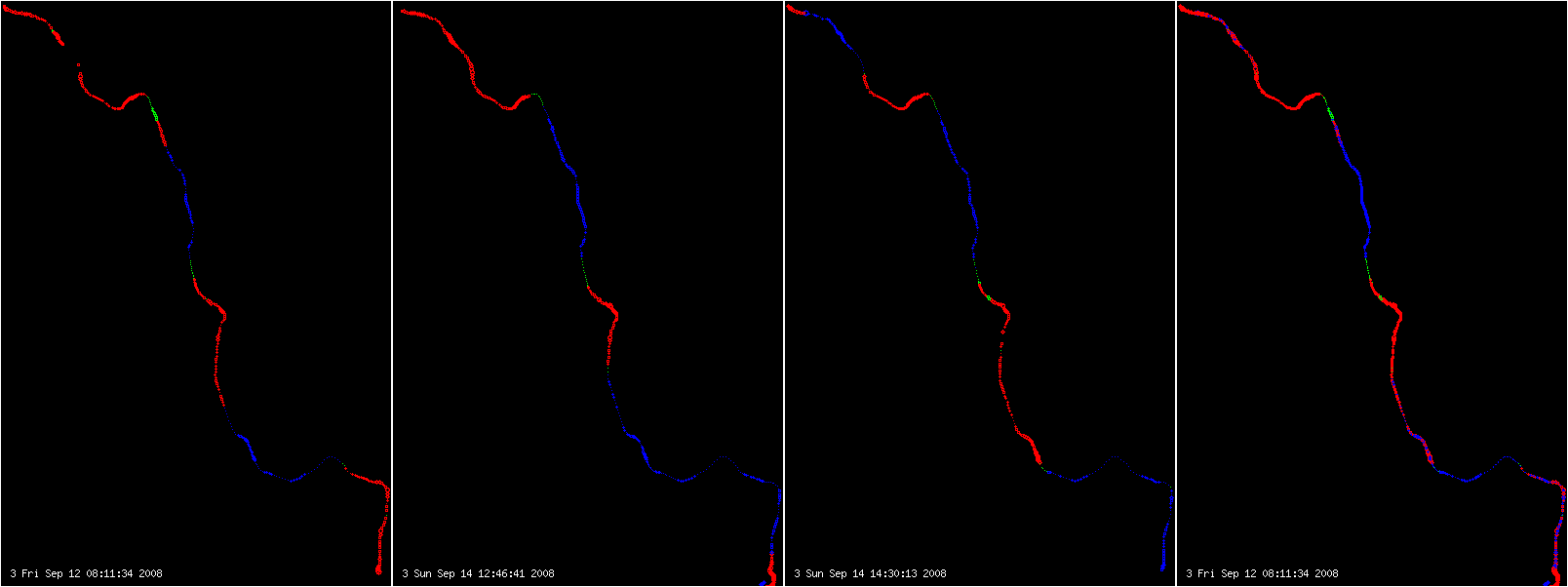
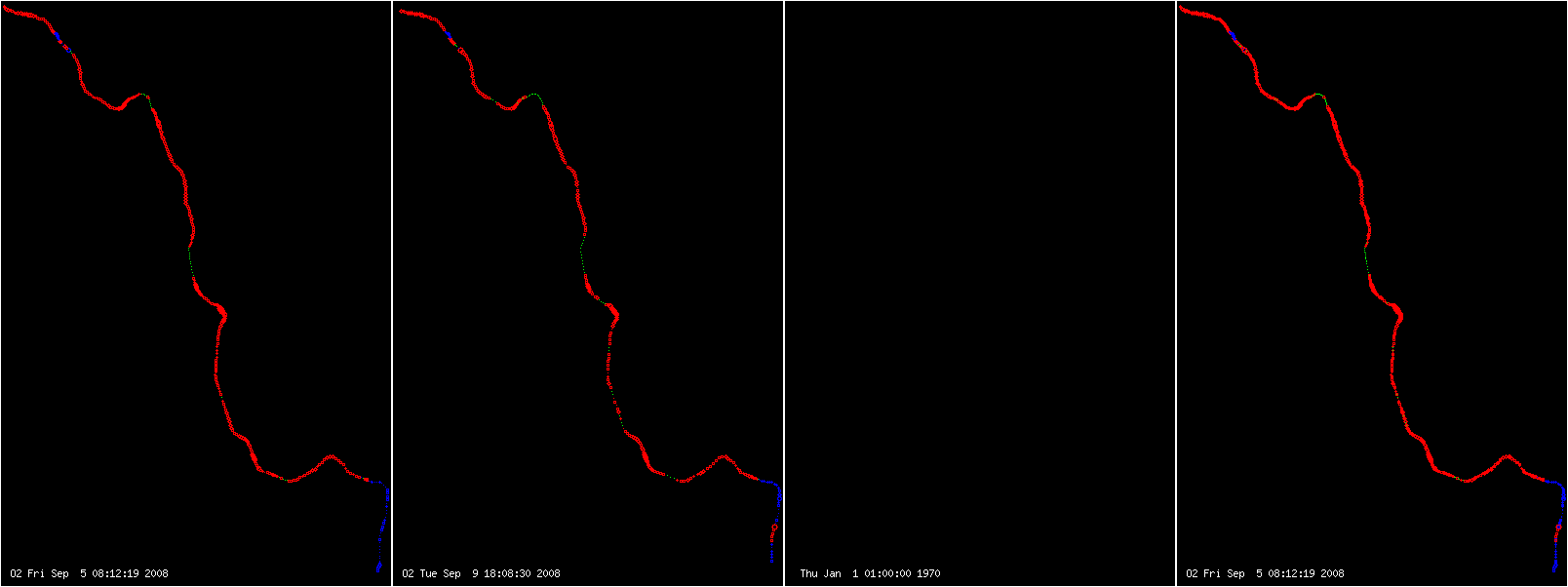
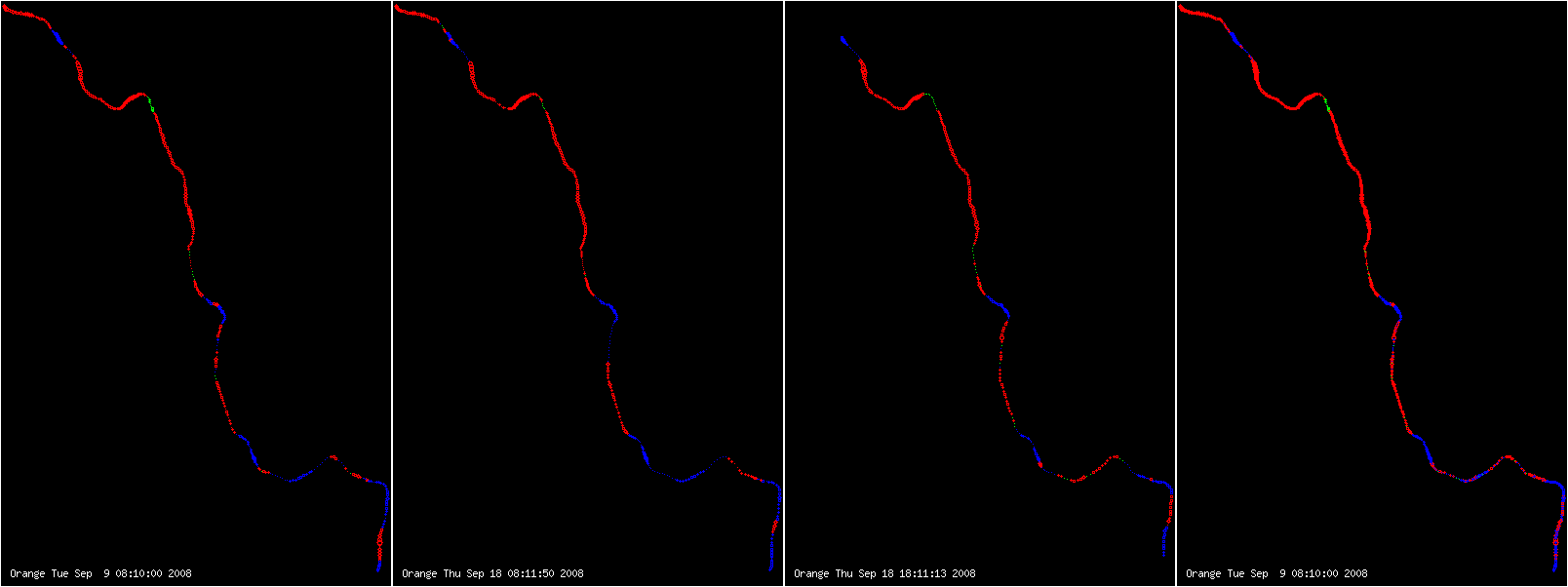
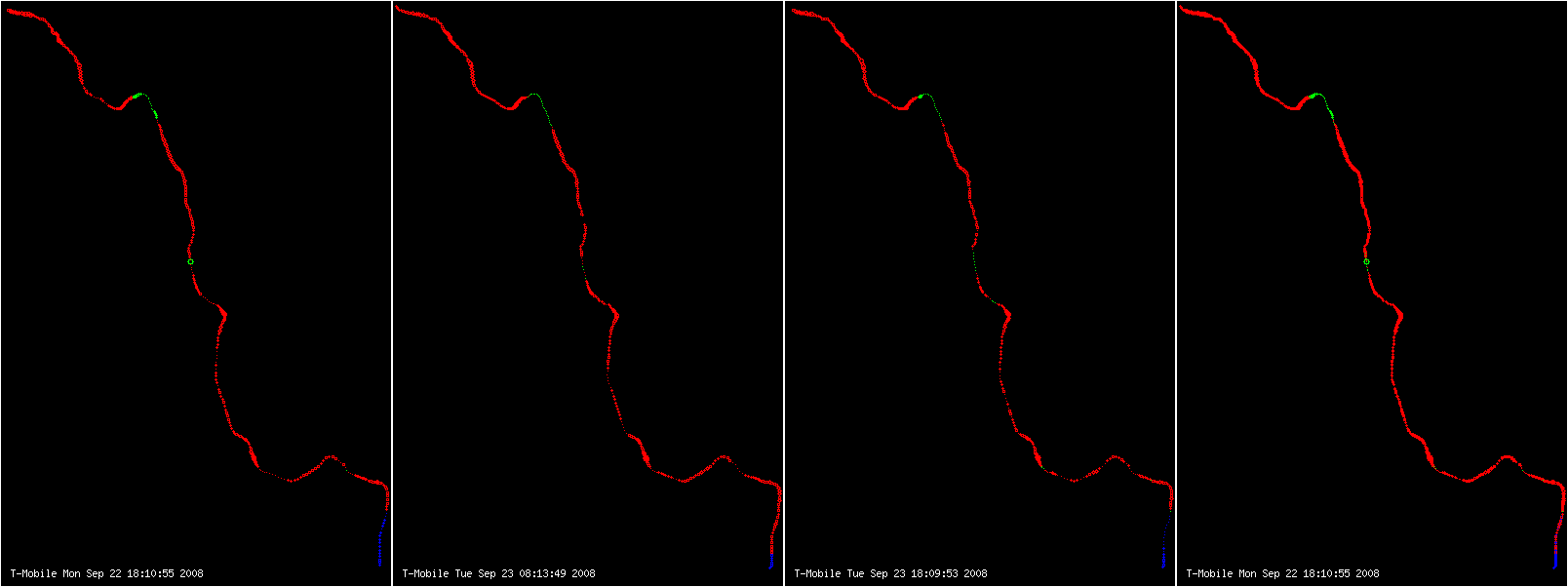
A second piece of Perl took this data and drew the maps you see below. The graph on the right for each provider is all data points. Red means 2G, blue means 3G, green means "Limited Service" (ie it could see a signal, but not one it was allowed to connect to). White means that we had a GPS location and no signal at all. Click on the maps for bigger versions. You can see the route on OpenStreetMap - my graphs are a little squished horizontally, but the journey is from Castlerock (top left on the coast near Coleraine) to Belfast (bottom right).

3
O2
Orange
T-Mobile
Vodafone

At first glance 3 look to be the best bet. Lots of blue, a reasonably priced data plan. Except they can't hold up a session to save themselves. Not only does a 2G/3G handover almost always seem to result in a drop, but I had periods of failing to get a 2G session up at all and had some random drops while in 3G coverage as well. So strike them off.

O2 and T-Mobile don't manage any 3G outside Belfast (that's the bottom right corner btw). I found that a few periods of 3G along the journey helped a lot; it meant I could do a quick mail sync rather than the long drawn out affair it was on a 2G connection. They can both handle handover between 2G/3G and keep a session up for most of the journey, but the lack of speed counts them out.

Vodafone managed the worst reception, which is disappointing. I found them quite good when I lived in England (my datacard is from a Vodafone Pay as You Use data contract). I did find sessions being dropped during the no signal regions, so they just don't seem to be a good bet.

Which leaves Orange. I've had issues with Orange and data in the past (pre 2004 IIRC) but in testing they were able to keep a session up between Belfast and Castlerock, handling 2G/3G handover fine. Coverage was reasonably good and they manage 3G at several points along the journey (the blue points roughly correspond to Coleraine, Ballymena, Antrim and Belfast). I understand Orange have some EDGE capability, but my card doesn't do EDGE so I've no idea if that'll be an extra gain or not. I had a few issues with getting dud DNS servers but this happened with the other providers too so I was beginning to suspect the datacard of playing up. Manually setting known good servers in resolv.conf worked fine.

So, before I go and sign up to an 18 month Orange contract, what have I forgotten?

27 September 2008

Adeodato Sim : A good window manager for me?

For some time now I’ve been wanting to find a window manager that allows me to improve my current “implementation” of my workflow. I currently use KWin. Since I’m a bit overwhelmed by the number of window managers available, some of them being perhaps too flexible, and since what I want is very, very specific, I thought I’d go for a lazy-web post. My workflow is simple: I don’t do tiling, and my sole wish is that a simple key combo (Mod + one letter) can activate the window designated by that combo. Ideally I can statically assign combos to each application (or, in general, window properties) from the configuration file, but I can also use a special combo to change on-the-fly the current keybindings for a particular window. At the moment I’m “faking” this with several methods combined: In my new world, I’d be able to just type Mod+M to activate Minirok, Mod+A to activate Akregator, Mod+B for the browser, and several others keybindings for each instance of my terminal emulator (one for my -release work, one for my ongoing Uni work, another for my ongoing programming work). I really, really want that’s it’s just one Mod plus a key, because I’m convinced that’d work out very well for me (though it should offer a way to cycle among all windows as well). As for the rest, ability to display Kicker (KDE’s panel) gracefully would be a plus. Please mail me with your suggestions, but I’d appreciate if you could include pointers to the relevant parts of the documentation, or even examples, of how to accomplish what I want. I’ve tried eg. awesome 3, and I only managed to get lost in Lua-land.

26 September 2008

Kapil Paranjape: Why people write Free Software

Some people troll free software lists with remarks like:
Linux will never be able to displace MacOS/Windows since the latter are much more pretty/user-friendly. You will lose.
Such people assume that hackers write free software because they "hate Microsoft" or "hate capitalism" or have some other pet hates. However, it should be obvious that such a large creative effort cannot be sustained if it is based on such negative emotions.1 There are a number of positive reasons why one works on free software. The software that I like to work on is software2 that I use or want to use. This has some consequences which are worth underlining: Giving others the "four freedoms" results in wider critical examination of these aspects. Bugs must be acknowledged and fixed --- or elevated to features! Moreover, there are parts of the task that are "obvious" to me but I would have to ask others for advice on other parts. So I gain a lot by being part of a larger community. There are other reasons to write free software. For example, someone may pay you to do it. However, this is just deferring the same question to your employer. In most cases, your employer already has a use in mind for the software. The employer has the same concerns as I outlined above except that the job of writing the code is being out-sourced. The usability, portability and long-term maintainability are probably even bigger concerns for your employer. "Last but not the least" (as we always wrote in our school-day essays) free software is fun! You share ideas with people from across the globe and to show them your own clever little tricks. Good code and good themes resonate with people who may not even speak the same language as you do. What could be nicer than that!

  1. One should not ignore the strength of negative emotions. Enormous war machines are built on negative emotions.
  2. I use the term "software" here for computer programs. Most of what is written applies equally well to books, articles and documentation --- which are "software for the brain".

25 September 2008

Pablo Lorenzzoni: Brazilian E-Voting

DISCLAIMER: Paranoid rant ahead. You ve been warned. Every two years, around this time of the year, I feel concerned: it s voting time in Brazil. For quite some time now, Brazil has had electronic voting, but that doesn t make me more confortable with it. Yes, having the results within the same day is an enormous advantage, but I am not sure about the security of the whole process. You can call me paranoid (and surely I am a bit), but there are some things that give me the creeps about it. For a start, let s look at the operational process. The voting machines are certified and sealed by Electoral Justice officers the week before the voting. They are opened in the electoral section by those officers in the presence of common citizens. Those citizens are called to work in the Electoral process usually for four or five elections in a row, being replaced after that by newcomers . The voting machines are not connected to any network. During the day, voters come with the voting document (voting is mandatory in Brazil), one of those citizens enable the voting machine by typing the document unique number in it, the voter give his vote and go home. Then the voting machine is unable to receive votes if not enabled by entering another document number, and it goes on and on the whole day long (pretty boring work ). At the end of the day, the president of the section (usually the most experienced of those citizens) close the voting machine, prints a tally sheet , hand a colored 3 -inch floppy disk to the Electoral Justice officer with the votes and go home. Other officers will pick up the voting machines later on. The first officer then goes to the voting processing central of the Electoral Justice and within hours we will know the result of the election. As you can see, there are lots of points of failure in the whole process! All this sealing of voting machines are just a matter of trust. First point: there s no way we can know for sure if the machine does what it s suppose to do. Even if officers say that they randomly choose machines to be tested, there s no way to know how random is that. There s a report [pt-BR] made by a prestigious university (English summary here), stating that 1/3 of the voting machines in a particular studied state had corrupted log-files (among other important security problems!). This study also showed differences in the countings (sometimes as large as 20-thousand votes!)... Hey! This is supposed to be a deterministic system: if nothing in the conditions changed, counts should always match! Until recently, closed-source software were used in the voting machines, but that has changed recently. I doubt that it makes any difference, since we ll never really know what is actually running in the machine. Surely, Electoral Justice officers know (or should know), so we d have to trust them So second point: we don t know how the voting is processed within the machine. (Also, we don t know for sure the machine doesn t have a network connection. It may have a wireless connection we don t know about and can be passing all the votes to someone else, or even receiving instructions But since that can be spotted with a scanner, I ll trust other paranoids have already done that.) Surely the machine must be enabled before every vote with the voters document number. If it were not, how could we know that no one voted twice, or that a non-voter have voted? But we don t know how the machine records that! Third point: we cannot know if the voting machine database doesn t link the voter to the vote. That is a nasty one it opens up the possibility of voting by intimidation . Also, the tally sheet that is printed at the end of the day only brings the total of votes, the total of absent-voters, and the votes each candidate (or party) have received. So, on to the fourth point: there s no way of knowing for sure that your vote was counted right (or was counted at all!). At least a copy of this tally sheet is glued at the entrance of the voting section, so an independent audit only on the numbers is do-able (although hard to do!). What happens to the colored disk between the voting section and the voting processing central is not known. It goes with the officer and what he does with it is just a matter of trust. Now for the most insteresting point: the security is based on the color of the disk!. The Electoral Justice checks if the officer handed the right colored disk and puts the data in the system. Surely (?) they might have some way to check data integrity other than that On the same issue, maybe even worse: even if the disk is not tampered, but just read (or copied) by the officer before being handed, and if the database links the voter to the vote, this information is valuable, and may be sold. Finally, since we don t know (and have no way to know for sure) what the machine does, we don t know if the machine keeps a copy of the voting database in it. So when it is taken back by other officers, we cannot know whether the same thing that may happen to the disk also could happen with the machine. I am missing a lot of things about the whole Brazilian E-Voting process, and also I surely have missed other points of failure. I heard of fraud in the past, with paper ballots, and those were pretty nasty frauds. But this whole tale of impossible fraud in e-voting is nothing but a tale (as fraud is more than possible!). I think we have to begin investigating other systems, surely with cryptography involved. A system like Debian s, far from perfect (we all have to trust secretary s word on the secrecy of the voting system key), is much better, for instance. I understand that it s not simple enough for non-geeks, but there might be a way! It doesn t need to be a whole new system! I would be happy if, as an example, the tally sheet printed a hash of my vote that I could verify later on or if the security of the disk is not just color-based or if the tally sheets had a way of being validated and be available on-line for auditing (and not just glued at the entrance of every voting section). Look! I am not distrusting any officer a priori... I think the message is auditing should be made easy... then I could trust a version of Linus s Law adapted to E-Voting: Given enough eyeballs, all frauds can be discovered .

John Goerzen: New version of datapacker

I wrote before about datapacker, but I didn't really describe what it is or how it's different from other similar programs.

So, here's the basic problem the other day. I have a bunch of photos spanning nearly 20 years stored on my disk. I wanted to burn almost all of them to DVDs. I can craft rules with find(1) to select the photos I want, and then I need to split them up into individual DVDs. There are a number of tools that did that, but not quite powerful enough for what I want.

When you think about splitting things up like this, there are a lot of ways you can split things. Do you want to absolutely minimize the number of DVDs? Or do you keep things in a sorted order, and just start a new DVD when the first one fills up? Maybe you are adding an index to the first DVD, and need a different size for it.

Well, datapacker 1.0.1 can solve all of these problems. As its manpage states, "datapacker is a tool in the traditional Unix style; it can be used in pipes and call other tools." datapacker accepts lists of files to work on as command-line parameters, piped in from find, piped in from find -print0. It can also output its results in various parser-friendly formats, call other programs directly in a manner similar to find -exec, or create hardlink or symlink forests for ease of burning to DVD (or whatever you'll be doing with it).

So, what I did was this:


find Pictures -type f -and -not -iwholename "Pictures/2001/*.tif" -and \
-not -wholename "Pictures/Tabor/*" -print0 \
datapacker -0Dp -s 4g --sort -a hardlink -b ~/bins/%03d -


So I generate a list of photos to process with find. Then datapacker is told to read the list of files to process in a null-separated way (-0), generate bins that mimic the source directory structure (-D), organize into bins preserving order (-p), use a 4GB size per bin (-s 4g), sort the input prior to processing (--sort), create hardlinks for the files (-a hardlink), and then name the bins with a 3-digit number under ~/bins, and finally, read the list of files from stdin (-). By using --sort and -p, the output will be sorted by year (Pictures/2000, Pictures/2001, etc), so that photos from all years aren't all mixed in on the discs.

This generates 13 DVD-sized bins in a couple of seconds. A simple for loop then can use mkisofs or growisofs to burn them.

The datapacker manpage also contains an example for calling mkisofs directly for each bin, generating ISOs without even an intermediate hardlink forest.

So, when I wrote about datapacker last time, people asked how it differed from other tools. Many of them had different purposes in mind. So I'm not trying to say one tool or the other is better, just highlighting differences. Most of these appear to not have anything like datapacker --deep-links.

gaffiter: No xargs-convenient output, no option to pass results directly to shell commands. Far more complex source (1671 lines vs. 228 lines)

dirsplit: Park of mkisofs package. Uses a random iterative approach, few options.

packcd: Similar packing algorithm options, but few input/input options. No ability to read a large file list from stdin. Could have issues with command line length.

24 September 2008

Russell Coker: My Prediction for the iPhone

I have previously written about how I refused an offer of a free iPhone [1] (largely due to it’s closed architecture). The first Google Android phone has just been announced, the TechCrunch review is interesting - while the built-in keyboard is a nice feature the main thing that stands out is the open platform [2]. TechCrunch says “From now on, phones need to be nearly as capable as computers. All others need not apply“. What I want is a phone that I control, and although most people don’t understand the issues enough to say the same, I think that they will agree in practice. In the 80’s the Macintosh offered significant benefits over PCs, but utterly lost in the marketplace because it was closed (less available software and less freedom). Due to being used in Macs and similar machines the Motorolla 68000 CPU family also died out, and while it’s being used in games consoles and some other niche markets the PPC CPU family (the next CPU used by Apple) also has an uncertain future. The IBM PC architecture evolved along with it’s CPU from a 16bit system to a 64bit system and took over the market because it does what users want it to do. I predict that the iPhone will be just as successful as the Macintosh OS and for the same reasons. The Macintosh OS still has a good share of some markets (it has traditionally been well accepted for graphic design and has always provided good hardware and software support for such use), and is by far the most successful closed computer system, but it has a small part of the market. I predict that the iPhone will maintain only a small share of the market. There will be some very low-end phones that have the extremely closed design that currently dominates the market, and the bulk of the market will end up going with Android or some other open phone platform that allows users to choose how their phone works. One issue that I think will drive user demand for control over their own phones is the safety issues related to child use of phones (I’ve written about this previously [3]). Currently phone companies don’t care about such things - the safety of customers does not affect their profits. But programmable phones allows the potential for improvements to be made without involving the phone company - while with iPhone you have Apple as the roadblock. Now having a small share of the mobile phone market could be very profitable, just as the small share of the personal computer market is quite profitable for Apple. But it does mean that I can generally ignore them as they aren’t very relevant in the industry.

Biella Coleman: NYC Area Free Software/Free Cultre/Computer Events

Last weekend at the Software Freedom Day party, I was a little surprised to find myself among hundreds of attendees and supporters. Even if NYC is not known, like Silicon Valley is, for its vibrant tech scene, this event reminded me that we definitely have a thriving community of programmers and advocates but we have lacked a central “place” to check for computer-related events in the area. At least until now. James Vasile, a lawyer at the Software Freedom Law Center will now be publishing an event feed. Please send him an email if there is any event you want advertised (contact details on his page), you can subscribe here, and here is a calendar.

23 September 2008

Bernhard R. Link: Phony stamp files in debian/rules

As I wrote in blog item 29 there are many ways to break your debian/rules file. As I grew of seeing those and many more, I decided to write a lintian test for this. Getting that finished will still need several days, as the general Makefile syntax is quite intresting in detail, and lintian is written in perl thus so have to be tests. It's quite intresting that the different cases when variables are resolved and when not seem to quite firmly force an specific way to parse it. (And relearning perl when I so successfully unlearned all parts of that language in the past make it not much faster). Anyway, the reason I'm blogging is to give you already the results of one particular test a preliminary version gave when running over the lintian lab: It's checking for targets with -stamp in them that are phony, as that makes no sense. It will either cause configure or make run multiple times via build, wasting buildd cycles or even make the build more unstable, or just indicates needlessly complex Makefiles (having an install target that invokes an install-stamp target that does not actually produce a stamp file just makes the Makefile longer without doing anything at all but confusing readers). You can find the preliminary results for that test at http://people.debian.org/~brlink/debian-rules-phony-stamp-file.log. I looked at some randomly choosen results and did not find a false positive. As that list was produced by the last runable version which did not yet look at variables, I guess the list will only increase.

Zak B. Elep: Broken Comment Posting Fixed; New #olpc-ph Grassroots Group

Thanks to Wolfger for pointing out an HTTP 500 while trying to greet me by comment. :D I totally forgot about upgrading Net::Akismet to the new version that comes with my patch, as described previously. All the while I was thinking Net::Akismet was doing too good of a job keeping out comment spam, when it may as well have kept out all comments :( But its my fault, really. Among other things, Jerome has finally started a new grassroots group for the OLPC effort here in the Philippines, fresh from the success at the recently-concluded SFD. There's now an IRC channel up too, with logs available locally (text-only, until I can set up a web and fileserver frontend.) I'm personally interested on running a port of Inferno and perhaps help out on the TODOs for it.

David Welton: Caveat Emptor Dominium

Ok, my apologies, the Latin is incorrect, but the idea is this: I have run into an important limitation of Google's domain registration system. Buyer beware. Lately, I have been using Google Apps to register domains. At $10 a year for new domains, which come with all the nifty Google applications, email and so on, it's a really good deal. However, there appears to be a potentially crucial problem: you can't sell or transfer the domains, as far as I can tell. I would love to hear that I am wrong on this, but the person helping me through Google's support channel first told me to "enter the new credit card details in the Google Checkout account associated with the domain". Uh, sorry, but I want to transfer the whole thing, lock, stock and barrel. After another round of email, I got this:
To assign a different Google Account to the subscription you'll need to modify your billing information by following the steps listed below:
  • Enable automatic renewals for your account.
  • When you receive email notification of the impending charge, visit the link to the 'Ordering page.' - Authorize a new purchase for your domain registration renewal. This will replace the old subscription and charge your new billing information on the subscription expiration date. Automatic renewals will also be enabled going forward.
If you don't have automatic renewals enabled, your email notification won't include an 'Ordering page' link to change the Google Checkout account and purchase or renew Google Apps. You must first enable auto-renew to be sent this link.
I don't want to have to wait for the email notification, though! The domain won't be automatically renewed until sometime next spring. Hopefully this is either an oversight on my part or something Google will fix soonish, as buying a domain name that you can't sell or otherwise give to someone else is of very limited use for some things. No, I haven't gone into business as a domain name speculator/squatter, the domain in question is InnsbruckExpats.com, a site I registered for a friend a bit more than a year ago.

22 September 2008

Axel Beckert: Can't resist this meme

Just stumbled over this meme at Adrian (the meme seems to be started by madduck involuntarily), and since I’m fascinated by how people choose hostnames since my early years at university, I can’t resist to add my two cents to this meme. To be exact, I have two schemes, one for servers out there somewhere (Hetzner, xencon, etc.) and they’re all wordplays on their domain name noone.org, e.g. symlink.to.noone.org (short name “sym” :-), gateway.to.noone.org (usually an alias for one of the machines below), virtually.noone.org (always a virtual machine, initially UML, soon a Xen DomU), etc. So nothing for a quiz here. My other scheme is for all my machines at home and my mobile machines. I’ll start this list with the not so obvious hostnames, so the earlier you guess the scheme, the better you are (or the better you know me ;-). One more hint in advance: “(*)” means this attribute or fact made me choose the name for the machine and therefore can be used as hint for the scheme. :-)
azam
My first PC at all, a 386 with 25 MHz and MS-DOS. (Got named retroactively(*). Hadn’t hostnames at that time.)
ak (pronounced as letters)
Got it from my brother after he didn’t need it anymore. It initially was identical to azam, but once was upgraded to a 486. Still have the 386 board, though.
azka
My first self-bought computer, a pure SCSI system with a AMD K5-PR133 and 32 MB RAM. Initially had SuSE 4.4 and Windows 95 on. Still my last machine which had a Windows installed! :-)
m35
Same case and same speed as azka. Used it for experimenting(*) with Sid years ago.
azu
Initially also an AMD K5-PR133, later replaced by a Pentium 90 and used as DSL router.
azl
An HP Vectra 386/25N book size mini desktop I saved from the scrapyard at Y_Plentyn before his (first) move to Munich. The cutest(*) 386 I ever saw.
ayce
A 386 with 387 co-processor(*) and solded 8 MB of RAM.
ayca
A 1992 Toshiba T6400C 486 laptop bought at VCFe 5.0.
bijou
My 1996 ThinkPad 760ED, which is still working and running Debian GNU/Linux 5.0 Lenny (I started with Debian 3.0 Woody on it and always dist-upgraded it! :-)
gsa (pronounced as letters)
My long-time desktop after azka. A Pentium II with 400 MHz and 578 MB of RAM at the end. Bought used at LinuxTag 2003, it worked until end of last year when it started to suddenly switch off more and more often and now refuses to boot at all. Hasn’t been replaced yet though. I mostly use my laptops at home since then.
gsx (pronounced as letters)
An AMD K6 with 500 MHz I got from maol and which was used as Symlink test server more than once. (It was the machine initially named symlink.to.noone.org because of that.)
hy
My 32 bit Sparc, a Hamilton Hamstation.
hz (pronounced as letters)
My 64 bit Sparc, an UltraSparc 5.
tub
An HP Apollo 9000 Series 400, model 400t from 1990.
tpv (pronounced as letters, too ;-)
My Zaurus SL-5500G.
tryane
A Unisys Acquanta CP mini desktop with a passively cooled(*) 200 MHz Pemtium MMX. Used as DSL router for while, but the power supply fan was too noisy.
lna (pronounced as letters)
A 233 MHz Alpha
loadrunner
An IBM ThinkPad A31 running Sid. I use it as beside terminal.
pony
A Compaq LTE5100 laptop with a Pentium 90 running Sid.
dagonet
A Sony Vaio laptop which ran Debian GNU/kFreeBSD until it broke.
Those who know me quite good should already have guessed the scheme, even if they can’t assign all the names. For all others, here’s one name which doesn’t exactly fit into the scheme, but still is related in someway, but you need to knowledge of the theme’s subject to know the relation:
colani
A big tower from the early 90s designed by Colani.
Ok, and now the more obvious hostnames:
rosalie
A very compact Toshiba T1000LE 8086 laptop running ELKS and FreeDOS.
amisuper
Also an old Symlink test server from maol. He named it “dual”. 2x(*) Pentium I with 166 MHz. Unfortunately doesn’t boot anymore.
visa
An IBM NetVista workstation running Debian GNU/kFreeBSD. My current IRC host.
nemo
My ASUS EeePC running Debian 5.0 Lenny.
pluriel
My current WLAN router running FreeWRT.
c1
My MicroClient JrSX, an embedded 486SX compatible machine with 300 Mhz for VESA mountings.
c2
My MicroClient Jr, an embedded Pentium MMX compatible machine with 200 Mhz for VESA mountings.
c-crosser
My Lenovo ThinkPad T61 running Debian 5.0 Lenny.
c-cactus and c-metisse
The KVM based virtual(*) machines on c-crosser running Sid and Debian GNU/kFreeBSD.
jumper
My NAS(*) at home, currently a TheCus N4100. Soon to be replaced by some Mini-ITX box.
Any one who hasn’t guessed the scheme yet? For those understanding German it’s explained at the end of my old hardware page. For all others I suggest either to look at the domain name in my e-mail address (no, it’s usually not noone.org). Still not clear? Well, feel free to ask me for all the gory details or mark the following white box to see the scheme as well as the explanations for nearly all hostnames hidden in there:
All the machines are named after Citroëns. Old machines after old Citroëns, current hardware after current Citroën models or prototypes. Those names starting with “A” are 2CV derivatives since the 2CV was Citroëns “A” model. “AZ” was the 2CV, AZU and AK were 2CV vans and everything starting with AY (e.g. AYA, AYA2, AYB – but those don’t sound that nice ;-) is Dyane based, but I currently only use Méhara names (AYCA is the normal Méhari, AYCE the 4x4 version). Interestingly not everything starting with AYC is a Méhari: AYCD was the Acadiane, the Dyane van. HY and HZ are variants of Citroëns “H van” (HX, HW and H1600 as well, but they don’t sound that nice), TUB was the pre-WWII “H van” prototype and later the nickname of the “H van” in France. TPV was the name of the pre-WWII 2CV prototype and an abbreviation for Toute Petite Voiture (French for “Very Small Car”), hence the Zaurus, my smallest Linux box, got that name. Rosalie was the nickname of a rear-wheel drive pre-WWII Citroën. M35 was a Wankel engine prototype of the Ami 8 and the Ami Super was the 4 cylinder version of the Ami 8. Bijou was a 2CV based coupé build by Citroën UK in the late 50s and early 60s. Visa and LNA were 2CV predecessors which were available with 2CV engines, but were stopped before the 2CV. GSA and GSX are GS late derivatives. C1, C2, (C3) Pluriel, C-Crosser, Jumper and Nemo are current Citroën models and C-Cactus and C-Métisse are recent Citroën prototypes and show cars. The 2CV Dagonet was an aerodynamically optimised 2CVs by Jean Dagonet in the 50s. The Tryane is an aerodynamic and fuel efficient, three wheeled car by Friend Wood based on the 2CV and with a body of wood. And Colani once dressed a 2CV so that it broke several efficiency world records. The Namco Pony was a 2CV based light utility truck (similar to the Méhari, but with steel body) built in Greece under license in many variants. And Loadrunner is the name of some CX six-wheeler conversions.
Some links about the naming items: Hope you had fun. I had. ;-)

Now playing: Willi Astor — Gwand Anham Ära

21 September 2008

Russell Coker: Things you can do for your LUG

A Linux Users Group like most volunteer organisations will often have a small portion of the membership making most of the contributions. I believe that every LUG has many people who would like to contribute but don’t know how, here are some suggestions for what you can do. Firstly offer talks. Many people seem to believe that giving a talk for a LUG requires expert knowledge. While it is desired to get any experts in the area to share their knowledge, it is definitely not a requirement that you be an expert to give a talk. The only requirement is that you know more than the audience - and a small amount of research can achieve that goal. One popular talk that is often given is “what’s new in Linux”. This is not a talk that requires deep knowledge, it does require spending some time reading the news (which lots of people do for fun anyway). So if you spend an average of 30 minutes a day every week day reading about new developments in Linux and other new technology, you could spend another minute a day (20 minutes a month) making notes and the result would be a 10 to 15 minute talk that would be well received. A talk about what’s new is one way that a novice can give a presentation that will get the attention of all the experts (who know their own area well but often don’t have time to see the big picture). There are many aspects of Linux that are subtle, tricky, and widely misunderstood. Often mastering them is a matter that is more related to spending time testing than anything else. An example of this is the chmod command (and all the Unix permissions that are associated with it). I believe that the majority of Linux users don’t understand all the subtleties of Unix permissions (I have even seen an employee of a Linux vendor make an error in this regard while running a formal training session). A newbie who spent a few hours trying the various combinations of chmod etc and spoke about the results could give a talk that would teach something to almost everyone in the audience. I believe that there are many other potential talk topics of this nature. One thing that is often overlooked when considering how to contribute to LUGs is the possibility of sharing hardware. We all have all the software we need for free but hardware still costs money. If you have some hardware that hasn’t been used for a year then consider whether you will ever use it again, if it’s not likely to be used then offer it to your LUG (either via a mailing list or by just bringing it to a meeting). Also if you see some hardware that is about to be discarded and you think that someone in your LUG will like it then grab it! In a typical year I give away a couple of car-loads of second-hand hardware, most of it was about to be thrown out by a client so I grab it for my local LUG. Taking such hardware reduces disposal costs for my clients, prevents computer gear from poisoning landfill (you’re not supposed to put it in the garbage but most people do), and helps random people who need hardware. One common use for the hardware I give away is for children. Most people are hesitant to buy hardware specifically for children as it only takes one incident of playing with the switch labeled 240V/110V (or something of a similar nature) to destroy it. Free hardware allows children to get more access to computers at an early age. Finally one way to contribute is by joining the committee. Many people find it difficult to attend meetings, so attending a regular meeting and a committee meeting every month is difficult. So if you have no problems in attending meetings then please consider contributing in this way.

Joerg Jaspert: Debian upload hosts

The last two days saw some updates to the queue daemon. (The queue daemon is that part of our archive software that processes the anonymous ftp uploads and, if they pass basic checks, moves them into the place our archive wants new uploads to be in.) The first big patch to it was written by FTP Assistant Thomas Viehmann, implementing the DELAYED (DEFERRED) Queue. Now, the second one was by me and not even half as much work. As people did like one feature of the unofficial DELAYED upload queue that Tollef did run in the past, namely the possibility to upload using ssh, we now officially provide such a way. While it won’t ever support uploads to the DEFERRED queue, I don’t think thats neccessary. DEFERRED is, as far as I know, used seldomly enough to not warrant the amount of work it would need to support it. As the ssh upload queue daemon is basically nothing more than a simple “ssh to ftp” wrapper (it just takes .changes and associated files and uploads them to the ftp place), people will get two mails for uploads done that way. One saying “Uploaded to ftp.upload.debian.org”, the next will be “Uploaded to localhost”. One equally important thing was changed together with the above two things: We have new names for the upload locations. People shouldn’t use direct hostnames anymore. Use the CNAMEs we provide, ssh.upload.debian.org or ftp.upload.debian.org. Comments: 0

Biella Coleman: Software Freedom Day

Parties around the world were held yesterday to celebrate Software Freedom Day. I went to the NYC party which attracted an impressive number of people who were mingling and celebrating on the beautiful rooftop of Limegroup/Limewire office. Here are a few pictures and a short video of Eben Moglen who has done a whole lot to make software freedom a reality today.

20 September 2008

Benjamin Mako Hill: Software Freedom Day Boston

It's late notice but Boston area folks should drop by the local Software Freedom Day events today. It goes from 10:00-16:00 and is located in a great space in Chinatown. More information in on the wiki. I'm teaming up with John Sullivan of the FSF to talk about free software on in your pocket on unexecpted platforms. We'll show off CHDK (for cameras), the FreeRunner (a phone), and probably also talk about RockBox, iPodLinux, and more. It should be laid back and fun! The whole point of SFD (and this SFD event in particular) is create a space that's appropriate to folks that don't already know about free and open source software and that aren't necessary technical. If you are a hacker or an advocate, show up and meet some like minded folks and introduce new people to the ideas that inspire you. If you are just curious about this stuff this event is designed for you. If you're not in Boston, check the SFD webpage. There are hundreds of events around the world and may even be one near you!

MJ Ray: Lots of Days: Software Freedom, British Food and World Peace

Today is Software Freedom Day. It is also the start of British Food Fortnight. (Tip to total coverage cooperative.) There is an open day 11-3 at Thatchers Cider, near here in Sandford. (To get there from Worle by bike, leave through St Georges to Bourton, then Hewish, Puxton, Nye, over the Strawberry Line and you’ll arrive on Nye Road in Sandford - turn right for the cider. I’m not sure of the best way from Locking direction…) Tomorrow is the second equinox and International Day of Peace. (Tip to New Internationalist cooperative.) What are you doing this weekend?

19 September 2008

Biella Coleman: If I were in Manchester, I would go

To this… (and I know there are readers of the blog in Manchester and close by who just may be interested in the a one-day seminar and evening lecture on the 1858 cable and later transatlantic communications link). Full details below. ***
2008 marks the 150th anniversary of the first communications link laid beneath 1600 nautical miles of the Atlantic Ocean. That telegraph cable was the first in a series of cutting-edge technologies enabling fast and accurate communication between Britain and the United States of America, linking the old and new worlds. To mark the occasion, the IET in conjunction with the Museum of Science and Industry, Manchester, are holding a one-day seminar and evening lecture on the 1858 cable and later transatlantic communications links, including wireless and satellite, on Tuesday 28th October 2008. Both events are open to the public and admission is free of charge, but pre-booking is a must. The programme is given below. Both events will be held in the Cardwell Theatre, MOSI and there will be a small exhibition on the history of transatlantic communications to accompany the event. To register for the seminar and/or the lecture, please contact Anne Locker (details given at the end of the email). SEMINAR 1000-1030 Arrival and coffee 1030-1045 Bob Martin-Royle :Chairman s welcome, introduction and overview 1045-1115 Neil Barton: First steps to transatlantic - crossing the Irish Sea 1852-1854 1115-1130 Donard de Cogan: Background to the 1858 telegraph cable 1130-1145 Pauline Webb: John Pender and Manchester s contribution 1145-1215 Donard de Cogan: Insights into the landing of the 1858 cable 1215-1230 Pat Wilson: Lord Kelvin s contribution to submarine telegraphy 1230-1300 Questions and discussion 1300-1400 Lunch 1400-1430 Bob Martin-Royle: Marconi and the first transatlantic wireless links 1430-1515 Phil Kelly: TAT1 (includes film) - the first telephone cable 1515-1545 Tea 1545-1615 Des Prouse: Telstar - the birth of transatlantic satellite communications 1615-1630 Transatlantic communications: the present and future 1630-1700 Questions, discussion and closing remarks EVENING 1800-1830 Light refreshments 1830-1930 Nigel Linge: An interactive public lecture on The Transatlantic Telegraph Cable - the birth of global communications 1930- 2000 Questions and closing remarks Regards, Anne Locker
IET Archivist The Institution of Engineering and Technology
IET

Savoy Place
London
WC2R 0BL
United Kingdom

Kapil Paranjape: Fedora Core DomU on Debian Etch

The IMSc recently installed a desktop machine for me that is powerful enough to run Xen virtualised domU's. (My previous desktop machine was removed at my request; explanations at a later date!) One task was to get Fedora Core running under this Debian Etch machine. Since the information required for this task was rather difficult to find (rant later!), here is a quick 2-paise tip (to borrow a phrase from the linux gazette) on how to get Fedora Core running under a Debian Xen machine. The helpful packages under Debian are xen-tools and rinse.1 Since the latter is only available with "lenny", this requires an schroot installation about which I have written elsewhere. So let me assume that we have a lenny chroot inside the dom0 in which xen-tools and rinse have been installed. One can either bind mount /etc/xen from the dom0 into the lenny chroot or one can just create this directory to hold the configuration file for the domU to be created. Creating the domU is as simple as:

xen-create-image --ip=192.168.17.71 --hostname=fedora \
  	--arch=amd64 --lvm vg0 --install-method rinse \
  	--dist fedora-core-8

   
with ip address, hostname, lvm volume group and arch chosen appropriately. (Be careful and choose a hostname that does not match a hostname that you have already used in the same Xen system). This will create the logical volumes /dev/vg0/fedora-disk and /dev/vg0/fedora-swap containing the appropriate images for use with the Fedora domU. Before you can boot into this domU there are some minor issues you need to fix; see #499476. The fixes are to create /etc/shadow and /etc/gshadow and set a usable password as follows. Mount /dev/vg0/fedora-disk somewhere and chroot to it. Then run the following commands:

  pwconv
  grpconv
  passwd root

   
Then exit the chroot and unmount /dev/vg0/fedora-disk and then exit the lenny chroot. If necessary, copy the file etc/xen/fedora.cfg from within the lenny chroot to /etc/xen/ in the dom0. You should now be ready to boot your Fedora Core 8 domU with

  xm create fedora.cfg

   
It would be nice if one could install Fedora Core 9 the same way; see #499477.

  1. Thanks go out to Steve Kemp and the maintainers of the Debian packages for their excellent work. ↩

18 September 2008

Russell Coker: Play Machine Update

My Play Machine [1] was offline for most of the past 48 hours (it’s up again now). I have upgraded the hardware for the Dom0 used to run it so that it now has the ability to run more DomU’s. I can now run at least 5 DomUs while previously I could only run 3. I have several plans that involve running multiple Play Machines with different configurations and for running SE Linux training. The upgrade didn’t need to take two days, but I had some other things that diverted me during the middle of the job (running the Play Machine isn’t my highest priority). I’ve been doing some significant updates to the SE Linux policy for Lenny including some important changes to the policy related to mail servers. Among other things I created a new domain for DKIM (which I previously wrote about) [2]. The chain of dependencies was that a client wanted me to do some urgent DKIM work and I needed my own mail server to be a test-bed. I installed DKIM and then of course I had to write the SE Linux policy. Now that my client’s network is running the way it should be I’ve got a little more time for other SE Linux work.

Next.

Previous.