Junichi Uekawa: I was looking for a way to lock and reboot from gnome.
 I was looking for a way to lock and reboot from gnome.
And found out that those services are provided by GDM that lightdm didn't work.
I was looking for a way to lock and reboot from gnome.
And found out that those services are provided by GDM that lightdm didn't work.
 On Friday October 31, 2014, and Saturday November 1, 2014, around thirty-five graduate students and faculty members attended a Software Carpentry workshop. Attendees came primarily from the Economics department and the Kellogg School of Management, which was also the host and sponsor providing an excellent venue with the Allen Center on the (main) Evanston campus of Northwestern University.
The focus of the two-day workshop was an introduction, and practical initiation, to working effectively at the shell, getting introduced and familiar with the git revision control system, as well as a thorough introduction to working and programming in R---from the basics all the way to advanced graphing as well as creating reproducible research documents.
The idea of the workshop had come out of discussion during our R/Finance 2014 conference. Bob McDonald of Northwestern, one of this year's keynote speakers, and I were discussing various topic related to open source and good programming practice --- as well as the lack of a thorough introduction to either for graduate students and researcher. And once I mentioned and explained Software Carpentry, Bob was rather intrigued. And just a few months later we were hosting a workshop (along with outstanding support from Jackie Milhans from Research Computing at Northwestern).
We were extremely fortunate in that Karthik Ram and Ramnath Vaidyanathan were able to come to Chicago and act as lead instructors, giving me an opportunity to get my feet wet. The workshop began with a session on shell and automation, which was followed by three session focusing on R: a core introduction, a session focused on function, and to end the day, a session on the split-apply-combine approach to data transformation and analysis.
The second day started with two concentrated session on git and the git workflow. In the afternoon, one session on visualization with R as well as a capstone-alike session on reproducible research rounded out the second day.
 We the Debian Qt/KDE Team want to early-announce [maintainer warning] our decision to remove Qt4 from Jessie+1. This warning is mostly targeted at upstreams.
 I first want to clarify for the people not intimately involved with Debian that the GR-2014-003 vote is not about choosing the default init system or deciding if sysvinit should still be supported: its outcome will not stop systemd from being Debian's default init system and will not prevent any interested developers from supporting sysvinit.
Some non-developers have recently threatened of "forking Debian" if this GR will not pass, apparently without understanding well the concept: Debian welcomes forks and I think that having more users working on free software would be great no matter which init system they favour.
The goal of Ian Jackson's proposal is to force the maintainers who want to use the superior features of systemd in their packages to spend their time on making them work with sysvinit as well. This is antisocial and also hard to reconcile it with the Debian Constitution, which states:
2.1.1 Nothing in this constitution imposes an obligation on anyone to do work for the Project. A person who does not want to do a task which has been delegated or assigned to them does not need to do it. [...]
As it has been patiently explained by many other people, this proposal is unrealistic: if the maintainers of some packages were not interested in working on support for sysvinit and nobody else submitted patches then we would probably still have to release them as is even if formally declared unsuitable for a release. On the other hand, if somebody is interested in working on sysvinit support then there is no need for a GR forcing them to do it.
The most elegant outcome of this GR would be a victory of choice 4 ("please do not waste everybody's time with pointless general resolutions"), but Ian Jackson has been clear enough in explaining how he sees the future of this debate:
If my GR passes we will only have to have this conversation if those who are outvoted do not respect the project's collective decision.
If my GR fails I expect a series of bitter rearguard battles over individual systemd dependencies.
There are no significant practical differences between choices 2 "support alternative init systems as much as possible" and 3 "packages may require specific init systems if maintainers decide", but the second option is more explicit in supporting the technical decisions of maintainers and upstream developers.
This is why I think that we need a stronger outcome to prevent discussing this over and over, no matter how each one of us feels about working personally on sysvinit support in the future. I will vote for choices 3, 2, 4, 1.
emacs-gdb interfaces.
emacs and gdb interfaces have evolved.
I think -fullname option is old interface used by
gud-gdb.
I think there's also --annotate=3 which was used in emacs23.
emacs24 M-x gdb uses -i=mi.
Some things in M-x gdb annoy me but I'm not finding a good docuemntation on this matter. Hmm..
Already November? wow.
 Wednesday 1:
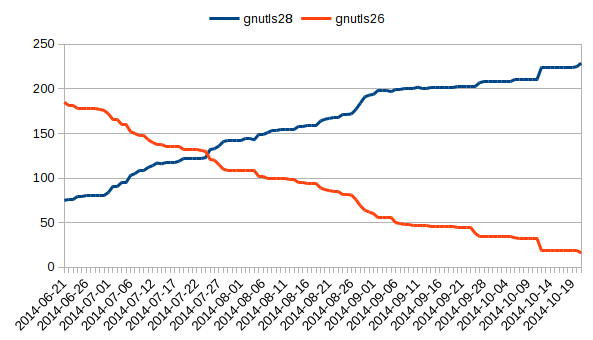 Looking back, this worked both well and badly: On one hand it played
nicely with testing migration. It did not break a lot of important packages
at a single time or block packages from migration to testing. On the other
hand over a 100 sourceful uploads are a lot, and the transition took a long
time.
 Oliver, meanwhile, enjoyed his pumpkin outfit, complete with orange hair his favorite part.
 Here s a typical scene:
 And, of course, Jacob running with the cape flowing behind him:

 Setting up basic systemd-network was recently described by Joachim, and the post inspired me to try it as well. The twist is that in my case I need a bridge for my KVM with Lava server and arm/aarch64 qemu system emulators...For background, qemu/kvm support a few ways to provide network to guests. The default is user networking, which requires no privileges, but is slow and based on ancient SLIRP code. The other common option is tap networking, which is fast, but complicated to set up. Turns out, with networkd and qemu bridge helper, tap is easy to set up.
Diverging from Joachims simple example, we replaced "DHCP=yes" with "Bridge=br0". Then we proceed to define the bridge (in the kvm.netdev) and give it an ip via dhcp in kvm.network. From the kvm side, if you haven't used the bridge helper before, you need to give the helper permissions (setuid root or cap_net_admin) to create a tap device to attach on the bridge. The helper needs an configuration file to tell what bridge it may meddle with.
$ for file in /etc/systemd/network/*; do echo $file; cat $file; done
/etc/systemd/network/eth.network
[Match]
Name=eth1
[Network]
Bridge=br0

/etc/systemd/network/kvm.netdev
[NetDev]
Name=br0
Kind=bridge

/etc/systemd/network/kvm.network
[Match]
Name=br0
[Network]
DHCP=yes
Now we can start kvm with bridge networking as easily as with user networking:
# cat > /etc/qemu/bridge.conf <<__END__
allow br0
__END__
# setcap cap_net_admin=ep /usr/lib/qemu/qemu-bridge-helper
The manpages systemd.network(5) and systemd.netdev(5) do a great job explaining the files. Qemu/kvm networking docs are unfortunately not as detailed.
$ kvm -m 2048 -drive file=jessie.img,if=virtio -net bridge -net nic,model=virtio -serial stdio
 Mikkel Rasmussen:
If you look at the idea of "The Kitchen of Tomorrow" as IKEA thought about it is the core idea is that cooking is slavery. It's the idea that technology can free us from making food. It can do it for us. It can recognise who we are, we don't have to be tied to the kitchen all day, we don't have to think about it. Now if you're an anthropologist, they would tell you that cooking is perhaps one of the most complicated things you can think about when it comes to the human condition. If you think about your own cooking habits they probably come from your childhood, the nation you're from, the region you're from. It takes a lot of skill to cook. It's not so easy. And actually, it's quite fun to cook. there's also a lot of improvisation. I don't know if you ever tried to come home to a fridge and you just look into the fridge: oh, there's a carrot and some milk and some white wine and you figure it out. That's what cooking is like it's a very human thing to do.

The physical version of your smart recipe site?
Therefore, if you think about it, having anything that automates this for you or decides for you or improvises for you is actually not doing anything to help you with what you want to do, which is that it's nice to cook. More generally, if you make technology for example that has at its core the idea that cooking is slavery and that idea is wrong, then your technology will fail. Not because of the technology, but because it simply gets people wrong. This happens all the time. You cannot swing a cat these days without hitting one of those refrigerator companies that make smart fridges. I don't know you've ever seen them, like a "intelligent fridge". There's so many of them that there is actually a website called "Fuck your internet fridge" by a guy who tracks failed prototypes on intelligent fridges. Why? Because the idea is wrong. Not the technology, but the idea about who we are - that we do not want the kitchen to be automated for us. We want to cook. We want Japanese knives. We want complicated cooking. And so what we are saying here is not that technology is wrong as such. It's just you need to base it especially when you are innovating really big ideas on something that's a true human insight. And cooking as slavery is not a true human insight and therefore the prototypes will fail.(I hereby nominate "internet fridge" as the term to describe products or ideas that whilst technologically sound is based on fundamentally flawed anthropology.) Hearing "I hate X" and thinking that simply removing X will provide real value to your users is short-sighted, especially when you don't really understand why humans are doing X in the first place.
 I'm not a huge fan of Hacker News[1]. My impression continues to be that it ends up promoting stories that align with the Silicon Valley narrative of meritocracy, technology will fix everything, regulation is the cancer killing agile startups, and discouraging stories that suggest that the world of technology is, broadly speaking, awful and we should all be ashamed of ourselves.
| Keyword | Penalised | Unpenalised |
| Women | 13 | 4 |
| Harass | 2 | 0 |
| Female | 5 | 1 |
| Intel | 2 | 3 |
| x86 | 3 | 4 |
| ARM | 3 | 4 |
| Airplane | 1 | 2 |
| Startup | 46 | 26 |
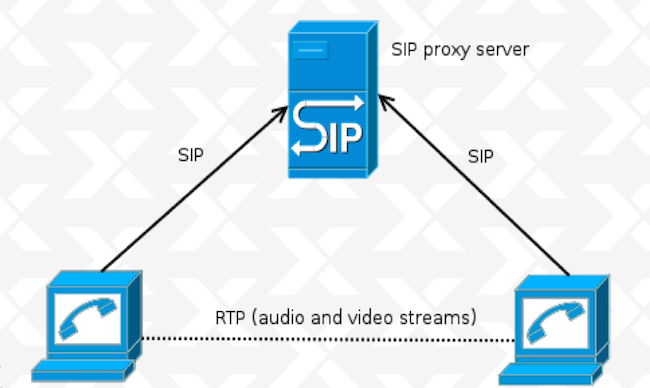 If you have users behind NAT, you ll also need a TURN server for relay:
 In both cases, setup is not too difficult, particularly if using reSIProcate which offers both the SIP proxy and the TURN server. Daniel Pocock has an excellent post on how to setup and configure your SIP proxy and TURN server.
With regard to JSCommunicator, it is a generic telephone in HTML5 which can easily be embedded in any web site or web app. Almost every aspect of JSCommunicator is easily customizable. More about JSCommunicator setup and architecture is detailed in a previous post.
The JSCommunicator-xTuple extension can be installed in xTuple as an npm package (xtuple-jscommunicator). It is still at a very beta - or even pre-beta - stage and there are various limitations; the configuration must be hard-coded and dialing is done manually as opposed to clicking on a contact. Some of these limitations are features are on the wish list for future work. For example, some ideas for the next version of the extension are a click to dial from CRM records functionality and to bring up CRM records for an incomming call. Additionaly, the SIP proxy could be automatically installed with the xTuple server installation if desired.
We closed the presentation with a live demo during which I made a video call from a JSCommunicator instance embedded in freephonebox.net to the JSCommunicator xTuple extension running on Daniel s laptop. Despite the occasionally iffy hotel Wifi, the demo was a hit - at one point I even left the conference room and took a quick walk around the hotel and invited other xTupleCon attendees to say hello to those in the room. The audience s reception was more enthusiastic than I anticipated, giving way to a pretty extensive Q&A session. It s great to see more and more people interested in WebRTC, I can t emphasize enough what a useful and versatile tool it is.
Here s an action shot of part of the xTuple WebRTC presentation:
 I joined the board of directors of the Free Software Foundation a couple of weeks ago. I've been travelling a bunch since then, so haven't really had time to write about it. But since I'm currently waiting for a test job to finish, why not?
 If someone would have told me that I would visit three feminist events this year I would have slowly nodded at them and responded with "yeah, sure..." not believing it. But sometimes things take their own turns.
It all started with the Debian Women Mini-Debconf in Barcelona. The organizers did ask me how they have to word the call for papers so that I would feel invited to give a speech, which felt very welcoming and nice. So we settled for "people who identify themselves as female". Due to private circumstances I didn't prepare well for my talk, but I hope it was still worth it. The next interesting part though happened later when there were lightning talks. Someone on IRC asked why there are male people in the lightning talks, which was explicitly allowed for them only. This also felt very very nice, to be honest, that my talk wasn't questioned. Those are amongst the reasons why I wrote
My place is here, my home is Debconf.Second event I went to was the FemCamp Wien. It was my first event that was a barcamp, I didn't know what to expect organization wise. Topic-wise it was set about Queer Feminism. And it was the first event that I went to which had a policy. Granted, there was an extremely silly written part in it, which naturally ended up in a shit storm on twitter (which people from both sides did manage very badly, which disappointed me). Denying that there is sexism against cis-males is just a bad idea, but the background of it was that this wasn't the topic of this event. The background of the policy was that usually barcamps but events in general aren't considered that save of a place for certain people, and that this barcamp wanted to make it clear that people usually shying away from such events in the fear of harassment can feel at home there.
dominant talk patternsand how to work around or against them also made sure that the rest of the event was giving shy people a chance to speak up and feel comfortable, too. And the range of the sessions that were held was simply great. This was the event that I came up with the pattern that I have to define the quality of an event on the sessions that I'm unable to attend. The thing that hurt me most in the afterthought was that I couldn't attend the session about
minorities within minorities. :/ Last but not least I attended AdaCamp Berlin. This was a small unconference/barcamp dedicated to increase women's participation in open technology and culture named after Ada Lovelace who is considered the first programmer. It was a small event with only 50 slots for people who identify as women. So I was totally hyper when I received the mail that was accepted. It was another event with a policy, and at first reading it looked strange. But given that there are people who are allergic to ingredients of scents, it made sense to raise awareness of that topic. And given that women are facing a fair amount of harassment in the IT and at events, it also makes sense to remind people to behave. After all it was a general policy for all AdaCamps, not for this specific one with only women.
 Goodbye Barnes & Noble
I've read books on electronic devices for many years now; the
convenience of having a huge library with me while traveling makes up
for the lower quality of the presentation. I've read books on a
selection of Palm devices, an old OpenInkpot
compatible ereader, my phone and, most recently, on my
Kobo Aura.
To get reading material, I've used a variety of sources, including the
venerable Project Gutenberg, the
Internet Archive, directly from authors like
Cory Doctorow and even our local Multnomah
County Public Library.
I like to have books in epub
format; it's a published standard, based on HTML and CSS. My recent
devices have all happily supported that, and it allows for editing
when I feel the need to correct typos or formatting problems.
Purchasing Books
When I wanted to actually purchase a book, I bought from Barnes &
Noble; they have a good selection, and reasonable automatic
recommendations. According to their web site, since I started shopping
there, I've purchased 51 books. I can't tell how much I've spent, but
probably in excess of $500.
Not knowing which device I'd be reading on at any one time, and liking
to have the assurance of ongoing access to my library, I would always
download the epub files to my laptop and then transfer them to
whichever device I wanted to read on. This ensured that my books
would be available even when I didn't have a network connection (as
happened yesterday during a wind storm which cut the power to the
DSLAM which connects me to the internet).
I'd created a simple shell script which captured the file after it was
downloaded on my laptop and prepared it for my reader. A bit of
browser configuration and it really was as simple as clicking the
'download' button to get a book onto both my laptop and my reading
device.
Barnes & Noble Disables Downloading
I was traveling in Bordeaux a couple of weeks ago and wanted to get the
latest volume in a series I was reading. My library didn't have it
available, and so I decided that it was worth a few dollars to
purchase it for the flight home.
After clicking through the Barnes & Noble store, I was ready to
download the book so that I could transfer it to my reader. Going to
'My Library', I found my new purchases but the usual 'Download' button
was missing. I was a bit surprised as I'd purchased and downloaded the
previous volume just before leaving without any troubles.
At first, I assumed there was some kind of region restriction on the
distribution of this book. I'm familiar with that from DVD region
locking of movies, and supposed that the same could be done with books
for some reason. However, after setting up a VPN back to home and
browsing through that (to ensure that my browser would appear with an
Oregon address), the download button was still not present.
The unhelpful Barnes & Noble representative that I accessed through
the 'help' button disclosed that the 'download' "feature" had been
disabled for "security" reasons.
Not really having any alternative, I requested a refund for the new
book.
Barnes & Noble Loses a Customer
With no way to actually use ebooks purchased through the Barnes &
Noble store, I won't be spending any more money with them.
I'm not sure how that helps their "security" issues, although if they
lose enough customers and they close their doors, I guess that would
make them about as secure as imaginable.
Kobo Makes a Sale
Having purchased a Kobo Aura, it had built-in access to their book
store, which made it easy to download the book that I wanted. Then, I
simply connected my reader to my laptop and copied the file over for
safe keeping.
Buying Books under Linux
After I got home, I had to figure out how to get Adobe Digital Editions
installed on my laptop. Fortunately, I discovered that
version 2.0.1
runs fine under wine.
Now, purchasing books can be done with my laptop (a vastly superior
browsing experience). The .acsm file can be dragged straight from the
iceweasel download menu to Adobe Digital Editions, which happily
downloads the actual .epub file and makes it available for transferring
to my reader.
Of course, now that I've got Adobe Digital Editions working, I can
also get digitally restricted books from all over the net, greatly
expanding my options for purchasing (or borrowing) books. It's a bit
less convenient, and requires that I run an icky Windows binary under
wine, but at least I have choices, which is some consolation.
Running git grep under emacs compilation mode.
It's driving me nuts because there's 0xfeff(BOM) at the beginning which seems to break file name matching.
The Debian Edu Team is pleased to announce the release of Debian Edu
Jessie 8.0+edu0~alpha0
Debian Edu is a complete operating system for schools. Through its
various installation profiles you can install servers, workstations
and laptops which will work together on the school network. With
Debian Edu, the teachers themselves or their technical support can
roll out a complete multi-user multi-machine study environment within
hours or a few days. Debian Edu comes with hundreds of applications
pre-installed, but you can always add more packages from Debian.
For those who want to give Debian Edu Jessie a try, download and
installation instructions are available, including detailed
instructions in the manual[1] explaining the first steps, such as
setting up a network or adding users. Please note that the password
for the user your prompted for during installation must have a length
of at least 5 characters!
 [1] <URL: https://wiki.debian.org/DebianEdu/Documentation/Jessie >
Would you like to give your school's computer a longer life? Are you
tired of sneaker administration, running from computer to computer
reinstalling the operating system? Would you like to administrate all
the computers in your school using only a couple of hours every week?
Check out Debian Edu Jessie!
Skolelinux is used by at least two hundred schools all over the world,
mostly in Germany and Norway.
About Debian Edu and Skolelinux
===============================
Debian Edu, also known as Skolelinux[2], is a Linux distribution based
on Debian providing an out-of-the box environment of a completely
configured school network. Immediately after installation a school
server running all services needed for a school network is set up just
waiting for users and machines being added via GOsa , a comfortable
Web-UI. A netbooting environment is prepared using PXE, so after
initial installation of the main server from CD or USB stick all other
machines can be installed via the network.  The provided school server
provides LDAP database and Kerberos authentication service,
centralized home directories, DHCP server, web proxy and many other
services.  The desktop contains more than 60 educational software
packages[3] and more are available from the Debian archive, and
schools can choose between KDE, Gnome, LXDE, Xfce and MATE desktop
environment.
 [2] <URL: http://www.skolelinux.org/ >
 [3] <URL: http://people.skolelinux.org/pere/blog/Educational_applications_included_in_Debian_Edu___Skolelinux__the_screenshot_collection____.html >
Full release notes and manual
=============================
Below the download URLs there is a list of some of the new features
and bugfixes of Debian Edu 8.0+edu0~alpha0 Codename Jessie. The full
list is part of the manual. (See the feature list in the manual[4] for
the English version.) For some languages manual translations are
available, see the manual translation overview[5].
 [4] <URL: https://wiki.debian.org/DebianEdu/Documentation/Jessie/Features >
 [5] <URL: http://maintainer.skolelinux.org/debian-edu-doc/ >
Where to get it
---------------
To download the multiarch netinstall CD release (624 MiB) you can use
 * ftp://ftp.skolelinux.org/skolelinux-cd/debian-edu-8.0+edu0~alpha0-CD.iso
 * http://ftp.skolelinux.org/skolelinux-cd/debian-edu-8.0+edu0~alpha0-CD.iso
 * rsync -avzP ftp.skolelinux.org::skolelinux-cd/debian-edu-8.0+edu0~alpha0-CD.iso .
The SHA1SUM of this image is: 361188818e036ce67280a572f757de82ebfeb095
New features for Debian Edu 8.0+edu0~alpha0 Codename Jessie released 2014-10-27
===============================================================================
Installation changes
--------------------
 * PXE installation now installs firmware automatically for the hardware present.
Software updates
----------------
Everything which is new in Debian Jessie 8.0, eg:
 * Linux kernel 3.16.x
 * Desktop environments KDE "Plasma" 4.11.12, GNOME 3.14, Xfce 4.10,
   LXDE 0.5.6 and MATE 1.8 (KDE "Plasma" is installed by default; to
   choose one of the others see manual.)
 * the browsers Iceweasel 31 ESR and Chromium 38
 * !LibreOffice 4.3.3
 * GOsa 2.7.4
 * LTSP 5.5.4
 * CUPS print system 1.7.5
 * new boot framework: systemd
 * Educational toolbox GCompris 14.07
 * Music creator Rosegarden 14.02
 * Image editor Gimp 2.8.14
 * Virtual stargazer Stellarium 0.13.0
 * golearn 0.9
 * tuxpaint 0.9.22
 * New version of debian-installer from Debian Jessie.
 * Debian Jessie includes about 42000 packages available for
   installation.
 * More information about Debian Jessie 8.0 is provided in the release
   notes[6] and the installation manual[7].
 [6] <URL: http://www.debian.org/releases/jessie/releasenotes >
 [7] <URL: http://www.debian.org/releases/jessie/installmanual >
Fixed bugs
----------
 * Inserting incorrect DNS information in Gosa will no longer break
   DNS completely, but instead stop DNS updates until the incorrect
   information is corrected (Debian bug #710362)
 * and many others.
Documentation and translation updates
-------------------------------------
 * The Debian Edu Jessie Manual is fully translated to German, French,
   Italian, Danish and Dutch. Partly translated versions exist for
   Norwegian Bokmal and Spanish.
Other changes
-------------
 * Due to new Squid settings, powering off or rebooting the main
   server takes more time.
 * To manage printers localhost:631 has to be used, currently www:631
   doesn't work.
Regressions / known problems
----------------------------
 * Installing LTSP chroot fails with a bug related to eatmydata about
   exim4-config failing to run its postinst (see Debian bug #765694
   and Debian bug #762103).
 * Munin collection is not properly configured on clients (Debian bug
   #764594).  The fix is available in a newer version of munin-node.
 * PXE setup for Main Server and Thin Client Server setup does not
   work when installing on a machine without direct Internet access.
   Will be fixed when Debian bug #766960 is fixed in Jessie.
See the status page[8] for the complete list.
 [8] <URL: https://wiki.debian.org/DebianEdu/Status/Jessie >
How to report bugs
------------------
<URL: http://wiki.debian.org/DebianEdu/HowTo/ReportBugs >
About Debian
============
The Debian Project was founded in 1993 by Ian Murdock to be a truly
free community project. Since then the project has grown to be one of
the largest and most influential open source projects. Thousands of
volunteers from all over the world work together to create and
maintain Debian software. Available in 70 languages, and supporting a
huge range of computer types, Debian calls itself the universal
operating system.
Contact Information
For further information, please visit the Debian web pages[9] or send
mail to press@debian.org.
 [9] <URL: http://www.debian.org/ >
 I've taught my laptop to wake up at 7:30 in the morning. When it does, it
will run whatever's in my ~/bin/goodmorning script. Then, if the lid is
still closed, it will go back to sleep again.
So, it's a programmable alarm clock that doesn't need the laptop to be left
turned on to work.
But it doesn't have to make noise and wake me up (I rarely want to be woken
up by an alarm; the sun coming in the window is a much nicer method).
It can handle other tasks like downloading my email, before I wake up. When
I'm at home and on dialup, this tends to take an hour in the morning, so
it's nice to let it happen before I get up.
This took some time to figure out, but it's surprisingly simple.
Besides ~/bin/goodmorning, which can be any program/script,
I needed just two files to configure systemd to do this.
/etc/systemd/system/goodmorning.timer
[Unit]
Description=good morning
[Timer]
Unit=goodmorning.service
OnCalendar=*-*-* 7:30
WakeSystem=true
Persistent=false
[Install]
WantedBy=multi-user.target
/etc/systemd/system/goodmorning.service
[Unit]
Description=good morning
RefuseManualStart=true
RefuseManualStop=true
ConditionACPower=true
[Service]
Type=oneshot
ExecStart=/bin/systemd-inhibit --what=handle-lid-switch --why=goodmorning /bin/su joey -c "/usr/bin/timeout 45m /home/joey/bin/goodmorning"
installation After installing those files, run (as root):
systemctl enable goodmorning.timer; systemctl start goodmorning.timer
Then, you'll also need to edit /etc/systemd/logind.conf, and
set LidSwitchIgnoreInhibited=no -- this overrides the default, which
is not to let systemd-inhibit block sleep on lid close.
almost too easy
I don't think this would be anywhere near as easy to do without systemd,
logind, etc. Especially the handling of waking the system at the right
time, and the behavior around lid sleep inhibiting.
The WakeSystem=true relies on some
hardware support for waking from sleep;
my laptop supported it with no trouble but I don't know how broadly
available that is.
Also, notice the ConditionACPower=true, which I added once I realized I
don't want the job to run if I forgot to leave the laptop plugged in
overnight. Technically, it will still wake up when on battery power, but
then it should go right back to sleep.
Quite a lot of nice peices of systemd all working together here!
xfce workaround
If using xfce, xfce4-power-manager takes over handling of lid close from
systemd, and currently prevents the system from going back to sleep if the
lid is still closed when goodmorning finishes. Happily, there is an easy
workaround; this configures xfce to not override the lid switch behavior:
xfconf-query -c xfce4-power-manager -n -p /xfce4-power-manager/logind-handle-lid-switch -t bool -s true
Other desktop environments may have similar issues.
why not a per-user unit?
It would perhaps be better to use the per-user systemd, not the system wide
one. Then I could change the time the alarm runs without using root.
What's prevented me from doing this is that systemd-inhibit uses policykit,
and policykit prevents it from being used in this situation. It's a lot
easier to run it as root and use su, than it is to reconfigure policykit.
Next.