Daniel Pocock: Thank you to the OSCAL team

The welcome gift deserves its own blog post. If you want to know what is inside, I hope to see you at OSCAL'17.

 Visiting the FSFE team in Berlin
Having recently joined the FSFE's General Assembly as the fellowship representative, I've been keen to get to know more about the organization. My visit to the FSFE office involved a wide-ranging discussion with Erik Albers about the fellowship program and FSFE in general.
 Steak and SDR night
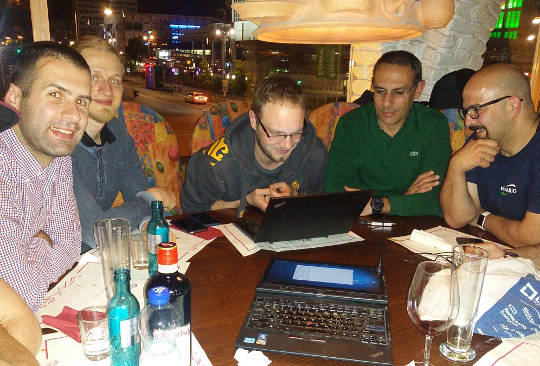
After a hard day of SIP hacking and a long afternoon at Kamailio World's open bar, a developer needs a decent meal and something previously unseen to hack on. A group of us settled at Escados, Alexanderplatz where my SDR kit emerged from my bag and other Debian users found out how easy it is to apt install the packages, attach the dongle and explore the radio spectrum.
 Next stop OSCAL'17, Tirana
Having left Berlin, I'm now in Tirana, Albania where I'll give an SDR workshop and Free-RTC talk at OSCAL'17. The weather forecast is between 26 - 28 degrees celsius, the food is great and the weekend's schedule is full of interesting talks and workshops. The organizing team have already made me feel very welcome here, meeting me at the airport and leaving a very generous basket of gifts in my hotel room. OSCAL has emerged as a significant annual event in the free software world and if it's too late for you to come this year, don't miss it in 2018.

 Two days ago one of the most influential logician of the 20th century has passed away, Gaisi Takeuti ( ). I had the pleasure to meet this excellent man, teacher, writer, thinker several times while he was the president of the Kurt G del Society.
 I don t want to recall his achievements in mathematical logic, in particular proof theory, because I am not worth to write about such a genius. I want to recall a few personal stories from my own experience.
I came into contact with Prof. Takeuti via is famous book Proof Theory, which my then Professor, now colleague and friend Matthias Baaz used for teaching us students proof theory. Together with Shoenfield s Mathematical Logic these two books became the foundation of my whole logic education. Now again in print, back then the Proof Theory was a rare precious. Few prints did remain in the library, and over the years one by one disappeared, until the last copy we had access to was my copy where I had scribbled pages and pages of notes and proofs. Matthias later on used these copies for his lectures, I should have written on the back-side!
I remember well my first meeting with Prof. Takeuti: I was on the Conference on Internationalization in 2003 in Tsukuba, long before I moved to Japan. Back then I was just finishing my PhD and without much experience. When I arrived in the hotel, without fail there was a message of Prof. Takeuti inviting me for dinner the following day. We had dinner in a specialty restaurant of his area, together with is lovely wife. I was soo nervous about Japanese manners and stuttered Japanese phrases just to be stopped by Prof. Takeuti pouring himself a glass of sake and telling me: Relax, and forget the rules and fill your own glass when you want to. I am well aware that this liberal attitude didn t extend to Japanese colleagues, where he, descendant from a Samurai family, was at times very, extremely strict.
The dinner was decided upon already, not easy since I was still strict vegetarian back than (now I would have enjoyed the dinner much more!), but for the last course we could decide. I remember with a smile how Prof. Takeuti suggested in Japanese various sweets, just to be interrupted by his wife with No Gaisi, no! . I asked what is going on and she explained that he wants to order a Japanese sweet for me I agreed, and that was probably the worst dish I had in Japan. Slippy noodles swimming in a cold broth, to be picked with chopsticks and put into a semi-sweet soja-sauce. I finished it, but it wasn t good. I should have thought twice when Prof. Takeuti s wife ordered a normal fruit salad.
Scientifically he was simply a genius and famous for not reading a lot but reinventing everything. One of my research areas, G del logics, was reinvented by him as Intuitionistic Fuzzy Logic (for an overview see my talk at the Collegium Logicum 2016: G del Logics a short survey). But I want to recall one of my favorite articles of him: A Conservative Extension of Peano Arithmetic . This was published as part 2 of Volume 17 of Publications of the Mathematical Society of Japan, retypeset pdf is available here, JSTOR page. Therein he develops classical (real and complex) analysis over Peano s arithmetic. He shows that any arithmetical theorem proved in analytic number theory is a theorem in Peano s arithmetic. The proof uses Gentzen s cut elimination theorem, the center piece of modern proof theory.
With Georg Kreisel having passed away in 2015, and now Gaisi Takeuti, we loose two of the greatest, if not the greatest minds in logic.
 If you see Thunderbird hanging during startup for a minute and then continuing to load fine, you are probably running into an issue similar to what I saw when Debian migrated Icedove back to the "official" Mozilla Thunderbird branding and changed
~/.icedove to ~/.thunderbird in the process (one symlinked to the other).
Looking at the console log (=start Thunderbird from a terminal so you see its messages), I got:
console.log: foxclocks.bootstrap._loadIntoWindow(): got xul-overlay-merged - waiting for overlay-loaded
[.. one minute delay ..]
console.log: foxclocks.bootstrap._windowListener(): got window load chrome://global/content/commonDialog.xul
 More details about Intel's AMT vulnerablity have been released - it's about the worst case scenario, in that it's a total authentication bypass that appears to exist independent of whether the AMT is being used in Small Business or Enterprise modes (more background in my previous post here). One thing I claimed was that even though this was pretty bad it probably wasn't super bad, since Shodan indicated that there were only a small number of thousand machines on the public internet and accessible via AMT. Most deployments were probably behind corporate firewalls, which meant that it was plausibly a vector for spreading within a company but probably wasn't a likely initial vector.

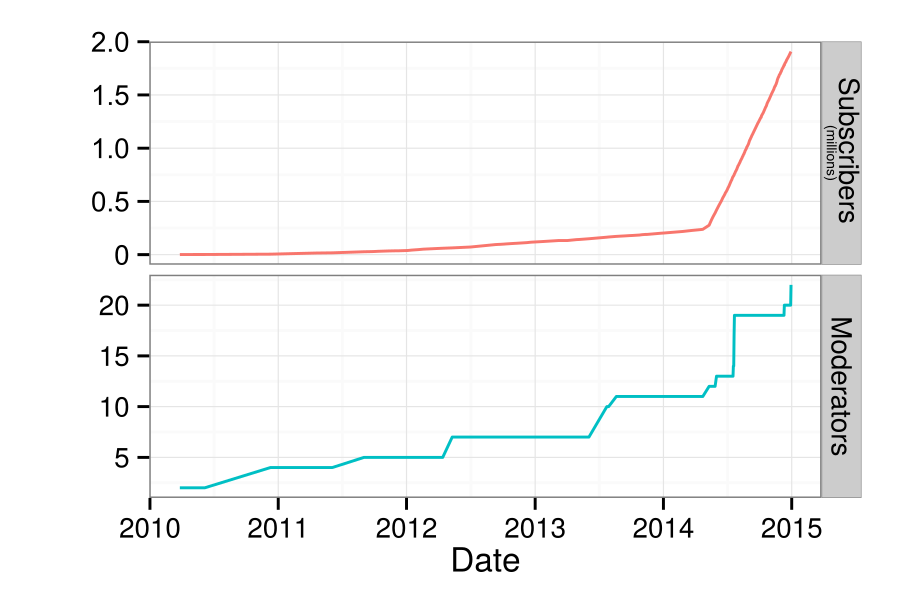 Number of subscribers and moderators on /r/NoSleep over time.
This blog post was written with Charlie Kiene. The paper and work this post describes is collaborative work with Charlie Kiene and Andr s Monroy-Hern ndez. The paper was published in the Proceedings of CHI 2016 and is released as open access so anyone can read the entire paper here. A version of this post was published on the Community Data Science Collective blog.
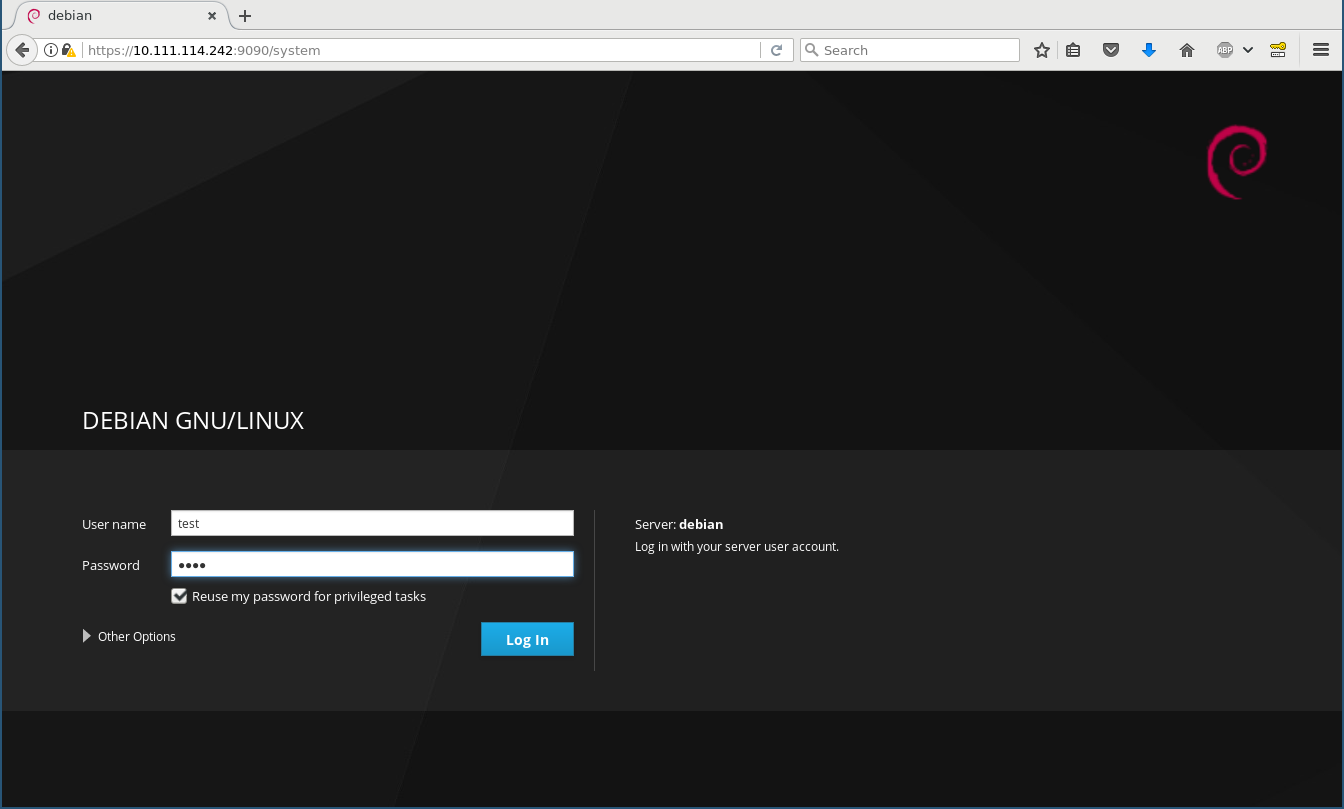
dpkg, gcc-6 and r-base for our experimental toolchain for unstable on arm64, i386 and armhf. Cockpit has now been in Debian unstable and
Ubuntu 17.04 and devel, which means it s now a simple
$ sudo apt install cockpit
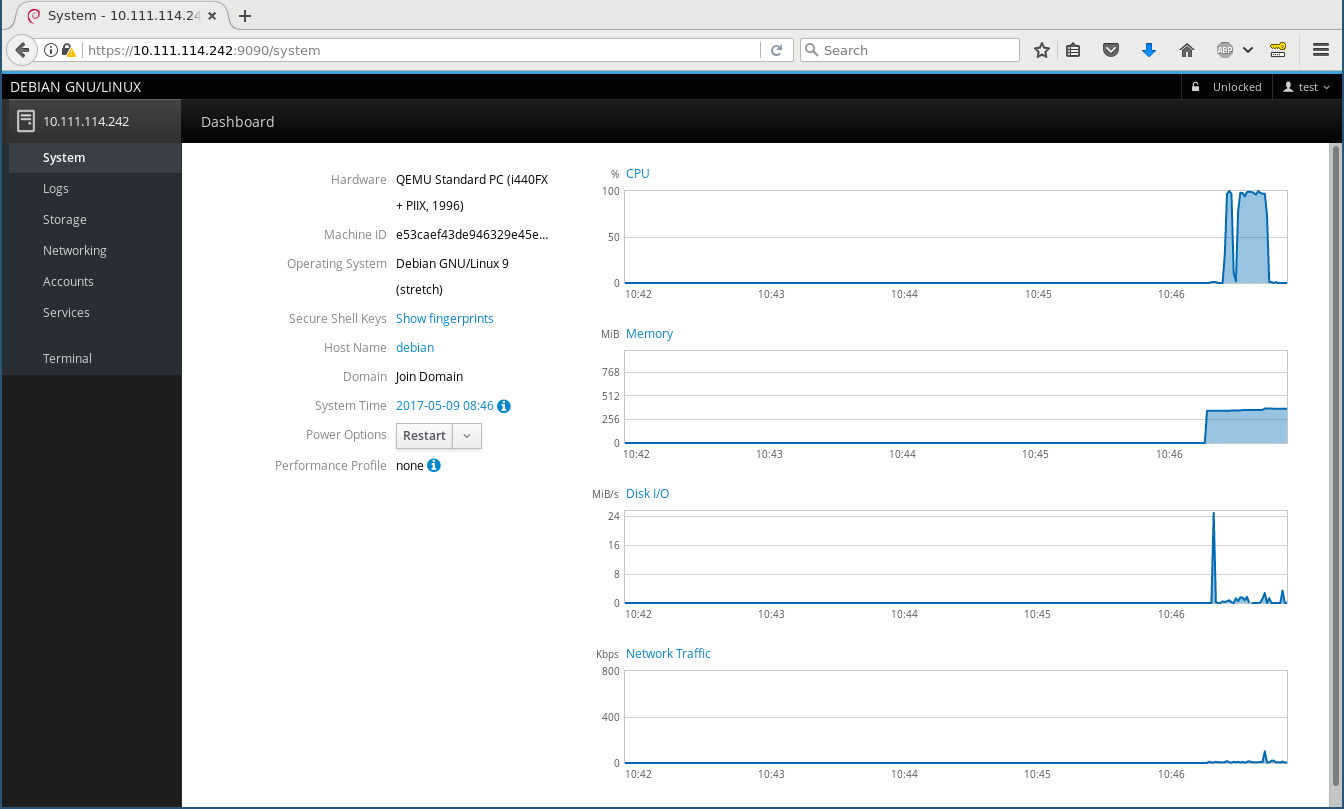 The left side bar is the equivalent of a task switcher , and the applications (i. e. modules for administering various aspects of your
server) are run in parallel.
The main idea of Cockpit is that it should not behave special in any way - it does not have any
specific configuration files or state keeping and uses the same Operating System APIs and privileges like you would on the command line
(such as
lvmconfig, the org.freedesktop.UDisks2 D-Bus interface, reading/writing the native config files, and using sudo when
necessary). You can simultaneously change stuff in Cockpit and in a shell, and Cockpit will instantly react to changes in the OS, e. g. if
you create a new LVM PV or a network device gets added. This makes it fundamentally different to projects like
webmin or ebox, which basically own your computer once you use them the first
time.
It is an interface for your operating system, which even reflects in the branding: as you see above, this is Debian (or Ubuntu, or Fedora,
or wherever you run it on), not Cockpit .
cockpit-bridge and cockpit-system on
those for the most basic functionality, configure SSH on them, and then add them on the Dashboard (I add a Fedora 26 machine
here) and from then on can switch between them on the top left, and everything works and feels exactly the same, including using the
terminal widget:
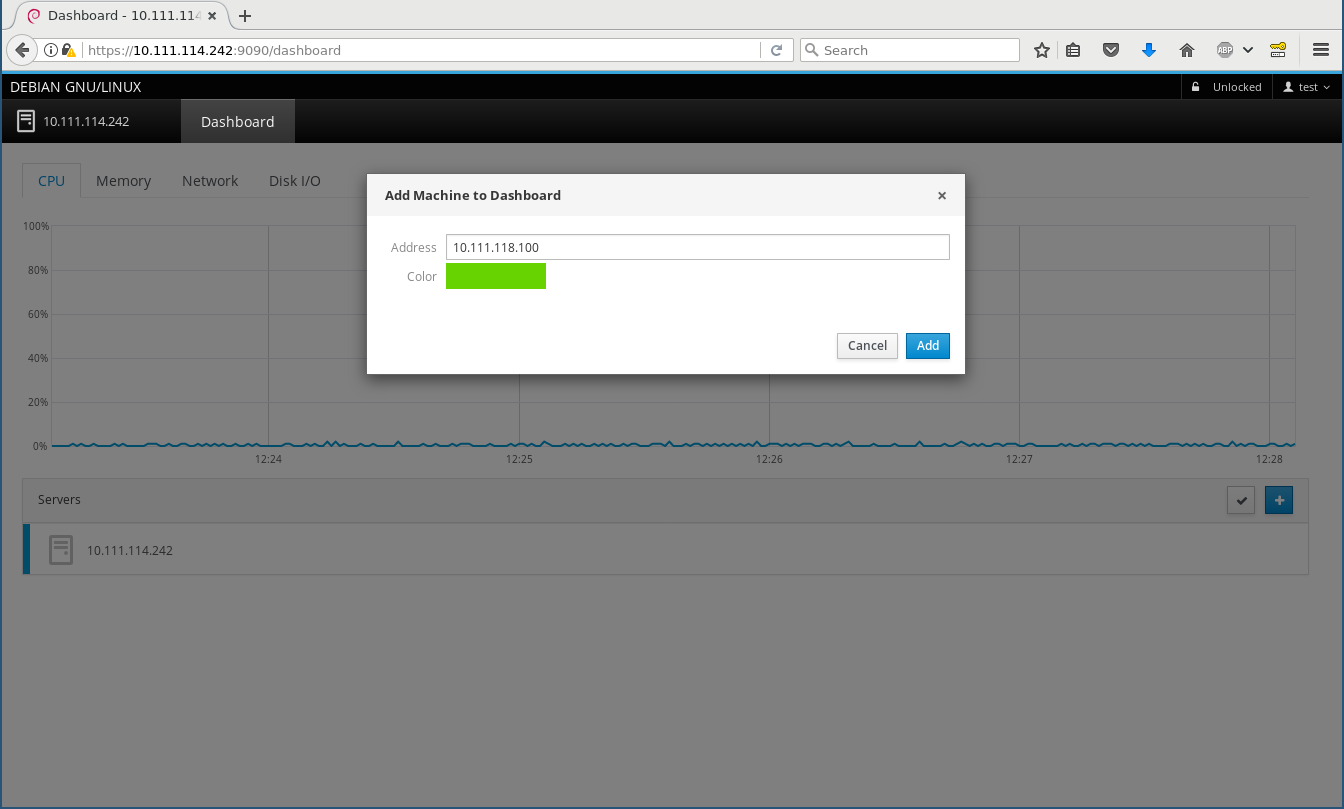
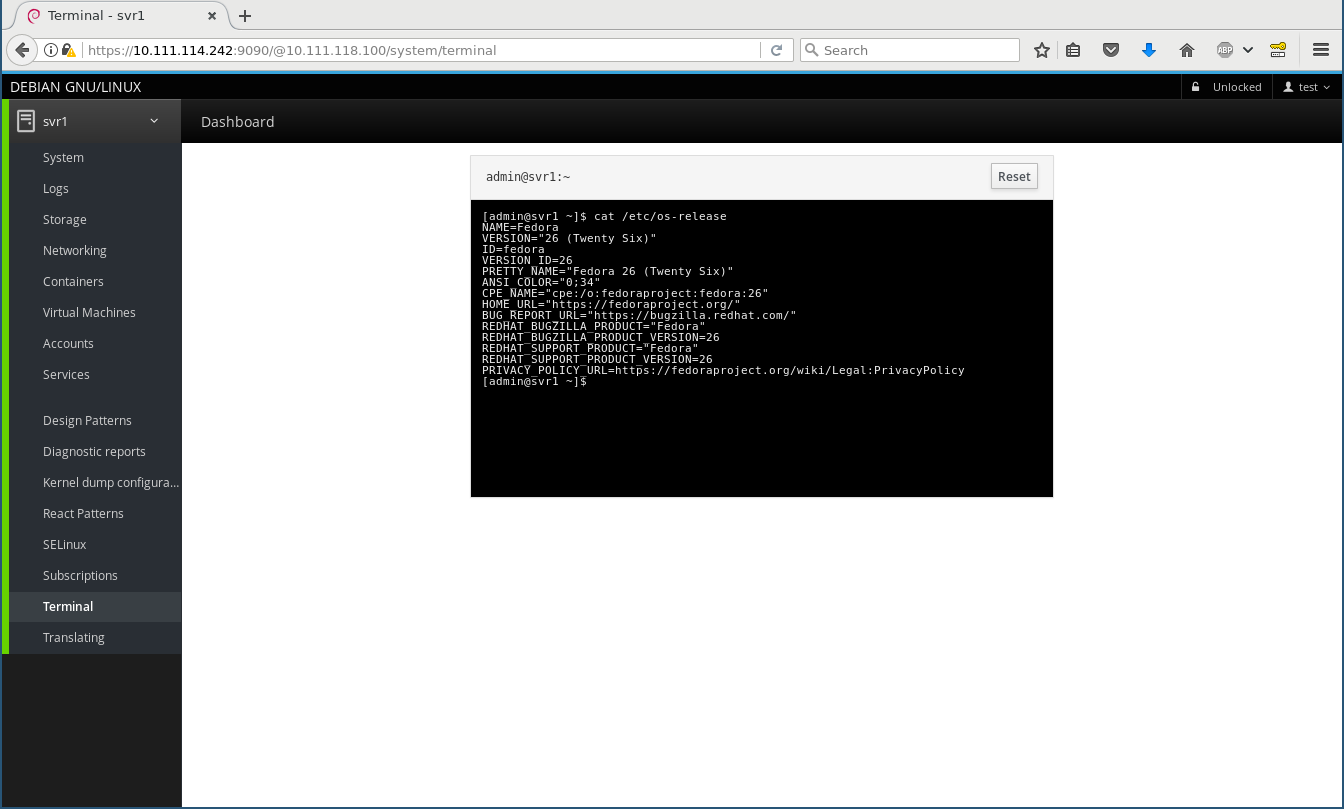 The Fedora 26 machine has some more Cockpit modules installed, including a lot of playground ones, thus you see a lot more menu entries there.
hostnamed:
$ cockpit-bridge --interact=---
  "command": "open", "channel": "d1", "payload": "dbus-json3", "name": "org.freedesktop.hostname1"
---
d1
  "call": [ "/org/freedesktop/hostname1", "org.freedesktop.DBus.Properties", "Get",
          [ "org.freedesktop.hostname1", "StaticHostname" ] ],
  "id": "hostname-prop"
---
d1
 "reply":[[ "t":"s","v":"donald" ]],"id":"hostname-prop"
---
host and passing credentials these can also be run remotely through
logging in via ssh and running cockpit-bridge on the remote host.
Stef Walter explains this in detail in a blog post about Web Access to System
APIs.
Of course Cockpit plugins (both internal and third-party) don t directly speak this, but use a nice
JavaScript API.
As a simple example how to create your own Cockpit plugin that uses this API you can look at my
schroot plugin proof of concept which I hacked together at DevConf.cz in about
an hour during the Cockpit workshop. Note that I never before wrote any JavaScript and I didn t put any effort into design whatsoever, but
it does work .
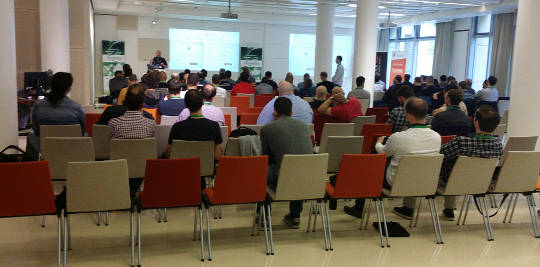 Kamailio World features a range of talks about developing and using SIP and telephony applications and offers many opportunities for SIP developers, WebRTC developers, network operators and users to interact. Wednesday, at midday, there is a Dangerous Demos session where cutting edge innovations will make their first (and potentially last) appearance.
 OSCAL'17, Tirana
OSCAL'17 is an event that has grown dramatically in recent years and is expecting hundreds of free software users and developers, including many international guests, to converge on Tirana, Albania this weekend.
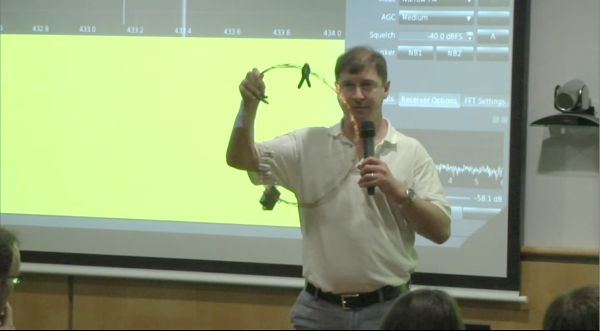
On Saturday I'll be giving a workshop about the Debian Hams project and Software Defined Radio. On Sunday I'll give a talk about Free Real-time Communications (RTC) and the alternatives to systems like Skype, Whatsapp, Viber and Facebook.
deb http://packages.arctica-project.org/debian jessie,stretch,sid maindeb http://packages.arctica-project.org/ubuntu trusty,xenial main wget -qO - http://packages.arctica-project.org/archive.key sudo apt-key add -
nxproxy (client-side component) and nxagent (nx-X11 server,
server-side component). The nxagent Xserver can be used from remote
sessions (via nxcomp compression library) or as a next Xserver.
Ubuntu developers, please note: we have added nightly builds for Ubuntu
latest to our build server. At the moment, you can obtain nx-libs builds for
Ubuntu 16.10 (yakkety) and 17.04 (zenial) as nightly builds.
References
 A new release 0.2.14 of RInside is now on CRAN and in Debian.
RInside provides a set of convenience classes which facilitate embedding of R inside of C++ applications and programs, using the classes and functions provided by Rcpp.
It has been nearly two years since the last release, and a number of nice extensions, build robustifications and fixes had been submitted over this period---see below for more. The only larger and visible extension is both a new example and some corresponding internal changes to allow a readline prompt in an RInside application, should you desire it.
RInside is stressing the CRAN system a little in that it triggers a number of NOTE and WARNING messages. Some of these are par for the course as we get close to R internals not all of which are "officially" in the API. This lead to the submission sitting a little longer than usual in incoming queue. Going forward we may need to find a way to either sanction these access point, whitelist them or, as a last resort, take the package off CRAN. Time will tell.
Changes since the last release were:
CRANberries also provides a short report with changes from the previous release. More information is on the RInside page. Questions, comments etc should go to the rcpp-devel mailing list off the Rcpp R-Forge page, or to issues tickets at the GitHub repo.Changes in RInside version 0.2.14 (2017-04-28)
- Interactive mode can use readline REPL ( ukasz aniewski-Wo k in #25, and Dirk in #26)
- Windows macros checks now uses
_WIN32(Kevin Ushey in #22)- The wt example now links with
libboost_system- The
Makevarsfile is now more robist (Mattias Ellert in #21)- A problem with empty environment variable definitions on Windows was addressed (Jeroen Ooms in #17 addressing #16)
HAVE_UINTPTR_Tis defined only if not already defined- Travis CI is now driven via
run.shfrom our forked r-travis
This post by Dirk Eddelbuettel originated on his Thinking inside the box blog. Please report excessive re-aggregation in third-party for-profit settings.
 Fuzzing is method of producing random malformed inputs for a software and
observe the software behavior. If a software crashes then there is a bug and it
can have security implications. Fuzzing has gained a lot of interest now a days,
especially with automated tools like American Fuzzy Lop (AFL) which can easily
help you to fuzz the program and record inputs which causes crash in the
software.
American Fuzzy Lop is a file based fuzzer which feeds input to program via
standard input. Using it with network program like server's or clients is not
possible in the original state. There is a version of AFL with patches to allow it fuzz
network programs, but this patch is not merged upstream and I do not know if it
ever makes into upstream or not. Also the above repository contains version 1.9
which is older compared to currently released versions.
There is another method for fuzzing network program using AFL with help of
LD_PRELOAD tricks. preeny is a project
which provides library which when used with LD_PRELOAD can desocket the network
program and make it read from stdin.
There is this best tutorial from LoLWare which talks about fuzzing
Nginx with preeny and AFL. There is a best AFL workflow by Foxglove Security
which gives start to finish details about how to use AFL and its companion tool
to do fuzzing. So I'm not going to talk about any steps of fuzzing in this post
instead I'm going to list down my observations on changes that needs to be done
to get clean fuzzing with AFL and preeny.
while(__AFL_LOOP(1000))   // Change 1000 with iteration count
             // your logic here
 For the last two years, I was known among swing dancers for my green flat cap:

Monti, a better model than me

The last picture with the hat
 Today I'm excited to release debug-me,
a program for secure remote debugging.
Debugging a problem over email/irc/BTS is slow, tedious, and hard. The developer needs to see your problem to understand it. Debug-me aims to make debugging fast, fun, and easy, by letting the developer access your computer remotely, so they can immediately see and interact with the problem. Making your problem their problem gets it fixed fast. debug-me session is logged and signed with the developer's GnuPG key, producing a chain of evidence of what they saw and what they did. So the developer's good reputation is leveraged to make debug-me secure.I've recorded a short screencast demoing debug-me. And here's a screencast about debug-me's chain of evidence. The idea for debug-me came from Re: Debugging over email, and then my Patreon supporters picked debug-me in a poll as a project I should work on. It's been a fun month, designing the evidence chain, building a custom efficient protocol with space saving hacks, using websockets and protocol buffers and ed25519 for the first time, and messing around with low-level tty details. The details of debug-me's development are in my devblog. Anyway, I hope debug-me makes debugging less of a tedious back and forth, at least some of the time. PS: Since debug-me's protocol lets multiple people view the same shell session, and optionally interact with it, there could be uses for it beyond debugging, including live screencasting, pair programming, etc. PPS: There needs to be a debug-me server not run by me, so someone please run one..
 Recently Rob and I visited
Soile and Lars. We had a lovely
time wandering around Helsinki with them, and I also spent a good chunk of time
with Lars working on some design and planning for the
Yarn test specification and tooling.
You see, I wrote a Rust implementation of Yarn
called rsyarn "for fun" and in doing
so I noted a bunch of missing bits in the understanding Lars and I shared about
how Yarn should work. Lars and I filled, and re-filled, a whiteboard with
discussion about what the 'Yarn specification' should be, about various
language extensions and changes, and also about what functionality a normative
implementation of Yarn should have.
This article is meant to be a write-up of all of that discussion, but before I
start on that, I should probably summarise what Yarn is.
/bin/true tool:
SCENARIO true should exit with code zero
WHEN /bin/true is run with no arguments
THEN the exit code is 0
 AND stdout is empty
 AND stderr is empty
IMPLEMENTS, for example:
IMPLEMENTS WHEN (\S+) is run with no arguments
set +e
"$ MATCH_1 " > "$ DATADIR /stdout" 2> "$ DATADIR /stderr"
echo $? > "$ DATADIR /exitcode"
IMPLEMENTS can use regular expressions
to capture parts of their invocation, allowing the test implementer to handle
many different scenario statements with one implementation block. For the rest
of the implementation, whatever you assume about things will probably be okay
for now.
SCENARIO, GIVEN, WHEN, THEN,
ASSUMING, FINALLY, AND, IMPLEMENTS, EXAMPLE, ...)IMPLEMENTS current directory, data directory, home directory, and also
environment.IMPLEMENTSIMPLEMENTS per statementASSUMING at the end, or FINALLY at the
start)IMPLEMENTS (and arguments for them)ASSUMING statements lead to an errorIMPLEMENTScmdtest (and which I shall refer to as pyyarn for now) and
my Rust based one (rsyarn).
rsyarn supports, but pyyarn does not, is running multiple
scenarios in parallel. However when I wrote that support into rsyarn I
noticed that there were plenty of issues with running stuff in parallel. (A
problem I'm sure any of you who know about threads will appreciate).
One particular issue was that scenarios often need to share resources which
are not easily sandboxed into the $ DATADIR provided by Yarn. For example
databases or access to limited online services. Lars and I had a good chat
about that, and decided that a reasonable language extension could be:
USING database foo
RESOURCE database (\S+)
LABEL database-$1
GIVEN a database called $1
FINALLY database $1 is torn down
USING statement should be reasonably clear in its pairing to a RESOURCE
statement. The LABEL statement I'll get to in a moment (though it's only
relevant in a RESOURCE block, and the rest of the statements are essentially
substituted into the calling scenario at the point of the USING.
This is nowhere near ready to consider adding to the specification though.
Both Lars and I are uncomfortable with the $1 syntax though we can't think of
anything nicer right now; and the USING/RESOURCE/LABEL vocabulary isn't
set in stone either.
The idea of the LABEL is that we'd also require that a normative Yarn
implementation be capable of specifying resource limits by name. E.g. if a
RESOURCE used a LABEL foo then the caller of a Yarn scenario suite could
specify that there were 5 foos available. The Yarn implementation would then
schedule a maximum of 5 scenarios which are using that label to happen
simultaneously. At bare minimum it'd gate new users, but at best it would
intelligently schedule them.
In addition, since this introduces the concept of parallelism into Yarn proper,
we also wanted to add a maximum parallelism setting to the Yarn implementation
requirements; and to specify that any resource label which was not explicitly
set had a usage limit of 1.
CALLING write foo
EXPANDING write (\S+)
GIVEN bar
WHEN $1 is written to
THEN success was had by all
CALLING/EXPANDING keywords are not fixed yet, nor is the $1
type syntax, though whatever is used here should match the other places where
we might want it.
GIVEN foo
... bar
... baz
GIVEN foo bar baz
YAML into a Yarn scenario is a pain, as would be including any
amount of another whitespace-sensitive input language.
After a lot of to-ing and fro-ing, we decided that the right thing to do would
be to redefine the ... Yarn statement to be whitespace preserving and to then
pass that whitespace through to be matched by the IMPLEMENTS or whatever. In
order for that to work, the regexp matching would have to be defined to treat
the input as a single line, allowing . to match \n etc.
Of course, this would mean that the old functionality wouldn't be possible, so
we considered allowing a \ at the end of a line to provide the current kind
of behaviour, rewriting the above example as:
GIVEN foo \
bar \
baz
... in any of
our Yarn suites where having the whitespace preserved would be an issue, we
decided it was worth the pain.
pyyarn and rsyarn and from there we can implement
our new proposals for extending Yarn to be even more useful.
 VXLAN is an overlay network to encapsulate Ethernet traffic
over an existing (highly available and scalable, possibly the
Internet) IP network while accomodating a very large number of
tenants. It is defined in RFC 7348. For an uncut introduction on
its use with Linux, have a look at my VXLAN & Linux post.
 In the above example, we have hypervisors hosting a virtual
machines from different tenants. Each virtual machine is given
access to a tenant-specific virtual Ethernet segment. Users are
expecting classic Ethernet segments: no MAC restrictions1,
total control over the IP addressing scheme they use and availability
of multicast.
 Compared to other solutions to deploy VXLAN, BGP EVPN
has three main advantages:
203.0.113.254 configured as a loopback IP.
router bgp 65000
  bgp router-id 203.0.113.254
  bgp cluster-id 203.0.113.254
  bgp log-neighbor-changes
  no bgp default ipv4-unicast
  neighbor fabric peer-group
  neighbor fabric remote-as 65000
  neighbor fabric capability extended-nexthop
  neighbor fabric update-source 203.0.113.254
  bgp listen range 203.0.113.0/24 peer-group fabric
  !
  address-family evpn
   neighbor fabric activate
   neighbor fabric route-reflector-client
  exit-address-family
  !
  exit
!
fabric is defined and we leverage the dynamic neighbor
feature of Cumulus Quagga: we don t have to explicitely define each
neighbor. Any client from 203.0.113.0/24 and presenting itself as
part of AS 65000 can connect. All sent EVPN routes will be accepted
and reflected to the other clients.
You don t need to run Zebra, the route engine talking with the
kernel. Instead, start bgpd with the --no_kernel flag.
global:
  config:
    as: 65000
    router-id: 203.0.113.254
    local-address-list:
      - 203.0.113.254
neighbors:
  - config:
      neighbor-address: 203.0.113.1
      peer-as: 65000
    afi-safis:
      - config:
          afi-safi-name: l2vpn-evpn
    route-reflector:
      config:
        route-reflector-client: true
        route-reflector-cluster-id: 203.0.113.254
$ gobgp neighbor add 203.0.113.2 as 65000 \
>         route-reflector-client 203.0.113.254 \
>         --address-family evpn
interfaces
    lo0
        unit 0
            family inet
                address 203.0.113.254/32;


protocols
    bgp
        group fabric
            family evpn
                signaling
                    /* Do not try to install EVPN routes */
                    no-install;


            type internal;
            cluster 203.0.113.254;
            local-address 203.0.113.254;
            allow 203.0.113.0/24;


routing-options
    router-id 203.0.113.254;
    autonomous-system 65000;
 VXLANs can be provisioned with the following script. Source-address
learning is disabled as we will rely solely on BGP EVPN to synchronize
FDBs between the hypervisors.
for vni in 100 200; do
    # Create VXLAN interface
    ip link add vxlan$ vni  type vxlan
        id $ vni  \
        dstport 4789 \
        local 203.0.113.2 \
        nolearning
    # Create companion bridge
    brctl addbr br$ vni
    brctl addif br$ vni  vxlan$ vni
    brctl stp br$ vni  off
    ip link set up dev br$ vni
    ip link set up dev vxlan$ vni
done
# Attach each VM to the appropriate segment
brctl addif br100 vnet10
brctl addif br100 vnet11
brctl addif br200 vnet12
advertise-all-vni directive to
publish all local VNIs.
router bgp 65000
  bgp router-id 203.0.113.2
  no bgp default ipv4-unicast
  neighbor fabric peer-group
  neighbor fabric remote-as 65000
  neighbor fabric capability extended-nexthop
  neighbor fabric update-source dummy0
  ! BGP sessions with route reflectors
  neighbor 203.0.113.253 peer-group fabric
  neighbor 203.0.113.254 peer-group fabric
  !
  address-family evpn
   neighbor fabric activate
   advertise-all-vni
  exit-address-family
  !
  exit
!
ping command shows if everything is in order:
$ ping -c10 -w1 -t1 ff02::1%eth0
PING ff02::1%eth0(ff02::1%eth0) 56 data bytes
64 bytes from fe80::5254:33ff:fe00:8%eth0: icmp_seq=1 ttl=64 time=0.016 ms
64 bytes from fe80::5254:33ff:fe00:b%eth0: icmp_seq=1 ttl=64 time=4.98 ms (DUP!)
64 bytes from fe80::5254:33ff:fe00:9%eth0: icmp_seq=1 ttl=64 time=4.99 ms (DUP!)
64 bytes from fe80::5254:33ff:fe00:a%eth0: icmp_seq=1 ttl=64 time=4.99 ms (DUP!)
--- ff02::1%eth0 ping statistics ---
1 packets transmitted, 1 received, +3 duplicates, 0% packet loss, time 0ms
rtt min/avg/max/mdev = 0.016/3.745/4.991/2.152 ms
vtysh:
# show interface vxlan100
Interface vxlan100 is up, line protocol is up
  Link ups:       1    last: 2017/04/29 20:01:33.43
  Link downs:     0    last: (never)
  PTM status: disabled
  vrf: Default-IP-Routing-Table
  index 11 metric 0 mtu 1500
  flags: <UP,BROADCAST,RUNNING,MULTICAST>
  Type: Ethernet
  HWaddr: 62:42:7a:86:44:01
  inet6 fe80::6042:7aff:fe86:4401/64
  Interface Type Vxlan
  VxLAN Id 100
  Access VLAN Id 1
  Master (bridge) ifindex 9 ifp 0x56536e3f3470
# show evpn mac vni 100
Number of MACs (local and remote) known for this VNI: 2
MAC               Type   Intf/Remote VTEP      VLAN
50:54:33:00:00:0a local  eth1.100
50:54:33:00:00:0b local  eth2.100
vtysh:
# show bgp neighbors 203.0.113.254
BGP neighbor is 203.0.113.254, remote AS 65000, local AS 65000, internal link
 Member of peer-group fabric for session parameters
  BGP version 4, remote router ID 203.0.113.254
  BGP state = Established, up for 00:00:45
  Neighbor capabilities:
    4 Byte AS: advertised and received
    AddPath:
      L2VPN EVPN: RX advertised L2VPN EVPN
    Route refresh: advertised and received(new)
    Address family L2VPN EVPN: advertised and received
    Hostname Capability: advertised
    Graceful Restart Capabilty: advertised
[...]
 For address family: L2VPN EVPN
  fabric peer-group member
  Update group 1, subgroup 1
  Packet Queue length 0
  Community attribute sent to this neighbor(both)
  8 accepted prefixes

  Connections established 1; dropped 0
  Last reset never
Local host: 203.0.113.2, Local port: 37603
Foreign host: 203.0.113.254, Foreign port: 179
Established,L2VPN EVPN is correctly advertised, and# gobgp neighbor 203.0.113.2 BGP neighbor is 203.0.113.2, remote AS 65000, route-reflector-client BGP version 4, remote router ID 203.0.113.2 BGP state = established, up for 00:04:30 BGP OutQ = 0, Flops = 0 Hold time is 9, keepalive interval is 3 seconds Configured hold time is 90, keepalive interval is 30 seconds Neighbor capabilities: multiprotocol: l2vpn-evpn: advertised and received route-refresh: advertised and received graceful-restart: received 4-octet-as: advertised and received add-path: received UnknownCapability(73): received cisco-route-refresh: received [...] Route statistics: Advertised: 8 Received: 5 Accepted: 5
> show bgp neighbor 203.0.113.2
Peer: 203.0.113.2+38089 AS 65000 Local: 203.0.113.254+179 AS 65000
  Group: fabric                Routing-Instance: master
  Forwarding routing-instance: master
  Type: Internal    State: Established
  Last State: OpenConfirm   Last Event: RecvKeepAlive
  Last Error: None
  Options: <Preference LocalAddress Cluster AddressFamily Rib-group Refresh>
  Address families configured: evpn
  Local Address: 203.0.113.254 Holdtime: 90 Preference: 170
  NLRI evpn: NoInstallForwarding
  Number of flaps: 0
  Peer ID: 203.0.113.2     Local ID: 203.0.113.254     Active Holdtime: 9
  Keepalive Interval: 3          Group index: 0    Peer index: 2
  I/O Session Thread: bgpio-0 State: Enabled
  BFD: disabled, down
  NLRI for restart configured on peer: evpn
  NLRI advertised by peer: evpn
  NLRI for this session: evpn
  Peer supports Refresh capability (2)
  Stale routes from peer are kept for: 300
  Peer does not support Restarter functionality
  NLRI that restart is negotiated for: evpn
  NLRI of received end-of-rib markers: evpn
  NLRI of all end-of-rib markers sent: evpn
  Peer does not support LLGR Restarter or Receiver functionality
  Peer supports 4 byte AS extension (peer-as 65000)
  NLRI's for which peer can receive multiple paths: evpn
  Table bgp.evpn.0 Bit: 20000
    RIB State: BGP restart is complete
    RIB State: VPN restart is complete
    Send state: in sync
    Active prefixes:              5
    Received prefixes:            5
    Accepted prefixes:            5
    Suppressed due to damping:    0
    Advertised prefixes:          8
  Last traffic (seconds): Received 276  Sent 170  Checked 276
  Input messages:  Total 61     Updates 3       Refreshes 0     Octets 1470
  Output messages: Total 62     Updates 4       Refreshes 0     Octets 1775
  Output Queue[1]: 0            (bgp.evpn.0, evpn)
> show route table bgp.evpn.0 receive-protocol bgp 203.0.113.2
bgp.evpn.0: 10 destinations, 10 routes (10 active, 0 holddown, 0 hidden)
  Prefix                  Nexthop              MED     Lclpref    AS path
  2:203.0.113.2:100::0::50:54:33:00:00:0a/304 MAC/IP
*                         203.0.113.2                  100        I
  2:203.0.113.2:100::0::50:54:33:00:00:0b/304 MAC/IP
*                         203.0.113.2                  100        I
  3:203.0.113.2:100::0::203.0.113.2/304 IM
*                         203.0.113.2                  100        I
  3:203.0.113.2:200::0::203.0.113.2/304 IM
*                         203.0.113.2                  100        I
extensive. Here is a type 3 route advertising 203.0.113.2 as a
VTEP for VNI 1008:
> show route table bgp.evpn.0 receive-protocol bgp 203.0.113.2 extensive
bgp.evpn.0: 11 destinations, 11 routes (11 active, 0 holddown, 0 hidden)
* 3:203.0.113.2:100::0::203.0.113.2/304 IM (1 entry, 1 announced)
     Accepted
     Route Distinguisher: 203.0.113.2:100
     Nexthop: 203.0.113.2
     Localpref: 100
     AS path: I
     Communities: target:65000:268435556 encapsulation:vxlan(0x8)
[...]
50:54:33:00:00:0a MAC address for VNI 100:
> show route table bgp.evpn.0 receive-protocol bgp 203.0.113.2 extensive
bgp.evpn.0: 11 destinations, 11 routes (11 active, 0 holddown, 0 hidden)
* 2:203.0.113.2:100::0::50:54:33:00:00:0a/304 MAC/IP (1 entry, 1 announced)
     Accepted
     Route Distinguisher: 203.0.113.2:100
     Route Label: 100
     ESI: 00:00:00:00:00:00:00:00:00:00
     Nexthop: 203.0.113.2
     Localpref: 100
     AS path: I
     Communities: target:65000:268435556 encapsulation:vxlan(0x8)
[...]
vtysh:
# show bgp evpn route
BGP table version is 0, local router ID is 203.0.113.1
Status codes: s suppressed, d damped, h history, * valid, > best, i - internal
Origin codes: i - IGP, e - EGP, ? - incomplete
EVPN type-2 prefix: [2]:[ESI]:[EthTag]:[MAClen]:[MAC]
EVPN type-3 prefix: [3]:[EthTag]:[IPlen]:[OrigIP]
   Network          Next Hop            Metric LocPrf Weight Path
Route Distinguisher: 203.0.113.2:100
*>i[2]:[0]:[0]:[48]:[50:54:33:00:00:0a]
                    203.0.113.2                   100      0 i
*>i[2]:[0]:[0]:[48]:[50:54:33:00:00:0b]
                    203.0.113.2                   100      0 i
*>i[3]:[0]:[32]:[203.0.113.2]
                    203.0.113.2                   100      0 i
Route Distinguisher: 203.0.113.2:200
*>i[3]:[0]:[32]:[203.0.113.2]
                    203.0.113.2                   100      0 i
[...]
# gobgp global rib -a evpn   grep rd:203.0.113.2:200
    Network  Next Hop             AS_PATH              Age        Attrs
*>  [type:macadv][rd:203.0.113.2:100][esi:single-homed][etag:0][mac:50:54:33:00:00:0a][ip:<nil>][labels:[100]]203.0.113.2                               00:00:17   [ Origin: i   LocalPref: 100   Extcomms: [VXLAN], [65000:268435556] ]
*>  [type:macadv][rd:203.0.113.2:100][esi:single-homed][etag:0][mac:50:54:33:00:00:0b][ip:<nil>][labels:[100]]203.0.113.2                               00:00:17   [ Origin: i   LocalPref: 100   Extcomms: [VXLAN], [65000:268435556] ]
*>  [type:macadv][rd:203.0.113.2:200][esi:single-homed][etag:0][mac:50:54:33:00:00:0a][ip:<nil>][labels:[200]]203.0.113.2                               00:00:17   [ Origin: i   LocalPref: 100   Extcomms: [VXLAN], [65000:268435656] ]
*>  [type:multicast][rd:203.0.113.2:100][etag:0][ip:203.0.113.2]203.0.113.2                               00:00:17   [ Origin: i   LocalPref: 100   Extcomms: [VXLAN], [65000:268435556] ]
*>  [type:multicast][rd:203.0.113.2:200][etag:0][ip:203.0.113.2]203.0.113.2                               00:00:17   [ Origin: i   LocalPref: 100   Extcomms: [VXLAN], [65000:268435656] ]
show bgp evpn route command of vtysh.
Does Quagga correctly understand the received routes? The type 3
routes are translated to an assocation between the remote VTEPs and
the VNIs:
# show evpn vni
Number of VNIs: 2
VNI        VxLAN IF              VTEP IP         # MACs   # ARPs   Remote VTEPs
100        vxlan100              203.0.113.2     4        0        203.0.113.3
                                                                   203.0.113.1
200        vxlan200              203.0.113.2     3        0        203.0.113.3
                                                                   203.0.113.1
# show evpn mac vni 100
Number of MACs (local and remote) known for this VNI: 4
MAC               Type   Intf/Remote VTEP      VLAN
50:54:33:00:00:09 remote 203.0.113.1
50:54:33:00:00:0a local  eth1.100
50:54:33:00:00:0b local  eth2.100
50:54:33:00:00:0c remote 203.0.113.3
bridge command:
# bridge fdb show dev vxlan100   grep dst
00:00:00:00:00:00 dst 203.0.113.1 self permanent
00:00:00:00:00:00 dst 203.0.113.3 self permanent
50:54:33:00:00:0c dst 203.0.113.3 self
50:54:33:00:00:09 dst 203.0.113.1 self
203.0.113.1 and 203.0.113.3)
and the two last ones are the translation of the type 2 routes.
ip link and
brctl with Linux. We only configure one physical interface with two
old-school VLANs paired with matching VNIs.
interfaces
    ge-0/0/1
        unit 0
            family bridge
                interface-mode trunk;
                vlan-id-list [ 100 200 ];


routing-instances
    switch
        instance-type virtual-switch;
        interface ge-0/0/1.0;
        bridge-domains
            vlan100
                domain-type bridge;
                vlan-id 100;
                vxlan
                    vni 100;
                    ingress-node-replication;


            vlan200
                domain-type bridge;
                vlan-id 200;
                vxlan
                    vni 200;
                    ingress-node-replication;
protocols
    bgp
        group fabric
            type internal;
            multihop;
            family evpn signaling;
            local-address 203.0.113.3;
            neighbor 203.0.113.253;
            neighbor 203.0.113.254;


routing-instances
    switch
        vtep-source-interface lo0.0;
        route-distinguisher 203.0.113.3:1; #
        vrf-import EVPN-VRF-VXLAN;
        vrf-target
            target:65000:1;
            auto;

        protocols
            evpn
                encapsulation vxlan;
                extended-vni-list all;
                multicast-mode ingress-replication;


routing-options
    router-id 203.0.113.3;
    autonomous-system 65000;

policy-options
    policy-statement EVPN-VRF-VXLAN
        then accept;
> show route table bgp.evpn.0 receive-protocol bgp 203.0.113.3 extensive
bgp.evpn.0: 13 destinations, 13 routes (13 active, 0 holddown, 0 hidden)
* 3:203.0.113.3:1::100::203.0.113.3/304 IM (1 entry, 1 announced)
     Accepted
     Route Distinguisher: 203.0.113.3:1
     Nexthop: 203.0.113.3
     Localpref: 100
     AS path: I
     Communities: target:65000:268435556 encapsulation:vxlan(0x8)
     PMSI: Flags 0x0: Label 6: Type INGRESS-REPLICATION 203.0.113.3
[...]
> show route table bgp.evpn.0 receive-protocol bgp 203.0.113.3 extensive
bgp.evpn.0: 13 destinations, 13 routes (13 active, 0 holddown, 0 hidden)
* 2:203.0.113.3:1::200::50:54:33:00:00:0f/304 MAC/IP (1 entry, 1 announced)
     Accepted
     Route Distinguisher: 203.0.113.3:1
     Route Label: 200
     ESI: 00:00:00:00:00:00:00:00:00:00
     Nexthop: 203.0.113.3
     Localpref: 100
     AS path: I
     Communities: target:65000:268435656 encapsulation:vxlan(0x8)
[...]
> show evpn database l2-domain-id 100
Instance: switch
VLAN  DomainId  MAC address        Active source                  Timestamp        IP address
     100        50:54:33:00:00:0c  203.0.113.1                    Apr 30 12:46:20
     100        50:54:33:00:00:0d  203.0.113.2                    Apr 30 12:32:42
     100        50:54:33:00:00:0e  203.0.113.2                    Apr 30 12:46:20
     100        50:54:33:00:00:0f  ge-0/0/1.0                     Apr 30 12:45:55
# show evpn vni 100
VNI: 100
 VxLAN interface: vxlan100 ifIndex: 9 VTEP IP: 203.0.113.1
 Remote VTEPs for this VNI:
  203.0.113.3
  203.0.113.2
 Number of MACs (local and remote) known for this VNI: 4
 Number of ARPs (IPv4 and IPv6, local and remote) known for this VNI: 0
# show evpn mac vni 100
Number of MACs (local and remote) known for this VNI: 4
MAC               Type   Intf/Remote VTEP      VLAN
50:54:33:00:00:0c local  eth1.100
50:54:33:00:00:0d remote 203.0.113.2
50:54:33:00:00:0e remote 203.0.113.2
50:54:33:00:00:0f remote 203.0.113.3
203.0.113.2:100) is not the one used to encode the VNI. The VNI
is encoded in the route target (65000:268435556), in the 24
least signifiant bits (268435556 & 0xffffff equals 100). As
long as VNIs are unique, we don t have to understand those
details.
VXLAN is an overlay network to carry Ethernet traffic over an
existing (highly available and scalable) IP network while accommodating
a very large number of tenants. It is defined in RFC 7348.
Starting from Linux 3.12, the VXLAN implementation is quite complete
as both multicast and unicast are supported as well as IPv6
and IPv4. Let s explore the various methods to configure it.
 To illustrate our examples, we use the following setup:
H1), we can reach directly all the other hosts in the
virtual segment:
$ ping -c10 -w1 -t1 ff02::1%eth0
PING ff02::1%eth0(ff02::1%eth0) 56 data bytes
64 bytes from fe80::5254:33ff:fe00:8%eth0: icmp_seq=1 ttl=64 time=0.016 ms
64 bytes from fe80::5254:33ff:fe00:b%eth0: icmp_seq=1 ttl=64 time=4.98 ms (DUP!)
64 bytes from fe80::5254:33ff:fe00:9%eth0: icmp_seq=1 ttl=64 time=4.99 ms (DUP!)
64 bytes from fe80::5254:33ff:fe00:a%eth0: icmp_seq=1 ttl=64 time=4.99 ms (DUP!)
--- ff02::1%eth0 ping statistics ---
1 packets transmitted, 1 received, +3 duplicates, 0% packet loss, time 0ms
rtt min/avg/max/mdev = 0.016/3.745/4.991/2.152 ms
# ip -6 link add vxlan100 type vxlan \
>   id 100 \
>   dstport 4789 \
>   local 2001:db8:1::1 \
>   group ff05::100 \
>   dev eth0 \
>   ttl 5
# brctl addbr br100
# brctl addif br100 vxlan100
# brctl addif br100 vnet22
# brctl addif br100 vnet25
# brctl stp br100 off
# ip link set up dev br100
# ip link set up dev vxlan100
vxlan100 and put it in a bridge with some regular
interfaces1. Each VXLAN segment is associated to a 24-bit
segment ID, the VXLAN Network Identifier (VNI). In our example, the
default VNI is specified with id 100.
When VXLAN was first implemented in Linux 3.7, the UDP port to use was
not defined. Several vendors were using 8472 and Linux took the same
value. To avoid breaking existing deployments, this is still the
default value. Therefore, if you want to use the IANA-assigned port,
you need to explicitely set it with dstport 4789.
As we want to use multicast, we have to specify a multicast group to
join (group ff05::100), as well as a physical device (dev
eth0). With multicast, the default TTL is 1. If your multicast
network leverages some routing, you ll have to increase the value a
bit, like here with ttl 5.
The vxlan100 device acts as a bridge device with remote VTEPs as
virtual ports:
 The FDB of the VXLAN device can be observed with the
bridge
command. If the destination MAC is present, the frame is sent to the
associated VTEP (unicast). The all-zero address is only used when a
lookup for the destination MAC fails.
# bridge fdb show dev vxlan100   grep dst
00:00:00:00:00:00 dst ff05::100 via eth0 self permanent
50:54:33:00:00:0b dst 2001:db8:3::1 self
50:54:33:00:00:08 dst 2001:db8:1::1 self
# ip -6 link add vxlan100 type vxlan \
>   id 100 \
>   dstport 4789 \
>   local 2001:db8:1::1
# bridge fdb append 00:00:00:00:00:00 dev vxlan100 dst 2001:db8:2::1
# bridge fdb append 00:00:00:00:00:00 dev vxlan100 dst 2001:db8:3::1
# ip -6 link add vxlan100 type vxlan \
>   id 100 \
>   dstport 4789 \
>   local 2001:db8:1::1 \
>   nolearning
# bridge fdb append 00:00:00:00:00:00 dev vxlan100 dst 2001:db8:2::1
# bridge fdb append 00:00:00:00:00:00 dev vxlan100 dst 2001:db8:3::1
# bridge fdb append 50:54:33:00:00:09 dev vxlan100 dst 2001:db8:2::1
# bridge fdb append 50:54:33:00:00:0a dev vxlan100 dst 2001:db8:2::1
# bridge fdb append 50:54:33:00:00:0b dev vxlan100 dst 2001:db8:3::1
nolearning flag, source-address learning is
disabled. Therefore, if a MAC is missing, the frame will always be
sent using the all-zero entries.
The all-zero entries are still needed for broadcast and multicast
traffic (e.g. ARP and IPv6 neighbor discovery). This kind of setup
works well to provide virtual L2 networks to virtual machines (no L3
information available). You need some glue to update the FDB entries.
BGP EVPN with Cumulus Quagga is an example of use of
this strategy (see VXLAN: BGP EVPN with Cumulus Quagga for
additional information).
# ip -6 link add vxlan100 type vxlan \
>   id 100 \
>   dstport 4789 \
>   local 2001:db8:1::1 \
>   nolearning \
>   proxy
# ip -6 neigh add 2001:db8:ff::11 lladdr 50:54:33:00:00:09 dev vxlan100
# ip -6 neigh add 2001:db8:ff::12 lladdr 50:54:33:00:00:0a dev vxlan100
# ip -6 neigh add 2001:db8:ff::13 lladdr 50:54:33:00:00:0b dev vxlan100
# bridge fdb append 50:54:33:00:00:09 dev vxlan100 dst 2001:db8:2::1
# bridge fdb append 50:54:33:00:00:0a dev vxlan100 dst 2001:db8:2::1
# bridge fdb append 50:54:33:00:00:0b dev vxlan100 dst 2001:db8:3::1
l2miss and l3miss
options5:
ip -6 link add vxlan100 type vxlan \
   id 100 \
   dstport 4789 \
   local 2001:db8:1::1 \
   nolearning \
   l2miss \
   l3miss \
   proxy
AF_NETLINK socket
using the NETLINK_ROUTE protocol. This socket needs to be bound to
the RTNLGRP_NEIGH group. The following is doing exactly that and
decodes the received notifications:
# ip monitor neigh dev vxlan100
miss 2001:db8:ff::12 STALE
miss lladdr 50:54:33:00:00:0a STALE
ip -6 neigh replace 2001:db8:ff::12 \
    lladdr 50:54:33:00:00:0a \
    dev vxlan100 \
    nud reachable
bridge fdb replace 50:54:33:00:00:0a \
    dst 2001:db8:2::1 \
    dev vxlan100 dynamic
 VXLAN adds a fixed overhead of 50 bytes. If you also use IPsec, the
overhead depends on many factors. In transport mode, with AES and
SHA256, the overhead is 56 bytes. With NAT traversal, this is 64 bytes
(additional UDP header). In tunnel mode, this is 72
bytes. See Cisco IPsec Overhead Calculator Tool.
Some users will expect to be able to use an Ethernet MTU of 1500 for
the overlay network. Therefore, the underlay MTU should be
increased. If it is not possible, ensure the inner MTU (inside the
containers or the virtual machines) is correctly decreased8.
ip command (to be included
in 4.11) to use IPv6 for transport. In the meantime, here is a
quick workaround:
# ip -6 link add vxlan100 type vxlan \
>   id 100 \
>   dstport 4789 \
>   local 2001:db8:1::1 \
>   remote 2001:db8:2::1
# bridge fdb append 00:00:00:00:00:00 \
>   dev vxlan100 dst 2001:db8:3::1

# apt-cache search fidonets 0.00 % 0.00 % [kdevtmpfs]So, there are at least two different mailer (ifcico and binkd) and crashmail as a tosser. What is missing is a FidoNet reader. In older Debian releases there was GoldEd+, but this package got removed from Debian some years ago. There's still some upstream development of GoldEd+, but when I tried to compile it fails. So there is no easy way to have a full FidoNet node running on Debian, which is sad. Yes, FidoNet is maybe outdated technology, but it's still alive and I would like to get a FidoNet node running again. Are there any other FidoNet nodes running on Debian and give assistance in setting up? There are maybe some fully integrated solutions like MysticBBS, but I'm unsure about those. So, any tips and hints are welcome! :-)
crashmail - JAM and *.MSG capable Fidonet tosser
fortunes-es - Spanish fortune database
htag - A tagline/.signature adder for email, news and FidoNet messages
ifcico - Fidonet Technology transport package
ifgate - Internet to Fidonet gateway
ifmail - Internet to Fidonet gateway
jamnntpd - NNTP Server allowing newsreaders to access a JAM messagebase
jamnntpd-dbg - debugging symbols for jamnntpd
lbdb - Little Brother's DataBase for the mutt mail reader
Next.