Search Results: "cas"

6 February 2014

Neil Williams: iMX53 in the home lab

The iMX53 Quick Start Board has been a mainstay of the Debian armhf port and has been part of LAVA until recently. It s a natural choice for seeing how LAVA and Debian can work together more closely. So, in the first steps to getting my home lab running, I set about restoring two of these boards to LAVA support. I will be looking into each of the possible boot methods with these boards, but the way to start is with a LAVA master image on an SD card. With the pause in iMX53 development within LAVA, this raises a couple of issues: LAVA master image on iMX53 The LAVA master image is more recent and can fix these problems. See lava-image-creation preparing a master image
$ git clone git://git.linaro.org/lava/lava-master-image-scripts.git
$ cd lava-master-image-scripts

Use patch -p1 to apply this patch (apologies for the line wrapping in the blog):
diff --git a/lava-create-master b/lava-create-master
index 2e1d0e8..a1e6131 100755
--- a/lava-create-master
+++ b/lava-create-master
@@ -366,7 +366,7 @@ make_master()  
         verbose " * Building vanilla image with linaro-media-create..."
         if ! linaro-media-create \
             --dev $LMC_DEV \
-            --rootfs ext4 \
+            --rootfs ext3 \
             --image-file $CACHE_DIR/pristine-images/$dev-vanilla.img \
             --image-size 1G \
             --align-boot-part \
$ sudo ./lava-create-master imx53 Without the patch applied, I simply removed the SD card, mounted the third partition on my main machine and created a tarball of the contents:
$ sudo mount /dev/mmcblk0p3 /mnt/
$ pushd /mnt
$ sudo tar -czf /tmp/imx53-rootfs.tgz ./*
$ popd
$ sudo umount /mnt/
Reformat p3 to ext3 (or ext2 if you prefer)
$ sudo mkfs.ext3 /dev/mmcblk0p3
Put the rootfs back onto the replacement ext3 partition.
$ sudo mount /dev/mmcblk0p3 /mnt/
$ pushd /mnt
$ sudo tar -xzvf /tmp/imx53-rootfs.tgz
$ popd
$ sudo sync
$ sudo umount /mnt/
The bootscript is buggy, so run:
> run loaduimage
> run mmcboot
Then fix bootscript or you won t be able to reboot: Simplest way may be to set u-boot to ignore boot.scr
> setenv script
> saveenv
> reset
Device configuration in LAVA I found screen to be a bit awkward as a serial connection, (use Ctrl-A : quit) to quit. I tried autologin for the lucid image but that was not needed for the master image which uses the linaro overlay. The PDU commands are for my own setup. The daemon (the machine running the pdu daemon scripts), hostname (the hostname or IP of the PDU itself) and the port numbers will change between labs. Again, the blog has changed the line endings.
device_type = mx53loco
hostname = imx53-01
connection_command = telnet hobbes 4002
#login_prompt = lucid-desktop login:
#password_prompt = Password:
#username = lucid
#password = lucid
hard_reset_command = /usr/bin/pduclient --daemon localhost --hostname pdu --command reboot --port 05
power_off_cmd = /usr/bin/pduclient --daemon localhost --hostname pdu --command off --port 05
power_on_cmd = /usr/bin/pduclient --daemon localhost --hostname pdu --command on --port 05
testboot_offset = 3
Critical testboot_offset is currently undocumented. Without it, you will see:
 ** Partition 4 not valid on device 0 **
You can trace this back in a LAVA test log to:
  setenv bootcmd "fatload mmc 0:4 0x70000000 uImage; fatload mmc 0:4 0x72000000 uInitrd; fatload mmc 0:4 0x71ff0000 board.dtb; bootm 0x70000000 0x72000000 0x71ff0000"
The correct line needs to use mmc 0:5 in each case.
This is what testboot_offset modifies the default is 2.
  setenv bootcmd "fatload mmc 0:4 0x70000000 uImage; fatload mmc 0:5 0x72000000 uInitrd; fatload mmc 0:5 0x71ff0000 board.dtb; bootm 0x70000000 0x72000000 0x71ff0000"
Hacking session in LAVA A hacking session in LAVA is a way of getting an SSH login directly into a deployed test image, as root. It s a test image, so look around, trash stuff, build stuff, reboot the board When you are done, use stop-hacking and the test completes, leaving the master image unchanged, ready for the next rootfs to go onto the test image you were using. This will be improved in later blog entries but as a starter and so that you can play with the SATA drive with a recent installation, this is the JSON for a LAVA job which gives you an SSH session inside the LAVA test image on an iMX53. The test image comes from Linaro releases 12.01. I haven t set up a proxy yet, so to save time, I downloaded it once and used a local file:// URL in the testjob. Note the rootfstype parameter without this, LAVA will helpfully format the partition onto which the rootfs is installed to ext4, with predictable results. (This bug is currently being fixed in LAVA so that LAVA uses the same filesystem as the downloaded image. All part of making LAVA less presumptive.) The smoke-tests-basic testdef is gratuitous and can be removed but this particular run won t be quick it took over an hour to get into the hacking session, but future topics here will improve that so the extra few minutes for the smoke-tests is not a big win. Change the value for GATEWAY to something sane for your network, change the value for PUB_KEY to your SSH public key. Change the image location to something which works for your setup.
 
 "health_check": false,
 "job_name": "iMX53-hacking",
 "logging_level": "DEBUG",
 "device_type": "mx53loco",
 "timeout": 900,
 "actions": [
 
 "command": "deploy_linaro_image",
 "parameters": 
 "image": "file:///home/linaro/lava/mx53loco-ubuntu-desktop.img.gz",
 "rootfstype": "ext3"
 
 ,
 
 "command": "lava_test_shell",
 "parameters": 
 "testdef_repos": [
 
 "git-repo": "git://git.linaro.org/qa/test-definitions.git",
 "testdef": "ubuntu/smoke-tests-basic.yaml"
 ,
 
 "git-repo": "http://git.linaro.org/git/lava-team/hacking-session.git",
 "parameters": 
 "GATEWAY": "10.15.0.1",
 "PUB_KEY": "...."
 ,
 "testdef": "hacking-session-debian.yaml"
 
 ],
 "timeout": 18000
 
 ,
 
 "command": "submit_results_on_host",
 "parameters": 
 "server": "http://sylvester.codehelp/RPC2/",
 "stream": "/anonymous/codehelp/"
 
 
 ]
 
(Use http://jsonlint.com to reformat.) I was part of the way through running debootstrap on the SATA drive when ser2net timed out because I hadn t changed the values at that time. Configuring set2net for LAVA ser2net can run on any machine capable of providing the serial connections, including a dedicated device. Decide on a port range to use on the machine running ser2net. If the device has more than one network interface, ensure that ser2net only offers connections on the relevant interface by prefixing the port with the IP address or hostname. telnet is generally the easiest ser2net state to use with LAVA.
#  ::::
#     TCP port
#            Name   or  number of the TCP/IP port to accept con-
#            nections from for this device.  A port number may
#            be of the form [host,]port, such as 127.0.0.1,2000
#            or localhost,2000.  If this is specified, it will
#            only bind to the IP address specified. Otherwise
#            it will bind to all the ports on the machine.
# 10.15.0.1,4000:telnet:600:/dev/ttyUSB0:115200 8DATABITS NONE 1STOPBIT banner
Clear the timeout or long running jobs will fail.
10.15.0.1,4000:telnet:0:/dev/ttyUSB0:115200 8DATABITS NONE 1STOPBIT banner
10.15.0.1,4001:telnet:0:/dev/ttyUSB1:115200 8DATABITS NONE 1STOPBIT banner
I ve tried relatively carefully to preserve the instructions here from my notes. However, if you do try this yourself and there are problems, let me know and I ll update. I m also planning on putting all of the config files, patches, JSON examples and other code into a git repo fairly soon to make things easier.

Russ Allbery: New init system feature!

The Debian Technical Committee has concluded that all of the available init systems were missing a key technical feature, and, in the spirit of free software, has gone ahead and fixed that lack. All init systems currently packaged for Debian can now double as test case generators for Condorcet vote analysis. I'm not sure if this counts as an NMU. In the event that the Debian project votes on a General Resolution on the default init system, this blog post should be considered striken in its entirety and replaced by the most complex email message from Anthony Towns that the reader can find.

5 February 2014

Sune Vuorela: CMake skeleton for small Qt projects

For small Qt-projects, I have for a long time been using qmake, mostly because qmake -project gives me a working build in most cases, but once the project grows a bit, I have switched to cmake because there is just things there I like better. So, I thought how to start with cmake instead, and ended up writing a small script. I guess I should share it:

#! /bin/sh # Simple script that generates a cmake project file for a Qt project #
# Copyright (c) 2013 Sune Vuorela
#
# Permission is hereby granted, free of charge, to any person
# obtaining a copy of this software and associated documentation
# files (the Software ), to deal in the Software without
# restriction, including without limitation the rights to use,
# copy, modify, merge, publish, distribute, sublicense, and/or sell
# copies of the Software, and to permit persons to whom the
# Software is furnished to do so, subject to the following
# conditions:
#
# The above copyright notice and this permission notice shall be
# included in all copies or substantial portions of the Software.
#
# THE SOFTWARE IS PROVIDED AS IS , WITHOUT WARRANTY OF ANY KIND,
# EXPRESS OR IMPLIED, INCLUDING BUT NOT LIMITED TO THE WARRANTIES
# OF MERCHANTABILITY, FITNESS FOR A PARTICULAR PURPOSE AND
# NONINFRINGEMENT. IN NO EVENT SHALL THE AUTHORS OR COPYRIGHT
# HOLDERS BE LIABLE FOR ANY CLAIM, DAMAGES OR OTHER LIABILITY,
# WHETHER IN AN ACTION OF CONTRACT, TORT OR OTHERWISE, ARISING
# FROM, OUT OF OR IN CONNECTION WITH THE SOFTWARE OR THE USE OR
# OTHER DEALINGS IN THE SOFTWARE.
# CPPFILES= $(ls *.cpp 2>/dev/null) UIFILES= $(ls *.ui 2>/dev/null) QRCFILES= $(ls *.qrc 2>/dev/null) NAME= $(basename $(pwd)) error()
echo ERROR: $@
exit 1
debug()
[ -z "$ DEBUG " ] && return
echo DEBUG: $@ 1>&2
# sanity checks if [ -e "CMakeLists.txt" ]
then
error CMakeLists.txt found. Doing nothing.
fi if [ -z "$ CPPFILES " ]
then
error No cpp files found
fi debug NAME $ NAME
debug CPPFILES $ CPPFILES
debug UIFILES $ UIFILES
debug QRCFILES $ QRCFILES # First part of cmake files
cat >> CMakeLists.txt << __EOHEADER__
project($ NAME ) cmake_minimum_required(VERSION 2.8.11) find_package(Qt5 CONFIG REQUIRED Widgets) set(CMAKE_AUTOMOC ON)
set(CMAKE_INCLUDE_CURRENT_DIR ON) __EOHEADER__ # Handle ui files if any
if [ -n "$ UIFILES " ]
then
cat >> CMakeLists.txt << __EOUI__
set($ NAME _ui $ UIFILES )
qt5_wrap_ui($ NAME _wrapped_ui \$ $ NAME _ui ) __EOUI__ UIWRAPPED="\$ $ NAME _wrapped_ui "
debug prepared UIWRAPPED $ UIWRAPPED
fi # Handle qrc files if any
if [ -n "$ QRCFILES " ]
then cat >> CMakeLists.txt << __EOQRC__
set($ NAME _qrc $ QRCFILES )
qt5_add_resources($ NAME _wrapped_qrc \$ $ NAME _qrc ) __EOQRC__ QRCWRAPPED="\$ $ NAME _wrapped_qrc "
debug prepared QRCWRAPPED $ QRCWRAPPED
fi # Build the actual library
cat >> CMakeLists.txt << __EOCPP__
set($ NAME _src $ CPPFILES ) add_executable($ NAME \$ $ NAME _src $ UIWRAPPED $ QRCWRAPPED ) target_link_libraries($ NAME Qt5::Widgets )
__EOCPP__
I ve saved it locally as cmake-qtproject and it works with at least cmake 2.8.11. I hope wordpress doesn t make too much mess of it. Have fun.

4 February 2014

Russell Coker: Clothing and Phone Cameras

In 2012 I wrote about my jeans from Rivers that fit the largest available phones (and the smaller tablets) in their pockets [1]. Those jeans are still working well for me, I can add the fact that they don t wear out quickly to the list of positive attributes. Recently my sister asked for advice on getting a new phone, she was considering the Samsung Galaxy Note 2 (the phone I m using now) because it apparently takes better pictures than the Nexus 4 she s using. I ve used both those phones and I hadn t noticed a difference in picture quality, but there is some variation in manufacturing and it could be that I ve got a below average Note 2 and a better than average Nexus 4 so I ll assume for the sake of discussion that my sister would actually get an improvement in picture quality by using a Note 2. If you have a phone that doesn t have the picture quality you desire then one option is to buy a phone with a better camera, but you will be limited by issues of physics. A thin phone has a short focal length which means that the lens has to be small and therefore the amount of light that gets to the sensor is small. The Nokia Lumia 1020 has some of the best camera hardware that you ll find in a phone, but it s still only 14.5mm thick where the camera is and that will limit the quality a lot. Any compact camera should be able to beat all phone cameras in terms of picture quality in most areas. The Samsung Galaxy Camera [2] is also worth considering, it has more features than a typical compact camera and good GUI that allows novice photographers to take advantage of it. Also being able to blog your photos directly from the camera could be a useful feature. But the big down-side of a compact camera is that it s not that compact. Most people won t find it convenient to carry a compact camera with them at all times and therefore they might miss a good opportunity to take a photo. The Galaxy Note series of phones also suffer in this regard because they are larger than most phones. If your phone won t fit in your pocket and you have it in your backpack when on the move or on a bench at home then you will probably miss some good photos. As I was at a Rivers store recently I tested my Note 2 in the pockets of women s jeans. Rivers scored very poorly in this regard, one pair of women s jeans had fake pockets (this is just wrong for working clothes) and of the rest only one pair could fit a Note 2. The pair that fit a Note 2 didn t completely enclose the phone, one corner was sticking out, this would probably give a risk of having the phone fall out of the pocket and cause some discomfort to the wearer. I have a pair of shorts with similar size pockets and find it very annoying with the Note 2 in the pocket (for about 10 months of the year I wear jeans so this isn t a big deal). Rivers jeans only count as geeky jeans for male geeks. It s disappointing that with about a dozen different styles of women s jeans there didn t seem to be a single one with pockets of comparable size to the men s jeans. I had to recommend that my sister not get a phone from the Galaxy Note series if taking pictures is a priority due to the apparent difficulty in getting it to fit in a pocket and the probability that she would miss good photos due to this. In past discussions of phone size there have been mentions of the possibility of getting clothing altered. Does anyone have a good experience in getting clothes altered to have bigger pockets or in the case of women s clothing to have fake pockets replaced with real ones?

3 February 2014

Evgeni Golov: Monitoring your Puppet nodes using PuppetDB

When you run Puppet, it is very important to monitor whether all nodes have an uptodate catalog and did not miss the last year of changes because of a typo in a manifest or a broken cron-script. The most common solution to this is a script that checks /var/lib/puppet/state/last_run_summary.yaml on each node. While this is nice and easy in a small setup, it can get a bit messy in a bigger environment as you have to do an NRPE call for every node (or integrate the check as a local check into check_mk). Given a slightly bigger Puppet environment, I guess you already have PuppetDB running. Bonuspoints if you already let it save the reports of the nodes via reports = store,puppetdb. Given a central knowledgebase about your Puppet environment one could ask PuppetDB about the last node runs, right? I did not find any such script on the web, so I wrote my own: check_puppetdb_nodes. The script requires a recent (1.5) PuppetDB and a couple of Perl modules (JSON, LWP, Date::Parse, Nagios::Plugin) installed. When run, the script will contact the PuppetDB via HTTP on localhost:8080 (obviously configurable via -H and -p, HTTPS is available via -s) and ask for a list of nodes from the /nodes endpoint of the API. PuppetDB will answer with a list of all nodes, their catalog timestamps and whether the node is deactivated. Based on this result, check_puppetdb_nodes will check the last catalog run of all not deactivated nodes and issue a WARNING notification if there was none in the last 2 hours (-w) or a CRITICAL notification if there was none for 24 hours (-c). As a fresh catalog does not mean that the node was able to apply it, check_puppetdb_nodes will also query the /event-counts endpoint for each node and verify that the node did not report any failures in the last run (for this feature to work, you need reports stored in PuppetDB). You can modify the thresholds for the number of failures that trigger a WARNING/CRITICAL with -W and -C, but I think 1 is quite a reasonable default for a CRITICAL in this case. Using check_puppetdb_nodes you can monitor the health of ALL your Puppet nodes with a singe NRPE call. Or even with zero, if your monitoring host can access PuppetDB directly.

2 February 2014

Gunnar Wolf: CuBox-i4Pro

CuBox-i4Pro
Somewhere back in August or September, I pre-ordered a CuBox-i A nicely finished, completely hackable, and reasonably powerful ARM system, nicely packaged and meant to be used to hack on. A sweet deal! There are four models (you can see the different models' specs here) I went for the top one, and bought a CuBox-i4Pro. That means, I have a US$130 nice little box, with 4 ARM7 cores, 2GB RAM, WiFi, and... well, all of its basic goodies and features. For some more details, look at the CuBox-i block diagram. I got it delivered by early January, and (with no real ARM experience on my side) I finally got to a point where I can, I believe, contribute something to its adoption/usage: How to get a basic Debian system installed and running in it. The ARM world is quite different to the x86 one: Compatibility is much harder, the computing platform does not self-describe properly, and a kernel must first understand how a specific subarchitecture is before being able to boot on it. Somewhere in the CuBox forums (or was it the IRC channel?) I learnt that the upstream Linux kernel does not yet boot on the i.MX6 chip (although support is rumored to be merged for the 3.14 release), so I am using both a kernel and an uBoot bootloader not built for (or by) Debian people. Besides that, the result I will describe is a kosher Debian install. Yes, I know that my orthodox friends and family will say that 99% kosher is taref... But remember I'm never ever that dogmatic. (yeah, right!) Note that there is a prebuilt image you can run if you are so inclined: In the CuBox-i forums and wiki, you will find links to a pre-installed Debian image you can use... But I cannot advise to do so. First, it is IMO quite bloated (you need a 4GB card for a very basic Debian install? Seriously?) Second, it has a whole desktop environment (LXDE, if I recall correctly) and a whole set of packages I will probably not use in this little box. Third, there is a preinstalled user, and that's a no-no (user: debian, password: debian). But, most importantly, fourth: It is a nightly build of the Testing (Jessie) suite... Built back in December. So no, as a Debian Developer, it's not something we should recommend our users to run! So, in the end and after quite a bit of frustration due to my lack of knowledge, here goes the list of steps I followed:
Using the CuBox
On the i2 and i4 models, you can use it either with a USB keyboard and a HDMI monitor, or by a serial consoles (smaller models do not have a serial console). I don't have a HDMI monitor handy (only a projector), so I prefer to use the serial terminal. Important details to avoid frustration: The USB keyboard has to be connected to the lower USB port, or it will be ignored during the boot process. And make sure your serial terminal is configured not to use hardware flow control. Minicom is configured by default to use hardware flow control, so it was not sending any characters to the CuBox. ^A-O gets you to the Minicom configuration, select Serial port setup, and disable it.
Set up the SD card
I created a 2GB partition, but much less can suffice; I'd leave it at least to 1GB to do the base install, although it can be less once the system is set up (more on this later). Partition and format using your usual tools (fdisk+mke2fs, or gparted, or whatever suits your style).
Install the bootloader
I followed up the instructions on this CuBox-i forums thread to get the SPL and uBoot bootloader running. In short, from this Google Drive folder, download the SPL-U-Boot.img.xz file, uncompress it (xz --decompress SPL-U-Boot.img.xz), and write it to the SD card just after the partition map: As root,
# dd if=SPL-U-Boot.img of=/dev/mmcblk0 bs=1024 seek=1.
Actually, to be honest: As I wanted something basic to be able to debug from, I downloaded (from the same Google Drive) the busybox.img.gz file. That's a bit easier to install from: xz --decompress busybox.img.xz, and just dump it into the SD from the beginning (as it does already include a partition table):
# dd if=busybox.img of=/dev/mmcblk0
This card is already bootable and minimal, and allows to debug some bits from the CuBox-i itself (as we will see shortly).
After this step, I created a second partition, as I said earlier. So, my mmcblk0p1 partition holds Busybox, and the second will hold Debian. We are still working from the x86 system, so we mount the SD card in /media/mmcblk0p2
Installing the base system
Without debian-installer to do the heavy lifting, I went for debootstrap. As I ran it from my PC, debootstrap's role will be for this first stage only to download and do a very initial pre-unpacking of the files: Bootstrapping a foreign architecture implies, right, using the --foreign switch:
debootstrap --foreign --arch=armhf wheezy /media/mmcblk0p2 http://http.debian.net/debian
You can add some packages you often use by specifying --include=foo,bar,baz
So, take note notes: This board is capable of running the armhf architecture (HF for Hardware Float). It can also run armel, but I understand it is way slower.
First boot (with busybox)
So, once debootstrap finishes, you are good to go to the real hardware! Unmount the SD card, put it in the little guy, plug your favorite console in (I'm using the serial port), and plug the power in! You should immediately see something like:
  1. U-Boot SPL 2013.10-rc4-gd05c5c7-dirty (Jan 12 2014 - 02:18:28)
  2. Boot Device: SD1
  3. reading u-boot.img
  4. Load image from RAW...
  5. U-Boot 2013.10-rc4-gd05c5c7-dirty (Jan 12 2014 - 02:18:28)
  6. CPU: Freescale i.MX6Q rev1.2 at 792 MHz
  7. Reset cause: POR
  8. Board: MX6-CuBox-i
  9. DRAM: 2 GiB
  10. MMC: FSL_SDHC: 0
  11. In: serial
  12. Out: vga
  13. Err: vga
  14. Net: phydev = 0x0
  15. Phy not found
  16. PHY reset timed out
  17. FEC
  18. (Re)start USB...
  19. USB0: USB EHCI 1.00
  20. scanning bus 0 for devices... 1 USB Device(s) found
  21. scanning usb for storage devices... 0 Storage Device(s) found
  22. scanning usb for ethernet devices... 0 Ethernet Device(s) found
  23. Hit any key to stop autoboot: 3

Let it boot (that means, don't stop autoboot), and you will soon see a familiar #, showing you are root in the busybox environment. Great! Now, mount the Debian partition:
# mount /dev/mmcblk0p2 /mnt
Finishing debootstrap's task
With everything in place, it's time for debootstrap to work. Chroot into the Debian partition:
# chroot /mnt
And ask Debootstrap to finish what it started:
# debootstrap --second-stage
Be patient, as this step takes quite a bit to be finished.
Some extra touches...
After this is done, your Debian system is almost ready to be booted into. Why almost? Because it still does not have any users, does not know its own name nor knows I want to use it via a serial terminal. Three very simple tasks to fix. First two:
  1. # passwd
  2. Enter new UNIX password:
  3. Retype new UNIX password:
  4. passwd: password updated successfully
  5. # echo cubox-i.gwolf.org > /etc/hostname

For the second one, add a line to /etc/inittab specifying the details of the serial console. You can just do this:
# echo 'T0:23:respawn:/sbin/getty -L ttymxc0 115200 vt100' >> /etc/inittab
Boot into Debian!
So, ready to boot Debian? Ok, first exit the chroot shell, to go back to the Busybox shell, unmount the Debian partition, and set the root partition read-only:
  1. # exit
  2. # umount /mnt
  3. # mount / -o remount,ro

Disconnect and connect power, and now, do interrupt the boot process when you see the Hit any key to stop automount prompt. To see the configuration of uboot, you can type printenv We will only modify the parameters given to the kernel:
  1. CuBox-i U-Boot > setenv root /dev/mmcblk0p2 rootfstype=ext3 ro rootwait
  2. CuBox-i U-Boot > boot

So, the kernel will load, and a minimal Debian system will be initialized. In my case, I get the following output:
  1. ** File not found /boot/busyEnv.txt **
  2. 4703740 bytes read in 390 ms (11.5 MiB/s)
  3. ## Booting kernel from Legacy Image at 10000000 ...
  4. Image Name: Linux-3.0.35-8
  5. Image Type: ARM Linux Kernel Image (uncompressed)
  6. Data Size: 4703676 Bytes = 4.5 MiB
  7. Load Address: 10008000
  8. Entry Point: 10008000
  9. Verifying Checksum ... OK
  10. Loading Kernel Image ... OK
  11. Starting kernel ...
  12. Unable to get enet.0 clock
  13. pwm-backlight pwm-backlight.0: unable to request PWM for backlight
  14. pwm-backlight pwm-backlight.1: unable to request PWM for backlight
  15. _regulator_get: get() with no identifier
  16. mxc_sdc_fb mxc_sdc_fb.2: NO mxc display driver found!
  17. INIT: version 2.88 booting
  18. [info] Using makefile-style concurrent boot in runlevel S.
  19. [....] Starting the hotplug events dispatcher: udevd. ok
  20. [....] Synthesizing the initial hotplug events...done.
  21. [....] Waiting for /dev to be fully populated...done.
  22. [....] Activating swap...done.
  23. [....] Cleaning up temporary files... /tmp. ok
  24. [....] Activating lvm and md swap...done.
  25. [....] Checking file systems...fsck from util-linux 2.20.1
  26. done.
  27. [....] Mounting local filesystems...done.
  28. [....] Activating swapfile swap...done.
  29. [....] Cleaning up temporary files.... ok
  30. [....] Setting kernel variables ...done.
  31. [....] Configuring network interfaces...done.
  32. [....] Cleaning up temporary files.... ok
  33. [....] Setting up X socket directories... /tmp/.X11-unix /tmp/.ICE-unix. ok
  34. INIT: Entering runlevel: 2
  35. [info] Using makefile-style concurrent boot in runlevel 2.
  36. [....] Starting enhanced syslogd: rsyslogd. ok
  37. [....] Starting periodic command scheduler: cron. ok
  38. Debian GNU/Linux 7 cubox-i.gwolf.org ttymxc0
  39. cubox-i login:

And that's it, the system is live and ready for my commands!
So, how big is this minimal Debian installed system? I cheated a bit on this, as I had already added emacs and screen to the system, so yours will be a small bit smaller. But anyway Lets clear our cache of downloaded packages, and see the disk usage information:
  1. root@cubox-i:~# apt-get clean
  2. root@cubox-i:~# df -h
  3. Filesystem Size Used Avail Use% Mounted on
  4. rootfs 1008M 347M 611M 37% /
  5. /dev/root 1008M 347M 611M 37% /
  6. devtmpfs 881M 0 881M 0% /dev
  7. tmpfs 177M 132K 177M 1% /run
  8. tmpfs 5.0M 0 5.0M 0% /run/lock
  9. tmpfs 353M 0 353M 0% /run/shm

So, instead of a 4GB install, we have a 350MB one. Great improvement! Now, lets get it to do something useful, in a most Debianic way!

Chris Lamb: Defaulting to comparing against yourself on Strava

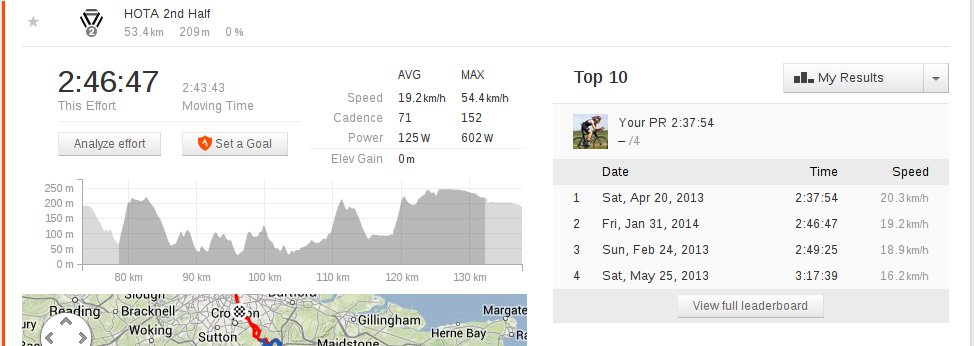
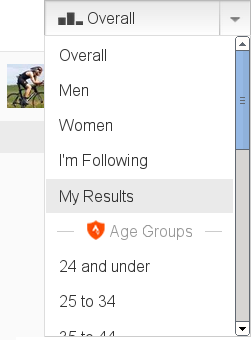
Strava's brand positioning is based around challenging and comparing yourself to others through virtual competitions and leaderboards. I am not against the competitive spirit in principle, but my personal experience is that most psychologically and physiologically rewarding training comes from comparing your own past performances to today or from setting long term goals. I accordingly use the service as a glorified training diary, with the public leaderboards serving only as curiosa or as an occasional check on hubris. (Zen-like introspection aside, using public data as a guide in a metropolis such as London is problematic as rankings are distorted by professional racers, KOM hunters, drafting, fraud and obviously traffic conditions.) To make this easier, I wrote a Chrome extension that changes the default leaderboard to "My Results" instead of "Overall" when viewing a segment effort: https://chris-lamb.co.uk/wp-content/2014/my_results.png The other leaderboards can still be viewed via the usual selector: https://chris-lamb.co.uk/wp-content/2014/my_results_dropdown.png I've found it curious but not altogether surprising how this mere change of default dramatically affects one's mindset. Source code is available. If you found this extension useful, you might like my extension to quickly switch between metric and imperial units.

Vasudev Kamath: Moving weblog from Jekyll to Pelican

Its been a while and I was not actively blogging. I wanted to start blogging again but I was for some reason not happy with Jekyll static site generator which was powering my previous site. So I took this chance to explore other static site generators and redesign my blog. I explored a bit of Pelican, Nikola and Frog. I didn't feel comfortable with Nikola. Frog is a static site generator written using *Racket* and since I'm learning Scheme using racket I was leaning towards using it but at the last moment I decided to settle with Pelican. The main reason for not using Frog was that I just wanted to get my site up rather than waiting for me to complete learning racket and use Frog. My feeling about Pelican is that its a nice tool and is simple and gives all basic things like generating RSS/ATOM feeds and nice theming support. In case of Jekyll I had to write custom page for creating RSS feed and had pain in creating my first theme (yeah I'm not a designer). But now things might have changed in Jekyll land but anyway I don't care anymore. New design uses pelican-bootstrap3 theme and there is no comment facility available. If you want to comment or suggesting things on my post consider writing mail to me :-). So what happened to older entries? Moving the old entries from Jekyll format to Pelican was real PITA so I just renamed my old site to blog-archive. So this is a from scratch site and will contain only new entries. So how do you like my new blog design? :-)

31 January 2014

Daniel Pocock: If you thought systemd proponents were bad....

Just imagine for a moment if something like the iPhone App Store approval process was applied to every application for a domain name. Delays and unexplained rejections killing many great ideas before they even get off the ground. In the worse cases, like that of Greg Hughes, the great firewall of the app store has been used to quash ideas that it appears Apple may have been planning to compete with or copy. If domain applicants had to go through such a process or if other core technologies fell into a rut like that then it would throw Charles Darwin's long established theory of evolution out the window and society would end up eating each other. Once companies had established their position and were happily making money they would do everything possible to stomp out any innovation that may undermine them. This is exactly the kind of non-evolution that has plagued the telecoms sector for many years now. You don't have to look past the price of a simple SMS to see the truth of this situation. Your 160 bytes can cost anywhere between $US0.10 - $US0.50 throughout the western world, even on a network that is otherwise charging maybe $10 per 1MiB (the equivalent of 6,000 text messages) when roaming. One of the compelling features of free software is that it empowers innovation and efficiency. Telecoms executives may argue that by charging you these extortionate fees, they are keeping spam out of your phone. Think again: technologies like XMPP and SIP are doing that even more effectively and without any price to pay. Software for managing buddy lists and algorithms for spam detection put those telecoms executives out of a job. If SIP, XMPP or both become dominant, evolution may succeed yet. Despite having these great technologies available for messaging and multimedia communications and despite having a range of free software success stories in products such as Firefox or whole distributions like Fedora, Debian and its derivatives like Ubuntu, non-free communications solutions like Skype and Viber continue to run rampant in the voice and video domain. As it turns out, this is a very dangerous area for the free software community to neglect. How many people know somebody who tried running Linux but went back to a proprietary solution so they could use a non-free softphone? In these cases, it is not the phone software itself that appeals to the user: it is the people that software lets them communicate with, their friends, family, professional community and beyond. For people who don't truly perceive the benefits of free software or those who don't have the confidence or experience to defend those benefits, the power of Metcalfe's law hits them like a tsunami and violently sweeps away all the rest of the free software they had started to use. While Skype is currently available for some distributions of Linux, it is not free software: amongst other things, there is no published source code and no independent review of the code has been possible. Leveraging the power of Metcalfe's law, the publisher of that software gains significant power over those who choose to install it. Any day now, they could even use it to offer users a one-click "free trial" upgrade to some "Windows Lite" or install other components that obstruct effective upgrades to newer versions of the free operating system. To make an analogy, the potential for dirty tricks in this area is far more scary than the things systemd proponents have been accused of. For those with an interest in solving these problems or at least giving free real-time communications software a try, On the init system issue itself Note: the reference to systemd is not itself an opinion for or against any particular init system in Debian nor is it a suggestion that any one side is badder than any other.

29 January 2014

Petter Reinholdtsen: A fist full of non-anonymous Bitcoins

Bitcoin is a incredible use of peer to peer communication and encryption, allowing direct and immediate money transfer without any central control. It is sometimes claimed to be ideal for illegal activity, which I believe is quite a long way from the truth. At least I would not conduct illegal money transfers using a system where the details of every transaction are kept forever. This point is investigated in USENIX ;login: from December 2013, in the article "A Fistful of Bitcoins - Characterizing Payments Among Men with No Names" by Sarah Meiklejohn, Marjori Pomarole,Grant Jordan, Kirill Levchenko, Damon McCoy, Geoffrey M. Voelker, and Stefan Savage. They analyse the transaction log in the Bitcoin system, using it to find addresses belong to individuals and organisations and follow the flow of money from both Bitcoin theft and trades on Silk Road to where the money end up. This is how they wrap up their article:
"To demonstrate the usefulness of this type of analysis, we turned our attention to criminal activity. In the Bitcoin economy, criminal activity can appear in a number of forms, such as dealing drugs on Silk Road or simply stealing someone else s bitcoins. We followed the flow of bitcoins out of Silk Road (in particular, from one notorious address) and from a number of highly publicized thefts to see whether we could track the bitcoins to known services. Although some of the thieves attempted to use sophisticated mixing techniques (or possibly mix services) to obscure the flow of bitcoins, for the most part tracking the bitcoins was quite straightforward, and we ultimately saw large quantities of bitcoins flow to a variety of exchanges directly from the point of theft (or the withdrawal from Silk Road). As acknowledged above, following stolen bitcoins to the point at which they are deposited into an exchange does not in itself identify the thief; however, it does enable further de-anonymization in the case in which certain agencies can determine (through, for example, subpoena power) the real-world owner of the account into which the stolen bitcoins were deposited. Because such exchanges seem to serve as chokepoints into and out of the Bitcoin economy (i.e., there are few alternative ways to cash out), we conclude that using Bitcoin for money laundering or other illicit purposes does not (at least at present) seem to be particularly attractive."
These researches are not the first to analyse the Bitcoin transaction log. The 2011 paper "An Analysis of Anonymity in the Bitcoin System" by Fergal Reid and Martin Harrigan is summarized like this:
"Anonymity in Bitcoin, a peer-to-peer electronic currency system, is a complicated issue. Within the system, users are identified by public-keys only. An attacker wishing to de-anonymize its users will attempt to construct the one-to-many mapping between users and public-keys and associate information external to the system with the users. Bitcoin tries to prevent this attack by storing the mapping of a user to his or her public-keys on that user's node only and by allowing each user to generate as many public-keys as required. In this chapter we consider the topological structure of two networks derived from Bitcoin's public transaction history. We show that the two networks have a non-trivial topological structure, provide complementary views of the Bitcoin system and have implications for anonymity. We combine these structures with external information and techniques such as context discovery and flow analysis to investigate an alleged theft of Bitcoins, which, at the time of the theft, had a market value of approximately half a million U.S. dollars."
I hope these references can help kill the urban myth that Bitcoin is anonymous. It isn't really a good fit for illegal activites. Use cash if you need to stay anonymous, at least until regular DNA sampling of notes and coins become the norm. :) As usual, if you use Bitcoin and want to show your support of my activities, please send Bitcoin donations to my address 15oWEoG9dUPovwmUL9KWAnYRtNJEkP1u1b.

Russ Allbery: rra-c-util 5.2

Another release of my general collection of utility libraries, Autoconf probes, general test cases, and similar things. The major change in this release is the addition of Autoconf probes and portability wrappers for libevent. Now included are Autoconf macros to probe for libevent (mandatory or optional) either via pkg-config or not, following the pattern of other probes in rra-c-util. Also included is a portability wrapper, probes, and some additional glue code that allows programs to be written against the libevent 2.x API and work (mostly) with the libevent 1.4 API, albeit with some missing functionality. This release fixes the systemd unit directory probe to not produce shell errors if pkg-config isn't available on the local system. It also fixes a syntax error when building portable/krb5.h with a C++ compiler. There are multiple improvements to the Kerberos and process TAP add-ons: memory is properly freed in all processes, making exhaustive memory allocation analysis easier; process output is flushed after stopping the process instead of before; the method used to stop processes is cleaner; a memory leak when running via fakeroot has been fixed; and full use is made of the new test_cleanup_register API in C TAP Harness. This release also adds a new message_handlers_reset function that restores all message handlers to their defaults and frees any memory allocated to set different handlers. This again is mostly useful when doing exhaustive memory allocation testing. You can get the latest release from the rra-c-util distribution page.

Russ Allbery: C TAP Harness 3.0

This is my test harness and C and shell library for writing test suites using the Test Anything Protocol (also used by Perl). The changes in this release aren't that major, but I changed one API in a non-backward-compatible way, so I bumped the major revision. That change is to test_cleanup_register, whose callback functions now take two arguments instead of one. The first, as before, indicates whether the test case succeeded or failed. The second is now true if the callback is running in the primary process (the one in which plan or plan_lazy was called), and false otherwise. Callback functions are now called for all processes, not just the primary one. This allows cleanup of per-process resources, like memory, in the child processes, which allows for easier valgrind analysis. Also in this release, the test harness was modified to reopen standard input to /dev/null when running a set of tests from a list, rather than inheriting standard input from the test driver. The test harness also now cleans up all extraneous copies of open file descriptors used during the setup of standard input, output, and error to avoid leaking harmless but noticeable file descriptors to tests. You can get the latest release from the C TAP Harness distribution page.

28 January 2014

Andrew Pollock: [life] Day 2, first day of "daddy daycare"

Today was the first weekday of me taking care of Zoe. We got things started more or less on the same routine that we used to do when she had day care, so we were dressed and ready to roll by about 8am. We baked a batch of mini cornbread muffins, and had them ready by the time my 9:30am chiropractic appointment rolled around, so we took a few with us for morning tea for my chiropractor and his receptionist. I've taken Zoe with me on a few occasions, and speak of her often to my chiropractor. He's a dad himself, and the first few times I brought her in, he juggled for her, so she thinks he's pretty cool. Last night, Zoe had expressed a desire to go to Southbank today. It was initially looking like it'd be too rainy, but by the time I was done with the chiropractor, it looked safe enough to venture out, so we went back home, and I prepared a picnic lunch for us, and we caught a bus over to Southbank. We had a bit of a splash around in the water and then ate lunch. Zoe had a great time alternating between feeding and chasing seagulls, crows, and an ibis. My girlfriend, who works in South Brisbane, walked over and joined us briefly and then we all walked back towards the bus and parted ways. Southbank mid-week is pretty nice. Not too busy. It was a slow walk home from the bus, but the reward of a My Little Pony biscuit was enough to get her racing ahead of me from the corner. After a biscuit and some quiet time, she fell asleep and I've had a couple of hours to read and write blog posts, as well as plan future activities. I'm hoping that we'll have enough time to go birthday present shopping for a 4th birthday party (for twins from Zoe's old day care) that we're going to on Saturday morning after swim class, before Sarah arrives to pick her up, but I'm dubious we'll get time. Zoe's still asleep as I write. There's always tomorrow. We might be best off just baking the second batch of cornbread muffins.

27 January 2014

Kees Cook: -fstack-protector-strong

There will be a new option in gcc 4.9 named -fstack-protector-strong , which offers an improved version of -fstack-protector without going all the way to -fstack-protector-all . The stack protector feature itself adds a known canary to the stack during function preamble, and checks it when the function returns. If it changed, there was a stack overflow, and the program aborts. This is fine, but figuring out when to include it is the reason behind the various options. Since traditionally stack overflows happen with string-based manipulations, the default (-fstack-protector), only includes the canary code when a function defines an 8 (--param=ssp-buffer-size=N, N=8 by default) or more byte local character array. This means just a few functions get the checking, but they re probably the most likely to need it, so it s an okay balance. Various distributions ended up lowering their default --param=ssp-buffer-size option down to 4, since there were still cases of functions that should have been protected but the conservative gcc upstream default of 8 wasn t covering them. However, even with the increased function coverage, there are rare cases when a stack overflow happens on other kinds of stack variables. To handle this more paranoid concern, -fstack-protector-all was defined to add the canary to all functions. This results in substantial use of stack space for saving the canary on deep stack users, and measurable (though surprisingly still relatively low) performance hit due to all the saving/checking. For a long time, Chrome OS used this, since we re paranoid. :) In the interest of gaining back some of the lost performance and not hitting our Chrome OS build images with such a giant stack-protector hammer, Han Shen from the Chrome OS compiler team created the new option -fstack-protector-strong, which enables the canary in many more conditions: This meant we were covering all the more paranoid conditions that might lead to a stack overflow. Chrome OS has been using this option instead of -fstack-protector-all for about 10 months now. As a quick demonstration of the options, you can see this example program under various conditions. It tries to show off an example of shoving serialized data into a non-character variable, like might happen in some network address manipulations or streaming data parsing. Since I m using memcpy here for clarity, the builds will need to turn off FORTIFY_SOURCE, which would also notice the overflow.
#include <stdio.h>
#include <stdlib.h>
#include <string.h>
struct no_chars  
    unsigned int len;
    unsigned int data;
 ;
int main(int argc, char * argv[])
 
    struct no_chars info =    ;
    if (argc < 3)  
        fprintf(stderr, "Usage: %s LENGTH DATA...\n", argv[0]);
        return 1;
     
    info.len = atoi(argv[1]);
    memcpy(&info.data, argv[2], info.len);
    return 0;
 
Built with everything disabled, this faults trying to return to an invalid VMA: Built with FORTIFY_SOURCE enabled, we see the expected catch of the overflow in memcpy: So, we ll leave FORTIFY_SOURCE disabled for our comparisons. With pre-4.9 gcc, we can see that -fstack-protector does not get triggered to protect this function: However, using -fstack-protector-all does trigger the protection, as expected: And finally, using the gcc snapshot of 4.9, here is -fstack-protector-strong doing its job: For Linux 3.14, I ve added support for -fstack-protector-strong via the new CONFIG_CC_STACKPROTECTOR_STRONG option. The old CONFIG_CC_STACKPROTECTOR will be available as CONFIG_CC_STACKPROTECTOR_REGULAR. When comparing the results on builds via size and objdump -d analysis, here s what I found with gcc 4.9: A normal x86_64 defconfig build, without stack protector had a kernel text size of 11430641 bytes with 36110 function bodies. Adding CONFIG_CC_STACKPROTECTOR_REGULAR increased the kernel text size to 11468490 (a +0.33% change), with 1015 of 36110 functions stack-protected (2.81%). Using CONFIG_CC_STACKPROTECTOR_STRONG increased the kernel text size to 11692790 (+2.24%), with 7401 of 36110 functions stack-protected (20.5%). And 20% is a far-cry from 100% if support for -fstack-protector-all was added back to the kernel. The next bit of work will be figuring out the best way to detect the version of gcc in use when doing Debian package builds, and using -fstack-protector-strong instead of -fstack-protector. For Ubuntu, it s much simpler because it ll just be the compiler default.

2014, Kees Cook. This work is licensed under a Creative Commons Attribution-ShareAlike 3.0 License.
Creative Commons License

Richard Hartmann: Conference proceedings

Seems I had exactly the same idea two years ago, down to choosing exactly the same name and directory structure... In case anyone finds it useful, there's Conference proceedings: a public git-annex repository which contains videos from various conferences. As of right now, it contains only FOSDEM up to 2008 and last year's Chaos Communication Congress, 30c3. I expect to add more and more conferences over time and patches are always welcome. Just try and make sure you don't include location data about your own repository in said commits. But there's already something in the works to fix that problem.

Jo Shields: Dear Debian Developers, lrn2gpg

For some strange reason, I ve been receiving a lot of GPG-signed mail from Debian Developers and Maintainers lately. In response to each of these mails, I need to send a GPG-encrypted reply. The rate at which I m able to send replies has been significantly hampered by the poor state in which many DD/DM s maintain their GPG keys. Here are a few common mistakes, so you can consider correcting them. Ensure you have a UID for the email address(es) you use When I send an encrypted mail, I need to be sure that the recipient is legit. This means any decent mail client should refuse to send an encrypted message to foo@bar.com unless that email address is known somehow to GPG. In many cases, someone with a valid key for foo@bar.com would send their signed mail from foobar@gmail.com without that being a valid UID. In some cases, foo@bar.com isn t even a valid email address anymore (i.e. the bar.com mail server says no such mailbox). You should have a UID for each address you use. Signatures are per-UID You may well have a valid UID for foo@debian.org, foo@bar.com, and foobar@gmail.com but the PGP trust model doesn t automatically trust every UID as much as its peers. Each individual UID needs to be trusted (i.e. signed/uploaded) by others. What if you added billg@microsoft.com as a UID should that automatically be trusted? Clearly not. Just because you have foo@debian.org doesn t mean it s trusted for encryption without some signatures. Make sure you actually have an encrypting subkey GPG sucks, and as a result, it reports Skipping unusable pubkey when the issue is a lack of valid encrypting subkeys. If you have revoked all encrypting subkeys, or allowed them to expire, then I cannot send you encrypted mail. Exact naming matters Bob Bobbertson <foo@bar.com> and B b B bb rts n <foo@bar.com> are different people. Check your mail client s From: setting, to ensure it matches your UID. If not, fix one of them. Check your webmail plugin isn t shit Some people use third party plugins to integrate GPG into their webmail client (e.g. Hotmail or GMail). Make sure this actually works. Don t use Enigmail Enigmail is a popular plugin to integrate GPG into Mozilla Thunderbird. It doesn t work, in most cases. Almost every single BADSIG in my inbox is due to Enigmail. Thunderbird will insert spurious line wraps and escape characters into your mail after signing, resulting in invalid signatures. It s mostly okay if you never quote mail, and restrict messages to about 70 characters. I know plenty of Debian Developers don t care about GPG other than for package signing but please, for the sanity of the rest of us, take an occasional moment to care a little. I should note that the worst offenders for keys which don t just work were Developers with 1024D keys the best behaved were Maintainers of all stripes.

26 January 2014

Neil Williams: Home server rack

The uses of this particular rack I ll cover in future entries this is about how I made the rack itself, with help from friends (Steve McIntyre & Andy Simpkins). A common theme is making allowances for using dev kit boards ready-to-rack ARM servers are not here yet. My aim was to have 4, possibly 6 ARM dev kit boards running services from home, so there was no need for a standard 42U rack, a 9U rack is enough. Hence:
Wall Mounted 9U 450mm deep 19 inch rack enclosure glass door To run various other services around the house (firewall, file server etc.), a microserver was also necessary:
HP 704941-421 ProLiant Micro Server (AMD Turion II Neo N54L 2.2GHz, 2GB RAM, 250GB HDD, 2 Core, 7th Generation) I chose to mount that on a bookcase beneath the wall mounted rack as it kept all the cables at the bottom of the rack itself. The microserver needed a second gigabit network card fitted to cope with being a firewall as well, if you do the same, ensure you find a suitable card with a low profile bracket. Some are described as being low profile but do not package the low profile bracket, only a low profile card and a full height bracket.
Intel EXPI9301CTBLK PRO1000 Network Card note the low profile bracket in the pack. The first of the dev kit requirements is the lack of boards which can be racked, so shelves are going to be needed, leading on to something to stop the boards wandering across the shelf when the cables are adjusted velcro pads in my case. Second requirement is that dev kit boards are notorious for not rebooting cleanly. Nothing to do with the image being run, the board just doesn t cut power or doesn t come back after cutting power. Sometimes this is down to early revisions of the board, sometimes the board pulls enough power through the USB serial converter to remain alive, whatever the cause, it won t reboot without user involvement. So a PDU becomes necessary remotely controllable. New units tend to be expensive and/or only suitable for larger racks, I managed to find an older 8 port APC unit, something like: (Don t be surprised if that becomes a dead link search for APC Smart Slot Master Switch Power Distribution Unit). Talking of power, I m looking to use SATA drives with these boards and the boards themselves come with a variety of wall wart plugs or USB cables, so a number of IEC sockets are needed not the usual plugs:
Power cable IEC C14 plug 13A socket 25 cm or, for devices which genuinely need 2A to boot (use the 1A for attached SATA or leave empty):

Black Universal 3.1A 15W 5V Dual USB Rapid Mains Charger Plug Check the power output rating of the USB plugs used to connect to the mains as well many are 1A or less. Keep the right plug for the right board.
Power is going to also be a problem if, like me, you want to run SATA drives off boards which support SATA. The lack of a standard case means that ATX power is awkward, so check out some cheap SATA enclosures to get a SATA connector with USB power. I am using these enclosures (prices seem to have risen since I obtained them):

Startech 2.5 inch eSATA USB External Hard Drive Enclosure for SATA HDD Along with these:
eSATA to SATA Serial External Shielded Cable 1m because the iMx53 boards have SATA connectors but the enclosure exports eSATA. Whilst this might seem awkward, the merit of having both eSATA and simple USB power on one enclosure is not to be under-estimated. (Avoid the stiffer black cables space will get tight inside the rack.) Naturally, a 2.5 inch SATA drive is going to be needed for each enclosure, I m using HDD but SSD is also an option. Also, consider simple 2 or 3 way fused adaptors so that the board and the SATA drive can be powered from a single PDU port, this makes rebooting much simpler if the board needs a power supply with integrated plug instead of over USB. Now to the networking (2 x 8 port was cheaper than 1 x 16):
Netgear GS108 8-port Gigabit Ethernet Unmanaged Switch Don t forget the cat5 cables too you ll want lots of short cables, 1m or shorter inside the rack and a few longer ones going to the microserver and wall socket. I used 8x1m. Naturally, on the floor below your rack you are going to put a UPS, so the PDU power then needs to be converted to draw from the UPS via IEC plugs instead of standard mains. I decided to use a 6 gang extension 1m cable with an IEC plug it was the only bit of wiring I had to do and even those are available ready-made if you want to do it that way. Depending on the board, you may need your own serial to USB converters, you ll certainly need some powered USB hubs. I m using a wall mounted 9U rack, so I also needed a masonry drill and 4 heavy duty masonry M8 bolts. The rack comes with a mounting plate which needs to be bolted to the wall but nothing else is included. This step is much easier with someone else to take the weight of the rack as it is guided into the brackets on the mounting plate the bracket may need a little persuasion to allow for the bolt heads to not get in the way during mounting. Once mounted, the holes in the back of the rack allow for plenty of room, it s just getting to that point. The rack has side panels which latch out easily, providing easy maintenance. The glass door can be easily reversed to open from the opposite side. However, the key in the glass door is largely useless. The expectation is that the units in the rack are attached at the front but the dev boards on shelves are not going to be protected by a key in the front door. The key therefore ends up being little more than a handle for the glass door. OK. If you ve got this far, it s a case of putting things together:
Economy Cage Nut Tool 19 inch racking for cagenut extraction Yes, you really do want one. Fine, do without the premium one, but the economy one will save you a lot of (physical) pain. At this stage, it becomes clear that the normal 19 inch server rack shelves don t leave a lot of room at the back of the rack for the cables and there are a lot of cables. Each board has power, USB serial connection and network. The SATA has power too. The PDU has a power lead and you ll need network switches too. The network switches need power and an uplink cable. I positioned the supports in the rack as far forward as possible and attached the shelves to give enough room for the PDU on the base of the rack, the network switches resting on top and the extension bar (with the heavier, stiffer cables) at the back. (I need to bring my shelves another 1 or 2 positions further forward as there is barely enough room for one cable between the shelf and the back of the rack and that makes moving boards around harder than it needs to be.) The PDU defaults to enabling all ports at startup, so connect to it over telnet and turn off the ports before connecting things and sorting out the network interface to what the rest of the lab needs. (I m using a 10. range and the PDU was originally set to use 192.168.1.) That s about it as far as the hardware setup is concerned. Just time to label up each board, note down which PDU port does which device, which serial to USB converter is on which device on the microserver and check the power my initial problem with one board was traced to the inability of the board to power SATA off the on-board USB port even when using the provided 2A power supply. That meant adding a standard mains adaptor to feed both the SATA power and the board power off the one PDU port there is little point powering off the board but not the SATA, or vice versa. I haven t totalled up the expenditure but the biggest expenses were the microserver and the wall mounted rack but don t underestimate how much it will cost to buy 6 IEC plugs, various USB serial converters and how much you may spend on peripheral items. There is quite a lot of room on the 2 shelves for more boards, what will limit the deployment in this rack is space for the cables, especially power. The shorter the power cables, the easier it will be to maintain the devices in the rack. It might be worth looking at a 12U rack, if only to give plenty of space for cables. Once I ve got the software working, I ll describe what this rack will be doing it s got something to do with Debian, ARM, Linux and tests but you ve probably already guessed that much

25 January 2014

Ben Hutchings: Looking back on my time at Solarflare, part 1

Friday was my last day at Solarflare Communications, which I joined in 2006 (originally as Level 5 Networks). When I started, Level 5 Networks (L5N) had a 2-port gigabit Ethernet controller called EF1 and a user-level network stack called EtherFabric which ran on Linux. It had nearly completed the Falcon project to develop a 10-gigabit controller (also supporing a 2-port gigabit mode) and was porting EtherFabric to Windows. Later that year, however, L5N merged with Solarflare Communications (SF), which was developing a 10GBASE-T PHY (for 10-gigabit Ethernet over twisted-pair cables). The investors and management saw the opportunity to create an integrated 10GBASE-T LAN-on-motherboard chip that would be attractive to OEMs and so had the potential for mass sales. EtherFabric was put on the back-burner, but regular net drivers for Linux, Windows and other operating systems became more important. In a change from my previous jobs, my initial role at L5N was to maintain and extend the in-house test automation software, Runbench, written in Python. I worked with Dickon Reed who had written most of Runbench up to then. One of my first major tasks was to extend it to cover DUTs running Windows. Aside from changing Runbench itself, I wrote a simple SSH server to be installed on DUTs, using the Twisted.Python framework. (Cygwin's port of OpenSSH wasn't suitable for running a lot of native Windows commands.) I rewrote the test-installation script for the Windows driver itself, converting it to Python (with a C extension to get around the WOW64 nonsense). As Windows does not allow loading a driver just once (like insmod in Linux), except by using the kernel debugger, I added a time check in the driver so the test-installation script can make it fail early when reloaded after a reboot, so that a crasher bug in the probe path would usually be recoverable. In 2007 I persuaded management in Cambridge to loan several older servers to DebConf. I took them there and back by car, and they were used to convert video for live streams and recordings. (This was repeated in 2009.) I was also asked to work on other small development tasks, including some cleanup on the Linux net driver (sfc). In mid-2007, when SF decided it was time to get sfc upstream (in-tree), I joined Steve Hodgson and Robert Stonehouse in working on that. Out-of-tree (separately distributed) drivers for Linux normally need a large number of preprocessor conditions for compatibility with Linux's kernel module API across a range of supported versions. They may also implement some features with a driver-specific interface that should be replaced with a standard interface (possibly including the work to define that standard). They may not comply with the kernel coding style or unwritten conventions for kernel code. All of these problems were present and had to be dealt with. As part of this work, I extended unifdef so that it could be used to remove all of the backward-compatibility and not-for-upstream code without introducing extra blank lines. I could then export the out-of-tree driver from CVS(!) into a kernel source tree automatically and turn it into a patch or patch series that would stand a chance of being acceptable upstream. Our first few attempts got little response, but eventually we newbies got the message that the driver was simply too big for a single submission and that putting patches on a web site because they're too big for the list was not a solution. In the next week, I removed about half of the code (on a git branch), resulting in a relatively lean driver that could be sent to the netdev list. And finally the 9th (I think) submission was accepted. Following this, I continued to work on sfc but was also brought into the Siena project. Siena (SFL9021) was the LAN-on-motherboard chip that had been planned following the merger. It combined a dual-port controller based on Falcon with a 10GBASE-T PHY and a management controller (MC) to support Lights-Out Management (LOM). (Since 10GBASE-T has not taken off, it is now mostly sold as the SFC9020 variant in which the PHY is disabled.) I worked on some of the test framework and test cases for validating the controller design in software simulation and FPGA. In the course of this I learned to read and (somewhat) understand the chip design written in Verilog, but only made a single trivial fix to it. In August 2009, the first Siena ASICs came back from the fab. There were a few ASIC-specific bugs but all of them were quickly worked around in firmware, so it would soon be ready for production. But there was much work still to be done on the driver and firmware. The firmware had until then been running in a smaller block of RAM with no peripherals to manage, while sfc had earlier been modified just enough to configure a sim or FPGA for running a userland test application. sfc now had many special cases scattered around it, and would tell the MC firmware to peek and poke registers that were no longer directly accessible from the host. The software and firmware developers had agreed that, in order to support LOM, the MC would be responsible for managing the ports and all peripherals and drivers would send higher-level requests to the MC. As a bonus, this removed the need for the driver to know the details of each new board, so that it would not be necessary to backport sfc into distribution kernels very often. Over the next few months, the firmware team did an excellent job of defining and implementing those operations, including writing the driver-side functions to invoke them. Meanwhile, Steve and I concentrated on refactoring sfc so most of the Falcon/Siena differences could be abstracted through a few structures with function pointers. The refactoring and new code for Siena were completed and submitted upstream in several large patch series in October and November. In fact, there were so many patches that Solarflare appeared in LWN's table of who wrote Linux 2.6.33 (as did I, thanks also to another patch series adding firmware metadata to many drivers). Sadly we had missed Linux 2.6.32 which was a longterm stable branch and used in many distributions, but I was able to get this version backported into all the major distributions over the next year. (To be continued.)

Russell Coker: Links January 2014

Fast Coexist has an interesting article about the art that Simon Beck creates by walking in snow [1]. If you are an artist you can create art in any way, even by walking in patterns in the snow. Russ Altman gave an interesting TED talk about using DNA testing before prescribing drugs [2]. I was surprised by the amount of variation in effects of codeine based on genetics, presumably many other drugs have a similar range. Helen Epstein wrote an interesting article about Dr. Sara Josephine Baker who revolutionised child care and saved the lives of a huge number of children [3]. Her tenacity is inspiring. Also it s interesting to note that the US Republican party was awful even before the Southern Strategy . The part about some doctors opposing child care because it s the will of God for children to die and keep them in employment is chilling. Jonathan Weiler wrote an insightful article about the problems with American journalism in defending the government [4]. He criticises the media for paying more attention to policing decorum than to content. Tobias Buckell wrote an interesting post about the so-called socialised health-care in the US [5]. He suggests that Ronald Reagan socialised health-care by preventing hospitals from dumping dying people on the street. I guess if doing nothing for people until they have a medical emergency counts as socialised health-care then the US has it. Kelvin Thomson MP made some insightful comments about climate change, the recent heat-wave in Australia, and renewable energy [6]. Iwan Baan gave an interesting TED talk about ways that people have built cheap homes in unexpected places [7], lots of good pictures. Racialicious has an interesting article by Arturo R. Garc a about research into the effects of concussion and the way the NFL in the US tried to prevent Dr. Bennet Omalu publicising the results of his research [8]. Stani (Jan Schmidt) wrote an interesting post about how they won a competition to design a commemerative Dutch 5 Euro coin [9]. The coin design is really good (a candidate for the geekiest coin ever), I want one! Seriously if anyone knows how to get one at a reasonable price (IE close to face value for circulated or not unreasonably expensive for uncirculated) then please let me know. When writing about Edward Snowden, Nathan says Imagine how great a country would be if if it were governed entirely by people who Dick Cheney would call Traitor [10]. That s so right, that might make the US a country I d be prepared to live in. Andrew Solomon gave an interesting TED talk Love No Matter What about raising different children [11]. Aditi Shankardass gave an interesting TED talk about using an ECG to analyse people diagnosed wit severe Autism and other developmental disorders [12]. Apparently some severe cases of Autism have a root cause that can be treated with anti-seizure medication. George Monbiot wrote an insightful article about the way that Bono and Bob Geldoff promote G8 government intervention in Africa and steal air-time that might be given to allow Africans to represent themselves in public debates [13]. Daniel Pocock wrote an informative article about racism in Australian politics and how it is bad for job-seekers and the economy (in addition to being horribly wrong) [14]. Aeon Magazine has an interesting article by Anne Buchanan about the difference between scientists and farmers [15]. She has some interesting points about the way that the lack of general knowledge impacts research, but misses the point that in most fields of study there is a huge problem of people not knowing about recent developments in their own field. I don t think it s a pipe dream to be well educated in humanities and science, but I guess that depends on the definition of well educated . Brian Cox gave an interesting TED talk titled Why We Need the Explorers about the benefits of scientific research [16]. Yupu Zhang, Abhishek Rajimwale, Andrea C. Arpaci-Dusseau, and Remzi H. Arpaci-Dusseau from the University of Wisconsin-Madison wrote an interesting paper about ZFS corruption in the face of disk and memory errors [17]. One thing to note is that turning off atime can reduce the probability of a memory error leading to corrupt data being written to disk, run zfs set atime=off tank to fix this. The comedian Solomon Georgio celebrated Martin Luther King day by tweeting I love you to racists [18]. It s an interesting approach and appears to have worked well.

23 January 2014

John Goerzen: Why and how to run ZFS on Linux

I m writing a bit about ZFS these days, and I thought I d write a bit about why I am using it, why it might or might not be interesting for you, and what you might do about it. ZFS Features and Background ZFS is not just a filesystem in the traditional sense, though you can use it that way. It is an integrated storage stack, which can completely replace the need for LVM, md-raid, and even hardware RAID controllers. This permits quite a bit of flexibility and optimization not present when building a stack involving those components. For instance, if a drive in a RAID fails, it needs only rebuild the parts that have actual data stored on them. Let s look at some of the features of ZFS: Although it is often considered a server filesystem, ZFS has been used in plenty of other situations for some time now, with ports to FreeBSD, Linux, and MacOS. I find it particularly useful: The added level of security in having cheap snapshots available is almost worth it by itself. ZFS drawbacks Compared to other Linux filesystems, there are a few drawbacks of ZFS: Converting to ZFS I have written up an extensive HOWTO on converting an existing system to use ZFS. It covers workarounds for all the boot-time bugs I have encountered as well as documenting all steps needed to make it happen. It works quite well. Additional Hints If setting up zvols to be used by VirtualBox or some such system, you might be interested in managing zvol ownership and permissions with udev.

Next.

Previous.