Search Results: "ron"

3 February 2015

Thomas Goirand: OpenStack packaging activity, November 2014 to January 2015

November 2014:
Sunday 2nd:
Travel from Moscow to Paris Monday 3rd to Sunday 8th:
Summit in Paris Monday 10th:
Uploaded python-rudolf to Sid (needed by Fuel)
Uploaded python-invoke and python-invocations (needed to run fabric s unit tests)
Uploaded python-requests-kerberos/0.5-2 fixing CVE-2014-8650: failure to handle mutual authentication. Asked the release team for unblock.
Uploaded openstack-pkg-tools version 19 fixing startup with systemd in Jessie (added RuntimeDirectory directive). Asked the release team for unblock.
Opened ticket to remove TripleO, Tuskar and Ironic packages from Jessie. I don t consider them ready for a Debian stable release, and there s no long term support from upstream.
Fixed Designate Juno dbsync process which prevented it from being installed.
Fixed Ironic Juno unowned files after purge (policy 6.8, 10.8): /var/lib/ironic/ cache, ironicdb (eg: purging these folders on purge) Thuesday 11:
Fixed nova-api CVE-2014-3708: Nova network DoS through API filtering in both the Juno and Icehouse release. Asked the release team to unblock the Icehouse version for Jessie. See: https://bugs.debian.org/769163
Uploaded Cinder with Duch debconf translation fix and pt.po
Uploaded python-django-pyscss with upstream patch for Django 1.7 support instead of the Debian one that I wrote 2 months ago. Asked the release team to unblock which they did. Wednesday 12:
Uploaded fix for horizon (see #769101) unowned files after purge (policy 6.8, 10.8). Now purging /usr/share/openstack-dashboard/openstack_dashboard on purge.
Uploaded Ironic with Duch translations of debconf
Uploaded Designate with Duch translations of Debconf screens
Uploaded openstack-trove with Duch translations of Debconf screens
Uploaded Tuskar with Duch translations of Debconf screens
Updated python-oslotest in Experimental to version 1.2.0 Thursday 13:
Uploaded new packages: python-oslo.middleware and python-oslo.concurrency.
Opened a new packaging branch for Nova Kilo, and updated (build-)depends.
Uploaded fix for Icehouse Cinder: delete volume failed due to unicode problems , and asked for unblock.
Uploaded new package: python-pygit2 and python-xmlbuilder, needed for fuel-agent-ci.
Uploaded sheepdog with Duch debconf translation.
Uploaded python-daemonize to Sid (in FTP master NEW queue).
Re-uploaded python-invoke after FTP master rejection (missing copyright information) Friday 14:
Uploaded liberasurecode & python-pyeclib to Sid, now in the FTP masters NEW queue waiting for approval. This will soon be needed by Swift. Monday 17:
Worked on the Cobbler packaging (all day long ) Tuesday 18:
Worked on backporting all of Fuel packages to Wheezy. Done with fuelclient already.
Uploaded ruby-cstruct and ruby-rethtool to Sid (needed by nailgun-agent) Wednesday 19:
Uploaded pyeclib again, with fixes for the build-depends. Package is still in the NEW queue anyway.
Built a Debian-based bootstrap hardware discovery image for Fuel, and it seems that it works already (to be checked )! \o/
To be added as packages in the ISO:
* nailgun-mcagents
* nailgun-net-check
* fuel-agent
* python-tasklib Thursday 20:
Uploaded python-tasklib to Sid (now in NEW queue )
Continued working on the discovery bootstrap ISO Friday 21:
Documented Sahara procedure in Debian in the official install-guide: https://review.openstack.org/136237
Fixed oslo.messaging so it doesn t use PROTOCOL_SSLv3 because its support has been removed from Debian (due to possible protocol downgrade attacks): https://review.openstack.org/136278 and uploaded fixed packages for Sid and Experimental.
Uploaded fixed Neutron packages for CVE-2014-7821 in both Sid and Experimental (eg: Icehouse and Juno) Monday 24:
Uploaded new package: python-os-client-config (in NEW queue)
Installed new Xen server to be used as my new Jenkins build machine
Moved the juno-wheezy VM to it
Finished to package python-pymysql and uploaded to Sid. It s now running all unit tests successfully! \o/ Tuesday 25:
Uploaded fix for openstack-debian-images to add the -o compat=1.0 option when building an image with Qemu > 1.0. Opened bug to the release team to have it unblocked.
Continued working on unit tests for fuel-nailgun. Wednesday 26:
Uploaded python-os-net-config to Sid (new package)
Worked briefly on python-cassandra-driver. It needs cassandra to be in, which is a LOT of work.
Found a (not useable) hack to run nailgun unit tests. It works, however, it doesn t seem like fuel-nailgun is designed to be able to use unix socket for the postgres connection in its unit tests.
Uploaded python-pykmip to Sid (new package)
Updated the Debian wheezy backport repository for libvirt to version 1.2.9 from official wheezy-backports. Removed policykit-1 and libusb from there too, as it broke stuff to use a backported version (X and usb were not useable on my Wheezy laptop when using it ). Thursday 27 & Friday 28:
Uploaded new Javascript packages or dependencies for Fuel: libjs-autonumeric, libjs-backbone-deep-model, libjs-backbone.stickit, libjs-cocktail, libjs-i18next, libjs-require-css, libjs-requirejs, libjs-requirejs-text Sunday 30:
Uploaded debian/copyright fixes for libjs-backbone-deep-model, libjs-backbone.stickit and libjs-cocktail after the packages were accepted by the FTP masters and they gave remarks about copyright. DECEMBER 2014 Monday 01:
Uploaded new Debian image to MOX, after I unerstood the issue was about the architecture field that I was wrongly filling. I ll be able to use that for Tempest checking on my dev account. Tuesday 02:
Uploaded python-q-text-as-data to Sid (new awesome package!)
Uploaded Horizon with some triggers mechanisms to start the compress when one of its JS depends is updated. That s very important for security!
Uploaded a fixed version of heat-cfntools to Sid (it was missing the /usr/lib/python* folder). Asked the release team for an unblock so it can reach Jessie.
Fixed unit tests in fuel-nailgun, thanks to a patch from Sebastian Kalinowski. Now all unit tests are passing but one (for which I opened a launchpad bug: tests are trying to write in /var/log/nailgun, which is impossible at package build time). Wednesday 03:
Uploaded fixed version of ruby-rethtool after FTP master s rejection and upstream correction of licensing files.
Uploaded fixed version of libjs-require-css after FTP master s rejection
Fixed (in Git only) python-sysv-ipc missing build-depends on dh-python as per bug opened by James Page (this is not so important, but I did it still).
Continued working on the tempest-ci scripts.
Added to the image-guide docs about openstack-debian-images: https://review.openstack.org/#/c/138743/ Thursday 04:
Uploaded new package: python-proliantutils. Send patch to upstream about an issue in indentation (mix-up with space and tabs) which made the package uninstallable with Python 3.4. Friday 05:
Worked on the package CI. Monday 07:
Worked on the package CI. All works now, up to all of the Tempest tests for Keystone. Now need to fix the neutron config. Thuesday 08:
Continued working on the CI. Wednesday 09:
Uploaded fix for FTBFS of python-tasklib (Closes: #772606)
Uploaded fix for libjerasure-deb missing dependency on libgf-complete-dev, package already unblocked and will migrate to Jessie.
Uploaded fix for Designate Juno fail to upgrade from Icehouse: this was due to the database_connection directive renamed to connection =.
Uploaded fix for Designate purge in Sid (Icehouse release of Designate).
Commited to git updates of the German debconf translation in both Icehouse and Juno.
Updated nova to use libvirtd as init script dependency instead of libvirt-bin (this was renamed in the libvirt-daemon-system package).
Do not touch the db connection directive if user didn t ask for db handling by the package. Thursday 10 to Saturday 13:
Finally understood the issues with systemd service files not being activated by default. Fixed openstack-pkg-tools, and uploaded version 20 to Sid, after the release team accepted the changes. Sunday 14:
Uploaded Juno 2014.2.1 to Experimental: ceilometer, cinder, glance, python-glance-store, heat, horizon, keystone Monday 15:
Finished uploading Juno 2014.2.1 to Experimental: Nova, Neutron, Sahara Tuesday 16:
Added crontab to flush tokens in Icehouse Keystone
Some more CI work Wednesday 17:
Uploaded keystone with systemd fix and crontab to flush the token table in Sid (eg: Icehouse).
Uploaded nova Icehouse with a bunch of fixes in Sid. Thursday 18:
Updated some issues in Nova Icehouse (Sid/Jessie) Friday 19:
Started building a new Jenkins instance for building Kilo packages Monday 22:
Finished building the new Jenkins instance for building Kilo packages, and rebuilt every packages there, using Jessie as a base. Tuesday 23:
Updated version for the following packages: oslo.utils, oslo.middleware, stevedore, oslo.concurency, pecan, oslo.concurrency, python-oslo.vmware, python-glance-store
Built so far: Ceilometer, Keystone, python-glanceclient, cinder, glance Wednesday 24:
Continued packaging Kilo beta 1. Updated: nova, designate, neutron
Uploaded python-tempest-lib to Debian Unstable (new package) Wednesday 31:
Continued packaging Kilo beta 1. Updated: heat JANUARY 2015 Thursday 01:
Continued packaging Kilo beta 1. Updated: ironic, openstack-trove, openstack-doc-tools, ceilometer Friday 02:
Finished packaging Kilo beta 1. Updated: Sahara, Murano, Murano-dashboard, Murano-agent Sunday 04:
Started testing Kilo beta 1. Fixed a few issues on default configuration for Ceilometer and Glance. Monday 05:
Fixed openstack-pkg-tools which failed to create PID files at boot time, Uploaded to Sid, asked the release team for unblock.
Uploaded ceilometer & cinder to Sid, rebuilt against openstack-pkg-tools 21.
Did more testing of Kilo beta 1, fixed a few more minor issues. Tuesday 06:
Uploaded glance, neutron, nova, designate, keystone, heat, trove to Sid, so that all sysv-rc init scripts are fixed with the new openstack-pkg-tools 21. Designate, heat, keystone and trove contains other minor fixes reported to the Debian BTS. Wednesday 07:
Asked the Debian release team (open bugs with debdiff as attachment) for unblocks of glance, neutron, nova, designate, keystone, heat, trove so they migrate to Jessie.
Fixed a few minor issues tracked in the Debian BTS on various packages. Thesday 08:
James Page from Canonical informed me that they are now using openstack-pkg-tools for maintaining their daemons in Nova, Cinder and Keystone in Ubuntu. That s an awesome news : more QA for both platforms.
James Page found out that dh_installinit *must* be called *after* the call of dh_systemd_enable, otherwise, daemons aren t started automatically at the first install of packages, as the unmask of systemd happens after the invoke-rc.d. Friday 09:
Did some QA checks on the latest upload. Fixed Heat which broke because using the wrong template name (glance instead of heat). Monday 12:
Started re-running the automated openstack-deploy scrip in Icehouse, Juno and Kilo. Found out the issue in Keystone wasn t fixed in Juno (but was fixed in other releases), and fixed it.
Removed the use of ssl.PROTOCOL_SSLv3 from heat (removed form Debian). Uploaded the fixed package to Sid.
All of openstack-deploy (debian/kilo branch) now works and succesfully installs OpenStack again. If dh_installinit is called before, we have:
# Automatically added by dh_installinit
if [ -x "/etc/init.d/keystone" ]; then
update-rc.d keystone defaults >/dev/null
fi
if [ -x "/etc/init.d/keystone" ]   [ -e "/etc/init/keystone.conf" ]; then
invoke-rc.d keystone start   true
fi
# End automatically added section
# Automatically added by dh_systemd_enable
# This will only remove masks created by d-s-h on package removal.
deb-systemd-helper unmask keystone.service >/dev/null   true
# was-enabled defaults to true, so new installations run enable.
if deb-systemd-helper --quiet was-enabled keystone.service; then
# Enables the unit on first installation, creates new
# symlinks on upgrades if the unit file has changed.
deb-systemd-helper enable keystone.service >/dev/null   true
else
# Update the statefile to add new symlinks (if any), which need to be
# cleaned up on purge. Also remove old symlinks.
deb-systemd-helper update-state keystone.service >/dev/null   true
fi
# End automatically added section
If it s called after dh_systemd_enable, we have:
# Automatically added by dh_systemd_enable
# This will only remove masks created by d-s-h on package removal.
deb-systemd-helper unmask keystone.service >/dev/null   true
# was-enabled defaults to true, so new installations run enable.
if deb-systemd-helper --quiet was-enabled keystone.service; then
# Enables the unit on first installation, creates new
# symlinks on upgrades if the unit file has changed.
deb-systemd-helper enable keystone.service >/dev/null   true
else
# Update the statefile to add new symlinks (if any), which need to be
# cleaned up on purge. Also remove old symlinks.
deb-systemd-helper update-state keystone.service >/dev/null   true
fi
# End automatically added section
# Automatically added by dh_installinit
if [ -x "/etc/init.d/keystone" ]; then
update-rc.d keystone defaults >/dev/null
fi
if [ -x "/etc/init.d/keystone" ]   [ -e "/etc/init/keystone.conf" ]; then
invoke-rc.d keystone start   true
fi
# End automatically added section
As a consequence, I have to re-upload version 22 of openstack-pkg-tools and also re-upload all OpenStack core packages to Debian Sid. Fixed a number of issues like:
* dbc_upgrade = true check which shouldn t have been there in postinst.
* <project>/configure_db default value is now always false
* db_sync and pkgos_dbc_postinst are now only done if <project>/configure_db is set to true.
Rebuilt all packages in Juno and Kilo with the above changes. Tuesday 13:
Opened unblock bugs for the release team to unblock all fixed packages.
Made more tests in Juno and Kilo to make sure the fixed bugs in Icehouse are fixed there too.
Fixed numerous issues in Trove (missing trove-conductor.conf, wrong trove-api init file, etc.). More work will be needed for it for both Icehouse and newer releases. Wednesday 14:
Did a doc meeting about debconf. Some doc contributors still want to kill the debconf / debian manual, and I have to not agree.
Made a new patch to better document the keystone install procedure:
Did some bug triaging in the doc about Debian.
Uploaded new versions of core packages to Experimental (eg: Juno) built against openstack-pkg-tools >= 22~, and some fixes forward ported from Icehouse: Keystone, Ceilometer, Cinder, Glance, Heat, Ironic, Murano, Neutron, Nova, Saraha and Murano-agent. All where rebuilt in Juno (Wheezy + Trusty) and Kilo (Jessie only) on my Jenkins. Thuesday 15:
Succesfully booted a live-build Debian live image containing mcollective and nailgun-agent as a Debian replacement for the hardware discovery / boostrap image of Fuel. Now, I need to find a way to use just a kernel + initramfs Friday 16 to Tuesday 20:
Worked on the packaging CI. Wednesday 21:
Fixed https://bugs.debian.org/775636 (Horizon failed to build due to a Moscow timezone change and wrong test). Uploaded to Sid, asked for unblock.
Fixed https://bugs.debian.org/775926: CVE-2015-1195: Glance still allows users to download and delete any file in glance-api server (applied upstream patch). Uploaded to Sid, asked for unblock. Uploaded Juno version to Experimental.
Uploaded openstack-trove with the remaining fixes, asked release team for unblock.
Uploaded python-glanceclient 0.15.0 (Juno) to Experimental because it fixes an issue with HTTPS. Added to it a patch from James Page not yet merged, which fixes unit test with Python 2.7.9 (7 failures otherwise).
Uploaded python-xstatic-d3 as it can t be installed anymore in Sid after a new version of d3 was uploaded. Thursday 22:
Uploaded python-xstatic-smart-table and libjs-angularjs-smart-table to Sid (new packages, now in NEW queue). Friday 23:
Ask for the removal of the below list of packages from Jessie:
python-xstatic
python-xstatic-angular
python-xstatic-angular-cookies
python-xstatic-angular-mock
python-xstatic-bootstrap-datepicker
python-xstatic-bootstrap-scss
python-xstatic-d3
python-xstatic-font-awesome
python-xstatic-hogan
python-xstatic-jasmine
python-xstatic-jquery
python-xstatic-jquery-migrate
python-xstatic-jquery-ui
python-xstatic-jquery.bootstrap.wizard
python-xstatic-jquery.quicksearch
python-xstatic-jquery.tablesorter
python-xstatic-jsencrypt
python-xstatic-qunit
python-xstatic-rickshaw
python-xstatic-spin
libjs-jsencrypt
libjs-spin.js
libjs-twitter-bootstrap-datepicker
libjs-twitter-bootstrap-wizard They are used only in OpenStack Horizon starting on 2014.2 (aka Juno), and Jessie is shipped with Icehouse, so it s IMO best to not carry the burden of maintaining these packages for the life of Jessie. Monday 26:
Enhanced and review requested changes for https://review.openstack.org/147296 (ie: Keystone install with more details about what the package does).
Finished testing network on the CI install. Now need to automate all. Tuesday 27:
Closed all bugs on the rabbitmq-server package (2 correction, one bug triage).
Uploaded a fix for the missing conntrack dependency in neutron-l3-agent.
Restarted working on CI setup of Juno after success with manual install in a Xen domU.
Uploaded fix to make sheepdog build reproducible (patch from the Debian BTS). Thursday 28:
Fixed and uploaded to Sid openstack-debian-images 2 bugs reported by Steve McIntire. Official Debian images for OpenStack are now available at:
http://cdimage.debian.org/cdimage/openstack/ \o/
Note that this is the weekly build of testing. We wont get Debian Stable images before Jessie is out.
Documented the new image thing here: http://docs.openstack.org/image-guide/content/ch_obtaining_images.html#debian-images as a new patch: https://review.openstack.org/#/c/151015/
Fixed my patch for keystone debconf doc at: https://review.openstack.org/#/c/147296/ Wednesday 29:
Continued working on packaging CI Thursday 30:
Fixed CVE on Neutron (Juno): L3 agent denial of service with radvd 2.0+
Fixed CVE on Glance (Icehouse + Juno): Glance user storage quota bypass. Asked release team for unblock.
Fixed the image-guide patch after review (ie: https://review.openstack.org/151015)


31 January 2015

John Goerzen: Home Automation, part 2: Z-Wave and ISY programming

In my part 1 post yesterday, I wrote about the start of the home automation project. I mentioned that I was using Insteon switches, and they mostly were working well (I forgot to mention an annoyance: you can dim, but not totally shut off, their LED status light.) Anyhow, the Insteon battery-operated sensors seem to not be as good as their Z-Wave competition. Setting up Z-Wave Z-Wave devices get joined to the Z-Wave network in much the same way Bluetooth devices get paired with each other. The first time you use a Z-Wave device, you join it to the controller. The controller assigns it an ID on your network, and both devices discover the best route to communicate with each other. I discovered that the Z-Wave module on the ISY-994i has particularly poor reception. Combined with the generally short range of battery-operated Z-wave devices, this meant that my sensors didn t work reliably. As with Insteon, AC-powered Z-wave devices tend to be repeaters, but I didn t have any AC-powered Z-wave devices. I went looking for Z-wave repeaters, and found some. But then I discovered that a Z-wave relay-based appliance switch was actually $5 cheaper, acted as a repeater, and could be used as a switch down the road if needed. A couple of those solved my communications issues. You join them to the network as usual, but then either re-join the battery-powered sensors (so they see the new route) or do a network heal (every device on the network re-learns about its neighbors and routes to the other devices) so they see the new route. Z-Wave Motion / Occupancy Sensors If you have been in new buildings, chances are you have seen light switches with built-in occupancy sensors. My doctor s office has these. They are typically the same size as a regular light switch, but with a passive infrared (PIR) motion sensor used to automatically turn the lights off after a timeout (or even on, when someone walks into the room.) These work fine for small rooms, but if you ve ever been in a bathroom with a PIR lightswitch that goes off while you re still in the room, you are aware of their faults for larger rooms! Most of the time, when you read about occupancy sensors , it s really a PIR sensor, and the term is used interchangeably with motion detector. Motion detectors in home automation systems are commonly used for a number of purposes: detecting occuption of rooms for automatic control of lighting or HVAC systems, triggering alerts, or even locking or unlocking doors. My friend told me he had poor luck with the Insteon PIR sensors, so I tried two different Z-Wave models: the $48 Aeon/Aeotec multi-sensor and the $30 Ecolink PIRZWAVE2-ECO. The Aeon device is clearly the more capable; it can be used indoors or out, and has a lot of options that can be configured by Z-Wave configuration parameters. It also has a ball/socket mount, so it can be easily aimed in different directions. It can draw power from 4 AAA batteries, or a mini USB cable (cable, but not power supply, included). The Aeon multi-sensor also has a temperature, humidity, and illumination (lux) sensor but, as you ll see, they have some drawbacks. The Ecolink device is more basic; it has a few settings that can be altered via jumpers, but none that can be altered via Z-Wave configuration commands. That makes it a bit of a hassle, since you have to open it up to change, and when you do, it triggers a tamper alarm that is both undocumented and never seems to go away. It is powered by a single CR123A 3V Lithium battery, which are about $2 each on Amazon. Both units have a default PIR timeout of 4 minutes. That means that after sensing motion, they will transmit the on signal (meaning motion detected) and then transmit no further signals for at least 4 minutes. This is because operating the radio consumes far more battery power than simply monitoring the PIR sensor, and it cuts down on repeated on/off transmissions. In this configuration, both units should have battery life of 6 months to a year, I figure, with an edge for the Ecolink, perhaps. Both can also be configured to transmit more frequently; the Ecolink has a jumper that can change its timeout to 10 seconds, whereas the Aeon can be configured over Z-Wave for any timeout between 10 seconds and 65535 seconds (values above 4 minutes are rounded to the nearest minute, for some reason.) Both also have adjustable sensitivity; on the Aeon this is via an adjustment knob, and on the Ecolink it s via jumpers. And both can report their battery level to enable software alerts when it s getting low. The Aeon ships with its temperature, humidity, battery, and lux sensors disabled. This appears to be the cause of much confusion online, as they send one transmission and then no more. Sadly, one has to resort to the hard-to-find but very helpful MultiSensor engineering spec document to figure out the way to enable those sensors and set their interval. (It must be said, however, that I doubt most consumers will understand how to set bitfields, and this is either not covered or covered incorrectly in their other manuals.) This can be a real power drain, so I just set it to report battery level every 6 hours (so I can alert myself if it gets low) and leave it at that. The Ecolink manual claims a detection radius of 39 feet and a total angle of 90deg (45deg left or right from center) and a 3-year battery life (I m skeptical). It also is rated for indoor use only. Aeotec claims a detection radius of 16 feet and a total angle of 120 deg. Be skeptical of all these figures. Once set up with good reception, both devices have been working fine. Programming the controller The ISY-994i-Zw Pro controller I mentioned in Part 1 has its own sort of programming language. It s a lot better than the sort of GUI clicky mess that is found in most of these things, but it still has a sort of annoying Java-based editor where you select keywords from a menu and such. Although you can backup and restore the device, and import and export the programs, the file formats are XML and not really suitable for hand-editing. Sigh. The language is limited, but gets the job done. Here is a simple program that turns off the fan in a bathroom 30 minutes after the light was turned off:
If
        Status  '1st Floor / Bathroom + Laundry / Main Bath Fan' is On
    And Status  '1st Floor / Bathroom + Laundry / Main Bath Light' is Off
 
Then
        Wait  30 minutes 
        Set '1st Floor / Bathroom + Laundry / Main Bath Fan' Off
 
Else
   - No Actions - (To add one, press 'Action')
The if/then/else clauses should probably be more properly called when/do/finally. The if clauses are evaluated whenever a relevant event occurs. If the If evaluates to true, if executes the Then section. The program in Then is uninterruptible except for wait and repeat statements. So in this case, the program begins, and if the light stays off and the fan stays on, 30 minutes later it turns off the fan. But if the light comes back on, the program aborts (since there is nothing in else ). Similarly, if the fan goes off, the program aborts. A more complicated example: motion-activated lamp There is a table lamp in our living room controlled by Insteon. By adding a motion sensor in that room, it can be automatically turned on by someone walking through the room. Now, to be useful, I don t want it to turn on during the day. I also don t want it to turn on or adjust itself if other lights are on in the room, or if I turned it on myself; that could cause it to go on and off while I m watching TV, for instance. It s just to be helpful at night. Because the ISY-994i is pretty limited, having almost no control flow operations, this as with many tasks requires several programs . First, here s my main :
If
        Status  '1st Floor / Living + Dining Room / LR Table Lamp' is Off
    And $LR_Lamp_Lockout is 0
    And Status  '1st Floor / Living + Dining Room / ZW 005 Binary Sensor' is On
    And From    Sunset 
        To      Sunrise (next day)
    And $LR_Lamp_Motion_Working is not 0
    And Status  '1st Floor / Living + Dining Room / LR Floor Lamp' is Off
    And Status  '1st Floor / Living + Dining Room / Dining Light' is Off
    And Status  '1st Floor / Living + Dining Room / LR Light' is Off
 
Then
        Set '1st Floor / Living + Dining Room / LR Table Lamp' 22%
        Set '1st Floor / Living + Dining Room / LR S Remote (Table Lamp)' 22%
 
Else
   - No Actions - (To add one, press 'Action')
So, let s look at the conditions. This program triggers if the lamp is off, the sensor is on, the time is between sunset and sunrise, and three other lights are off. (I will explain the lockout and motion_working variables later). If this is the case, it sets the lamp to 22% (and also informs the wall switch for it that the lamp is at 22%). I pick this precise value because it is unlikely I would manually set it via the wall switch, and therefore lamp is 22% bright doubles as a lamp was turned on by this program flag. So this is the turning the lamp on bit. Let s look at the program that turns it back off later:
If
        Status  '1st Floor / Living + Dining Room / LR Table Lamp' is 22%
    And (
             Status  '1st Floor / Living + Dining Room / ZW 005 Binary Sensor' is Off
          Or $LR_Lamp_Motion_Working is 0
          Or Status  '1st Floor / Living + Dining Room / LR Light' is not Off
          Or Status  '1st Floor / Living + Dining Room / LR Floor Lamp' is not Off
          Or Status  '1st Floor / Living + Dining Room / Dining Light' is not Off
        )
 
Then
        Wait  15 seconds
        Set '1st Floor / Living + Dining Room / LR S Remote (Table Lamp)' Off
        Set '1st Floor / Living + Dining Room / LR Table Lamp' Off
 
Else
   - No Actions - (To add one, press 'Action')
 
This is using a sensor with a 4-minute timeout, so the lamp will always be on for at least 4 minutes and 15 seconds. This program runs if the lamp is still at the program-set level (so if, for instance, I turned the lamp full on, the program does nothing to override my setting.) Then, it looks for a condition to trigger turning the lamp off, which could be any of the sensor indicating no more motion, another program detecting it s lost communication with the sensor, or somebody turning on one of the bigger lights in the room. Then it simply sets the light (and the wall switch controlling it) to off. There are a couple more bits to this puzzle. What if the system turned the lamp on, but I really want it off? If I walked up to the wall switch and pushed off , the lamp would go off. And then, a couple seconds later, come back on, since the state of the system met the conditions for the lamp-on program. So we need a lockout that prevents this from happening. Here s my trigger lockout program:
If
        Control '1st Floor / Living + Dining Room / LR Table Lamp' is switched Off
     Or Control '1st Floor / Living + Dining Room / LR Table Lamp' is switched Fast Off
     Or Control '1st Floor / Living + Dining Room / LR S Remote (Table Lamp)' is switched Fast Off
     Or Control '1st Floor / Living + Dining Room / LR S Remote (Table Lamp)' is switched Off
 
Then
        $LR_Lamp_Lockout += 1
        Run Program 'LR Lamp Clear Lockout' (If)
 
Else
   - No Actions - (To add one, press 'Action') 
So if someone pushes the off button at the lamp switch box at the outlet it s plugged into (unlikely), or at the wall switch, it increments the lockout variable and runs another program. This other program is unique in that it is flagged disabled , meaning it is never run automatically by the system, only when called by another program. Here s the clear lockout program:
If
        $LR_Lamp_Lockout > 0
 
Then
        Wait  5 minutes 
        $LR_Lamp_Lockout  = 0
 
Else
   - No Actions - (To add one, press 'Action')
Thus by pushing the off button on the switch, the motion-triggered program won t turn the lamp back on for at least 5 minutes. Before I had reliable Z-Wave communication to the device, I had some times where it would simply drop off the Z-Wave network until a reboot. This was particularly annoying if it occured after having detected motion, since the state of the sensor in the ISY controller is simply whatever state it last received. Therefore, I wrote this program to check if it believes the motion sensor is working:
If
        Status  '1st Floor / Living + Dining Room / ZW 005 Binary Sensor' is On
 
Then
        $LR_Lamp_Motion_Working  = 1
        Wait  1 hour 
        $LR_Lamp_Motion_Working  = 0
 
Else
        $LR_Lamp_Motion_Working  = 1
We don t really care if the motion sensor is broken when the status is off; all that happens then is no lamp turns on. So this program activates when the status is set to on. It flips the working flag to true, then waits for an hour. If the sensor shows no motion within that hour, the program skips to the else (keeping the flag true). But if it is still on after an hour, it decides it must not be working and sets the working flag to false. You can see that flag used in the other programs logic. But because of the Else, which is run whenever the conditions that caused the Then clause to run become false, as soon as the system receives no motion , it will flag the sensor as working again. The final piece to this puzzle is a program flagged to run at boot time of the controller:
If
   - No Conditions - (To add one, press 'Schedule' or 'Condition')
 
Then
        $LR_Lamp_Motion_Working  = 1
 
Else
   - No Actions - (To add one, press 'Action')
This simply initializes the motion working variable to a known state. Keypads The Insteon KeypadLinc is a nice device. It can control a single load directly, but all 8 buttons are fully responsive in the Insteon system. They each also have individually-addressible LED backlights. They are commonly used to do things like ALL OFF , TV (to set lights for watching TV), AWAY (to set the system for everyone being out of the house for awhile), etc. They are the size of a regular Decora switch, and I have installed one already, but haven t programmed much of it yet. REST API The ISY has an extensive REST API, which I ve used to integrate it a bit with my Debian systems. More on that another time. Mobile app Mobile apps are a common thing people look for in these systems. You can t use the Insteon app with the ISY, but they recommend Mobilinc Pro. It does the job. Mobilinc tries to sell a $10/mo connection service, which is totally unnecessary if you can figure out SSL, and has on-screen buttons to bypass, but judging by the Google Play reviews, a lot of people thought they had to pay for that and uninstalled it afterwards. Future directions Many people put in electronic door locks. I don t plan to do that. I do plan to have the house systems be aware of the general state of things (is the house empty? is everyone asleep?) and do appropriate things with lighting and HVAC. I don t really expect the savings in power for lighting control to pay for the system anytime soon. However, if it can achieve some savings in heating and cooling, it may well be able to pay for itself in a few years. So my big next step is thermostats that can integrate with all this. I have had a water mess in my basement before, and water leak sensors are a very common item people deploy in these setups. I certainly plan to add a few of them. Door-open sensors are also useful; they trigger more instantly and reliably than motion detectors and can be used in some nice ways (is it after dark and the door is opening when the house is vacant? If so, turn on the light nearby in case their hands are full.) Issues Some issues I ran into so far are already discussed above. One other major one involves SSL on the ISY-994i Pro. The method for adding SSL keys is cumbersome, but the processor on the device which appears to run some sort of Java is just not up to working with SSL. Apparently they only recently got it fast enough to work with 2048-bit keys. This is rather undocumented, though, so I obtained a cert for a 4096-bit key, my usual. Attempting to connect to the box with SSL appeared to hang not just that but confuse a lot of other things on it as well. Turned out it wasn t hung; it just too a minute and 45 seconds to complete the SSL handshake. Moral of the story: use 2048-bit keys, or stunnel4 or some such to re-wrap the SSL communications with a stronger key. The KeypadLinc backlights can be completely shut off, and both their on and off levels can be customized. I have it set to shut off the backlight during the day and turn it on at night. The wall switches, however, can t have their brightness status LED bar entirely shut off. They can be made dim, but don t ever go away. That s rather annoying. Also annoying is that Insteon doesn t make switches in the traditional toggle switch style in colors other than white. As our house had mostly black switches, I was forced into the Decora style. Overall thoughts This has been a great learning experience for me in a number of ways. I have only begun to tap what the system can do, and the real benefits will probably come once I get the heating and cooling into the mix. It s quite a nice way for a geek to go, and the improvements in lighting have also been popular with everyone else in the house.

John Goerzen: First Steps with Home Automation and LED Lighting

I ve been thinking about home automation automating lights, switches, thermostats, etc. for years. Literally decades, in fact. When I was a child, my parents had a RadioShack X10 control module and one or two target devices. I think I had fun giving people a light show turning on or off one switch and one outlet remotely. But I was stuck there are a daunting number of standards for home automation these days. Zigbee, UPB, Z-Wave, Insteon, and all sorts of Wifi-enabled things that aren t really compatible with each other (hellooooo, Nest) or have their own ecosystem that isn t all that open (helloooo, Apple). Frankly I don t think that Wifi is a great home automation protocol; its power drain completely prohibits it being used in a lot of ways. Earlier this month, my awesome employer had our annual meeting and as part of that our technical teams had some time for anyone to talk about anything geeky. I used my time to talk about flying quadcopters, but two of my colleagues talked about home automation. I had enough to have a place to start, and was hooked. People use these systems to do all sorts of things: intelligently turn off lights when rooms aren t occupied, provide electronic door locks (unlockable via keypad, remote, or software), remote control lighting and heating/cooling via smartphone apps, detect water leakage, control switches with awkward wiring environments, buttons to instantly set multiple switches to certain levels for TV watching, turning off lights left on, etc. I even heard examples of monitoring a swamp cooler to make sure it is being used correctly. The possibilities are endless, and my geeky side was intrigued. Insteon and Z-Wave Based on what I heard from my colleagues, I decided to adopt a hybrid network consisting of Insteon and Z-Wave. Both are reliable protocols (with ACKs and retransmit), so they work far better than X10 did. Both have all sorts of controls and sensors available (browse around on smarthome.com for some ideas). Insteon is a particularly interesting system an integrated dual-mesh network. It has both powerline and RF signaling, and most hardwared Insteon devices act as repeaters for both the wired and RF network simultaneously. Insteon packets contain a maximum hop count that is decremented after each relay, and the packets repeat in such as way that they collide and strengthen one another. There is no need to maintain routing tables or anything like that; it simply scales nicely. This system addresses all sorts of potential complexities. It addresses the split-phase problem of powerline-only systems, but using an RF bridge. It addresses long distances and outbuildings by using the powerline signaling. I found it to work quite well. The downside to Insteon is that all the equipment comes from one vendor: Insteon. If you don t like their thermostat or motion sensor, you don t have any choice. Insteon devices can be used entirely without a central controller. Light switches can talk to each other directly, and you can even set them up so that one switch controls dozens of others, if you have enough patience to go around your house pressing tiny set buttons. Enter Z-Wave. Z-Wave is RF-only, and while it is also a mesh network, it is source-routed, meaning that if you move devices around, you have to heal your network as all your nodes have to re-learn the path to each other. It also doesn t have the easy distance traversal of Insteon, of course. On the other hand, hundreds of vendors make Z-Wave products, and they mostly interoperate well. Z-Wave is said to scale practically to maybe two or three dozen devices, which would have been an issue for me, buut with Insteon doing the heavy lifting and Z-Wave filling in the gaps, it s worked out well. Controlling it all While both Insteon (and, to a certain extent, Z-Wave) devices can control each other, to really spread your wings, you need more centralized control. This lets you have programs that do things like if there s motion in the room on a weekday and it s dark outside, then turn on a light, and turn it back off 5 minutes later. Insteon has several options. One, you can buy their power line modem (PLM). This can be hooked up to a PC to run either Insteon s proprietary software, or something open-source like MisterHouse, written in Perl. Or you can hook it up to a controller I ll mention in a minute. Those looking for a fairly simpe controller might get the Insteon 2242-222 Hub, which has the obligatory smartphone app and basic schedules. For more sophisticated control, my friend recommended the ISY-994i controller. Not only does it have a lot more capable programming language (though still frustrating), it supports both Insteon and Z-Wave in an integrated box, and has a comprehensive REST API for integrating with other things. I went this route. First step: LED lighting I began my project by replacing my light bulbs with LEDs. I found that I could get Cree 4-Flow 60W equivs for $10 at Home Depot. They are dimmable, a key advantage over CFL, and also maintain their brightness throughout their life far better. As I wanted to install dimmer switches, I got a combination of Cree 60W bulbs, Cree TW bulbs (which have a better color spectrum coverage for more true colors), and Cree 100W equiv bulbs for places I needed more coverage. I even put in a few LED flood lights to replace my can lights. Overall I was happy with the LEDs. They are a significant improvement over the CFLs I had been using, and use even less power to boot. I have had issues with three Cree bulbs, though: one arrived broken, and two others have had issues such as being quite dim. They have a good warranty, but it seems their QA could be better. Also, they can have a tendency to flickr when dimmed, though this plagues virtually all LED bulbs. I had done quite a bit of research. CNET has some helpful brightness guides, and Insteon has a color temperature chart. CNET also had a nifty in-depth test of LED bulbs. Second step: switches Once the LED bulbs were in place, I was then able to start installing smart switches. I picked up Insteon s basic switch, the SwitchLinc 2477D at Menard s. This is a dimmable switch and requires a neutral wire in the box, but acts as a dual-band repeater for the system as well. The way Insteon switches work, they can be standalone, or controllers, responders, or both in a scene . A scene is where multiple devices act together. You can create virtual 3-way switches in a scene, or more complicated things where different lights are turned on at different levels. Anyhow, these switches worked out quite well. I have a few boxes where there is no neutral wire, so I had to use the Insteon SwitchLinc 2474D in them. That switch is RF-only and is supposed to have a minimum load of 20W, though they seemed to work OK albeit with limited range and the occasional glitch with my LEDs. There is also the relay-based SwitchLinc 2477S for use with non-dimmable lights, fans, etc. You can also get plug-in modules for controlling lamps and such. I found the Insteon devices mostly lived up to their billing. Occasionally I could provoke a glitch by changing from dimming to brightening in rapid succession on a remote switch controlling a load on a distant one. Twice I had to power cycle an Insteon switch that got confused (rather annoying when they re hardwared). Other than that, though, it s been solid. From what I gather, this stuff isn t ever quite as reliable as a 1950s mechanical switch, but at least in this price range, this is about as good as it gets these days. Well, this post got quite long, so I will have to follow up with part 2 in a little while. I intend to write about sensors and the Z-Wave network (which didn t work quite as easily as Insteon), as well as programming the ISY and my lessons learned along the way.

30 January 2015

Laura Arjona: Going selfhosting: Installing Debian Wheezy in my home server

It was in my mind to open a new series of articles with topic selfhosting , because I really believe in free software based network services and since long time I want to plug a machine 24 7 at home to host my blog, microblog, MediaGoblin, XMPP server, mail, and, in conclusion, all the services that now I trust to very kind third parties that run them with free software, but I know I could run myself (and offer them to my family and friends). Last September I bought the domain larjona.net (curious, they say buy but it s a rent, for 1,2,3 years never yours. Pending another post about my adventures with the domain name, dynamic DNS, and SSL certs!) and I bought an HP Microserver G7 N54L, with 2 GB RAM. It had a 250GB SATA harddisk and I bought 2 more SATA harddisks, 1 TB each, to setup a RAID 1 (mirror). Total cost (with keyboard and mouse), 300 . A friend gave me a TFT monitor that was too old for him (1024 768) but it serves me well, (it s a server, no graphical interface, and I will connect remotely most of the times). Installing Debian stable (wheezy) I decided to install Debian stable. Jessie was not frozen yet, and since it was my first non-LAMP server install, I wanted to make sure that errors and problems would be my errors, not issues of the non-released-yet distro. I thought to install YunoHost or some other distro prepared for selfhosting, but I ve never tried them, and I have not much free time, so I decided to stick on Debian, my beloved distro, because it s the one that I know best and I m part of its awesome community. And maybe I could contribute back some bug reports or documentation. I wanted to try a crypto setup (just for fun, just for learn, for its benefits, and to be one more freecrypto-tester in the world) so after reading a bit: https://wiki.debian.org/DebianInstaller/SataRaid
https://wiki.archlinux.org/index.php/disk_encryption
http://madduck.net/docs/cryptdisk/
http://linuxgazette.net/140/kapil.html
http://smcv.pseudorandom.co.uk/2008/09/cryptroot/
http://www.linuxquestions.org/questions/linux-security-4/lvm-before-and-after-encryption-871379/ and some other pages, and try some different things, this is the setup that I managed to configure: Everything went well. Yay! Some doubts and one problem Everything went quite well except some doubts: After talking about this issues with friends (and in debian-women IRC channel), I decided to install the non-free driver, just in case, with the same reasoning as with the RAID: let the card do the job, so the CPU can care about other things. Again, I notice that learning a bit about benchmarking (and having some time to do some tests) would be nice And now, the problem: I left this problem apart and go on installing the software. I would think later what to do. Installing MediaGoblin The most urgent selfhosting service, for me, was GNU MediaGoblin, because I wanted to show my server to my family in Christmas, and upload the pictures of the babies and kids of the family. And it s a project where I contribute translations and I am a big fan, so I would be very proud of hosting my own instance. I followed the documentation to setup 2 instances of GNU MediaGoblin 0.7 (the stable release in the moment), with their corresponding PostgreSQL databases. Why two instances? Well, I want an instance to host and show my videos, images, and replicate videos that I like, and a private one for sharing photos and videos with my family. MediaGoblin has no privacy settings yet, so I installed separate instances, and the private one I put it in a different port, with a self-signed SSL cert, and enabled http-authorization in Nginx, so only authorized Linux users of my machine can accesss the website. Installing MediaGoblin was easier than what I thought. I only had some small doubts about the documentation, and they were solved in the IRC channel. You can access, for example, my user profile in my public instance, and see some different files that I already uploaded. I m very happy!! Face to face with the bug, again I had to solve the problem of the password not accepted in reboots. I began to think that it could be a bug in cryptsetup. Should I upgrade the package to the version in wheezy-backports? Jessie was almost frozen, maybe it was time to upgrade the whole system, to see if the problem was solved (and to see how my MediaGoblin was working or not in Jessie. It should work, it s almost packaged! But who knows). And if it didn t work, maybe it was time to file a bug So I upgraded my system to Debian Jessie. And after upgrade, the system didn t boot. But that s the story of another blog post (that I still need to finish to write don t worry, it has happy end, as you could see accessing my Mediagoblin site!). Comments? You can comment in this pump.io thread.
Filed under: My experiences and opinion Tagged: Debian, encryption, English, libre software, MediaGoblin, Moving into free software, N54L, selfhosting, sysadmin

28 January 2015

Andrea Veri: The GNOME Infrastructure Apprentice Program

Many times it happened seeing someone joining the #sysadmin IRC channel requesting participation to the team after having spent around 5 minutes trying to explain what the skills and the knowledge were and why this person felt it was the right figure for the position. And it was always very disappointing for me having to reject all these requests as we just didn t have the infrastructure in place to let new people join the rest of the team with limited privileges. With the introduction of FreeIPA, more fine-grained ACLs (and hiera-eyaml-gpg for securing tokens, secrets, passwords out of Puppet itself) we are so glad to announce the launch of the GNOME Infrastructure Apprentice Program (from now till the end of the post just Program ). If you are familiar with the Fedora Infrastructure and how it works you might know what this is about already. If you don t please read further ahead. The Program will allow apprentices to join the Sysadmin Team with a limited set of privileges which mainly consist in being able to access the Puppet repository and all the stored configuration files that run the machines powering the GNOME Infrastructure every day. Once approved to the Program apprentices will be able to submit patches for review to the team and finally see their work merged on the production environment if the proposed changes matched the expectations and addressed comments. While the Program is open to everyone to join, we have some prerequisites in place. The interested person should be:
  1. Part of an existing FOSS community
  2. Familiar with how a FOSS Project works behind the scenes
  3. Familiar with popular tools like Puppet, Git
  4. Familiar with RHEL as the OS of choice
  5. Familiar with popular Sysadmin tools, softwares and procedures
  6. Eager to learn new things, make constructive discussions with a team, provide feedback and new ideas
If you feel like having all the needed prerequisites and would be willing to join follow these steps:
  1. Subscribe to the gnome-infrastructure and infrastructure-announce mailing lists
  2. Join the #sysadmin IRC channel on irc.gnome.org
  3. Send a presentation e-mail to the gnome-infrastructure mailing list stating who you are, what your past experiences and plans are as an Apprentice
  4. Once the presentation has been sent an existing Sysadmin Team member will evaluate your application and follow-up with you introducing you to the Program
More information about the Program is available here.

27 January 2015

Laura Arjona: Upgrading my computers to Debian Jessie: Husband s laptop (Acer Aspire 5250)

This is an old laptop, with AMD E-300 processor, 6 GB RAM, Radeon HD 6310 VGA and Atheros AR9485 wireless network adapter. It was running Windows 7 (preinstalled). The hard disk failed, and I put the hard disk of another laptop (a broken Acer Aspire One D255) on it. Surprisingly, the Windows 7 on it booted (after some self-configuration that took quite long), but it was a Windows 7 Home 32bits, so it was only recognizing 4 GB RAM. That was the perfect excuse to convince my husband to install Debian in the laptop and begin his transition to a free OS. Yay! I installed Debian Jessie from scratch last summer. Everything went well (the installer went fine, 8 months before than its RC1 release, congrats Debian-boot team!). I needed the non-free radeon driver for the graphical display :/ Jessie is running GNOME3 desktop, and I ve been seeing all these months the transition to 3.14 version, and later, the integration of the Lines theme (by Juliette Belin), which I like very much. I have problems to watch high quality videos, in every player that I tried (VLC, Totem, mplayer) the audio and video are not synced, and video sometimes freezes. I m almost sure that the problem is what mplayer says: Your system is too SLOW to play this! . I tried to install the ATI non-free driver for better performance, but after successfully install it and reboot, GNOME was not starting (I got a black screen, no gdm greeting me). I could log in tty2, though. I don t know if I did something wrong, how to solve the problem, and I don t wanted to waste time, so I uninstalled it and returned to the non-free firmware that goes to the Linux kernel. For now, when I need to watch a video that gives those problems, I upload the file to my GNU MediaGoblin site, or use WinFF to reduce size/quality. Overall impression Fine! Both my husband and me are very happy. The installation went really well. I m not a GNOME expert user but I find it easy, intuitive, and he found it easy too. My husband uses the computer to surf the web, watch some videos and online series (we had to install non-free flash plugin from Adobe #grr), read mail from the browser, write something in LibreOffice and print it (hey! we just plug the printer/scanner and it works, no need to install drivers!), scan some image and send it by email I set Debian as default in GRUB, and the switch from Windows has been very natural for him (he was already using Firefox and LibreOffice in Windows. He still says I m a Windows user although he is just using Debian for months!). He bought an IPhone 4S (#grr!) and I tried to connect it as shown in the corresponding Debian wiki page, but it didn t work (I got segmentation fault when connecting the phone). However, it is recognized by Shotwell and we can copy all the photos and videos to the computer, which is what we wanted to do. So no problem on that side, either. In conclussion, one more computer at home running Debian ( future stable ), and we don t run Windows at home anymore :)
Filed under: My experiences and opinion Tagged: Debian, English, Moving into free software

Matthias Klumpp: AppStream 0.8 released!

Yesterday I released version 0.8 of AppStream, the cross-distribution standard for software metadata, that is currently used by GNOME-Software, Muon and Apper in to display rich metadata about applications and other software components. What s new? The new release contains some tweaks on AppStreams documentation, and extends the specification with a few more tags and refinements. For example we now recommend sizes for screenshots. The recommended sizes are the ones GNOME-Software already uses today, and it is a good idea to ship those to make software-centers look great, as others SCs are planning to use them as well. Normal sizes as well as sizes for HiDPI displays are defined. This change affects only the distribution-generated data, the upstream metadata is unaffected by this (the distro-specific metadata generator will resize the screenshots anyway). Another addition to the spec is the introduction of an optional <source_pkgname/> tag, which holds the source package name the packages defined in <pkgname/> tags are built from. This is mainly for internal use by the distributor, e.g. it can decide to use this information to link to internal resources (like bugtrackers, package-watch etc.). It may also be used by software-center applications as additional information to group software components. Furthermore, we introduced a <bundle/> tag for future use with 3rd-party application installation solutions. The tag notifies a software-installer about the presence of a 3rd-party application bundle, and provides the necessary information on how to install it. In order to do that, the software-center needs to support the respective installation solution. Currently, the Limba project and Xdg-App bundles are supported. For software managers, it is a good idea to implement support for 3rd-party app installers, as soon as the solutions are ready. Currently, the projects are worked on heavily. The new tag is currently already used by Limba, which is the reason why it depends on the latest AppStream release. How do I get it? All AppStream libraries, libappstream, libappstream-qt and libappstream-glib, are supporting the 0.8 specification in their latest version so in case you are using one of these, you don t need to do anything. For Debian, the DEP-11 spec is being updated at time, and the changes will land in the DEP-11 tools soon. Improve your metadata! This call goes especilly to many KDE projects! Getting good data is partly a task for the distributor, since packaging issues can result in incorrect or broken data, screenshots need to be properly resized etc. However, flawed upstream data can also prevent software from being shown, since software with broken data or missing data will not be incorporated in the distro XML AppStream data file. Richard Hughes of Fedora has created a nice overview of software failing to be included. You can see the failed-list here the data can be filtered by desktop environment etc. For KDE projects, a Comment= field is often missing in their .desktop files (or a <summary/> tag needs to be added to their AppStream upstream XML file). Keep in mind that you are not only helping Fedora by fixing these issues, but also all other distributions cosuming the metadata you ship upstream. For Debian, we will have a similar overview soon, since it is also a very helpful tool to find packaging issues. If you want to get more information on how to improve your upstream metadata, and how new metadata should look like, take a look at the quickstart guide in the AppStream documentation.

26 January 2015

Tanguy Ortolo: Scale manufacturers

Dear manufacturers of kitchen scales, could you please stop considering your clients as idiots, and start developing useful features?Liquid measurement: this is one feature that is available on almost every electronic scale available. Except it is completely useless to people that use the metric system, as all it does is replace the usual display in grammes by centilitres and divide the number on display by ten. Thank you, but no person that has been to school in a country that uses the metric system needs electronic assistance to determine the volume corresponding to a given weight of water, and for people that have not, a simple note written on the scale, stating that for water or milk, divide the weight in grammes by ten to get the volume in centilitres should be enough. Now, there is still one thing that an electronic scale could be useful for, which is determining the volume of liquids other than water (density 1 g/ml) or milk (density approx. equal to 1 g/ml), most importantly: oil (density approx. equal to .92 g/ml for edible oils like sunflower, peanut, olive and canola).

Francois Marier: Using unattended-upgrades on Rackspace's Debian and Ubuntu servers

I install the unattended-upgrades package on almost all of my Debian and Ubuntu servers in order to ensure that security updates are automatically applied. It works quite well except that I still need to login manually to upgrade my Rackspace servers whenever a new rackspace-monitoring-agent is released because it comes from a separate repository that's not covered by unattended-upgrades. It turns out that unattended-upgrades can be configured to automatically upgrade packages outside of the standard security repositories but it's not very well documented and the few relevant answers you can find online are still using the old whitelist syntax.

Initial setup The first thing to do is to install the package if it's not already done:
apt-get install unattended-upgrades
and to answer yes to the automatic stable update question. If you don't see the question (because your debconf threshold is too low -- change it with dpkg-reconfigure debconf), you can always trigger the question manually:
dpkg-reconfigure -plow unattended-upgrades
Once you've got that installed, the configuration file you need to look at is /etc/apt/apt.conf.d/50unattended-upgrades.

Whitelist matching criteria Looking at the unattended-upgrades source code, I found the list of things that can be used to match on in the whitelist:
  • origin (shortcut: o)
  • label (shortcut: l)
  • archive (shortcut: a)
  • suite (which is the same as archive)
  • component (shortcut: c)
  • site (no shortcut)
You can find the value for each of these fields in the appropriate _Release file under /var/lib/apt/lists/. Note that the value of site is the hostname of the package repository, also present in the first part these *_Release filenames (stable.packages.cloudmonitoring.rackspace.com in the example below). In my case, I was looking at the following inside /var/lib/apt/lists/stable.packages.cloudmonitoring.rackspace.com_debian-wheezy-x86%5f64_dists_cloudmonitoring_Release:
Origin: Rackspace
Codename: cloudmonitoring
Date: Fri, 23 Jan 2015 18:58:49 UTC
Architectures: i386 amd64
Components: main
...
which means that, in addition to site, the only things I could match on were origin and component since there are no Suite or Label fields in the Release file. This is the line I ended up adding to my /etc/apt/apt.conf.d/50unattended-upgrades:
 Unattended-Upgrade::Origins-Pattern  
         // Archive or Suite based matching:
         // Note that this will silently match a different release after
         // migration to the specified archive (e.g. testing becomes the
         // new stable).
 //      "o=Debian,a=stable";
 //      "o=Debian,a=stable-updates";
 //      "o=Debian,a=proposed-updates";
         "origin=Debian,archive=stable,label=Debian-Security";
         "origin=Debian,archive=oldstable,label=Debian-Security";
+        "origin=Rackspace,component=main";
  ;

Testing To ensure that the config is right and that unattended-upgrades will pick up rackspace-monitoring-agent the next time it runs, I used:
unattended-upgrade --dry-run --debug
which should output something like this:
Initial blacklisted packages: 
Starting unattended upgrades script
Allowed origins are: ['origin=Debian,archive=stable,label=Debian-Security', 'origin=Debian,archive=oldstable,label=Debian-Security', 'origin=Rackspace,component=main']
Checking: rackspace-monitoring-agent (["<Origin component:'main' archive:'' origin:'Rackspace' label:'' site:'stable.packages.cloudmonitoring.rackspace.com' isTrusted:True>"])
pkgs that look like they should be upgraded: rackspace-monitoring-agent
...
Option --dry-run given, *not* performing real actions
Packages that are upgraded: rackspace-monitoring-agent

Making sure that automatic updates are happening In order to make sure that all of this is working and that updates are actually happening, I always install apticron on all of the servers I maintain. It runs once a day and emails me a list of packages that need to be updated and it keeps doing that until the system is fully up-to-date. The only thing missing from this is getting a reminder whenever a package update (usually the kernel) requires a reboot to take effect. That's where the update-notifier-common package comes in. Because that package will add a hook that will create the /var/run/reboot-required file whenever a kernel update has been installed, all you need to do is create a cronjob like this in /etc/cron.daily/reboot-required:
#!/bin/sh
cat /var/run/reboot-required 2> /dev/null   true
assuming of course that you are already receiving emails sent to the root user (if not, add the appropriate alias in /etc/aliases and run newaliases).

25 January 2015

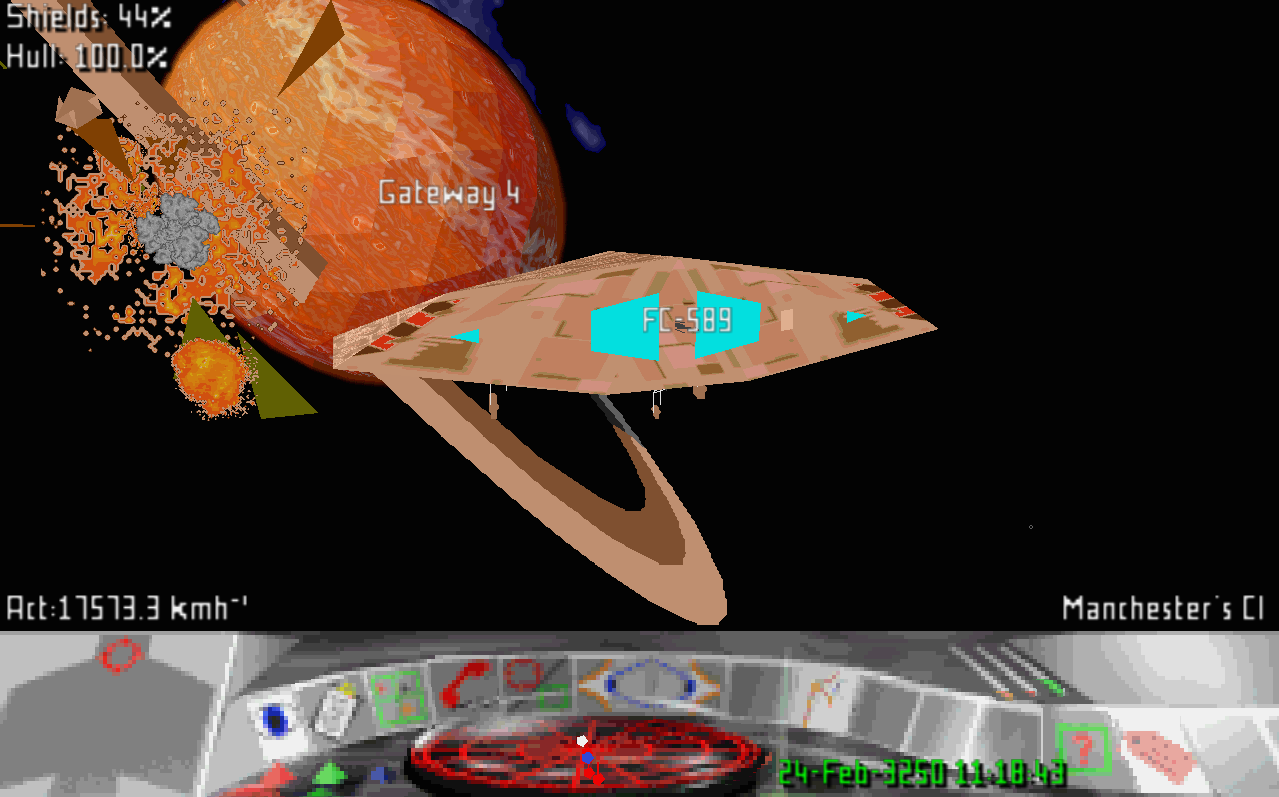
Jonathan Dowland: Frontier: First Encounters

Cobra mk. 3 Cobra mk. 3
Four years ago, whilst looking for something unrelated, I stumbled across Tom Morton's port of "Frontier: Elite II" for the Atari to i386/OpenGL. This took me right back to playing Frontier on my Amiga in the mid-nineties. I spent a bit of time replaying Frontier and its sequel, First Encounters, for which there exists an interesting family of community-written game engines based on a reverse-engineering of the original DOS release. I made some scrappy notes about engines, patches etc. at the time, which are on my frontier page. With the recent release of Elite: Dangerous, I thought I'd pick up where I left in 2010 and see if I could get the Thargoid ship. I'm nowhere near yet, but I've spent some time trying to maximize income during the game's initial Soholian Fever period. My record in a JJFFE-derived engine (and winning the Wiccan Ware race during the same period) is currently 727,800. Can you do better?

Joey Hess: making propellor safer with GADTs and type families

Since July, I have been aware of an ugly problem with propellor. Certain propellor configurations could have a bug. I've tried to solve the problem at least a half-dozen times without success; it's eaten several weekends. Today I finally managed to fix propellor so it's impossible to write code that has the bug, bending the Haskell type checker to my will with the power of GADTs and type-level functions. the bug Code with the bug looked innocuous enough. Something like this:
foo :: Property
foo = property "foo" $
    unlessM (liftIO $ doesFileExist "/etc/foo") $ do
        bar <- liftIO $ readFile "/etc/foo.template"
        ensureProperty $ setupFoo bar
The problem comes about because some properties in propellor have Info associated with them. This is used by propellor to introspect over the properties of a host, and do things like set up DNS, or decrypt private data used by the property. At the same time, it's useful to let a Property internally decide to run some other Property. In the example above, that's the ensureProperty line, and the setupFoo Property is run only sometimes, and is passed data that is read from the filesystem. This makes it very hard, indeed probably impossible for Propellor to look inside the monad, realize that setupFoo is being used, and add its Info to the host. Probably, setupFoo doesn't have Info associated with it -- most properties do not. But, it's hard to tell, when writing such a Property if it's safe to use ensureProperty. And worse, setupFoo could later be changed to have Info. Now, in most languages, once this problem was noticed, the solution would probably be to make ensureProperty notice when it's called on a Property that has Info, and print a warning message. That's Good Enough in a sense. But it also really stinks as a solution. It means that building propellor isn't good enough to know you have a working system; you have to let it run on each host, and watch out for warnings. Ugh, no! the solution This screams for GADTs. (Well, it did once I learned how what GADTs are and what they can do.) With GADTs, Property NoInfo and Property HasInfo can be separate data types. Most functions will work on either type (Property i) but ensureProperty can be limited to only accept a Property NoInfo.
data Property i where
    IProperty :: Desc -> ... -> Info -> Property HasInfo
    SProperty :: Desc -> ... -> Property NoInfo
data HasInfo
data NoInfo
ensureProperty :: Property NoInfo -> Propellor Result
Then the type checker can detect the bug, and refuse to compile it. Yay! Except ... Property combinators There are a lot of Property combinators in propellor. These combine two or more properties in various ways. The most basic one is requires, which only runs the first Property after the second one has successfully been met. So, what's it's type when used with GADT Property?
requires :: Property i1 -> Property i2 -> Property ???
It seemed I needed some kind of type class, to vary the return type.
class Combine x y r where
    requires :: x -> y -> r
Now I was able to write 4 instances of Combines, for each combination of 2 Properties with HasInfo or NoInfo. It type checked. But, type inference was busted. A simple expression like
foo  requires  bar
blew up:
   No instance for (Requires (Property HasInfo) (Property HasInfo) r0)
      arising from a use of  requires'
    The type variable  r0' is ambiguous
    Possible fix: add a type signature that fixes these type variable(s)
    Note: there is a potential instance available:
      instance Requires
                 (Property HasInfo) (Property HasInfo) (Property HasInfo)
        -- Defined at Propellor/Types.hs:167:10
To avoid that, it needed ":: Property HasInfo" appended -- I didn't want the user to need to write that. I got stuck here for an long time, well over a month. type level programming Finally today I realized that I could fix this with a little type-level programming.
class Combine x y where
    requires :: x -> y -> CombinedType x y
Here CombinedType is a type-level function, that calculates the type that should be used for a combination of types x and y. This turns out to be really easy to do, once you get your head around type level functions.
type family CInfo x y
type instance CInfo HasInfo HasInfo = HasInfo
type instance CInfo HasInfo NoInfo = HasInfo
type instance CInfo NoInfo HasInfo = HasInfo
type instance CInfo NoInfo NoInfo = NoInfo
type family CombinedType x y
type instance CombinedType (Property x) (Property y) = Property (CInfo x y)
And, with that change, type inference worked again! \o/ (Bonus: I added some more intances of CombinedType for combining things like RevertableProperties, so propellor's property combinators got more powerful too.) Then I just had to make a massive pass over all of Propellor, fixing the types of each Property to be Property NoInfo or Property HasInfo. I frequently picked the wrong one, but the type checker was able to detect and tell me when I did. A few of the type signatures got slightly complicated, to provide the type checker with sufficient proof to do its thing...
before :: (IsProp x, Combines y x, IsProp (CombinedType y x)) => x -> y -> CombinedType y x
before x y = (y  requires  x)  describe  (propertyDesc x)
onChange
    :: (Combines (Property x) (Property y))
    => Property x
    => Property y
    => CombinedType (Property x) (Property y)
onChange = -- 6 lines of code omitted
fallback :: (Combines (Property p1) (Property p2)) => Property p1 -> Property p2 -> Property (CInfo p1 p2)
fallback = -- 4 lines of code omitted
.. This mostly happened in property combinators, which is an acceptable tradeoff, when you consider that the type checker is now being used to prove that propellor can't have this bug. Mostly, things went just fine. The only other annoying thing was that some things use a [Property], and since a haskell list can only contain a single type, while Property Info and Property NoInfo are two different types, that needed to be dealt with. Happily, I was able to extend propellor's existing (&) and (!) operators to work in this situation, so a list can be constructed of properties of several different types:
propertyList "foos" $ props
    & foo
    & foobar
    ! oldfoo    
conclusion The resulting 4000 lines of changes will be in the next release of propellor. Just as soon as I test that it always generates the same Info as before, and perhaps works when I run it. (eep) These uses of GADTs and type families are not new; this is merely the first time I used them. It's another Haskell leveling up for me. Anytime you can identify a class of bugs that can impact a complicated code base, and rework the code base to completely avoid that class of bugs, is a time to celebrate!

24 January 2015

Dirk Eddelbuettel: Rcpp 0.11.4

A new release 0.11.4 of Rcpp is now on the CRAN network for GNU R, and an updated Debian package will be uploaded in due course. Rcpp has become the most popular way of enhancing GNU R with C++ code. As of today, 323 packages on CRAN depend on Rcpp for making analyses go faster and further; BioConductor adds another 41 packages, and casual searches on GitHub suggests dozens mores. This release once again adds a large number of small bug fixes, polishes and enhancements. And like the last time, these changes were made by a group of seven different contributors (counting code commits) plus three more providing concrete suggestions. This shows that the Rcpp development and maintenance rests a large number of (broad) shoulders. See below for a detailed list of changes extracted from the NEWS file.
Changes in Rcpp version 0.11.4 (2015-01-20)
  • Changes in Rcpp API:
    • The ListOf<T> class gains the .attr and .names methods common to other Rcpp vectors.
    • The [dpq]nbinom_mu() scalar functions are now available via the R:: namespace when R 3.1.2 or newer is used.
    • Add an additional test for AIX before attempting to include execinfo.h.
    • Rcpp::stop now supports improved printf-like syntax using the small tinyformat header-only library (following a similar implementation in Rcpp11)
    • Pairlist objects are now protected via an additional Shield<> as suggested by Martin Morgan on the rcpp-devel list.
    • Sorting is now prohibited at compile time for objects of type List, RawVector and ExpressionVector.
    • Vectors now have a Vector::const_iterator that is 'const correct' thanks to fix by Romain following a bug report in rcpp-devel by Martyn Plummer.
    • The mean() sugar function now uses a more robust two-pass method, and new unit tests for mean() were added at the same time.
    • The mean() and var() functions now support all core vector types.
    • The setequal() sugar function has been corrected via suggestion by Qiang Kou following a bug report by S ren H jsgaard.
    • The macros major, minor, and makedev no longer leak in from the (Linux) system header sys/sysmacros.h.
    • The push_front() string function was corrected.
  • Changes in Rcpp Attributes:
    • Only look for plugins in the package's namespace (rather than entire search path).
    • Also scan header files for definitions of functions to be considerd by Attributes.
    • Correct the regular expression for source files which are scanned.
  • Changes in Rcpp unit tests
    • Added a new binary test which will load a pre-built package to ensure that the Application Binary Interface (ABI) did not change; this test will (mostly or) only run at Travis where we have reasonable control over the platform running the test and can provide a binary.
    • New unit tests for sugar functions mean, setequal and var were added as noted above.
  • Changes in Rcpp Examples:
    • For the (old) examples ConvolveBenchmarks and OpenMP, the respective Makefile was renamed to GNUmakefile to please R CMD check as well as the CRAN Maintainers.
Thanks to CRANberries, you can also look at a diff to the previous release As always, even fuller details are on the Rcpp Changelog page and the Rcpp page which also leads to the downloads page, the browseable doxygen docs and zip files of doxygen output for the standard formats. A local directory has source and documentation too. Questions, comments etc should go to the rcpp-devel mailing list off the R-Forge page.

This post by Dirk Eddelbuettel originated on his Thinking inside the box blog. Please report excessive re-aggregation in third-party for-profit settings.

23 January 2015

Chris Lamb: Slack integration for Django

I recently started using the Slack group chat tool in a few teams. Wishing to add some vanity notifications such as sales and user growth milestones from some Django-based projects, I put together an easy-to-use integration between the two called django-slack. Whilst you can use any generic Python-based method of sending messages to Slack, using a Django-specific integration has some advantages:
Here is an example of how to send a message from a Django view:
from django_slack import slack_message
@login_required
def view(request, item_id):
    item = get_object_or_404(Item, pk=item_id)
    slack_message('items/viewed.slack',  
        'item': item,
        'user': request.user,
     )
    return render(request, 'items/view.html',  
        'item': item,
     )
Where items/viewed.slack (in your templates directory) might contain:
 % extends django_slack % 
 % block text % 
  user.get_full_name   just viewed   item.title   (  item.content urlize  ).
 % endblock % 
.slack files are regular Django templates text is automatically escaped as appropriate and that you can use the regular template filters and tags such as urlize, loops, etc. By default, django-slack posts to the #general channel, but it can be overridden on a per-message basis by specifying a channel block:
 % block channel % 
#mychannel
 % endblock % 
You can also set the icon, URL and emoji in a similar fashion. You can set global defaults for all of these attributes to avoid DRY violations within .slack templates as well. For more information please see the project homepage or read the documentation. Patches and other contributions are welcome via the django-slack GitHub project.

Jaldhar Vyas: Mini-Debconf Mumbai 2015

Last weekend I went to Mumbai to attend the Mini-Debconf held at IIT-Bombay. These are my impressions of the trip. Arrival and Impressions of Mumbai Getting there was a quite an adventure in itself. Unlike during my ill-fated attempt to visit a Debian event in Kerala last year when a bureaucratic snafu left me unable to get a visa, the organizers started the process much earlier at their end this time and with proper permissions. Yet in India, the wheels only turn as fast as they want to turn so despite their efforts, it was only literally at the last minute that I actually managed to secure my visa. I should note however that Indian government has done a lot to improve the process compared to the hell I remember from, say, a decade ago. It's fairly straightforward for tourist visas now and I trust they will get around to doing the same for conference visas in the fullness of time. I didn't want to commit to buying a plane ticket until I had the visa so I became concerned that the only flights left would be either really expensive or on the type of airline that flies you over Syria or under the Indian Ocean. I lucked out and got a good price on a Swiss Air flight, not non-stop but you can't have everything. So Thursday afternoon I set off for JFK. With only one small suitcase getting there by subway was no problem and I arrived and checked in with plenty of time. Even TSA passed me through with only a minimal amount of indignity. The first leg of my journey took me to Zurich in about eight hours. We were only in Zurich for an hour and then (by now Friday) it was another 9 hours to Mumbai. Friday was Safala Ekadashi but owing to the necessity of staying hydrated on a long flight I drank a lot of water and ate some fruit which I don't normally do on a fasting day. It was tolerable but not too pleasant; I definitely want to try and make travel plans to avoid such situations in the future. Friday evening local time I got to Mumbai. Chhattrapati Shivaji airport has improved a lot since I saw t last and now has all the amenities an international traveller needs including unrestricted free wifi (Zurich airport are you taking notes?) But here my first ominous piece of bad luck began. No sign of my suitcase. Happily some asking around revealed that it had somehow gotten on some earlier Swiss Air flight instead of the one I was on and was actually waiting for me. I got outside and Debian Developer Praveen Arimbrathodiyil was waiting to pick me up. Normally I don't lke staying in Mumbai very much even though I have relatives there but that's because we usually went during July-August the monsoon season when Mumbai reverts back to the swampy archipelago it was originally built on. This time the weather was nice, cold by local standards, but lovely and spring-like to someone from snowy New Jersey. There have been a lot of improvements to the road infrastructure and people are actually obeying the traffic laws. (Within reason of course. Whether or not a family of six can arrange themselves on one Bajaj scooter is no business of the cops.) The Hotel Tuliip (yes, two i's. Manager didn't know why.) Residency where I was to stay while not quite a five star establishment was adequate for my needs with a bed, hot water shower, and air conditioning. And a TV which to the bellhops great confusion I did not want turned on. (He asked about five times.) There was no Internet access per se but the manager offered to hook up a wireless router to a cable. Which on closer inspection turned out to have been severed at the base. He assured me it would be fixed tomorrow so I didn't complain and decided to do something more productive thank checking my email like sleeping. The next day I woke up in total darkness. Apparently there had been some kind of power problem during the night which tripped a fuse or something. A call to the front desk got them to fix that and then the second piece of bad luck happened. I plugged my Thinkpad in and woke it up from hibernation and a minute later there was a loud pop from the power adapter. Note I have a travel international plug adapter with surge protector so nothing bad ought to have happened but the laptop would on turning on display the message "critical low battery error" and immediately power off. I was unable to google what that meant without Internet access but I decided not to panic and continue getting ready. I would have plenty of opportunity to troubleshoot at the conference venue. Or so I thought... I took an autorickshaw to IIT. There also there have been positive improvements. Being quite obviously a foreigner I was fully prepared to be taken along the "scenic route." But now there are fair zones and the rickshaws all have (tamperproof!) digital fare meters so I was deposited at the main gate without fuss. After reading a board with a scary list of dos and don'ts I presented myself at security only to be inexplicably waved through without a second glance. Later I found out they've abandoned all the security theatre but not got around to updating the signs yet. Mumbai is one of the biggest, densely populated cities in the world but the IIT campus is an oasis of tranquility on the shores of Lake Powai. It's a lot bigger than it looked on the map so I had to wander around a bit before I reached the conference venue but I did make for the official registration time. Registration I was happy to meet several old friends (Such as Kartik Mistry and Kumar Appiah who along with Praveen and myself were the other DDs there,) people who I've corresponded with but never met, and many new people. I'm told 200+ people registered altogether. Most seemed to be students from IIT and elsewhere in Mumbai but there were also some Debian enthusiasts from further afield and most hearteningly some "civilians" who wanted to know what this was all about. With the help of a borrowed Thinkpad adapter I got my laptop running again. (Thankfully, despite the error message, the battery itself was unharmed.) However, my streak of bad luck was not yet over. It was that very weekend that IIT had a freak campus-wide network outage something that had never happened before. And as the presentation for the talk I was to give had apparently been open when I hibernated my laptop the night before, the sudden forced shutdown had trashed the file. (ls showed it as 0 length. An fsck didn't help.) I possibly had a backup on my server but with no Internet access I had no way to retrieve it. I still remained cool. The talk was scheduled for the second day so I could recover it at the hotel. Keynotes Professor Kannan Maudgalya of the FOSSEE (Free and Open Source Software for Education) Project which is part of the central government Ministry for Human Resource Development spoke about various activities of his project. Of particular interest to us are: FOSSEE is well funded, backed by the government and has enthusiastic staff so we should be seeing a lot more from them in the future. Veteran Free Software activist Venky Hariharan spoke about his experiences in lobbying the government on tech issues. He noted that there has been a sea change in attitudes towards Linux and Open source in the bureacracy of late. Several states have been aggressively mandating the use of it as have several national ministries and agencies. We the community can provide a valuable service by helping them in the transition. They also need to be educated on how to work with the community (contributing changes back, not working behind closed doors etc.) Debian History and Debian Cycle Shirish Agarwal spoke about the Debian philosophy and foundational documents such as the social contract and DFSG and how the release cycle works. Nothing new to an experienced user but informative to the newcomers in the audience and sparked some questions and discussion. Keysigning One of my main missions in attending was to help get as many isolated people as possible into the web of trust. Unfortunately the keysigning was not adequately publicized and few people were ready. I would have led them through the process of creating a new key there and then but with the lack of connectivity that idea had to be abandoned. I did manage to sign about 8-10 keys during other times. Future Directions for Debian-IN BOF I led this one. Lots of spirited discussion and I found feedback from new users in particular to be very helpful. Some take aways are: Lil' Debi Kumar Sukhani was a Debian GSoC student and his project which he demonstrated was to be able to install Debian on an Android phone. Why would you want to do this? Apart from the evergreen "Because I can", you can run server software such as sshd on your phone or even use it as an ARM development board. Unfortunately my phone uses Blackberry 10 OS which can run android apps (emulated under QNX) but wouldn't be able to use this. When I get a real Android phone I will try it out. Debian on ARM Siji Sunny gave this talk which was geared more towards hardware types which I am not but one thing I learned was thee difference between all the different ARM subarchitectures. I knew Siji first from a previous incarnation when he worked at CDAC with the late and much lamented Prof. R.K. Joshi. We had a long conversation about those days. Prof. Joshi/CDAC had developed an Indic rendering system called Indix which alas became the Betamax to Pango's VHS but he was also very involved in other Indic computing issues such as working with the Unicode Consortium and the preseration of Sanskrit manuscripts which is also an interest of mine. One good thing that cameout of Indix was some rather nice fonts. I had thought they were still buried in the dungeons of CDAC but apparently they were freed at one point. That's one more thing for me to look into. Evening/Next morning< My cousin met me and we had a leisurely dinner together. It was quite late by the time I got back to the hotel. FOSSEE had kindly lent me one of their tablets (which incidently are powerful enough to run LibreOffice comfortably.) so I thought I might be able to quickly redo my presentation before bedtime. Well, wouldn't you know it the wifi was not fixed. As I should have guessed but all the progress I'd had made me giddily optimistic. There was an option of trying to find an Internet cafe in a commercial area 15-20 minutes walk away. If this had been Gujarat I would have tried it but although I can more or less understand Hindi I can barely put together two sentences and Marathi I don't know at all. So I gave up that idea. I redid the slides from memory as best I could and went to sleep. In the morning I checked out and ferried myself and my suitcase via rickshaw back to the IIT campus. This time I got the driver to take me all the way in to the conference venue. Prof. Maudgalya kindly offered to let me keep the tablet to develop stuff on. I respectfully had to decline because although I love to collect bits of tech the fact it is it would have just gathered dust and ought to go to someone who can make a real contribution with it. I transferred my files to a USB key and borrowed a loaner laptop for my talk. Debian Packaging Workshop While waiting to do my talk I sat in on a workshop Praveen ran taking participants through the whole process of creating a Debian package (a ruby gem was the example.) He's done this before so it was a good presentation and well attended but the lack of connectivity did put a damper on things. Ask Me Anything It turned out the schedule had to be shuffled a bit so my talk was moved later from the announced time. A few people had already showed up so I took some random questions about Debian from them instead. GNOME Shell Accessibility With Orca Krishnakant Mane is remarkable. Although he is blind, he is a developer and a major contributor to Open Source projects. He talked about the Accessibility features of GNOME and compared them (favorably I might add) with proprietary screen readers. Not a subject that's directly useful to me but I found it interesting nonetheless. Rust: The memory safe language Manish Goregaokar talked about one of the new fad programming languages that have gotten a lot of buzz lately. This one is backed by Mozilla and it's interesting enough but I'll stick with C++ and Perl until one of the new ones "wins." Building a Mail Server With Debian Finally I got to give my talk and, yup, the video out on my borrowed laptop was incompatible with the projector. A slight delay to transfer everything to another laptop and I was able to begin. I talked about setting up BIND, postfix, and of course dovecot along with spamassassin, clamav etc. It turned out I had more than enough material and I went atleast 30 minutes over time and even then I had to rush at the end. People said they liked it so I'm happy. The End I gave the concluding remarks. Various people were thanked (including myself) mementos were given and pictures were taken. Despite a few mishaps I enjoyed myself and I am glad I attended. The level of enthusiasm was very high and lessons were learned so the next Debian-IN event should be even better. My departing flight wasn't due to leave until 1:20AM so I killed a few hours with my family before the flight. Once again I was stopping in Zurich, this time for most of a day. The last of my blunders was not to take my coat out of my suitcase and the temperature outside was 29F so I had to spend that whole time enjoing the (not so) many charms of Zurich airport. Atleast the second flight took me to Newark instead of JFK so I was able to get home a little earlier on Monday evening, exhausted but happy I made the trip.

22 January 2015

Erich Schubert: Year 2014 in Review as Seen by a Trend Detection System

We ran our trend detection tool Signi-Trend (published at KDD 2014) on news articles collected for the year 2014. We removed the category of financial news, which is overrepresented in the data set. Below are the (described) results, from the top 50 trends (I will push the raw result to appspot if possible due to file limits).
I have highlighted the top 10 trends in bold, but otherwise ordered them chronologically.
Updated: due to an error in a regexp, I had filtered out too many stories. The new results use more articles.

January
2014-01-29: Obama's state of the union address
February
2014-02-07: Sochi Olympics gay rights protests
2014-02-08: Sochi Olympics first results
2014-02-19: Violence in Ukraine and Maidan in Kiev
2014-02-20: Wall street reaction to Facebook buying WhatsApp
2014-02-22: Yanukovich leaves Kiev
2014-02-28: Crimea crisis begins
March
2014-03-01: Crimea crisis escalates futher
2014-03-02: NATO meeting on Crimea crisis
2014-03-04: Obama presents U.S. fiscal budget 2015 plan
2014-03-08: Malaysia Airlines MH-370 missing in South China Sea
2014-03-08: MH-370: many Chinese on board of missing airplane
2014-03-15: Crimean status referencum (upcoming)
2014-03-18: Crimea now considered part of Russia by Putin
2014-03-21: Russian stocks fall after U.S. sanctions.
April
2014-04-02: Chile quake and tsunami warning
2014-04-09: False positive? experience + views
2014-04-13: Pro-russian rebels in Ukraine's Sloviansk
2014-04-17: Russia-Ukraine crisis continues
2014-04-22: French deficit reduction plan pressure
2014-04-28: Soccer World Cup coverage: team lineups
May
2014-05-14: MERS reports in Florida, U.S.
2014-05-23: Russia feels sanctions impact
2014-05-25: EU elections
June
2014-06-06: World cup coverage
2014-06-13: Islamic state Camp Speicher massacre in Iraq
2014-06-14: Soccer world cup: Spain surprisingly destoyed by Netherlands
July
2014-07-05: Soccer world cup quarter finals
2014-07-17: Malaysian Airlines MH-17 shot down over Ukraine
2014-07-18: Russian blamed for 298 dead in airline downing
2014-07-19: Independent crash site investigation demanded
2014-07-20: Israel shelling Gaza causes 40+ casualties in a day
August
2014-08-07: Russia bans food imports from EU and U.S.
2014-08-08: Obama orders targeted air strikes in Iraq
2014-08-20: IS murders journalist James Foley, air strikes continue
2014-08-30: EU increases sanctions against Russia
September
2014-09-05: NATO summit with respect to IS and Ukraine conflict
2014-09-11: Scottish referendum upcoming - poll results are close
2014-09-23: U.N. on legality of U.S. air strikes in Syria against IS
2014-09-26: Star manager Bill Gross leaves Allianz/PIMCO for Janus
October
2014-10-22: Ottawa parliament shooting
2014-10-26: EU banking review
November
2014-11-05: U.S. Senate and governor elections
2014-11-12: Foreign exchange manipulation investigation results
2014-11-17: Japan recession
December
2014-12-11: CIA prisoner and U.S. torture centers revieled
2014-12-15: Sydney cafe hostage siege
2014-12-17: U.S. and Cuba relations improve unexpectedly
2014-12-18: Putin criticizes NATO, U.S., Kiev
2014-12-28: AirAsia flight QZ-8501 missing

As you can guess, we are really happy with this result - just like the result for 2013 it mentiones (almost) all the key events.
There probably is one "false positive" there: 2014-04-09 has a lot of articles talking about "experience" and "views", but not all refer to the same topic (we did not do topic modeling yet).
There are also some events missing that we would have liked to appear; many of these barely did not make it into the top 50, but do appear in the top 100, such as the Sony cyberattack (#51) and the Fergusson riots on November 11 (#66).
You can also explore the results online in a snapshot.

21 January 2015

Tomasz Buchert: Expired keys in Debian keyring

A new version of Stellarium was recently released (0.13.2), so I wanted to upload it to Debian unstable as I usually do. And so I did, but it was rejected without me even knowing, since I got no e-mail response from ftp-masters. It turns out that my GPG key in the Debian keyring expired recently and so my upload was rightfully rejected. Not a big deal, actually, since you can easily move the expiration date (even after its expiration!). I did it already and the updated key is already propagated, but be aware that Debian keyring does not synchronize with other keyservers! To update your key in Debian (if you are a Debian Developer or Mantainer) you must send your updated keys to keyring.debian.org like that (you should replace my ID with your own):
$ gpg --keyserver keyring.debian.org --send-keys 24B17D29
Debian keyring is distributed as a standard DEB package and apparently it may take up to a month to have your updated key in Debian. It seems that I may be unable to upload packages for some time. But the whole story made me thinking: am I the only one who forgot to update his key in Debian keyring? To verify it I wrote the following snippet (works in Python 2 and 3!) which shows keys expired in the Debian keyring (well, two of them). As a bonus, it also shows keys that have non-UTF8 characters in UIDs see #738483 for more information.
#
# be sure to do "apt-get install python-gnupg"
#
import gnupg
import datetime
def check_keys(keyring, tab = ""):
    gpg = gnupg.GPG(keyring = keyring)
    gpg.decode_errors = 'replace' # see: https://bugs.debian.org/738483
    keys = gpg.list_keys()
    now = datetime.datetime.now()
    for key in keys:
        uids = key['uids']
        uid = uids[0]
        if key['expires'] != '':
            expire = datetime.datetime.fromtimestamp(int(key['expires']))
            diff = expire - now
            if diff.days < 0:
                print(u' EXPIRED: Key of   expired   days ago.'.format(tab, uid, -diff.days))
        mangled_uids = [ u for u in uids if u'\ufffd' in u ]
        if len(mangled_uids) > 0:
            print(u' MANGLED: Key of   has some mangled uids:  '.format(tab, uid, mangled_uids))
keyrings = [
    "/usr/share/keyrings/debian-keyring.gpg",
    "/usr/share/keyrings/debian-maintainers.gpg"
]
for keyring in keyrings:
    print(u"CHECKING  ".format(keyring))
    check_keys(keyring, tab = "    ")
I m not going to show the output of this code, because it contains names and e-mail adresses which I really shouldn t post. But you can run it yourself. You will see that there is a small group of people with expired keys (including me!). Interestingly, some keys have expired a long time ago: there is one that expired more than 7 years ago! The outcome of the story is: yes, you should have an expiration date on your key for safety reasons, but be careful - it can surprise you at the worst moment.

Enrico Zini: miniscreen

Playing with python, terminfo and command output I am experimenting with showing progress on the terminal for a subcommand that is being run, showing what is happening without scrolling away the output of the main program, and I came out with this little toy. It shows the last X lines of a subcommand output, then gets rid of everything after the command has ended. Usability-wise, it feels like a tease to me: it looks like I'm being shown all sorts of information then they are taken away from me before I managed to make sense of them. However, I find it cute enough to share:
#!/usr/bin/env python3
#coding: utf-8
# Copyright 2015 Enrico Zini <enrico@enricozini.org>.  Licensed under the terms
# of the GNU General Public License, version 2 or any later version.
import argparse
import fcntl
import select
import curses
import contextlib
import subprocess
import os
import sys
import collections
import shlex
import shutil
import logging
def stream_output(proc):
    """
    Take a subprocess.Popen object and generate its output, line by line,
    annotated with "stdout" or "stderr". At process termination it generates
    one last element: ("result", return_code) with the return code of the
    process.
    """
    fds = [proc.stdout, proc.stderr]
    bufs = [b"", b""]
    types = ["stdout", "stderr"]
    # Set both pipes as non-blocking
    for fd in fds:
        fcntl.fcntl(fd, fcntl.F_SETFL, os.O_NONBLOCK)
    # Multiplex stdout and stderr with different prefixes
    while len(fds) > 0:
        s = select.select(fds, (), ())
        for fd in s[0]:
            idx = fds.index(fd)
            buf = fd.read()
            if len(buf) == 0:
                fds.pop(idx)
                if len(bufs[idx]) != 0:
                    yield types[idx], bufs.pop(idx)
                types.pop(idx)
            else:
                bufs[idx] += buf
                lines = bufs[idx].split(b"\n")
                bufs[idx] = lines.pop()
                for l in lines:
                    yield types[idx], l
    res = proc.wait()
    yield "result", res
@contextlib.contextmanager
def miniscreen(has_fancyterm, name, maxlines=3, silent=False):
    """
    Show the output of a process scrolling in a portion of the screen.

    has_fancyterm: true if the terminal supports fancy features; if false, just
    write lines to standard output

    name: name of the process being run, to use as a header

    maxlines: maximum height of the miniscreen

    silent: do nothing whatsoever, used to disable this without needing to
            change the code structure

    Usage:
        with miniscreen(True, "my process", 5) as print_line:
            for i in range(10):
                print_line(("stdout", "stderr")[i % 2], "Line # ".format(i))
    """
    if not silent and has_fancyterm:
        # Discover all the terminal control sequences that we need
        output_normal = str(curses.tigetstr("sgr0"), "ascii")
        output_up = str(curses.tigetstr("cuu1"), "ascii")
        output_clreol = str(curses.tigetstr("el"), "ascii")
        cols, lines = shutil.get_terminal_size()
        output_width = cols
        fg_color = (curses.tigetstr("setaf") or
                    curses.tigetstr("setf") or "")
        sys.stdout.write(str(curses.tparm(fg_color, 6), "ascii"))
        output_lines = collections.deque(maxlen=maxlines)
        def print_lines():
            """
            Print the lines in our buffer, then move back to the beginning
            """
            sys.stdout.write("  progress:".format(name))
            sys.stdout.write(output_clreol)
            for msg in output_lines:
                sys.stdout.write("\n")
                sys.stdout.write(msg)
                sys.stdout.write(output_clreol)
            sys.stdout.write(output_up * len(output_lines))
            sys.stdout.write("\r")
        try:
            print_lines()
            def _progress_line(type, line):
                """
                Print a new line to the miniscreen
                """
                # Add the new line to our output buffer
                msg = "   ".format("." if type == "stdout" else "!", line)
                if len(msg) > output_width - 4:
                    msg = msg[:output_width - 4] + "..."
                output_lines.append(msg)
                # Update the miniscreen
                print_lines()
            yield _progress_line
            # Clear the miniscreen by filling our ring buffer with empty lines
            # then printing them out
            for i in range(maxlines):
                output_lines.append("")
            print_lines()
        finally:
            sys.stdout.write(output_normal)
    elif not silent:
        def _progress_line(type, line):
            print(" :  ".format(type, line))
        yield _progress_line
    else:
        def _progress_line(type, line):
            pass
        yield _progress_line
def run_command_fancy(name, cmd, env=None, logfd=None, fancy=True, debug=False):
    quoted_cmd = " ".join(shlex.quote(x) for x in cmd)
    log.info("%s running command %s", name, quoted_cmd)
    if logfd: print("runcmd:", quoted_cmd, file=logfd)
    # Run the script itself on an empty environment, so that what was
    # documented is exactly what was run
    proc = subprocess.Popen(cmd, stdout=subprocess.PIPE, stderr=subprocess.PIPE, env=env)
    with miniscreen(fancy, name, silent=debug) as progress:
        stderr = []
        for type, val in stream_output(proc):
            if type == "stdout":
                val = val.decode("utf-8")
                if logfd: print("stdout:", val, file=logfd)
                log.debug("%s stdout: %s", name, val)
                progress(type, val)
            elif type == "stderr":
                val = val.decode("utf-8")
                if logfd: print("stderr:", val, file=logfd)
                stderr.append(val)
                log.debug("%s stderr: %s", name, val)
                progress(type, val)
            elif type == "result":
                if logfd: print("retval:", val, file=logfd)
                log.debug("%s retval: %d", name, val)
                retval = val
    if retval != 0:
        lastlines = min(len(stderr), 5)
        log.error("%s exited with code %s", name, retval)
        log.error("Last %d lines of standard error:", lastlines)
        for line in stderr[-lastlines:]:
            log.error("%s: %s", name, line)
    return retval
parser = argparse.ArgumentParser(description="run a command showing only a portion of its output")
parser.add_argument("--logfile", action="store", help="specify a file where the full execution log will be written")
parser.add_argument("--debug", action="store_true", help="debugging output on the terminal")
parser.add_argument("--verbose", action="store_true", help="verbose output on the terminal")
parser.add_argument("command", nargs="*", help="command to run")
args = parser.parse_args()
if args.debug:
    loglevel = logging.DEBUG
elif args.verbose:
    loglevel = logging.INFO
else:
    loglevel = logging.WARN
logging.basicConfig(level=loglevel, stream=sys.stderr)
log = logging.getLogger()
fancy = False
if not args.debug and sys.stdout.isatty():
    curses.setupterm()
    if curses.tigetnum("colors") > 0:
        fancy = True
if args.logfile:
    logfd = open("output.log", "wt")
else:
    logfd = None
retval = run_command_fancy("miniscreen example", args.command, logfd=logfd)
sys.exit(retval)

Jo Shields: mono-project.com Linux packages, January 2015 edition

The latest version of Mono has released (actually, it happened a week ago, but it took me a while to get all sorts of exciting new features bug-checked and shipshape). Stable packages This release covers Mono 3.12, and MonoDevelop 5.7. These are built for all the same targets as last time, with a few caveats (MonoDevelop does not include F# or ASP.NET MVC 4 support). ARM packages will be added in a few weeks time, when I get the new ARM build farm working at Xamarin s Boston office. Ahead-of-time support This probably seems silly since upstream Mono has included it for years, but Mono on Debian has never shipped with AOT d mscorlib.dll or mcs.exe, for awkward package-management reasons. Mono 3.12 fixes this, and will AOT these assemblies optimized for your computer on installation. If you can suggest any other assemblies to add to the list, we now support a simple manifest structure so any assembly can be arbitrarily AOT d on installation. Goodbye Mozroots! I am very pleased to announce that as of this release, Mono users on Linux no longer need to run mozroots to get SSL working. A new command, cert-sync , has been added to this release, which synchronizes the Mono SSL certificate store against your OS certificate store and this tool has been integrated into the packaging system for all mono-project.com packages, so it is automatically used. Just make sure the ca-certificates-mono package is installed on Debian/Ubuntu (it s always bundled on RPM-based) to take advantage! It should be installed on fresh installs by default. If you want to invoke the tool manually (e.g. you installed via make install, not packages) use
cert-sync /path/to/ca-bundle.crt
On Debian systems, that s
cert-sync /etc/ssl/certs/ca-certificates.crt
and on Red Hat derivatives it s
cert-sync /etc/pki/tls/certs/ca-bundle.crt
Your distribution might use a different path, if it s not derived from one of those. Windows installer back from the dead Thanks to help from Alex Koeplinger, I ve brought the Windows installer back from the dead. The last release on the website was for 3.2.3 (it s actually not this version at all it s complicated ), so now the Windows installer has parity with the Linux and OSX versions. The Windows installer (should!) bundles everything the Mac version does F#, PCL facades, IronWhatever, etc, along with Boehm and SGen builds of the Mono runtime done with Visual Studio 2013. An EXPERIMENTAL OH MY GOD DON T USE THIS IN PRODUCTION 64-bit installer is in the works, when I have the time to try and make a 64-build of Gtk#.

20 January 2015

Daniel Pocock: Quantifying the performance of the Microserver

In my earlier blog about choosing a storage controller, I mentioned that the Microserver's on-board AMD SB820M SATA controller doesn't quite let the SSDs perform at their best. Just how bad is it? I did run some tests with the fio benchmarking utility. Lets have a look at those random writes, they simulate the workload of synchronous NFS write operations:
rand-write: (groupid=3, jobs=1): err= 0: pid=1979
  write: io=1024.0MB, bw=22621KB/s, iops=5655 , runt= 46355msec
Now compare it to the HP Z800 on my desk, it has the Crucial CT512MX100SSD1 on a built-in LSI SAS 1068E controller:
rand-write: (groupid=3, jobs=1): err= 0: pid=21103
  write: io=1024.0MB, bw=81002KB/s, iops=20250 , runt= 12945msec
and then there is the Thinkpad with OCZ-NOCTI mSATA SSD:
rand-write: (groupid=3, jobs=1): err= 0: pid=30185
  write: io=1024.0MB, bw=106088KB/s, iops=26522 , runt=  9884msec
That's right, the HP workstation is four times faster than the Microserver, but the Thinkpad whips both of them. I don't know how much I can expect of the PCI bus in the Microserver but I suspect that any storage controller will help me get some gain here.

19 January 2015

Daniel Pocock: Storage controllers for small Linux NFS networks

While contemplating the disk capacity upgrade for my Microserver at home, I've also been thinking about adding a proper storage controller. Currently I just use the built-in controller in the Microserver. It is an AMD SB820M SATA controller. It is a bottleneck for the SSD IOPS. On the disks, I prefer to use software RAID (such as md or BtrFs) and not become dependent on the metadata format of any specific RAID controller. The RAID controllers don't offer the checksumming feature that is available in BtrFs and ZFS. The use case is NFS for a small number of workstations. NFS synchronous writes block the client while the server ensures data really goes onto the disk. This creates a performance bottleneck. It is actually slower than if clients are writing directly to their local disks through the local OS caches. SSDs on an NFS server offer some benefit because they can complete write operations more quickly and the NFS server can then tell the client the operation is complete. The more performant solution (albeit with a slight risk of data corruption) is to use a storage controller with a non-volatile (battery-backed or flash-protected) write cache. Many RAID controllers have non-volatile write caches. Some online discussions of BtrFs and ZFS have suggested staying away from full RAID controllers though, amongst other things, to avoid the complexities of RAID controllers adding their metadata to the drives. This brings me to the first challenge though: are there suitable storage controllers that have a non-volatile write cache but without having other RAID features? Or a second possibility: out of the various RAID controllers that are available, do any provide first-class JBOD support? Observations I looked at specs and documentation for various RAID controllers and identified some of the following challenges: Next steps Are there other options to look at, for example, alternatives to NFS? If I just add in a non-RAID HBA to enable faster IO to the SSDs will this be enough to make a noticeable difference on the small number of NFS clients I'm using? Or is it inevitable that I will have to go with one of the solutions that involves putting a vendor's volume metadata onto JBOD volumes? If I do go that way, which of the vendors' metadata formats are most likely to be recognized by free software utilities in the future if I ever connect the disk to a generic non-RAID HBA? Thanks to all those people who provided comments about choosing drives for this type of NAS usage. Related reading

Next.

Previous.