Search Results: "stone"

31 May 2013

Julien Danjou: OpenStack Ceilometer Havana-1 milestone released

Yesterday, the first milestone of the Havana developement branch of Ceilometer has been released and is now available for testing and download. This means the first quarter of the OpenStack Havana development has passed! New features Ten blueprints have been implemented as you can see on the release page. I'm going to talk through some of them here, that are the most interesting for users. Ceilometer can now counts the scheduling attempt of instances done by nova-scheduler. This can be useful to eventually bill such information or for audit (implemented by me for eNovance).
People using the HBase backend can now do requests filtering on any of the counter fields, something we call metadata queries, and which was missing for this backend driver. Thanks to Shengjie Min (Dell) for the implementation. Counters can now be sent over UDP instead of the Oslo RPC mechanism (AMQP based by default). This allows counter transmission to be done in a much faster way, though less reliable. The primary use case being not audit or billing, but the alarming features that we are working on (implemented by me for eNovance).
The initial alarm API has been designed and implemented, thanks to Mehdi Abaakouk (eNovance) and Angus Salkled (RedHat) who tackled this. We're now able to do CRUD actions on these. Posting of meters via the HTTP API is now possible. This is now another conduct that can be used to publish and collector meter. Thanks to Angus Salkled (RedHat) for implementing this. I've been working on an somewhat experimental notifier driver for Oslo notification that publishes Ceilometer counters instead of the standard notification, using the Ceilometer pipeline setup. Sandy Walsh (Rackspace) has put in place the base needed to store raw notifications (events), with the final goal of bringing more functionnalities around these into Ceilometer. Obviously, all of this blueprint and bugfixes wouldn't be implemented or fixed without the harden eyes of our entire team, reviewing code and advising restlessly the developers. Thanks to them! Bug fixes Thirty-one bugs were fixed, though most of them might not interest you so I won't elaborate too much on that. Go read the list if you are curious. Toward Havana 2 We now have 21 blueprints targetting the Ceilometer's second Havana milestone, with some of them are already started. I'll try to make sure we'll get there without too much trouble for the 18th July 2013. Stay tuned!

Daniel Pocock: VoIP federation: another milestone

Slashdot recently picked out Federated VoIP as one of the compelling features in the upcoming Fedora 19 (Schrodinger's Cat) release. The same capability was recently part of the Debian 7 (wheezy) release and it is in Ubuntu too. It is ironic that the debates about Federated VoIP have long mirrored the debate about Schrodinger's famous feline - is it dead, is it alive, or is it just a theory? Well, the answer is here today (for VoIP, not the cat).

Does it work? Yes, it does work. Even better, users on all the supported platforms can call each other, for example, user1@debian.org should be able to seamlessly and securely place a call to user2@fedoraproject.org What is involved? Server: Each domain needs a SIP proxy, XMPP server or preferably both. They are alternatives and they happily co-exist. For convenience, they can run on an existing mail server as long as the load is not excessive. See the Real-time communcations (RTC) quick start guide for setting up the server, firewall rules, DNS entries and all other details Clients: Each user can have a hard phone, softphone such as Jitsi or Empathy or a mobile VoIP client like Lumicall. Each of these projects has their own email support lists where users can ask any questions about getting started. Is the server difficult to set up and maintain? Setting up fully featured Asterisk or FreeSWITCH servers and keeping them secure for public Internet use is a daunting task. That's why federated VoIP with a basic SIP proxy is so compelling. It is possible to set up the SIP proxy now, get people talking, and add in a soft PBX later if optional features like queues or menus are needed. The repro SIP proxy from reSIProcate is one of the easiest to set up. It can be configured through a web interface or directly entering users into the MySQL tables. Here is a screenshot: Where to next for federated VoIP? People should not be waiting for their ISP to deploy federated VoIP. Many of them are either looking for ways to monetize VoIP, or keen to keep costs low by just selling bandwidth. Rather, it will be up to power users (like those of us who run their own mail server at home), corporate IT departments and also the IT departments of universities and other large, distributed organisations to take leadership. There is huge opportunity here: by displacing the phone companies, IT departments can provide a wider range of services to their organisations. Money previously lost in contracts for phone systems can bolster the IT department as the one-stop-shop for technology, giving IT workers greater career opportunities and stability in their organisation. The organisation benefits from having a system designed and operated around their business needs with much better value for money and a visible support team.

7 May 2013

Jo Shields: Windows 8: Blood from a Stone

Ordinarily, I m a big believer that it is important to keep up to date with what every piece of software which competes with yours is doing, to remain educated on the latest concepts. Sometimes, there are concepts that get added which are definitely worth ripping off. We ve ripped off plenty of the better design choices from Windows or Mac OS, over the years, for use in the Free Desktop. So, what about Windows 8, the hip new OS on everyone s lips? Well, here s the thing I ve been using it on and off for a few months now for running legacy apps, and I can t for the life of me find anything worth stealing. Let s take the key change Windows 8 has apps built with a new design paradigm which definitely isn t called Metro. Metro apps don t really have windows in the traditional sense they re more modeled on full-screen apps from smartphones or tablets than on Windows 1.0 -> 7. Which is fine, really, if you re running Windows 8 on a tablet or touchscreen device. But what if you re not? What about the normal PC user? As Microsoft themselves ask:

How do you multitask with #windows8? The answer to that is, well, you sorta don t. Metro apps can exist in three states fullscreen, almost fullscreen, or vertical stripe. You re allowed to have two apps at most at the same time one mostly full screen, and one vertical stripe. So what happens if you try to *use* that? Let s take a fairly common thing I do watch a video and play Minesweeper. In this example, the video player is the current replacement for Windows Media Player, and ships by default. The Minesweeper game isn t installed by default, but is the only Minesweeper game in the Windows 8 app store which is gratis and by Microsoft Game Studios. Here s option A:

Unusable Windows 8 option 1 And for contrast, here s option B:

Unusable Windows 8 option 2 Which of these does a better job of letting me play Minesweeper and watch a video at the same time? Oh, here s option C, dumping Microsoft s own software, and using a third-party video player and third party Minesweeper implementation:

Windows 7 flavour It s magical almost as if picking my own window sizes makes the experience better. So, as you can see above, the old OS is still hiding there, in the form of a Windows 8 app called Desktop . Oh, sorry, didn t I say? Metro apps, and non-Metro apps, are segregated. You can run both (the Desktop app can also be almost-fullscreen or a vertical strip), but they get their own lists of apps when multitasking. Compare the list on the left with the list at the bottom:

Needs moar task lists And it s even more fun for apps like Internet Explorer, which can be started in both modes (and you often need both modes). Oh, and notice how the Ribbon interface from Office 2007 has invaded Explorer, filling the view with large buttons to do things you never want to do under normal circumstances. So, that s a short primer on why Windows 8 is terrible. Is there really nothing here worth stealing? Actually, yes, there is! After much research, I have discovered Windows 8 s shining jewel:

win8multitasking-004 The new Task Manager is lovely. I want it on my Linux systems. But that s it.

29 April 2013

Thomas Goirand: Jenkins: building debian packages after a git push (my 2cents of a howto)

The below is written in the hope it will be helpful for my fellow DDs. Why using build after push ? Simple answer: to save time, to always use a clean build environment, to automate more tests. Real answer: because you are lazy, and tired of always having to type these build commands, and that watching the IRC channel is more fun than watching the build process. Other less important answers: building takes some CPU time, and makes your computer run slower for other tasks. It is really nice that building doesn t consume CPU cycles on your workstation/laptop, and that a server does the work, not disturbing you while you are working. It is also super nice that it can maintain a Debian repository for you after a successful build, available for everyone to use and test, which would be harder to achieve on your work machine (which may be behind a router doing NAT, or even sometimes turned off, etc.). It s also kind of fun to have an IRC robot telling everyone when a build is successful, so that you don t have to tell them, they can see it and start testing your work. Install a SID box that can build with cowbuilder
Install Jenkins WARNING: Probably, before really installing, you should read what s bellow (eg: Securing Jenkins). Simply apt-get install jenkins from experimental (the SID version has some security issues, and has been removed from Wheezy, on a request of the maintainer). Normally, after installing jenkins, you can access it through:
http://<ip-of-your-server>:8080/
There is no auth by default, so anyone will be able to access your jenkins web GUI and start any script under the jenkins user (sic!). Jenkins auth
Before doing anything else, you have to enable Jenkins auth, otherwise, you have everything accessible from the outside, meaning that more or less, anyone browsing your jenkins server could be allowed to run any command. It might sound simple, but in fact, Jenkins auth is tricky to activate, and it is very easy to get yourself locked out, with no working web access. So here s the steps: 1. Click on Manage Jenkins then on Configure system 2. Check the enable security checkbox 3. Under security realm select Jenkins s own user database and leave allow users to sign up . Important: leave Anyone can do anything for the moment (otherwise, you will lock yourself out). 5. At the bottom of the screen, click on the SAVE button. 6. On the top right, click to login / create an account. Create yourself an account, and stay logged in. 7. Once logged-in, go back again in the Manage Jenkins -> Configure system , under security. 8. Switch to Project based matrix authentication strategy . Under User/group to add , enter the new login you ve just created, and click on Add . 9. Select absolutely all checkboxes for that user, so that you make yourself an administrator. 10. For the Anonymous user, for Job, check Read, Build and Workspace. For Overall select Read. 11. At the bottom of the screen, hit save again. Now, anonymous (eg: not logged-in) users should be able to see all projects, and be able to click on the build now button. Note that if you lock yourself out, the way to fix is to turn off Jenkins, edit config.xml, remove the useSecurity thing, and all what is in authorizationStragegy and securityRealm , then restart Jenkins. I had to do that multiple times until I had it right (as it isn t really obvious you got to leave Jenkins completely insecure when creating a new user). Securing Jenkins: Proxy Jenkins through apache to use it over SSL
When doing a quick $search-engine search, you will see lots of tutorials to use apache as a proxy, which seems to be the standard way to run Jenkins. Add the following to /etc/apache2/sites-available/default-ssl:
ProxyPass / http://localhost:8080/
ProxyPassReverse / http://localhost:8080/
ProxyRequests Off
Then perform the following commands on the shell:
htpasswd -c /etc/apache2/jenkins_htpasswd <your-jenkins-username>
a2enmod proxy
a2enmod proxy_http
a2enmod ssl
a2ensite default-ssl
a2dissite default
apache2ctl restart
Then disable access to the port 8080 of jenkins from outside:
iptables -I INPUT -d <ip-of-your-server> -p tcp --dport 8080 -j REJECT
Of course, this doesn t mean you shouldn t take the steps to activate Jenkins own authentication, which is disabled by default (sic!). Build a script to build packages in a cowbuilder I thought it was hard. In fact it was not. All together, this was kind of fun to hack. Yes hack. What I did yet another kind of 10km ugly shell script. The way to use it is simply: build-openstack-pkg <package-name>. On my build server, I have put that script in /usr/bin, so that it is accessible from the default path.Ugly, but it does the job! Jenkins build script for openstack At the end of the script, scan_repo() generates the necessary files for a Debian repository to work under /home/ftp. I use pure-ftpd to serve it. /home/ftp must be owned by jenkins:jenkins so that the build script can copy packages in it. This build script is by no mean state of the art, and in fact, it s quite hack-ish (so I m not particularly proud of it, but it does its job ). If I am showing it in this blog post, it is just to show an example of what can be done. It is left as an exercise to the reader to create another build script adapted to its own needs, and write something cleaner and more modular. Dependency building Let s say that you are using the Built-Using: field, and that package B needs to be built if package A changes. Well, Jenkins can be configured to do that. Simply edit the configuration of project B (you will find it, it s easy ). My use case: In my case, for building Glance, Heat, Keystone, Nova, Quantum, Cinder and Ceilometer, which are all components of Openstack, I have written a small (about 500 lines) library of shell functions, and an also small (90 lines) Makefile, which are packaged in openstack-pkg-tools (so Nova, Glance, etc. all build-depends on openstack-pkg-tools). The shell functions are included in each maintainer scripts (debian/*.config and debian/*.postinst mainly) to avoid having some pre-depends that would break debconf flow. The Makefile of openstack-pkg-tools is included in debian/rules of each packages. In such a case, trying to manage the build process by hand is boring and time consuming (spending your time watching the build process of package A, so that you can manually start the build of package B, then wait again ). But it is also error prone: it is easy to do a mistakes in the build order, you can forget to dpkg -i the new version of package A, etc. But that s not it. Probably at some point, you will want Jenkins to rebuild everything. Well, that s easy to do. Simply create a dummy project, and have other project to build after that one. The build steps could simply be: echo Dummy project as a shell script (I m not even sure that s needed ). Configuring git to start a build on each push In Jenkins, pass your mouse over the Build now URL. Well, we just need to wget that URL in your Alioth repository. A small drawing is better than long explanation:
for i in  ls /git/openstack  ; do
    echo "wget -q --no-check-certificate \
    https://<ip-of-your-server>/job/$ PROJ_NAME /build?delay=0sec \
    -O /dev/null" >/git/openstack/$ i /hooks/post-receive \
        && chmod 0770 /git/openstack/$ i /hooks/post-receive;
done
The chmod 0770 is necessary if you don t want every Alioth users to have access to your Jenkins server web interface and see an eventual htpassword protection that you can add to your jenkins box (I m not covering that, but it is fairly easy to add such protection). Note that all of the members of your Alioth group will then have access to this post-receive hook, containing the password of your htaccess, so you must trust everyone in your Alioth group to not do nasty things with your Jenkins. Bonus point: IRC robot If you would like to see the result of your build published on IRC, Jenkins can do that. Click on Manage Jenkins , then on Manage Plugins . Then click on available and check the box in front of IRC plugin . Go at the bottom of the screen and click on Add . Then check the box to restart Jenkins automatically. Once it is restarted, go again under Manage jenkins then Configure system . Select the IRC Notification and configure it to join the network and the channel you want. Click on Advanced to select the IRC nick name of your bot, and make sure you change the port (by default jenkins has 194, when IRC normally uses 6667). Be patient when waiting for the IRC robot to connect / disconnect, this can take some time. Now, for each jenkins Job, you can tick the IRC Notification option. Doing piuparts after build One nice thing with automated builds, is that most of the time, you don t need to wait starring at them. So you can add as many tests as you want, the Jenkins IRC robot will anyway let you know sooner or later the result of your build. So adding piuparts tests in the build script seems the correct thing to do. Though that is still on my todo, so maybe that will be for my next blog post.

3 April 2013

Michal &#268;iha&#345;: Weblate and Hackweek 9

You might have already noticed that there is Hackweek 9 coming next week. At SUSE we will get pizzas, icecream and other nice stuff, but most importantly we can spend the week on hacking anything we want. Same as last year, I want to spend most of my Hackweek on Weblate, nice crowdsourcing tool for translations. The major goal is to finish 1.5 release, what should not be that hard. The most challenging bits for new machine translation interface are already implemented, and the rest is pretty much only tweaking of existing code. Another thing we want to explore is possibility of using Weblate for openSUSE translations. Currently they are mostly kept in SVN, what is blocker for using Weblate, but we will see what can be done there.

Filed under: English Phpmyadmin Suse Weblate 0 comments Flattr this!

1 April 2013

Russ Allbery: Review: Echo

Review: Echo, by Jack McDevitt
Series: Alex Benedict #5
Publisher: Ace
Copyright: November 2010
Printing: November 2011
ISBN: 1-937007-00-6
Format: Mass market
Pages: 367
This is the fifth book in the ongoing Alex Benedict series, but reading the previous volumes is generally optional. While there are references to earlier events (and indeed I resorted to Wikipedia at one point to refresh my memory of the plot of the the first book in the series), they aren't critical to the plot. They mostly are background for the reactions of other characters to Benedict and his firm. Echo opens with the now-familiar prologue, giving us a fleeting and limited glimpse into the mystery that Benedict and Chase Kolpath will be pursuing for the rest of the book. This time, it features the explorer Somerest Tuttle, who has spent most of his life looking for intelligent alien life. (In the far future setting of these books, humanity has spread through a large region of the galaxy but has only encountered one other alien race.) In the twilight of his career and life, a friend who works as a tour guide for astronomical tours comes to him with a story about something she saw. What, we don't know, and won't for most of the book. But, whatever it is, Tuttle never goes public with it, which is directly contrary to what everyone would expect him to do with any news about alien life. Benedict and Kolpath get involved some years later, after Tuttle's death, when a stone slab with unknown markings that was part of his estate shows up on the future equivalent of Craigslist, free to the first person who will haul it away. Benedict finds that interesting enough to go pick up, but then is really hooked when someone else goes to considerable lengths to try to make the slab disappear before anyone can get a good look at it. This, slowly, leads into poking around Tuttle's life and connections, the star tour industry, and the possible origins of the slab. If you've read any of the previous books in this series, Echo is more of the same, and I mean that in a good way. I think McDevitt is at his best when writing this sort of cross between scientific puzzle, mystery, and non-military adventure, full of people who care deeply about knowing and understanding things and don't like to be thwarted in their efforts. There is McDevitt's trademark halting and red-herring-ridden investigation that succeeds in being engrossing and compelling, plenty of opportunities to guess what's really going on (a bit easier this book than in some others), and a bit of action that I thought was better-handled than the somewhat strained action scenes of The Devil's Eye. The book moves right along, despite multiple reversals in the progress of the investigation, and the final revelation does indeed justify the strange behavior of the various people Benedict encounters. As with McDevitt in general and this series in particular, there is one caveat: the astronomical details are often interesting, but the world building in general is not terribly believable. Despite supposedly taking place millennia into the future, the society is a straight transplant (projection would imply more change than exists) of middle-class American culture, with bonus air cars, space ships, and slightly better computers. Similarly, alien ecologies suffer from severe Star Trek problems: all the planets feel like copies of Earth with a few minor tweaks. This just goes with the territory, and if you're up to the fifth book of the series, you've probably gotten used to it, but the unrealistic lack of divergence is actually used as a plot point here. That strained my suspension of disbelief a bit. That said, this sort of extremely familiar social context does give the books an oddly calm, comfortable feeling. It's tempting to describe McDevitt as cozy science fiction. There's a bit of danger, a bit of suspense, but one is fairly certain that everything will work out in the end and the reader will leave the book knowing the solutions to most of the mysteries raised without having to work very hard at understanding the society or the puzzle. If that's what you're in the mood for (and I was when I read Echo), McDevitt delivers reliably. If you like the Alex Benedict series in general, recommended, as this is an excellent example of the type. Rating: 8 out of 10

14 March 2013

Matthias Klumpp: Tanglu

Hi everyone! Today I make an announcement I thought I would never ever make. But things changed. Discussion about this has a long history, starting as a non-serious suggestion at DesktopSummit 2011, continued with people on IRC, but it was decided back then that it wouldn t be worth the effort. This has changed too, and a small team has formed to work on it. We hereby announce Tanglu, a new Debian-based-Linux distribution. A new logo?Why do we need another one? Let me explain the concepts of that distro: Tanglu will be based on Debian Testing and follow the Debian development closely. It will have a 6-months release-cycle and it s target audience are Linux desktop users. We will make installing and setting up the distro as easy as possible. Tanglu will be usable for both developers of upstream software and the average Linux user and Linux newbie. This is possible because in our opinion developers and users don t have different needs for a desktop system. Both kinds of users like a polished desktop which just works . We will, hwever, not apply any kind of fancy modification on upstream software, we will basically just distribute what upstream created, so users can get an almost pure GNOME and KDE experience. Tanglu is designed to be able to solve the issue that Debian is frozen for a long time and Debian Developers can t make new upstream versions available for testing easily. During a Debian freeze, DDs can upload their software to the current Tanglu development version and later start the new Debian cycle with already tested packages from Tanglu. The delta between Tanglu and Debian should be kept as minimal as possible. However, Tanglu is not meant as experimental distribution for Debian, so please upload experimental stuff to Experimental. Only packages good enough for a release should go into Tanglu. Ideally, Tanglu and Debian should be working well together in mixed environments, where you for example have Debian servers and multiple Tanglu desktops with the new software, targeted at desktop user. Since the differences between Tanglu and Debian should not be very high, administering both systems should be very easy (if you know Debian). Tanglu will be an open project, driven by community. At the beginning of each cycle, people can make suggestions for release goals they want to implement (similar to Fedora, but without FESCo). These proposals are discussed in public and are rejected if there are major technical concerns. If consensus about a certain proposal is lacking, a vote is done for it. The proposal can be accepted with absolute majority. If this does not happen, the proposal is postponed for the next release, where people can vote for it again. If nobody wants that function, it is rejected. In general, decisions made by Debian are superior and have to be followed. We don t think we know every package and every software better than the original upstream. That s why it makes much sense to rely on feedback from others and to have a community-based and peer-reviewed distribution, instead of secretly developing stuff and dumping it on the community. Tanglu will have a highly predictable set of features, defined at the beginning of a cycle, so you will know what you can expect from the next release as soon as possible and plan for it. Tanglu will make it easy to deploy applications for it. It will contain a software-center, similar to what Ubuntu has. We will also try to establish a solution for a Linux-AppCenter , a place for Linux applications, which will be open not only for Tanglu, but can be implemented in any other distribution too. Possible income will flow back into development of the platform. Now, let s answer the FQA (Future Questions Asked): Why don t you contribute to Debian directly and create yet another distribution? First of all, we contribute to Debian ;-) And for me, I can say that I will contribute to Debian even more. The point is that Debian can not cover all possible use-cases, and with Tanglu we want to make a distro which solves this. You might ask why we have to create a new distro for that, instead of creating improvements inside Debian? Creating a new distro allows us to do stuff we can never do in Debian. For example, we will include proprietary firmware in that distro, we will make installations of proprietary stuff possible easily (but don t ship with it by default) and we will have a time-based release cycle. These are already things which are a no-go for Debian, and that s fine. We don t want Debian to support these cases, as it is already a great distribution. We want to offer a distro as close to Debian as possible, but with a few modifications for use-cases which are not covered by Debian itself. Of course we will participate in DEX. If Debian Developers contribute to Tanglu, freezes will take even longer! This is an often-heard concern, it comes up on every mailinglist discussion about continuing development while freeze. I would disagree here, packaging new upstream stuff is not slowing down testing and improving of packages in Testing. Also, Tanglu is an offer for Debian developers to participate (we will sync privileges for their packages) we don t expect anyone to work on it, but as we think DDs know their packages best, we will make it possible for them to participate without extra barriers. We hope that Tanglu can add value to Debian and that Debian cycles can start with better-tested packages. You said you are a small team you cannot develop a whole distribution with it! Let s put that to the test! ;-) All people working on this are well aware of the issue that the project can not survive without much community-involvement on the long run. But we see a chance that many people are interested in it and that there is a high demand for it. At the beginning, we will just start with a small set of packages. We will also sync many packages from Ubuntu, to reduce workload. For example, it is planned to use the Ubuntu-Kernel and KDE packaging. By doing this, we keep the workload at the beginning low. We also reduce duplicate work with that. We even have some possible sponsors for the new distribution. But nothing is set in stone yet, so just wait for it to happen. :) Why not participate in Arch, OpenSUSE $other_distro? These are not Debian ;-) . I know, it sounds odd, but if you like the Debian way of doing things, you want to use a Debian-based distribution. There is nothing wrong with OpenSUSE. And Debian has issues too. But we want to be close to Debian and use it s tools and way of doing things. I hate you!!! You are doing it wrong!! The project is useless!
Well, that s fine. But there is no reason for hating us. If you dislike our idea, there are basically two options: First, you hate us but the project is successful. In that case, you have been wrong with hate, as there are definitely people who liked the project and contributed to it. Second, you hate us and we fail. In this case, there is no reason for hate, as the project will just vanish and you don t have to worry about it. So hating it would ve been just a big waste of energy. Also keep in mind that forking is a way to keep development healthy and to adapt software to new use-cases which it didn t target before. And we are not introducing incompatibilities here (like e.g. writing our own display server could). Instead, we want to stay close to Debian and reuse as much code as possible. Which desktop will you use? Everyone can add a new desktop to Tanglu, as long as the desktop-environment is present in Debian. Long term, we will have to offer Linux-newbies a default flavour, probably by setting a default download on the website. But as long as there is a community for a given desktop-environment, the desktop is considered as supported. At the beginning, we will focus on KDE, as many people have experience with it. But adding vanilla GNOME is planned too. Can you say something about the software used in Tanglu? Yes, but this is still in flow, so I can t promise final decisions here. On the server, side, we will try to use the Dak for repository management, as soon as we have enough server capacity. We will also use the standard Debian repository GUI and basically reuse most of the software there, to diverge less from Debian. The distribution itself will use a Linux Kernel from Ubuntu and systemd as the primary init system, as well as the login manager logind. It will be based on current Debian Testing with some fresh packages from Unstable and Experimental. We might also use the Ubuntu driver packages and KDE packaging. We expect to have a very rough start with the first release, but there will be enough time to polish Tanglu. Nice idea! How can I help? Well, you can help with basically anything at time from writing manuals, over designing logos and pages to administering a webserver and create packages. We are at an early stage of development at the moment, but we wanted to go public with it as soon as possible, to include the community and receive feedback so we can make that distro community-centric from the beginning. Most of the infrastructure is currently in progress too. So, if you want to get started with Tanglu, subscribe to our mailinglist tanglu-devel and write a mail to it, intruducing yourself. We can then include you in the loop. Generally, if you want to get access to our machines, a trusted GPG-signature will help a lot. If you want to talk to us, join #tanglu-devel or Freenode! Most discussions are currently happening there. And that s it! Tanglu will be awesome!

Some other projects of mine will develop a bit slower because I am now involved in Tanglu. But nothing will stop, and there is some pretty cool stuff coming for both GNOME and KDE (and I still have to implement DEP-11 for Debian). :)

Rudy Godoy: Subversion auth using SSH external key-pair

Normally when using Subversion s SSH authentication facility you ll use your own SSH generated key-pair that svn will read from the proper location, usually $HOME/.ssh. However, there could be situations when you ll need to use a different key-pair. In such case you can use a nice trick to make svn+ssh authentication work smoothly. Let s say you have an external key-pair and the public key it s already set on the svn server. You store the private key somewhere in your home directory. Now when doing a svn checkout you ll find that you have to use SSH s -i parameter. However, when used together with svn it won t work as expected as you ll normally do when using ssh with an external key-pair. Subversion makes your life easier by using the $SVN_SSH environment variable, so you can put the ssh command and modifiers that fit your needs. In the external key case you can do something like:
export SVN_SSH="ssh -i </path/to/external-key>"
Next time you use svn s ssh auth it will read $SVN_SSH then use it. So now you can use svn commands such checkout, etc in the same fashion you normally do.
svn co svn+ssh://rudy@somesvnserver.at.somwhere.org/repo/for/software
Update: Jeff Epler offered great advice for using .ssh/config and key-pairs based on hostname. See the comments below.

23 February 2013

Daniel Pocock: Checking authors.txt before migrating to github

Ensuring that contributors are correctly recognised for their work is a cornerstone of the free and open source software community. Here I present a convenient script to help. When projects migrate to git (and usually Github these days), there is usually quite a lot of enthusiasm to get up and running and the authors.txt file is not looked at closely, or not at all. Github does a great job of summarising the free software contributions of each member. To do this, it needs to cross-reference their commits with their email addresses. This possibility is not unique to Github though: as git is a distributed version control system, it is quite possible that other services will seek to mirror and report on code contributions in the future. authors.txt can be tedious For a large project with a long history, there may be more than 100 committers, many of them designated by SVN user IDs that are unique to the project and not easily mapped to the user email address. If the project is hosted on Google Code SVN, then Google often makes dummy gmail.com accounts for the committers - and many people don't even use those accounts for anything else, not even as an email account. Including these accounts in a git repository is a bad idea if it is not the person's preferred email address. If they don't have that address associated with their Github account, then their commits won't be easily attributed to them at all. Often, building an accurate authors.txt can be tedious, but here are some steps to simplify it:
  • Use a script like svn-authors-extract to quickly build a template file by scanning the SVN repository.
  • Scan email list history - if necessary, download the email archive as a mailbox, and use regular expressions to extract all email addresses
  • Find out if the SVN server keeps a list of email addresses with the SVN user IDs somewhere
  • Use searches in Google, LinkedIn and various other places to try and find out where the person is now
  • Finally, use the script below to test the results
Testing the results against Github automatically How do you know which email addresses are already matched to a Github account and which need further research? I've written a convenient script to help It creates a dummy repository with one commit per committer. Upload this dummy repository as a new project on Github, view the commit log page, and all the matched user IDs will be highlighted, so the missing ones will stand out and you can quickly focus your search for missing email addresses. I've tested this with the authors.txt file I'm building for the Sipdroid/Lumicall projects. This project comes from Google Code SVN and almost all the identities are obscured by gmail.com addresses that may or may not be the real/preferred email addresses. I created a dummy project on Github called sipdroid-users and pushed the dummy commits there so I can see how many of the contributors are correctly mapped to a Github account. A full copy of the script is below, you can also find it in the sync2git repository:
#!/bin/bash
set -e
if [ $# -lt 2 ];
then
  echo "$0 <authors file> <dest repo for push>"
  exit 1
fi
AUTHORS_FILE=" pwd /$1"
DEST_REPO="$2"
if [ ! -e "$ AUTHORS_FILE " ];
then
  echo "can't find $ AUTHORS_FILE , aborting"
  exit 1
fi
TMP_REPO= mktemp -d 
TARGET_FILE="testing.txt"
cd "$ TMP_REPO "
git init .
cat "$ AUTHORS_FILE "   while read ;
do
  full_info= echo "$ REPLY "   cut -f2 -d'='   cut -b2- 
  an=" echo "$ full_info "   sed -e "s/ <.*\$//\" "
  am=" echo "$ full_info "   sed -e "s/^.*</</\" "
  cn="$an"
  cm="$am"
  echo "$REPLY" >> "$ TARGET_FILE "
  git add "$ TARGET_FILE "
  export GIT_AUTHOR_NAME="$an"
  export GIT_AUTHOR_EMAIL="$am"
  export GIT_COMMITTER_NAME="$cn"
  export GIT_COMMITTER_EMAIL="$cm"
  git commit -m "Test adding $ REPLY "
done
git remote add origin "$ DEST_REPO "
git push -u origin master

1 February 2013

Johannes Schauer: Bootstrappable Debian FOSDEM talk

I will give a talk about the current status of automating Debian bootstrapping at FOSDEM 2013. There will also be a live demo of the developed toolchain. The talk will start 16:30 on Saturday, 2 February 2013 in room H.1302 as part of the Cross distro devroom track and will be half an hour long. Directly after my talk, at 17:00, Wookey will give his about bootstrapping Debian/Ubuntu for arm64 in the same location. The current version of the slides can be downloaded here. The latex beamer source is available in the git repository of the debian bootstrap project. If you can't make it to FOSDEM, then my last post about the topic gives away most of the things I will be talking about.

28 January 2013

Russell Coker: My SE Linux Status Report LCA 2013

This morning I gave a status report on SE Linux. The talk initially didn t go too well, I wasn t in the right mental state for it and I moved through the material too fast. Fortunately Casey Schaufler asked some really good questions which helped me to get back on track. The end result seemed reasonably good. Here s a summary of the things I discussed: Transaction hooks for RPM to support SE Linux operations. This supports signing packages to indicate their security status and preventing packages from overwriting other packages or executing scripts in the wrong context. There is also work to incorporate some of the features of that into dpkg for Debian. Some changes to libraries to allow faster booting. Systems with sysvinit and a HDD won t be affected but with systemd and SSD it makes a real difference. Mostly Red Hat s work. Filename transition rules to allow the initial context to be assigned based on file name were created in 2011 but are not starting to get used. When systemd is used for starting/stopping daemons some hacks such as run_init can be avoided. Fedora is making the best progress in this regard due to only supporting systemd while the support for other init systems will limit what we can do for Debian. This improves security by stopping terminal buffer insertion attacks while also improving reliability by giving the daemon the same inherited settings each time it s executed. Labelled NFS has been accepted as part of the NFSv4.2 specification. This is a big deal as labelled NFS work has been going for many years without hitting such a milestone in the past. ZFS and BTRFS support but we still need to consider management issues for such snapshot based filesystems. Filesystem snapshots have the potential to interact badly with relabelling if we don t develop code and sysadmin practices to deal with it properly. The most significant upstream focus of SE Linux development over the last year is SE Android. I hope that will result in more work on the X Access Controls for use on the desktop. During question time I also gave a 3 minute lightning talk description of SE Linux.

25 January 2013

Johannes Schauer: Bootstrappable Debian - New Milestone

This post is about the port bootstrap build ordering tool (naming suggestions welcome) which was started as a Debian Google Summer of Code project in 2012 and continued to be developed afterwards. Sources are available through gitorious. In the end of November 2012, I managed to put down an approximation algorithm to the feedback arc set problem which allowed to break the dependency graph into a directed acyclic graph with only few removed build dependencies. I wrote about this effort on our mailinglist but didnt mention it here because it was still too much of a proof-of-concept. Later, in January 2013, I mentioned the result of this algorithm in an email wookey and me wrote to debian-devel mailinglist. Many things happened since November 2012:

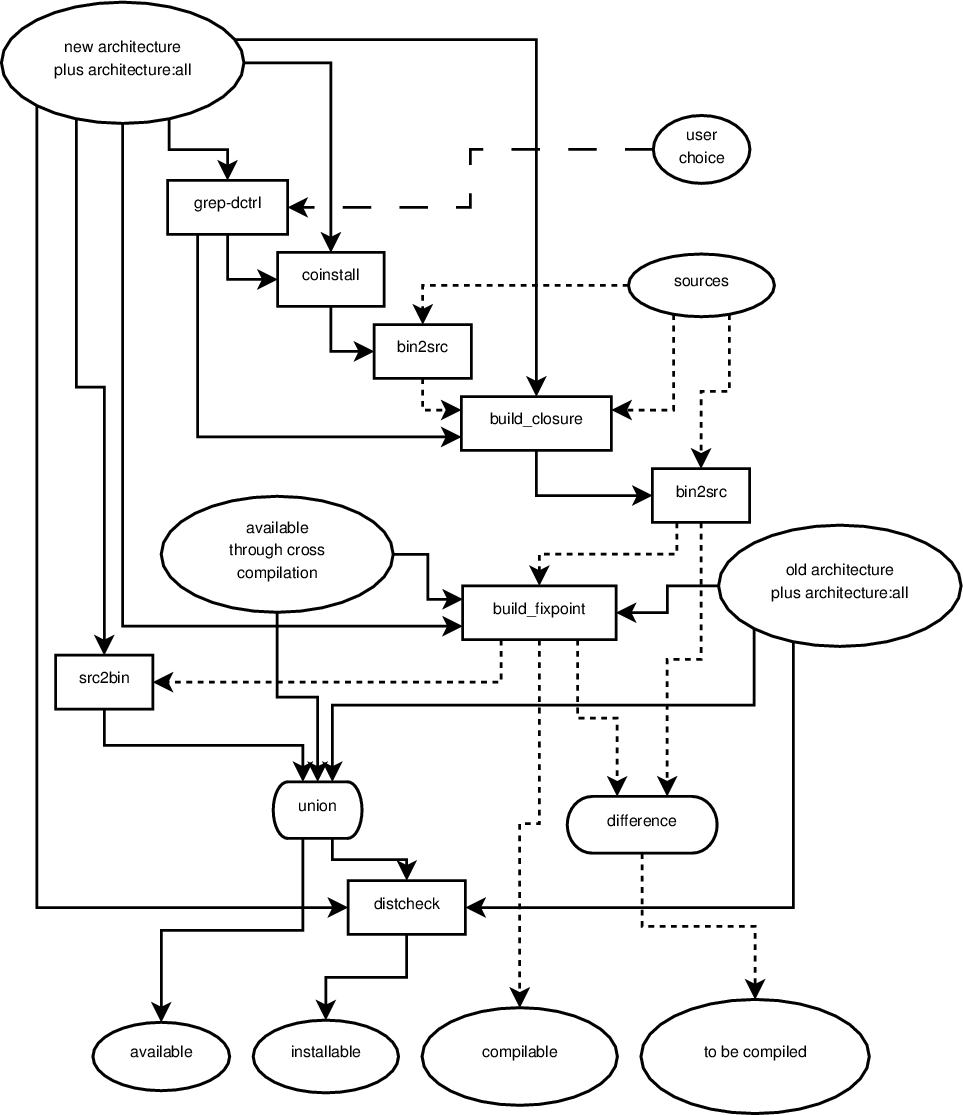
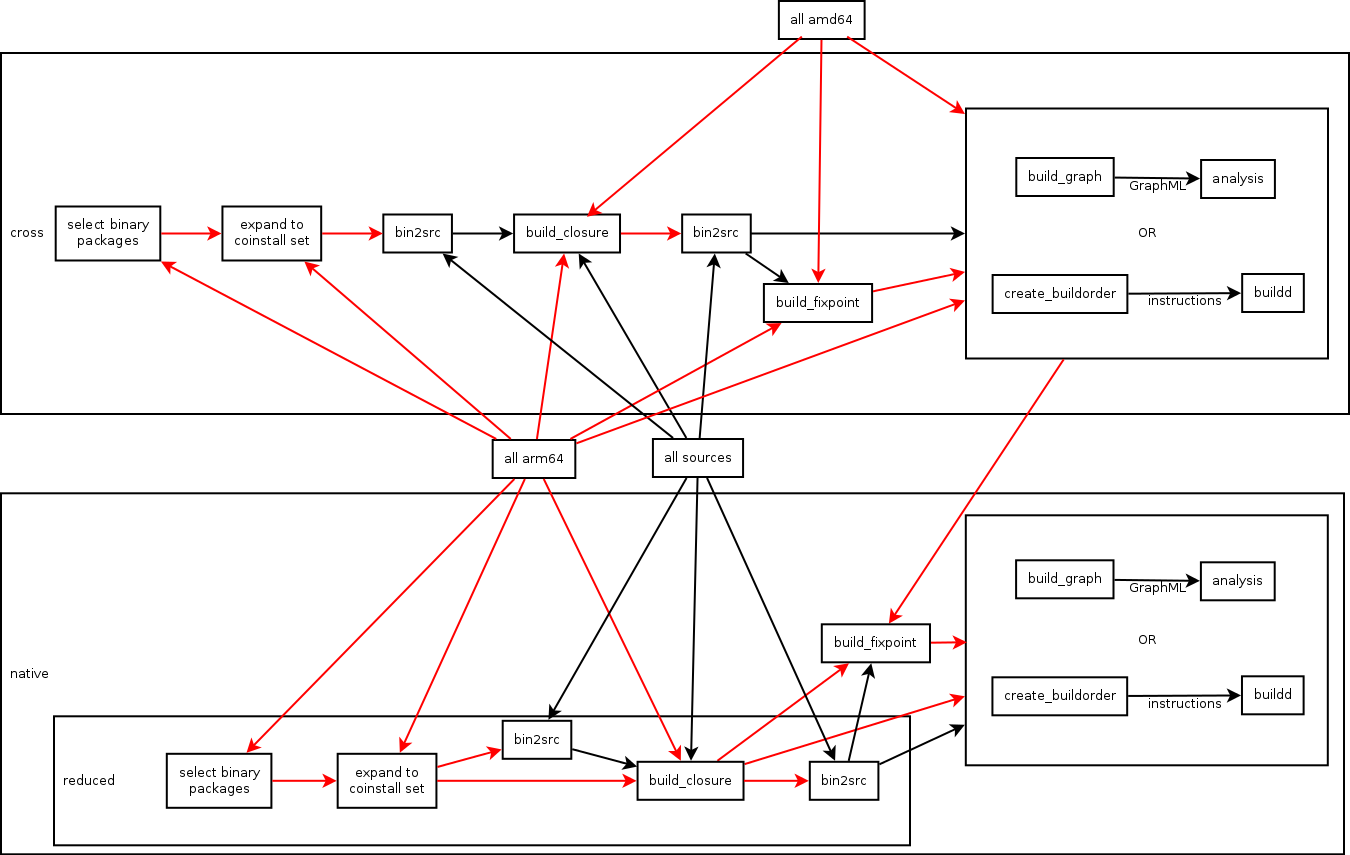
Processing pipeline instead of monolithic tools The tools I developed so far tried to accomplish everything by themselves, reusing functionality implemented in a central library. Therefor, if one wanted to try out even trivial new things, it mostly meant to hack some OCaml code. Pietro Abate suggested to instead develop smaller tools which could work independently of each other, would only execute one algorithm each and could easily be connected together in different ways to achieve different effects. This switch is now done and all functionality from the old tools is moved into a new toolset. The exchange format between the tools is either plain text files in deb822 control format (Packages/Sources files) or a dependency graph. The dependency graph is currently marshalled by OCaml but future versions should work with just passing a GraphML (an XML graph format) representation around. This new way of doing things seems close to the UNIX philosophy (each program does one thing well, data is stored as text, every program is a filter). For example the deb822 control output can easily be manipulated using grep-dctrl(1) and there exist many tools which can read, analyze and manipulate GraphML. It is a big improvement over the old, monolithic tools which did not allow to manipulate any intermediate result by external, existing tools. Currently, a shell script (native.sh) will execute all tools in a meaningful order, connecting them together correctly. The same tools will be used for a future cross.sh but they will be connected differently. I wrote about a first proposal of what the individual tools should do and how they should be connected in this email from which I also linked a confusing overview of the pipeline. This overview has recently been improved to be even more confusing and the current version of the lower half (the native part) now looks like this: native reduced Solid arrows represent a flow of binary packages, dottend arrows represent a flow of source packages, ovals represent a set of packages, boxes with rounded corners represent set operations, rectangular boxes represent filters. There is only one input to a filter, which is the arrow connected to the top of the box. Outgoing arrows from the bottom represent the filtered input. Ingoing arrows to either side are arguments to the filter and control how the filter behaves depending on the algorithm. I will explain this better once the pipeline proved to be less in flux. The pipeline is currently executed like this by native.sh.

Two new ways to break dependency cycles have been discovered So far, we knew of three ways to formally break dependency cycles:
  • remove build dependencies through build profiles
  • find out that the build dependency is only used to build arch:all packages and therefor put it into Build-Depends-Indep
  • cross compile some source packages
Two new methods can be added to the above:

Dependency graph definition changed Back in September when I was visiting irill, Pietro found a flaw in how the dependency graph used to be generated. He supplied a new definition of the dependency graph which does away with the problem he found. After fixing some small issues with his code, I changed all the existing algorithms to use the new graph definition. The old graph is as of today removed from the repository. Thanks to Pietro for supplying the new graph definition - I must still admit that my OCaml foo is not strong enough to have come up with his code.

Added complexity for profile built source packages As mentioned in the introduction, wookey and me addressed the debian-devel list with a proposal on necessary changes for an automated bootstrapping of Debian. During the discussiong, two important things came up which are to be considered by the dependency graph algorithms:
  • profile built source packages may not create all binary packages
  • profile built source packages may need additional build dependencies
Both things make it necessary to alter the dependency graph during the generation of a feedback arc set and feedback vertex set beyond the simple removal of edges. Luckily, the developed approximation algorithms can be extended to support such changes in the graph.

Different feedback arc set algorithms The initially developed feedback arc set algorithm is well suited to discover build dependency edges which should be dropped. It performs far worse when creating the final build order because it only considers edges by itself and not how many edges of a source package can be dropped by profile building it. The adjusted algorithm for generating a build order is more of a feedback vertex set algorithm because instead of greedily finding the edge with most cycles through it, it greedily finds the source package which would break most cycles if it was profile built.

Generating a build order with less profile built source packages After implementing all the features above I now feel more confident to publish the current status of the tools to a wider audience. The following test shows a run of the aforementioned ./native.sh shell script. Its final output is a list of source packages which have to be profile built and a build order. Using the resulting build order, starting from a minimal build system (essential:yes, build-essential and debhelper), all source packages will be compiled which are needed to compile all binary packages in the system. The result will therefor be a list of source and binary packages which fulfill the following property:
  • all binary packages can be built from the available source packages
  • all source packages can be built with the available binary packages
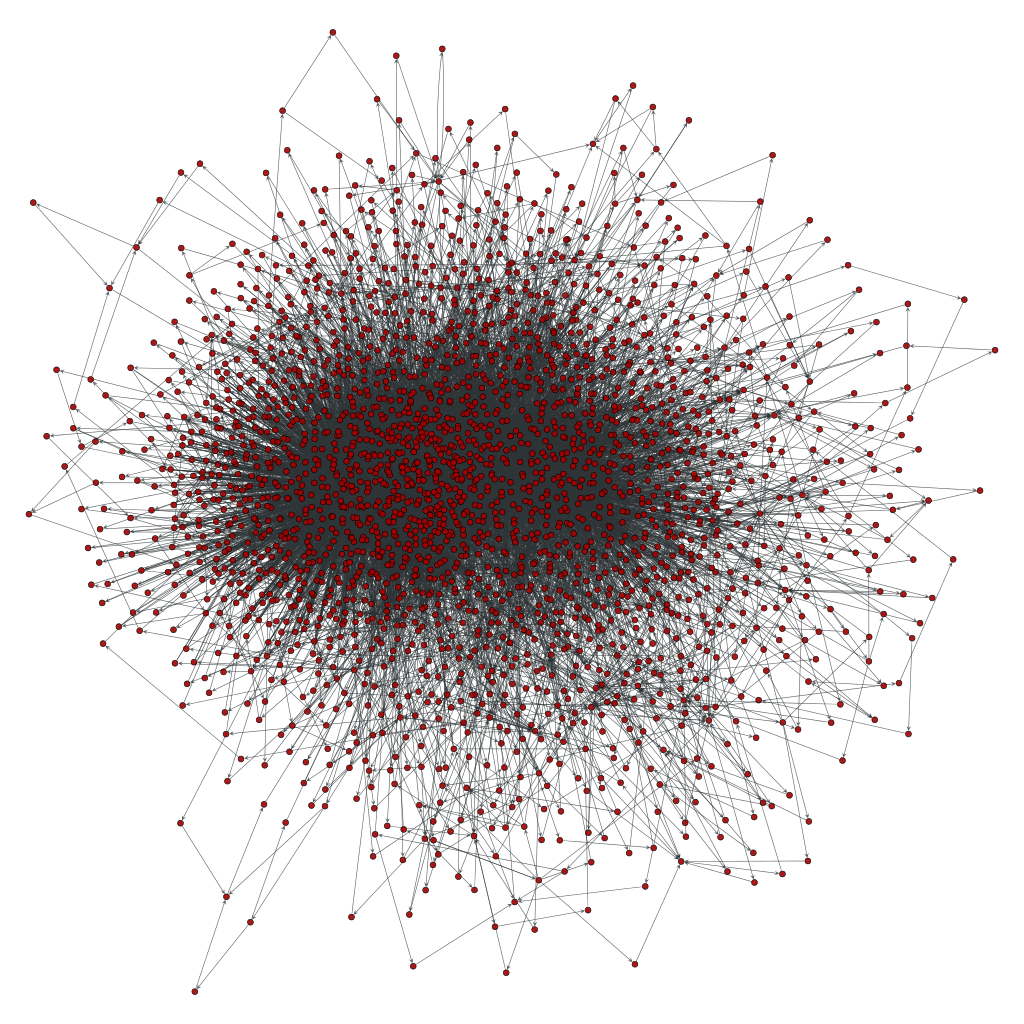
I called this a "reduceded distribution" in earlier posts. The interesting property of this specific selection is, that it contains the biggest problem set of Debian when bootstrapping it: a 900 to 1000 nodes big strongly connected component. Here is a visualization of the problem: hideous mess Source packages do not yet come with build profiles and the cross build situation can not yet be analyzed, so the following assumptions were made: The last point is about 14 build dependencies which were decided to be broken by the feedback arc set algorithm but for which other data sources did not indicate that they are actually breakable. Those 14 are dynamically generated by native.sh. If above assumptions should not be too far from the actual situation, then not more than 73 source packages have to be modified to bootstrap a reduced distribution. This reduced distribution even includes dependency-wise "big" packages like webkit, metacity, iceweasel, network-manager, tracker, gnome-panel, evolution-data-server, kde-runtime, libav and nautilus. By changing one line in native.sh one could easily develop a build order which generates gnome-desktop or really any given (meta-)package selection. All of native.sh takes only 80 seconds to execute on my system (Core i5, 2.5 GHz, singlethreaded). Here is the final build order which creates 2044 binary packages from 613 source packages.
  1. nspr, libio-pty-perl, libmcrypt, unzip, libdbi-perl, cdparanoia, libelf, c-ares, liblocale-gettext-perl, libibverbs, numactl, ilmbase, tbb, check, libogg, libatomic-ops, libnl($), orc($), libaio, tcl8.4, kmod, libgsm, lame, opencore-amr, tcl8.5, exuberant-ctags, mhash, libtext-iconv-perl, libutempter, pciutils, gperf, hspell, recode, tcp-wrappers, fdupes, chrpath, libbsd, zip, procps, wireless-tools, cpufrequtils, ed, libjpeg8, hesiod, pax, less, dietlibc, netkit-telnet, psmisc, docbook-to-man, libhtml-parser-perl, libonig, opensp($), libterm-size-perl, linux86, libxmltok, db-defaults, java-common, sharutils, libgpg-error, hardening-wrapper, cvsps, p11-kit, libyaml, diffstat, m4
  2. openexr, enca, help2man, speex, libvorbis, libid3tag, patch, openjade1.3, openjade, expat, fakeroot, libgcrypt11($), ustr, sysvinit, netcat, libirman, html2text, libmad, pth, clucene-core, libdaemon($), texinfo, popt, net-tools, tar, libsigsegv, gmp, patchutils($), dirac, cunit, bridge-utils, expect, libgc, nettle, elfutils, jade, bison
  3. sed, indent, findutils, fastjar, cpio, chicken, bzip2, aspell, realpath, dctrl-tools, rsync, ctdb, pkg-config($), libarchive, gpgme1.0, exempi, pump, re2c, klibc, gzip, gawk, flex-old, original-awk, mawk, libtasn1-3($), flex($), libtool
  4. libcap2, mksh, readline6, libcdio, libpipeline, libcroco, schroedinger, desktop-file-utils, eina, fribidi, libusb, binfmt-support, silgraphite2.0, atk1.0($), perl, gnutls26($), netcat-openbsd, ossp-uuid, gsl, libnfnetlink, sg3-utils, jbigkit, lua5.1, unixodbc, sqlite, wayland, radvd, open-iscsi, libpcap, linux-atm, gdbm, id3lib3.8.3, vo-aacenc, vo-amrwbenc, fam, faad2, hunspell, dpkg, tslib, libart-lgpl, libidl, dh-exec, giflib, openslp-dfsg, ppl($), xutils-dev, blcr, bc, time, libdatrie, libpthread-stubs, guile-1.8, libev, attr, libsigc++-2.0, pixman, libpng, libssh2, sqlite3, acpica-unix, acl, a52dec
  5. json-c, cloog-ppl, libverto, glibmm2.4, rtmpdump, libdbd-sqlite3-perl, nss, freetds, slang2, libpciaccess, iptables, e2fsprogs, libnetfilter-conntrack, bash, libthai, python2.6($), libice($), libpaper, libfontenc($), libxau, libxdmcp($), openldap($), cyrus-sasl2($), openssl, python2.7($)
  6. psutils, libevent, stunnel4, libnet-ssleay-perl, libffi, readline5, file, libvoikko, gamin, libieee1284, build-essential, libcap-ng($), lcms($), keyutils, libxml2, libxml++2.6, gcc-4.6($), binutils, dbus($), libsm($), libxslt, doxygen($)
  7. liblqr, rarian, xmlto, policykit-1($), libxml-parser-perl, tdb, devscripts, eet, libasyncns, libusbx, icu, linux, libmng, shadow, xmlstarlet, tidy, gavl, flac, dbus-glib($), libxcb, apr, krb5, alsa-lib
  8. usbutils, enchant, neon27, uw-imap, libsndfile, yasm, xcb-util, gconf($), shared-mime-info($), audiofile, ijs($), jbig2dec, libx11($)
  9. esound, freetype, libxkbfile, xvidcore, xcb-util-image, udev($), libxfixes, libxext($), libxt, libxrender
  10. tk8.4, startup-notification, libatasmart, fontconfig, libxp, libdmx, libvdpau, libdrm, libxres, directfb, libxv, libxxf86dga, libxxf86vm, pcsc-lite, libxss, libxcomposite, libxcursor, libxdamage, libxi($), libxinerama, libxrandr, libxmu($), libxpm, libxfont($)
  11. xfonts-utils, libxvmc, xauth, libxtst($), libxaw($)
  12. pmake, corosync, x11-xserver-utils, x11-xkb-utils, coreutils, xft, nas, cairo
  13. libedit, cairomm, tk8.5, openais, pango1.0($)
  14. ocaml, blt, ruby1.8, firebird2.5, heimdal, lvm2($)
  15. cvs($), python-stdlib-extensions, parted, llvm-2.9, ruby1.9.1, findlib, qt4-x11($)
  16. xen, mesa, audit($), avahi($)
  17. x11-utils, xorg-server, freeglut, libva
  18. jasper, tiff3, python3.2($)
  19. openjpeg, qt-assistant-compat, v4l-utils, qca2, jinja2, markupsafe, lcms2, sip4, imlib2, netpbm-free, cracklib2, cups($), postgresql-9.1
  20. py3cairo, pycairo, pam, libgnomecups, gobject-introspection($)
  21. gdk-pixbuf, libgnomeprint, gnome-menus, gsettings-desktop-schemas, pangomm, consolekit, vala-0.16($), colord($), atkmm1.6
  22. libgee, gtk+3.0($), gtk+2.0($)
  23. gtkmm2.4, poppler($), openssh, libglade2, libiodbc2, gcr($), libwmf, systemd($), gcj-4.7, java-atk-wrapper($)
  24. torque, ecj($), vala-0.14, gnome-keyring($), gcc-defaults, gnome-vfs($)
  25. libidn, libgnome-keyring($), openmpi
  26. mpi-defaults, dnsmasq, wget, lynx-cur, ghostscript, curl
  27. fftw3, gnupg, libquvi, xmlrpc-c, raptor, liboauth, groff, fftw, boost1.49, apt
  28. boost-defaults, libsamplerate, cmake, python-apt
  29. qjson, qtzeitgeist, libssh, qimageblitz, pkg-kde-tools, libical, dwarves-dfsg, automoc, attica, yajl, source-highlight, pygobject, pygobject-2, mysql-5.5($)
  30. libdbd-mysql-perl, polkit-qt-1, libdbusmenu-qt, raptor2, dbus-python, apr-util
  31. rasqal, serf, subversion($), apache2
  32. git, redland
  33. xz-utils, util-linux, rpm, man-db, make-dfsg, libvisual, cryptsetup, libgd2, gstreamer0.10
  34. mscgen, texlive-bin
  35. dvipng, luatex
  36. libconfig, transfig, augeas, blas, libcaca, autogen, libdbi, linuxdoc-tools, gdb, gpm
  37. ncurses, python-numpy($), rrdtool, w3m, iproute, gcc-4.7, libtheora($), gcc-4.4
  38. libraw1394, base-passwd, lm-sensors, netcf, eglibc, gst-plugins-base0.10
  39. libiec61883, qtwebkit, libvirt, libdc1394-22, net-snmp, jack-audio-connection-kit($), bluez
  40. redhat-cluster, gvfs($), pulseaudio($)
  41. phonon, libsdl1.2, openjdk-6($)
  42. phonon-backend-gstreamer($), gettext, libbluray, db, swi-prolog, qdbm, swig2.0($)
  43. highlight, libselinux, talloc, libhdate, libftdi, libplist, python-qt4, libprelude, libsemanage, php5
  44. samba, usbmuxd, libvpx, lirc, bsdmainutils, libiptcdata, libgtop2, libgsf, telepathy-glib, libwnck3, libnotify, libunique3, gnome-desktop3, gmime, glib2.0, json-glib, libgnomecanvas, libcanberra, orbit2, udisks, d-conf, libgusb
  45. libgnomeprintui, libimobiledevice, nautilus($), libbonobo, librsvg
  46. evas, wxwidgets2.8, upower, gnome-disk-utility, libgnome
  47. ecore, libbonoboui
  48. libgnomeui
  49. graphviz
  50. exiv2, libexif, lapack, soprano, libnl3, dbus-c++
  51. atlas, libffado, graphicsmagick, libgphoto2, network-manager
  52. pygtk, jackd2, sane-backends, djvulibre
  53. libav($), gpac($), ntrack, python-imaging, imagemagick, dia
  54. x264($), matplotlib, iceweasel
  55. strigi, opencv, libproxy($), ffms2
  56. kde4libs, frei0r, glib-networking
  57. kde-baseapps, kate, libsoup2.4
  58. geoclue, kde-runtime, totem-pl-parser, libgweather, librest, libgdata
  59. webkit
  60. zenity, gnome-online-accounts
  61. metacity, evolution-data-server
  62. gnome-panel
  63. tracker
The final recompilation of profile built source packages is omitted. Source packages marked with a ($) are selected to be profile built. All source packages listed in the same line can be built in parallel as they do not depend upon each other. This order looks convincing as it first compiles a multitude of source packages which have no or only few build dependencies lacking. Later steps allow fewer source packages to be compiled in parallel. The amount of needed build dependencies is highest in the source packages that are built last.

24 January 2013

Dirk Eddelbuettel: Rcpp reaches 100 dependents on CRAN

With the arrival earlier today of the stochvol package onto the CRAN network for R, our Rcpp project reached a new milestone: 100 packages have either a Depends:, Imports: or LinkingTo: statement on it. The full list will always be at the bottom of the CRAN page for Rcpp; I also manually edit a list on my Rcpp page. But for the record as of today, here is the current list as produced by a little helper script I keep:
 acer                apcluster           auteur             
 bcp                 bfa                 bfp                
 bifactorial         blockcluster        ccaPP              
 cda                 classify            clusteval          
 ConConPiWiFun       EpiContactTrace     fastGHQuad         
 fdaMixed            forecast            fugeR              
 GeneticTools        gMWT                gof                
 gRbase              gRim                growcurves         
 GUTS                jaatha              KernSmoothIRT      
 LaF                 maxent              mets               
 minqa               mirt                mRMRe              
 multmod             mvabund             MVB                
 NetworkAnalysis     ngspatial           oem                
 openair             orQA                parser             
 pbdBASE             pbdDMAT             phom               
 phylobase           planar              psgp               
 quadrupen           Rchemcpp            Rclusterpp         
 RcppArmadillo       RcppBDT             rcppbugs           
 RcppClassic         RcppClassicExamples RcppCNPy           
 RcppDE              RcppEigen           RcppExamples       
 RcppGSL             RcppOctave          RcppRoll           
 RcppSMC             RcppXts             rforensicbatwing   
 rgam                RInside             Rmalschains        
 Rmixmod             robustgam           robustHD           
 rococo              RProtoBuf           RQuantLib          
 RSNNS               RSofia              rugarch            
 RVowpalWabbit       SBSA                sdcMicro           
 sdcTable            simFrame            spacodiR           
 sparseHessianFD     sparseLTSEigen      SpatialTools       
 stochvol            surveillance        survSNP            
 termstrc            tmg                 transmission       
 trustOptim          unmarked            VIM                
 waffect             WideLM              wordcloud          
 zic                
And not to be forgotten is BioConductor which has another 10:
 ddgraph            GeneNetworkBuilder GOSemSim          
 GRENITS            mosaics            mzR               
 pcaMethods         Rdisop             Risa              
 rTANDEM  
As developers of Rcpp, we are both proud and also a little humbled. The packages using Rcpp span everything from bringing new libraries to R, to implementing faster ways of doing things we have before to doing completely new things. It is an exciting time to be using R, and to be connecting R to C++, especially with so many exciting things happening in C++ right now. Follow the Rcpp links for more, and come join us on the Rcpp-devel mailing list to discuss and learn.

23 January 2013

Joey Hess: in Sydney

After arriving yesterday, and doing the obligatory jetlagged wander around Circular Quay to the Opera House, I crashed for 15 hours sleep and seem reasonably well over the jetlag now. I'm staying near Central Station, which is great because it's very convenient to transport and there's lots of cheap ethnic food.
view down my street
Today I took the ferry over to Manly Beach. I had to get in some in swimming of course, although today was cloudy and only in the 80's (F). That was ok, but the really nice bit was walking over to Shelly Beach and up along the sandstone cliffs near North Head. Highlight was finding a small gotto high on the cliff, with some beautiful sandstone filigree overhead, that seemed carved by water (but probably really by wind), and contained a shady bench overlooking the Pacific. Great place to enjoy a lunch of crusty bread and salami if you're ever in the area. Topped off a great day with a random trip to Neutral Bay (the D&Der in me liked the name, and why not, ferries are free) and a wander through the Royal Botanic Gardens. I'm hoping to spend either Thursday or Friday at a co-working or hackerspace in Sydney, but I don't know where yet. Any locals have ideas?

18 January 2013

Michal &#268;iha&#345;: Roadmap for Weblate 1.4 and 1.5

As usual, I've changed my plans for Weblate 1.4. Simply before I got to implementing features I wanted to have there, I've already implemented bunch of other things, which are worth releasing. So my plan is to release Weblate 1.4 next week with current feature set (you can check list of fixed issues) and focus on 1.5 development then. Some major features which will be available in Weblate 1.4: As a clear consequence, some of the big features were moved to 1.5, but I've added also some other things I'd like to implement, see 1.5 milestone on GitHub.

Filed under: English Phpmyadmin Suse Weblate 0 comments Flattr this!

17 January 2013

Craig Small: Pre-selecting ToscaWidgets jqgrid values in TurboGears

My Turbogears project has recently reached an important milestone; one of the back-end processes now runs pretty much continuously and the plugins it use (or at least the ones I can see) are also working. That means I can turn to the front-end which displays the data the back-end collected. For some of the data I am using a ToscaWidgets (or TW2) widget called a jqGridWidget which is a very nice jquery device that separates the presentation and data using a json query. I ve mentioned previously about how to get a jqGridWidget working but left the pre-filtering out until now. This meant that my grid showed all the items in the database, not just the ones I wanted to see, but it was a start. Now this widget displays things called Attributes which are basically children of another model called Hosts. Basically, Attributes are things you want to check or track about a Host. My widget used to show all Attributes but often on a Host screen, I want to see its hosts only. So, this is how I got my widget to behave; I m not sure this is THE CORRECT way of doing it, but it does work. First, in the Hosts controller you need to create the widget and pass along the host_id that the controller has obtained. I was not able to use the sub-classing trick you see in some TW2 documentation but actually make a widget instance.
class HostsController(BaseController):
    # other stuff here
    class por2(portlets.Portlet):
        title = 'Host Attributes'
        widget = AttributeGrid()
        widget.host_id = host_id
Next, the prepare() method in the Widget needs to get hold of the host_id and put it into the postData list. I needed to do it before calling super() because the options become one long string in the sub-class.
class AttributeGrid(jqgrid.jqGridWidget):
    def prepare(self, **kw):
        if self.host_id is not None:
            self.options['postData'] =  'hostid': self.host_id 
        super(AttributeGrid, self).prepare()
This means the jqgrid when it asks for its JSON data will include the hostid parameter as well. We need that method to see the host ID so we can filter the database access. Finally in the JSON method for the Attribute we pick up and filter on the hostid.
    @expose('json')
    @validate(validators= 'hostid':validators.Int() )
    def jqsumdata(self, hostid=0, page=1, rows=1, *args, **kw):
        conditions = []
        if hostid &gt; 0:
            conditions.append(model.Attribute.host_id == hostid)
        attributes =model.DBSession.query(model.Attribute).filter(and_(*conditions))
From there you run through the attributes variable and build your JSON reply.

Craig Small: Pre-selecting ToscaWidgets jqgrid values in TurboGears

My Turbogears project has recently reached an important milestone; one of the back-end processes now runs pretty much continuously and the plugins it use (or at least the ones I can see) are also working. That means I can turn to the front-end which displays the data the back-end collected. For some of the data I am using a ToscaWidgets (or TW2) widget called a jqGridWidget which is a very nice jquery device that separates the presentation and data using a json query. I ve mentioned previously about how to get a jqGridWidget working but left the pre-filtering out until now. This meant that my grid showed all the items in the database, not just the ones I wanted to see, but it was a start. Now this widget displays things called Attributes which are basically children of another model called Hosts. Basically, Attributes are things you want to check or track about a Host. My widget used to show all Attributes but often on a Host screen, I want to see its hosts only. So, this is how I got my widget to behave; I m not sure this is THE CORRECT way of doing it, but it does work. First, in the Hosts controller you need to create the widget and pass along the host_id that the controller has obtained. I was not able to use the sub-classing trick you see in some TW2 documentation but actually make a widget instance.
class HostsController(BaseController):
    # other stuff here
    class por2(portlets.Portlet):
        title = 'Host Attributes'
        widget = AttributeGrid()
        widget.host_id = host_id
Next, the prepare() method in the Widget needs to get hold of the host_id and put it into the postData list. I needed to do it before calling super() because the options become one long string in the sub-class.
class AttributeGrid(jqgrid.jqGridWidget):
    def prepare(self, **kw):
        if self.host_id is not None:
            self.options['postData'] =  'hostid': self.host_id 
        super(AttributeGrid, self).prepare()
This means the jqgrid when it asks for its JSON data will include the hostid parameter as well. We need that method to see the host ID so we can filter the database access. Finally in the JSON method for the Attribute we pick up and filter on the hostid.
    @expose('json')
    @validate(validators= 'hostid':validators.Int() )
    def jqsumdata(self, hostid=0, page=1, rows=1, *args, **kw):
        conditions = []
        if hostid &gt; 0:
            conditions.append(model.Attribute.host_id == hostid)
        attributes =model.DBSession.query(model.Attribute).filter(and_(*conditions))
From there you run through the attributes variable and build your JSON reply.

Tollef Fog Heen: Gitano git hosting with ACLs and other shininess

gitano is not entirely unlike the non-web, server side of github. It allows you to create and manage users and their SSH keys, groups and repositories from the command line. Repositories have ACLs associated with them. Those can be complex ("allow user X to push to master in the doc/ subtree) or trivial ("admin can do anything"). Gitano is written by Daniel Silverstone, and I'd like to thank him both for writing it and for holding my hand as I went stumbling through my initial gitano setup. Getting started with Gitano can be a bit tricky, as it's not yet packaged and fairly undocumented. Until it is packaged, it's install from source time. You need luxio, lace, supple, clod, gall and gitano itself. luxio needs a make install LOCAL=1, the others will be installed to /usr/local with just make install. Once that is installed, create a user to hold the instance. I've named mine git, but you're free to name it whatever you would like. As that user, run gitano-setup and answer the prompts. I'll use git.example.com as the host name and john as the user I'm setting this up for. To create users, run ssh git@git.example.com user add john john@example.com John Doe, then add their SSH key with ssh git@git.example.com as john sshkey add workstation < /tmp/john_id_rsa.pub. To create a repository, run ssh git@git.example.com repo create myrepo. Out of the box, this only allows the owner (typically "admin", unless overridden) to do anything with it. To change ACLs, you'll want to grab the refs/gitano/admin branch. This lives outside of the space git usually use for branches, so you can't just check it out. The easiest way to check it out is to use git-admin-clone. Run it as git-admin-clone git@git.example.com:myrepo ~/myrepo-admin and then edit in ~/myrepo-admin. Use git to add, commit and push as normal from there. To change ACLs for a given repo, you'll want to edit the rules/main.lace file. A real-world example can be found in the NetSurf repository and the lace syntax might be useful. A lace file consists of four types of lines: Rules are processed one by one, from the top and terminate whenever a matching allow or deny is found. Conditions can either be matches to an update, such as ref refs/heads/master to match updates to the master branch. To create groupings, you can use the anyof or allof verbs in a definition. Allows and denials are checked against all the definitions listed and if all of them match, the appropriate action is taken. Pay some attention to what conditions you group together, since a basic operation (is_basic_op, aka op_read and op_write) happens before git is even involved and you don't have a tree at that point, so rules like:
define is_master ref refs/heads/master
allow "Devs can push" op_is_basic is_master
simply won't work. You'll want to use a group and check on that for basic operations and then have a separate rule to restrict refs.

31 December 2012

Russ Allbery: Review: Wasted Heart

Review: Wasted Heart, by Lynn Galli
Publisher: Penikila
Copyright: 2010
ISBN: 1-935611-32-1
Format: Kindle
Pages: 252
Austy is a lawyer working for the US District Attorney's office in Seattle. Six months ago, she moved there from Virginia, in large part because she fell in love with her best friend. Her married best friend. Now, she's trying (mostly unsuccessfully) to deal with the Seattle lesbian scene while becoming (successfully) the go-to lawyer for prosecuting cases with a substantial technology component. Two things are about to complicate that life: meeting and working with FBI special agent Elise Bridie, and working on a case that involves her best friend's company. Yes, that best friend. This is, as you might have guessed, a lesbian romance novel, so with that should come my "reading out of genre disclaimer": it's rather easy, when reading a genre one normally doesn't read, to find books fresh and interesting when they're unoriginal to regular genre readers, or to miss genre conventions or reactions because one has not read the previous work. You should therefore take my opinions with a grain of salt, particularly if you read more romance novels than I do (which wouldn't be hard). I grabbed this book for a few reasons: I felt like reading a warm-hearted story focused on human relationships, I wanted a reasonably fast read (since I'm obsessed with meaningless numeric milestones, like how many books I read in a year), and I wanted something with an upbeat ending. Romance generally delivers on those fronts. Lesbian romance has the added bonus of avoiding a whole bunch of gender essentialism and heterosexual romance tropes that tend to give me hives. Landing was excellent, so I thought I'd see if I could find more of that. Wasted Heart does indeed deliver, although it's not quite as good as Landing. There's a bit too much physical attraction and love based on appearance for my taste, but Galli leavens that with quite a lot of interesting psychology. Both Austy and Elise are private and cautious people, and for me that makes the romance feel more realistic. It also draws out the initial phase of getting to know the other person, which is the part of the romance that I often find the most interesting. Elise in particular is a great character maybe a little too ideal in a few places, but smart and observant in a way that's very fun to read about. Like a lot of romances, there is some annoying miscommunication and misunderstanding (predictably right around the height of the tension), but it's not quite as stupid as those problems usually are, and Galli doesn't drag it out until one starts wanting to hit the characters with blunt objects. As good or better is the community that surrounds the main characters. Galli has a full cast of believable and interesting characters, most notably including Austy's old gang from Virginia. The tensions between having a group of friends one cares about deeply, wanting to build a new life after making a major break and major decision but having difficulty sustaining that under the onslaught of those friends, and being easily tossed about by expressive and outgoing people when one is private and a bit quiet all play out here. And, refreshingly, without a lot of angst, and with quite a bit of intelligent introspection. Both Austy and her friends are smarter and more considerate than most of the characters I've seen in this sort of situation. Another good bit is the little pieces of legal drama. Galli doesn't neglect Austy's work life, and while this is certainly not a legal thriller or procedural, we do get some nice scenes of Austy doing her job. I love courtroom scenes, particularly ones (like these) that are more on the realistic side, so that was a nice bonus. Austy and Elise's jobs also lead to a somewhat predictable bit of drama, and I was a bit less enamored of that; the more I thought about it, the less well it hung together for me. But I did like that it stayed firmly on the realistic side, including a look at psychological aftereffects for real people rather than thriller protagonists. This is not the sort of book that I would tell someone to rush out and buy, but it met my criteria nicely and delivered just the sort of entertainment I was looking for. (And it's not particularly expensive on Kindle, at least in the US.) There was a bit too much focus on physical appearance and physical infatuation, and Elise might be just a little too perfect, but I enjoyed it. Note that I read the special edition, which includes a (much appreciated) epilogue that closes out the story. That seems to be the default edition for sale everywhere I look, but in case you see the older version, I recommend the special edition. Rating: 7 out of 10

26 December 2012

Rudy Godoy: s3tools Simple Storage Service for non-Amazon providers

One of the nicest developments in the cloud arena is the increasing adoption of standards, this of course will impact on maturity and market confidence on such technologies. Amazon, as one of the pioneers, made a good choice on their offering design by making their API implementation public. Now, vendors such as Eucalyptus private/hybrid cloud offering and many other providers can leverage and build upon the specs to offer compatible services without the hassle for their customers to learn a new technology/tool. I ve bare-metal servers siting on Connectria s data-center. A couple of months ago I ve learned about their new cloud storage offering. Since I m working a lot on cloud lately I checked the service. It s was nice to learn they are not re-inventing the wheel but instead implementing Amazon s Simple Storage Service (S3) de-facto standard for cloud storage. Currently there are many S3-compatible tools available both FLOSS and freeware/closed source (Connectria provides a nice list of them). I ve been using s3tools, which is already available in the Debian archive, to interact with S3-compatible services. Usage is pretty straightforward. For my use case I intend to store copies of certain files on my provider s S3 service. I ll need to create buckets to be able to store files. For the ones not very familiar with S3 terminology buckets can be seen as containers or folders (in the desktop paradigm). First thing to do is configure your keys and credentials for accessing S3 from your provider. I do recommend you to use the --configure option to create the $HOME/.s3cfg file because it will put all the available options for a standard S3 service, leaving you the work of just tweaking them based on your needs. You can go and create the file all by yourself if you prefer, of course.
$ sudo aptitude install s3cmd
$ s3cmd --configure
Enter new values or accept defaults in brackets with Enter.
Refer to user manual for detailed description of all options.
Access key and Secret key are your identifiers for Amazon S3
Access Key:
...
You ll be required to enter the access key and the secret key. You ll be asked for a encryption password (use only if you plan to use this feature). Finally, the software will test the configuration against Amazon s service. Since this is not our case it will fail. Tell the configuration instead to not retry configuration and say Y to Save configuration. Now, edit the $HOME/.s3cfg file and set the address for your private/third-party S3 provider. This is done here:
host_base = s3.amazonaws.com
host_bucket = %(bucket)s.s3.amazonaws.com
Change s3.amazonaws.com to your provider s address and the host_bucket configuration also. For my case I had to use:
host_base = rs1.connectria.com
host_bucket = %(bucket)s.rs1.connectria.com
Now, save the file and test the service by listing the available buckets (of course there is none yet).
$ s3cmd ls
If you don t get an error then the tool is properly configured. Now you can create buckets, put files, list, etc.
$ s3cmd mb s3://testbucket
Bucket 's3://testbucket/' created
$ s3cmd put testfile.txt s3://testbucket
testfile.txt -> s3://testbucket/testfile.txt [1 of 1]
8331 of 8331 100% in 1s 7.48 kB/s done
$ s3cmd ls s3://testbucket
2012-12-26 22:09 8331 s3://testbucket/testfile.txt

Next.

Previous.