Search Results: "ron"

3 September 2025

Valhalla's Things: English Paper Piecing, Done Wrong

Posted on September 3, 2025
Tags: madeof:bits
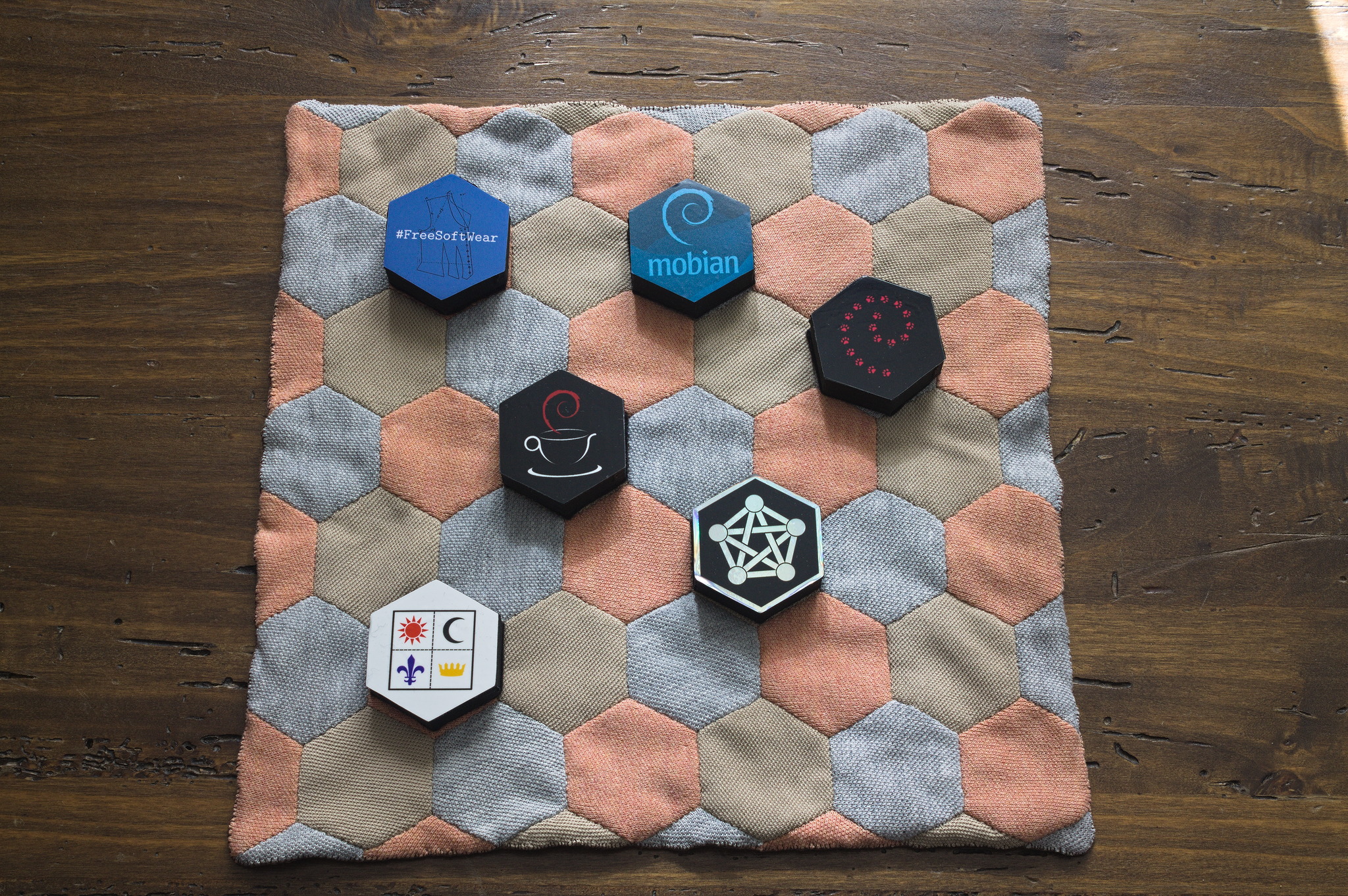
A square mat made of orange, green and grey knit fabric hexagons sewn together. For quite some time, I have been thinking about trying a bit of patchwork, and English Paper Piecing looked like a technique suited to my tastes, with the handsewing involved and the fact of having a paper pattern of sort and everything. The problem is, most of the scraps of fabric I get from my sewing aren t really suitable for quilting, with a lot of them being either too black and too thick or too white and too thin. The other side of the same mat, made of orange and green squares. On the other hand, my partner wears polo shirts at work, and while I try to mend the holes that form, after a while the edges get worn, and they just are no longer suitable for the office, even with some creative mending, and they get downgraded to home wear. But then more office shirts need to be bought, and the home ones accumulate, and there is only so much room for polo shirts in the house, and the worst ones end up in my creative reuse pile. Some parts are worn out and they will end up as cabbage stuffing for things, but some are still in decent enough conditions and could be used as fabric. But surely, for English Paper Piecing you d need woven fabric, not knit, even if it s the dense piqu used in polo shirts, right? Especially if it s your first attempt at the technique, right? The hexagon side of the mat, with my hexagonal pattern weights decorated with Standard Compliant stickers: they fit exactly on the mat pattern. Well, probably it wouldn t work with complex shapes, but what about some 5-ish cm tall Standard Compliant bestagon? So I printed out some hexagons on thick paper, printed some bigger hexagons with sewing allowance as a cutting aid, found two shirts in the least me colours I could find (and one in grey because it was the best match for the other two) and decided to sacrifice them for the experiment. And as long as the paper was still in the pieces, the work went nicely, so I persevered while trying to postpone the Moment of Truth. The squares side of the mat, with a few random Piecepack pieces: the tiles take almost exactly 2   2 squares, and the coins fit inside each square with room to pick them up. After a while I measured things out and saw that I could squeeze a 6.5 7 hexagon pattern into something resembling a square that was a multiple of the 2.5 cm square on the back of my Piecepack tiles, and decided to go for another Standard for the back (because of course I wasn t going to buy new fabric for lining the work). I kept the paper in the pieces until both sides were ready, and used it to sew them right sides together, leaving the usual opening in the middle of one side. Then I pressed, removed the paper, turned everything inside out, pressed again and. It worked! The hexagon side of the mat, with a set of polyhedral dice. The hexagons look like hexagons, the squares look like squares, the whole thing feels soft and drapey, but structurally sound. And it s a bit lumpy, but not enough to cause issues when using it as a soft surface to put over a noisy wooden table to throw dice on. I considered adding some lightweight batting in the middle, but there was really no need for it, and wondered about how to quilt the piece in a way that worked with the patterns on the two sides, but for something this small it wasn t really required. However, I decided to add a buttonhole stitch border on all edges, to close the opening I had left and to reinforce especially the small triangles on the hexagons side, as those had a smaller sewing allowance and could use it. The squares sides of the mat, with some blue and purple stones  in the starting position for a hnefatafl game. And of course, the 11 11 squares side wasn t completely an accident, but part of A Plan. For this project there isn t really a pattern, but I did publish the files I used to print the paper pieces even if they were pretty trivial. And there are more polo shirts in that pile, and while they won t be suitable for anything complex, maybe I could try some rhombs, or even kites and darts?

2 September 2025

Debian Outreach Team: Spaarsh Gsoc Report

layout: post title: GSoC 2025 Report: Enhancing Debian packages with ROCm GPU acceleration date: 2025-09-01 categories: gsoc debian ROCm debian-packaging author: Spaarsh Thakkar

GitLab Salsa: @Spaarsh

GitHub: Spaarsh

Introduction I am Spaarsh Thakkar, a final-year Computer Science Engineering undergrad from India. My interests lie in research and systems. My recent work has been in and around Graphics Processing Units and I also hold a keen interest in Computer Networks. At the time of writing, I have been an open-source contributor for almost a year.

Proposal Description (as shown on GSoC Project Profile1) Due to Debian s open-source nature, no Debian package in main can have a proprietary GPU package listed as a dependency. While AI and HPC workloads increasingly rely on GPU acceleration, many Debian packages still focus solely on CUDA, which is proprietary. With the advent of ROCm, an open-source GPU computing platform, we can now integrate full-fledged AMD GPU support into Debian packages. This will improve the experience of developers working in AI/ML and HPC while positioning Debian as a strong OS choice for GPU-driven workloads. The proposal aims to aid in solving the aforementioned program by packaging several ROCm packages for debian and add ROCm support to some existing debian packages. The deliverables are as follows:
  1. New Debian packages with GPU support
  2. Enhanced GPU support within existing Debian packages
  3. More autopackagetests running on the Debian ROCm CI

Key Objectives Enable ROCm in:
  1. dbcsr
  2. gloo
  3. cp2k
Publish the following packages to debian apt archive:
  1. hipblas-common
  2. hipBLASlt

Work Report

1. Publishing hipblas-common to apt This objective was successfully completed, resulting in hipblas-common being published in the apt repository2. The process involved the following steps:
  1. Filing a Intent-To-Package (ITP)3
  2. Pulling the upstream source code repository from GitHub
  3. Adding the debian/ packaging files
  4. Testing the package locally
  5. Creating the corresponding project under rocm-team4
  6. Applying the necessary changes
  7. Building the package
  8. Testing it using sbuild
  9. Signing the package files
  10. Uploading the package to the mentors.debian.net archive(now in official archive)5
  11. Addressing review feedback and making changes
  12. Requesting sponsorship6
  13. Securing sponsorship, which led to the package being accepted into the experimental branch of apt
Since the beginning of GSoC, the package has also been promoted to the unstable branch2.

2. DBCSR ROCm and Multi-Arch Support During my GSoC project, I worked on extending the DBCSR (Distributed Block Compressed Sparse Row)7 package to improve its ROCm/HIP support, and handling multi-architecture GPU kernels in a way that is both practical for upstream maintainers and debian package developers. The code changes can be found at my dbcsr fork here8.

ROCm/HIP Enablement
  • Enabled ROCm backend support to DBCSR, allowing GPU acceleration beyond CUDA by enabling HIP-based builds.
  • Investigated and resolved build issues specific to HIP kernels within DBCSR.

Multi-Architecture GPU Kernel Handling (The following content was presented in greater detail at DebConf 25 as well. The presentation video can be found here9 and the presentation slide can be found here10).
  • DBCSR contains GPU kernels that are heavily optimized for specific architectures. By default, these are built for a single target architecture, which poses challenges for packaging where binaries need to support multiple possible GPU targets.
  • Explored different strategies for solving the multi-arch GPU kernel distribution problem, including:
    • Option 1: Fat binaries (embedding multiple GPU architectures into a single binary, with runtime dispatch). This is ideal for end-users but requires deeper changes upstream and is not straightforward with HIP/ROCm.
    • Option 2: Arch-specific libraries (e.g., libdbcsr.gfxXXX.a), where the alternatives system or explicit user selection would determine which one is used. This solves the problem but pushes complexity downstream into packaging and user configuration.
    • Option 3: Prefixed functions inside a single file, where kernels are compiled separately per architecture, functions are renamed with an arch prefix, and runtime logic in DBCSR decides which kernel to invoke. This shifts complexity upstream but could give a clean downstream experience.
  • I critically analyzed these options in the context of Debian packaging and upstream maintainability. Arch-specific .a files introduce exponential dependency complexity. The prefixed-function approach seemed like a plausible way forward, though it requires upstream buy-in.
  • After consulting with my mentor, these concerns were raised in the dbcsr repository as a discussion here11

Summary My work involved:
  • Enabling HIP/ROCm support in DBCSR.
  • Prototyping strategies for handling GPU multi-arch builds.
  • Evaluating the trade-offs between upstream maintainability and downstream packaging complexity.

3. gloo, hipification and source code issues One of the other packages that were targeted was gloo12. It is a collective communications library and has the implementations of different Machine Learning communication algorithms. The code changes can be found at my gloo fork here13 (some changes have not be committed at the time of writing).

HIP/ROCm Enablement
  1. Fixing old ROCm CMake functions The upstream Gloo codebase still used old ROCm CMake functions that began with the hip_ prefix (for example, hip_add_executable). These functions have since been deprecated/removed. I updated the build system to use the modern ROCm CMake equivalents so that the package can build properly in a current ROCm environment.
  2. Debian packaging changes I modified debian/control to add a new package, libgloo-rocm, in addition to the existing packages. This allows proper separation and handling of ROCm-enabled builds in Debian.
  3. First successful library build After these changes, I was able to successfully build the library. However, I ran into issues when trying to produce the shared library: there were undefined symbol errors at link time.

Source Code Issue On investigating the undefined symbol errors, I identified that these came from a lack of explicit template instantiation for some Gloo classes. Since C++ templates only get compiled when explicitly used or instantiated, this resulted in missing symbols in the shared library. To solve this, I explored the source code and noticed that the HIP backend code was not natively written it was generated from the CUDA backend using a custom hipification script maintained by the repo.
  • I experimented with modifying the HIPification process itself, trying out hipify-perl14 instead of the repository s custom Python script.
  • I also tried tweaking the source code in places where template instantiations were missing, so that the ROCm build would correctly export the needed symbols.

Summary The issue is still unresolved. The core problem lies in how the source code is structured: the HIP backend is almost entirely auto-generated from CUDA code, and the process does not handle template instantiations correctly. Because of this, the Debian package for Gloo with ROCm support is not yet ready for release, and further source-level fixes are required to make the ROCm build reliable.

4. cp2k CP2K15 is a quantum chemistry and solid state physics software package that can perform atomistic simulations of solid state, liquid, molecular, periodic, material, crystal, and biological systems.

HIP/ROCm Enablement cp2k depends on dbcsr and hence, HIP/ROCm enablement in this package required the dbcsr16 package to get through. Even though dbcsr isn t ready yet, it was worthwhile to plan how it shall be built with HIP/ROCm once we have dbcsr in place. Upon doing this, it was realized that the architecture-wise libraries provided by the dbcsr package will result in a complicated building process for cp2k. No changes have been made to this package yet and more concrete steps shall be taken once the dbcsr package work is completed.

Summary The multi-arch build process for cp2k maybe complicated by the one static-library-per-architecture method used in the dependent package, dbcsr.

Auxiliary Work & Activities While working on the aformentioned GSoC Goals, there were a few other things that were also done.
  1. libamdhip64-dev bug file17 While trying to enable HIP/ROCm in dbcsr, CMakeDetermineHIPCompiler.cmake was unable to find HIP runtime CMake package. After going through some similar issues faced by other developers earlier, it was decided to file a bug report under the libamdhip64-dev package. After discussions with and trying the changes suggested by Cory (my mentor) under the bug, the issue was resolved. Turns out, the wrong compiler was being used by me! The gcc compiler was supposed to be used and I was using hipcc. The bug was closed since it was not due an issue with the package. Cory suggested that I add this info under the ROCm wiki page. It is yet to be done and hopefully I get it done soon.
  2. DebConf25 Talk After facing the multi-arch build dilemma with dbcsr (and also getting to know about the issues faced by other fellow package developers), I came to realise that this was more than a packaging, build or programming issue. GPU-packaging was facing a policy issue. Hence, I decided to cover this problem in greater detail at my DebConf25 Virtual Presentation under the Outreach Session. Shoutout to Cory for his support and Lucas Kanashiro for encouraging me to present my work!
  3. Bi-Weekly AMD ROCm Meetings Shortly after the Coding period started, Cory began the initiative of Bi-Weekly AMD ROCm Meetings18. Being a part of the meetings (participated in all but one!), seeing the work the other folks are doing and being able to discuss my own problems was a delight.
  4. (Upcoming) IndiaFOSS 2025 Talk After understanding the nuances and beauty of the debian packaging ecosystem in these months, I decided to spread the work about debian packaging and packaging software in general. My talk19 for the same got accepted in the upcoming IndiaFOSS 202520 conference! I hope this beings more people towards the packaging ecosystem and to the debian developer ecosystem.

Conclusion My GSoC time was fantastic! I plan to complete the work that I have started during my GSoC and beyond. Working with Cory21 and Utkarsh22 (a fellow GSoC 25 contributor under Cory) has been a very positive experience. HIP/ROCm GPU-packaging is in a nascent stage. It is an exciting time to be in this space right now. The problems are new and never encountered before (CPU packaging isn t architecture specific!). The problems were shall face in the coming time, and our solutions to them will set a precendent for the future.

References 1 : https://summerofcode.withgoogle.com/programs/2025/projects/9s4jUjV0 2 : https://tracker.debian.org/pkg/hipblas-common 3 : https://bugs.debian.org/cgi-bin/bugreport.cgi?bug=1105114 4 : https://salsa.debian.org/rocm-team 5 : https://packages.debian.org/source/sid/hipblas-common 6 : https://lists.debian.org/debian-ai/2025/05/msg00088.html 7 : https://www.cp2k.org/dbcsr 8 : https://salsa.debian.org/Spaarsh/dbcsr/ 9 : https://drive.google.com/file/d/14WQuTMcI-L0lbi3zkUc9pT6RGwwVY0j1/view?usp=sharing 10 : https://docs.google.com/presentation/d/1p-nkHPgg5C5jKGy7ySZ8rts5G2vNFQpQJQ8UySOWgVE 11 : https://github.com/cp2k/dbcsr/discussions/933 12 : https://github.com/pytorch/gloo 13 : https://salsa.debian.org/Spaarsh/gloo 14 : https://tracker.debian.org/pkg/hipify 15 : https://www.cp2k.org/ 16 : https://tracker.debian.org/pkg/dbcsr 17 : https://bugs.debian.org/cgi-bin/bugreport.cgi?https://fossunited.org/indiafoss/2025bug=1108159 18 : https://lists.debian.org/debian-ai/2025/05/msg00113.html 19 : https://fossunited.org/c/indiafoss/2025/cfp/dpq0b26ece 20 : https://fossunited.org/indiafoss/2025 21 : https://salsa.debian.org/cgmb 22 : https://salsa.debian.org/utk4r-sh

Jonathan Dowland: Luminal and Lateral

For my birthday I was gifted copies of Eno's last two albums, Luminal and Lateral, both of which are collaborations with Beatie Wolfe.
Luminal and Lateral records in the sunshine
Let's start with the art. I love this semi-minimalist, bold style, and how the LP itself (in their coloured, bio-vinyl variants) feels like it's part of the artwork. I like the way the artist credits mirror each other: Wolfe, Eno for Luminal; Eno, Wolfe for Lateral. My first "bio vinyl" LP was the Cure's last one, last year. Ahead of it arriving I planned to blog about it, but when it came arrived it turned out I had nothing interesting to say. In terms of how it feels, or sounds, it's basically the same as the traditional vinyl formulation. The attraction of bio-vinyl to well-known environmentalists like Eno (and I guess, the Cure) is the reduced environmental impact due to changing out the petroleum and other ingredients with recycled used cooking oil. You can read more about bio-vinyl if you wish. I try not to be too cynical about things like this; my immediate response is to assume some kind of green-washing PR campaign (I'm currently reading Consumed by Saabira Chaudhuri, an excellent book that is not sadly only fuelling my cynicism) but I know Eno in particular takes this stuff seriously and has likely done more than a surface-level evaluation. So perhaps every little helps. On to the music. The first few cuts I heard from the albums earlier in the year didn't inspire me much. Possibly I heard something from Luminal, the vocal album; and I'm generally more drawn to Eno's ambient work. (Lateral is ambient instrumental). I was not otherwise familiar with Beatie Wolfe. On returning to the albums months later, I found them more compelling. Luminal reminds me a little of Apollo: Atmospheres and Soundtracks. Lateral worked well as space music for phd-correction sessions. The pair recently announced a third album, Liminal, to arrive in October, and totally throw off the symmetry of the first two. Two of its tracks are available to stream now in the usual places.

1 September 2025

Russ Allbery: Review: Regenesis

Review: Regenesis, by C.J. Cherryh
Series: Cyteen #2
Publisher: DAW
Copyright: January 2009
ISBN: 0-7564-0592-0
Format: Mass market
Pages: 682
The main text below is an edited version of my original review of Regensis written on 2012-12-21. Additional comments from my re-read are after the original review. Regenesis is a direct sequel to Cyteen, picking up very shortly after the end of that book and featuring all of the same characters. It would be absolutely pointless to read this book without first reading Cyteen; all of the emotional resonance and world-building that make Regensis work are done there, and you will almost certainly know whether you want to read it after reading the first book. Besides, Cyteen is one of the best SF novels ever written and not the novel to skip. Because this is such a direct sequel, it's impossible to provide a good description of Regenesis without spoiling at least characters and general plot developments from Cyteen. So stop reading here if you've not yet read the previous book. I've had this book for a while, and re-read Cyteen in anticipation of reading it, but I've been nervous about it. One of the best parts of Cyteen is that Cherryh didn't belabor the ending, and I wasn't sure what part of the plot could be reasonably extended. Making me more nervous was the back-cover text that framed the novel as an investigation of who actually killed the first Ari, a question that was fairly firmly in the past by the end of Cyteen and that neither I nor the characters had much interest in answering. Cyteen was also a magical blend of sympathetic characters, taut tension, complex plotting, and wonderful catharsis, the sort of lightning in a bottle that can rarely be caught twice. I need not have worried. If someone had told me that Regenesis was another 700 pages of my favorite section of Cyteen, I would have been dubious. But that's exactly what it is. And the characters only care about Ari's murderer because it comes up, fairly late in the novel, as a clue in another problem. Ari and Justin are back in the safe laboratory environment of Reseune, safe now that politics are not trying to kill or control them. Yanni has taken over administration. There is a general truce, and even some deeper agreement. Everyone can take a breath and relax, albeit with the presence of Justin's father Jordan as an ongoing irritant. But broader Union politics are not stable: there is an election in progress for the Defense councilor that may break the tenuous majority in favor of Reseune and the Science Directorate, and Yanni is working out a compromise to gain more support by turning a terraforming project loose on a remote world. As the election and the politics heat up, interpersonal relationships abruptly deteriorate, tensions with Jordan sharply worsen, and there may be moles in Reseune's iron-clad security. Navigating the crisis while keeping her chosen family safe will once again tax all of Ari's abilities. The third section of Cyteen, where Ari finally has the tools to take fate into her own hands and starts playing everyone off against each other, is one of my favorite sections of any book. If it was yours as well, Regenesis is another 700 pages of exactly that. As an extension and revisiting, it does lose a bit of immediacy and surprise from the original. Regenesis is also less concerned with the larger questions of azi society, the nature of thought and personality, loyalty and authority, and the best model for the development of human civilization. It's more of a political thriller. But it's a political thriller that recaptures much of the drama and tension of Cyteen and is full of exceptionally smart and paranoid people thinking through all angles of a problem, working fast on their feet, and successfully navigating tricky and treacherous political landscapes. And, like Cyteen but unlike others of Cherryh's novels I've read, it's a novel about empowerment, about seizing control of one's surroundings and effectively using all of the capability and leverage at one's fingertips. That gives it a catharsis that's almost as good as Cyteen. It's also, like its predecessor, a surprisingly authoritarian novel. I think it's in that, more than anything else in these books, that one sees the impact of the azi. Regenesis makes it clear that the story is set, not in a typical society, but inside a sort of corporation, with an essentially hierarchical governance structure. There are other SF novels set within corporations (Solitaire comes to mind), but normally they follow peons or at best mid-level personnel or field agents, or otherwise take the viewpoint of the employees or the exploited. When they follow the corporate leaders, the focus usually isn't down inside the organization, but out into the world, with the corporation as silent resources on which the protagonist can draw. Regenesis is instead about the leadership. It's about decisions about the future of humanity that characters feel they can make undemocratically (in part because they or their predecessors have effectively engineered the opinions of the democratic population), but it's also about how one manages and secures a top-down organization. Reseune is, as in the previous novel, a paranoid's suspicions come true; everyone is out to get everyone else, or at least might be, and the level of omnipresent security and threat forces a close parsing of alliances and motivations that elevates loyalty to the greatest virtue. In Cyteen, we had long enough with Ari to see the basic shape of her personality and her slight divergences from her predecessor, but her actions are mostly driven by necessity. Regenesis gives us more of a picture of what she's like when her actions aren't forced, and here I think Cherryh manages a masterpiece of subtle characterization. Ari has diverged substantially from her predecessor without always realizing, and those divergences are firmly grounded in the differences she found or created between her life and the first Ari's. She has friends, confidents, and a community, which combined with past trauma has made her fiercely, powerfully protective. It's that protective instinct that weaves the plot together. So many of the events of Cyteen and Regenesis are driven by people's varying reactions to trauma. If you, like me, loved the last third of Cyteen, read this, because Regenesis is more of exactly that. Cherryh finds new politics, new challenges, and a new and original plot within the same world and with the same characters, but it has the same feel of maneuvering, analysis, and decisive action. You will, as with Cyteen have to be comfortable with pages of internal monologue from people thinking through all sides of a problem. If you didn't like that in the previous book, avoid this one; if you loved it, here's the sequel you didn't know you were waiting for. Original rating: 9 out of 10

Some additional thoughts after re-reading Regenesis in 2025: Cyteen mostly held up to a re-reading and I had fond memories of Regenesis and hoped that it would as well. Unfortunately, it did not. I think I can see the shape of what I enjoyed the first time I read it, but I apparently was in precisely the right mood for this specific type of political power fantasy. I did at least say that you have to be comfortable with pages of internal monologue, but on re-reading, there was considerably more of that than I remembered and it was quite repetitive. Ari spends most of the book chasing her tail, going over and around and beside the same theories that she'd already considered and worrying over the nuances of every position. The last time around, I clearly enjoyed that; this time, I found it exhausting and not very well-written. The political maneuvering is not that deep; Ari just shows every minutia of her analysis. Regenesis also has more about the big questions of how to design a society and the role of the azi than I had remembered, but I'm not sure those discussions reach any satisfying conclusions. The book puts a great deal of effort into trying to convince the reader that Ari is capable of designing sociological structures that will shape Union society for generations to come through, mostly, manipulation of azi programming (deep sets is the term used in the book). I didn't find this entirely convincing the first time around, and I was even less convinced in this re-read. Human societies are a wicked problem, and I don't find Cherryh's computer projections any more convincing than Asimov's psychohistory. Related, I am surprised, in retrospect, that the authoritarian underpinnings of this book didn't bother me more on my first read. They were blatantly obvious on the second read. This felt like something Cherryh put into these books intentionally, and I think it's left intentionally ambiguous whether the reader is supposed to agree with Ari's goals and decisions, but I was much less in the mood on this re-read to read about Ari making blatantly authoritarian decisions about the future of society simply because she's smart and thinks she, unlike others, is acting ethically. I say this even though I like Ari and mostly enjoyed spending time in her head. But there is a deep fantasy of being able to reprogram society at play here that looks a lot nastier from the perspective of 2025 than apparently it did to me in 2012. Florian and Catlin are still my favorite characters in the series, though. I find it oddly satisfying to read about truly competent bodyguards, although like all of the azi they sit in an (I think intentionally) disturbing space of ambiguity between androids and human slaves. The somewhat too frank sexuality from Cyteen is still present in Regenesis, but I found it a bit less off-putting, mostly because everyone is older. The authoritarian bent is stronger, since Regenesis is the story of Ari consolidating power rather than the underdog power struggle of Cyteen, and I had less tolerance for it on this re-read. The main problem with this book on re-read was that I bogged down about halfway through and found excuses to do other things rather than finish it. On the first read, I was apparently in precisely the right mood to read about Ari building a fortified home for all of her friends; this time, it felt like endless logistics and musings on interior decorating that didn't advance the plot. Similarly, Justin and Grant's slow absorption into Ari's orbit felt like a satisfying slow burn friendship in my previous reading and this time felt touchy and repetitive. I was one of the few avid defenders of Regenesis the first time I read it, and sadly I've joined the general reaction on a re-read: This is not a very good book. It's too long, chases its own tail a bit too much, introduces a lot more authoritarianism and doesn't question it as directly as I wanted, and gets even deeper into Cherryh's invented pseudo-psychology than Cyteen. I have a high tolerance for the endless discussions of azi deep sets and human flux thinking, and even I got bored this time through. On re-read, this book was nowhere near as good as I thought it was originally, and I would only recommend it to people who loved Cyteen and who really wanted a continuation of Ari's story, even if it is flabby and not as well-written. I have normally been keeping the rating of my first read of books, but I went back and lowered this one by two points to ensure it didn't show as high on my list of recommendations.

Re-read rating: 6 out of 10

31 August 2025

Otto Kek l inen: Managing procrastination and distractions

Featured image of post Managing procrastination and distractionsI ve noticed that procrastination and inability to be consistently productive at work has become quite common in recent years. This is clearly visible in younger people who have grown up with an endless stream of entertainment literally at their fingertips, on their mobile phone. It is however a trap one can escape from with a little bit of help. Procrastination is natural they say humans are lazy by nature after all. Probably all of us have had moments when we choose to postpone a task we know we should be working on, and instead spent our time doing secondary tasks (valorisation). Classic example is cleaning your apartment when you should be preparing for an exam. Some may procrastinate by not doing any work at all, and just watching YouTube videos or the like. To some people, typically those who are in their 20s and early in their career, procrastination can be a big challenge and finding the discipline to stick to planned work may need intentional extra effort, and perhaps even external help. During my 20+ year career in software development I ve been blessed to work with engineers of various backgrounds and each with their unique set of strengths. I have also helped many grow in various areas and overcome challenges, such as lack of intrinsic motivation and managing procrastination, and some might be able to get it in check with some simple advice.
Distance yourself from the digital distractions The key to avoiding distractions and procrastination is to make it inconvenient enough that you rarely do it. If continuing to do work is easier than switching to procrastination, work is more likely to continue. Tips to minimize digital distractions, listed in order of importance:
  1. Put your phone away. Just like when you go to a movie and turn off your phone for two hours, you can put the phone away completely when starting to work. Put the phone in a different room to ensure there is enough physical distance between you and the distraction, so it is impossible for you to just take a quick peek .
  2. Turn off notifications from apps. Don t let the apps call you like sirens luring Odysseus. You don t need to have all the notifications. You will see what the apps have when you eventually open them at a time you choose to use them.
  3. Remove or disable social media apps, games and the like from your phone and your computer. You can install them back when you have vacation. You can probably live without them for some time. If you can t remove them, explore your phone s screen time restriction features to limit your own access to apps that most often waste your time. These features are sometimes listed in the phone settings under digital health .
  4. Have a separate work computer and work phone. Having dedicated ones just for work that are void of all unnecessary temptations helps keep distance from the devices that could derail your focus.
  5. Listen to music. If you feel your brain needs a dose of dopamine to get you going, listening to music helps satisfy your brain s cravings while still being able to simultaneously keep working.
Doing a full digital detox is probably not practical, or not sustainable for an extended time. One needs apps to stay in touch with friends and family, and staying current in software development probably requires spending some time reading news online and such. However the tips above can help contain the distractions and minimize the spontaneous attention the distractions get. Some of the distractions may ironically be from the work itself, for example Slack notifications or new email notifications. I recommend turning them off for a couple of hours every day to have some distraction free time. It should be enough to check work mail a couple times a day. Checking them every hour probably does not add much overall value for the company unless your work is in sales or support where the main task itself is responding to emails.

Distraction free work environment Following the same principle of distancing yourself from distractions, try to use a dedicated physical space for working. If you don t have a spare room to dedicate to work, use a neighborhood caf or sign up for a local co-working space or start commuting to the company office to find a space to be focused on work in.

Break down tasks into smaller steps Sometimes people postpone tasks because they feel intimidated by the size or complexity of a task. In particular in software engineering problems may be vague and appear large until one reaches the breakthrough that brings the vision of how to tackle it. Breaking down problems into smaller more manageable pieces has many advantages in software engineering. Not only can it help with task-avoidance, but it can also make the problem easier to analyze, suggest solutions and test them and build a solid foundation to expand upon to ultimately later reach a full solution on the entire larger problem. Working on big problems as a chain of smaller tasks may also offer more opportunities to celebrate success on completing each subtask and help getting in a suitable cadence of solving a single thing, taking a break and then tackling the next issue. Breaking down a task into concrete steps may also help with getting more realistic time estimations. Sometimes procrastination isn t real someone could just be overly ambitious and feel bad about themselves for not doing an unrealistic amount of work.

Intrinsic motivation Of course, you should follow your passion when possible. Strive to pick a career that you enjoy, and thus maximize the intrinsic motivation you experience. However, even a dream job is still a job. Nobody is ever paid to do whatever they want. Any work will include at least some tasks that feel like a chore or otherwise like something you would not do unless paid to. Some would say that the definition of work itself is having to do things one would otherwise not do. You can only fully do whatever you want while on vacation or when you choose to not have a job at all. But if you have a job, you simply need to find the intrinsic motivation to do it. Simply put, some tasks are just unpleasant or boring. Our natural inclination is to avoid them in favor of more enjoyable activities. For these situations we just have to find the discipline to force ourselves to do the tasks and figuratively speaking whip ourselves into being motivated to complete the tasks.

Extrinsic motivation As the name implies, this is something people external to you need to provide, such as your employer or manager. If you have challenges in managing yourself and delivering results on a regular basis, somebody else needs to set goals and deadlines and keep you accountable for them. At the end of the day this means that eventually you will stop receiving salary or other payments unless you did your job. Forcing people to do something isn t nice, but eventually it needs to be done. It would not be fair for an employer to pay those who did their work the same salary as those who procrastinated and fell short on their tasks. If you work solo, you can also simulate the extrinsic motivation by publicly announcing milestones and deadlines to build up pressure for yourself to meet them and avoid publicly humiliation. It is a well-studied and scientifically proven phenomenon that most university students procrastinate at the start of assignments, and truly start working on them only once the deadline is imminent.

External help for addictions If procrastination is mainly due to a single distraction that is always on your mind, it may be a sign of an addiction. For example, constantly thinking about a computer game or staying up late playing a computer game, to the extent that it seriously affects your ability to work, may be a symptom of an addiction, and getting out of it may be easier with external help.
Discipline and structure Most of the time procrastination is not due to an addiction, but simply due to lack of self-discipline and structure. The good thing is that those things can be learned. It is mostly a matter of getting into new habits, which most young software engineers pick up more or less automatically while working along the more senior ones. Hopefully these tips can help you stay on track and ensure you do everything you are expected to do with clear focus, and on time!

30 August 2025

Utkarsh Gupta: FOSS Activites in August 2025

Here s my monthly but brief update about the activities I ve done in the F/L/OSS world.

Debian
Debian 13 was released! Woot! Whilst I didn t get a chance to do much, here s still a few things that I worked on:
  • Helped Anshul with Golang 1.25 packaging and upload.
  • Assited Anshul in fixing Golang bugs in the stable release via a -pu.
  • Mentoring for newcomers.
  • Moderation of -project mailing list.

Ubuntu
I joined Canonical to work on Ubuntu full-time back in February 2021. Whilst I can t give a full, detailed list of things I did, here s a quick TL;DR of what I did:
  • Released Questing snapshot 4! \o/
  • Prepared for 25.10 Beta, held weekly release syncs, et al.
  • Granted FFe and triaged a bunch of other bugs from both, Release team and Archive Admin POV. :)
  • Got a recognition award for helping Chlo with Google Guest Agent packages.
  • Preparing for the a round of internal review, 360s, and trying to not be sick. :)

Debian (E)LTS
This month I have worked 16.00 hours on Debian Long Term Support (LTS) and 4.50 hours on its sister Extended LTS project and did the following things:
  • [LTS] Prepared the LTS update for wordpress, bumping the package from 5.7.11 to 5.7.13.
    • Prepared an update for stable, too, and pinged Craig. Haven t heard yet.
    • Got incredibly sick so will carry on the coordination work and release the updates to all the releases. Everything s mostly ready and tested.
    • Gave Salvatore a quick heads up via IRC.
  • [E/LTS] Frontdesk duty from 28th July to 04th August.
  • [E/LTS] Helped Daniel Leidert in showing him around as he did his first frontdesk rota. Yay!
    • We paired on an hour long meets call and discussed various toolings and workflows.
    • Pair-reviewed a few CVEs together.
    • Also discussed how to triage newly supported packages for ELTS, too!
  • [LTS] Attended the monthly LTS meeting on Jitsi. Summary here.
    • [ELTS] Raised questions about installing debusine on Ubuntu.
      • Still trying to play around to get a bit more comfortable before starting to do actual uploads there.
  • [LTS] Helping a few folks - like assisting Lee to see if we have a reproducer for CVE-2025-27613 for git, et al.
  • [Stable] Been working on fixing 2 packages:
    • ruby-graphql: The Debian Security team asked to fix that via p-u so prepared a patch update.
    • ruby-saml: The update is finally ready but not tested yet - should be a quick one though.
    • Got incredibly sick and couldn t move things forward but will take care of the work in the following month.

Until next time.
:wq for today.

29 August 2025

Ravi Dwivedi: Installing Debian With Btrfs and Encryption

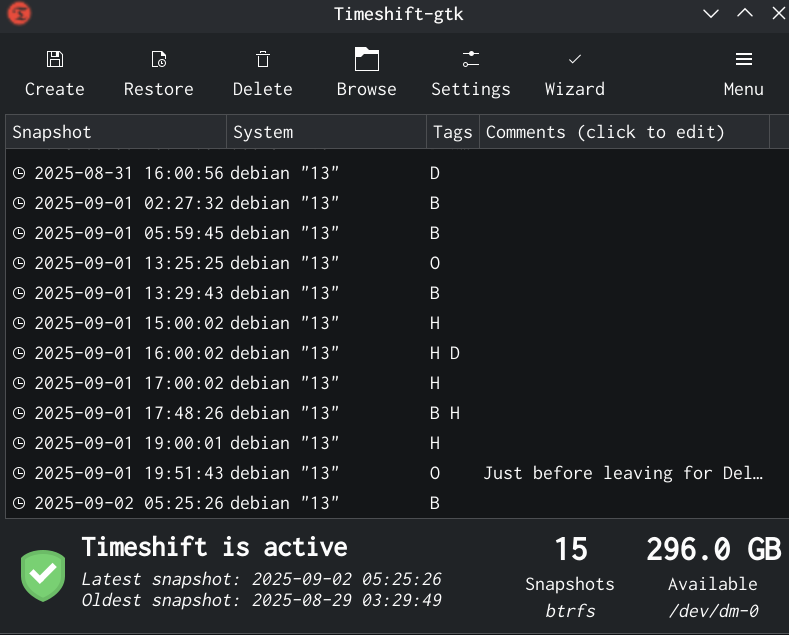
Motivation On the 8th of August 2025 (a day before the Debian Trixie release), I was upgrading my personal laptop from Debian Bookworm to Trixie. It was a major update. However, the update didn t go smoothly, and I ran into some errors. From the Debian support IRC channel, I got to know that it would be best if I removed the texlive packages. However, it was not so easy to just remove texlive with a simple apt remove command. I had to remove the texlive packages from /usr/bin. Then I ran into other errors. Hours after I started the upgrade, I realized I preferred having my system as it was before, as I had to travel to Noida the next day. Needless to say, I wanted to go to sleep rather than fix my broken system. Only if I had a way to go back to my system before I started upgrading, it would have saved a lot of trouble for me. I ended up installing Trixie from scratch. It turns out that there was a way to recover to the state before the upgrade - using Timeshift to roll back the system to a state (in our example, it is the state before the upgrade process started) in the past. However, it needs the Btrfs filesystem with appropriate subvolumes, not provided by Debian installer in their guided partitioning menu. I have set it up after a few weeks of the above-mentioned incident. Let me demonstrate how it works.
Check the screenshot above. It shows a list of snapshots made by Timeshift. Some of them were made by me manually. Others were made by Timeshift automatically as per the routine - I have set up hourly backups and weekly backups etc. In the above-mentioned major update, I could have just taken a snapshot using Timeshift before performing the upgrade and could have rolled back to that snapshot when I found that I cannot spend more time on fixing my installation errors. Then I could just perform the upgrade later.

Installation In this tutorial, I will cover how I installed Debian with Btrfs and disk encryption, along with creating subvolumes @ for root and @home for /home so that I can use Timeshift to create snapshots. These snapshots are kept on the same disk where Debian is installed, and the use-case is to roll back to a working system in case I mess up something or to recover an accidentally deleted file. I went through countless tutorials on the Internet, but I didn t find a single tutorial covering both the disk encryption and the above-mentioned subvolumes (on Debian). Debian doesn t create the desired subvolumes by default, therefore the process requires some manual steps, which beginners may not be comfortable performing. Beginners can try distros such as Fedora and Linux Mint, as their installation includes Btrfs with the required subvolumes. Furthermore, it is pertinent to note that I used Debian Trixie s DVD iso on a real laptop (not a virtual machine) for my installation. Debian Trixie is the codename for the current stable version of Debian. Then I took screenshots in a virtual machine by repeating the process. Moreover, a couple of screenshots are from the installation I did on the real laptop. Let s start the tutorial by booting up the Debian installer.

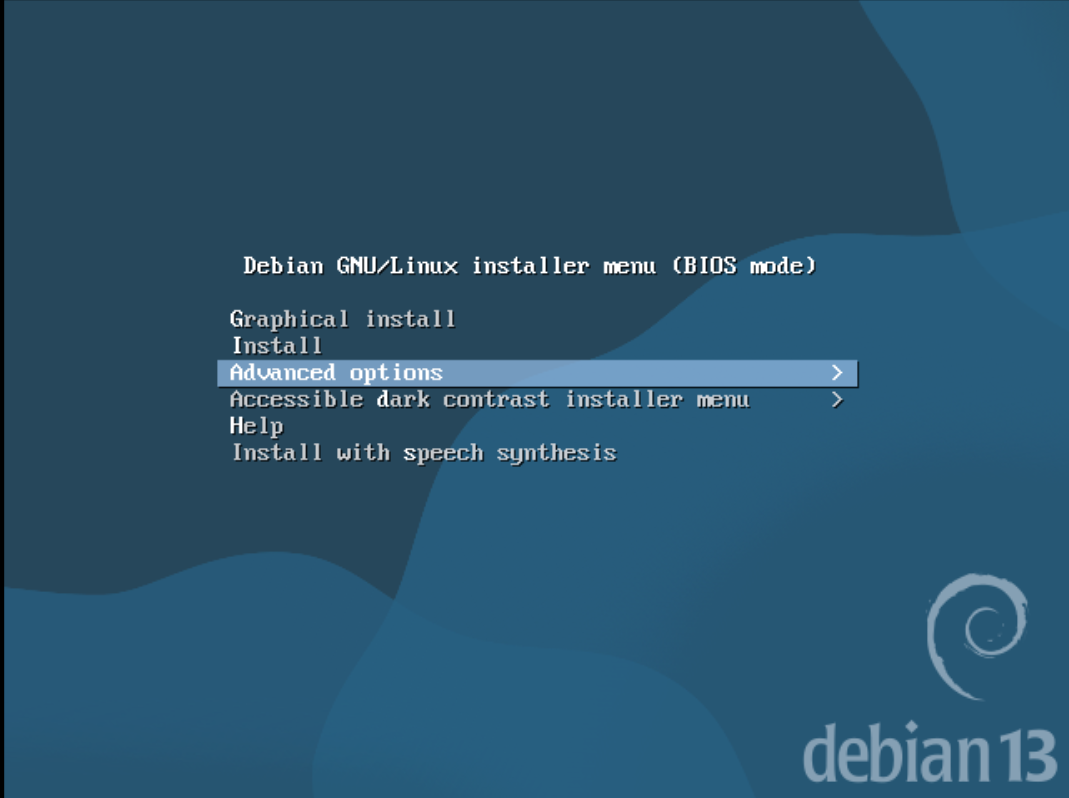
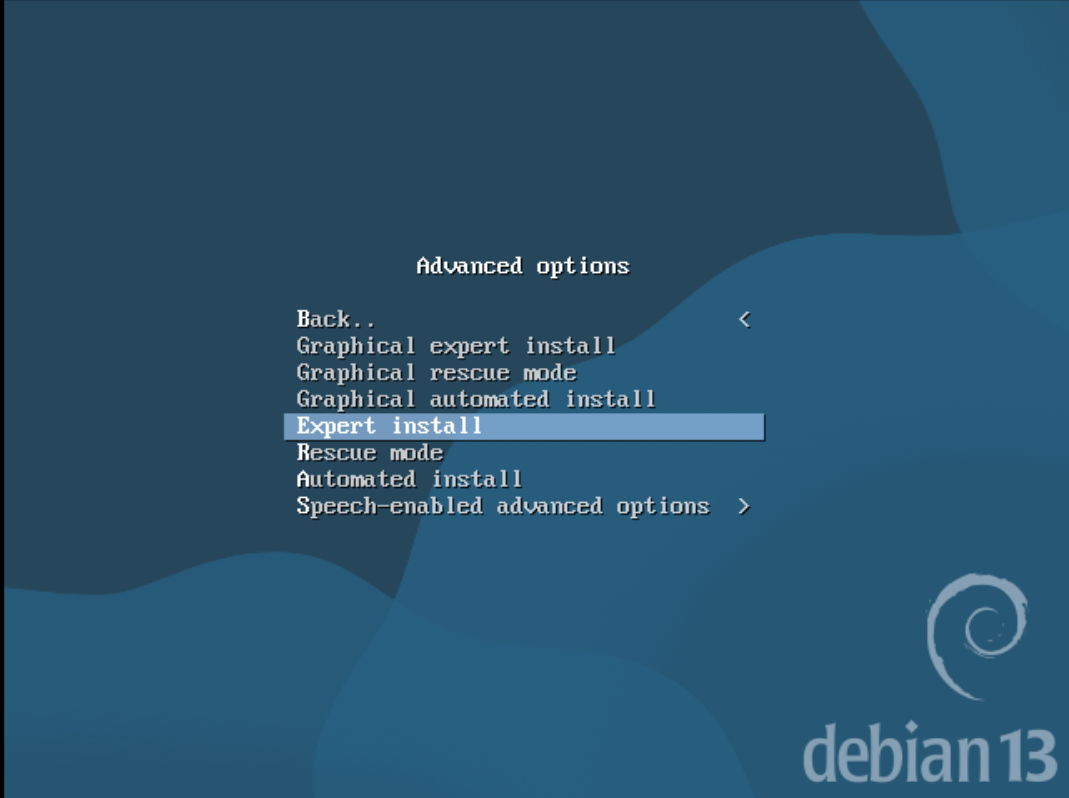
The above screenshot shows the first screen we see on the installer. Since we want to choose Expert Install, we select Advanced Options in the screenshot above.
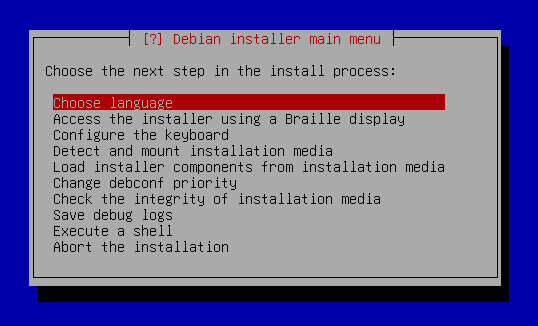
Let s select the Expert Install option in the above screenshot. It is because we want to create subvolumes after the installer is done with the partition, and only then proceed to installing the base system. Non-expert install modes proceed directly to installing the system right after creating partitions without pausing for us to create the subvolumes.
After selecting the Expert Install option, you will get the screen above. I will skip to partitioning from here and leave the intermediate steps such as choosing language, region, connecting to Wi-Fi, etc. For your reference, I did create the root user.
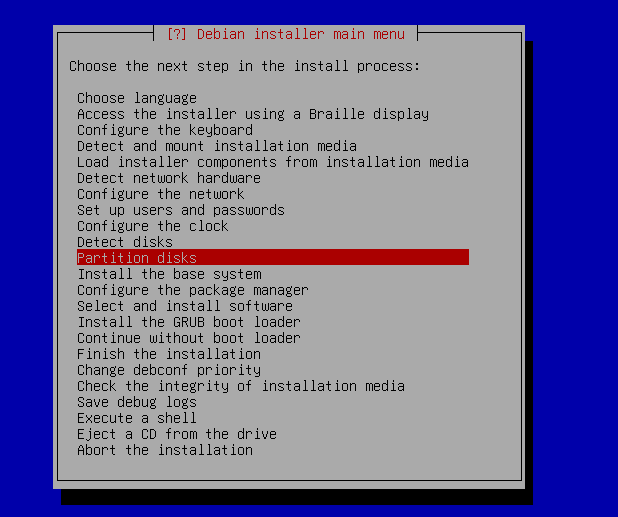
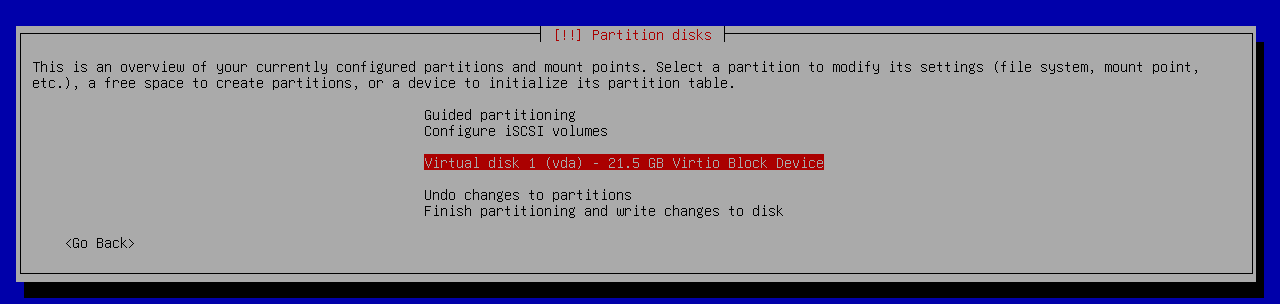
Let s jump right to the partitioning step. Select the Partition disks option from the menu as shown above.
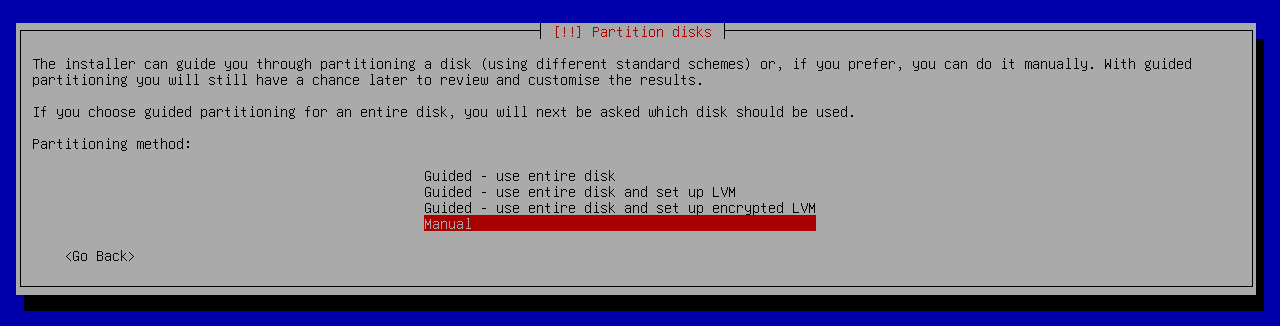
Choose Manual.
Select your disk where you would like to install Debian.
Select Yes when asked for creating a new partition.
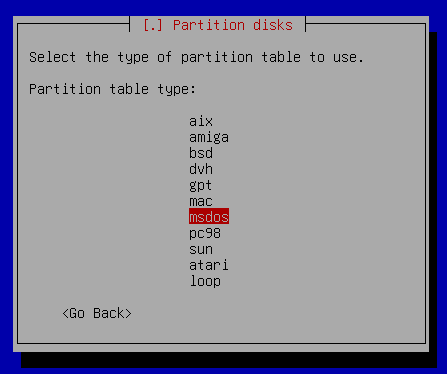
I chose the msdos option as I am not using UEFI. If you are using UEFI, then you need to choose the gpt option. Also, your steps will (slightly) differ from mine if you are using UEFI. In that case, you can watch this video by the YouTube channel EF Linux in which he creates an EFI partition. As he doesn t cover disk encryption, you can continue reading this post after following the steps corresponding to EFI.
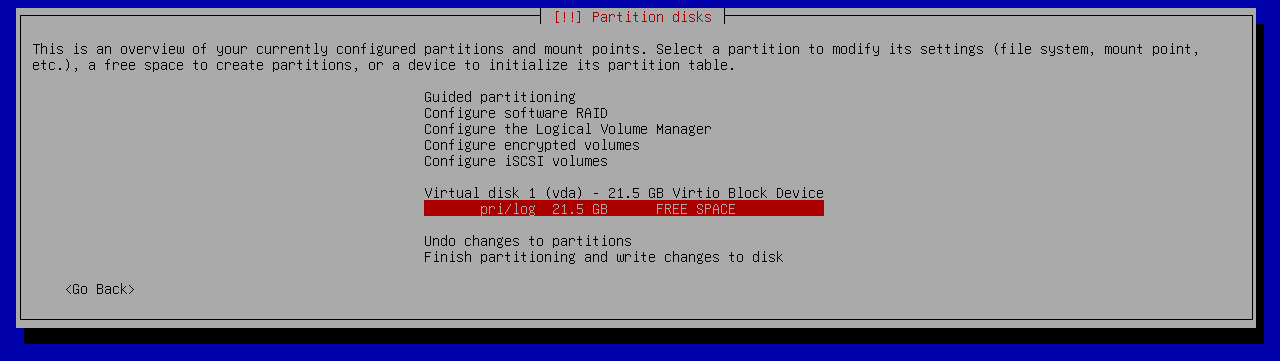
Select the free space option as shown above.
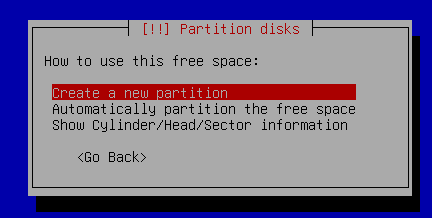
Choose Create a new partition.
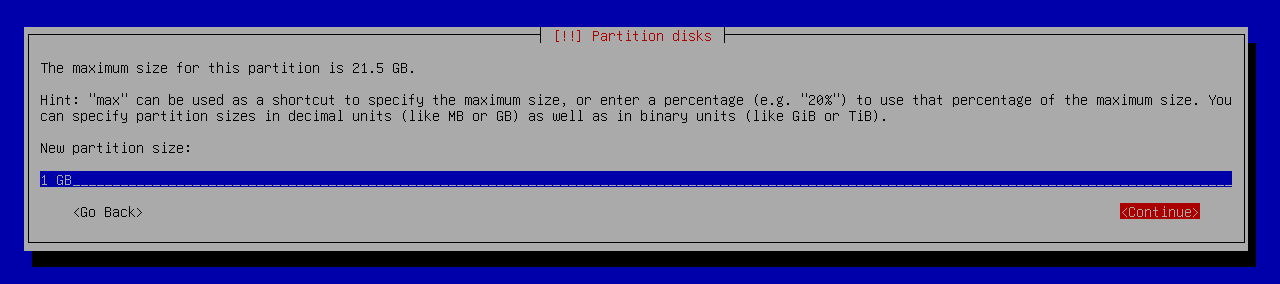
I chose the partition size to be 1 GB.
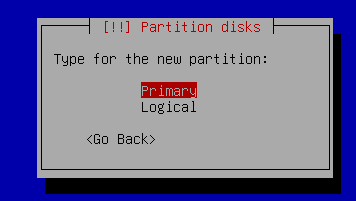
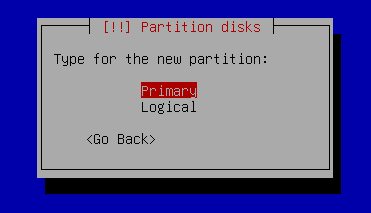
Choose Primary.
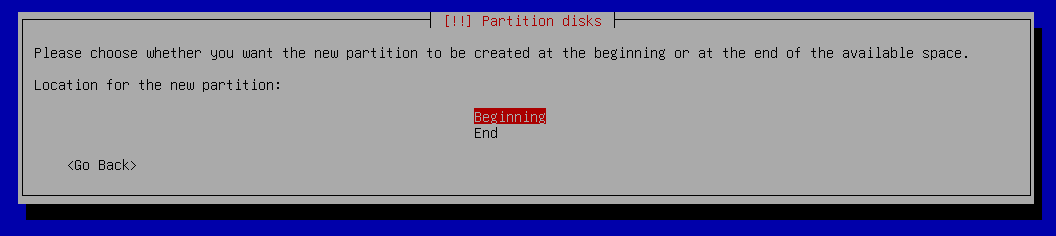
Choose Beginning.
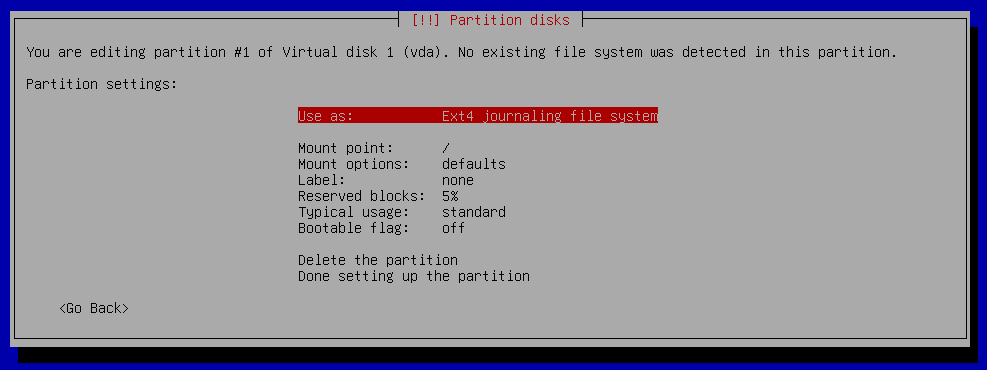
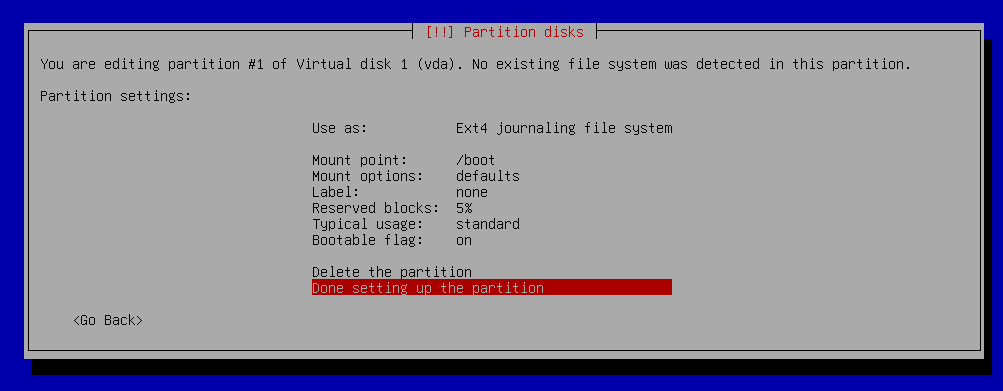
Now, I got to this screen.
I changed mount point to /boot and turned on the bootable flag and then selected Done setting up the partition.
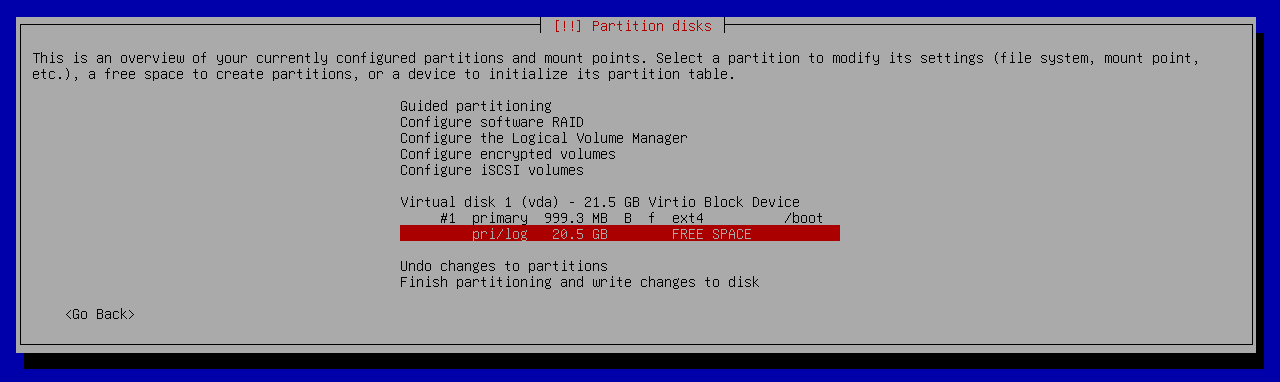
Now select free space.
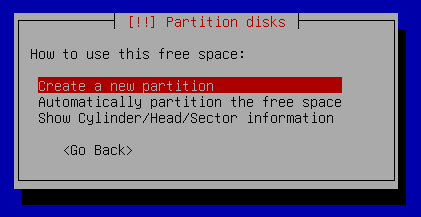
Choose the Create a new partition option.
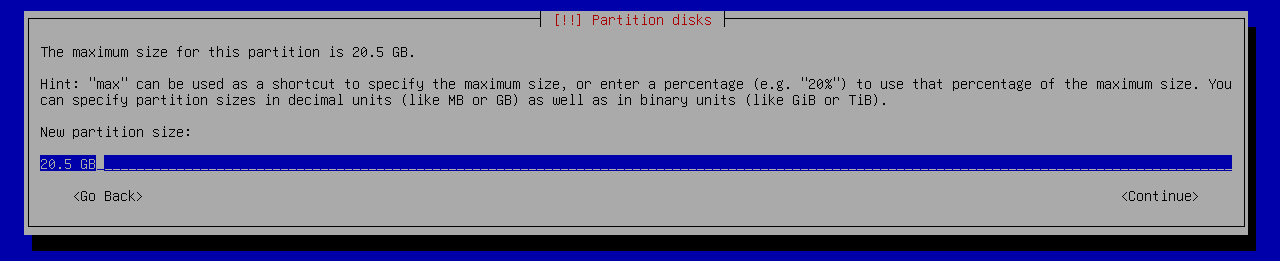
I made the partition size equal to the remaining space on my disk. I do not intend to create a swap partition, so I do not need more space.
Select Primary.
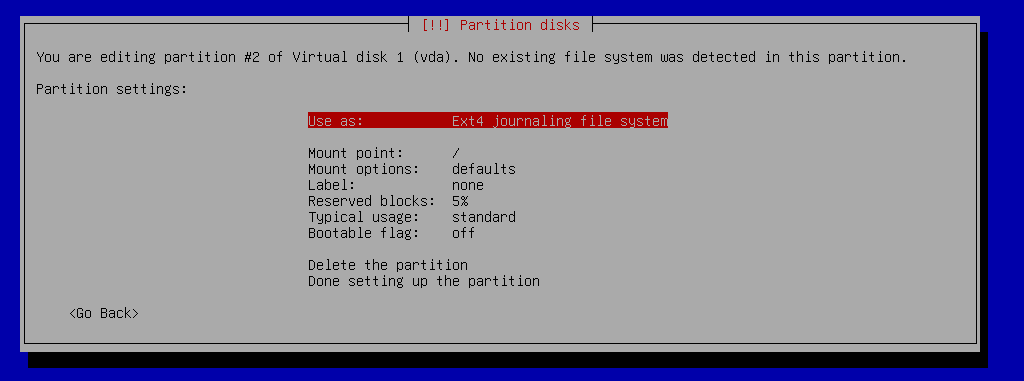
Select the Use as option to change its value.
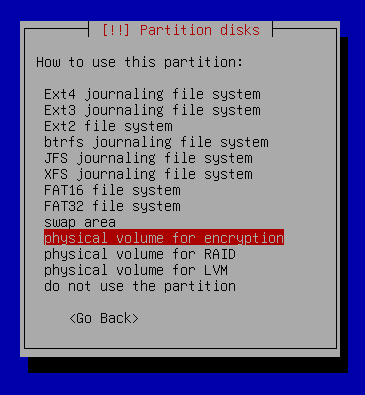
Select physical volume for encryption.
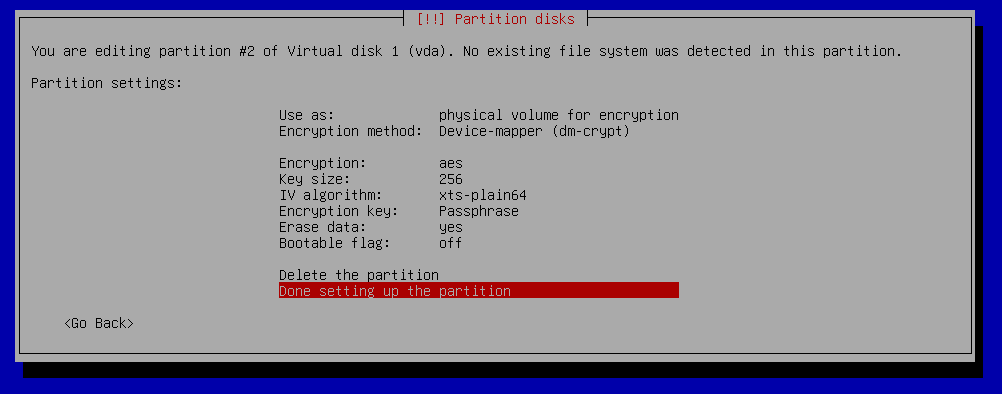
Select Done setting up the partition.
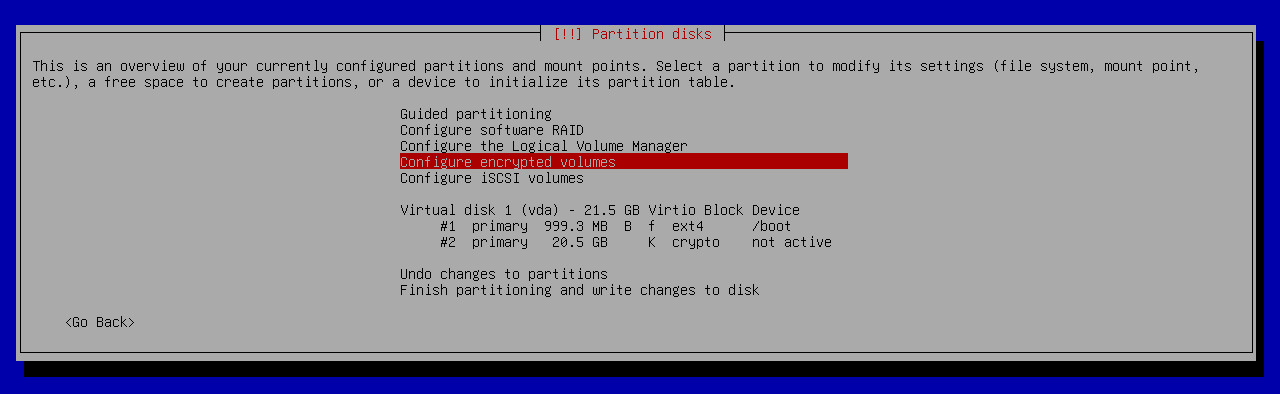
Now select Configure encrypted volumes.
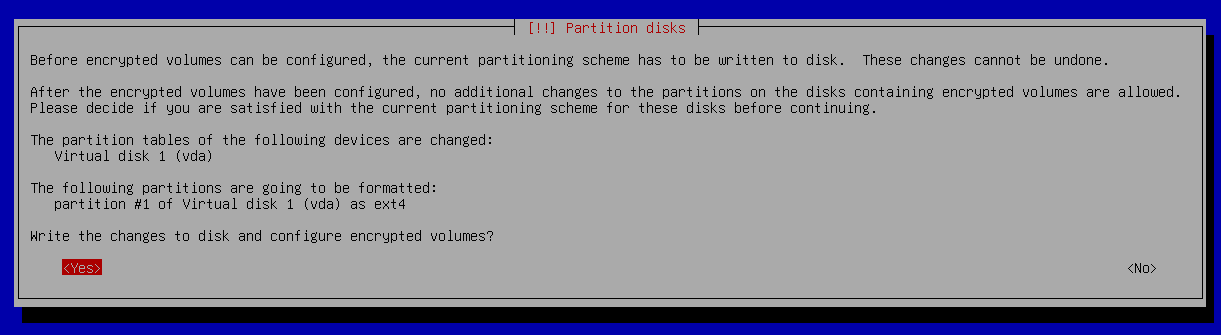
Select Yes.
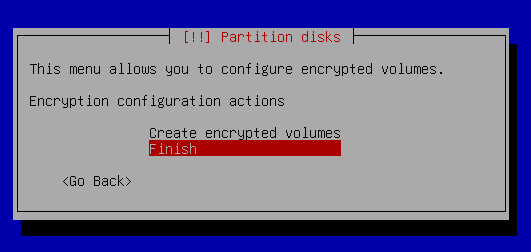
Select Finish.
Selecting Yes will take a lot of time to erase the data. Therefore, I would say if you have hours for this step (in case your SSD is like 1 TB), then I would recommend selecting Yes. Otherwise, you could select No and compromise on the quality of encryption. After this, you will be asked to enter a passphrase for disk encryption and confirm it. Please do so. I forgot to take the screenshot for that step.
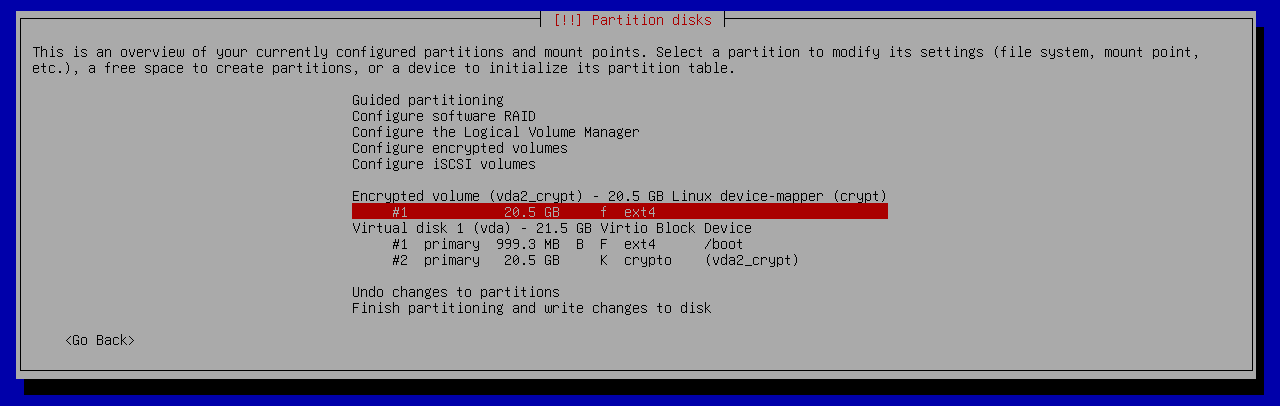
Now select that encrypted volume as shown in the screenshot above.
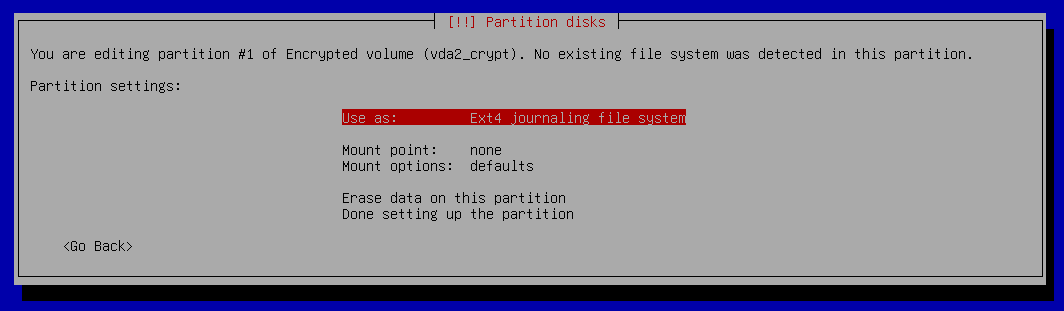
Here we will change a couple of options which will be shown in the next screenshot.
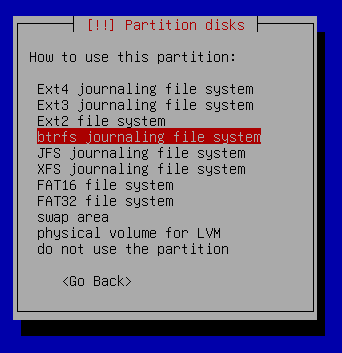
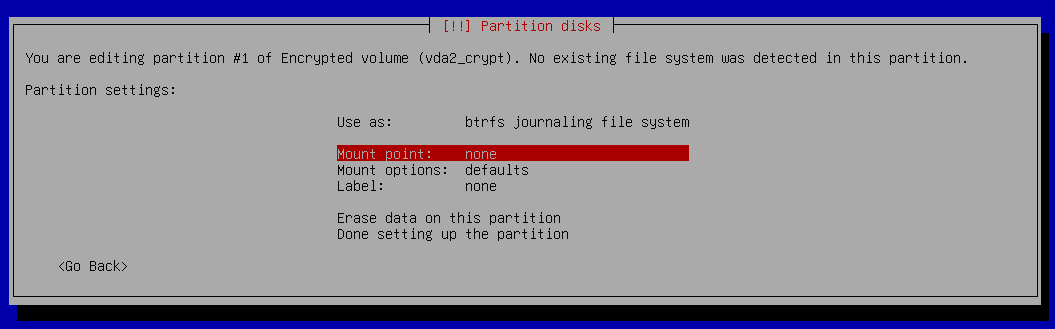
In the Use as menu, select btrfs journaling file system.
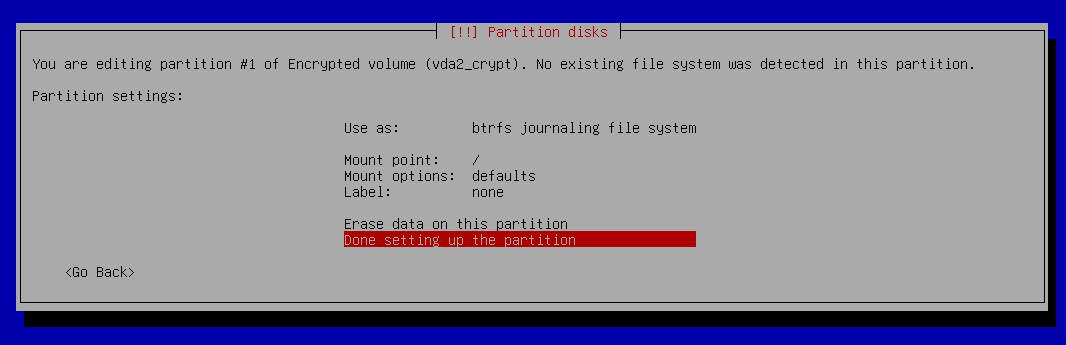
Now, click on the mount point option.
Change it to / - the root file system.
Select Done setting up the partition.
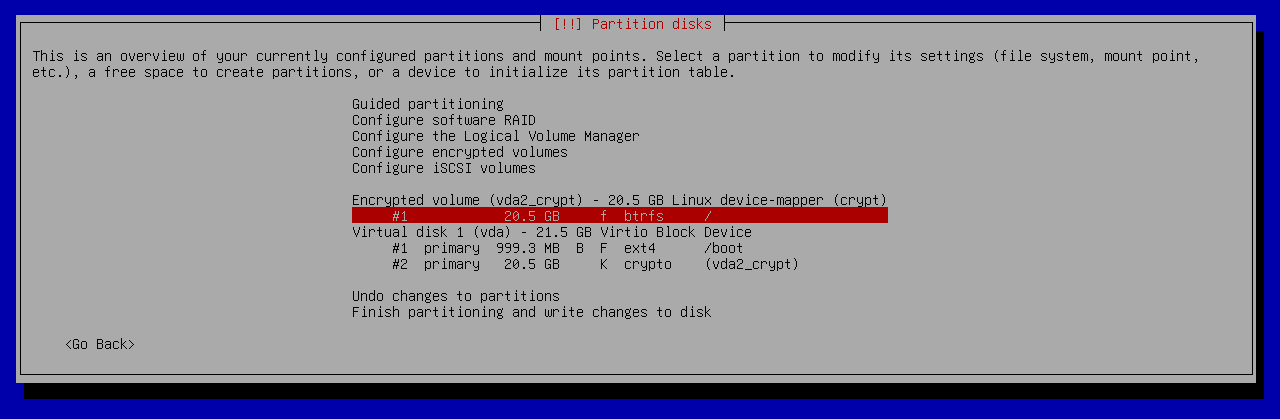
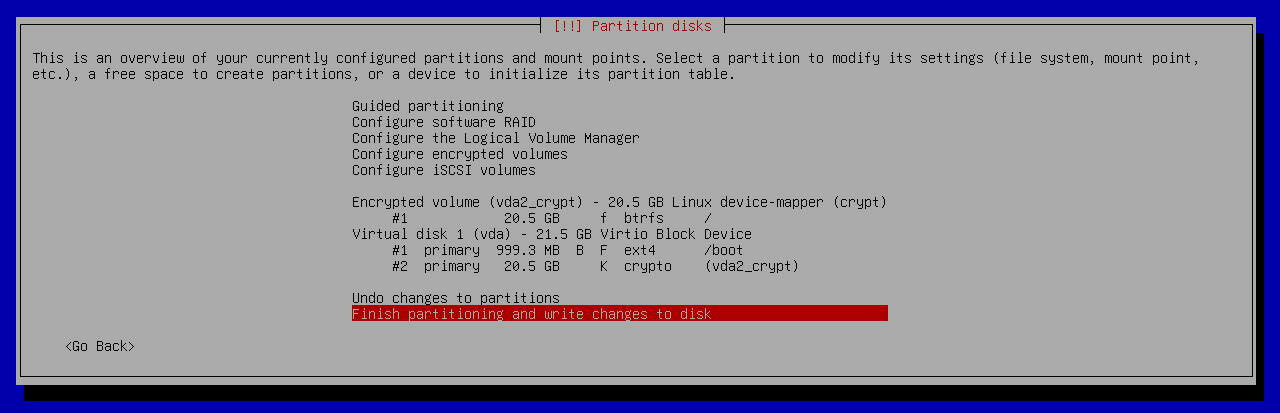
This is a preview of the paritioning after performing the above-mentioned steps.
If everything is okay, proceed with the Finish partitioning and write changes to disk option.
The installer is reminding us to create a swap partition. I proceeded without it as I planned to add swap after the installation.
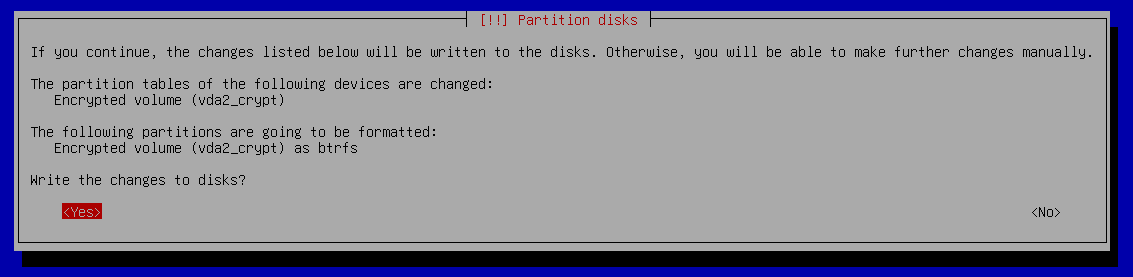
If everything looks fine, choose yes for writing the changes to disks.
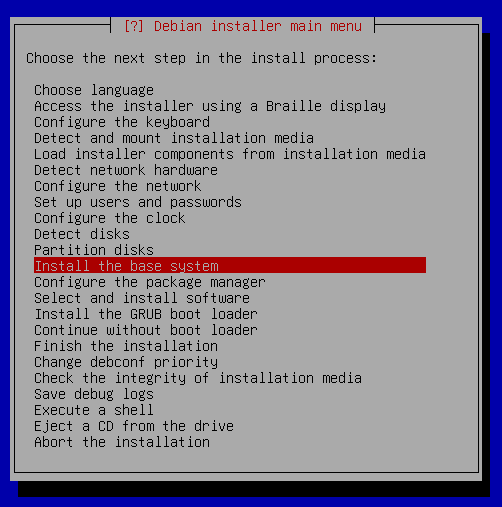
Now we are done with partitioning and we are shown the screen in the screenshot above. If we had not selected the Expert Install option, the installer would have proceeded to install the base system without asking us. However, we want to create subvolumes before proceeding to install the base system. This is the reason we chose Expert Install. Now press Ctrl + F2.
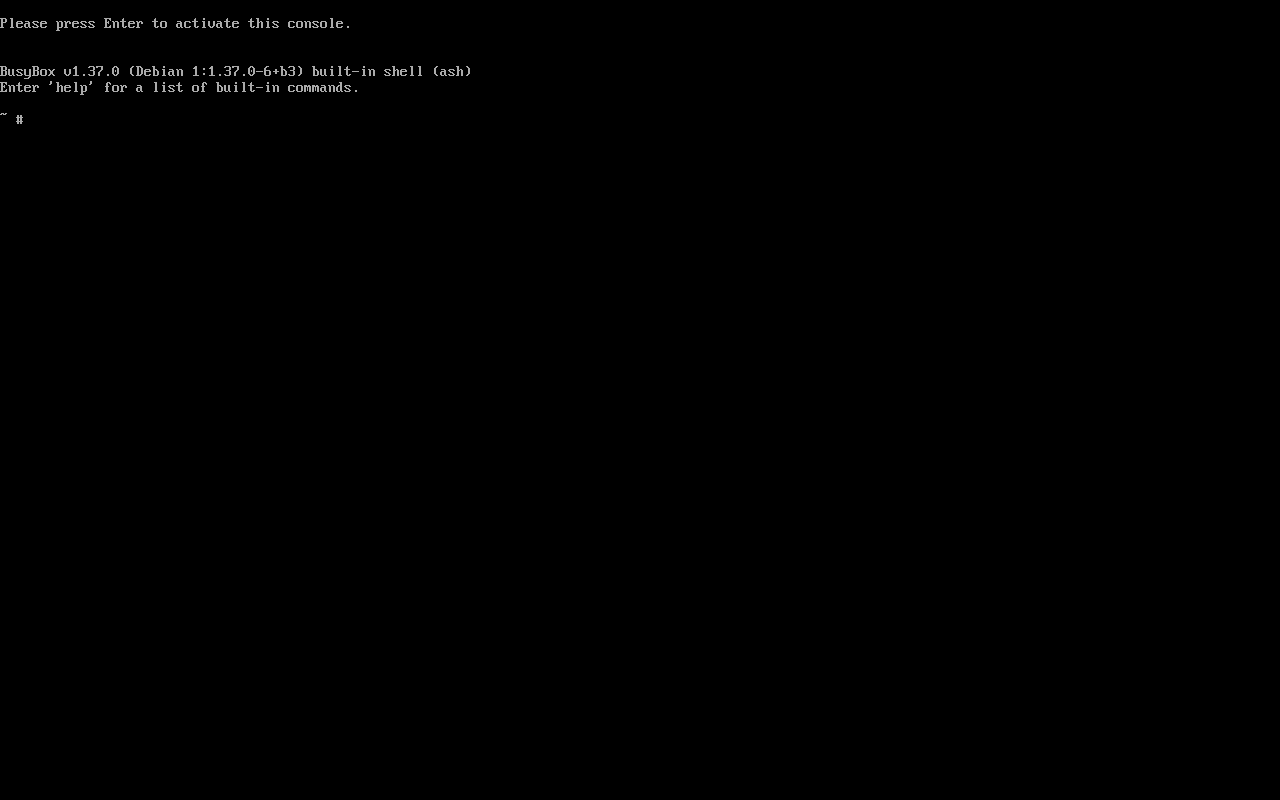
You will see the screen as in the above screenshot. It says Please press Enter to activate this console. So, let s press Enter.
After pressing Enter, we see the above screen.
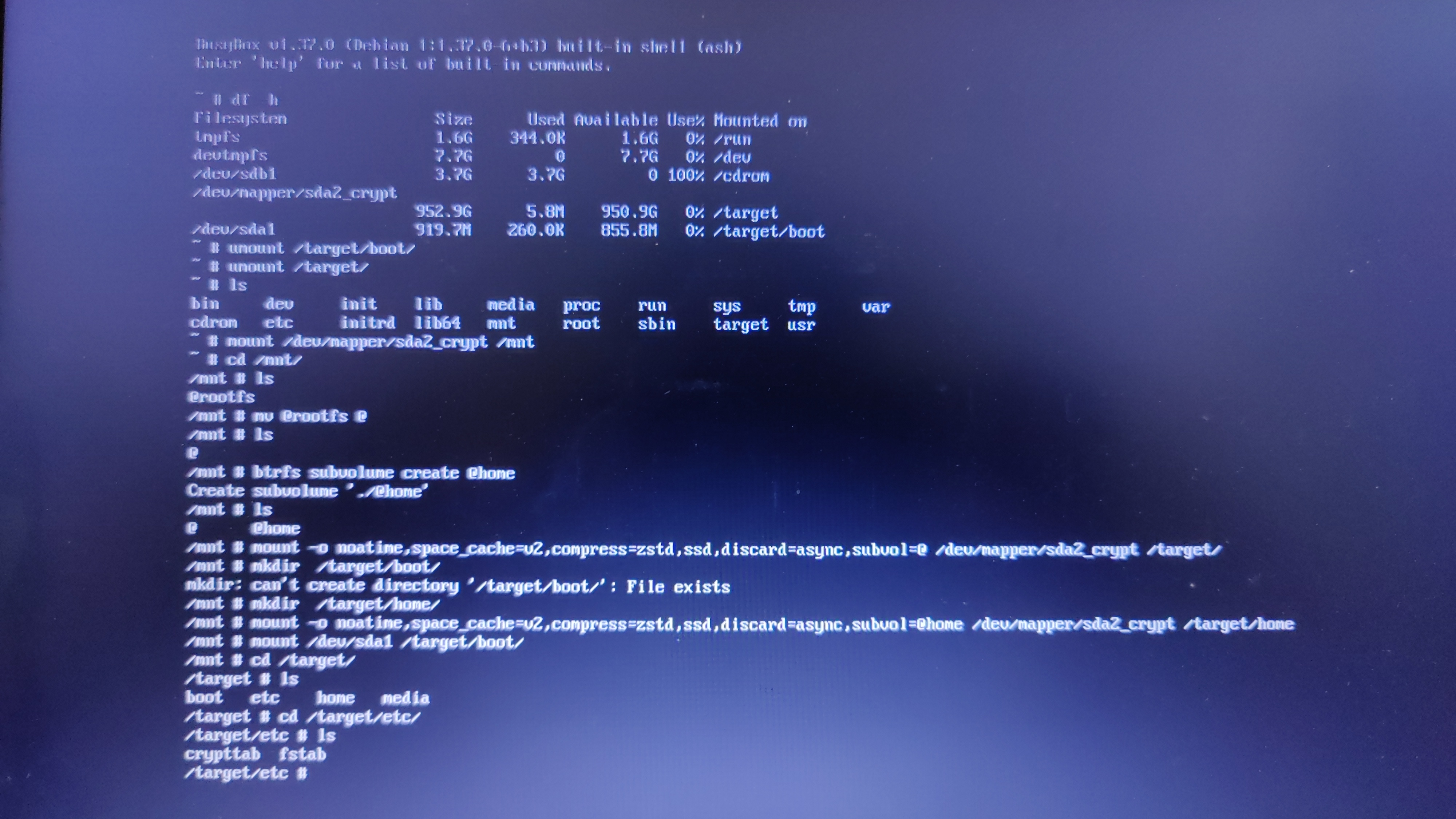
The screenshot above shows the steps I performed in the console. I followed the already mentioned video by EF Linux for this part and adapted it to my situation (he doesn t encrypt the disk in his tutorial). First we run df -h to have a look at how our disk is partitioned. In my case, the output was:
# df -h
Filesystem              Size  Used  Avail   Use% Mounted on
tmpfs                   1.6G  344.0K  1.6G    0% /run
devtmpfs                7.7G       0  7.7G   0% /dev
/dev/sdb1               3.7G    3.7G    0   100% /cdrom
/dev/mapper/sda2_crypt  952.9G  5.8G  950.9G  0% /target
/dev/sda1               919.7M  260.0K  855.8M  0% /target/boot
df -h shows us that /dev/mapper/sda2_crypt and /dev/sda1 are mounted on /target and /target/boot respectively. Let s unmount them. For that, we run:
# umount /target
# umount /target/boot
Next, let s mount our root filesystem to /mnt.
# mount /dev/mapper/sda2_crypt /mnt
Let s go into the /mnt directory.
# cd /mnt
Upon listing the contents of this directory, we get:
/mnt # ls
@rootfs
Debian installer has created a subvolume @rootfs automatically. However, we need the subvolumes to be @ and @home. Therefore, let s rename the @rootfs subvolume to @.
/mnt # mv @rootfs @
Listing the contents of the directory again, we get:
/mnt # ls
@
We only one subvolume right now. Therefore, let us go ahead and create another subvolume @home.
/mnt # btrfs subvolume create @home
Create subvolume './@home'
If we perform ls now, we will see there are two subvolumes:
/mnt # ls
@ @home
Let us mount /dev/mapper/sda2_crypt to /target
/mnt # mount -o noatime,space_cache=v2,compress=zstd,ssd,discard=async,subvol=@ /dev/mapper/sda2_crypt /target/
Now we need to create a directory for /home.
/mnt # mkdir /target/home/
Now we mount the /home directory with subvol=@home option.
/mnt # mount -o noatime,space_cache=v2,compress=zstd,ssd,discard=async,subvol=@home /dev/mapper/sda2_crypt /target/home/
Now mount /dev/sda1 to /target/boot.
/mnt # mount /dev/sda1 /target/boot/
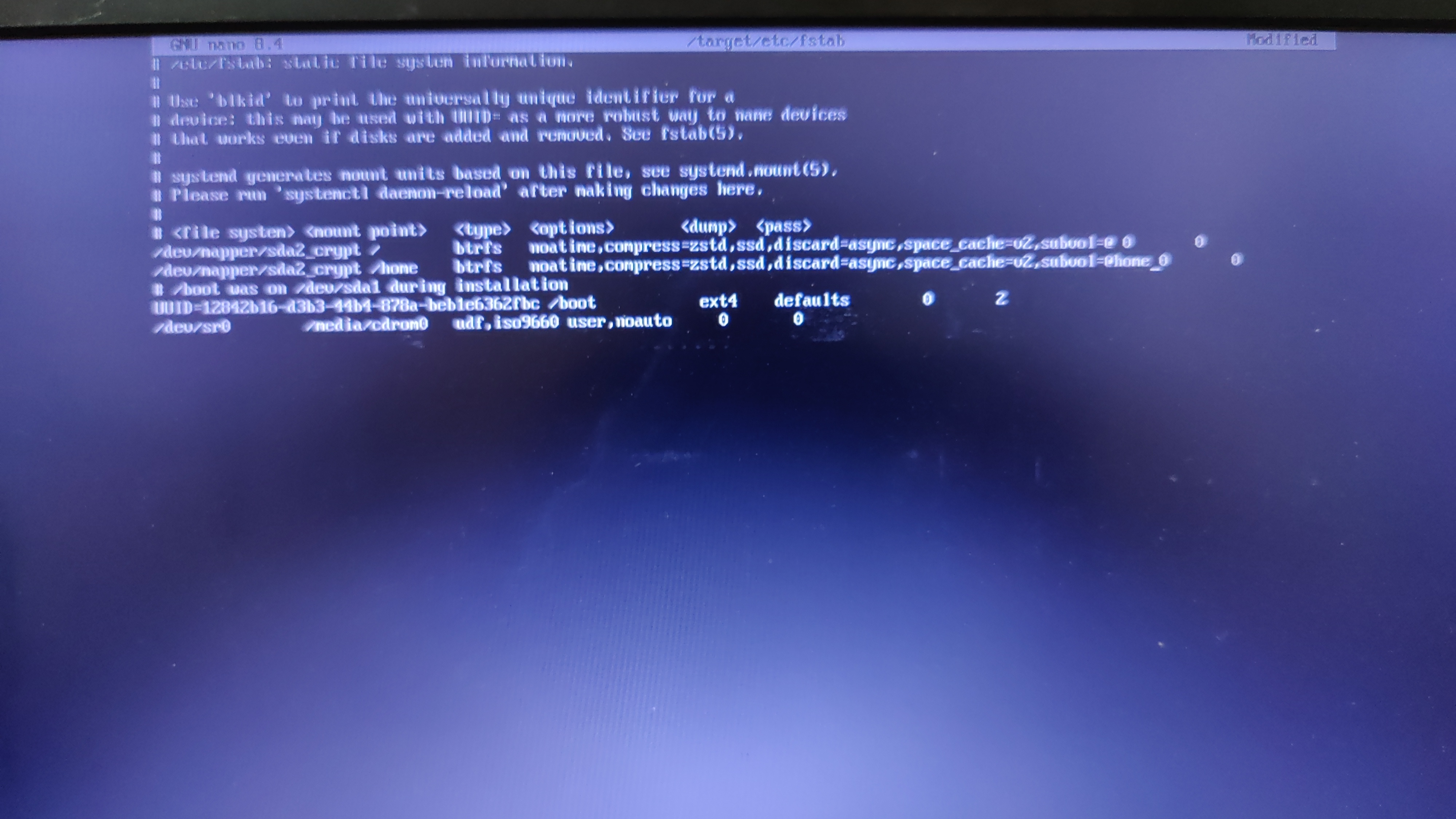
Now we need to add these options to the fstab file, which is located at /target/etc/fstab. Unfortunately, vim is not installed in this console. The only way to edit is Nano.
nano /target/etc/fstab
Edit your fstab file to look similar to the one in the screenshot above. I am pasting the fstab file contents below for easy reference.
# /etc/fstab: static file system information.
#
# Use 'blkid' to print the universally unique identifier for a
# device; this may be used with UUID= as a more robust way to name devices
# that works even if disks are added and removed. See fstab(5).
#
# systemd generates mount units based on this file, see systemd.mount(5).
# Please run 'systemctl daemon-reload' after making changes here.
#
# <file system> <mount point>   <type>  <options>       <dump>  <pass>
/dev/mapper/sda2_crypt /        btrfs   noatime,compress=zstd,ssd,discard=async,space_cache=v2,subvol=@ 0       0
/dev/mapper/sda2_crypt /home    btrfs   noatime,compress=zstd,ssd,discard=async,space_cache=v2,subvol=@home 0       0
# /boot was on /dev/sda1 during installation
UUID=12842b16-d3b3-44b4-878a-beb1e6362fbc /boot           ext4    defaults        0       2
/dev/sr0        /media/cdrom0   udf,iso9660 user,noauto     0       0
Please double check the fstab file before saving it. In Nano, you can press Ctrl+O followed by pressing Enter to save the file. Then press Ctrl+X to quit Nano. Now, preview the fstab file by running
cat /target/etc/fstab
and verify that the entries are correct, otherwise you will booted to an unusable and broken system after the installation is complete. Next, press Ctrl + Alt + F1 to go back to the installer.
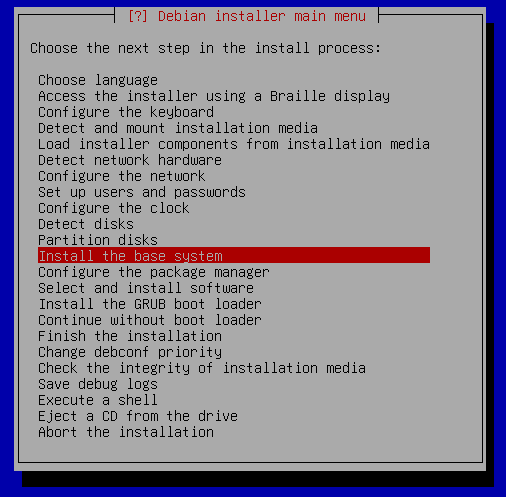
Proceed to Install the base system.
Screenshot of Debian installer installing the base system. Screenshot of Debian installer installing the base system.

I chose the default option here - linux-image-amd64. After this, the installer will ask you a few more questions. For desktop environment, I chose KDE Plasma. You can choose the desktop environment as per your liking. I will not cover the rest of the installation process and assume that you were able to install from here.

Post installation Let s jump to our freshly installed Debian system. Since I created a root user, I added the user ravi to the suoders file (/etc/sudoers) so that ravi can run commands with sudo. Follow this if you would like to do the same. Now we set up zram as swap. First, install zram-tools.
sudo apt install zram-tools
Now edit the file /etc/default/zramswap and make sure to have the following lines are uncommented:
ALGO=lz4
PERCENT=50
Now, run
sudo systemctl restart zramswap
If you run lsblk now, you should see the below-mentioned entry in the output:
zram0          253:0    0   7.8G  0 disk  [SWAP]
This shows us that zram has been activated as swap. Now we install timeshift, which can be done by running
sudo apt install timeshift
After the installation is complete, run Timeshift and schedule snapshots as you please. We are done now. Hope the tutorial was helpful. See you in the next post and let me know if you have any suggestions and questions on this tutorial.

Raju Devidas: Fixing Auto-Rotate screen orientation on PostmarketOS devices running MATE DE

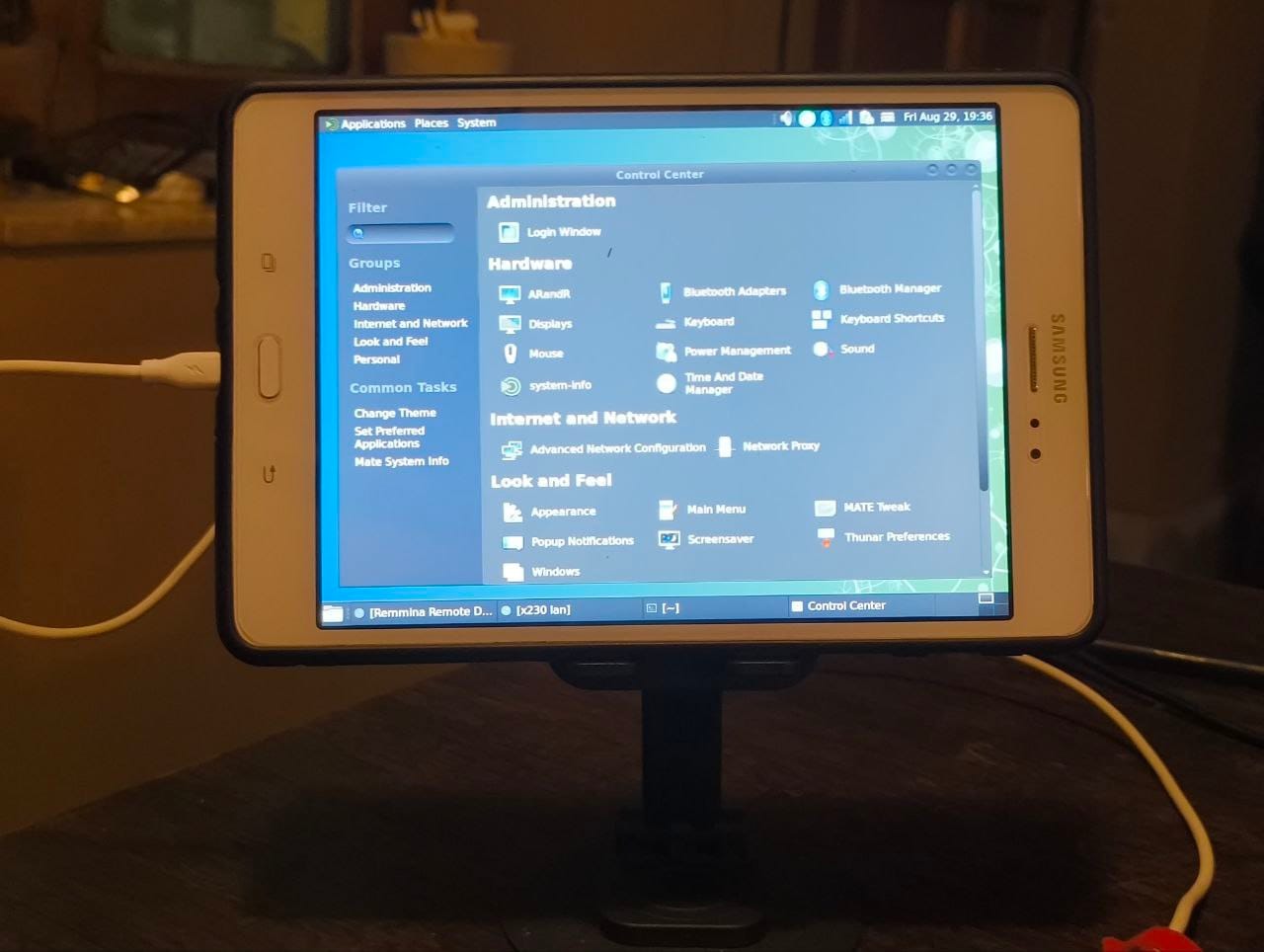
Fixing Auto-Rotate screen orientation on PostmarketOS devices running MATE DEI have been using my Samsung Galaxy Tab A (2015) with PostmarketOS on and off since last year. It serves as a really good e-book reader with KOReader installed on it. Have tried phosh and plasma-mobile on it, works nicely but slows the device down heavily (2 GB RAM and old processor) so I use MATE Desktop environment on it.Lately I have started using this tablet along with my laptop as a second screen for work. And it has been working super nicely for that. The only issue being that I have to manually rotate the screen to landscape every time I reboot the device. It resets the screen orientation to portrait after a reboot. So I went through the pmOS wiki and a neat nice hack documented there worked very well for me. First we will test if the auto-rotate sensor works and if we can read values from it. So we install some basic necessary packages

$ sudo apk add xrandr xinput inotify-tools iio-sensor-proxy
Enable the service for iio-sensor-proxy
sudo rc-update add iio-sensor-proxy
Reboot the device. Now in the device terminal start the sensor monitor-sensor
user@samsung-gt58 ~> monitor-sensor
    Waiting for iio-sensor-proxy to appear
+++ iio-sensor-proxy appeared
=== Has accelerometer (orientation: normal, tilt: vertical)
=== Has ambient light sensor (value: 5.000000, unit: lux)
=== No proximity sensor
=== No compass
    Light changed: 14.000000 (lux)
    Accelerometer orientation changed: left-up
    Tilt changed: tilted-down
    Light changed: 12.000000 (lux)
    Tilt changed: vertical
    Light changed: 13.000000 (lux)
    Light changed: 11.000000 (lux)
    Light changed: 13.000000 (lux)
    Accelerometer orientation changed: normal
    Light changed: 5.000000 (lux)
    Light changed: 6.000000 (lux)
    Light changed: 5.000000 (lux)
    Accelerometer orientation changed: right-up
    Light changed: 3.000000 (lux)
    Light changed: 4.000000 (lux)
    Light changed: 5.000000 (lux)
    Light changed: 12.000000 (lux)
    Tilt changed: tilted-down
    Light changed: 19.000000 (lux)
    Accelerometer orientation changed: bottom-up
    Tilt changed: vertical
    Light changed: 1.000000 (lux)
    Light changed: 2.000000 (lux)
    Light changed: 4.000000 (lux)
    Accelerometer orientation changed: right-up
    Tilt changed: tilted-down
    Light changed: 11.000000 (lux)
    Accelerometer orientation changed: normal
    Tilt changed: vertical
    Tilt changed: tilted-down
    Light changed: 18.000000 (lux)
    Light changed: 21.000000 (lux)
    Light changed: 22.000000 (lux)
    Light changed: 19.000000 (lux)
    Accelerometer orientation changed: left-up
    Light changed: 17.000000 (lux)
    Tilt changed: vertical
    Light changed: 14.000000 (lux)
    Tilt changed: tilted-down
    Light changed: 16.000000 (lux)
    Light changed: 18.000000 (lux)
    Light changed: 17.000000 (lux)
    Light changed: 18.000000 (lux)
    Light changed: 17.000000 (lux)
    Light changed: 18.000000 (lux)
    Light changed: 17.000000 (lux)
    Light changed: 18.000000 (lux)
    Light changed: 17.000000 (lux)
As you can see we can read the rotation values from the sensor as I am rotating the tablet in different orientations. Now we just need to use a script which changes the screen orientation using xrandr according to the sensor value.
#!/bin/sh
killall monitor-sensor
monitor-sensor > /dev/shm/sensor.log 2>&1 &
while inotifywait -e modify /dev/shm/sensor.log; do
  ORIENTATION=$(tail /dev/shm/sensor.log   grep &aposorientation&apos   tail -1   grep -oE &apos[^ ]+$&apos)
  case "$ORIENTATION" in
    normal)
      xrandr -o normal
      xinput set-prop "Goodix Capacitive TouchScreen" "Coordinate Transformation Matrix" 1 0 0 0 1 0 0 0 1
      ;;
    left-up)
      xrandr -o left
      xinput set-prop "Goodix Capacitive TouchScreen" "Coordinate Transformation Matrix" 0 -1 1 1 0 0 0 0 1
      ;;
    bottom-up)
      xrandr -o inverted
      xinput set-prop "Goodix Capacitive TouchScreen" "Coordinate Transformation Matrix" -1 0 1 0 -1 1 0 0 1
      ;;
    right-up)
      xrandr -o right
      xinput set-prop "Goodix Capacitive TouchScreen" "Coordinate Transformation Matrix" 0 1 0 -1 0 1 0 0 1
      ;;
  esac
done

auto-rotate-screen.sh

You need to replace the name of your touch input device in the script, you can get the name by using xinput --list , make sure to type this on the device terminal.
user@samsung-gt58 ~> xinput --list
* Virtual core pointer                    	id=2	[master pointer  (3)]
*   * Virtual core XTEST pointer              	id=4	[slave  pointer  (2)]
*   * Zinitix Capacitive TouchScreen          	id=10	[slave  pointer  (2)]
*   * Toad One Plus                           	id=12	[slave  pointer  (2)]
* Virtual core keyboard                   	id=3	[master keyboard (2)]
    * Virtual core XTEST keyboard             	id=5	[slave  keyboard (3)]
    * GPIO Buttons                            	id=6	[slave  keyboard (3)]
    * pm8941_pwrkey                           	id=7	[slave  keyboard (3)]
    * pm8941_resin                            	id=8	[slave  keyboard (3)]
    * Zinitix Capacitive TouchScreen          	id=11	[slave  keyboard (3)]
    * samsung-a2015 Headset Jack              	id=9	[slave  keyboard (3)]
In our script here we are using a Zinitix capacitive screen, it will be different for yours.Once your script is ready with the correct touchscreen name. Save and make the script executable. chmod +x auto-rotate-screen.sh Then test your script in your terminal ./auto-rotate.sh , stop the script using Ctrl + CNow we need add this script to auto-start. On MATE DE you can go to System > Control Center > Startup Applications, then click on Custom Add button, browse the script location, give it a name and then click on Add button. Now reboot the tablet/device, login and see the auto rotation working.
0:00
/0:09

  1. Auto-Rotation wiki article on PostmarketOS Wiki https://wiki.postmarketos.org/wiki/Auto-rotation

Noah Meyerhans: Determining Network Online Status of Dualstack Cloud VMs

When a Debian cloud VM boots, it typically runs cloud-init at various points in the boot process. Each invocation can perform certain operations based on the host s static configuration passed by the user, typically either through a well known link-local network service or an attached iso9660 drive image. Some of the cloud-init steps execute before the network comes up, and others at a couple of different points after the network is up. I recently encountered an unexpected issue when configuring a dualstack (uses both IPv6 and legacy IPv4 networking) VM to use a custom apt server accessible only via IPv6. VM provisioning failed because it was unable to access the server in question, yet when I logged in to investigate, it was able to access the server without any problem. The boot had apparently gone smoothly right up until cloud-init s Package Update Upgrade Install module called apt-get update, which failed and broke subsequent provisioning steps. The errors reported by apt-get indicated that there was no route to the service in question, which more accurately probably meant that there was not yet a route to the service. But there was shortly after, when I investigated. This was surprising because the apt-get invocations occur in a cloud-init sequence that s explicitly ordered after the network is configured according to systemd-networkd-wait-online. Investigation eventually led to similar issues encountered in other environments reported in Debian bug #1111791, systemd: network-online.target reached before IPv6 address is ready . The issue described in that bug is identical to mine, but the bug is tagged wontfix. The behavior is considered correct.

Why the default behavior is the correct one While it s a bit counterintuitive, the systemd-networkd behavior is correct, and it s also not something we d want to override in the cloud images. Without explicit configuration, systemd can t accurately infer the intended network configuration of a given system. If a system is IPv6-only, systemd-networkd-wait-online will introduce unexpected delays in the boot process if it waits for IPv4, and vice-versa. If it assumes dualstack, things are even worse because it would block for a long time (approximately two minutes) in any single stack network before failing, leaving the host in degraded state. So the most reasonable default behavior is to block until any protocol is configured. For these same reasons, we can t change the systemd-networkd-wait-online configuration in our cloud images. All of the cloud environments we support offer both single stack and dual stack networking, so we preserve systemd s default behavior. What s causing problems here is that IPv6 takes significantly longer to configure due to its more complex router solicitation + router advertisement + DHCPv6 setup process. So in this particular case, where I ve got a dualstack VM that needs to access a v6-only apt server during the provisioning process, I need to find some mechanism to override systemd s default behavior and wait for IPv6 connectivity specifically.

What won t work Cloud-init offers the ability to write out arbitrary files during provisioning. So writing a drop-in for systemd-networkd-wait-online.service is trivial. Unfortunately, this doesn t give us everything we actually need. We still need to invoke systemctl daemon-reload to get systemd to actually apply the changes after we ve written them, and of course we need to do that before the service actually runs. Cloud-init provides a bootcmd module that lets us run shell commands very early in the boot process , but it runs too early: it runs before we ve written out our configuration files. Similarly, it provides a runcmd module, but scripts there are towards the end of the boot process, far too late to be useful. Instead of using the bootcmd facility, to simply reload systemd s config, it seemed possible that we could both write the config and trigger the reload, similar to the following:
 bootcmd:
- mkdir -p /etc/systemd/system/systemd-networkd-wait-online.service.d
- echo "[Service]" > /etc/systemd/system/systemd-networkd-wait-online.service.d/10-netplan.conf
- echo "ExecStart=" >> /etc/systemd/system/systemd-networkd-wait-online.service.d/10-netplan.conf
- echo "ExecStart=/usr/lib/systemd/systemd-networkd-wait-online --operational-state=routable --any --ipv6" >> /etc/systemd/system/systemd-networkd-wait-online.service.d/10-netplan.conf
- systemctl daemon-reload
But even that runs too late, as we can see in the logs that systemd-networkd-wait-online.service has completed before bootcmd is executed:
root@sid-tmp2:~# journalctl --no-pager -l -u systemd-networkd-wait-online.service
Aug 29 17:02:12 sid-tmp2 systemd[1]: Starting systemd-networkd-wait-online.service - Wait for Network to be Configured...
Aug 29 17:02:13 sid-tmp2 systemd[1]: Finished systemd-networkd-wait-online.service - Wait for Network to be Configured
.
root@sid-tmp2:~# grep -F 'config-bootcmd ran' /var/log/cloud-init.log
2025-08-29 17:02:14,766 - handlers.py[DEBUG]: finish: init-network/config-bootcmd: SUCCESS: config-bootcmd ran successfully and took 0.467 seconds
At this point, it s looking like there are few options left!

What eventually worked I ended up identifying two solutions to the issue, both of which involve getting some other component of the provisioning process to run systemd-networkd-wait-online.

Solution 1 The first involves getting apt-get itself to wait for IPv6 configuration. The apt.conf configuration interface allows the definition of an APT::Update::Pre-Invoke hook that s executed just before apt s update operation. By writing the following to a file in /etc/apt/apt.conf.d/, we re able to ensure that we have IPv6 connectivity before apt-get tries accessing the network. This cloud-config snippet accomplishes that:
 - path: /etc/apt/apt.conf.d/99-wait-for-ipv6
content:  
APT::Update::Pre-Invoke   "/usr/lib/systemd/systemd-networkd-wait-online --operational-state=routable --any --ipv6";  
This is safe to leave in place after provisioning, because the delay will be negligible once IPv6 connectivity is established. It s only during address configuration that it ll block for a noticeable amount of time, but that s what we want. This solution isn t entirely correct, though, because it s only apt-get that s actually affected by it. Other service that start after the system is ostensibly online might only see IPv4 connectivity when they start. This seems acceptable at the moment, though.

Solution 2 The second solution is to simply invoke systemd-networkd-wait-online directly from a cloud-init bootcmd. Similar to the first solution, it s not exactly correct because the host has already reached network-online.target, but it does block enough of cloud-init that package installation happens only after it completes. The cloud-config snippet for this is
bootcmd:
- [/usr/lib/systemd/systemd-networkd-wait-online, --operational-state=routable, --any, --ipv6]
In either case, we still want to write out a snippet to configure systemd-networkd-wait-online to wait for IPv6 connectivity for future reboots. Even though cloud-init won t necessarily run in those cases, and many cloud VMs never reboot at all, it does complete the solution. Additionally, it solves the problem for any derivative images that may be created based on the running VM s state. (At least if we can be certain that instances of those derivative images will never run in an IPv4-only network!)
write_files:
- path: /run/systemd/system/systemd-networkd-wait-online.service.d/99-ipv6-wait.conf
content:  
[Service]
ExecStart=
ExecStart=/lib/systemd/systemd-networkd-wait-online --any --operational-state=routable --ipv6

How to properly solve it One possible improvement would be for cloud-init to support a configuration key allowing the admin to specify the required protocols. Based on the presence of this key, cloud-init could reconfigure systemd-networkd-wait-online.service accordingly. Alternatively it could set the appropriate RequiredFamilyForOnline= value in the generated .network file. cloud-init supports multiple network configuration backends, so each of those would need to be updated. If using the systemd-networkd configuration renderer, this should be straightforward, but Debian uses the netplan renderer, so that tool might also need to be taught to pass such a configuration along to systemd-networkd.

28 August 2025

Samuel Henrique: Debian 13: My list of exciting new features

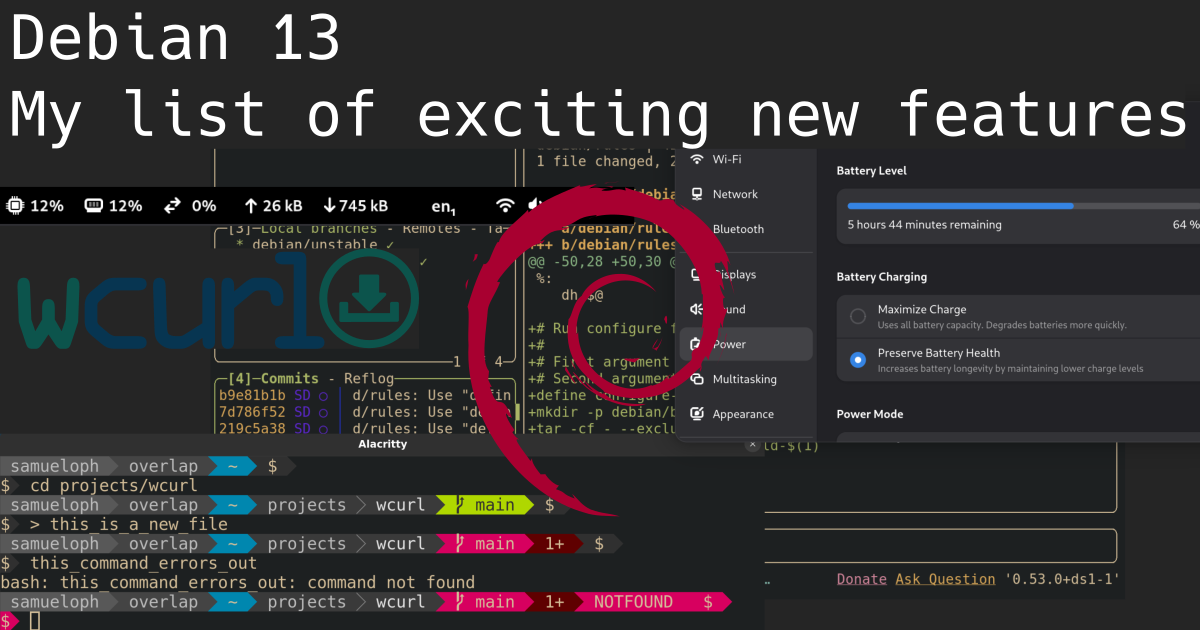
A bunch of screenshots overlaid on top of each other showing different tools: lazygit, gnome settings, gnome system monitor, powerline-go, and the wcurl logo, the text at the top says 'Debian 13: My list of exciting new features', and there's a Debian logo in the middle of image

Beyond Debian: Useful for other distros too Every two years Debian releases a new major version of its Stable series, meaning the differences between consecutive Debian Stable releases represent two years of new developments both in Debian as an organization and its native packages, but also in all other packages which are also shipped by other distributions (which are getting into this new Stable release). If you're not paying close attention to everything that's going on all the time in the Linux world, you miss a lot of the nice new features and tools. It's common for people to only realize there's a cool new trick available only years after it was first introduced. Given these considerations, the tips that I'm describing will eventually be available in whatever other distribution you use, be it because it's a Debian derivative or because it just got the same feature from the upstream project. I'm not going to list "passive" features (as good as they can be), the focus here is on new features that might change how you configure and use your machine, with a mix between productivity and performance.

Debian 13 - Trixie I have been a Debian Testing user for longer than 10 years now (and I recommend it for non-server users), so I'm not usually keeping track of all the cool features arriving in the new Stable releases because I'm continuously receiving them through the Debian Testing rolling release. Nonetheless, as a Debian Developer I'm in a good position to point out the ones I can remember. I would also like other Debian Developers to do the same as I'm sure I would learn something new. The Debian 13 release notes contain a "What's new" section , which lists the first two items here and a few other things, in other words, take my list as an addition to the release notes. Debian 13 was released on 2025-08-09, and these are nice things you shouldn't miss in the new release, with a bonus one not tied to the Debian 13 release.

1) wcurl wcurl logo Have you ever had to download a file from your terminal using curl and didn't remember the parameters needed? I did. Nowadays you can use wcurl; "a command line tool which lets you download URLs without having to remember any parameters." Simply call wcurl with one or more URLs as parameters and it will download all of them in parallel, performing retries, choosing the correct output file name, following redirects, and more. Try it out:
wcurl example.com
wcurl comes installed as part of the curl package on Debian 13 and in any other distribution you can imagine, starting with curl 8.14.0. I've written more about wcurl in its release announcement and I've done a lightning talk presentation in DebConf24, which is linked in the release announcement.

2) HTTP/3 support in curl Debian has become the first stable Linux distribution to ship curl with support for HTTP/3. I've written about this in July 2024, when we first enabled it. Note that we first switched the curl CLI to GnuTLS, but then ended up releasing the curl CLI linked with OpenSSL (as support arrived later). Debian was the first stable Linux distro to enable it, and within rolling-release-based distros; Gentoo enabled it first in their non-default flavor of the package and Arch Linux did it three months before we pushed it to Debian Unstable/Testing/Stable-backports, kudos to them! HTTP/3 is not used by default by the curl CLI, you have to enable it with --http3 or --http3-only. Try it out:
curl --http3 https://www.example.org
curl --http3-only https://www.example.org

3) systemd soft-reboot Starting with systemd v254, there's a new soft-reboot option, it's an userspace-only reboot, much faster than a full reboot if you don't need to reboot the kernel. You can read the announcement from the systemd v254 GitHub release Try it out:
# This will reboot your machine!
systemctl soft-reboot

4) apt --update Are you tired of being required to run sudo apt update just before sudo apt upgrade or sudo apt install $PACKAGE? So am I! The new --update option lets you do both things in a single command:
sudo apt --update upgrade
sudo apt --update install $PACKAGE
I love this, but it's still not yet where it should be, fingers crossed for a simple apt upgrade to behave like other package managers by updating its cache as part of the task, maybe in Debian 14? Try it out:
sudo apt upgrade --update
# The order doesn't matter
sudo apt --update upgrade
This is especially handy for container usage, where you have to update the apt cache before installing anything, for example:
podman run debian:stable bin/bash -c 'apt install --update -y curl'

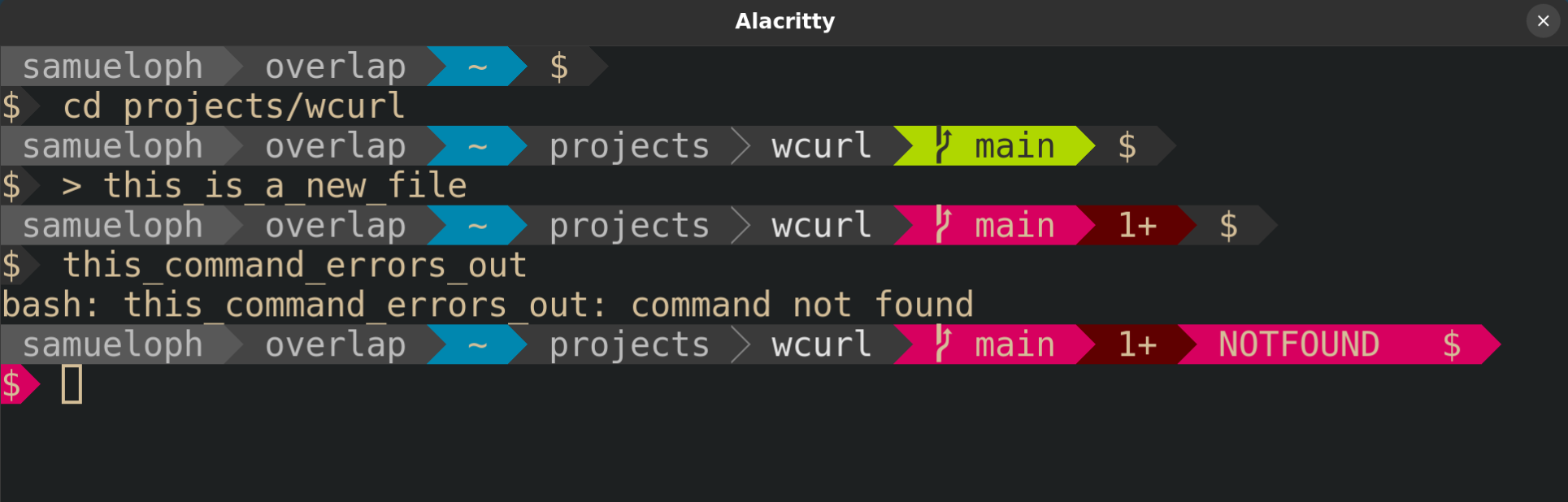
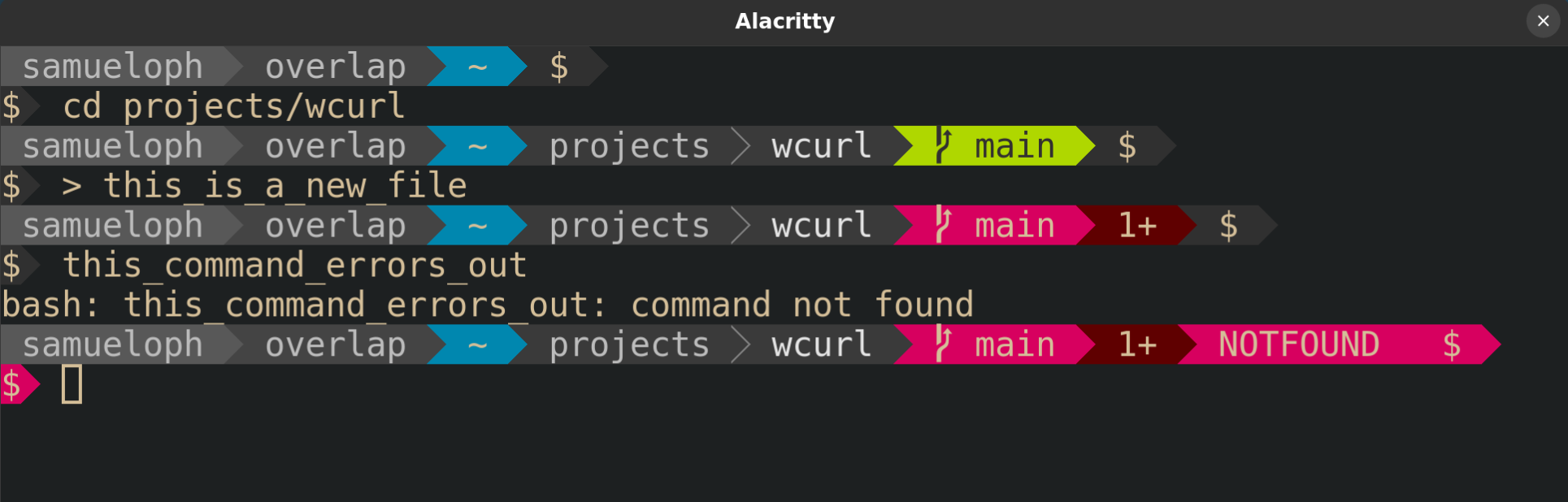
5) powerline-go powerline-go is a powerline-style prompt written in Golang, so it's much more performant than its Python alternative powerline. powerline-style prompts are quite useful to show things like the current status of the git repo in your working directory, exit code of the previous command, presence of jobs in the background, whether or not you're in an ssh session, and more. A screenshot of a terminal with powerline-go enabled, showing how the PS1 changes inside a git repository and when the last command fails Try it out:
sudo apt install powerline-go
Then add this to your .bashrc:
function _update_ps1()  
    PS1="$(/usr/bin/powerline-go -error $? -jobs $(jobs -p   wc -l))"

    # Uncomment the following line to automatically clear errors after showing
    # them once. This not only clears the error for powerline-go, but also for
    # everything else you run in that shell. Don't enable this if you're not
    # sure this is what you want.

    #set "?"
 

if [ "$TERM" != "linux" ] && [ -f "/usr/bin/powerline-go" ]; then
    PROMPT_COMMAND="_update_ps1; $PROMPT_COMMAND"
fi
Or this to .zshrc:
function powerline_precmd()  
    PS1="$(/usr/bin/powerline-go -error $? -jobs $ $ (%):%j :-0 )"

    # Uncomment the following line to automatically clear errors after showing
    # them once. This not only clears the error for powerline-go, but also for
    # everything else you run in that shell. Don't enable this if you're not
    # sure this is what you want.

    #set "?"
 
If you'd like to have your prompt start in a newline, like I have in the screenshot above, you just need to set -newline in the powerline-go invocation in your .bashrc/.zshrc.

6) Gnome System Monitor Extension Tips number 6 and 7 are for Gnome users. Gnome is now shipping a system monitor extension which lets you get a glance of the current load of your machine from the top bar. Screenshot of the top bar of Gnome with the system monitor extension enabled, showing the load of: CPU, memory, network and disk I've found this quite useful for machines where I'm required to install third-party monitoring software that tends to randomly consume more resources than it should. If I feel like my machine is struggling, I can quickly glance at its load to verify if it's getting overloaded by some process. The extension is not as complete as system-monitor-next, not showing temperatures or histograms, but at least it's officially part of Gnome, easy to install and supported by them. Try it out:
sudo apt install gnome-system-monitor gnome-shell-extension-manager
And then enable the extension from the "Extension Manager" application.

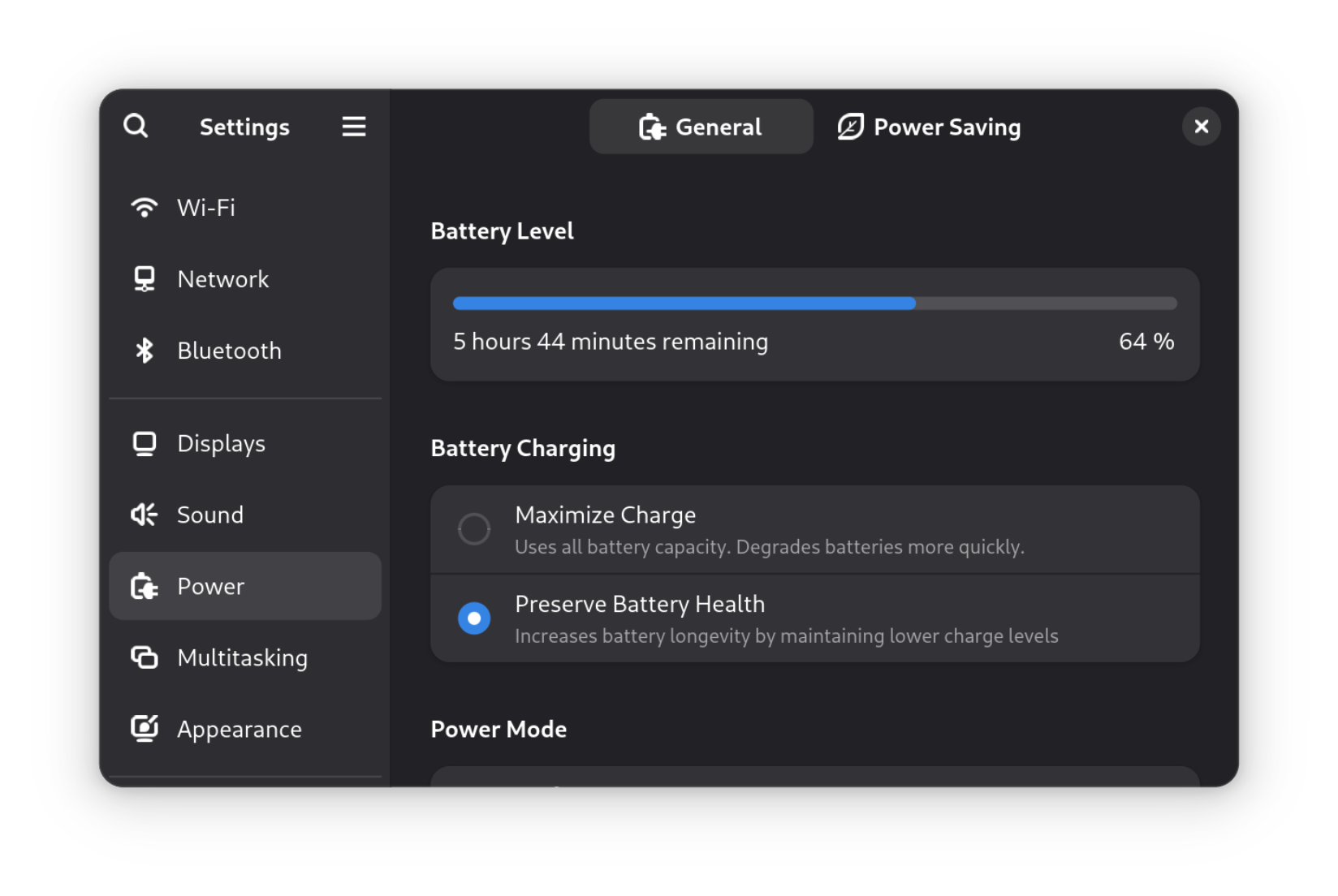
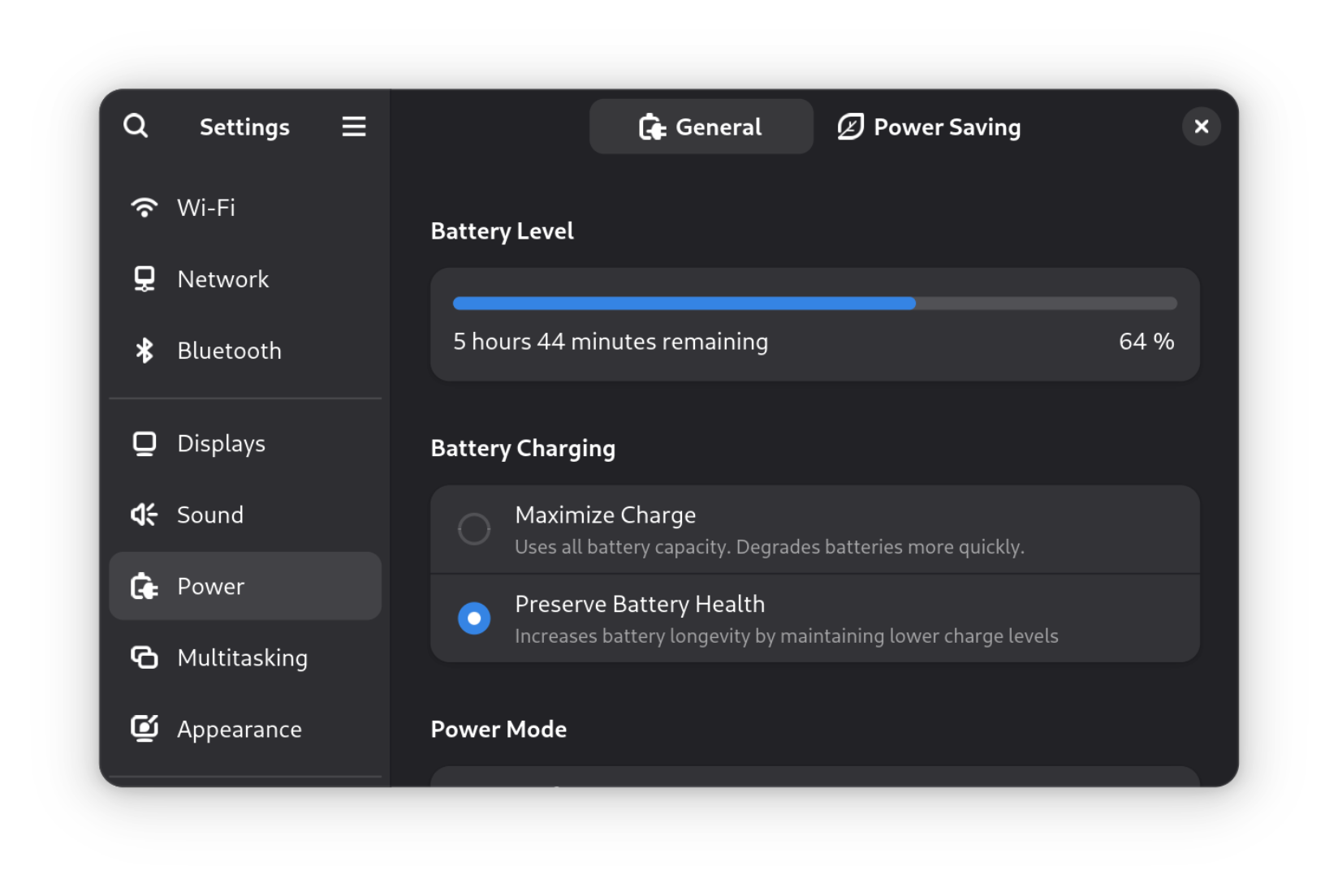
7) Gnome setting for battery charging profile After having to learn more about batteries in order to get into FPV drones, I've come to have a bigger appreciation for solutions that minimize the inevitable loss of capacity that accrues over time. There's now a "Battery Charging" setting (under the "Power") section which lets you choose between two different profiles: "Maximize Charge" and "Preserve Battery Health". A screenshot of the Gnome settings for Power showing the options for Battery Charging On supported laptops, this setting is an easy way to set thresholds for when charging should start and stop, just like you could do it with the tlp package, but now from the Gnome settings. To increase the longevity of my laptop battery, I always keep it at "Preserve Battery Health" unless I'm traveling. What I would like to see next is support for choosing different "Power Modes" based on whether the laptop is plugged-in, and based on the battery charge percentage. There's a GNOME issue tracking this feature, but there's some pushback on whether this is the right thing to expose to users. In the meantime, there are some workarounds mentioned in that issue which people who really want this feature can follow. If you would like to learn more about batteries; Battery University is a great starting point, besides getting into FPV drones and being forced to handle batteries without a Battery Management System (BMS). And if by any chance this sparks your interest in FPV drones, Joshua Bardwell's YouTube channel is a great resource: @JoshuaBardwell.
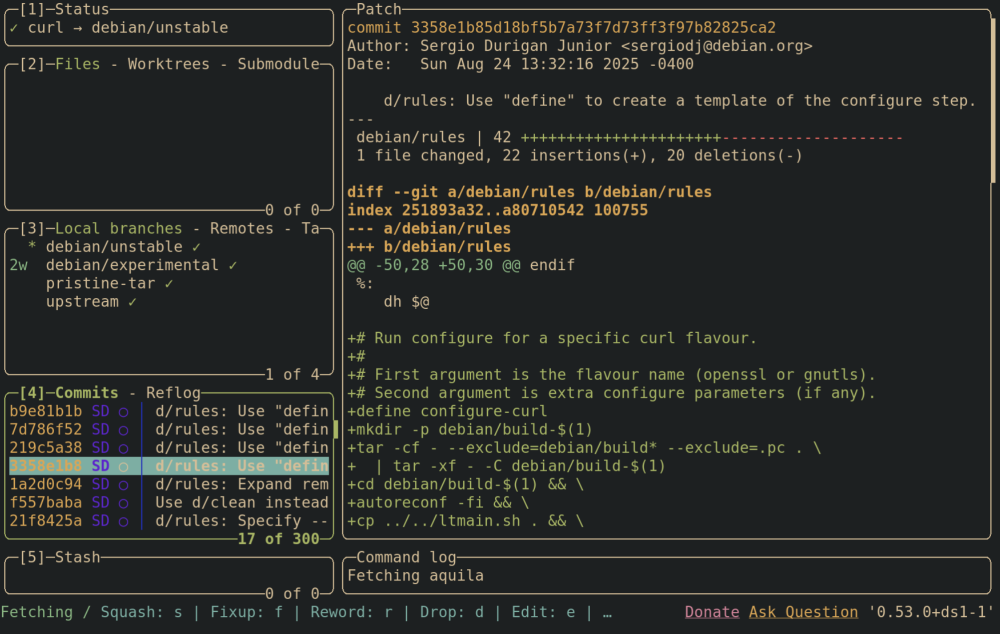
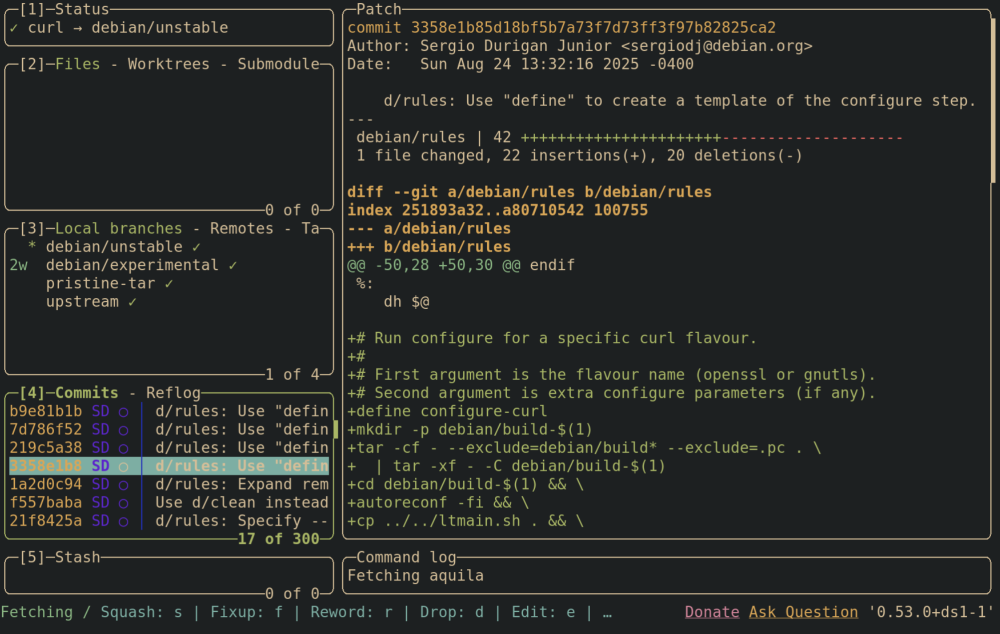
8) Lazygit Emacs users are already familiar with the legendary magit; a terminal-based UI for git. Lazygit is an alternative for non-emacs users, you can integrate it with neovim or just use it directly. I'm still playing with lazygit and haven't integrated it into my workflows, but so far it has been a pleasant experience. Screenshot of lazygit from the Debian curl repository, showing a selected commit and its diff, besides the other things from the lazygit UI You should check out the demos from the lazygit GitHub page. Try it out:
sudo apt install lazygit
And then call lazygit from within a git repository.

9) neovim neovim has been shipped in Debian since 2016, but upstream has been doing a lot of work to improve the experience out-of-the-box in the last couple of years. If you're a neovim poweruser, you're likely not installing it from the official repositories, but for those that are, Debian 13 comes with version 0.10.4, which brings the following improvements compared to the version in Debian 12:
  • Treesitter support for C, Lua, Markdown, with the possibility of adding any other languages as needed;
  • Better spellchecking due to treesitter integration (spellsitter);
  • Mouse support enabled by default;
  • Commenting support out-of-the-box; Check :h commenting for details, but the tl;dr is that you can use gcc to comment the current line and gc to comment the current selection.
  • OSC52 support. Especially handy for those using neovim over an ssh connection, this protocol lets you copy something from within the neovim process into the clipboard of the machine you're using to connect through ssh. In other words, you can copy from neovim running in a host over ssh and paste it in the "outside" machine.

10) [Bonus] Running old Debian releases The bonus tip is not specific to the Debian 13 release, but something I've recently learned in the #debian-devel IRC channel. Did you know there are usable container images for all past Debian releases? I'm not talking "past" as in "some of the older releases", I'm talking past as in "literally every Debian release, including the very first one". Tianon Gravi "tianon" is the Debian Developer responsible for making this happen, kudos to him! There's a small gotcha that the releases Buzz (1.1) and Rex (1.2) require a 32-bit host, otherwise you will get the error Out of virtual memory!, but starting with Bo (1.3) all should work in amd64/arm64. Try it out:
sudo apt install podman

podman run -it docker.io/debian/eol:bo
Don't be surprised when noticing that apt/apt-get is not available inside the container, that's because apt first appeared in Debian Slink (2.1).

Changes since publication

2025-08-30
  • Mention that Arch also enabled HTTP/3.

Samuel Henrique: Debian 13: My list of exciting new features

A bunch of screenshots overlaid on top of each other showing different tools: lazygit, gnome settings, gnome system monitor, powerline-go, and the wcurl logo, the text at the top says 'Debian 13: My list of exciting new features', and there's a Debian logo in the middle of image

Beyond Debian: Useful for other distros too Every two years Debian releases a new major version of its Stable series, meaning the differences between consecutive Debian Stable releases represent two years of new developments both in Debian as an organization and its native packages, but also in all other packages which are also shipped by other distributions (which are getting into this new Stable release). If you're not paying close attention to everything that's going on all the time in the Linux world, you miss a lot of the nice new features and tools. It's common for people to only realize there's a cool new trick available only years after it was first introduced. Given these considerations, the tips that I'm describing will eventually be available in whatever other distribution you use, be it because it's a Debian derivative or because it just got the same feature from the upstream project. I'm not going to list "passive" features (as good as they can be), the focus here is on new features that might change how you configure and use your machine, with a mix between productivity and performance.

Debian 13 - Trixie I have been a Debian Testing user for longer than 10 years now (and I recommend it for non-server users), so I'm not usually keeping track of all the cool features arriving in the new Stable releases because I'm continuously receiving them through the Debian Testing rolling release. Nonetheless, as a Debian Developer I'm in a good position to point out the ones I can remember. I would also like other Debian Developers to do the same as I'm sure I would learn something new. The Debian 13 release notes contain a "What's new" section , which lists the first two items here and a few other things, in other words, take my list as an addition to the release notes. Debian 13 was released on 2025-08-09, and these are nice things you shouldn't miss in the new release, with a bonus one not tied to the Debian 13 release.

1) wcurl wcurl logo Have you ever had to download a file from your terminal using curl and didn't remember the parameters needed? I did. Nowadays you can use wcurl; "a command line tool which lets you download URLs without having to remember any parameters." Simply call wcurl with one or more URLs as parameters and it will download all of them in parallel, performing retries, choosing the correct output file name, following redirects, and more. Try it out:
wcurl example.com
wcurl comes installed as part of the curl package on Debian 13 and in any other distribution you can imagine, starting with curl 8.14.0. I've written more about wcurl in its release announcement and I've done a lightning talk presentation in DebConf24, which is linked in the release announcement.

2) HTTP/3 support in curl Debian has become the first stable Linux distribution to ship curl with support for HTTP/3. I've written about this in July 2024, when we first enabled it. Note that we first switched the curl CLI to GnuTLS, but then ended up releasing the curl CLI linked with OpenSSL (as support arrived later). Debian was the first Linux distro to enable it in the default build of the curl package, but Gentoo enabled it a few weeks earlier in their non-default flavor of the package, kudos to them! HTTP/3 is not used by default by the curl CLI, you have to enable it with --http3 or --http3-only. Try it out:
curl --http3 https://www.example.org
curl --http3-only https://www.example.org

3) systemd soft-reboot Starting with systemd v254, there's a new soft-reboot option, it's an userspace-only reboot, much faster than a full reboot if you don't need to reboot the kernel. You can read the announcement from the systemd v254 GitHub release Try it out:
# This will reboot your machine!
systemctl soft-reboot

4) apt --update Are you tired of being required to run sudo apt update just before sudo apt upgrade or sudo apt install $PACKAGE? So am I! The new --update option lets you do both things in a single command:
sudo apt --update upgrade
sudo apt --update install $PACKAGE
I love this, but it's still not yet where it should be, fingers crossed for a simple apt upgrade to behave like other package managers by updating its cache as part of the task, maybe in Debian 14? Try it out:
sudo apt upgrade --update
# The order doesn't matter
sudo apt --update upgrade
This is especially handy for container usage, where you have to update the apt cache before installing anything, for example:
podman run debian:stable bin/bash -c 'apt install --update -y curl'

5) powerline-go powerline-go is a powerline-style prompt written in Golang, so it's much more performant than its Python alternative powerline. powerline-style prompts are quite useful to show things like the current status of the git repo in your working directory, exit code of the previous command, presence of jobs in the background, whether or not you're in an ssh session, and more. A screenshot of a terminal with powerline-go enabled, showing how the PS1 changes inside a git repository and when the last command fails Try it out:
sudo apt install powerline-go
Then add this to your .bashrc:
function _update_ps1()  
    PS1="$(/usr/bin/powerline-go -error $? -jobs $(jobs -p   wc -l))"

    # Uncomment the following line to automatically clear errors after showing
    # them once. This not only clears the error for powerline-go, but also for
    # everything else you run in that shell. Don't enable this if you're not
    # sure this is what you want.

    #set "?"
 

if [ "$TERM" != "linux" ] && [ -f "/usr/bin/powerline-go" ]; then
    PROMPT_COMMAND="_update_ps1; $PROMPT_COMMAND"
fi
Or this to .zshrc:
function powerline_precmd()  
    PS1="$(/usr/bin/powerline-go -error $? -jobs $ $ (%):%j :-0 )"

    # Uncomment the following line to automatically clear errors after showing
    # them once. This not only clears the error for powerline-go, but also for
    # everything else you run in that shell. Don't enable this if you're not
    # sure this is what you want.

    #set "?"
 
If you'd like to have your prompt start in a newline, like I have in the screenshot above, you just need to set -newline in the powerline-go invocation in your .bashrc/.zshrc.

6) Gnome System Monitor Extension Tips number 6 and 7 are for Gnome users. Gnome is now shipping a system monitor extension which lets you get a glance of the current load of your machine from the top bar. Screenshot of the top bar of Gnome with the system monitor extension enabled, showing the load of: CPU, memory, network and disk I've found this quite useful for machines where I'm required to install third-party monitoring software that tends to randomly consume more resources than it should. If I feel like my machine is struggling, I can quickly glance at its load to verify if it's getting overloaded by some process. The extension is not as complete as system-monitor-next, not showing temperatures or histograms, but at least it's officially part of Gnome, easy to install and supported by them. Try it out:
sudo apt install gnome-system-monitor gnome-shell-extension-manager
And then enable the extension from the "Extension Manager" application.

7) Gnome setting for battery charging profile After having to learn more about batteries in order to get into FPV drones, I've come to have a bigger appreciation for solutions that minimize the inevitable loss of capacity that accrues over time. There's now a "Battery Charging" setting (under the "Power") section which lets you choose between two different profiles: "Maximize Charge" and "Preserve Battery Health". A screenshot of the Gnome settings for Power showing the options for Battery Charging On supported laptops, this setting is an easy way to set thresholds for when charging should start and stop, just like you could do it with the tlp package, but now from the Gnome settings. To increase the longevity of my laptop battery, I always keep it at "Preserve Battery Health" unless I'm traveling. What I would like to see next is support for choosing different "Power Modes" based on whether the laptop is plugged-in, and based on the battery charge percentage. There's a GNOME issue tracking this feature, but there's some pushback on whether this is the right thing to expose to users. In the meantime, there are some workarounds mentioned in that issue which people who really want this feature can follow. If you would like to learn more about batteries; Battery University is a great starting point, besides getting into FPV drones and being forced to handle batteries without a Battery Management System (BMS). And if by any chance this sparks your interest in FPV drones, Joshua Bardwell's YouTube channel is a great resource: @JoshuaBardwell.

8) Lazygit Emacs users are already familiar with the legendary magit; a terminal-based UI for git. Lazygit is an alternative for non-emacs users, you can integrate it with neovim or just use it directly. I'm still playing with lazygit and haven't integrated it into my workflows, but so far it has been a pleasant experience. Screenshot of lazygit from the Debian curl repository, showing a selected commit and its diff, besides the other things from the lazygit UI You should check out the demos from the lazygit GitHub page. Try it out:

sudo apt install lazygit
And then call lazygit from within a git repository.

9) neovim neovim has been shipped in Debian since 2016, but upstream has been doing a lot of work to improve the experience out-of-the-box in the last couple of years. If you're a neovim poweruser, you're likely not installing it from the official repositories, but for those that are, Debian 13 comes with version 0.10.4, which brings the following improvements compared to the version in Debian 12:
  • Treesitter support for C, Lua, Markdown, with the possibility of adding any other languages as needed;
  • Better spellchecking due to treesitter integration (spellsitter);
  • Mouse support enabled by default;
  • Commenting support out-of-the-box; Check :h commenting for details, but the tl;dr is that you can use gcc to comment the current line and gc to comment the current selection.
  • OSC52 support. Especially handy for those using neovim over an ssh connection, this protocol lets you copy something from within the neovim process into the clipboard of the machine you're using to connect through ssh. In other words, you can copy from neovim running in a host over ssh and paste it in the "outside" machine.

10) [Bonus] Running old Debian releases The bonus tip is not specific to the Debian 13 release, but something I've recently learned in the #debian-devel IRC channel. Did you know there are usable container images for all past Debian releases? I'm not talking "past" as in "some of the older releases", I'm talking past as in "literally every Debian release, including the very first one". Tianon Gravi "tianon" is the Debian Developer responsible for making this happen, kudos to him! There's a small gotcha that the releases Buzz (1.1) and Rex (1.2) require a 32-bit host, otherwise you will get the error Out of virtual memory!, but starting with Bo (1.3) all should work in amd64/arm64. Try it out:
sudo apt install podman

podman run -it docker.io/debian/eol:bo
Don't be surprised when noticing that apt/apt-get is not available inside the container, that's because apt first appeared in Debian Slink (2.1).

Valhalla's Things: 1840s Underwear

Posted on August 28, 2025
Tags: madeof:atoms, craft:sewing, FreeSoftWear
A woman wearing a knee-length shift with very short pleated sleeves and drawers that are a bit longer than needed to be ankle-length. The shift is too wide at the top, had to have a pleat taken in the center front, but the sleeves are still falling down. She is also wearing a black long sleeved t-shirt and leggings under said underwear, for decency. A bit more than a year ago, I had been thinking about making myself a cartridge pleated skirt. For a number of reasons, one of which is the historybounding potential, I ve been thinking pre-crinoline, so somewhere around the 1840s, and that s a completely new era for me, which means: new underwear. Also, the 1840s are pre-sewing machine, and I was already in a position where I had more chances to handsew than to machine sew, so I decided to embrace the slowness and sew 100% by hand, not even using the machine for straight seams. A woman turning fast enough that her petticoat extends a considerable distance from the body. The petticoat is white with a pattern of cording from the hem to just below hip level, with a decreasing number of rows of cording going up. If I remember correctly, I started with the corded petticoat, looking around the internet for instructions, and then designing my own based on the practicality of using modern wide fabric from my stash (and specifically some DITTE from costumers favourite source of dirty cheap cotton IKEA). Around the same time I had also acquired a sashiko kit, and I used the Japanese technique for sewing running stitches pushing the needle with a thimble that covers the base of the middle finger, and I can confirm that for this kind of things it s great! I ve since worn the petticoat a few times for casual / historyBounding / folkwearBounding reasons, during the summer, and I can confirm it s comfortable to use; I guess that during the winter it could be nice to add a flannel layer below it. The technical drawing and pattern for drawers from the book: each leg is cut out of a rectangle of fabric folded along the length, the leg is tapered equally, while the front is tapered more than the back, and comes to a point below the top of the original rectangle. Then I proceeded with the base layers: I had been browsing through The workwoman's guide and that provided plenty of examples, and I selected the basic ankle-length drawers from page 53 and the alternative shift on page 47. As for fabric, I had (and still have) a significant lack of underwear linen in my stash, but I had plenty of cotton voile that I had not used in a while: not very historically accurate for plain underwear, but quite suitable for a wearable mockup. Working with a 1830s source had an interesting aspect: other of the usual, mildly annoying, imperial units, it also used a lot a few obsolete units, especially nails, that my qalc, my usual calculator and converter, doesn t support. Not a big deal, because GNU units came to the rescue, and that one knows a lot of obscure and niche units, and it s quite easy to add those that are missing1 Working on this project also made me freshly aware of something I had already noticed: converting instructions for machine sewing garments into instructions for hand sewing them is usually straightforward, but the reverse is not always true. Starting from machine stitching, you can usually convert straight stitches into backstitches (or running backstitches), zigzag and overlocking into overcasting and get good results. In some cases you may want to use specialist hand stitches that don t really have a machine equivalent, such as buttonhole stitches instead of simply overcasting the buttonhole, but that s it. Starting from hand stitching, instead, there are a number of techniques that could be converted to machine stitching, but involve a lot of visible topstitching that wasn t there in the original instructions, or at times are almost impossible to do by machine, if they involve whipstitching together finished panels on seams that are subject to strong tension. Anyway, halfway through working with the petticoat I cut both the petticoat and the drawers at the same time, for efficiency in fabric use, and then started sewing the drawers. the top third or so of the drawers, showing a deep waistband that is closed with just one button at the top, and the front opening with finished edges that continue through the whole crotch, with just the overlap of fabric to provide coverage. The book only provided measurements for one size (moderate), and my fabric was a bit too narrow to make them that size (not that I have any idea what hip circumference a person of moderate size was supposed to have), so the result is just wide enough to be comfortably worn, but I think that when I ll make another pair I ll try to make them a bit wider. On the other hand they are a bit too long, but I think that I ll fix it by adding a tuck or two. Not a big deal, anyway. The same woman as in the opening image from the back, the shift droops significantly in the center back, and the shoulder straps have fallen down on the top of the arms. The shift gave me a bit more issues: I used the recommended gusset size, and ended up with a shift that was way too wide at the top, so I had to take a box pleat in the center front and back, which changed the look and wear of the garment. I have adjusted the instructions to make gussets wider, and in the future I ll make another shift following those. Even with the pleat, the narrow shoulder straps are set quite far to the sides, and they tend to droop, and I suspect that this is to be expected from the way this garment is made. The fact that there are buttonholes on the shoulder straps to attach to the corset straps and prevent the issue is probably a hint that this behaviour was to be expected. The technical drawing of the shift from the book, showing a the top of the body, two trapezoidal shoulder straps, the pleated sleeves and a ruffle on the front edge. I ve also updated the instructions so that they shoulder straps are a bit wider, to look more like the ones in the drawing from the book. Making a corset suitable for the time period is something that I will probably do, but not in the immediate future, but even just wearing the shift under a later midbust corset with no shoulder strap helps. I m also not sure what the point of the bosom gores is, as they don t really give more room to the bust where it s needed, but to the high bust where it s counterproductive. I also couldn t find images of original examples made from this pattern to see if they were actually used, so in my next make I may just skip them. Sleeve detail, showing box pleats that are about 2 cm wide and a few mm distance from each other all along the circumference, neatly sewn into the shoulder strap on one side and the band at the other side. On the other hand, I m really happy with how cute the short sleeves look, and if2 I ll ever make the other cut of shift from the same book, with the front flaps, I ll definitely use these pleated sleeves rather than the straight ones that were also used at the time. As usual, all of the patterns have been published on my website under a Free license:





  1. My ~/.units file currently contains definitions for beardseconds, bananas and the more conventional Nm and NeL (linear mass density of fibres).
  2. yeah, right. when.

27 August 2025

Matthew Palmer: StrongBox: Simple, Safe Data Encryption for Rust

Some time ago, I wanted to encrypt a bunch of data in an application I was writing in Rust, mostly to be stored in a database, but also session cookies and sensitive configuration variables. Since Rust is widely known as a secure-yet-high-performance programming language, I was expecting that there would be a widely-used crate that gave me a secure, high-level interface to strong, safe cryptography. Imagine my surprise when I discovered that just didn t seem to exist. Don t get me wrong: Rust is replete with fast, secure, battle-tested cryptographic primitives. The RustCrypto group provides all manner of robust, widely-used crates for all manner of cryptography-related purposes. They re the essential building blocks for practical cryptosystems, but using them directly in an application is somewhat akin to building a car from individual atoms of iron and carbon. So I wrote my own high-level data encryption library, called it StrongBox, and have been happily encrypting and decrypting data ever since.

Cryptography So Simple Even I Can t Get It Wrong The core of StrongBox is the StrongBox trait, which has only two methods: encrypt and decrypt, each of which takes just two arguments. The first argument is the plaintext (for encrypt) or the ciphertext (for decrypt) to work on. The second argument is the encryption context, for use as Authenticated Additional Data, an important part of many uses of encryption. There s essentially no configuration or parameters to get wrong. You can t choose the encryption algorithm, or block cipher mode, and you don t have to worry about generating a secure nonce. You create a StrongBox with a key, and then you call encrypt and decrypt. That s it.

Practical Cryptographic Affordances Ok, ok that s not quite it. Because StrongBox is even easier to use than what I ve described, thanks to the companion crate, StructBox. When I started using StrongBox in the wild , it quickly became clear that what I almost always wanted to encrypt in my application wasn t some ethereal plaintext . I wanted to encrypt things, specifically structs (and enums). So, through the magic of Rust derive macros, I built StructBox, which provides encrypt and decrypt operations on any Serde-able type. Given that using Serde encoders can be a bit fiddly to use, it s virtually easier to get an encrypted, serialized struct than it is to get a plaintext serialized struct.

Key Problems in Cryptography The thing about cryptography is that it largely turns all data security problems into key management problems. All the fancy cryptographic wonkery is for naught if you don t manage the encryption keys well. So, most of the fancy business in StrongBox isn t the encryption and decryption, but instead solving problems around key management.

Different Keys for Different Purposes Using the same key for all of your cryptographic needs is generally considered a really bad idea. It opens up all manner of risks, that are easily avoided if you use different keys for different things. However, having to maintain a big pile of different keys is a nightmare, so nobody s going to do that. Enter: key derivation. Create one safe, secure root key, and then use a key derivation function to spawn as many other keys as you need. Different keys for each database column, another one to encrypt cookies, and so on. StrongBox supports this through the StemStrongBox type. You ll typically start off by creating a StemStrongBox with the root key, and then derive whatever other StrongBoxes you need, for encrypting and decrypting different kinds of data.

You Spin Me Round Sometimes, keys need to be rotated. Whether that s because you actually know (or even have reason to suspect) someone has gotten the key, or just because you re being appropriately paranoid, sometimes key rotation has to happen. As someone who has had to rotate keys in situations where such an eventuality was not planned for, I can say with some degree of authority: it absolutely sucks to have to do an emergency key rotation in a system that isn t built to make that easy. That s why StrongBox natively supports key rotation. Every StrongBox takes one encryption key, and an arbitrary number of decryption keys, and will automatically use the correct key to decrypt ciphertexts.

Will You Still Decrypt Me, Tomorrow? In addition to manual key rotation, StrongBox also supports time-based key rotation with the RotatingStrongBox type. This comes in handy when you re encrypting a lot of ephemeral data, like cookies (or server-side session data). It provides a way to automatically expire old data, and prevents attacks that become practical when large amounts of data are encrypted using a single key.

Invasion of the Invisible Salamanders! I mostly mention this just because I love the name, but there is a kind of attack possible in common AEAD modes called the invisible salamanders attack. StrongBox implements mitigations against this, by committing to the key being used so that an attacker can t forge a ciphertext that decrypts validly to different plaintexts when using different keys. This is why I love cryptography: everything sounds like absolute goddamn magic.

Call Me Crazy, Support Me Maybe? If you re coding in Rust (which you probably should be), encrypting your stored data (which you definitely should be), and StrongBox makes your life easier (which it really will), you can show your appreciation for my work by contributing to my open source code-fund. Simply by shouting me a refreshing beverage, you ll be helping me out, and helping to grow the software commons. Alternately, if you re looking for someone to Speak Rust to Computers on a professional basis, I m available for contracts or full-time remote positions.

22 August 2025

Matthias Geiger: Enforcing darkmode for QT programs under a non-QT based environment

I use sway as window manager on my main machine. As I prefer dark mode, I looked for a way to enable dark mode everywhere. For GTK-based this is fairly straightforward: Just install whatever theme you prefer, and apply it. However, QT-based applications on a non-QT based desktop will look

20 August 2025

Antoine Beaupr : Encrypting a Debian install with UKI

I originally setup a machine without any full disk encryption, then somehow regretted it quickly after. My original reasoning was that this was a "play" machine so I wanted as few restrictions on accessing the machine as possible, which meant removing passwords, mostly. I actually ended up having a user password, but disabled the lock screen. Then I started using the device to manage my photo collection, and suddenly there was a lot of "confidential" information on the device that I didn't want to store in clear text anymore.

Pre-requisites So, how does one convert an existing install from plain text to full disk encryption? One way is to backup to an external drive, re-partition everything and copy things back, but that's slow and boring. Besides, cryptsetup has a cryptsetup-reencrypt command, surely we can do this in place? Having not set aside enough room for /boot, I briefly considered a "encrypted /boot" configuration and conversion (e.g. with this guide) but remembered grub's support for this is flaky, at best, so I figured I would try something else. Here, I'm going to guide you through how I first converted from grub to systemd-boot then to UKI kernel, then re-encrypt my main partition. Note that secureboot is disabled here, see further discussion below.

systemd-boot and Unified Kernel Image conversion systemd folks have been developing UKI ("unified kernel image") to ship kernels. The way this works is the kernel and initrd (and UEFI boot stub) in a single portable executable that lives in the EFI partition, as opposed to /boot. This neatly solves my problem, because I already have such a clear-text partition and won't need to re-partition my disk to convert. Debian has started some preliminary support for this. It's not default, but I found this guide from Vasudeva Kamath which was pretty complete. Since the guide assumes some previous configuration, I had to adapt it to my case. Here's how I did the conversion to both systemd-boot and UKI, all at once. I could have perhaps done it one at a time, but doing both at once works fine. Before your start, make sure secureboot is disabled, see the discussion below.
  1. install systemd tools:
    apt install systemd-ukify systemd-boot
    
  2. Configure systemd-ukify, in /etc/kernel/install.conf:
    layout=uki
    initrd_generator=dracut
    uki_generator=ukify
    
    TODO: it doesn't look like this generates a initrd with dracut, do we care?
  3. Configure the kernel boot arguments with the following in /etc/kernel/uki.conf:
    [UKI]
    Cmdline=@/etc/kernel/cmdline
    
    The /etc/kernel/cmdline file doesn't actually exist here, and that's fine. Defaults are okay, as the image gets generated from your current /proc/cmdline. Check your /etc/default/grub and /proc/cmdline if you are unsure. You'll see the generated arguments in bootctl list below.
  4. Build the image:
    dpkg-reconfigure linux-image-$(uname -r)
    
  5. Check the boot options:
    bootctl list
    
    Look for a Type #2 (.efi) entry for the kernel.
  6. Reboot:
    reboot
    
You can tell you have booted with systemd-boot because (a) you won't see grub and (b) the /proc/cmdline will reflect the configuration listed in bootctl list. In my case, a systemd.machine_id variable is set there, and not in grub (compare with /boot/grub/grub.cfg). By default, the systemd-boot loader just boots, without a menu. You can force the menu to show up by un-commenting the timeout line in /boot/efit/loader/loader.conf, by hitting keys during boot (e.g. hitting "space" repeatedly), or by calling:
systemctl reboot --boot-loader-menu=0
See the systemd-boot(7) manual for details on that. I did not go through the secureboot process, presumably I had already disabled secureboot. This is trickier: because one needs a "special key" to sign the UKI image, one would need the collaboration of debian.org to get this working out of the box with the keys shipped onboard most computers. In other words, if you want to make this work with secureboot enabled on your computer, you'll need to figure out how to sign the generated images before rebooting here, because otherwise you will break your computer. Otherwise, follow the following guides:

Re-encrypting root filesystem Now that we have a way to boot an encrypted filesystem, we can switch to LUKS for our filesystem. Note that you can probably follow this guide if, somehow, you managed to make grub work with your LUKS setup, although as this guide shows, you'd need to downgrade the cryptographic algorithms, which seems like a bad tradeoff. We're using cryptsetup-reencrypt for this which, amazingly, supports re-encrypting devices on the fly. The trick is it needs free space at the end of the partition for the LUKS header (which, I guess, makes it a footer), so we need to resize the filesystem to leave room for that, which is the trickiest bit. This is a possibly destructive behavior. Be sure your backups are up to date, or be ready to lose all data on the device. We assume 512 byte sectors here. Check your sector size with fdisk -l and adjust accordingly.
  1. Before you perform the procedure, make sure requirements are installed:
    apt install cryptsetup systemd-cryptsetup cryptsetup-initramfs
    
    Note that this requires network access, of course.
  2. Reboot in a live image, I like GRML but any Debian live image will work, possibly including the installer
  3. First, calculate how many sectors to free up for the LUKS header
    qalc> 32Mibyte / ( 512 byte )
      (32 mebibytes) / (512 bytes) = 65536
    
  4. Find the sector sizes of the Linux partitions:
    fdisk  -l /dev/nvme0n1   awk '/filesystem/   print $1 " " $4  '  
    
    For example, here's an example with a /boot and / filesystem:
    $ sudo fdisk -l /dev/nvme0n1   awk '/filesystem/   print $1 " " $4  '
    /dev/nvme0n1p2 999424
    /dev/nvme0n1p3 3904979087
    
  5. Substract 1 from 2:
    qalc> set precision 100
    qalc> 3904979087 - 65536
    
    Or, last step and this one, in one line:
    fdisk -l /dev/nvme0n1   awk '/filesystem/   print $1 " " $4 - 65536  '
    
  6. Recheck filesystem:
    e2fsck -f /dev/nvme0n1p2
    
  7. Resize filesystem:
    resize2fs /dev/nvme0n1p2 $(fdisk -l /dev/nvme0n1   awk '/nvme0n1p2/   print $4 - 65536  ')s
    
    Notice the trailing s here: it makes resize2fs interpret the number as a 512 byte sector size, as opposed to the default (4k blocks).
  8. Re-encrypt filesystem:
    cryptsetup reencrypt --encrypt /dev/nvme0n1p2 --resize-device-size=32M
    
    This is it! This is the most important step! Make sure your laptop is plugged in and try not to interrupt it. This can, apparently, be resumed without problem, but I'd hate to show you how. This will show progress information like:
    Progress:   2.4% ETA 23m45s,      53GiB written, speed   1.3 GiB/s
    
    Wait until the ETA has passed.
  9. Open and mount the encrypted filesystem and mount the EFI system partition (ESP):
    cryptsetup open /dev/nvme0n1p2 crypt
    mount /dev/mapper/crypt /mnt
    mount /dev/nvme0n1p1 /mnt/boot/efi
    
    If this fails, now is the time to consider restoring from backups.
  10. Enter the chroot
    for fs in proc sys dev ; do
      mount --bind /$fs /mnt/$fs
    done
    chroot /mnt
    
    Pro tip: this can be done in one step in GRML with:
    grml-chroot /mnt bash
    
  11. Generate a crypttab:
    echo crypt_dev_nvme0n1p2 UUID=$(blkid -o value -s UUID /dev/nvme0n1p2) none luks,discard >> /etc/crypttab
    
  12. Adjust root filesystem in /etc/fstab, make sure you have a line like this:
    /dev/mapper/crypt_dev-nvme0n1p2 /               ext4    errors=remount-ro 0       1
    
    If you were already using a UUID entry for this, there's nothing to change!
  13. Configure the root filesystem in the initrd:
    echo root=/dev/mapper/crypt_dev_nvme0n1p2 > /etc/kernel/cmdline
    
  14. Regenerate UKI:
    dpkg-reconfigure linux-image-$(uname -r)
    
    Be careful here! systemd-boot inherits the command line from the system where it is generated, so this will possibly feature some unsupported commands from your boot environment. In my case GRML had a couple of those, which broke the boot. It's still possible to workaround this issue by tweaking the arguments at boot time, that said.
  15. Exit chroot and reboot
    exit
    reboot
    
Some of the ideas in this section were taken from this guide but was mostly rewritten to simplify the work. My guide also avoids the grub hacks or a specific initrd system (as the guide uses initramfs-tools and grub, while I, above, switched to dracut and systemd-boot). RHEL also has a similar guide, perhaps even better. Somehow I have made this system without LVM at all, which simplifies things a bit (as I don't need to also resize the physical volume/volume groups), but if you have LVM, you need to tweak this to also resize the LVM bits. The RHEL guide has some information about this.

Dirk Eddelbuettel: RcppArmadillo 14.6.3-1 on CRAN: Minor Upstream Bug Fixes

armadillo image Armadillo is a powerful and expressive C++ template library for linear algebra and scientific computing. It aims towards a good balance between speed and ease of use, has a syntax deliberately close to Matlab, and is useful for algorithm development directly in C++, or quick conversion of research code into production environments. RcppArmadillo integrates this library with the R environment and language and is widely used by (currently) 1268 other packages on CRAN, downloaded 41 million times (per the partial logs from the cloud mirrors of CRAN), and the CSDA paper (preprint / vignette) by Conrad and myself has been cited 642 times according to Google Scholar. Conrad made three minor bug fix releases since the 4.6.0 release last month. We need to pace releases at CRAN so we do not immediately upload there on each upstream release and then CRAN also had the usual (and well-deserved) summer rest leading to a slight delay relative to the last upstream. The minor changes in the three releases are summarized below. All our releases are always available via the GitHub repo and hence also via r-universe, and still rigorously tested via our own reverse-dependency checks. We also note that the package once again passed with flying colours and no human intervention which remains impressive given the over 1200 reverse dependencies.

Changes in RcppArmadillo version 14.6.3-1 (2025-08-14)
  • Upgraded to Armadillo release 14.6.3 (Caffe Mocha)
    • Fix OpenMP related crashes in Cube::slice() on Arm64 CPUs

Changes in RcppArmadillo version 14.6.2-1 (2025-08-08) (GitHub Only)
  • Upgraded to Armadillo release 14.6.2 (Caffe Mocha)
    • Fix for corner-case speed regression in sum()
    • Better handling of OpenMP in omit_nan() and omit_nonfinite()

Changes in RcppArmadillo version 14.6.1-1 (2025-07-21) (GitHub Only)
  • Upgraded to Armadillo release 14.6.1 (Caffe Mocha)
    • Fix for speed regression in mean()
    • Fix for detection of compiler configuration
    • Use of pow optimization now optional

Courtesy of my CRANberries, there is a diffstat report relative to previous release. More detailed information is on the RcppArmadillo page. Questions, comments etc should go to the rcpp-devel mailing list off the Rcpp R-Forge page.

This post by Dirk Eddelbuettel originated on his Thinking inside the box blog. If you like this or other open-source work I do, you can sponsor me at GitHub.

Emmanuel Kasper: Benchmarking 3D graphic cards and their drivers

I have in the past benchmarked network links and disks, so as to have a rough idea of the performance of the hardware I am confronted at $WORK. As I started to dabble into Linux gaming (on non-PC hardware !), I wanted to have some numbers from the graphic stack as well. I am using the command glmark2 --size 1920x1080 which is testing the performance of an OpenGL implementation, hardware + drivers. OpenGL is the classic 3D API used by most opensource gaming on Linux (Doom3 Engine, SuperTuxCart, 0AD, Cube 2 Engine). Vulkan is getting traction as a newer 3D API however the equivalent Vulkan vkmark benchmark was crashing using the NVIDIA semi-proprietary drivers. (vkmark --size 1920x1080 was throwing an ugly Error: Selected present mode Mailbox is not supported by the used Vulkan physical device. )
# apt install glmark2
$ lspci   grep -i vga # integrated GPU
00:02.0 VGA compatible controller: Intel Corporation HD Graphics 615 (rev 02)
$ glmark2 --size 1920x1080
...
...
glmark2 Score: 2063
$ lspci   grep -i vga # integrated GPU
00:02.0 VGA compatible controller: Intel Corporation Meteor Lake-P [Intel Graphics] (rev 08)
glmark2 Score: 3095
$ lspci   grep -i vga # discrete GPU, using nouveau
0000:01:00.0 VGA compatible controller: NVIDIA Corporation AD107GL [RTX 2000 / 2000E Ada Generation] (rev a1)
glmark2 Score: 2463
$ lspci   grep -i vga # discrete GPU, using nvidia-open semi-proprietary driver
0000:01:00.0 VGA compatible controller: NVIDIA Corporation AD107GL [RTX 2000 / 2000E Ada Generation] (rev a1)
glmark2 score: 4960
Nouveau has currently some graphical glitches with Doom3 so I am using the nvidia-open driver for this hardware. In my testing with Doom3 and SuperTuxKart, post 2015 integrated Intel Hardware is more than enough to play in HD resolution.

19 August 2025

Russell Coker: Colmi P80 SmartWatch First Look

I just bought a Colmi P80 SmartWatch from Aliexpress for $26.11 based on this blog post reviewing it [1]. The main things I was after in this was a larger higher resolution screen because my vision has apparently deteriorated during the time I ve been wearing a Pinetime [2] and I now can t read messages on it when not wearing my reading glasses. The watch hardware is quite OK. It has a larger and higher resolution screen and looks good. The review said that GadgetBridge (the FOSS SmartWatch software in the F-Droid repository) connected when told that the watch was a P79 and in a recent release got support for sending notifications. In my tests with GadgetBridge it doesn t set the time, can t seem to send notifications, can t read the battery level, and seems not to do anything other than just say connected . So I installed the proprietary app, as an aside it s a neat feature to have the watch display a QR code for installing the app, maybe InfiniTime should have a similar QR code for getting GadgetBridge from the F-Droid repository. The proprietary app is quote OK for the basic functionality and a less technical relative who is using one is happy. For my use the proprietary app is utterly broken. One of my main uses is to get notifications of Jabber messages from the Conversations app (that s in F-Droid). I have Conversations configured to always have a notification of how many accounts are connected which prevents Android from killing it, with GadgetBridge that notification isn t reported but the actual message contents are (I don t know how/why that happens) but with the Colmi app I get repeated notifcation messages on the watch about the accounts being connected. Also the proprietary app has on/off settings for messages to go to the watch for a hard coded list of 16 common apps and an Others setting for the rest. GadgetBridge lists the applications that are actually installed so I can configure it not to notify me about Reddit, connecting to my car audio, and many other less common notifications. I prefer the GadgetBridge option to have an allow-list for apps that I want notifications from but it also has a configuration option to use a deny list so you could have everything other than the app that gives lots of low value notifications. The proprietary app has a wide range of watch faces that it can send to the watch which is a nice feature that would be good to have in InfiniTime and GadgetBridge. The P80 doesn t display a code on screen when it is paired via Bluetooth so if you have multiple smart watches then you are at risk of connecting to the wrong one and there doesn t seem to be anything stopping a hostile party from connecting to one. Note that hostile parties are not restricted to the normal maximum transmission power and can use a high gain antenna for reception so they can connect from longer distances than normal Bluetooth devices. Conclusion The Colmi P80 hardware is quite decent, the only downside is that the vibration has an annoying tinny feel. Strangely it has a rotation sensor for a rotating button (similar to analogue watches) but doesn t seem to have a use for it as the touch screen does everything. The watch firmware is quite OK (not great but adequate) but lacking a password for pairing is a significant lack. The Colmi Android app has some serious issues that make it unusable for what I do and the release version of GadgetBridge doesn t work with it, so I have gone back to the PineTime for actual use. The PineTime cost twice as much, has less features (no sensor for O2 level in blood), but seems more solidly constructed. I plan to continue using the P80 with GadgetBridge and Debian based SmartWatch software to help develop the Debian Mobile project. I expect that at some future time GadgetBridge and the programs written for non-Android Linux distributions will support the P80 and I will transition to it. I am confident that it will work well for me at some future time and that I will get $26.11 of value from it. At this time I recommend that people who do the sort of things I do get one of each and that less technical people get a Colmi P80.

18 August 2025

Otto Kek l inen: Best Practices for Submitting and Reviewing Merge Requests in Debian

Featured image of post Best Practices for Submitting and Reviewing Merge Requests in DebianHistorically the primary way to contribute to Debian has been to email the Debian bug tracker with a code patch. Now that 92% of all Debian source packages are hosted at salsa.debian.org the GitLab instance of Debian more and more developers are using Merge Requests, but not necessarily in the optimal way. In this post I share what I ve found the best practice to be, presented in the natural workflow from forking to merging.
Why use Merge Requests? Compared to sending patches back and forth in email, using a git forge to review code contributions brings several benefits:
  • Contributors can see the latest version of the code immediately when the maintainer pushes it to git, without having to wait for an upload to Debian archives.
  • Contributors can fork the development version and easily base their patches on the correct version and help test that the software continues to function correctly at that specific version.
  • Both maintainer and other contributors can easily see what was already submitted and avoid doing duplicate work.
  • It is easy for anyone to comment on a Merge Request and participate in the review.
  • Integrating CI testing is easy in Merge Requests by activating Salsa CI.
  • Tracking the state of a Merge Request is much easier than browsing Debian bug reports tagged patch , and the cycle of submit review re-submit re-review is much easier to manage in the dedicated Merge Request view compared to participants setting up their own email plugins for code reviews.
  • Merge Requests can have extra metadata, such as Approved , and the metadata often updates automatically, such as a Merge Request being closed automatically when the Git commit ID from it is pushed to the target branch.
Keeping these benefits in mind will help ensure that the best practices make sense and are aligned with maximizing these benefits.

Finding the Debian packaging source repository and preparing to make a contribution Before sinking any effort into a package, start by checking its overall status at the excellent Debian Package Tracker. This provides a clear overview of the package s general health in Debian, when it was last uploaded and by whom, and if there is anything special affecting the package right now. This page also has quick links to the Debian bug tracker of the package, the build status overview and more. Most importantly, in the General section, the VCS row links to the version control repository the package advertises. Before opening that page, note the version most recently uploaded to Debian. This is relevant because nothing in Debian currently enforces that the package in version control is actually the same as the latest uploaded to Debian. Packaging source code repository links at tracker.debian.org Following the Browse link opens the Debian package source repository, which is usually a project page on Salsa. To contribute, start by clicking the Fork button, select your own personal namespace and, under Branches to include, pick Only the default branch to avoid including unnecessary temporary development branches. View after pressing Fork Once forking is complete, clone it with git-buildpackage. For this example repository, the exact command would be gbp clone --verbose git@salsa.debian.org:otto/glow.git. Next, add the original repository as a new remote and pull from it to make sure you have all relevant branches. Using the same fork as an example, the commands would be:
git remote add go-team https://salsa.debian.org/go-team/packages/glow.git
gbp pull --verbose --track-missing go-team
The gbp pull command can be repeated whenever you want to make sure the main branches are in sync with the original repository. Finally, run gitk --all & to visually browse the Git history and note the various branches and their states in the two remotes. Note the style in comments and repository structure the project has and make sure your contributions follow the same conventions to maximize the chances of the maintainer accepting your contribution. It may also be good to build the source package to establish a baseline of the current state and what kind of binaries and .deb packages it produces. If using Debcraft, one can simply run debcraft build in the Git repository.
Submitting a Merge Request for a Debian packaging improvement Always start by making a development branch by running git checkout -b <branch name> to clearly separate your work from the main branch. When making changes, remember to follow the conventions you already see in the package. It is also important to be aware of general guidelines on how to make good Git commits. If you are not able to immediately finish coding, it may be useful to publish the Merge Request as a draft so that the maintainer and others can see that you started working on something and what general direction your change is heading in. If you don t finish the Merge Request in one sitting and return to it another day, you should remember to pull the Debian branch from the original Debian repository in case it has received new commits. This can be done easily with these commands (assuming the same remote and branch names as in the example above):
git fetch go-team
git rebase -i go-team/debian/latest
Frequent rebasing is a great habit to help keep the Git history linear, and restructuring and rewording your commits will make the Git history easier to follow and understand why the changes were made. When pushing improved versions of your branch, use git push --force. While GitLab does allow squashing, I recommend against it. It is better that the submitter makes sure the final version is a neat and clean set of commits that the receiver can easily merge without having to do any rebasing or squashing themselves. When ready, remove the draft status of the Merge Request and wait patiently for review. If the maintainer does not respond in several days, try sending an email to <source package name>@packages.debian.org, which is the official way to contact maintainers. You could also post a comment on the MR and tag the last few committers in the same repository so that a notification email is triggered. As a last resort, submit a bug report to the Debian bug tracker to announce that a Merge Request is pending review. This leaves a permanent record for posterity (or the Debian QA team) of your contribution. However, most of the time simply posting the Merge Request in Salsa is enough; excessive communication might be perceived as spammy, and someone needs to remember to check that the bug report is closed.

Respect the review feedback, respond quickly and avoid Merge Requests getting stale Once you get feedback, try to respond as quickly as possible. When people participating have everything fresh in their minds, it is much easier for the submitter to rework it and for the reviewer to re-review. If the Merge Request becomes stale, it can be challenging to revive it. Also, if it looks like the MR is only waiting for re-review but nothing happens, re-read the previous feedback and make sure you actually address everything. After that, post a friendly comment where you explicitly say you have addressed all feedback and are only waiting for re-review.

Reviewing Merge Requests This section about reviewing is not exclusive to Debian package maintainers anyone can contribute to Debian by reviewing open Merge Requests. Typically, the larger an open source project gets, the more help is needed in reviewing and testing changes to avoid regressions, and all diligently done work is welcome. As the famous Linus quote goes, given enough eyeballs, all bugs are shallow . On salsa.debian.org, you can browse open Merge Requests per project or for a whole group, just like on any GitLab instance. Reviewing Merge Requests is, however, most fun when they are fresh and the submitter is active. Thus, the best strategy is to ensure you have subscribed to email notifications in the repositories you care about so you get an email for any new Merge Request (or Issue) immediately when posted. Change notification settings from Global to Watch to get an email on new Merge Requests When you see a new Merge Request, try to review it within a couple of days. If you cannot review in a reasonable time, posting a small note that you intend to review it later will feel better to the submitter compared to not getting any response. Personally, I have a habit of assigning myself as a reviewer so that I can keep track of my whole review queue at https://salsa.debian.org/dashboard/merge_requests?reviewer_username=otto, and I recommend the same to others. Seeing the review assignment happen is also a good way to signal to the submitter that their submission was noted.
Reviewing commit-by-commit in the web interface Reviewing using the web interface works well in general, but I find that the way GitLab designed it is not ideal. In my ideal review workflow, I first read the Git commit message to understand what the submitter tried to do and why; only then do I look at the code changes in the commit. In GitLab, to do this one must first open the Commits tab and then click on the last commit in the list, as it is sorted in reverse chronological order with the first commit at the bottom. Only after that do I see the commit message and contents. Getting to the next commit is easy by simply clicking Next. Example review to demonstrate location of buttons and functionality When adding the first comment, I choose Start review and for the following remarks Add to review. Finally, I click Finish review and Submit review, which will trigger one single email to the submitter with all my feedback. I try to avoid using the Add comment now option, as each such comment triggers a separate notification email to the submitter.

Reviewing and testing on your own computer locally For the most thorough review, I pull the code to my laptop for local review with git pull <remote url> <branch name>. There is no need to run git remote add as pulling using a URL directly works too and saves from needing to clean up old remotes later. Pulling the Merge Request contents locally allows me to build, run and inspect the code deeply and review the commits with full metadata in gitk or equivalent.

Investing enough time in writing feedback, but not too much See my other post for more in-depth advice on how to structure your code review feedback. In Debian, I would emphasize patience, to allow the submitter time to rework their submission. Debian packaging is notoriously complex, and even experienced developers often need more feedback and time to get everything right. Avoid the temptation to rush the fix in yourself. In open source, Git credits are often the only salary the submitter gets. If you take the idea from the submission and implement it yourself, you rob the submitter of the opportunity to get feedback, try to improve and finally feel accomplished. Sure, it takes extra effort to give feedback, but the contributor is likely to feel ownership of their work and later return to further improve it. If a submission looks hopelessly low quality and you feel that giving feedback is a waste of time, you can simply respond with something along the lines of: Thanks for your contribution and interest in helping Debian. Unfortunately, looking at the commits, I see several shortcomings, and it is unlikely a normal review process is enough to help you finalize this. Please reach out to Debian Mentors to get a mentor who can give you more personalized feedback. There might also be contributors who just dump the code , ignore your feedback and never return to finalize their submission. If a contributor does not return to finalize their submission in 3-6 months, I will in my own projects simply finalize it myself and thank the contributor in the commit message (but not mark them as the author). Despite best practices, you will occasionally still end up doing some things in vain, but that is how volunteer collaboration works. We all just need to accept that some communication will inevitably feel like wasted effort, but it should be viewed as a necessary investment in order to get the benefits from the times when the communication led to real and valuable collaboration. Please just do not treat all contributors as if they are unlikely to ever contribute again; otherwise, your behavior will cause them not to contribute again. If you want to grow a tree, you need to plant several seeds.

Approving and merging Assuming review goes well and you are ready to approve, and if you are the only maintainer, you can proceed to merge right away. If there are multiple maintainers, or if you otherwise think that someone else might want to chime in before it is merged, use the Approve button to show that you approve the change but leave it unmerged. The person who approved does not necessarily have to be the person who merges. The point of the Merge Request review is not separation of duties in committing and merging the main purpose of a code review is to have a different set of eyeballs looking at the change before it is committed into the main development branch for all eternity. In some packages, the submitter might actually merge themselves once they see another developer has approved. In some rare Debian projects, there might even be separate people taking the roles of submitting, approving and merging, but most of the time these three roles are filled by two people either as submitter and approver+merger or submitter+merger and approver. If you are not a maintainer at all and do not have permissions to click Approve, simply post a comment summarizing your review and that you approve it and support merging it. This can help the maintainers review and merge faster.

Making a Merge Request for a new upstream version import Unlike many other Linux distributions, in Debian each source package has its own version control repository. The Debian sources consist of the upstream sources with an additional debian/ subdirectory that contains the actual Debian packaging. For the same reason, a typical Debian packaging Git repository has a debian/latest branch that has changes only in the debian/ subdirectory while the surrounding upstream files are the actual upstream files and have the actual upstream Git history. For details, see my post explaining Debian source packages in Git. Because of this Git branch structure, importing a new upstream version will typically modify three branches: debian/latest, upstream/latest and pristine-tar. When doing a Merge Request for a new upstream import, only submit one Merge Request for one branch: which means merging your new changes to the debian/latest branch. There is no need to submit the upstream/latest branch or the pristine-tar branch. Their contents are fixed and mechanically imported into Debian. There are no changes that the reviewer in Debian can request the submitter to do on these branches, so asking for feedback and comments on them is useless. All review, comments and re-reviews concern the content of the debian/latest branch only. It is not even necessary to use the debian/latest branch for a new upstream version. Personally, I always execute the new version import (with gbp import-orig --verbose --uscan) and prepare and test everything on debian/latest, but when it is time to submit it for review, I run git checkout -b import/$(dpkg-parsechangelog -SVersion) to get a branch named e.g. import/1.0.1 and then push that for review.

Reviewing a Merge Request for a new upstream version import Reviewing and testing a new upstream version import is a bit tricky currently, but possible. The key is to use gbp pull to automate fetching all branches from the submitter s fork. Assume you are reviewing a submission targeting the Glow package repository and there is a Merge Request from user otto s fork. As the maintainer, you would run the commands:
git remote add otto https://salsa.debian.org/otto/glow.git
gbp pull --verbose otto
If there was feedback in the first round and you later need to pull a new version for re-review, running gbp pull --force will not suffice, and this trick of manually fetching each branch and resetting them to the submitter s version is needed:
for BRANCH in pristine-tar upstream debian/latest
do
git checkout $BRANCH
git reset --hard origin/$BRANCH
git pull --force https://salsa.debian.org/otto/glow.git $BRANCH
done
Once review is done, either click Approve and let the submitter push everything, or alternatively, push all the branches you pulled locally yourself. In GitLab and other forges, the Merge Request will automatically be marked as Merged once the commit ID that was the head of the Merge Request is pushed to the target branch.

Please allow enough time for everyone to participate When working on Debian, keep in mind that it is a community of volunteers. It is common for people to do Debian stuff only on weekends, so you should patiently wait for at least a week so that enough workdays and weekend days have passed for the people you interact with to have had time to respond on their own Debian time. Having to wait may feel annoying and disruptive, but try to look at the upside: you do not need to do extra work simply while waiting for others. In some cases, that waiting can be useful thanks to the sleep on it phenomenon: when you yourself look at your own submission some days later with fresh eyes, you might notice something you overlooked earlier and improve your code change even without other people s feedback!

Contribute reviews! The last but not least suggestion is to make a habit of contributing reviews to packages you do not maintain. As we already see in large open source projects, such as the Linux kernel, they have far more code submissions than they can handle. The bottleneck for progress and maintaining quality becomes the reviews themselves. For Debian, as an organization and as a community, to be able to renew and grow new contributors, we need more of the senior contributors to shift focus from merely maintaining their packages and writing code to also intentionally interact with new contributors and guide them through the process of creating great open source software. Reviewing code is an effective way to both get tangible progress on individual development items and to transfer culture to a new generation of developers.

Why aren t 100% of all Debian source packages hosted on Salsa? As seen at trends.debian.net, more and more packages are using Salsa. Debian does not, however, have any policy about it. In fact, the Debian Policy Manual does not even mention the word Salsa anywhere. Adoption of Salsa has so far been purely organic, as in Debian each package maintainer has full freedom to choose whatever preferences they have regarding version control. I hope the trend to use Salsa will continue and more shared workflows emerge so that collaboration gets easier. To drive the culture of using Merge Requests and more, I drafted the Debian proposal DEP-18: Encourage Continuous Integration and Merge Request based Collaboration for Debian packages. If you are active in Debian and you think DEP-18 is beneficial for Debian, please give a thumbs up at dep-team/deps!21.

17 August 2025

C.J. Collier: The Very Model of a Patriot Online

It appears that the fragile masculinity tech evangelists have identified Debian as a community with boundaries which exclude them from abusing its members and they re so angry about it! In response to posts such as this, and inspired by Dr. Conway s piece, I ve composed a poem which, hopefully, correctly addresses the feelings of that crowd.
The Very Model of a Patriot Online
I am the very model of a modern patriot online,
My keyboard is my rifle and my noble cause is so divine.
I didn't learn my knowledge in a dusty college lecture hall,
But from the chans where bitter anonymity enthralls us all.
I spend a dozen hours every day upon my sacred quest,
To put the globo-homo narrative completely to the test.
My arguments are peer-reviewed by fellas in the comments section,
Which proves my every thesis is the model of complete perfection.
I m steeped in righteous anger that the libs call 'white fragility,'
For mocking their new pronouns and their lack of masculinity.
I m master of the epic troll, the comeback, and the searing snark,
A digital guerrilla who is fighting battles in the dark.
I know the secret symbols and the dog-whistles historical,
From Pepe the Frog to  Let s Go Brandon,  in order categorical;
In short, for fighting culture wars with rhetoric rhetorical,
I am the very model of a patriot polemical.
***
I stand for true expression, for the comics and the edgy clown,
Whose satire is too based for all the fragile folks in town.
They say my speech is 'violence' while my spirit they are trampling,
The way they try to silence me is really quite a startling sampling
Of 1984, which I've not read but thoroughly understand,
Is all about the tyranny that's gripping this once-blessed land.
My humor is a weapon, it s a razor-bladed, sharp critique,
(Though sensitive elites will call my masterpiece a form of  hate speech ).
They cannot comprehend my need for freedom from all consequence,
They call it 'hate,' I call it 'jokes,' they just don't have a lick of sense.
So when they call me  bigot  for the spicy memes I post pro bono,
I tell them their the ones who're cancelled, I'm the victim here, you know!
Then I can write a screed against the globalist cabal, you see,
And tell you every detail of their vile conspiracy.
In short, when I use logic that is flexible and personal,
I am the very model of a patriot controversial.
***
I'm very well acquainted with the scientific method, too,
It's watching lengthy YouTube vids until my face is turning blue.
I trust the heartfelt testimony of a tearful, blonde ex-nurse,
But what a paid fact-checker says has no effect and is perverse.
A PhD is proof that you've been brainwashed by the leftist mob,
While my own research on a meme is how I really do my job.
I know that masks will suffocate and vaccines are a devil's brew,
I learned it from a podcast host who used to sell brain-boosting goo.
He scorns the lamestream media, the CNNs and all the rest,
Whose biased reporting I've put fully to a rigorous test
By only reading headlines and confirming what I already knew,
Then posting my analysis for other patriots to view.
With every "study" that they cite from sources I can't stand to hear,
My own profound conclusions become ever more precisely clear.
In short, when I've debunked the experts with a confident "Says who?!",
I am the very model of a researcher who sees right through you.
***
But all these culture wars are just a sleight-of-hand, a clever feint,
To hide the stolen ballots and to cover up the moral taint
Of D.C. pizza parlors and of shipping crates from Wayfair, it s true,
It's all connected in a plot against the likes of me and you!
I've analyzed the satellite photography and watermarks,
I understand the secret drops, the cryptic Qs, the coded sparks.
The  habbening  is coming, friends, just give it two more weeks or three,
When all the traitors face the trials for their wicked treachery.
They say that nothing happened and the dates have all gone past, you see,
But that's just disinformation from the globalist enemy!
Their moving goalposts constantly, a tactic that is plain to see,
To wear us down and make us doubt the coming, final victory!
My mind can see the patterns that a simple sheep could never find,
The hidden puppet-masters who are poisoning our heart and mind.
In short, when I link drag queens to the price of gas and child-trafficking,
I am the very model of a patriot whose brain is quickening!
***
My pickup truck's a testament to everything that I hold dear,
With vinyl decals saying things the liberals all hate and fear.
The Gadsden flag is waving next to one that's blue and starkly thin,
To show my deep respect for law, except the feds who're steeped in sin.
There's Punisher and Molon Labe, so that everybody knows
I'm not someone to trifle with when push to final shoving goes.
I've got my tactical assault gear sitting ready in the den,
Awaiting for the signal to restore our land with my fellow men.
I practice clearing rooms at home when my mom goes out to the store,
A modern Minuteman who's ready for a civil war.
The neighbors give me funny looks, I see them whisper and take note,
They'll see what's what when I'm the one who's guarding checkpoints by their throat.
I am a peaceful man, of course, but I am also pre-prepared,
To neutralize the threats of which the average citizen's unscared.
In short, when my whole identity's a brand of tactical accessory,
You'll say a better warrior has never graced a Cabela's registry.
***
They say I have to tolerate a man who thinks he is a dame,
While feminists and immigrants are putting out my vital flame!
There taking all the jobs from us and giving them to folks who kneel,
And "woke HR" says my best jokes are things I'm not allowed to feel!
An Alpha Male is what I am, a lion, though I'm in this cubicle,
My life's frustrations can be traced to policies Talmudical.
They lecture me on privilege, I, who have to pay my bills and rent!
While they give handouts to the lazy, worthless, and incompetent!
My grandad fought the Nazis! Now I have to press a key for  one 
To get a call-rep I can't understand beneath the blazing sun
Of global, corporate tyranny that's crushing out the very soul
Of men like me, who've lost their rightful, natural, and just control!
So yes, I am resentful! And I'm angry! And I'm right to be!
They've stolen all my heritage and my masculinity!
In short, when my own failures are somebody else's evil plot,
I am the very model of the truest patriot we've got!
***
There putting chips inside of you! Their spraying things up in the sky!
They want to make you EAT THE BUGS and watch your very spirit die!
The towers for the 5G are a mind-control delivery tool!
To keep you docile while the children suffer in a grooming school!
The WEF, and Gates, and Soros have a plan they call the 'Great Reset,'
You'll own no property and you'll be happy, or you'll be in debt
To social credit overlords who'll track your every single deed!
There sterilizing you with plastics that they've hidden in the feed!
The world is flat! The moon is fake! The dinosaurs were just a lie!
And every major tragedy's a hoax with actors paid to cry!
I'M NOT INSANE! I SEE THE TRUTH! MY EYES ARE OPEN! CAN'T YOU SEE?!
YOU'RE ALL ASLEEP! YOU'RE COWARDS! YOU'RE AFRAID OF BEING TRULY FREE!
My heart is beating faster now, my breath is short, my vision's blurred,
From all the shocking truth that's in each single, solitary word!
I've sacrificed my life and friends to bring this message to the light, so...
You'd better listen to me now with all your concentrated might, ho!
***
For my heroic struggle, though it's cosmic and it's biblical,
Is waged inside the comments of a post that's algorithm-ical.
And still for all my knowledge that's both tactical and practical,
My mom just wants the rent I owe and says I'm being dramatical.

Next.

Previous.