Search Results: "otto"

29 June 2015

Lunar: Reproducible builds: week 9 in Stretch cycle

What happened about the reproducible builds effort this week: Toolchain fixes Norbert Preining uploaded texinfo/6.0.0.dfsg.1-2 which makes texinfo indices reproducible. Original patch by Chris Lamb. Lunar submitted recently rebased patches to make the file order of files inside .deb stable. akira filled #789843 to make tex4ht stop printing timestamps in its HTML output by default. Dhole wrote a patch for xutils-dev to prevent timestamps when creating gzip compresed files. Reiner Herrmann sent a follow-up patch for wheel to use UTC as timezone when outputing timestamps. Mattia Rizzolo started a discussion regarding the failure to build from source of subversion when -Wdate-time is added to CPPFLAGS which happens when asking dpkg-buildflags to use the reproducible profile. SWIG errors out because it doesn't recognize the aforementioned flag. Trying to get the .buildinfo specification to more definitive state, Lunar started a discussion on storing the checksums of the binary package used in dpkg status database. akira discovered while proposing a fix for simgrid that CMake internal command to create tarballs would record a timestamp in the gzip header. A way to prevent it is to use the GZIP environment variable to ask gzip not to store timestamps, but this will soon become unsupported. It's up for discussion if the best place to fix the problem would be to fix it for all CMake users at once. Infrastructure-related work Andreas Henriksson did a delayed NMU upload of pbuilder which adds minimal support for build profiles and includes several fixes from Mattia Rizzolo affecting reproducibility tests. Neils Thykier uploaded lintian which both raises the severity of package-contains-timestamped-gzip and avoids false positives for this tag (thanks to Tomasz Buchert). Petter Reinholdtsen filled #789761 suggesting that how-can-i-help should prompt its users about fixing reproducibility issues. Packages fixed The following packages became reproducible due to changes in their build dependencies: autorun4linuxcd, libwildmagic, lifelines, plexus-i18n, texlive-base, texlive-extra, texlive-lang. The following packages became reproducible after getting fixed: Some uploads fixed some reproducibility issues but not all of them: Untested uploaded as they are not in main: Patches submitted which have not made their way to the archive yet: debbindiff development debbindiff/23 includes a few bugfixes by Helmut Grohne that result in a significant speedup (especially on larger files). It used to exhibit the quadratic time string concatenation antipattern. Version 24 was released on June 23rd in a hurry to fix an undefined variable introduced in the previous version. (Reiner Herrmann) debbindiff now has a test suite! It is written using the PyTest framework (thanks Isis Lovecruft for the suggestion). The current focus has been on the comparators, and we are now at 93% of code coverage for these modules. Several problems were identified and fixed in the process: paths appearing in output of javap, readelf, objdump, zipinfo, unsqusahfs; useless MD5 checksum and last modified date in javap output; bad handling of charsets in PO files; the destination path for gzip compressed files not ending in .gz; only metadata of cpio archives were actually compared. stat output was further trimmed to make directory comparison more useful. Having the test suite enabled a refactoring of how comparators were written, switching from a forest of differences to a single tree. This helped removing dust from the oldest parts of the code. Together with some other small changes, version 25 was released on June 27th. A follow up release was made the next day to fix a hole in the test suite and the resulting unidentified leftover from the comparator refactoring. (Lunar) Documentation update Ximin Luo improved code examples for some proposed environment variables for reference timestamps. Dhole added an example on how to fix timestamps C pre-processor macros by adding a way to set the build date externally. akira documented her fix for tex4ht timestamps. Package reviews 94 obsolete reviews have been removed, 330 added and 153 updated this week. Hats off for Chris West (Faux) who investigated many fail to build from source issues and reported the relevant bugs. Slight improvements were made to the scripts for editing the review database, edit-notes and clean-notes. (Mattia Rizzolo) Meetings A meeting was held on June 23rd. Minutes are available. The next meeting will happen on Tuesday 2015-07-07 at 17:00 UTC. Misc. The Linux Foundation announced that it was funding the work of Lunar and h01ger on reproducible builds in Debian and other distributions. This was further relayed in a Bits from Debian blog post.

12 June 2015

Riku Voipio: Dystopia of Things

The Thing on Internet
I've now had an "Internet of Things" device for about a year. It is Logitech Harmony HUB, an universal remote controller. It comes with a traditional remote, but the interesting part is that it allows me to use my smartphone/tablet as remote over WiFi. With the android app it provides a rather nice use experience, yet I can see the inevitable end in anger. Bare minimum GPL respectToday, the GPL sources for hub are available - at least the kernel and a patch for busybox. The proper GPL release is still only through written offer. The sources appeared online April this year while Hub has been sold for two years already. Even if I ordered the GPL CD, it's unlikely I could build a modified system with it - too many proprietary bits. The whole GPL was invented by someone who couldn't make a printer do what he wanted. The dystopian today where I have to rewrite the whole stack running on a Linux-based system if I'm not happy what's running there as provided by OEM.App onlyThe smartphone app is mandatory. The app is used to set up the hub. There is no HTML5 interface or any other way to control to the hub - just the bundled remote and phone apps. Fully proprietary apps, with limited customization options. And if app store update removes a feature you have used.. well you can't get it from anywhere anymore. The dystopian today where "Internet of Things" is actually "Smartphone App of Things".Locked APIMaybe instead of modifying the official app you could write your own UI? Like one screen with only the buttons you ever use when watching TV? There *is* an API with delightful headline "Better home experiences, together". However, not together with me, the owner of the harmony hub. The official API is locked to selected partners. And the API is not to control the hub - it's to let the hub connect to other IoT devices. Of course, for talented people, locked api is usually just undocumented api. People have reverse engineered how the app talks to the hub over wifi. Curiously it is actually Jabber based with some twists like logging credentials through Logitech servers. The dystopian today where I can't write programs to remotely control the internet connected thing I own without reverse engineering protocols.Central ServerDid someone say Logitech servers? Ah yes, all configuring of the remote happens via myharmony servers, where the database of remote controllers lives. There is some irony in calling the service *my* harmony when it's clearly theirs. The communication with cloud servers leaks at minimum back to Logitech what hardware I control with my hub. At the worst, it will become an avenue of exploits. And how long will Logitech manage these servers? The moment they are gone, harmony hub becomes a semi-brick. It will still work, but I can't change any configuration anymore. The dystopian future where the Internet of Thing will stop working *when* cloud servers get sunsetWhat nowThis is not just the Harmony hub - this is a pattern that many IoT products follow - Linux based gadget, smartphone app, cloud services, monetized apis. After the gadget is bought, the vendor has little incentive to provide any updates. After all, the next chance I'll carry them money is when the current gadget gets obsolete. I can see two ways out. The easy way is to get IoT gadgets as monthly paid service. Now the gadget vendor has the right incentive - instead of trying to convince me to buy their next gadget, their incentive is to keep me happily paying the monthly bill. The polar opposite is to start making open competing IoT's, and market to people the advantage of being yourself in control. I can see markets for both options. But half-way between is just pure dystopy.

5 June 2015

Simon McVittie: Why polkit (or, how to mount a disk on modern Linux)

I've recently found myself explaining polkit (formerly PolicyKit) to one of Collabora's clients, and thought that blogging about the same topic might be useful for other people who are confused by it; so, here is why udisks2 and polkit are the way they are. As always, opinions in this blog are my own, not Collabora's. Privileged actions Broadly, there are two ways a process can do something: it can do it directly (i.e. ask the kernel directly), or it can use inter-process communication to ask a service to do that operation on its behalf. If it does it directly, the components that say whether it can succeed are the Linux kernel's normal permissions checks (DAC), and if configured, AppArmor, SELinux or a similar MAC layer. All very simple so far. Unfortunately, the kernel's relatively coarse-grained checks are not sufficient to express the sorts of policies that exist on a desktop/laptop/mobile system. My favourite example for this sort of thing is mounting filesystems. If I plug in a USB stick with a FAT filesystem, it's reasonable to expect my chosen user interface to either mount it automatically, or let me press a button to mount it. Similarly, to avoid data loss, I should be able to unmount it when I'm finished with it. However, mounting and unmounting a USB stick is fundamentally the same system call as mounting and unmounting any other filesystem - and if ordinary users can do arbitrary mount system calls, they can cause all sorts of chaos, for instance by mounting a filesystem that contains setuid executables (privilege escalation), or umounting a critical OS filesystem like /usr (denial of service). Something needs to arbitrate: you can mount filesystems, but only under certain conditions . The kernel developer motto for this sort of thing is mechanism, not policy : they are very keen to avoid encoding particular environments' policies (the sort of thing you could think of as business rules ) in the kernel, because that makes it non-generic and hard to maintain. As a result, direct mount/unmount actions are only allowed by privileged processes, and it's up to user-space processes to arrange for a privileged process to make the desired mount syscall. Here are some other privileged actions which laptop/desktop users can reasonably expect to just work , with or without requiring a sysadmin-like (root-equivalent) user: In environments that use a MAC framework like AppArmor, actions that would normally be allowed can become privileged: for instance, in a framework for sandboxed applications, most apps shouldn't be allowed to record audio. This prevents carrying out these actions directly, again resulting in the only way to achieve them being to ask a service to carry out the action. Ask a system service to do it On to the next design, then: I can submit a request to a privileged process, which does some checks to make sure I'm not trying to break the system (or alternatively, that I have enough sysadmin rights that I'm allowed to break the system if I want to), and then does the privileged action for me. You might think I'm about to start discussing D-Bus and daemons, but actually, a prominent earlier implementation of this was mount(8), which is normally setuid root:
% ls -l /bin/mount
-rwsr-xr-x 1 root root 40000 May 22 11:37 /bin/mount
If you look at it from an odd angle, this is inter-process communication across a privilege boundary: I run the setuid executable, creating a process. Because the executable has the setuid bit set, the kernel makes the process highly privileged: its effective uid is root, and it has all the necessary capabilities to mount filesystems. I submit the request by passing it in the command-line arguments. mount does some checks - specifically, it looks in /etc/fstab to see whether the filesystem I'm trying to mount has the user or users flag - then carries out the mount system call. There are a few obvious problems with this: Ask a system service to do it, via D-Bus or other IPC To avoid the issues of setuid, we could use inter-process communication in the traditional sense: run a privileged daemon (on boot or on-demand), make it listen for requests, and use the IPC channel as our privilege boundary. udisks2 is one such privileged daemon, which uses D-Bus as its IPC channel. D-Bus is a commonly-used inter-process system; one of its intended/designed uses is to let user processes and system services communicate, especially this sort of communication between a privileged daemon and its less-privileged clients. People sometimes criticize D-Bus as not doing anything you couldn't do yourself with some AF_UNIX sockets. Well, no, of course it doesn't - the important bit of the reference implementation and the various interoperable reimplementations consists of a daemon and some AF_UNIX sockets, and the rest is a simple matter of programming. However, it's sufficient for most uses in its problem space, and is usually better than inventing your own. The advantage of D-Bus over doing your own thing is precisely that you are not doing your own thing: good IPC design is hard, and D-Bus makes some structural decisions so that fewer application authors have to think about them. For instance, it has a central hub daemon (the dbus-daemon, or message bus ) so that n communicating applications don't need O(n ) sockets; it uses the dbus-daemon to provide a total message ordering so you don't have to think about message reordering; it has a distributed naming model (which can also be used as a distributed mutex) so you don't have to design that; it has a serialization format and a type system so you don't have to design one of those; it has a framework for activating" run-on-demand daemons so they don't have to use resources initially, implemented using a setuid helper and/or systemd; and so on. If you have religious objections to D-Bus, you can mentally replace D-Bus with AF_UNIX or something and most of this article will still be true. Is this OK? In either case - exec'ing a privileged helper, or submitting a request to a privileged daemon via IPC - the privileged process has two questions that it needs to answer before it does its work: It needs to make some sort of decision on the latter based on the information available to it. However, before we even get there, there is another layer: In the setuid model, there is a simple security check that you can apply: you can make /bin/mount only executable by a particular group, or only executable by certain AppArmor profiles, or similar. That works up to a point, but cannot distinguish between physically-present and not-physically-present users, or other facts that might be interesting to your local security policy. Similarly, in the IPC model, you can make certain communication channels impossible, for instance by using dbus-daemon's ability to decide which messages to deliver, or AF_UNIX sockets' filesystem permissions, or a MAC framework like AppArmor. Both of these are quite coarse-grained checks which don't really understand the finer details of what is going on. If the answer to "is this safe? is something of the form maybe, it depends on... , then they can't do the right thing: they must either let it through and let the domain-specific privileged process do the check, or deny it and lose potentially useful functionality. For instance, in an AppArmor environment, some applications have absolutely no legitimate reason to talk to udisks2, so the AppArmor policy can just block it altogether. However, once again, this is a coarse-grained check: the kernel has mechanism, not policy, and it doesn't know what the service does or why. If the application does need to be able to talk to the service at all, then finer-grained access control (obeying some, but not all, requests) has to be the service's job. dbus-daemon does have the ability to match messages in a relatively fine-grained way, based on the object path, interface and member in the message, as well as the routing information that it uses itself (i.e. the source and destination). However, it is not clear that this makes a great deal of sense conceptually: these are facts about the mechanics of the IPC, not facts about the domain-specific request (because the mechanics of the IPC are all that dbus-daemon understands). For instance, taking the udisks2 example again, dbus-daemon can't distinguish between an attempt to adjust mount options for a USB stick (probably fine) and an attempt to adjust mount options for /usr (not good). To have a domain-specific security policy, we need a domain-specific component, for instance udisks2, to get involved. Unlike dbus-daemon, udisks2 knows that not all disks are equal, knows which categories make sense to distinguish, and can identify which categories a particular disk is in. So udisks2 can make a more informed decision. So, a naive approach might be to write a function in udisks2 that looks something like this pseudocode:
may_i_mount_this_disk (user, disk, mount options)   boolean
 
    if (user is root   user is root-equivalent)
        return true;
    if (disk is not removable)
       return false;
    if (mount options are scary)
       return false;
    if (user is in  manipulate non-local disks  group)
        return true;
    if (user is not logged-in locally)
       return false;
    # https://en.wikipedia.org/wiki/Multiseat_configuration
    if (user is not logged-in on the same seat where the disk is
            plugged in)
       return false;
    return true;
 
Delegating the security policy to something central The pseudocode security policy outlined above is reasonably complicated already, and doesn't necessarily cover everything that you might want to consider. Meanwhile, not every system is the same. A general-purpose Linux distribution like Debian might run on server/mainframe systems with only remote users, personal laptops/desktops with one root-equivalent user, locked-down corporate laptops/desktops, mobile devices and so on; these systems should not necessarily all have the same security policy. Another interesting factor is that for some privileged operations, you might want to carry out interactive authorization: ask the requesting user to confirm that the action (which might have come from a background process) should take place (like Windows' UAC), or to prove that the person currently at the keyboard is the same as the person who logged in by giving their password (like sudo). We could in principle write code for all of this in udisks2, and in NetworkManager, and in systemd, ... - but that clearly doesn't scale, particularly if you want the security policy to be configurable. Enter polkit (formerly PolicyKit), a system service for applying security policies to actions. The way polkit works is that the application does its domain-specific analysis of the request - in the case of udisks2, whether the device to be mounted is removable, whether the mount options are reasonable, etc. - and converts it into an action. The action gives polkit a way to distinguish between things that are conceptually different, without needing to know the specifics. For instance, udisks2 currently divides up filesystem-mounting into org.freedesktop.udisks2.filesystem-mount, org.freedesktop.udisks2.filesystem-mount-fstab, org.freedesktop.udisks2.filesystem-mount-system and org.freedesktop.udisks2.filesystem-mount-other-seat. The application also finds the identity of the user making the request. Next, the application sends the action, the identity of the requesting user, and any other interesting facts to polkit. As currently implemented, polkit is a D-Bus service, so this is an IPC request via D-Bus. polkit consults its database of policies in order to choose one of several results: So how does polkit decide this? The first thing is that it reads the machine-readable description of the actions, in /usr/share/polkit-1/actions, which specifies a default policy. Next, it evaluates a local security policy to see what that says. In the current version of polkit, the local security policy is configured by writing JavaScript in /etc/polkit-1/rules.d (local policy) and /usr/share/polkit-1/rules.d (OS-vendor defaults). In older versions such as the one currently shipped in Debian unstable, there was a plugin architecture; but in practice nobody wrote plugins for it, and instead everyone used the example local authority shipped with polkit, which was configured via files in /etc/polkit-1/localauthority and /etc/polkit-1/localauthority.d. These policies can take into account useful facts like: For instance, gnome-control-center on Debian installs this snippet:
polkit.addRule(function(action, subject)  
        if ((action.id == "org.freedesktop.locale1.set-locale"  
             action.id == "org.freedesktop.locale1.set-keyboard"  
             action.id == "org.freedesktop.hostname1.set-static-hostname"  
             action.id == "org.freedesktop.hostname1.set-hostname"  
             action.id == "org.gnome.controlcenter.datetime.configure") &&
            subject.local &&
            subject.active &&
            subject.isInGroup ("sudo"))  
                    return polkit.Result.YES;
             
 );
which is reasonably close to being pseudocode for active local users in the sudo group may set the system locale, keyboard layout, hostname and time, without needing to authenticate . A system administrator could of course override that by dropping a higher-priority policy for some or all of these actions into /etc/polkit-1/rules.d. Summary

14 May 2015

MJ Ray: Recorrecting Past Mistakes: Window Borders and Edges

A while ago, I switched from tritium to herbstluftwm. In general, it s been a good move, benefitting from active development and greater stability, even if I do slightly mourn the move from python scripting to a shell client. One thing that was annoying me was that throwing the pointer into an edge didn t find anything clickable. Window borders may be pretty, but they re a pretty poor choice as the thing that you can locate most easily, the thing that is on the screen edge. It finally annoyed me enough to find the culprit. The .config/herbstluftwm/autostart file said hc pad 0 26 (to keep enough space for the panel at the top edge) and changing that to hc pad 0 -8 -7 26 -7 and reconfiguring the panel to be on the bottom (where fewer windows have useful controls) means that throwing the pointer at the top or the sides now usually finds something useful like a scrollbar or a menu. I wonder if this is a useful enough improvement that I should report it as an enhancement bug.

24 March 2015

Vincent Fourmond: Release 0.12 of ctioga2

Out is the new version of ctioga2, which brings:
As usual, the new release is available as a gem:
~ gem update ctioga2
The website has also been decently improved, with now a search box for finding images in the gallery

12 March 2015

Hideki Yamane: localized directory name is harmful

Summary: xdg user directory spec is broken, I want to fix it.

One of annoyed things in Linux Desktop environment is localized user's directory (e.g. $HOME/ , instead of $HOME/Download). I know it is handled by XDG, my ~/.config/user-dirs.dirs has setting as below (by default).

XDG_DESKTOP_DIR="$HOME/ "
XDG_DOWNLOAD_DIR="$HOME/ "
XDG_TEMPLATES_DIR="$HOME/ "
XDG_PUBLICSHARE_DIR="$HOME/ "
XDG_DOCUMENTS_DIR="$HOME/ "
XDG_MUSIC_DIR="$HOME/ "
XDG_PICTURES_DIR="$HOME/ "
XDG_VIDEOS_DIR="$HOME/ "

So XDG utlility program changes it as setting, moves ~/Desktop to ~/ . However, it is NOT what users want.

Because if you would play with shell, you should also input localized characters in your terminal. Imagine, sometimes I download files with browser, then use it in terminal - download some tar.xz file and extract it. Well, it is downloaded in ~/ directory... it's not convinient - you cannot use tab completion without IME (input method editor), e.g. Anthy or Mozc for Japanese. And if you don't want to install it, what do you do? Use mouse to copy&paste?

Then, some Japanese people create webpages about "How to change localized user directory back to English name" ;)

Windows and OS X has localized Desktop, Download, Document directory, too. But it's not directory itself. In Windows, you can see " " (Desktop) with Windows Explorer but it is seen as just "Desktop" directory with cmd.exe (I don't know how to trick it. Maybe Windows registory magic). And in OS X, same thing with Finder. Those users don't annoy with localized directory name, it's friendly and convinient for cmd/shell users, and also for GUI (Windows' Explorer/OS X's Finder) users.


And also, it seems that localized directory name is good for average users who use File manager (Nautilus, etc). Just labeled with only English is not friendly to non-English native users like my mother ;) (Yes, localization is important!) But it's _better_ for *everyone* to set directory name with English _and_ localized with hardlink (and probably not harm anyone).

So lazyweb, could you tell me where should I go to talk this issue with upstream? It's not big thing, but still annoying. I can change it with xdg-user-dirs-update for my environment but it's just a workaround, not solution for this problem.

8 March 2015

Hideki Yamane: community booth @ "developers summit 2015" in Tokyo (19th&20th Feb)

I'm back to Developers Summit at (Meguro Gajoen), Tokyo. I was an attendee 2 years ago, and I'm at community booth this year :)

We were at booth "Debian JP Project" (Japanese local Debian community) and other distro people (Ubuntu Japanese Team, openSUSE, VineLinux)


Its conference mostly focuses "development style" in companies, not FLOSS -Keyword: Agile (Scrum), DevOps, using cloud infrastructure, IoT, etc. So, we're a bit stranger but enjoyed chat with some people.

16 February 2015

Vincent Sanders: To a child, often the box a toy came in is more appealing than the toy itself.

I think Allen Klein might not have been referring to me when he said that but I do seem to like creating boxes for my toys.

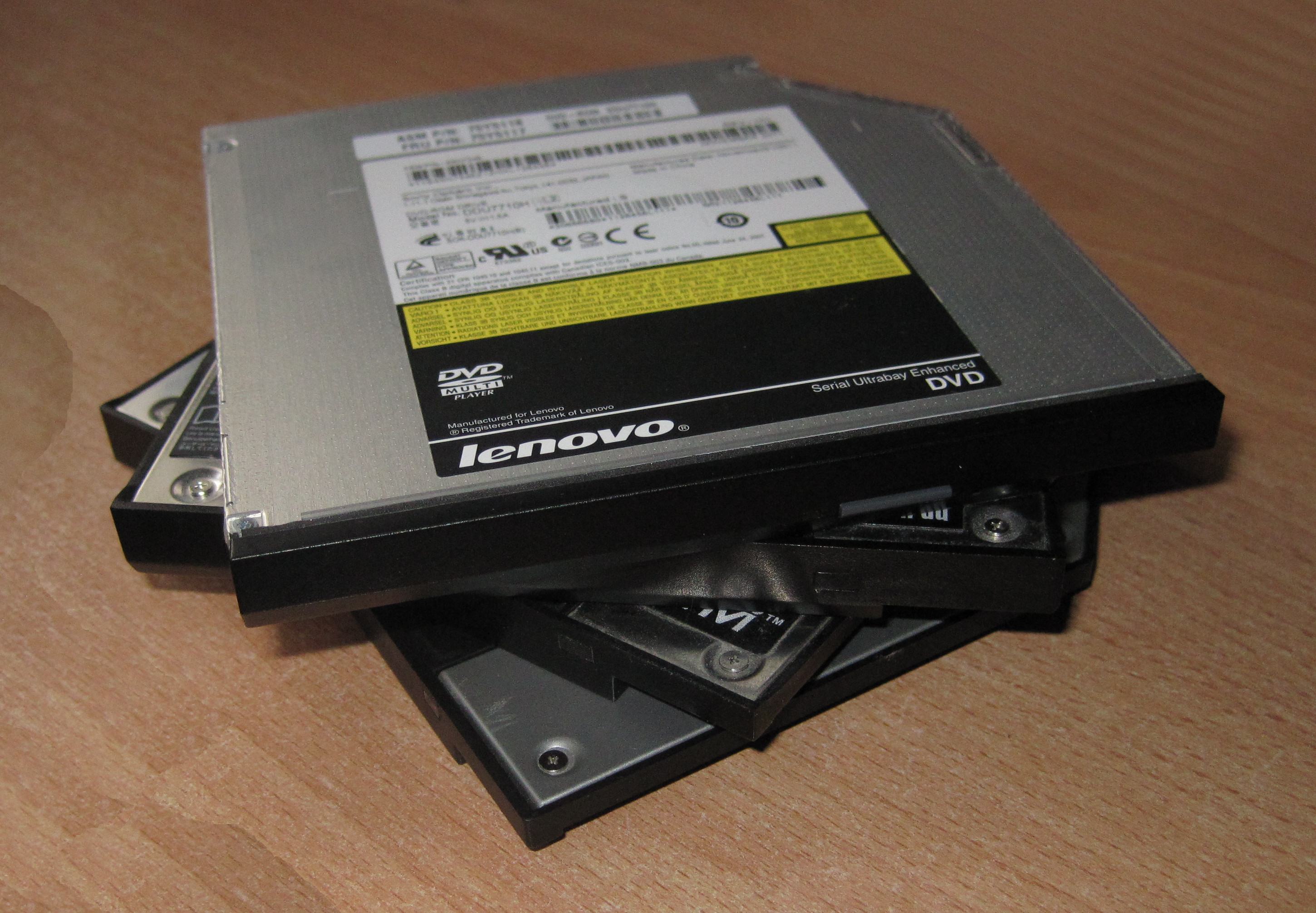
Lenovo laptop with ultrabay ejected
My Lenovo laptop has an Ultrabay, these are a way to easily swap optical and hard drives drives. They allow me to carry around additional storage and, providing I remembered to pack the drive, access optical media.
Over time I have acquired several additional hard drives housed in Ultrabay caddies. Generally I only need to access one at a time but increasingly I want to have more than one available.

Lenovo used to sell docking stations with multiple Ultrabays but since Series 3 was introduced this is no longer the case as the docks have been reduced to port replicators.

One solution is to buy a SATA to USB convertor which lets you use the drive externally. However once you have more than one drive this becomes somewhat untidy, not to mention all those unhoused drives on your desk become something of a hazard.

Recently after another close call I decided what I needed was a proper external enclosure to house all my drives. After some extensive googling I found nothing suitable ready to buy. Most normal people would give up at this point, I appear to be an abnormal person so I got the CAD package out.

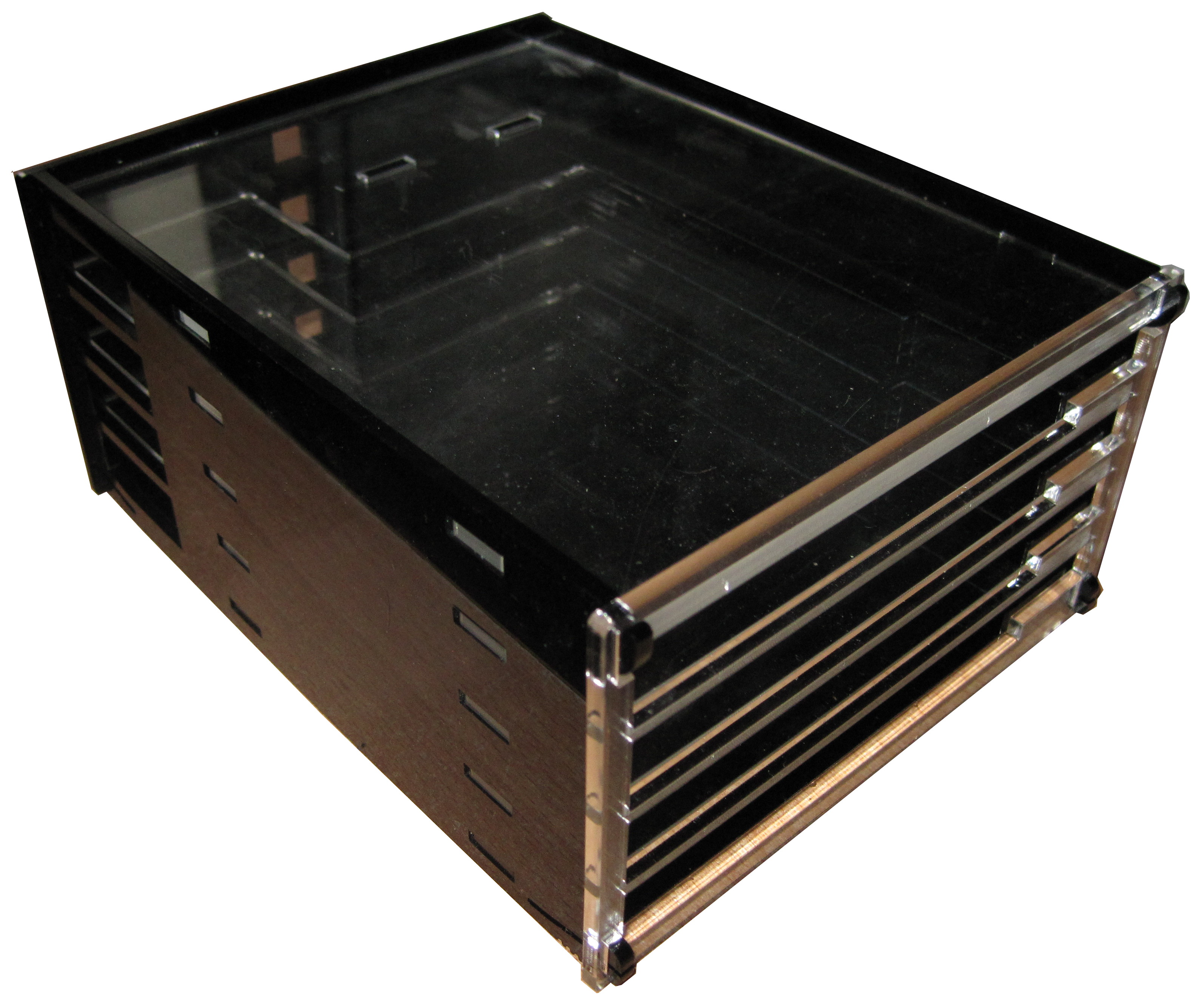
A few hours of design and a load of laser cutting later I came up with a four bay enclosure that now houses all my Ultrabay caddies.

The design was slightly evolved to accommodate the features of some older caddies and allow a pencil to be used to eject the drives (I put a square hole in the back)

The completed unit uses about 10 of plastic and takes 30 minutes to lasercut.

The only issue with the enclosure as manufactured is that Makespace ran out of black plastic stock and I had to use transparent to finish so it is not in classic black as lenovo intended.

As usual all the design files are publicly available from my design repo.

6 February 2015

Antoine Beaupr : Migrating from Drupal to Ikiwiki

TLPL; j'ai chang de logiciel pour la gestion de mon blog. TLDR; I have changed my blog from Drupal to Ikiwiki. Note: since this post uses ikiwiki syntax (i just copied it over here), you may want to read the original version instead of this one. will continue operating for a while to
give a chance to feed aggregators to catch that article. It will also
give time to the Internet archive to catchup with the static
stylesheets (it turns out it doesn't like Drupal's CSS compression at
all!) An archive will therefore continue being available on the
internet archive for people that miss the old stylesheet. Eventually, I will simply redirect the anarcat.koumbit.org URL to
the new blog location, . This will likely be my
last blog post written on Drupal, and all new content will be
available on the new URL. RSS feed URLs should not change.

Why I am migrating away from Drupal because it is basically impossible to
upgrade my blog from Drupal 6 to Drupal 7. Or if it is, I'll have to
redo the whole freaking thing again when Drupal 8 comes along. And frankly, I don't really need Drupal to run a blog. A blog was
originally a really simple thing: a web blog. A set of articles
written on the corner of a table. Now with Drupal, I can add
ecommerce, a photo gallery and whatnot to my blog, but why would I do
that? and why does it need to be a dynamic CMS at all, if I get so
little comments? So I'm switching to ikiwiki, for the following reason:
  • no upgrades necessary: well, not exactly true, i still need to
    upgrade ikiwiki, but that's covered by the Debian package
    maintenance and I only have one patch to it, and there's no data migration! (the last such migration in ikiwiki was in 2009 and was fully supported)
  • offline editing: this is a a big thing for me: i can just note
    things down and push them when I get back online
  • one place for everything: this blog is where I keep my notes, it's
    getting annoying to have to keep track of two places for that stuff
  • future-proof: extracting content from ikiwiki is amazingly
    simple. every page is a single markdown-formatted file. that's it.
Migrating will mean abandoning the
barlow theme, which was
seeing a declining usage anyways.

What So what should be exported exactly. There's a bunch of crap in the old
blog that i don't want: users, caches, logs, "modules", and the list
goes on. Maybe it's better to create a list of what I need to extract:
  • nodes
    • title ([[ikiwiki/directive/meta]] title and guid tags, guid to avoid flooding aggregators)
    • body (need to check for "break comments")
    • nid (for future reference?)
    • tags (should be added as \[[!tag foo bar baz]] at the bottom)
    • URL (to keep old addresses)
    • published date ([[ikiwiki/directive/meta]] date directive)
    • modification date ([[ikiwiki/directive/meta]] updated directive)
    • revisions?
    • attached files
  • menus
    • RSS feed
    • contact
    • search
  • comments
    • author name
    • date
    • title
    • content
  • attached files
    • thumbnails
    • links
  • tags
    • each tag should have its own RSS feed and latest posts displayed

When Some time before summer 2015.

Who Well me, who else. You probably really don't care about that, so let'S
get to the meat of it.

How How to perform this migration... There are multiple paths:
  • MySQL commandline: extracting data using the commandline mysql tool (drush sqlq ...)
  • Views export: extracting "standard format" dumps from Drupal and
    parse it (JSON, XML, CSV?)
Both approaches had issues, and I found a third way: talk directly to
mysql and generate the files directly, in a Python script. But first,
here are the two previous approaches I know of.

MySQL commandline LeLutin switched using MySQL requests,
although he doesn't specify how content itself was migrated. Comments
importing is done with that script:
echo "select n.title, concat('  [[!comment  format=mdwn  username=\"', c.name, '\"  ip=\"', c.hostname, '\"  subject=\"', c.subject, '\"  date=\"', FROM_UNIXTIME(c.created), '\"  content=\"\"\" ', b.comment_body_value, ' \"\"\"]]') from node n, comment c, field_data_comment_body b where n.nid=c.nid and c.cid=b.entity_id;"   drush sqlc   tail -n +2   while read line; do if [ -z "$i" ]; then i=0; fi; title=$(echo "$line"   sed -e 's/[    ]\+ .*//' -e 's/ /_/g' -e 's/[:(),?/+]//g'); body=$(echo "$line"   sed 's/[^ ]*  //'); mkdir -p ~/comments/$title; echo -e "$body" > ~/comments/$title/comment_$i._comment; i=$((i+1)); done
Kind of ugly, but beats what i had before (which was "nothing"). I do think it is the good direction to take, to simply talk to the
MySQL database, maybe with a native Python script. I know the Drupal
database schema pretty well (still! this is D6 after all) and it's
simple enough that this should just work.

Views export [[!img 2015-02-03-233846_1440x900_scrot.png class="align-right" size="300x" align="center" alt="screenshot of views 2.x"]] mvc recommended views data export on Lelutin's
blog. Unfortunately, my experience with the views export interface has
been somewhat mediocre so far. Yet another reason why I don't like
using Drupal anymore is this kind of obtuse dialogs: I clicked through those for about an hour to get JSON output that
turned out to be provided by views bonus instead of
views_data_export. And confusingly enough, the path and
format_name fields are null in the JSON output
(whyyy!?). views_data_export unfortunately only supports XML,
which seems hardly better than SQL for structured data, especially
considering I am going to write a script for the conversion anyways. Basically, it doesn't seem like any amount of views mangling will
provide me with what i need. Nevertheless, here's the [[failed-export-view.txt]] that I was able to
come up with, may it be useful for future freedom fighters.

Python script I ended up making a fairly simple Python script to talk directly to
the MySQL database. The script exports only nodes and comments, and nothing else. It makes
a bunch of assumptions about the structure of the site, and is
probably only going to work if your site is a simple blog like mine,
but could probably be improved significantly to encompass larger and
more complex datasets. History is not preserved so no interaction is
performed with git.

Generating dump First, I imported the MySQL dump file on my local mysql server for easier
development. It is 13.9MiO!!
mysql -e 'CREATE DATABASE anarcatblogbak;'
ssh aegir.koumbit.net "cd anarcat.koumbit.org ; drush sql-dump"   pv   mysql anarcatblogbak
I decided to not import revisions. The majority (70%) of the content has
1 or 2 revisions, and those with two revisions are likely just when
the node was actually published, with minor changes. ~80% have 3
revisions or less, 90% have 5 or less, 95% 8 or less, and 98% 10 or
less. Only 5 articles have more than 10 revisions, with two having the
maximum of 15 revisions. Those stats were generated with:
SELECT title,count(vid) FROM anarcatblogbak.node_revisions group
by nid;
Then throwing the output in a CSV spreadsheet (thanks to
mysql-workbench for the easy export), adding a column numbering the
rows (B1=1,B2=B1+1), another for generating percentages
(C1=B1/count(B$2:B$218)) and generating a simple graph with
that. There were probably ways of doing that more cleanly with R,
and I broke my promise to never use a spreadsheet again, but then
again it was Gnumeric and it's just to get a rough idea. There are 196 articles to import, with 251 comments, which means an
average of 1.15 comment per article (not much!). Unpublished articles
(5!) are completely ignored. Summaries are also not imported as such (break comments are
ignored) because ikiwiki doesn't support post summaries.

Calling the conversion script The script is in [[drupal2ikiwiki.py]]. It is called with:
./drupal2ikiwiki.py -u anarcatblogbak -d anarcatblogbak blog -vv
The -n and -l1 have been used for first tests as well. Use this
command to generate HTML from the result without having to commit and
push all:
ikiwiki --plugin meta --plugin tag --plugin comments --plugin inline  . ../anarc.at.html
More plugins are of course enabled in the blog, see the setup file for
more information, or just enable plugin as you want to unbreak
things. Use the --rebuild flag on subsequent runs. The actual
invocation I use is more something like:
ikiwiki --rebuild --no-usedirs --plugin inline --plugin calendar --plugin postsparkline --plugin meta --plugin tag --plugin comments --plugin sidebar  . ../anarc.at.html
I had problems with dates, but it turns out that I wasn't setting
dates in redirects... Instead of doing that, I started adding a
"redirection" tag that gets ignored by the main page.

Files and old URLs The script should keep the same URLs, as long as pathauto is enabled
on the site. Otherwise, some logic should be easy to add to point to
node/N. To redirect to the new blog, rewrite rules, on original blog, should
be as simple as:
Redirect / http://anarc.at/blog/
When we're sure:
Redirect permanent / http://anarc.at/blog/
Now, on the new blog, some magic needs to happen for files. Both
/files and /sites/anarcat.koumbit.org/files need to resolve
properly. We can't use symlinks because
ikiwiki drops symlinks on generation. So I'll just drop the files in /blog/files directly, the actual
migration is:
cp $DRUPAL/sites/anarcat.koumbit.org/files $IKIWIKI/blog/files
rm -r .htaccess css/ js/ tmp/ languages/
rm foo/bar # wtf was that.
rmdir *
sed -i 's#/sites/anarcat.koumbit.org/files/#/blog/files/#g' blog/*.mdwn
sed -i 's#http://anarcat.koumbit.org/blog/files/#/blog/files/#g' blog/*.mdwn
chmod -R -x blog/files
sudo chmod -R +X blog/files
A few pages to test images:
  • http://anarcat.koumbit.org/node/157
  • http://anarcat.koumbit.org/node/203
There are some pretty big files in there, 10-30MB MP3s - but those are
already in this wiki! so do not import them! Running fdupes on the result helps find oddities. The meta guid directive is used to keep the aggregators from finding
duplicate feed entries. I tested it with Liferea, but it may freak out
some other sites.

Remaining issues
  • postsparkline and calendar archive disrespect meta(date)
  • merge the files in /communication with the ones in /blog/files
    before import
  • import non-published nodes
  • check nodes with a format different than markdown (only a few 3=Full
    HTML
    found so far)
  • replace links to this wiki in blog posts with internal links
More progress information in [[the script drupal2ikiwiki.py]] itself.

5 February 2015

Daniel Pocock: Github iCalendar issue feed now scans all repositories

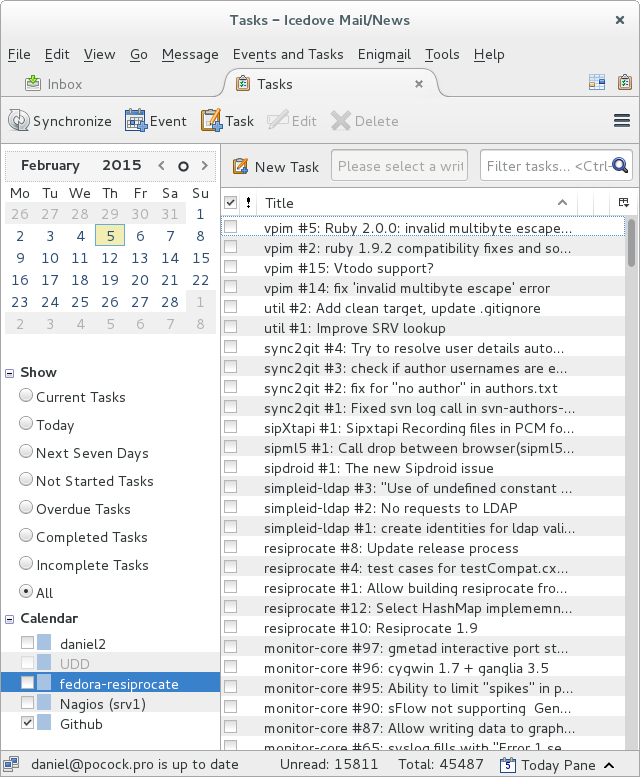
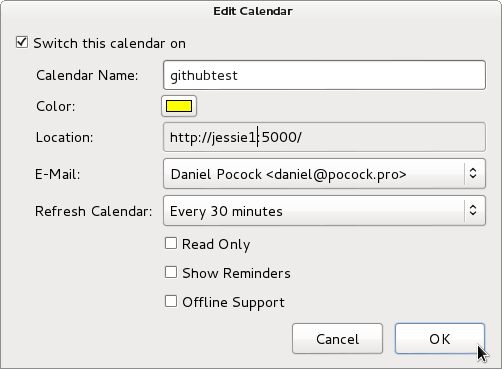
The Github iCalendar feed has now been updated to scan issues in all of your repositories. It is no longer necessary to list your repositories in the configuration file or remember to add new repositories to the configuration from time to time. Screenshot Below is a screenshot from Mozilla Lightning (known as Iceowl extension on Debian) showing the issues from a range of my projects on Github. Notice in the bottom left corner that I can switch each of my feeds on and off just by (un)ticking a box.

4 February 2015

Christoph Berg: apt.postgresql.org statistics

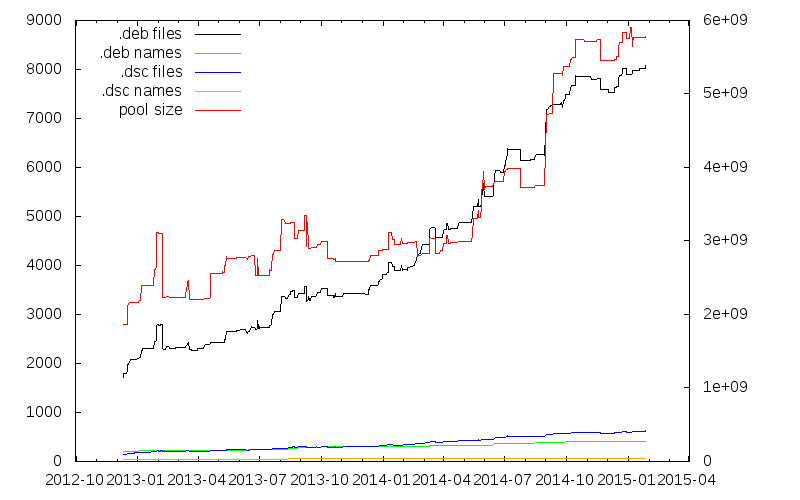
At this year's FOSDEM I gave a talk in the PostgreSQL devroom about Large Scale Quality Assurance in the PostgreSQL Ecosystem. The talk included a graph about the growth of the apt.postgresql.org repository that I want to share here as well: The yellow line at the very bottom is the number of different source package names, currently 71. From that, a somewhat larger number of actual source packages that include the "pgdgXX" version suffixes targeting the various distributions we have is built (blue). The number of different binary package names (green) is in about the same range. The dimension explosion then happens for the actual number of binary packages (black, almost 8000) targeting all distributions and architectures. The red line is the total size of the pool/ directory, currently a bit less than 6GB. (The graphs sometimes decrease when packages in the -testing distributions are promoted to the live distributions and the old live packages get removed.)
27 January 2015

Thomas Goirand: OpenStack debian image available from cdimage.debian.org

About a year and a half after I started writing the openstack-debian-images package, I m very happy to announce to everyone that, thanks to Steve McIntyre s help, the official OpenStack Debian image is now generated at the same time as the official Debian CD ISO images. If you are a cloud user, if you use OpenStack on a private cloud, or if you are a public cloud operator, then you may want to download the weekly build of the OpenStack image from here: http://cdimage.debian.org/cdimage/openstack/testing/ Note that for the moment, there s only the amd64 arch available, but I don t think this is a problem: so far, I haven t found any public cloud provider offering anything else than Intel 64 bits arch. Maybe this will change over the course of this year, and we will need arm64, but this can be added later on. Now, for later plans: I still have 2 bugs to fix on the openstack-debian-images package (the default 1GB size is now just a bit too small for Jessie, and the script exits with zero in case of error), but nothing that prevents its use right now. I don t think it will be a problem for the release team to accept these small changes before Jessie is out. When generating the image, Steve also wants to generate a sources.tar.gz containing all the source packages that we include on the image. He already has the script (which is used as a hook script when running the build-openstack-debian-image script), and I am planning to add it as a documentation in /usr/share/doc/openstack-debian-images. Last, probably it would be a good idea to install grub-xen, just as Ian Campbell suggested to make it possible for this image to run in AWS or other Xen based clouds. I would need to be able to test this though. If you can contribute with this kind of test, please get in touch. Feel free to play with all of this, and customize your Jessie images if you need to. The script is (on purpose) very small (around 400 lines of shell script) and easy to understand (no function, it s mostly linear from top to bottom of the file), so it is also very easy to hack, plus it has a convenient hook script facility where you can do all sorts of things (copying files, apt-get install stuff, running things in the chroot, etc.). Again, thanks so much to Steve for working on using the script during the CD builds. This feels me with joy that Debian finally has official images for OpenStack.
24 January 2015

Daniel Pocock: Get your Github issues as an iCalendar feed

I've just whipped up a Python script that renders Github issue lists from your favourite projects as an iCalendar feed. The project is called github-icalendar. It uses Python Flask to expose the iCalendar feed over HTTP. It is really easy to get up and running. All the dependencies are available on a modern Linux distribution, for example:
$ sudo apt-get install python-yaml python-icalendar python-flask python-pygithub
Just create an API token in Github and put it into a configuration file like this:
api_token: 6b36b3d7579d06c9f8e88bc6fb33864e4765e5fac4a3c2fd1bc33aad
bind_address: ::0
bind_port: 5000
filter: all
Run it from the shell:
$ ./github_icalendar/main.py github-ics.cfg
and connect to it with your favourite iCalendar client. Consolidating issue lists from Bugzilla, Github, Debian BTS and other sources A single iCalendar client can usually support multiple sources and thereby consolidate lists of issues from multiple bug trackers. This can be much more powerful than combining RSS bug feeds because iCalendar has built-in support for concepts such as priority and deadline. The client can use these to help you identify the most critical issues across all your projects, no matter which bug tracker they use. Bugzilla bugtrackers already expose iCalendar feeds directly, just look for the iCalendar link at the bottom of any search results page. Here is an example URL from the Mozilla instance of Bugzilla. The Ultimate Debian Database consolidates information from the Debian and Ubuntu universe and can already export it as an RSS feed, there is discussion about extrapolating that to an iCalendar feed too. Further possibilities
  • Prioritizing the issues in Github and mapping these priorities to iCalendar priorities
  • Creating tags in Github that allow issues to be ignored/excluded from the feed (e.g. excluding wishlist items)
  • Creating summary entries instead of listing all the issues, e.g. a single task entry with the title Fix 2 critical bugs for project foo
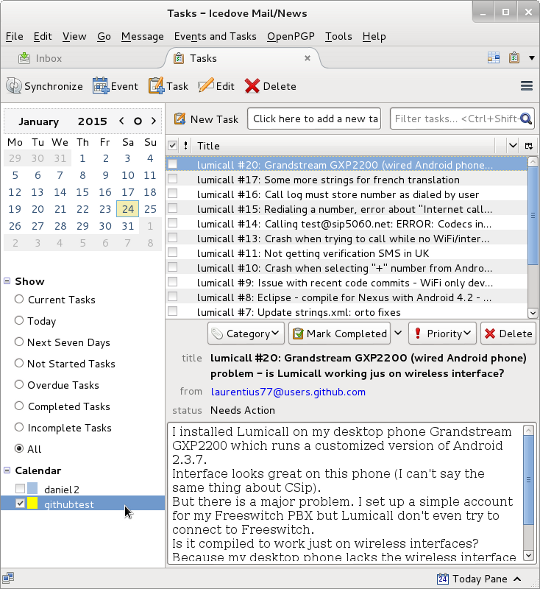
Screenshots The screenshots below are based on the issue list of the Lumicall secure SIP phone for Android. Screenshot - Mozilla Thunderbird/Lightning (Icedove/Iceowl-extension on Debian)

9 January 2015

Diego Escalante Urrelo: Link Pack #02

First sequel to my Link Pack series (I ll remove the quotes when it s LP#05): Link Pack #01. This time I m going for fewer articles, to try to keep things less overwhelming. There s no special theme, and I m actually leaving out some nice things I read recently. On the plus side, that means I have good material for a Link Pack #03. Also, I m gonna stick with Link Pack as a name, because it s good enough :-).
A Teenager s View on Social Media: Written by an actual teen
A well thought and realistic take on how social media is being used nowadays by teenagers. I have seen the patterns the author describes, and actually follow many of them. Does that mean I m still a teenager? It s interesting that the messaging and group-messaging part of the article is very US centric, or at least very US centric from my point of view. WhatsApp is the default messenger application south of the states, and fills the role of somewhere you can chat with people without having to give them your full personal information , that is, a place where you can chat with someone without running out of SMS and without adding them on Facebook (which would open them to stalk your whole profile and other friends). Some carriers in South Am rica offer unlimited plans for specific applications like WhatsApp. What Would Jesus Buy? (2007) Full movie
Reverend Billy Talen from the Church of Stop Shopping Gospel is trying to prevent the Shopocalypse from happening. It s an entertaining story of a group of funny guys and girls trying to share a message with comedy (that means A+ on my list). Simple and independent, a nice film. 13 Nutrition Lies That Made The World Sick And Fat
A pet peeve of mine. Nutrition is not really that complicated, but unfortunately there are a lot of myths that make people take really bad decisions. If you only read one thing in 2014 2015, read this.
Bottom Line: The low-fat, high-carb diet recommended by the mainstream nutrition organizations is a miserable failure and has been repeatedly proven to be ineffective. ( ) Bottom Line: Low-carb diets are the easiest, healthiest and most effective way to lose weight and reverse metabolic disease. It is pretty much a scientific fact at this point.
GM s hit and run: How a lawyer, mechanic, and engineer blew open the worst auto scandal in history
Cars are so complex nowadays, and dependent on electronics, that I m honestly afraid of them. I have made software for many years and I know how hard, impossible, it is to get things perfect . I can t imagine how hard it is for something so critical as brakes, steering wheels, etc. Even cameras can t get focus right some times, and it s been many many years.
Countless articles have been written about General Motors and its massive recalls earlier this year. What hasn t been fully told is how GM might have gotten away with multiple counts of consumercide were it not for the efforts of three men: a Georgia lawyer, a Mississippi mechanic, and a Florida engineer. ( ) Brooke Melton needn t have died that night. She was killed by a corporation s callous disregard for the safety of its customers, made worse by a regulatory agency reluctant to regulate.
The Long Game: Part 1 and The Long Game: Part 2
Two very short (less than 5 minutes) video essays about how notable people in the story of creativity are always celebrated without mentioning the boring years when they were nothing but losers. It s a fun little video, worth a watch for the idea and the interesting editing. It feels like someone really wanted to create these.

8 January 2015

Wouter Verhelst: ExtreMon example

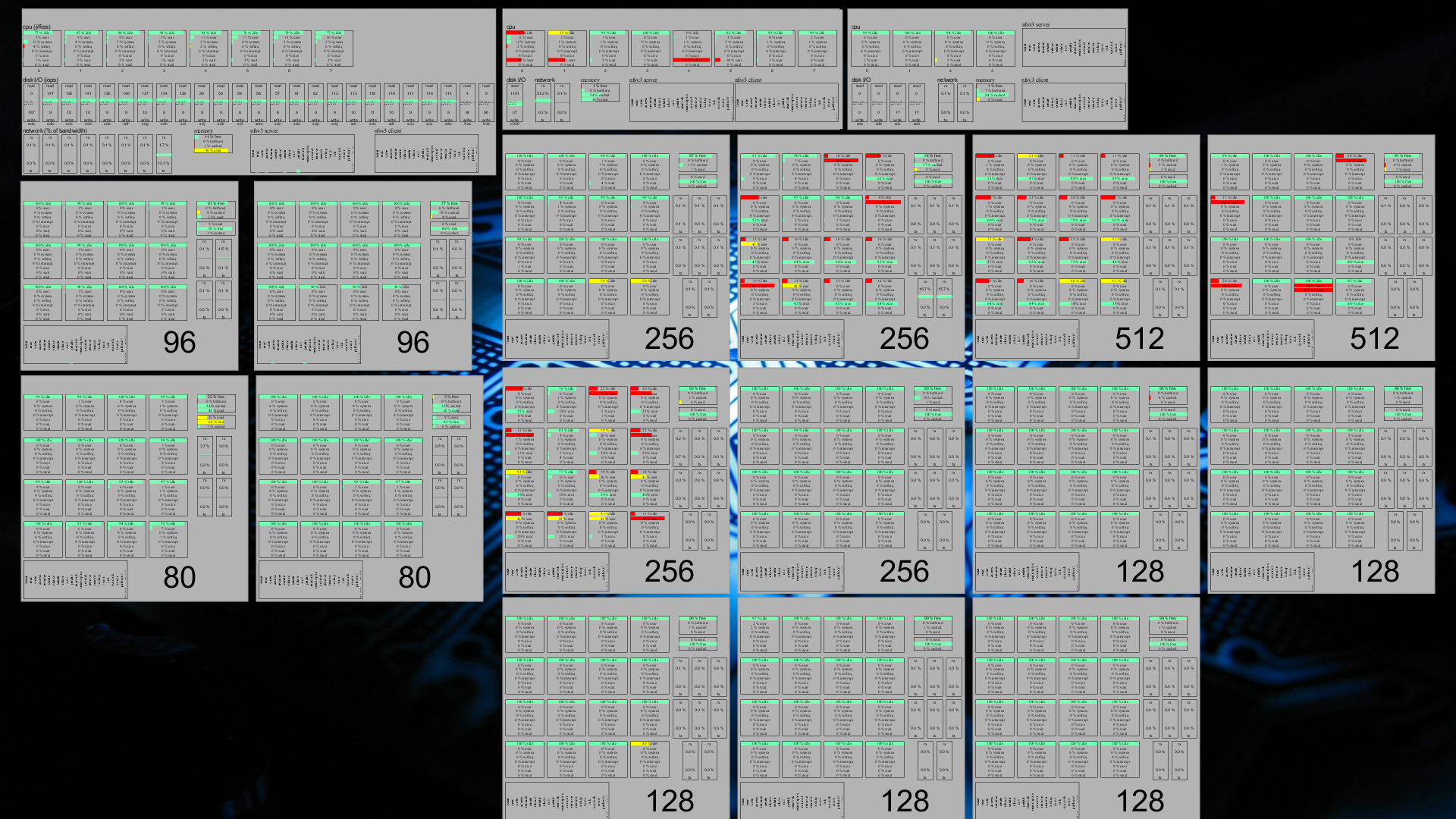
About a month ago, I blogged about extremon. As a reminder, ExtreMon is a monitoring tool that allows you to view things as they are happening, rather than with the ~5 minute delay that munin gives you, and also avoiding the quad-state limitation of Nagios' "good", "bad", "ugly", and "unknown" states. No, they're not really called that. Yes, I know you knew that. Anyway. In my blog post, I explained how you can set up ExtreMon, and I also set up a fairly limited demo version on my own server. But I have since realized that while it is functional, it doesn't actually show why ExtreMon is so great. In an effort to remedy that, I present you an example of what ExtreMon can do. Let's start with a screenshot of the ExtreMon console at the customer for which I spent time trying to figure out how to get it up and running: Click for full sized version. You'll note that even in that full-sized version, many things are unreadable. This is because the ExtreMon console allows one to move around (right mouse button drag for zoom; left mouse button drag for moving around; control+RMB for rotate; center mouse button to reset to default); so what matters is that everything fits on the screen, not whether it is all readable (if you need to read, you zoom). The image shows 18 rectangles. Each rectangle represents a single machine in this particular customer's HPC cluster. The top three rectangles are the cluster's file servers; the rest are its high performance nodes. You'll note that the left fileserver has 8 processor cores (top row), 8 network cards (bottom row, left part), and it also shows information on its memory usage (bottom row, small rectangle in the middle) as well as its NFS client and server procedure calls (bottom row, slightly larger rectangles to the right). This file server is the one on which I installed ZFS a while back; hence the large amount of disks visible in the middle row. The leftmost disk is the root filesystem (which is an ext4 off a hardware RAID1); the two rightmost "disks" are the PCIe-attached SSDs which are used for the ZFS L2ARC and write log. The other disks in this file server nicely show how ZFS does write load balancing over all its disks. The second file server has a hardware RAID1 on which it stores all its data; as such, there is only one disk graph there. It is also somewhat more limited in network, as it has only two NICs. It does, however, also have 8 cores. The last file server has no more than four processor cores; in addition, it also does not have a hardware RAID controller, so it must use software RAID over its four hard disks. This server is used for archival purposes, mostly, since it is insufficient for most anything else. As said, the other nodes are the "compute nodes", where the hard work is done. Most of these compute nodes have 16 cores each; two have 12 instead. When this particular screenshot was taken, four of the nodes (the ones showing red in their processor graphs) were hard at work; the others seem to have been mostly idling. In addition to the familiar memory, NFS (client only), network, and processor graphs, these nodes also show a "swap space" graph (just below the memory one), which seems fine for most nodes, except for the bottom left one (which shows a few bars that are coloured yellow rather than green). The green/yellow/red stuff is supposed to represent the "ok", "warning", "bad" states that would be familiar from Nagios. In this particular case, however, where "processor is busy all the time" is actually a wanted state, a low amount of idleness on the part of the processor isn't actually a problem, on the contrary. I did consider, therefore, to modify the ExtreMon configuration so that the processor graphs would not show red when the system was under high load; however, I found that differences in colour like this actually makes it more easy to see, at a glance, which machines are busy -- and that's one of the main reasons why we wanted to set this up. If you look carefully, you can find a particular processor core in the graph which shows 100% usage for "idle", "system", and "softirq", at the same time. Obviously that can't be the case, so there's a bug somewhere. Frank seems to believe it is a bug in CollectD; I haven't verified that. At any rate, though, this isn't usually a problem, due to the high update frequency of ExtreMon. The amount of data that's flowing through ExtreMon is amazing: Which renders a grand total of 2887 data points that are shown in this particular screenshot; and then I'm not even counting all the intermediate values, some of which also pass through ExtreMon. Nor am I counting the extra bits which have since been added (this screenshot is a few days old, now, and I'm still finetuning things). Yet even so, ExtreMon manages to update those values once every few seconds, in the worst case. As a result, the display isn't static for a moment, constantly moving and updating data so that what you see is never out of date for more than a second or two. Awesome.

2 January 2015

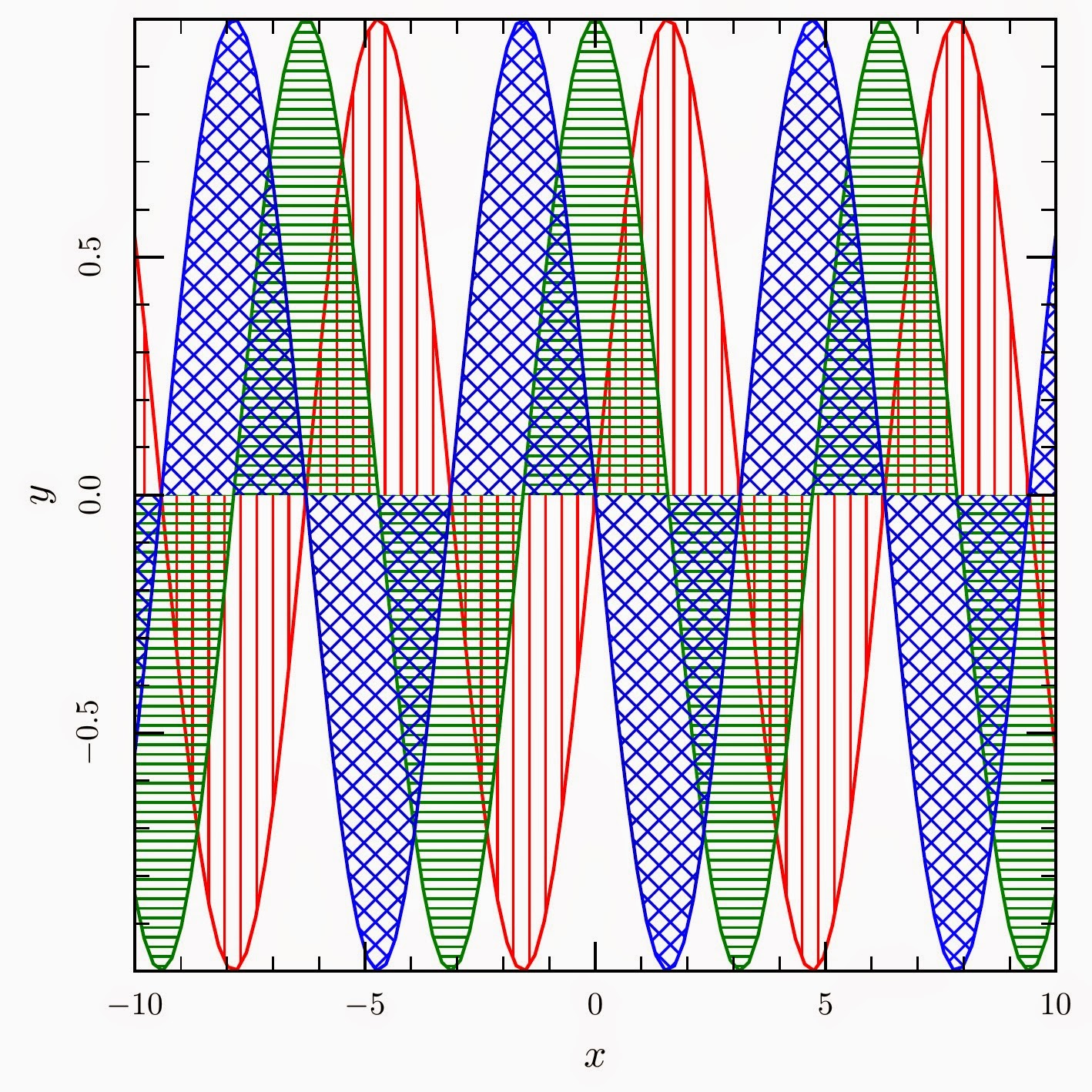
Vincent Fourmond: Release 0.11 of ctioga2

The new year is starting with a new release of ctioga2, with a lot of new features, such as:
The new release is of course available using rubygems:
~ gem update ctioga2
It can also be downloaded from sourceforge.The possibilities of the new styling system are particularly interesting, and I'm working on ways to make it more powerful, and providing series of default style files that anyone could use as they want. Among other future changes, I want to improve the position of ticks, especially when using non-linear axes, and add functions to draw vector fields (though this still needs some thinking). Enjoy, and a happy new year to everyone !

29 December 2014

Dirk Eddelbuettel: rfoaas 0.0.5

A new version of rfoaas is now on CRAN. The rfoaas package provides an interface for R to the most excellent FOAAS service--which provides a modern, scalable and RESTful web service for the frequent need to tell someone to eff off. This version aligns the rfoaas version number with the (at long last) updated upstream version number, and brings a change suggested by Richie Cotton to set the encoding of the returned object. As usual, CRANberries provides a diff to the previous release. Questions, comments etc should go to the GitHub issue tracker off the GitHub repo.

This post by Dirk Eddelbuettel originated on his Thinking inside the box blog. Please report excessive re-aggregation in third-party for-profit settings.

25 December 2014

Dirk Eddelbuettel: rfoaas 0.0.4.20141224

A new version of rfoaas is now on CRAN. The rfoaas package provides an interface for R to the most excellent FOAAS service -- which provides a modern, scalable and RESTful web service for the frequent need to tell someone to eff off. This is minor update, affecting only the rfoaas side without changes at the FOAAS backend side. We documented that the result may need an encoding update (at least on the World's leading consumer OS), and now provide a default value for from so that many services can be called argument-less, or at least with one argument less than before. Both of these were suggested by Richie Cotton via issue tickets at the GitHub repo. CRANberries also provides a diff to the previous release. Questions, comments etc should go to the GitHub issue tracker off the GitHub repo.

This post by Dirk Eddelbuettel originated on his Thinking inside the box blog. Please report excessive re-aggregation in third-party for-profit settings.

3 December 2014

Michael Stapelberg: Announcing the new Debian Code Search Instant

For the last few months, I have been working on a new version of Debian Code Search, and today it s going live! I call it Debian Code Search Instant, for multiple reasons, see below. A lot faster The new Debian Code Search is still hosted by Rackspace (thank you!), but our new architecture finally allows us to use their Performance Cloud Servers hardware generation. The old code search architecture was split across 5 different servers, however the search itself was only performed on a single machine with a network attached block volume backed by SSD. The new Code Search spreads out both the trigram index and the source code onto 6 different servers, and thanks to the new hardware generation, we have a locally connected SSD drive in each of them. So, we now get more than 6 times the IOPS we ve had before, at much lower latency :). Grouping by Debian source package The first feature request we ever got for Code Search was to group results by Debian source package. I ve tried tackling that before, but it s a pretty hard problem. With the new architecture and capacity, this finally becomes feasible. After your query completes, there is a checkbox called Group search results by Debian source package . Enable it, and you ll get neatly grouped results. For each package, there is a link at the bottom to refine the search to only consider that package. In case you are more interested in the full list of packages, for example because you are doing large-scale changes across Debian, that s also possible: Click on the symbol right next to the Filter by package list, and a curl command will be revealed with which you can download the full list of packages. Expensive queries (with lots of results) now possible Previously, we had a 60 second timeout during which queries must complete. This timeout has been completely lifted, and long-running queries with tons and tons of results are now possible. We kindly ask you to not abuse this feature it s not very exciting to play with complexity explosion in regular expression engines by preventing others from doing their work. If you re interested in that sort of analysis, go grab the source code and play with it on your own machine :). Instant results While your query is running, you will almost immediately see the top 10 results, even though the search may still take a while. This is useful to figure out if your regular expression matches what you thought it would, before having to wait until your 5 minute query is finished. Also, the new progress bar tells you how far the system is with your search. Instant indexing Previously, Code Search was deployed to a new set of machines from scratch every week in order to update the index. This was necessary because the performance would severely degrade while building the index, so we were temporarily running with twice the amount of machines until the new version was up. In the new architecture, we store an index for each source package and then merge these into one big index shard. This currently takes about 4 minutes with the code I wrote, but I m sure this can be made even faster if necessary. So, whenever new packages are uploaded to the Debian archive, we can just index the new version and trigger a merge. We get notifications about new package uploads from FedMsg. Packages that are not seen on FedMsg for some reason are backfilled every hour. The time between uploading a package and being able to find it in Debian Code Search therefore now ranges from a couple of minutes to about an hour, instead of about a week! New, beautiful User Interface Since we needed to rewrite the User Interface anyway thanks to the new architecture, we also spent some effort on making it modern, polished and beautiful. Smooth CSS animations make you aware of what s going on, and the search results look cleaner than ever. Conclusion At least to me, the new Debian Code Search seems like a significant improvement over the old one. I hope you enjoy the new features into which I put a lot of work. In case you have any feedback, I m happy to hear it (see the contact link at the bottom of every Code Search site).

2 December 2014

Richard Hartmann: Tabletop games

Wood. I really like wood. Even more, I like working with wood. Touching it, following its grain, and contemplating that it was made mostly from thin air and water. Normally, I just turn trees into handy pieces of firewood. While that's already deeply satisfying in the sense that you actually get to see what you worked for, it's a mostly destructive task. You kill a tree, you chop it up, only to turn it back into (mostly) thin air. As chance would have it, I needed a new table. After dragging myself through way too many furniture stores, I realized that I wouldn't be happy with what's on offer. So I struck a deal with a local carpenter: I would buy from them, but only if I could help building my own table; I would finally create something larger than a carving from wood. After some scouting, the carpenter found five planks of oak which were 4+ meter long, about 40-60 cm wide, and 8+ cm thick: Five raw planks of oak If you think this wood looks old, worn, and broken: You should have seen it up close; it was worse than on the potato-cam picture ;) But that's another great thing about working with wood: by taking off a laughably thin layer of surface material, you can renew the whole thing. We cut off 10 cm from each side as that's what tends to split and tossed that away. Afterwards, we cut off 80 cm from the wider side for the legs. Again, the base tends to have more imperfections and as you don't need to cut long pieces, you have more freedom in deciding how to cut. Cutting is an art in itself; tiny imperfections in the wood's surface can hint at large fissures underneath. The fact that the wood looks worn and spotty does not help in figuring this out. After cutting to minimize waste, you end up with a pile like this: Planks after cutting And a surprising amount of waste, i.e. firewood: Leftovers After a lot of planing, the wood becomes cleaner and smoother: Planed planks Then, everything's fitted so that neighbouring planks have their heartwood running into different directions, and so that the upper surface gets (most of) the interesting features. This is another surprisingly involved process and took about two hours. And no, the potato-cam does not manage to capture the wood's beauty. Set planks After sanding the sides down to perfection to ensure the glue can bond really tightly, the table feet are glued and put into a hydraulic press: Table feet about to be pressed while the tabletop itself shines in all its 287 cm x 107 cm x 6.3 cm glory: Tabletop set and glued Tomorrow, we will sand down the top and bottom of the tabletop and prepare the feet. Grooves will be milled into the wood to glue steel bars into it, as well as another plank that will be glued to the bottom of the tabletop, running along the middle. Along with the alternating heartwood, this helps ensure that this beast of a table will not fold in on itself or otherwise succumb to internal torsion or gravity. The final steps will be to fit the feet, sand down the surface again and then apply two layers of oil. And while most people may not fancy taking a week off just to rise way too early and then do unpaid work, I love it. As I said: I like wood.

Next.

Previous.