Benjamin Mako Hill: Dialogue
 Me: Do you want your coffee in a Japanese or Western style tea cup?
M: Yunomi.
Me: Apparently not as well as you think I do!
Me: Do you want your coffee in a Japanese or Western style tea cup?
M: Yunomi.
Me: Apparently not as well as you think I do!
 Snow coming. I'm tuned into the local 24 hour slop weather stream. AI
generated, narrated, up to the minute radar and forecast graphics. People
popping up on the live weather map with questions "snow soon?" (They pay
for the privilege.) LLM generating reply that riffs on their name. Tuned to
keep the urgency up, something is always happening somewhere, scanners are
pulling the police reports, live webcam description models add
verisimilitude to the description of the morning commute. Weather is
happening.
In the subtext, climate change is happening. Weather is a growth industry.
The guy up in Kentucky coal country who put this thing together is building
an empire. He started as just another local news greenscreener. Dropped out
and went twitch weather stream. Hyping up tornado days and dicy snow
forecasts. Nowcasting, hyper individualized, interacting with chat.
Now he's automated it all. On big days when he's getting real views,
the bot breaks into his live streams, gives him a break.
Only a few thousand watching this morning yet. Perfect 2026 grade slop.
Details never quite right, but close enough to keep on in the background
all day. Nobody expects a perfect forecast after all, and it's fed from the
National Weather Center discussion too. We still fund those guys? Why
bother when a bot can do it?
He knows why he's big in these states, these rural areas. Understands
the target audience. Airbrushed AI aesthetics are ok with them, receive no
pushback. Flying more under the radar coastally, but weather is big there
and getting bigger. The local weather will come for us all.
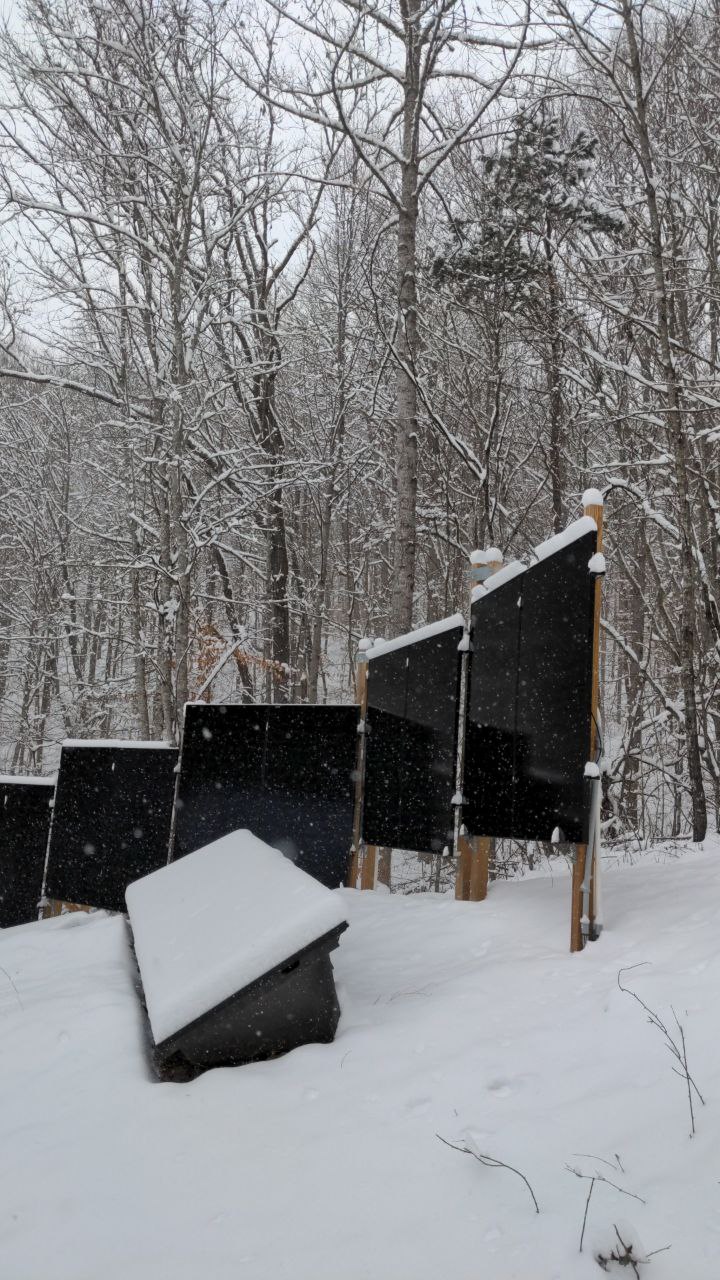 (Not fiction FYI.)



:wq for today.

install_gpu_driver.sh initializationproxy-exercise-2025-11) to build thecustom-images Toolkitexamples/secure-boot)
The examples/secure-boot directory within thecustom-images repository contains the necessary scripts andenv.json: The central configurationcreate-key-pair.sh: Manages the Securebuild-and-run-podman.sh: Orchestratespre-init.sh: Sets up the buildgenerate_custom_image.py. It crucially passes metadataenv.json (like proxy settings and Secure Bootgenerate_custom_image.py: The coregce-proxy-setup.sh: This script fromstartup_script/ is vital. It s injected into the temporaryinstall_gpu_driver.sh: Used as the--customization-script within the build VM. As detailed ingce-proxy-setup.sh.pre-init.sh script employs a layered approach:
secure-boot Image: Base image withtf Image: Based onsecure-boot, this image runs the fullinstall_gpu_driver.sh within the proxy-configured build VMsecure-proxy and proxy-tf layers-tf image combined with runtimeenv.json: Ensure you have thecustom-images and cloud-dataproc repos and aenv.json as described in Part 1.
bash # Example: Build a 2.2-debian12 based image set # Run from the custom-images repository root bash examples/secure-boot/build-and-run-podman.sh 2.2-debian12env.json via the metadata injected into thedataproc-2-2-deb12-YYYYMMDD-HHMMSS-tf).
custom-images repository to build Securegce-proxy-setup.sh, and leveraging theinstall_gpu_driver.sh from Part 2.
In Part 4, we ll bring it all together, deploying a Dataproc cluster-tf image within the secure network, and The following contributors got their Debian Developer accounts in the last two
months:
install_gpu_driver.sh script from the LLC-Technologies-Collier/initialization-actionsgpu-202601).
This isn t just any installation script; it has been significantlyinstall_gpu_driver.sh
To address these challenges, the script incorporates several keyset_proxyapt, curl,gpg, and even gsutil failed in proxy-onlyset_proxy functiongce-proxy-setup.sh) was completely overhauledhttp-proxy,https-proxy, proxy-uri,no-proxy). Critically, environment variablesHTTP_PROXY, HTTPS_PROXY,NO_PROXY) are now set before any networkNO_PROXY is carefully set to include.google.com and .googleapis.com to allowhttp-proxy-pem-uri.gcloud, apt, dnf, anddirmngr are also configured to use the proxy.import_gpg_keysgpg --recv-keys is not proxy-friendly.import_gpg_keyscurl, whichgpg --recv-keys calls.dataproc-temp-bucket)build_driver_from_githubsign-file), install, and verify the signed modules.install_gpu_driver.sh--metadata invocation-type=custom-images). In this mode,dataproc-gpu-config.service) that runs on the first bootinstall_gpu_driver.sh initialization action is moreproxy-exercise-2025-11) uses this proxy-sync-2026-01).
LLC-Technologies-Collier/cloud-dataproc
To make setting up and tearing down these complex networkgcloud directory of thecloud-dataproc repository. These scripts handle thegcloud/bin/create-dpgce-private
This script is the cornerstone for creating the private, proxiedenv.json
We use a single env.json file to drive thecustom-images scripts in Part 3. This env.jsoncustom-images repository clone, andcloud-dataproc/gcloud# Assuming you have cloud-dataproc and custom-images cloned side-by-side
# And your env.json is in the custom-images root
cd cloud-dataproc/gcloud
# Symlink to the env.json in custom-images
ln -sf ../../custom-images/env.json env.json
# Run the creation script, but don't create a cluster yet
bash bin/create-dpgce-private --no-create-cluster
cd ../../custom-imagesstartup_script/gce-proxy-setup.sh (from thecustom-images repository) is designed to be run on eachhttp-proxy andhttp-proxy-pem-uri (which our cluster creation scripts in# Run from the custom-images repository root
gsutil cp startup_script/gce-proxy-setup.sh gs://$(jq -r .BUCKET env.json)/custom-image-deps/cloud-dataproc scripts, we ve laid thegce-proxy-setup.sh) in GCS, ready to be used by ourinstall_gpu_driver.sh initialization action from theLLC-Technologies-Collier/initialization-actions repositorygpu-202601) and how it s been adapted to install$ curl https://api.ftp-master.debian.org/changelogs?search_term=almeida+ciprianoWARNING: Check v2: https://people.debian.org/~gladk/blog/posts/202601_ftp-master-changelog-v2/The query provides a way to search through the changelogs of all Debian packages currently published. The source code is available at Salsa. I'm already using it to track my uploads, I made this page that updates every day. If you want to setup something similar, you can use my script and just change the
search_term to the name you use in your
changelog entries.
I m running it using a systemd timer. Here s what I ve got:
# .config/systemd/user/track-uploads.service
[Unit]
Description=Track my uploads using the dak API
StopWhenUnneeded=yes
[Service]
Type=oneshot
WorkingDirectory=/home/cipriano/public_html/uploads
ExecStart=/usr/bin/python3 generate.py
# .config/systemd/user/track-uploads.timer
[Unit]
Description=Run track-uploads script daily
[Timer]
OnCalendar=daily
Persistent=true
[Install]
WantedBy=timers.target$ systemctl --user daemon-reload
$ systemctl --user enable --now track-uploads.timer
$ systemctl --user start track-uploads.service # generates the html now
 Ubuntu Pro is a subscription offering for Ubuntu users who want to pay for the assurance of getting quick and high-quality security updates for Ubuntu. I tested it out to see how it works in practice, and to evaluate how well it works as a commercial open source service model for Linux.
Anyone running Ubuntu can subscribe to it at ubuntu.com/pro/subscribe by selecting the setup type Desktops for the price of $25 per year (+applicable taxes) for Enterprise users. There is also a free version for personal use. Once you have an account, you can find your activation token at ubuntu.com/pro/dashboard, and use it to activate Ubuntu Pro on your desktop or laptop Ubuntu machine by running
sudo pro attach <token>:
$ sudo pro attach aabbcc112233aabbcc112233
Enabling default service esm-apps
Updating package lists
Ubuntu Pro: ESM Apps enabled
Enabling default service esm-infra
Updating package lists
Ubuntu Pro: ESM Infra enabled
Enabling default service livepatch
Installing canonical-livepatch snap
Canonical livepatch enabled.
Unable to determine current instance-id
This machine is now attached to 'Ubuntu Pro Desktop'
$ sudo pro status --all
SERVICE ENTITLED STATUS DESCRIPTION
anbox-cloud yes disabled Scalable Android in the cloud
cc-eal yes n/a Common Criteria EAL2 Provisioning Packages
esm-apps yes enabled Expanded Security Maintenance for Applications
esm-infra yes enabled Expanded Security Maintenance for Infrastructure
fips yes n/a NIST-certified FIPS crypto packages
fips-preview yes n/a Preview of FIPS crypto packages undergoing certification with NIST
fips-updates yes disabled FIPS compliant crypto packages with stable security updates
landscape yes enabled Management and administration tool for Ubuntu
livepatch yes disabled Canonical Livepatch service
realtime-kernel yes disabled Ubuntu kernel with PREEMPT_RT patches integrated
generic yes disabled Generic version of the RT kernel (default)
intel-iotg yes n/a RT kernel optimized for Intel IOTG platform
raspi yes n/a 24.04 Real-time kernel optimised for Raspberry Pi
ros yes n/a Security Updates for the Robot Operating System
ros-updates yes n/a All Updates for the Robot Operating System
usg yes disabled Security compliance and audit tools
Enable services with: pro enable <service>
Account: Otto Kekalainen
Subscription: Ubuntu Pro Desktop
Valid until: Thu Mar 3 08:08:38 2026 PDT
Technical support level: essentialesm-apps, which delivers extended security updates to many applications typically used on desktop systems.
Another relevant command to confirm the current subscription status is:
$ sudo pro security-status
2828 packages installed:
2143 packages from Ubuntu Main/Restricted repository
660 packages from Ubuntu Universe/Multiverse repository
13 packages from third parties
12 packages no longer available for download
To get more information about the packages, run
pro security-status --help
for a list of available options.
This machine is receiving security patching for Ubuntu Main/Restricted
repository until 2029.
This machine is attached to an Ubuntu Pro subscription.
Ubuntu Pro with 'esm-infra' enabled provides security updates for
Main/Restricted packages until 2034.
Ubuntu Pro with 'esm-apps' enabled provides security updates for
Universe/Multiverse packages until 2034. You have received 26 security
updates.sudo pro security-status --esm-apps to get a detailed breakdown of the installed software packages in scope for Expanded Security Maintenance (ESM).
https://esm.ubuntu.com/apps/ubuntu, but other than that there aren t any notable signs of Ubuntu Pro being in use. That is a good thing after all one is paying for assurance that everything works with minimum disruptions, so the system that enables smooth sailing should stay in the background and not make too much noise of itself.
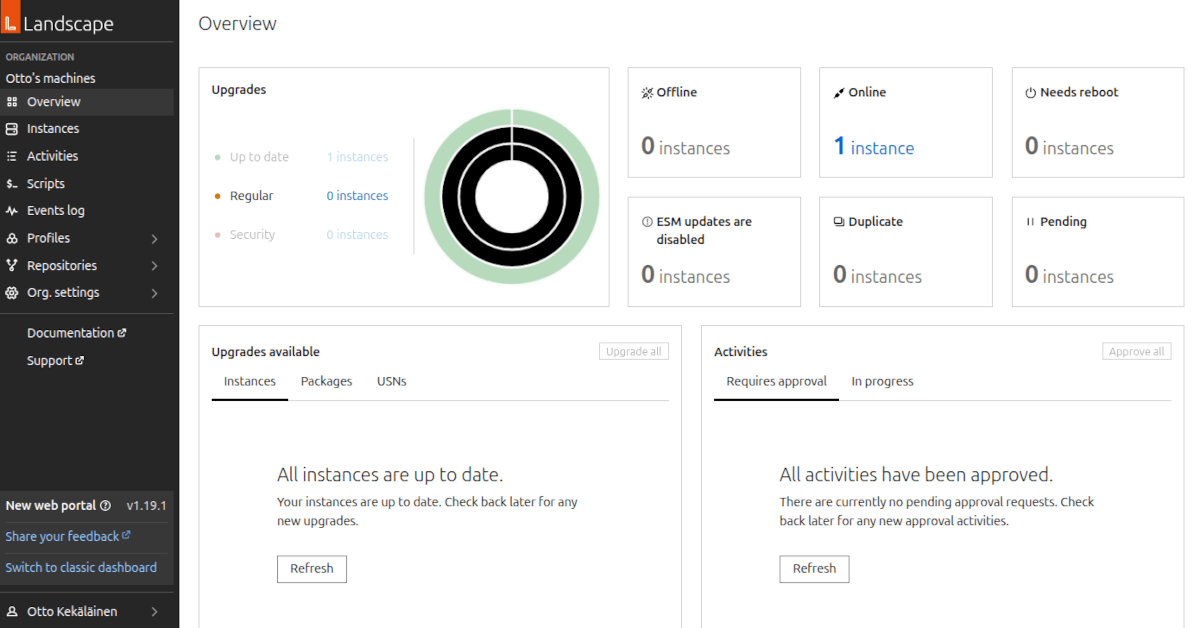
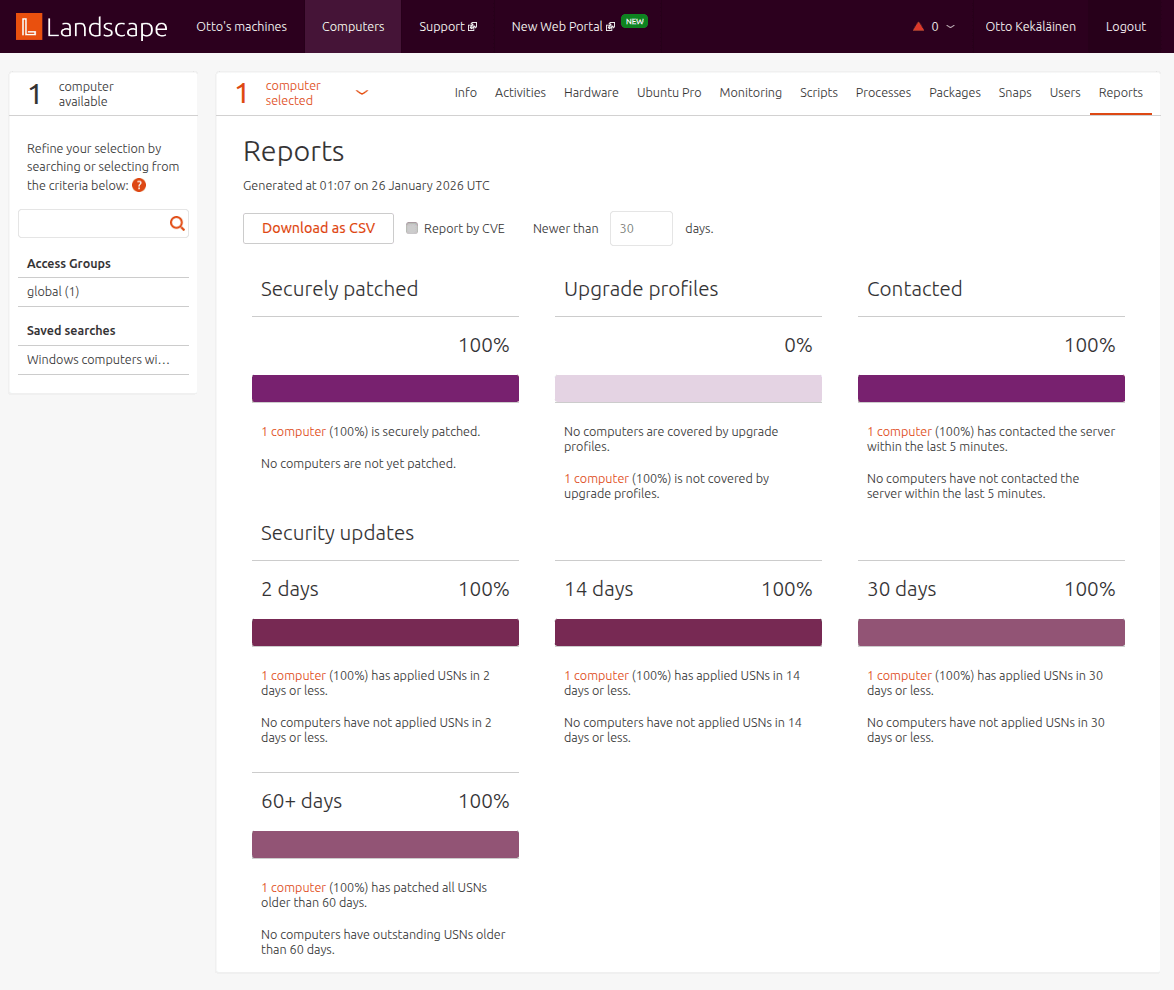 Landscape.canonical.com is a fleet management system that shows information like security update status and resource utilization for the computers you administer. Ubuntu Pro attached systems under one s account are not automatically visible in Landscape, but have to be enrolled in it.
To enroll an Ubuntu Pro attached desktop/laptop to Landscape, first install the required package with
sudo apt install landscape-client and then run sudo landscape-config --account-name <account name> to start the configuration wizard. You can find your account name in the Landscape portal. On the last wizard question Request a new registration for this computer now? [y/N] hit y to accept. If successful, the new computer will be visible on the Landscape portal page Pending computers , from where you can click to accept it.
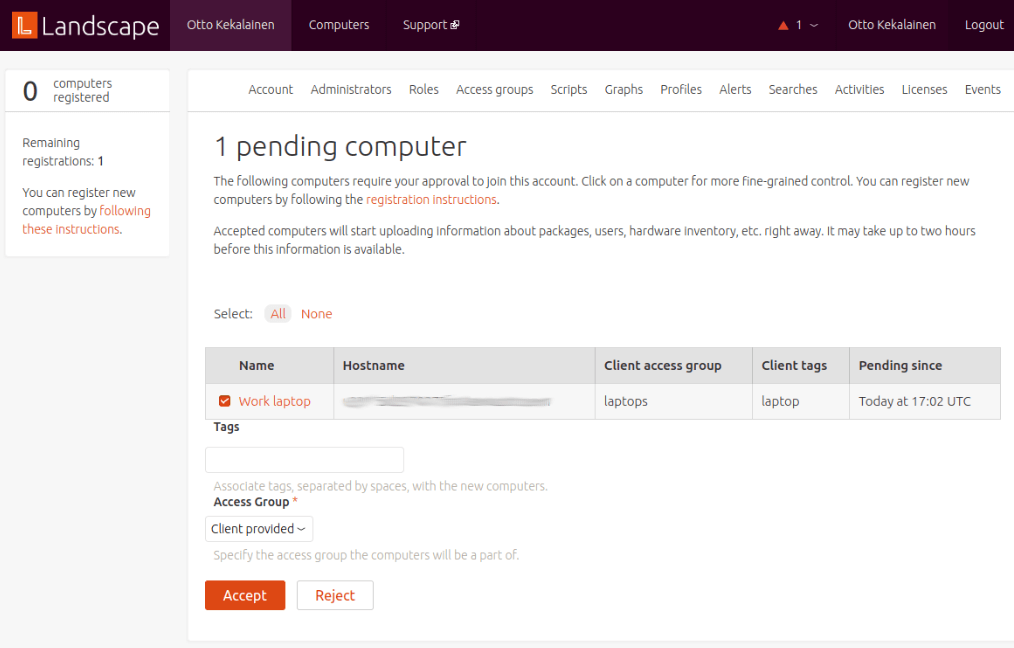 If I had a large fleet of computers, Landscape might come in useful. Also it is obvious Landscape is intended primarily for managing server systems. For example, the default alarm trigger on systems being offline, which is common for laptops and desktop computers, is an alert-worthy thing only on server systems.
It is good to know that Landscape exists, but on desktop systems I would probably skip it, and only stick to the security updates offered by Ubuntu Pro without using Landscape.
This shows Canonical is actively investing in the service and it is likely going to sit at the center of their business model for years to come.
 Finally, some light at the end of the tunnel!
As I have said in this
blog
and elsewhere, after putting quite a bit of work into generating the Debian
Raspberry Pi images between late
2018
and 2023, I had to recognize I don t have the time and energy to properly
care for it.
I even registered a GSoC project for it. I mentored Kurva Prashanth, who
did good work on the vmdb2
scripts we use for the image generation but in the end, was unable to
push them to be built in Debian infrastructure. Maybe a different approach
was needed! While I adopted the images as they were conceived by Michael
Stapelberg,
sometimes it s easier to start from scratch and build a fresh approach.
So, I m not yet pointing at a stable, proven release, but to a good
promise. And I hope I m not being pushy by making this public: in the
#debian-raspberrypi channel,
waldi has shared the images he has created
with the Debian Cloud Team s infrastructure.
So, right now, the images built so
far
support Raspberry Pi families 4 and 5 (notably, not the 500 computer I
have, due to a missing Device Tree, but I ll try to help figure that bit
out Anyway, p400/500/500+ systems are not that usual). Work is
underway to get the 3B+ to boot (some hackery is needed, as it only
understands MBR partition schemes, so creating a hybrid image seems to be
needed).
 Sadly, I don t think the effort will be extended to cover older,
32-bit-only systems (RPi 0, 1 and 2).
Anyway, as this effort stabilizes, I will phase out my (stale!) work on
raspi.debian.net, and will redirect it to point at the new images.
That s beyond my knowledge Although I can tell you that: Raspberry Pi OS has hardware support as soon as their new boards hit the market. The ability to even boot a board can take over a year for the mainline Linux kernel (at least, it has, both in the cases of the 4 and the 5 families).Yeah, unfortunately I m aware of that I ve also been trying to boot OpenBSD on my rpi5 out of curiosity, but been blocked by my somewhat unusual setup involving an NVMe SSD as the boot drive :/
Also, sometimes some bits of hardware are not discovered by the Linux kernels even if the general family boots because they are not declared in the right place of the Device Tree (i.e. the wireless network interface in the 02W is in a different address than in the 3B+, or the 500 does not fully boot while the 5B now does). Usually it is a matter of just declaring stuff in the right place, but it s not a skill many of us have.At some point in my life I had started reading a bit about device trees and stuff, but got distracted by other stuff before I could develop any familiarity with it. So I don t have the skills either :)
Also, many RPi hats ship with their own Device Tree overlays, and they cannot always be loaded on top of mainline kernels.I m definitely not happy to hear this! Guess I ll have to try, and maybe report back once some page for these new builds materializes.
 Somehow this whole DevOps thing is all about generating the wildest things from some (usually equally wild) template.
And today we're gonna generate YAML from ERB, what could possibly go wrong?!
Well, actually, quite a lot,
so one wants to validate the generated result before using it to break systems at scale.
The YAML we generate is a cloud-init cloud-config,
and while checking that we generated a valid YAML document is easy (and we were already doing that),
it would be much better if we could check that cloud-init can actually use it.
Enter
cloud-init schema, or so I thought.
Turns out running cloud-init schema is rather broken without root privileges,
as it tries to load a ton of information from the running system.
This seems like a bug (or multiple), as the data should not be required for the validation of the schema itself.
I've not found a way to disable that behavior.
Luckily, I know Python.
Enter evgeni-knows-better-and-can-write-python:
#!/usr/bin/env python3
import sys
from cloudinit.config.schema import get_schema, validate_cloudconfig_file, SchemaValidationError
try:
    valid = validate_cloudconfig_file(config_path=sys.argv[1], schema=get_schema())
    if not valid:
        raise RuntimeError("Schema is not valid")
except (SchemaValidationError, RuntimeError) as e:
    print(e)
    sys.exit(1)
validate_cloudconfig_file API,
as it will sometimes raise an SchemaValidationError,
sometimes a RuntimeError and sometimes just return False.
No idea why.
But the above just turns it into a couple of printed lines and a non zero exit code,
unless of course there are no problems, then you get peaceful silence.
 A new (micro) maintenance release of our RApiDatetime
package is now on CRAN, coming
only a good week after the 0.0.10
release which itself had a two year gap to its predecessor
release.
RApiDatetime
provides a number of entry points for C-level functions of the R API for
Date and Datetime calculations. The functions
asPOSIXlt and asPOSIXct convert between long
and compact datetime representation, formatPOSIXlt and
Rstrptime convert to and from character strings, and
POSIXlt2D and D2POSIXlt convert between
Date and POSIXlt datetime. Lastly,
asDatePOSIXct converts to a date type. All these functions
are rather useful, but were not previously exported by R for C-level use
by other packages. Which this package aims to change.
This release adds a single (and ) around one variable as the
rchk container and service by Tomas now flagged this. Which
is somewhat peculiar, as this is old code also borrowed from R
itself but no point arguing so I just added this.
Details of the release follow based on the NEWS file.
Courtesy of my CRANberries, there is also a diffstat report for this release.Changes in RApiDatetime version 0.0.11 (2026-01-19)
- Add PROTECT (and UNPROTECT) to appease rchk
This post by Dirk Eddelbuettel originated on his Thinking inside the box blog. If you like this or other open-source work I do, you can sponsor me at GitHub.
Hurray!  I have officially reached the 6-week mark, the halfway point of my Outreachy internship. The time has flown by incredibly fast, yet it feels short because there is still so much exciting work to do.
I remember starting this journey feeling overwhelmed, trying to gain momentum. Today, I feel much more confident. I began with the apps_startstop task during the contribution period, writing manual test steps and creating preparation Perl scripts for the desktop environments. Since then, I ve transitioned into full automation and taken a liking to reading openQA upstream documentation when I have issues or for reference.
In all of this, I ve committed over 30 hours a week to the project. This dedicated time has allowed me to look in-depth into the Debian ecosystem and automated quality assurance.
Reviewing my 12-week goal, which included extending automated tests for live image testing, installer testing, and documentation, I am happy to report that I am right on track. My work on desktop apps tests has directly improved the quality of both the Live Images and the netinst (network installer) ISOs.
I have successfully extended the apps_startstop tests for two Desktop Environments (DEs): Cinnamon and LXQt. These tests ensure that common and DE specific apps launch and close correctly across different environments.
One of my favorite challenges was suggested by my mentor, Roland: synergizing the tests to reduce redundancy. I observed that some applications (like Firefox and LibreOffice) behave identically across different desktops. Instead of duplicating Perl scripts/code for every single DE, I used symbolic links. This allows the use of the same Perl script and possibly the same needles, making the test suite lighter and much easier to maintain.

During the contribution phase, I noticed how rigid the documentation and coding style requirements are. While this ensures high standards and uniformity, it can be intimidating for newcomers and time-consuming for reviewers.
To help, I created a contributor guide [MR !97]. This guide addresses the project s writing style. My goal is to reduce the back-and-forth during reviews, making the process more efficient for everyone and helping new contributors.
For the second half of the internship, I plan to:
This journey has been an amazing experience of learning and connecting with the wider open-source community, especially Debian Women and the Linux QA team.
I am deeply grateful to my mentors, Tassia Camoes Araujo, Roland Clobus, and Philip Hands, for their constant guidance and for believing in my ability to take on this project.
Here s to the next 6 weeks 
 I'm going to FOSDEM 2026!
I'm presenting in the Containers dev room. My talk is Java Memory Management
in Containers
and it's scheduled as the first talk on the first day. I'm the warm-up act!
The Java devroom has been a stalwart at FOSDEM since 2004 (sometimes in other
forms), but sadly there's no Java devroom this year. There's a story about
that, but it's not mine to tell.
Please recommend to me any interesting talks! Here's a few that caught my eye:
Debian/related:
 Note 9
 Power Use
In 93 minutes having the PinePhone Pro, Librem 5, and FLX1s online with open ssh sessions from my workstation the PinePhone Pro went from 100% battery to 26%, the Librem 5 went from 95% to 69%, and the FLX1s went from 100% to 99%. The battery discharge rate of them was reported as 3.0W, 2.6W, and 0.39W respectively. Based on having a 16.7Wh battery 93 minutes of use should have been close to 4% battery use, but in any case all measurements make it clear that the FLX1s will have a much longer battery life. Including the measurement of just putting my fingers on the phones and feeling the temperature (FLX1s felt cool and the others felt hot).
The PinePhone Pro and the Librem 5 have an optional Caffeine mode which I enabled for this test, without that enabled the phone goes into a sleep state and disconnects from Wifi. So those phones would use much less power with caffeine mode enabled, but they also couldn t get fast response to notifications etc. I found the option to enable a Caffeine mode switch on the FLX1s but the power use was reported as being the same both with and without it.
Charging
One problem I found with my phone is that in every case it takes 22 seconds to negotiate power. Even when using straight USB charging (no BC or PD) it doesn t draw any current for 22 seconds. When I connect it it will stay at 5V and varying between 0W and 0.1W (current rounded off to zero) for 22 seconds or so and then start charging. After the 22 second display the phone will make the tick sound indicating that it s charging and the power meter will measure that it s drawing some current.
I added the table from my previous post about phone charging speed [6] with an extra row for the FLX1s. For charging from my PC USB ports the results were the worst ever, the port that does BC did not work at all it was looping trying to negotiate after a 22 second negotiation delay the port would turn off. The non-BC port gave only 2.4W which matches the 2.5W given by the spec for a High-power device which is what that port is designed to give. In a discussion on the Purism forum about the Librem5 charging speed one of their engineers told me that the reason why their phone would draw 2A from that port was because the cable was identifying itself as a USB-C port not a High-power device port. But for some reason out of the 7 phones I tested the FLX1s and the One Plus 6 are the only ones to limit themselves to what the port is apparently supposed to do. Also the One Plus 6 charges slowly on every power supply so I don t know if it is obeying the spec or just sucking.
On a cheap AliExpress charger the FLX1s gets 5.9V and on a USB battery it gets 5.8V. Out of all 42 combinations of device and charger I tested these were the only ones to involve more than 5.1V but less than 9V. I welcome comments suggesting an explanation.
The case that I received has a hole for the USB-C connector that isn t wide enough for the plastic surrounds on most of my USB-C cables (including the Dell dock). Also to make a connection requires a fairly deep insertion (deeper than the One Plus 6 or the Note 9). So without adjustment I have to take the case off to charge it. It s no big deal to adjust the hole (I have done it with other cases) but it s an annoyance.
| Phone | Top z640 | Bottom Z640 | Monitor | Ali Charger | Dell Dock | Battery | Best | Worst |
|---|---|---|---|---|---|---|---|---|
| FLX1s | FAIL | 5.0V 0.49A 2.4W | 4.8V 1.9A 9.0W | 5.9V 1.8A 11W | 4.8V 2.1A 10W | 5.8V 2.1A 12W | 5.8V 2.1A 12W | 5.0V 0.49A 2.4W |
| Note9 | 4.8V 1.0A 5.2W | 4.8V 1.6A 7.5W | 4.9V 2.0A 9.5W | 5.1V 1.9A 9.7W | 4.8V 2.1A 10W | 5.1V 2.1A 10W | 5.1V 2.1A 10W | 4.8V 1.0A 5.2W |
| Pixel 7 pro | 4.9V 0.80A 4.2W | 4.8V 1.2A 5.9W | 9.1V 1.3A 12W | 9.1V 1.2A 11W | 4.9V 1.8A 8.7W | 9.0V 1.3A 12W | 9.1V 1.3A 12W | 4.9V 0.80A 4.2W |
| Pixel 8 | 4.7V 1.2A 5.4W | 4.7V 1.5A 7.2W | 8.9V 2.1A 19W | 9.1V 2.7A 24W | 4.8V 2.3A 11.0W | 9.1V 2.6A 24W | 9.1V 2.7A 24W | 4.7V 1.2A 5.4W |
| PPP | 4.7V 1.2A 6.0W | 4.8V 1.3A 6.8W | 4.9V 1.4A 6.6W | 5.0V 1.2A 5.8W | 4.9V 1.4A 5.9W | 5.1V 1.2A 6.3W | 4.8V 1.3A 6.8W | 5.0V 1.2A 5.8W |
| Librem 5 | 4.4V 1.5A 6.7W | 4.6V 2.0A 9.2W | 4.8V 2.4A 11.2W | 12V 0.48A 5.8W | 5.0V 0.56A 2.7W | 5.1V 2.0A 10W | 4.8V 2.4A 11.2W | 5.0V 0.56A 2.7W |
| OnePlus6 | 5.0V 0.51A 2.5W | 5.0V 0.50A 2.5W | 5.0V 0.81A 4.0W | 5.0V 0.75A 3.7W | 5.0V 0.77A 3.7W | 5.0V 0.77A 3.9W | 5.0V 0.81A 4.0W | 5.0V 0.50A 2.5W |
| Best | 4.4V 1.5A 6.7W | 4.6V 2.0A 9.2W | 8.9V 2.1A 19W | 9.1V 2.7A 24W | 4.8V 2.3A 11.0W | 9.1V 2.6A 24W |
/backup/serverA.domain/.sync/foo
/backup/serverA.domain/daily.0/foo
/backup/serverA.domain/daily.1/foo
/backup/serverA.domain/daily.2/foo
...
/backup/serverA.domain/daily.6/foo
/backup/serverA.domain/weekly.0/foo
/backup/serverA.domain/weekly.1/foo
...
/backup/serverA.domain/monthly.0/foo
/backup/serverA.domain/monthly.1/foo
...
/backup/serverA.domain/yearly.0/foomirror command to download all S3 objects to my laptop, and rely on rsnapshot to keep backups of this. While 4TB NVME s are relatively cheap, I ve felt that this disk and network churn on my laptop is unsatisfactory for quite some time.
What is a better approach?
I find S3 hosting sites fairly unreliable by design. Only a couple of clicks in your web browser and you have dropped 100TB of data. Or by someone else who steal your plaintext-equivalent cookie. Thus, I haven t really felt comfortable using any S3-based backup option. I prefer to self-host, although continously running a mirror job is not sufficient: if I accidentally drop the entire S3 object store, my mirror run will remove all files locally too.
The rsnapshot approach that allows going back in time and having data on self-managed servers feels superior to me.
What if we could use rsnapshot with a S3 client instead of rsync?
Someone else asked about this several years ago, and the suggestion was to use the fuse-based s3fs which sounded unreliable to me. After some experimentation, working around some hard-coded assumption in the rsnapshot implementation, I came up with a small configuration pattern and a wrapper tool to implement what I desired.
Here is my configuration snippet:
cmd_rsync    /backup/s3/s3rsync
rsync_short_args    -Q
rsync_long_args    --json --remove
lockfile    /backup/s3/rsnapshot.pid
snapshot_root    /backup/s3
backup    s3:://hetzner/debdistget-gnuinos    ./debdistget-gnuinos
backup    s3:://hetzner/debdistget-tacos  ./debdistget-tacos
backup    s3:://hetzner/debdistget-diffos ./debdistget-diffos
backup    s3:://hetzner/debdistget-pureos ./debdistget-pureos
backup    s3:://hetzner/debdistget-kali   ./debdistget-kali
backup    s3:://hetzner/debdistget-devuan ./debdistget-devuan
backup    s3:://hetzner/debdistget-trisquel   ./debdistget-trisquel
backup s3:://hetzner/debdistget-debian ./debdistget-debian/backup/s3/.
I have some scripts that take a complete rsnapshot.conf file and append my per-directory configuration so that this becomes a complete configuration. If you are curious how I roll this, backup-all invokes backup-one appending my rsnapshot.conf template with the snippet above.
The s3rsync wrapper script is the essential hack to convert rsnapshot s rsync parameters into something that talks S3 and the script is as follows:
#!/bin/sh
set -eu
S3ARG=
for ARG in "$@"; do
    case $ARG in
    s3:://*) S3ARG="$S3ARG "$(echo $ARG   sed -e 's,s3:://,,');;
    -Q*) ;;
    *) S3ARG="$S3ARG $ARG";;
    esac
done
echo /backup/s3/mc mirror $S3ARG
exec /backup/s3/mc mirror $S3ARGs3cmd but its sync command read all files to compute MD5 checksums every time you invoke it, which is very slow. The mc mirror command is blazingly fast since it only compare mtime s, just like rsync or git.
First you need to store credentials for your S3 bucket. These are stored in plaintext in ~/.mc/config.json which I find to be sloppy security practices, but I don t know of any better way to do this. Replace AKEY and SKEY with your access token and secret token from your S3 provider:
/backup/s3/mc alias set hetzner AKEY SKEYsync job for a fully synced up directory the output looks like this:
root@hamster /backup# /run/current-system/profile/bin/rsnapshot -c /backup/s3/rsnapshot.conf -V sync
Setting locale to POSIX "C"
echo 1443 > /backup/s3/rsnapshot.pid
/backup/s3/s3rsync -Qv --json --remove s3:://hetzner/debdistget-gnuinos \
    /backup/s3/.sync//debdistget-gnuinos
/backup/s3/mc mirror --json --remove hetzner/debdistget-gnuinos /backup/s3/.sync//debdistget-gnuinos
 "status":"success","total":0,"transferred":0,"duration":0,"speed":0
/backup/s3/s3rsync -Qv --json --remove s3:://hetzner/debdistget-tacos \
    /backup/s3/.sync//debdistget-tacos
/backup/s3/mc mirror --json --remove hetzner/debdistget-tacos /backup/s3/.sync//debdistget-tacos
 "status":"success","total":0,"transferred":0,"duration":0,"speed":0
/backup/s3/s3rsync -Qv --json --remove s3:://hetzner/debdistget-diffos \
    /backup/s3/.sync//debdistget-diffos
/backup/s3/mc mirror --json --remove hetzner/debdistget-diffos /backup/s3/.sync//debdistget-diffos
 "status":"success","total":0,"transferred":0,"duration":0,"speed":0
/backup/s3/s3rsync -Qv --json --remove s3:://hetzner/debdistget-pureos \
    /backup/s3/.sync//debdistget-pureos
/backup/s3/mc mirror --json --remove hetzner/debdistget-pureos /backup/s3/.sync//debdistget-pureos
 "status":"success","total":0,"transferred":0,"duration":0,"speed":0
/backup/s3/s3rsync -Qv --json --remove s3:://hetzner/debdistget-kali \
    /backup/s3/.sync//debdistget-kali
/backup/s3/mc mirror --json --remove hetzner/debdistget-kali /backup/s3/.sync//debdistget-kali
 "status":"success","total":0,"transferred":0,"duration":0,"speed":0
/backup/s3/s3rsync -Qv --json --remove s3:://hetzner/debdistget-devuan \
    /backup/s3/.sync//debdistget-devuan
/backup/s3/mc mirror --json --remove hetzner/debdistget-devuan /backup/s3/.sync//debdistget-devuan
 "status":"success","total":0,"transferred":0,"duration":0,"speed":0
/backup/s3/s3rsync -Qv --json --remove s3:://hetzner/debdistget-trisquel \
    /backup/s3/.sync//debdistget-trisquel
/backup/s3/mc mirror --json --remove hetzner/debdistget-trisquel /backup/s3/.sync//debdistget-trisquel
 "status":"success","total":0,"transferred":0,"duration":0,"speed":0
/backup/s3/s3rsync -Qv --json --remove s3:://hetzner/debdistget-debian \
    /backup/s3/.sync//debdistget-debian
/backup/s3/mc mirror --json --remove hetzner/debdistget-debian /backup/s3/.sync//debdistget-debian
 "status":"success","total":0,"transferred":0,"duration":0,"speed":0
touch /backup/s3/.sync/
rm -f /backup/s3/rsnapshot.pid
/run/current-system/profile/bin/logger -p user.info -t rsnapshot[1443] \
    /run/current-system/profile/bin/rsnapshot -c /backup/s3/rsnapshot.conf \
    -V sync: completed successfully
root@hamster /backup# mc is not packaged in Guix, so you will have to install it from the MinIO Client GitHub page manually.
Running the daily rotation looks like this:
root@hamster /backup# /run/current-system/profile/bin/rsnapshot -c /backup/s3/rsnapshot.conf -V daily
Setting locale to POSIX "C"
echo 1549 > /backup/s3/rsnapshot.pid
mv /backup/s3/daily.5/ /backup/s3/daily.6/
mv /backup/s3/daily.4/ /backup/s3/daily.5/
mv /backup/s3/daily.3/ /backup/s3/daily.4/
mv /backup/s3/daily.2/ /backup/s3/daily.3/
mv /backup/s3/daily.1/ /backup/s3/daily.2/
mv /backup/s3/daily.0/ /backup/s3/daily.1/
/run/current-system/profile/bin/cp -al /backup/s3/.sync /backup/s3/daily.0
rm -f /backup/s3/rsnapshot.pid
/run/current-system/profile/bin/logger -p user.info -t rsnapshot[1549] \
    /run/current-system/profile/bin/rsnapshot -c /backup/s3/rsnapshot.conf \
    -V daily: completed successfully
root@hamster /backup#  Version 0.0.26 of RcppSpdlog arrived
on CRAN moments ago, and will
be uploaded to Debian and built for
r2u shortly. The (nice)
documentation
site has been refreshed too. RcppSpdlog
bundles spdlog, a
wonderful header-only C++ logging library with all the bells and
whistles you would want that was written by Gabi Melman, and also includes fmt by Victor Zverovich. You can learn
more at the nice package
documention site.
Brian Ripley noticed an infelicity when building under C++20 which he
is testing hard and fast. Sadly, this came a day late for yesterday s
upload of release 0.0.25 with another trivial fix so another incremental
release was called for. We already accommodated C++20 and its use of
std::format (in lieu of the included
fmt::format) but had not turned it on
unconditionally. We do so now, but offer an opt-out for those
who prefer the previous build type.
The NEWS entry for this release follows.
Courtesy of my CRANberries, there is also a diffstat report detailing changes. More detailed information is on the RcppSpdlog page, or the package documention site.Changes in RcppSpdlog version 0.0.26 (2026-01-16)
- Under C++20 or later, switch to using
std::formatto avoid a compiler nag that CRAN now complains about
This post by Dirk Eddelbuettel originated on his Thinking inside the box blog. If you like this or other open-source work I do, you can sponsor me at GitHub.
Next.