Search Results: "tachi"

8 April 2015

Ben Hutchings: Call for testing: linux 3.16.7-ckt9-1

As it is nearly time to release Debian 8 (codename jessie), I've uploaded a new version of the Linux kernel to unstable which I hope will be the version to go into the initial release (8.0). The changes from the current version in testing are mostly bug fixes: Please test this new version (which should be on mirrors within the next 24 hours) and report any regressions you spot. It's now too late to add new hardware support for Debian 8.0, but we'll probably be able to improve it in subsequent point releases. So, please also report driver changes that should be backported from later kernel versions to improve hardware support, with severity of 'important'. If you can provide precise information about which upstream commits are needed, that makes things easier for us, and you should add the 'patch' tag.

25 February 2015

Eddy Petrișor: Occasional Rsnapshot v1.3.0

It is almost exactly 1 year and a half since I came up with the idea of having a way of making backups using Rsnapshot automatically triggered by my laptop when I have the backup media connected to my laptop. This could mean connecting a USB drive directly to the laptop or mounting a NFS/sshfs share in my home network. Today I tagged Occasional Rsnapshot the v1.3.0 version, the first released version that makes sure even when you connect your backup media occasionally, your Rsnapshot backups are done if and when it makes sense to do it, according to the rsnapshot.conf file and the status of the existing backups on the backup media.

Quoting from the README, here is what Occasional Rsnapshot does:

This is a tool that allows automatic backups using rsnapshot when the external backup drive or remote backup media is connected.

Although the ideal setup would be to have periodic backups on a system that is always online, this is not always possible. But when the connection is done, the backup should start fairly quickly and should respect the daily/weekly/... schedules of rsnapshot so that it accurately represents history.

In other words, if you backup to an external drive or to some network/internet connected storage that you don't expect to have always connected (which is is case with laptops) you can use occasional_rsnapshot to make sure your data is backed up when the backup storage is connected.

occasional_rsnapshot is appropriate for:
  • laptops backing up on:
    • a NAS on the home LAN or
    • a remote or an internet hosted storage location
  • systems making backups online (storage mounted locally somehow)
  • systems doing backups on an external drive that is not always connected to the system
The only caveat is that all of these must be mounted in the local file system tree somehow by any arbitrary tool, occasional_rsnapshot or rsnapshot do not care, as long as the files are mounted.

So if you find yourself in a simillar situation, this script might help you to easily do backups in spite of the occasional availability of the backup media, instead of no backups at all. You can even trigger backups semi-automatically when you remember to or decide is time to backup, by simply pulging in your USB backup HDD.

But how did I end up here, you might ask?

In December 2012 I was asking about suggestions for backup solutions that would work for my very modest setup with Linux and Windows so I can backup my and my wife's system without worrying about loss of data.

One month later I was explaining my concept of a backup solution that would not trust the backup server, and leave to the clients as much as possible the decision to start the backup at their desired time. I was also pondering on the problems I might encounter.

From a security PoV, what I wanted was that:
  1. clients would be isolated from each other
  2. even in the case of a server compromise:
      • the data would not be accessible since they would be already encrypted before leaving the client
      • the clients could not be compromised


    The general concept was sane and supplemental security measures such as port knocking and initiation of backups only during specific time frames could be added.

    The problem I ran to was that when I set up this in my home network a sigle backup cycle would take more than a day, due to the fact that I wanted to do backup of all of my data and my server was a humble Linksys NSLU2 with a 3TB storage attached on USB.

    Even when the initial copy was done by attaching the USB media directly to the laptop, so the backup would only copy changed data, the backup with the HDD attached to the NSLU2 was not finished even after more than 6 hours.

    The bottleneck was the CPU speed and the USB speed. I tried even mounting the storage media over sshfs so the tiny xscale processor in the NSLU2 would not be bothered by any of the rsync computation. This proved to an exercise in futility, any attempt to put the NSLU2 anywhere in the loop resulted in an unacceptable and impractically long backup time.

    All these attempts, of course, took time, but that meant that I was aware I still didn't have appropriate backups and I wasn't getting closer to the desired result.

    So this brings us August 2013, when I realized I was trying to manually trigger Rsnapshot backups from time to time, but having to do all sorts of mental gymnastics and manual listing to evaluate if I needed to do monthly, weekly and daily backups or if weekly and daily was due.

    This had to stop.
    Triggering a backup should happen automatically as soon as the backup media is available, without any intervention from the user.
    I said.

    Then I came up with the basic concept for Occasional Rsnapshot: a very silent script that would be called from cron every 5 minutes, would check if the backup media is mounted, if is not, exit silently to not generate all sorts of noise in cron emails, but if mounted, compute which backup intervals should be triggered, and trigger them, if the appropriate amount of time passed since the most recent backup in that backup interval.

    Occasional Rsnapshot version v1.3.0 is the 8th and most recent release of the script. Even if I used Occasional Rsnapshot since the day 1, v1.3.0 is the first one I can recommend to others, without fearing they might lose data due to it.

    The backup media can be anything, starting from your regular USB mounted HDD, your sshfs mounted backup partition on the home NAS server to even a remote storage such as Amazon S3 online storage, and there are even brief instructions on how to do encrypted backups for the cases where you don't trust the remote storage.

    So if you think you might find anything that I described remotely interesting, I recommend downloading the latest release of Occasional Rsnapshot, go through the README and trying it out.

    Feedback and bug reports are welcome.
    Patches are welcomed with a 'thank you'.
    Pull requests are eagerly waited for :) .

    26 December 2014

    Vasudev Kamath: Notes: LXC How-To

    LXC - Linux Containers allows us to run multiple isolated Linux system under same control host. This will be useful for testing application without changing our existing system. To create an LXC container we use the lxc-create command, it can accepts the template option, with which we can choose the OS we would like to run under the virtual isolated environment. On a Debian system I see following templates supported

    [vasudev@rudra: ~/ ]% ls /usr/share/lxc/templates
    lxc-alpine*    lxc-archlinux*  lxc-centos*  lxc-debian*    lxc-fedora*  lxc-openmandriva*  lxc-oracle*  lxc-sshd*    lxc-ubuntu-cloud*
    lxc-altlinux*  lxc-busybox*    lxc-cirros*  lxc-download*  lxc-gentoo*  lxc-opensuse*      lxc-plamo*   lxc-ubuntu*
    
    For my application testing I wanted to create a Debian container for my By default the template provided by lxc package creates Debian stable container. This can be changed by passing the option to debootstrap after -- as shown below.
    sudo MIRROR=http://localhost:9999/debian lxc-create -t debian \
         -f   container.conf -n container-name -- -r sid
    
    -r switch is used to specify the release, MIRROR environment variable is used to choose the required Debian mirror. I wanted to use my own local approx installation, so I can save some bandwidth. container.conf is the configuration file used for creating the LXC, in my case it contains basic information on how container networking should b setup. The configuration is basically taken from LXC Debian wiki
    lxc.utsname = aptoffline-dev
    lxc.network.type = veth
    lxc.network.flags = up
    lxc.network.link = br0.1
    lxc.network.name = eth0
    lxc.network.ipv4 = 192.168.3.2/24
    lxc.network.veth.pair = vethvm1
    
    I'm using VLAN setup described in Debian wiki: LXC VLAN Networking page. Below is my interfaces file.
    iface eth0.1 inet manual
    iface br0.1  inet manual
       bridge_ports eth0.1
       bridge_fd 0
       bridge_maxwait 0
    
    Before launching the LXC make sure you run below command
    sudo ifup eth0.1
    sudo ifup br0.1
    # Also give ip to bridge in same subnet as lxc.network.ipv4
    sudo ip addr add 192.168.3.1/24 dev br0.1
    
    I'm giving ip address to bridge so that I can communicate with container from my control host, once it comes up. Now start the container using below command
    sudo lxc-start -n container -d -c tty8
    
    We are starting lxc in daemon mode and attaching it to console tty8. If you want, you can drop -d and -c option to start lxc in foreground. But its better you start it in background and attach using lxc-console command shown below.
    sudo lxc-console -n container -t tty8
    
    You can detach from console using Ctrl+a q combination and let lxc execute in background. Its also possible to simply ssh into the running container since we have enabled networking. Stopping the container should be done using lxc-stop command, but without -k switch (kill) this command never returned. Even with timeout container is not stopped.
    sudo lxc-stop -n container
    
    -r can be used for reboot of container. Since I couldn't get clean shutdown I normally attach the console and issue a halt command in container itself. Not sure if this is the right way, but it gets the thing done. I consider Linux container as a better alternative for spawning a virtual Linux environment instead of running a full blown VM like Virtualbox or VMware.

    22 April 2014

    Axel Beckert: GNU Screen 4.2.0 in Debian Experimental

    About a month ago, on 20th of March, GNU Screen had its 27th anniversary. A few days ago, Amadeusz S awi ski, GNU Screen s new primary upstream maintainer, released the status quo of Screen development as version 4.2.0 (probably to distinguish it from all those 4.1.0 labeled development snapshots floating around in most Linux distributions nowadays). I did something similar and uploaded the status quo of Debian s screen package in git as 4.1.0~20120320gitdb59704-10 to Debian Sid shortly afterwards. That upload should hit Jessie soon, too, resolving the following two issues also in Testing: That way I could decouple these packaging fixes/features from the new upstream release which I uploaded to Debian Experimental for now. Testers for the 4.2.0-1 package are very welcome! Oh, and by the way, that upstream comment (or ArchLinux s according announcement) about broken backwards compatibility with attaching to running sessions started with older Screen releases doesn t affected Debian since that has been fixed in Debian already with the package which is in Wheezy. (Thanks again Julien Cristau for the patch back then!) While there are bigger long-term plans at upstream, Amadeusz is already working on the next 4.x release (probably named 4.2.1) which will likely incorporate some of the patches floating around in the Linux distributions packages. At least SuSE and Debian offered their patches explicitly for upstream inclusion. So far already two patches found in the Debian packages have been obsoleted by upstream git commits after the 4.2.0 release. Yay!

    1 March 2014

    Michael Prokop: Jenkins on-demand slave selection through labels

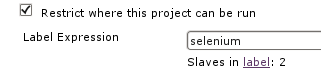
    Problem description: One of my customers had a problem with their Selenium tests in the Jenkins continuous integration system. While Perl s Test::WebDriver still worked just fine the Selenium tests using Ruby s selenium-webdriver suddenly reported failures. The problem was caused by Debian wheezy s upgrade of the Iceweasel web browser. Debian originally shipped Iceweasel version 17.0.10esr-1~deb7u1 in wheezy, but during a security-update version 24.3.0esr-1~deb7u1 was brought in through the wheezy-security channel. Because the selenium tests are used in an automated fashion in a quite large and long-running build pipeline we immediately rolled back to Iceweasel version 17.0.10esr-1~deb7u1 so everything can continue as expected. Of course we wanted to get the new Iceweasel version up and running, but we didn t want to break the existing workflow while working on it. This is where on-demand slave selection through labels comes in. Basics: As soon as you re using Jenkins slaves you can instruct Jenkins to run a specific project on a particular (slave) node. By attaching labels to your slaves you can also use a label instead of a specific node name, providing more flexibility and scalability (to e.g. avoid problems if a specific node is down or you want to scale to more systems). Then Jenkins decides which of the nodes providing the according label should be considered for job execution. In the following screenshot a job uses the selenium label to restrict its execution to the slaves providing selenium and currently there are two nodes available providing this label: TIP 1: Visiting $JENKINS_SERVER/label/$label/ provides a list of slaves that provide that given $label (as well as list of projects that use $label in their configuration), like:
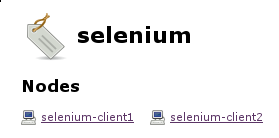
    TIP 2: Execute the following script on $JENKINS_SERVER/script to get a list of available labels of your Jenkins system:
    import hudson.model.*
    labels = Hudson.instance.getLabels()
    labels.each  label -> println label.name  
    
    Solution: In the according customer setup we re using the swarm plugin (with automated Debian deployment through Grml s netscript boot option, grml-debootstrap + Puppet) to automatically connect our Jenkins slaves to Jenkins master without any manual intervention. The swarm plugin allows you to define the labels through the -labels command line option. By using the NodeLabel Parameter plugin we can configure additional parameters in Jenkins jobs: node and label . The label parameter allows us to execute the jobs on the nodes providing the requested label: This is what we can use to gradually upgrade from the old Iceweasel version to the new one by keeping a given set of slaves at the old Iceweasel version while we re upgrading other nodes to the new Iceweasel version (same for the selenium-server version which we want to also control). We can include the version number of the Iceweasel and selenium-server packages inside the labels we announce through the swarm slaves, with something like:
    if [ -r /etc/init.d/selenium-server ] ; then
      FLAGS="selenium"
      ICEWEASEL_VERSION="$(dpkg-query --show --showformat='$ Version ' iceweasel)"
      if [ -n "$ICEWEASEL_VERSION" ] ; then
        ICEWEASEL_FLAG="iceweasel-$ ICEWEASEL_VERSION%%.* "
        EXTRA_FLAGS="$EXTRA_FLAGS $ICEWEASEL_FLAG"
      fi
      SELENIUM_VERSION="$(dpkg-query --show --showformat='$ Version ' selenium-server)"
      if [ -n "$SELENIUM_VERSION" ] ; then
        SELENIUM_FLAG="selenium-$ SELENIUM_VERSION%-* "
        EXTRA_FLAGS="$EXTRA_FLAGS $SELENIUM_FLAG"
      fi
    fi
    
    Then by using -labels $FLAGS EXTRA_FLAGS in the swarm invocation script we end up with labels like selenium iceweasel-24 selenium-2.40.0 for the slaves providing the Iceweasel v24 and selenium v2.40.0 Debian packages and selenium iceweasel-17 selenium-2.40.0 for the slaves providing Iceweasel v17 and selenium v2.40.0. This is perfect for our needs, because instead of using the selenium label (which is still there) we can configure the selenium jobs that should continue to work as usual to default to the slaves with the iceweasel-17 label now. The development related jobs though can use label iceweasel-24 and fail as often as needed without interrupting the build pipeline used for production. To illustrate this here we have slave selenium-client2 providing Iceweasel v17 with selenium-server v2.40. When triggering the production selenium job it will get executed on selenium-client2, because that s the slave providing the requested labels: Whereas the development selenium job can point to the slaves providing Iceweasel v24, so it will be executed on slave selenium-client1 here: This setup allowed us to work on the selenium Ruby tests while not conflicting with any production build pipeline. By the time I m writing about this setup we ve already finished the migration to support Iceweasel v24 and the infrastructure is ready for further Iceweasel and selenium-server upgrades.

    11 December 2013

    Gustavo Noronha Silva: WebKitGTK+ hackfest 5.0 (2013)!

    For the fifth year in a row the fearless WebKitGTK+ hackers have gathered in A Coru a to bring GNOME and the web closer. Igalia has organized and hosted it as usual, welcoming a record 30 people to its office. The GNOME foundation has sponsored my trip allowing me to fly the cool 18 seats propeller airplane from Lisbon to A Coru a, which is a nice adventure, and have pulpo a feira for dinner, which I simply love! That in addition to enjoying the company of so many great hackers.
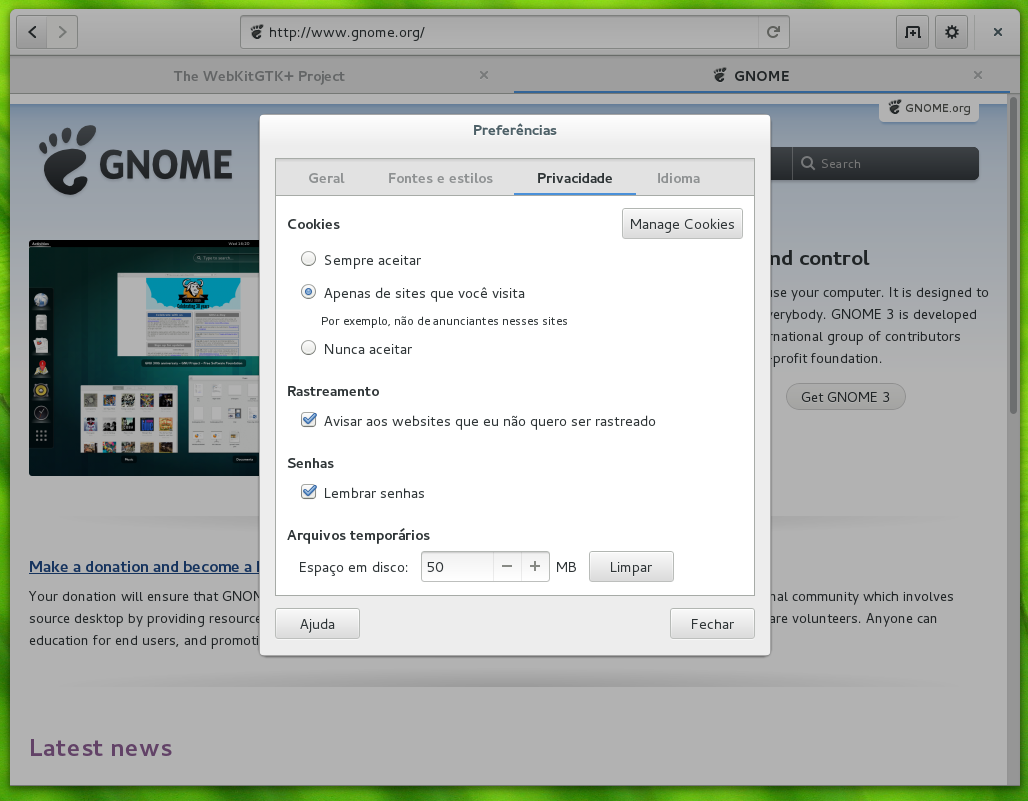
    Web with wider tabs and the new prefs dialog

    Web with wider tabs and the new prefs dialog

    The goals for the hackfest have been ambitious, as usual, but we made good headway on them. Web the browser (AKA Epiphany) has seen a ton of little improvements, with Carlos splitting the shell search provider to a separate binary, which allowed us to remove some hacks from the session management code from the browser. It also makes testing changes to Web more convenient again. Jon McCan has been pounding at Web s UI making it more sleek, with tabs that expand to make better use of available horizontal space in the tab bar, new dialogs for preferences, cookies and password handling. I have made my tiny contribution by making it not keep tabs that were created just for what turned out to be a download around. For this last day of hackfest I plan to also fix an issue with text encoding detection and help track down a hang that happens upon page load.
    Martin Robinson and Dan Winship hack

    Martin Robinson and Dan Winship hack

    Martin Robinson and myself have as usual dived into the more disgusting and wide-reaching maintainership tasks that we have lots of trouble pushing forward on our day-to-day lives. Porting our build system to CMake has been one of these long-term goals, not because we love CMake (we don t) or because we hate autotools (we do), but because it should make people s lives easier when adding new files to the build, and should also make our build less hacky and quicker it is sad to see how slow our build can be when compared to something like Chromium, and we think a big part of the problem lies on how complex and dumb autotools and make can be. We have picked up a few of our old branches, brought them up-to-date and landed, which now lets us build the main WebKit2GTK+ library through cmake in trunk. This is an important first step, but there s plenty to do.
    Hackers take advantage of the icecream network for faster builds

    Hackers take advantage of the icecream network for faster builds

    Under the hood, Dan Winship has been pushing HTTP2 support for libsoup forward, with a dead-tree version of the spec by his side. He is refactoring libsoup internals to accomodate the new code paths. Still on the HTTP front, I have been updating soup s MIME type sniffing support to match the newest living specification, which includes specification for several new types and a new security feature introduced by Internet Explorer and later adopted by other browsers. The huge task of preparing the ground for a one process per tab (or other kinds of process separation, this will still be topic for discussion for a while) has been pushed forward by several hackers, with Carlos Garcia and Andy Wingo leading the charge.
    Jon and Guillaume battling code

    Jon and Guillaume battling code

    Other than that I have been putting in some more work on improving the integration of the new Web Inspector with WebKitGTK+. Carlos has reviewed the patch to allow attaching the inspector to the right side of the window, but we have decided to split it in two, one providing the functionality and one the API that will allow browsers to customize how that is done. There s a lot of work to be done here, I plan to land at least this first patch durign the hackfest. I have also fought one more battle in the never-ending User-Agent sniffing war, in which we cannot win, it looks like.
    Hackers chillin' at A Coru a

    Hackers chillin at A Coru a

    I am very happy to be here for the fifth year in a row, and I hope we will be meeting here for many more years to come! Thanks a lot to Igalia for sponsoring and hosting the hackfest, and to the GNOME foundation for making it possible for me to attend! See you in 2014!

    17 September 2013

    Cyril Brulebois: Fixing bugs

    It s a somewhat strange feeling to spend time fixing things that broke instead of implementing new things, but it s not like I m a creative guy anyway For those last two points, the long term plan is: Hopefully getting this done this week (famous last words, eh?).

    16 August 2013

    Daniel Leidert: N54L LCD-Mod with U204FR-A3 (LCDModkit) and lcdproc (II)

    Here it goes. I was looking for an LCD display for my microservers 5,25'' bay and found this neat post. The manufacturer of the LCD display used there provides different displays for this purpose. I've decided for an U204FR-A2 in black with a red backlight. It left Hongkong around five days later and arrived here another 6 days later. All in all: I got it after 11 days. I unpacked the LCD device. It comes with an internal USB connector and is driven by an Hitachi HD44780 LCD controller. The connection wasn't a problem at all. I've already put a Silverstone SST-EC04-P PCIe card with two USB 3.0 external ports and an internal 19pin dual port connector into the systems PCIe 1x slot. Now to connect the LCD with this card I've bought an Inline 19pin USB 3.0 header to 8pin double USB 2.0 header adapter and connected the card with the LCD display. Easy, right?
    To make the display "attached" to the case - it comes with two steel sheets and two screw holes each, that cannot be attached to anything in the microserver case - I've used a small workaround: double-faced adhesive tape and two halfs of a matchbox - one can also use small scantlings - and created a bonding between the steel sheets and the case.
    That's it. I put the cover plate carefully back - the steels sheets of the LCD display and the LED of the server will bump to each other!
    There are two programs to output information to the LCD display. These are lcdproc and lcd4linux. I started with the first one which only provides pre-defined screens. Seems with the latter one can create own screens. This is an option for the future. lcdproc consists of two programs. First there is a daemon called LCDd. It controls the driver, contrast etc.pp. The relevant parts of its configuration file /etc/LCDd.conf look like as shown below. Note that I did not change the default values for contrast or brightness.

    [server]
    Driver=hd44780
    WaitTime=25

    [hd44780]
    ConnectionType=lcd2usb
    Size=20x4
    To print something to the screen one can use the lcdproc command, which is configured via /etc/lcdproc.conf. I've enabled the Iface, TimeDate, SMP-CPU, and MiniClock screens. The program is started during startup via cron. The file /etc/cron.d/lcdproc simply contains this:

    @reboot root lcdproc
    The following pictures show the resulting screens, which change every 25 seconds. That's it.

    1 July 2013

    Russ Allbery: Review: Dark Lies the Island

    Review: Dark Lies the Island, by Kevin Barry
    Publisher: Greywolf
    Copyright: 2012
    Printing: 2013
    ISBN: 1-55597-651-4
    Format: ARC
    Pages: 185
    This is a literary short story collection by a mainstream Irish writer, rather far from my normal fare. It was the second book in a shipment of Powell's Indiespensable, which is generally (when there is one) a proof or Advanced Reading Copy of something relatively obscure. I'm not really the target audience, not being much of a short story aficionado, but the whole point of doing this Indiespensable experiment is to stretch my reading range. First off, as I would generally expect by mainstream fiction, the quality of the writing is excellent. One thing I particularly like about Barry is that he's refreshingly and unhesitatingly profane. His characters curse like I expect people to curse, some of them at the drop of a hat, and for me it gives a feel of solid realism to his dialogue. He's also very good with eye dialect, giving the impression of accents without making the text hard to read. Some of these stories I liked a great deal, rather more than I had expected. But if there was a general undermining flaw for me, it was that I prefer stories that go somewhere, that have a plot or lead up to a definite point. Some of Barry's do, but a lot of them seem more vignettes or just scenes, sketches of characters, that drift off without resolution. I can admire those as writing exercises, but for me they don't fill the desire I have when I sit down with a story. I'm not sure how useful these reviews will be, given that I don't have a lot of mainstream fiction background to compare them with, but here are some reactions, for whatever they're worth. "Across the Rooftops": This is one of those sketches, but it's one of the best of them. It's a single moment on the rooftops, an attempt to capture the moment of possibility around the first romantic overture. It's sadly quite conventional in gender roles (nervous man initiating, woman as relationship gatekeeper), but apart from that it's very well-written. This kind of thing is normally not to my taste, but Barry does such a great job capturing the sense of uncertainty and the sharp focus on detail that I couldn't help but like it. (7) "Wifey Redux": This is by far my favorite story of this book. I think it's both hilarious and brilliant, right from the starting line.
    This is the story of a happy marriage but before you throw up and turn the page let me say that it will end with my face pressed hard into the cold metal of the Volvo's bonnet, my hands cuffed behind my back, and my rights droned into my ear this will occur in the car park of a big-box retail unit on the Naas Road in Dublin.
    It's the story of a marriage and how it changes over time, but also the story of being a father and his baffled, flailing reactions to his daughter's sexual explorations. But that's not what makes the story. What makes the story is what leads up to the arrest at the end, which had me laughing out-loud in delight. Barry is great at writing a sort of devilish humor; I wish more of the collection was like this. (9) "Fjord of Killary": This is another one of the ones I enjoyed. It's about an author who buys a hotel (with a bar) on the fjord of Killary thinking that the local culture and contact along with the wild beauty would inspire his poetry. At the start of the story, he's thoroughly sick of both the climate and the people, and the collision between his idyllic dreams and the reality, as well as his acerbic first-person complaints, is quite entertaining. A huge storm and resulting flood provides the conflict and impetus for change, and a few moments of humor in the understated local reactions. I thought the closing epiphany was a bit too obvious and expected, and the ending didn't quite work for me, but it has some good moments. (7) "A Cruelty": Here's where the collection started losing me. This is still well-written and closely observed, but in the case of this story, I wish it weren't, since I found it extremely uncomfortable. The viewpoint character is vulnerable to an encounter of unalloyed nastiness. I'm sure that's the point, but, similar to how I avoid horror, it's the sort of story I'd rather not read. (3) "Beer Trip to Llandudno": This was my second-favorite story of the collection. It's about a group of men who take periodic beer-tasting trips and rate beers. They're just normal men, from a variety of backgrounds and professions, and I thought Barry did a great job capturing the sort of camaraderie that comes from long association with a hobby. That includes, here, the awkward limits on what one talks about and the tendency to use the hobby as a shield from anything that drifts into less certain territory. I thought the story suffered somewhat from not having much of a plot or conclusion, but that's also necessary from the setup. This group of people isn't actually going to solve problems, but will be there for each other in their own way. (8) "Ernestine and Kit": Another very dark story, although that's not quite as obvious at the start. As with "A Cruelty," it's well-written but disturbing and lacks any sort of positive resolution. Here, I think Barry went a bit far into portraying people who are a large part of the popular imagination but who are exceptionally rare in reality. It's the kind of story that, at least for me, plays badly with my brain's threat analysis: too memorable for the level of actual risk, and feeling like it was playing a bit too much with popular boogeymen. (4) "The Mainland Campaign": This one was just too subtle for me. Some of the summaries for this book hint at a meaning for the story that I didn't pick up at all on my first reading. On re-reading, I suspect that analysis is right, but even re-reading the story with that interpretation in mind (this is the sort of story where I'm not sure the average American would pick it up on first reading, but others might), I still don't understand exactly what happened. I think some mainstream writing, and some short stories, tends to err on the side of subtle. (4) "Wistful England": Another one that's way over on the sketch of a moment side of stories. Unlike "Across the Rooftops," it failed to make any impression on me whatsoever; I had to skim it just now to remind myself of any details at all, and by the time I edited this review for posting, I'd forgotten it again. I think it was aiming at capturing a mood, but the mopey viewpoint character didn't mean anything to me. (3) "Doctor Sot": This is another odd one, and I'm not quite sure what I think of it. Either it's another character sketch without much of a plot, or the plot was too subtle. The protagonist is a rather unlikable drunk who doubles as a small town's incompetent doctor. The story involves his encounter with a local sort of hippie encampment, which is moderately interesting even though I couldn't stand the man. Then it leads to an encounter that clearly meant something, but which was entirely lost on me. (4) "The Girls and the Dogs": And from an absence of plot back to the deeply disturbing. This story is about a moderately unlikable drug dealer who gets refuge from an extremely unlikable crazy person in a weird relationship with a woman and her sister. (As is sadly typical, polyamory only makes an appearance when the author wants to paint a scenario that's utterly fucked up and psychotic.) There's a pseudo-fantasy element here in that the characters talk about spells, but I think the only spell involved is authorial fiat to create a deeply broken and sick game that plays into a host of negative stereotypes. Despite myself, I did get drawn into the suspense of the story (Barry's undoubtedly a good writer), but it left me feeling dirty on several levels. (4) "White Hitachi": Finally, another story that I liked, although not as good as the ones earlier in the collection. This one follows a con man and two-bit thief as he gets his brother out of lockup and tries to resolve, or at least stay ahead of, various problems in his life. Again, no real ending, but I thought Barry did a good job at taking a snapshot of a life from a perspective that I don't read much in literature (along with all the sexism and racism that comes along with it). It sort of drifts off rather than ends (although the last sentence is a great bit of characterization), but I found it oddly enjoyable. (6) "Dark Lies the Island": I'm not sure what to make of this. It's another character sketch, a moment of deep psychological significance for a character, floating somewhat alone but described in detail. But the character is a girl struggling with cutting, from a male author whose other stories did not fill me with confidence in his handling of female characters. Barry makes this psychologically believable, but I'm a little nervous about trusting his portrayal of that mindset. It's also, again, just a bit too subtle; I had a hard time getting an emotional feel for how the events of the story connect. (5) "Berlin Arkonaplatz My Lesbian Summer": The final story of the collection is fairly typical of the problem I had with most of it. It seems reasonably well-written, I had a hard time connecting with the protagonist or understanding his motivations. It looks at a slice of life with which I have no familiarity at all (and is interesting for that reason), but I don't quite trust the story enough to submerge in it. Barry seems to write a lot of protagonists who seem aimless, befuddled, or just largely out of control, and I like a bit more agency in the primary character. Silvija is an interesting character, even shown from another's perspective, but the story is almost purely observational: showing her without comment, without obvious motive, and mostly without plot. It's strangely compelling, but not quite compelling enough that I'd actually seek it out. Which, really, is the whole book in a nutshell. (6) Rating: 6 out of 10

    26 June 2013

    Jon Dowland: Office suite UI and creativity

    [pic]
    For some reason I've always hated the layout of Office Suite tools such as LibreOffice, OpenOffice and Microsoft Office (I seem to find the Ribbon interface nicer than what has gone before, although I can't put my finger on why.) I always find the sheer quantity of UI in these programs have a real negative impact on creativity. I still haven't found anything as inspirational as a blank sheet of paper (or perhaps more accurately, less demotivating than a blank sheet of paper.)
    [pic]
    I've tried disabling and removing bits in the past, but I've never ended up with something I was happy with. Recently I tried attaching one of the two standard toolbars vertically, instead of horizontally. Surprisingly to me, the result feels a lot nicer. There's still some way to go, though. focuswriter is pretty good but I like to have some graphical features. By analogy when I write on paper it's not always straight lines of words, but sometimes bubbles, arrows, lines, strikethroughs, etc. At least I can get bullet points by remembering the write X compose key sequence (alt gr, dot, equals)

    21 June 2012

    Russell Coker: New SE Linux Policy for Wheezy

    I ve just uploaded a new SE Linux policy for Debian/Wheezy. It now works correctly with systemd and Chromium, two significant features that I wanted for Wheezy. Now it turns out that we have until the end of the month for Wheezy updates, so I may get another version of the policy uploaded before then. If so it will only be for relatively minor changes, I think that most SE Linux users would be reasonably happy with policy the way it is. Anything that doesn t work now can probably be solved by local configuration changes. execmem The current version of KDE in Debian is 4.8.4, it seems that large parts of the KDE environment depend on execmem access, this includes kwin and plasma-desktop. Basically there is no possibility of having a KDE desktop environment without those programs and therefore KDE depends on execmem access. Debugging this is difficult as the important programs SEGV when denied execmem access and the KDE crash handler really gets in the way of debugging it running /usr/bin/plasma-desktop results in the process forking a child and detaching from the gdb session. The most clear example of an execmem issue in KDE is from the program /usr/lib/kde4/libexec/kwin_opengl_test which gives the following error:
    LLVM ERROR: Allocation failed when allocating new memory in the JIT
    Can t allocate RWX Memory: Permission denied To make this work you run the command setsebool -P allow_execmem 1 which gives many domains the ability to create writable-executable memory regions. I raised this issue for discussion on the SE Linux mailing list and Hinnerk van Bruinehsen wrote an informative message in response summarising the situation [1]. It seems that it s possible to compile some of the programs in question to not use the JIT and therefore not require such access and there is a build option in Gentoo to allow it. But it s impractically difficult for me to fork KDE in Debian so the only option is to recommend that people enable the allow_execmem boolean for Debian desktop systems running SE Linux. Related posts:
    1. /run and SE Linux Policy Currently Debian/Unstable is going through a transition to using /run...
    2. An Update on DKIM Signing and SE Linux Policy In my previous post about DKIM [1] I forgot to...
    3. New SE Linux Policy for Squeeze I have just uploaded refpolicy version 0.2.20100524-1 to Unstable. This...

    7 April 2012

    Wouter Verhelst: New toy

    A while back, I was thinking. Playing the flute or whistling on a bottle is the exact same technique; but, in my opinion, the sound that comes from a bottle has some interesting overtones, making for a nice sound. Since the material of which an instrument is made is in large part responsible for the overtones that it produces (apart from the technique used by the musician), I wondered if nobody had ever come up with the idea of making a flute in glass. Turns out that, of course, this has already happened. In fact, the modern concert flute wouldn't have been possible without one Claude Laurent, a Parisian instrument maker who received a patent for "a new [method of] making flutes from crystal"; part of his patent described a method of attaching the valves to the instrument. It was this method which was used by Theobald Boehm when he invented the fingering system that defines the modern concert flute. The price of an intact Laurent flute today is, of course, beyond my budget; and it doesn't look like there are any glass flutes being made that use the Boehm system. But that doesn't mean there aren't any glass flutes being made anymore; indeed, a short look around the Internet quickly turned up Hall Crystal Flutes, a family-owned business from Rochester in the US state of Washington. As the price was not too insane (49 USD for the instrument, plus almost the same amount for shipping it to Belgium), I ordered one of their piccolos in C. Last wednesday, a woman from the post office rang my doorbell, with a pakage containing the new instrument. Unfortunately, however, it had a customs tax of slightly more than what was in my wallet at the time, which meant I could only fetch it from the post office the next day. At least I could pay in plastic there. After having had it for a few days, I can make a few observations: I've been playing a few diddlies on it for the past few days, and it's been fun so far. We'll see where this leads us.

    7 February 2012

    Martin Pitt: fatrace: report system wide file access events

    Part of our efforts to reduce power consumption is to identify processes which keep waking up the disk even when the computer is idle. This already resulted in a few bug reports (and some fixes, too), but we only really just began with this. Unfortunately there is no really good tool to trace file access events system-wide. powertop claims to, but its output is both very incomplete, and also wrong (e. g. it claims that read accesses are writes). strace gives you everything you do and don t want to know about what s going on, but is per-process, and attaching strace to all running and new processes is cumbersome. blktrace is system-wide, but operates at a way too low level for this task: its output has nothing to do any more with files or even inodes, just raw block numbers which are impossible to convert back to an inode and file path. So I created a little tool called fatrace ( file access trace , not fat race :-) ) which uses fanotify, a couple of /proc lookups and some glue to provide this. By default it monitors the whole system, i. e. all mounts (except the virtual ones like /proc, tmpfs, etc.), but you can also tell it to just consider the mount of the current directory. You can write the log into a file (stdout by default), and run it for a specified number of seconds. Optional time stamps and PID filters are also provided.
    $ sudo fatrace
    rsyslogd(967): W /var/log/auth.log
    notify-osd(2264): O /usr/share/pixmaps/weechat.xpm
    compiz(2001): R device 8:2 inode 658203
    [...]
    
    It shows the process name and pid, the event type (Rread, Write, Open, or Close), and the path. Sometimes its not possible to determine a path (usually because it s a temporary file which already got deleted, and I suspect mmaps as well), in that case it shows the device and inode number; such programs then need closer inspection with strace. If you run this in gnome-terminal, there is an annoying feedback loop, as gnome-terminal causes a disk access with each output line, which then causes another output line, ad infinitum. To fix this, you can either redirect output to a file (-o /tmp/trace) or ignore the PID of gnome-terminal (-p pidof gnome-terminal ). So to investigate which programs are keeping your disk spinning, run something like
      $ sudo fatrace -o /tmp/trace -s 60
    
    and then do nothing until it finishes. My next task will be to write an integration program which calls fatrace and powertop, and creates a nice little report out of that raw data, sorted by number of accesses and process name, and all that. But it might already help some folks as it is right now. The code lives in bzr branch lp:fatrace (web view), you can just run make and sudo ./fatrace. I also uploaded a package to Ubuntu Precise, but it still needs to go through the NEW queue. I also made a 0.1 release, so you can just grab the release tarball if you prefer. Have a look at the manpage and --help, it should be pretty self-explanatory.

    6 January 2012

    Timo Jyrinki: I have a new GPG key


    -----BEGIN PGP SIGNED MESSAGE-----
    Hash: SHA1,SHA512

    Hello,

    I'm transitioning from my 2003 GPG key to a new one.

    The old key will continue to be valid for some time, but I eventually
    plan to revoke it, so please use the new one from now on. I would also
    like this new key to be re-integrated into the web of trust. This message
    is signed by both keys to certify the transition.

    The old key was:

    pub 1024D/FC7F6D0F 2003-07-10
    Key fingerprint = E6A8 8BA0 D28A 3629 30A9 899F 82D7 DF6D FC7F 6D0F

    The new key is:

    pub 4096R/90BDD207 2012-01-06
    Key fingerprint = 6B85 4D46 E843 3CD7 CDC0 3630 E0F7 59F7 90BD D207

    To fetch my new key from a public key server, you can simply do:

    gpg --keyserver pgp.mit.edu --recv-key 90BDD207

    If you already know my old key, you can now verify that the new key is
    signed by the old one:

    gpg --check-sigs 90BDD207

    If you don't already know my old key, or you just want to be double
    extra paranoid, you can check the fingerprint against the one above:

    gpg --fingerprint 90BDD207

    If you are satisfied that you've got the right key, and the UIDs match
    what you expect, I'd appreciate it if you would sign my key:

    gpg --sign-key 90BDD207

    Lastly, if you could send me these signatures, i would appreciate it.
    You can either send me an e-mail with the new signatures by attaching
    the following file:

    gpg --armor --export 90BDD207 > timojyrinki.asc

    Or you can just upload the signatures to a public keyserver directly:

    gpg --keyserver pgp.mit.edu --send-key 90BDD207

    Please let me know if there is any trouble, and sorry for the inconvenience.

    (this post has been modified from the example at
    http://www.debian-administration.org/users/dkg/weblog/48)

    -----BEGIN PGP SIGNATURE-----
    Version: GnuPG v1.4.11 (GNU/Linux)

    iEYEARECAAYFAk8GuZoACgkQgtffbfx/bQ9nqACglWyHnDTFQfdKmz8OCd3oL6iR
    hcEAmgKJ7RZsgwxwkRGPhygy5y1Ztb+3iQIcBAEBCgAGBQJPBrmaAAoJEOD3WfeQ
    vdIHdVQQAMT1yvIogzbtK6sUnWqwbrXI9pDEFk7AzJTb80R+wzxsw7gu9gcBDk8G
    BL2O26GKUqKWA3ytuApSl42FJam/Lusi9npT3XNkmHs6FaBMNuLYrqEXmCwXwWr/
    OrLyeeLiF4yxgbNWbv+600BqAWqFlo6NeTgQKsJWtCjR3RVMxX3R8nzjDnKJuF+z
    c6+2JKBWyx/HVUKcJpJrFDDR36HRFvVJomTuma2JCQ/RAl9vzAguqNYOi1QkuuQv
    EF1gXH7gLifukGuwquP1DHP6SWWkj77jtRWr5ewC0xymbrArzAwKbvMQl3VpKBHh
    MmpJjYP3ECyL14AKi/TY2Lidi0Sf6yqFMcPcreoih01N0OU0NXmD4IrHMT24/ssb
    okDUe1o3YImjGq1jTACvlzC8s54EfLsqDgSP98SGVpuoDqPJUwVk4nuHj8q0vDSs
    qZox26gVwB2FAOUi1BFiZbIzM5rsyYfCGyWUGiAwBFf54lYRAeCDCt8iAOOL1Ov/
    TumIGYdLoXnDuOJq1VjXLGx2OFDrpyU8SPGoa3zNEVz39tgxQ48ASJEqcqt7HvBy
    IW+TTsMLdJ1Ait9aCM3mzzr1iwP8TrL0qUsdRLOE6AKdAqocIfqXY8OeDKhbUiOJ
    CXWk5q3xheK3sDWUXX7J63bAAUH4jFnpQEOVMJKBUNMKsWa0iXDS
    =mklN
    -----END PGP SIGNATURE-----

    14 November 2011

    Bdale Garbee: RF Immunity

    We've had sporadic Altus Metrum customer reports about RF susceptibility issues with their TeleMetrum installations. In almost every case, these problems have been completely resolved by either making sure the system battery has sufficient charge before launch, or through the application of standard engineering techniques such as twisting wire pairs to reduce differential coupling. However, even when every technique we could think of had been applied, once in a while someone still had issues. Around the time of LDRS this year, the incidence of such reports seemed to increase. One customer, in particular, had an installation in which he virtually always saw continuous resets of the board once his 54mm airframe was put on a launch rail, and several customers reported seeing board resets during ejection charge firing. Keith and I saw a board reset during main charge firing happen in person at NCR's Oktoberfest, and with a couple days available to work together after that launch, we decided it was time to figure out what was really going on. Here's what we've learned. In bench testing, it quickly became clear that the problem was the 3.3 volt power supply rail getting pulled down far enough to reset the CPU. This most frequently happened during ejection charge firing, when the input of the LDO regulator is pulled down by the near-short presented by the e-match when a pyro FET is turned on. To keep the 3.3 volt rail voltage up during firing, we include a 100uF bulk capacitor on the regulator's output. In all of our prior bench testing, we never saw the 3.3 volt rail droop significantly. Clearly something had changed... or maybe several things had changed? The first thing I wondered about was whether the new Kalman filtering code, which requires more compute cycles from the processor, might be consuming enough more power to pull the rail down faster during charge firing. After poking around at it, though, we have no data to suggest the new code makes a measurable difference in power consumption. The next thing we pondered was that at least some of the e-matches we and others are using in the hobby now come from the fireworks industry, where it is apparently considered a feature for the match to retain continuity after firing. This means the input of the LDO gets held down for longer than with the e-matches we used to use and Quest Q2G2 igniters that open when fired. But that still didn't make sense as the root cause, as we chose the FET firing time such that even with a dead short across the igniter terminals, the 3.3 volt rail wouldn't be pulled down far enough to cause trouble during firing. One of the big changes between v1.0 and v1.1 on TeleMetrum was that the newer boards incorporate a better reset circuit. This helps ensure the GPS chip always comes up running at power on, which was a problem at temperature extremes with older boards. However, a side-effect of this change is that a v1.1 board will reset any time the 3.3 volt rail drops below 3.15 volts, whereas older boards didn't trip until a much lower voltage. So the recent increase in reports might just be related to more v1.1 boards being placed in service? While experimenting on the bench, we observed that injecting RF energy into the input of the LDO regulator had the effect of pulling down the output voltage, presumably because the internal reference source accumulates charge and is fooled into thinking the output is too high. Since our designs all have the power switch contacts ahead of the LDO, the wires going out to the switch and back are effectively an antenna... as are, to a lesser extent, the wires going to the e-matches. There is some variability from part to part in just how badly the LDO reacts. But by attaching a tuned length of wire as an antenna to the LDO input and playing around, we were finally able to reproduce the problem reliably on a test board at my bench! On further analysis, we realized that the output of the USB battery charger chip and the input of the LDO both expect a 1uF bypass cap to ground. At some point, those looked redundant and we eliminated one of the two. Unfortunately, we weren't internalizing the fact that the switch leads were between the two caps, and the one we left was on the output of the charger and not at the input of the LDO. Placing a suitable bypass cap right at the input of the LDO turns out to have a truly dramatic effect on RF immunity! Once we realized that RF getting into the LDO input was the problem, Keith pointed out that we used to see "noise" in the accelerometer data on earlier boards that was caused by the 3.3 volt rail moving slightly during radio transmit, which we fixed with a hardware change on v1.1. We are now convinced that this was at least partly related to RF coupling to the LDO input, not just the change in power consumption on the LDO output. We didn't realize what was going on in earlier testing because we often didn't have ematches wired up, so RF coupling was minimal. But going back to flights logged with v1.0 boards that included deployment, and studying the magnitude of the "steps" in acceleration data observed when the transmitter was on, Keith was able to compute the amount the 3.3 volt rail must have sagged if the real acceleration wasn't changing... which in some cases was as much as 180mV! We think this proves that RFI could cause the LDO to drop its output voltage below the reset controller set point on v1.1 boards. Based on these observations, I'm making two hardware changes for the next version of TeleMetrum (version 1.2), and Keith is also making a software change. We have tested all of these changes on real boards both on the bench and in test flights, and the net effect is a major improvement in the RF immunity of TeleMetrum. The first hardware change is moving to a slightly lower trip voltage on the reset controller. Instead of 3.15, the new part trips at 3.00 volts nominal. This gives us more "headroom" to tolerate 3.3 volt rail droop during charge firing, and will allow the board to operate longer on a given battery charge. This change is not relevant for v1.0 and prior. The second hardware change is adding an appropriate bypass capacitor right at the LDO input. This requires a PCB update, but it's possible for me to update existing production boards by adding an 0402 cap right across the appropriate pins on the regulator chip. The software change prevents our altimeters from turning on the radio transmitter while an ejection charge is firing. Since the RF transmitter draws substantial additional power, this should help keep the 3.3 volt rail from drooping. This may not really matter, but it feels like the right thing to do. This change will be part of our next stable firmware release. We think most TeleMetrum customers need not worry about these updates. But if you have seen odd resets on the rail or during ejection charge firing in flight with a TeleMetrum v1.1, feel free to contact me about updating your existing board to include these improvements.

    7 November 2011

    Ritesh Raj Sarraf: Seagate FreeAgent GoFlex

    I recently purchased a Seagate FreeAgent GoFlex 1 TB hard drive. It is a 2.5" compact disk that you connect over USB. It draws its power from the USB controller. My previous Extern HDDs were all 2.5" laptop drives, for which I bought a USB enclosure. Those devices always worked perfect, as in:The typical kernel messages I got for these devices were:
    [56063.268107] usb 1-1: new high speed USB device number 13 using ehci_hcd
    [56063.401635] usb 1-1: New USB device found, idVendor=14cd, idProduct=6116
    [56063.401645] usb 1-1: New USB device strings: Mfr=1, Product=3, SerialNumber=2
    [56063.401652] usb 1-1: Product: USB 2.0 SATA BRIDGE
    [56063.401658] usb 1-1: Manufacturer: Super Top
    [56063.401663] usb 1-1: SerialNumber: M6116018VF16
    [56063.402857] scsi8 : usb-storage 1-1:1.0
    [56064.400896] scsi 8:0:0:0: Direct-Access WDC WD50 00BEVT-24A0RT0 PQ: 0 ANSI: 0
    [56064.401576] sd 8:0:0:0: Attached scsi generic sg2 type 0
    [56064.402102] sd 8:0:0:0: [sdb] 976773168 512-byte logical blocks: (500 GB/465 GiB)
    [56064.402615] sd 8:0:0:0: [sdb] Write Protect is off
    [56064.402618] sd 8:0:0:0: [sdb] Mode Sense: 03 00 00 00
    [56064.403101] sd 8:0:0:0: [sdb] No Caching mode page present
    [56064.403105] sd 8:0:0:0: [sdb] Assuming drive cache: write through
    [56064.404861] sd 8:0:0:0: [sdb] No Caching mode page present
    [56064.404864] sd 8:0:0:0: [sdb] Assuming drive cache: write through
    [56064.419657] sdb: sdb1
    [56064.421850] sd 8:0:0:0: [sdb] No Caching mode page present
    [56064.421854] sd 8:0:0:0: [sdb] Assuming drive cache: write through
    [56064.421857] sd 8:0:0:0: [sdb] Attached SCSI disk
    But for my Seagate FreeAgent GoFlex HDD, things were different. The kernel would detect but then it would not mount. The error reported is that the device is busy. My FreeAgent's kernel messages look similar to what the regular one has:

    [ 168.520140] usb 1-1: new high speed USB device number 5 using ehci_hcd
    [ 168.657424] usb 1-1: New USB device found, idVendor=0bc2, idProduct=5021
    [ 168.657433] usb 1-1: New USB device strings: Mfr=1, Product=2, SerialNumber=3
    [ 168.657439] usb 1-1: Product: FreeAgent GoFlex
    [ 168.657444] usb 1-1: Manufacturer: Seagate
    [ 168.657449] usb 1-1: SerialNumber: NA0C1BML
    [ 168.659079] scsi5 : usb-storage 1-1:1.0
    [ 169.657136] scsi 5:0:0:0: Direct-Access Seagate FreeAgent GoFlex 0148 PQ: 0 ANSI: 4
    [ 169.708786] sd 5:0:0:0: Attached scsi generic sg3 type 0
    [ 169.709079] sd 5:0:0:0: [sdc] 1953525167 512-byte logical blocks: (1.00 TB/931 GiB)
    [ 169.709954] sd 5:0:0:0: [sdc] Write Protect is off
    [ 169.709963] sd 5:0:0:0: [sdc] Mode Sense: 1c 00 00 00
    [ 169.710567] sd 5:0:0:0: [sdc] Write cache: enabled, read cache: enabled, doesn't support DPO or FUA
    [ 169.759942] sdc: sdc1
    [ 169.762050] sd 5:0:0:0: [sdc] Attached SCSI disk
    As the Device Mapper Multipath Debian Maintainer, I have multipath-tools installed on my laptop. Turns out, for some reason, the device is consumer by the device mapper multipath stack.
    20:12:58 rrs@champaran:~$ ls /dev/mapper/
    1Seagate@ 1Seagate FreeAgent GoFlex N 1Seagate FreeAgent GoFlex Np1 control LocalDisk-ROOT@ LocalDisk-SWAP@

    Also the block device ID listing is enumerated as type SCSI.

    19:56:44 rrs@champaran:~$ ls /dev/disk/by-id/
    ata-HITACHI_HTS723216L9SA60_091220FC1220NCJASEVG@ scsi-SATA_HITACHI_HTS7232091220FC1220NCJASEVG@
    ata-HITACHI_HTS723216L9SA60_091220FC1220NCJASEVG-part1@ scsi-SATA_HITACHI_HTS7232091220FC1220NCJASEVG-part1@
    ata-HITACHI_HTS723216L9SA60_091220FC1220NCJASEVG-part2@ scsi-SATA_HITACHI_HTS7232091220FC1220NCJASEVG-part2@
    ata-HITACHI_HTS723216L9SA60_091220FC1220NCJASEVG-part3@ scsi-SATA_HITACHI_HTS7232091220FC1220NCJASEVG-part3@
    ata-HL-DT-ST_DVDRAM_GU10N_M189CNI1127@ scsi-SSeagate_FreeAgent_GoFle_NA0C1BML@
    ata-ST1000LM010-9YH146_W1000ZD8@ usb-WDC_WD12_00BEVE-11UYT0_ST_Killer-0:0@
    dm-name-1Seagate@ usb-WDC_WD12_00BEVE-11UYT0_ST_Killer-0:0-part1@
    dm-name-LocalDisk-ROOT@ wwn-0x5000c5003d19c8c2@
    dm-name-LocalDisk-SWAP@ wwn-0x5000cca586e112bc@
    dm-uuid-LVM-buywwzKkpfKG2RegankA2nPkmFBBPFe3D5DepV8w8nLrHfoAjIIQVnakOQJZEqJX@ wwn-0x5000cca586e112bc-part1@
    dm-uuid-LVM-buywwzKkpfKG2RegankA2nPkmFBBPFe3k9aJfc9B7wRmVIwfoagffHUZjuN6c4cM@ wwn-0x5000cca586e112bc-part2@
    dm-uuid-mpath-1Seagate@ wwn-0x5000cca586e112bc-part3@
    raid-1Seagate@
    But I'm not sure why the same doesn't happend for my external laptop drive. It gets properly tagged as device type USB. So Laptop or Server, if you have a FreeAgent that you want to connect to your machine, and see the device busy error when accessing the device['s] directly, do the following:First, the ID of the device.

    20:17:43 rrs@champaran:~$ /lib/udev/scsi_id --whitelisted --page=0x83 --device=/dev/sdc
    1Seagate FreeAgent GoFlex N
    Add the ID to /etc/multipath.conf under blacklist section

    blacklist
    wwid "1Seagate FreeAgent GoFlex*"
    wwid "1Seagate FA GoFlex Desk*"
    # devnode "^(ram raw loop fd md dm- sr scd st)[0-9]*"
    # devnode "^hd[a-z][[0-9]*]"
    # device
    # vendor DEC.*
    # product MSA[15]00
    #
    Run mulitpath -F to flush the unused maps. Run multipath -v3 to ensure that now the device is blacklisted.
    Nov 03 20:19:02 sdc: (Seagate:FreeAgent GoFlex) wwid blacklisted

    The front cause for the mis-behavior is:

    # Coalesce multipath devices before multipathd is running (initramfs, early
    # boot)
    ACTION=="add change", SUBSYSTEM=="block", RUN+="/sbin/multipath -v0 /dev/$name"

    But something else, maybe the default blacklist table, needs the actual fix.

    9 October 2011

    Axel Beckert: Git Snapshot of GNU Screen in Debian Experimental

    I just uploaded a snapshot of GNU Screen to Debian Experimental. The package (4.1.0~20110819git450e8f3-1) is based on upstream s HEAD whose most recent commit currently dates to the 19th of August 2011. While the upload fixes tons of bugs which accumulated over the past two years in Debian s, Ubuntu s and upstream s bug tracker, I don t yet regard it as suitable for the next stable release (and hence for Debian Unstable) since there s one not so nice issue about it: Nevertheless it fixes a lot of open issues (of which the oldest is a wishlist bug report dating back to 1998 :-) and I didn t want to withhold it from the rest of the Debian community so I uploaded it to Debian Experimental. Issues closed in Debian ExperimentalIssues which will be closed in UbuntuPlease test the version from Experimental If you are affected by one of the issues mentioned above, please try the version from Debian Experimental and check if they re resolved for you, too. Thanks to all who contributed! A lot of the fixes have been made or applied upstream by Sadrul Habib Chowdhury who also industriously tagged Debian bug reports as fixed-upstream . Thanks! Thanks also to Brian P Kroth who gave the initial spark to this upload by packaging Fedora 15 s git snapshot for Debian and filing bug although the upload is based on the current HEAD version of GNU Screen as this fixes some more important issues than the snapshot Fedora 15 includes. That way also two patches from Fedora/RedHat s screen package are included in this upload. (Co-) Maintainer wanted! Oh, and if you care about the state of GNU Screen in Debian, I d really appreciate if you d join in and contribute to our collab-maint git repository there are still a lot of issues unresolved and I know that I won t be able to fix all of them myself. And since Hessophanes unfortunately currently has not enough time for the package, we definitely need more people maintaining this package. P.S. Yes, I know about tmux and tried to get some of my setups working with it, too. But I still prefer screen over tmux. :-)

    7 August 2011

    Tanguy Ortolo: Useful options of rsync

    rsync logo
    rsync is often used to back up systems, with options such as:
    -a --archive
    recurse and preserve usual attributes: symlinks, devices and special files, user and groups ownership, permissions and times;
    -H --hard-links
    detect and preserve hard links;
    -A --acls
    preserve ACLs, if you use them;
    -X --xattrs
    preserve extended attributes, if you use them.
    In addition to these common options, rsync has plenty others, so everyone has his own recipe, but I would like to share two useful options I discovered.--numeric-ids By default, rsync uses literal UIDs and GIDs if it can find matches in both the source and the destination. That is, if you have users jacquouille (1002) on your source system Reblochon, and a user jacquouille (1005) on your destination system Neufch tel, rsync will map them: files with an UID of 1002 will be backed up with an UID of 1005. This may or may not be wanted, but anyway you must be aware of it. For instance, if you have to restore Reblochon's home directories and do that by attaching a new drive locally to Neufch tel, you will end with mixed up UIDs. This option --numeric-ids forces rsync to use numeric IDs instead of trying to map them. It is notably needed for backups of jailed systems (BSD jails, OpenVZ, VServer, lxc ) which appear to have bogus IDs when seen from their host system because they have their own ID maps. --fake-super When you back up a full system or anything that requires keeping file ownership or device information, you need to have root privileges on the destination system. Without them, rsync would be unable to correctly chown() the destination files. This option --fake-super offers a way to back up privileged information without requiring root privileges. It works by adding special extended attributes such as user.rsync.%stat containing al this information. Of course, it still requires a destination file system that supports extended attributes. This provides a good way to push system backups without weakening your security by opening a root access on you destination system. For instance, I personally use it with rsyncd running as an unprivileged user.

    31 July 2011

    Uwe Hermann: The FONIC Surf-Stick, Huawei E1750 HSPA USB modem, on Debian GNU/Linux via usb_modeswitch and wvdial

    FONIC Surf-Stick, Huawei E1750, package
    I recently got myself a FONIC account for mobile Internet. This (German) prepaid-provider offers a "daily flatrate" for 2.50 per day. After the 10th day of usage (i.e., 25 ) you don't pay any more. This means, even if you need mobile Internet access 31 days a month, you only pay for 10 days. After 500MB/day or 5GB/month you're throttled down to GPRS speed (but you can still connect, and you don't pay more). The FONIC account comes with the "FONIC Surf-Stick", a Huawei E1750 HSPA USB modem (apparently it supports GPRS, EDGE, UMTS, HSDPA (up to 7.2Mbit/s), HSUPA (up to 5.76 Mbit/s), and a SIM card. In order to use the device on Linux you need two packages, usb_modeswitch and wvdial:
      $ apt-get install usb-modeswitch wvdial
    
    Recent versions of usb_modeswitch (and matching udev entries) already support the Huawei E1750 out of the box, a few seconds after attaching the device it's automatically switched into modem mode. After this has been done you should have three new serial devices, usually /dev/ttyUSB0, /dev/ttyUSB1, and /dev/ttyUSB2. You'll need /dev/ttyUSB0 for talking to the device using AT commands. The lsusb output should look like this (see here for full lsusb -vvv):
      $ lsusb
      Bus 001 Device 045: ID 12d1:1436 Huawei Technologies Co., Ltd. 
    
    (before usb_modeswitch was run, the USB IDs were 12d1:1446) FONIC Surf-Stick, Huawei E1750, front The required settings for connecting are documented at fonic.de, specifically the APN (pinternet.interkom.de). A username and/or password is not required. You need to provide your FONIC PIN though. Dialing is done using the *99# number and using the ATDT command. I'm using the following wvdial config file:
      $ cat /etc/wvdial.conf
      [Dialer Defaults]
      Modem = /dev/ttyUSB0
      Baud = 460800
      [Dialer pin]
      Init1 = AT+CPIN=1234
      [Dialer fonic]
      Phone = *99#
      Username = foo
      Password = foo
      Stupid Mode = 1
      Dial Command = ATDT
      Init2 = ATZ
      Init3 = AT+CGDCONT=1,"IP","pinternet.interkom.de"
    
    FONIC Surf-Stick, Huawei E1750, back For mobile Internet access you would do the following:
    1. Attach the device via USB, wait a few seconds to let usb_modeswitch do its magic.
    2. Run wvdial pin and wait a few seconds (until the prompt returns):
        $ wvdial pin
        --> WvDial: Internet dialer version 1.61
        --> Initializing modem.
        --> Sending: AT+CPIN=1234
        AT+CPIN=1234
        OK
        --> Modem initialized.
        --> Configuration does not specify a valid phone number.
        --> Configuration does not specify a valid login name.
        --> Configuration does not specify a valid password.
      
    3. Run wvdial fonic and wait until the "CONNECT" message appears and you get DNS addresses:
        $ wvdial fonic
        --> WvDial: Internet dialer version 1.61
        --> Initializing modem.
        --> Sending: ATZ
        ATZ
        OK
        --> Sending: ATZ
        ATZ
        OK
        --> Sending: AT+CGDCONT=1,"IP","pinternet.interkom.de"
        AT+CGDCONT=1,"IP","pinternet.interkom.de"
        OK
        --> Modem initialized.
        --> Sending: ATDT*99#
        --> Waiting for carrier.
        ATDT*99#
        CONNECT
        --> Carrier detected.  Starting PPP immediately.
        --> Starting pppd at Mon Aug  1 xx:xx:xx 2011
        --> Pid of pppd: 18672
        --> Using interface ppp0
        --> local  IP address xxx.xxx.xxx.xxx
        --> remote IP address yyy.yyy.yyy.yyy
        --> primary   DNS address 193.189.244.225
        --> secondary DNS address 193.189.244.206
      
    If everything worked fine you should now have connected successfully. There are other alternatives for achieving the same result, including umtsmon (Qt3 in the last release from 2009, looks a bit unmaintained), kppp, the GNOME NetworkManager, and others, but wvdial worked OK for me. For more details about the Huawei E1750 device (e.g. lsusb -vvv and more photos), see my wiki page at http://randomprojects.org/wiki/FONIC_Surf-Stick_Huawei_E1750 Update 2011-08-03: My measured download speed for a Debian ISO (over HTTP via wget, at night, roughly 22:00 o'clock) is 350-470 KB/s in case anyone is interested. During this download the blue LED on the stick was enabled, which denotes a UMTS connection (green == GPRS/EDGE, turquoise == HSDPA).

    30 June 2011

    Joachim Breitner: Flattr experiments

    A while ago I registered with flattr. I found the idea of encouraging people to give kudos to people who do something on the web easily and meaningfully, by attaching a little bit of money to it. I had planned to use my flattr account only as a kudos-forwarder: All funds that I get by being flattred would be spend on flattering things that I like. At that time, flattr did not allow me registering my things without first uploading money, so I did not use my account. But recently, they changed this policy, so I added a few of my projects to the list of things people can now flattr: I almost always use the less intrusive text links. I fear that this means that people have to do an extra click before the have flattred the thing, but I still prefer it this way. Also, I do not use the automatic addition of things for each blog post, on the one hand because that does not seem to work with text links, and on the other hand because I don t think that each post is worth to be flattred. Generally, I avoid such closed-source walled-garden online services. I guess I make an exception this time because it is not a service that I run the risk of becoming dependent on. Flattr makes money per things flattered. It would be nicer if they only charged when people actually withdraw cash from their account, this way, many more people could do forward-only flattering for free, making many other people happy and appreciated, while still eventually making money.

    Flattr this post

    Next.

    Previous.