Search Results: "mika"

31 March 2016

Michael Prokop: Event: OSDC 2016

* Open Source Data Center Conference (OSDC) is a conference on open source software in data centers and huge IT environments and will take place in Berlin/Germany in April 2016. I will give a talk titled Continuous Integration in Data Centers Further 3 Years Later there. I gave a talk titled Continuous Integration in data centers at OSDC in 2013, presenting ways how to realize continuous integration/delivery with Jenkins and related tools. Three years later we gained new tools in our continuous delivery pipeline, including Docker, Gerrit and Goss. Over the years we also had to deal with different problems caused by faster release cycles, a growing team and gaining new projects. We therefore established code review in our pipeline, improved our test infrastructure and invested in our infrastructure automation. In this talk I will discuss the lessons we learned over the last years, demonstrate how a proper continuous delivery pipeline can improve your life and how open source tools like Jenkins, Docker and Gerrit can be leveraged for setting up such an environment. Hope to see you there!

30 December 2015

Steve Kemp: I joined the internet of things.

In my old flat I had a couple of simple radio-controlled switches, which allowed me to toggle power to a pair of standing lamps - one at each side of the bed. This was very lazy, but also really handy and I've always been curious about automation.. When it comes to automation there seems to be three main flavours:
X10
The original standard, with stuff produced by many vendors and good Linux support. X10 supports two ways of sending/receiving commands - over the electrical wiring, and over RF.
Z-Wave
This is the newcomer, which despite that seems to be well-supported and extensible. It allows "measurements" to be sent/received in addition to the broadcast of events like "switch on", and "switch off".
Other systems - often lighting-centric
There are toy-things like the previously noted power-controlling things, there are also stand-alone devices from people like Philips with their philips hue system, but given how Philips recently crippled their devices to disable third-party bulbs I've no desire to use them. One company caught my eye though, Osram make a smart lightbulb and mini-hub to work with it.
So I bought one of the osram lightify systems, consisting of a magic box and a pair of lightbulbs. The box connects to your wifi, and gets an IP address. The IP address is then used by the application on your mobile phone (i.e. the magic box does the magic, not the bulbs). The phone application can be used to trigger "on", "off", "dim", "brighter", and the various colour-changing commands, as you would expect. You absolutely must use the phone-based application to do the setup, but after that the whole point was that I could automate things. I wanted to be able to setup my desktop computer to schedule events, and started hacking. I've written a simple Perl module to let me discover bulbs, and turn them off and on. No doubt it'll be on CPAN in the near future, once I can pick a suitable name for it:
$ ol --bridge=192.168.10.136 --list
hall       MAC:8418260000d9c70c RGBW:255,255,255,255 STATE:On
kitchen    MAC:8418260000cb433b RGBW:255,255,255,255 STATE:On
$ ol --bridge=192.168.10.136 --off=kitchen
$ ol --bridge=192.168.10.136 --list
hall       MAC:8418260000d9c70c RGBW:255,255,255,255 STATE:On
kitchen    MAC:8418260000cb433b RGBW:255,255,255,255 STATE:Off
The only niggle was the fiddly pairing, and the lack of any decent documentation. The code I wrote was loosely based on the python project python-lightify written by Mikael Magnusson. Also worth noting that the bridge/magic-box only exposes a single port so you can find the device on your VLAN by nmapping for port 4000:
$ nmap -v 192.168.10.0/24 -p 4000
The device doesn't seem to allow any network setup at all - it only uses DHCP. So you might want to make sure it gets assigned a stable IP. Anyway I'm going to bed. When I do so I'll turn the lights off with my mobile phone. Neat. In the future I will look at more complex automation, and I think Z-wave is the way I'll go. Right now I'm in a rented flat so replacing wall-switches, etc, is something I can't do. But the systems I've looked at seem neat, and this current setup will keep me amused for several months!

21 September 2015

Norbert Preining: International Sad Hits Volume 1

I stumbled over this CD a few weeks ago, and immediately ordered it from some second-hand dealer in the US: International Sad Hits Volume 1: Altaic Group. Four artists from different countries (2x Japan, Korea, Turkey) and very different music style, but connected in one thing: That they don t fit into the happy-peppy culture of AKB48, JPOP, KPOP and the like, but singers and songwriters that probe the depths of sadness. With two of my favorite Japanese appearing in the list (Tomokawa Kazuki and Mikami Kan), there was no way I could not buy this CD. international-sad-hits-volume-1 The four artist combined in this excellent CD are: Fikret K z lok, a Turkish musician, singer and songwriter. Quoting from the pamphlet:
However, in 1983 K z lok returned with one of his most important and best albums: Zaman Zaman (Time to time). [ ] These albums presented an alternative to the horrible pop scene emerging in Turkey they criticized the political situation, the so-called intellectuals, and the pop stars.
The Korean artist is (Kim Doo Soo), who was the great surprise of the CD for me. The sadness and beauty that is transmitted through is music is special. The pamphlet of the CD states:
The strictness of his home atmosphere suffocated him, and in defiance against his father he dropped out, and walked along the roads. He said later that, Hatred towards the world, and the emptiness of life overwhelmed me. I lived my life with alcohol every day.
After some problems due to political crisis, and fierce reactions to his song Bohemian (included) made him disappear into the mountains for 10 years, only to return with even better music. The third artist is one of my big favorites, Tomokawa Kazuki (Official site, Wikipedia) from Japan. I have written often about Tomokawa, but found a very fitting description in the booklet:
Author Tatematsu Wahei has described Tomokawa as a man standing naked, his sensibility utterly exposed and tingling. It s an accurate response to a creativity that seems unmediated by embarrassment, voraciously feeding off the artist s personal concern.
The forth artist is again from Japan, Mikami Kan, a well known wild man from the Japanese music scene. After is debut at the Nakatsugawa All-Japan Folk Jamboree in 1971, he was something like a star for some years, but without a record deal his popularity decreased steadily.
During this period his songwriting gradually altered, becoming more dense, surreal and uncompromisingly personal.
Every song on this CD is a masterpiece by itself, but despite me being a great fan of Tomokawa, my favorite is Kim Doo Soo here, with songs that grip your heart and soul, stunningly beauty and sad at the same time.

24 August 2015

Michael Prokop: DebConf15: Continuous Delivery of Debian packages talk

At the Debian Conference 2015 I gave a talk about Continuous Delivery of Debian packages. My slides are available online (PDF, 753KB). Thanks to the fantastic video team there s also a recording of the talk available: WebM (471MB) and on YouTube.

2 July 2015

Michael Prokop: HAProxy with Debian/squeeze clients causing random Hash Sum mismatch

Update on 2015-07-02 22:15 UTC: as Petter Reinholdtsen noted in the comments:
Try adding /etc/apt/apt.conf.d/90squid with content like this: Acquire::http::Pipeline-Depth 0; It turn off the feature in apt confusing proxies.
this indeed avoids those Hash Sum mismatch failures with HAProxy as well. Thanks, Petter! Many of you might know apt s Hash Sum mismatch issue and there are plenty of bug reports about it (like #517874, #624122, #743298 + #762079). Recently I saw the Hash Sum mismatch usually only when using random mirrors with e.g. httpredir.debian.org in apt s sources.list, but with a static mirror such issues usually don t exist anymore. A customer of mine has a Debian mirror and this issue wasn t a problem there neither, until recently: Since the mirror also includes packages provided to customers and the mirror needs to be available 24/7 we decided to provide another instance of the mirror and put those systems behind HAProxy (version 1.5.8-3 as present in Debian/jessie). The HAProxy setup worked fine and we didn t notice any issues in our tests, until the daily Q/A builds randomly started to report failures:
Failed to fetch http://example.org/foobar_amd64.deb Hash Sum mismatch
When repeating the download there was no problem though. This problem only appeared about once every 15-20 minutes with random package files and it affected only Debian/squeeze clients (wheezy and jessie aren t affected at all). The problem also didn t appear when directly accessing the mirrors behind HAproxy. We tried plenty of different options for apt (Acquire::http::No-Cache=true, Acquire::http::No-Partial=true, ) and also played with some HAProxy configurations, nothing really helped. With apt s Debug::Acquire::http=True we saw that there really was a checksum failure and HTTP status code 102 ( Processing , or in terms of apt: Waiting for headers ) seems to be involved. The actual problem between apt on Debian/squeeze and HAProxy is still unknown to us though. While digging deeper into this issue is on my todo list yet, I found a way to avoid those Hash Sum mismatch failures: switch from http to https in sources.list. As soon as https is used the problem doesn t appear anymore. I m documenting it here just in case anyone else should run into it.

7 May 2015

Benjamin Mako Hill: Books Room

Mika trying to open the books room. And failing.Is the locked books room at McMahon Hall at UW a metaphor for DRM in the academy? Could it be, like so many things in Seattle, sponsored by Amazon? Mika noticed the room several weeks ago but felt that today s International Day Against DRM was a opportune time to raise the questions in front of a wider audience.

4 May 2015

Michael Prokop: The #newinjessie game: tools related to RPM packages

Continuing the #newinjessie game: Bernhard Miklautz, contributor to jenkins-debian-glue and author of jenkins-package-builder (being in an early stage but under active development to provide support for building RPMs, similar to what jenkins-debian-glue provides for building Debian/Ubuntu packages) pointed out that there are new tools related to RPM packaging available in Debian/jessie:

28 April 2015

Michael Prokop: GLT15: Slides of my Debian 8 aka jessie, what s new talk

* I wasn t sure whether I would make it to Linuxdays Graz (GLT15) this year so I didn t participate in its call for lectures. But when meeting folks on the evening before the main event I came up with the idea of giving a lightning talk as special kind of celebrating the Debian jessie release. So I gave a lightning talk about "Debian 8 aka jessie, what s new" on 25th of April (couldn t have been a better date :)) and the slides of my talk turned up to be more useful than expected (>3000 downloads within the first 48 hours and I received lots of great feedback), so maybe it s worth mentioning them here as well: "Debian 8 aka jessie, what s new" (PDF, 450KB) PS: please join the #newinjessie game, also see #newinjessie on twitter

25 April 2015

Jonathan McCrohan: New packages in Debian 8.0 Jessie

[I liked the #newinwheezy effort for the last Debian release, so I tipped Mika off about it again this time] A short post about what is #newinjessie, Debian's new 8.0 Jessie release. See Mika's debian-devel post for more information. For this release cycle, I have uploaded two new packages: I've also have taken over as (co-)maintainer of some existing packages during this release cycle: I've updated nearly all of my existing packages during this release cycle: The following package received no updates during this release cycle due to a combination of no upstream releases and the existing package already being in good shape: I hope you find them useful. Enjoy!

24 April 2015

Michael Prokop: The #newinjessie game: new forensic packages in Debian/jessie

Repeating what I did for the last Debian release with the #newinwheezy game it s time for the #newinjessie game: Debian/jessie AKA Debian 8.0 includes a bunch of packages for people interested in digital forensics. The packages maintained within the Debian Forensics team which are new in the Debian/jessie stable release as compared to Debian/wheezy (and ignoring wheezy-backports): Join the #newinjessie game and present packages which are new in Debian/jessie.

9 March 2015

Axel Beckert: Do we need a zsh-static package in Debian?

Dear Planet Debian, the Debian Zsh Packaging Team (consisting of Michael Prokop, Frank Terbeck, Richard Hartmann and myself) wonders if there s still a reason to build and ship a zsh-static package in Debian. There are multiple reasons: So we ask you, the Planet Debian reader:

Do you need Debian s zsh-static package? If so, please send an e-mail to us Debian Zsh Maintainers <pkg-zsh-devel@lists.alioth.debian.org> and state that you use zsh-static, and, if you want, please also state why or how you re using it. Thanks in advance! Mika, Frank, RichiH and Axel

10 February 2015

Benjamin Mako Hill: Kuchisake-onna Decision Tree

Mika recently brought up the Japanese modern legend of Kuchisake-onna ( ). For background, I turned to the English Wikipedia article on Kuchisake-onna which had the following to say about the figure (the description matches Mika s memory):
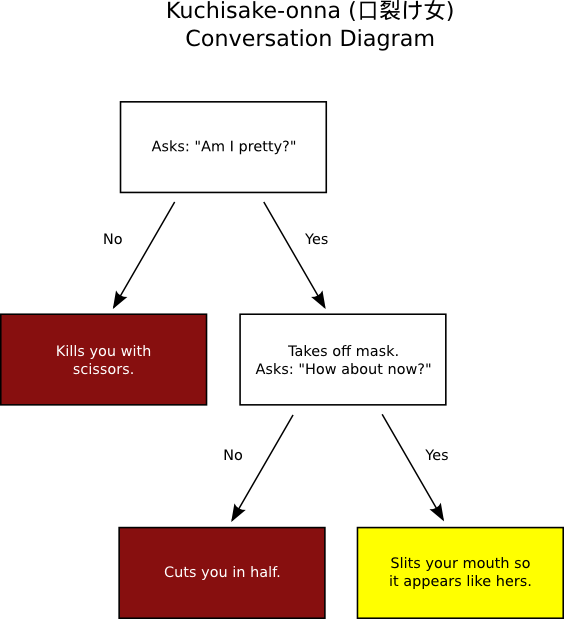
According to the legend, children walking alone at night may encounter a woman wearing a surgical mask, which is not an unusual sight in Japan as people wear them to protect others from their colds or sickness. The woman will stop the child and ask, Am I pretty? If the child answers no, the child is killed with a pair of scissors which the woman carries. If the child answers yes, the woman pulls away the mask, revealing that her mouth is slit from ear to ear, and asks How about now? If the child answers no, he/she will be cut in half. If the child answers yes, then she will slit his/her mouth like hers. It is impossible to run away from her, as she will simply reappear in front of the victim.
To help anyone who is not only frightened, but also confused, Mika and I made the following decision tree of possible conversations with Kuchisake-onna and their universally unfortunate outcomes.
Decision tree of conversations with Kuchisake-onna.Decision tree of conversations with Kuchisake-onna.
Of course, we uploaded the SVG source for the diagram to Wikimedia Commons and used the diagram to illustrate the Wikipedia article.

23 January 2015

Michael Prokop: check-mk: monitor switches for GBit links

For one of our customers we are using the Open Monitoring Distribution which includes Check_MK as monitoring system. We re monitoring the switches (Cisco) via SNMP. The switches as well as all the servers support GBit connections, though there are some systems in the wild which are still operating at 100MBit (or even worse on 10MBit). Recently there have been some performance issues related to network access. To make sure it s not the fault of a server or a service we decided to monitor the switch ports for their network speed. By default we assume all ports to be running at GBit speed. This can be configured either manually via:
cat etc/check_mk/conf.d/wato/rules.mk
[...]
checkgroup_parameters.setdefault('if', [])
checkgroup_parameters['if'] = [
  (  'speed': 1000000000 , [], ['switch1', 'switch2', 'switch3', 'switch4'], ALL_SERVICES,  'comment': u'GBit links should be used as default on all switches'  ),
] + checkgroup_parameters['if']
or by visting Check_MK s admin web-interface at WATO Configuration -> Host & Service Parameters -> Parameters for Inventorized Checks -> Networking -> Network interfaces and switch ports and creating a rule for the Explicit hosts switch1, switch2, etc and setting Operating speed to 1 GBit/s there. So far so straight forward and this works fine. Thanks to this setup we could identify several systems which used 100Mbit and 10MBit links. Definitely something to investigate on the according systems with their auto-negotiation configuration. But to avoid flooding the monitoring system and its notifications we want to explicitly ignore those systems in the monitoring setup until those issues have been resolved. First step: identify the checks and their format by either invoking cmk -D switch2 or looking at var/check_mk/autochecks/switch2.mk:
OMD[synpros]:~$ cat var/check_mk/autochecks/switch2.mk
[
  ("switch2", "cisco_cpu", None, cisco_cpu_default_levels),
  ("switch2", "cisco_fan", 'Switch#1, Fan#1', None),
  ("switch2", "cisco_mem", 'Driver text', cisco_mem_default_levels),
  ("switch2", "cisco_mem", 'I/O', cisco_mem_default_levels),
  ("switch2", "cisco_mem", 'Processor', cisco_mem_default_levels),
  ("switch2", "cisco_temp_perf", 'SW#1, Sensor#1, GREEN', None),
  ("switch2", "if64", '10101',  'state': ['1'], 'speed': 1000000000 ),
  ("switch2", "if64", '10102',  'state': ['1'], 'speed': 1000000000 ),
  ("switch2", "if64", '10103',  'state': ['1'], 'speed': 1000000000 ),
  [...]
  ("switch2", "snmp_info", None, None),
  ("switch2", "snmp_uptime", None,  ),
]
OMD[synpros]:~$
Second step: translate this into the according format for usage in etc/check_mk/main.mk:
checks = [
  ( 'switch2', 'if64', '10105',  'state': ['1'], 'errors': (0.01, 0.1), 'speed': None ), # MAC: 00:42:de:ad:be:af,  10MBit
  ( 'switch2', 'if64', '10107',  'state': ['1'], 'errors': (0.01, 0.1), 'speed': None ), # MAC: 00:23:de:ad:be:af, 100MBit
  ( 'switch2', 'if64', '10139',  'state': ['1'], 'errors': (0.01, 0.1), 'speed': None ), # MAC: 00:42:de:ad:be:af, 100MBit
  [...]
]
Using this configuration we ignore the operation speed on ports 10105, 10107 and 10139 of switch2 using the the if64 check. We kept the state setting untouched where sensible ( 1 means that the expected operational status of the interface is to be up ). The errors settings specifies the error rates in percent for warnings (0.01%) and critical (0.1%). For further details refer to the online documentation or invoke cmk -M if64 . Final step: after modifying the checks configuration make sure to run cmk -IIu switch2 ; cmk -R to renew the inventory for switch2 and apply the changes. Do not forget to verify the running configuration by invoking cmk -D switch2 : Screenshot of 'cmk -D switch2' execution

30 December 2014

Michael Prokop: Installing Debian in UEFI mode with some stunts

For a recent customer setup of Debian/wheezy on a IBM x3630 M4 server we used my blog entry State of the art Debian/wheezy deployments with GRUB and LVM/SW-RAID/Crypto as a base. But this time we wanted to use (U)EFI instead of BIOS legacy boot. As usual we went for installing via Grml and grml-debootstrap. We started by dd-ing the Grml ISO to a USB stick ( dd grml64-full_2014.11.iso of=/dev/sdX bs=1M ). The IBM server couldn t boot from it though, as far as we could identify it seems to be related to a problem with the IBM server not being able to properly recognize USB sticks that are registering themselves as mass storage device instead of removable storage devices (you can check your device via the /sys/devices/ /removable setting). So we enabled Legacy Boot and USB Storage in the boot manager of the server to be able to boot Grml in BIOS/legacy mode from this specific USB stick. To install the GRUB boot loader in (U)EFI mode you need to be able to execute modprobe efivars . But our system was booted via BIOS/legacy and in that mode the modprobe efivars doesnt work. We could have used a different USB device for booting Grml in UEFI mode but because we are lazy sysadmins and wanted to save time we went for a different route instead: First of all we write the Grml 64bit ISO (which is (U)EFI capable out-of-the-box, also when dd-ing it) to the local RAID disk (being /dev/sdb in this example):
root@grml ~ # dd if=grml64-full_2014.11.iso of=/dev/sdb bs=1M
Now we should be able to boot in (U)EFI mode from the local RAID disk. To verify this before actually physically rebooting the system (and possibly getting into trouble) we can use qemu with OVMF:
root@grml ~ # apt-get update
root@grml ~ # apt-get install ovmf
root@grml ~ # qemu-system-x86_64 -bios /usr/share/qemu/OVMF.fd -hda /dev/sdb
The Grml boot splash comes up as expected, perfect. Now we actually reboot the live system and boot the ISO from the local disks in (U)EFI mode. Then we put the running Grml live system into RAM to not use and block the local disks any longer since we want to install Debian there. This can be achieved not just by the toram boot option, but also by executing grml2ram on-demand as needed from user space:
root@grml ~ # grml2ram
Now having the local disks available we verify that we re running in (U)EFI mode by executing:
root@grml ~ # modprobe efivars
root@grml ~ # echo $?
0
Great, so we can install the system in (U)EFI mode now. Starting with the according partitioning (/dev/sda being the local RAID disk here):
root@grml ~ # parted /dev/sda
GNU Parted 3.2
Using /dev/sda
Welcome to GNU Parted! Type 'help' to view a list of commands.
(parted) mklabel gpt
(parted) mkpart primary fat16 2048s 4095s
(parted) name 1 "EFI System"
(parted) mkpart primary 4096s 100%
(parted) name 2 "Linux LVM"
(parted) print
Model: IBM ServeRAID M5110 (scsi)
Disk /dev/sda: 9000GB
Sector size (logical/physical): 512B/4096B
Partition Table: gpt
Disk Flags:
  Number  Start   End     Size    File system  Name        Flags
   1      1049kB  2097kB  1049kB  fat16        EFI System
   2      2097kB  9000GB  9000GB               Linux LVM
(parted) quit
Information: You may need to update /etc/fstab.
Then setting up LVM with a logical volume for the root fs and installing Debian via grml-debootstrap on it:
root@grml ~ # pvcreate /dev/sda2
  Physical volume "/dev/sda2" successfully created
root@grml ~ # vgcreate vg0 /dev/sda2
  Volume group "vg0" successfully created
root@grml ~ # lvcreate -n rootfs -L16G vg0
  Logical volume "rootfs" created
root@grml ~ # grml-debootstrap --target /dev/mapper/vg0-rootfs --password secret --hostname foobar --release wheezy
[...]
Now finally set up the (U)EFI partition and properly install GRUB in (U)EFI mode:
root@grml ~ # mkfs.fat -F 16 /dev/sda1
mkfs.fat 3.0.26 (2014-03-07)
WARNING: Not enough clusters for a 16 bit FAT! The filesystem will be
misinterpreted as having a 12 bit FAT without mount option "fat=16".
root@grml ~ # mount /dev/mapper/vg0-rootfs /mnt
root@grml ~ # grml-chroot /mnt /bin/bash
Writing /etc/debian_chroot ...
(foobar)root@grml:/# mkdir -p /boot/efi
(foobar)root@grml:/# mount /dev/sda1 /boot/efi
(foobar)root@grml:/# apt-get install grub-efi-amd64
[...]
(foobar)root@grml:/# grub-install /dev/sda
Timeout: 10 seconds
BootOrder: 0003,0000,0001,0002,0004,0005
Boot0000* CD/DVD Rom
Boot0001* Hard Disk 0
Boot0002* PXE Network
Boot0004* USB Storage
Boot0005* Legacy Only
Boot0003* debian
Installation finished. No error reported.
(foobar)root@grml:/# ls /boot/efi/EFI/debian/
grubx64.efi
(foobar)root@grml:/# update-grub
[...]
(foobar)root@grml:/# exit
root@grml ~ # umount /mnt/boot/efi
root@grml ~ # umount /mnt/
root@grml ~ # vgchange -an
  0 logical volume(s) in volume group "vg0" now active
That s it. Now rebooting the system should bring you to your Debian installation running in (U)EFI mode. You can verify this before actually rebooting into the system by using the qemu/OVMF trick from above once again.

22 December 2014

Michael Prokop: Ten years of Grml

* On 22nd of October 2004 an event called OS04 took place in Seifenfabrik Graz/Austria and it marked the first official release of the Grml project. Grml was initially started by myself in 2003 I registered the domain on September 16, 2003 (so technically it would be 11 years already :)). It started with a boot-disk, first created by hand and then based on yard. On 4th of October 2004 we had a first presentation of grml 0.09 Codename Bughunter at Kunstlabor in Graz. I managed to talk a good friend and fellow student Martin Hecher into joining me. Soon after Michael Gebetsroither and Andreas Gredler joined and throughout the upcoming years further team members (Nico Golde, Daniel K. Gebhart, Mario Lang, Gerfried Fuchs, Matthias Kopfermann, Wolfgang Scheicher, Julius Plenz, Tobias Klauser, Marcel Wichern, Alexander Wirt, Timo Boettcher, Ulrich Dangel, Frank Terbeck, Alexander Steinb ck, Christian Hofstaedtler) and contributors (Hermann Thomas, Andreas Krennmair, Sven Guckes, Jogi Hofm ller, Moritz Augsburger, ) joined our efforts. Back in those days most efforts went into hardware detection, loading and setting up the according drivers and configurations, packaging software and fighting bugs with lots of reboots (working on our custom /linuxrc for the initrd wasn t always fun). Throughout the years virtualization became more broadly available, which is especially great for most of the testing you need to do when working on your own (meta) distribution. Once upon a time udev became available and solved most of the hardware detection issues for us. Nowadays X.org doesn t even need a xorg.conf file anymore (at least by default). We have to acknowledge that Linux grew up over the years quite a bit (and I m wondering how we ll look back at the systemd discussions in a few years). By having Debian Developers within the team we managed to push quite some work of us back to Debian (the distribution Grml was and still is based on), years before the Debian Derivatives initiative appeared. We never stopped contributing to Debian though and we also still benefit from the Debian Derivatives initiative, like sharing issues and ideas on DebConf meetings. On 28th of May 2009 I myself became an official Debian Developer. Over the years we moved from private self-hosted infrastructure to company-sponsored systems, migrated from Subversion (brr) to Mercurial (2006) to Git (2008). Our Zsh-related work became widely known as grml-zshrc. jenkins.grml.org managed to become a continuous integration/deployment/delivery home e.g. for the dpkg, fai, initramfs-tools, screen and zsh Debian packages. The underlying software for creating Debian packages in a CI/CD way became its own project known as jenkins-debian-glue in August 2011. In 2006 I started grml-debootstrap, which grew into a reliable method for installing plain Debian (nowadays even supporting installation as VM, and one of my customers does tens of deployments per day with grml-debootstrap in a fully automated fashion). So one of the biggest achievements of Grml is from my point of view that it managed to grow several active and successful sub-projects under its umbrella. Nowadays the Grml team consists of 3 Debian Developers Alexander Wirt (formorer), Evgeni Golov (Zhenech) and myself. We couldn t talk Frank Terbeck (ft) into becoming a DM/DD (yet?), but he s an active part of our Grml team nonetheless and does a terrific job with maintaining grml-zshrc as well as helping out in Debian s Zsh packaging (and being a Zsh upstream committer at the same time makes all of that even better :)). My personal conclusion for 10 years of Grml? Back in the days when I was a student Grml was my main personal pet and hobby. Grml grew into an open source project which wasn t known just in Graz/Austria, but especially throughout the German system administration scene. Since 2008 I m working self-employed and mainly working on open source stuff, so I m kind of living a dream, which I didn t even have when I started with Grml in 2003. Nowadays with running my own business and having my own family it s getting harder for me to consider it still a hobby though, instead it s more integrated and part of my business which I personally consider both good and bad at the same time (for various reasons). Thanks so much to anyone of you, who was (and possibly still is) part of the Grml journey! Let s hope for another 10 successful years! Thanks to Max Amanshauser and Christian Hofstaedtler for reading drafts of this.

15 December 2014

Thomas Goirand: Supporting 3 init systems in OpenStack packages

tl;dr: Providing support for all 3 init systems (sysv-rc, Upstart and systemd) isn t hard, and generating the init scripts / Upstart job / systemd using a template system is a lot easier than I previously thought. As always, when writing this kind of blog post, I do expect that others will not like what I did. But that s the point: give me your opinion in a constructive way (please be polite even if you don t like what you see I had too many times had to read harsh comments), and I ll implement your ideas if I find it nice. History of the implementation: how we came to the idea I had no plan to do this. I don t believe what I wrote can be generalized to all of the Debian archive. It s just that I started doing things, and it made sense when I did it. Let me explain how it happened. Since it s clear that many, and especially the most advanced one, may have an opinion about which init system they prefer, and because I also support Ubuntu (at least Trusty), I though it was a good idea to support all the main init system: sysv-rc, Upstart and systemd. Though I have counted (for the sake of being exact in this blog) : OpenStack in Debian contains currently 64 init scripts to run daemons in total. That s quite a lot. A way too much to just write them, all by hand. Though that s what I was doing for the last years until this the end of this last summer! So, doing all by hand, I first started implementing Upstart. Its support was there only when building in Ubuntu (which isn t the correct thing to do, this is now fixed, read further ). Then we thought about adding support for systemd. Gustavo Panizzo, one of the contributors in the OpenStack packages, started implementing it in Keystone (the auth server for OpenStack) for the Juno release which was released this October. He did that last summer, early enough so we didn t expect anyone to use the Juno branch Keystone. After some experiments, we had kind of working. What he did was invoking /etc/init.d/keystone start-systemd , which was still using start-stop-daemon. Yes, that s not perfect, and it s better to use systemd foreground process handling, but at least, we had a unique place where to write the startup scripts, where we check the /etc/default for the logging configuration, configure the log file, and so on. Then around in october, I took a step backward to see the whole picture with sysv-rc scripts, and saw the mess, with all the tiny, small difference between them. It became clear that I had to do something to make sure they were all the same, with the support for the same things (like which log system to use, where to store the PID, create /var/lib/project, /var/run/project and so on ). Last, on this month of December, I was able to fix the remaining issues for systemd support, thanks to the awesome contribution of Mikael Cluseau on the Alioth OpenStack packaging list. Now, the systemd unit file is still invoking the init script, but it s not using start-stop-daemon anymore, no PID file involved, and daemons are used as systemd foreground processes. Finally, daemons service files are also activated on installation (they were not previously). Implementation So I took the simplistic approach to use always the same template for the sysv-rc switch/case, and the start and stop functions, happening it at the end of all debian/*.init.in scripts. I started to try to reduce the number of variables, and I was surprised of the result: only a very small part of the init scripts need to change from daemon to daemon. For example, for nova-api, here s the init script (LSB header stripped-out):
DESC="OpenStack Compute API"
PROJECT_NAME=nova
NAME=$ PROJECT_NAME -api
That is it: only 3 lines, defining only the name of the daemon, the name of the project it attaches (eg: nova, cinder, etc.), and a long description. There s of course much more complicated init scripts (see the one for neutron-server in the Debian archive for example), but the vast majority only needs the above. Here s the sysv-rc init script template that I currently use:
#!/bin/sh
# The content after this line comes from openstack-pkg-tools
# and has been automatically added to a .init.in script, which
# contains only the descriptive part for the daemon. Everything
# else is standardized as a single unique script.
# Author: Thomas Goirand <zigo@debian.org>
# PATH should only include /usr/* if it runs after the mountnfs.sh script
PATH=/sbin:/usr/sbin:/bin:/usr/bin
if [ -z "$ DAEMON " ] ; then
	DAEMON=/usr/bin/$ NAME 
fi
PIDFILE=/var/run/$ PROJECT_NAME /$ NAME .pid
if [ -z "$ SCRIPTNAME " ] ; then
	SCRIPTNAME=/etc/init.d/$ NAME 
fi
if [ -z "$ SYSTEM_USER " ] ; then
	SYSTEM_USER=$ PROJECT_NAME 
fi
if [ -z "$ SYSTEM_USER " ] ; then
	SYSTEM_GROUP=$ PROJECT_NAME 
fi
if [ "$ SYSTEM_USER " != "root" ] ; then
	STARTDAEMON_CHUID="--chuid $ SYSTEM_USER :$ SYSTEM_GROUP "
fi
if [ -z "$ CONFIG_FILE " ] ; then
	CONFIG_FILE=/etc/$ PROJECT_NAME /$ PROJECT_NAME .conf
fi
LOGFILE=/var/log/$ PROJECT_NAME /$ NAME .log
if [ -z "$ NO_OPENSTACK_CONFIG_FILE_DAEMON_ARG " ] ; then
	DAEMON_ARGS="$ DAEMON_ARGS  --config-file=$ CONFIG_FILE "
fi
# Exit if the package is not installed
[ -x $DAEMON ]   exit 0
# If ran as root, create /var/lock/X, /var/run/X, /var/lib/X and /var/log/X as needed
if [ "x$USER" = "xroot" ] ; then
	for i in lock run log lib ; do
		mkdir -p /var/$i/$ PROJECT_NAME 
		chown $ SYSTEM_USER  /var/$i/$ PROJECT_NAME 
	done
fi
# This defines init_is_upstart which we use later on (+ more...)
. /lib/lsb/init-functions
# Manage log options: logfile and/or syslog, depending on user's choosing
[ -r /etc/default/openstack ] && . /etc/default/openstack
[ -r /etc/default/$NAME ] && . /etc/default/$NAME
[ "x$USE_SYSLOG" = "xyes" ] && DAEMON_ARGS="$DAEMON_ARGS --use-syslog"
[ "x$USE_LOGFILE" != "xno" ] && DAEMON_ARGS="$DAEMON_ARGS --log-file=$LOGFILE"
do_start()  
	start-stop-daemon --start --quiet --background $ STARTDAEMON_CHUID  --make-pidfile --pidfile $ PIDFILE  --chdir /var/lib/$ PROJECT_NAME  --startas $DAEMON \
			--test > /dev/null   return 1
	start-stop-daemon --start --quiet --background $ STARTDAEMON_CHUID  --make-pidfile --pidfile $ PIDFILE  --chdir /var/lib/$ PROJECT_NAME  --startas $DAEMON \
			-- $DAEMON_ARGS   return 2
 
do_stop()  
	start-stop-daemon --stop --quiet --retry=TERM/30/KILL/5 --pidfile $PIDFILE
	RETVAL=$?
	rm -f $PIDFILE
	return "$RETVAL"
 
do_systemd_start()  
	exec $DAEMON $DAEMON_ARGS
 
case "$1" in
start)
	init_is_upstart > /dev/null 2>&1 && exit 1
	log_daemon_msg "Starting $DESC" "$NAME"
	do_start
	case $? in
		0 1) log_end_msg 0 ;;
		2) log_end_msg 1 ;;
	esac
;;
stop)
	init_is_upstart > /dev/null 2>&1 && exit 0
	log_daemon_msg "Stopping $DESC" "$NAME"
	do_stop
	case $? in
		0 1) log_end_msg 0 ;;
		2) log_end_msg 1 ;;
	esac
;;
status)
	status_of_proc "$DAEMON" "$NAME" && exit 0   exit $?
;;
systemd-start)
	do_systemd_start
;;  
restart force-reload)
	init_is_upstart > /dev/null 2>&1 && exit 1
	log_daemon_msg "Restarting $DESC" "$NAME"
	do_stop
	case $? in
	0 1)
		do_start
		case $? in
			0) log_end_msg 0 ;;
			1) log_end_msg 1 ;; # Old process is still running
			*) log_end_msg 1 ;; # Failed to start
		esac
	;;
	*) log_end_msg 1 ;; # Failed to stop
	esac
;;
*)
	echo "Usage: $SCRIPTNAME  start stop status restart force-reload systemd-start " >&2
	exit 3
;;
esac
exit 0
Nothing particularly fancy here You ll noticed that it s really OpenStack centric (see the LOGFILE and CONFIGFILE things ). You may have also noticed the call to init_is_upstart which is needed for upstart support. I m not sure if it s at the correct place in the init script. Should I put that on top of the script? Was I right with the exit values for it? Please send me your comments Then I thought about generalizing all of this. Because not only the sysv-rc scripts needed to be squared-up, but also Upstart. The approach here was to source the sysv-rc script in debian/*.init.in, and then generate the Upstart job accordingly, using the above 3 variables (or more as needed). Here, the fun is that, instead of taking the approach of calculating everything at runtime with the sysv-rc, for Upstart jobs, many things are calculated at build time. For each debian/*.init.in script that the debian/rules finds, pkgos-gen-upstart-job is called. Here s pkgos-gen-upstart-job:
#!/bin/sh
INIT_TEMPLATE=$ 1 
UPSTART_FILE= echo $ INIT_TEMPLATE    sed 's/.init.in/.upstart/' 
# Get the variables defined in the init template
. $ INIT_TEMPLATE 
## Find out what should go in After=
#SHOULD_START= cat $ INIT_TEMPLATE    grep "# Should-Start:"   sed 's/# Should-Start://' 
#
#if [ -n "$ SHOULD_START " ] ; then
#	AFTER="After="
#	for i in $ SHOULD_START  ; do
#		AFTER="$ AFTER $ i .service "
#	done
#fi
if [ -z "$ DAEMON " ] ; then
        DAEMON=/usr/bin/$ NAME 
fi
PIDFILE=/var/run/$ PROJECT_NAME /$ NAME .pid
if [ -z "$ SCRIPTNAME " ] ; then
	SCRIPTNAME=/etc/init.d/$ NAME 
fi
if [ -z "$ SYSTEM_USER " ] ; then
	SYSTEM_USER=$ PROJECT_NAME 
fi
if [ -z "$ SYSTEM_GROUP " ] ; then
	SYSTEM_GROUP=$ PROJECT_NAME 
fi
if [ "$ SYSTEM_USER " != "root" ] ; then
	STARTDAEMON_CHUID="--chuid $ SYSTEM_USER :$ SYSTEM_GROUP "
fi
if [ -z "$ CONFIG_FILE " ] ; then
	CONFIG_FILE=/etc/$ PROJECT_NAME /$ PROJECT_NAME .conf
fi
LOGFILE=/var/log/$ PROJECT_NAME /$ NAME .log
DAEMON_ARGS="$ DAEMON_ARGS  --config-file=$ CONFIG_FILE "
echo "description \"$ DESC \"
author \"Thomas Goirand <zigo@debian.org>\"
start on runlevel [2345]
stop on runlevel [!2345]
chdir /var/run
pre-start script
	for i in lock run log lib ; do
		mkdir -p /var/\$i/$ PROJECT_NAME 
		chown $ SYSTEM_USER  /var/\$i/$ PROJECT_NAME 
	done
end script
script
	[ -x \"$ DAEMON \" ]   exit 0
	DAEMON_ARGS=\"$ DAEMON_ARGS \"
	[ -r /etc/default/openstack ] && . /etc/default/openstack
	[ -r /etc/default/\$UPSTART_JOB ] && . /etc/default/\$UPSTART_JOB
	[ \"x\$USE_SYSLOG\" = \"xyes\" ] && DAEMON_ARGS=\"\$DAEMON_ARGS --use-syslog\"
	[ \"x\$USE_LOGFILE\" != \"xno\" ] && DAEMON_ARGS=\"\$DAEMON_ARGS --log-file=$ LOGFILE \"
	exec start-stop-daemon --start --chdir /var/lib/$ PROJECT_NAME  \\
		$ STARTDAEMON_CHUID  --make-pidfile --pidfile $ PIDFILE  \\
		--exec $ DAEMON  -- --config-file=$ CONFIG_FILE  \$ DAEMON_ARGS 
end script
" >$ UPSTART_FILE 
The only thing which I don t know how to do, is how to implement the Should-Start / Should-Stop in an Upstart job. Can anyone shoot me a mail and tell me the solution? Then, I wanted to add support for systemd. Here, we cheated, since we only just called the sysv-rc script from the systemd unit, however, the systemd-start target uses exec, so the process stays in the foreground. It s also much smaller than the Upstart thing. However, here, I could implement the After thing, corresponding to the Should-Start:
#!/bin/sh
INIT_TEMPLATE=$ 1 
SERVICE_FILE= echo $ INIT_TEMPLATE    sed 's/.init.in/.service/' 
# Get the variables defined in the init template
. $ INIT_TEMPLATE 
if [ -z "$ SCRIPTNAME " ] ; then
	SCRIPTNAME=/etc/init.d/$ NAME 
fi
if [ -z "$ SYSTEM_USER " ] ; then
	SYSTEM_USER=$ PROJECT_NAME 
fi
if [ -z "$ SYSTEM_GROUP " ] ; then
	SYSTEM_GROUP=$ PROJECT_NAME 
fi
# Find out what should go in After=
SHOULD_START= cat $ INIT_TEMPLATE    grep "# Should-Start:"   sed 's/# Should-Start://' 
if [ -n "$ SHOULD_START " ] ; then
	AFTER="After="
	for i in $ SHOULD_START  ; do
		AFTER="$ AFTER $ i .service "
	done
fi
echo "[Unit]
Description=$ DESC 
$AFTER
[Service]
User=$ SYSTEM_USER 
Group=$ SYSTEM_GROUP 
WorkingDirectory=/var/lib/$ PROJECT_NAME 
PermissionsStartOnly=true
ExecStartPre=/bin/mkdir -p /var/lock/$ PROJECT_NAME  /var/log/$ PROJECT_NAME  /var/lib/$ PROJECT_NAME 
ExecStartPre=/bin/chown $ SYSTEM_USER :$ SYSTEM_GROUP  /var/lock/$ PROJECT_NAME  /var/log/$ PROJECT_NAME  /var/lib/$ PROJECT_NAME 
ExecStart=$ SCRIPTNAME  systemd-start
Restart=on-failure
[Install]
WantedBy=multi-user.target
" >$ SERVICE_FILE 
As you can see, it s calling /etc/init.d/$ SCRIPTNAME sytemd-start, which isn t great. I d be happy to have comments from systemd user / maintainers on how to fix it to make it better. Integrating in debian/rules To integrate with the Debian package build system, we only need had to write this:
override_dh_installinit:
	# Create the init scripts from the template
	for i in  ls -1 debian/*.init.in  ; do \
		MYINIT= echo $$i   sed s/.init.in//  ; \
		cp $$i $$MYINIT.init ; \
		cat /usr/share/openstack-pkg-tools/init-script-template >>$$MYINIT.init ; \
		pkgos-gen-systemd-unit $$i ; \
	done
	# If there's an upstart.in file, use that one instead of the generated one
	for i in  ls -1 debian/*.upstart.in  ; do \
		MYPKG= echo $$i   sed s/.upstart.in//  ; \
		cp $$MYPKG.upstart.in $$MYPKG.upstart ; \
	done
	# Generate the upstart job if there's no already existing .upstart.in
	for i in  ls debian/*.init.in  ; do \
		MYINIT= echo $$i   sed s/.init.in/.upstart.in/  ; \
		if ! [ -e $$MYINIT ] ; then \
			pkgos-gen-upstart-job $$i ; \
		fi \
	done
	dh_installinit --error-handler=true
	# Generate the systemd unit file
	# Note: because dh_systemd_enable is called by the
	# dh sequencer *before* dh_installinit, we have
	# to process it manually.
	for i in  ls debian/*.init.in  ; do \
		pkgos-gen-systemd-unit $$i ; \
		MYSERVICE= echo $$i   sed 's/debian\///'  ; \
		MYSERVICE= echo $$MYSERVICE   sed 's/.init.in/.service/'  ; \
		dh_systemd_enable $$MYSERVICE ; \
	done
As you can see, it s possible to use a debian/*.upstart.in and not use the templating system, in the more complicated case (I needed it mostly for neutron-server and neutron-plugin-openvswitch-agent). Conclusion I do not pretend that what I wrote in the openstack-pkg-tools is the ultimate solution. But I m convince that it answers our own need as the OpenStack maintainers in Debian. There s a lot of room for improvements (like implementing the Should-Start in Upstart jobs, or stop calling the sysv-rc script in the systemd units), but that this is a very good move that we did to use templates and generated scripts, as the init scripts are a way more easy to maintain now, in a much more unified way. As I m not completely satisfied for the systemd and Upstart implementation, I m sure that there s already a huge improvements on the sysv-rc script maintainability. Last and again: please send your comments and help improving the above! :)

23 July 2014

Michael Prokop: Book Review: The Docker Book

Docker is an open-source project that automates the deployment of applications inside software containers. I m responsible for a docker setup with Jenkins integration and a private docker-registry setup at a customer and pre-ordered James Turnbull s The Docker Book a few months ago. Recently James he s working for Docker Inc released the first version of the book and thanks to being on holidays I already had a few hours to read it AND blog about it. :) (Note: I ve read the Kindle version 1.0.0 and all the issues I found and reported to James have been fixed in the current version already, jey.) The book is very well written and covers all the basics to get familiar with Docker and in my opinion it does a better job at that than the official user guide because of the way the book is structured. The book is also a more approachable way for learning some best practices and commonly used command lines than going through the official reference (but reading the reference after reading the book is still worth it). I like James approach with ENV REFRESHED_AT $TIMESTAMP for better controlling the cache behaviour and definitely consider using this in my own setups as well. What I wasn t aware is that you can directly invoke docker build $git_repos_url and further noted a few command line switches I should get more comfortable with. I also plan to check out the Automated Builds on Docker Hub. There are some references to further online resources, which is relevant especially for the more advanced use cases, so I d recommend to have network access available while reading the book. What I m missing in the book are best practices for running a private docker-registry in a production environment (high availability, scaling options, ). The provided Jenkins use cases are also very basic and nothing I personally would use. I d also love to see how other folks are using the Docker plugin, the Docker build step plugin or the Docker build publish plugin in production (the plugins aren t covered in the book at all). But I m aware that this are fast moving parts and specialised used cases upcoming versions of the book are already supposed to cover orchestration with libswarm, developing Docker plugins and more advanced topics, so I m looking forward to further updates of the book (which you get for free as existing customer, being another plus). Conclusion: I enjoyed reading the Docker book and can recommend it, especially if you re either new to Docker or want to get further ideas and inspirations what folks from Docker Inc consider best practices.

24 March 2014

Michael Prokop: kamailio-deb-jenkins: Open Source Jenkins setup for Debian Packaging

Kamailio is an Open Source SIP Server. Since beginning of March 2014 a new setup for Kamailio s Debian packages is available. Development of this setup is sponsored by Sipwise and I am responsible for its infrastructure part (Jenkins, EC2, jenkins-debian-glue). The setup includes support for building Debian packages for Debian 5 (lenny), 6 (squeeze), 7 (wheezy) and 8 (jessie) as well as Ubuntu 10.04 (lucid) and 12.04 (precise), all of them architectures amd64 and i386. My work is fully open sourced. Deployment instructions, scripts and configuration are available at kamailio-deb-jenkins, so if you re interested in setting up your own infrastructure for Continuous Integration with Debian/Ubuntu packages that s a very decent starting point. NOTE: I ll be giving a talk about Continuous Integration with Debian/Ubuntu packages at Linuxdays Graz/Austria on 5th of April. Besides kamailio-deb-jenkins I ll also cover best practices, Debian packaging, EC2 autoscaling,

Michael Prokop: Building Debian+Ubuntu packages on EC2

In a project I recently worked on we wanted to provide a jenkins-debian-glue based setup on Amazon s EC2 for building Debian and Ubuntu packages. The idea is to keep a not-so-strong powered Jenkins master up and running 24 7, while stronger machines serving as Jenkins slaves should be launched only as needed. The project setup in question is fully open sourced (more on that in a separate blog post), hereby I am documenting the EC2 setup in usage. Jenkins master vs. slave Debian source packages are generated on Jenkins master where a checkout of the Git repository resides. The Jenkins slaves do the actual workload by building the binary packages and executing piuparts (.deb package installation, upgrading, and removal testing tool) on the resulting binary packages. The Debian packages (source+binaries) are then provided back to Jenkins master and put into a reprepro powered Debian repository for public usage. Preparation The starting point was one of the official Debian AMIs (x86_64, paravirtual on EBS). We automatically deployed jenkins-debian-glue on the system which is used as Jenkins master (we chose a m1.small instance for our needs). We started another instance, slightly adjusted it to already include jenkins-debian-glue related stuff out-of-the-box (more details in section Reduce build time below) and created an AMI out of it. This new AMI ID can be configured for usage inside Jenkins by using the Amazon EC2 Plugin (see screenshot below). IAM policy Before configuring EC2 in Jenkins though start by adding a new user (or group) in AWS s IAM (Identity and Access Management) with a custom policy. This ensures that your EC2 user in Jenkins doesn t have more permissions than really needed. The following policy should give you a starting point (we restrict the account to allow actions only in the EC2 region eu-west-1, YMMV):
 
  "Version": "2012-10-17",
  "Statement": [
     
      "Action": [
        "ec2:CreateTags",
        "ec2:DescribeInstances",
        "ec2:DescribeImages",
        "ec2:DescribeKeyPairs",
        "ec2:GetConsoleOutput",
        "ec2:RunInstances",
        "ec2:StartInstances",
        "ec2:StopInstances",
        "ec2:TerminateInstances"
      ],
      "Effect": "Allow",
      "Resource": "*",
            "Condition":  
                "StringEquals":  
                    "ec2:Region": "eu-west-1"


  ]
 
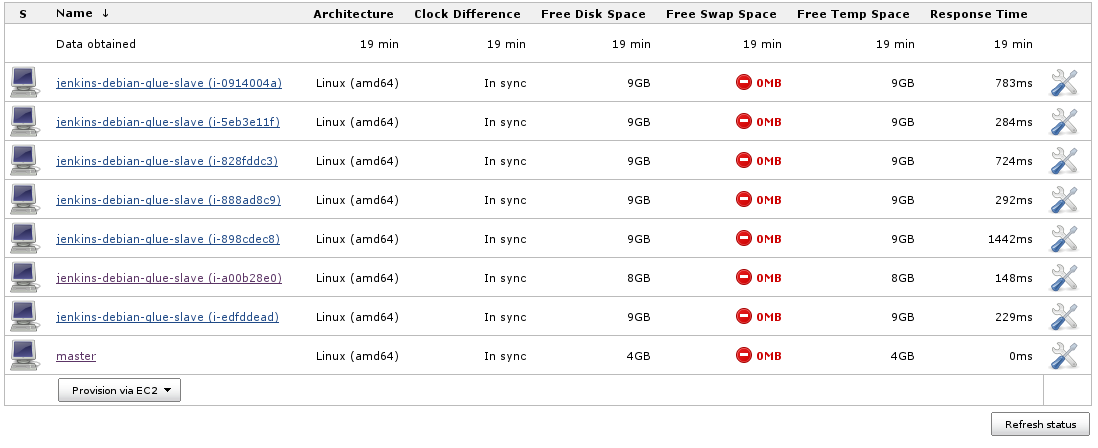
Jenkins configuration Configure EC2 access with Access Key ID , Secret Access Key , Region and EC2 Key Pair s Private Key (for SSH login) inside Jenkins in the Cloud section on $YOUR_JENKINS_SERVER/configure. Finally add an AMI in the AMIs Amazon EC2 configuration section (adjust security-group as needed, SSH access is enough): As you can see the configuration also includes a launch script. This script ensures that slaves are set up as needed (provide all the packages and scripts that are required for building) and always get the latest configuration and scripts before starting to serve as Jenkins slave. Now your setup should be ready for launching Jenkins slaves as needed: NOTE: you can use the Instance Cap configuration inside the advanced Amazon EC2 Jenkins configuration section to place an upward limit to the number of EC2 instances that Jenkins may launch. This can be useful for avoiding surprises in your AWS invoices. :) Notice though that the cap numbers are calculated for all your running EC2 instances, so be aware if you have further machines running under your account, you might want to e.g. further restrict your IAM policy then. Reduce build time Using a plain Debian AMI and automatically installing jenkins-debian-glue and further jenkins-debian-glue-buildenv* packages on each slave startup would work but it takes time. That s why we created our own AMI which is nothing else than an official Debian AMI with the bootstrap.sh script (which is referred to in the screenshot above) already executed. All the necessary packages are pre-installed and also all the cowbuilder environments are already present then. From time to time we start the instance again to apply (security) updates and execute the bootstrap script with its &dash&dashupdate option to also have all the cowbuilder systems up2date. Creating a new AMI is a no-brainer and we can then use the up2date system for our Jenkins slaves, if something should break for whatever reason we can still fall back to an older known-to-be-good AMI. Final words How to set up your Jenkins jobs for optimal master/slave usage, multi-distribution support (Debian/Ubuntu) and further details about this setup are part of another blog post. Thanks to Andreas Granig, Victor Seva and Bernhard Miklautz for reading drafts of this.
Next.

Previous.