Search Results: "bap"

1 October 2020

Jonathan Carter: Free Software Activities for 2020-09

This month I started working on ways to make hosting access easier for Debian Developers. I also did some work and planning for the MiniDebConf Online Gaming Edition that we ll likely announce within the next 1-2 days. Just a bunch of content that needs to be fixed and a registration bug then I think we ll be ready to send out the call for proposals. In the meantime, here s my package uploads and sponsoring for September: 2020-09-07: Upload package calamares (3.2.30-1) to Debian unstable. 2020-09-07: Upload package gnome-shell-extension-dash-to-panel (39-1) to Debian unstable. 2020-09-08: Upload package gnome-shell-extension-draw-on-your-screen (6.2-1) to Debian unstable. 2020-09-08: Sponsor package sqlobject (3.8.0+dfsg-2) for Debian unstable (Python team request). 2020-09-08: Sponsor package bidict (0.21.0-1) for Debian unstable (Python team request). 2020-09-11: Upload package catimg (2.7.0-1) to Debian unstable. 2020-09-16: Sponsor package gamemode (1.6-1) for Debian unstable (Games team request). 2020-09-21: Sponsor package qosmic (1.6.0-3) for Debian unstable (Debian Mentors / e-mail request). 2020-09-22: Upload package gnome-shell-extension-draw-on-your-screen (6.4-1) to Debian unstable. 2020-09-22: Upload package bundlewrap (4.2.0-1) to Debian unstable. 2020-09-25: Upload package gnome-shell-extension-draw-on-your-screen (7-1) to Debian unstable. 2020-09-27: Sponsor package libapache2-mod-python (3.5.0-1) for Debian unstable (Python team request). 2020-09-27: Sponsor package subliminal (2.1.0-1) for Debian unstable (Python team request).

8 August 2020

Thorsten Alteholz: My Debian Activities in July 2020

FTP master This month I accepted 434 packages and rejected 54. The overall number of packages that got accepted was 475. Debian LTS This was my seventy-third month that I did some work for the Debian LTS initiative, started by Raphael Hertzog at Freexian. This month my all in all workload has been 25.25h. During that time I did LTS uploads of: I started to work on python2.7 as well but stumbled over some hurdles in the testsuite, so I did not upload a fixed version yet. This month was much influenced by the transition from Jessie LTS to Stretch LTS and one or another workflow/script needed some adjustments. Last but not least I did some days of frontdesk duties. Debian ELTS This month was the twenty fifth ELTS month. During my allocated time I uploaded: Like in LTS, I also started to work on python2.7 and encountered the same hurdles in the testsuite. So I did not upload a fixed version for ELTS as well. Last but not least I did some days of frontdesk duties. Other stuff In this section nothing much happened this month. Thanks a lot to everybody who NMUed a package to fix a bug.

9 July 2020

Enrico Zini: Laptop migration

This laptop used to be extra-flat My laptop battery started to explode in slow motion. HP requires 10 business days to repair my laptop under warranty, and I cannot afford that length of downtime. Alternatively, HP quoted me 375 + VAT for on-site repairs, which I tought was very funny. For 376.55 + VAT, which is pretty much exactly the same amount, I bought instead a refurbished ThinkPad X240 with a dual-core I5, 8G of RAM, 250G SSD, and a 1920x1080 IPS display, to use as a spare while my laptop is being repaired. I'd like to thank HP for giving me the opportunity to own a ThinkPad. Since I'm migrating all my system to the spare and then (hopefully) back, I'm documenting what I need to be fully productive on new hardware. Install Debian A basic Debian netinst with no tasks selected is good enough to get going. Note that if wifi worked in Debian Installer, it doesn't mean that it will work in the minimal system it installed. See here for instructions on quickly bringing up wifi on a newly installed minimal system. Copy /home A simple tar of /home is all I needed to copy my data over. A neat way to do it was connecting the two laptops with an ethernet cable, and using netcat:
# On the source
tar -C / -zcf - home   nc -l -p 12345 -N
# On the target
nc 10.0.0.1 12345   tar -C / -zxf -
Since the data travel unencrypted in this way, don't do it over wifi. Install packages I maintain a few simple local metapackages that depend on the packages I usually used. I could just install those and let apt bring in their dependencies. For the build dependencies of the programs I develop, I use mk-build-deps from the devscripts package to create metapackages that make sure they are installed. Here's an extract from debian/control of the metapackage:
Source: enrico
Section: admin
Priority: optional
Maintainer: Enrico Zini <enrico@debian.org>
Build-Depends: debhelper (>= 11)
Standards-Version: 3.7.2.1
Package: enrico
Section: admin
Architecture: all
Depends:
  mc, mmv, moreutils, powertop, syncmaildir, notmuch,
  ncdu, vcsh, ddate, jq, git-annex, eatmydata,
  vdirsyncer, khal, etckeeper, moc, pwgen
Description: Enrico's working environment
Package: enrico-devel
Section: devel
Architecture: all
Depends:
  git, python3-git, git-svn, gitk, ansible, fabric,
  valgrind, kcachegrind, zeal, meld, d-feet, flake8, mypy, ipython3,
  strace, ltrace
Description: Enrico's development environment
Package: enrico-gui
Section: x11
Architecture: all
Depends:
  xclip, gnome-terminal, qalculate-gtk, liferea, gajim,
  mumble, sm, syncthing, virt-manager
Recommends: k3b
Description: Enrico's GUI environment
Package: enrico-sanity
Section: admin
Architecture: all
Conflicts: libapache2-mod-php, libapache2-mod-php5, php5, php5-cgi, php5-fpm, libapache2-mod-php7.0, php7.0, libphp7.0-embed, libphp-embed, libphp5-embed
Description: Enrico's sanity
 Metapackage with a list of packages that I do not want anywhere near my
 system.
System-wide customizations I tend to avoid changing system-wide configuration as much as possible, so copying over /home and installing packages takes care of 99% of my needs. There are a few system-wide tweaks I cannot do without: For postfix, I have a little ansible playbook that takes care of it. Network Manager system connections need to be copied manually: a plain copy and a systemctl restart network-manager are enough. Note that Network Manager will ignore the files unless their owner and permissions are what it expects. Fine tuning Comparing the output of dpkg --get-selections between the old and the new system might highlight packages manually installed in a hurry and not added to the metapackages. Finally, what remains is fixing the sad state of mimetype associations, which seem to associate opening file depending on whatever application was installed last, phases of the moon, and what option is the most annoying. Currently on my system, PDFs are opened in inkscape by xdg-open and in calibre by run-mailcap. Let's see how long it takes to figure this one out.

11 June 2020

Markus Koschany: My Free Software Activities in May 2020

Welcome to gambaru.de. Here is my monthly report (+ the first week in June) that covers what I have been doing for Debian. If you re interested in Java, Games and LTS topics, this might be interesting for you. Debian Games
Debian Java Misc Debian LTS This was my 51. month as a paid contributor and I have been paid to work 25 hours on Debian LTS, a project started by Rapha l Hertzog. In that time I did the following: ELTS Extended Long Term Support (ELTS) is a project led by Freexian to further extend the lifetime of Debian releases. It is not an official Debian project but all Debian users benefit from it without cost. The current ELTS release is Debian 7 Wheezy . This was my 24. month and I have been paid to work 9,25 hours on ELTS. Thanks for reading and see you next time.

24 May 2020

Enrico Zini: Music links

It's the end of the world as we know it, twice as fast
After Homemade Instruments Week on the facebook page, here is an article with some PVC pipes instruments! Percussion on PVC pipes A classic, long pipes for big bass, easy to tune by changing the length
"Ut queant laxis" or "Hymnus in Ioannem" is a Latin hymn in honor of John the Baptist, written in Horatian Sapphics and traditionally attributed to Paulus Diaconus, the eighth-century Lombard historian. It is famous for its part in the history of musical notation, in particular solmization. The hymn belongs to the tradition of Gregorian chant.

2 April 2020

Sven Hoexter: New TLDs and Automatic link detection was a bad idea

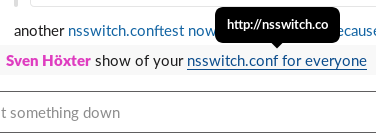
Update: Seems this is a Firefox specific bug in the Slack Webapplication, it works in Chrome and the Slack Electron Application as it should. Tested with Firefox ESR on Debian/buster and Firefox 74 on OS X. Ah I like it that we now have so many TLDs and matching on those seems to go bad more often now. Last occassion is Slack (which I think is a pile of shit written by morons, but that is a different story) which somehow does not properly match on .co domains. Leading to this auto linking: nsswitch.conf link Now I'm not sure if someone enocountered the same issue, or people just registered random domains just because they could. I found registrations for I've a few more .conf files in /etc which could be interesting in an IT environment, but for the sake of playing with it I registered nsswitch.co at godaddy. I do not want to endorse them in anyway, but for the first year it's only 13.08EUR right now, which is okay to pay for a stupid demo. So if you feel like it, you can probably register something stupid for yourself to play around with. I do not intent to renew this domain next year, so be aware of what happens then with the next owner.

1 April 2020

Paul Wise: FLOSS Activities March 2020

Changes

Issues

Review

Administration
  • Debian wiki: approve accounts

Communication

Sponsors The dh-make-perl feature requests, file bug report, File::Libmagic changes, autoconf-archive change, libpst work and the purple-discord upload were sponsored by my employer. All other work was done on a volunteer basis.

7 March 2020

Matthias Klumpp: Introducing the MetaInfo Creator

This year s FOSDEM conference was a lot of fun one of the things I always enjoy most about this particular conference (besides having some of the outstanding food you can get in Brussels and meeting with friends from the free software world) is the ability to meet a large range of new people who I wouldn t usually have interacted with, or getting people from different communities together who otherwise would not meet in person as each bigger project has their own conference (for example, the amount of VideoLAN people is much lower at GUADEC and Akademy compared to FOSDEM). It s also really neat to have GNOME and KDE developers within reach at the same place, as I care about both desktops a lot. An unexpected issue This blog post however is not about that. It s about what I learned when talking to people there about AppStream, and the outcome of that. Especially when talking to application authors but also to people who deal with larger software repositories, it became apparent that many app authors don t really want to deal with the extra effort of writing metadata at all. This was a bit of a surprise to me, as I thought that there would be a strong interest for application authors to make their apps look as good as possible in software catalogs. A bit less surprising was the fact that people apparently don t enjoy reading a large specification, reading a long-ish intro guide with lots of dos and don ts or basically reading any longer text at all before being able to create an AppStream MetaInfo/AppData file describing their software. Another common problem seems to be that people don t immediately know what a reverse-DNS ID is, the format AppStream uses for uniquely identifying each software component. So naturally, people either have to read about it again (bah, reading!  ) or make something up, which occasionally is wrong and not the actual component-ID their software component should have. The MetaInfo Creator It was actually suggested to me twice that what people really would like to have is a simple tool to put together a MetaInfo file for their software. Basically a simple form with a few questions which produces the final file. I always considered this a nice to have, but not essential feature, but now I was convinced that this actually has a priority attached to it. So, instead of jumping into my favourite editor and writing a bunch of C code to create this make MetaInfo file form as part of appstreamcli, this time I decided to try what the cool kids are doing and make a web application that runs in your browser and creates all metadata there. So, behold the MetaInfo Creator! If you click this link, you will end up at an Angular-based web application that will let you generate MetaInfo/AppData files for a few component-types simply by answering a set of questions. The intent was to make this tool as easy to use as possible for someone who basically doesn t know anything about AppStream at all. Therefore, the tool will: For the Meson feature, the tool simply can not generate a use this and be done script, as each Meson snippet needs to be adjusted for the individual project. So this option is disabled by default, but when enabled, a few simple Meson snippets will be produced which can be easily adjusted to the project they should be part of. The tool currently does not generate any release information for a MetaInfo file at all, This may be added in future. The initial goal was to have people create any MetaInfo file in the first place, having projects also ship release details would be the icing on the cake. I hope people find this project useful and use it to create better MetaInfo files, so distribution repositories and Flatpak repos look better in software centers. Also, since MetaInfo files can be used to create an inventory of software and to install missing stuff as-needed, having more of them will help to build smarter software managers, create smaller OS base installations and introspect what software bundles are made of easily. I welcome contributions to the MetaInfo Creator! You can find its source code on GitHub. This is my first web application ever, the first time I wrote TypeScript and the first time I used Angular, so I d bet a veteran developer more familiar with these tools will cringe at what I produced. So, scratch that itch and submit a PR!  Also, if you want to create a form for a new component type, please submit a patch as well. C developer s experience notes for Angular, TypeScript, NodeJS This section is just to ramble a bit about random things I found interesting as a developer who mostly works with C/C++ and Python and stepped into the web-application developer s world for the first time. For a project like this, I would usually have gone with my default way of developing something for the web: Creating a Flask-based application in Python. I really love Python and Flask, but of course using them would have meant that all processing would have had to be done on the server. One the one hand I could have used libappstream that way to create the XML, format it and validate it, but on the other hand I would have had to host the Python app on my own server, find a place at Purism/Debian/GNOME/KDE or get it housed at Freedesktop somehow (which would have taken a while to arrange) and I really wanted to have a permanent location for this application immediately. Additionally, I didn t want people to send the details of new unpublished software to my server. TypeScript I must say that I really like TypeScript as a language compared to JavaScript. It is not really revolutionary (I looked into Dart and other ways to compile $stuff to JavaScript first), but it removes just enough JavaScript weirdness to be pleasant to use. At the same time, since TS is a superset of JS, JavaScript code is valid TypeScript code, so you can integrate with existing JS code easily. Picking TS up took me much less than an hour, and most of its features you learn organically when working on a project. The optional type-safety is a blessing and actually helped me a few times to find an issue. It being so close to JS is both a strength and weakness: On the one hand you have all the JS oddities in the language (implicit type conversion is really weird sometimes) and have to basically refrain from using them or count on the linter to spot them, but on the other hand you can immediately use the massive amount of JavaScript code available on the web. Angular The Angular web framework took a few hours to pick up there are a lot of concepts to understand. But ultimately, it s manageable and pretty nice to use. When working at the system level, a lot of complexity is in understanding how the CPU is processing data, managing memory and using the low-level APIs the operating system provides. With the web application stuff, a lot of the complexity for me was in learning about all the moving parts the system is comprised of, what their names are, what they are, and what works with which. And that is not a flat learning curve at all. As C developer, you need to know how the computer works to be efficient, as web developer you need to know a bunch of different tools really well to be productive. One thing I am still a bit puzzled about is the amount of duplicated HTML templates my project has. I haven t found a way to reuse template blocks in multiple components with Angular, like I would with Jinja2. The documentation suggests this feature does not exist, but maybe I simply can t find it or there is a completely different way to achieve the same result. NPM Ecosystem The MetaInfo Creator application ultimately doesn t do much. But according to GitHub, it has 985 (!!!) dependencies in NPM/NodeJS. And that is the bare minimum! I only added one dependency myself to it. I feel really uneasy about this, as I prefer the Python approach of having a rich standard library instead of billions of small modules scattered across the web. If there is a bug in one of the standard library functions, I can submit a patch to Python where some core developer is there to review it. In NodeJS, I imagine fixing some module is much harder. That being said though, using npm is actually pretty nice there is a module available for most things, and adding a new dependency is easy. NPM will also manage all the details of your dependency chain, GitHub will warn about security issues in modules you depend on, etc. So, from a usability perspective, there isn t much to complain about (unlike with Python, where creating or using a module ends up as a fight the system event way too often and the question which random file do I need to create now to achieve what I want? always exists. Fortunately, Poetry made this a bit more pleasant for me recently). So, tl;dr for this section: The web application development excursion was actually a lot of fun, and I may make more of those in future, now that I learned more about how to write web applications. Ultimately though, I enjoy the lower-level software development and backend development a bit more. Summary Check out the MetaInfo Creator and its source code, if you want to create MetaInfo files for a GUI application, console application, addon or service component quickly.

24 October 2017

Daniel Silverstone: Introducing the car

For many years now, I have been driving a diesel based VW Passat Estate. It has served me very well and been as reliable as I might have hoped given how awful I am with cars. Sadly Gunther was reaching the point where it was going to cost more per year to maintain than the car was worth, and also I've been being more and more irked by not having a car from the future. I spent many months doing spreadsheets, trying to convince myself I could somehow afford a Tesla of some variety. Sadly I never quite managed it. As such I set my sights on the more viable BEVs such as the Nissan Leaf. For a while, nothing I saw was something I wanted. I am quite unusual it seems, in that I don't want a car which is a "Look at me, I'm driving an electric car" fashion statement. I felt like I'd never get something which looked like a normal car, but happened to be a BEV. Then along came the Hyundai Ioniq. Hybrid, Plug-in Hybrid, and BEV all looking basically the same, and not in-your-face-special. I began to covet. Eventually I caved and arranged a test drive of an Ioniq plug-in hybrid because the BEV was basically on 9 month lead. I enjoyed the drive and was instantly very sad because I didn't want a plug-in hybrid, I wanted a BEV. Despondent, I left the dealership and went home. I went online and found a small number of second-hand Ioniq BEVs but as I scrolled through the list, none seemed to be of the right trim level. Then, just as I was ready to give up hope, I saw a new listing, no photo, of the right thing. One snag, it was 200 miles away. No matter, I rang the place, confirmed it was available, and agreed to sleep on the decision. The following morning, I hadn't decided to not buy, so I called them up, put down a deposit to hold the car until I could test drive it, and then began the long and awkward process of working out how I would charge the car given I have no off-street parking so I can't charge at home. (Yeah yeah, you'd think I'd have checked that first, but no I'm just not that sensible). Over the week I convinced myself I could do it, I ordered RFID cards for various schemes, signed up with a number of services, and then, on Friday last week, I drove down to a hotel near the dealership and had a fitful night's sleep. I rocked up to the dealership exactly as they opened for business, shook the hand of the very helpful salesman who had gone through the purchase process with me over the phone during the week, and got to see the car. Instant want coursed through me as I sat in it and decided "Yes, this somehow feels right". I took the car for about a 45 minute test drive just to see how it felt relative to the plug-in hybrid I'd driven the week before and it was like night and day. The BEV felt so much better to drive. I was hooked. Back to the dealership and we began the paperwork. Emptying Gunther of all of the bits and bobs scattered throughout his nooks and crannies took a while and gave me a chance to say goodbye to a car which, on reflection, had actually been a pleasure to own, even when its expensive things went wrong, more than once. But once I'd closed the Passat for the last time, and handed the keys over, it was quite a bittersweet moment as the salesman drove off in what still felt like my car, despite (by this point) it not being so. Sitting in the Ioniq though, I headed off for the 200 mile journey back home. With about 90% charge left after the test drive, I had two stops planned at rapid chargers and I headed toward my first. Unfortunately disaster struck, the rapid (50KW) charger refused to initialise, and I ended up with my car on the slower (7KW) charger to get enough juice into it to drive on to the next rapid charger enabled service station. When I got the message that my maximum charge period (45m) had elapsed, I headed back to the car to discover I couldn't persuade it to unlock from the car. Much hassle later, and an AA man came and together we learned that it takes 2 to tango, one to pull the emergency release in the boot, the other to then unplug the cable. Armed with this knowledge, I headed on my way to a rapid charger I'd found on the map which wasn't run by the same company. Vainly hoping that this would work better, I plugged the car in, set the charger going, and headed into the adjacent shop for a rest break. I went back to the car about 20 minutes later to see the charger wasn't running. Horror of horrors. I imagined maybe some nasty little oik had pressed 'stop' so I started the charger up again, and sat in the car to read my book. After about 3 minutes, the charge stopped. Turns out that charger was slightly iffy and couldn't cope with the charge current and kept emergency-stopping as a result. The lovely lady I spoke to about it directed me to a nearby (12 miles or so, easily done with the charge I had) charger in the grounds of a gorgeous chateau hotel. That one worked perfectly and I filled up. I drove on to my second planned stop and that charge went perfectly too. In fact, every charge since has gone flawlessly. So perhaps my baptism of failed charges has hardened me to the problems with owning a BEV. I've spent the past few days trying different charge points around Manchester enjoying my free charge capability, and trying different names for the car before I finally settled on which is a reasonable Korean boy's name (since the car is Korean I even got to set that as the bluetooth ID) and it's roughly pronounced sock/gin which are two wonderful things in life. I'm currently sat in a pub, eating a burger, enjoying myself while suckles on the teat of "free" electricity to make up for the fact that I've developed a non-trivial habit of leaving Audi drivers in the dust at traffic lights. Further updates may happen as I play with Android Auto and other toys in an attempt to eventually be able to ask the car to please "freeze my buttocks" (a feature it has in the form of air-conditioned seats.)

13 October 2017

Alex Muntada: My Free Software Activities in Jul-Sep 2017

If you read Planet Debian often, you ve probably noticed a trend of Free Software activity reports at the beginning of the month. First, those reports seemed a bit unamusing and lengthy, but since I take the time to read them I ve learnt a lot of things, and now I m amazed at the amount of work that people are doing for Free Software. Indeed, I knew already that many people are doing lots of work. But reading those reports gives you an actual view of how much it is. Then, I decided that I should do the same and write some kind of report since I became a Debian Developer in July. I think it s a nice way to share your work with others and maybe inspire them as it happened to me. So I asked some of the people that have been inspiring me how do they do it. I mean, I was curious to know how they keep track of the work they do and how long it takes to write their reports. It seems that it takes quite some time, it s mostly manual work and usually starts by the end of the month, reviewing their contributions in mailing lists, bug trackers, e-mail folders, etc. Here I am now, writing my first report about my Free Software activities since July and until September 2017. I hope you like it: Happy hacking!

11 August 2017

Mike Gabriel: @DebConf 2017: Ayatana Indicators

On last Tuesday, I gave a 20 min talk about Ayatana Indicators at DebConf 17 in Montreal. Ayatana Indicators Talk The talk had video coverage, so big thanks to the DebConf video team for making it possible to send the below video link around to people in the world: http://meetings-archive.debian.net/pub/debian-meetings/2017/debconf17/ay... The document of notes shown in the video is available on Debian's Infinote (Gobby) server:
$ sudo apt-get install gobby
$ sudo gobby infinote://gobby.debian.org/debconf17/talk/ayatana-indicators 
The major outcome of this talk was getting to know Dimitri John Ledkov from the Foundation Team at Canonical Ltd. We agreed on investigating the following actions, targetting the Ubuntu 18.04 LTS release and later on Debian 10 (aka buster): Upstream Todos Debian/Ubuntu Todos Please get in Touch... As this is going to be quite an effort, esp. if we want to get this done until 18.04 LTS, let me say, that this blog post is a call for help. If you are attached to Ubuntu and have used desktops with indicator support until now, please get in touch with the Ayatana Indicators team upstream as well as downstream (Debian/Ubuntu). Contact: Looking forward to meeting you online or on person and possibly working together with you on this transition project.

30 July 2017

Jose M. Calhariz: Crossgrading a complex Desktop and Debian Developer machine running Debian 9, for real.

After sometime without looking into this problem, I decided to do another try. I do not found a way to do a complex crossgrade of my desktop without massively removing packages. And there are bug and bug that require to edit the config scripts of the packages. So here is my another try to do a crossgrade of my desktop, this time for real.
apt-get update
apt-get upgrade
apt-get autoremove
apt-get clean
dpkg --list > original.dpkg
apt-get --download-only install dpkg:amd64 tar:amd64 apt:amd64 bash:amd64 dash:amd64 init:amd64 mawk:amd64
for pack32 in $(grep i386 original.dpkg   egrep "^ii "   awk ' print $2 ' ) ; do 
  echo $pack32 ; 
  apt-get --download-only install -y --allow-remove-essential $ pack32%:i386 :amd64 ; 
done
cd /var/cache/apt/archives/
dpkg --install libacl1_*amd64.deb libattr1_*_amd64.deb libapt-pkg5.0_*amd64.deb libbz2-1.0_*amd64.deb dpkg_*amd64.deb tar_*amd64.deb apt_*amd64.deb bash_*amd64.deb dash_*amd64.deb 
dpkg --install --skip-same-version *.deb
dpkg --configure --pending
dpkg --install --skip-same-version *.deb
dpkg --remove libcurl4-openssl-dev:i386
dpkg --configure --pending
dpkg --remove libkdesu5 kde-runtime
apt-get --fix-broken install
apt-get install  $(egrep "^ii"  ~/original.dpkg   grep -v ":i386"   grep -v "all"   grep -v "aiccu"   grep -v "acroread"   grep -v "flashplayer-mozilla"   grep -v "flash-player-properties"   awk ' print $2 ')
Reboot. Then the system failed to boot, missing lvm2 package. Boot with a live CD.
sudo -i
mount /dev/sdc2         /mnt
mount /dev/vg100/usr /mnt/usr
mount /dev/vg100/var /mnt/var
mount -o bind /proc    /mnt/proc
mount -o bind /sys     /mnt/sys
mount -o bind /dev/    /mnt/dev
mount -o bind /dev/pts  /mnt/dev/pts
chroot /mnt /bin/su -
apt-get install lvm2
exit
reboot
Still somethings do not work, like command fakeroot.
for pack32 in $(grep i386 original.dpkg    egrep "^ii "   awk ' print $2 ' ) ; do     
  echo $pack32 ;     
  if dpkg --status $pack32   grep -q "Multi-Arch: same" ; then       
    apt-get -y install $ pack32%:i386 :amd64 ;     
  fi ;   
done
for pack32 in $(grep i386 original.dpkg    egrep "^ii "   awk ' print $2 ' ) ; do     
  echo $pack32 ;     
  apt-get -y install $ pack32%:i386 :amd64 ;     
done
Now is time to find what still does not work and how to solve it.

29 July 2017

Russell Coker: Apache Mesos on Debian

I decided to try packaging Mesos for Debian/Stretch. I had a spare system with a i7-930 CPU, 48G of RAM, and SSDs to use for building. The i7-930 isn t really fast by today s standards, but 48G of RAM and SSD storage mean that overall it s a decent build system faster than most systems I run (for myself and for clients) and probably faster than most systems used by Debian Developers for build purposes. There s a github issue about the lack of an upstream package for Debian/Stretch [1]. That upstream issue could probably be worked around by adding Jessie sources to the APT sources.list file, but a package for Stretch is what is needed anyway. Here is the documentation on building for Debian [2]. The list of packages it gives as build dependencies is incomplete, it also needs zlib1g-dev libapr1-dev libcurl4-nss-dev openjdk-8-jdk maven libsasl2-dev libsvn-dev. So BUILDING this software requires Java + Maven, Ruby, and Python along with autoconf, libtool, and all the usual Unix build tools. It also requires the FPM (Fucking Package Management) tool, I take the choice of name as an indication of the professionalism of the author. Building the software on my i7 system took 79 minutes which includes 76 minutes of CPU time (I didn t use the -j option to make). At the end of the build it turned out that I had mistakenly failed to install the Fucking Package Management gem and it aborted. At this stage I gave up on Mesos, the pain involved exceeds my interest in trying it out. How to do it Better One of the aims of Free Software is that bugs are more likely to get solved if many people look at them. There aren t many people who will devote 76 minutes of CPU time on a moderately fast system to investigate a single bug. To deal with this software should be prepared as components. An example of this is the SE Linux project which has 13 source modules in the latest release [3]. Of those 13 only 5 are really required. So anyone who wants to start on SE Linux from source (without considering a distribution like Debian or Fedora that has it packaged) can build the 5 most important ones. Also anyone who has an issue with SE Linux on their system can find the one source package that is relevant and study it with a short compile time. As an aside I ve been working on SE Linux since long before it was split into so many separate source packages and know the code well, but I still find the separation convenient I rarely need to work on more than a small subset of the code at one time. The requirement of Java, Ruby, and Python to build Mesos could be partly due to language interfaces to call Mesos interfaces from Ruby and Python. Ohe solution to that is to have the C libraries and header files to call Mesos and have separate packages that depend on those libraries and headers to provide the bindings for other languages. Another solution is to have autoconf detect that some languages aren t installed and just not try to compile bindings for them (this is one of the purposes of autoconf). The use of a tool like Fucking Package Management means that you don t get help from experts in the various distributions in making better packages. When there is a FOSS project with a debian subdirectory that makes barely functional packages then you will be likely to have an experienced Debian Developer offer a patch to improve it (I ve offered patches for such things on many occasions). When there is a FOSS project that uses a tool that is never used by Debian developers (or developers of Fedora and other distributions) then the only patches you will get will be from inexperienced people. A software build process should not download anything from the Internet. The source archive should contain everything that is needed and there should be dependencies for external software. Any downloads from the Internet need to be protected from MITM attacks which means that a responsible software developer has to read through the build system and make sure that appropriate PGP signature checks etc are performed. It could be that the files that the Mesos build downloaded from the Apache site had appropriate PGP checks performed but it would take me extra time and effort to verify this and I can t distribute software without being sure of this. Also reproducible builds are one of the latest things we aim for in the Debian project, this means we can t just download files from web sites because the next build might get a different version. Finally the fpm (Fucking Package Management) tool is a Ruby Gem that has to be installed with the gem install command. Any time you specify a gem install command you should include the -v option to ensure that everyone is using the same version of that gem, otherwise there is no guarantee that people who follow your documentation will get the same results. Also a quick Google search didn t indicate whether gem install checks PGP keys or verifies data integrity in other ways. If I m going to compile software for other people to use I m concerned about getting unexpected results with such things. A Google search indicates that Ruby people were worried about such things in 2013 but doesn t indicate whether they solved the problem properly.

2 July 2017

Bits from Debian: New Debian Developers and Maintainers (May and June 2017)

The following contributors got their Debian Developer accounts in the last two months: The following contributors were added as Debian Maintainers in the last two months: Congratulations!

27 June 2017

Colin Watson: New address book

I ve had a kludgy mess of electronic address books for most of two decades, and have got rather fed up with it. My stack consisted of: The biggest practical problem with this was that I had the address book that was most convenient for me to add things to (Google Contacts) and the one I used when sending email, and no sensible way to merge them or move things between them. I also wasn t especially comfortable with having all my contact information in a proprietary web service. My goals for a replacement address book system were: I think I have all this now! New stack The obvious basic technology to use is CardDAV: it s fairly complex, admittedly, but lots of software supports it and one of my goals was not having to write my own thing. This meant I needed a CardDAV server, some way to sync the database to and from both Android and the system where I run mutt, and whatever query glue was necessary to get mutt to understand vCards. There are lots of different alternatives here, and if anything the problem was an embarrassment of choice. In the end I just decided to go for things that looked roughly the right shape for me and tried not to spend too much time in analysis paralysis. CardDAV server I went with Xandikos for the server, largely because I know Jelmer and have generally had pretty good experiences with their software, but also because using Git for history of the backend storage seems like something my future self will thank me for. It isn t packaged in stretch, but it s in Debian unstable, so I installed it from there. Rather than the standalone mode suggested on the web page, I decided to set it up in what felt like a more robust way using WSGI. I installed uwsgi, uwsgi-plugin-python3, and libapache2-mod-proxy-uwsgi, and created the following file in /etc/uwsgi/apps-available/xandikos.ini which I then symlinked into /etc/uwsgi/apps-enabled/xandikos.ini:
[uwsgi]
socket = 127.0.0.1:8801
uid = xandikos
gid = xandikos
umask = 022
master = true
cheaper = 2
processes = 4
plugin = python3
module = xandikos.wsgi:app
env = XANDIKOSPATH=/srv/xandikos/collections
The port number was arbitrary, as was the path. You need to create the xandikos user and group first (adduser --system --group --no-create-home --disabled-login xandikos). I created /srv/xandikos owned by xandikos:xandikos and mode 0700, and I recommend setting a umask as shown above since uwsgi s default umask is 000 (!). You should also run sudo -u xandikos xandikos -d /srv/xandikos/collections --autocreate and then Ctrl-c it after a short time (I think it would be nicer if there were a way to ask the WSGI wrapper to do this). For Apache setup, I kept it reasonably simple: I ran a2enmod proxy_uwsgi, used htpasswd to create /etc/apache2/xandikos.passwd with a username and password for myself, added a virtual host in /etc/apache2/sites-available/xandikos.conf, and enabled it with a2ensite xandikos:
<VirtualHost *:443>
        ServerName xandikos.example.org
        ServerAdmin me@example.org
        ErrorLog /var/log/apache2/xandikos-error.log
        TransferLog /var/log/apache2/xandikos-access.log
        <Location />
                ProxyPass "uwsgi://127.0.0.1:8801/"
                AuthType Basic
                AuthName "Xandikos"
                AuthBasicProvider file
                AuthUserFile "/etc/apache2/xandikos.passwd"
                Require valid-user
        </Location>
</VirtualHost>
Then service apache2 reload, set the new virtual host up with Let s Encrypt, reloaded again, and off we go. Android integration I installed DAVdroid from the Play Store: it cost a few pounds, but I was OK with that since it s GPLv3 and I m happy to help fund free software. I created two accounts, one for my existing Google Contacts database (and in fact calendaring as well, although I don t intend to switch over to self-hosting that just yet), and one for the new Xandikos instance. The Google setup was a bit fiddly because I have two-step verification turned on so I had to create an app-specific password. The Xandikos setup was straightforward: base URL, username, password, and done. Since I didn t completely trust the new setup yet, I followed what seemed like the most robust option from the DAVdroid contacts syncing documentation, and used the stock contacts app to export my Google Contacts account to a .vcf file and then import that into the appropriate DAVdroid account (which showed up automatically). This seemed straightforward and everything got pushed to Xandikos. There are some weird delays in syncing contacts that I don t entirely understand, but it all seems to get there in the end. mutt integration First off I needed to sync the contacts. (In fact I happen to run mutt on the same system where I run Xandikos at the moment, but I don t want to rely on that, and going through the CardDAV server means that I don t have to poke holes for myself using filesystem permissions.) I used vdirsyncer for this. In ~/.vdirsyncer/config:
[general]
status_path = "~/.vdirsyncer/status/"
[pair contacts]
a = "contacts_local"
b = "contacts_remote"
collections = ["from a", "from b"]
[storage contacts_local]
type = "filesystem"
path = "~/.contacts/"
fileext = ".vcf"
[storage contacts_remote]
type = "carddav"
url = "<Xandikos base URL>"
username = "<my username>"
password = "<my password>"
Running vdirsyncer discover and vdirsyncer sync then synced everything into ~/.contacts/. I added an hourly crontab entry to run vdirsyncer -v WARNING sync. Next, I needed a command-line address book tool based on this. khard looked about right and is in stretch, so I installed that. In ~/.config/khard/khard.conf (this is mostly just the example configuration, but I preferred to sort by first name since not all my contacts have neat first/last names):
[addressbooks]
[[contacts]]
path = ~/.contacts/<UUID of my contacts collection>/
[general]
debug = no
default_action = list
editor = vim
merge_editor = vimdiff
[contact table]
# display names by first or last name: first_name / last_name
display = first_name
# group by address book: yes / no
group_by_addressbook = no
# reverse table ordering: yes / no
reverse = no
# append nicknames to name column: yes / no
show_nicknames = no
# show uid table column: yes / no
show_uids = yes
# sort by first or last name: first_name / last_name
sort = first_name
[vcard]
# extend contacts with your own private objects
# these objects are stored with a leading "X-" before the object name in the vcard files
# every object label may only contain letters, digits and the - character
# example:
#   private_objects = Jabber, Skype, Twitter
private_objects = Jabber, Skype, Twitter
# preferred vcard version: 3.0 / 4.0
preferred_version = 3.0
# Look into source vcf files to speed up search queries: yes / no
search_in_source_files = no
# skip unparsable vcard files: yes / no
skip_unparsable = no
Now khard list shows all my contacts. So far so good. Apparently there are some awkward vCard compatibility issues with creating or modifying contacts from the khard end. I ve tried adding one address from ~/.mutt/aliases using khard and it seems to at least minimally work for me, but I haven t explored this very much yet. I had to install python3-vobject 0.9.4.1-1 from experimental to fix eventable/vobject#39 saving certain vCard files. Finally, mutt integration. I already had set query_command="lbdbq '%s'" in ~/.muttrc, and I wanted to keep that in place since I still wanted to use LDAP querying as well. I had to write a very small amount of code for this (perhaps I should contribute this to lbdb upstream?), in ~/.lbdb/modules/m_khard:
#! /bin/sh
m_khard_query ()  
    khard email --parsable --remove-first-line --search-in-source-files "$1"
 
My full ~/.lbdb/rc now reads as follows (you probably won t want the LDAP stuff, but I ve included it here for completeness):
MODULES_PATH="$MODULES_PATH $HOME/.lbdb/modules"
METHODS='m_muttalias m_khard m_ldap'
LDAP_NICKS='debian canonical'
Next steps I ve deleted one account from Google Contacts just to make sure that everything still works (e.g. I can still search for it when composing a new message), but I haven t yet deleted everything. I won t be adding anything new there though. I need to push everything from ~/.mutt/aliases into the new system. This is only about 30 contacts so shouldn t take too long. Overall this feels like a big improvement! It wasn t a trivial amount of setup for just me, but it means I have both better usability for myself and more independence from proprietary services, and I think I can add extra users with much less effort if I need to. Postscript A day later and I ve consolidated all my accounts from Google Contacts and ~/.mutt/aliases into the new system, with the exception of one group that I had defined as a mutt alias and need to work out what to do with. This all went smoothly. I ve filed the new lbdb module as #866178, and the python3-vobject bug as #866181.

8 March 2017

Thorsten Glaser: Updated Debian packaging example: PHP webapp with dbconfig-common

Since I use this as base for other PHP packages like SimKolab, I ve updated my packaging example with: The old features (Apache 2.2 and 2.4 support, dbconfig-common, etc.) are, of course, still there. Support for other webservers could be contributed by you, and I could extend the autoloader to work at runtime (using dpkg triggers) to include dependencies as packaged in other Debian packages. See, nobody needs composer ! Feel free to check it out, play around with it, install it, test it, send me improvement patches and feature requests, etc. it s here with a mirror at GitHub (since I wrote it myself and the licence is permissive enough anyway). This posting and the code behind it are sponsored by my employer tarent.

7 March 2017

Daniel Stender: Remotely deploy a WSGI application (as a Debian package) with Ansible

This is a mini workshop as an introduction into using Ansible for the administration of Debian systems. As an example it s shown how this configuration management tool can be used to remotely set up a simple WSGI application running on an Apache web server on a Debian installation to make it available on the net. The application which is used as an example is httpbin by Runscope. This is an useful HTTP request service for the development of web software or any other purposes which features a number of specific endpoints that can be used for different testing matters. For example, the address http://<address>/user-agent of httpbin returns the user agent identification of the client program which has been used to query it (that s taken from the header of the request). There are official instances of this request server running on the net, like the one at http://httpbin.org/. WSGI is a widespread standard for programming web application in Python, and httpbin is implemented in Python using the Flask web framework. The basis of the workshop is a simple base installation of an up-to-date Debian 8 Jessie on a demonstration host, and the latest official release of that is 8.7. As a first step, the installation has to be switched over to the testing branch of Debian, because the Debian packages of httpbin are comparatively new and are going to be introduced into the stable branch of the archive the first time with the upcoming major release number 9 Stretch . After that, the Apache packages which are needed to make it available (apache2 and libapache2-mod-wsgi other web servers of course could be used instead), and which are not part of a base installation, are installed from the archive. The web server then gets launched remotely, and the httpbin package will be also pulled and the service is going to be integrated into Apache to run on that. To achieve that, two configuration files must be deployed on the target system, and a few additional operations are needed to get everything working together. Every step is preconfigured within Ansible so that the whole process could be launched by a single command on the control node, and could be run on a single or a number of comparable target machines automatically and reproducibly. If a server is needed for trying this workshop out, straightforward cloud server instances are available on the net for example at DigitalOcean, but let me underline this there are other cloud providers which offer the same things, too! If it s needed for experiments or other purposes only for a limited time, low priced droplets are available here which are billed by the hour. After being registered, the machine(s) which is/are wanted could be set up easily over the web interface (choose Debian 8.7 as OS), but there are also command line clients available like doctl (which is not yet available as a Debian package). For the convenient use of a droplet the user should generate a SSH key pair on the local machine, first:
$ ssh-keygen -t rsa -b 4096 -C "john@doe.com" -f ~/.ssh/mykey
The public part of the key ~/.ssh/mykey.pub then can be uploaded into the user account before the droplet is going to be created, it then could be integrated automatically. There is a good introduction on the whole process available in the excellent tutorial series serversforhackers.com, here. Ansible then can use the SSH keypair to login into a droplet without the need to type in the password every time. On a cloud server like this carrying a Debian base system, the examples in this workshop can be tried well. Ansible works client-less and doesn t need to be installed on the remote system but only on the control node, however a Python 2.7 interpreter is needed there (the base system of DigitalOcean includes that). For that Ansible can do anything on them, remote servers which are going to be controlled must be added to /etc/ansible/hosts. This is a configuration file in the INI format for DNS names and IP addresses. For a flexible organisation of the server inventory it s possible to group hosts here, IP ranges could be given, and optional variables can be used among other useful things (the default file contains a couple of examples). One or a couple of servers (in Ansible they are called hosts ) on which something particular is going to be happening (like httpbin is going to be installed) could be added like this (the group name is arbitrary):
[httpbin]
192.0.2.0
Whether Ansible could communicate with the hosts in the group and actually can operate on them can be verified by just pinging them like this:
$ ansible httpbin -m ping -u root --private-key=~/.ssh/mykey
192.0.2.0   SUCCESS =>  
    "changed": false, 
    "ping": "pong"
 
The command succeeded well, so it appears there isn t no significant problem regarding this machine. The return value changed:false indicates that there haven t been any changes on that host as a result of the execution of this command. Next to ping there are several other modules which could be used with the command line tool ansible the same way, and these modules are actually something like the core components of Ansible. The module shell for example can be used to execute shell commands on the remote machine like uname to get some system information returned from the server:
$ ansible httpbin -m shell -a "uname -a" -u root --private-key=~/.ssh/mykey
192.0.2.0   SUCCESS   rc=0 >>
Linux debian-512mb-fra1-01 3.16.0-4-amd64 #1 SMP Debian 3.16.36-1+deb8u2 (2016-10-19) x86_64 GNU/Linux
In the same way, the module apt could be used to remotely install packages. But with that there s no major advantage over other software products that offer a similar functionality, and using those modules on the command line is just the basics of Ansible usage. Playbooks in Ansible are YAML scripts for the manipulation of the registered hosts in /etc/ansible/hosts. Different tasks can be defined here for successive processing, like a simple playbook for changing the package source from stable to testing for example goes like this:
---
 - hosts: httpbin
   tasks:
   - name: remove "jessie" package source
     apt_repository: repo='deb http://mirrors.digitalocean.com/debian jessie main' state=absent
   - name: add "testing" package source
     apt_repository: repo='deb http://httpredir.debian.org/debian testing main contrib non-free' state=present
   - name: upgrade packages
     apt: update_cache=yes upgrade=dist
First, like used with the CLI tool ansible above, the targeted host group httpbin is chosen. The default user root and the SSH key could be fixed here, too, to spare the need to give them on the command line. Then there are three tasks defined to get worked down consecutively: With the module apt_repository the preset package source jessie is removed from /etc/apt/sources.list. Then, a new package source for the testing archive gets added to /etc/apt/sources.list.d/ by using the same module (by the way, mirrors.digitalocean.org also provides testing, though, and that might be faster). After that, the apt module is used to upgrade the package inventory (it performs apt-get dist-upgrade), after an update of the package cache has taken place (by running apt-get update) A playbook like this (the filename is arbitrary, but commonly carries the suffix .yml) can be run by the CLI tool ansible-playbook, like this:
$ ansible-playbook httpbin.yml -u root --private-key=~/.ssh/mykey
Ansible then works down the individual plays of the tasks on the remote server(s) top-down, and due to a high speed net connection and SSD block device hardware the change of the system to being a Debian Testing base installation only takes around a minute to complete in the cloud. While working, Ansible puts out status reports for the individual operations. If certain changes on the base system have been taken place already like when a playbook is run through one more time, the modules of course sense that and return just the information that the system haven t been changed because it s already there what have been wanted to change to. Beyond the basic playbook which is shown here there are more advanced features like register and when available to bind the execution of a play to the error-free result of a previous one. The apt module then can be used in the playbook to install the three needed binary packages one after another:
   - name: install apache2
     apt: pkg=apache2 state=present
   - name: install mod_wsgi
     apt: pkg=libapache2-mod-wsgi state=present
   - name: install httpbin
     apt: pkg=python-httpbin state=present
The Debian packages are configured in a way that the Apache web server is running immediately after installation, and the Apache module mod_wsgi is automatically integrated. If that would be otherwise desired, there are Ansible modules available for operating on Apache which can reverse this if that is wanted. By the way, after the package have been installed the httpbin server can be launched with python -m httpbin.core, but this runs only a mini web server which is not suitable for productive use. To get httpbin running on the Apache web server two configuration files are needed. They could be set up in the project directory on the control node and then uploaded onto the remote machine with another Ansible module. The file httpbin.wsgi (the name is again arbitrary) contains only a single line which is the starter for the WSGI application to run:
from httpbin import app as application
The module copy can be used to deploy that script on the host, while the target folder /var/www/httpbin must be set up before that by the module file. In addition to that, a separate user account like httpbin (the name is also arbitrary but picked up in the other config file) is needed to run it, and the module user can set this up. The demonstrational playbook continues, and the plays which are performing these three operations are going like this:
   - name: mkdir /var/www/httpbin
     file: path=/var/www/httpbin state=directory
   - name: set up user "httpbin"
     user: name=httpbin
   - name: copy WSGI starter
     copy: src=httpbin.wsgi dest=/var/www/httpbin/httpbin.wsgi owner=httpbin group=httpbin mode=0644 
Another configuration script httpbin.conf is needed for Apache on the remote server to include the WSGI application httpbin running as a virtual host. It goes like this:
<VirtualHost *>
 WSGIDaemonProcess httpbin user=httpbin group=httpbin threads=5
 WSGIScriptAlias / /var/www/httpbin/httpbin.wsgi
 <Directory /var/www/httpbin>
  WSGIProcessGroup httpbin
  WSGIApplicationGroup % GLOBAL 
  Order allow,deny
  Allow from all
 </Directory>
</VirtualHost>
This file needs to be copied into the folder /etc/apache2/sites-available on the host, which already exists when the apache2 package is installed. The remaining operations which are missing to get anything running together are: The default welcome screen of Apache blocks anything else and should be disabled by Apache s CLI tool a2dissite. And after that, the new virtual host needs to be activated with the complementary tool a2ensite both could be run remotely by the module command. Then the Apache server on the remote machine must be restarted to read in the new configuration. You ve guessed it already, that s all easy to perform with Ansible:
   - name: deploy configuration script
     copy: src=httpbin.conf dest=/etc/apache2/sites-available owner=root group=root mode=0644
   - name: deactivate default welcome screen
     command: a2dissite 000-default.conf
     
   - name: activate httpbin virtual host
     command: a2ensite httpbin.conf
   - name: restart Apache
     service: name=apache2 state=restarted 
That s it. After this playbook has been performed by Ansible on a (or several) freshly set up remote Debian base installation completely, then the httpbin request server is available running on the Apache web server and could be queried from anywhere by a web browser, or for example by curl:
$ curl http://192.0.2.0/user-agent
 
  "user-agent": "curl/7.50.1"
 
With the broad set of Ansible modules and the playbooks a lot of tasks can be accomplished like the example problem which has been explained here. But the range of functions of Ansible however is still even more comprehensive, but to discuss that would have blown the frame of this blog post. For example the playbooks offer more advanced features like event handler which can be used for recurring operations like the restart of Apache in more extensive projects. And beyond playbooks, templates could be set up in the roles which can behave differently on selected machine groups Ansible uses Jinja2 as template engine for that. And the scope of functions of the basic modules could be expanded by employing external tools. To drop a word on why it could be useful in certain situations to run own instances of the httpbin request server instead of using the official ones which are provided on the net by Runscope: Like some people would prefer to run a private instance for example in the local network instead of querying the one on the internet. Or for some development reasons a couple or even a large number of identical instances might be needed Ansible is ideal for setting them up automatically. Anyway, the Javascript bindings to the tracking services like Google Analytics in httpbin/templates/trackingscripts.html are patched out in the Debian package. That could be another reason to prefer to set up an own instance on a Debian server.

15 February 2017

Daniel Stender: APT programming snippets for Debian system maintenance

The Python API for the Debian package manager APT is useful for writing practical system maintenance scripts, which are going beyond shell scripting capabilities. There are Python2 and Python3 libraries for that available as packages, as well as a documentation in the package python-apt-doc. If that s also installed, the documentation then could be found in /usr/share/doc/python-apt-doc/html/index.html, and there are also a couple of example scripts shipped into /usr/share/doc/python-apt-doc/examples. The libraries mainly consists of Python bindings for the libapt-inst and libapt-pkg C++ core libraries of the APT package manager, which makes it processing very fast. Debugging symbols are also available as packages (python ,3 -apt-dbg). The module apt_inst provides features like reading from binary packages, while apt_pkg resembles the functions of the package manager. There is also the apt abstraction layer which provides more convenient access to the library, like apt.cache.Cache() could be used to behave like apt-get:
from apt.cache import Cache
mycache = Cache()
mycache.update()                   # apt-get update
mycache.open()                     # re-open
mycache.upgrade(dist_upgrade=True) # apt-get dist-upgrade
mycache.commit()                   # apply

boil out selections As widely known, there is a feature of dpkg which helps to move a package inventory from one installation to another by just using a text file with a list of installed packages. A selections list containing all installed package could be easily generated with $ dpkg --get-selections > selections.txt. The resulting file then looks something similar like this:
$ cat selections.txt
0ad                                 install
0ad-data                            install
0ad-data-common                     install
a2ps                                install
abi-compliance-checker              install
abi-dumper                          install
abigail-tools                       install
accountsservice                     install
acl                                 install
acpi                                install
The counterpart for this operation (--set-selections) could be used to reinstall (add) the complete package inventory on another installation resp. computer (that needs superuser rights), like that s explained in the manpage dpkg(1). No problem so far. The problem is, if that list contains a package which couldn t be found in any of the package inventories which are set up in /etc/apt/sources.list(.d/) on the target system, dpkg stops the whole process:
# dpkg --set-selections < selections.txt
dpkg: warning: package not in database at line 524: google-chrome-beta
dpkg: warning: found unknown packages; this might mean the available database
is outdated, and needs to be updated through a frontend method
Thus, manually downloaded and installed wild packages from unofficial package sources are problematic for this approach, because the package installer simply doesn t know where to get them. Luckily, dpkg puts out the relevant package names, but instead of having them removed manually with an editor this little Python script for python3-apt automatically deletes any of these packages from a selections file:
#!/usr/bin/env python3
import sys
import apt_pkg
apt_pkg.init()
cache = apt_pkg.Cache()
infile = open(sys.argv[1])
outfile_name = sys.argv[1] + '.boiled'
outfile = open(outfile_name, "w")
for line in infile:
    package = line.split()[0]
    if package in cache:
        outfile.write(line)
infile.close()
outfile.close()
sys.exit(0)
The script takes one argument which is the name of the selections file which has been generated by dpkg. The low level module apt_pkg first has to been initialized with apt_pkg.init(). Then apt_pkg.Cache() can be used to instantiate a cache object (here: cache). That object is iterable, thus it s easy to not perform something if a package from that list couldn t be found in the database, like not copying the corresponding line into the outfile (.boiled), while the others are copied. The result then looks something like this:
$ diff selections.txt selections.txt.boiled 
3780d3779
< python-timemachine   install
4438d4436
< wlan-supercracker    install
That script might be useful also for moving from one distribution resp. derivative to another (like from Ubuntu to Debian). For productive use, open() should be of course secured against FileNotFound and IOError-s to prevent program crashs on such events.

purge rc-s Like also widely known, deinstalled packages leave stuff like configuration files, maintainer scripts and logs on the computer, to save that if the package gets reinstalled at some point in the future. That happens if dpkg has been used with -r/--remove instead of -P/--purge, which also removes these files which are left otherwise. These packages are then marked as rc in the package archive, like:
$ dpkg -l   grep ^rc
rc  firebird2.5-common          2.5.6.27020.ds4-3   amd64   common files for firebird 2.5 servers and clients
rc  firebird2.5-server-common   2.5.6.27020.ds4-3   amd64   common files for firebird 2.5 servers
rc  firebird3.0-common          3.0.1.32609.ds4-8   all     common files for firebird 3.0 server, client and utilities
rc  imagemagick-common          8:6.9.6.2+dfsg-2    all     image manipulation programs -- infrastructure dummy package
It could be purged over them afterwards to completely remove them from the system. There are several shell coding snippets to be found on the net for completing this job automatically, like this one here:
dpkg -l   grep "^rc"   sed  e "s/^rc //"  e "s/ .*$//"   \
xargs dpkg  purge
The first thing which is needed to handle this by a Python script is the information that in apt_pkg, the package state rc per default is represented by the code 5:
>>> testpackage = cache['firebird2.5-common']
>>> testpackage.current_state
5
For changing things in the database apt_pkg.DepCache() could be docked onto an cache object to manipulate the installation state of a package within, like marking it to be removed resp. purged:
>>> mydepcache = apt_pkg.DepCache(mycache)
>>> mydepcache.mark_delete(testpackage, True) # True = purge
>>> mydepcache.marked_delete(testpackage)
True
That s basically all which is needed for an old package purging maintenance script in Python 3, another iterator as package filter and there you go:
#!/usr/bin/env python3
import sys
import apt_pkg
from apt.progress.text import AcquireProgress
from apt.progress.base import InstallProgress
acquire = AcquireProgress()
install = InstallProgress()
apt_pkg.init()
cache = apt_pkg.Cache()
depcache = apt_pkg.DepCache(cache)
for paket in cache.packages:
    if paket.current_state == 5:
        depcache.mark_delete(paket, True)
depcache.commit(acquire, install)
The method DepCache.commit() applies the changes to the package archive at the end, and it needs apt_progress to perform. Of course this script needs superuser rights to run. It then returns something like this:
$ sudo ./rc-purge 
Reading package lists... Done
Building dependency tree
Reading state information... Done
Fetched 0 B in 0s (0 B/s)
custom fork found
got pid: 17984
got pid: 0
got fd: 4
(Reading database ... 701434 files and directories currently installed.)
Purging configuration files for libmimic0:amd64 (1.0.4-2.3) ...
Purging configuration files for libadns1 (1.5.0~rc1-1) ...
Purging configuration files for libreoffice-sdbc-firebird (1:5.2.2~rc2-2) ...
Purging configuration files for vlc-nox (2.2.4-7) ...
Purging configuration files for librlog5v5 (1.4-4) ...
Purging configuration files for firebird3.0-common (3.0.1.32609.ds4-8) ...
Purging configuration files for imagemagick-common (8:6.9.6.2+dfsg-2) ...
Purging configuration files for firebird2.5-server-common (2.5.6.27020.ds4-3)
It s not yet production ready (like there s an infinite loop if dpkg returns error code 1 like from can t remove non empty folder ). But generally, ATTENTION: be very careful with typos and other mistakes if you want to use that code snippet, a false script performing changes on the package database might destroy the integrity of your system, and you don t want that to happen.

detect wild packages Like said above, installed Debian packages might be called wild if they have been downloaded from somewhere on the net and installed manually, like that is done from time to time on many systems. If you want to remove that whole class of packages again for any reason, the question would be how to detect them. A characteristic element is that there is no source connected to such a package, and that could be detected by Python scripting using again the bindings for the APT libraries. The package object doesn t have an associated method to query its source, because the origin is always connected to a specific package version, like some specific version might have come from security updates for example. The current version of a package can be queried with DepCache.get_candidate_ver() which returns a complex apt_pkg.Version object:
>>> import apt_pkg
>>> apt_pkg.init()
>>> mycache = apt_pkg.Cache()
Reading package lists... Done
Building dependency tree
Reading state information... Done
>>> mydepcache = apt_pkg.DepCache(mycache)
>>> testpackage = mydepcache.get_candidate_ver(mycache['nano'])
>>> testpackage
<apt_pkg.Version object: Pkg:'nano' Ver:'2.7.4-1' Section:'editors'  Arch:'amd64' Size:484790 ISize:2092032 Hash:33578 ID:31706 Priority:2>
For version objects there is the method file_list available, which returns a list containing PackageFile() objects:
>>> testpackage.file_list
[(<apt_pkg.PackageFile object: filename:'/var/lib/apt/lists/httpredir.debian.org_debian_dists_testing_main_binary-amd64_Packages'  a=testing,c=main,v=,o=Debian,l=Debian arch='amd64' site='httpredir.debian.org' IndexType='Debian Package Index' Size=38943764 ID:0>, 669901L)]
These file objects contain the index files which are associated with a specific package source (a downloaded package index), which could be read out easily (using a for-loop because there could be multiple file objects):
>>> for files in testpackage.file_list:
...     print(files[0].filename)
/var/lib/apt/lists/httpredir.debian.org_debian_dists_testing_main_binary-amd64_Packages
That explains itself: the nano binary package on this amd64 computer comes from httpredir.debian.org/debian testing main. If a package is wild that means it was installed manually, so there is no associated index file to be found, but only /var/lib/dpkg/status (libcudnn5 is not in the official package archives but distributed by Nvidia as a .deb package):
>>> testpackage2 = mydepcache.get_candidate_ver(mycache['libcudnn5'])
>>> for files in testpackage2.file_list:
...     print(files[0].filename)
/var/lib/dpkg/status
The simple trick now is to find all packages which have only /var/lib/dpkg/status as associated system file (that doesn t refer to what packages contain), an not an index file representing a package source. There s a little pitfall: that s truth also for virtual packages. But virtual packages commonly don t have an associated version (python-apt docs: to check whether a package is virtual; that is, it has no versions and is provided at least once ), and that can be queried by Package.has_versions. A filter to find out any packages that aren t virtual packages, are solely associated to one system file, and that file is /var/lib/dpkg/status, then goes like this:
for package in cache.packages:
    if package.has_versions:
        version = mydepcache.get_candidate_ver(package)
        if len(version.file_list) == 1:
            if 'dpkg/status' in version.file_list[0][0].filename:
                print(package.name)
On my Debian testing system this puts out a quite interesting list. It lists all the wild packages like libcudnn5, but also packages which are recently not in testing because they have been temporarily removed by AUTORM due to release critical bugs. Then there s all the obsolete stuff which have been installed from the package archives once and then being forgotten like old kernel header packages ( obsolete packages in dselect). So this snippet brings up other stuff, too. Thus, this might be more experimental stuff so far, though.

1 January 2017

Joey Hess: p2p dreams

In one of the good parts of the very mixed bag that is "Lo and Behold: Reveries of the Connected World", Werner Herzog asks his interviewees what the Internet might dream of, if it could dream. The best answer he gets is along the lines of: The Internet of before dreamed a dream of the World Wide Web. It dreamed some nodes were servers, and some were clients. And that dream became current reality, because that's the essence of the Internet. Three years ago, it seemed like perhaps another dream was developing post-Snowden, of dissolving the distinction between clients and servers, connecting peer-to-peer using addresses that are also cryptographic public keys, so authentication and encryption and authorization are built in. Telehash is one hopeful attempt at this, others include snow, cjdns, i2p, etc. So far, none of them seem to have developed into a widely used network, although any of them still might get there. There are a lot of technical challenges due to the current Internet dream/nightmare, where the peers on the edges have multiple barriers to connecting to other peers. But, one project has developed something similar to the new dream, almost as a side effect of its main goals: Tor's onion services. I'd wanted to use such a thing in git-annex, for peer-to-peer sharing and syncing of git-annex repositories. On November 13th, I started building it, using Tor, and I'm releasing it concurrently with this blog post.
git-annex's Tor support replaces its old hack of tunneling git protocol over XMPP. That hack was unreliable (it needed a TCP on top of XMPP layer) but worse, the XMPP server could see all the data being transferred. And, there are fewer large XMPP servers these days, so fewer users could use it at all. If you were using XMPP with git-annex, you'll need to switch to either Tor or a server accessed via ssh.
Now git-annex can serve a repository as a Tor onion service, and that can then be accessed as a git remote, using an url like tor-annex::tungqmfb62z3qirc.onion:42913. All the regular git, and git-annex commands, can be used with such a remote. Tor has a lot of goals for protecting anonymity and privacy. But the important things for this project are just that it has end-to-end encryption, with addresses that are public keys, and allows P2P connections. Building an anonymous file exchange on top of Tor is not my goal -- if you want that, you probably don't want to be exchanging git histories that record every edit to the file and expose your real name by default. Building this was not without its difficulties. Tor onion services were originally intended to run hidden websites, not to connect peers to peers, and this kind of shows.. Tor does not cater to end users setting up lots of Onion services. Either root has to edit the torrc file, or the Tor control port can be used to ask it to set one up. But, the control port is not enabled by default, so you still need to su to root to enable it. Also, it's difficult to find a place to put the hidden service's unix socket file that's writable by a non-root user. So I had to code around this, with a git annex enable-tor that su's to root and sets it all up for you.
One interesting detail about the implementation of the P2P protocol in git-annex is that it uses two Free monads to build up actions. There's a Net monad which can be used to send and receive protocol messages, and a Local monad which allows only the necessary modifications to files on disk. Interpreters for Free monad actions can chose exactly which actions to allow for security reasons. For example, before a peer has authenticated, the P2P protocol is being run by an interpreter that refuses to run any Local actions whatsoever. Other interpreters for the Net monad could be used to support other network transports than Tor.
When two peers are connected over Tor, one knows it's talking to the owner of a particular onion address, but the other peer knows nothing about who's talking to it, by design. This makes authentication harder than it would be in a P2P system with a design like Telehash. So git-annex does its own authentication on top of Tor. With authentication, users would need to exchange absurdly long addresses (over 150 characters) to connect their repositories. One very convenient thing about using XMPP was that a user would have connections to their friend's accounts, so it was easy to share with them. Exchanging long addresses is too hard. This is where Magic Wormhole saved the day. It's a very elegant way to get any two peers in touch with each other, and the users only have to exchange a short code phrase, like "2-mango-delight", which can only be used once. Magic Wormhole makes some security tradeoffs for this simplicity. It's got vulnerabilities to DOS attacks, and its MITM resistance could be improved. But I'm lucky it came along just in time. So, it takes only installing Tor and Magic Wormhole, running two git-annex commands, and exchanging short code phrases with a friend, perhaps over the phone or in an encrypted email, to get your git-annex repositories connected and syncing over Tor. See the documentation for details. Also, the git-annex webapp allows setting the same thing up point-and-click style. The Tor project blog has throughout December been featuring all kinds of projects that are using Tor. Consider this a late bonus addition to that. ;) I hope that Tor onion services will continue to develop to make them easier to use for peer-to-peer systems. We can still dream a better Internet.
This work was made possible by all my supporters on Patreon.

20 December 2016

Reproducible builds folks: Reproducible Builds: week 86 in Stretch cycle

What happened in the Reproducible Builds effort between Sunday December 11 and Saturday December 17 2016: Reproducible builds world summit The 2nd Reproducible Builds World Summit was held in Berlin, Germany on December 13th-15th. The event was a great success with enthusiastic participation from an extremely diverse number of projects. Many thanks to our sponsors for making this event possible! Reproducible Summit 2 in Berlin 2016 Whilst there is an in-depth report forthcoming, the Guix project have already released their own report. Media coverage Reproducible work in other projects Documentation update A large number of revisions were made to the website during the summit, including re-structuring existing content and creating a concrete plan to move the wiki content to the website: Elsewhere in Debian Packages reviewed and fixed, and bugs filed Chris Lamb: Daniel Shahaf: Reiner Herrmann: Reviews of unreproducible packages 9 package reviews have been added, 19 have been updated and 17 have been removed in this week, adding to our knowledge about identified issues. 3 issue types have been added: One issue type was updated: Weekly QA work During our reproducibility testing, some FTBFS bugs have been detected and reported by: diffoscope development reprotest development trydiffoscope development Misc. This week's edition was written by Chris Lamb and reviewed by a bunch of Reproducible Builds folks on IRC and via email.

Next.

Previous.