Search Results: "Michael Prokop"

30 December 2014

Michael Prokop: Installing Debian in UEFI mode with some stunts

For a recent customer setup of Debian/wheezy on a IBM x3630 M4 server we used my blog entry State of the art Debian/wheezy deployments with GRUB and LVM/SW-RAID/Crypto as a base. But this time we wanted to use (U)EFI instead of BIOS legacy boot. As usual we went for installing via Grml and grml-debootstrap. We started by dd-ing the Grml ISO to a USB stick ( dd grml64-full_2014.11.iso of=/dev/sdX bs=1M ). The IBM server couldn t boot from it though, as far as we could identify it seems to be related to a problem with the IBM server not being able to properly recognize USB sticks that are registering themselves as mass storage device instead of removable storage devices (you can check your device via the /sys/devices/ /removable setting). So we enabled Legacy Boot and USB Storage in the boot manager of the server to be able to boot Grml in BIOS/legacy mode from this specific USB stick. To install the GRUB boot loader in (U)EFI mode you need to be able to execute modprobe efivars . But our system was booted via BIOS/legacy and in that mode the modprobe efivars doesnt work. We could have used a different USB device for booting Grml in UEFI mode but because we are lazy sysadmins and wanted to save time we went for a different route instead: First of all we write the Grml 64bit ISO (which is (U)EFI capable out-of-the-box, also when dd-ing it) to the local RAID disk (being /dev/sdb in this example):
root@grml ~ # dd if=grml64-full_2014.11.iso of=/dev/sdb bs=1M
Now we should be able to boot in (U)EFI mode from the local RAID disk. To verify this before actually physically rebooting the system (and possibly getting into trouble) we can use qemu with OVMF:
root@grml ~ # apt-get update
root@grml ~ # apt-get install ovmf
root@grml ~ # qemu-system-x86_64 -bios /usr/share/qemu/OVMF.fd -hda /dev/sdb
The Grml boot splash comes up as expected, perfect. Now we actually reboot the live system and boot the ISO from the local disks in (U)EFI mode. Then we put the running Grml live system into RAM to not use and block the local disks any longer since we want to install Debian there. This can be achieved not just by the toram boot option, but also by executing grml2ram on-demand as needed from user space:
root@grml ~ # grml2ram
Now having the local disks available we verify that we re running in (U)EFI mode by executing:
root@grml ~ # modprobe efivars
root@grml ~ # echo $?
0
Great, so we can install the system in (U)EFI mode now. Starting with the according partitioning (/dev/sda being the local RAID disk here):
root@grml ~ # parted /dev/sda
GNU Parted 3.2
Using /dev/sda
Welcome to GNU Parted! Type 'help' to view a list of commands.
(parted) mklabel gpt
(parted) mkpart primary fat16 2048s 4095s
(parted) name 1 "EFI System"
(parted) mkpart primary 4096s 100%
(parted) name 2 "Linux LVM"
(parted) print
Model: IBM ServeRAID M5110 (scsi)
Disk /dev/sda: 9000GB
Sector size (logical/physical): 512B/4096B
Partition Table: gpt
Disk Flags:
  Number  Start   End     Size    File system  Name        Flags
   1      1049kB  2097kB  1049kB  fat16        EFI System
   2      2097kB  9000GB  9000GB               Linux LVM
(parted) quit
Information: You may need to update /etc/fstab.
Then setting up LVM with a logical volume for the root fs and installing Debian via grml-debootstrap on it:
root@grml ~ # pvcreate /dev/sda2
  Physical volume "/dev/sda2" successfully created
root@grml ~ # vgcreate vg0 /dev/sda2
  Volume group "vg0" successfully created
root@grml ~ # lvcreate -n rootfs -L16G vg0
  Logical volume "rootfs" created
root@grml ~ # grml-debootstrap --target /dev/mapper/vg0-rootfs --password secret --hostname foobar --release wheezy
[...]
Now finally set up the (U)EFI partition and properly install GRUB in (U)EFI mode:
root@grml ~ # mkfs.fat -F 16 /dev/sda1
mkfs.fat 3.0.26 (2014-03-07)
WARNING: Not enough clusters for a 16 bit FAT! The filesystem will be
misinterpreted as having a 12 bit FAT without mount option "fat=16".
root@grml ~ # mount /dev/mapper/vg0-rootfs /mnt
root@grml ~ # grml-chroot /mnt /bin/bash
Writing /etc/debian_chroot ...
(foobar)root@grml:/# mkdir -p /boot/efi
(foobar)root@grml:/# mount /dev/sda1 /boot/efi
(foobar)root@grml:/# apt-get install grub-efi-amd64
[...]
(foobar)root@grml:/# grub-install /dev/sda
Timeout: 10 seconds
BootOrder: 0003,0000,0001,0002,0004,0005
Boot0000* CD/DVD Rom
Boot0001* Hard Disk 0
Boot0002* PXE Network
Boot0004* USB Storage
Boot0005* Legacy Only
Boot0003* debian
Installation finished. No error reported.
(foobar)root@grml:/# ls /boot/efi/EFI/debian/
grubx64.efi
(foobar)root@grml:/# update-grub
[...]
(foobar)root@grml:/# exit
root@grml ~ # umount /mnt/boot/efi
root@grml ~ # umount /mnt/
root@grml ~ # vgchange -an
  0 logical volume(s) in volume group "vg0" now active
That s it. Now rebooting the system should bring you to your Debian installation running in (U)EFI mode. You can verify this before actually rebooting into the system by using the qemu/OVMF trick from above once again.

22 December 2014

Michael Prokop: Ten years of Grml

* On 22nd of October 2004 an event called OS04 took place in Seifenfabrik Graz/Austria and it marked the first official release of the Grml project. Grml was initially started by myself in 2003 I registered the domain on September 16, 2003 (so technically it would be 11 years already :)). It started with a boot-disk, first created by hand and then based on yard. On 4th of October 2004 we had a first presentation of grml 0.09 Codename Bughunter at Kunstlabor in Graz. I managed to talk a good friend and fellow student Martin Hecher into joining me. Soon after Michael Gebetsroither and Andreas Gredler joined and throughout the upcoming years further team members (Nico Golde, Daniel K. Gebhart, Mario Lang, Gerfried Fuchs, Matthias Kopfermann, Wolfgang Scheicher, Julius Plenz, Tobias Klauser, Marcel Wichern, Alexander Wirt, Timo Boettcher, Ulrich Dangel, Frank Terbeck, Alexander Steinb ck, Christian Hofstaedtler) and contributors (Hermann Thomas, Andreas Krennmair, Sven Guckes, Jogi Hofm ller, Moritz Augsburger, ) joined our efforts. Back in those days most efforts went into hardware detection, loading and setting up the according drivers and configurations, packaging software and fighting bugs with lots of reboots (working on our custom /linuxrc for the initrd wasn t always fun). Throughout the years virtualization became more broadly available, which is especially great for most of the testing you need to do when working on your own (meta) distribution. Once upon a time udev became available and solved most of the hardware detection issues for us. Nowadays X.org doesn t even need a xorg.conf file anymore (at least by default). We have to acknowledge that Linux grew up over the years quite a bit (and I m wondering how we ll look back at the systemd discussions in a few years). By having Debian Developers within the team we managed to push quite some work of us back to Debian (the distribution Grml was and still is based on), years before the Debian Derivatives initiative appeared. We never stopped contributing to Debian though and we also still benefit from the Debian Derivatives initiative, like sharing issues and ideas on DebConf meetings. On 28th of May 2009 I myself became an official Debian Developer. Over the years we moved from private self-hosted infrastructure to company-sponsored systems, migrated from Subversion (brr) to Mercurial (2006) to Git (2008). Our Zsh-related work became widely known as grml-zshrc. jenkins.grml.org managed to become a continuous integration/deployment/delivery home e.g. for the dpkg, fai, initramfs-tools, screen and zsh Debian packages. The underlying software for creating Debian packages in a CI/CD way became its own project known as jenkins-debian-glue in August 2011. In 2006 I started grml-debootstrap, which grew into a reliable method for installing plain Debian (nowadays even supporting installation as VM, and one of my customers does tens of deployments per day with grml-debootstrap in a fully automated fashion). So one of the biggest achievements of Grml is from my point of view that it managed to grow several active and successful sub-projects under its umbrella. Nowadays the Grml team consists of 3 Debian Developers Alexander Wirt (formorer), Evgeni Golov (Zhenech) and myself. We couldn t talk Frank Terbeck (ft) into becoming a DM/DD (yet?), but he s an active part of our Grml team nonetheless and does a terrific job with maintaining grml-zshrc as well as helping out in Debian s Zsh packaging (and being a Zsh upstream committer at the same time makes all of that even better :)). My personal conclusion for 10 years of Grml? Back in the days when I was a student Grml was my main personal pet and hobby. Grml grew into an open source project which wasn t known just in Graz/Austria, but especially throughout the German system administration scene. Since 2008 I m working self-employed and mainly working on open source stuff, so I m kind of living a dream, which I didn t even have when I started with Grml in 2003. Nowadays with running my own business and having my own family it s getting harder for me to consider it still a hobby though, instead it s more integrated and part of my business which I personally consider both good and bad at the same time (for various reasons). Thanks so much to anyone of you, who was (and possibly still is) part of the Grml journey! Let s hope for another 10 successful years! Thanks to Max Amanshauser and Christian Hofstaedtler for reading drafts of this.

23 July 2014

Michael Prokop: Book Review: The Docker Book

Docker is an open-source project that automates the deployment of applications inside software containers. I m responsible for a docker setup with Jenkins integration and a private docker-registry setup at a customer and pre-ordered James Turnbull s The Docker Book a few months ago. Recently James he s working for Docker Inc released the first version of the book and thanks to being on holidays I already had a few hours to read it AND blog about it. :) (Note: I ve read the Kindle version 1.0.0 and all the issues I found and reported to James have been fixed in the current version already, jey.) The book is very well written and covers all the basics to get familiar with Docker and in my opinion it does a better job at that than the official user guide because of the way the book is structured. The book is also a more approachable way for learning some best practices and commonly used command lines than going through the official reference (but reading the reference after reading the book is still worth it). I like James approach with ENV REFRESHED_AT $TIMESTAMP for better controlling the cache behaviour and definitely consider using this in my own setups as well. What I wasn t aware is that you can directly invoke docker build $git_repos_url and further noted a few command line switches I should get more comfortable with. I also plan to check out the Automated Builds on Docker Hub. There are some references to further online resources, which is relevant especially for the more advanced use cases, so I d recommend to have network access available while reading the book. What I m missing in the book are best practices for running a private docker-registry in a production environment (high availability, scaling options, ). The provided Jenkins use cases are also very basic and nothing I personally would use. I d also love to see how other folks are using the Docker plugin, the Docker build step plugin or the Docker build publish plugin in production (the plugins aren t covered in the book at all). But I m aware that this are fast moving parts and specialised used cases upcoming versions of the book are already supposed to cover orchestration with libswarm, developing Docker plugins and more advanced topics, so I m looking forward to further updates of the book (which you get for free as existing customer, being another plus). Conclusion: I enjoyed reading the Docker book and can recommend it, especially if you re either new to Docker or want to get further ideas and inspirations what folks from Docker Inc consider best practices.

24 March 2014

Michael Prokop: kamailio-deb-jenkins: Open Source Jenkins setup for Debian Packaging

Kamailio is an Open Source SIP Server. Since beginning of March 2014 a new setup for Kamailio s Debian packages is available. Development of this setup is sponsored by Sipwise and I am responsible for its infrastructure part (Jenkins, EC2, jenkins-debian-glue). The setup includes support for building Debian packages for Debian 5 (lenny), 6 (squeeze), 7 (wheezy) and 8 (jessie) as well as Ubuntu 10.04 (lucid) and 12.04 (precise), all of them architectures amd64 and i386. My work is fully open sourced. Deployment instructions, scripts and configuration are available at kamailio-deb-jenkins, so if you re interested in setting up your own infrastructure for Continuous Integration with Debian/Ubuntu packages that s a very decent starting point. NOTE: I ll be giving a talk about Continuous Integration with Debian/Ubuntu packages at Linuxdays Graz/Austria on 5th of April. Besides kamailio-deb-jenkins I ll also cover best practices, Debian packaging, EC2 autoscaling,

Michael Prokop: Building Debian+Ubuntu packages on EC2

In a project I recently worked on we wanted to provide a jenkins-debian-glue based setup on Amazon s EC2 for building Debian and Ubuntu packages. The idea is to keep a not-so-strong powered Jenkins master up and running 24 7, while stronger machines serving as Jenkins slaves should be launched only as needed. The project setup in question is fully open sourced (more on that in a separate blog post), hereby I am documenting the EC2 setup in usage. Jenkins master vs. slave Debian source packages are generated on Jenkins master where a checkout of the Git repository resides. The Jenkins slaves do the actual workload by building the binary packages and executing piuparts (.deb package installation, upgrading, and removal testing tool) on the resulting binary packages. The Debian packages (source+binaries) are then provided back to Jenkins master and put into a reprepro powered Debian repository for public usage. Preparation The starting point was one of the official Debian AMIs (x86_64, paravirtual on EBS). We automatically deployed jenkins-debian-glue on the system which is used as Jenkins master (we chose a m1.small instance for our needs). We started another instance, slightly adjusted it to already include jenkins-debian-glue related stuff out-of-the-box (more details in section Reduce build time below) and created an AMI out of it. This new AMI ID can be configured for usage inside Jenkins by using the Amazon EC2 Plugin (see screenshot below). IAM policy Before configuring EC2 in Jenkins though start by adding a new user (or group) in AWS s IAM (Identity and Access Management) with a custom policy. This ensures that your EC2 user in Jenkins doesn t have more permissions than really needed. The following policy should give you a starting point (we restrict the account to allow actions only in the EC2 region eu-west-1, YMMV):
 
  "Version": "2012-10-17",
  "Statement": [
     
      "Action": [
        "ec2:CreateTags",
        "ec2:DescribeInstances",
        "ec2:DescribeImages",
        "ec2:DescribeKeyPairs",
        "ec2:GetConsoleOutput",
        "ec2:RunInstances",
        "ec2:StartInstances",
        "ec2:StopInstances",
        "ec2:TerminateInstances"
      ],
      "Effect": "Allow",
      "Resource": "*",
            "Condition":  
                "StringEquals":  
                    "ec2:Region": "eu-west-1"


  ]
 
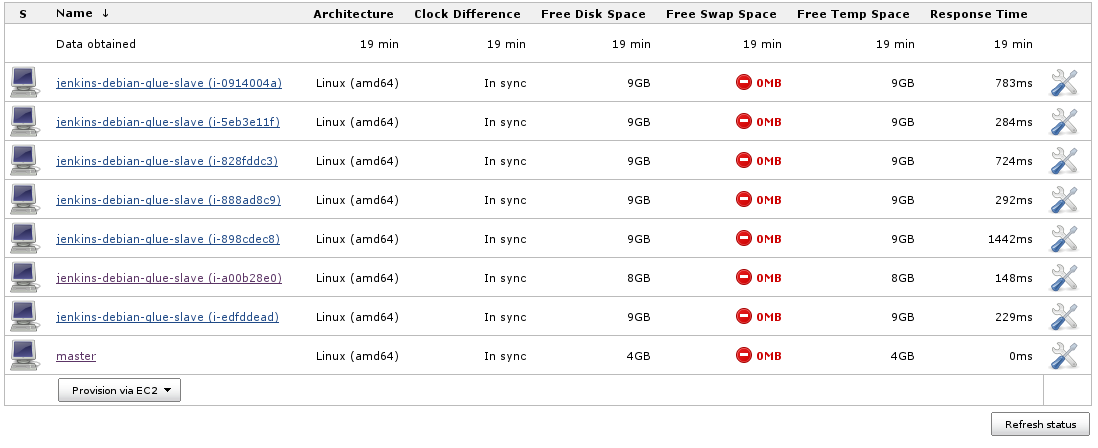
Jenkins configuration Configure EC2 access with Access Key ID , Secret Access Key , Region and EC2 Key Pair s Private Key (for SSH login) inside Jenkins in the Cloud section on $YOUR_JENKINS_SERVER/configure. Finally add an AMI in the AMIs Amazon EC2 configuration section (adjust security-group as needed, SSH access is enough): As you can see the configuration also includes a launch script. This script ensures that slaves are set up as needed (provide all the packages and scripts that are required for building) and always get the latest configuration and scripts before starting to serve as Jenkins slave. Now your setup should be ready for launching Jenkins slaves as needed: NOTE: you can use the Instance Cap configuration inside the advanced Amazon EC2 Jenkins configuration section to place an upward limit to the number of EC2 instances that Jenkins may launch. This can be useful for avoiding surprises in your AWS invoices. :) Notice though that the cap numbers are calculated for all your running EC2 instances, so be aware if you have further machines running under your account, you might want to e.g. further restrict your IAM policy then. Reduce build time Using a plain Debian AMI and automatically installing jenkins-debian-glue and further jenkins-debian-glue-buildenv* packages on each slave startup would work but it takes time. That s why we created our own AMI which is nothing else than an official Debian AMI with the bootstrap.sh script (which is referred to in the screenshot above) already executed. All the necessary packages are pre-installed and also all the cowbuilder environments are already present then. From time to time we start the instance again to apply (security) updates and execute the bootstrap script with its &dash&dashupdate option to also have all the cowbuilder systems up2date. Creating a new AMI is a no-brainer and we can then use the up2date system for our Jenkins slaves, if something should break for whatever reason we can still fall back to an older known-to-be-good AMI. Final words How to set up your Jenkins jobs for optimal master/slave usage, multi-distribution support (Debian/Ubuntu) and further details about this setup are part of another blog post. Thanks to Andreas Granig, Victor Seva and Bernhard Miklautz for reading drafts of this.

1 March 2014

Michael Prokop: Jenkins on-demand slave selection through labels

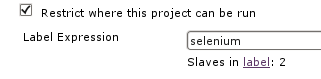
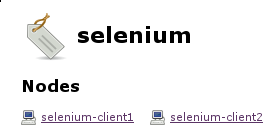
Problem description: One of my customers had a problem with their Selenium tests in the Jenkins continuous integration system. While Perl s Test::WebDriver still worked just fine the Selenium tests using Ruby s selenium-webdriver suddenly reported failures. The problem was caused by Debian wheezy s upgrade of the Iceweasel web browser. Debian originally shipped Iceweasel version 17.0.10esr-1~deb7u1 in wheezy, but during a security-update version 24.3.0esr-1~deb7u1 was brought in through the wheezy-security channel. Because the selenium tests are used in an automated fashion in a quite large and long-running build pipeline we immediately rolled back to Iceweasel version 17.0.10esr-1~deb7u1 so everything can continue as expected. Of course we wanted to get the new Iceweasel version up and running, but we didn t want to break the existing workflow while working on it. This is where on-demand slave selection through labels comes in. Basics: As soon as you re using Jenkins slaves you can instruct Jenkins to run a specific project on a particular (slave) node. By attaching labels to your slaves you can also use a label instead of a specific node name, providing more flexibility and scalability (to e.g. avoid problems if a specific node is down or you want to scale to more systems). Then Jenkins decides which of the nodes providing the according label should be considered for job execution. In the following screenshot a job uses the selenium label to restrict its execution to the slaves providing selenium and currently there are two nodes available providing this label: TIP 1: Visiting $JENKINS_SERVER/label/$label/ provides a list of slaves that provide that given $label (as well as list of projects that use $label in their configuration), like:

TIP 2: Execute the following script on $JENKINS_SERVER/script to get a list of available labels of your Jenkins system:
import hudson.model.*
labels = Hudson.instance.getLabels()
labels.each  label -> println label.name  
Solution: In the according customer setup we re using the swarm plugin (with automated Debian deployment through Grml s netscript boot option, grml-debootstrap + Puppet) to automatically connect our Jenkins slaves to Jenkins master without any manual intervention. The swarm plugin allows you to define the labels through the -labels command line option. By using the NodeLabel Parameter plugin we can configure additional parameters in Jenkins jobs: node and label . The label parameter allows us to execute the jobs on the nodes providing the requested label: This is what we can use to gradually upgrade from the old Iceweasel version to the new one by keeping a given set of slaves at the old Iceweasel version while we re upgrading other nodes to the new Iceweasel version (same for the selenium-server version which we want to also control). We can include the version number of the Iceweasel and selenium-server packages inside the labels we announce through the swarm slaves, with something like:
if [ -r /etc/init.d/selenium-server ] ; then
  FLAGS="selenium"
  ICEWEASEL_VERSION="$(dpkg-query --show --showformat='$ Version ' iceweasel)"
  if [ -n "$ICEWEASEL_VERSION" ] ; then
    ICEWEASEL_FLAG="iceweasel-$ ICEWEASEL_VERSION%%.* "
    EXTRA_FLAGS="$EXTRA_FLAGS $ICEWEASEL_FLAG"
  fi
  SELENIUM_VERSION="$(dpkg-query --show --showformat='$ Version ' selenium-server)"
  if [ -n "$SELENIUM_VERSION" ] ; then
    SELENIUM_FLAG="selenium-$ SELENIUM_VERSION%-* "
    EXTRA_FLAGS="$EXTRA_FLAGS $SELENIUM_FLAG"
  fi
fi
Then by using -labels $FLAGS EXTRA_FLAGS in the swarm invocation script we end up with labels like selenium iceweasel-24 selenium-2.40.0 for the slaves providing the Iceweasel v24 and selenium v2.40.0 Debian packages and selenium iceweasel-17 selenium-2.40.0 for the slaves providing Iceweasel v17 and selenium v2.40.0. This is perfect for our needs, because instead of using the selenium label (which is still there) we can configure the selenium jobs that should continue to work as usual to default to the slaves with the iceweasel-17 label now. The development related jobs though can use label iceweasel-24 and fail as often as needed without interrupting the build pipeline used for production. To illustrate this here we have slave selenium-client2 providing Iceweasel v17 with selenium-server v2.40. When triggering the production selenium job it will get executed on selenium-client2, because that s the slave providing the requested labels: Whereas the development selenium job can point to the slaves providing Iceweasel v24, so it will be executed on slave selenium-client1 here: This setup allowed us to work on the selenium Ruby tests while not conflicting with any production build pipeline. By the time I m writing about this setup we ve already finished the migration to support Iceweasel v24 and the infrastructure is ready for further Iceweasel and selenium-server upgrades.

28 February 2014

Michael Prokop: Full-Crypto setup with GRUB2

Update on 2014-03-03: quoting Colin Watson from the comments:
Note that this is spelled GRUB_ENABLE_CRYPTODISK=y in GRUB 2.02 betas (matching the 2.00 documentation though not the implementation; not sure why Andrey chose to go with the docs).
Since several people asked me how to get such a setup and it s poorly documented (as in: I found it in the GRUB sources) I decided to blog about this. When using GRUB >=2.00-22 (as of February 2014 available in Debian/jessie and Debian/unstable) it s possible to boot from a full-crypto setup (this doesn t mean it s recommended, but it worked fine in my test setups so far). This means not even an unencrypted /boot partition is needed. Before executing the grub-install commands execute those steps (inside the system/chroot of course, adjust GRUB_PRELOAD_MODULES for your setup as needed, I ve used it in a setup with SW-RAID/LVM):
# echo GRUB_CRYPTODISK_ENABLE=y >> /etc/default/grub
# echo 'GRUB_PRELOAD_MODULES="lvm cryptodisk mdraid1x"' >> /etc/default/grub
This will result in the following dialog before getting to GRUB s bootsplash:

Michael Prokop: State of the art Debian/wheezy deployments with GRUB and LVM/SW-RAID/Crypto

Moving from Lilo to GRUB, using LVM as default, etc throughout the last years it was time to evaluate how well LVM works without a separate boot partition, possibly also on top of Software RAID. Big disks are asking for partitioning with GPT, just UEFI isn t my default yet, so I m still defaulting to Legacy BIOS for Debian/wheezy (I expect this to change for Debian/jessie and according hardware approaching at my customers). So what we have and want in this demonstration setup: System used for installation:
root@grml ~ # grml-version
grml64-full 2013.09 Release Codename Hefeknuddler [2013-09-27]
Partition setup:
root@grml ~ # parted /dev/sda
GNU Parted 2.3
Using /dev/sda
Welcome to GNU Parted! Type 'help' to view a list of commands.
(parted) mklabel gpt
(parted) mkpart primary 2048s 4095s
(parted) set 1 bios_grub on
(parted) name 1 "BIOS Boot Partition"
(parted) mkpart primary 4096s 100%
(parted) set 2 raid on
(parted) name 2 "SW-RAID / Linux"
(parted) quit
Information: You may need to update /etc/fstab.
Clone partition layout from sda to all the other disks:
root@grml ~ # for f in  b,c,d  ; sgdisk -R=/dev/sd$f /dev/sda
The operation has completed successfully.
Make sure each disk has its unique UUID:
root@grml ~ # for f in  b,c,d  ; sgdisk -G /dev/sd$f
The operation has completed successfully.
SW-RAID setup:
root@grml ~ # mdadm --create /dev/md0 --verbose --level=raid5 --raid-devices=4 /dev/sd a,b,c,d 2
mdadm: layout defaults to left-symmetric
mdadm: chunk size defaults to 512K
mdadm: size set to 1465004544K
mdadm: Defaulting to version 1.2 metadata
mdadm: array /dev/md0 started.
root@grml ~ #
SW-RAID speedup (system dependent, YMMV):
root@grml ~ # cat /sys/block/md0/md/stripe_cache_size
256
root@grml ~ # echo 16384 > /sys/block/md0/md/stripe_cache_size # 16MB
root@grml ~ # blockdev --getra /dev/md0
6144
root@grml ~ # blockdev --setra 65536 /dev/md0 # 32 MB
root@grml ~ # sysctl dev.raid.speed_limit_max
dev.raid.speed_limit_max = 200000
root@grml ~ # sysctl -w dev.raid.speed_limit_max=9999999999
dev.raid.speed_limit_max = 9999999999
root@grml ~ # sysctl dev.raid.speed_limit_min
dev.raid.speed_limit_min = 1000
root@grml ~ # sysctl -w dev.raid.speed_limit_min=100000
dev.raid.speed_limit_min = 100000
LVM setup:
root@grml ~ # pvcreate /dev/md0
  Physical volume "/dev/md0" successfully created
root@grml ~ # vgcreate homesrv /dev/md0
  Volume group "homesrv" successfully created
root@grml ~ # lvcreate -n rootfs -L4G homesrv
  Logical volume "rootfs" created
root@grml ~ # lvcreate -n bootfs -L1G homesrv
  Logical volume "bootfs" created
Check partition setup + alignment:
root@grml ~ # parted -s /dev/sda print
Model: ATA WDC WD15EADS-00P (scsi)
Disk /dev/sda: 1500GB
Sector size (logical/physical): 512B/512B
Partition Table: gpt
Number  Start   End     Size    File system  Name                 Flags
 1      1049kB  2097kB  1049kB               BIOS Boot Partition  bios_grub
 2      2097kB  1500GB  1500GB               SW-RAID / Linux      raid
root@grml ~ # parted -s /dev/sda unit s print
Model: ATA WDC WD15EADS-00P (scsi)
Disk /dev/sda: 2930277168s
Sector size (logical/physical): 512B/512B
Partition Table: gpt
Number  Start  End          Size         File system  Name                 Flags
 1      2048s  4095s        2048s                     BIOS Boot Partition  bios_grub
 2      4096s  2930276351s  2930272256s               SW-RAID / Linux      raid
root@grml ~ # gdisk -l /dev/sda
GPT fdisk (gdisk) version 0.8.5
Partition table scan:
  MBR: protective
  BSD: not present
  APM: not present
  GPT: present
Found valid GPT with protective MBR; using GPT.
Disk /dev/sda: 2930277168 sectors, 1.4 TiB
Logical sector size: 512 bytes
Disk identifier (GUID): 212E463A-A4E3-428B-B7E5-8D5785141564
Partition table holds up to 128 entries
First usable sector is 34, last usable sector is 2930277134
Partitions will be aligned on 2048-sector boundaries
Total free space is 2797 sectors (1.4 MiB)
Number  Start (sector)    End (sector)  Size       Code  Name
   1            2048            4095   1024.0 KiB  EF02  BIOS Boot Partition
   2            4096      2930276351   1.4 TiB     FD00  SW-RAID / Linux
root@grml ~ # mdadm -E /dev/sda2
/dev/sda3:
          Magic : a92b4efc
        Version : 1.2
    Feature Map : 0x0
     Array UUID : 7ed3b741:0774d529:d5a71c1f:cf942f0a
           Name : grml:0  (local to host grml)
  Creation Time : Fri Jan 31 15:26:12 2014
     Raid Level : raid5
   Raid Devices : 4
 Avail Dev Size : 2928060416 (1396.21 GiB 1499.17 GB)
     Array Size : 4392089088 (4188.62 GiB 4497.50 GB)
  Used Dev Size : 2928059392 (1396.21 GiB 1499.17 GB)
    Data Offset : 262144 sectors
   Super Offset : 8 sectors
          State : clean
    Device UUID : c1e4213b:81822fd1:260df456:2c9926fb
    Update Time : Mon Feb  3 09:41:48 2014
       Checksum : b8af8f6 - correct
         Events : 72
         Layout : left-symmetric
     chunk size : 512k
   Device Role : Active device 0
   Array State : AAAA ('A' == active, '.' == missing)
root@grml ~ # pvs -o +pe_start
  PV         VG      Fmt  Attr PSize PFree 1st PE
  /dev/md0   homesrv lvm2 a--  4.09t 4.09t   1.50m
root@grml ~ # pvs --units s -o +pe_start
  PV         VG      Fmt  Attr PSize       PFree       1st PE
  /dev/md0   homesrv lvm2 a--  8784175104S 8773689344S   3072S
root@grml ~ # pvs -o +pe_start
  PV         VG      Fmt  Attr PSize PFree 1st PE
  /dev/md0   homesrv lvm2 a--  4.09t 4.09t   1.50m
root@grml ~ # pvs --units s -o +pe_start
  PV         VG      Fmt  Attr PSize       PFree       1st PE
  /dev/md0   homesrv lvm2 a--  8784175104S 8773689344S   3072S
root@grml ~ # vgs -o +pe_start
  VG      #PV #LV #SN Attr   VSize VFree 1st PE
  homesrv   1   2   0 wz--n- 4.09t 4.09t   1.50m
root@grml ~ # vgs --units s -o +pe_start
  VG      #PV #LV #SN Attr   VSize       VFree       1st PE
  homesrv   1   2   0 wz--n- 8784175104S 8773689344S   3072S
Cryptsetup:
root@grml ~ # echo cryptsetup >> /etc/debootstrap/packages
root@grml ~ # cryptsetup luksFormat -c aes-xts-plain64 -s 256 /dev/mapper/homesrv-rootfs
WARNING!
========
This will overwrite data on /dev/mapper/homesrv-rootfs irrevocably.
Are you sure? (Type uppercase yes): YES
Enter passphrase:
Verify passphrase:
root@grml ~ # cryptsetup luksOpen /dev/mapper/homesrv-rootfs cryptorootfs
Enter passphrase for /dev/mapper/homesrv-rootfs:
Filesystems:
root@grml ~ # mkfs.ext4 /dev/mapper/cryptorootfs
mke2fs 1.42.8 (20-Jun-2013)
Filesystem label=
OS type: Linux
Block size=4096 (log=2)
Fragment size=4096 (log=2)
Stride=128 blocks, Stripe width=384 blocks
262144 inodes, 1048192 blocks
52409 blocks (5.00%) reserved for the super user
First data block=0
Maximum filesystem blocks=1073741824
32 block groups
32768 blocks per group, 32768 fragments per group
8192 inodes per group
Superblock backups stored on blocks:
        32768, 98304, 163840, 229376, 294912, 819200, 884736
Allocating group tables: done
Writing inode tables: done
Creating journal (16384 blocks): done
Writing superblocks and filesystem accounting information: done
root@grml ~ # mkfs.ext4 /dev/mapper/homesrv-bootfs
mke2fs 1.42.8 (20-Jun-2013)
Filesystem label=
OS type: Linux
Block size=4096 (log=2)
Fragment size=4096 (log=2)
Stride=128 blocks, Stripe width=384 blocks
65536 inodes, 262144 blocks
13107 blocks (5.00%) reserved for the super user
First data block=0
Maximum filesystem blocks=268435456
8 block groups
32768 blocks per group, 32768 fragments per group
8192 inodes per group
Superblock backups stored on blocks:
        32768, 98304, 163840, 229376
Allocating group tables: done
Writing inode tables: done
Creating journal (8192 blocks): done
Writing superblocks and filesystem accounting information: done
Install Debian/wheezy:
root@grml ~ # mount /dev/mapper/cryptorootfs /media
root@grml ~ # mkdir /media/boot
root@grml ~ # mount /dev/mapper/homesrv-bootfs /media/boot
root@grml ~ # grml-debootstrap --target /media --password YOUR_PASSWORD --hostname YOUR_HOSTNAME
 * grml-debootstrap [0.57] - Please recheck configuration before execution:
   Target:          /media
   Install grub:    no
   Using release:   wheezy
   Using hostname:  YOUR_HOSTNAME
   Using mirror:    http://http.debian.net/debian
   Using arch:      amd64
   Important! Continuing will delete all data from /media!
 * Is this ok for you? [y/N] y
[...]
Enable grml-rescueboot (to have easy access to rescue ISO via GRUB):
root@grml ~ # mkdir /media/boot/grml
root@grml ~ # wget -O /media/boot/grml/grml64-full_$(date +%Y.%m.%d).iso http://daily.grml.org/grml64-full_testing/latest/grml64-full_testing_latest.iso
root@grml ~ # grml-chroot /media apt-get -y install grml-rescueboot
[NOTE: We're installing a daily ISO for grml-rescueboot here because the 2013.09 Grml release doesn't work for this LVM/SW-RAID setup while newer ISOs are working fine already. The upcoming Grml stable release is supposed to work just fine, so you will be able to choose http://download.grml.org/grml64-full_2014.XX.iso by then. :)] Install GRUB on all disks and adjust crypttab, fstab + initramfs:
root@grml ~ # grml-chroot /media /bin/bash
(grml)root@grml:/# for f in  a,b,c,d  ; do grub-install /dev/sd$f ; done
(grml)root@grml:/# update-grub
(grml)root@grml:/# echo "cryptorootfs /dev/mapper/homesrv-rootfs none luks" > /etc/crypttab
(grml)root@grml:/# echo "/dev/mapper/cryptorootfs / auto defaults,errors=remount-ro 0   1" > /etc/fstab
(grml)root@grml:/# echo "/dev/mapper/homesrv-bootfs /boot auto defaults 0 0" >> /etc/fstab
(grml)root@grml:/# update-initramfs -k all -u
(grml)root@grml:/# exit
Clean unmounted/removal for reboot:
root@grml ~ # umount /media/boot
root@grml ~ # umount /media/
root@grml ~ # cryptsetup luksClose cryptorootfs
root@grml ~ # dmsetup remove homesrv-bootfs
root@grml ~ # dmsetup remove homesrv-rootfs
NOTE: On a previous hardware installation I had to install GRUB 2.00-22 from Debian/unstable to get GRUB working.
Some metadata from different mdadm and LVM experiments seems to have been left and confused GRUB 1.99-27+deb7u2 from Debian/wheezy (I wasn t able to reproduce this issue in my VM demo/test setup).
Just in cause you might experience the following error message, try GRUB >=2.00-22:
  # grub-install --recheck /dev/sda
  error: unknown LVM metadata header.
  error: unknown LVM metadata header.
  /usr/sbin/grub-probe: error: cannot find a GRUB drive for /dev/mapper/cryptorootfs.  Check your device.map.
  Auto-detection of a filesystem of /dev/mapper/cryptorootfs failed.
  Try with --recheck.
  If the problem persists please report this together with the output of "/usr/sbin/grub-probe --device-map="/boot/grub/device.map"
  --target=fs -v /boot/grub" to <bug-grub@gnu.org>

1 September 2013

Rapha&#235;l Hertzog: My Free Software Activities in August 2013

This is my monthly summary of my free software related activities. If you re among the people who made a donation to support my work (47.50 , thanks everybody!), then you can learn how I spent your money. Otherwise it s just an interesting status update on my various projects. Package Tracking System There are only 2-3 weeks left in the summer of code project dedicated to rewrite the package tracking system. We have come a long way during August check it out yourself in pts.debian.net. The rewrite doesn t have all the features of the old PTS yet, but I opted to keep some of the easy and less interesting features for others to re-implement. Instead I asked Marko to work in the coming weeks on new features that will bring more value, like the possibility to have user accounts with the possibility to easily review and tweak all your subscriptions on the web, and like the possibility to subscribe to groups of packages (i.e. those managed by a team). Our main problem right now is that exim has a pretty poor default behavior of forking hundreds of processes if you get hundreds of mails (in a batch) to an address that delivers via a pipe (postfix is saner, it serializes the deliveries on pipes). The new PTS is much more modular and its memory footprint is bigger (about 3 times more for the process that delivers mails, 30Mb instead of 10Mb), and in such a situation we managed to run out of memory for now we worked around the situation with an exim setting that queues mails once the load gets too high but it s a poor workaround IMO. We could obviously implement our own queue and a daemon but I d like to avoid this. So who knows how to tell exim to behave? :-) On the positive side, Marko has gotten some feedback from people who like the new PTS and are using it daily already. And several persons have expressed their interest to work on the new codebase already. On my side, I created a package so that it s easy to deploy for derivatives. In this process, I revamped the way we manage the Django settings (for development and for production). The package is not finished yet, but it s mostly usable already. But I still want to do some cleanup/refactoring in the models before others start deploying it. We must also enable South to make it possible to upgrade easily afterwards. DebConf 13 in Vaumarcus From August 10th to 17th, I was attending DebConf 13. It matched the only week of vacation that my wife had this summer so we went there with the whole family (that is with a 3 years old son, and 6 months old one). Thus I could not immerse myself in Debconf and missed all the nice things that happen outside of the talk rooms. I picked 3-4 interesting talks per day and I spent the rest with my family. On the positive side, I was pleased that my wife could meet (or at least see) some other Debian people. She knows quite a few (of you) by name because I have been telling her Debian stories for years now Debian France Debian France sold quite some merchandise during Debconf but I didn t take care of that. It was supervised by Sylvestre Ledru but fortunately he got the help of multiple persons, both to bring everything there, to sell it, and to bring back the rest. The good news of the month is that the upstream author of galette published a new version with all the features that we ordered him a few months ago. We send now automatic reminders to members who must renew their subscription, we have automatic update of our accounting books (in a ledger file in a git repository) when we people donate or pay their subscription via the paypal form on our website. I was so pleased to finally have this that I took some hours to finalize the packaging of galette, so that it could be uploaded to Debian. It s now waiting in the NEW queue. I also spent multiple hours to write the python script that is executed by galette and that updates the accounting files. Misc Debian stuff Debian Packaging. I did two uploads of logidee-tools to fix bugs #718671 and #718836. I created a package for Dolibarr a PHP-based CRM and ERP software (it doesn t do accounting however), it s sitting in the NEW queue for almost a month already. I forwarded #719000 to the upstream Publican developers. I filed #720393 to request a new upstream version of libphp-mailer. git-multimail. After its deployment on Alioth last month, Niels Thykier reported me a case where it lead to bounces, I filed this as a new upstream ticket and in fact I fixed it myself a few days after. I got the fixed version installed on Alioth. dpkg. I investigated why the the automatic builds of dpkg were no longer happening and asked Michael Prokop if he could install a newer version of gettext in the build chroot. He told me that he would need a backport for that so I asked Santiago Vila if he was willing to provide it and he kindly accepted. A few days after, the package was in backports and I m now again running the latest dpkg out of git thanks to the nice service provided by Michael. Misc discussions. The thread about user planets drifted into a discussion of how to avoid promotional posts on such planets and in that context someone again brought up the Debian Machine Usage Policy as a way to shut down any kind of (self-)promotional content on planet if there s money involved. This always irritates me and this time I opted to ask James Troup about the origin of that clause in the DMUP. So who is willing to work with DSA to fix the DMUP so that people stop abusing it in contexts where it doesn t make sense? I also participated in some discussions concerning dgit. I like the ideas behind the tool, but I m saddened by the behavior of Ian Jackson. I helped him to fill his gap of knowledge about new sources formats but he keeps on bashing about the 3.0 (quilt) source format both in the manual page and in the output of the program. He believes that dgit is no longer an experiment but the truth is that it s still a poorly commented Perl script doing lots of hackish things. Kali Linux Between Debconf and all, I haven t done much for Kali except a couple of fixes. There s a nice story of how I tracked a bug in live-installer on the Kali blog. That fix has been committed to Debian. I also improved live-build to include xfsprogs/jfsutils on the ISO image when you include the debian-installer (so that you don t end up in problems when you pick JFS or XFS as file systems for your installation). Thanks See you next month for a new summary of my activities.

One comment Liked this article? Click here. My blog is Flattr-enabled.

10 May 2013

Michael Prokop: How to get grub-reboot working

So while testing Proxmox VE 3.0 RC1 I had the need to reboot the system into a kernel version different than the one being the default in the bootloader GRUB. lilo -R worked fine in the past, but with GRUB it s not as trivial on the first sight to get its equivalent. I remembered to have had problems with grub-reboot in the past already, or to quote a friend of mine: has grub-reboot worked ever? Well yes, grub-reboot works but only once you re aware of the fact that you need to manually edit /etc/default/grub. :( It s actually documented at wiki.debian.org/GrubReboot, but not in the man page/info document of grub-reboot itself (great idea to provide a separate wiki page for this issue but not consider editing the official documentation instead, not). So here you go:
# grep GRUB_DEFAULT /etc/default/grub 
GRUB_DEFAULT=0
# sed -i 's/^GRUB_DEFAULT.*/GRUB_DEFAULT=saved/' /etc/default/grub
# grep GRUB_DEFAULT /etc/default/grub 
GRUB_DEFAULT=saved
# update-grub
[...]
# grep '^menuentry' /boot/grub/grub.cfg
menuentry 'Debian GNU/Linux, with Linux 3.2.0-4-amd64' --class debian --class gnu-linux --class gnu --class os  
menuentry 'Debian GNU/Linux, with Linux 3.2.0-4-amd64 (recovery mode)' --class debian --class gnu-linux --class gnu --class os  
menuentry 'Debian GNU/Linux, with Linux 2.6.32-20-pve' --class debian --class gnu-linux --class gnu --class os  
menuentry 'Debian GNU/Linux, with Linux 2.6.32-20-pve (recovery mode)' --class debian --class gnu-linux --class gnu --class os  
menuentry 'Debian GNU/Linux, with Linux 2.6.32-5-amd64' --class debian --class gnu-linux --class gnu --class os  
menuentry 'Debian GNU/Linux, with Linux 2.6.32-5-amd64 (recovery mode)' --class debian --class gnu-linux --class gnu --class os  
# grub-reboot 2  # to boot the third entry, the command writes to /boot/grub/grubenv
# reboot
FTR: Filed as #707695.

4 May 2013

Jonathan McCrohan: New packages in Debian 7.0 Wheezy

Given that Debian 7.0 Wheezy will be released in a few hours, I thought it would be a good time to take part in Michael Prokop's #newinwheezy effort to publicise the new packages that have uploaded to Debian as part of Wheezy. I have introduced two new packages to Debian for this release: I've also have become (co-)maintainer of the following packages, updating them for this release: I hope you find them useful. Enjoy!

2 May 2013

Michael Prokop: The #newinwheezy game: Grml packages in Debian/wheezy

Following up on the #newinwheezy game: Debian/wheezy is the first Debian release which ships packages from the Grml system. Grml became an official Debian Derivative and I m very happy that three major projects of Grml found their official way into Debian: As the description states grml2usb is interesting for getting Grml onto a USB device when the dd(1) approach ( dd if=grml.iso of=/dev/sdX ) just isn t flexible enough. grml-debootstrap provides a decent way to install Debian systems from the command line. As its author I might be biased but I ve to mention that it s working so nice that it is in use at several of my customers for automated roll-outs without any worries at all, and I got reports from other companies that they are very happy users of it as well. Finally the grml-rescueboot packages provides a very simple and nice way to boot a rescue system from within GRUB (short version: throw a Grml ISO to /boot/grml/, run update-grub and be done). PS: Thanks everyone for joining the #newinwheezy game over at planet.debian.org. :)

29 April 2013

Michael Prokop: The #newinwheezy game: new forensic packages in Debian/wheezy

Debian/wheezy includes a bunch of packages for people interested in digital forensics. The packages maintained within the Debian Forensics team which are shipped with the upcoming Debian/wheezy stable release for the first time in a Debian release are: Join the #newinwheezy game and present packages which are new in Debian/wheezy.

3 March 2013

Gregor Herrmann: DPL game

when francesca started her DPL game, I also started thinking about people I'd like to encourage to stand as a DPL candidate. unfortunately my initial "short list" contained 18 names, which doesn't fit the game's rules very well. after waiting a bit, 9 of them were mentioned by others already, so I can leave them out here (which also means no public hug, sorry, please complain to the inventor of the game!). from the remaining 9, I've now chosen my Fantastic Four (in alphabtic order of first names): in my opinion, the DPL task is mostly about managing, & those four people are in my experience all very good at organising projects & dealing with people, & are therefore well suited for this task. let's see if they feel motivated to take on the challenge! (the nomination period has already started, so don't hestitate!)

18 February 2013

Michael Prokop: ldmtool: accessing Microsoft Windows dynamic disks from Linux

Linux is a great platform for dealing with all kinds of different file systems, partition tables etc. But one of the few annoying situations when working in IT forensics are Microsoft Windows dynamic disks, AKA LDM (Logical Disk Manager). Thanks to libldm s ldmtool this is no longer true. A short demonstration from a real-life IT forensics investigation (actual IDs/data randomized for obvious reasons):
# ldmtool
ldm> scan /dev/sdc*
[
  "1bad5bbc-a4b5-42e1-8823-001014b00003"
]
ldm> show diskgroup 1bad5bbc-a4b5-42e1-8823-001014b00003
 
  "name" : "FOOBAR-Dg0",
  "guid" : "1bad5bbc-a4b5-42e1-8823-001014b00003",
  "volumes" : [
    "Volume1"
  ],
  "disks" : [
    "Disk1",
    "Disk2"
  ]
 
ldm> show volume 1bad5bbc-a4b5-42e1-8823-001014b00003 Volume1
 
  "name" : "Volume1",
  "type" : "striped",
  "size" : 3907039232,
  "chunk-size" : 128,
  "hint" : "D:",
  "partitions" : [
    "Disk1-01",
    "Disk2-01"
  ]
 
ldm> show partition 1bad5bbc-a4b5-42e1-8823-001014b00003 Disk1-01
 
  "name" : "Disk1-01",
  "start" : 1985,
  "size" : 1953519616,
  "disk" : "Disk1"
 
ldm> create all
Unable to create volume Volume1 in disk group 1bad5bbc-a4b5-42e1-8823-001014b00003: Disk Disk2 required by striped volume Volume1 is missing
[
]
ldm> scan /dev/sdd*
[
  "1bad5bbc-a4b5-42e1-8823-001014b00003"
]
ldm> create all
[
  "ldm_vol_FOOBAR-Dg0_Volume1"
]
ldm>
The just created device mapper device then can be handled as usual:
# dmsetup ls   grep ldm
ldm_vol_FOOBAR-Dg0_Volume1        (254:4)
# mount /dev/mapper/ldm_vol_FOOBAR-Dg0_Volume1 /mnt/whatever
ldmtool just hit Debian unstable (and I intend to ship the tool with the upcoming version of Grml-Forensic).

8 January 2013

Michael Prokop: Event: OSDC 2013

I ll be speaker at the Open Source Data Center Conference 2013 in Nuremberg/Germany on 17th and 18th April, talking about Continuous Integration/Delivery in the data-center. I was speaking at OSDC back in 2009 and very much enjoyed the conference so I m totally looking forward to OSDC 2013, hope to see you there!

21 November 2012

David Paleino: Wicd .deb packages

Hello world, it's been a long time since I last posted something. Today, I want to let the world know about the availability of Debian packages for wicd. Since the release cycle of wicd is somewhat slow, I decided to provide automatically-built Debian packages for the latest revision of the upstream repository. The automatic build process is possible thanks to Jenkins and the great jenkins-debian-glue, by Michael Prokop. Here's the APT snippet, for those who dare:
# For the "upstream" version of wicd
deb http://jupiter.hanskalabs.net/debian/ wicd main
The repository is signed with a separate GnuPG key, which I signed with my main keys. You can download it or retrieve it from a keyserver, then you should add it to your APT keyring:
$ gpg --keyserver pgp.mit.edu --recv-keys 4D00F190
# gpg --export 4D00F190   apt-key add -
Obviously these builds are not guaranteed to work :) but, since I myself use these autobuilt packages, I usually try to fix problems as soon as I notice them. If you find bugs, or have proposals to improve wicd, please report them on launchpad!

4 October 2012

Rapha&#235;l Hertzog: My Debian Activities in September 2012

This is my monthly summary of my Debian related activities. If you re among the people who made a donation to support my work (1086.48 , thanks everybody!), then you can learn how I spent your money. Otherwise it s just an interesting status update on my various projects. Dpkg I am subscribed to Launchpad s dpkg bug tracker and I was getting annoyed with the amount of noise I got under the form of bug reports that look like package foo failed to install/upgrade: package foo is already installed and configured . Those reports are a combination of a bug in APT and of random other failures (often hardware related like corrupted .deb files, or I/O errors, but sometimes also real problems in other packages) but they always end up assigned on dpkg (because dpkg is outputting an error message complaining about APT s decision to configure something that doesn t have to be configured). I simply don t have the time required to manually process and inspect all those reports, so I decided to filter them at the apport level with a new Ubuntu bug pattern that indicates that those reports are a duplicate of LP#541595. Thanks to this, the dpkg bug count quickly went down from 130 to about 80. Packaging I sponsored a new upstream version of ledgersmb. I quickly updated WordPress to version 3.4.2 since it contains security relevant fixes. I also pushed a small update of nautilus-dropbox fixing #686863 because upstream renamed the binary package that they hand out on their website from nautilus-dropbox to dropbox. Their dropbox package only conflicts with old versions of nautilus-dropbox and not with the version that Debian is shipping and thus I had to add a Conflicts on our side to forbid co-installation of both packages. Testing wheezy s installation I bought a new laptop (Lenovo Thinkpad X230) and used this as an excuse to test Wheezy s installation process. It worked mostly fine except for two things:
  1. First I noticed that it would not accept my passphrase for my encrypted partition during early boot this turned out to be already reported as #619711 but was no longer getting any attention from the package maintainer. After some IRC discussion with Julien Cristau, we prodded Michael Prokop who had apparently already offered to take care of this issue. I tested his updated package and the result got quickly uploaded.
  2. I had weird networking problems that turned out to be related to the lack of the loopback network (i.e. on localhost). This was the result of a broken /etc/network/interfaces: it had been incorrectly modified by NetworkManager. I reported this in #688355. This issue affects people with IPv6 enabled networks.
Debian France There s a resurgence of activity in Debian France. Sylvestre Ledru is leading the organization of a mini-debconf in Paris on November 24-25th. And Tanguy Ortolo is now taking care of some merchandising (Polo shirts, to change from the usual T-Shirt). I might give a talk during this mini-debconf, possibly about multi-arch. Misc It s been a few months that I noticed a 2 second lag of gnome-shell everytime that smuxi (my IRC client) sent a notification. It s very annoying, you have the impression that the entire machine freezes. So I contacted Mirco Bauer on #smuxi and we investigated a bit. It turns out that smuxi is using an old version of the notification protocol where the picture is sent as a bytestream leading to huge dbus messages. This is clearly sub-optimal so smuxi will be fixed to be able to send the path of the picture instead of the picture itself. On the other hand, it s really a bug of gnome-shell that it freezes during the time it takes to handle the bigger-than-usual dbus message. So I also filed a bug on GNOME Shell (Bugzilla #683829) to get this fixed. Librement: funding free software work I started a new project with the goal of helping free software developers to fund their free software work. It s still mostly vaporware for now but I have a public code repository, a nice logo and lots of ideas. If the topic is of interest to you, and you d like to be involved, feel free to get in touch. Otherwise stay tuned. Thanks See you next month for a new summary of my activities.

4 comments Liked this article? Click here. My blog is Flattr-enabled.

27 August 2012

Michael Prokop: jenkins-debian-glue: Continuous Integration for Debian and Ubuntu made easy

jenkins-debian-glue is an open source project of mine which recently celebrated its first birthday and it s time to finally write about it. jenkins-debian-glue allows you to build Debian and Ubuntu packages directly from the Jenkins continuous integration system. It retrieves package sources from a version control repository, adjusts debian/changelog (handle version number + mention changes that took place) and builds according source and binary packages out of it. Its lintitan integration provides Q/A reports about the resulting source and binary Debian packages. It started as a small pet project of mine to get integration of Debian packaging inside Jenkins. I mainly had the needs for the Grml project in mind and starting with Grml 2011.12 every release (including also all the daily builds) was built using Jenkins since then. It turned out that my project would also be a perfect match for one of my customers, Sipwise GmbH. In December 2011 the sip:provider 2.4 was the first stable release that was built 100% through Jenkins and featuring jenkins-debian-glue. Thanks to special needs and the open source friendliness of Sipwise I could invest further time into the project. Recently the project got even some further drive thanks to interest by some fellow Debian Developers, most notably are the icinga, nagios-plugins, packages and the PostgreSQL in Debian Hackathon. Now if you re also interested in it: there s an automated deployment procedure available for your service to get started with the whole jenkins-debian-glue and Jenkins stack in less than 10 minutes, working just fine on Debian as well as Ubuntu. For further details please head over to jenkins-debian-glue.org or check out this 6:36min screencast (safe for work, no audio :) ): <iframe allowfullscreen="allowfullscreen" frameborder="0" height="315" src="http://www.youtube.com/embed/9asp2ZvH90A?autohide=1&amp;showinfo=0" width="560"></iframe> This embedded video doesn t work for you? Try heading over to YouTube.

2 December 2011

Michael Prokop: commit-sounds make committing more fun

December, release time. I m currently involved in the release management of three major projects and it s not always about fun. So lets make it more fun: https://github.com/mika/commit-sounds

Next.

Previous.