Search Results: "Daniel Leidert"

30 March 2015

Daniel Leidert: Prevent suspend/hibernate if system is remotely backed up via rdiff-backup

I usually use rdiff-backup to backup several of my systems. One is a workstation which goes to sleep after some time of idling around. Now having a user logged in running rdiff-backup (or rsync, rsnapshot etc for that matter) won't prevent the system from being put to sleep. Naturally this happens before the backup is complete. So some time ago I was looking for a resolution and recieved a suggestion to use a script in /etc/pm/sleep.d/. I had to modify the script a bit, because the query result always was true. So this is my solution in /etc/pm/sleep.d/01_prevent_sleep_on_backup now:

#!/bin/sh

. "$ PM_FUNCTIONS "

command_exists rdiff-backup exit $NA

case "$1" in
hibernate suspend)
if ps cax grep -q rdiff-backup
then
exit 1
fi
;;
esac

exit 0
Currently testing ... UpdateThe above works with pm-utils; but it fails with systemd. Seems I have to move and modify the script for my system. Update 2It doesn't work. In short: exit 1 doesn't prevent systemd from going to suspend. I can see, that the script itself leads to the results I want, so the logic is correct. But I cannot find a way to tell systemd, to stop suspend. Shouldn't it be doing this automtically in a case, where a remote user is logged in and runs a command? Update 3There is also a related bug report.

13 February 2015

Daniel Leidert: Motion picture capturing: Debian + motion + Logitech C910 - part II

In my recent attempt to setup a motion detection camera I was disappointed, that my camera, which should be able to record with 30 fps in 720p mode only reached 10 fps using the software motion. Now I got a bit further. This seems to be an issue with the format used by motion. I've check the output of v4l2-ctl ...
$ v4l2-ctl -d /dev/video1 --list-formats-ext
[..]
ioctl: VIDIOC_ENUM_FMT
Index : 0
Type : Video Capture
Pixel Format: 'YUYV'
Name : YUV 4:2:2 (YUYV)
[..]
Size: Discrete 1280x720
Interval: Discrete 0.100s (10.000 fps)
Interval: Discrete 0.133s (7.500 fps)
Interval: Discrete 0.200s (5.000 fps)
[..]

Index : 1
Type : Video Capture
Pixel Format: 'MJPG' (compressed)
Name : MJPEG
[..]
Size: Discrete 1280x720
Interval: Discrete 0.033s (30.000 fps)
Interval: Discrete 0.042s (24.000 fps)
Interval: Discrete 0.050s (20.000 fps)
Interval: Discrete 0.067s (15.000 fps)
Interval: Discrete 0.100s (10.000 fps)
Interval: Discrete 0.133s (7.500 fps)
Interval: Discrete 0.200s (5.000 fps)
[..]
... and motion:
$ motion
[..]
[1] [NTC] [VID] v4l2_set_pix_format: Config palette index 17 (YU12) doesn't work.
[1] [NTC] [VID] v4l2_set_pix_format: Supported palettes:
[1] [NTC] [VID] v4l2_set_pix_format: (0) YUYV (YUV 4:2:2 (YUYV))
[1] [NTC] [VID] v4l2_set_pix_format: 0 - YUV 4:2:2 (YUYV) (compressed : 0) (0x56595559)
[1] [NTC] [VID] v4l2_set_pix_format: (1) MJPG (MJPEG)
[1] [NTC] [VID] v4l2_set_pix_format: 1 - MJPEG (compressed : 1) (0x47504a4d)
[1] [NTC] [VID] v4l2_set_pix_format Selected palette YUYV
[1] [NTC] [VID] v4l2_do_set_pix_format: Testing palette YUYV (1280x720)
[1] [NTC] [VID] v4l2_do_set_pix_format: Using palette YUYV (1280x720) bytesperlines 2560 sizeimage 1843200 colorspace 00000008
[..]
Ok, so both formats YUYV and MJPG are supported and recognized and I can choose both via the v4l2palette configuration variable, citing motion.conf:
# v4l2_palette allows to choose preferable palette to be use by motion
# to capture from those supported by your videodevice. (default: 17)
# E.g. if your videodevice supports both V4L2_PIX_FMT_SBGGR8 and
# V4L2_PIX_FMT_MJPEG then motion will by default use V4L2_PIX_FMT_MJPEG.
# Setting v4l2_palette to 2 forces motion to use V4L2_PIX_FMT_SBGGR8
# instead.
#
# Values :
# V4L2_PIX_FMT_SN9C10X : 0 'S910'
# V4L2_PIX_FMT_SBGGR16 : 1 'BYR2'
# V4L2_PIX_FMT_SBGGR8 : 2 'BA81'
# V4L2_PIX_FMT_SPCA561 : 3 'S561'
# V4L2_PIX_FMT_SGBRG8 : 4 'GBRG'
# V4L2_PIX_FMT_SGRBG8 : 5 'GRBG'
# V4L2_PIX_FMT_PAC207 : 6 'P207'
# V4L2_PIX_FMT_PJPG : 7 'PJPG'
# V4L2_PIX_FMT_MJPEG : 8 'MJPEG'
# V4L2_PIX_FMT_JPEG : 9 'JPEG'
# V4L2_PIX_FMT_RGB24 : 10 'RGB3'
# V4L2_PIX_FMT_SPCA501 : 11 'S501'
# V4L2_PIX_FMT_SPCA505 : 12 'S505'
# V4L2_PIX_FMT_SPCA508 : 13 'S508'
# V4L2_PIX_FMT_UYVY : 14 'UYVY'
# V4L2_PIX_FMT_YUYV : 15 'YUYV'
# V4L2_PIX_FMT_YUV422P : 16 '422P'
# V4L2_PIX_FMT_YUV420 : 17 'YU12'
#
v4l2_palette 17
Now motion uses YUYV as default mode as shown by its output. So it seems that all I have to do is to choose MJPEG in my motion.conf:
v4l2_palette 8
Testing again ...
$ motion
[..]
[1] [NTC] [VID] vid_v4lx_start: Using V4L2
[1] [NTC] [ALL] image_ring_resize: Resizing pre_capture buffer to 1 items
[1] [NTC] [VID] v4l2_set_control: setting control "Brightness" to 25 (ret 0 )
Corrupt JPEG data: 5 extraneous bytes before marker 0xd6
[1] [CRT] [VID] mjpegtoyuv420p: Corrupt image ... continue
[1] [NTC] [VID] v4l2_set_control: setting control "Brightness" to 14 (ret 0 )
Corrupt JPEG data: 1 extraneous bytes before marker 0xd5
[1] [CRT] [VID] mjpegtoyuv420p: Corrupt image ... continue
[1] [NTC] [VID] v4l2_set_control: setting control "Brightness" to 36 (ret 0 )
Corrupt JPEG data: 3 extraneous bytes before marker 0xd2
[1] [CRT] [VID] mjpegtoyuv420p: Corrupt image ... continue
[1] [NTC] [VID] v4l2_set_control: setting control "Brightness" to 58 (ret 0 )
Corrupt JPEG data: 1 extraneous bytes before marker 0xd7
[1] [CRT] [VID] mjpegtoyuv420p: Corrupt image ... continue
[1] [NTC] [VID] v4l2_set_control: setting control "Brightness" to 80 (ret 0 )
Corrupt JPEG data: 4 extraneous bytes before marker 0xd7
[1] [CRT] [VID] mjpegtoyuv420p: Corrupt image ... continue
[1] [ERR] [ALL] motion_init: Error capturing first image
[1] [NTC] [ALL] image_ring_resize: Resizing pre_capture buffer to 16 items
Corrupt JPEG data: 4 extraneous bytes before marker 0xd1
[1] [CRT] [VID] mjpegtoyuv420p: Corrupt image ... continue
Corrupt JPEG data: 11 extraneous bytes before marker 0xd1
[1] [CRT] [VID] mjpegtoyuv420p: Corrupt image ... continue
Corrupt JPEG data: 3 extraneous bytes before marker 0xd4
[1] [CRT] [VID] mjpegtoyuv420p: Corrupt image ... continue
Corrupt JPEG data: 7 extraneous bytes before marker 0xd1
[..]
... and another issue is turning up :( The output above goes on and on and on and there is no video capturing. So accordingly to $searchengine the above happens to a lot of people. I just found one often suggested fix: pre-load v4l2convert.so from libv4l-0:
$ LD_PRELOAD=/usr/lib/x86_64-linux-gnu/libv4l/v4l2convert.so motion
But the problem persists and I'm out of ideas :( So atm it lokks like I cannot use the MJPEG format and don't get 30 fps at 1280x720 pixels. During writing I then discovered a solution by good old trial-and-error: Leaving the v4l2_palette variable at its default value 17 (YU12) and pre-loading v4l2convert.so makes use of YU12 and the framerate at least raises to 24 fps:
$ LD_PRELOAD=/usr/lib/x86_64-linux-gnu/libv4lg/v4l2convert.so motion
[..]
[1] [NTC] [VID] v4l2_do_set_pix_format: Testing palette YU12 (1280x720)
[1] [NTC] [VID] v4l2_do_set_pix_format: Using palette YU12 (1280x720) bytesperlines 1280 sizeimage 1382400 colorspace 00000008
[..]
[1] [NTC] [EVT] event_new_video FPS 24
[..]
Finally! :) The results are nice. It would maybe even be a good idea to limit the framerate a bit, to e.g. 20. So that is a tested configuration for the Logitech C910 running at a resolution of 1280x720 pixels:
v4l2_palette 17
width 1280
height 720
framerate 20
minimum_frame_time 0
pre_capture 10 # 0,5 seconds pre-recording
post_capture 50 # 2,5 seconds after-recording
auto_brightness on
ffmpeg_variable_bitrate 2 # best quality
Now all this made me curious, which framerate is possible at a resolution of 1920x1080 pixels now and how the results look like. Although I get 24 fps too, the resulting movie suffers of jumps every few frames. So here I got pretty good results with a more conservative setting. By increasing framerate - tested up to 15 fps with good results - pre_capture needed to be decreased accordingly to values between 1..3 to minimize jumps:
v4l2_palette 17
width 1920
height 1080
framerate 12
minimum_frame_time 0
pre_capture 6 # 0,5 seconds pre-recording
post_capture 30 # 2,5 seconds after-recording
auto_brightness on
ffmpeg_variable_bitrate 2 # best quality
Both configurations lead to satisfying results. Of course the latter will easily fill your hardrive :) TODOI guess, the results can be optimzed further by playing around with ffmpeg_bps and ffmpeg_variable_bitrate. Maybe then it is possible to record without jumps at higher framerates too(?). I also didn't test the various norm settings (PAL, NTSC, etc.).

12 February 2015

Daniel Leidert: Setting up a network buildd with pbuilder ... continued

Last year I'd described my setup of a local network-buildd using pbuilder, ccache, inoticoming and NFS. One then-still-open goal was to support different Debian releases. This is especially necessary for backports of e.g. bluefish. The rules to contribute backports require to include all changelog entries since the last version on debian-backports or since stable if it's the first version in an uploaded package. Therefor one needs to know the last version in e.g. wheezy-backports. Because I'm not typing the command (the source package only gets uploaded and inoticoming starts the build process) I was looking for a way to automatically retrieve that version and add the relevant -vX.Y-Z switch to dpkg-buildpackage.The solution I found requires aptitude and a sources.list entry for the relevant release. If you are only interested in the solution, just jump to the end :)I'm going to add the version switch to the DEBBUILDOPTS variable of pbuilder. In my setup I have a common (shared) snippet called /etc/pbuilderrc.inc and one configuration file per release and architecture, say /etc/pbuilderrc.amd64.stable. Now the first already contains ...
DEBBUILDOPTS="-us -uc -j2"
... and DEBBUILDOPTS can be extended in the latter:
DEBBUILDOPTS+="..."
Because the config file is parsed pretty early in the process the package name has not yet been assigned to any variable. The last argument to pbuilder is the .dsc file. So I use the last argument and parse the file to retrieve the source package name.
cat $ @: -1    grep -e ^Source   awk -F\  '  print $2  '
The solution above works, because pbuilder is a BASH script. Otherwise it maybe needs some tweaking. I use the source package name, because it is unique and there is just one :) Now with this name I check for all versions in wheezy* and stable* and sort them. The sort order of aptitude is from low to high, so the last line shopuld contain the highest version. This covers the possibility that there has not yet been a backport or that there is one:
aptitude versions -F '%p' --show-package-names=never --group-by=none --sort=version \
"?narrow(?source-package(^PACKAGE\$), ?or(?archive(^wheezy.*), ?archive(^stable.*)))" \
tail -n 1 sed -e 's#~bpo.*$##g'
The sed-part is necessary because otherwise dh_genchanges will add a superfluous changelog entry (the last one of the last upload). To make things easier, I assign the name and version to variables. So this is the complete solution:

[..]
MYPACKAGE=" cat $ @: -1 grep -e ^Source awk -F\ ' print $2 ' "
MYBPOVERS=" aptitude versions -F '%p' --show-package-names=never --group-by=none --sort=version "?narrow(?source-package(^$MYPACKAGE\$), ?or(?archive(^wheezy.*), ?archive(^stable.*)))" tail -n 1 sed -e 's#~bpo.*$##g' "

log "I: Package is $MYPACKAGE and last stable/bpo version is $MYBPOVERS"

DEBBUILDOPTS+=" -v$MYBPOVERS"
[..]
ExamplesI've recently built a new bluefish backport. The last backport version is 2.2.6-1~bpo70+1. There is also the stable version 2.2.3-4. So the version I need is 2.2.6-1 (2.2.6-1~bpo70+1 < 2.2.6-1!!). Checking the log it works:
I: Package is bluefish and last stable/bpo version is 2.2.6-1
A different example is rsync. I've recently locally rebuilt it for a stable system (wanted to make use of the --chown switch). There is not yet a backport. So the version I (would) need is 3.0.9-4. Checking the logs again and works too:
I: Package is rsync and last stable/bpo version is 3.0.9-4
Feedback appreciated ... Links

11 February 2015

Daniel Leidert: Blogger RSS feed and category URLs with combined labels/tags

Run a blog on blogger.com? Maybe made it bilingual? Maybe blog on different topics? Wondering how the URL for an RSS feed for e.g. two labels looks like? Asking how to see all articles matching two tags (labels)? Finding a keyword under one or more labels? Many things are possible. I'll show a few examples below. Maybe that is even interesting for the planet Debian folks. I happen to blog mostly in English about Debian topics. But sometimes I also want to post something in German only (e.g. about German tax software). It is discouraged to put the latter on planet-debian. Instead it can be published in the language specific planet feed. So instead of adding new tags, one could easily combine two labels: the one for language of the feed and the one for Debian related posts (e.g. debian+english or debian+german). Therefor this post goes to the Debian planet. Search for combbined labels/tagsSay I want to view all postings related to the topics FOO and BAR. Then it is:

http://domain.tld/search/label/FOO+BAR OR
http://domain.tld/search/?q=label:FOO+label:BAR
Be aware that labels are case sensitive and that more labels can be added. The examples below will show all postings related to the topics debian and n54l and xbmc:

http://www.wgdd.de/search/label/debian+n54l+xbmc
http://www.wgdd.de/search/?q=label:debian+label:n54l+label:xbmc
It is also possible to search for all posts related to the topics FOO or BAR:

http://domain.tld/search/?q=label:FOO label:BAR
Say for example, you want to see all postings related to the topics logitech or toshiba, then it is:

http://www.wgdd.de/search/?q=label:logitech label:toshiba
Feed URLsTo get back to the first example lets say, the feed shall contain all posts related to the topics FOO and BAR. Then it is:

http://domain.tld/feeds/posts/default/-/FOO/BAR/ OR
http://domain.tld/feeds/posts/default?q=label:FOO+label:BAR
Respecitvely to show all feeds related to either of those topics use:

http://domain.tld/feeds/posts/default/?q=label:FOO label:BAR
To get a feed of the example topics as shown above then would be:

http://www.wgdd.de/feeds/posts/default/-/debian/n54l/xbmc/
http://www.wgdd.de/feeds/posts/default?q=label:debian+label:n54l+label:xbmc
http://www.wgdd.de/feeds/posts/default?q=label:logitech label:toshiba
Coming back to planet Debian, below is a solution for a multi-lingual planet contribution (if both planets would exist):

http://www.wgdd.de/feeds/posts/default?q=label:planet-debian+label:english
http://www.wgdd.de/feeds/posts/default?q=label:planet-debian+label:german
Advanced ...There is much more possible. I'll just show two more examples. AND and OR can be combined ...
http://www.wgdd.de/feeds/posts/default?q=label:debian+(label:logitech label:toshiba)
... and a keyword search can be added too:
http://www.wgdd.de/feeds/posts/default?q=stick+(label:debian+(label:logitech label:toshiba))
Links

Daniel Leidert: Issues with Server4You vServer running Debian Stable (Wheezy)

I recently acquired a vServer hosted by Server4You and decided to install a Debian Wheezy image. Usually I boot any device in backup mode and first install a fresh Debian copy using debootstrap over the provided image, to have a clean system. In this case I did not and I came across a few glitches I want to talk about. So hopefully, if you are running the same system image, it saves you some time to figure out, why the h*ll some things don't work as expected :) Cron jobs not runningI installed unattended-upgrades and adjusted all configuration files to enable unattended upgrades. But I never received any mail about an update although looking at the system, I saw updates waiting. I checked with
# run-parts --list /etc/cron.daily
and apt was not listed although /etc/cron.daily/apt was there. After spending some time to figure out, what was going on, I found the rather simple cause: Several scripts were missing the executable bit, thus did not run. So it seems, for whatever reason, the image authors have tempered with file permissions and of course, not by using dpkg-statoverride :( It was easy to fix the file permissions for everything beyond /etc/cron*, but that still leaves a very bad feeling, that there are more files that have been tempered with! I'm not speaking about customizations. That are easy to find using debsums. I'm speaking about file permissions and ownership.Now there seems no easy way to either check for changed permissions or ownership. The only solution I found is to get a list of all installed packages on the system, install them into a chroot environment and get all permission and ownership information from this very fresh system. Then compare file permissions/ownership of the installed system with this list. Not fun. init from testing / upstart on holdToday I've discovered, that apt-get wanted to update the init package. Of course I was curious, why unattended-upgrades didn't yet already do so. Turns out, init is only in testing/unstable and essential there. I purged it, but apt-get keeps bugging me to update/install this package. I really began to wonder, what is going on here, because this is a plain stable system:
  • no sources listed for backports, volatile, multimedia etc.
  • sources listed for testing and unstable
  • only packages from stable/stable-updates installed
  • sets APT::Default-Release "stable";
First I checked with aptitude:
# aptitude why init
Unable to find a reason to install init.
Ok, so why:
# apt-get dist-upgrade -u
Reading package lists... Done
Building dependency tree
Reading state information... Done
Calculating upgrade... Done
The following NEW packages will be installed:
init
0 upgraded, 1 newly installed, 0 to remove and 0 not upgraded.
Need to get 0 B/4674 B of archives.
After this operation, 29.7 kB of additional disk space will be used.
Do you want to continue [Y/n]?
JFTR: I see a stable system bugging me to install systemd for no obvious reason. The issue might be similar! I'm still investigating. (not reproducible anymore)Now I tried to debug this:
# apt-get -o  Debug::pkgProblemResolver="true" dist-upgrade -u
Reading package lists... Done
Building dependency tree
Reading state information... Done
Calculating upgrade... Starting
Starting 2
Investigating (0) upstart [ amd64 ] < 1.6.1-1 1.11-5 > ( admin )
Broken upstart:amd64 Conflicts on sysvinit [ amd64 ] < none -> 2.88dsf-41+deb7u1 2.88dsf-58 > ( admin )
Conflicts//Breaks against version 2.88dsf-58 for sysvinit but that is not InstVer, ignoring
Considering sysvinit:amd64 5102 as a solution to upstart:amd64 10102
Added sysvinit:amd64 to the remove list
Fixing upstart:amd64 via keep of sysvinit:amd64
Done
Done
The following NEW packages will be installed:
init
0 upgraded, 1 newly installed, 0 to remove and 0 not upgraded.
Need to get 0 B/4674 B of archives.
After this operation, 29.7 kB of additional disk space will be used.
Do you want to continue [Y/n]?
Eh, upstart?
# apt-cache policy upstart
upstart:
Installed: 1.6.1-1
Candidate: 1.6.1-1
Version table:
1.11-5 0
500 http://ftp.de.debian.org/debian/ testing/main amd64 Packages
500 http://ftp.de.debian.org/debian/ sid/main amd64 Packages
*** 1.6.1-1 0
990 http://ftp.de.debian.org/debian/ stable/main amd64 Packages
100 /var/lib/dpkg/status
# dpkg -l upstart
Desired=Unknown/Install/Remove/Purge/Hold
Status=Not/Inst/Conf-files/Unpacked/halF-conf/Half-inst/trig-aWait/Trig-pend
/ Err?=(none)/Reinst-required (Status,Err: uppercase=bad)
/ Name Version Architecture Description
+++-=============================-===================-===================-===============================================================
hi upstart 1.6.1-1 amd64 event-based init daemon
Ok, at least one package is at hold. This is another questionable customization, but in case easy to fix. But I still don't understand apt-get and the difference to aptitude behaviour? Can someone please enlighten me? Customized filesThis isn't really an issue, but just for completion: several files have been customized. debsums easily shows which ones:
# debsums -ac
I don't have the original list anymore - please check yourself

2 December 2014

Daniel Leidert: WISO Steuer-Sparbuch unter Debian Linux

Ich bin begeistert, denn meine USB-Stick Installation vom WISO Steuer-Sparbuch l sst sich ganz einfach unter Debian Linux mit Wine nutzen:
wine32 /media/pfad/mein/stick/WISO/Steuersoftware\ 2014/usbstart.exe
Es gab berhaupt keine Probleme w hrend der mehrst ndigen Arbeit!! Die Update-Funktion werde ich bei Gelegenheit noch testen, genauso wie die Installation auf den USB-Stick unter Wine. F r letzteres hatte ich noch auf Windows zur ckgegriffen. Genial :)

17 November 2014

Daniel Leidert: Rsync files between two machines over SSH and limit read access

From time to time I need to get contents from a remote machine to my local workstation. The data sometimes is big and I don't want to start all over again if something fails. Further the transmission should be secure and the connection should be limited to syncing only this path and its sub-directories. So I've setup a way to do this using rsync and ssh and I'm going to describe this setup. Consider you have already created a SSH key, say ~/.ssh/key_rsa together with ~/.ssh/key_rsa.pub, and on the remote machine there is an SSH server running allowing to login by a public key and rsync is available. Lets further assume the following:
  • the remote machine is rsync.domain.tld
  • the path on the remote machine that holds the data is /path/mydata
  • the user on the remote machine being able to read /path/mydata and to login via SSH is remote_user
  • the path on the local machine to put the data is /path/mydest
  • the user on the local machine being able to write /path/mydest is local_user
  • the user on the local machine has the private key ~local_user/.ssh/key_rsa and the public key ~local_user/.ssh/key_rsa.pub
Now the public key ~local_user/.ssh/key_rsa.pub is added to the remote users ~remote_user/.ssh/authorized_keys file. The file will then probably look like this (there is just one very long line with the key, here cut out by [..]):
ssh-rsa [..]= user@domain.tld
Now I would like to limit the abilities for a user logging in with this key to only rsync the special directory /path/mydata. I therefor preceed the key with a command prefix, which is explained in the manual page sshd(8). The file then looks like this:
command="/usr/bin/rsync --server --sender -vlogDtprze . /path/mydata",no-port-forwarding,no-X11-forwarding,no-agent-forwarding,no-pty ssh-rsa [..]= user@domain.tld
I then can rsync the remote directory to a local location over SSH by running:
rsync -avz -P --delete -e 'ssh remote_user@rsync.domain.tld' rsync.domain.tld:/path/mydata/ /path/mydest
That's it.

Daniel Leidert: Removal of debian.wgdd.de and cvs,svn,vcs .wgdd.de

If you've recently tried to browse to or apt-get from either cvs.wgdd.de, svn.wgdd.de, vcs.wgdd.de, debian.wgdd.de or ubuntu.wgdd.deyou've probably seen (and still are) an error (410, Gone) coming up and I'd like to give a short explanation why. cvs,svn,vcs .wgdd.deI've left my server provider and shut down the above services and only keep a small amount of services running. The domains cvs,svn,vcs .wgdd.de were used to provide (a) a subversion (SVN) server (via HTTPS and dav_svn) for some public and private work and (b) a CVS web-client to some old project works in CVS.Among the latter was e.g. old code to generate manual pages for the proprietary fglrx graphics driver, stuff that laid there untouched for many years. So I guess, it was about time to finally remove it :)The subversion web-client gave public access to some packaging work I do for the Debian GNU/Linux distribution, e.g. for the cvsweb, gtypist packages and some non-official packaging work. For the official packages I plan to move the files into the collab-maint web space and adjust the packages control files accordingly. Everything else will be hosted non-publicly in the future. I still intend to move stuff, that turns out to be useful for more people, to public places like github and Co. Update 17.11.2014: cvsweb, gurlchecker and gtypist have been moved to collab-maint. debian.wgdd.deI used this site to describe my usage of Debian GNU/Linux on the hardware I own ... laptop, servers etc. I wrote a few HOWTOs and provided a link collection with useful links. You can still find all of this using the archive.org service. I also had a repository up and working, especially to provide bluefish packages for users of Debian stable and Ubuntu. Half a year ago I dropped the Ubuntu build environments and packages and moved the Debian stable backports to official places. This effectively emptied the repository and left only the wgdd-archive-keyring package in place. So, there is no real need for a public repository anymore and the linklist probably got outdated too. All in all, I decided to stop this service (maybe I'll forward the site to here later :)).If you see an error regarding the debian.wgdd.de URL running apt-get or aptitude, then there is a reference to this site in /etc/apt/sources.list or /etc/apt/sources.list.d/*, which can be safely removed. Further you should get rid of the wgdd-archive-keyring package:
apt-get autoremove --purge wgdd-archive-keyring
... or the repository key:
apt-key del E394D996
What elseIn case you need any content from the mentioned services, just let me know.

16 November 2014

Daniel Leidert: Getting the audio over HDMI to work for the HP N54L microserver running Debian Wheezy and a Sapphire Radeon HD 6450

Conclusion: Sound over HDMI works with the Sapphire Radeon HD 6450 card in my HP N54L microserver. It requires a recent kernel and firmware from Wheezy 7.7 backports and the X.org server. There is no sound without X.org, even if audio has been enabled for the radeon kernel module. Last year I couldn't get audio over HDMI to work after I installed a Sapphire Radeon HD 6450 1 GB (11190-02-20g) card into my N54L microserver. The cable that connects the HDMI interfaces between the card and the TV monitor supports HDMI 1.3, so audio should have been possible even then. However, I didn't get any audio output by XBMC playing video or music files. Nothing happened with stock Wheezy 7.1 and X.org/XBMC installed. So I removed the latter two and used the server as stock server without X/desktop and delayed my plans for an HTPC.Now I tried again after I found some new hints, that made me curious for a second try :) Imagine my joy, when (finally) speaker-test produced noise on the TV! So here is my configuration and a step-by-step guide to
  • enable Sound over HDMI for the Radeon HD 6450
  • install a graphical environment
  • install XBMC
  • automatically start XBMC on boot
The latter two will be covered by a second post. Also note, that there is lot of information out there to achive the above tasks. So this is only about my configuration. Some packages below are marked as optional. A few are necessary only for the N54L microserver (firmware) and for a few I'm not sure they are necessary at all. Step 1 - Prepare the systemAt this point I don't have any desktop nor any other graphical environment (X.org) installed. First I purged pulseaudio and related packages completely and only use ALSA:
# apt-get autoremove --purge pulseaudio pulseaudio-utils pulseaudio-module-x11 gstreamer0.10-pulseaudio
# apt-get install alsa-base alsa-utils alsa-oss
Next I installed a recent linux kernel and recent firmware from Wheezy backports:
# apt-get install -t wheezy-backports linux-image-amd64 firmware-linux-free firmware-linux firmware-linux-nonfree firmware-atheros firmware-bnx2 firmware-bnx2x
This put linux-image-3.16-0.bpo.3-amd64 and recent firmware onto my system. I've chosen to upgrade linux-image-amd64 instead to pick a special (recent) linux kernel package from Wheezy backports to keep up-to-date with recent kernels from there.Then I enabled the audio output of the kernel radeon module. Essentially there are at least three ways to do this. I use the one to modify /etc/modules.d/radeon.conf and set the audio parameter there. The hw_i2c parameter is disabled. I read, that it might cause trouble with the audio output here although I never personally experienced it:
options radeon audio=1 hw_i2c=0
JFTR: This is how I boot the N54L by default:
GRUB_CMDLINE_LINUX_DEFAULT="quiet splash acpi=force pcie_aspm=force nmi_watchdog=0"
After rebooting I see this for the Radeon card in question:

# lsmod egrep snd\ radeon\ drm awk ' print $1 ' sort
[..]
drm
drm_kms_helper
i2c_algo_bit
i2c_core
radeon
snd
snd_hda_codec
snd_hda_codec_hdmi
snd_hda_controller
snd_hda_intel
snd_hwdep
snd_pcm
snd_seq
snd_seq_device
snd_timer
soundcore
ttm
[..]
# lspci -k
[..]
01:00.0 VGA compatible controller: Advanced Micro Devices, Inc. [AMD/ATI] Caicos [Radeon HD 6450/7450/8450 / R5 230 OEM]
Subsystem: PC Partner Limited / Sapphire Technology Device e204
Kernel driver in use: radeon
01:00.1 Audio device: Advanced Micro Devices, Inc. [AMD/ATI] Caicos HDMI Audio [Radeon HD 6400 Series]
Subsystem: PC Partner Limited / Sapphire Technology Radeon HD 6450 1GB DDR3
Kernel driver in use: snd_hda_intel
[..]
# cat /sys/module/radeon/parameters/audio
1
# cat /sys/module/radeon/parameters/hw_i2c
0
# aplay -l
**** List of PLAYBACK Hardware Devices ****
card 0: HDMI [HDA ATI HDMI], device 3: HDMI 0 [HDMI 0]
Subdevices: 0/1
Subdevice #0: subdevice #0
# aplay -L
null
Discard all samples (playback) or generate zero samples (capture)
pulse
PulseAudio Sound Server
hdmi:CARD=HDMI,DEV=0
HDA ATI HDMI, HDMI 0
HDMI Audio Output
At this point, without having the X.org server installed, I still have no audio output to the connected monitor. Running alsamixer I only see the S/PDIF bar for the HDA ATI HDMI device, showing a value of 00. I can mute and un-mute this device but not change the value. No need to worry, sound comes with step two. Step 2 - Install a graphical environment (X.org server)Next is to install a graphical environment, basically the X.org server. This is done in Debian by the desktop task. Unfortunately tasksel makes use of APT::Install-Recommends="true" and would install a desktop environment and some more recommended packages. At the moment I don't want this, only X. So basically I installed only the task-desktop package with dependencies:
# apt-get install task-desktop xfonts-cyrillic
Next is to install a display manager. I've chosen lightdm:
# apt-get install lightdm accountsservice
Done. Now (re-)start the X server. Simply ...
# service lightdm restart
... should do. And now there is sound, probably due to the X.org Radeon driver. The following command created noise on the two monitor speakers :)
# speaker-test -c2 -D hdmi:0 -t pink
Finally there is sound over HDMI! Step 3 - Install XBMC To be continued ...

Daniel Leidert: Install automatically starting XBMC to N54L microserver under Debian Wheezy 7.7

This is a followup to my previous post about getting sound output from the Sapphire Radeon HD 6450 card in my HP N54L microserver via HDMI. This post will describe, howto install XBMC from Wheezy backports and how to automatically start it. Again, there are vaious ways and I'll only describe mine. Further, this is, what I did so far: enable the audio output for the Radeon card and install X.org together with lightdm. Step 3 - Install XBMCThis is a pretty easy task. I've chosen to install XBMC 13.2 from the Wheezy backports repository.
# apt-get install -t wheezy-backports xbmc
Step 4 - Automically start XBMCThere are various ways; some involve starting it a s a service using init scripts f r sysvinit or upstrart or systemd. You'll easily find them. I've chosen to create a user, automatically log him into X and start XBMC. The user is called xbmc.
# adduser --home /home/xbmc --add_extra_groups xbmc
I used to choose a password. But I wonder, if using --disabled-password would work too? Next I adjusted /etc/lightdm/lightdm.conf. Below are only the differences to the stock version of this file. I haven't touched other lines.
[SeatDefaults]
greeter-session=lightdm-gtk-greeter
user-session=XBMC
autologin-guest=false
autologin-user=xbmc
autologin-user-timeout=0
The file /usr/share/xsessions/XBMC.desktop is the stock one, no changes made. After restarting lightdm:
# service lightdm restart
XBMC is started automatically. If anything goes wrong or doesn't work, I suggest to check /var/log/auth.log, /home/xbmc/.xsession-errors and /var/log/lightdm/*.log. In a few cases it seems necessary to login the user xbmc manually once although it wasn't necessary here.JFTR: When I checked /var/log/auth.log I saw a few errors and installed gnome-keyring too:
apt-get install --install-recommends gnome-keyring
Step 5 - Useful packagesThere are some packages, which might be useful running XBMC, e.g. ConclusionI'm now running XBMC on top of Debian Wheezy on the N54L microserver without a bloated desktop environment. The system automatically starts the XBMC session on start/reboot. Video and sound are working fine, though it was necessary to install recent firmware and a recent kernel from Wheezy backports to get it done. Thanks to the whole OSS community for aksing, for answering, for blogging, for using and for continue developing! I currently enjoy the results :)

14 January 2014

Daniel Leidert: Debian Sid and GNOME 3 - Restoring automount function of USB devices

I recently found, that the automount feature of my recent Debian Sid / GNOME 3 system didn't work anymore. For example: I plugged in an USB stick. Nothing happened, although dmesg clearly showed, that the system recognized it. After manually mounting and unmounting the device, nautilus automatically offered to automount it. But I always had to manually mount and unmount it first. Seems the culprit was a pmount installation. JFTR: In some cases also usbmount might cause trouble.

30 November 2013

Russell Coker: Links November 2013

Shanley wrote an insightful article about microagressions and management [1]. It s interesting to read that and think of past work experiences, even the best managers do it. Bill Stone gave an inspiring TED talk about exploring huge caves, autonamous probes to explore underground lakes (which can be used on Europa) and building a refuelling station on the Moon [2]. Simon Lewis gave an interesting TED talk about consciousness and the technology needed to help him recover from injuries sustained in a serious car crash [3]. Paul Wayper wrote an interesting article about reforming the patent system [4]. He also notes that the patent system is claimed to be protecting the mythical home inventor when it s really about patent trolls (and ex-inventors who work for them). This is similar to the way that ex-musicians work for organisations that promote extreme copyright legislation. Amanda Palmer gave an interesting TED talk about asking for donations/assistance, and the interactions between musicians and the audience [5]. Some part of this are NSFW. Hans Rakers wrote a useful post about how to solve a Dovecot problem with too many files open [6]. His solution was for a Red Hat based system, for Debian you can do the same but by editing /etc/init.d/dovecot. The use of the /proc/N/limits file was interesting, I ve never had a cause to deliberately use that file before. Krebs on Security has an interesting article about Android malware being used to defeat SMS systems to prevent bank fraud [7]. Apparently an infected PC will instruct the user to install an Android app to complete the process. Rick Falkvinge wrote an interesting article about how to apply basic economics terminology to so-called Intellectual Property [8]. Matthew Garrett wrote an interesting post about the way that Ubuntu gets a better result than Debian and Fedora because it has clear fixed goals [9]. He states that many people regard Fedora as a playground to produce a range of niche derivatives , probably a large portion of the Fedora and Debian developers consider this a feature not a bug. Ming Thein wrote an interesting article about the demise of the DSLR [10]. Bruce Schneier wrote an interesting post on the detention of David Miranda by the British authorities [11]. It s mostly speculation as to why they would do such a thing (which seems to go against their own best interests) and whether the NSA even knows which documents Edward Snowden copied. Jaclyn Friedman wrote an interesting article on Mens Rights Movements (MRAs) and how they are bad for MEN as well as for women [12]. Rodney S. Tucker wrote an insightful article for the IEEE about the NBN [13]. Basically the Liberal party are going to spend most of the tax money needed for a full NBN but get a significantly less than the full benefit. Lauren Drell wrote an interesting article for Mashable about TellSpec, a portable spectrometer that communicates with an Android phone to analyse food for allergens [14]. I guess this will stop schools from banning phones. Katie McDonough wrote an interesting article for Salon about the Pope s statements about the problems with unchecked capitalism [15]. His ideas are really nothing new to anyone who has read the Bible and read the news. It seems to me that the most newsworthy part of this is that most Christian leaders don t make similar statements. Daniel Leidert wrote an interesting post about power saving when running Debian on a HP Microserver [16]. Most of it is relevant to other AMD64 hardware too, I ll have to investigate the PCIE ASPM and spin down options on some of my systems that are mostly idle.

17 August 2013

Daniel Leidert: Create a KNOPPIX USB (boot-)stick from a running Linux system

I was recently examining, how to boot a (live) KNOPPIX from an USB stick. It turns out I did not find a manual about how to create a bootable USB stick containing KNOPPIX without burning KNOPPIX to a CD/DVD first?! So this is a short howto without burning anything. I'm showing how to put a KNOPPIX ISO image to an USB stick. I need an ISO image of KNOPPIX, an USB stick and syslinux installed. I've chosen to put the 4GB DVD image KNOPPIX_V7.2.0DVD-2013-06-16-EN.iso onto a 16GB USB stick. The place left on the USB device should be available to the user as NTFS partition. I'll use the term /dev/sdX to refer to the stick (where X is a lowercase character, e.g. /dev/sdb) and completely empty it first (THIS WILL DELETE ALL DATA INCLUDING THE PARTITION TABLE!):
shred -z /dev/sdX
Now after the ISO image has been downloaded, we need to alter it a bit. For this some information about the USB stick is required. The relevant bits heads and sectors/track are highlighted below:

fdisk -l /dev/sdX

Disk /dev/sdX: 16.0 GB, 16008609792 bytes
64 heads, 32 sectors/track, 15267 cylinders, total 31266816 sectors
Units = sectors of 1 * 512 = 512 bytes
Sector size (logical/physical): 512 bytes / 512 bytes
I/O size (minimum/optimal): 512 bytes / 512 bytes
Disk identifier: 0x0000

Device Boot Start End Blocks Id System
Now we change the ISO image for hybrid mode:
isohybrid -o 1 -h 64 -s 32 -e 1 KNOPPIX_V7.2.0DVD-2013-06-16-EN.iso
and copy the ISO image to the USB stick:
cat KNOPPIX_V7.2.0DVD-2013-06-16-EN.iso > /dev/sdX
After the command has succeeded, the partition table will show a bootable "Hidden HPFS/NTFS" partition. Note that you can adjust the partition type by using the -t, --type switch of isohybrid.

fdisk -l /dev/sdX

Disk /dev/sdX: 16.0 GB, 16008609792 bytes
64 heads, 32 sectors/track, 15267 cylinders, total 31266816 sectors
Units = sectors of 1 * 512 = 512 bytes
Sector size (logical/physical): 512 bytes / 512 bytes
I/O size (minimum/optimal): 512 bytes / 512 bytes
Disk identifier: 0x0000

Device Boot Start End Blocks Id System
/dev/sdX * 1 8032255 4016127+ 17 Hidden HPFS/NTFS
Now we can create one or more partitions on the stick for shipping data or $whatever by using fdisk, e.g. create a new primary partition and set the type to HPFS/NTFS/exFAT:

fdisk /dev/sdX

Command (m for help): p

Disk /dev/sdX: 16.0 GB, 16008609792 bytes
64 heads, 32 sectors/track, 15267 cylinders, total 31266816 sectors
Units = sectors of 1 * 512 = 512 bytes
Sector size (logical/physical): 512 bytes / 512 bytes
I/O size (minimum/optimal): 512 bytes / 512 bytes
Disk identifier: 0x12345678

Device Boot Start End Blocks Id System
/dev/sdX * 1 8032255 4016127+ 17 Hidden HPFS/NTFS

Command (m for help): n
Partition type:
p primary (1 primary, 0 extended, 3 free)
e extended
Select (default p): p
Partition number (1-4, default 2): 2
First sector (8032256-31266815, default 8032256):
Using default value 8032256
Last sector, +sectors or +size K,M,G (8032256-31266815, default 31266815):
Using default value 31266815

Command (m for help): t
Partition number (1-4): 2
Hex code (type L to list codes): 7
Changed system type of partition 2 to 7 (HPFS/NTFS/exFAT)

Command (m for help): p

Disk /dev/sdX: 16.0 GB, 16008609792 bytes
64 heads, 32 sectors/track, 15267 cylinders, total 31266816 sectors
Units = sectors of 1 * 512 = 512 bytes
Sector size (logical/physical): 512 bytes / 512 bytes
I/O size (minimum/optimal): 512 bytes / 512 bytes
Disk identifier: 0x12345678

Device Boot Start End Blocks Id System
/dev/sdX1 * 1 8032255 4016127+ 17 Hidden HPFS/NTFS
/dev/sdX2 8032256 31266815 11617280 7 HPFS/NTFS/exFAT

Command (m for help): w

[..]
Run mkfs.ntfs on /dev/sdX2 to create the NTFS file system there. The USB stick is ready now. Connected to the system where one wants to start a live KNOPPIX and chosen to boot this system from USB will result in a running KNOPPIX system.The same should also work for creating a Debian live system USB stick. Thanks to the author of this article.

16 August 2013

Daniel Leidert: N54L LCD-Mod with U204FR-A3 (LCDModkit) and lcdproc (II)

Here it goes. I was looking for an LCD display for my microservers 5,25'' bay and found this neat post. The manufacturer of the LCD display used there provides different displays for this purpose. I've decided for an U204FR-A2 in black with a red backlight. It left Hongkong around five days later and arrived here another 6 days later. All in all: I got it after 11 days. I unpacked the LCD device. It comes with an internal USB connector and is driven by an Hitachi HD44780 LCD controller. The connection wasn't a problem at all. I've already put a Silverstone SST-EC04-P PCIe card with two USB 3.0 external ports and an internal 19pin dual port connector into the systems PCIe 1x slot. Now to connect the LCD with this card I've bought an Inline 19pin USB 3.0 header to 8pin double USB 2.0 header adapter and connected the card with the LCD display. Easy, right?
To make the display "attached" to the case - it comes with two steel sheets and two screw holes each, that cannot be attached to anything in the microserver case - I've used a small workaround: double-faced adhesive tape and two halfs of a matchbox - one can also use small scantlings - and created a bonding between the steel sheets and the case.
That's it. I put the cover plate carefully back - the steels sheets of the LCD display and the LED of the server will bump to each other!
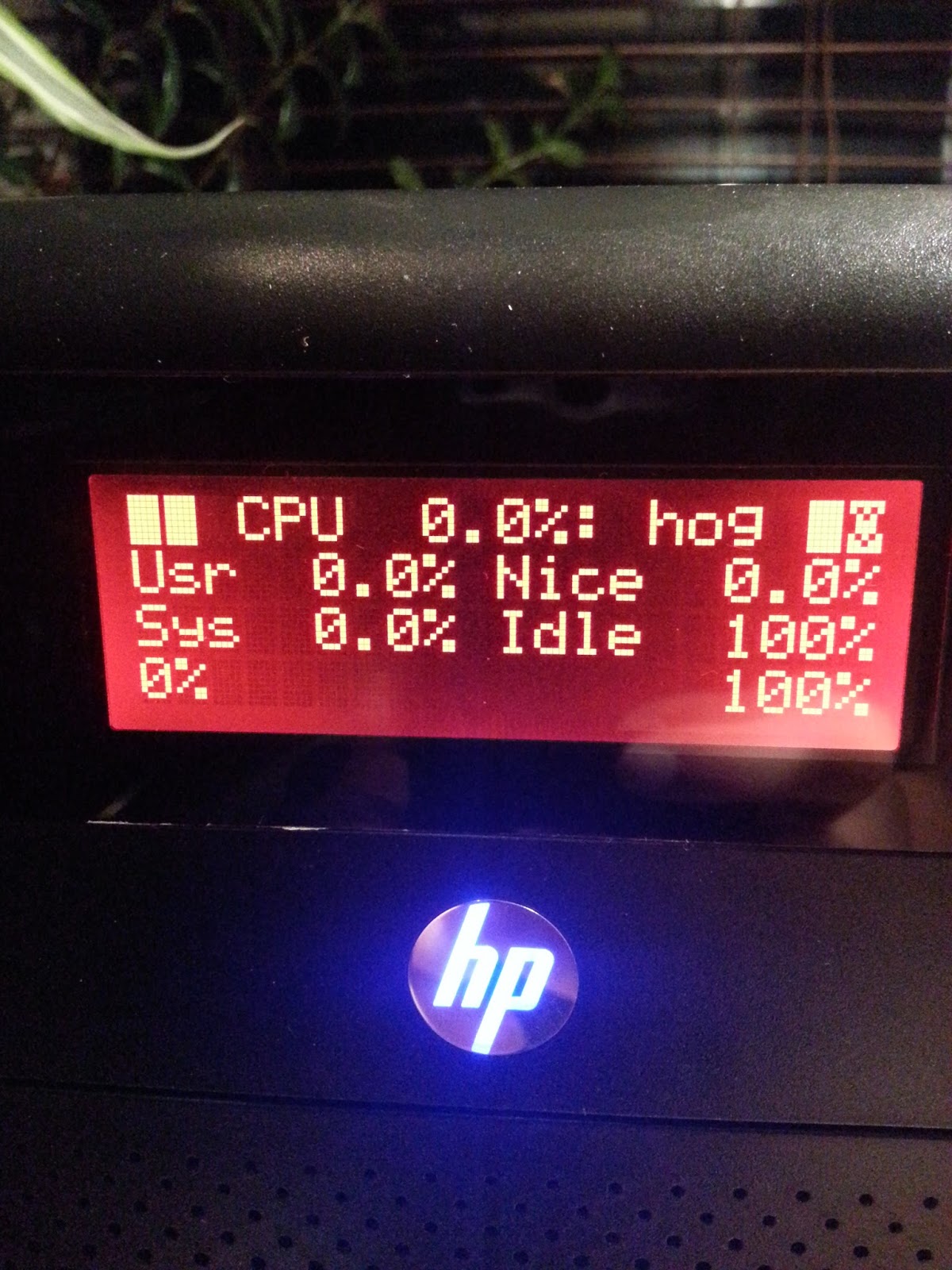
There are two programs to output information to the LCD display. These are lcdproc and lcd4linux. I started with the first one which only provides pre-defined screens. Seems with the latter one can create own screens. This is an option for the future. lcdproc consists of two programs. First there is a daemon called LCDd. It controls the driver, contrast etc.pp. The relevant parts of its configuration file /etc/LCDd.conf look like as shown below. Note that I did not change the default values for contrast or brightness.

[server]
Driver=hd44780
WaitTime=25

[hd44780]
ConnectionType=lcd2usb
Size=20x4
To print something to the screen one can use the lcdproc command, which is configured via /etc/lcdproc.conf. I've enabled the Iface, TimeDate, SMP-CPU, and MiniClock screens. The program is started during startup via cron. The file /etc/cron.d/lcdproc simply contains this:

@reboot root lcdproc
The following pictures show the resulting screens, which change every 25 seconds. That's it.

15 August 2013

Daniel Leidert: HP N54L Microserver - energy efficiency and power management

I recently worked on activating power management functions, reduce energy consumption and noise of my little HP N54L "toy". During this process I tried to avoid the usage of /etc/rc.local and set things by udev, hdparm and friends. Below are my results. Actual resultsWith the following steps my system (N54L + 3xWD20EFRX HDD +1xWD5003AZEX HDD + LCD-mod + case fan mod + Debian Wheezy) uses 27W in idle mode. The USB W-LAN card uses another 10W. In active mode, e.g. compiling source code, the system runs (and boots) with around 57W. The highest power consumption observed is during startup phase with 88W. First things firstFor the following steps it might be necessary to have some packages installed, that maybe do not occur in this post. If I missed something, I appreciate a hint. Further the following steps might produce even better results with a custom kernel. I'm using the stock linux-image-3.2.0-4-amd64 kernel image as the time of writing and I have these packages installed: amd64-microcode, firmware-linux, firmware-linux-free, firmware-linux-nonfree and firmware-atheros (the latter for my WLAN card). ASPM and ACPIFirst I enabled PCIE ASPM in my (non-modded) BIOS and forced it together with ACPI via grub by changing GRUB_CMDLINE_LINUX_DEFAULT in /etc/default/grub so it looks like this:

GRUB_CMDLINE_LINUX_DEFAULT="quiet splash acpi=force pcie_aspm=force nmi_watchdog=0"
ASPM has now been enabled as lspci prooves:

00:04.0 PCI bridge: Advanced Micro Devices, Inc. [AMD] RS780/RS880 PCI to PCI bridge (PCIE port 0) (prog-if 00 [Normal decode])
[..]
LnkCap: Port #1, Speed 5GT/s, Width x1, ASPM L0s L1, Latency L0 <64ns, L1 <1us
ClockPM- Surprise- LLActRep+ BwNot+
LnkCtl: ASPM L0s L1 Enabled; RCB 64 bytes Disabled- Retrain- CommClk+
ExtSynch- ClockPM- AutWidDis- BWInt- AutBWInt-
[..]
00:06.0 PCI bridge: Advanced Micro Devices, Inc. [AMD] RS780 PCI to PCI bridge (PCIE port 2) (prog-if 00 [Normal decode])
[..]
LnkCap: Port #3, Speed 5GT/s, Width x1, ASPM L0s L1, Latency L0 <64ns, L1 <1us
ClockPM- Surprise- LLActRep+ BwNot+
LnkCtl: ASPM L0s L1 Enabled; RCB 64 bytes Disabled- Retrain- CommClk+
ExtSynch- ClockPM- AutWidDis- BWInt- AutBWInt-
02:00.0 USB controller: Renesas Technology Corp. uPD720201 USB 3.0 Host Controller (rev 03) (prog-if 30 [XHCI])
[..]
LnkCap: Port #0, Speed 5GT/s, Width x1, ASPM L0s L1, Latency L0 <4us, L1 unlimited
ClockPM+ Surprise- LLActRep- BwNot-
LnkCtl: ASPM L0s L1 Enabled; RCB 64 bytes Disabled- Retrain- CommClk+
ExtSynch- ClockPM- AutWidDis- BWInt- AutBWInt-
[..]
03:00.0 Ethernet controller: Broadcom Corporation NetXtreme BCM5723 Gigabit Ethernet PCIe (rev 10)
[..]
LnkCap: Port #0, Speed 2.5GT/s, Width x1, ASPM L0s L1, Latency L0 <1us, L1 <64us
ClockPM+ Surprise- LLActRep- BwNot-
LnkCtl: ASPM L0s L1 Enabled; RCB 64 bytes Disabled- Retrain- CommClk+
ExtSynch- ClockPM- AutWidDis- BWInt- AutBWInt-
[..]
Even so /sys/module/pcie_aspm/parameters/policy will still show as below:

[default] performance powersave
I'll show how to set the powersave value in /sys/module/pcie_aspm/parameters/policy in the next section.JFTR: These are my ACPI related packages installed: acpi, acpid, acpi-support and acpi-support-base. Enable powersaving via UDEVThe following rules file /etc/udev/rules.d/90-local-n54l.rules has been inspired by a blog post. It enables powersaving modes for all PCI, SCSI and USB devices and ASPM. Further the internal RADEON cards power profile is set to the low value. There is no monitor connected usually. The file contains these rules:

SUBSYSTEM=="module", KERNEL=="pcie_aspm", ACTION=="add", TEST=="parameters/policy", ATTR parameters/policy ="powersave"

SUBSYSTEM=="i2c", ACTION=="add", TEST=="power/control", ATTR power/control ="auto"
SUBSYSTEM=="pci", ACTION=="add", TEST=="power/control", ATTR power/control ="auto"
SUBSYSTEM=="usb", ACTION=="add", TEST=="power/control", ATTR power/control ="auto"
SUBSYSTEM=="usb", ACTION=="add", TEST=="power/autosuspend", ATTR power/autosuspend ="2"
SUBSYSTEM=="scsi", ACTION=="add", TEST=="power/control", ATTR power/control ="auto"
SUBSYSTEM=="spi", ACTION=="add", TEST=="power/control", ATTR power/control ="auto"

SUBSYSTEM=="drm", KERNEL=="card*", ACTION=="add", DRIVERS=="radeon", TEST=="power/control", TEST=="device/power_method", ATTR device/power_method ="profile", ATTR device/power_profile ="low"

SUBSYSTEM=="scsi_host", KERNEL=="host*", ACTION=="add", TEST=="link_power_management_policy", ATTR link_power_management_policy ="min_power"
Set harddrives spindown timeoutI decided to sent my system drive to standby after 20 minutes and the RAID drives after 15 minutes. This is usually ok, because the RAID isn't always used. hdparm is the right tool to realize this. Many people use the /dev/disk/by-uuid/... syntax here, to avoid having to touch the configuration file if some system configuration changes. Because I'm running a RAID, I couldn't use this syntax, although it might be possible to use /dev/disk/by-id/... instead. Well for the moment I stay with the configuration below. The relevant part of /etc/hdparm.conf is:

[..]

# system harddrive
/dev/sda
spindown_time = 240


# below are the WD20EFRX drives
/dev/sdb
spindown_time = 180


/dev/sdc
spindown_time = 180


/dev/sdd
spindown_time = 180

Idle modeWhen there is nothing to do for the system, all I hear is the (still a bit noisy) fan of the power supply, which I might replace in the future too. Either by testing a different fan or by replacing the whole power supply unit by the fanless FORTRON FSP150-50TNF or (even better) a picoPSU.The system currently shows a power consumption of around 37W in idle mode whereas the USB W-LAN card itself needs around 10W. There is a possibility to enable power savings mode for this card too. I could add this entry to /etc/udev/rules.d/90-local-n54l.rules:

SUBSYSTEM=="net", ACTION=="add", KERNEL=="wlan*" RUN+="/usr/bin/iw dev %k set power_save on"
But it turned out that the connection became a bit unstable after it. So I don't use this rule. More on the roadThere are a lot more options one can easily find via $search_engine. The N54L system could be brought to sleep and woken up by LAN via Wake-on-LAN (WOL). This is a feature I don't use. I've also read rumors about enabling different sleep/suspend states of the system, which seems to require to install a modded BIOS. Well, I'll post news and changes if they happen to come;)

9 August 2013

Daniel Leidert: Local link networking on Debian/Linux between server and workstation

My network is based on wireless LAN, which is running at 54MBit/s. Transfering files between two systems therefor is not very fast. I could use wired connections, but cables would need to be pretty long to connect to the router. However the file server and the workstation are located near to each other and both have a free Gigabit LAN link. So why not connect these systems directly?Both systems run network-manager, whereas the server runs without a graphical/desktop environment. The file /etc/network/interfaces contains this entry related to the LAN devices on both systems:

allow-hotplug eth0
auto eth0
To create the connection it is necessary to have the package avahi-autoipd installed. In a graphical environment is is then as easy as open the network(-manager) preferences dialog, create a new wired connection, change to the IPv4 Settings tab in its Options dialog and choose the Link local only method. Done.On the server I have no desktop environment. Therefor I wrote the necessary file /etc/NetworkManager/system-connections/LocalLink myself. The UUID value can be obtained via uuid -n 1:

[802-3-ethernet]
duplex=full
mac-address=<MAC-address>

[connection]
id=LocalLink
uuid=<value of: uuid -n 1>
type=802-3-ethernet
timestamp=0
autoconnect=true

[ipv6]
method=auto

[ipv4]
method=link-local
I restarted the manager via service network-manager restart on the server and the link came up too. The direct link was ready.A note: I was able to create the connection by using a patch cable because my cards are able to handle the situation. On older systems it might be necessary to use a cross-over-cable.I would really like to use bonding on the wired ethernet and the wireless devices. But the wireless connections are done via router whereas the ethernet connections are created via local link. I think, this is impossible. Any ideas/hints?

3 August 2013

Daniel Leidert: Setting up a network buildd with pbuilder, ccache, inoticoming and NFS

I recently bought an N54L HP microserver, which shall act as a build-daemon (buildd) for Debian packaging. The idea of my workflow is the following:
  1. do the maintenance tasks locally, usually using svn-buildpackage, quilt etc.pp
  2. build a source package locally
  3. upload the source to an incoming directory on the server
  4. watch this incoming directory and start a build process as soon as a package is uploaded
  5. put the result into an accessible directory
  6. support different vendors (debian, ubuntu)
  7. support different releases (experimental, unstable, stable, oldstable)
  8. support different architectures (amd64, i386)
  9. speed up the build process
Setting up the building environmentMy first idea was to use sbuild as described in several places. However I went with pbuilder for a long time having a setup I personally like. So I decided to stay with it. I reduce the time and work to update the configure files by using
  • one central file /etc/pbuilderrc.inc defining all the common/shared settings and
  • small configure files defining vendor, release, architecture and mirrors
Here are the relevant parts of my central configure snippet:

[..]
EXTRAPACKAGES="apt-utils debconf debconf-utils libfile-fcntllock-perl"
[..]
BASETGZ="/var/cache/pbuilder/base.$DISTRIBUTION.$ARCHITECTURE.tgz"
APTCACHE="/var/cache/pbuilder/aptcache/$DISTRIBUTION/$ARCHITECTURE/"
BUILDRESULT="/var/cache/pbuilder/result/$DISTRIBUTION/$ARCHITECTURE/"
[..]
case "$VENDOR" in
ubuntu)
MIRRORSITE="http://archive.ubuntu.com/ubuntu"
COMPONENTS="main restricted universe multiverse"
OTHERMIRROR="\
deb http://de.archive.ubuntu.com/ubuntu $DISTRIBUTION main restricted universe multiverse \
deb http://archive.ubuntu.com/ubuntu $DISTRIBUTION-updates main restricted universe multiverse \
deb http://security.ubuntu.com/ubuntu $DISTRIBUTION-security main restricted universe multiverse \
"
;;
*)
MIRRORSITE="http://ftp.debian.org/debian"
COMPONENTS="main contrib non-free"
OTHERMIRROR="\
deb http://ftp.de.debian.org/debian $DISTRIBUTION main contrib non-free \
"
;;
esac
[..]
DEBBUILDOPTS="-us -uc -j2"
AUTO_DEBSIGN=no
USE_PDEBUILD_INTERNAL=yes
[..]
You get the main idea, right? Create own files and directories for each architecture, release and vendor. Further I only want to pull build related packages into the build environment, not into the server environment. So I enabled USE_PDEBUILD_INTERNAL. I don't want to sign anything on the buildd itself and use both cores. That's what DEBBUILDOPTS and AUTO_DEBSIGN are used for. Further I saw some warnings reported during build processes. I therefor install the packages mentioned in EXTRAPACKAGES to every build enviroment. The following are the configure files for the unstable amd64 (default) and the stable i386 build environments:

VENDOR="debian"
DISTRIBUTION="sid"
ARCHITECTURE="amd64"

. /etc/pbuilderrc.inc

VENDOR="debian"
DISTRIBUTION="wheezy"
ARCHITECTURE="i386"

. /etc/pbuilderrc.inc

OTHERMIRROR+="\
deb http://security.debian.org $DISTRIBUTION/updates main contrib non-free \
"
Now to not having to update all of these environments manually there is a small parallelized script /usr/local/sbin/update-pbuilder-chroots:

#!/bin/sh

t=$(tempfile -p .upc. -s .list) exit 1

cat > $t << EOF
/etc/pbuilderrc.amd64.sid
/etc/pbuilderrc.i386.sid
/etc/pbuilderrc.amd64.wheezy
/etc/pbuilderrc.i386.wheezy
/etc/pbuilderrc.amd64.squeeze
/etc/pbuilderrc.i386.squeeze
EOF

parallel /usr/sbin/pbuilder update --override-config --configfile :::: $t tee -a /var/log/pbuilder.log

rm -f $t

exit 0
The script will make sure, that every change to the configuration file(s) will be considered (--override-config) and is run once a week via cron. The default build environment is updated on a daily base without this restriction:

@reboot root rm -rf /var/cache/pbuilder/build/*/ >> /dev/null 2>&1
@daily root test -x /usr/sbin/pbuilder && /usr/sbin/pbuilder update --configfile /etc/pbuilderrc.amd64.sid tee -a /var/log/pbuilder.log >> /dev/null 2>&1
@weekly root test -x /usr/local/sbin/update-pbuilder-chroots && /usr/local/sbin/update-pbuilder-chroots >> /dev/null 2>&1
Speeding up the build processSometimes it is necessary to recompile a package. The tool to speed up this process is ccache, which can be easily integrated into pbuilder by setting CCACHEDIR in /etc/pbuilderrc.inc. It acts like a cache for compiled files and avoids recompilation in several buildd runs.

CCACHEDIR=/var/cache/pbuilder/ccache
It is also possible to use a TMPFS for BUILDPLACE to speed up the build process itself. In this case APTCACHEHARDLINK must be disabled. Well, yeah, I don't do this.Watch an incoming directory and start the build processNot much to say about this except that the user nobody is used to run the pbuilder command. Therefor it is necessary to mention this in /etc/sudoers to allow him to do this via sudo command:

Defaults env_keep = "DH_OPTIONS DH_VERBOSE DEB_BUILD_OPTIONS DH_OPTIONS MAKEFLAGS CC CXX CPP F77 F90"
[..]
nobody ALL=NOPASSWD:/usr/sbin/pbuilder
The first line is only necessary, if a pbuilder command is started with one of these environmental variables set. This can be useful when e.g. debugging a build failure with a future gcc version that is not yet the default or when debugging a clang build issue or when creating non-stripped binary packages for creating a backtrace (BTW: When there is a common repository of all debugging symbols created?).Now to start the build process, I created an incoming directory with mods 777 at /var/cache/pbuilder/incoming/ and use inoticoming to watch it. This is started during boot via cron. The following shows the entry for the default unstable amd64 build environment:

@reboot root /usr/bin/inoticoming --logfile /var/log/inoticoming.log --pid-file /var/run/inoticoming.pid /var/cache/pbuilder/incoming --chdir /var/cache/pbuilder/incoming --suffix .dsc --stderr-to-log --stdout-to-log /bin/su -c '/usr/bin/sudo /usr/sbin/pbuilder build --autocleanaptcache ' nobody \;
Done. That's how the basic buildd works.Getting the resultsThe pbuilder BUILDRESULT directory with mods 777 is shared via NFS mount to the workstation. After successfully building the package, debsign and dput can be used as usual.Setting up the workstationI use svn-buildpackage for most of my packages. Because pbuilder won't download source tarballs on demand by default (maybe via hook?), the tarball must always be included building the source package, which then gets uploaded via dput to the buildd. This is considered in the command listed in svn-builder in ~/.svn-buildpackage.conf (note, below shows my personal layout):

svn-builder=debuild --post-dpkg-buildpackage-hook=\"dput -f buildd /usr/local/src/packages/$PACKAGE/%p_%v_source.changes\" --no-lintian -d -sa -us -uc -S
svn-override=origDir=/usr/local/src/packages/$PACKAGE
svn-override=buildArea=/usr/local/src/packages/$PACKAGE
[..]
The host buildd has been added to ~/.dput.cf:

[buildd]
fqdn = mybuildd
login = mylogin
method = scp
incoming = /var/cache/pbuilder/incoming
allow_unsigned_uploads = 1
run_lintian = 0
Done. Now the svn-buildpackage command will create a source package including the source tarball and upload it to the buildd, where the package building starts right after the upload.ConclusionsThis is the main setup which works nicely for the default build environment so far. On the TODO list is to extend this setup so I can easily deal with all the architectures and releases (point 6..8 at the beginning).

1 August 2013

Daniel Leidert: N54L LCD-Mod with U204FR-A3 (LCDModkit) and lcdproc *pic*

N54L LCD-Mod with U204FR-A3 (LCDModkit) and lcdproc CPU screen
The picture shows my HP N54L microserver with an LCD (item no. U204FR-A3 by LCDModkit). The display is controlled via LCDd and lcdproc using the hd44780 driver. It shows the so called CPU screen here. To be continued soon ... :)

24 July 2013

Daniel Leidert: Moving from (software) RAID 1 to RAID 5 and testing performance

Finally I finished migrating my new N54L from a 2-disk software RAID 1 (2x2TB WD20EFRX) to 3-disk RAID 5 (3x2TB WD20EFRX) using mdadm. I got an excellent mini HOWTO I followed. Resyncing and reshaping the RAID took several days ... top speed was 110.000K/s ... but left my data untouched. Finally growing the RAID now I have two partitions; one with 0.5GB (md0) and the other with 3.4GB (md1) which both host an EXT4 file system, whereas the first one is encrypted via LUKS and the second one is not. RAID device and file system configuration Below is a summary of the setup and the values I found working well for my system.
3-disk RAID 5 devicefile system
devicechunkstripe_cache_sizeread_ahead_kbtypeencryptionstridestripe-width
/dev/md064409632768ext4luks1632
/dev/md15121638432768ext4no128256
I've played around with the system a bit. Changing the chunk size on the fly however took a long time. /dev/md0 will contain some backups, so there probably will be a mixture of small and large files. So I've chosen to only test the values 64K, 128K and 512K (default) for this device. I left the other untouched as it will mainly contain large files. Performance measurement Below are the results using hdparm to measure performance. First lets take a look at the drives ...

$ hdparm -tT /dev/sd[bcd]
/dev/sdb:
Timing cached reads: 3268 MB in 2.00 seconds = 1634.54 MB/sec
Timing buffered disk reads: 438 MB in 3.00 seconds = 145.87 MB/sec

/dev/sdc:
Timing cached reads: 3292 MB in 2.00 seconds = 1646.32 MB/sec
Timing buffered disk reads: 392 MB in 3.01 seconds = 130.22 MB/sec

/dev/sdd:
Timing cached reads: 3306 MB in 2.00 seconds = 1653.18 MB/sec
Timing buffered disk reads: 436 MB in 3.00 seconds = 145.26 MB/sec

$ hdparm --direct -tT /dev/sd[bcd]
/dev/sdb:
Timing O_DIRECT cached reads: 468 MB in 2.01 seconds = 233.17 MB/sec
Timing O_DIRECT disk reads: 442 MB in 3.00 seconds = 147.15 MB/sec

/dev/sdc:
Timing O_DIRECT cached reads: 468 MB in 2.00 seconds = 233.69 MB/sec
Timing O_DIRECT disk reads: 392 MB in 3.01 seconds = 130.36 MB/sec

/dev/sdd:
Timing O_DIRECT cached reads: 468 MB in 2.00 seconds = 233.94 MB/sec
Timing O_DIRECT disk reads: 442 MB in 3.01 seconds = 146.93 MB/sec
... and now at the RAID devices ...

$ hdparm -tT /dev/md?
/dev/md0:
Timing cached reads: 3320 MB in 2.00 seconds = 1660.37 MB/sec
Timing buffered disk reads: 770 MB in 3.01 seconds = 256.05 MB/sec

/dev/md1:
Timing cached reads: 3336 MB in 2.00 seconds = 1668.07 MB/sec
Timing buffered disk reads: 742 MB in 3.01 seconds = 246.89 MB/sec

$ hdparm --direct -tT /dev/md?
/dev/md0:
Timing O_DIRECT cached reads: 974 MB in 2.00 seconds = 487.08 MB/sec
Timing O_DIRECT disk reads: 770 MB in 3.01 seconds = 256.17 MB/sec

/dev/md1:
Timing O_DIRECT cached reads: 784 MB in 2.00 seconds = 391.18 MB/sec
Timing O_DIRECT disk reads: 742 MB in 3.01 seconds = 246.42 MB/sec
... and now lets see, which actual speed we reach using dd. First lets check the encrypted device:

RAID-5 /dev/md0 (LUKS encrypted EXT4): chunk=64K, stripe_cache_size=4096,
readahead(blockdev)=65536, stride=16, stripe-width=32 ...

$ dd if=/dev/zero of=/mnt/md0/10g.img bs=1k count=10000000
10000000+0 Datens tze ein
10000000+0 Datens tze aus
10240000000 Bytes (10 GB) kopiert, 64,1227 s, 160 MB/s

$ dd if=/mnt/md0/10g.img of=/dev/null bs=1k count=10000000
10000000+0 Datens tze ein
10000000+0 Datens tze aus
10240000000 Bytes (10 GB) kopiert, 85,768 s, 119 MB/s
Well, read speed is consistently lower than write speed for the encrypted file system. Lets take a look at the non-encrypted device:

RAID-5 /dev/md1 (EXT4): chunk=512K, stripe_cache_size=16384,
readahead(blockdev)=65536, stride=128, stripe-width=256 ...

$ dd if=/dev/zero of=/mnt/md1/10g.img bs=1k count=10000000
10000000+0 Datens tze ein
10000000+0 Datens tze aus
10240000000 Bytes (10 GB) kopiert, 37,0016 s, 277 MB/s

$ dd if=/mnt/md1/10g.img of=/dev/null bs=1k count=10000000
10000000+0 Datens tze ein
10000000+0 Datens tze aus
10240000000 Bytes (10 GB) kopiert, 33,5901 s, 305 MB/s
Looks nice to me. How to set these values I use a mixture of udev, util-linux and e2fsprogs to set the values. First I checked, which values for stripe_cache_size and read_ahead_kb are working best for me. For the LUKS encrypted EXT4 I got varying results showing best performances with values of 4096, 8192 and 16384 for stripe_cache_size. I decided for the first value, because it appeared more often with the best performance than the others.

$ less /etc/udev/rules.d/90-local-n54l.rules grep stripe_cache
SUBSYSTEM=="block", KERNEL=="md0", ACTION=="add", TEST=="md/stripe_cache_size", TEST=="queue/read_ahead_kb", ATTR md/stripe_cache_size ="4096", ATTR queue/read_ahead_kb ="32768", ATTR bdi/read_ahead_kb ="32768"
SUBSYSTEM=="block", KERNEL=="md1", ACTION=="add", TEST=="md/stripe_cache_size", TEST=="queue/read_ahead_kb", ATTR md/stripe_cache_size ="16384", ATTR queue/read_ahead_kb ="32768", ATTR bdi/read_ahead_kb ="32768"
The read_ahead_kb value can also be set using blockdev. Note that this command expects a value of 512-byte sectors whereas read_ahead_kb is the size in kbyte. Therefor the difference in values:

$ blockdev --setra 65536 /dev/md[01]
Tuning the EXT4 file system performance with calculated values using tune2fs:

$ tune2fs -E stride=16,stripe-width=32 -O dir_index /dev/mapper/_dev_md0
$ tune2fs -E stride=128,stripe-width=256 -O dir_index /dev/md1
Disabling NCQ reduced the speed a lot for me, so I left the values as is and did not struggle with it:

$ cat /sys/block/sd[bcd]/device/queue_depth
31
31
31

5 July 2013

Daniel Leidert: Dear Lazyweb ... why does lshw (still) identify my Linux raid autodetect partition(s) as NTFS volumes?

In a very first attempt, my disk:2 was partitioned and initialized as follows:
/dev/sdc1     1,5TB     NTFS
/dev/sdc2 0,5TB EXT4
This was later changed to what you can see below and what fdisk correctly reports. These partitions all use the EXT4 file system.
[..]
Device Boot Start End Blocks Id System
/dev/sdb1 2048 524290047 262144000 fd Linux raid autodetect
/dev/sdb2 524290048 3907029167 1691369560 fd Linux raid autodetect
[..]
Device Boot Start End Blocks Id System
/dev/sdc1 2048 524290047 262144000 fd Linux raid autodetect
/dev/sdc2 524290048 3907029167 1691369560 fd Linux raid autodetect
[..]
I'm wondering why lshw and parted shows some of the partitions still being NTFS volumes? Checkout the output below. How can this be fixed? What is missing? Erase some header data?

Model: ATA WDC WD20EFRX-68A (scsi)
Disk /dev/sdb: 2000GB
Sector size (logical/physical): 512B/4096B
Partition Table: msdos

Number Start End Size Type File system Flags
1 1049kB 268GB 268GB primary raid
2 268GB 2000GB 1732GB primary raid


Model: ATA WDC WD20EFRX-68A (scsi)
Disk /dev/sdc: 2000GB
Sector size (logical/physical): 512B/4096B
Partition Table: msdos

Number Start End Size Type File system Flags
1 1049kB 268GB 268GB primary ntfs raid
2 268GB 2000GB 1732GB primary raid
[..]
*-disk:1
description: ATA Disk
product: WDC WD20EFRX-68A
vendor: Western Digital
physical id: 1
bus info: scsi@3:0.0.0
logical name: /dev/sdb
version: 80.0
serial: WD-WCC300354221
size: 1863GiB (2TB)
capabilities: partitioned partitioned:dos
configuration: ansiversion=5 sectorsize=4096
*-volume:0
description: Linux raid autodetect partition
physical id: 1
bus info: scsi@3:0.0.0,1
logical name: /dev/sdb1
capacity: 250GiB
capabilities: primary multi
*-volume:1
description: Linux raid autodetect partition
physical id: 2
bus info: scsi@3:0.0.0,2
logical name: /dev/sdb2
capacity: 1613GiB
capabilities: primary multi
*-disk:2
description: ATA Disk
product: WDC WD20EFRX-68A
vendor: Western Digital
physical id: 2
bus info: scsi@4:0.0.0
logical name: /dev/sdc
version: 80.0
serial: WD-WCC1T0567095
size: 1863GiB (2TB)
capabilities: partitioned partitioned:dos
configuration: ansiversion=5 sectorsize=4096 signature=000a4d07
*-volume:0
description: Windows NTFS volume
physical id: 1
bus info: scsi@4:0.0.0,1
logical name: /dev/sdc1
version: 3.1
serial: 013e-8473
size: 1396GiB
capabilities: primary multi ntfs initialized
configuration: clustersize=4096 created=2013-06-18 06:24:11 filesystem=ntfs label=MEDIA state=clean
*-volume:1
description: Linux raid autodetect partition
physical id: 2
bus info: scsi@4:0.0.0,2
logical name: /dev/sdc2
capacity: 1613GiB
capabilities: primary multi
[..]

Next.

Previous.