Search Results: "Aigars Mahinovs"

21 October 2013

Aigars Mahinovs: Moved to Mezzanine

After my server that has hosted my blog for some years had given out its last breath (second motherboard failure), I decited it was time for a change. And not just server change, but also change in the blog engine itself. As I now focus on Python and Django almost exclusively at work, it felt logical to use some kind of Django-based blog or CMS. I tried django-cms and mezzanine and ... Mezzanine is so fast and simple, that I simply stopped looking. After simply following the tutorial and creating a skeleton project, I had a ready-to go site with all the CMS features, incuding a blog. I just had to change a few settings to have the blog module be the home page of the site, change site settings for the title and Google Analytics settings and such and tweak the theme a bit to my liking. This was my first real exposure to a Bootstrap design. I must say - it is very simple to understand and modify if your needs fit within its limits. For example, I wanted to remove the left sidebar and expand the main content block to fill that. All I had to do was to remove the div element with class "left-sidebar span-2" and change the class of the main content part from "span-7" to "span-9". To do that I simply copied the templates/base.html file from mezzanine default templates and modified it. The information from django-debug-toolbar showed me what files were used in rendering the page. But the feature that really got me hooked was the Wordpress import. Using a simple management command I was able to feed into Mezzanine instance the XML export file from Wordpress. It created blog posts, categories, comments, static pages and even redirects from Wordpress permalinks to Mezzanine permalinks. It was not flawless - there were a few issues: After that was done it was a relatively straightforward process of picking up the code and data and deploying it to a Django-friendly hosting service. There is a plenty of good competition out there, most now offer a simple one-click Django installation, so I just created a simple Django skeleton via their web interface and then replace what they generated with my app while keeping their settings as local_settings.py . I should probably write a bit more details about the process. After I create a custom fabric file for this. It is quite a strange feeling to have a Mezzanine blog that responds faster from a shared server half a continent away, compared to a Wordpress on dedicated server in the same room There are a few features that I am still missing - most notably draft post autosave. That has bitten me hard while writing this post :P Also a Twitter digest post feature. But on the bright side - that is a great motivation to write such features, preferably in a portable way that other people can use too :)

12 August 2013

Aigars Mahinovs: Soon to be on my way to Debconf too

Going to Debconf13
I also soon will be on my way to Debconf13 and those who asked for more photos from the place on Planet Debian will soon start getting their fill ;) Privacy note: as always, I will be trying to balance the need for people to get lots of pictures as fast as possible with privacy of people, who do not want to be in published photos. The way this has been done before and will be done this time (at least from my side) is that: Update: http://www.aigarius.com/blog/2013/08/12/not-going-after-all/

Aigars Mahinovs: Not going after all

I was very excited to go to Debconf13, but in the last minute I caught some kind of virus and went down with fever in the night before the flight. I am sure Wouter will take over group photo duties. And I will just take this week of vacation to rest up and check out the video streaming :)

16 April 2013

Aigars Mahinovs: na 6 internets

na ir slavena ne tikai ar savu akmens m ri valsts zieme os, bat ar ar Di o nas Ugunsm ri apk rt visam s valsts Internetam, kas blo visu p c k rtas un iebremzina visu p r jo. Man pirm person g saskarsme ar o pakalpojumu notika jau anhajas lidost , kad tri vien izr d j s, ka valst blo ts ir ne tikai Facebook, bet ar Twitter, kas iev rojami apgr tin ja manas iesp jas tri un viegli apzi ot visus, ka es esmu v l joproj m esmu dz vs un vesels. P c p ris eksperimentiem izr d j s, ka, lai ar no telefona nav pieejama Google+ m jas lapa un nav lejupl d jama Google+ (un WhatsApp) programma uz Android, tom r, ja t s jau ir telefon , ie abi servisi turpina no telefona str d t. T p c es s ku rakst t ce ojuma piez mes Google+ un da as dienas p c ce ojuma s kuma man pat izdev s nokonfigur t If This Then That servisu, lai tas pa em manus Google+ ierakstus un uztaisa no tiem Twitter ierakstus (kas jau t l k pa citiem kan liem izplat s uz Facebook un Draugiem un ar par d s k ned as kopsavilkums aj blog ). Google+ ir savi plusi, bet ar savi m nusi. Galvenais m nuss, ko es aj ce ojum paman ju ir tas, ka Google+ Android aplik cij nav iesp jams sagatavot vair kus ierakstu melnrakstus (v lams katru ar savu geolok ciju) bez Interneta var rakst t tikai vienu ierakstu un t ieraksta GPS koordin tes b s t s kur viet p c tam Internets par d sies. Es jau uzrakst ju Googlei par o probl mu. Galvenais pluss Google plusam (no pun intended) ir Instant Upload ja bild t fotogr fijas ar Android telefonu, s fotogr fijas autom tiski tiks aug upiel d tas un par d sies jaun ieraksta izveides interfeis , kur t s var pievienot ierakstam ar vienu klik i bez jebk das gaid anas. Diem l tas nestr d ar norm laj m kamer m. Pagaid m ;) Ta u es neb tu sts datori is, ja es nepam in tu uzlaust vai apiet o nelielo nas probl mu, ne? ;) Visvienk r akais veids k apiet nas Lielo Ugunsm ru ir izmantot jebk du VPN, kas at auj ne tikai piek t VPN t kla resursiem, bet ar at auj laist visu trafiku caur o VPN savienojumu. dus VPN piesl gumus var nopirkt, vai (ja ir Linux serveris vai routeris rpus nas) izveidot pa am. Man gad jum tas bija ar vienu klik i iesl gts OpenVPN uz Fonera routera, kas st v man s m j s. Diem l na ir sav da. Blo to lapu, portu un protokolu saraksts main s gan da dos rajonos, gan ar atkar b no t vai Internets ir mob lais vai wifi vai ar piesl gumu, gan ar vienk r i no dienas dien . Liel da gad jumu blo to lietu sarakst iekr t ar VPN savienojumi. Bie i vien ar priv tie. Man kaut k ne iet, ka mana m jas IP adrese ir nas ugunsm ra sarakstos, ta u da reiz ar tam VPN pievienoties es nevar ju. Un t d s situ cij s, lai apskat tu k du YouTube video, atliek tikai viens, eni ls risin jums sshuttle! is eni lais r ks izveido ko l dz gu VPN savienojumam caur parasto SSH portu un protokolu. Uz lok l s ma nas ir nepiecie ams Python un root ties bas, bet uz servera ir vajadz gas tikai ties bas palaist Python programmas. sshuttle pats aizs ta sevi uz serveri un palai s tur, pat ie ifr un p rs ta visus savienojumus un ar DNS piepras jumus, ja vi am to paprasa. Var p rs t t konkr tus t klus vai visu trafiku. Un trums man pieredz tas ir bija pat tr ks par parasto VPN. Kopum Interneta blok de un t visp r gais l nums ir viens oti spec gs m nuss nai. Aizskrienot mazliet uz priek u st st jum pateik u, ka Hong Kong das probl mas nav tur Internets ir lielisks! L k t ds t zeris san ca :)

18 February 2013

Aigars Mahinovs: Istabai.lv installation

So, the price of heating my apartment has gone up significantly since last year and a lot of people have noticed the same trend. As a geek, I want not just any solutions, but geekiest solutions possible to that enter a Smart Home system. The heating in my apartment is separated from all other apartments with a separate heat meter that measures both heating water flow and the temperature difference on the incoming and outgoing pipes, so if I reduce the heating consumption I will immediately see that in lower heating bills. This particular smart home system is very simple and made in Latvia and also relatively cheap, so I decided to give this a try. The start was very simple I filled out a form on their home page and got a call the next day to verify the specifics. They already knew my building and had experience installing there, so they offered me two options: I could have two thermal sensors and a radiator controller on each of the 3 radiators in my apartment or (seeing how my apartment is relatively small and well ventilated thus reducing the efficiency of per-room control) one thermal sensor and one radiator controller installed on a new valve that they would build into the heating pipe just outside my apartment. I chose the second option as that was cheaper, simpler and involved less installation for me. Also they offered a nice discount. A plumber of my building installed the valve at some point during the day, I did not even have to be there or arrange anything special, it was all included in the main bill. Then the next day a friendly guy came by to my office and gave me three very cute boxes. The packaging was very, very Apple-like. The three devices were named mother , spy and puller basically that is a base station, a temperature sensor and a radiator regulator a wireless stepper motor. The installation was straight forward I connected the base station (something very similar to this thin in size and looks) to Ethernet and power, went to the web address specified on the sticker on the base station, completed a registration process there, entered a code from the base of the base station into the website and it just found it. After that I pressed a button on the temperature sensor (a Zippo lighter sized box with a built-in Li-Ion battery rechargeable via microUSB once a year or so) and put that on a shelf. I secured it with some double-sided tape after the cat got to it once and played some hockey while I was away. The temperature sensor immediately showed up in the Web UI and I could assign it to a room. The regulator installation was the most complex bit, but it was trivial as well all I had to do was insert some AA batteries (helpfully included in the box, should last a couple years by their estimates), then go outside to the newly installed inlet valve, put this thing on, screw the thread with my hands and then push and hold a button for 10 seconds. After that the controller came to life, connected with the base station and started spinning the valve, testing its operational range I presume. The range is very good you can see 13% signal in the screenshots that is across the whole of the apartment, trough 3 solid walls and another 5 meters out in the hallway inside another wall. As soon as that was done, the Web UI showed the controller and asked my to assign it to a room. So now I have 1 room defined with 1 temperature sensor and one controller. That is all that is needed. Temperature From the charts I have already found out that at current inside/outside temperatures my apartment cools down at around 0.3 degrees C per hour and with current radiator settings it heats up by around 1 degree C per hour. I should turn the radiators up a bit thus increasing the rate at which the system is able to heat things up. Also I should try to re-inspect all possible cold spots to see why the cooldown speed is so high. I expected it to be lower. At least now I have real data to compare things. Temperature chart At this point you can either fire up your web browser or a Android/iOS client on you mobile device to monitor and control the temperature of the apartment. But that was not enough for me I opted for the PRO upgrade which includes the ability to program a weekly cycle of desired temperatures. The programming is limited and thus simple to do there are three temperature modes: day, night and eco. The idea is that you have the night mode every night, then at some time during the day, you have the day mode (to wake up), then you switch to eco mode (when noone is home) and then in the evening you go back to day mode and later to night mode. There are separate sliders for each day of the week and temperature settings for each of the modes for every programmed room. Time zones Temperatures in zones Devices Total investment so far 210 Ls (or around 3 months worth of just heating bills). The experience of other users tells of 30-50% heating bill reduction, so this should pay for itself in 2-3 years. In addition I get a more stable and predictable temperature at home and some more geeky stuff to brag about yay! These guys have their work cut out for them I have no idea how/of they do international orders, I would definately like to see more information in the web site about how my system is working (more temperature history, valve state history, wireless signal and battery history, mobile apps are a bit wonky it feels like the mobile app does not respect the temperature set over the web and tries to reassert itself when opened and it often shows out-of-date temperature data with no indication that it is out-of-date + the mobile apps are missing charts. All in all this is a great start: easy, quite cheap and stylish home heating automation. Good work! P.S. I am pretty sure they use Linux, but it is so packaged, that there is basically no way to confirm or deny that. P.P.S. Also check out this overnight chart, there is definitely some mode switch anticipation going on :)
Overnight temperatures

6 February 2013

Aigars Mahinovs: Pensijas prognoze 18.43

Update: I apologise for spamming all the nice people on Planet Debian with this unrelated post in foreign language it got mis-tagged and (although I tried classifying it correctly and removing it from the separate Debian-only RSS feed going to the Debian Planet) Planet software just keeps it around until admins get a spare moment to remove it manually. The basic idea of the post is that there is a e-government service by the Latvian government that provides any citizen a way to check what their pension would be, but it is kinda useless, because it calculates what you pension would be if you decided to retire right now. So in the post below I provide a few simple steps on how to estimate what the real pension could be (in todays currency values) if a person kept paying into the system at the same rate until the normal retirement age. Latvija.lv ir r ks savas n kotnes pensijas prognoz anai, ta u tas ir, maigi izsakoties, bezj dz gs tiem, kas nepl no iet pensij tuv k gada laik . tri apskatoties atteic gos likumus un noteikumus es nonacu pie lietder g kas metodes. Vispirms m s varam dro i ignor t pensiju indeks ciju un visas ar to saist t s pensiju kapit la p rr in anas vai iemaksu palielin anos ir skaidrs, ka gadiem ejot uz priek u b s kaut k ds infl cijas procents, kura d palielin sies algas, palielin sies iemaksas pensiju kapit l un tiks p rr in tas vis das izmaksas, ta u t pati infl cija tie i ietekm s ar to cik v rt gs b s katrs gala pensijas lats taj br d , kad pensija tiks sa emta, l dz ar to infl cijas efekts tiek neitraliz ts, ja m s v rt jam gala ciparu br a cenu kontekst t.i. ja gal san ks, ka pensija b s 400Ls, tad to vai tas ir daudz vai maz j dom br a cen s, nevis m inot izdom t k das b cenas p c 30 gadiem. To visu emot v r pensijas apr ins stipri vienk r ojas:
  1. Pa emam atskaiti no t Latvija.lv pakalpojuma. Tas mums dos uz o br di uzkr to pensijas kapit lu (U) un aptuvenu ciparu par to k ds ir kapit la ikgad jais piaugums (P)
  2. Apr inam cik v l gadi ir paliku i l dz pension an s vecumam (t) t.i. l dz 62 gadiem. Es pat r in tos ar to, ka ap to laiku m r a vecums jau b s 65.
  3. Sar inam to cik b s aptuvenais pensijas kapit ls pension anas vecuma, ja m s turpinam iemaksas k tagad K = U + ( P * t )
  4. Apr inam k da san k ikm ne a pensija no da pensijas kapit la Pensija = K / G / 12, kur G ir emts no pension an s vecumam atbilsto s rindi as MK noteikumos, piem ram 62 gadiem tas ir 18.43
Piez me: G ir statisti u apr in ta prognoze par to cik vid ji gadus Latvijas iedz vot ji nodz vo ja vi i ir sasniegu i attiec go pension an s vecumu, t.i. t ir prognoze par to cik gadus vid ji jums b s tas prieks baud t pensiju. Ja rezult ts san k par k mazs, tad j em v r , ka summa neiek auj dividendes no 2 un 3 pensijas l me a, kas p ris gadu desmitu laik var b t t ri iespaid gs. Da as prognozes ir t das, ka 2ais un 3ais pensijas l menis kop var tu dod v l aptuveni t du pa u pensiju kl t k 1ais l menis. Ta u tas ir stipri atkar gs no fondu tirgus ilglaic gas dinamikas. Man to visu apr inot san k ap 400 Ls pensijas prognoze. Ja piepild s paredz jumi par 2o un 3o pensijas l meni, tad, ja es iedom jos sevi tagad k pension ru ar 600-800 Ls pensiju zin nav ne vainas. :)

23 September 2012

Aigars Mahinovs: Cloning or pre-configuring a batch of Android phones

An interesting question popped up in my Twitter stream today is there an Android alternative to Apple configurator (for iPhone, iPad and iPod Touch) that allows to create a bunch of identical Apple devices with some added configurations and applications. The best I could come up with is not as polished, but on the other hand much more powerful option Nandroid backup and restore (also known as ClockworkMod Recovery backup). To do this, you need a source phone and a bunch of destination phones. On the source phone a ClockworkMod Recovery (CWR) must be installed (either via a root or via a bootloader unlock). On the destination phones you will either need to also install ClockworkMod Recovery or unlock the bootloader to allow the Fastboot tool to work. So the procedure then goes as follows:
1. Unlock the bootloader on the source phone (search for device specific info on how to do that)
2. Use fastboot flash recovery filename.img to write a device-specific version of CWR to the recovery partition of the device (the phone must be in fastboot mode at that point)
3. Do whatever customisations you want to the source phone at this point. You can use custorm ROMs, install whatever applications, do whatever configuration, but I would suggest keeping everything in phone memory so you don t have to flash the SD card as well.
4. Reboot the source phone into CWR mode, use the backup option to create a full backup.
5. The backup will now be in the SD card of the source device. Copy that to the computer that you will use for creating copies. For each destination phone:
6. Unlock the bootloader of the destination phone
7. Reboot the phone in the fastboot mode, connect it via USB to the copying computer
8. Flash all partitions from the backup using fastboot flash ... commands, skip flashing the recovery partition if you don t want CMR on the destination device
9. Re-lock the bootloader (with fastboot oem lock) And you are done! All the phones must be of the same model. And that model must support unlocking bootloader for this to work. I prefer this method, because this way it is possible to create an end device without root, with a locked bootloader and without CWR thus providing some security as unlocking the bootloader wipes the device, so without specific hacking an attacker can not easily get access to system data on such device. It is also possible to do this with devices that do not have an boot unlock if there is a way to root the original firmware which allows to install CWR and go on from there, but that is significantly more complicated and time-consuming, so using devices with an ability to unlock the bootloader is much preferable. However, before you go to all that trouble, it might be worth to consider if maybe for your particular use case it would be enough with the two commands from Android SDK adb install ... and adb push ... to install applications or individual files on devices or adb backup AppName and adb restore ... to backup and restore one or more individual applications with all their settings. These options have the benefit of that they will work across different device models and that they do not wipe other data or applications from the devices. As I could not immediately find a better way or even a detailed guide how to do this, I decided to write this post, so it would be easier for other people to find this information. If you know a better way, please do mention it in the comments section!

20 September 2012

Aigars Mahinovs: You though NVidia was bad, don t try AMD

Remember when Linus Torvalds lambasted NVidia for not supporting their Optimus technology in their Linux drivers for half a decade and counting? Well, I went out and bought an AMD/ATi video card as mu upgrade. And you know what? Its Linux drivers are far, far worse than NVidia.
1. Most of the games I had working fine on NVidia, do not work on AMD. And those that do suffer far more visual corruption, synchronization bugs (like bottom 40% of the screen rendering half a second after the top 60%), strange visual artifacts (weird triangles popping out of everywhere) and crashes, lots of crashes.
2. There were crashes with NVidia too, but NVidia never managed to crash Compiz along with it or crash the whole X server or lock up the system so far that only SysRq works or even lock up the system so far that only powering it off manually works.
3. And then there is the configuration atrocity. Apparently AMD is too good to store its configuration in /etc/X11/xorg.conf. Or even to document the supported options there. Instead they have their own (also undocumented) configuration file in /etc/ati folder. And it is undocumented because it is a cryptic mess and the only supported way to change it is to use their tools aticonfig and amdccccle. The command line tool is almost reasonable, except it is also barely documented. For example, one of my screens somehow was always stared at 1920 1080@30Hz. There were 3 different ways to specify default resolution, but none of them used or saved the refresh rate. And when I changed it in the GUI tool the refresh rate did change, but it was never saved. Oh there nowhere is a save button. It just works , except when it doesn t. Like: both of my screens for some reason started with huge black borders around the screen, I finally narrowed it down to the GUI setting overscan which defaulted to 10%. Ok, so I change it, it works, but next time I reboot, the overscan is back! I had to find an undocumented invocation of the aticonfig that would change the default value to 0%. Why did this one setting not save? Oh and fun note the refresh rate of that second screen was correct on the login screen, but it then swiched back as I logged in. Fun, huh?
4. Even at basic desktop tasks fglrx if inferior to not only the free driver, but also to the nvidia driver even simple scrolling of a large folder in nautilus seems to tax the 200$ card to its limits the bottom row blinks into place almost half a second after I stop scrolling. Another example with NVidia when I switch my TV to the HDMI input from the card, the sound starts at the same moment as the picture, however with AMD the sound only decides to show up 10-15 seconds later. And sometime it does not show up at all, unless I start the AMD Control GUI tool and only then the sound shows up 15 seconds later (without doing anything in the GUI). It may be that one part of AMD is better than NVidia at talking to free driver developers, but another part is so much worse at actual technical work of writing a driver, it is not even funny. They are busy reinventing the bycicle of configuration and display management, while their core driver is just not good enough. TL/DR: Anyone wanna buy a HD 6850 cheaply off my hands? Crossposted to Google+ https://plus.google.com/u/0/107099528362923100900/posts/6PC7RFQpm8K P.S. I also noticed the color difference with NVidia there was no difference between colors on my LCD TV and my IPS monitor, but with AMD there is a huge difference, the TV color just got washed out. I guess there is no proper color calibration support in the AMD driver? Update: I have managed to return the HD 6850 to the shop where I got it from (thanks to a nice law requiring web shops to take stuff back within 14 days no questions asked) and got the new NVidia GeForce GTX 660 instead. I had to build an updated NVidia driver (304.48 from this post, just like here or here) but other than that it was smooth and painless and everything is working great again. Only even faster :)

8 August 2012

Aigars Mahinovs: Fun with the new camera

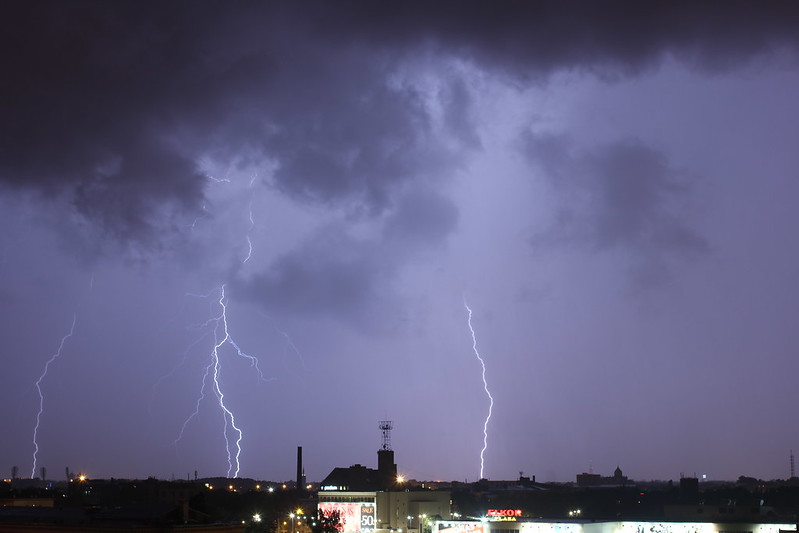
Triple hit! So, I finally received my Canon 650D and Canon EF 40mm STM lens. I am very happy with the purchase. The STM lens is very, very compact, it is barely bigger than the lens cap that comes with the camera. The focusing is fast enough and it is very smooth and silent enough not to be audible in video mode. The largest bonus of the 650D compared to my old 550D is the articulated display. It has come in handy many times already. It is especially useful with the STM lens, live view and touch to focus function. Very useful to focus on something even when the camera is at an weird angle. And a couple days ago I got to really use the new camera capturing the shot above (an others in that set). It turns out capturing cool lightning shots is quite easy: It is basically the same as shooting photos of a fireworks display, with the exception that lightning is not so bright sometimes and that there is a high chance of rain in a thunderstorm ;) P.S. Got over 5k photos in Flickr now with this set, and closing in for 500k views. That feels cool :)

21 June 2012

Aigars Mahinovs: Fish-ing for tips

I am trying to get used to fish as a default shell. I like some things in it, but can not quite get used to other things, so I wonder maybe I am cooking it wrong? So here are things that I could not find a solution for, while switching from bash. I do like the colors, the shortened cwd in the prompt, the univeral history and univeral variables, lower memory usage and funkier completions. Any other fish features people like? Especially I am interested in features that are not enabled by default.

11 June 2012

Aigars Mahinovs: New camera research

So, I was reading the coverage of the newly announced Canon 650D last week and it so happened that a friend needed a camera, so I sold my old Canon 550D and started looking for a replacement. For the last few years 95+% of the photos I have taken were with Canon 35mm f/2.0 lens on my Canon 550D, sometimes helped with a bounce&swivel flash. Which is very close to 50mm in full-frame equivalent. So I am looking to continue shooting in a similar way with a near-50mm prime lens and sometimes with bounce flash. As a given I have: Canon 35mm f/2.0, Canon 50mm f/1.8, Canon Speedlite 430EX II (bounce&swivel flash) and a budget of around 1k USD. It is a fun time to be looking around for a new camera body, so I found that I have many interesting options: Option 1: safe bet. Wait a bit and get the new Canon 650D body and continue shooting with the 35mm and the Canon flash. Pros: safe, new tech, good video. Cons: rather bulky and heavy, boring. Option 2: old school. Get a used Canon 5D Mark II body that pros are selling off to buy their Mark III and then start taking photos with the Canon 50mm f/1.8 lens and the Canon flash. Sell Canon 35mm f/2.0 to cover the price difference between bodies. Pros: full frame, higher resolution, huge viewfinder. Cons: very heavy and bulky, evolutionary dead-end, used, bad corner performance even with best lenses. Option 3: new wave. Sell the rest of my Canon stuff and buy into one of the new mirrorless cameras. The problem with this approach is that I can not find a mirrorless camera with all of: 18+ Mpix, sharp and fast near-50mm-equivalent prime autofocus lens, bounce&swivel external flash. Pros: light and small, new tech, funky. Cons: lens fragmentation, bad adapters (no AF), bad flashes. So, basically I am torn three ways. Any advice? Which mirrorless camera system would best match my needs? P.S. Due to work issues and the long distance, I am *not* attending this years Debconf.
P.P.S. To keep this slightly more on-topic how is the RAW files support on Linux for the new crop of the mirrorless cameras?

8 March 2012

Raphaël Hertzog: People Behind Debian: Gregor Herrmann, member of the Perl team

Photo by Aigars Mahinovs

I followed Gregor s evolution within Debian because I used to be somewhat active in the Perl team. His case is exemplar because it shows that you don t need to be an IT professional to join Debian and to make a difference. His QA page is impressive with hundreds of packages maintained and hundreds of non-maintainer uploads too. While he started out slowly, I remember meeting him at Debconf 7 in Edinburgh and after that he really got more implicated. Again a case of someone joining for technical reasons but getting more involved and staying there for social reasons! :-) Let s jump into the interview and learn more about him. Raphael: Who are you? Gregor: I m 41 years old, and I live in Innsbruck, Austria, in a shared apartment with a friend of mine. In my day job, I m working at the regional addiction prevention agency, so I m one of the few Debian guys who s not an IT student or professional. I started maintaining packages in 2006, and I am a DD since April 2008. Raphael: How did you start contributing to Debian? Gregor: After having used Debian on servers for some years, I finally switched to it on the desktop after some procrastinating. Soon afterwards I wanted to know more about the making-of , started to join mailing lists, filed bugs, and tried to learn packaging. Luckily I quickly found a permanent sponsor Tony Mancill, and we re still co-maintaining each others packages. And when I packaged my first Perl modules, Gunnar Wolf invited me to join the Debian Perl Group, an offer I accepted a few days later. And I m still there :) Later, the NM process, although it involved some waiting times, was also a good learning experience due to my AM Wouter Verhelst. (And in the meantime the organization of the NM process has vastly improved, from what I hear.) So my starting point for joining Debian was my curiosity but what really helped me to find my way into the project was the support of the people who invited and helped me. Raphael: What s your biggest achievement within Debian or Ubuntu? Gregor: I m not sure I can name a single big achievement but I guess I can say that my contributions to the Debian Perl Group have helped to make and keep the team a success story. Raphael: The pkg-perl team seems to work very well. As an active member, can you explain us how it is organized? How do you explain its success? In particular it seems to be a great entry point for new contributors. Gregor: The team is huge, both in numbers of members and packages (over 2200). Since last DebConf we manage our source packages in git, we have 2 mailing lists and an IRC channel, and we manage to keep an overview by using PET, the Package Entropy Tracker. It s true that we get new members on a regular basis; we try to invite people (like it happened to me 6 years ago :) ) but there are also quite a few new contributors who find our docs and introduce themselves on the mailing list. Maybe someone should conduct a study and ask them what motivated them to join. :) We hand out group membership/commit access quickly, and we try to mentor new contributors actively during their early times in the group. Some of them leave for other projects after some time, but many also stay and become DDs later. I m not sure what the reasons for the group s success are, maybe a combination of: For everyone interested in joining the Debian Perl Group, our Welcome page on the wiki is a good starting point. Raphael: What are your plans for Debian Wheezy? Gregor: Nothing overly exciting. What I should do is getting a newer JabRef into Debian (which involves packaging some new Java libraries any takers?). A solution for libdatetime-timezone-perl (which ships timezone data converted to Perl modules and tends to get outdated when the timezone data change) would be nice; let s see if #660404 leads to some results And some Perl packages will also need a bit of work for the hardening build flags release goal (cf. #657853). Raphael: What s the biggest problem of Debian? Gregor: Inertia. While I really like the fact that Debian is a volunteer project, and that every contributor works when and on what they decide to work on, I get the feeling that Debian could do better in moving forward, innovating, taking decisions. I also think that more uniformity in managing source packages would make things easier; it s quite amazing to see how many source formats, packaging helpers, patch systems, RCSs etc. are used all over the archive. I m not advocating for mono-cultures, and I consider this diversity a strength in general, but having to find out first how this particular package works when preparing a bug fix can be annoying. On the bright side, I think that the myth Debian and its mailing lists are mostly about flames can be seen as dispelled in the meantime. Sure, sometimes the tone could be a bit more civil, but in general most of the interactions I ve seen in the last years were friendly and helpful. IMO, the Debian Project consists of mostly nice and cooperative people, and that s what makes it fun for me. Raphael: You re one of the most dedicated participants to RCBW (Release Critical Bugs of the Week), an initiative to fix RC bugs every week. How much time do you spend on it? What would you advise to people who are considering to join the movement? Gregor: I got into the habit of fixing RC bugs after having been invited to my first Bug Squashing Party in Munich some years ago. During this weekend I saw that fixing RC bugs can be fun, is often not that difficult, and gives a warm fuzzy feeling :) I can definitely recommend attending a BSP if one happens to be organized near you. After tasting blood at this first BSP I tried to continue looking at RC bugs, and I guess I spend something around half an hour per day on it. I usually blog about it once a week, in order to motivate others to join in. And joining is easy: just take a look at the tips people like Zack, Vorlon, or me have written. You don t have to be a DD to help, many of my NMUs are based on patches that others kindly prepare and send to the BTS kudos! Another nice aspect is that the RC bug list contains problems from different fields: general packaging problems, language-specific issues, policy violations, etc. So there s something for everybody, and you don t have to be an expert in all fields to fix a specific bug. What s rewarding about fixing RC bugs is not only the feeling of accomplishment and the knowledge about having helped the next release I also received quite a few Thank you mails from maintainers who were busy at that time and appreciated the help. Raphael: Do you have wishes for Debian Wheezy? Gregor: Well, there s not so much left of the Wheezy release cycle if we manage to freeze in June :) Some quick thoughts for Wheezy and Wheezy+1: Raphael: Is there someone in Debian that you admire for their contributions? Gregor: There are many people in Debian I admire, too many to name them all. The first one that comes to my mind is Russ Allbery who not only does great work from lintian to Debian policy but who also sets a great example of communicating in a perfectly polite and respectful way even in heated discussions.
Thank you to Gregor for the time spent answering my questions. I hope you enjoyed reading his answers as I did. Note that older interviews are indexed on wiki.debian.org/PeopleBehindDebian.

Subscribe to my newsletter to get my monthly summary of the Debian/Ubuntu news and to not miss further interviews. You can also follow along on Identi.ca, Google+, Twitter and Facebook.

2 comments Liked this article? Click here. My blog is Flattr-enabled.

28 February 2012

Aigars Mahinovs: Gnome thumbnails size

I wonder am I the only one who feels that Gnome default thumbnail size is way too small? See the bug report for the background, motivation and a comparison screenshot :) P.S. The fix is simple dconf write /org/gnome/nautilus/icon-view/thumbnail-size 128; rm -r ~/.thumbnails/* and then close and restart your nautilus file browser. ;)

21 February 2012

Aigars Mahinovs: Le Camp Le DebConf Le 2013!

The meeting was as long as the kernel changelog, the decision was as difficult as a Debian release, but in the end Le Camp has won in the voting 5 to 4. It was lucky that one member of the 10 man committee was not present or we could have had a tie, just like there was one in the first round of voting. Well, congratulations to the poor sods of the Swiss team, who will now have to fulfil what they promised and also all the small things that everyone always forgets that also need to be done for every Debconf! I think that I will try again for 2015, but before that we will try to get a few people from Latvian community to go to Debconf13 to get the Debconf and Debian experience and exposure. Meanwhile, it looks like I will be skipping this years Debconf12 it is very far away for me and as I could not find a reasonable business rationale for me being there, it would be a far and expensive vacation for me. I don t think there is enough benefit from me being there to ask for any Debian funds for this either, especially hearing how tight money is this year. So if you re going, make sure to take a camera and take a bunch of pictures, so we at home can see it too :)

14 February 2012

Martin-Éric Racine: Adopted: ispell-et, myspell-lv, rus-ispell.

Over recent months, I have been pondering the relevance of my Free Software involvement a lot: More than anything, it constantly feels more and more like several important distributions and projects are moving in directions that break with the old ways far too radically, by breaking software usability rules such as "least surprise", "works out of the box", and "if it ain't broken, don't fix it" either to try new approaches to addressing existing needs or simply for change's sake. Another aspect lies in my usual motivation for packaging or adopting software: because I need it and nobody else bothered doing it. Further reflection made me ponder what, correspondingly, are my usual reasons for dropping software: because what exists already works and because everybody and their grand-mother already invented a million of ways to handle the same issue. Which brings us to today's news. What prompted me to hand the dictionary packages I maintained over to someone else was a combination of "no longer need it" and "it already works fine as it is." For instance, the Estonian dictionaries haven't seen any upstream release since the initial one in 2003. While I still use Estonian daily in my online communications, the last 9 years have mostly been spent making minor changes to the dependencies and maintainer scripts, just to keep the package compliant with current Debian packaging policies and with ongoing improvements to the dictionary-common maintainer tools. This is not the sort of work that requires any knowledge of the Estonian language, so I felt that having dictionary-common developers handle those technical transitions in a clean and across-the-board way for as many dictionary packages as possible would be more productive than me trying to keep track of those changes by myself. A similar case applies to the Latvian dictionaries. While there have been occasional upstream releases, some of which required patching the source code, maintaining the package has mostly been about tracking Debian policy changes and dictionary-common functional changes. Additionally, my interest for learning Latvian has dramatically dropped over the years, so I no longer saw any point in remaining involved in maintaining the package. Ditto for the Russian dictionaries: occasional upstream releases, occasional patches, regular packaging upgrades to keep up with the Debian policy and with dictionary-common functionality, but no longer much of anything than a passive interest in practicing my Russian. One of the developers behind dictionary-common, Agustin Martin Domingo, frequently helped me make sense of the changes I needed to track in the past, so he gladly accepted taking over the technical maintenance of all 3 packages. The Estonian dictionaries, while extremely skim in the breadth of vocabulary they cover, remain useful, but are essentially deprecated, as the upstream author is working on a spell checking engine similar to what Voikko does for Finnish, which is why maintaining them will be a rather easy task for Agustin. Meanwhile, Aigars Mahinovs passively remains on board for the Latvian dictionaries, while the Russian dictionaries have been adopted by Mikhail Gusarov, in both cases with Agustin assisting on technical matters. Basically, I feel that passing the maintenance over to people whose motivation remains high is a better way to guarantee those packages' future than leaving them in my unmotivated hands and I'm glad that I found someone to keep on packaging them. PS: happy Valentine's day to everyone!

26 January 2012

Aigars Mahinovs: Zombies. Wait, don t run away, yet

I never got the craze for the zombie this and zombie that. I saw the premise as thinner than vampire storyline which in my book only had a good day with Buffy franchise. But then I got Kindle and run out of stuff to read and decided to pick up something less lively and more shambling. And you know what I found there are a few great books hiding behind the zombie label. I read them in the worng order, so to help you guys out, here is the way I would recommend to check out if the zombie genre is interesting to you: Start with World War Z: An Oral History of the Zombie War. It is written as a historical book documenting the memories of people that have survived the world wide zombie apocalipse is a series of escalating short stories. This is a perfect bathroom or bus reading. Each story focuses on how people react (or fail to react) to a radical change in their environment. Zombies are a tool to expose the human condition for this book. The next you could read (or you could even skip this if it get a bit boring for you) is The Zombie Survival Guide: Complete Protection from the Living Dead this is a problem solving book, it basically takes a problem ( ZOMBIES! ) a goal ( I want to survive! ) and describes the logical steps needed to reach the goal in the context of the problem. It is very educational on the issue of problem solving, especially with unusual problems. But it can get boring for people if so, don t give up, but just skip this book for now and move on the the best of them all The third is a trilogy, two books are already published, the third is coming soon first books is Feed (Newsflesh, Book 1) and the second is Deadline (Newsflesh, Book 2). This is a rare gem of modern literature. Basically this is a book set in the world long time after a zombie outbreak (with a good reason why and how it happened) where people have already lived a few decades with the problema and the kids are very used to it. So the book is written from a perspective of a young woman and her brother, who were born after Rising and are now into one of the most dangerous profession journalism. :) Early on they become the first bloggers to be picked to follow a presidential election campagn (book was written before Obama campaign really took off) and it only get wilder from there. I really liked these books. So much so, that I will now explore the other zombie fiction books to see if there possibly is something good there as well. Any recommendations?

10 November 2011

Aigars Mahinovs: Well, this is now really on :)

http://lists.debconf.org/lurker/message/20111110.144615.333c5288.en.html Date: 2011-11-10 16:46 +200
To: DebConf Team
CC: debconf-discuss
Subject: [Debconf-team] Debconf13 in Riga, Latvia bid
Hello all, I will be concise and to the point. This email is a formal bid to organize Debconf13 in Riga, Latvia. You can find all the relevant information on the appropriate wiki page: http://wiki.debconf.org/wiki/DebConf13/Latvia All the plans have been solidified over the last few months and the backup options are there only for unforeseen disaster scenarios (like a big fire burning down the primary venue or something like that). The only details that are not nailed down are the final location for the day trip and formal dinner as the vendors did not want to give us such quotes and tentative reservations so far in advance, but even there we have primary and backup options planned already. We are trying to keep everything about this bid simple and predictable, so we hope you ll enjoy it.
Best regards,
Aigars Mahinovs

24 August 2011

Russell Coker: Digital Cameras

In May I gave a talk for LUV about the basics of creating video on Linux. As part of the research for that I investigated which cameras were good for such use. I determined that 720p was a good enough resolution, as nothing that does 1080p was affordable and 1080i is lower quality. One thing to note is that 854*480 and 850*480 are both common resolutions for mobile phones and either of those resolutions can be scaled up to full screen on a 1920*1080 monitor without looking too blocky. So it seems that anything that s at least 850*480 will be adequate by today s standards. Of course as Dell is selling a 27 inch monitor that can do 2560*1440 resolution for a mere $899 in the near future 720p will be the minimum that s usable. Cheap Digital Video Cameras The cameras I suggested at the time of my talk (based on what was on offer in Melbourne stores) were the Panasonic Lumix DMC-S3 which has 4*optical zoom for $148 from Dick Smith [1] and the Olympus MJU 5010 which has 5*optical zoom camera for $168 (which is now $128) from Dick Smith [2]. Both of them are compact cameras that do 720p video. They are fairly cheap cameras but at the time I couldn t find anything on offer that had significantly better specs for video without being unreasonably expensive (more than $600). Update: In the comments Chris Samuel pointed out that Kogan has a FullHD digital video camera for $289 [13]. That s a very tempting offer. More Expensive Digital Video Cameras Teds Cameras has a good range of Digital Video Cameras (including wearable cameras, and cameras that are designed to be attached to a helmet, surfboard, or car) [3]. These are specifically designed as video cameras rather than having the video function be an afterthought. Ted sells the Sony Handycam HDR-CX110 which does 1080p video, 3MP photos, and 25* optical zoom for $450 [4]. They also sell the pistol-style Panasonic HX-WA10 which is waterproof to 3M, does 1080p video, 11MP pictures, and 5* optical zoom for $500 [5]. For my use I can t justify the extra expense of the digital video cameras (as opposed to digital cameras that can take video), I don t think that they offer enough. So a cheap $128 Olympus MJU 5010 is what I will probably get if I buy a device for making video. I can afford to replace a $128 camera in a year or two but a device that costs $500 or more needs to last a bit longer. I expect that in a year or two I will be able to buy something that does 1080p for $200. Features to look for in Great Digital Cameras The other option when buying a camera is to buy something that is designed to be a great camera. It seems that RAW file capture [6] is a requirement for good photography. RAW files don t just contain uncompressed data (which is what I previously thought) but they have raw sensor data which may not even be in a cartesian grid. There is some processing of the data that can be best done with raw sensor data (which may be in a hexagonal array) and which can t be done properly once it s been converted to a cartesian array of pixels. Image Magick can convert RAW files to JPEG or TIFF. I haven t yet investigated the options on Linux for processing a RAW file in any way other than just generating a JPEG. A client has several TB of RAW files and has found Image Magick to be suitable for converting them so it should do. The next issue is the F number [7]. A brief summary of the F number is that it determines the inverse-square of the amount of light that gets to the CCD which determines the possible shutter speed. For example a camera set to F1 would have a 4* faster shutter speed than a camera set to F2. The F rating of a camera (or lens for interchangeable lens cameras) is a range on many good cameras (or lenses for detachable lens cameras), if you want to take long exposure shots then you increase the F number proportionally. A casual scan of some web sites indicates that anything less than F3 is good, approaching F1 is excellent, and less than F1 is rare. But you don t want to only use low F numbers, having a higher F number gives a larger Depth of Field, that means that the distance between the nearest and furthest objects that appear to be in focus is greater. So increasing the F number and using a flash can result in more things being in focus than using a low F number without a flash. Another important issue is the focal length, cheap cameras are advertised as having a certain optical zoom which apparently isn t quite how things work. The magnification apparently varies depending on the distance to the object. Expensive cameras/lenses are specified with the range of focal lengths which can be used to calculate the possible magnification. According to DPReview.com Optical zoom = maximum focal length / minimum focal length, so a 28mm-280mm lens would be 10* optical zoom [8]. Finally it seems to be that the specified focal length of cameras is usually in 35mm equivalent. So a lens described as 280mm won t be 28cm long, it will be some fraction of that based on the size of the CCD as a proportion of the 35mm film standard (which is 36*24mm for the image/CCD size). Update: In the comments Aigars Mahinovs said: Don t bother too much with the zoom. The view of a normal person is equivalent to 50mm lens (in 35mm film equivalent). Anything under 24mm is for landscapes and buildings it is for sights where you would actually have to move your head to take in the view. Zooms are rarely useful. Something in 85-100mm range is perfectly fine to capture a bird or a person some distance away or some interesting piece of landscape, but anything more and you are in the range of silly stuff for capturing portraits of football players from the stands or for paparazzi photos. And the more zoom is in the lens the crappier the lens optics will be (or more expensive, or both) that is why the best optics are prime lenses with no zoom at all and just one specific optical length each. For example almost all my Debconf photos of the last two years are taken with one lens Canon 35mm f/2.0 (a 50mm equivalent on my camera) and only the group shots are taken with a lens that is equivalent to 85mm. So I guess if I was going to get an interchangeable lens camera then I could get fixed focus lenses for things that are close and far away and one with a small zoom range for random other stuff. Of course that would get me way outside my budget unless I got some good deals on the second hand market. Also having a camera that can fit into a pocket is a real benefit, and the ability to rapidly get a camera out and take a picture is important! A final item is the so-called ISO Number which specifies how fast the film is. A higher number means that a photograph can be taken with less light but that the quality will generally be lower. It seems that you have a trade-off between a low F number (and therefore low Depth of Field), good lighting (maybe a flash), a long exposure time (blurry if the subject or camera isn t still) and a grainy picture from a high ISO number. Comparing Almost-Affordable Great Digital Cameras I visited Michaels camera store in Melbourne [9] and asked for advice about affordable cameras that support RAW capture (every DSLR does but I don t want to pay for a DSLR). The first option they suggested was the Samsung EX1 that does 10MP, F1.8-F2.4 with a 24-72mm equivalent focal range (3* optical zoom), and 640*480 video [10] for $399. The next was a Nikon P7000 that does 10MP, F2.8-5.6 with 7* optical zoom (28-200mm equivalent), and 720p video [11] for $599. The final option they had was the Canon G12 that does 10MP, F2.8-4.5 with 5* optical zoom (28-140mm equivalent), and 720p video [12] for $599. 3* optical zoom isn t really enough, and $599 is a bit too much for me, so it seems that RAW format might not be an option at this time. Conclusion I can t get what I want for great photography at this time, there seems to be nothing that meets my minimum desired feature set and costs less than $550. A client who s a professional photographer is going to lend me an old DSLR that he has hanging around for some photography I want to do on the weekend. I am also considering buying a Olympus MJU 5010 for making videos and general photography, it s better than anything else I own at this time and $128 is no big deal. Please let me know if I made any errors (as opposed to gross simplifications) in the above summary of the technical issues, also let me know if there are other things to consider. I will eventually buy a camera that can capture RAW images.

8 August 2011

Aigars Mahinovs: Debconf t-shirts

Debconf t-shirts from Debconf11 to Debconf3 Here is one more photo from Debconf11 that has been missed in all the excitement t-shirts from all Debconfs so far: from Debconf3 up to Debconf11. I was a bit late in stitching it together, so it appeared in the middle of the photo stream and people missed it. P.S. I also took a bit of time to add some labels to the photos so the people that were not there would know what is happening in the image. P.P.S. Talking to few key people (housing, venue, catering, networking) to prepare Latvia bid for Debconf13 is in full swing now. :)

Next.

Previous.