We ve been busy setting up a Virtual Machine (VM) image to be used by participants of a MOOC that s opening in early september on Relational Databases at Telecom SudParis.
We ve chosen to use Vagrant and VirtualBox which are used to build, distribute and run the box, providing scriptability (reproducibility) and making it portable on most operating systems.
The VM itself contains a Debian (jessie) minimal system which runs (in the background) PostgreSQL, Apache + mod_php, phpPgAdmin, and a few applications of our own to play with example databases already populated in PostgreSQL.
As the MOOC s language will be french, we expect the box to be used mostly on machines with azerty keyboards. This and other context elements led us to add some customizations (locale, APT mirror) in provisioning scripts run during the box creation.
At the moment, we generate 2 variants of the box, one for 32 bits kernel (i686) and one for 64 bits kernel (amd64) which (once compressed) represent betw. 300 and 350 Mb.
The resulting boxes are uploaded to a self-hosting site, and distributed through vagrantcloud. Once the VM are created in VirtualBox, the typical VMDK drives file is around 1.3Gb.
We use our own Debian base boxes containing a minimal Debian jessie/testing, instead of relying on someone else s, and recreate them using (the development branch version of) bootsrap-vz. This ensure we can put more trust in the content as it s a native Debian package installation without MITM intervention.
The VM are meant to be run headless for the moment, keeping their size to the minimum, even though we also provide a script to install and configure a desktop environment based on XFCE4.
The applications are either used through vagrant ssh, for instance for SQL command-line in psql, or in the Web browser, for our own Web based SQL exerciser, or phpPgAdmin (see a demo screencast (in french, w/ english subtitles)), which can then be used even off-line by the participants, which also means this requires no servers availability for our IT staff.
The MOOC includes a section on PHP + SQL programming, whose exercises can be performed using a shared sub-folder of /vagrant/ which allows editing on the host with the favourite native editor/IDE, while running PHP inside the VM s Apache + mod_php.
The sources of our environment are available as free software, if you re interested to replicate a similar environment for another project.
As we re still polishing the environment before the MOOC opening (on september 10th), I m not mentioning the box URLs but they shouldn t be too hard to find if you re investigating (refering to the fusionforge project s web site).
We don t know yet how suitable this environment will be for learning SQL and database design and programming, and if Vagrant will bring more difficulties than benefits. Still we hope that the participants will find this practical, allowing them to work on the lab / exercises whenever and wherever they chose, removing the pain of installing and configuring a RDBMS on their machines, or the need to be connected to a cloud or to our overloaded servers. Of course, one limitation will be the requirements on the host machines, that will need to be reasonably modern, in order to run a virtualized Linux system. Another is access to high bandwidth for downloading the boxes, but this is kind of a requirement already for downloading/watching the videos of the MOOC classes
Big thanks go to our intern St phane Germain, who joined us this summer to work on this virtualized environment.
Debian LTS - impressions and thoughts from my first month involvement
About LTS - we want feedback and more companies supporting it financially
Squeeze LTS, and even more Debian LTS, is a pretty young project, started in May 2014, so it's still a bit unclear where exactly we'll be going One purpose of this post is to spread some information about the initiative and invite you to tell us what you think about it or what your needs are.
LTS stands for "Long Term Support" and the goal of the project is to extend the security support for Squeeze (aka the current oldstable distribution) by two years. If it weren't for Squeeze LTS, the security support for it would have been stopped in May 2014 (=one year after the release of the current stable distribution), which for many is a too short timespan after it's release in February 2011. It's an experiment, we hope that there will be a similar Wheezy LTS initiative in future, but the future is unwritten and things will change based on our experiences and your needs.
If you have feedback on the direction LTS should take (or anything else LTS related), please comment on the lts mailing list. For immediate feedback there is also the #debian-lts IRC channel.
Another quite pragmatic way to express your needs is to read more about how to financially contribute to LTS and then doing exactly that - and unsurprisingly we are prioritizing the updates based on the needs expressed from our paying customers.
My LTS work in July 2014
So, "somehow" I started working for money on Debian LTS in July, which means there were 10h I got paid, and probably another 10h where I did LTS related work unpaid. I used those to release four updates for squeeze-lts (linux-2.6, file, munin and reportbug) fixing 22 CVEs in total.
The unpaid work was mostly spent on unsuccessfully working on security updates and on adding support for LTS to the security team tracker, which I improved but couldn't fully address and which I haven't properly shared / committed yet... but at least I have a local instance of the tracker now, which - for LTS - is more useful than the .debian.org one. Hopefully during DebConf14 we'll manage to fix the tracker for good.
Without success I've looked at libtasn1-3 (where the first fixes applied easily but then the code had changed too much from what was in squeeze compared to the available patches that I gave up) and libxstream-java (which is at version 1.3, while patches exist for upstream branches 1.4 and 2.x, but those need newer java to build and maybe if I'll spend two more hours I'll can get it build and then I'll have to find a useful test case, which looked quite difficult on a brief look.. so maybe I give up on libxstream-java too.... OTOH, if you use it and can do some testing, please do tell me.
Working on all these updates turned out to be more team work than expected and a lot of work involving code (which I did expect), and often code which I'd normally not look at... similarily with tools: one has to deal with tools one doesnt like, eg I had to install cdbs... And as I usually like challenges, this has actually been a lot of fun! Though it's also pretty cool to use common best practices, easy and understandable workflows. I love README.Source (or better yet, when it's not needed). And while git is of course really really great, it's still very desirable if your package builds twice (=many times) in a row, without resetting it via git.
Some more observations
The first 16 updates (until July 19th) didn't have a DLA ID, until I suggested to introduce them and insisted until we agreed. So now we agreed to put the DLA ID in the subject of the announcement mails and there is also some tool support for generating the templates/mails, but enforcing proper subjects is not done, as silent bounces are useless (and non silent ones can be abused too easily). I'm not really happy about this, but who is happy with the way email works today? And I agree, it's not the end of the world if an LTS announcement is done without a proper ID, but it looks unprofessional and could be avoided, but we have more important work to do. But one day we should automate this better.
Another detail I'm not entirely happy is the policy/current decision that "almost everything is fine to upload if deemed sensible by the uploader" (which is everyone in the Debian upload keyring(s)). In discussions before actually having the archive some people suggested the desire to upload new upstream versions too (eg newer kernels, iceweasel or other software to keep running a squeeze desktop in the modern world were discussed). I sincerely hope for most intrusive new upstream versions squeeze-(sloppy-)backports is used instead, and squeeze-lts rather not. Luckily so far all uploads were (IMHO) sensible and so, right now, I will just say that I hope it will stay this way. And it's true, one also has to install these upgrades in the first place. But people do that blindly all the time...
So by design/desire currently there is no gatekeeping mechanism whatsover (no NEW, no proposed updates), except that only some selected "few" can upload. What is uploaded (and signed correctly), gets pushed to archive, buildds and the mirrors, and hopefully maybe someone will send an announcement. So far this has worked remarkedly well - and it's also the way the Debian Security team works, as I'm told. Looking at this from a process quality / automatisation perspective, all this manual and errorprone labour seems very strange to me.
And then there is another thing: as already mentioned, the people working paid hours for this, are prioritizing their work based on customer requests. So we did two updates (python-scipy and file), which are not fixed in wheezy yet. I think this is unfortunate and while I could probably prepare the wheezy DSA for file, I don't really want to join the Security Team... or maybe I want/should join the Security Team and be a seldomly active member (eg fixing file in wheezy now....)
A note related to this: out of those 37 uploads done until today, 16 were done by those two people being paid, while the other 21 uploads were done by 10 volunteers (or at least not paid by Debian LTS). It will be interesting to see how this statistics evolves over time.
Last, but not least, there is also this can of worms (aka: the discussion) about paying people to work on Debian... I do agree it's work we didnt find volunteers for and I also see how the (financial side of the) setup is done outside of Debian (and well too, btw!), but... then we also use Debian ressources like buildds, the archive itself and official mailing lists. Also I'm currently biased in this discussion, as I directly (and happily) profit from it. I'm mentioning this here, because I believe it's important we discuss this and come to both good and practical conclusions. FWIW, we have also discussed this on the list, feel free to search the archives for it.
To bring this post to an end: for those attending DebConf14 (directly or thanks to some ninjas), there will be an event about LTS in Portland, though I'm not sure yet what I will have to talk about what hasn't been already covered here But this probably means that will be a good opportunity for you to do lots of talking instead! I'm curious what you will have to say!
Thanks for reading this far. I think I can promise that my next LTS report will be shorter
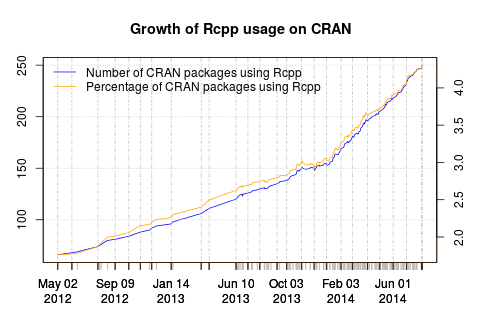
After two pre-releases in the last few days,
Conrad finalised a new
Armadillo version 4.400 today.
I had kept up with the pre-releases, tested twice against all eighty (!!)
CRAN dependents of
RcppArmadillo
and have hence uploaded RcppArmadillo 0.4.400.0 to
CRAN and into
Debian.
This release brings a number of new upstream features which are detailed
below. As included is s bugfix for sparse matrix creation at the
RcppArmadillo
end which was found by the ASAN tests at CRAN ---
which are similar to the sanitizers
tests I recently blogged. I was able to develop and test the fix in the very
docker r-devel-san images
I had written about which was nice. Special thanks also to Ryan Curtin for help
with the fix.
Changes in RcppArmadillo version 0.4.400.0 (2014-08-19)
Upgraded to Armadillo release Version 4.400 (Winter Shark Alley)
added gmm_diag class for statistical modelling using Gaussian Mixture Models;
includes multi-threaded implementation of k-means and Expectation-Maximisation for parameter estimation
added clamp() for clamping values to be between lower and upper limits
expanded batch insertion constructors for sparse matrices to add values at repeated locations
faster handling of subvectors by dot()
faster handling of aliasing by submatrix views
Corrected a bug (found by the g++ Address Sanitizer) in sparse
matrix initialization where space for a sentinel was allocated, but
the sentinel was not set; with extra thanks to Ryan Curtin for help
For a while, I've been wanting to set up configuration management for my home network.
With half a dozen servers, a VPS and a workstation it is not big, but large
enough to make it annoying to manually log into each machine for network-wide changes.
Most of the servers I have are low-end ARM machines, each responsible for a
couple of tasks. Most of my machines run Debian or something derived from Debian.
Oh, and I'm a member of the declarative school of configuration management.
Propellor
Propellor caught my eye earlier this year. Unlike some other configuration
management tools, it doesn't come with its own custom language but it is
written in Haskell, which I am already familiar with. It's also fairly simple,
declarative, and seems to do most of the handful of things that I need.
Propellor is essentially a Haskell application that you customize for your site.
It works very similar to e.g. xmonad, where you write a bit of Haskell code
for configuration which uses the upstream library code. When you run the
application it takes your code and builds a binary from your code and
the upstream libraries.
Each host on which Propellor is used keeps a clone of the site-local Propellor git
repository in /usr/local/propellor. Every time propellor runs
(either because of a manual "spin", or from a cronjob it can set up for you), it
fetches updates from the main site-local git repository, compiles the Haskell
application and runs it.
Setup
Propellor was surprisingly easy to set up. Running propellor
creates a clone of the upstream repository under ~/.propellor with a README
file and some example configuration. I copied config-simple.hs to
config.hs, updated it to reflect one of my hosts and within a few minutes I
had a basic working propellor setup.
You can use ./propellor <host> to trigger a run on a remote host.
At the moment I have propellor working for some basic things -
having certain Debian packages installed, a specific network configuration, mail
setup, basic Kerberos configuration and certain SSH options set.
This took surprisingly little time to set up, and it's been great being able
to take full advantage of Haskell.
Propellor comes with convenience functions for dealing with some commonly used
packages, such as Apt, SSH and Postfix. For a lot of the other packages, you'll
have to roll your own for now. I've written some extra code to make Propellor deal
with Kerberos keytabs and Dovecot, which I hope to submit upstream.
I don't have a lot of experience with other Free Software configuration
management tools such as Puppet and Chef, but for my use case Propellor works
very well.
The main disadvantage of propellor for me so far is that it needs to build
itself on each machine it runs on. This is fine for my workstation and
high-end servers, but it is somewhat more problematic on e.g. my Raspberry Pi's.
Compilation takes a while, and the Haskell compiler and libraries it needs amount
to 500Mb worth of disk space on the tiny root partition.
In order to work with Propellor, some Haskell knowledge is required.
The Haskell in the configuration file is reasonably easy to understand if you
keep it simple, but once the compiler spits out error messages then I suspect
you'll have a hard time without any Haskell knowledge.
Propellor relies on having a central repository with the configuration that it
can pull from as root. Unlike Joey, I am wary of publishing the configuration
of my home network and I don't have a highly available local git server setup.
A little more than 2 years ago, the
Ceilometer project was launched inside
the OpenStack ecosystem. Its main objective was to measure OpenStack cloud
platforms in order to provide data and mechanisms for functionalities such
as billing, alarming or capacity planning.
In this article, I would like to relate what I've been doing with other
Ceilometer developers in the last 5 months. I've lowered my involvement in
Ceilometer itself directly to concentrate on solving one of its biggest
issue at the source, and I think it's largely time to take a break and talk
about it.
Ceilometer early design
For the last years, Ceilometer didn't change in its core architecture.
Without diving too much in all its parts, one of the early design decision
was to build the metering around a data structure we called samples. A
sample is generated each time Ceilometer measures something. It is composed
of a few fields, such as the the resource id that is metered, the user and
project id owning that resources, the meter name, the measured value, a
timestamp and a few free-form metadata. Each time Ceilometer measures
something, one of its components (an agent, a pollster ) constructs and
emits a sample headed for the storage component that we call the
collector.
This collector is responsible for storing the samples into a database. The
Ceilometer collector uses a pluggable storage system, meaning that you can
pick any database system you prefer. Our original implementation has been
based on MongoDB from the beginning, but we then added a SQL driver, and
people contributed things such as HBase or DB2 support.
The REST API exposed by Ceilometer allows to execute various reading
requests on this data store. It can returns you the list of resources that
have been measured for a particular project, or compute some statistics on
metrics. Allowing such a large panel of possibilities and having such a
flexible data structure allows to do a lot of different things with
Ceilometer, as you can almost query the data in any mean you want.
The scalability issue
We soon started to encounter scalability issues in many of the read requests
made via the REST API. A lot of the requests requires the data storage to do
full scans of all the stored samples. Indeed, the fact that the API allows
you to filter on any fields and also on the free-form metadata (meaning non
indexed key/values tuples) has a terrible cost in terms of performance (as
pointed before, the metadata are attached to each sample generated by
Ceilometer and is stored as is). That basically means that the sample data
structure is stored in most drivers in just one table or collection, in
order to be able to scan them at once, and there's no good "perfect"
sharding solution, making data storage scalability painful.
It turns out that the Ceilometer REST API is unable to handle most of the
requests in a timely manner as most operations are O(n) where n is the
number of samples recorded (see
big O notation if you're
unfamiliar with it). That number of samples can grow very rapidly in an
environment of thousands of metered nodes and with a data retention of
several weeks. There is a few optimizations to make things smoother in
general cases fortunately, but as soon as you run specific queries, the API
gets barely usable.
During this last year, as the Ceilometer PTL, I discovered these issues
first hand since a lot of people were feeding me back with this kind of
testimony. We engaged several blueprints to improve the situation, but it
was soon clear to me that this was not going to be enough anyway.
Thinking outside the box
Unfortunately, the PTL job doesn't leave him enough time to work on the
actual code nor to play with anything new. I was coping with most of the
project bureaucracy and I wasn't able to work on any good solution to tackle
the issue at its root. Still, I had a few ideas that I wanted to try and as
soon as I stepped down from the PTL role, I stopped working on Ceilometer
itself to try something new and to think a bit outside the box.
When one takes a look at what have been brought recently in Ceilometer, they
can see the idea that Ceilometer actually needs to handle 2 types of data:
events and metrics.
Events are data generated when something happens: an instance start, a
volume is attached, or an HTTP request is sent to an REST API server. These
are events that Ceilometer needs to collect and store. Most OpenStack
components are able to send such events using the notification system built
into oslo.messaging.
Metrics is what Ceilometer needs to store but that is not necessarily tied
to an event. Think about an instance CPU usage, a router network bandwidth
usage, the number of images that Glance is storing for you, etc These are
not events, since nothing is happening. These are facts, states we need to
meter.
Computing statistics for billing or capacity planning requires both of these
data sources, but they should be distinct. Based on that assumption, and the
fact that Ceilometer was getting support for storing events, I started to
focus on getting the metric part right.
I had been a system administrator for a decade before jumping into OpenStack
development, so I know a thing or two on how monitoring is done in this
area, and what kind of technology operators rely on. I also know that
there's still no silver bullet this made it a good challenge.
The first thing that came to my mind was to use some kind of time-series
database, and export its access via a REST API as we do in all OpenStack
services. This should cover the metric storage pretty well.
Cooking Gnocchi
A cloud of gnocchis!
At the end of April 2014, this led met to start a new project code-named
Gnocchi. For the record, the name was picked after confusing so many times
the OpenStack Marconi project, reading OpenStack Macaroni instead. At least
one OpenStack project should have a "pasta" name, right?
The point of having a new project and not send patches on Ceilometer, was
that first I had no clue if it was going to make something that would be any
better, and second, being able to iterate more rapidly without being
strongly coupled with the release process.
The first prototype started around the following idea: what you want is to
meter things. That means storing a list of tuples of (timestamp, value) for
it. I've named these things "entities", as no assumption are made on what
they are. An entity can represent the temperature in a room or the CPU usage
of an instance. The service shouldn't care and should be agnostic in this
regard.
One feature that we discussed for several OpenStack summits in the
Ceilometer sessions, was the idea of doing aggregation. Meaning, aggregating
samples over a period of time to only store a smaller amount of them. These
are things that time-series format such as the
RRDtool have been doing for a long time on
the fly, and I decided it was a good trail to follow.
I assumed that this was going to be a requirement when storing metrics into
Gnocchi. The user would need to provide what kind of archiving it would
need: 1 second precision over a day, 1 hour precision over a year, or even
both.
The first driver written to achieve that and store those metrics inside
Gnocchi was based on whisper. Whisper
is the file format used to store metrics for the
Graphite project. For the actual storage,
the driver uses Swift, which has the advantages to be part of OpenStack and
scalable.
Storing metrics for each entities in a different whisper file and putting
them in Swift turned out to have a fantastic algorithm complexity: it was
O(1). Indeed, the complexity needed to store and retrieve metrics doesn't
depends on the number of metrics you have nor on the number of things you
are metering. Which is already a huge win compared to the current Ceilometer
collector design.
However, it turned out that whisper has a few limitations that I was
unable to circumvent in any manner. I needed to patch it to remove a lot of
its assumption about manipulating file, or that everything is relative to
now (time.time()). I've started to hack on that in my own fork, but then
everything broke. The whisper project code base is, well, not the state of
the art, and have 0 unit test. I was starring at a huge effort to transform
whisper into the time-series format I wanted, without being sure I wasn't
going to break everything (remember, no test coverage).
I decided to take a break and look into alternatives, and stumbled upon
Pandas, a data manipulation and statistics
library for Python. Turns out that Pandas support time-series natively, and
that it could do a lot of the smart computation needed in Gnocchi. I built a
new file format leveraging Pandas for computing the time-series and named it
carbonara (a wink to both the
Carbon project and pasta, how
clever!). The code is quite small (a third of whisper's, 200 SLOC vs 600
SLOC), does not have many of the whisper limitations and it has test
coverage. These Carbonara files are then, in the same fashion, stored into
Swift containers.
Anyway, Gnocchi storage driver system is designed in the same spirit that
the rest of OpenStack and Ceilometer storage driver system. It's a plug-in
system with an API, so anyone can write their own driver. Eoghan Glynn has
already started to write a InfluxDB driver, working
closely with the upstream developer of that database. Dina Belova started to
write an OpenTSDB driver. This helps to make sure
the API is designed directly in the right way.
Handling resources
Measuring individual entities is great and needed, but you also need to link
them with resources. When measuring the temperature and the number of a
people in a room, it is useful to link these 2 separate entities to a
resource, in that case the room, and give a name to these relations, so one
is able to identify what attribute of the resource is actually measured. It
is also important to provide the possibility to store attributes on these
resources, such as their owners, the time they started and ended their
existence, etc.
Relationship of entities and resources
Once this list of resource is collected, the next step is to list and filter
them, based on any criteria. One might want to retrieve the list of
resources created last week or the list of instances hosted on a particular
node right now.
Resources also need to be specialized. Some resources have attributes that
must be stored in order for filtering to be useful. Think about an instance
name or a router network.
All of these requirements led to to the design of what's called the
indexer. The indexer is responsible for indexing entities, resources, and
link them together. The initial implementation is based on
SQLAlchemy and should be pretty efficient. It's
easy enough to index the most requested attributes (columns), and they are
also correctly typed.
We plan to establish a model for all known OpenStack resources (instances,
volumes, networks, ) to store and index them into the Gnocchi indexer in
order to request them in an efficient way from one place. The generic
resource class can be used to handle generic resources that are not tied to
OpenStack. It'd be up to the users to store extra attributes.
Dropping the free form metadata we used to have in Ceilometer makes sure
that querying the indexer is going to be efficient and scalable.
The indexer classes and their relations
REST API
All of this is exported via a REST API that was partially designed and
documented in the
Gnocchi specification in the Ceilometer repository;
though the spec is not up-to-date yet. We plan to auto-generate the
documentation from the code as we are currently doing in Ceilometer.
The REST API is pretty easy to use, and you can use it to manipulate
entities and resources, and request the information back.
Macroscopic view of the Gnocchi architecture
Roadmap & Ceilometer integration
All of this plan has been exposed and discussed with the Ceilometer team
during the last
OpenStack summit in Atlanta
in May 2014, for the Juno release. I led a session about this entire
concept, and convinced the team that using Gnocchi for our metric storage
would be a good approach to solve the Ceilometer collector scalability
issue.
It was decided to conduct this project experiment in parallel of the current
Ceilometer collector for the time being, and see where that would lead the
project to.
Early benchmarks
Some engineers from Mirantis did a few benchmarks around Ceilometer and also
against an early version of Gnocchi, and Dina Belova presented them to us
during the mid-cycle sprint we organized in Paris in early July.
The following graph sums up pretty well the current Ceilometer performance
issue. The more you feed it with metrics, the more slow it becomes.
For Gnocchi, while the numbers themselves are not fantastic, what is
interesting is that all the graphs below show that the performances are
stable without correlation with the number of resources, entities or
measures. This proves that, indeed, most of the code is built around a
complexity of O(1), and not O(n) anymore.
Next steps
Cl ment drawing the logo
While the Juno cycle is being wrapped-up for most projects, including
Ceilometer, Gnocchi development is still ongoing. Fortunately, the composite
architecture of Ceilometer allows a lot of its features to be replaced by
some other code dynamically. That, for example, enables Gnocchi to provides
a Ceilometer dispatcher plugin for its collector, without having to ship the
actual code in Ceilometer itself. That should help the development of
Gnocchi to not be slowed down by the release process for now.
The Ceilometer team aims to provide Gnocchi as a sort of technology preview
with the Juno release, allowing it to be deployed along and plugged with
Ceilometer. We'll discuss how to integrate it in the project in a more
permanent and strong manner probably during the
OpenStack Summit for Kilo
that will take place next November in Paris.
There hasn t been a progress-report on DEP-11 for some time, but that doesn t mean there was no work going on on it.
DEP-11 is Debian s implementation of AppStream, as well as an effort to enhance the metadata available about software in Debian. While initially, AppStream was only about applications, DEP-11 was designed with a larger scope, to collect data about libraries, binaries and things like Python modules. Now, since AppStream 0.6, DEP-11 and AppStream have essentially the same scope, with the difference of DEP-11 metadata being described in YAML, while official AppStream data is XML. That was due to a request by our ftpmasters team, which doesn t like XML (which is also not used anywhere in Debian, as opposed to YAML). But this doesn t mean that people will have to deal with the YAML file format: The libappstream library will just take DEP-11 data as another data source for it s Xapian database, allowing anything using libappstream to access that data just like the XML stuff. Richards libappstream-glib will also receive support for the DEP-11 format soon, filling it s in-memory data cache and enabling the use of GNOME-Software on Debian.
So, what has been done so far? The past months, my Google Summer of Code student. Abhishek Bhattacharjee, was working hard to integrate DEP-11 support into dak, the Debian Archive Kit, which maintains the whole Debian archive. The result will be an additional metadata table in our internal Postgres database, storing detailed information about the software available in a Debian package, as well as Components-<arch>.yml.gz files in the Debian repositories. Dak will also produce an application icon-cache and a screenshots repository. During the time of the SoC, Abhishek focused mainly on the applications part of things, and less on the other components (like extracting data about Python modules or libraries) these things can easily be implemented later.
The remaining steps will be to polish the code and make it merge-ready for Debian s dak (as soon as it has received enough testing, we will likely give it a try on the Tanglu Debian derivative). Following that, Apt will be extended to fetch the DEP-11 data on-demand on systems where it is useful (which is currently mostly desktop-systems) if you want to save a little bit of space, you will be able to disable downloading this extra metadata in Apt. From there, libappstream will take the data for it s Xapian db. This will lead to the removal of the much-hated (from ftpmasters and maintainers side) app-install-data package, which has not been updated for two years and only contains a small fraction of the metadata provided by DEP-11.
What Debian will ultimately gain from this effort is support for software-centers like GNOME-Software, and improved support for tools like Apper and Muon in displaying applications. Long-term, with more metadata being available, It would be cool to add support for it to specialized package managers , like Python s pip, npm or gem, to make them fetch information about available distribution software and install that instead of their own copies from 3rd-party repositories, if possible. This should ultimatively lead to less code duplication on distributions and will likely result in fewer security issues, since the officially maintained and integrated distribution packages can easily be used, if possible. This is no attempt to make tools like pip obsolete, but an attempt to have the different tools installing software on your machine communicate better, instead of creating parallel worlds in terms of software management. Another nice sideeffect of more metadata will be options to search for tools handling mimetypes in the software repos (in case you can t open a file), smart software centers installing missing firmware, and automatic suggestions for developers which software they need to install in order to build a specific software package. Also, the data allows us to match software across distributions, for that, I will have some news soon (not sure how soon though, as I am currently in thesis-writing-mode, and therefore have not that much spare time). Since the goal is to have these features available on all distributions supporting AppStream, it will take longer to realize but we are on a good way.
So, if you want some more information about my student s awesome work, you can read his blogpost about it. He will also be at Debconf 14 (Portland). (I can t make it this time, but I surely won t miss the next Debconf)
Sadly, I only see a very small chance to have the basic DEP-11 stuff land in-time for Jessie (lots of review work needs to be done, and some more code needs to be written), but we will definitively have it in Jessie+1.
A small example on how this data will look like can be found here a larger, actual file is available here. Any questions and feedback are highly appreciated.
This is a random post inspired by recent purchases. Some things we buy are practical, others are a little arbitrary.
I tend to avoid buying things for the sake of it, and have explicitly started decluttering our house over the past few years. That said sometimes things just seem sufficiently "cool" that they get bought without too much thought.
This entry is about two things.
A couple of years ago my bathroom was ripped apart and refitted. Gone was the old and nasty room, and in its place was a glorious space. There was only one downside to the new bathroom - you turn on the light and the fan comes on too.
When your wife works funny shifts at the hospital you can find that the (quiet) fan sounds very loud in the middle of the night and wakes you up..
So I figured we could buy a couple of LED lights and scatter them around the place - when it is dark the movement sensors turn on the lights.
These things are amazing. We have one sat on a shelf, one velcroed to the bottom of the sink, and one on the floor, just hidden underneath the toilet.
Due to the shiny-white walls of the room they're all you need in the dark.
By contrast my second purchase was a mistake - The Logitech Harmony 650 Universal Remote Control should be great. It clearly has the features I want - Able to power:
Our TV.
Our Sky-box.
OUr DVD player.
The problem is solely due to the horrific software. You program the device via an application/website which works only under Windows.
I had to resort to installing Windows in a virtual machine to make it run:
# Get the Bus/ID for the USB device
bus=$(lsusb  grep -i Harmony   awk ' print $2 '   tr -d 0)
id=$(lsusb  grep -i Harmony   awk ' print $4 '   tr -d 0:)
# pass to kvm
kvm -localtime ..  -usb -device usb-host,hostbus=$bus,hostaddr=$id ..
That allows the device to be passed through to windows, though you'll later have to jump onto the Qemu console to re-add the device as the software disconnects and reconnects it at random times, and the bus changes. Sigh.
I guess I can pretend it works, and has cut down on the number of remotes sat on our table, but .. The overwhelmingly negative setup and configuration process has really soured me on it.
There is a linux application which will take a configuration file and squirt it onto the device, when attached via a USB cable. This software, which I found during research prior to buying it, is useful but not as much as I'd expected. Why? Well the software lets you upload the config file, but to get a config file you must fully complete the setup on Windows. It is impossible to configure/use this device solely using GNU/Linux.
(Apparently there is MacOS software too, I don't use macs. *shrugs*)
In conclusion - Motion-activated LED lights, more useful than expected, but Harmony causes Discord.
This is the last week of Google Summer of Code 2014 - all good things must come to an end. To wrap things up, I ve merged all my work on JSCommunicator into a new version with all the added features. You can now demo the new and improved (or at least so I hope) JSCommunicator on rtc.debian.org!
JSCommunicator 2.0 has an assortment of new add-ons, the most important new features are the Instant Messaging component and the internationalization support.
The UI has been reorganized but we are currently not using a skin for color scheme - will be posting about that in a bit. The idea is to have a more neutral look that can be easily customized and integrated with other web apps.
A chat session is automatically opened when you begin a call with someone - unless you already started a chat session with said someone. Sound alerts for new incoming messages are optional in the config file, visual alerts occur when an inactive chat tab receives a new message. Future work includes multiple user chat sessions and adapting the layout to a large amount of chat tabs. Currently it only handles 6. (Should I allow more? Who chats with more than 6 people at once? 14 year old me would, but now I just can t handle that. Anyway, I welcome advice on how to go about this. Should we do infinite tabs or if not, what s the cut-off?)
About internationalization, I m uber proud to say we currently run in 6 languages! The 6 are English (default), Spanish, French, Portuguese, Hebrew and German. But one thing I must mention is that since I added new stuff to JSCommunicator, some of the new stuff doesn t have a translation. I took care of the Portuguese translation and Yehuda Korotkin quickly turned in the Hebrew translation, but we are still missing an update for Spanish, French and German. If you can contribute, please do. There are about 10 new labels to translate, you can fix the issue here. Or if you re short on time, shoot me an email with the translation for what s on the right side of the = :
welcome = Welcome,
call = Call
chat = Chat
enter_contact = Enter contact
type_to_chat = type to chat
start_chat = start chat
me = me
logout = Logout
no_contact = Please enter a contact.
remember_me = Remember me
I ll merge it myself but I ll be sure to add you to the authors list.
One of the issues that comes up from time to time in many organizations and projects (both community and commercial ventures) is the question of how to manage bug reports, feature requests and support requests.
There are a number of open source solutions and proprietary solutions too. I've never seen a proprietary solution that offers any significant benefit over the free and open solutions, so this blog only looks at those that are free and open.
Support request or bug?
One common point of contention is the distinction between support requests and bugs. Users do not always know the difference.
Some systems, like the Github issue tracker, gather all the requests together in a single list. Calling them "Issues" invites people to submit just about anything, such as "I forgot my password".
At the other extreme, some organisations are so keen to keep support requests away from their developers that they operate two systems and a designated support team copies genuine bugs from the customer-facing trouble-ticket/CRM system to the bug tracker. This reduces the amount of spam that hits the development team but there is overhead in running multiple systems and having staff doing cut and paste.
Will people use it?
Another common problem is that a full bug report template is overkill for some issues. If a user is asking for help with some trivial task and if the tool asks them to answer twenty questions about their system, application version, submit log files and other requirements then they won't use it at all and may just revert to sending emails or making phone calls.
Ideally, it should be possible to demand such details only when necessary. For example, if a support engineer routes a request to a queue for developers, then the system may guide the support engineer to make sure the ticket includes attributes that a ticket in the developers' queue should have.
Beyond Perl
Some of the most well known systems in this space are Bugzilla, Request Tracker and OTRS. All of these solutions are developed in Perl.
These days, Python, JavaScript/Node.JS and Java have taken more market share and Perl is chosen less frequently for new projects. Perl skills are declining and younger developers have usually encountered Python as their main scripting language at university.
My personal perspective is that this hinders the ability of Perl projects to attract new blood or leverage the benefits of new Python modules that don't exist in Perl at all.
Bugzilla has fallen out of the Debian and Ubuntu distributions after squeeze due to its complexity. In contrast, Fedora carries the Bugzilla packages and also uses it as their main bug tracker.
Evaluation
I recently started having a look at the range of options in the Wikipedia list of bug tracking systems.
Some of the trends that appear:
Many appear to be bug tracking systems rather than issue tracking / general-purpose support systems. How well do they accept non-development issues and keep them from spamming the developers while still providing a useful features for the subset of users who are doing development?
A number of them try to bundle other technologies, like wiki or FAQ systems: but how well do they work with existing wikis? This trend towards monolithic products is slightly dangerous. In my own view, a wiki embedded in some other product may not be as well supported as one of the leading purpose-built wikis.
Some of them also appear to offer various levels of project management. For development tasks, it is just about essential for dependencies and a roadmap to be tightly integrated with the bug/feature tracker but does it make the system more cumbersome for people dealing with support requests? Many support requests, like "I've lost my password", don't really have any relationship with project management or a project roadmap.
Not all appear to handle incoming requests by email. Bug tracking systems can be purely web/form-based, but email is useful for helpdesk systems.
Questions
This leaves me with some of the following questions:
Which of these systems can be used as a general purpose help-desk / CRM / trouble-ticket system while also being a full bug and project management tool for developers?
For those systems that don't work well for both use cases, which combinations of trouble-ticket system + bug manager are most effective, preferably with some automated integration?
Which are more extendable with modern programming practices, such as Python scripting and using Git?
Which are more future proof, with choice of database backend, easy upgrades, packages in official distributions like Debian, Ubuntu and Fedora, scalability, IPv6 support?
Which of them are suitable for the public internet and which are only considered suitable for private access?
Qemu is upto 8x faster than Foundation model on Integers, but only 50% faster on Math. Meanwhile, the Host pc spends 7-40x slower emulating ARMv8 than executing native instructions.
PrefaceDuring Google Summer of Code 2014, I got to work on the Debian WebRTC portal under the mentorship of Daniel Pocock. Now I had every intention of meticulously documenting my progress at each step of development in this blog, but I was a bit late in getting the blog up and running. I ll now be publishing a series of posts to recap all I ve done during GSoC. Better late than never.
Intro
JSCommunicator is a SIP communication tool developed in HTML and JavaScript. The code was designed to make integrating JSCommunicator with a website or web app as simple as possible. It s quite easy, really. However, I do think a more detailed explanation on how to set things up and a guide to the JSCommunicator architecture could be of use, particularly for those wanting to modify the code in any way.
Setup
To begin, please fork the JSCommunicator repo.
If you are new to git, feel free to follow the steps in section Setup and Clone in this post.
If you read the README file (which you always should), you ll see that JSCommunicator needs a SIP proxy that supports SIP over Websockets transport. Some options are:
I didn t find a tutorial for Kamailio setup, I did find one for repro setup. And bonus, here you have a great tutorial on how to setup and configure your SIP proxy AND your TURN server.
In your project s root directory, you ll see a file named config-sample.js. Make a copy of that file named config.js. The config-sample.js file has comments that are very instructive. In sum, the only thing you have to modify is the turn_servers property and the websocket property. In my case, debrtc.org was the domain registered for testing my project, so my config file has:
turn_servers:[server:"turn:debrtc.org"],
Note that unlike the sample, I didn t set a username and password so SIP credentials will be used.
Now fill in the websocket property here we use sip5060.net.
I m pretty sure you can set the connection_recovery properties to whatever you like. Everything else is optional. If you set the user property, specifically display_name and uri, that will be used to fill in the Login form and takes preference over any Remember me data. If you also set sip_auth_password, JSCommunicator will automatically log in.
All the other properties are for other optional functionalities and are well explained.
You ll need some third-party javascript that is not included in the JSCommunicator git repo. Namely jQuery version 1.4 or higher and ArbiterJS version 1.0. Download jQuery here and ArbiterJS here and place the .js files in your project s root directory. Do make sure that you are including the correct filename in your html file. For example, in phone-dev.shtml, a file named jquery.js is included. The file you downloaded will likely have version numbers in it s file name. So rename the downloaded file or change the content of src in your includes. This is uber trivial, but I ve made the mistake several times.
You ll also need JsSIP.js which can be downloaded here. Same naming care must be taken as is the case for jQuery and ArbiterJS. The recently added Instant Messaging component and some of the new features need jQuery-UI - so far version 1.11.* is known to work. From the downloaded .zip all you need is the jquery-ui-...js file and the jquery-ui-...css file, also to be placed in the project s root directory. If you ll be using the internationalization support you ll also need jquery.i18n.properties.js.
To try out JSCommunicator, deploy the website locally by copying your project directory to the apache document root directory (provided you are using apache, which is a good idea.). You ll likely have to restart your server before this works. Now the demo .shtml pages only have a header with all the necessary includes, then a Server Side Include for the body of the page, with all the JSCommunicator html. The html content is in the file jscommunicator.inc. You can enable SSI on apache, OR you can simply copy and paste the content of jscommunicator.inc into phone-dev.shmtl. Start up apache, open a browser and navigate to localhost/jscommunicator/phone-dev.shmtl and you should see:
Actually, pending updates to JSCommunicator, you should see a brand new UI! But all the core stuff will be the same.
Architecture
Disclaimer: I m explaining my view of the JSCommunicator architecture, which currently may not be 100% correct. But so far it s been enough for me to make my modifications and additions to the code, so it could be of use. One I get a JSCommunicator Founding Father s stamp of approval, I ll be sure to confirm the accuracy.
Now to explain how the JSCommunicator code interacts, the use of each code item is described, ignoring all the html and css which will vary according to how you choose to use JSCommunicator. I m also not going to explain jQuery which is a dependency but not specific to WebRTC. The core JSCommunicator code is the following:
config.js
jssip-helper.js
parseuri.js
webrtc-check.js
JSCommUI.js
JSCommManager.js
make-release
init.js
Arbiter.js
JsSIP.js
Each of these files will be presented in what I hope is an intuitive order.
config.js - As expected, this file contains your custom configuration specifications, i.e. the servers being used to direct traffic, authentication credentials, and a series of properties to enable/disable optional functionalities in JSCommunicator.
The next three files could be considered utils :
jssip-helper.js - This will load the data from config.js necessary to run JSCommunicator, such as configurations relating to servers, websockets, connection specifications (timeout, recovery intervals), and user credentials. Properties for optional features are ignored of course.
parseuri.js - Contains a function to segregate data from a URI.
webrtc-check.js - Verifies if browser is WebRTC compatible by checking if it s possible to enable camera and microphone access.
These two are where the magic happens:
JSCommUI.js - Responsible for the UI component, controling what becomes visible to the user, audio effects, client-side error handling, and gathering the data that will be fed to JSCommManager.js.
JSCommManager.js - Initializes the SIP User Agent to manage the session including (but not limited to) beginning/terminating the session, sending/receiving SIP messages and calls, and signaling the state of the session and other important notifications such as incoming calls, messages received, etc.
Now for some extras:
make-release - Combines the main .js files into one big file. Gets jssip-helper.js, parseuri.js, webrtc-check.js, JSCommUI.js and JSCommManager.js and spits out a new file JSComm.js with all that content. Now you understand why phone-dev.shtml included each of the 5 files mentioned above whereas phone.shmtl includes only JSComm.js which didn t exist until you ran make-release. That confused me a bit.
init.js - On page load, calls JSCommManager.js init function, which eventually calls JSCommUI.js init function. In other words, starts up the JSCommunicator app. I guess it s only used to show how to start up the app. This could be done directly on the page you re embedding JSCommunicator from. So maybe not entirely needed.
Third party code:
Arbiter.js - Javascript implmentation of the publish/subscribe patten, written by Matt Kruse. In JSCommunicator it s used in JSCommManager.js to publish signals to describe direct the app s behavior. For example, JSCommManager will publish a message indicating that the user received a call from a certain URI. In event-demo.js we subscribe to this kind of message and when said message is received, an action can be performed such as adding to the app s call history. Very cool.
JsSIP.js - Implements the SIP WebSocket transport in Javascript. This ensures the transportantion of data is done in adherence to the WebSocket protocol. In JSCommManager.js we initialize a SIP User Agent based in the implementation in JsSIP.js. The User Agent will translate all of the JSCommunicator actions into SIP WebSocket format. For example, when sending an IM, the JSCommunicator app will collect the essential data such as say the origin URI, destination URI and an IM message, while the User Agent is in charge of formating the data so that it can be transported in a SIP message unit. A SIP message contains a lot more information than just the sender, receiver and message. Of course, a lot of the info in a SIP message is irrelevant to the user and in JSCommUI.js we filter through all that data and only display what the user needs to see.
Here s a diagram of sorts to help you visualize how the code interacts:
In sum, 1 - JSCommUI.js handles what is displayed in the UI and feeds data to JSCommManager.js; 2 - JSCommManager.js actually does stuff, feeding data to be displayed to JSCommUI.js; 3 - JSCommManager.js calls functions from the three utils , parseuri.js, webrtc-check.js and jssip-helpher.js which organizes the data from config.js; 4 - JSCommManager.js initializes a SIP User Agent based on the implementation in Arbiter.js.
When making any changes to JSCommunicator, you will likely only be working with JSCommUI.js and JSCommManager.js.
PrefaceDuring Google Summer of Code 2014, I got to work on the Debian WebRTC portal under the mentorship of Daniel Pocock. Now I had every intention of meticulously documenting my progress at each step of development in this blog, but I was a bit late in getting the blog up and running. I ll now be publishing a series of posts to recap all I ve done during GSoC. Better late than never.
Intro
JSCommunicator is a SIP communication tool developed in HTML and JavaScript. The code was designed to make integrating JSCommunicator with a website or web app as simple as possible. It s quite easy, really. However, I do think a more detailed explanation on how to set things up and a guide to the JSCommunicator architecture could be of use, particularly for those wanting to modify the code in any way.
Setup
To begin, please fork the JSCommunicator repo.
If you are new to git, feel free to follow the steps in section Setup and Clone in this post.
If you read the README file (which you always should), you ll see that JSCommunicator needs a SIP proxy that supports SIP over Websockets transport. Some options are:
I didn t find a tutorial for Kamailio setup, I did find one for repro setup. And bonus, here you have a great tutorial on how to setup and configure your SIP proxy AND your TURN server.
In your project s root directory, you ll see a file named config-sample.js. Make a copy of that file named config.js. The config-sample.js file has comments that are very instructive. In sum, the only thing you have to modify is the turn_servers property and the websocket property. In my case, debrtc.org was the domain registered for testing my project, so my config file has:
turn_servers:[server:"turn:debrtc.org"],
Note that unlike the sample, I didn t set a username and password so SIP credentials will be used.
Now fill in the websocket property here we use sip5060.net.
I m pretty sure you can set the connection_recovery properties to whatever you like. Everything else is optional. If you set the user property, specifically display_name and uri, that will be used to fill in the Login form and takes preference over any Remember me data. If you also set sip_auth_password, JSCommunicator will automatically log in.
All the other properties are for other optional functionalities and are well explained.
You ll need some third-party javascript that is not included in the JSCommunicator git repo. Namely jQuery version 1.4 or higher and ArbiterJS version 1.0. Download jQuery here and ArbiterJS here and place the .js files in your project s root directory. Do make sure that you are including the correct filename in your html file. For example, in phone-dev.shtml, a file named jquery.js is included. The file you downloaded will likely have version numbers in it s file name. So rename the downloaded file or change the content of src in your includes. This is uber trivial, but I ve made the mistake several times.
You ll also need JsSIP.js which can be downloaded here. Same naming care must be taken as is the case for jQuery and ArbiterJS. The recently added Instant Messaging component and some of the new features need jQuery-UI - so far version 1.11.* is known to work. From the downloaded .zip all you need is the jquery-ui-...js file and the jquery-ui-...css file, also to be placed in the project s root directory. If you ll be using the internationalization support you ll also need jquery.i18n.properties.js.
To try out JSCommunicator, deploy the website locally by copying your project directory to the apache document root directory (provided you are using apache, which is a good idea.). You ll likely have to restart your server before this works. Now the demo .shtml pages only have a header with all the necessary includes, then a Server Side Include for the body of the page, with all the JSCommunicator html. The html content is in the file jscommunicator.inc. You can enable SSI on apache, OR you can simply copy and paste the content of jscommunicator.inc into phone-dev.shmtl. Start up apache, open a browser and navigate to localhost/jscommunicator/phone-dev.shmtl and you should see:
Actually, pending updates to JSCommunicator, you should see a brand new UI! But all the core stuff will be the same.
Architecture
Disclaimer: I m explaining my view of the JSCommunicator architecture, which currently may not be 100% correct. But so far it s been enough for me to make my modifications and additions to the code, so it could be of use. One I get a JSCommunicator Founding Father s stamp of approval, I ll be sure to confirm the accuracy.
Now to explain how the JSCommunicator code interacts, the use of each code item is described, ignoring all the html and css which will vary according to how you choose to use JSCommunicator. I m also not going to explain jQuery which is a dependency but not specific to WebRTC. The core JSCommunicator code is the following:
config.js
jssip-helper.js
parseuri.js
webrtc-check.js
JSCommUI.js
JSCommManager.js
make-release
init.js
Arbiter.js
JsSIP.js
Each of these files will be presented in what I hope is an intuitive order.
config.js - As expected, this file contains your custom configuration specifications, i.e. the servers being used to direct traffic, authentication credentials, and a series of properties to enable/disable optional functionalities in JSCommunicator.
The next three files could be considered utils :
jssip-helper.js - This will load the data from config.js necessary to run JSCommunicator, such as configurations relating to servers, websockets, connection specifications (timeout, recovery intervals), and user credentials. Properties for optional features are ignored of course.
parseuri.js - Contains a function to segregate data from a URI.
webrtc-check.js - Verifies if browser is WebRTC compatible by checking if it s possible to enable camera and microphone access.
These two are where the magic happens:
JSCommUI.js - Responsible for the UI component, controling what becomes visible to the user, audio effects, client-side error handling, and gathering the data that will be fed to JSCommManager.js.
JSCommManager.js - Initializes the SIP User Agent to manage the session including (but not limited to) beginning/terminating the session, sending/receiving SIP messages and calls, and signaling the state of the session and other important notifications such as incoming calls, messages received, etc.
Now for some extras:
make-release - Combines the main .js files into one big file. Gets jssip-helper.js, parseuri.js, webrtc-check.js, JSCommUI.js and JSCommManager.js and spits out a new file JSComm.js with all that content. Now you understand why phone-dev.shtml included each of the 5 files mentioned above whereas phone.shmtl includes only JSComm.js which didn t exist until you ran make-release. That confused me a bit.
init.js - On page load, calls JSCommManager.js init function, which eventually calls JSCommUI.js init function. In other words, starts up the JSCommunicator app. I guess it s only used to show how to start up the app. This could be done directly on the page you re embedding JSCommunicator from. So maybe not entirely needed.
Third party code:
Arbiter.js - Javascript implmentation of the publish/subscribe patten, written by Matt Kruse. In JSCommunicator it s used in JSCommManager.js to publish signals to describe direct the app s behavior. For example, JSCommManager will publish a message indicating that the user received a call from a certain URI. In event-demo.js we subscribe to this kind of message and when said message is received, an action can be performed such as adding to the app s call history. Very cool.
JsSIP.js - Implements the SIP WebSocket transport in Javascript. This ensures the transportantion of data is done in adherence to the WebSocket protocol. In JSCommManager.js we initialize a SIP User Agent based in the implementation in JsSIP.js. The User Agent will translate all of the JSCommunicator actions into SIP WebSocket format. For example, when sending an IM, the JSCommunicator app will collect the essential data such as say the origin URI, destination URI and an IM message, while the User Agent is in charge of formating the data so that it can be transported in a SIP message unit. A SIP message contains a lot more information than just the sender, receiver and message. Of course, a lot of the info in a SIP message is irrelevant to the user and in JSCommUI.js we filter through all that data and only display what the user needs to see.
Here s a diagram of sorts to help you visualize how the code interacts:
In sum, 1 - JSCommUI.js handles what is displayed in the UI and feeds data to JSCommManager.js; 2 - JSCommManager.js actually does stuff, feeding data to be displayed to JSCommUI.js; 3 - JSCommManager.js calls functions from the three utils , parseuri.js, webrtc-check.js and jssip-helpher.js which organizes the data from config.js; 4 - JSCommManager.js initializes a SIP User Agent based on the implementation in Arbiter.js.
When making any changes to JSCommunicator, you will likely only be working with JSCommUI.js and JSCommManager.js.
Different hosting providers do things slightly differently, so it's
sometimes handy to be able to figure out where you are. Rackspace is
based on Xen and their provided images should include the
xenstore-ls command available. xenstore-lsvm-data will give
you a handy provider and even region fields to let you know
where you are.
function is_rackspace if[ ! -f /usr/bin/xenstore-ls ]; then return 1
fi
/usr/bin/xenstore-ls vm-data grep -q "Rackspace"if is_rackspace; thenecho"I am on Rackspace"fi
As mentioned in my previous message, I'm orphaning
various software packages that I was maintaining as part of my job at
Stanford, or that for some other reason I'm no longer using directly. My
goal is to free up some time and space for new work projects at my new
employer, for other hobbies, and to take better care of other projects
that I'm not orphaning.
The following software packages are now orphaned, and marked as such on
their web pages:
I'm also stepping down from Debian package maintenance for the OpenAFS and
Shibboleth packages, and have already notified the relevant communities.
For the Debian packages, and for the above software packages, I will
continue to provide security support until someone else can take them
over.
WebAuth is going to be in a state of transition as noted on its page:
My successor at Stanford will be continuing maintenance and development,
but that person hasn't been hired yet, and it will take some time for them
to ramp up and start making new releases (although there may be at least
one interim release with work that I'm finishing now). It's therefore not
strictly orphaned, but it's noted that way on my software pages until
someone else at Stanford picks it up.
Development of the other packages that I maintain should continue as
normal, with a small handful of exceptions. The following packages are
currently in limbo, since I'm not sure if I'll have continued use for
them:
I'm not very happy with the current design of either kadmin-remctl or
wallet, so if I do continue to maintain them (and have time to work on
them), I am likely to redesign them considerably.
For all of my packages, I've been adding clones of the repository to
GitHub as an additional option besides my
personal Git repository server. I'm of two minds about using (and locking
myself into) more of the GitHub infrastructure, but repository copies on
GitHub felt like it might be useful for anyone who wanted to fork or take
over maintenance. I will be adding links to the GitHub repositories to
the software packages for things that are in Git.
If you want to take over any of the orphaned software packages, feel free.
When you're ready for the current software pages to redirect to its new
home, let me know.
Those reading this journal may have noticed that my rate of posting has
dropped a bit in the past few years, and quite a lot in the past year.
One of the major reasons for this was work, which had been getting more
bureaucratic, more stressful, less trusting, and more fearful. After this
got drastically worse in the past six months, I finally decided enough was
enough and took advantage of a good opportunity to do something different.
I will be joining Dropbox's site reliability engineering team in a week
and a half (which means that I'll be working on their servers, not on
the product itself). It will take a few months to settle in, but
hopefully this will mean a significant improvement to my stress levels and
a lot of interesting projects to work on.
I'm taking advantage of this change to inventory the various things I'm
currently committed to and let go of some projects to make more space in
my life. There are also a variety of software projects that I was
maintaining as part of my job at Stanford, and I will be orphaning many of
those packages. I'll make another journal post about that a bit later.
For Debian folks, I am going to be at Debconf, and hope to meet many of
you there. (It's going to sort of be my break between jobs.) In the long
run, I'm hoping this move will let me increase my Debian involvement.
In the long run, I expect most of my free software work, my reviews, and
the various services I run to continue as before, or even improve as my
stress drops. But I've been at Stanford for a very long time, so this is
quite the leap into the unknown, and it's going to take a while before I'm
sure what new pattern my life will fall into.
count=0
things="0 1 0 0 1"for i in $things;
do if[$i=="1"]; then(( count++ ))fidoneecho"Count is $ count "
Looks fine? I've probably written this many times. There's a small
gotcha:
((expression))
The expression is evaluated according to the rules described below
under ARITHMETIC EVALUATION. If the value of the expression is
non-zero, the return status is 0; otherwise the return status
is 1. This is exactly equivalent to let "expression".
When you run this script with -e or enable errexit -- probably
because the script has become too big to be reliable without it --
count++ is going to return 0 (post-increment) and per above
stop the script. A definite trap to watch out for!
GNOME has, for some reason or another,
always been the default desktop environment in Debian since the installer is
able to install a full desktop environment by default. Release after release,
Debian has been shipping different versions of GNOME, first based on the
venerable 1.2/1.4 series, then moving to the time-based GNOME 2.x series,
and finally to the newly designed 3.4 series for the last stable release,
Debian 7 wheezy .
During the final stages of wheezy s development, it was pointed out that
the first install CD image would not longer hold all of the required packages
to install a full GNOME desktop environment. There was lots of discussion
surrounding this bug or fact, and there were two major reactions to it. The
Debian GNOME team rebuilt some key packages so they would be compressed using
xz instead of gzip, saving the few megabytes that
were needed to squeeze everything in the first CD. In parallel, the tasksel
maintainer decided
switching to Xfce as default
desktop was another obvious fix. This change, unannounced and two days before
the freeze, was very contested and spurred the usual massive debian-devel
threads. In the end, and after a few default desktop flip flops, it was agreed
that GNOME would remain as the default for the already frozen wheezy release,
and this issue would be revisited later on during jessie s
development.
And indeed, some months ago, Xfce was again reinstated as Debian s
default desktop for jessie as announced:
Change default desktop to xfce.
This will be re-evaluated before jessie is frozen. The evaluation will
start around the point of DebConf (August 2014). If at that point gnome
looks like a better choice, it ll go back as the default.
Some criteria for that choice will include:
* Popcon numbers for gnome on jessie. If gnome installations continue to
  rise fast enough despite xfce being the default (compared with, say
  kde installations), then we ll know that users prefer gnome.
  Currently we have no data about how many users would choose gnome when
  it s not the default. Part of the reason for switching to xfce now
  is to get such data.
* The state of accessability support, particularly for the blind.
* How well the UI works for both new and existing users. Gnome 3
  seems to be adding back many gnome 2 features that existing users
  expect, as well as making some available via addons. If it feels
  comfortable to gnome 2 (and xfce) users, that would go a long way
  toward switching back to it as the default. Meanwhile, Gnome 3 is also
  breaking new ground in its interface; if the interface seems more
  welcoming to new users, or works better on mobile devices, etc, that
  would again point toward switching back.
* Whatever size constraints exist for CD or other images at the time.
--
Hello to all the tech journalists out there. This is pretty boring.
Why don t you write a story about monads instead?
Suffice to say that the Debian GNOME team participants have never been
thrilled about how the whole issue is being handled, and we ve been wondering
if we should be doing anything about it, or just move along and enjoy
the smaller amount of bug reports against GNOME packages that this change would
bring us, if it finally made it through to the final release. During our real
life meet-ups in FOSDEM and the systemd+GNOME sprint
in Antwerp, most members of the team did feel Debian would not be
delivering a graphical environment with the polish we think our users deserve,
and decided we at least should try to convince the rest of the Debian project
and our users that Debian will be best suited by shipping GNOME 3.12 by
default. Power users, of course, can and know how to get around this default
and install KDE, Xfce, Cinnamon, MATE or whatever other choice they have. For
the average user, though, we think we should be shipping GNOME by default, and
tasksel should revert the above commit again. Some of our reasons are:
Accessibility: GNOME continues to be the only free desktop
environment that provides full accessibility coverage, right from login screen.
While it s true GNOME 3.0 was lacking in many areas, and GNOME 3.4 (which we
shipped in wheezy) was just barely acceptable thanks to some last minute GDM
fixes, GNOME 3.12 should have ironed out all of the issues and our non-expert
understanding is that a11y support is now on par with what GNOME 2.30 from
squeeze offered.
Downstream health: The number of active members in the
team taking care of GNOME in Debian is around 5-10 persons, while it is 1-2 in
the case of Xfce. Being the default desktop draws a lot of attention (and bug
reports) that only a bigger team might have the resources to handle.
Upstream health: While GNOME is still committed to its
time-based release schedule and ships new versions every 6 months, Xfce
upstream is, unfortunately, struggling a bit more to keep up with new plumbing
technology. Only very recently it has regained support to suspend/hibernate via
logind, or support for Bluez 5.x, for example.
Community: GNOME is one of the biggest free software
projects, and is lucky to have created an ecosystem of developers, documenters,
translators and users that interact regularly in a live social community. Users
and developers gather in hackfests and big, annual conferences like
GUADEC, the
Boston Summit, or
GNOME.Asia. Only KDE has a comparable
community, the rest of the free desktop projects don t have the userbase or
humanpower to sustain communities like this.
Localization: Localization is more extensive and complete
in GNOME. Xfce has 18 languages above 95% of coverage, and 2 at 100%
(excluding English). GNOME has 28 languages above 95%, 9 of them being
complete (excluding English).
Documentation: Documentation coverage is extensive in
GNOME, with most of the core applications providing localized, up to date and
complete manuals, available in an accessible format via the Help reader.
Integration: The level of integration between components
is very high in GNOME. For example, instant messaging, agenda and accessibility
components are an integral part of the desktop. GNOME is closely integrated to
NetworkManager, PulseAudio, udisks and upower so that the user has access to
all the plumbing in a single place. GNOME also integrates easily with online
accounts and services (ownCloud, Google, MS Exchange ).
Hardware: GNOME 3.12 will be one of the few desktop
environments to support HiDPI displays, now very common on some laptop models.
Lack of support for HiDPI means non-technical users will get an unreadable
desktop by default, and no hints on how to fix that.
Security: GNOME is more secure. There are no processes
launched with root permissions on the user s session. All everyday operations
(package management, disk partitioning and formatting, date/time
configuration ) are accomplished through PolicyKit wrappers.
Privacy: One of the latest focuses of GNOME development is
improving privacy,
and work is being done to make it easy to run GNOME applications in isolated
containers, integrate Tor seamlessly in the desktop experience, better disk
encryption support and other features that should make GNOME a more secure
desktop environment for end users.
Popularity: One of the metrics discussed by the tasksel
change proponents mentioned popcon
numbers. 8 months after the desktop change,
Xfce does not seem to have made a dent on install numbers.
The Debian GNOME team doesn t feel popcon s data is any better than a
random online poll though, as it s an opt-in service which the vast majority
of users don t enable.
systemd embracing: One of the reasons to switch to Xfce
was that it didn t depend on systemd. But now that systemd is the default, that
shouldn t be a problem. Also given ConsoleKit is deprecated and dead upstream,
KDE and Xfce are switching or are planning to switch to systemd/logind.
Adaptation: Debian forced a big desktop change with the
wheezy release, switching from the traditional GNOME 2.x to the new GNOME Shell
environment. Switching again would mean more adaptation for uses when they ve
had two years to experience GNOME 3.4. Furthermore, GNOME 3.12 means two years
of improvements and polishing to GNOME 3.4, which should help with some of the
rough edges found in the GNOME release shipped with wheezy.
Administration: GNOME is easy to administrate. All the
default settings can be defined by administrators, and mandatory settings can
be forced to users, which is required in some companies and administrations;
Xfce cannot do that. The close integration with freedesktop components
(systemd, NM, PulseAudio ) also gives access to specific and useful
administration tools.
In short, we think defaulting to GNOME is the best option for the Debian
release, and in contrast, shipping Xfce as the default desktop could mean
delivering a desktop experience that has some incomplete or rough edges, and
not on par with Debian quality standards for a stable release. We believe
tasksel should again revert the change and be uploaded as soon as possible, in
order to get people testing images with GNOME the sooner the better, with the
freeze only two months away.
We would also like that in the future, changes of
this nature will not be announced in a git commit log, but widely discussed in
debian-project and the other usual development/decision channels, like the
change of init system happened recently. We will, whichever the final decision
is, continue to package GNOME with great care to ensure our users get the best
possible desktop experience Debian can offer.
As mentioned by Rapha l Hertzog, I have been spending some time on improving Britney2. Just the other day I submitted a second branch for review that I expect to merge early next week. I also got another set patches coming up soon. Currently, none of them are really user visible, so unless you are hosting your own version of Britney, these patches are probably not all that interesting to you.
The highlights:
Reduce the need for backtracking by finding semantically equivalent packages.
Avoid needing to set up a backtrack point in some cases.
This has the side-effect of eliminating some O(e^n) runtime cases.
Optimise installability testing of packages affected by a hinted migration.
This has the side-effect of avoiding some O(e^n) runtime cases when the post-hint state does not trigger said behaviour.
There is a follow-up patch for this one coming in the third series to fix a possible bug for a corner-case (causing a valid hint to be incorrectly rejected when it removed an uninstallable package).
Reduce the number of affected packages to test when migrating items by using knowledge about semantically equivalent packages.
In some cases, Britney can now do free migrations when all binaries being updated replace semantically equivalent packages.
(Merge pending) Avoid many redundant calls to sort_actions() , which exhibits at least O(n^2) runtime in some cases.
For the dataset Rapha l submitted, this patch shaves off over 30 minutes runtime. In the particular case, each call to sort_actions takes 3+ minutes and it was called at least 10 times, where it was not needed.
That said, sort_actions have a vastly lower runtime in the runs for Debian (and presumably also Ubuntu, since no one complained from their side so far).
The results so far:
After the first patch series was merged, the Kali dataset (from Rapha l) could be processed in only ~2 hours. With the second patch series merged, the dataset will drop by another 30-50 minutes (most of which are thanks to the change mentioned in highlight #5).
The third patch series currently do not have any mention-worthy performance related changes. It will probably be limited to bug fixes and some refactoring.
Reflections:
The 3 first highlights only affects the new installability tester meaning that the Britney2 instances at Ubuntu and Tanglu should be mostly unaffected by the O(n^2) runtime. Although those cases will probably just fail with several AIEEE s. :) The 5th highlight should equally interesting to all Britney2 instances though.
For me, the most interesting part is that we have never observed the O(n^2) behaviour in a daily sid -> testing run. The dataset from Rapha l was basically a stable -> testing/sid run, which is a case I do not think we have ever done before. Despite our current updates, there is still room for improvements on that particular use case.
In particular, I was a bit disheartened at how poorly our auto hinter(s) performed on this dataset. Combined they only assisted with the migration of something like 28 items . For comparison, the main run migrated ~7100 items and 9220 items were unable to migrate. Furthermore, the Original auto hinter spend the better part of 15 minutes computing hints at least it results in 10 items migrating.
Links to the patches:
Rcpp reached a
nice round milestone yesterday: 250 packages on CRAN now depend on it
(as measured by Depends, Imports and LinkingTo declarations).
The graph is on the left depicts the growth of Rcpp
over time. Or at least since I started to write down some usage numbers:
first informally, then via a script.
Also displayed is the relative proportion of CRAN packages using it.
Rcpp cleared the
four per-cent hurdle just before useR! 2014
where I showed a similar graph (as two distinct graphs) in my
invited talk.
250 is a pretty impressive, and rather humbling, number.
From everybody behind Rcpp,
I would like to say a heartfelt Thank You! to all the users and of course
contributors.
I m installing new 4TB disks on an older Dell server, it s a PowerEdge T110 with a G6950 CPU so it s not really old, but it s a couple of generations behind the latest Dell servers.
I tried to enable UEFI booting, but when I turned that option on the system locked up during the BIOS process (wouldn t boot from the CD or take keyboard input). So I had to make it boot with a BIOS compatible MBR and a GPT partition table.
Number Start (sector) End (sector) Size Code Name
1 2048 4095 1024.0 KiB EF02 BIOS boot partition
2 4096 25169919 12.0 GiB FD00 Linux RAID
3 25169920 7814037134 3.6 TiB 8300 Linux filesystem
After spending way to much time reading various web pages I discovered that the above partition table works. The 1MB partition is for GRUB code and needs to be enabled by a parted command such as the following:
parted /dev/sda set 1 bios_grub on
/dev/sda2 is a RAID-1 array used for the root filesystem. If I was installing a non-RAID system I d use the same partition table but with a type of 8300 instead of FD00. I have a RAID-1 array over sda2 and sdb2 for the root filesystem and sda3, sdb3, sdc3, sdd3, and sde3 are used for a RAID-Z array. I m reserving space for the root filesystem on all 5 disks because it seems like a good idea to use the same partition table and the 12G per disk that is unused on sdc, sdd, and sde isn t worth worrying about when dealing with 4TB disks.
 We ve been busy setting up a Virtual Machine (VM) image to be used by participants of a MOOC that s opening in early september on Relational Databases at Telecom SudParis.
We ve chosen to use Vagrant and VirtualBox which are used to build, distribute and run the box, providing scriptability (reproducibility) and making it portable on most operating systems.
The VM itself contains a Debian (jessie) minimal system which runs (in the background) PostgreSQL, Apache + mod_php, phpPgAdmin, and a few applications of our own to play with example databases already populated in PostgreSQL.
We ve been busy setting up a Virtual Machine (VM) image to be used by participants of a MOOC that s opening in early september on Relational Databases at Telecom SudParis.
We ve chosen to use Vagrant and VirtualBox which are used to build, distribute and run the box, providing scriptability (reproducibility) and making it portable on most operating systems.
The VM itself contains a Debian (jessie) minimal system which runs (in the background) PostgreSQL, Apache + mod_php, phpPgAdmin, and a few applications of our own to play with example databases already populated in PostgreSQL. Big thanks go to our intern St phane Germain, who joined us this summer to work on this virtualized environment.
 Debian LTS - impressions and thoughts from my first month involvement
About LTS - we want feedback and more companies supporting it financially
Squeeze LTS, and even more
Debian LTS - impressions and thoughts from my first month involvement
About LTS - we want feedback and more companies supporting it financially
Squeeze LTS, and even more  One purpose of this post is to spread some information about the initiative and invite you to tell us what you think about it or what your needs are.
LTS stands for "Long Term Support" and the goal of the project is to extend the security support for Squeeze (aka the current oldstable distribution) by two years. If it weren't for Squeeze LTS, the security support for it would have been stopped in May 2014 (=one year after the release of the current stable distribution), which for many is a too short timespan after it's release in February 2011. It's an experiment, we hope that there will be a similar Wheezy LTS initiative in future, but the future is unwritten and things will change based on our experiences and your needs.
If you have feedback on the direction LTS should take (or anything else LTS related), please comment on the
One purpose of this post is to spread some information about the initiative and invite you to tell us what you think about it or what your needs are.
LTS stands for "Long Term Support" and the goal of the project is to extend the security support for Squeeze (aka the current oldstable distribution) by two years. If it weren't for Squeeze LTS, the security support for it would have been stopped in May 2014 (=one year after the release of the current stable distribution), which for many is a too short timespan after it's release in February 2011. It's an experiment, we hope that there will be a similar Wheezy LTS initiative in future, but the future is unwritten and things will change based on our experiences and your needs.
If you have feedback on the direction LTS should take (or anything else LTS related), please comment on the  And then there is another thing: as already mentioned, the people working paid hours for this, are prioritizing their work based on customer requests. So we did two updates (python-scipy and file), which are not fixed in wheezy yet. I think this is unfortunate and while I could probably prepare the wheezy DSA for file, I don't really want to join the Security Team... or maybe I want/should join the Security Team and be a seldomly active member (eg fixing file in wheezy now....)
A note related to this: out of those 37 uploads done until today, 16 were done by those
And then there is another thing: as already mentioned, the people working paid hours for this, are prioritizing their work based on customer requests. So we did two updates (python-scipy and file), which are not fixed in wheezy yet. I think this is unfortunate and while I could probably prepare the wheezy DSA for file, I don't really want to join the Security Team... or maybe I want/should join the Security Team and be a seldomly active member (eg fixing file in wheezy now....)
A note related to this: out of those 37 uploads done until today, 16 were done by those 
 After two pre-releases in the last few days,
 A little more than 2 years ago, the

 A cloud of gnocchis!
 Relationship of entities and resources
 The indexer classes and their relations
 Macroscopic view of the Gnocchi architecture


 This is a random post inspired by recent purchases. Some things we buy are practical, others are a little arbitrary.
I tend to avoid buying things for the sake of it, and have explicitly started decluttering our house over the past few years. That said sometimes things just seem sufficiently "cool" that they get bought without too much thought.
This entry is about two things.
A couple of years ago
This is a random post inspired by recent purchases. Some things we buy are practical, others are a little arbitrary.
I tend to avoid buying things for the sake of it, and have explicitly started decluttering our house over the past few years. That said sometimes things just seem sufficiently "cool" that they get bought without too much thought.
This entry is about two things.
A couple of years ago 
 Some systems, like the Github issue tracker, gather all the requests together in a single list. Calling them "Issues" invites people to submit just about anything, such as "I forgot my password".
At the other extreme, some organisations are so keen to keep support requests away from their developers that they operate two systems and a designated support team copies genuine bugs from the customer-facing trouble-ticket/CRM system to the bug tracker. This reduces the amount of spam that hits the development team but there is overhead in running multiple systems and having staff doing cut and paste.
Will people use it?
Another common problem is that a full bug report template is overkill for some issues. If a user is asking for help with some trivial task and if the tool asks them to answer twenty questions about their system, application version, submit log files and other requirements then they won't use it at all and may just revert to sending emails or making phone calls.
Ideally, it should be possible to demand such details only when necessary. For example, if a support engineer routes a request to a queue for developers, then the system may guide the support engineer to make sure the ticket includes attributes that a ticket in the developers' queue should have.
Beyond Perl
Some of the most well known systems in this space are
Some systems, like the Github issue tracker, gather all the requests together in a single list. Calling them "Issues" invites people to submit just about anything, such as "I forgot my password".
At the other extreme, some organisations are so keen to keep support requests away from their developers that they operate two systems and a designated support team copies genuine bugs from the customer-facing trouble-ticket/CRM system to the bug tracker. This reduces the amount of spam that hits the development team but there is overhead in running multiple systems and having staff doing cut and paste.
Will people use it?
Another common problem is that a full bug report template is overkill for some issues. If a user is asking for help with some trivial task and if the tool asks them to answer twenty questions about their system, application version, submit log files and other requirements then they won't use it at all and may just revert to sending emails or making phone calls.
Ideally, it should be possible to demand such details only when necessary. For example, if a support engineer routes a request to a queue for developers, then the system may guide the support engineer to make sure the ticket includes attributes that a ticket in the developers' queue should have.
Beyond Perl
Some of the most well known systems in this space are  A quick update -
  Actually, pending updates to JSCommunicator, you should see a brand new UI! But all the core stuff will be the same.
Architecture
Disclaimer: I m explaining my view of the JSCommunicator architecture, which currently may not be 100% correct. But so far it s been enough for me to make my modifications and additions to the code, so it could be of use. One I get a JSCommunicator Founding Father s stamp of approval, I ll be sure to confirm the accuracy.
Now to explain how the JSCommunicator code interacts, the use of each code item is described, ignoring all the html and css which will vary according to how you choose to use JSCommunicator. I m also not going to explain jQuery which is a dependency but not specific to WebRTC. The core JSCommunicator code is the following:
Actually, pending updates to JSCommunicator, you should see a brand new UI! But all the core stuff will be the same.
Architecture
Disclaimer: I m explaining my view of the JSCommunicator architecture, which currently may not be 100% correct. But so far it s been enough for me to make my modifications and additions to the code, so it could be of use. One I get a JSCommunicator Founding Father s stamp of approval, I ll be sure to confirm the accuracy.
Now to explain how the JSCommunicator code interacts, the use of each code item is described, ignoring all the html and css which will vary according to how you choose to use JSCommunicator. I m also not going to explain jQuery which is a dependency but not specific to WebRTC. The core JSCommunicator code is the following:
 In sum, 1 - JSCommUI.js handles what is displayed in the UI and feeds data to JSCommManager.js; 2 - JSCommManager.js actually does stuff, feeding data to be displayed to JSCommUI.js; 3 - JSCommManager.js calls functions from the three utils , parseuri.js, webrtc-check.js and jssip-helpher.js which organizes the data from config.js; 4 - JSCommManager.js initializes a SIP User Agent based on the implementation in Arbiter.js.
When making any changes to JSCommunicator, you will likely only be working with JSCommUI.js and JSCommManager.js.
In sum, 1 - JSCommUI.js handles what is displayed in the UI and feeds data to JSCommManager.js; 2 - JSCommManager.js actually does stuff, feeding data to be displayed to JSCommUI.js; 3 - JSCommManager.js calls functions from the three utils , parseuri.js, webrtc-check.js and jssip-helpher.js which organizes the data from config.js; 4 - JSCommManager.js initializes a SIP User Agent based on the implementation in Arbiter.js.
When making any changes to JSCommunicator, you will likely only be working with JSCommUI.js and JSCommManager.js.