Search Results: "don"

25 July 2016

Simon D saulniers: [GSOC] Week 8&9 Report

Week 8 This particular week has been tiresome as I did catch a cold ;). I did come back from Cape Town where debconf taking place. My arrival at Montreal was in the middle of the week, so this week is not plenty of news

What I ve done I have synced myself with my coworker Nicolas Reynaud, who s working on building the indexation system over the DHT. We have worked together on critical algorithms: concurrent maintenance of data in the trie (PHT).

Week 9

What I ve done Since my mentor, who s also the main author of OpenDHT, was gone for presenting Ring at the RMLL, I ve been attributed tasks that needed attention quickly. I ve been working on making OpenDHT run properly when compiled with some failing version of Apple s LLVM. I ve had the pleasure of debugging obscure runtime errors that you don t get depending on the compiler you use, but I mean very obscure.
I have released OpenDHT 0.6.2! This release was meant to fix a critical functionality bug that would arise if one of the two routing table (IPv4, IPv6) was empty. This was really critical for Ring to have the 0.6.2 version because it is not rare that a user connects to some router not giving IPv6 address. Finally, I have fixed some minor bugs in my work on the queries.

Norbert Preining: TUG 2016 Day 0 Books and Beers

The second pre-conference day was dedicated to books and beers, with a visit to an exquisite print studio, and a beer tasting session at one of the craft breweries in Canada. In addition we could grab a view into the Canadian lifestyle by visiting Pavneet s beautiful house in the countryside, as well as enjoying traditional style pastries from a bakery.
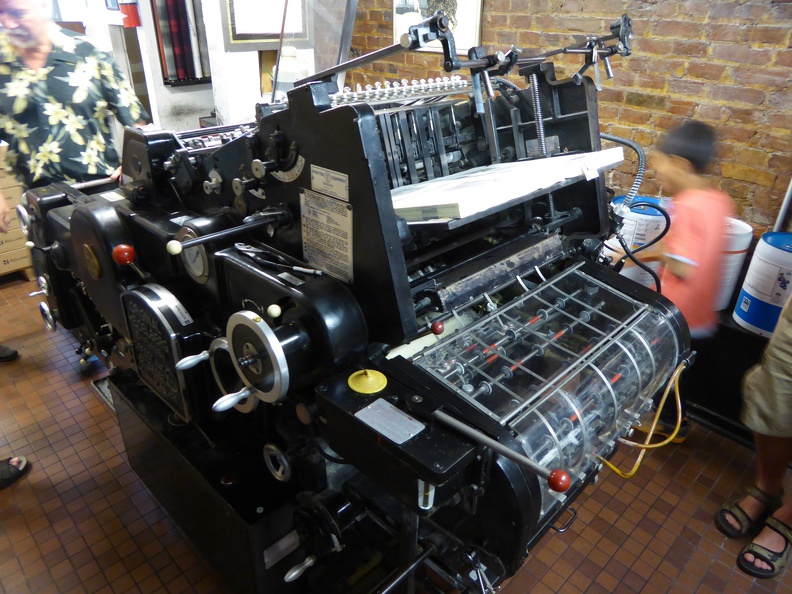
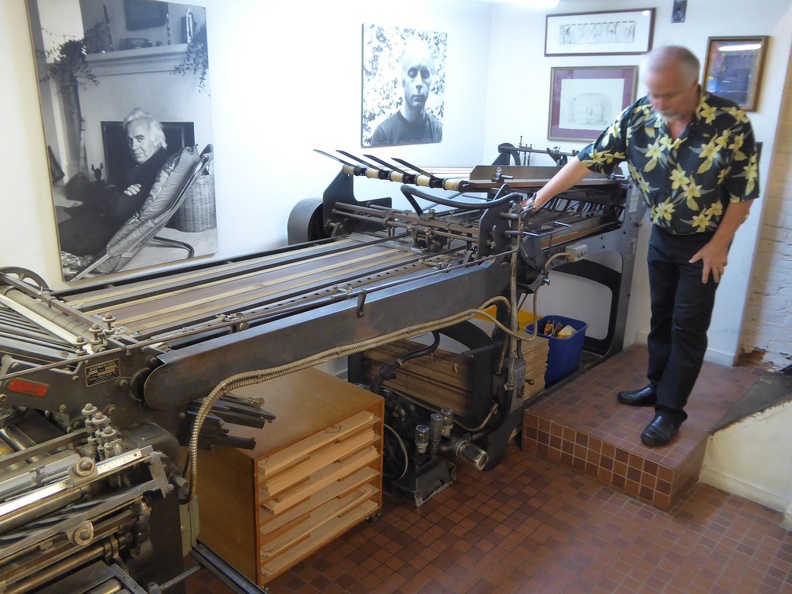
Heidelberg printing machine at Porcupine's quilt
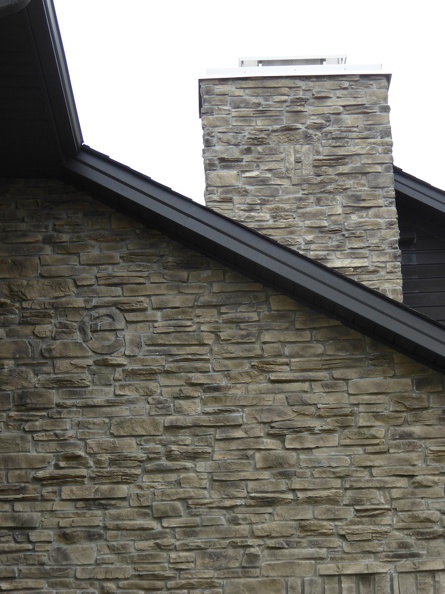
In short, a perfect combination for us typography and beer savvy freaks! This morning we had somehow an early start from the hotel. Soon the bus left downtown Toronto and entered countryside Ontario, large landscapes filled with huge (for my Japanese feeling) estates and houses, separated by fields, forests and wild landscape. Very beautiful and inviting to live there. On our way to the printing workshop we stopped at Pavneet s house for a very short visit of the exterior, which includes mathematics in the bricking. According to Pavneet, his kids hate to see math on the wall I would be proud to have it.
Pavneet's house is hiding some mathematics
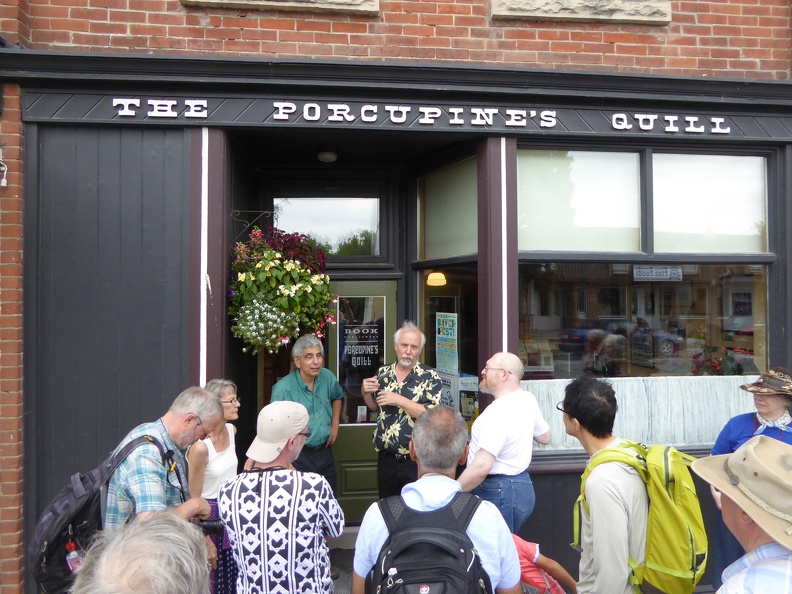
A bit further on we entered into Erin, where the Porcupine s Quill is located. A small building along the street, one could easily oversee that rare jewel! In addition considering that according to the owners, Google Maps has a bad error which would lead you to a completely different location. This printing workshop, led by Tim and Elke Inkster, is producing books in a traditional style using an old Heidelberg Offset printing machine.
Entrance to the Porcupine's Quill, a local bookshop doing excellent printing
Elke introduced us to the sewing of folded signatures together with a lovely old sewing machine. It was the first time I actually saw one in action.
Sewn signatures
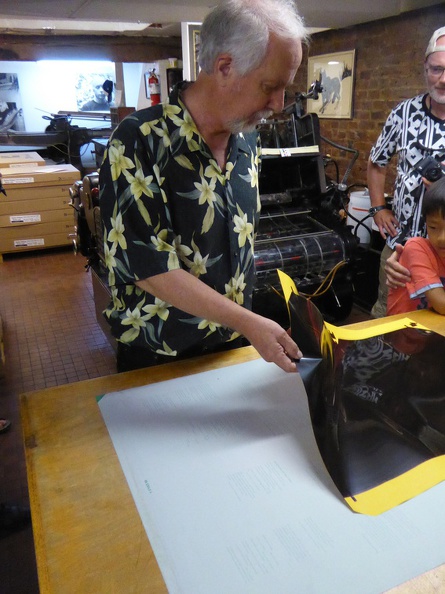
Tim, the head master of the printing shop, first entertained us with stories about Chinese publishers visiting them in the old cold-war times, before diving into explanations of the actual machines around, like the Heidelberg offset printing machine.
Master Tim is showing us offset technique
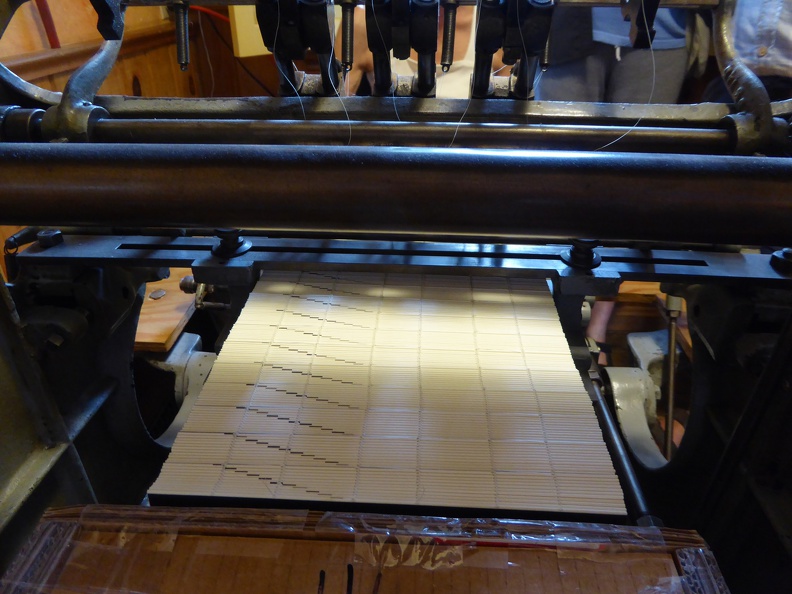
In the back of the basement of the little studio there is also a huge folding machine, which cuts up the big signatures of 16 pages and folds them into bundles. An impressive example of tricky engineering.
The folding machine creates from a printed signature 16 pages in proper order.
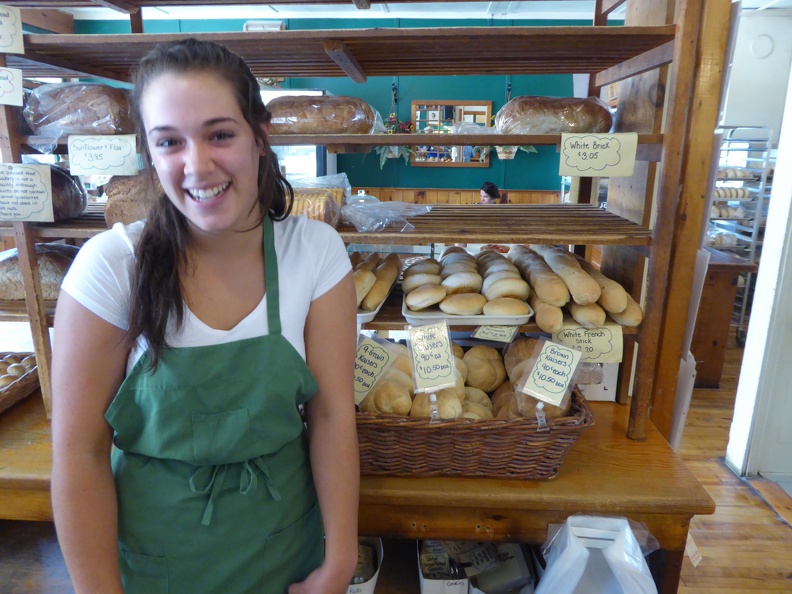
Due to the small size of the printing studio, our groups were actually split into two groups, and while the other group got its guided tour, we grabbed coffee and traditional cookies and pastries from the nearby Holtom s bakery. Loads of nice pastries with various filling, my favorite being the slightly salty cherry pie, and above all the rhubarb-raspberry pie.
Nearby old-style bakery, selling Viennese-style "Kaisersemmel", calling them "Kaiser buns". There must be an Austrian hiding somewhere around.
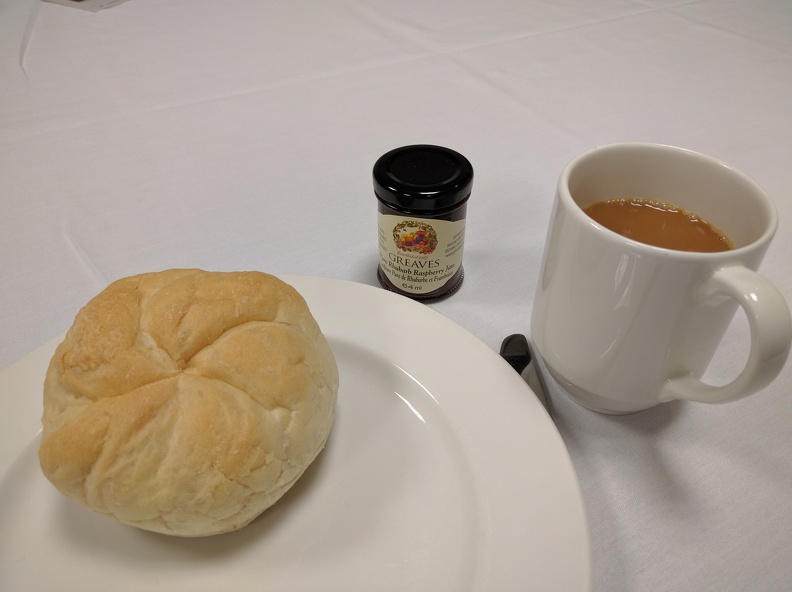
To my absolute astonishment I also found there a Viennese Kaisersemmel , called Kaiser bun here, but keeping the shape and the idea (but unfortunately not the crispy cracky quality of the original in Vienna). Of course I got two of them, together with a nice jam from the region, and enjoyed these Viennese breakfast the next day morning.
Viennese breakfast from the Bakery near Porcupine's Quill
Leaving the Quill we headed for a lunch in a nice pizzeria (I got Pizza Toscana) which also served excellent local beer how would I like to have something like this over in Japan! Our last stop on this excursion was Stone Hammer Brewery, ne of the most famous craft breweries in Canada.
One of the top craft breweries in Canada, the Stone Hammer
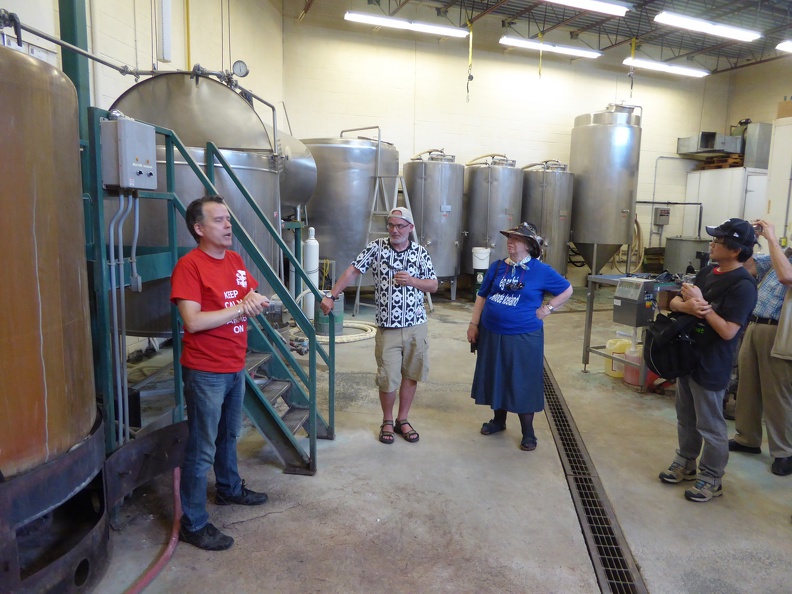
keep-calmAlthough they wont win a prize for typography (besides one page of a coaster there that carried a nice pun), their beers are exquisite. We got five different beers to taste, plus extensive explanations on brewing methods and differences. Now I finally understand why most of the new craft breweries in Japan are making Ales: Ales don t need a long process and are ready for sale in rather short time, compared to e.g. lagers.)
Explanations of the the secrets of beer brewing
Nothing to add to this poster found in the Stone Hammer Brewery!
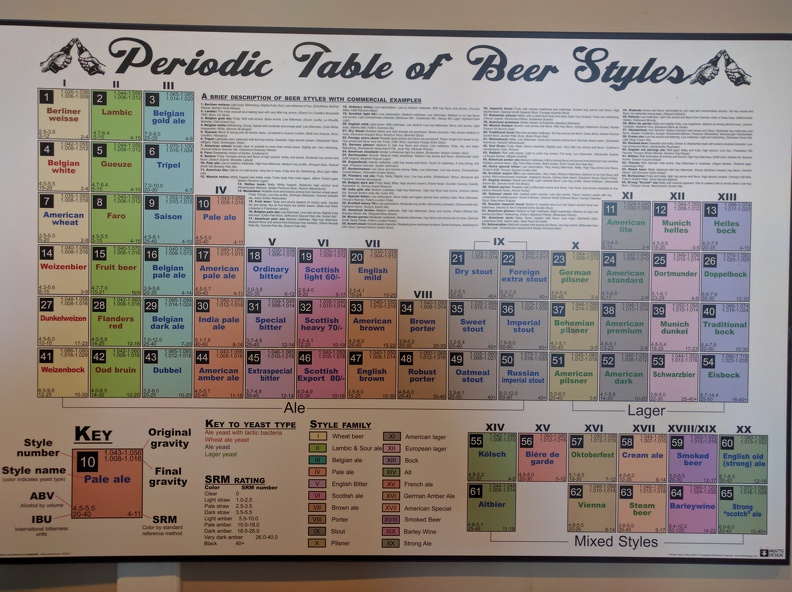
Also at the Stone Hammer Brewery I spotted this very nice poster on the wall of the toilet. And I cannot agree more, everything can easily be discussed over a good beer it calms down aversions, makes even the worst enemies friends, and is healthy for both the mind and body. Filled with excellent beer, some of us (notably an unnamed US TeXnician and politician), stacked up on beers to carry home. I was very tempted to get a huge batch, but putting cans into an airplane seems to be not the optimal idea. Since we are talking cans, I was surprised to hear that many craft beer brewers nowadays prefer cans due to their better protection of the beer from light and oxygen, both killers of good beer. Before leaving we took a last look at the Periodic Table of Beer Types, which left me in awe about how much I don t know and I probably never will know. In particular, I heard the first time of a Vienna style beer Vienna is not really famous for beer, better to say, it is infamous. So maybe this is a different Vienna than my home town that is meant here.
Lots to study here, the Periodic Table of Beers
Another two hour bus ride brought us back to Toronto, where we met with other participants at the reception in a restaurant of Mediterranean cuisine, where I could enjoy for the first time in years a good Tahina and Humus. All around another excellent day, now I only would like to have two days of holidays, guess I need to relax in the lectures starting from tomorrow.

Norbert Preining: TUG 2016 Day -1 Wines and Waters

This years TUG is held in Toronto, Canada, and our incredible host Pavneet has managed to put together an busy program of excursions and events around the real conference. The -1st day (yeah, you read right, the minus-first day), that is two days before the actual conference starts, was dedicated to an excursion to enjoying wines at the wine estate Ch teau des Charmes, followed by a visit to the Niagara falls.
The amount of water running down the Horseshoe Falls is incredible
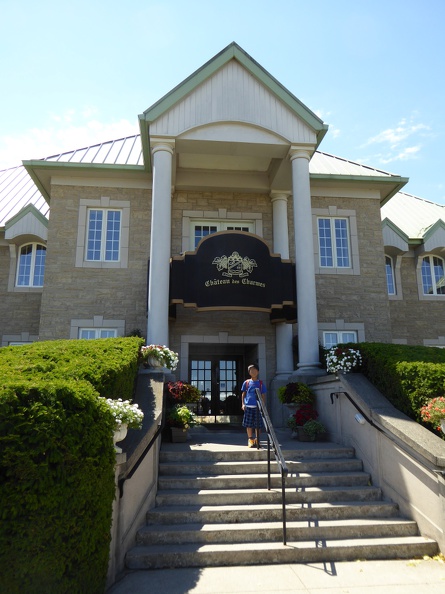
What should I say, if the first thing after getting out of the bus is a good wine, then there is nothing to go wrong I arrived in Toronto already two days earlier in the late afternoon, and spend Friday relaxing, recovering from the long flight, walking the city a bit, trying to fix my cold, and simply going slowly. Saturday morning we met already at a comfortable 10am in the morning (still to early for me, due to jet lag and a slightly late evening before), but the first 2h of bus drive allowed us to relax. Our first stop was the Ch teau des Charmes, and impressive building surrounded by vineyards.
Entrance to the Ch teau des Charmes
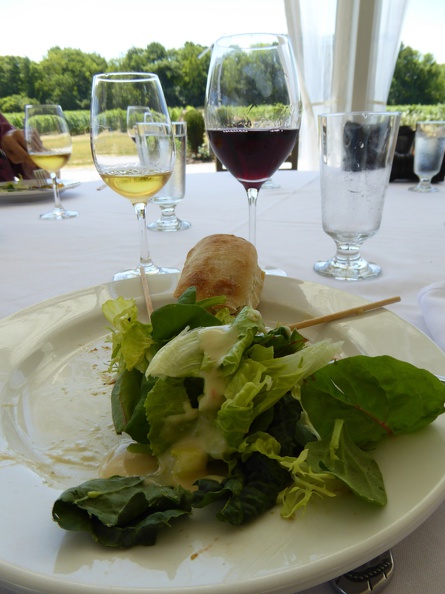
We were immediately handed over to a sandwich lunch with white, red, and ice wine. Good start! And although the breakfast wasn t that long time ago, the delicious sandwiches (at least the vegetarian ones I tried) were good foundation for the wine.
Lunch impressions at Ch teau des Charmes
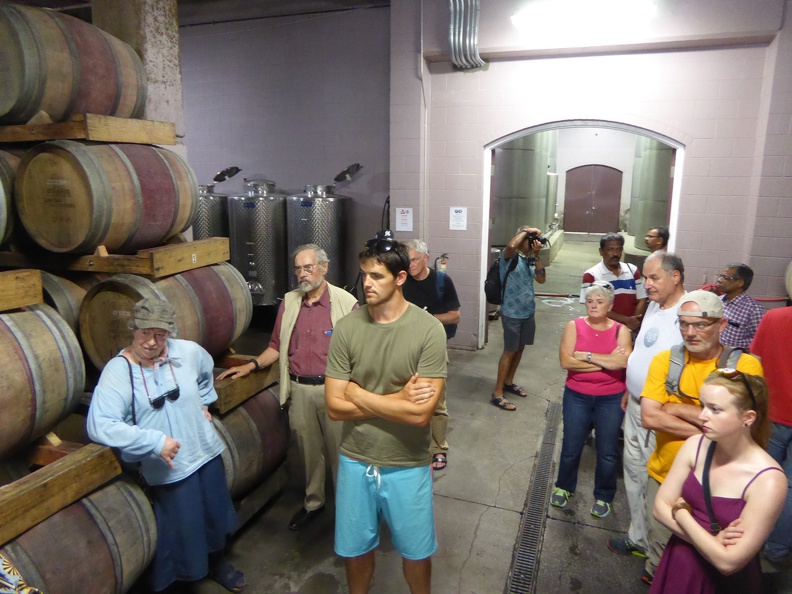
After having refilled our energy reserves, we are ready to start our tour. Our guide, very, if not over, enthusiastic, explains us that practically everything related to wine in Canada has been started at this Ch teau from the current owner the Ch teau system where farmer and wine producer are the same, import of European grapes, winter protection methods, wine making I was close to forgetting our Roman and Greek ancestors. At least she admitted that the Ice wine was brought over by an Austrian but perfection was done here, were the controls of the government are much stricter than anywhere else hmmm, somehow I cannot completely believe all this narrative, but at least it is enjoyable. So now that we know all about the history, we dive into the production process area, and the barrel space, always accompanied with extensive comments and (self-)praise.
Enjoying the explanations of our very enthusiastic guide
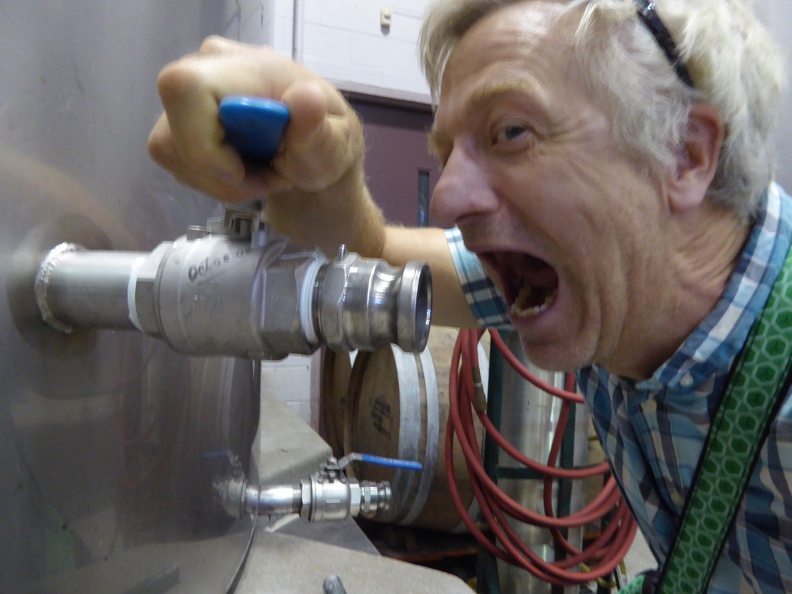
After this exhaustive and exhausting round, we are guided back to the patio to taste another three different wines, a white (bit too warm, not so much my taste), a rose (very good), and a red made from a new grape variety that has mutated first here on the Ch teau (interesting). As I didn t have enough, I tried to get something out of the big containers directly, but without success!
Me trying to get a full load of wine
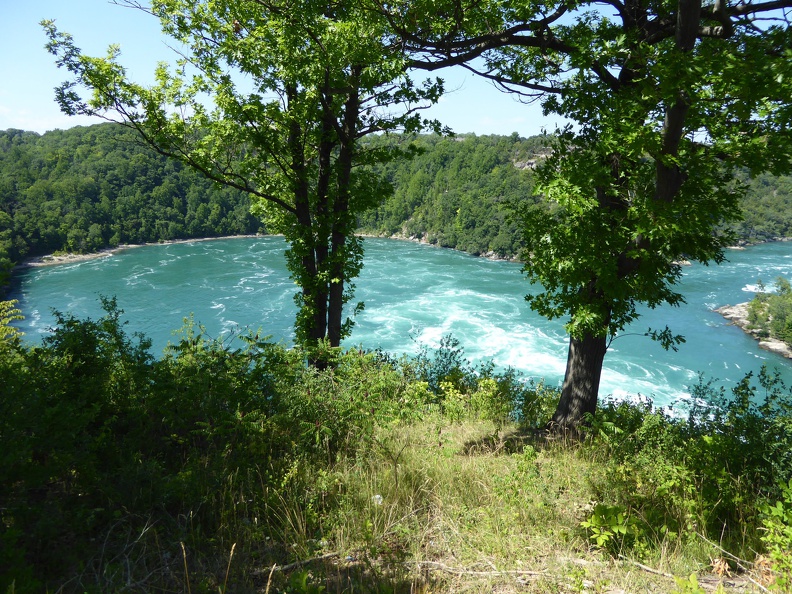
Happy and content, and after passing through the shopping area, we are boarding the bus to continue direction of the Niagara Falls. Passing by at quite some nice houses of definitely quite rich people (although Pavneet told me that houses in Toronto are far more expensive than those here how can someone afford this?), we first have a view onto the lower Niagara river. A bit further one we are let out to see huge whirlpools in the river, where boat tours are bringing sightseers on a rough ride ride into the pool.
Whirlpools along the Niagara river
Only a slight bit further on we finally reach the Niagara falls, with the great view onto the American falls in full power, and the Horseshoe Falls further up.
Horseshoe Falls in view
We immediately boarded a boat tour making a short trip to the Horseshoe Fall. Lining up with hundreds and hundreds of other spectators, we prepare for the splash with red rain wear (the US side uses blue, not that any side would rescue a wrong person and create an illegal immigrant!). The trip passes first under the American Falls and continues right into the mist that fills all the area in the middle of the Horseshoe falls. Spectacular impression with walls of water falling down on both sidess.
Panorama of the Horseshoe Falls
Returned from the splash and having dried our feet, we walk along the ridge to see the Horseshoe falls from close up. The amount of water falling down these falls is incredible, and so is the erosion that creates the brown foam on the water down in the pool, made up from pulverized limestone. Blessed as we were, the sun was laughing all the day and we got a nice rainbow right in the fall.
Horseshoe Falls with boat and rainbow, lovely.
The surroundings of the fall are less impressive Disney land? Horror cabinet? Jodel bar? A wild mixture of amusement park style locations squeezed together and overly full with people as if enjoying the nature itself would not be enough. All immersed by ever blasting loudspeaker music.
Torture around Niagara falls
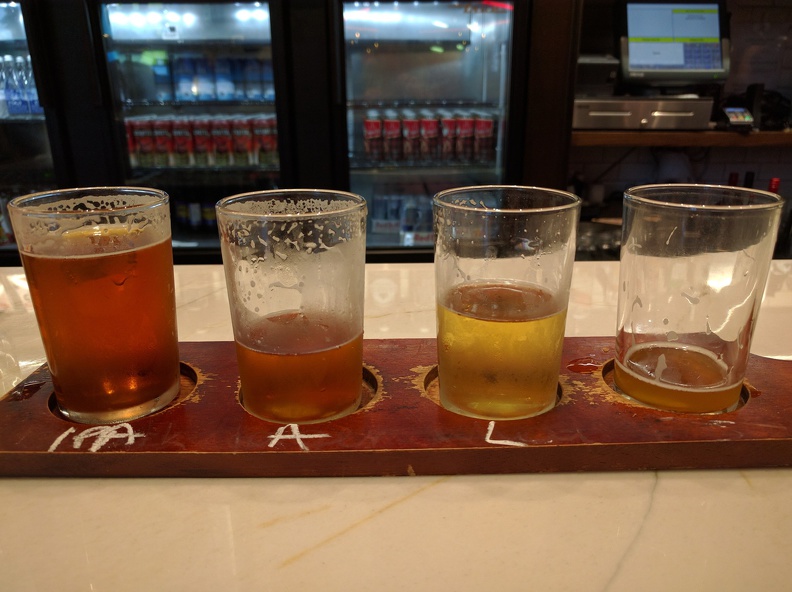
The only plus point I could find in this encampment of forced happiness was a local craft beer brewer where one could taste 8 different beers I made it only to four, though.
Beer tasting at Niagara Brewery, IPA, Amber ale, Lager, and some Light Fruity Radler beer.
Finally night was falling in and we moved down to the falls again to enjoy the illumination of the falls.
Night view onto Niagara falls
After this wonderful finish we boarded the bus and back to Toronto, where we arrived around mid-night. A long but very pleasurable Day Minus One! Further photos can be seen at the gallery TUG 2016 Day Minus One.

23 July 2016

Mateus Bellomo: Send/receive text messages to buddies

Some weeks ago I ve implemented the option to send a text message from telepathy-resiprocate Empathy. At that time I just implemented it at apps/telepathy/TextChannel class which wasn t the ideal. Now, with a better understand of the resip/recon and resip/dum APIs, I was able to move this implementation there. Besides that I also have implemented the option to receive a text message. For that I have done some changes at resip/recon/ConversationManager and resip/recon/UserAgent classes, along some other. The complete changes could be seen at [1]. This branch also holds modifications related to send/receive presence. This is necessary since to send a message to a contact he/she should be online. There is still work to be done specially checking the possible error cases but at least we could see a first prototype working. Follow some images:
textChannel_JitsiAccount logged in with Jitsi
textChannel_EmpathyAccount logged in with Empathy using telepathy-resiprocate
[1] https://github.com/resiprocate/resiprocate/compare/master MateusBellomo:mateus-presence-text

22 July 2016

Russell Coker: 802.1x Authentication on Debian

I recently had to setup some Linux workstations with 802.1x authentication (described as Ethernet authentication ) to connect to a smart switch. The most useful web site I found was the Ubuntu help site about 802.1x Authentication [1]. But it didn t describe exactly what I needed so I m writing a more concise explanation. The first thing to note is that the authentication mechanism works the same way as 802.11 wireless authentication, so it s a good idea to have the wpasupplicant package installed on all laptops just in case you need to connect to such a network. The first step is to create a wpa_supplicant config file, I named mine /etc/wpa_supplicant_SITE.conf. The file needs contents like the following:
network= 
 key_mgmt=IEEE8021X
 eap=PEAP
 identity="USERNAME"
 anonymous_identity="USERNAME"
 password="PASS"
 phase1="auth=MD5"
 phase2="auth=CHAP password=PASS"
 eapol_flags=0
 
The first difference between what I use and the Ubuntu example is that I m using eap=PEAP , that is an issue of the way the network is configured, whoever runs your switch can tell you the correct settings for that. The next difference is that I m using auth=CHAP and the Ubuntu example has auth=PAP . The difference between those protocols is that CHAP has a challenge-response and PAP just has the password sent (maybe encrypted) over the network. If whoever runs the network says that they don t store unhashed passwords or makes any similar claim then they are almost certainly using CHAP. Change USERNAME and PASS to your user name and password. wpa_supplicant -c /etc/wpa_supplicant_SITE.conf -D wired -i eth0 The above command can be used to test the operation of wpa_supplicant.
Successfully initialized wpa_supplicant
eth0: Associated with 00:01:02:03:04:05
eth0: CTRL-EVENT-EAP-STARTED EAP authentication started
eth0: CTRL-EVENT-EAP-PROPOSED-METHOD vendor=0 method=25
TLS: Unsupported Phase2 EAP method 'CHAP'
eth0: CTRL-EVENT-EAP-METHOD EAP vendor 0 method 25 (PEAP) selected
eth0: CTRL-EVENT-EAP-PEER-CERT depth=0 subject=''
EAP-MSCHAPV2: Authentication succeeded
EAP-TLV: TLV Result - Success - EAP-TLV/Phase2 Completed
eth0: CTRL-EVENT-EAP-SUCCESS EAP authentication completed successfully
eth0: CTRL-EVENT-CONNECTED - Connection to 00:01:02:03:04:05 completed [id=0 id_str=]
Above is the output of a successful test with wpa_supplicant. I replaced the MAC of the switch with 00:01:02:03:04:05. Strangely it doesn t like CHAP but is automatically selecting MSCHAPV2 and working, maybe anything other than PAP would do.
auto eth0
iface eth0 inet dhcp
  wpa-driver wired
  wpa-conf /etc/wpa_supplicant_SITE.conf
Above is a snippet of /etc/network/interfaces that works with this configuration.

Dirk Eddelbuettel: RcppCCTZ 0.0.5

Version 0.0.5 of RcppCCTZ arrived on CRAN a couple of days ago. It reflects an upstream fixed made a few weeks ago. CRAN tests revealed that g++-6 was tripping over one missing #define; this was added upstream and I subsequently synchronized with upstream. At the same time the set of examples was extended (see below). Somehow useR! 2016 got in the way and while working on the then-incomplete examples during the traveling I forgot to release this until CRAN reminded me that their tests still failed. I promptly prepared the 0.0.5 release but somehow failed to update NEWS files etc. They are correct in the repo but not in the shipped package. Oh well. CCTZ is a C++ library for translating between absolute and civil times using the rules of a time zone. In fact, it is two libraries. One for dealing with civil time: human-readable dates and times, and one for converting between between absolute and civil times via time zones. It requires only a proper C++11 compiler and the standard IANA time zone data base which standard Unix, Linux, OS X, ... computers tend to have in /usr/share/zoneinfo. RcppCCTZ connects this library to R by relying on Rcpp. Two good examples are now included, and shown here. The first one tabulates the time difference between New York and London (at a weekly level for compactness):
R> example(tzDiff)
tzDiffR> # simple call: difference now
tzDiffR> tzDiff("America/New_York", "Europe/London", Sys.time())
[1] 5
tzDiffR> # tabulate difference for every week of the year
tzDiffR> table(sapply(0:52, function(d) tzDiff("America/New_York", "Europe/London",
tzDiff+                                       as.POSIXct(as.Date("2016-01-01") + d*7))))
 4  5 
 3 50 
R> 
Because the two continents happen to spring forward and fall backwards between regular and daylight savings times, there are, respectively, two and one week periods where the difference is one hour less than usual. A second example shifts the time to a different time zone:
R> example(toTz)
toTzR> toTz(Sys.time(), "America/New_York", "Europe/London")
[1] "2016-07-14 10:28:39.91740 CDT"
R> 
Note that because we return a POSIXct object, it is printed by R with the default (local) TZ attribute (for "America/Chicago" in my case). A more direct example asks what time it is in my time zone when it is midnight in Tokyo:
R> toTz(ISOdatetime(2016,7,15,0,0,0), "Japan", "America/Chicago")
[1] "2016-07-14 15:00:00 CDT"
R>
More changes will come in 0.0.6 as soon as I find time to translate the nice time_tool (command-line) example into an R function. Changes in this version are summarized here:
Changes in version 0.0.5 (2016-07-09)
  • New utility example functions toTz() and tzDiff
  • Synchronized with small upstream change for additional #ifdef for compiler differentiation
We also have a diff to the previous version thanks to CRANberries. More details are at the RcppCCTZ page; code, issue tickets etc at the GitHub repository.

This post by Dirk Eddelbuettel originated on his Thinking inside the box blog. Please report excessive re-aggregation in third-party for-profit settings.

21 July 2016

Reproducible builds folks: Reproducible builds: week 62 in Stretch cycle

What happened in the Reproducible Builds effort between June 26th and July 2nd 2016: Read on to find out why we're lagging some weeks behind ! GSoC and Outreachy updates Toolchain fixes With the doxygen upload we are now down to only 2 modified packages in our repository: dpkg and rdfind. Weekly reports delay and the future of statistics To catch up with our backlog of weekly reports we have decided to skip some of the statistics for this week. We might publish them in a future report, or we might switch to a format where we summarize them more (and which we can create (even) more automatically), we'll see. We are doing these weekly statistics because we believe it's appropriate and useful to credit people's work and make it more visible. What do you think? We would love to hear your thoughts on this matter! Do you read these statistics? Somewhat? Actually, thanks to the power of notmuch, Holger came up with what you can see below, so what's missing for this week are the uploads fixing irreprodubilities. Which we really would like to show for the reasons stated above and because we really really need these uploads to happen ;-) But then we also like to confirm the bugs are really gone, which (atm) requires manual checking, and to look for the words "reproducible" and "deterministic" (and spelling variations) in debian/changelogs of all uploads, to spot reproducible work not tracked via the BTS. And we still need to catch up on the backlog of weekly reports. Bugs submitted with reproducible usertags It seems DebCamp in Cape Town was hugely successful and made some people get a lot of work done: 61 bugs have been filed with reproducible builds usertags and 60 of them had patches: Package reviews 437 new reviews have been added (though most of them were just linking the bug, "only" 56 new issues in packages were found), an unknown number has been been updated and 60 have been removed in this week, adding to our knowledge about identified issues. 4 new issue types have been found: Weekly QA work 98 FTBFS bugs have been reported by Chris Lamb and Santiago Vila. diffoscope development strip-nondeterminism development tests.reproducible-builds.org Misc. This week's edition was written by Mattia Rizzolo, Reiner Herrmann, Ceridwen and Holger Levsen and reviewed by a bunch of Reproducible builds folks on IRC.

20 July 2016

Daniel Pocock: How many mobile phone accounts will be hijacked this summer?

Summer vacations have been getting tougher in recent years. Airlines cut into your precious vacation time with their online check-in procedures and a dozen reminder messages, there is growing concern about airport security and Brexit has already put one large travel firm into liquidation leaving holidaymakers in limbo. If that wasn't all bad enough, now there is a new threat: while you are relaxing in the sun, scammers fool your phone company into issuing a replacement SIM card or transferring your mobile number to a new provider and then proceed to use it to take over all your email, social media, Paypal and bank accounts. The same scam has been appearing around the globe, from Britain to Australia and everywhere in between. Many of these scams were predicted in my earlier blog SMS logins: an illusion of security (April 2014) but they are only starting to get publicity now as more aspects of our lives are at risk, scammers are ramping up their exploits and phone companies are floundering under the onslaught. With the vast majority of Internet users struggling to keep their passwords out of the wrong hands, many organizations have started offering their customers the option of receiving two-factor authentication codes on their mobile phone during login. Rather than making people safer, this has simply given scammers an incentive to seize control of telephones, usually by tricking the phone company to issue a replacement SIM or port the number. It also provides a fresh incentive for criminals to steal phones while cybercriminals have been embedding code into many "free" apps to surreptitiously re-route the text messages and gather other data they need for an identity theft sting. Sadly, telephone networks were never designed for secure transactions. Telecoms experts have made this clear numerous times. Some of the largest scams in the history of financial services exploited phone verification protocols as the weakest link in the chain, including a $150 million heist reminiscent of Ocean's 11. For phone companies, SMS messaging came as a side-effect of digital communications for mobile handsets. It is less than one percent of their business. SMS authentication is less than one percent of that. Phone companies lose little or nothing when SMS messages are hijacked so there is little incentive for them to secure it. Nonetheless, like insects riding on an elephant, numerous companies have popped up with a business model that involves linking websites to the wholesale telephone network and dressing it up as a "security" solution. These companies are able to make eye-watering profits by "purchasing" text messages for $0.01 and selling them for $0.02 (one hundred percent gross profit), but they also have nothing to lose when SIM cards are hijacked and therefore minimal incentive to take any responsibility. Companies like Google, Facebook and Twitter have thrown more fuel on the fire by encouraging and sometimes even demanding users provide mobile phone numbers to "prove they are human" or "protect" their accounts. Through these antics, these high profile companies have given a vast percentage of the population a false sense of confidence in codes delivered by mobile phone, yet the real motivation for these companies does not appear to be security at all: they have worked out that the mobile phone number is the holy grail in cross-referencing vast databases of users and customers from different sources for all sorts of creepy purposes. As most of their services don't involve any financial activity, they have little to lose if accounts are compromised and everything to gain by accurately gathering mobile phone numbers from as many users as possible.
Can you escape your mobile phone while on vacation? Just how hard is it to get a replacement SIM card or transfer/port a user's phone number while they are on vacation? Many phone companies will accept instructions through a web form or a phone call. Scammers need little more than a user's full name, home address and date of birth: vast lists of these private details are circulating on the black market, sourced from social media, data breaches (99% of which are never detected or made public), marketing companies and even the web sites that encourage your friends to send you free online birthday cards. Every time a company has asked me to use mobile phone authentication so far, I've opted out and I'll continue to do so. Even if somebody does hijack my phone account while I'm on vacation, the consequences for me are minimal as it will not give them access to any other account or service, can you and your family members say the same thing? What can be done?
  • Opt-out of mobile phone authentication schemes.
  • Never give the mobile phone number to web sites unless there is a real and pressing need for them to call you.
  • Tell firms you don't have a mobile phone or that you share your phone with your family and can't use it for private authentication.
  • If you need to use two-factor authentication, only use technical solutions such as smart cards or security tokens that have been engineered exclusively for computer security. Leave them in a locked drawer or safe while on vacation. Be wary of anybody who insists on SMS and doesn't offer these other options.
  • Rather than seeking to "protect" accounts, simply close some or all social media accounts to reduce your exposure and eliminate the effort of keeping them "secure" and updating "privacy" settings.
  • If your bank provides a relationship manager or other personal contact, this
    can also provide a higher level of security as they get to know you.
Previous blogs on SMS messaging, security and two factor authentication, including my earlier blog SMS Logins: an illusion of security.

Michal Čihař: New projects on Hosted Weblate

For almost two months I found very little time to process requests to host free software on Hosted Weblate. Today the queue has been emptied, what means that you can find many new translations there. To make it short, here is list of new projects: PS: If you didn't receive reply for your hosting request today, it was probably lost, so don't hesitate to ask again.

Filed under: Debian English Weblate 0 comments

Shirish Agarwal: Debconf 16 and My Experience with Debian

It has been often said that you should continually try new things in life so that a. Unlike the fish you do not mistake the pond to be the sea. b. You see other people, other types and ways of living and being which you normally won t in your day-to-day existence. With both of those as mantras I decided to take a leap into the unknown. I was unsure both about the visa process as well as the travel bit as I was traveling to an unknown place and although I had done some research about the place I was unsure about the authenticity of whatever is/was shared on the web. During the whole journey both to and fro, I couldn t sleep a wink. The Doha airport is huge. There are 5 Concourses, A, B , C, D, E and around 30+ gates in each Concourse. The ambition of the small state is something to be reckoned with. Almost 95% of the blue workers in the entire airport were of Asian sub-continent. While the Qatari Rial is 19 times stronger to us, the workers I suspect are worse-off than people doing similar things back home. Add to that the sharia law, even for all the money in the world, I wouldn t want to settle therein. Anyways, during the journey, a small surprise awaited me, Ritesh Raj Saraff, a DD was also traveling to Debconf. We bumped into each other while going to see the Doha City, courtesy Al-Hamad International Airport. I would probably share a bit more about Doha and my experiences with the city in upcoming posts. Cut to Cape Town, South Africa, we landed in the city half an hour after our scheduled time and then we sped along to University of Cape Town (UCT) which was to become our home for the next 13 odd days. The first few days were a whirlwind as there were new people to meet, old people whom I knew only as an e-mail id or an IRC nickname turned out to be real people and you have to try to articulate yourself in English, which is not a native language of mine. During Debcamp I was fortunate to be able visit some of the places and the wiki page had a lot of places which I knew I wouldn t be able to complete unless I had 15 days unlimited time and money to go around so didn t even try. I had gone with few goals in mind :- a. Do some documentation of the event In this I failed completely as just the walk from the venue to where the talks were energy-draining for me. Apart from that, you get swept in meeting new people and talking about one of million topics in Debian which interest you or the other person and while they are fulfilling, it is and was both physically and emotionally draining for me (in a good way). Bernelle (one of the organizers) had warned us of this phenomenon but you disregard it as you know you have a limited time-frame in which to meet and greet people and it is all a over-whelming experience. b. Another goal was to meet my Indian brethren who had left the country around 60~100 years mostly as slaves of East India company In this I was partially successful. I met a couple of beautiful ladies who had either a father or a mother who was Indian while the other was of African heritage. It seemed in them a yearning to know the culture but from what little they had, only Bollywood and Indian cuisine was what they could make of Indian culture. One of the girls, ummm women to be more truer, shared a somewhat grim tale. She had both an African boyfriend as well as Indian boyfriend in her life and in both cases, she was rejected by the boy s parents because she wasn t pure enough. This was deja vu all over again as the same thing can be seen here happening in casteism so there wasn t any advice I could give but just nod in empathy. What was sort of relevation was when their parents or grandparents came, the name and surnames were thrown off and the surname was just the place from where they belong. From the discussions it emerged that there were also lot of cases of forced conversions to Christianity during that era as well as temptations of a better life. As shared, this goal succeeded partially, as I was actually interested in their parents or grand-parents to know the events that shaped the Indian diaspora over there. While the children know only of today, yester-years could only be known by those people who made the unwilling perilous journey to Africa. I had also wanted to know more about Gandhiji s role in that era but alas, that part of history would have to wait for another day as I guess, both those goals would only have met had I visited Durban but that was not to be. I had applied for one talk My Experience with Debian and one workshop for Installation of Debian on systems. The My Experience with Debian was aimed at newbies and I had thought of using show-and-tell to share the differences between proprietary Operating Systems and a FOSS distribution such as Debian. I was going to take simple things such as changelogs, apt-listbugs, real-time knowledge of updates and upgrades as well as /etc/apt/sources.list to share both the versatility of the Debian desktop and real improvements than what proprietary Operating Systems had to offer. But I found myself engaging with Debian Developers (DD s) rather than the newbies so had to change the orientation and fundamentals of the talk on the fly. I knew or suspected rather that the old idea would not work as it would just be repeating to the choir. With that in the back of mind, and the idea that perhaps they would not be so aware of the politics and events which happened in India over the last couple of decades, I tried to share what little I was able to recollect what little I was able to remember about those times. Apart from that, I was also highly conscious that I had been given just the before lunch slot aka You are in the way of my lunch slot. So I knew I had to speak my piece as quickly as possible being as clear as can be. Later, I did get feedback that I was fast and seeing it through couple of times, do agree that I could have done a better job. What s done is done and the only thing I could do to salvage it a bit is to make a presentation which I am sharing as below. my_experience_with_debian Would be nice if somebody could come up with a lighter template for presentations. For reference the template I have taken it from is shared at https://wiki.debian.org/Presentations . Some pictures from the presentation. vlcsnap-00004 me_sharing my_experience_with_debian You can find the video at http://meetings-archive.debian.net/pub/debian-meetings/2016/debconf16/My_Experience_with_Debian.webm This is by no means the end of the Debconf16 experience, but actually the starting. I hope to share more of my thoughts, ideas and get as much feedback from all the wonderful people I met during Debconf.
Filed under: Miscellenous Tagged: #Debconf16, Doha, My talk, Qatar

Steinar H. Gunderson: Solskogen 2016 videos

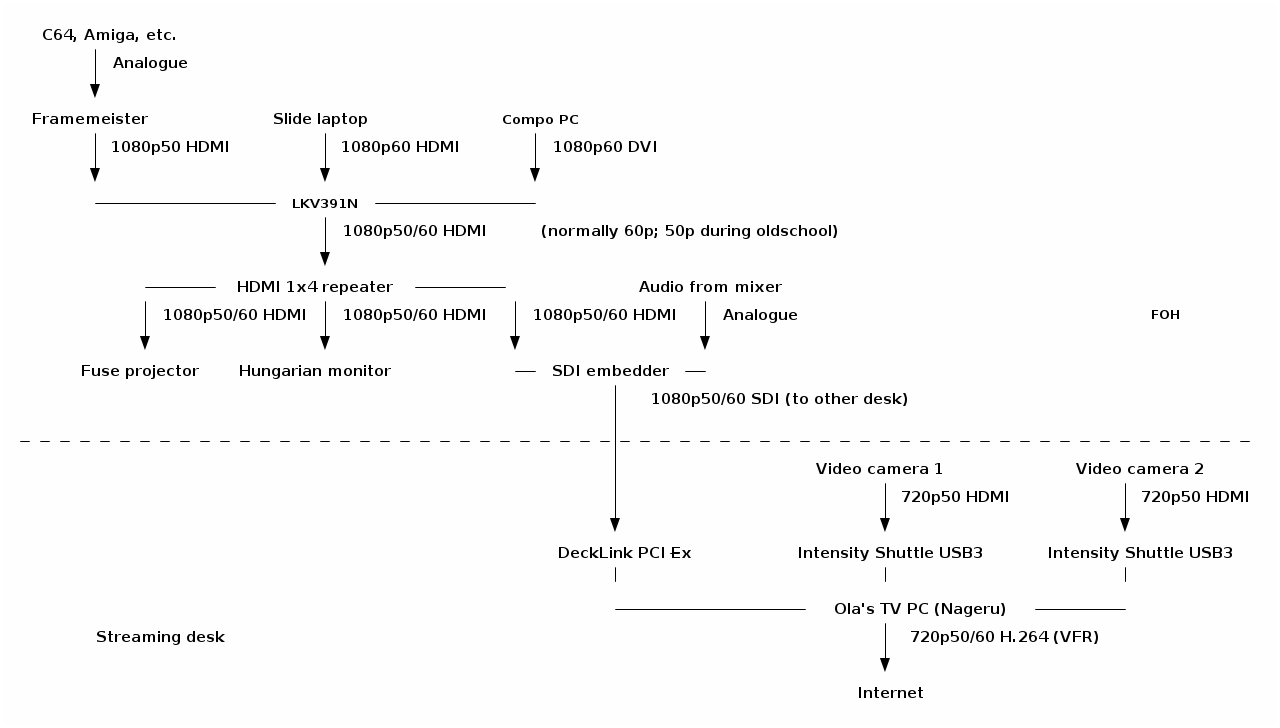
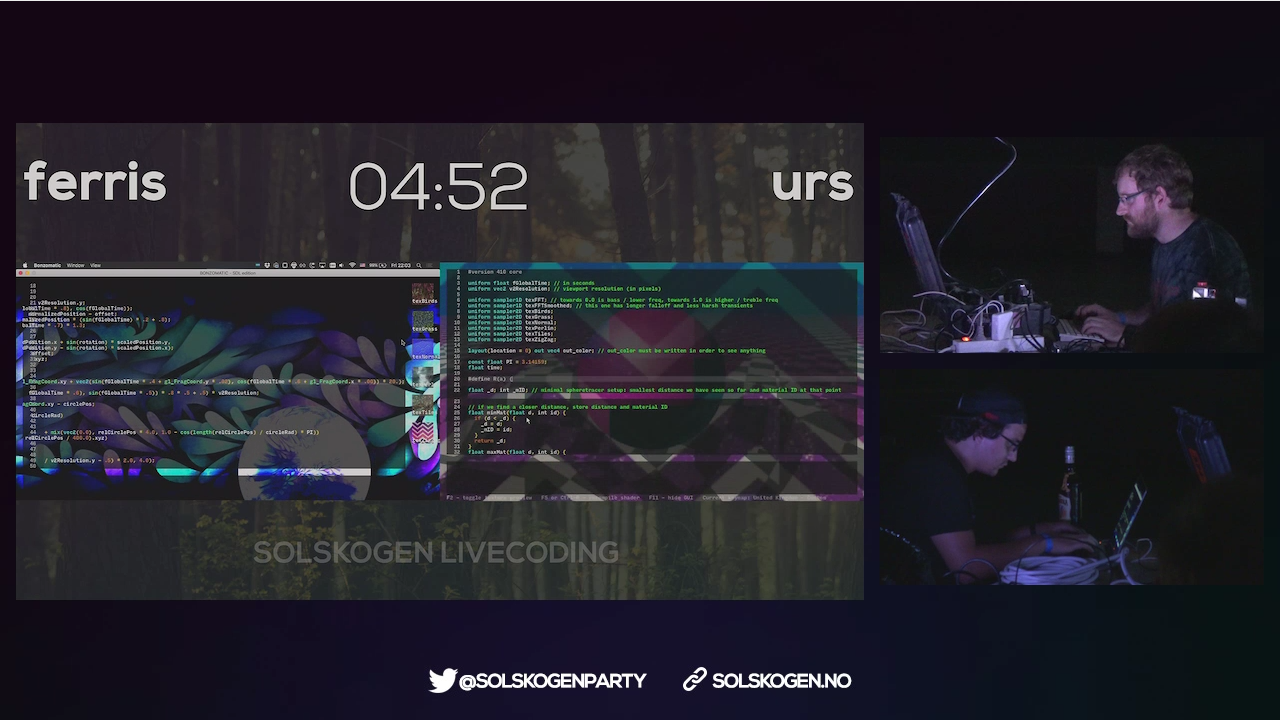
I just published the videos from Solskogen 2016 on Youtube; you can find them all in this playlist. The are basically exactly what was being sent out on the live stream, frame for frame, except that the audio for the live shader compos has been remastered, and of course a lot of dead time has been cut out (the stream was sending over several days, but most of the time, only the information loop from the bigscreen). YouTube doesn't really support the variable 50/60 Hz frame rate we've been using well as far as I can tell, but mostly it seems to go to some 60 Hz upconversion, which is okay enough, because the rest of your setup most likely isn't free-framerate anyway. Solskogen is interesting in that we're trying to do a high-quality stream with essentially zero money allocated to it; where something like Debconf can use 2500 for renting and transporting equipment (granted, for two or three rooms and not our single stream), we're largely dependent on personal equipment as well as borrowing things here and there. (I think we borrowed stuff from more or less ten distinct places.) Furthermore, we're nowhere near the situation of two cameras, a laptop, perhaps a few microphones ; not only do you expect to run full 1080p60 to the bigscreen and switch between that and information slides for each production, but an Amiga 500 doesn't really have an HDMI port, and Commodore 64 delivers an infamously broken 50.12 Hz signal that you really need to deal with carefully if you want it to not look like crap. These two factors together lead to a rather eclectic setup; here, visualized beautifully from my ASCII art by ditaa: Solskogen 2016 A/V setup diagram Of course, for me, the really interesting part here is near the end of the chain, with Nageru, my live video mixer, doing the stream mixing and encoding. (There's also Cubemap, the video reflector, but honestly, I never worry about that anymore. Serving 150 simultaneous clients is just not something to write home about anymore; the only adjustment I would want to make would probably be some WebSockets support to be able to deal with iOS without having to use a secondary HLS stream.) Of course, to make things even more complicated, the live shader compo needs two different inputs (the two coders' laptops) live on the bigscreen, which was done with two video capture cards, text chroma-keyed on top from Chroma, and OBS, because the guy controlling the bigscreen has different preferences from me. I would take his screen in as a dirty feed and then put my own stuff around it, like this: Solskogen 2016 shader compo screenshot (Unfortunately, I forgot to take a screenshot of Nageru itself during this run.) Solskogen was the first time I'd really used Nageru in production, and despite super-extensive testing, there's always something that can go wrong. And indeed there was: First of all, we discovered that the local Internet line was reduced from 30/10 to 5/0.5 (which is, frankly, unusable for streaming video), and after we'd half-way fixed that (we got it to 25/4 or so by prodding the ISP, of which we could reserve about 2 for video demoscene content is really hard to encode, so I'd prefer a lot more) Nageru started crashing. It wasn't even crashes I understood anything of. Generally it seemed like the NVIDIA drivers were returning GL_OUT_OF_MEMORY on things like creating mipmaps; it's logical that they'd be allocating memory, but we had 6 GB of GPU memory and 16 GB of CPU memory, and lots of it was free. (The PC we used for encoding was much, much faster than what you need to run Nageru smoothly, so we had plenty of CPU power left to run x264 in, although you can of course always want more.) It seemed to be mostly related to zoom transitions, so I generally avoided those and ran that night's compos in a more static fashion. It wasn't until later that night (or morning, if you will) that I actually understood the bug (through the godsend of the NVX_gpu_memory_info extension, which gave me enough information about the GPU memory state that I understood I wasn't leaking GPU memory at all); I had set Nageru to lock all of its memory used in RAM, so that it would never ever get swapped out and lose frames for that reason. I had set the limit for lockable RAM based on my test setup, with 4 GB of RAM, but this setup had much more RAM, a 1080p60 input (which uses more RAM, of course) and a second camera, all of which I hadn't been able to test before, since I simply didn't have the hardware available. So I wasn't hitting the available RAM, but I was hitting the amount of RAM that Linux was willing to lock into memory for me, and at that point, it'd rather return errors on memory allocations (including the allocations the driver needed to make for its texture memory backings) than to violate the never swap contract. Once I fixed this (by simply increasing the amount of lockable memory in limits.conf), everything was rock-stable, just like it should be, and I could turn my attention to the actual production. Often during compos, I don't really need the mixing power of Nageru (it just shows a single input, albeit scaled using high-quality Lanczos3 scaling on the GPU to get it down from 1080p60 to 720p60), but since entries come in using different sound levels (I wanted the stream to conform to EBU R128, which it generally did) and different platforms expect different audio work (e.g., you wouldn't put a compressor on an MP3 track that was already mastered, but we did that on e.g. SID tracks since they have nearly zero ability to control the overall volume), there was a fair bit of manual audio tweaking during some of the compos. That, and of course, the live 50/60 Hz switches were a lot of fun: If an Amiga entry was coming up, we'd 1. fade to a camera, 2. fade in an overlay saying we were switching to 50 Hz so have patience, 3. set the camera as master clock (because the bigscreen's clock is going to go away soon), 4. change the scaler from 60 Hz to 50 Hz (takes two clicks and a bit of waiting), 5. change the scaler input in Nageru from 1080p60 to 1080p50, 6. steps 3,2,1 in reverse. Next time, I'll try to make that slightly smoother, especially as the lack of audio during the switch (it comes in on the bigscreen SDI feed) tended to confuse viewers. So, well, that was a lot of fun, and it certainly validated that you can do a pretty complicated real-life stream with Nageru. I have a long list of small tweaks I want to make, though; nothing beats actual experience when it comes to improving processes. :-)

Daniel Stender: Theano in Debian: maintenance, BLAS and CUDA

I'm glad to announce that we have the current release of Theano (0.8.2) in Debian unstable now, it's on its way into the testing branch and the Debian derivatives, heading for Debian 9. The Debian package is maintained in behalf of the Debian Science Team. We have a binary package with the modules in the Python 2.7 import path (python-theano), if you want or need to stick to that branch a little longer (as a matter of fact, in the current popcon stats it's the most installed package), and a package running on the default Python 3 version (python3-theano). The comprehensive documentation is available for offline usage in another binary package (theano-doc). Although Theano builds its extensions on run time and therefore all binary packages contain the same code, the source package generates arch specific packages1 for the reason that the exhaustive test suite could run over all the architectures to detect if there are problems somewhere (#824116). what's this? In a nutshell, Theano is a computer algebra system (CAS) and expression compiler, which is implemented in Python as a library. It is named after a Classical Greek female mathematician and it's developed at the LISA lab (located at MILA, the Montreal Institute for Learning Algorithms) at the Universit de Montr al. Theano tightly integrates multi-dimensional arrays (N-dimensional, ND-array) from NumPy (numpy.ndarray), which are broadly used in Scientific Python for the representation of numeric data. It features a declarative Python based language with symbolic operations for the functional definition of mathematical expressions, which allows to create functions that compute values for them. Internally the expressions are represented as directed graphs with nodes for variables and operations. The internal compiler then optimizes those graphs for stability and speed and then generates high-performance native machine code to evaluate resp. compute these mathematical expressions2. One of the main features of Theano is that it's capable to compute also on GPU processors (graphical processor unit), like on custom graphic cards (e.g. the developers are using a GeForce GTX Titan X for benchmarks). Today's GPUs became very powerful parallel floating point devices which can be employed also for scientific computations instead of 3D video games3. The acronym "GPGPU" (general purpose graphical processor unit) refers to special cards like NVIDIA's Tesla4, which could be used alike (more on that below). Thus, Theano is a high-performance number cruncher with an own computing engine which could be used for large-scale scientific computations. If you haven't came across Theano as a Pythonistic professional mathematician, it's also one of the most prevalent frameworks for implementing deep learning applications (training multi-layered, "deep" artificial neural networks, DNN) around5, and has been developed with a focus on machine learning from the ground up. There are several higher level user interfaces build in the top of Theano (for DNN, Keras, Lasagne, Blocks, and others, or for Python probalistic programming, PyMC3). I'll seek for some of them also becoming available in Debian, too. helper scripts Both binary packages ship three convenience scripts, theano-cache, theano-test, and theano-nose. Instead of them being copied into /usr/bin, which would result into a binaries-have-conflict violation, the scripts are to be found in /usr/share/python-theano (python3-theano respectively), so that both module packages of Theano can be installed at the same time. The scripts could be run directly from these folders, e.g. do $ python /usr/share/python-theano/theano-nose to achieve that. If you're going to heavy use them, you could add the directory of the flavour you prefer (Python 2 or Python 3) to the $PATH environment variable manually by either typing e.g. $ export PATH=/usr/share/python-theano:$PATH on the prompt, or save that line into ~/.bashrc. Manpages aren't available for these little helper scripts6, but you could always get info on what they do and which arguments they accept by invoking them with the -h (for theano-nose) resp. help flag (for theano-cache). running the tests On some occasions you might want to run the testsuite of the installed library, like to check over if everything runs fine on your GPU hardware. There are two different ways to run the tests (anyway you need to have python ,3 -nose installed). One is, you could launch the test suite by doing $ python -c 'import theano; theano.test() (or the same with python3 to test the other flavour), that's the same what the helper script theano-test does. However, by doing it that way some particular tests might fail by raising errors also for the group of known failures. Known failures are excluded from being errors if you run the tests by theano-nose, which is a wrapper around nosetests, so this might be always the better choice. You can run this convenience script with the option --theano on the installed library, or from the source package root, which you could pull by $ sudo apt-get source theano (there you have also the option to use bin/theano-nose). The script accept options for nosetests, so you might run it with -v to increase verbosity. For the tests the configuration switch config.device must be set to cpu. This will also include the GPU tests when a proper accessible device is detected, so that's a little misleading in the sense of it doesn't mean "run everything on the CPU". You're on the safe side if you run it always like this: $ THEANO_FLAGS=device=cpu theano-nose, if you've set config.device to gpu in your ~/.theanorc. Depending on the available hardware and the used BLAS implementation (see below) it could take quite a long time to run the whole test suite through, on the Core-i5 in my laptop that takes around an hour even excluded the GPU related tests (which perform pretty fast, though). Theano features a couple of switches to manipulate the default configuration for optimization and compilation. There is a rivalry between optimization and compilation costs against performance of the test suite, and it turned out the test suite performs a quicker with lesser graph optimization. There are two different switches available to control config.optimizer, the fast_run toggles maximal optimization, while fast_compile runs only a minimal set of graph optimization features. These settings are used by the general mode switches for config.mode, which is either FAST_RUN by default, or FAST_COMPILE. The default mode FAST_RUN (optimizer=fast_run, linker=cvm) needs around 72 minutes on my lower mid-level machine (on un-optimized BLAS). To set mode=FAST_COMPILE (optimizer=fast_compile, linker=py) brings some boost for the performance of the test suite because it runs the whole suite in 46 minutes. The downside of that is that C code compilation is disabled in this mode by using the linker py, and also the GPU related tests are not included. I've played around with using the optimizer fast_compile with some of the other linkers (c py and cvm, and their versions without garbage collection) as alternative to FAST_COMPILE with minimal optimization but also machine code compilation incl. GPU testing. But to my experience, fast_compile without another than the linker py results in some new errors and failures of some tests on amd64, and this might the case also on other architectures, too. By the way, another useful feature is DebugMode for config.mode, which verifies the correctness of all optimizations and compares the C to Python results. If you want to have detailed info on the configuration settings of Theano, do $ python -c 'import theano; print theano.config' less, and check out the chapter config in the library documentation in the documentation. cache maintenance Theano isn't a JIT (just-in-time) compiler like Numba, which generates native machine code in the memory and executes it immediately, but it saves the generated native machine code into compiledirs. The reason for doing it that way is quite practical like the docs explain, the persistent cache on disk makes it possible to avoid generating code for the same operation, and to avoid compiling again when different operations generate the same code. The compiledirs by default are located within $(HOME)/.theano/. After some time the folder becomes quite large, and might look something like this:
$ ls ~/.theano
compiledir_Linux-4.5--amd64-x86_64-with-debian-stretch-sid--2.7.11+-64
compiledir_Linux-4.5--amd64-x86_64-with-debian-stretch-sid--2.7.12-64
compiledir_Linux-4.5--amd64-x86_64-with-debian-stretch-sid--2.7.12rc1-64
compiledir_Linux-4.5--amd64-x86_64-with-debian-stretch-sid--3.5.1+-64
compiledir_Linux-4.5--amd64-x86_64-with-debian-stretch-sid--3.5.2-64
compiledir_Linux-4.5--amd64-x86_64-with-debian-stretch-sid--3.5.2rc1-64
If the used Python version changed like in this example you might to want to purge obsolete cache. For working with the cache resp. the compiledirs, the helper theano-cache comes in handy. If you invoke it without any arguments the current cache location is put out like ~/.theano/compiledir_Linux-4.5--amd64-x86_64-with-debian-stretch-sid--2.7.12-64 (the script is run from /usr/share/python-theano). So, the compiledirs for the old Python versions in this example (11+ and 12rc1) can be removed to free the space they occupy. All compiledirs resp. cache directories meaning the whole cache could be erased by $ theano-cache basecompiledir purge, the effect is the same as by performing $ rm -rf ~/.theano. You might want to do that e.g. if you're using different hardware, like when you got yourself another graphics card. Or habitual from time to time when the compiledirs fill up so much that it slows down processing with the harddisk being very busy all the time, if you don't have an SSD drive available. For example, the disk space of build chroots carrying (mainly) the tests completely compiled through on default Python 2 and Python 3 consumes around 1.3 GB (see here). BLAS implementations Theano needs a level 3 implementation of BLAS (Basic Linear Algebra Subprograms) for operations between vectors (one-dimensional mathematical objects) and matrices (two-dimensional objects) carried out on the CPU. NumPy is already build on BLAS and pulls the standard implementation (libblas3, soure package: lapack), but Theano links directly to it instead of using NumPy as intermediate layer to reduce the computational overhead. For this, Theano needs development headers and the binary packages pull libblas-dev by default, if any other development package of another BLAS implementation (like OpenBLAS or ATLAS) isn't already installed, or pulled with them (providing the virtual package libblas.so). The linker flags could be manipulated directly through the configuration switch config.blas.ldflags, which is by default set to -L/usr/lib -lblas -lblas. By the way, if you set it to an empty value, Theano falls back to using BLAS through NumPy, if you want to have that for some reason. On Debian, there is a very convenient way to switch between BLAS implementations by the alternatives mechanism. If you have several alternative implementations installed at the same time, you can switch from one to another easily by just doing:
$ sudo update-alternatives --config libblas.so
There are 3 choices for the alternative libblas.so (providing /usr/lib/libblas.so).
  Selection    Path                                  Priority   Status
------------------------------------------------------------
* 0            /usr/lib/openblas-base/libblas.so      40        auto mode
  1            /usr/lib/atlas-base/atlas/libblas.so   35        manual mode
  2            /usr/lib/libblas/libblas.so            10        manual mode
  3            /usr/lib/openblas-base/libblas.so      40        manual mode
Press <enter> to keep the current choice[*], or type selection number:
The implementations are performing differently on different hardware, so you might want to take the time to compare which one does it best on your processor (the other packages are libatlas-base-dev and libopenblas-dev), and choose that to optimize your system. If you want to squeeze out all which is in there for carrying out Theano's computations on the CPU, another option is to compile an optimized version of a BLAS library especially for your processor. I'm going to write another blog posting on this issue. The binary packages of Theano ship the script check_blas.py to check over how well a BLAS implementation performs with it, and if everything works right. That script is located in the misc subfolder of the library, you could locate it by doing $ dpkg -L python-theano grep check_blas (or for the package python3-theano accordingly), and run it with the Python interpreter. By default the scripts puts out a lot of info like a huge perfomance comparison reference table, the current setting of blas.ldflags, the compiledir, the setting of floatX, OS information, the GCC version, the current NumPy config towards BLAS, NumPy location and version, if Theano linked directly or has used the NumPy binding, and finally and most important, the execution time. If just the execution time for quick perfomance comparisons is needed this script could be invoked with -q. Theano on CUDA The function compiler of Theano works with alternative backends to carry out the computations, like the ones for graphics cards. Currently, there are two different backends for GPU processing available, one docks onto NVIDIA's CUDA (Compute Unified Device Architecture) technology7, and another one for libgpuarray, which is also developed by the Theano developers in parallel. The libgpuarray library is an interesting alternative for Theano, it's a GPU tensor (multi-dimensional mathematical object) array written in C with Python bindings based on Cython, which has the advantage of running also on OpenCL8. OpenCL, unlike CUDA9, is full free software, vendor neutral and overcomes the limitation of the CUDA toolkit being only available for amd64 and the ppc64el port (see here). I've opened an ITP on libgpuarray and we'll see if and how this works out. Another reason for it would be great to have it available is that it looks like CUDA currently runs into problems with GCC 610. More on that, soon. Here's a litle checklist for setting up your CUDA device so that you don't have to experience something like this:
$ THEANO_FLAGS=device=gpu,floatX=float32 python ./cat_dog_classifier.py 
WARNING (theano.sandbox.cuda): CUDA is installed, but device gpu is not available (error: Unable to get the number of gpus available: no CUDA-capable device is detected)
hardware check For running Theano on CUDA you need an NVIDIA graphics card which is capable of doing that. You can recheck if your device is supported by CUDA here. When the hardware isn't too old (CUDA support started with GeForce 8 and Quadro X series) or too strange I think it isn't working only in exceptional cases. You can check your model and if the device is present in the system on the bare hardware level by doing this:
$ lspci   grep -i nvidia
04:00.0 3D controller: NVIDIA Corporation GM108M [GeForce 940M] (rev a2)
If a line like this doesn't get returned, your device most probably is broken, or not properly connected (ouch). If rev ff appears at the end of the line that means the device is off meaning powered down. This might be happening if you have a laptop with Optimus graphics hardware, and the related drivers have switched off the unoccupied device to safe energy11. kernel module Running CUDA applications requires the proprietary NVIDIA driver kernel module to be loaded into the kernel and working. If you haven't already installed it for another purpose, the NVIDIA driver and the CUDA toolkit are both in the non-free section of the Debian archive, which is not enabled by default. To get non-free packages you have to add non-free (and it's better to do so, also contrib) to your package source in /etc/apt/sources.list, which might then look like this:
deb http://httpredir.debian.org/debian/ testing main contrib non-free
After doing that, perform $ apt-cache update to update the package lists, and there you go with the non-free packages. The headers of the running kernel are needed to compile modules, you can get them together with the NVIDIA kernel module package by running:
$ sudo apt-get install linux-headers-$(uname -r) nvidia-kernel-dkms build-essential
DKMS will then build the NVIDIA module for the kernel and does some other things on the system. When the installation has finished, it's generally advised to reboot the system completely. troubleshooting If you have problems with the CUDA device, it's advised to verify if the following things concerning the NVIDIA driver resp. kernel module are in order: blacklist nouveau Check if the default Nouveau kernel module driver (which blocks the NVIDIA module) for some reason still gets loaded by doing $ lsmod grep nouveau. If nothing gets returned, that's right. If it's still in the kernel, just add blacklist nouveau to /etc/modprobe.d/blacklist.conf, and update the booting ramdisk with sudo update-initramfs -u afterwards. Then reboot once more, this shouldn't be the case then anymore. rebuild kernel module To fix it when the module haven't been properly compiled for some reason you could trigger a rebuild of the NVIDIA kernel module with $ sudo dpkg-reconfigure nvidia-kernel-dkms. When you're about to send your hardware in to repair because everything looks all right but the device just isn't working, that really could help (own experience). After the rebuild of the module or modules (if you have a few kernel packages installed) has completed, you could recheck if the module really is available by running:
$ sudo modinfo nvidia-current
filename:       /lib/modules/4.4.0-1-amd64/updates/dkms/nvidia-current.ko
alias:          char-major-195-*
version:        352.79
supported:      external
license:        NVIDIA
alias:          pci:v000010DEd00000E00sv*sd*bc04sc80i00*
alias:          pci:v000010DEd*sv*sd*bc03sc02i00*
alias:          pci:v000010DEd*sv*sd*bc03sc00i00*
depends:        drm
vermagic:       4.4.0-1-amd64 SMP mod_unload modversions 
parm:           NVreg_Mobile:int
It should be something similiar to this when everything is all right. reload kernel module When there are problems with the GPU, maybe the kernel module isn't properly loaded. You could recheck if the module has been properly loaded by doing
$ lsmod   grep nvidia
nvidia_uvm             73728  0
nvidia               8540160  1 nvidia_uvm
drm                   356352  7 i915,drm_kms_helper,nvidia
The kernel module could be loaded resp. reloaded with $ sudo nvidia-modprobe (that tool is from the package nvidia-modprobe). unsupported graphics card Be sure that you graphics cards is supported by the current driver kernel module. If you have bought new hardware, that's quite possible to come out being a problem. You can get the version of the current NVIDIA driver with:
$ cat /proc/driver/nvidia/version 
NVRM version: NVIDIA UNIX x86_64 Kernel Module 352.79  Wed Jan 13 16:17:53 PST 2016
GCC version:  gcc version 5.3.1 20160528 (Debian 5.3.1-21)
Then, google the version number like nvidia 352.79, this should get you onto an official driver download page like this. There, check for what's to be found under "Supported Products". I you're stuck with that there are two options, to wait until the driver in Debian got updated, or replace it with the latest driver package from NVIDIA. That's possible to do, but something more for experienced users. occupied graphics card The CUDA driver cannot work while the graphical interface is busy like by processing the graphical display of your X.Org server. Which kernel driver actually is used to process the desktop could be examined by this command:12
$ grep '(II).*([0-9]):' /var/log/Xorg.0.log
[    37.700] (II) intel(0): Using Kernel Mode Setting driver: i915, version 1.6.0 20150522
[    37.700] (II) intel(0): SNA compiled: xserver-xorg-video-intel 2:2.99.917-2 (Vincent Cheng <vcheng@debian.org>)
 ... 
[    39.808] (II) intel(0): switch to mode 1920x1080@60.0 on eDP1 using pipe 0, position (0, 0), rotation normal, reflection none
[    39.810] (II) intel(0): Setting screen physical size to 508 x 285
[    67.576] (II) intel(0): EDID vendor "CMN", prod id 5941
[    67.576] (II) intel(0): Printing DDC gathered Modelines:
[    67.576] (II) intel(0): Modeline "1920x1080"x0.0  152.84  1920 1968 2000 2250  1080 1083 1088 1132 -hsync -vsync (67.9 kHz eP)
This example shows that the rendering of the desktop is performed by the graphical device of the Intel CPU, which is just like it's needed for running CUDA applications on your NVIDIA graphics card, if you don't have another one. nvidia-cuda-toolkit With the Debian package of the CUDA toolkit everything pretty much runs out of the box for Theano. Just install it with apt-get, and you're ready to go, the CUDA backend is the default one. Pycuda is also a suggested dependency of the binary packages, it could be pulled together with the CUDA toolkit. The up-to-date CUDA release 7.5 is of course available, with that you have Maxwell architecture support so that you can run Theano on e.g. a GeForce GTX Titan X with 6,2 TFLOPS on single precision13 at an affordable price. CUDA 814 is around the corner with support for the new Pascal architecture15. Like the GeForce GTX 1080 high-end gaming graphics card already has 8,23 TFLOPS16. When it comes to professional GPGPU hardware like the Tesla P100 there is much more computational power available, scalable by multiplication of cores resp. cards up to genuine little supercomputers which fit on a desk, like the DGX-117. Theano can use multiple GPUs for calculations to work with highly scaled hardware, I'll write another blog post on this issue. Theano on the GPU It's not difficult to run Theano on the GPU. Only single precision floating point numbers (float32) are supported on the GPU, but that is sufficient for deep learning applications. Theano uses double precision floats (float64) by default, so you have to set the configuration variable config.floatX to float32, like written on above, either with the THEANO_FLAGS environment variable or better in your .theanorc file, if you're going to use the GPU a lot. Switching to the GPU actually happens with the config.device configuration variable, which must be set to either gpu or gpu0, gpu1 etc., to choose a particular one if multiple devices are available. Here's is a little test script check1.py, it's taken from the docs and slightly altered. You can run that script either with python or python3 (there was a single test failure on the Python 3 package, so the Python 2 library might be a little more stable currently). For comparison, here's an example on how it perfoms on my hardware, one time on the CPU, one more time on the GPU:
$ THEANO_FLAGS=floatX=float32 python ./check1.py 
[Elemwise exp,no_inplace (<TensorType(float32, vector)>)]
Looping 1000 times took 4.481719 seconds
Result is [ 1.23178029  1.61879337  1.52278066 ...,  2.20771813  2.29967761
  1.62323284]
Used the cpu
$ THEANO_FLAGS=floatX=float32,device=gpu python ./check1.py 
Using gpu device 0: GeForce 940M (CNMeM is disabled, cuDNN not available)
[GpuElemwise exp,no_inplace (<CudaNdarrayType(float32, vector)>), HostFromGpu(GpuElemwise exp,no_inplace .0)]
Looping 1000 times took 1.164906 seconds
Result is [ 1.23178029  1.61879349  1.52278066 ...,  2.20771813  2.29967761
  1.62323296]
Used the gpu
If you got a result like this you're ready to go with Theano on Debian, training computer vision classifiers or whatever you want to do with it. I'll write more on for what Theano could be used, soon.

  1. Some ports are disabled because they are currently not supported by Theano. There are NotImplementedErrors and other errors in the tests on the numpy.ndarray object being not aligned. The developers commented on that, see here. And on some ports the build flags -m32 resp. -m64 of Theano aren't supported by g++, the build flags can't be manipulated easily.
  2. Theano Development Team: "Theano: a Python framework for fast computation of mathematical expressions"
  3. Marc Couture: "Today's high-powered GPUs: strong for graphics and for maths". In: RTC magazine June 2015, pp. 22 25
  4. Ogier Maitre: "Understanding NVIDIA GPGPU hardware". In: Tsutsui/Collet (eds.): Massively parallel evolutionary computation on GPGPUs. Berlin, Heidelberg: Springer 2013, pp. 15-34
  5. Geoffrey French: "Deep learing tutorial: advanved techniques". PyData London 2016 presentation
  6. Like the description of the Lintian tag binary-without-manpage says, that's not needed for them being in /usr/share.
  7. Tom. R. Halfhill: "Parallel processing with CUDA: Nvidia's high-performance computing platform uses massive multithreading". In: Microprocessor Report January 28, 2008
  8. Faber et.al: "Parallelwelten: GPU-Programmierung mit OpenCL". In: C't 26/2014, pp. 160-165
  9. For comparison, see: Valentine Sinitsyn: "Feel the taste of GPU programming". In: Linux Voice February 2015, pp. 106-109
  10. https://lists.debian.org/debian-devel/2016/07/msg00004.html
  11. If Optimus (hybrid) graphics hardware is present (like commonly today on PC laptops), Debian launches the X-server on the graphics processing unit of the CPU, which is ideal for CUDA. The problem with Optimus actually is the graphics processing on the dedicated GPU. If you are using Bumblebee, the Python interpreter which you want to run Theano on has be to be started with the launcher primusrun, because Bumblebee powers the GPU down with the tool bbswitch every time it isn't used, and I think also the kernel module of the driver is dynamically loaded.
  12. Thorsten Leemhuis: "Treiberreviere. Probleme mit Grafiktreibern f r Linux l sen": In: C't Nr.2/2013, pp. 156-161
  13. Martin Fischer: "4K-Rakete: Die schnellste Single-GPU-Grafikkarte der Welt". In C't 13/2015, pp. 60-61
  14. http://www.heise.de/developer/meldung/Nvidia-CUDA-8-bringt-Optimierungen-fuer-die-Pascal-Architektur-3164254.html
  15. Martin Fischer: "All In: Nvidia enth llt die GPU-Architektur 'Pascal'". In: C't 9/2016, pp. 30-31
  16. Martin Fischer: "Turbo-Pascal: High-End-Grafikkarte f r Spieler: GeForce GTX 1080". In: C't 13/2016, pp. 100-103
  17. http://www.golem.de/news/dgx-1-nvidias-supercomputerchen-mit-8x-tesla-p100-1604-120155.html

19 July 2016

Lars Wirzenius: Debugging over email

I write free software and I have some users. My primary support channels are over email and IRC, which means I do not have direct access to the system where my software runs. When one of my users has a problem, we go through one or more cycles of them reporting what they see and me asking them for more information, or asking them to try this thing or that thing and report results. This can be quite frustrating. I want, nay, need to improve this. I've been thinking about this for a while, and talking with friends about it, and here's my current ideas. First idea: have a script that gathers as much information as possible, which the user can run. For example, log files, full configuration, full environment, etc. The user would then mail the output to me. The information will need to be anonymised suitably so that no actual secrets are leaked. This would be similar to Debian's package specific reportbug scripts. Second idea: make it less likely that the user needs help solving their issue, with better error messages. This would require error messages to have sufficient explanation that a user can solve their problem. That doesn't necessarily mean a lot of text, but also code that analyses the situation when the error happens to include things that are relevant for the problem resolving process, and giving error messages that are as specific as possible. Example: don't just fail saying "write error", but make the code find out why writing caused an error. Third idea: in addition to better error messages, might provide diagnostics tools as well. A friend suggested having a script that sets up a known good set of operations and verifies they work. This would establish a known-working baseline, or smoke test, so that we can rule things like "software isn't completely installed". Do you have ideas? Mail me (liw@liw.fi) or tell me on identi.ca (@liw) or Twitter (@larswirzenius).

17 July 2016

Michael Stapelberg: mergebot: easily merging contributions

Recently, I was wondering why I was pushing off accepting contributions in Debian for longer than in other projects. It occurred to me that the effort to accept a contribution in Debian is way higher than in other FOSS projects. My remaining FOSS projects are on GitHub, where I can just click the Merge button after deciding a contribution looks good. In Debian, merging is actually a lot of work: I need to clone the repository, configure it, merge the patch, update the changelog, build and upload. I wondered how close we can bring Debian to a model where accepting a contribution is just a single click as well. In principle, I think it can be done. To demonstrate the feasibility and collect some feedback, I wrote a program called mergebot. The first stage is done: mergebot can be used on your local machine as a command-line tool. You provide it with the source package and bug number which contains the patch in question, and it will do the rest:
midna ~ $ mergebot -source_package=wit -bug=#831331
2016/07/17 12:06:06 will work on package "wit", bug "831331"
2016/07/17 12:06:07 Skipping MIME part with invalid Content-Disposition header (mime: no media type)
2016/07/17 12:06:07 gbp clone --pristine-tar git+ssh://git.debian.org/git/collab-maint/wit.git /tmp/mergebot-743062986/repo
2016/07/17 12:06:09 git config push.default matching
2016/07/17 12:06:09 git config --add remote.origin.push +refs/heads/*:refs/heads/*
2016/07/17 12:06:09 git config --add remote.origin.push +refs/tags/*:refs/tags/*
2016/07/17 12:06:09 git config user.email stapelberg AT debian DOT org
2016/07/17 12:06:09 patch -p1 -i ../latest.patch
2016/07/17 12:06:09 git add .
2016/07/17 12:06:09 git commit -a --author Chris Lamb <lamby AT debian DOT org> --message Fix for  wit: please make the build reproducible  (Closes: #831331)
2016/07/17 12:06:09 gbp dch --release --git-author --commit
2016/07/17 12:06:09 gbp buildpackage --git-tag --git-export-dir=../export --git-builder=sbuild -v -As --dist=unstable
2016/07/17 12:07:16 Merge and build successful!
2016/07/17 12:07:16 Please introspect the resulting Debian package and git repository, then push and upload:
2016/07/17 12:07:16 cd "/tmp/mergebot-743062986"
2016/07/17 12:07:16 (cd repo && git push)
2016/07/17 12:07:16 (cd export && debsign *.changes && dput *.changes)
midna ~ $ cd /tmp/mergebot-743062986/repo
midna /tmp/mergebot-743062986/repo $ git log HEAD~2..
commit d983d242ee546b2249a866afe664bac002a06859
Author: Michael Stapelberg <stapelberg AT debian DOT org>
Date:   Sun Jul 17 13:32:41 2016 +0200
    Update changelog for 2.31a-3 release
commit 5a327f5d66e924afc656ad71d3bfb242a9bd6ddc
Author: Chris Lamb <lamby AT debian DOT org>
Date:   Sun Jul 17 13:32:41 2016 +0200
    Fix for  wit: please make the build reproducible  (Closes: #831331)
midna /tmp/mergebot-743062986/repo $ git push
Counting objects: 11, done.
Delta compression using up to 8 threads.
Compressing objects: 100% (11/11), done.
Writing objects: 100% (11/11), 1.59 KiB   0 bytes/s, done.
Total 11 (delta 6), reused 0 (delta 0)
remote: Sending notification emails to: dispatch+wit_vcs@tracker.debian.org
To git+ssh://git.debian.org/git/collab-maint/wit.git
   650ee05..d983d24  master -> master
 * [new tag]         debian/2.31a-3 -> debian/2.31a-3
midna /tmp/mergebot-743062986/repo $ cd ../export
midna /tmp/mergebot-743062986/export $ debsign *.changes && dput *.changes
[ ]
Uploading wit_2.31a-3.dsc
Uploading wit_2.31a-3.debian.tar.xz
Uploading wit_2.31a-3_amd64.deb
Uploading wit_2.31a-3_amd64.changes
Of course, this is not quite as convenient as clicking a Merge button yet. I have some ideas on how to make that happen, but I need to know whether people are interested before I spend more time on this. Please see github.com/Debian/mergebot for more details, and please get in touch if you think this is worthwhile or would even like to help. Feedback is accepted in the GitHub issue tracker for mergebot or the project mailing list mergebot-discuss. Thanks!

15 July 2016

Lars Wirzenius: Two-factor auth for local logins in Debian using U2F keys

Warning: This blog post includes instructions for a procedure that can lead you to lock yourself out of your computer. Even if everything goes well, you'll be hunted by dragons. Keep backups, have a rescue system on a USB stick, and wear flameproof clothing. Also, have fun, and tell your loved ones you love them. I've recently gotten two U2F keys. U2F is a open standard for authentication using hardware tokens. It's probably mostly meant for website logins, but I wanted to have it for local logins on my laptop running Debian. (I also offer a line of stylish aluminium foil hats.) Having two-factor authentication (2FA) for local logins improves security if you need to log in (or unlock a screen lock) in a public or potentially hostile place, such as a cafe, a train, or a meeting room at a client. If they have video cameras, they can film you typing your password, and get the password that way. If you set up 2FA using a hardware token, your enemies will also need to lure you into a cave, where a dragon will use a precision flame to incinerate you in a way that leaves the U2F key intact, after which your enemies steal the key, log into your laptop and leak your cat GIF collection. Looking up information for how to set this up, I found a blog post by Sean Brewer, for Ubuntu 14.04. That got me started. Here's what I understand: Here are the detailed steps for Debian stretch, with minute differences from those for Ubuntu 14.04. If you follow these, and lock yourself out of your system, it wasn't my fault, you can't blame me, and look, squirrels! Also not my fault if you don't wear sufficient protection against dragons.
  1. Install pamu2fcfg and libpam-u2f.
  2. As your normal user, mkdir ~/.config/Yubico. The list of allowed U2F keys will be put there.
  3. Insert your U2F key and run pamu2fcfg -u$USER > ~/.config/Yubico/u2f_keys, and press the button on your U2F key when the key is blinking.
  4. Edit /etc/pam.d/common-auth and append the line auth required pam_u2f.so cue.
  5. Reboot (or at least log out and back in again).
  6. Log in, type in your password, and when prompted and the U2F key is blinking, press its button to complete the login.
pamu2fcfg reads the hardware token and writes out its identifying data in a form that the PAM module understands; see the pam-u2f documentation for details. The data can be stored in the user's home directory (my preference) or in /etc/u2f_mappings. Once this is set up, anything that uses PAM for local authentication (console login, GUI login, sudo, desktop screen lock) will need to use the U2F key as well. ssh logins won't. Next, add a second key to your u2f_keys. This is important, because if you lose your first key, or it's damaged, you'll otherwise have no way to log in.
  1. Insert your second U2F key and run pamu2fcfg -n > second, and press the second key's button when prompted.
  2. Edit ~/.config/Yubico/u2f_keys and append the output of second to the line with your username.
  3. Verify that you can log in using your second key as well as the first key. Note that you should have only one of the keys plugged in at the same time when logging in: the PAM module wants the first key it finds so you can't test both keys plugged in at once.
This is not too difficult, but rather fiddly, and it'd be nice if someone wrote at least a way to manage the list of U2F keys in a nicer way.

14 July 2016

Andrew Cater: Who wrote Hello world

Who wrote "Hello, world" ?
Rereading Kernighan and Ritchie's classic book on C - https://en.wikipedia.org/wiki/The_C_Programming_Language - almost the first thing you find is the listing for hello world. The comments make it clear that this is a commonplace - the sort of program that every programmer writes as a first test - the new computer works, the compiler / interpreter produces useful output and so on. It' s the classic, canonical thing to do.

A long time back, I got asked whether programming was an art or a science: it's both, but most of all it's only good insofar as it's shared and built on. I used hello world as an example: you can write hello world. You decide to add different text - a greeting (Hej! / ni hao / Bonjour tout le monde! )for friends.

You discover at / cron / anacron - now you can schedule reminders "It's midnight - do you know where your code is?" "Go to bed, you have school tomorrow"

You can discover how to code for a graphical environment: how to build a test framework around it to check that it _only_ prints hello world and doesn't corrupt other memory ... the uses are endless if it sparks creativity.

If you feel like it, you can share your version - and learn from others. Write it in different languages - there's the analogous 99 bottles of beer site showing how to count and use different languages at www.99-bottles-of-beer.net

Not everyone will get it: not everyone will see it but everyone needs the opportunity

Everyone needs the chance to share and make use of the commons, needs to be able to feel part of this

Needs to be included: needs to feel that this is part of common heritage.
If you work for an employer: get them to contribute code / money / resources - even if it's as a charitable donation or to offset against taxes

If you work for a government: get them to use Free/Libre/Open Source products

If you work for a hosting company / ISP - get them to donate bandwidth for schools/coding clubs.

Give your time, effort, expertise to help: you gained from others, help others gain

If you work for an IT manufacturer - get them to think of FLOSS as the norm, not the exception


13 July 2016

Reproducible builds folks: Reprotest containers are (probably) working, finally

Author: ceridwen After testing and looking at the code for Plumbum, I decided that it wouldn't work for my purposes. When a command is created by something like remote['ls'], it actually looks up which ls executable will be run and uses in the command object an internal representation of a path like /bin/ls. To make it work with autopkgtest's code would have required writing some kind of middle layer that would take all of the Plumbum code that makes subprocess calls, does path lookups, or uses the Python standard library to access OS functions and convert them into shell scripts. Another similar library, sh, has the same problems. I think there's a strong argument that something like Plumbum's or sh's API would be much easier to work with than adt_testbed, and I may take steps to improve it at some point, but for the moment I've focused on getting reprotest working with the existing autopkgtest/adt_testbed API. To do this, I created a minimalistic shell AST library in _shell_ast.py using the POSIX shell grammar. I omitted a lot of functionality that wasn't immediately relevant for reprotest and simplified the AST in some places to make it easier to work. Using this, it generates a shell script and runs it with adt_testbed.Testbed.execute(). With these pieces in place, the tests succeed for both null and schroot! I haven't tested the rest of the containers, but barring further issues with autopkgtest, I expect they should work. At this point, my goal is to push the next release out by next week, though as usual it will depend on how many snags I hit in the process. I see the following as the remaining blockers:

12 July 2016

Steinar H. Gunderson: Cisco WLC SNMP password reset

If you have a Cisco wireless controller whose admin password you don't know, and you don't have the right serial cable, you can still reset it over SNMP if you forgot to disable the default read/write community:
snmpset -Os -v 2c -c private 192.168.1.1 1.3.6.1.4.1.14179.2.5.5.1.3.5.97.100.109.105.110 s foobarbaz
Thought you'd like to know. :-P (There are other SNMP-based variants out there that rely on the CISCO-CONFIG-COPY-MIB, but older versions of the WLc software doesn't suppport it.)

Mateus Bellomo: Get presence from buddies

Now it s also implemented the functionality that allows a user to see his contacts presence. At first week I ve implemented only the Telepathy part of this methods and back then I didn t comprehend that this information would come in the form of a NOTIFY SIP message. I also needed to use the SUBSCRIPTION mechanism properly so the presence server could send me the NOTIFY message. To be able to create those messages was necessary a better understanding of resip/stack, resip/recon and resip/dum API s. Not that I master this libraries now, but at least I m not totally lost anymore =) Looking into this libraries I could see how much work was done by all of resiprocate contributors (and I imagine I don t even saw the tip of the iceberg). There is so many features ready for use that now I think twice before start implementing something. Since I didn t find any reference explicitly showing the contact s status in RFC3863 [1], I got this information by changing a contact presence (in a different machine logged in Jitsi [2]) and looking into the NOTIFY message received at resiprocate. Follow some images about contact s presence at Empathy:
status_OnlineOnline status
status_OfflineOffline status
status_Busy (DND)Busy DND status
status_AwayAway status
status_In a meetingIn a meeting status
status_UnknownUnknow status
[1] https://tools.ietf.org/html/rfc3863 [2] https://jitsi.org/

10 July 2016

Simon D saulniers: [GSOC] Week 5&6 Report

During week 5 and 6, I have been to the debian conference 2016. It was really interesting meeting with a lot of people all so involved in Debian.

Key signing party Each year, this is a really important tradition: people gather together and exchange GPG public key fingerprint and sign each other s keys. This contributes greatly to the growth of the web of trust.
I did exchange public key fingerprint with others. It was the first opportunity become more connected in the PGP web of trust. I think this is something that needs to make its way to the less technical people so that everyone can benefit from the network privacy features. There is support for some mail clients like Thunderbird, but I think there is still work to do there and mostly there is work to do about the opinion or point of view people have about encryption ; people don t care enough and they don t really know what encryption can do for them (digital signature, trust and privacy).

Ring now part of Debian During the first week at debcamp, Alexandre Viau, an employee at Savoir-Faire Linux and a also a Debian developer (DD for short), has packaged Ring for Debian. Users can now install Ring like so:
$ sudo apt-get install ring
This is an important moment as more people are now going to easily try Ring and potentially contribute to it.

Presentating Ring Alexandre Viau and I have been thinking about presenting Ring at debconf 2016. We finally did it.

Next.

Previous.