Search Results: "will"

16 October 2016

Mirco Bauer: Debian 8 on Dell XPS 15

It was time for a new work laptop so I got a Dell XPS 15 9950. I wasn't planning to write a blog post of how to install Debian 8 "Jessie" on the laptop but since it wasn't just install and use, I will share what is needed to get the wifi and graphics card to work. So first download the DVD-1 AMD64 image of Debian 8 from your favorite download mirror. The closest one for me is the Hong Kong mirror. You do not need to download the other DVDs, just the first one is sufficient. The netinstaller and CD images will not provide a good experience since they need a working network/internet connection. With the DVD image you can do a full default desktop install and most things will just work out-of-the-box. Now you can do a regular install, no special procedure or anything will be needed. Depending on your desktop selection it will boot right into lovely GNOME3. You will quickly notice that the wifi is not working out-of-the-box though. It is a Qualcomm Atheros QCA6174 and the Linux kernel version 3.16 shipped with Debian 8 does not support that wifi card. This card needs the ath10k_pci kernel module which is included in a newer Linux kernel package from the Debian backports archive. If you don't have the Dell docking station as neither I do, then there is no wired ethernet that you can use for getting a temporary Internet connection. So use a different computer with Internet access to download the following packages from the Debian backports archive manually and put them on a USB disk. After that connect the USB disk to the new Dell laptop and mount the disk using the GNOME3 file browser (nautilus). It will mount the USB disk to /media/$your_username/$volume_name. Become root using sudo or su. Then install all downloaded package from USB with like this:
cd /media/$your_username/$volume_name
dpkg -i linux-base_*.deb
dpkg -i linux-image-4.7.0-0.bpo.1-amd64_*.deb
dpkg -i firmware-atheros_*.deb
dpkg -i firmware-misc-nonfree_*.deb
dpkg -i xserver-xorg-video-intel_*.deb
That's it. If dpkg finished without error message then you can reboot and your wifi and graphics card should just work! After reboot you can verify the wifi card is recognized by running "/sbin/iwconfig" and see if wlan0 shows up. Have fun with your Dell XPS and Debian! PS: if this does not work for you, leave a comment or write to meebey at meebey . net

14 October 2016

Mike Gabriel: [Arctica Project] Release of nx-libs (version 3.5.99.2)

Introduction NX is a software suite which implements very efficient compression of the X11 protocol. This increases performance when using X applications over a network, especially a slow one. NX (v3) has been originally developed by NoMachine and has been Free Software ever since. Since NoMachine obsoleted NX (v3) some time back in 2013/2014, the maintenance has been continued by a versatile group of developers. The work on NX (v3) is being continued under the project name "nx-libs". Release Announcement On Thursday, Oct 13th, version 3.5.99.2 of nx-libs has been released [1]. This release brings a major backport of libNX_X11 to the status of libX11 1.3.4 (as provided by X.org). On top of that, all CVE fixes provided for libX11 by the Debian X11 Strike Force and the Debian LTS team got cherry-picked to libNX_X11, too. This big chunk of work has been performed by Ulrich Sibiller and there is more to come. We currently have a pull request pending review that backports more commits from libX11 (bumping the status of libNX_X11 to the state of libX11 1.6.4, which is the current HEAD on the X.org Git site). Another big clean-up performed by Ulrich is the split-up of XKB code which got symlinked between libNX_X11 and nx-X11/programs/Xserver. This brings in some code duplications but allows maintaing the nxagent Xserver code and the libNX_X11 code separately. In the upstream ChangeLog you will find some more items around code clean-ups and .deb packaging, see the diff [2] on the ChangeLog file for details. So for this releas, a very special and massive thanks goes to Ulrich Sibiller!!! Well done!!! Change Log A list of recent changes (since 3.5.99.1) can be obtained from here. Known Issues This version of nx-libs is known to segfault when LDFLAGS / CFLAGS have the -pie / -fPIE hardening flags set. This issue is currently under investigation. Binary Builds You can obtain binary builds of nx-libs for Debian (jessie, stretch, unstable) and Ubuntu (trusty, xenial) via these apt-URLs: Our package server's archive key is: 0x98DE3101 (fingerprint: 7A49 CD37 EBAE 2501 B9B4 F7EA A868 0F55 98DE 3101). Use this command to make APT trust our package server:
 wget -qO - http://packages.arctica-project.org/archive.key   sudo apt-key add -
The nx-libs software project brings to you the binary packages nxproxy (client-side component) and nxagent (nx-X11 server, server-side component). Ubuntu developers, please note: we have added nightly builds for Ubuntu latest to our build server. This has been Ubuntu 16.10 so far, but we will soon drop 16.10 support in nightly builds and add 17.04 support. References

Antoine Beaupr : Managing good bug reports

Bug reporting is an art form that is too often neglected in software projects. Bug reports allow contributors to participate without deep technical knowledge and at the same time provide a crucial space for developers to be made aware of issues with their software that they could not have foreseen or found themselves, for lack of resources, variety or imagination.

Prior art Unfortunately, there are rarely good guidelines for submitting bug reports. Historically, people have pointed towards How to report bugs effectively or How to ask questions the smart way. While those guides can be useful for motivated people and may seem attractive references for project managers, they suffer from serious issues:
  • they are written by technical people, for non-technical people
  • as a result, they have a deeply condescending attitude such as calling people "stupid" or various animal names like "mongoose"
  • they are also very technical themselves: one starts with a copyright notice and a changelog, the other uses magic words like "Core dumps" and $Id$
  • they are too long: sgtatham's is about 3600 words long, esr's is even longer at about 11800 words. those texts will take about 20 to 60 minutes to read by an average reader, according to research
Individual projects have their own guides as well. Linux has the REPORTING_BUGS file that is a much shorter 1200 that can be read under 5 minutes, provided that you can understand the topic at hand. Interestingly, that guide refers to both esr's and sgtatham's guidelines, which means, in the degenerate case where the user hasn't had the "privilege" of reading esr's prose already, they will have an extra hour and a half of reading to do to have honestly followed the guidelines before reporting the bug. I often find good documentation in the Tails project. Their bug reporting guidelines are easily accessible and quick to read, although they still might be too technical. It could be argued that you need to get technical at some point to get that information out, of course. In the Monkeysign project, I have started a bug reporting guide that doesn't yet address all those issues. I am considering writing a new guide, but I figured I would look at other people's work and get feedback before writing my own standard.

What's the point? Why have those documents been written? Are people really expected to read them before seeking help? It seems to me unlikely that someone would:
  1. be motivated enough to do something about a broken part of their computer
  2. figure out they can do something about it
  3. read a fifteen thousand words novel about how to report a bug...
  4. just to finally write a 20-line bug report that has no warranty of support attached to it
And if I would be a paying customer, I wouldn't want to be forced to waste my time reading that prose either: it's your job to help me fix your broken things, not the reverse. As someone doing consulting these days: I totally understand: it's not you, the user, it's us, the developers, that have a problem. We have been socialized through computers, and it makes us weird and obtuse, but that's no excuse, and we need to clean up our act. Furthermore, it's surprising how often we get (and make!) bug reports that can be difficult to use. The Monkeysign project is very "technical" and I have expected that the bug reports I would get would be well written, with ways to reproduce and so on, but it happened that I received bug reports that were all over the place, didn't have any ways of reproducing or were simply incomplete. Those three bug reports were filed by people that I know to be very technically capable: one is a fellow Debian developer, the second had filed a good bug report 5 days before, and the third one is a contributor that sent good patches before. In all three cases, they knew what they were doing. Those three people probably read the guidelines mentioned in the past. They may have even read the Monkeysign bug reporting guidelines as well. I can only explain those bug reports by the lack of time: people thought the issue was obvious, that it would get fixed rapidly because, obviously, something is broken. We need a better way.

The takeaway What are those guides trying to tell us?
  1. ask questions in the right place
  2. search for similar questions and issues before reporting the bug
  3. try to make the developers reproduce the issues
  4. failing that, try to describe the issue as well as you can
  5. write clearly, be specific and verbose yet concise
There are obviously contradictions in there, like sgtatham telling us to be verbose and esr tells us to, basically, not be verbose. There is definitely a tension in there, and there are many, many more details about how great bug reports can be if done properly. I tend towards the side of terseness in our descriptions: people that will know how to be concise will be, people that don't will most likely not learn by reading a 12 000 words novel that, in itself, didn't manage to be parsimonious. But I am willing to allow for verbosity in bug reports: I prefer too many details instead of missing a key bit of information.

Issue trackers Step 1 is our job: we should send people in the right place, and give them the right tools. Monkeysign used to manage bugs with bugs-everywhere and this turned out to be a terrible idea: you had to understand git and bugs-everywhere to file any bug reports. As a result, there were exactly zero bug reports filed by non-developers during the whole time BE was used, although some bugs were filed in the Debian Bugtracker. So have a good bug tracker. A mailing list or email address is not a good bug tracker: you lose track of old issues, and it's hard for newcomers to search the archives. It does have the advantage of having a unified interface for the support forum and bug tracking, however. Redmine, Gitlab, Github and others are all decent-enough bug trackers. The key point is that the issue tracker should be publicly available, and users should be able to register easily to file new issues. You should also be able to mass-edit tickets and users should be able to discover the tracker's features easily. I am sorry to say that the Debian BTS somewhat falls short on those two features. Step 2 is a shared responsibility: there should be an easy way to search for issues, and we should help the user looking for similar issues. Stackexchange sites do an excellent job at this, by automatically searching for similar questions while you write your question, suggesting similar ones in an attempt to weed out duplicates. Duplicates still happen, but they can then clearly be marked and linked with a distinct mechanism. Most bug trackers do not offer such high level functionality, but should, so I feel the fault lies more on "our" end than at the user's end.

Reproducing the environment Step 3 and 4 are more or less the user's responsibility. We can detail in our documentation how to clearly share the environment where we reproduced the bug, for example, but in the end, the user decides if they want to share that information or not. In Monkeysign, I have finally implemented joeyh's suggestion of shipping the test suite with the program. I can now tell people to run the test suite in their environment to see if this is a regression that is specific to their environment - so a known bug, in a way - or a novel bug for which I can look at writing a new unit test. I also include way more information about the environment in the --version output, an idea I brought forward in the borg project to ease debugging. That way, people can just send the output of monkeysign --test and monkeysign --version, and I have a very good overview of what is happening on their end. Of course, Monkeysign also supports the usual --verbose and --debug flag that users should enable when reproducing issues. Another idea is to report bugs directly from the application. We have all seen Firefox or other software have automatic bug reporting tools, but somehow those seem unsatisfactory for a user: we have no feedback of where the report goes, if it's followed up on. It is useful for larger project to get statistical data, but not so useful for users in the short term. Monkeysign tries to handle exceptions in the code in a graceful way, but could do better. We use a small library to handle exceptions, but that library has since then been improved to directly file bugs against the Github project. This assumes the user is logged into Github, but it is nice to pre-populate bug reports with the relevant information up front.

Issue templates In the meantime, to make sure people provide enough information, I have now moved a lot of the bug reporting guidelines to a separate issue template. That issue template is available through the issue creation form now, although it is not enabled by default, a weird limitation of Gitlab. Issue templates are available in Gitlab and Github. Issue templates somewhat force users in a straight jacket: there is already something to structure their bug report. Those could be distinct form elements that had to be filled in, but I like the flexibility of the template, and the possibility for users to just escape the formalism and just plead for help in their own way.

Issue guidelines In the end, I opted for a short few paragraphs in the style of the Tails documentation, including a reference to sgtatham, as an optional future reference:
  • Before you report a new bug, review the existing issues in the online issue tracker and the Debian BTS for Monkeysign to make sure the bug has not already been reported elsewhere.
  • The first aim of a bug report is to tell the developers exactly how to reproduce the failure, so try to reproduce the issue yourself and describe how you did that.
  • If that is not possible, try to describe what went wrong in detail. Write down the error messages, especially if they have numbers.
  • Take the necessary time to write clearly and precisely. Say what you mean, and make sure it cannot be misinterpreted.
  • Include the output of monkeysign --test, monkeysign --version and monkeysign --debug in your bug reports. See the issue template for more details about what to include in bug reports.
If you wish to read more about issues regarding communication in bug reports, you can read How to Report Bugs Effectively, which takes around 20 to 30 minutes.
Unfortunately, short of rewriting sgtatham's guide, I do not feel there is much more we can do as a general guide. I find esr's guide to be too verbose and commanding, so sgtatham it will be for now.

The prose and literacy In the end, there is a fundamental issue with reporting bugs: it assumes our users are literate and capable of writing amazing prose that we will enjoy reading as the last J.K. Rowling novel (if you're into that kind of thing). It's just an unreasonable expectation: some of your users don't even speak the same language as you, let alone read or write it. This makes for challenging collaboration, to say the least. This is where automated reporting makes sense: it doesn't require user's intervention, and the communication is mediated by machines without human intervention and their pesky culture. But we should, as maintainers, "be liberal in what we accept and conservative in what we send". Be tolerant, and help your users in fixing their issues. It's what you are there for, after all. And in the end, we all fail the same way. In an attempt to improve the situation on bug reporting guides, I seem to have myself written a 2000 short story that will have taken up a hopefully pleasant 10 minutes of your time at minimum. Hopefully I will have succeeded at being clear, specific, verbose and concise all at once and look forward to your feedback on how to improve our bug reporting culture.

Daniel Silverstone: Gitano - Approaching Release - Changes

Continuing on from the previous article, here is a (probably incomplete) list of the critical changes to Gitano which have been, or will be, worked on during the run toward a 1.0 release. Each of these will have a blog posting to discuss what the changes mean for current and future users. Sometimes I'll aggregate postings, sometimes I won't. The following are some highlights from the past little while of development which has been undertaken by Richard and myself. Each item is, I feel, important enough to warrant commentary, even for those who already use Gitano. Any number of smaller things have been done which fall below some arbitrary barrier for telling you about. If you're aware of any of them and feel they are worthwhile telling the world about, then please prod me and I'll add an article to the series. Finally it's worth noting that the effort to get all this into Debian Stretch proceeds apace. Of the eight packages needed, at the time of posting: one was already in and has been updated (luxio), three have been accepted into Debian already (supple, clod, lua-scrypt), two are in NEW (gall and lace), and that leaves the newest library (tongue) and then Gitano itself still to go. The Debian FTP team have been awesome in helping me with all this, so thanks go to them.

13 October 2016

Wouter Verhelst: Webserver certificate authentication with intermediate CAs

Authenticating HTTPS clients using TLS certificates has long been very easy to do. The hardest part, in fact, is to create a PKI infrastructure robust enough so that compromised (or otherwise no longer desirable) certificates cannot be used anymore. While setting that up can be fairly involved, it's all pretty standard practice these days. But authentication using a private CA is laughably easy. With apache, you just do something like:
SSLCACertificateFile /path/to/ca-certificate.pem
SSLVerifyClient require
...and you're done. With the above two lines, apache will send a CertificateRequest message to the client, prompting the client to search its local certificate store for certificates signed by the CA(s) in the ca-certificate.pem file, and using the certificate thus found to authenticate against the server. This works perfectly fine for setting up authentication for a handful of users. It will even work fine for a few thousands of users. But what if you're trying to set up website certificate authentication for millions of users? Well, in that case, storing everything in a single CA just doesn't work, and you'll need intermediate CAs to make things not fall flat on their face. Unfortunately, the standard does not state what should happen when a client certificate is signed by an intermediate certificate, and the distinguished name(s) in the CertificateRequest message are those of the certificate(s) at the top of the chain rather than the intermediates. Previously, browsers would not just send out the client certificate, but also send along the certificate that it knew to have signed that client certificate, and so on until it found a self-signed certificate. With that, the server would see a chain of certificates that it could verify against the root certificates in its local trust store, and certificate verification would succeed. It would appear that browsers are currently changing this behaviour, however. With the switch to BoringSSL, Google Chrome on the GNU/Linux platform no longer sent the signing certificates, and instead only sends the leaf certificate that it wants to use for certificate authentication. In the bug report, Ryan Sleevi explains that while the change was premature, the long term plans are for this to be the behaviour not just on GNU/Linux, but on Windows and macOS too. Meanwhile, the issue has been resolved for Chrome 54 (due to be released), but there's no saying for how long. As if that was not enough, the new version of Safari as shipped with macOS 10.12 has also stopped sending intermediate certificates, and expects the web server to be happy with just receiving the leaf certificates. So, I guess it's safe to say that when you want to authenticate a client in a multi-level hierarchical CA environment, you cannot just hand the webserver a list of root certificates and expect things to work anymore; you'll have to hand it the intermediary certificates as well. To do so, you need to modify the SSLCACertificateFile parameter in apache configuration so that it not only contains the root certificate, but all the intermediate certificates as well. If your list of intermediate certificates is rather long, it may improve performance to use SSLCACertificatePath and the c_rehash tool to create a hashed directory with certificates rather than a PEM file, but in essense, that should work. While this works, the problem with doing so is that now the DNs of all the intermediate certificates are sent along with the CertificateRequest message to the client, which (again, if your list of intermediate certificates is rather long) may result in performance issues. The fix for that is fairly easy: add a line like
SSLCADNRequestFile /path/to/root-certificates.pem
where the file root-certificates.pem contains the root certificates only. This file will tell the webserver which certificates should be announced in the CertificateRequest message, but the SSLCACertificateFile (or SSLCACertificatePath) configuration item will still be used for actual verification of the certificates in question. Note though that the root certificates apparently also seem to need to be available in the SSLCACertificatePath or SSLCACertificateFile configuration; if you do not do so, then authentication seems to fail, although I haven't yet found why. I've set up a test page for all of those "millions" of certificates, and it seems to work for me. I've you're trying to use one of those millions of certificates against your own webserver or have a similar situation with a different set of certificates, you might want to make the above changes, too.

Michal Čihař: Announcing SimpleMath

For quite some time we've been relying on using eval() function in phpMyAdmin in two places. One of them is gettext library, where we have to evaluate plural forms and second of them is MySQL configuration advisor, which does it's suggestions based on text file (the original idea was to make this file shared with other tools, but it never really worked out). Using eval() in PHP is something what is better to avoid, but we were using it on data we ship, so it was considered safe. On the other side, there are hostings which deny using eval() altogether (as many of exploits are using this function), so it's better to avoid that. I've been looking for options for replacing eval() in motranslator (library we use for handling Gettext MO files) for quite some time, but never found library which would support all operators needed in Gettext plural formulas. Yesterday I finally came to conclusion that writing own library to do this is best approach. This way it can in future extended to work with Advisor as well. Also we can make it pretty lightweight without additional dependencies (what was problem in some existing libraries I've found). To make the story short, this is how SimpleMath was born. As of now, it has grown to version 0.2 (you can use Packagist to install it). For now it's really simple and it can be probably confused by various strange inputs, but it seems for work pretty well for our case. Currently supported features: Maybe it will be usable for somebody else as well, but even if not, it's the way for us to get rid of using eval() in our codebase. Update It seems that Symfony ExpressionLanguage Component is doing pretty much same, but more flexible and faster, so SimpleMath will be probably dead soon and we will switch to using Symphony component.

Filed under: Debian English phpMyAdmin 4 comments

Michal Čihař: Announcing SimpleMath

For quite some time we've been relying on using eval() function in phpMyAdmin in two places. One of them is gettext library, where we have to evaluate plural forms and second of them is MySQL configuration advisor, which does it's suggestions based on text file (the original idea was to make this file shared with other tools, but it never really worked out). Using eval() in PHP is something what is better to avoid, but we were using it on data we ship, so it was considered safe. On the other side, there are hostings which deny using eval() altogether (as many of exploits are using this function), so it's better to avoid that. I've been looking for options for replacing eval() in motranslator (library we use for handling Gettext MO files) for quite some time, but never found library which would support all operators needed in Gettext plural formulas. Yesterday I finally came to conclusion that writing own library to do this is best approach. This way it can in future extended to work with Advisor as well. Also we can make it pretty lightweight without additional dependencies (what was problem in some existing libraries I've found). To make the story short, this is how SimpleMath was born. As of now, it has grown to version 0.2 (you can use Packagist to install it). For now it's really simple and it can be probably confused by various strange inputs, but it seems for work pretty well for our case. Currently supported features: Maybe it will be usable for somebody else as well, but even if not, it's the way for us to get rid of using eval() in our codebase. Update It seems that Symfony ExpressionLanguage Component is doing pretty much same, but more flexible and faster, so SimpleMath will be probably dead soon and we will switch to using Symphony component.

Filed under: Debian English phpMyAdmin 4 comments

12 October 2016

C.J. Adams-Collier: Using SonarQube 5.4, Maven 3.3.9, Jenkins 2.19.1 on systems with both Java 1.7 and 1.8

Hello folks! My team spent hours and hours beating our head against a Sonar deployment problem on Ubuntu Trusty (14.04 LTS). I thought I might share our findings so that you won t have to! As you probably know, Trusty only makes Java Development Kit 1.7 available on the stock installation. The current stable version of the Java is 1.8. The way we install this is to use the OpenJDK PPA, generously uploaded by our dear friend Matthias Klose. To make things even more exciting, a modern Maven is not available on this platform. And so we use the stock Maven 3.3.9 tarball distribution. This tarball distribution does not integrate well with Debian, and so, when we tell the system using sudo update-java-alternatives -s /usr/lib/jvm/java-1.8.0-openjdk-amd64 that we wish to use Java 1.8 as our default system JDK, it does not get the message. The only way to reliably let Maven know which java you wish to use is to set the JAVA_HOME environment variable. In order to do this within the Jenkins environment, one must select the JDK one wishes to use: openjdk8-ubuntu1404-as-jdk To make things worse, this option is not, as one might expect, available for editing in a stock Jenkins 2.x installation. In Jenkins 1.x, one would be able to specify which java one wished to use just by specifying openjdk8 in a field. With Jenkins 2.x, the field does not exist unless a configuration option in an unrelated form is set. So! One should first select Manage Jenkins -> Global Tool Configuration: Jenkins2-Global_Tool_Configuration Once this form is open, look for the JDK installations button: Jenkins2-JDK_installations Click it very thoroughly just once. You ll be presented with a form into which you may enter details about the various JDKs your build executors may have access to. You ll refer to them in your job configuration by the value of their Name field, and when executing the build, Jenkins will set JAVA_HOME to the value of the (you guessed it) JAVA_HOME field: Jenkins2-JDK_installations-expanded Once these entries are made, they can be selected in two place. 1) on the ZMQ Event Publisher: jdk-select-project 2) in the post-build actions under SonarQube analysis with Maven (advanced) postbuild-sonarqube-select-jdk And that s how it s done! Here s the details from my colleague, Thanh: https://lists.fd.io/pipermail/honeycomb-dev/2016-October/000387.html

11 October 2016

Stig Sandbeck Mathisen: DevOps toys, looking at new and old tools

From last month s toybox of distractions, I ve spent time with GitLab CI, Ansible, Prometheus and OpenShift. GitLab CI is a lot like Travis CI, and a little less like Jenkins. When a commit is pushed to the repository in GitLab, and the branch contains a .gitlab-ci.yml file, a GitLab CI runner will check out the repository, and follow the instructions in that file. Useful for configuration syntax checks, unit tests, and puppet environment deployments. I ve mostly used Ansible for orchestration, performing tasks across a number of nodes. I ve used it much configuration management for a bit, and from what I see, it can do that rather well, too. I ve used Puppet in production for a bit (I committed revision 1 in the old puppet configuration management repository at work in 2007-07-04). A new perspective on configuration management is good. Prometheus is a master-node stats gatherer and presenter. It does a single HTTP GET to fetch all metrics in a single request. I ve used Munin for a long, long time, and while the plugin ecosystem is far larger for Munin, the Prometheus master scales much better (millions of metrics per minute on a modern machine). I use Grafana to present graphs from Prometheus and logs from Elasticsearch in the same dashboard. Prometheus can collect data from a munin node, using a munin node exporter. Last week I got training in OpenShift, which was an eye-opener. I ve used Docker for a good while, and planned to introduce Kubernetes, as well as an imperial buttload of shell scripts to keep it all automated. Thankfully, OpenShift Origin already includes Kubernetes and does the required automation. An OpenShift cluster is now being added to the core infrastructure to do the required care and feeding of the herd of APIs and microservices written over the years. Bunch it together behind an API Management Gateway, and you should be able to label the whole thing Microservice Architecture . I m not running out of fun things to do for a while.

Daniel Pocock: Outreachy and GSoC 2017 opportunities in Computer Security, Cryptography, PGP and Python

I've proposed the PGP/PKI Clean Room as a topic in Outreachy this year. The topic will also be promoted as part of GSoC 2017. If you are interested in helping as either an intern or mentor, please follow the instructions there to make contact. Even if you can't participate, if you have the opportunity to promote the topic in a university or any other environment where potential interns will see it, please do so as this makes a big difference to the success of these programs.

Daniel Pocock: Outreachy and GSoC 2017 opportunities in Multimedia Real-Time Communication

I've proposed Free Real-Time Communication as a topic in Outreachy this year. The topic will also be promoted as part of GSoC 2017. If you are interested in helping as either an intern or mentor, please follow the instructions there to make contact. Even if you can't participate, if you have the opportunity to promote the topic in a university or any other environment where potential interns will see it, please do so as this makes a big difference to the success of these programs. The project could involve anything related to SIP, XMPP, WebRTC or peer-to-peer real-time communication, as long as it emphasizes a specific feature or benefit for the Debian community. If other Outreachy organizations would also like to have a Free RTC project for their community, then this could also be jointly mentored.

Michal Čihař: stardicter 0.10

Stardicter 0.10, the set of scripts to convert some freely available dictionaries to StarDict format, has been released today. There are mostly minor changes and it's time to push them out in official release. There is one change worth mentioning though - the original site for English - Czech dictionary (http://slovnik.zcu.cz/) has stopped to work and has been moved to https://www.svobodneslovniky.cz/. Hopefully this new location will live at least as long as the original one and will bring back new contributors (honestly the original dictionary gained mostly spam entries in last months). The dictionary data are now hosted in Git repository on GitHub.

Filed under: Debian English StarDict 0 comments

Michal Čihař: stardicter 0.10

Stardicter 0.10, the set of scripts to convert some freely available dictionaries to StarDict format, has been released today. There are mostly minor changes and it's time to push them out in official release. There is one change worth mentioning though - the original site for English - Czech dictionary (http://slovnik.zcu.cz/) has stopped to work and has been moved to https://www.svobodneslovniky.cz/. Hopefully this new location will live at least as long as the original one and will bring back new contributors (honestly the original dictionary gained mostly spam entries in last months). The dictionary data are now hosted in Git repository on GitHub.

Filed under: Debian English StarDict 0 comments

Vincent Sanders: The pine stays green in winter... wisdom in hardship.

In December 2015 I saw the kickstarter for the Pine64. The project seemed to have a viable hardware design and after my experience with the hikey I decided it could not be a great deal worse.

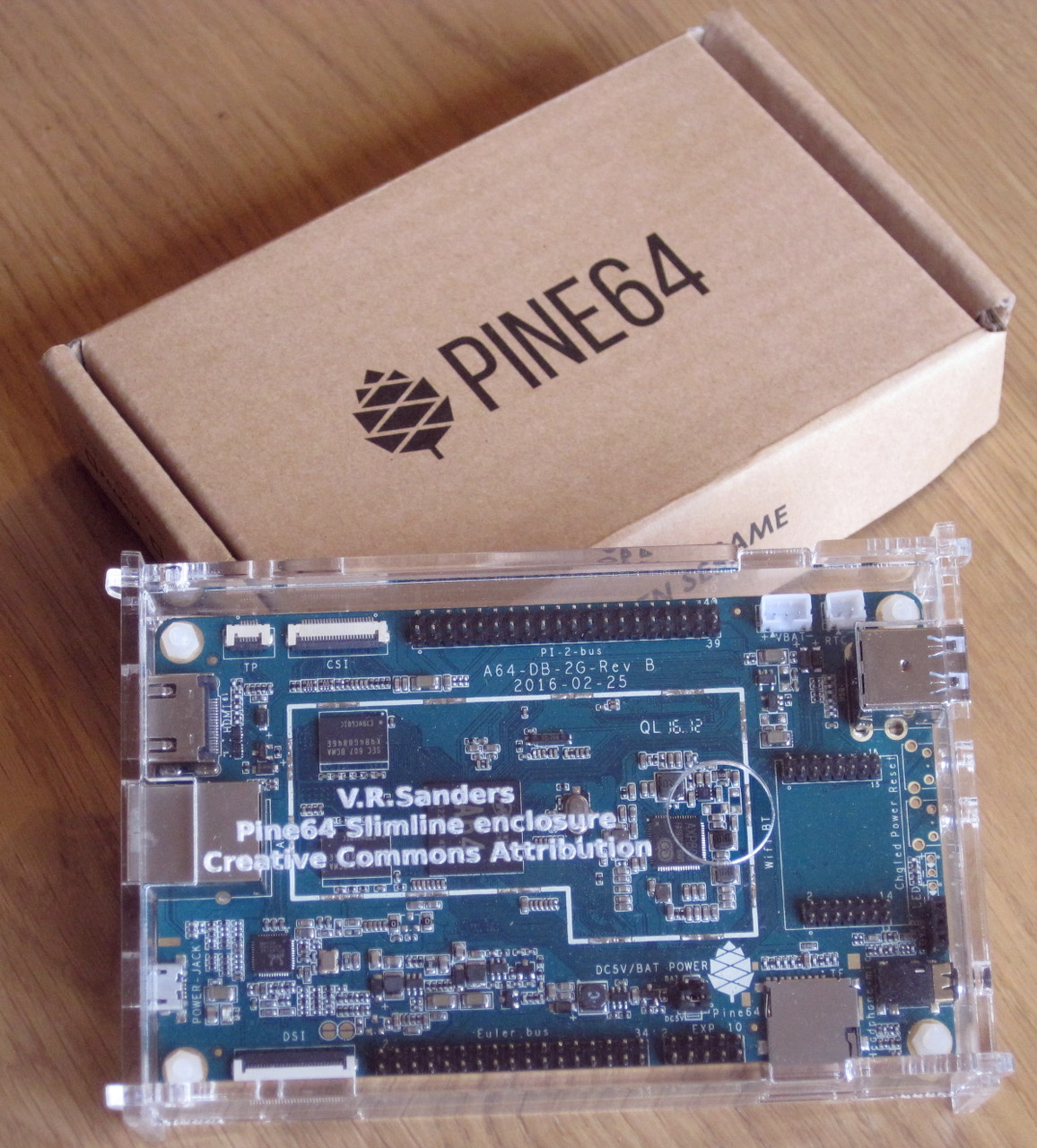
Pine64 board in my case design
The system I acquired comprises of:
Hardware based kickstarter projects are susceptible to several issues and the usual suspects occurred causing delays:
My personal view is that PINE 64 inc. handled it pretty well, much better than several other projects I have backed and as my Norman Douglas quotation suggests I think they have gained some wisdom from this.

I received my hardware at the beginning of April only a couple of months after their initial estimated shipping date which as these things go is not a huge delay. I understand some people who had slightly more complex orders were just receiving their orders in late June which is perhaps unfortunate but still well within kickstarter project norms.

As an aside: I fear that many people simply misunderstand the crowdfunding model for hardware projects and fail to understand that they are not buying a finished product, on the other side of the debate I think many projects need to learn expectation management much better than they do. Hyping the product to get interest is obviously the point of the crowdfunding platform, but over promising and under delivering always causes unhappy customers.

Pine64 board dimensions
Despite the delays in production and shipping the information available for the board was (and sadly remains) inadequate. As usual I wanted to case my board and there were no useful dimension drawings so I had to make my own from direct measurements together with a STL 3D model.

Also a mental sigh for "yet another poor form factor decision" so another special case size and design. After putting together a design and fabricating with the laser cutter I moved on to the software.

Once more this is where, once again, the story turns bleak. We find a very pretty website but no obvious link to the software (hint scroll to the bottom and find the "support" wiki link) once you find the wiki you will eventually discover that the provided software is either an Android 5.1.1 image (which failed to start on my board) or relies on some random guy from the forums who has put together his own OS images using a hacked up Allwinner Board Support Package (BSP) kernel.

Now please do not misunderstand me, I think the work by Simon Eisenmann (longsleep) to get a working kernel and Lenny Raposo to get viable OS images is outstanding and useful. I just feel that Allwinner and vendors like Pine64 Inc. should have provided something much, much better than they have. Even the efforts to get mainline support for this hardware are all completely volunteer community efforts and are are making slow progress as a result.

Assuming I wanted to run a useful OS on this hardware and not just use it as a modern work of art I installed a basic Debian arm64 using Lenny Raposo's pine64 pro site downloads. I was going to use the system for compiling and builds so used the "Debian Base" image to get a minimal setup. After generating unique ssh keys, renaming the default user and checking all the passwords and permissions I convinced myself the system was reasonably trustworthy.

The standard Debian Jessie OS runs as expected with few surprises. The main concern I have is that there are a number of unpackaged scripts installed (prefixed with pine64_) which perform several operations from reporting system health (using sysfs entries) to upgrading the kernel and bootloader.

While I understand these scripts have been provided for the novice users to reduce support burden, doing even more of the vendors job, I would much rather have had proper packages for these scripts, kernel and bootloader which apt could manage. This would have reduced image creation to a simple debootstrap giving much greater confidence in the images provenance.

The 3.10 based kernel is three years old at the time of writing and lacks a great number of features for the aarch64 ARM processors introduced since release. However I was pleasantly surprised at kvm apparently being available.

# dmesg grep -i kvm
[ 7.592896] kvm [1]: Using HYP init bounce page @b87c4000
[ 7.593361] kvm [1]: interrupt-controller@1c84000 IRQ25
[ 7.593778] kvm [1]: timer IRQ27
[ 7.593801] kvm [1]: Hyp mode initialized successfully

I installed the libvirt packages (and hence all their dependencies like qemu) and created a bridge ready for the virtual machines.

I needed access to storage for the host disc images and while I could have gone the route of using USB attached SATA as with the hikey I decided to try and use network attached storage instead. Initially I investigated iSCSI but it seems the Linux target (iSCSI uses initiator for client and target for server) support is either old, broken or unpackaged.

I turned to network block device (nbd) which is packaged and seems to have reasonable stability out of the box on modern distributions. This appeared to work well, indeed over the gigabit Ethernet interface I managed to get a sustained 40 megabytes a second read and write rate in basic testing. This is better performance than a USB 2.0 attached SSD on the hikey

I fired up the guest and perhaps I should have known better than to expect a 3.10 vendor kernel to cope. The immediate hard crashes despite tuning many variables convinced me that virtualisation was not viable with this kernel.

So abandoning that approach I attempted to run the CI workload directly on the system. To my dismay this also proved problematic. The processor has the bad habit of throttling due to thermal issues (despite a substantial heatsink) and because the storage is network attached throttling the CPU also massively impacts I/O.

The limitations meant that the workload caused the system to move between high performance and almost no progress on a roughly ten second cycle. This caused a simple NetSurf recompile CI job to take over fifteen minutes. For comparison the same task takes the armhf builder (CubieTruck) four minutes and a 64 bit x86 build which takes around a minute.

If the workload is tuned to a single core which does not trip thermal throttling the build took seven minutes. which is almost identical to the existing single core virtual machine instance running on the hikey.

In conclusion the Pine64 is an interesting bit of hardware with fatally flawed software offering. Without Simon and Lenny providing their builds to the community the device would be practically useless rather than just performing poorly. There appears to have been no progress whatsoever on the software offering from Pine64 in the six months since I received the device and no prospect of mainline Allwinner support for the SoC either.

Effectively I have spent around 50usd (40 for the board and 10 for the enclosure) on a failed experiment. Perhaps in the future the software will improve sufficiently for it to become useful but I do not hold out much hope that this will come from Pine64 themselves.

10 October 2016

Daniel Pocock: DVD-based Clean Room for PGP and PKI

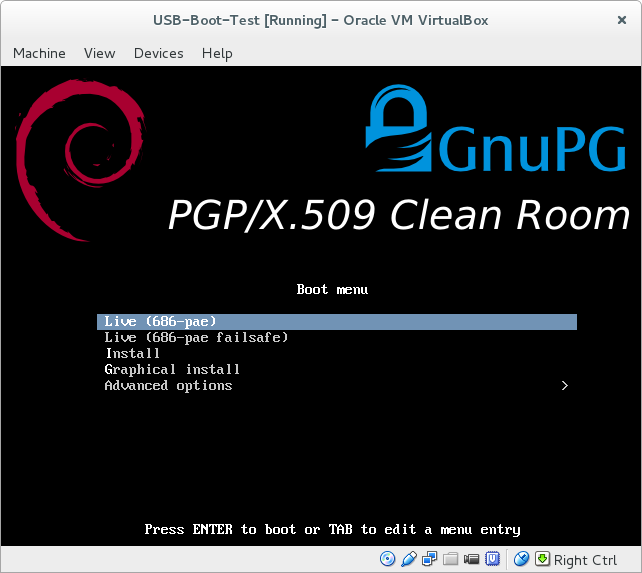
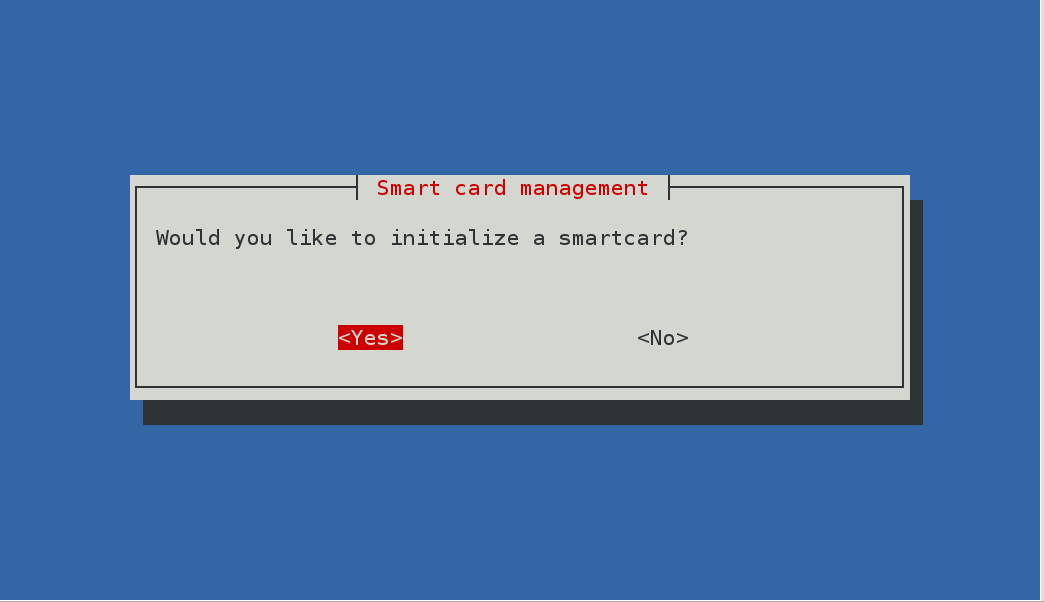
There is increasing interest in computer security these days and more and more people are using some form of PKI, whether it is signing Git tags, signing packages for a GNU/Linux distribution or just signing your emails. There are also more home networks and small offices who require their own in-house Certificate Authority (CA) to issue TLS certificates for VPN users (e.g. StrongSWAN) or IP telephony. Back in April, I started discussing the PGP Clean Room idea (debian-devel discussion and gnupg-users discussion), created a wiki page and started development of a script to build the clean room ISO using live-build on Debian. Keeping the master keys completely offline and putting subkeys onto smart cards and other devices dramatically lowers the risk of mistakes and security breaches. Using a read-only DVD to operate the clean-room makes it convenient and harder to tamper with. Trying it out in VirtualBox It is fairly easy to clone the Git repository, run the script to create the ISO and boot it in VirtualBox to see what is inside: At the moment, it contains a number of packages likely to be useful in a PKI clean room, including GnuPG, smartcard drivers, the lightweight pki utility from StrongSWAN and OpenSSL. I've been trying it out with an SPR-532, one of the GnuPG-supported smartcard readers with a pin-pad and the OpenPGP card. Ready to use today More confident users will be able to build the ISO and use it immediately by operating all the utilities from the command line. For example, you should be able to fully configure PGP smart cards by following this blog from Simon Josefsson. The ISO includes some useful scripts, for example, create-raid will quickly partition and RAID a set of SD cards to store your master key-pair offline. Getting involved To make PGP accessible to a wider user-base and more convenient for those who don't use GnuPG frequently enough to remember all the command line options, it would be interesting to create a GUI, possibly using python-newt to create a similar look-and-feel to popular text-based installer and system administration tools. If you are keen on this project and would like to discuss it further, please come and join the new pki-clean-room mailing list and feel free to ask questions or share your thoughts about it. One way to proceed may be to recruit an Outreachy or GSoC intern to develop the UI. Before they can get started, it would be necessary to more thoroughly document workflow requirements.
Balram Pariyarath: Something will be posted soon.


Reproducible builds folks: Reproducible Builds: week 76 in Stretch cycle

What happened in the Reproducible Builds effort between Sunday October 2 and Saturday October 8 2016: Media coverage Events Packages reviewed and fixed, and bugs filed Reviews of unreproducible packages 31 package reviews have been added, 27 have been updated and over 20 have been removed in this week, adding to our knowledge about identified issues. 3 issue types have been addded: 1 issue type has been updated: Weekly QA work During of reproducibility testing, some FTBFS bugs have been detected and reported by: tests.reproducible-builds.org Debian: Misc. This week's edition was written by Chris Lamb, Holger Levsen & Vagrant Cascadian and reviewed by a bunch of Reproducible Builds folks on IRC.

Petter Reinholdtsen: Experience and updated recipe for using the Signal app without a mobile phone

In July I wrote how to get the Signal Chrome/Chromium app working without the ability to receive SMS messages (aka without a cell phone). It is time to share some experiences and provide an updated setup. The Signal app have worked fine for several months now, and I use it regularly to chat with my loved ones. I had a major snag at the end of my summer vacation, when the the app completely forgot my setup, identity and keys. The reason behind this major mess was running out of disk space. To avoid that ever happening again I have started storing everything in userdata/ in git, to be able to roll back to an earlier version if the files are wiped by mistake. I had to use it once after introducing the git backup. When rolling back to an earlier version, one need to use the 'reset session' option in Signal to get going, and notify the people you talk with about the problem. I assume there is some sequence number tracking in the protocol to detect rollback attacks. The git repository is rather big (674 MiB so far), but I have not tried to figure out if some of the content can be added to a .gitignore file due to lack of spare time. I've also hit the 90 days timeout blocking, and noticed that this make it impossible to send messages using Signal. I could still receive them, but had to patch the code with a new timestamp to send. I believe the timeout is added by the developers to force people to upgrade to the latest version of the app, even when there is no protocol changes, to reduce the version skew among the user base and thus try to keep the number of support requests down. Since my original recipe, the Signal source code changed slightly, making the old patch fail to apply cleanly. Below is an updated patch, including the shell wrapper I use to start Signal. The original version required a new user to locate the JavaScript console and call a function from there. I got help from a friend with more JavaScript knowledge than me to modify the code to provide a GUI button instead. This mean that to get started you just need to run the wrapper and click the 'Register without mobile phone' to get going now. I've also modified the timeout code to always set it to 90 days in the future, to avoid having to patch the code regularly. So, the updated recipe for Debian Jessie:
  1. First, install required packages to get the source code and the browser you need. Signal only work with Chrome/Chromium, as far as I know, so you need to install it.
    apt install git tor chromium
    git clone https://github.com/WhisperSystems/Signal-Desktop.git
    
  2. Modify the source code using command listed in the the patch block below.
  3. Start Signal using the run-signal-app wrapper (for example using pwd /run-signal-app).
  4. Click on the 'Register without mobile phone', will in a phone number you can receive calls to the next minute, receive the verification code and enter it into the form field and press 'Register'. Note, the phone number you use will be user Signal username, ie the way others can find you on Signal.
  5. You can now use Signal to contact others. Note, new contacts do not show up in the contact list until you restart Signal, and there is no way to assign names to Contacts. There is also no way to create or update chat groups. I suspect this is because the web app do not have a associated contact database.
I am still a bit uneasy about using Signal, because of the way its main author moxie0 reject federation and accept dependencies to major corporations like Google (part of the code is fetched from Google) and Amazon (the central coordination point is owned by Amazon). See for example the LibreSignal issue tracker for a thread documenting the authors view on these issues. But the network effect is strong in this case, and several of the people I want to communicate with already use Signal. Perhaps we can all move to Ring once it work on my laptop? It already work on Windows and Android, and is included in Debian and Ubuntu, but not working on Debian Stable. Anyway, this is the patch I apply to the Signal code to get it working. It switch to the production servers, disable to timeout, make registration easier and add the shell wrapper:
cd Signal-Desktop; cat <<EOF   patch -p1
diff --git a/js/background.js b/js/background.js
index 24b4c1d..579345f 100644
--- a/js/background.js
+++ b/js/background.js
@@ -33,9 +33,9 @@
          );
      );
 
-    var SERVER_URL = 'https://textsecure-service-staging.whispersystems.org';
+    var SERVER_URL = 'https://textsecure-service-ca.whispersystems.org';
     var SERVER_PORTS = [80, 4433, 8443];
-    var ATTACHMENT_SERVER_URL = 'https://whispersystems-textsecure-attachments-staging.s3.amazonaws.com';
+    var ATTACHMENT_SERVER_URL = 'https://whispersystems-textsecure-attachments.s3.amazonaws.com';
     var messageReceiver;
     window.getSocketStatus = function()  
         if (messageReceiver)  
diff --git a/js/expire.js b/js/expire.js
index 639aeae..beb91c3 100644
--- a/js/expire.js
+++ b/js/expire.js
@@ -1,6 +1,6 @@
 ;(function()  
     'use strict';
-    var BUILD_EXPIRATION = 0;
+    var BUILD_EXPIRATION = Date.now() + (90 * 24 * 60 * 60 * 1000);
 
     window.extension = window.extension    ;
 
diff --git a/js/views/install_view.js b/js/views/install_view.js
index 7816f4f..1d6233b 100644
--- a/js/views/install_view.js
+++ b/js/views/install_view.js
@@ -38,7 +38,8 @@
             return  
                 'click .step1': this.selectStep.bind(this, 1),
                 'click .step2': this.selectStep.bind(this, 2),
-                'click .step3': this.selectStep.bind(this, 3)
+                'click .step3': this.selectStep.bind(this, 3),
+                'click .callreg': function()   extension.install('standalone')  ,
              ;
          ,
         clearQR: function()  
diff --git a/options.html b/options.html
index dc0f28e..8d709f6 100644
--- a/options.html
+++ b/options.html
@@ -14,7 +14,10 @@
         <div class='nav'>
           <h1>  installWelcome  </h1>
           <p>  installTagline  </p>
-          <div> <a class='button step2'>  installGetStartedButton  </a> </div>
+          <div> <a class='button step2'>  installGetStartedButton  </a>
+	    <br> <a class="button callreg">Register without mobile phone</a>
+
+	  </div>
           <span class='dot step1 selected'></span>
           <span class='dot step2'></span>
           <span class='dot step3'></span>
--- /dev/null   2016-10-07 09:55:13.730181472 +0200
+++ b/run-signal-app   2016-10-10 08:54:09.434172391 +0200
@@ -0,0 +1,12 @@
+#!/bin/sh
+set -e
+cd $(dirname $0)
+mkdir -p userdata
+userdata=" pwd /userdata"
+if [ -d "$userdata" ] && [ ! -d "$userdata/.git" ] ; then
+    (cd $userdata && git init)
+fi
+(cd $userdata && git add . && git commit -m "Current status."   true)
+exec chromium \
+  --proxy-server="socks://localhost:9050" \
+  --user-data-dir=$userdata --load-and-launch-app= pwd 
EOF
chmod a+rx run-signal-app
As usual, if you use Bitcoin and want to show your support of my activities, please send Bitcoin donations to my address 15oWEoG9dUPovwmUL9KWAnYRtNJEkP1u1b.

9 October 2016

Bits from Debian: Debian is participating in the next round of Outreachy!

Following the success of the last round of Outreachy, we are glad to announce that Debian will take part in the program for the next round, with internships lasting from the 6th of December 2016 to the 6th of March 2017. From the official website: Outreachy helps people from groups underrepresented in free and open source software get involved. We provide a supportive community for beginning to contribute any time throughout the year and offer focused internship opportunities twice a year with a number of free software organizations. Currently, internships are open internationally to women (cis and trans), trans men, and genderqueer people. Additionally, they are open to residents and nationals of the United States of any gender who are Black/African American, Hispanic/Latin@, American Indian, Alaska Native, Native Hawaiian, or Pacific Islander. If you want to apply to an internship in Debian, you should take a look at the wiki page, and contact the mentors for the projects listed, or seek more information on the (public) debian-outreach mailing-list. You can also contact the Outreach Team directly. If you have a project idea and are willing to mentor an intern, you can submit a project idea on the Outreachy wiki page. Here's a few words on what the interns for the last round achieved within Outreachy: Debian would not be able to participate in Outreachy without the help of the Software Freedom Conservancy, who provides administrative support for Outreachy, as well as the continued support of Debian's donors, who provide funding for the internships. If you want to donate, please get in touch with one of our trusted organizations. Debian is looking forward to welcoming new interns for the next few months, come join us!

Norbert Preining: Reload: Android 7.0 Nougat Root Pokemon Go

Ok, it turned out that a combinations of updates has broken my previous guide on playing Pokemon GO on a rooted Android device. What has happened that the October security update of the Android Nougat has changed the SecurityNet that is used for checking for rooted devices, and at the same time the Magisk rooting system as catapulted itself (hopefully temporarily) into the complete irrelevance by removing the working version and providing an improved version that does neither have SuperSU installed, nor the ability to hide root well done, congratulations. android-nougat-root-poke But there is a way around, and I am now back at the latest security patch level, rooted, and playing Pokemon GO (not very often, no time, though!). My previous guide used Magisk Version 6 to root and hide root. But the recent security updated of Andorid Nougat (October 2016) has rendered Magisk-v6 non-working. I first thought that Magisk-v7 could solve the problem, but I was badly disappointed: After reflashing my device to pristine state, installing Magisk-v7, I suddenly was left with: no SuperSU (that means, X-plore, Titanium Backup etc do not work anymore), nor the ability to hide root for Pokemon Go or banking apps. Great update. Thus, I have decided to remove Magisk completely and make a clean start with SuperSU and suhide (and a GUI for suhide). And it turned out to be more convenient and more standard than Magisk, may it rest in peace (until they fix their stuff together). In the following I assume you have a clean slate Android Nougat device, if not, please see one of the previous guides for hints how to flash back without loosing your user data. Ingredients One need the following few items: Rooting Unzip the CF-Auto-Root-angler-angler-nexus6p.zip and either use the included programs (root-linux.sh, root-mac.sh, root-windows.bat) to root your device, or simply connect your device to your computer, and run (assuming you have adb and fastboot installed):

adb reboot bootloader
sleep 10
fastboot boot image/CF-Auto-Root-angler-angler-nexus6p.img
After that your device will reboot a few times, and you will finally land in your normal Android screen and a new program SuperSU will be available. At this stage you will not be able to play Pokemon GO anymore. Updating SuperSU The version of SuperSU packaged with the CF-AutoRoot is unfortunately too old, so one needs to update using the zip file SR1-SuperSU-v2.78-SR1-20160915123031.zip (or later). Here are two options: Either you use TWRP recovery system, or you install FlashFire (main page, app store page) which allows you to flash zip/ota directly from your Android screen. This time I used for the first time the FlashFire method, and it worked without any problem. Just press the + button in FlashFire, than the Flash zip/ota button, select the SR1-SuperSU-v2.78-SR1-20160915123031.zip, click two times yes, and then wait a bit and a few black screens (don t do anything!) later you will be back in your Nougat environment. Opening the SuperSU app should show you on the Settings tag that the version has been updated to 2.78-SR1. Installing suhide As with the update of SuperSU, install the suhide zip file, smae procedure, nothing special. After this you will be able to add an application (like Pokemon GO) from the command line (shell), but this is not very convenient. Better is to install the suhide GUI from the app store, start it, scroll for Pokemnon GO, add a tick, and you are settled. After that you are free to play Pokemon GO again. At least until the next security update brings again problems. In the long run this is a loosing game, anyway. Enjoy it while you can.

Next.

Previous.