Search Results: "will"

23 October 2016

Jaldhar Vyas: What I Did During My Summer Vacation

Thats So Raven If I could sum up the past year in one word, that word would be distraction. There have been so many strange, confusing or simply unforseen things going on I have had trouble focusing like never before. For instance, on the opposite side of the street from me is one of Jersey City's old resorvoirs. It's not used for drinking water anymore and the city eventually plans on merging it into the park on the other side. In the meantime it has become something of a wildlife refuge. Which is nice except one of the newly settled critters was a bird of prey -- the consensus is possibly some kind of hawk or raven. Starting your morning commute under the eyes of a harbinger of death is very goth and I even learned to deal with the occasional piece of deconstructed rodent on my doorstep but nighttime was a big problem. For contrary to popular belief, ravens do not quoth "nevermore" but "KRRAAAA". Very loudly. Just as soon as you have drifted of to sleep. Eventually my sleep-deprived neighbors and I appealed to the NJ division of enviromental protection to get it removed but by the time they were ready to swing into action the bird had left for somewhere more congenial like Transylvania or Newark. Or here are some more complete wastes of time: I go the doctor for my annual physical. The insurance company codes it as Adult Onset Diabetes by accident. One day I opened the lid of my laptop and there's a "ping" sound and a piece of the hinge flies off. Apparently that also severed the connection to the screen and naturally the warranty had just expired so I had to spend the next month tethered to an external monitor until I could afford to buy a new one. Mix in all the usual social, political, family and work drama and you can see that it has been a very trying time for me. Dovecot I have managed to get some Debian work done. On Dovecot, my principal package, I have gotten tremendous support from Apollon Oikonomopolous who I belatedly welcome as a member of the Dovecot maintainer team. He has been particularly helpful in fixing our systemd support and cleaning out a lot of the old and invalid bugs. We're in pretty good shape for the freeze. Upstream has released an RC of 2.2.26 and hopefully the final version will be out in the next couple of days so we can include it in Stretch. We can always use more help with the package so let me know if you're interested. Debian-IN Most of the action has been going on without me but I've been lending support and sponsoring whenever I can. We have several new DDs and DMs but still no one north of the Vindhyas I'm afraid. Debian Perl Group gregoa did a ping of inactive maintainers and I regretfully had to admit to myself that I wasn't going to be of use anytime soon so I resigned. Perl remains my favorite language and I've actually been more involved in the meetings of my local Perlmongers group so hopefully I will be back again one day. And I still maintain the Perl modules I wrote myself. Debian-Axe-Murderers* May have gained a recruit. *Stricly speaking it should be called Debian-People-Who-Dont-Think-Faults-in-One-Moral-Domain-Such-As-For-Example-Axe-Murdering-Should-Leak-Into-Another-Moral-Domain-Such-As-For-Example-Debian but come on, that's just silly.

22 October 2016

Ingo Juergensmann: Automatically update TLSA records on new Letsencrypt Certs

I've been using DNSSEC for some quite time now and it is working quite well. When LetsEncrypt went public beta I jumped on the train and migrated many services to LE-based TLS. However there was still one small problem with LE certs: When there is a new cert, all of the old TLSA resource records are not valid anymore and might give problems to strict DNSSEC checking clients. It took some while until my pain was big enough to finally fix it by some scripts. There are at least two scripts involved: 1) dnssec.sh
This script does all of my DNSSEC handling. You can just do a "dnssec.sh enable-dnssec domain.tld" and everything is configured so that you only need to copy the appropriate keys into the webinterface of your DNS registry.
host:~/bin# dnssec.sh
No parameter given.
Usage: dnsec.sh MODE DOMAIN
MODE can be one of the following:
enable-dnssec : perform all steps to enable DNSSEC for your domain
edit-zone     : safely edit your zone after enabling DNSSEC
create-dnskey : create new dnskey only
load-dnskey   : loads new dnskeys and signs the zone with them
show-ds       : shows DS records of zone
zoneadd-ds    : adds DS records to the zone file
show-dnskey   : extract DNSKEY record that needs to uploaded to your registrar
update-tlsa   : update TLSA records with new TLSA hash, needs old and new TLSA hashes as additional parameters
For updating zone-files just do a "dnssech.sh edit-zone domain.tld" to add new records and such and the script will take care e.g. of increasing the serial of the zone file. I find this very convenient, so I often use this script for non-DNSSEC-enabled domains as well. However you can spot the command line option "update-tlsa". This option needs the old and the new TLSA hashes beside the domain.tld parameter. However, this option is used from the second script: 2) check_tlsa.sh
This is a quite simple Bash script that parses the domains.txt from letsencrypt.sh script, looking up the old TLSA hash in the zone files (structured in TLD/domain.tld directories), compare the old with the new hash (by invoking tlsagen.sh) and if there is a difference in hashes, call dnssec.sh with the proper parameters:
#!/bin/bash
set -e
LEPATH="/etc/letsencrypt.sh"
for i in  cat /etc/letsencrypt.sh/domains.txt   awk ' print $1 '  ; do
  domain= echo $i   awk 'BEGIN  FS="."  ;  print $(NF-1)"."$NF ' 
  #echo -n "Domain: $domain"
  TLD= echo $i   awk 'BEGIN  FS="." ;  print $NF ' 
  #echo ", TLD: $TLD"
  OLDTLSA= grep -i "in.*tlsa" /etc/bind/$ TLD /$ domain    grep $ i    head -n 1   awk ' print $NF ' 
  if [ -n "$ OLDTLSA " ] ; then
  #echo "--> $ OLDTLSA "
  # Usage: tlsagen.sh cert.pem host[:port] usage selector mtype
  NEWTLSA= /path/to/tlsagen.sh $LEPATH/certs/$ i /fullchain.pem $ i  3 1 1   awk ' print $NF ' 
  #echo "==> $NEWTLSA"
  if [ "$ OLDTLSA " != "$ NEWTLSA " ] ; then
  /path/to/dnssec.sh update-tlsa $ domain  $ OLDTLSA  $ NEWTLSA  > /dev/null
  echo "TLSA RR update for $ i "
  fi
  fi
done
So, quite simple and obviously a quick hack. For sure someone else can write a cleaner and more sophisticated implementation to do the same stuff, but at least it works for meTM. Use it on your own risk and do whatever you want with these scripts (licensed under public domain). You can invoke check_tlsa.sh right after your crontab call for letsencrypt.sh. In a more sophisticated way it should be fairly easy to invoke these scripts from letsencrypt.sh post hooks as well.
Please find the files attached to this page (remove the .txt extension after saving, of course).
AttachmentSize
check_tlsa.sh.txt812 bytes
dnssec.sh.txt3.88 KB
Kategorie:

Matthieu Caneill: Debugging 101

While teaching this semester a class on concurrent programming, I realized during the labs that most of the students couldn't properly debug their code. They are at the end of a 2-year cursus, know many different programming languages and frameworks, but when it comes to tracking down a bug in their own code, they often lacked the basics. Instead of debugging for them I tried to give them general directions that they could apply for the next bugs. I will try here to summarize the very first basic things to know about debugging. Because, remember, writing software is 90% debugging, and 10% introducing new bugs (that is not from me, but I could not find the original quote). So here is my take at Debugging 101. Use the right tools Many good tools exist to assist you in writing correct software, and it would put you behind in terms of productivity not to use them. Editors which catch syntax errors while you write them, for example, will help you a lot. And there are many features out there in editors, compilers, debuggers, which will prevent you from introducing trivial bugs. Your editor should be your friend; explore its features and customization options, and find an efficient workflow with them, that you like and can improve over time. The best way to fix bugs is not to have them in the first place, obviously. Test early, test often I've seen students writing code for one hour before running make, that would fail so hard that hundreds of lines of errors and warnings were outputted. There are two main reasons doing this is a bad idea: I recommend to test your code (compilation and execution) every few lines of code you write. When something breaks, chances are it will come from the last line(s) you wrote. Compiler errors will be shorter, and will point you to the same place in the code. Once you get more confident using a particular language or framework, you can write more lines at once without testing. That's a slow process, but it's ok. If you set up the right keybinding for compiling and executing from within your editor, it shouldn't be painful to test early and often. Read the logs Spot the places where your program/compiler/debugger writes text, and read it carefully. It can be your terminal (quite often), a file in your current directory, a file in /var/log/, a web page on a local server, anything. Learn where different software write logs on your system, and integrate reading them in your workflow. Often, it will be your only information about the bug. Often, it will tell you where the bug lies. Sometimes, it will even give you hints on how to fix it. You may have to filter out a lot of garbage to find relevant information about your bug. Learn to spot some keywords like error or warning. In long stacktraces, spot the lines concerning your files; because more often, your code is to be blamed, rather than deeper library code. grep the logs with relevant keywords. If you have the option, colorize the output. Use tail -f to follow a file getting updated. There are so many ways to grasp logs, so find what works best with you and never forget to use it! Print foobar That one doesn't concern compilation errors (unless it's a Makefile error, in that case this file is your code anyway). When the program logs and output failed to give you where an error occured (oh hi Segmentation fault!), and before having to dive into a memory debugger or system trace tool, spot the portion of your program that causes the bug and add in there some print statements. You can either print("foo") and print("bar"), just to know that your program reaches or not a certain place in your code, or print(some_faulty_var) to get more insights on your program state. It will give you precious information.
stderr >> "foo" >> endl;
my_db.connect(); // is this broken?
stderr >> "bar" >> endl;
In the example above, you can be sure it is the connection to the database my_db that is broken if you get foo and not bar on your standard error. (That is an hypothetical example. If you know something can break, such as a database connection, then you should always enclose it in a try/catch structure). Isolate and reproduce the bug This point is linked to the previous one. You may or may not have isolated the line(s) causing the bug, but maybe the issue is not always raised. It can depend on many other things: the program or function parameters, the network status, the amount of memory available, the decisions of the OS scheduler, the user rights on the system or on some files, etc. More generally, any assumption you made on any external dependency can appear to be wrong (even if it's right 99% of the time). According to the context, try to isolate the set of conditions that trigger the bug. It can be as simple as "when there is no internet connection", or as complicated as "when the CPU load of some external machine is too high, it's a leap year, and the input contains illegal utf-8 characters" (ok, that one is fucked up; but it surely happens!). But you need to reliably be able to reproduce the bug, in order to be sure later that you indeed fixed it. Of course when the bug is triggered at every run, it can be frustrating that your program never works but it will in general be easier to fix. RTFM Always read the documentation before reaching out for help. Be it man, a book, a website or a wiki, you will find precious information there to assist you in using a language or a specific library. It can be quite intimidating at first, but it's often organized the same way. You're likely to find a search tool, an API reference, a tutorial, and many examples. Compare your code against them. Check in the FAQ, maybe your bug and its solution are already referenced there. You'll rapidly find yourself getting used to the way documentation is organized, and you'll be more and more efficient at finding instantly what you need. Always keep the doc window open! Google and Stack Overflow are your friends Let's be honest: many of the bugs you'll encounter have been encountered before. Learn to write efficient queries on search engines, and use the knowledge you can find on questions&answers forums like Stack Overflow. Read the answers and comments. Be wise though, and never blindly copy and paste code from there. It can be as bad as introducing malicious security issues into your code, and you won't learn anything. Oh, and don't copy and paste anyway. You have to be sure you understand every single line, so better write them by hand; it's also better for memorizing the issue. Take notes Once you have identified and solved a particular bug, I advise to write about it. No need for shiny interfaces: keep a list of your bugs along with their solutions in one or many text files, organized by language or framework, that you can easily grep. It can seem slightly cumbersome to do so, but it proved (at least to me) to be very valuable. I can often recall I have encountered some buggy situation in the past, but don't always remember the solution. Instead of losing all the debugging time again, I search in my bug/solution list first, and when it's a hit I'm more than happy I kept it. Further reading degugging Remember this was only Debugging 101, that is, the very first steps on how to debug code on your own, instead of getting frustrated and helplessly stare at your screen without knowing where to begin. When you'll write more software, you'll get used to more efficient workflows, and you'll discover tools that are here to assist you in writing bug-free code and spotting complex bugs efficiently. Listed below are some of the tools or general ideas used to debug more complex software. They belong more to a software engineering course than a Debugging 101 blog post. But it's good to know as soon as possible these exist, and if you read the manuals there's no reason you can't rock with them! Don't hesitate to comment on this, and provide your debugging 101 tips! I'll be happy to update the article with valuable feedback. Happy debugging!

Iain R. Learmonth: The Domain Name System

As I posted yesterday, we released PATHspider 1.0.0. What I didn t talk about in that post was an event that occured only a few hours before the release. Everything was going fine, proofreading of the documentation was in progress, a quick git push with the documentation updates and CI FAILED!?! Our CI doesn t build the documentation, only tests the core code. I m planning to release real soon and something has broken. Starting to panic.
irl@orbiter# ./tests.sh
................
----------------------------------------------------------------------
Ran 16 tests in 0.984s
OK
This makes no sense. Maybe I forgot to add a dependency and it s been broken for a while? I scrutinise the dependencies list and it all looks fine. In fairness, probably the first thing I should have done is look at the build log in Jenkins, but I ve never had a failure that I couldn t reproduce locally before. It was at this point that I realised there was something screwy going on. A sigh of relief as I realise that there s not a catastrophic test failure but now it looks like maybe there s a problem with the University research group network, which is arguably worse. Being focussed on getting the release ready, I didn t realise that the Internet was falling apart. Unknown to me, a massive DDoS attack against Dyn, a major DNS host, was in progress. After a few attempts to debug the problem, I hardcoded a line into /etc/hosts, still believing it to be a localised issue.
192.30.253.112  github.com
I ve just removed this line as the problem seems to have resolved itself for now. There are two main points I ve taken away from this: This afternoon I read a post by [tj] on the 57North Planet, and this is where I learnt what had really happened. He mentions multicast DNS and Namecoin as distributed name system alternatives. I d like to add some more to that list: Only the first of these is really a distributed solution. My idea with ICMP Domain Name Messages is that you send an ICMP message to a webserver. Somewhere along the path, you ll hit either a surveillance or censorship middlebox. These middleboxes can provide value by caching any DNS replies that are seen so that an ICMP DNS request message will cause the message to not be forwarded but a reply is generated to provide the answer to the query. If the middlebox cannot generate a reply, it can still forward it to other surveillance and censorship boxes. I think this would be a great secondary use for the NSA and GCHQ boxen on the Internet, clearly fits within the scope of defending national security as if DNS is down the Internet is kinda dead, plus it d make it nice and easy to find the boxes with PATHspider.

Dirk Eddelbuettel: RcppArmadillo 0.7.500.0.0

armadillo image A few days ago, Conrad released Armadillo 7.500.0. The corresponding RcppArmadillo release 0.7.500.0.0 is now on CRAN (and will get into Debian shortly). Armadillo is a powerful and expressive C++ template library for linear algebra aiming towards a good balance between speed and ease of use with a syntax deliberately close to a Matlab. RcppArmadillo integrates this library with the R environment and language--and is widely used by (currently) 274 other packages on CRAN. Changes in this release relative to the previous CRAN release are as follows:

Changes in RcppArmadillo version 0.7.500.0.0 (2016-10-20)
  • Upgraded to Armadillo release 7.500.0 (Coup d'Etat)
    • Expanded qz() to optionally specify ordering of the Schur form
    • Expanded each_slice() to support matrix multiplication

Courtesy of CRANberries, there is a diffstat report. More detailed information is on the RcppArmadillo page. Questions, comments etc should go to the rcpp-devel mailing list off the R-Forge page.

This post by Dirk Eddelbuettel originated on his Thinking inside the box blog. Please report excessive re-aggregation in third-party for-profit settings.

Christoph Egger: Running Debian on the ClearFog

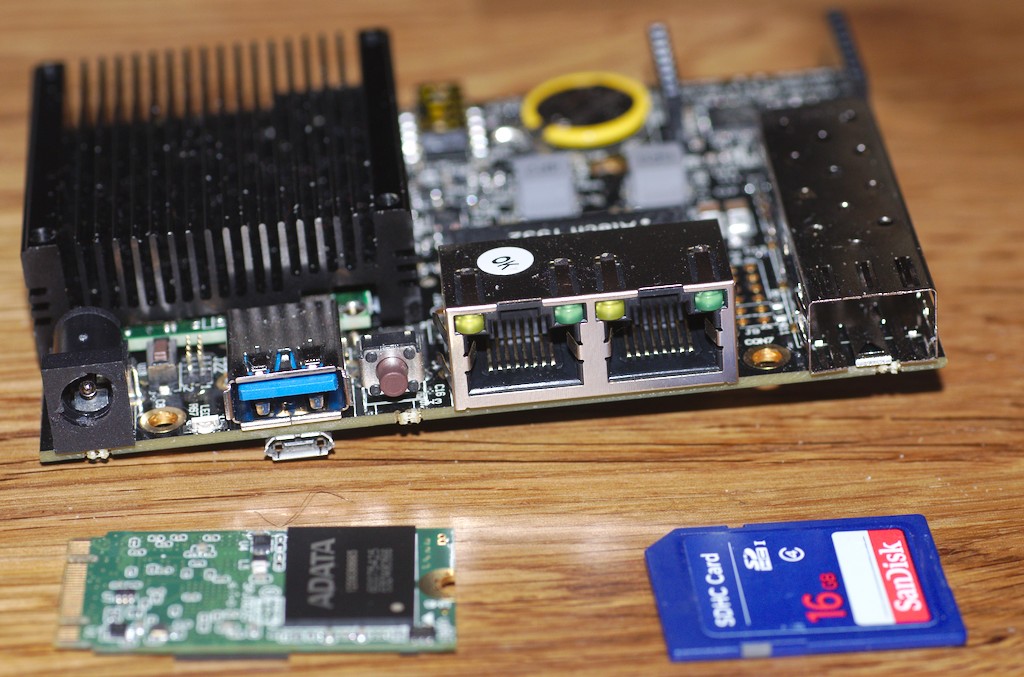
Back in August, I was looking for a Homeserver replacement. During FrOSCon I was then reminded of the Turris Omnia project by NIC.cz. The basic SoC (Marvel Armada 38x) seemed to be nice hand have decent mainline support (and, with the turris, users interested in keeping it working). Only I don't want any WIFI and I wasn't sure the standard case would be all that usefully. Fortunately, there's also a simple board available with the same SoC called ClearFog and so I got one of these (the Base version). With shipping and the SSD (the only 2242 M.2 SSD with 250 GiB I could find, a ADATA SP600) it slightly exceeds the budget but well. ClearFog with SSD When installing the machine, the obvious goal was to use mainline FOSS components only if possible. Fortunately there's mainline kernel support for the device as well as mainline U-Boot. First attempts to boot from a micro SD card did not work out at all, both with mainline U-Boot and the vendor version though. Turns out the eMMC version of the board does not support any micro SD cards at all, a fact that is documented but others failed to notice as well. U-Boot As the board does not come with any loader on eMMC and booting directly from M.2 requires removing some resistors from the board, the easiest way is using UART for booting. The vendor wiki has some shell script wrapping an included C fragment to feed U-Boot to the device but all that is really needed is U-Boot's kwboot utility. For some reason the SPL didn't properly detect UART booting on my device (wrong magic number) but patching the if (in arch-mvebu's spl.c) and always assume UART boot is an easy way around. The plan then was to boot a Debian armhf rootfs with a defconfig kernel from USB stick. and install U-Boot and the rootfs to eMMC from within that system. Unfortunately U-Boot seems to be unable to talk to the USB3 port so no kernel loading from there. One could probably make UART loading work but switching between screen for serial console and xmodem seemed somewhat fragile and I never got it working. However ethernet can be made to work, though you need to set eth1addr to eth3addr (or just the right one of these) in U-Boot, saveenv and reboot. After that TFTP works (but is somewhat slow). eMMC There's one last step required to allow U-Boot and Linux to access the eMMC. eMMC is wired to the same PINs as the SD card would be. However the SD card has an additional indicator pin showing whether a card is present. You might be lucky inserting a dummy card into the slot or go the clean route and remove the pin specification from the device tree.

--- a/arch/arm/dts/armada-388-clearfog.dts
+++ b/arch/arm/dts/armada-388-clearfog.dts
@@ -306,7 +307,6 @@
                        sdhci@d8000  
                                bus-width = <4>;
-                               cd-gpios = <&gpio0 20 GPIO_ACTIVE_LOW>;
                                no-1-8-v;
                                pinctrl-0 = <&clearfog_sdhci_pins
                                             &clearfog_sdhci_cd_pins>;
Next Up is flashing the U-Boot to eMMC. This seems to work with the vendor U-Boot but proves to be tricky with mainline. The fun part boils down to the fact that the boot firmware reads the first block from eMMC, but the second from SD card. If you write the mainline U-Boot, which was written and tested for SD card, to eMMC the SPL will try to load the main U-Boot starting from it's second sector from flash -- obviously resulting in garbage. This one took me several tries to figure out and made me read most of the SPL code for the device. The fix however is trivial (apart from the question on how to support all different variants from one codebase, which I'll leave to the U-Boot developers):
--- a/include/configs/clearfog.h
+++ b/include/configs/clearfog.h
@@ -143,8 +143,7 @@
 #define CONFIG_SPL_LIBDISK_SUPPORT
 #define CONFIG_SYS_MMC_U_BOOT_OFFS             (160 << 10)
 #define CONFIG_SYS_U_BOOT_OFFS                 CONFIG_SYS_MMC_U_BOOT_OFFS
-#define CONFIG_SYS_MMCSD_RAW_MODE_U_BOOT_SECTOR        ((CONFIG_SYS_U_BOOT_OFFS / 512)\
-                                                + 1)
+#define CONFIG_SYS_MMCSD_RAW_MODE_U_BOOT_SECTOR        (CONFIG_SYS_U_BOOT_OFFS / 512)
 #define CONFIG_SYS_U_BOOT_MAX_SIZE_SECTORS     ((512 << 10) / 512) /* 512KiB */
 #ifdef CONFIG_SPL_BUILD
 #define CONFIG_FIXED_SDHCI_ALIGNED_BUFFER      0x00180000      /* in SDRAM */
Linux Now we have a System booting from eMMC with mainline U-Boot (which is a most welcome speedup compared to the UART and TFTP combination from the beginning). Getting to fine-tune linux on the device -- we want to install the armmp Debian kernel and have it work. As all the drivers are build as modules for that kernel this also means initrd support. Funnily U-Boots bootz allows booting a plain vmlinux kernel but I couldn't get it to boot a plain initrd. Passing a uImage initrd and a normal kernel however works pretty well. Back when I first tried there were some modules missing and ethernet didn't work with the PHY driver built as a module. In the meantime the PHY problem was fixed in the Debian kernel and almost all modules already added. Ben then only added the USB3 module on my suggestion and as a result, unstable's armhf armmp kernel should work perfectly well on the device (you still need to patch the device tree similar to the patch above). Still missing is an updated flash-kernel to automatically generate the initrd uImage which is work in progress but got stalled until I fixed the U-Boot on eMMC problem and everything should be fine -- maybe get debian u-boot builds for that board. Pro versus Base The main difference so far between the Pro and the Base version of the ClearFog is the switch chip which is included on the Pro. The Base instead "just" has two gigabit ethernet ports and a SFP. Both, linux' and U-Boot's device tree are intended for the Pro version which makes on of the ethernet ports unusable (it tries to find the switch behind the ethernet port which isn't there). To get both ports working (or the one you settled on earlier) there's a second patch to the device tree (my version might be sub-optimal but works), U-Boot -- the linux-kernel version is a trivial adaption:
--- a/arch/arm/dts/armada-388-clearfog.dts
+++ b/arch/arm/dts/armada-388-clearfog.dts
@@ -89,13 +89,10 @@
                internal-regs  
                        ethernet@30000  
                                mac-address = [00 50 43 02 02 02];
+                               managed = "in-band-status";
+                               phy = <&phy1>;
                                phy-mode = "sgmii";
                                status = "okay";
-
-                               fixed-link  
-                                       speed = <1000>;
-                                       full-duplex;
-                                ;
                         ;
                        ethernet@34000  
@@ -227,6 +224,10 @@
                                pinctrl-0 = <&mdio_pins>;
                                pinctrl-names = "default";
+                               phy1: ethernet-phy@1   /* Marvell 88E1512 */
+                                    reg = <1>;
+                                ;
+
                                phy_dedicated: ethernet-phy@0  
                                        /*
                                         * Annoyingly, the marvell phy driver
@@ -386,62 +386,6 @@
                tx-fault-gpio = <&expander0 13 GPIO_ACTIVE_HIGH>;
         ;
-       dsa@0  
-               compatible = "marvell,dsa";
-               dsa,ethernet = <&eth1>;
-               dsa,mii-bus = <&mdio>;
-               pinctrl-0 = <&clearfog_dsa0_clk_pins &clearfog_dsa0_pins>;
-               pinctrl-names = "default";
-               #address-cells = <2>;
-               #size-cells = <0>;
-
-               switch@0  
-                       #address-cells = <1>;
-                       #size-cells = <0>;
-                       reg = <4 0>;
-
-                       port@0  
-                               reg = <0>;
-                               label = "lan1";
-                        ;
-
-                       port@1  
-                               reg = <1>;
-                               label = "lan2";
-                        ;
-
-                       port@2  
-                               reg = <2>;
-                               label = "lan3";
-                        ;
-
-                       port@3  
-                               reg = <3>;
-                               label = "lan4";
-                        ;
-
-                       port@4  
-                               reg = <4>;
-                               label = "lan5";
-                        ;
-
-                       port@5  
-                               reg = <5>;
-                               label = "cpu";
-                        ;
-
-                       port@6  
-                               /* 88E1512 external phy */
-                               reg = <6>;
-                               label = "lan6";
-                               fixed-link  
-                                       speed = <1000>;
-                                       full-duplex;
-                                ;
-                        ;
-                ;
-        ;
-
        gpio-keys  
                compatible = "gpio-keys";
                pinctrl-0 = <&rear_button_pins>;
Conclusion Apart from the mess with eMMC this seems to be a pretty nice device. It's now happily running with a M.2 SSD providing enough storage for now and still has a mSATA/mPCIe plug left for future journeys. It seems to be drawing around 5.5 Watts with SSD and one Ethernet connected while mostly idle and can feed around 500 Mb/s from disk over an encrypted ethernet connection which is, I guess, not too bad. My plans now include helping to finish flash-kernel support, creating a nice case and probably get it deployed. I might bring it to FOSDEM first though. Working on it was really quite some fun (apart from the frustrating parts finding the one-block-offset ..) and people were really helpful. Big thanks here to Debian's arm folks, Ben Hutchings the kernel maintainer and U-Boot upstream (especially Tom Rini and Stefan Roese)

Matthew Garrett: Fixing the IoT isn't going to be easy

A large part of the internet became inaccessible today after a botnet made up of IP cameras and digital video recorders was used to DoS a major DNS provider. This highlighted a bunch of things including how maybe having all your DNS handled by a single provider is not the best of plans, but in the long run there's no real amount of diversification that can fix this - malicious actors have control of a sufficiently large number of hosts that they could easily take out multiple providers simultaneously.

To fix this properly we need to get rid of the compromised systems. The question is how. Many of these devices are sold by resellers who have no resources to handle any kind of recall. The manufacturer may not have any kind of legal presence in many of the countries where their products are sold. There's no way anybody can compel a recall, and even if they could it probably wouldn't help. If I've paid a contractor to install a security camera in my office, and if I get a notification that my camera is being used to take down Twitter, what do I do? Pay someone to come and take the camera down again, wait for a fixed one and pay to get that put up? That's probably not going to happen. As long as the device carries on working, many users are going to ignore any voluntary request.

We're left with more aggressive remedies. If ISPs threaten to cut off customers who host compromised devices, we might get somewhere. But, inevitably, a number of small businesses and unskilled users will get cut off. Probably a large number. The economic damage is still going to be significant. And it doesn't necessarily help that much - if the US were to compel ISPs to do this, but nobody else did, public outcry would be massive, the botnet would not be much smaller and the attacks would continue. Do we start cutting off countries that fail to police their internet?

Ok, so maybe we just chalk this one up as a loss and have everyone build out enough infrastructure that we're able to withstand attacks from this botnet and take steps to ensure that nobody is ever able to build a bigger one. To do that, we'd need to ensure that all IoT devices are secure, all the time. So, uh, how do we do that?

These devices had trivial vulnerabilities in the form of hardcoded passwords and open telnet. It wouldn't take terribly strong skills to identify this at import time and block a shipment, so the "obvious" answer is to set up forces in customs who do a security analysis of each device. We'll ignore the fact that this would be a pretty huge set of people to keep up with the sheer quantity of crap being developed and skip straight to the explanation for why this wouldn't work.

Yeah, sure, this vulnerability was obvious. But what about the product from a well-known vendor that included a debug app listening on a high numbered UDP port that accepted a packet of the form "BackdoorPacketCmdLine_Req" and then executed the rest of the payload as root? A portscan's not going to show that up[1]. Finding this kind of thing involves pulling the device apart, dumping the firmware and reverse engineering the binaries. It typically takes me about a day to do that. Amazon has over 30,000 listings that match "IP camera" right now, so you're going to need 99 more of me and a year just to examine the cameras. And that's assuming nobody ships any new ones.

Even that's insufficient. Ok, with luck we've identified all the cases where the vendor has left an explicit backdoor in the code[2]. But these devices are still running software that's going to be full of bugs and which is almost certainly still vulnerable to at least half a dozen buffer overflows[3]. Who's going to audit that? All it takes is one attacker to find one flaw in one popular device line, and that's another botnet built.

If we can't stop the vulnerabilities getting into people's homes in the first place, can we at least fix them afterwards? From an economic perspective, demanding that vendors ship security updates whenever a vulnerability is discovered no matter how old the device is is just not going to work. Many of these vendors are small enough that it'd be more cost effective for them to simply fold the company and reopen under a new name than it would be to put the engineering work into fixing a decade old codebase. And how does this actually help? So far the attackers building these networks haven't been terribly competent. The first thing a competent attacker would do would be to silently disable the firmware update mechanism.

We can't easily fix the already broken devices, we can't easily stop more broken devices from being shipped and we can't easily guarantee that we can fix future devices that end up broken. The only solution I see working at all is to require ISPs to cut people off, and that's going to involve a great deal of pain. The harsh reality is that this is almost certainly just the tip of the iceberg, and things are going to get much worse before they get any better.

Right. I'm off to portscan another smart socket.

[1] UDP connection refused messages are typically ratelimited to one per second, so it'll take almost a day to do a full UDP portscan, and even then you have no idea what the service actually does.

[2] It's worth noting that this is usually leftover test or debug code, not an overtly malicious act. Vendors should have processes in place to ensure that this isn't left in release builds, but ha well.

[3] My vacuum cleaner crashes if I send certain malformed HTTP requests to the local API endpoint, which isn't a good sign

comment count unavailable comments

Russell Coker: Another Broken Nexus 5

In late 2013 I bought a Nexus 5 for my wife [1]. It s a good phone and I generally have no complaints about the way it works. In the middle of 2016 I had to make a warranty claim when the original Nexus 5 stopped working [2]. Google s warranty support was ok, the call-back was good but unfortunately there was some confusion which delayed replacement. Once the confusion about the IMEI was resolved the warranty replacement method was to bill my credit card for a replacement phone and reverse the charge if/when they got the original phone back and found it to have a defect covered by warranty. This policy meant that I got a new phone sooner as they didn t need to get the old phone first. This is a huge benefit for defects that don t make the phone unusable as you will never be without a phone. Also if the user determines that the breakage was their fault they can just refrain from sending in the old phone. Today my wife s latest Nexus 5 developed a problem. It turned itself off and went into a reboot loop when connected to the charger. Also one of the clips on the rear case had popped out and other clips popped out when I pushed it back in. It appears (without opening the phone) that the battery may have grown larger (which is a common symptom of battery related problems). The phone is slightly less than 3 years old, so if I had got the extended warranty then I would have got a replacement. Now I m about to buy a Nexus 6P (because the Pixel is ridiculously expensive) which is $700 including postage. Kogan offers me a 3 year warranty for an extra $108. Obviously in retrospect spending an extra $100 would have been a benefit for the Nexus 5. But the first question is whether new phone going to have a probability greater than 1/7 of failing due to something other than user error in years 2 and 3? For an extended warranty to provide any benefit the phone has to have a problem that doesn t occur in the first year (or a problem in a replacement phone after the first phone was replaced). The phone also has to not be lost, stolen, or dropped in a pool by it s owner. While my wife and I have a good record of not losing or breaking phones the probability of it happening isn t zero. The Nexus 5 that just died can be replaced for 2/3 of the original price. The value of the old Nexus 5 to me is less than 2/3 of the original price as buying a newer better phone is the option I want. The value of an old phone to me decreases faster than the replacement cost because I don t want to buy an old phone. For an extended warranty to be a good deal for me I think it would have to cost significantly less than 1/10 of the purchase price due to the low probability of failure in that time period and the decreasing value of a replacement outdated phone. So even though my last choice to skip an extended warranty ended up not paying out I expect that overall I will be financially ahead if I keep self-insuring, and I m sure that I have already saved money by self-insuring all my previous devices.

21 October 2016

Iain R. Learmonth: PATHspider 1.0.0 released!

In today s Internet we see an increasing deployment of middleboxes. While middleboxes provide in-network functionality that is necessary to keep networks manageable and economically viable, any packet mangling whether essential for the needed functionality or accidental as an unwanted side effect makes it more and more difficult to deploy new protocols or extensions of existing protocols. For the evolution of the protocol stack, it is important to know which network impairments exist and potentially need to be worked around. While classical network measurement tools are often focused on absolute performance values, PATHspider performs A/B testing between two different protocols or different protocol extensions to perform controlled experiments of protocol-dependent connectivity problems as well as differential treatment. PATHspider is a framework for performing and analyzing these measurements, while the actual A/B test can be easily customized. Late on the 21st October, we released version 1.0.0 of PATHspider and it s ready for production use (whatever that means for Internet research software). Our first real release of PATHspider was version 0.9.0 just in time for the presentation of PATHspider at the 2016 Applied Networking Research Workshop co-located with IETF 96 in Berlin earlier this year. Since this release we have made a lot of changes and I ll talk about some of the highlights here (in no particular order):

Switch from twisted.plugin to straight.plugin While we anticipate that some plugins may wish to use some features of Twisted, we didn t want to have Twisted as a core dependency for PATHspider. We found that straight.plugin was not just a drop-in replacement but it simplified the way in which 3rd-party plugins could be developed and it was worth the effort for that alone.

Library functions for the Observer PATHspider has an embedded flow-meter (think something like NetFlow but highly customisable). We found that even with the small selection of plugins that we had we were duplicating code across plugins for these customisations of the flow-meter. In this release we now provide library functions for common needs such as identifying TCP 3-way handshake completions or identifying ICMP Unreachable messages for flows.

New plugin: DSCP We ve added a new plugin for this release to detect breakage when using DiffServ code points to achieve differentiated services within a network.

Plugins are now subcommands Using the subparsers feature of argparse, all plugins including 3rd-party plugins will now appear as subcommands to the PATHspider command. This makes every plugin a first-class citizen and makes PATHspider truly generalised. We have an added benefit from this that plugins can also ask for extra arguments that are specific to the needs of the plugin, for example the DSCP plugin allows the user to select which code point to send for the experimental test.

Test Suite PATHspider now has a test suite! As the size of the PATHspider code base grows we need to be able to make changes and have confidence that we are not breaking code that another module relies on. We have so far only achieved 54% coverage of the codebase but we hope to improve this for the next release. We have focussed on the critical portions of data collection to ensure that all the results collected by PATHspider during experiments is valid.

DNS Resolver Utility Back when PATHspider was known as ECNSpider, it had a utility for resolving IP addresses from the Alexa top 1 million list. This utility has now been fully integrated into PATHspider and appears as a plugin to allow for repeated experiments against the same IP addresses even if the DNS resolver would have returned a different addresss.

Documentation Documentation is definitely not my favourite activity, but it has to be done. PATHspider 1.0.0 now ships with documentation covering commandline usage, input/output formats and development of new plugins.
If you d like to check out PATHspider, you can find the website at https://pathspider.net/. Debian packages will be appearing shortly and will find their way into stable-backports within the next 2 weeks (hopefully). Current development of PATHspider is supported by the European Union s Horizon 2020 project MAMI. This project has received funding from the European Union s Horizon 2020 research and innovation programme under grant agreement No 688421. The opinions expressed and arguments employed reflect only the authors view. The European Commission is not responsible for any use that may be made of that information.

20 October 2016

H ctor Or n Mart nez: Build a Debian package against Debian 8.0 using Download On Demand (DoD) service

In the previous post Open Build Service software architecture has been overviewed. In the current blog post, a tutorial on setting up a package build with OBS from Debian packages is presented. Steps: Generate a test environment by creating Stretch/SID VM Really, use whatever suits you best, but please create an untrusted test environment for this one. In the current tutorial it assumes $hostname is stretch , which should be stretch or sid suite. Be aware that copy & paste configuration files from current post might lead you into broken characters (i.e. ). Debian Stretch weekly netinst CD Enable experimental repository
# echo "deb http://httpredir.debian.org/debian experimental main" >> /etc/apt/sources.list.d/experimental.list
# apt-get update
Install and setup OBS server, api, worker and osc CLI packages
# apt-get install obs-server obs-api obs-worker osc
In the install process mysql database is needed, therefore if mysql server is not setup, a password needs to be provided.
When OBS API database obs-api is created, we need to pick a password for it, provide opensuse . The obs-api package will configure apache2 https webserver (creating a dummy certificate for stretch ) to serve OBS webui.
Add stretch and obs aliases to localhost entry in your /etc/hosts file.
Enable worker by setting ENABLED=1 in /etc/default/obsworker
Try to connect to the web UI https://stretch/
Login into OBS webui, default login credentials: Admin/opensuse).
From command line tool, try to list projects in OBS
 $ osc -A https://stretch ls
Accept dummy certificate and provide credentials (defaults: Admin/opensuse)
If the install proceeds as expected follow to the next step. Ensure all OBS services are running
# backend services
obsrun     813  0.0  0.9 104960 20448 ?        Ss   08:33   0:03 /usr/bin/perl -w /usr/lib/obs/server/bs_dodup
obsrun     815  0.0  1.5 157512 31940 ?        Ss   08:33   0:07 /usr/bin/perl -w /usr/lib/obs/server/bs_repserver
obsrun    1295  0.0  1.6 157644 32960 ?        S    08:34   0:07  \_ /usr/bin/perl -w /usr/lib/obs/server/bs_repserver
obsrun     816  0.0  1.8 167972 38600 ?        Ss   08:33   0:08 /usr/bin/perl -w /usr/lib/obs/server/bs_srcserver
obsrun    1296  0.0  1.8 168100 38864 ?        S    08:34   0:09  \_ /usr/bin/perl -w /usr/lib/obs/server/bs_srcserver
memcache   817  0.0  0.6 346964 12872 ?        Ssl  08:33   0:11 /usr/bin/memcached -m 64 -p 11211 -u memcache -l 127.0.0.1
obsrun     818  0.1  0.5  78548 11884 ?        Ss   08:33   0:41 /usr/bin/perl -w /usr/lib/obs/server/bs_dispatch
obsserv+   819  0.0  0.3  77516  7196 ?        Ss   08:33   0:05 /usr/bin/perl -w /usr/lib/obs/server/bs_service
mysql      851  0.0  0.0   4284  1324 ?        Ss   08:33   0:00 /bin/sh /usr/bin/mysqld_safe
mysql     1239  0.2  6.3 1010744 130104 ?      Sl   08:33   1:31  \_ /usr/sbin/mysqld --basedir=/usr --datadir=/var/lib/mysql --plugin-dir=/usr/lib/mysql/plugin --log-error=/var/log/mysql/error.log --pid-file=/var/run/mysqld/mysqld.pid --socket=/var/run/mysqld/mysqld.sock --port=3306
# web services
root      1452  0.0  0.1 110020  3968 ?        Ss   08:34   0:01 /usr/sbin/apache2 -k start
root      1454  0.0  0.1 435992  3496 ?        Ssl  08:34   0:00  \_ Passenger watchdog
root      1460  0.3  0.2 651044  5188 ?        Sl   08:34   1:46      \_ Passenger core
nobody    1465  0.0  0.1 444572  3312 ?        Sl   08:34   0:00      \_ Passenger ust-router
www-data  1476  0.0  0.1 855892  2608 ?        Sl   08:34   0:09  \_ /usr/sbin/apache2 -k start
www-data  1477  0.0  0.1 856068  2880 ?        Sl   08:34   0:09  \_ /usr/sbin/apache2 -k start
www-data  1761  0.0  4.9 426868 102040 ?       Sl   08:34   0:29 delayed_job.0
www-data  1767  0.0  4.8 425624 99888 ?        Sl   08:34   0:30 delayed_job.1
www-data  1775  0.0  4.9 426516 101708 ?       Sl   08:34   0:28 delayed_job.2
nobody    1788  0.0  5.7 496092 117480 ?       Sl   08:34   0:03 Passenger RubyApp: /usr/share/obs/api
nobody    1796  0.0  4.9 488888 102176 ?       Sl   08:34   0:00 Passenger RubyApp: /usr/share/obs/api
www-data  1814  0.0  4.5 282576 92376 ?        Sl   08:34   0:22 delayed_job.1000
www-data  1829  0.0  4.4 282684 92228 ?        Sl   08:34   0:22 delayed_job.1010
www-data  1841  0.0  4.5 282932 92536 ?        Sl   08:34   0:22 delayed_job.1020
www-data  1855  0.0  4.9 427988 101492 ?       Sl   08:34   0:29 delayed_job.1030
www-data  1865  0.2  5.0 492500 102964 ?       Sl   08:34   1:09 clockworkd.clock
www-data  1899  0.0  0.0  87100  1400 ?        S    08:34   0:00 /usr/bin/searchd --pidfile --config /usr/share/obs/api/config/production.sphinx.conf
www-data  1900  0.1  0.4 161620  8276 ?        Sl   08:34   0:51  \_ /usr/bin/searchd --pidfile --config /usr/share/obs/api/config/production.sphinx.conf
# OBS worker
root      1604  0.0  0.0  28116  1492 ?        Ss   08:34   0:00 SCREEN -m -d -c /srv/obs/run/worker/boot/screenrc
root      1605  0.0  0.9  75424 18764 pts/0    Ss+  08:34   0:06  \_ /usr/bin/perl -w ./bs_worker --hardstatus --root /srv/obs/worker/root_1 --statedir /srv/obs/run/worker/1 --id stretch:1 --reposerver http://obs:5252 --jobs 1
Create an OBS project for Download on Demand (DoD) Create a meta project file:
$ osc -A https://stretch:443 meta prj Debian:8 -e
<project name= Debian:8 >
<title>Debian 8 DoD</title>
<description>Debian 8 DoD</description>
<person userid= Admin role= maintainer />
<repository name= main >
<download arch= x86_64 url= http://deb.debian.org/debian/jessie/main repotype= deb />
<arch>x86_64</arch>
</repository>
</project>
Visit webUI to check project configuration Create a meta project configuration file:
$ osc -A https://stretch:443 meta prjconf Debian:8 -e
Add the following file, as found at build.opensuse.org
Repotype: debian
# create initial user
Preinstall: base-passwd
Preinstall: user-setup
# required for preinstall images
Preinstall: perl
# preinstall essentials + dependencies
Preinstall: base-files base-passwd bash bsdutils coreutils dash debconf
Preinstall: debianutils diffutils dpkg e2fslibs e2fsprogs findutils gawk
Preinstall: gcc-4.9-base grep gzip hostname initscripts insserv libacl1
Preinstall: libattr1 libblkid1 libbz2-1.0 libc-bin libc6 libcomerr2 libdb5.3
Preinstall: libgcc1 liblzma5 libmount1 libncurses5 libpam-modules
Preinstall: libpcre3 libsmartcols1
Preinstall: libpam-modules-bin libpam-runtime libpam0g libreadline6
Preinstall: libselinux1 libsemanage-common libsemanage1 libsepol1 libsigsegv2
Preinstall: libslang2 libss2 libtinfo5 libustr-1.0-1 libuuid1 login lsb-base
Preinstall: mount multiarch-support ncurses-base ncurses-bin passwd perl-base
Preinstall: readline-common sed sensible-utils sysv-rc sysvinit sysvinit-utils
Preinstall: tar tzdata util-linux zlib1g
Runscripts: base-passwd user-setup base-files gawk
VMinstall: libdevmapper1.02.1
Order: user-setup:base-files
# Essential packages (this should also pull the dependencies)
Support: base-files base-passwd bash bsdutils coreutils dash debianutils
Support: diffutils dpkg e2fsprogs findutils grep gzip hostname libc-bin 
Support: login mount ncurses-base ncurses-bin perl-base sed sysvinit 
Support: sysvinit-utils tar util-linux
# Build-essentials
Required: build-essential
Prefer: build-essential:make
# build script needs fakeroot
Support: fakeroot
# lintian support would be nice, but breaks too much atm
#Support: lintian
# helper tools in the chroot
Support: less kmod net-tools procps psmisc strace vim
# everything below same as for Debian:6.0 (apart from the version macros ofc)
# circular dependendencies in openjdk stack
Order: openjdk-6-jre-lib:openjdk-6-jre-headless
Order: openjdk-6-jre-headless:ca-certificates-java
Keep: binutils cpp cracklib file findutils gawk gcc gcc-ada gcc-c++
Keep: gzip libada libstdc++ libunwind
Keep: libunwind-devel libzio make mktemp pam-devel pam-modules
Keep: patch perl rcs timezone
Prefer: cvs libesd0 libfam0 libfam-dev expect
Prefer: gawk locales default-jdk
Prefer: xorg-x11-libs libpng fam mozilla mozilla-nss xorg-x11-Mesa
Prefer: unixODBC libsoup glitz java-1_4_2-sun gnome-panel
Prefer: desktop-data-SuSE gnome2-SuSE mono-nunit gecko-sharp2
Prefer: apache2-prefork openmotif-libs ghostscript-mini gtk-sharp
Prefer: glib-sharp libzypp-zmd-backend mDNSResponder
Prefer: -libgcc-mainline -libstdc++-mainline -gcc-mainline-c++
Prefer: -libgcj-mainline -viewperf -compat -compat-openssl097g
Prefer: -zmd -OpenOffice_org -pam-laus -libgcc-tree-ssa -busybox-links
Prefer: -crossover-office -libgnutls11-dev
# alternative pkg-config implementation
Prefer: -pkgconf
Prefer: -openrc
Prefer: -file-rc
Conflict: ghostscript-library:ghostscript-mini
Ignore: sysvinit:initscripts
Ignore: aaa_base:aaa_skel,suse-release,logrotate,ash,mingetty,distribution-release
Ignore: gettext-devel:libgcj,libstdc++-devel
Ignore: pwdutils:openslp
Ignore: pam-modules:resmgr
Ignore: rpm:suse-build-key,build-key
Ignore: bind-utils:bind-libs
Ignore: alsa:dialog,pciutils
Ignore: portmap:syslogd
Ignore: fontconfig:freetype2
Ignore: fontconfig-devel:freetype2-devel
Ignore: xorg-x11-libs:freetype2
Ignore: xorg-x11:x11-tools,resmgr,xkeyboard-config,xorg-x11-Mesa,libusb,freetype2,libjpeg,libpng
Ignore: apache2:logrotate
Ignore: arts:alsa,audiofile,resmgr,libogg,libvorbis
Ignore: kdelibs3:alsa,arts,pcre,OpenEXR,aspell,cups-libs,mDNSResponder,krb5,libjasper
Ignore: kdelibs3-devel:libvorbis-devel
Ignore: kdebase3:kdebase3-ksysguardd,OpenEXR,dbus-1,dbus-1-qt,hal,powersave,openslp,libusb
Ignore: kdebase3-SuSE:release-notes
Ignore: jack:alsa,libsndfile
Ignore: libxml2-devel:readline-devel
Ignore: gnome-vfs2:gnome-mime-data,desktop-file-utils,cdparanoia,dbus-1,dbus-1-glib,krb5,hal,libsmbclient,fam,file_alteration
Ignore: libgda:file_alteration
Ignore: gnutls:lzo,libopencdk
Ignore: gnutls-devel:lzo-devel,libopencdk-devel
Ignore: pango:cairo,glitz,libpixman,libpng
Ignore: pango-devel:cairo-devel
Ignore: cairo-devel:libpixman-devel
Ignore: libgnomeprint:libgnomecups
Ignore: libgnomeprintui:libgnomecups
Ignore: orbit2:libidl
Ignore: orbit2-devel:libidl,libidl-devel,indent
Ignore: qt3:libmng
Ignore: qt-sql:qt_database_plugin
Ignore: gtk2:libpng,libtiff
Ignore: libgnomecanvas-devel:glib-devel
Ignore: libgnomeui:gnome-icon-theme,shared-mime-info
Ignore: scrollkeeper:docbook_4,sgml-skel
Ignore: gnome-desktop:libgnomesu,startup-notification
Ignore: python-devel:python-tk
Ignore: gnome-pilot:gnome-panel
Ignore: gnome-panel:control-center2
Ignore: gnome-menus:kdebase3
Ignore: gnome-main-menu:rug
Ignore: libbonoboui:gnome-desktop
Ignore: postfix:pcre
Ignore: docbook_4:iso_ent,sgml-skel,xmlcharent
Ignore: control-center2:nautilus,evolution-data-server,gnome-menus,gstreamer-plugins,gstreamer,metacity,mozilla-nspr,mozilla,libxklavier,gnome-desktop,startup-notification
Ignore: docbook-xsl-stylesheets:xmlcharent
Ignore: liby2util-devel:libstdc++-devel,openssl-devel
Ignore: yast2:yast2-ncurses,yast2-theme-SuSELinux,perl-Config-Crontab,yast2-xml,SuSEfirewall2
Ignore: yast2-core:netcat,hwinfo,wireless-tools,sysfsutils
Ignore: yast2-core-devel:libxcrypt-devel,hwinfo-devel,blocxx-devel,sysfsutils,libstdc++-devel
Ignore: yast2-packagemanager-devel:rpm-devel,curl-devel,openssl-devel
Ignore: yast2-devtools:perl-XML-Writer,libxslt,pkgconfig
Ignore: yast2-installation:yast2-update,yast2-mouse,yast2-country,yast2-bootloader,yast2-packager,yast2-network,yast2-online-update,yast2-users,release-notes,autoyast2-installation
Ignore: yast2-bootloader:bootloader-theme
Ignore: yast2-packager:yast2-x11
Ignore: yast2-x11:sax2-libsax-perl
Ignore: openslp-devel:openssl-devel
Ignore: java-1_4_2-sun:xorg-x11-libs
Ignore: java-1_4_2-sun-devel:xorg-x11-libs
Ignore: kernel-um:xorg-x11-libs
Ignore: tetex:xorg-x11-libs,expat,fontconfig,freetype2,libjpeg,libpng,ghostscript-x11,xaw3d,gd,dialog,ed
Ignore: yast2-country:yast2-trans-stats
Ignore: susehelp:susehelp_lang,suse_help_viewer
Ignore: mailx:smtp_daemon
Ignore: cron:smtp_daemon
Ignore: hotplug:syslog
Ignore: pcmcia:syslog
Ignore: avalon-logkit:servlet
Ignore: jython:servlet
Ignore: ispell:ispell_dictionary,ispell_english_dictionary
Ignore: aspell:aspel_dictionary,aspell_dictionary
Ignore: smartlink-softmodem:kernel,kernel-nongpl
Ignore: OpenOffice_org-de:myspell-german-dictionary
Ignore: mediawiki:php-session,php-gettext,php-zlib,php-mysql,mod_php_any
Ignore: squirrelmail:mod_php_any,php-session,php-gettext,php-iconv,php-mbstring,php-openssl
Ignore: simias:mono(log4net)
Ignore: zmd:mono(log4net)
Ignore: horde:mod_php_any,php-gettext,php-mcrypt,php-imap,php-pear-log,php-pear,php-session,php
Ignore: xerces-j2:xml-commons-apis,xml-commons-resolver
Ignore: xdg-menu:desktop-data
Ignore: nessus-libraries:nessus-core
Ignore: evolution:yelp
Ignore: mono-tools:mono(gconf-sharp),mono(glade-sharp),mono(gnome-sharp),mono(gtkhtml-sharp),mono(atk-sharp),mono(gdk-sharp),mono(glib-sharp),mono(gtk-sharp),mono(pango-sharp)
Ignore: gecko-sharp2:mono(glib-sharp),mono(gtk-sharp)
Ignore: vcdimager:libcdio.so.6,libcdio.so.6(CDIO_6),libiso9660.so.4,libiso9660.so.4(ISO9660_4)
Ignore: libcdio:libcddb.so.2
Ignore: gnome-libs:libgnomeui
Ignore: nautilus:gnome-themes
Ignore: gnome-panel:gnome-themes
Ignore: gnome-panel:tomboy
Substitute: utempter
%ifnarch s390 s390x ppc ia64
Substitute: java2-devel-packages java-1_4_2-sun-devel
%else
 %ifnarch s390x
Substitute: java2-devel-packages java-1_4_2-ibm-devel
 %else
Substitute: java2-devel-packages java-1_4_2-ibm-devel xorg-x11-libs-32bit
 %endif
%endif
Substitute: yast2-devel-packages docbook-xsl-stylesheets doxygen libxslt perl-XML-Writer popt-devel sgml-skel update-desktop-files yast2 yast2-devtools yast2-packagemanager-devel yast2-perl-bindings yast2-testsuite
#
# SUSE compat mappings
#
Substitute: gcc-c++ gcc
Substitute: libsigc++2-devel libsigc++-2.0-dev
Substitute: glibc-devel-32bit
Substitute: pkgconfig pkg-config
%ifarch %ix86
Substitute: kernel-binary-packages kernel-default kernel-smp kernel-bigsmp kernel-debug kernel-um kernel-xen kernel-kdump
%endif
%ifarch ia64
Substitute: kernel-binary-packages kernel-default kernel-debug
%endif
%ifarch x86_64
Substitute: kernel-binary-packages kernel-default kernel-smp kernel-xen kernel-kdump
%endif
%ifarch ppc
Substitute: kernel-binary-packages kernel-default kernel-kdump kernel-ppc64 kernel-iseries64
%endif
%ifarch ppc64
Substitute: kernel-binary-packages kernel-ppc64 kernel-iseries64
%endif
%ifarch s390
Substitute: kernel-binary-packages kernel-s390
%endif
%ifarch s390x
Substitute: kernel-binary-packages kernel-default
%endif
%define debian_version 800
Macros:
%debian_version 800
Visit webUI to check project configuration Create an OBS project linked to DoD
$ osc -A https://stretch:443 meta prj test -e
<project name= test >
<title>test</title>
<description>test</description>
<person userid= Admin role= maintainer />
<repository name= Debian_8.0 >
<path project= Debian:8 repository= main />
<arch>x86_64</arch>
</repository>
</project>
Visit webUI to check project configuration Adding a package to the project
$ osc -A https://stretch:443 co test ; cd test
$ mkdir hello ; cd hello ; apt-get source -d hello ; cd - ; 
$ osc add hello 
$ osc ci -m "New import" hello
The package should go to dispatched state then get in blocked state while it downloads build dependencies from DoD link, eventually it should start building. Please check the journal logs to check if something went wrong or gets stuck. Visit webUI to check hello package build state OBS logging to the journal Check in the journal logs everything went fine:
$ sudo journalctl -u obsdispatcher.service -u obsdodup.service -u obsscheduler@x86_64.service -u obsworker.service -u obspublisher.service
Troubleshooting Currently we are facing few issues with web UI: And there are more issues that have not been reported, please do reportbug obs-api .

Daniel Pocock: Choosing smartcards, readers and hardware for the Outreachy project

One of the projects proposed for this round of Outreachy is the PGP / PKI Clean Room live image. Interns, and anybody who decides to start using the project (it is already functional for command line users) need to decide about purchasing various pieces of hardware, including a smart card, a smart card reader and a suitably secure computer to run the clean room image. It may also be desirable to purchase some additional accessories, such as a hardware random number generator. If you have any specific suggestions for hardware or can help arrange any donations of hardware for Outreachy interns, please come and join us in the pki-clean-room mailing list or consider adding ideas on the PGP / PKI clean room wiki. Choice of smart card For standard PGP use, the OpenPGP card provides a good choice. For X.509 use cases, such as VPN access, there are a range of choices. I recently obtained one of the SmartCard HSM cards, Card Contact were kind enough to provide me with a free sample. An interesting feature of this card is Elliptic Curve (ECC) support. More potential cards are listed on the OpenSC page here. Choice of card reader The technical factors to consider are most easily explained with a table:

On disk Smartcard reader without PIN-pad Smartcard reader with PIN-pad
Software Free/open Mostly free/open, Proprietary firmware in reader
Key extraction Possible Not generally possible
Passphrase compromise attack vectors Hardware or software keyloggers, phishing, user error (unsophisticated attackers) Exploiting firmware bugs over USB (only sophisticated attackers)
Other factors No hardware Small, USB key form-factor Largest form factor
Some are shortlisted on the GnuPG wiki and there has been recent discussion of that list on the GnuPG-users mailing list. Choice of computer to run the clean room environment There are a wide array of devices to choose from. Here are some principles that come to mind:

  • Prefer devices without any built-in wireless communications interfaces, or where those interfaces can be removed
  • Even better if there is no wired networking either
  • Particularly concerned users may also want to avoid devices with opaque micro-code/firmware
  • Small devices (laptops) that can be stored away easily in a locked cabinet or safe to prevent tampering
  • No hard disks required
  • Having built-in SD card readers or the ability to add them easily
SD cards and SD card readers The SD cards are used to store the master private key, used to sign the certificates/keys on the smart cards. Multiple copies are kept. It is a good idea to use SD cards from different vendors, preferably not manufactured in the same batch, to minimize the risk that they all fail at the same time. For convenience, it would be desirable to use a multi-card reader: although the software experience will be much the same if lots of individual card readers or USB flash drives are used. Other devices One additional idea that comes to mind is a hardware random number generator (TRNG), such as the FST-01. Can you help with ideas or donations? If you have any specific suggestions for hardware or can help arrange any donations of hardware for Outreachy interns, please come and join us in the pki-clean-room mailing list or consider adding ideas on the PGP / PKI clean room wiki.

19 October 2016

Pau Garcia i Quiles: FOSDEM Desktops DevRoom 2017 all for Participation

FOSDEM is one of the largest (5,000+ hackers!) gatherings of Free Software contributors in the world and happens each February in Brussels (Belgium, Europe). Once again, one of the tracks will be the Desktops DevRoom (formerly known as CrossDesktop DevRoom ), which will host Desktop-related talks. We are now inviting proposals for talks about Free/Libre/Open-source Software on the topics of Desktop development, Desktop applications and interoperability amongst Desktop Environments. This is a unique opportunity to show novel ideas and developments to a wide technical audience. Topics accepted include, but are not limited to: Talks can be very specific, such as the advantages/disadvantages of distributing a desktop application with snap vs flatpak, or as general as using HTML5 technologies to develop native applications. Topics that are of interest to the users and developers of all desktop environments are especially welcome. The FOSDEM 2016 schedule might give you some inspiration. Submissions Please include the following information when submitting a proposal: How to submit All submissions are made in the Pentabarf event planning tool: https://penta.fosdem.org/submission/FOSDEM17 To submit your talk, click on Create Event , then make sure to select the Desktops devroom as the Track . Otherwise your talk will not be even considered for any devroom at all. If you already have a Pentabarf account from a previous year, even if your talk was not accepted, please reuse it. Create an account if, and only if, you don t have one from a previous year. If you have any issues with Pentabarf, please contact desktops-devroom@lists.fosdem.org. Deadline The deadline for submissions is December 5th 2016. FOSDEM will be held on the weekend of 4 & 5 February 2017 and the Desktops DevRoom will take place on Sunday, February 5th 2017. We will contact every submitter with a yes or no before December 11th 2016. Recording permission The talks in the Desktops DevRoom will be audio and video recorded, and possibly streamed live too. In the Submission notes field, please indicate that you agree that your presentation will be licensed under the CC-By-SA-4.0 or CC-By-4.0 license and that you agree to have your presentation recorded. For example:
If my presentation is accepted for FOSDEM, I hereby agree to license all recordings, slides, and other associated materials under the Creative Commons Attribution Share-Alike 4.0 International License. Sincerely, <NAME>.
If you want us to stop the recording in the Q & A part (should you have one), please tell us. We can do that but only for the Q & A part. More information The official communication channel for the Desktops DevRoom is its mailing list desktops-devroom@lists.fosdem.org. Use this page to manage your subscription: https://lists.fosdem.org/listinfo/desktops-devroom Organization The Desktops DevRoom 2017 is managed by a team representing the most notable open desktops: If you want to join the team, please contact desktops-devroom@lists.fosdem.org

Michal &#268;iha&#345;: Gammu 1.37.90

Yesterday Gammu 1.37.90 has been released. This release brings quite a lot of changes and it's for testing purposes. Hopefully stable 1.38.0 will follow soon as soon as I won't get negative feedback on the changes. Besides code changes, there is one news for Windows users - there is Windows binary coming with the release. This was possible to automate thanks to AppVeyor, who does provide CI service where you can download built artifacts. Without this, I'd not be able to do make this as I don't have single Windows computer :-). Full list of changes: Would you like to see more features in Gammu? You an support further Gammu development at Bountysource salt or by direct donation.

Filed under: Debian English Gammu 0 comments

Reproducible builds folks: Reproducible Builds: week 77 in Stretch cycle

What happened in the Reproducible Builds effort between Sunday October 9 and Saturday October 15 2016: Media coverage Documentation update After discussions with HW42, Steven Chamberlain, Vagrant Cascadian, Daniel Shahaf, Christopher Berg, Daniel Kahn Gillmor and others, Ximin Luo has started writing up more concrete and detailed design plans for setting SOURCE_ROOT_DIR for reproducible debugging symbols, buildinfo security semantics and buildinfo security infrastructure. Toolchain development and fixes Dmitry Shachnev noted that our patch for #831779 has been temporarily rejected by docutils upstream; we are trying to persuade them again. Tony Mancill uploaded javatools/0.59 to unstable containing original patch by Chris Lamb. This fixed an issue where documentation Recommends: substvars would not be reproducible. Ximin Luo filed bug 77985 to GCC as a pre-requisite for future patches to make debugging symbols reproducible. Packages reviewed and fixed, and bugs filed The following updated packages have become reproducible - in our current test setup - after being fixed: The following updated packages appear to be reproducible now, for reasons we were not able to figure out. (Relevant changelogs did not mention reproducible builds.) Some uploads have addressed some reproducibility issues, but not all of them: Some uploads have addressed nearly all reproducibility issues, except for build path issues: Patches submitted that have not made their way to the archive yet: Reviews of unreproducible packages 101 package reviews have been added, 49 have been updated and 4 have been removed in this week, adding to our knowledge about identified issues. 3 issue types have been updated: Weekly QA work During of reproducibility testing, some FTBFS bugs have been detected and reported by: tests.reproducible-builds.org Debian: Openwrt/LEDE/NetBSD/coreboot/Fedora/archlinux: Misc. We are running a poll to find a good time for an IRC meeting. This week's edition was written by Ximin Luo, Holger Levsen & Chris Lamb and reviewed by a bunch of Reproducible Builds folks on IRC.

17 October 2016

Russ Allbery: pgpcontrol 2.5

pgpcontrol is the collection of the original signing and verification scripts that David Lawrence wrote (in Perl) for verification of Usenet control messages. I took over maintenance of it, with a few other things, but haven't really done much with it. It would benefit a lot from an overhaul of both the documentation and the code, and turning it into a more normal Perl module and supporting scripts. This release is none of those things. It's just pure housekeeping, picking up changes made by other people (mostly Julien LIE) to the copies of the scripts in INN and making a few minor URL tweaks. But I figured I may as well, rather than distribute old versions of the scripts. You can tell how little I've done with this stuff by noting that they don't even have a distribution page on my web site. The canonical distribution site is ftp.isc.org, although I'm not sure if that site will pick up the new release. (This relies on a chain of rsync commands that have been moved multiple times since the last time I pushed the release button, and I suspect that has broken.) I'll ping someone about possibly fixing that; in the meantime, you can find the files on archives.eyrie.org.

Arturo Borrero Gonz lez: nftables in Debian Stretch

Debian - Netfilter The next Debian stable release is codenamed Stretch, which I would expect to be released in less than a year. The Netfilter Project has been developing nftables for years now, and the status of the framework has been improved to a good point: it s ready for wide usage and adoption, even in high-demand production environments. The last released version of nft was 0.6, and the Debian package was updated just a day after Netfilter announced it. With the 0.6 version the software framework reached a good state of maturity, and I myself encourage users to migrate from iptables to nftables. In case you don t know about nftables yet, here is a quick reference: To run nftables in Debian Stretch you need several components:
  1. nft: the command line interface
  2. libnftnl: the nftables-netlink library
  3. linux kernel: a least 4.7 is recommended
A simple aptitude run will put your system ready to go, out of the box, with nftables:
root@debian:~# aptitude install nftables
Once installed, you can start using the nft command:
root@debian:~# nft list ruleset
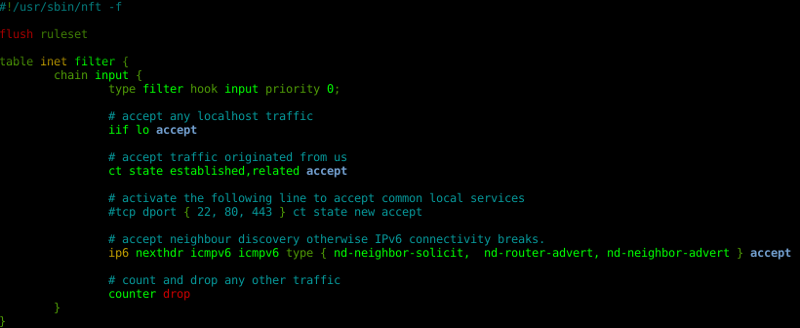
A good starting point is to copy a simple workstation firewall configuration:
root@debian:~# cp /usr/share/doc/nftables/examples/syntax/workstation /etc/nftables.conf
And load it:
root@debian:~# nft -f /etc/nftables.conf
Your nftables ruleset is now firewalling your network:
root@debian:~# nft list ruleset
table inet filter  
        chain input  
                type filter hook input priority 0;
                iif lo accept
                ct state established,related accept
                ip6 nexthdr icmpv6 icmpv6 type   nd-neighbor-solicit,  nd-router-advert, nd-neighbor-advert   accept
                counter drop
         
 
Several examples can be found at /usr/share/doc/nftables/examples/. A simple systemd service is included to load your ruleset at boot time, which is disabled by default. If you are running Debian Jessie and want to give a try, you can use nftables from jessie-backports. If you want to migrate your ruleset from iptables to nftables, good news. There are some tools in place to help in the task of translating from iptables to nftables, but that doesn t belong to this post :-) nft The nano editor includes nft syntax highlighting. What are you waiting for to use nftables?

Jaldhar Vyas: Something Else Will Be Posted Soon Also.

Yikes today was Sharad Purnima which means there is about two weeks to go before Diwali and I haven't written anything here all year. OK new challenge: write 7 substantive blog posts before Diwali. Can I manage to do it? Let's see...

Russell Coker: Improving Memory

I ve just attended a lecture about improving memory, mostly about mnemonic techniques. I m not against learning techniques to improve memory and I think it s good to teach kids a variety of things many of which won t be needed when they are younger as you never know which kids will need various skills. But I disagree with the assertion that we are losing valuable skills due to digital amnesia . Nowadays we have programs to check spelling so we can avoid the effort of remembering to spell difficult words like mnemonic, calendar apps on our phones that link to addresses and phone numbers, and the ability to Google the world s knowledge from the bathroom. So the question is, what do we need to remember? For remembering phone numbers it seems that all we need is to remember numbers that we might call in the event of a mobile phone being lost or running out of battery charge. That would be a close friend or relative and maybe a taxi company (and 13CABS isn t difficult to remember). Remembering addresses (street numbers etc) doesn t seem very useful in any situation. Remembering the way to get to a place is useful and it seems to me that the way the navigation programs operate works against this. To remember a route you would want to travel the same way on multiple occasions and use a relatively simple route. The way that Google maps tends to give the more confusing routes (IE routes varying by the day and routes which take all shortcuts) works against this. I think that spending time improving memory skills is useful, but it will either take time away from learning other skills that are more useful to most people nowadays or take time away from leisure activities. If improving memory skills is fun for you then it s probably better than most hobbies (it s cheap and provides some minor benefits in life). When I was in primary school it was considered important to make kids memorise their times tables . I m sure that memorising the multiplication of all numbers less than 13 is useful to some people, but I never felt a need to do it. When I was young I could multiply any pair of 2 digit numbers as quickly as most kids could remember the result. The big difference was that most kids needed a calculator to multiply any number by 13 which is a significant disadvantage. What We Must Memorise Nowadays the biggest memory issue is with passwords (the Correct Horse Battery Staple XKCD comic is worth reading [1]). Teaching mnemonic techniques for the purpose of memorising passwords would probably be a good idea and would probably get more interest from the audience. One interesting corner-case of passwords is ATM PIN numbers. The Wikipedia page about PIN numbers states that 4-12 digits can be used for PINs [2]. The 4 digit PIN was initially chosen because John Adrian Shepherd-Barron (who is credited with inventing the ATM) was convinced by his wife that 6 digits would be too difficult to memorise. The fact that hardly any banks outside Switzerland use more than 4 digits suggests that Mrs Shepherd-Barron had a point. The fact that this was decided in the 60 s proves that it s not digital amnesia . We also have to memorise how to use various supposedly user-friendly programs. If you observe an iPhone or Mac being used by someone who hasn t used one before it becomes obvious that they really aren t so user friendly and users need to memorise many operations. This is not a criticism of Apple, some tasks are inherently complex and require some complexity of the user interface. The limitations of the basic UI facilities become more obvious when there are operations like palm-swiping the screen for a screen-shot and a double-tap plus drag for a 1 finger zoom on Android. What else do we need to memorise?

16 October 2016

Thomas Goirand: Released OpenStack Newton, Moving OpenStack packages to upstream Gerrit CI/CD

OpenStack Newton is released, and uploaded to Sid OpenStack Newton was released on the Thursday 6th of October. I was able to upload nearly all of it before the week-end, though there was a bit of hick-ups still, as I forgot to upload python-fixtures 3.0.0 to unstable, and only realized it thanks to some bug reports. As this is a build time dependency, it didn t disrupt Sid users too much, but 38 packages wouldn t build without it. Thanks to Santiago Vila for pointing at the issue here. As of writing, a lot of the Newton packages didn t migrate to Testing yet. It s been migrating in a very messy way. I d love to improve this process, but I m not sure how, if not filling RC bugs against 250 packages (which would be painful to do), so they would migrate at once. Suggestions welcome. Bye bye Jenkins For a few years, I was using Jenkins, together with a post-receive hook to build Debian Stable backports of OpenStack packages. Though nearly a year and a half ago, we had that project to build the packages within the OpenStack infrastructure, and use the CI/CD like OpenStack upstream was doing. This is done, and Jenkins is gone, as of OpenStack Newton. Current status As of August, almost all of the packages Git repositories were uploaded to OpenStack Gerrit, and the build now happens in OpenStack infrastructure. We ve been able to build all packages a release OpenStack Newton Debian packages using this system. This non-official jessie backports repository has also been validated using Tempest. Goodies from Gerrit and upstream CI/CD It is very nice to have it built this way, so we will be able to maintain a full CI/CD in upstream infrastructure using Newton for the life of Stretch, which means we will have the tools to test security patches virtually forever. Another thing is that now, anyone can propose packaging patches without the need for an Alioth account, by sending a patch for review through Gerrit. It is our hope that this will increase the likeliness of external contribution, for example from 3rd party plugins vendors (ie: networking driver vendors, for example), or upstream contributors themselves. They are already used to Gerrit, and they all expected the packaging to work this way. They are all very much welcome. The upstream infra: nodepool, zuul and friends
The OpenStack infrastructure has been described already in planet.debian.org, by Ian Wienand. So I wont describe it again, he did a better job than I ever would. How it works All source packages are stored in Gerrit with the deb- prefix. This is in order to avoid conflict with upstream code, and to easily locate packaging repositories. For example, you ll find Nova packaging under https://git.openstack.org/cgit/openstack/deb-nova. Two Debian repositories are stored in the infrastructure AFS (Andrew File System, which means a copy of that repository exist on each cloud were we have compute resources): one for the actual deb-* builds, under jessie-newton , and one for the automatic backports, maintained in the deb-auto-backports gerrit repository. We re using a git tag based workflow. Every Gerrit repository contains all of the upstream branch, plus a debian/newton branch, which contains the same content as a tag of upstream, plus the debian folder. The orig tarball is generated using git archive , then used by sbuild to produce binaries. To package a new upstream release, one simply needs to git merge -X theirs FOO (where FOO is the tag you want to merge), then edit debian/changelog so that the Debian package version matches the tag, then do git commit -a amend , and simply git review . At this point, the OpenStack CI will build the package. If it builds correctly, then a core reviewer can approve the merge commit , the patch is merged, then the package is built and the binary package published on the OpenStack Debian package repository. Maintaining backports automatically The automatic backports is maintained through a Gerrit repository called deb-auto-backports containing a packages-list file that simply lists source packages we need to backport. On each new CR (change request) in Gerrit, thanks to some madison-lite and dpkg compare-version magic, the packages-list is used to compare what s in the Debian archive and what we have in the jessie-newton-backports repository. If the version is lower in our repository, or if the package doesn t exist, then a build is triggered. There is the possibility to backport from any Debian release (using the -d flag in the packages-list file), and even we can use jessie-backports to just rebuild the package. I also had to write a hack to just download from jessie-backports without rebuilding, because rebuilding the webkit2gtk package (needed by sphinx) was taking too resources (though we ll try to never use it, and rebuild packages when possible). The nice thing with this system, is that we don t need to care much about maintaining packages up-to-date: the script does that for us. Upstream Debian repository are NOT for production The produced package repositories are there because we have interconnected build dependencies, needed to run unit test at build time. It is the only reason why such Debian repository exist. They are not for production use. If you wish to deploy OpenStack, we very much recommend using packages from distributions (like Debian or Ubuntu). Indeed, the infrastructure Debian repositories are updated multiple times daily. As a result, it is very likely that you will experience failures to download (hash or file size mismatch and such). Also, the functional tests aren t yet wired in the CI/CD in OpenStack infra, and therefore, we cannot guarantee yet that the packages are usable. Improving the build infrastructure There s a bunch of things which we could do to improve the build process. Let me give a list of things we want to do. Generalizing to Debian During Debconf 16, I had very interesting talks with the DSA (Debian System Administrator) about deploying such a CI/CD for the whole of the Debian archive, interfacing Gerrit with something like dgit and a build CI. I was told that I should provide a proof of concept first, which I very much agreed with. Such a PoC is there now, within OpenStack infra. I very much welcome any Debian contributor to try it, through a packaging patch. If you wish to do so, you should read how to contribute to OpenStack here: https://wiki.openstack.org/wiki/How_To_Contribute#If_you.27re_a_developer and then simply send your patch with git review . This system, however, currently only fits the git tag based packaging workflow. We d have to do a little bit more work to make it possible to use pristine-tar (basically, allow to push in the upstream and pristine-tar branches without any CI job connected to the push). Dear DSA team, as we now nice PoC that is working well, on which the OpenStack PKG team is maintaining 100s of packages, shall we try to generalize and provide such infrastructure for every packaging team and DDs?

Steinar H. Gunderson: backup.sh opensourced

It's been said that backup is a bit like flossing; everybody knows you should do it, but nobody does it. If you want to start flossing, an immediate question is what kind of dental floss to get and conversely, for backup, which backup software do you want to rely on? I had some criteria: I looked at basically everything that existed in Debian and then some, and all of them failed. But Samfundet had its own script that's basically just a simple wrapper around tar and ssh, which has worked for 15+ years without a hitch (including several restores), so why not use it? All the authors agreed to a GPLv2+ licensing, so now it's time for backup.sh to meet the world. It does about the simplest thing you can imagine: ssh to the server and use GNU tar to tar down every filesystem that has the dump bit set in fstab. Every 30 days, it does a full backup; otherwise, it does an incremental backup using GNU tar's incremental mode (which makes sure you will also get information about file deletes). It doesn't do inter-file diffs (so if you have huge files that change only a little bit every day, you'll get blowup), and you can't do single-file restores without basically scanning through all the files; tar isn't random-access. So it doesn't do much fancy, but it works, and it sends you a nice little email every day so you can know your backup went well. (There's also a less frequently used mode where the backed-up server encrypts the backup using GnuPG, so you don't even need to trust the backup server.) It really takes fifteen minutes to set up, so now there's no excuse. :-) Oh, and the only good dental floss is this one. :-)
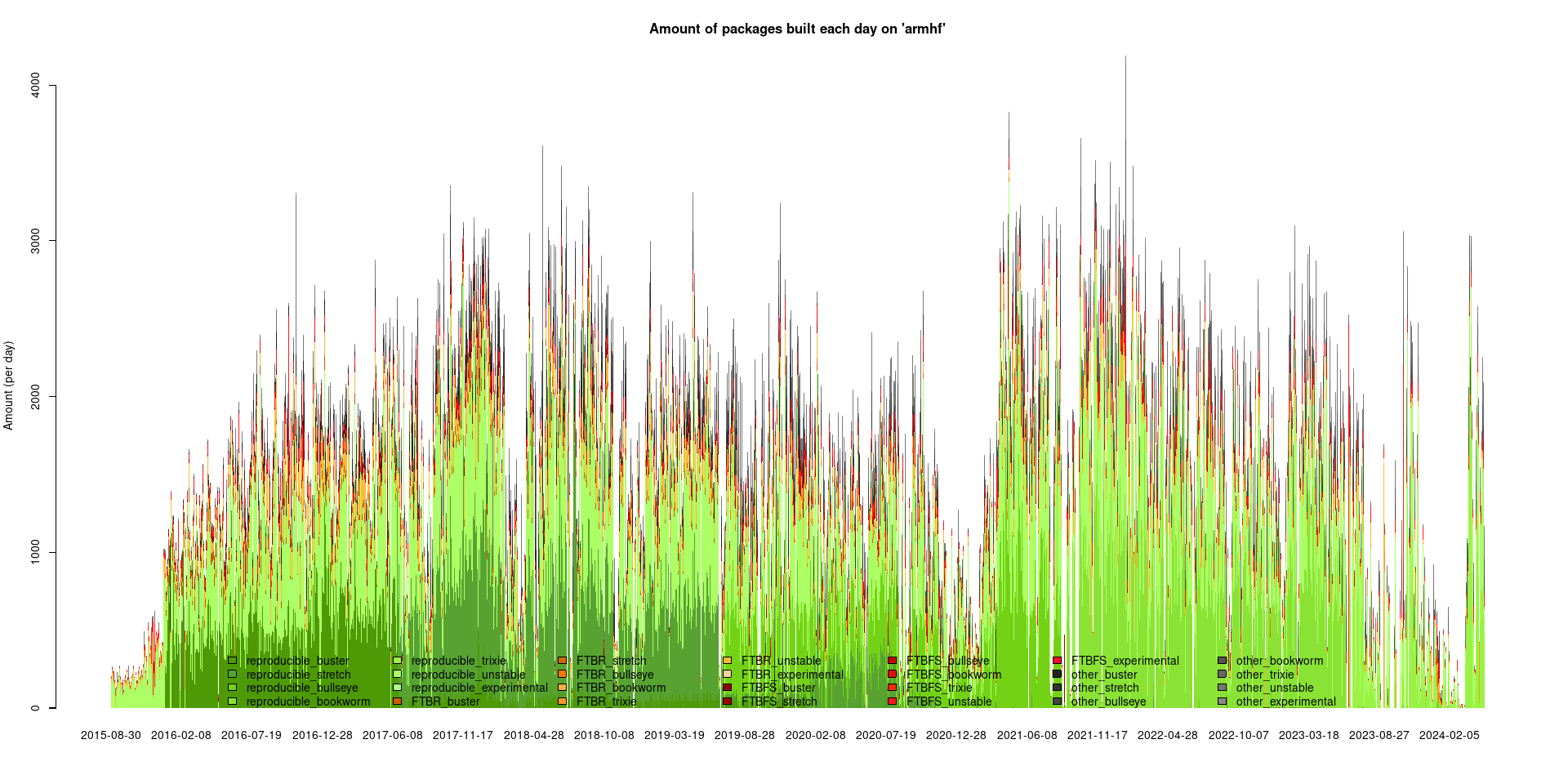
Next.

Previous.