Search Results: "sf"

27 March 2009

David Welton: Software Economics - Public Goods

To look at the economics of open source software, you have to start with the economics of software as a category, both proprietary and open source. Note: it should be perfectly obvious to everyone that open source software works, and works quite well for some things. This article is more about understanding the how and they why. Just to avoid any confusion... If you look at software as a product, it has a couple of defining characteristics: What do you get when you combine something that's "non excludable" and "non rivalrous"? In economics, these are known as "public goods": http://en.wikipedia.org/wiki/Public_good - read the whole thing if you have a few minutes, it's what I'll be talking about. As per the article, "The Problem" as it were, is the free rider problem. Let's stop and look at a contrived example: Bob is an ex-dentist and really knows what it would take to write a great program for managing a dentist's office (or pick your own example... it's contrived, don't quibble about the details). He's also a good programmer, with the skills necessary to implement the program. He talks to a few of his dentist friends, and they're enthusiastic about the whole thing. Let's look at a few scenarios of how things might play out: Bob values his time at 10 dollars an hour, and it will take him 100 hours to complete the project, meaning the whole project would cost about 1000 dollars. One way things could work is that he could find a dentist friend who needs this program, and bill him 1000$ for his time and services, bang out the code, and release it as open source software. Bob gets his money, the dentist gets his code... and all the other dentists in town get it for free, which is bound to make the dentist who shelled out the money a bit irritated, given that he's a human, not a homo-economus, and doesn't like paying and see others get the same thing for free. Let's introduce another variable: the software is only really worth 200$ to the dentist - any more than that and yeah, it's helpful, but not worth that much money (And please stay with me, I know it's contrived, but keep in mind that the situation *is* possible, even if the numbers might be different). That means that if Bob wants 1000$ for his time, but the dentist will only pay 200$, then no transaction will occur! The software won't get written, Bob won't get any money, and the dentist will be worse off because he won't have the nice program, and neither will his dentist colleagues. One way things might still work is if the dentist rounds up some friends and they all contribute a bit, however, that's kind of a pain in the neck for everyone concerned - the dentist doesn't want to get into the software business and spend a bunch of time trying to chase his friends for money, and even if 10 dentists contribute, the ideal position to be in his the 11th guy, who pays nothing, and still gets the software for free. So it's in everyone's interests to not return the dentist's calls in the hope of being the 11th guy. Also, none of them gets the software until they're all on board. So, how to resolve this problem? The wikipedia page talks about introducing an exclusion mechanism, which in this case would be a copyright system so that Bob can sell a copy of his software for 100$ and be sure that it won't be open to everyone to use. This way, the dentists get the software for 100$ less than they value it at (200$), and as soon as Bob signs up an 11th dentist, he's making more than his time/materials costs, and is therefore coming out ahead! The dentists all know that they're paying the same price, so have no reason to grumble about free riders. In short, everyone is pretty happy. Of course, in the real world, things don't play out like that all the time. There are problems with the simplified example above, some of which are very evident: the cost of enforcing copyright laws, in an age when copying is extremely easy, is very high and potentially very intrusive. However, "intellectual property" is, by and large, a compromise solution that has had positive aspects, especially when you ignore the outliers like Microsoft, and look at all kinds of niche software vendors, who make a nice living, create good products, and have happy, satisfied customers. If you look at the other solutions to the free rider problem listed on the wikipedia page, we can see how they might be applied to the world of software. None of these solutions is perfect, and all, including exclusion in the form of intellectual property laws, or simply doing nothing at all, have problems of their own. Due to the very nature of software, this is somewhat inevitable, and the best we can do is come up with good compromises, and continue to reevaluate them as technology and society change (this is something that needs to happen with IP laws, for instance).

Gunnar Wolf: Coordinaci n de esfuerzos en grupos de desarrollo e integraci n de Software Libre

TitleCoordinaci n de esfuerzos en grupos de desarrollo e integraci n de Software Libre
Publication TypeMagazine Article
Year of Publication2008
AuthorsGunnar, Wolf.
MagazineSoftware Gur
FrequencyQuarterly
Issue Number21
Pagination62-63
Date Published08/2008
Type of ArticleColumn
ISSN1870-0888
Key WordsSoftware libre, comunidad, organizaci n
Citation Key1926
Export

Chris Lamb: Don't rely on others to speak out

http://chris-lamb.co.uk/wp-content/2009/met_poster.jpg
For the benefit of non-Londoners, the above poster (and others) appeared a few days ago. Any further remark seems superfluous. Somewhat related, James Welch recently wrote about your rights at the so-called "knife arches".

25 March 2009

Francois Marier: Promoting your Free Software Project

After spending a considerable amount of time releasing your Free Software project to the public, you will probably want to make sure that it reaches as many of the people it could be useful to as possible. Here are a few tips to get you started.
Homepage: Is this software for me?The first thing you will probably think about is to create a homepage promoting your project. There are a lot of good tips on how to create an effective homepage, but I will focus here on the contents that you should include.

Screenshots are one of the most important elements you can include on your homepage. First-time visitors will only spend a few seconds on your site before deciding whether or not the information is relevant to them. You need to be able to summarize in a few pictures what your project is all about.

Would you be willing to read long white papers or to go through long build instructions just to find out that this software isn't going to be useful to you after all? Probably not. Make sure you can help users figure this out in a few seconds, even if your software lacks a graphical user interface.

Of course you will also want to describe the project in a few words and provide links to the source code and other services you may have available.
Hosting ChoicesWhere to put your contents is somewhat of a personal choice but there are a few things to keep in mind.

First of all, depending on the size of your project and its related data, the hosting site should may need a significant amount of storage and bandwidth. Furthermore, you should check whether download statistics are collected by your hosting provider. While not strictly necessary, it can be very motivating to watch these numbers go up!

Free Software hosting sites like Google Code, Source Forge and LaunchPad also provide different services like bug trackers and source control repositories.

Some people prefer a distributed approach to source control and issue tracking to avoid trusting their master copy of the data to a third party. Setting up a separate code repository on sites like Github or Gitorious is an option to consider.

All of these hosting providers promote the software they host to varying degrees. Have a look around before deciding where you should park your project.
Announcing your ReleaseFinally, what would a website be without other sites linking to it? The obvious place to start would be the main search engines, but that in itself is unlikely to bring much traffic in the early days of your project.

Sites dedicated to Free Software are more likely to bring visitors to your shiny new project. The most famous place for Free Software release news is Freshmeat. Whether or not you visit this site regularly, you should know that its contents is widely read and syndicated and you should not pass on this great opportunity to let people know about your software.

Other directories that may be of interest include the Free Software Foundation Directory and Ohloh (especially if you offer a publicly available source code repository).

Now that the word is getting out, it's time to start thinking about supporting these new users!

24 March 2009

Sandro Tosi: Reportbug 4.0 is born

I've just uploaded reportbug 4.0 in Sid (wait for the usual replication delay to have it on your machine). There are several changes in it (sadly, always too few than what I wanted):
I hope you'll be satisfied by that; sadly not all the promises are respected, let's hope we can deal with them in the next periods.Link

MJ Ray: Making infrastructure organisations more resilient Taunton 20 March 2009

Last Friday, I spent most of the day at this NAVCA ICT event in Taunton. (There s another similar one in York this Friday if you re interested.) The event was a sandwich, with a Steve Bridger social media session as the filling between workshop halves.

platform
Conference I went to the workshop for support workers. I m not sure whether it was quite the right label, but the others were for managers/trustees and for accidental technical supporters, which definitely weren t. There seemed to be at least three other ICT specialists there, so I wasn t the only one. The best thing about the workshop was the mix of specialists and generalists. I was really interested in what the generalists had to say, but sadly the workshop was more of a lecture and I don t feel I got as much out as I could. I d be interested to know if that was the same for other participants. I m not sure what I thought of Steve Bridger s session. It was a difficult one: the strange mix of an audience was all together, the room felt pretty warm and it stood between us and lunch. I had trouble concentrating but posted a few updates to identi.ca about it. The worst thing was all the needless promotion of certain companies products. They didn t talk about blogging and syndication, they talked about Blogger and Google Reader; they didn t talk about photo-sharing, they talked about Flickr; they didn t talk about spreadsheets, they talked about Excel. Nevertheless, I left the event feeling really positive about other ICT specialists, with some hope that the generalists were getting it and quite impressed by the people I met from the other tracks. It was pretty good to help someone towards the autosuspend setting on their GNOME-based netbook within ten minutes of arriving, too. I ve just updated software.coop with Richard Stallman s explanation of why proprietary software is a social problem, to see if that helps put the community-based view across. I ll look again at some of the grant-funded resources mentioned and see if we can improve them, but I d welcome any comments from the voluntary and community sector about how best to do that.

23 March 2009

David Welton: Easygoing Clients

I've been doing consulting for a while now, and while I'd like to branch out and do some kind of product that provides a bit more stability, it's not a bad life. I have enough going that I can turn down the odd request or two if I don't feel they're a good fit, so almost all my clients are enjoyable to work with and good experiences in their own ways. However, I wanted to write a bit about one kind of client that's great to find, the "easygoing client", for lack of a better term. These are the people who may not pay the most, or provide the most interesting technical challenges, but who are simply easy to work with, and happy with what you do, and satisfied with letting you guide them in terms of technology. It's easy to develop long term relationships with these clients, because they're generally happy with what you do, and you get to know what they need, and can therefore provide them with good service at a reasonable price. Depending on the situation, you can also work together to try out new technologies, perhaps with the client receiving a discount for being something of a guinea pig. For instance, for several years, my friend Cristiano's book shop ran on a combination of Rivet and a Tcl/Tk application installed locally. When it came time to redo the site several years ago, we agreed to experiment with doing the whole thing via the web, utilizing Ruby on Rails, which I was fairly new to at the time. It worked out well for him because he got an improved system at a good price, and I got to test out something new, which has gone on to become part of my repertoire. (BTW, we just redid the site again - if you're looking for antique Italian books, it's worth a look: http://www.libreriaminerva.it/ ). It's good to have a variety of clients, and having a few 'easygoing' ones makes a nice counterpart to others where there is more money on the line, and more pressure (which is justified if they're paying well, of course) to charge in and start making a difference right away.

22 March 2009

Rob Taylor: Codethink anniversary

Last month, Codethink turned 2 years old, to coincide we had a company-wide hackfest in Brussels straight after FOSDEM. It really brought home how much it d grown. Just a year ago there was just me and Mark. Now we are 8! So i m gonna take a moment to shout out to the great job these guys are doing. In order of appearence . Mark Doffman
Mark has been consistently working on transforming AT-SPI (the GNOME Accessibility and UI automation technology) into a D-Bus based cross-desktop project. From nothing a year ago, working with Mike Gorse from Novell, he s now got something that more or less works and it s getting a lot of focus and testing as we plan for GNOME 3.0. I m looking forward to a brave new future for cross toolkit accessibility on the Linux desktop. John Carr
John came to us from working on Conduit, and he s continued on his dream of making all the devices and web services of the world talk seamlessly to each other. John s been in charge of pushing the Wizbit project along and now the core of this is pretty stable, he is going to be turning his eye to working on using Wizbit for synchronisation. J rg Billeter
A stunning hacker who needs no introduction! J rg s been continuing to hack on Vala and it s getting more and more mature each week. His main work, however has been on the stunning tracker-vstore, a branch of tracker that brings full RDF capabilities, which Philip van Hoof has been blogging about. I ll be writing a biggish blog post on this soon and what RDF could really mean for the desktop experience. Karl Lattimer
Karl came to us from working on UI at Nokia. At Codethink he s continued to focus on graphics technology and user experience, bringing his keen eye to Wizbit, amongst other things. One of the most impressive things I ve seen for a while was Karl s kinetic scrolling widget for the Wizbit timeline view. I m hoping we can turn this into something more general in the future. Ryan Lortie
Another hacker who needs no introduction, Ryan s our low-level infrastructure guy. He s been working on GNIO, a library to do network operations using GIO stream abstractions and continuing to hack on DConf, which is gradually coming together. He s also been helping J rg out with Vala. Mukund Sivaraman
I knew Muks from his GIMP work, and his work on Herb is really impressive. Muks is mostly working on top secret stuff that we can t talk about, unfortunately! Peter Charlton
Our documentation guy. This guy knows how to write and knows how to take something vague and unintelligable and turn it into crystal clarity. Invaluable! Of course, through all this I ve been here, dancing about architecture and generally doing the best I can to hold the whole shebang together. I ve been mostly working on some top secret stuff which hopefully will be getting opened up soon. I ll dance about that then

21 March 2009

Meike Reichle: Chemnitz Linux Days 2009

This is my fourth CLT report and they surely are becoming repetitive! But every good event deserves a good report, so here goes: Contrary to previous years we already arrived on Friday this year. Since we were also not up for another stint with the gym (Aaah the sissifying effects of marriage!) we booked a room with a nice little guesthouse about 15 bus-minutes from the venue. The conference was great as ever: I usually visit the CLT mostly for networking but I also managed to see a few talks. I moderated the session on High Performance and got to see three very nice talks on GPU programing, cluster computing and parallel programming. This year also featured the first talk on (the lack of) women in Free Software. Unusually enough this one was even given by a man. I was quite curious about that talk, which was (how fitting!) scheduled in direct succession to my own. I am kind of torn on that topic myself. On one hand women in Free Software is a topic that is very important to me and deserves any attention it can get. On the other hand instead of talking about how evenly capable women are in Free Software I'd rather just demonstrate it, for instance by giving a good Free Software related talk. And instead of talking about how there should be more women in Free Software I'd rather just be one and try to encourage others with my example. The usual quota of female speakers at linux events is somewhere between 2-4% and I just don't like the idea of having a conference with n men talking about Free Software and 1 woman talking about women. I've had these settings before and it just doesn't sit well with me. Because of this I was quite please to find the topic being tackled by a man this time.
The talk itself, in my impression, left a few open issues though. It was rather brief and focussed mainly on stating the usual numbers, asserting that the Women in FLOSS movement wasn't about affirmative action or discriminating men and explaining how women feel discriminated by sexist behaviour and advertising and how objection to such things should not be mistaken as prudery. It's general advice on how to improve the quota of women in FLOSS mostly boiled down to the linuxchix slogan "Be Polite. Be Helpful.". What I missed most was practical advice to projects wishing to attract more female contributors, such as mentoring programs or low-threshold entry points. Also I felt that the talk lacked a real motivation beyond "gender balance is a Good Thing". However, I was glad the topic finally found its way into the CLT as well and I had a couple of very interesting discussions afterwards. Concerning my own talk I was rather satisfied as well. Attendance was - as usually in Chemnitz - very good, according to the organisers I got around 200 people. Since I designed the talk as a collaborative project and its feedback was predominantly good I'll continue developing it with the feedback I got and submit it again to other events. I think the topic is very worthwile and there's still a lot in it. Some people asked for a more collaborative way of contributing their thoughts and ideas so I'll just create a wiki to collect the new ideas. I'll of course announce it here as soon as it's in place. The slides and audio recording (both German) are as usually available from the talks page at CLT or my own talks section.

Russell Coker: Feeds and Banning from Planets

Stewart Smith has written about the removal of a blog from Planet Linux Australia [1] due to publishing a list of URLs that the Australian government wants to censor. The first point I want to make is that even if you had a list with thousands of entries that are not likely to offend anyone or incur any legal liability then it s still not suitable for syndication on most Planet feeds. The correct thing to do is to have a paragraph describing the list and why people would want to read it and then use the MORE feature of your blog so that the rest isn t in the RSS feed. If you use Wordpress which seems to have the MORE function broken then that would mean hosting the list somewhere else. In regard to the specific post, in a comment on Stewart s post Matt suggests that the Planet software somehow filter out certain blog posts. I am not aware of any way of doing that apart from through code changes, Matt could submit some patches to allow that sort of thing. One thing that would be really good would be to have an exclusion tag or category in a blog feed. So you for example you could have feed URLs such as /feed/lca which would be configured to list all posts without the tag not-lca. Another way for a blogger to do this would be to use Yahoo pipes [2]. The people who run a Planet should be prepared to take any feed URL. It would not be difficult for a blogger to create a pipe that excludes all items that have NSFW in the title (or any other possible way of listing them). A final option is to have multiple blogs. I have a blog for documents that I regularly update [3]. Many of those documents had been plain HTML files edited with vi for years before I started blogging. But Wordpress is a reasonable CMS and as I use it for blogging it made sense to use it for other documents too. Wordpress has no good option for managing two types of documents, ones that are date-based (regular blog posts with the date in the URL) and non-date based (which change periodically and have different date stamps). There are Wordpress pages, but the support for having moderate numbers of pages is not great. Also on my document blog I will often have articles appear new regularly as I change the date when updating them. Anyone is welcome to subscribe to the feed for my document blog if they are interested in seeing new versions of the documents, but I expect that most people don t want to. The Debian Wordpress package (as of last time I used it) and my fork of the Debian Wordpress package have great support for multiple blogs. There is Wordpress-MU for bulk blog hosting, but that is only designed for people who want to run something like LiveJournal or Blogger. If you just want a few blogs for friends and relatives then the regular Debian Wordpress package will do the job well. Some bloggers maintain two blogs, one for public things and another for close friends and relatives (people who ARE interested in what they ate for breakfast). Having one blog for the NSFW material would be a reasonable thing to do for certain bloggers. Finally while I doubt that someone who runs a Planet installation faces any legal liability, there is also the issue of a PR liability. From a PR perspective I think it s best for the reputation of Linux users in Australia for certain things to not appear on Planet Linux Australia. That said it would be good if there was a process for removing and reinstating blogs that was publicly documented. There will obviously be many differences of opinion as to what is too risky to allow on the Planet so we should expect that from time to time feeds will be temporarily removed. When that happens what does a blogger have to do to be done to be syndicated again? Update: A comment has revealed a way of filtering out RSS feeds via the feed URLs used by wordpress. A URL such as /feed/cat=-X will give a feed of all articles that don t contain category number X. Multiple categories can be specified when separated by commas. So this allows Wordpress users to exclude their NSFW category from Planet Linux Australia.

19 March 2009

Uwe Hermann: Using Debian GNU/Linux on the Lenovo IdeaPad S9e netbook

TuxMobil - Linux on Laptops, Notebooks, PDAs and Mobile Phones Lenovo Ideapad S9e netbook I recently got my hands on a Lenovo IdeaPad S9e netbook for a short amount of time (I don't own it), so I did a few tests with Debian unstable (more or less Lenny right now) and a Linux 2.6.28 kernel on it, see results below. The machine type is 4187-42G, and it features an Intel Atom N270 CPU (with HyperThreading) at 1.6 GHz, 1 GB of DDR2 RAM, an 80 GB SATA drive, an 8.9" WSVGA 1024x600 (glossy) screen, VGA port, LAN, wifi, bluetooth, 2xUSB, SD card slot, PCI ExpressCard slot, built-in microphone, and a webcam. BIOS You can enter the BIOS by pressing F2, the boot menu by pressing F12 during boot. Booting from USB works fine on this netbook. There's a Splashtop installation on the netbook (called "Lenovo Quickstart" here) which you can disable in the BIOS. Installation There's no CD-ROM drive, so the simplest way is to use a USB thumb drive for installation. Here's how you can prepare one containing a Lenny installer (assuming your USB thumb drive is /dev/sda):
  $ wget http://cdimage.debian.org/debian-cd/5.0.0/i386/iso-cd/debian-500-i386-netinst.iso
  $ wget http://ftp.nl.debian.org/debian/dists/lenny/main/installer-i386/current/images/hd-media/boot.img.gz
  $ gunzip boot.img.gz
  $ dd if=boot.img of=/dev/sda1
  $ mount -t vfat /dev/sda1 /mnt
  $ cp debian-500-i386-netinst.iso /mnt
  $ umount /mnt
If the above USB thumb drive doesn't boot correctly (which it did not in my case: GRUB error 17) it's probably because of a messed-up MBR. This is how you can fix it:
  $ apt-get install mbr
  $ install-mbr /dev/sda
 Lenovo Ideapad S9e Debian installation Then insert the USB thumb drive in the Lenovo IdeaPad S9e, choose USB boot in the BIOS, and start the installer. Most of the process works as usual, the only small difference is that you might want to load the "parted" installer module in order to resize the Windows-partition on the disk (if you want to keep it) to make space for Linux. The second (fat32) partition seems to keep a restore image and/or the Splashtop stuff, not sure. Audio Works out of the box using the snd_hda_intel driver. The hardware is onboard audio in the southbridge (82801G / ICH7) and uses the Realtek ALC269 codec. If some programs don't have working audio, try modprobe snd-pcm-oss. Built-in microphone Untested so far. Bluetooth Works out of the box using the bluetooth and btusb driver. The laptop's Bluetooth device is USB-attached internally and shows up in lsusb as:
  $ lsusb
  Bus 003 Device 002: ID 0a5c:2150 Broadcom Corp.
  $ dmesg
  usb 3-2: Product: BCM2046 Bluetooth Device
After modprobe btusb you can use hcitool / hciconfig etc. as usual, and/or enable more related stuff with /etc/init.d/bluetooth start. Sensors The lm-sensors script detects the lm75, eeprom, i2c-dev, and i2c_i801 modules. The following is the 'sensors' output:
  $ sensors
  acpitz-virtual-0
  Adapter: Virtual device
  temp1:       +36.0  C  (crit = +95.0  C)    
The hard drive temperature can be viewed with:
  $ hddtemp /dev/sda
  /dev/sda: FUJITSU MHZ2080BH G1: 44  C
HPET The Intel ICH7 southbridge in this laptop supports High Performance Event Timers (HPET) which allows for more power savings and thus improved battery life.
  $ dmesg   grep -i hpet
  ACPI: HPET 3F6E1E41, 0038 (r1 INTEL  CALISTGA  6040000 LOHR       5A)
  ACPI: HPET id: 0x8086a201 base: 0xfed00000
  hpet clockevent registered
  HPET: 3 timers in total, 0 timers will be used for per-cpu timer
  hpet0: at MMIO 0xfed00000, IRQs 2, 8, 0
  hpet0: 3 comparators, 64-bit 14.318180 MHz counter
You can check the wakeups-per-second with powertop. SD card slot Works out of the box. It seems to be attached via USB internally (usb-storage driver).
  $ lsusb
  Bus 001 Device 004: ID 0bda:0158 Realtek Semiconductor Corp. Mass Stroage Device
PCI ExpressCard slot Untested so far. ACPI Works fine, see comments for "acpitool" output. Network card Works out of the box using the tg3 driver.
  $ modprobe tg3
  tg3.c:v3.94 (August 14, 2008)
  tg3 0000:02:00.0: PCI INT A -> GSI 16 (level, low) -> IRQ 16
  tg3 0000:02:00.0: setting latency timer to 64
  eth0: Tigon3 [partno(BCM95906) rev c002 PHY(5906)] (PCI Express) 10/100Base-TX Ethernet 00:11:22:33:44:55
  eth0: RXcsums[1] LinkChgREG[0] MIirq[0] ASF[0] WireSpeed[0] TSOcap[0]
  eth0: dma_rwctrl[76180000] dma_mask[64-bit]
Touchpad Works out of the box, both in X as well as in the console using gpm.
  $ dmesg
  Synaptics Touchpad, model: 1, fw: 7.2, id: 0x1c0b1, caps: 0xd04731/0xa40000
Suspend-to-disk and suspend-to-RAM I'm using the hibernate Debian package. You can explicitly force the usage of either method in /etc/hibernate/hibernate.conf by uncommenting the respective lines.
  TryMethod disk.conf
  # TryMethod ram.conf
Suspend does not yet work out of the box, however, as the machine is unknown:
  $ s2ram -n
  Machine unknown
  This machine can be identified by:
      sys_vendor   = "LENOVO                          "
      sys_product  = "418742G         "
      sys_version  = "Lenovo                  "
      bios_version = "14CN51WW  "
  See http://suspend.sf.net/s2ram-support.html for details.
After a few test I found that s2ram -f -a 3 works fine (tested from console only so far). Now this needs to be integrated upstream and in the Debian package (I'll file a bug report). Update: Submitted bug #520848, and an email to the upstream mailing list. Wireless There doesn't seem to be a mainline driver for the Broadcom BCM4312 wifi card in the laptop, yet:
  $ lspci -nn
  05:00.0 Network controller [0280]: Broadcom Corporation BCM4312 802.11b/g [14e4:4315] (rev 01)
Neither the b43 nor the b43legacy drivers work as of 2.6.28. For now, one of two possible options is to build a (partly non-free) driver provided by Broadcom from source (option 2 would be to use ndiswrapper, I guess, but that's untested):
  $ wget http://people.debian.org/~adamm/kernel/linux-kbuild-2.6.28_2.6.28-0.1_i386.deb
  $ dpkg -i linux-kbuild-2.6.28_2.6.28-0.1_i386.deb (currently needed in unstable due to bug #518115)
  $ apt-get install build-essential linux-headers-2.6.28-1-686
  $ mkdir temp; cd temp
  $ wget http://www.broadcom.com/docs/linux_sta/hybrid-portsrc-x86_32-v5_10_79_10.tar.gz
  $ tar xfvz hybrid-portsrc-x86_32-v5_10_79_10.tar.gz
  $ make -C /lib/modules/ uname -r /build M= pwd  clean
  $ make -C /lib/modules/ uname -r /build M= pwd  modules
If that worked, you can load the driver via:
  $ rmmod bcm43xx; rmmod b43; rmmod b43legacy (you could also permanently blacklist these modules)
  $ modprobe ieee80211_crypt_tkip
  $ insmod ./wl.ko
  $ dmesg
  wl: module license '' taints kernel.
  wl 0000:05:00.0: PCI INT A -> GSI 18 (level, low) -> IRQ 18
  wl 0000:05:00.0: setting latency timer to 64
  eth1: Broadcom BCM4315 802.11 Wireless Controller 5.10.79.10
You can now run iwconfig, iwlist, etc. from the command line, or use some GUIs such as kwifimanager. In order to disable wireless, run:
  $ rmmod wl
So far, I only tested WEP (but not WPA). CPU frequency scaling Works out of the box using the acpi_cpufreq driver. Use cpufreq-set -c 0 -g performance if you need full CPU power, cpufreq-set -c 0 -g powersave otherwise. Use -c 1 to do the same with the other CPU/core. PC speaker Works fine out of the box using the pcspkr module, tested with beep. Graphics card Works out of the box using the intel X.org driver.
  $ xrandr
  Screen 0: minimum 320 x 200, current 1024 x 600, maximum 1024 x 1024
  VGA disconnected (normal left inverted right x axis y axis)
  LVDS connected 1024x600+0+0 (normal left inverted right x axis y axis) 195mm x 113mm
     1024x600      60.0*+
     800x600        60.3  
     640x480        59.9  
  TV disconnected (normal left inverted right x axis y axis)
DRI works out of the box with the (mainline, open-source) driver:
  $ glxinfo   grep direct
  direct rendering: Yes
If you attach an external monitor or projector, you can enable it using xrandr as usual:
  $ xrandr --output VGA --auto
You can also use a dual-head setup by adding this to your "Screen" section in /etc/X11/xorg.conf:
  SubSection "Display"
    Virtual 2048 2048
  EndSubSection
After restarting the X server, you can play with xrandr and move the external screen (VGA) "below" the laptop's LCD screen (LVDS) for a simple dual-head setup. The GUI tools arandr or grandr are probably a bit simpler to use than plain command line xrandr. USB Works fine, of course. The only small problem is that there are only two USB ports, more would have been better. Disk drive Works fine, it's an 80 GB SATA drive. Webcam Works out of the box using the uvcvideo driver.
  $ lsusb
  Bus 001 Device 005: ID 5986:0141 Acer, Inc
  $ modprobe uvcvideo
  uvcvideo: Found UVC 1.00 device Lenovo EasyCamera (5986:0141)
  input: Lenovo EasyCamera as /devices/pci0000:00/0000:00:1d.7/usb1/1-3/1-3:1.0/input/input9
  usb 1-3: New USB device found, idVendor=5986, idProduct=0141
  usb 1-3: New USB device strings: Mfr=3, Product=1, SerialNumber=0
  usb 1-3: Product: Lenovo EasyCamera
  usb 1-3: Manufacturer: BISON Corporation
You can use luvcvideo for webcam viewing. Battery Lasts for ca. 3.5 hours, probably less if the system is under high load. Special keys Fn+CursorUp / Fn+CursorDown (brightness), Fn+ESC (enable/disable webcam), Fn+F1 (sleep mode), Fn+F2 (enable/disable TFT backlight), Fn+F6 (enable/disable thouchpad), Fn+F7 (Num lock), Fn+F8 (scroll lock), and Fn+F11 (F12 key) all work fine. Fn+F3, Fn+F5, Fn+F9, Fn+F10, and all other special keys are untested. LEDs The power, disk activity, CAPS lock, Num lock, and battery charging LEDs all work fine out of the box. lspci -tvnn
  -[0000:00]-+-00.0  Intel Corporation Mobile 945GME Express Memory Controller Hub [8086:27ac]
           +-02.0  Intel Corporation Mobile 945GME Express Integrated Graphics Controller [8086:27ae]
           +-02.1  Intel Corporation Mobile 945GM/GMS/GME, 943/940GML Express Integrated Graphics Controller [8086:27a6]
           +-1b.0  Intel Corporation 82801G (ICH7 Family) High Definition Audio Controller [8086:27d8]
           +-1c.0-[0000:02]----00.0  Broadcom Corporation NetLink BCM5906M Fast Ethernet PCI Express [14e4:1713]
           +-1c.1-[0000:03-04]--
           +-1c.2-[0000:05]----00.0  Broadcom Corporation BCM4312 802.11b/g [14e4:4315]
           +-1d.0  Intel Corporation 82801G (ICH7 Family) USB UHCI Controller #1 [8086:27c8]
           +-1d.1  Intel Corporation 82801G (ICH7 Family) USB UHCI Controller #2 [8086:27c9]
           +-1d.2  Intel Corporation 82801G (ICH7 Family) USB UHCI Controller #3 [8086:27ca]
           +-1d.3  Intel Corporation 82801G (ICH7 Family) USB UHCI Controller #4 [8086:27cb]
           +-1d.7  Intel Corporation 82801G (ICH7 Family) USB2 EHCI Controller [8086:27cc]
           +-1e.0-[0000:06]--
           +-1f.0  Intel Corporation 82801GBM (ICH7-M) LPC Interface Bridge [8086:27b9]
           +-1f.1  Intel Corporation 82801G (ICH7 Family) IDE Controller [8086:27df]
           +-1f.2  Intel Corporation 82801GBM/GHM (ICH7 Family) SATA IDE Controller [8086:27c4]
           \-1f.3  Intel Corporation 82801G (ICH7 Family) SMBus Controller [8086:27da]
cat /proc/cpuinfo See comments. Resources All in all it's a really nice hardware, and it works (more or less) flawlessly without much hassle with recent distros/kernels. Update 2009-03-22: Updated various sections, added more info. Added resources section.

18 March 2009

Biella Coleman: FLOSS Manuals in Cambdrige, MA March 21-22nd

I recently got to spend some time hanging with part of the FLOSS manual crew and they basically are as busy as ever holding sprints across the US and Europe to write documentation and manuals for Free Software. They are holding a mini sprint in Cambridge, MA and along with the FSF will be writing a manual on the command line in about two days. If the idea of writing documentation makes you feel warm and happy inside, then this is the even for you. They are always looking for volunteers and I assure you, the experience will be well worth your time, effort, and participation.

16 March 2009

Theodore Ts'o: Don t fear the fsync!

After reading the comments on my earlier post, Delayed allocation and the zero-length file problem as well as some of the comments on the Slashdot story as well as the Ubuntu bug, it s become very clear to me that there are a lot of myths and misplaced concerns about fsync() and how best to use it. I thought it would be appropriate to correct as many of these misunderstandings about fsync() in one comprehensive blog posting. As the Eat My Data presentation points out very clearly, the only safe way according that POSIX allows for requesting data written to a particular file descriptor be safely stored on stable storage is via the fsync() call. Linux s close(2) man page makes this point very clearly:
A successful close does not guarantee that the data has been successfully saved to disk, as the kernel defers writes. It is not common for a file system to flush the buffers when the stream is closed. If you need to be sure that the data is physically stored use fsync(2).
Why don t application programmers follow these sage words? These three reasons are most often given as excuses:
  1. (Perceived) performance problems with fsync()
  2. The application only needs atomicity, but not durability
  3. The fsync() causing the hard drive to spin up unnecessarily in laptop_mode
Let s examine each of these excuses one at a time, to see how valid they really are. (Perceived) performance problems with fsync() Most of the bad publicity with fsync() originated with the now infamous problem with Firefox 3.0 that showed up about a year ago in May, 2008. What happened with Firefox 3.0 was that the primary user interface thread called the sqllite library each time the user clicked on a link to go to a new page. The sqllite library called fsync(), which in ext3 s data=ordered mode, caused a large, visible latency which was visible to the user if there was a large file copy happening by another process. Nearly all of the reported delays was a few seconds, which would be expected; normally there isn t that much dirty data that needs to be flushed out on a Linux system, even if it is even very busy. For example, consier the example of a laptop downloading an .iso image from a local file server; if the laptop has the exclusive link of a 100 megabit/second ethernet link, and the server has the .iso file in cache, or has a nice fast RAID array so it is not the bottleneck, then in the best case, the laptop will be able to download data at the rate of 10-12 MB/second. Assuming the default 5 second commit interval, that means that in the worst case, there will be at most 60 megabytes which must be written out before the commit can proceed. A reasonably modern 7200 rpm laptop drive can write between 60 and 70 MB/second. (The Seagate Momentus 7200.4 laptop drive is reported to be able to deliver 85-104 MB/second, but I can t find it for sale anywhere for love or money.) In this example, an fsync() will trigger a commit and might need to take a second while the download is going on; perhaps half a second if you have a really fast 7200 rpm drive, and maybe 2-3 seconds if you have a slow 5400 rpm drive. (Jump to Sidebar: What about those 30 second fsync reports?) Obviously, you can create workloads that aren t bottlenecked on the maximum ethernet download speed, or the speed of reading from a local disk drive; for example, dd if=/dev/zero of=big-zero-file will create a very large number of dirty pages that must be written to the hard drive at the next commit or fsync() call. It s important to remember though, fsync() doesn t create any extra I/O (although it may remove some optimization opportunities to avoid double writes); fsync() just pushes around when the I/O gets done, and whether it gets done synchronously or asynchronously. If you create a large number of pages that need to be flushed to disk, sooner or later it will have a significant and unfortunate effect on your system s performance. Fsync() might make things more visible, but if the fsync() is done off the main UI thread, the fact that fsync() triggers a commit won t actually disturb other processes doing normal I/O; in ext3 and ext4, we start a new transaction to take care of new file system operations while the committing transction completes. The final observation I ll make is that part of the problem is that Firefox as an application wants to make a huge number of updates to state files and was concerned about not losing that information even in the face of a crash. Every application writer should be asking themselves whether this sort of thing is really necessary. For example, doing some quick measurements using ext4, I determined that Firefox was responsible for 2.54 megabytes written to the disk for each web page visited by the user (and this doesn t include writes to the Firefox cache; I symlinked the cache directory to a tmpfs directory mounted on /tmp to reduce the write load to my SSD). So these 2.54 megabytes is just for Firefox s cookie cache and Places database to maintain its Awesome bar . Is that really worth it? If you visit 400 web pages in a day, that s 1GB of writes to your SSD, and if you write more than 20GB/day, the Intel SSD will enable its write endurance management feature which slows down the performance of the drive. In light of that, exactly how important is it to update those darned sqllite databases after every web click? What if Firefox saved a list of URL s that has been visited, and only updated every 30 or 60 minutes, instead? Is it really that every last web page that you browse be saved if the system crashes? An fsync() call every 15, 30, or 60 minutes, done by a thread which doesn t block the application s UI, would have never been noticed and would have not started the firestorm on Firefox s bugzilla #421482. Very often, after a little thinking, a small change in the application is all that s necessary for to really optimize the application s fsync() usage. (Skip over the sidebar if you ve already read it). Sidebar: What about those 30 second fsync reports? If you read through the Firefox s bugzilla entry, you ll find reports of fsync delays of 30 seconds or more. That tale has grown in the retelling, and I ve seen some hyperbolic claims of five minute delays. Where did that come from? Well, if you look that those claims, you ll find they were using a very read-heavy workload, and/or they were using the ionice command to set a real-time I/O priority. For example, something like ionice -c 1 -n 0 tar cvf /dev/null big-directory . This will cause some significant delays, first of all because ionice -c 1 causes the process to have a real-time I/O priority, such that any I/O requests issued by that process will be serviced before all others. Secondly, even without the real-time I/O priority, the I/O scheduler naturally prioritizes reads as higher priority than writes because normally processes are waiting for reads to complete, but writes are normally asynchronous. This is not at all realistic workload, and it is even more laughable that some people thought this might be an accurate representation of the I/O workload of a kernel compile. These folks had never tried the experiment, or measured how much I/O goes on during a kernel compile. If you try it, you ll find that a kernel compile sucks up a lot of CPU, and doesn t actually do that much I/O. (In fact, that s why an SSD only speeds up a kernel compile by about 20% or so, and that s in a completely cold cache case. If the commonly used include files are already in the system s page cache, the performance improvement of the SSD is much less.) Jump back to reading Performance problems with fsync. The atomicity not durability argument One argument that has commonly been made on the various comment streams is that when replacing a file by writing a new file and the renaming file.new to file , most applications don t need a guarantee that new contents of the file are committed to stable store at a certain point in time; only that either the new or the old contents of the file will be present on the disk. So the argument is essentially that the sequence:
  • fd = open( foo.new , O_WRONLY);
  • write(fd, buf, bufsize);
  • fsync(fd);
  • close(fd);
  • rename( foo.new , foo );
is too expensive, since it provides atomicity and durability , when in fact all the application needed was atomicity (i.e., either the new or the old contents of foo should be present after a crash), but not durability (i.e., the application doesn t need to need the new version of foo now, but rather at some intermediate time in the future when it s convenient for the OS). This argument is flawed for two reasons. First of all, the squence above exactly provides desired atomicity without durability . It doesn t guarantee which version of the file will appear in the event of an unexpected crash; if the application needs a guarantee that the new version of the file will be present after a crash, it s necessary to fsync the containing directory. Secondly, as we discussed above, fsync() really isn t that expensive, even in the case of ext3 and data=ordered; remember, fsync() doesn t create extra I/O s, although it may introduce latency as the application waits for some of the pending I/O s to complete. If the application doesn t care about exactly when the new contents of the file will be committed to stable store, the simplest thing to do is to execute the above sequence (open-write-fsync-close-rename) in a separate, asynchronous thread. And if the complaint is that this is too complicated, it s not hard to put this in a library. For example, there is currently discussion on the gtk-devel-list on adding the fsync() call to g_file_set_contents(). Maybe if someone asks nicely, the glib developers will add an asynchronous version of this function which runs g_file_set_contents() in a separate thread. Voila! Avoiding hard drive spin-ups with laptop_mode Finally, as Nathaniel Smith said in Comment #111 of of my previous post:
The problem is that I don t, really, want to turn off fsync s, because I like my data. What I want to do is to spin up the drive as little as possible while maintaining data consistency. Really what I want is a knob that says I m willing to lose up to minutes of work, but no more . We even have that knob (laptop mode and all that), but it only works in simple cases.
This is a reasonable concern, and the way to fix this is to enhance laptop_mode in the Linux kernel. Bart Samwel, the author and maintainer of laptop_mode, actually discussed this idea with me last month at FOSDEM. Laptop_mode already adjusts /proc/sys/vm/dirty_expire_centisecs and /proc/sys/vm/dirty_writeback_centisecs based on the configuration parameter MAX_LOST_WORK_SECONDS, and it also adjusts the file system commit time (for ext3; it needs to be taught to do the same thing for ext4, which is a simple patch) to MAX_LOST_WORK_SECONDS as well. All that is necessary is a kernel patch to allow laptop_mode to disable fsync() calls, since the kernel knows that it is in laptop_mode, and it notices that the disk has spun up, it will sync out everything to disk, since once the energy has been spent to spin up the hard drive, we might as well write everything in memory that needs to be written out right away. Hence, a patch which allows fsync() calls to be disabled while in laptop_mode should do pretty much everything Nate has asked. I need to check to see if laptop_mode does this already, but if it doesn t force a file system commit when it detects that the hard drive has been spun up, it should obviously do this as well. (In addition to having a way to globally disable fsync() s, it may also be useful to have a way to selectively disable fsync() s on a per-process basis, or on the flip side, exempt some process from a global fsync-disable flag. This may be useful if there are some system daemons that really do want to wake up the hard drive and once the hard drive is spinning, naturally everything else that needs to pushed out to stable store should be immediately written.) With this relatively minor change to the kernel s support of laptop_mode, it should be possible to achieve the result that Nate desires, without needing force applications to worry about this issue; applications should be able to just simply use fsync() without fear. Summary As we ve seen, the reasons most people think fsync() should be avoided really don t hold water. The fsync() call really is your friend, and it s really not the villain that some have made it out to be. If used intelligently, it can provide your application with a portable way of assuring that your data has been safely written to stable store, without causing a user-visible latency in your application. The problem is getting people to not fear fsync(), understand fsync(), and then learning the techniques to use fsync() optimally. So just as there has been a Don t fear the penguin campaign, maybe we also need to have a Don t fear the fsync() campaign. All we need is a friendly mascot and logo for a Don t fear the fsync() campaign. Anybody want to propose an image? We can make some T-shirts, mugs, bumper stickers Related posts (automatically generated):
  1. Delayed allocation and the zero-length file problem A recent Ubuntu bug has gotten slashdotted, and has started...

15 March 2009

Chris Lamb: Joachim Raff and the orchestration of Bach's Chaconne

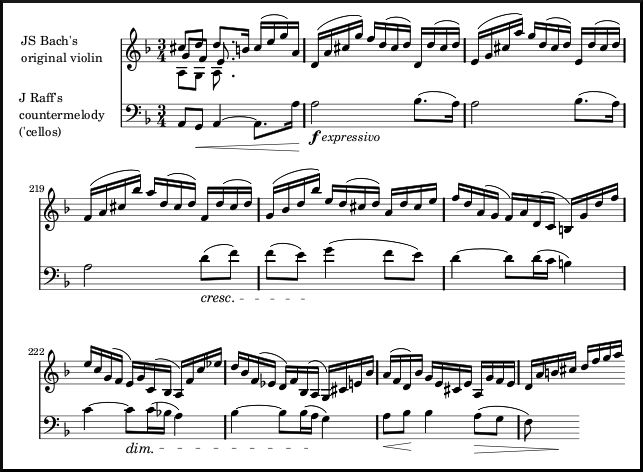
Earlier today I stumbled across a recording of a work I had not heard in a few years by the obscure Swiss-German composer Joachim Raff. The composition is an orchestral transcription of the Chaconne from Bach's Partita in D minor, without doubt the finest work ever written for solo violin. This piece has been transcribed countless times; the source material is clearly a masterpiece, but what makes the movement really attractive is its implicit nature - dispite the violin's limited facilities for counterpoint and polyphony in general, Bach succeeds in alluding to a multitude of voices within the same line. Larry Solomon provides a brief overview of what to look out for. Raff's transcription thus endeavours to render the implicit explicit; for example, where there is the implication of a held note, it can played for its implied duration. Indeed, Raff believed that Chaconne was in itself a "reduction" from an orchestrated original. Whilst I don't share that literal belief, it is certainly good working model for a transcription. And what a transcription! I've often thought of the romantic transcriptions such as these to be a guilty pleasures; they clearly violate any sensibilities I have about performing early music. However, what is most surprising (and guilt-relieving) about Raff's effort is the sheer amount of novel material involved. Here is an example starting at bar 216 - I have overlayed Bach's original line with a melody of Raff's own invention:
http://chris-lamb.co.uk/wp-content/2009/raff_chaconne.png
There are countless other examples which, following Bach's example, vary greatly in their subtlety. No prizes for guessing why I chose this excerpt though. However, dispite these additions I feel some crucial aspects are actually lost in translation. Firstly, we can muse over whether Bach would have approved of such a rendering - not wishing to dwell too deeply in well-tread arguments, many would point to Bach's re-use of his own material (as well as his transcriptions of other composers) to illustrate that he was not against the practice, but I find that argument difficult to apply to the Chaconne - the dualism between the implicit and the explicit would have greatly appealed to Bach, so to rob the work of it would seem to be doing him a serious discourtesy. Furthermore, the implications in Bach's work are certainly not followed to the same conclusions by all - a truly solo musician has the advantage of being able to make their own decisions about the music, perhaps even on the spur of the moment. In contrast, an ensemble is effectively forced to obey Hr. Raff's inferences. This lack of spontaneity is particularly damning; I am sure one would tire of differing interpretations of Raff's transcription quicker than one would of Bach's original. Lastly (and certainly most subjectively) there is something disarmingly solitary about the original work which is only amplified by being played solo - dispite my inability to provide a satisfactory rendition I would find performing this piece with (or even to) others rather discomforting. In conclusion, I would recommend listening to this work (and the rest of the CD). I have found it extremely illuminating, if only about Bach's original than of Raff's.

14 March 2009

Lucas Nussbaum: Anomos: anonymous BitTorrent

The following information is based on Anomos website. Funnily, when you go to that website, the default page is a blog that doesn t answer the What s anomos? question. The answer to that question is available on the About page, on this blog post, and those slides. So, Anomos seems like a good answer to the it s to easy to determine who is donwloading a file with BitTorrent problem. It:
  • uses a mix network (like Tor) to transfer all the content.
  • encrypts the file being transferred.

    It is based on BitTorrent for performance, however, performance might be seriously affected by the mix network (which probably don t resist too well to heavy load since most internet connections have asymmetric upload/download bandwidths). A strange point is that it uses a central tracker. I m not sure why the central tracker couldn t be dropped, to simply use a DHT instead. (And traffic to the DHT could go through the mix network as well).
  • Julien Blache: pommed v1.26: new external keyboard, fixes

    I ve just released a maintenance release of pommed. Nothing new under the sun in this one:

    • support for the new mini external keyboard,
    • the keyboard backlight idle timer now only takes keystrokes on the built-in keyboard into account,
    • move away from using /dev/mem to access PCI memory, use sysfs resource files instead.
    There are a couple of ideas floating around, we ll see if any one of those lands into a future release.

    12 March 2009

    David Welton: Linux "Just Working"

    I have used Linux since 1996, and was pretty used to having to fiddle with files in /etc and command line utilities to get stuff working, so I'm always very satisfied when I see the progress Linux has been making in becoming more user friendly. Two recent things jumped out at me: * I plugged in my phone, via USB, and was able to connect to the internet, just like that. It recognized everything! I was getting all ready to start googling instructions for how to do it, and voila , it worked with no intervention on my part. * I had to print some stuff out in the hopes that we get a DSL line soonish (hah... right). My wife's parents' (Windows) computer was unable to print it... some problem with the fonts and lots of gibberish printed out. I disconnected their computer, plugged it into mine, and printed everything out just fine. The computer recognized the printer just fine, and even picked up on the messages the printer was sending about being low on ink. All in all, nothing revolutionary, but one step at a time, Linux continues to impress me with how much it has grown since those early days when I first installed it and fell in love with it. Also: we've managed to move into our new house here in Padova. It's nice to be back!

    Jon Dowland: interzone

    The next issue of Interzone, a british SF magazine, is due out soon. The issue features a story and interview with Bruce Sterling, plus a review of his new novel the Caryatids (which Cory Doctorow said was his pick for best book of 2009, already). The cover for this issue looks fantastic: modern covers seem to be placing most of the focus on the artwork and placing the graphics and text to suite each cover art individually. I've been reading IZ for several years after having seen it mentioned several times as the source of stories in SF anthologies and highly recommend that people who enjoy reading SF give it a try.

    Russ Allbery: Policy 3.8.1 and Lintian 2.2.8

    I've just uploaded Policy 3.8.1.0 with the first batch of post-lenny changes. There isn't anything that earth-shattering in this set, but I'm hoping that we'll be able to get a lot more done during the squeeze release cycle. Policy has well over a hundred open bugs, quite a few of which we should be able to resolve. I also uploaded Lintian 2.2.8, which is synchronized against Policy 3.8.1 and also reverts some changes around install-menu due to a reverted change in debhelper 7.2.5, and fixes diagnosis of diversions. The last few versions of Lintian have all been a little bit buggy due mostly to the current pace of change. Hopefully this version will have fewer unexpected problems. Here is the summary of normative Policy changes, taken from upgrading-checklist.txt.gz in the debian-policy package.
    • Care should be taken when adding functionality to essential and such additions create an obligation to support that functionality in essential forever unless significant work is done.
    • Changelog files must be encoded in UTF-8.
    • Tighten some format requirements for changelog files from a should to a must.
    • Remove alternative changelog formats. Debian only supports one changelog format for the Debian Archive.
    • New nocheck option for DEB_BUILD_OPTIONS indicating any build-time test suite provided by the package should not be run.
    • All control files must be encoded in UTF-8.
    • debian/control allows comment lines starting with # with no preceding whitespace.
    • Init scripts ending in .sh are not handled specially. They are not sourced and are not guaranteed to be run by /bin/sh regardless of the #! line. This brings Policy in line with the long-standing behavior of the init system in Debian.
    • The start action of an init script must exit successfully and not start the daemon again if it's already running.
    • /var/run and /var/lock may be mounted as temporary filesystems, and init scripts must therefore create any necessary subdirectories dynamically.
    • /bin/sh scripts may assume that local can take multiple variable arguments and supports assignment.
    • User mailboxes may be mode 600 and owned by the user rather than mode 660, owned by user, and group mail.

    Next.

    Previous.