Search Results: "spa"

6 October 2014

Julian Andres Klode: A weekend with the Acer Chromebook 13 FHD (AKA nyan-big)

I spent the weekend using almost exclusively my Chromebook 13, on a single charge Saturday and Sunday. Keyboard I think I like the keyboard better now than I used to when I first tried it. It gets nowhere near the ThinkPad X230 one, though; appart from the coating, which my (backlit) X230 unfortunately does not have. Screen While the screen appeared very grainy to me on first sight, having only used IPS screens in the past year, I got used to it over the weekend. I now do not notice much graininess anymore. The contrast still seems extremely poor, the colors are not vivid, and the vertical viewing angles are still a disaster, though. Battery life I think the battery life is awesome. I have 30% remaining now while I am writing this blog post and Chrome OS tells me I still have 3 hours and 19 minutes remaining. It could probably still be improved though, I notice that Chrome OS uses 7-14% CPU in idle normally (and up to 20% in exceptional cases). The maximum power usage I measured using the battery s internal sensor was about 9.2W, that was with 5 Big Buck Bunny 1080p videos played in parallel. Average power consumption is around 3-5W (up to 6.5 with single video playing), depending on brightness, and use. Performance While I do notice a performance difference to my much more high-end Ivy Bridge Core i5 laptop, it turns out to be usable enough to not make me want to throw it at a wall. Things take a bit longer than I am used to, but it is still acceptable. Input: Software Part The user interface is great. There are a lot of gestures available for navigating between windows, tabs, and in the history. For example, horizontally swiping with two finger moves in history, three fingers moves between tabs; and swiping down (or up for Australian scrolling) gives an overview of all windows (like expose on Mac, GNOME s activities, or the multi-tasking thing Maemo used to have). What I miss is a keyboard shortcut like Meta + Left/Right on GNOME which moves the active window to the left/right side of the screen. That would be very useful for mult-tasking situations. Issues I noticed some performance issues. For example, I can easily get the Chromebook to use 85% of a CPU by scrolling on a page with the touchpad or 70% for scrolling by keeping a key pressed (crbug.com/420452). While watching Big Buck Bunny on YouTube, I noticed some (micro) stuttering in the beginning of the film, as well as each time I move in or out of the video area when not in full-screen mode (crbug.com/420582). It also increases CPU usage to about 70%. Running a proper Linux? Today, I tried to play around a bit with Debian wheezy and Ubuntu trusty systems, in a chroot for now. I was trying to find out if I can get an accelerated X server with the standard ChromeOS kernel. The short answer is: No. I tried two things:
  1. Debian wheezy with the binaries from ChromeOS (they have the same xserver version)
  2. Ubuntu trusty with the Nvidia drivers
Unfortunately, they did not work. Option 1 failed because ChromeOS uses glibc 2.15 whereas wheezy uses 1.13. Option 2 failed because the sysfs interface is different between the ChromeOS and Linux4Tegra kernels. I guess I ll have to wait. I also tried booting a custom kernel from USB, but given that the u-boot always sets console= and there is no non-verified u-boot available yet, I could not see any output on the screen :( Maybe I should build a u-boot myself?
Filed under: Chromebook

5 October 2014

Vasudev Kamath: Note to Self: LVM Shrink Resize HowTo

Recently I had to reinstall a system at office with Debian Wheezy and I thought I should use this opportunity to experiment with LVM. Yeah I've not used LVM till date, even though I'm using Linux for more than 5 years now. I know many DD friends who use LVM with LUKS encryption and I always wanted to experiment, but since my laptop is only thing I've and its currently perfectly in shape I didn't dare to experiment it there. This reinstall was golden opportunity for me to experiment and learn something new. I used Wheezy CD ISO downloaded using jigdo for installation. Now I will just go bit off topic and want to share the USB stick preparation. I have to say this because I had not done installation for quite a while now. Last I did was during Squeeze time so like usual I blindly executed following command.
cat debian-wheezy.iso > /dev/sdb
Surprisingly USB stick didn't boot! I was getting Corrupt or missing ISO.bin. So next I tried using dd for preparing.
dd if=debian-wheezy.iso of=/dev/sdb
Surprisingly this also didn't work and I get same error message as above. This is when I went back to debian manual and looked for installation step and there I found new way!
cp debian-wheezy.iso /dev/sdb
Look at destination, its a device and voil this worked! This is something new I learnt and I'm surprised how easy it is now to prepare USB stick. But I still didn't get why first 2 methods failed!. If you guys know please do share. Now coming back to LVM. I used default LVM when disk partitioning was asked, and I used guided partitioning method provided by debian-installer and ended up with following layout
$ lvs
  LV     VG        Attr     LSize  Pool Origin Data%  Move Log Copy%  Convert
home   system-disk -wi-ao-- 62.34g
root   system-disk -wi-ao--  9.31g
swap_1 system-disk -wi-ao--  2.64g
So guided partitioning of debian-installer allocates 10G for root and rest to home and swap. This is not a problem but when I started installing required software, I could see root running out of space quickly so I wanted to resize root and give it 10G more, for this I need to reduce the home by 10G for which I need to first unmount the home partition. Unmounting home from running system isn't possible so I booted into recovery assuming I can unmount home there but I couldn't. lsof didn't show any one using /home after searching a bit I found fuser command and it looks like kernel is using /home which is mounted by it.
$ fuser -vm /home
                     USER        PID ACCESS COMMAND
/home:               root     kernel mount /home
So it isn't possible to unmount /home in recovery mode also. Online materials told me to use live-cd for doing this but I didn't have patience to do that so I just went ahead commented /home mounting in /etc/fstab and rebooted!. This time it worked and /home is not mounted on recovery mode. Now comes the hard part resizing home, thanks to TLDP doc on reducing I coud do this with following step
# e2fsck -f /dev/volume-name/home
# resize2fs /dev/volume-name/home 52G
# lvreduce -L-10G /dev/volume-name/home
And now the next part live extending the root partition again thanks to TLDP doc on extending following command did it.
# lvextend -L+10G /dev/volume-name/root
# resize2fs /dev/volumne-name/root
And now important part! Uncomment /home line in /etc/fstab so it will be mounted normally in next boot and reboot! On login I can see my partitions updated.
# lvs
  LV     VG        Attr     LSize  Pool Origin Data%  Move Log Copy%  Convert
home   system-disk -wi-ao-- 52.34g
root   system-disk -wi-ao-- 19.31g
swap_1 system-disk -wi-ao--  2.64g
I've started liking LVM more now! :)

4 October 2014

Laura Arjona: I ve applied to be a (non uploading) Debian Developer

I ve just applied to be a (non uploading) Debian Developer. I ve just filled in the form, and decrypted the message that I received to confirm my application (I had read the important documents long time ago, and again, some weeks ago, and again, some days ago). I was expecting today to gather some GPG signs, but the event was cancelled (postponed). So beginning next week, I ll try to gather GPG signs one by one, by myself. Outdated translations of the website are finished (no more yellow stickers in the Spanish http://www.debian.org!), and I already began with the translation of new files. I ve sent mails to say thank you to some of the people that helped me during this phase of Debian Contributor. I think I ve done everything that I can do for now. So let s wait. I don t know how will I sleep tonight. Comments? You can comment in this pump.io thread.
Filed under: My experiences and opinion Tagged: Communities, Contributing to libre software, Debian, encryption, English, Free Software, Moving into free software, translations

3 October 2014

Mike Hommey: No PIE for you!

You are a software vendor. You distribute software on multiple operating systems. Let s say your software is a mildly popular internet browser. Let s say its logo represents an animal and a globe. Now, because you care about the security of your users, let s say you would like the entire address space of your application to be randomized, including the main executable portion of it. That would be neat, wouldn t it? And there s even a feature for that: Position independent executables. You get that working on (almost) all the operating systems you distribute software on. Great. Then a Gnome user (or an Ubuntu user, for that matter) comes, and tells you they downloaded your software tarball, unpacked it, and tried opening your software, but all they get is a dialog telling them:
Could not display application-name
There is no application installed for shared library files
Because, you see, a Position independent executable, in ELF terms, is actually a (position independent) shared library that happens to be executable, instead of being an executable that happens to be position independent. And nautilus (the file manager in Gnome and Ubuntu s Unity) usefully knows to distinguish between executables and shared libraries. And will happily refuse to execute shared libraries, even when they have the file-system-level executable bit set. You d think you can get around this by using a .desktop file, but the Exec field in those files requires a full path. (No, ./ doesn t work unless the executable is in the nautilus process current working directory, as in, the path nautilus was run from) Dear lazyweb, please prove me wrong and tell me there s a way around this.

Marco d'Itri: 15 years of whois

Exactly 15 years ago I uploaded to Debian the first release of my whois client. At the end of 1999 the United States Government forced Network Solutions, at the time the only registrar for the .com, .net and .org top level domains, to split their functions in a registry and a registrar and to and allow competing registrars to operate. Since then, two whois queries are needed to access the data for a domain in a TLD operating with a thin registry model: first one to the registry to find out which registrar was used to register the domain, and then one the registrar to actually get the data. Being as lazy as I am I tought that this was unacceptable, so I implemented a whois client that would know which whois server to query for all TLDs and then automatically follow the referrals to the registrars. But the initial reason for writing this program was to replace the simplistic BSD-derived whois client that was shipped with Debian with one that would know which server to query for IP addresses and autonomous system numbers, a useful feature in a time when people still used to manually report all their spam to the originating ISPs. Over the years I have spent countless hours searching for the right servers for the domains of far away countries (something that has often been incredibly instructive) and now the program database is usually more up to date than the official IANA one. One of my goals for this program has always been wide portability, so I am happy that over the years it was adopted by other Linux distributions, made available by third parties to all common variants of UNIX and even to systems as alien as Windows and OS/2. Now that whois is 15 years old I am happy to announce that I have recently achieved complete world domination and that all Linux distributions use it as their default whois client.

2 October 2014

Jonathan Dowland: Gigabyte J1900N-D3V Mini-ITX mainboard

For my 31st birthday I decided to build myself a computer, specifically a NAS and backup server which could do some other bits and pieces. I ended up buying a system based on the Gigabyte J1900N-D3V SoC from Mini-ITX (who's after sales support is great, by the way). I hope to write up a more comprehensive overview of what I've ended up with (probably in my rather dusty hardware section), but in the meantime I have a question for anyone else with this board:
If you've upgraded the BIOS, do the more recent BIOS versions insist on there being a display connected in order to boot?
Sadly the V1 BIOS version does, which seriously limits the utility of this board for my purposes. I did manage to flash the board up to V3, once, but it later decided to downgrade itself (believing the flashed BIOS to be corrupt). I haven't managed a second time. The EFI implementation in this board is... interesting. Convincing it to boot anything legacy is a tricky task. As an aside, I recently stumbled across this suggestion on reddit to use an old-ish, Core-era Thinkpad T-series with a dock for this exact purpose: the spare ultrabay gives you two SATA drive slots; the laptop battery serves as a crude UPS and there's a built in keyboard and mouse, avoiding the issue I'm having with the J1900N-D3V. A Core i5 is more than fast enough for what I want to do and it will have vt. Hindsight is a wonderful thing...

Matthew Garrett: Actions have consequences (or: why I'm not fixing Intel's bugs any more)

A lot of the kernel work I've ended up doing has involved dealing with bugs on Intel-based systems - figuring out interactions between their hardware and firmware, reverse engineering features that they refuse to document, improving their power management support, handling platform integration stuff for their GPUs and so on. Some of this I've been paid for, but a bunch has been unpaid work in my spare time[1].

Recently, as part of the anti-women #GamerGate campaign[2], a set of awful humans convinced Intel to terminate an advertising campaign because the site hosting the campaign had dared to suggest that the sexism present throughout the gaming industry might be a problem. Despite being awful humans, it is absolutely their right to request that a company choose to spend its money in a different way. And despite it being a dreadful decision, Intel is obviously entitled to spend their money as they wish. But I'm also free to spend my unpaid spare time as I wish, and I no longer wish to spend it doing unpaid work to enable an abhorrently-behaving company to sell more hardware. I won't be working on any Intel-specific bugs. I won't be reverse engineering any Intel-based features[3]. If the backlight on your laptop with an Intel GPU doesn't work, the number of fucks I'll be giving will fail to register on even the most sensitive measuring device.

On the plus side, this is probably going to significantly reduce my gin consumption.

[1] In the spirit of full disclosure: in some cases this has resulted in me being sent laptops in order to figure stuff out, and I was not always asked to return those laptops. My current laptop was purchased by me.

[2] I appreciate that there are some people involved in this campaign who earnestly believe that they are working to improve the state of professional ethics in games media. That is a worthy goal! But you're allying yourself to a cause that disproportionately attacks women while ignoring almost every other conflict of interest in the industry. If this is what you care about, find a new way to do it - and perhaps deal with the rather more obvious cases involving giant corporations, rather than obsessing over indie developers.

For avoidance of doubt, any comments arguing this point will be replaced with the phrase "Fart fart fart".

[3] Except for the purposes of finding entertaining security bugs

comment count unavailable comments

Joachim Breitner: 11 ways to write your last Haskell program

At my university, we recently held an exam that covered a bit of Haskell, and a simple warm-up question at the beginning asked the students to implement last :: [a] -> a. We did not demand a specific behaviour for last []. This is a survey of various solutions, only covering those that are actually correct. I elided some variation in syntax (e.g. guards vs. if-then-else). Most wrote the naive and straightforward code:
last [x] = x
last (x:xs) = last xs
Then quite a few seemed to be uncomfortable with pattern-matching and used conditional expressions. There was some variety in finding out whether a list is empty:
last (x:xs)
    null xs == True = x
    otherwise       = last xs
last (x:xs)
    length (x:xs) == 1 = x
    otherwise          = last xs
last (x:xs)
    length xs == 0 = x
    otherwise      = last xs
last xs
    lenght xs > 1 = last (tail xs)
    otherwise     = head xs
last xs
    lenght xs == 1 = head xs
    otherwise      = last (tail xs)
last (x:xs)
    xs == []  = x
    otherwise = last xs
The last one is not really correct, as it has the stricter type Eq a => [a] -> a. Also we did not expect our students to avoid the quadratic runtime caused by using length in every step. The next class of answers used length to pick out the right elemet, either using (!!) directly, or simulating it with head and drop:
last xs = xs !! (length xs - 1)
last xs = head (drop (length xs - 1) xs)
There were two submissions that spelled out an explicit left folding recursion:
last (x:xs) = lastHelper x xs
  where
    lastHelper z [] = z
    lastHelper z (y:ys) = lastHelper y ys
And finally there are a few code-golfers that just plugged together some other functions:
last x = head (reverse x)
Quite a lot of ways to write last!

1 October 2014

Matt Zimmerman: Join me in supporting The Ada Initiative

When I first read that Linux kernel developer Valerie Aurora would be changing careers to work full-time on behalf of women in open source communities, I never imagined it would lead so far so fast. Today, The Ada Initiative is a non-profit organization with global reach, whose programs have helped create positive change for women in a wide range of communities beyond open source. Building on this foundation, imagine how much more they can do in the next four years! That s why I m pledging my continuing support, and asking you to join me. For the next 7 days, I will personally match your donations up to $4,096. My employer, Heroku (Salesforce.com), will match my donations too, so every dollar you contribute will be tripled! My goal is that together we will raise over $12,000 toward The Ada Initiative s 2014 fundraising drive. Donate now Since about 1999, I had been working in open source communities like Debian and Ubuntu, where women are vastly underrepresented even compared to the professional software industry. Like other men in these communities, I had struggled to learn what I could do to change this. Such a severe imbalance can only be addressed by systemic change, and I hardly knew where to begin. I worked to raise awareness by writing and speaking, and joined groups like Debian Women, Ubuntu Women and Geek Feminism. I worked on my own bias and behavior to avoid being part of the problem myself. But it never felt like enough, and sometimes felt completely hopeless. Perhaps worst of all, I saw too many women burning out from trying to change the system. It was often taxing just to participate as a woman in a male-dominated community, and the extra burden of activism seemed overwhelming. They were all volunteers, doing this work in evenings and weekends around work or study, and it took a lot of time, energy and emotional reserve to deal with the backlash they faced for speaking out about sexism. Valerie Aurora and Mary Gardiner helped me to see that an activist organization with full-time staff could be part of the solution. I joined the Ada Initiative advisory board in February 2011, and the board of directors in April. founders_laughing Today, The Ada Initiative is making a difference not only in my community, but in my workplace as well. When I joined Heroku in 2012, none of the engineers were women, and we clearly had a lot of work to do to change that. In 2013, I attended AdaCamp SF along with my colleague Peter van Hardenberg, joining the first allies track , open to participants of any gender, for people who wanted to learn the skills to support the women around them. We ve gone on to host two ally skills workshops of our own for Heroku employees, one taught by Ada Initiative staff and another by a member of our team, security engineer Leigh Honeywell. These workshops taught interested employees simple, everyday ways to take positive action to challenge sexism and create a better workplace for women. The Ada Initiative also helped us establish a policy for conference sponsorship which supports our gender diversity efforts. Today, Heroku engineering includes about 10% women and growing. The Ada Initiative s programs are helping us to become the kind of company we want to be.leigh-eeoc-ally-skills-workshop
I attended the workshop with a group of Heroku colleagues, and it was a powerful experience to see my co-workers learning tactics to support women and intervene in sexist situations. Hearing them discuss power and privilege in the workplace, and the various a-ha! moments people had, were very encouraging and made me feel heard and supported.
Leigh Honeywell
If you want to see more of these programs from The Ada Initiative, please contribute now:
Donate now

Vincent Sanders: It is a bad plan that admits of no modification

I find it somewhat interesting that thousands of years later that our society still uses Publilius Syrus sententiae though I imagine the tendency to leave well enough alone means such phrases stay in usage.

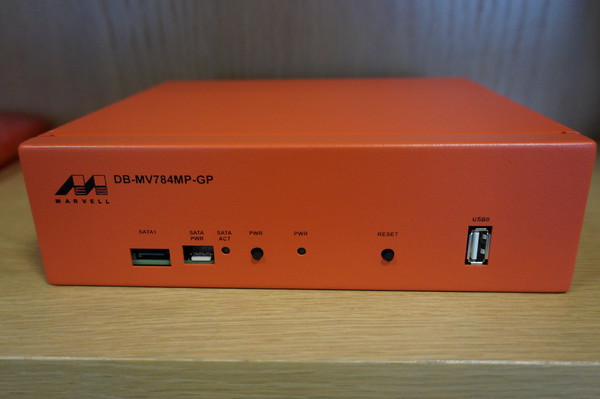
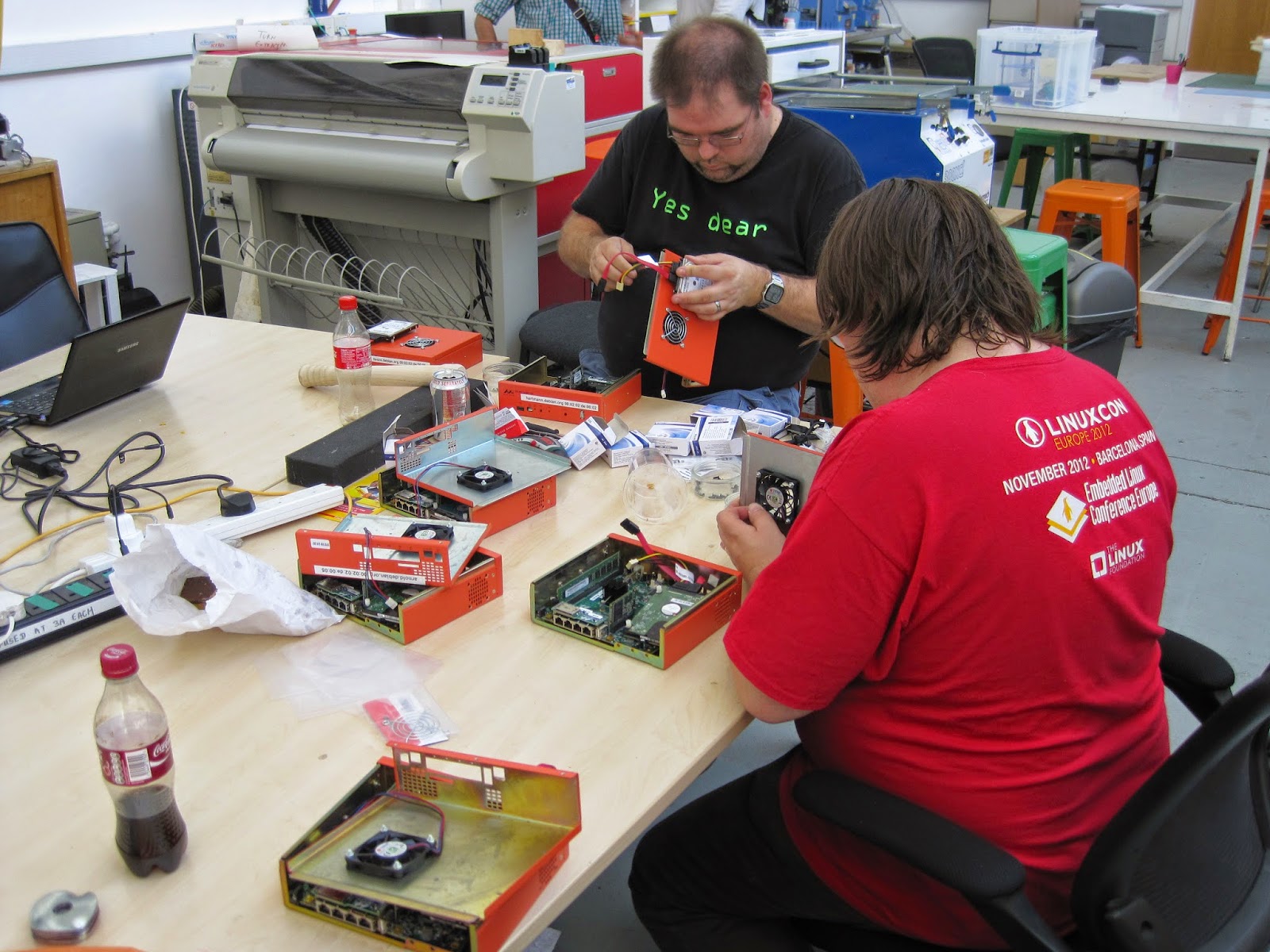
Marvell ARM system - Photo from Steve McIntyre
One weekend Steve McIntyre asked me if I could find a source of some of some 40mm fans for some systems with some pretty strict requirements. They needed to be long life and shift a lot of air to combat a persistent overheating issue.

I sat with him and went through the Farnell utterly hateful parametric web interface and eventually came up with a couple of options which were very expensive. Only then did I stop and ask what the actual problem was.

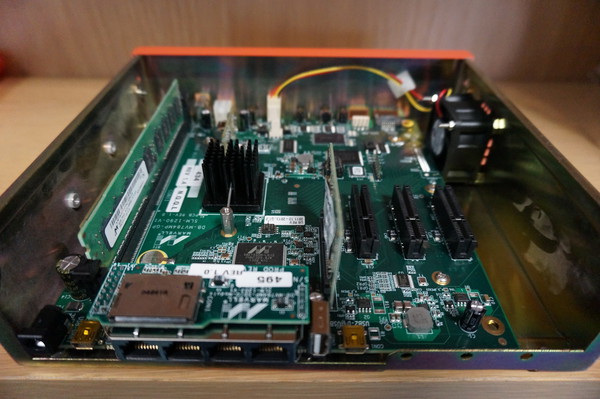
Marvell ARM system Original internal cooling arrangement - Photo from Steve McIntyre
Steve showed me one of the Debian ARM buildd boxes which are Marvell development machines. These systems are powerful quad core machines housed in compact steel enclosures.

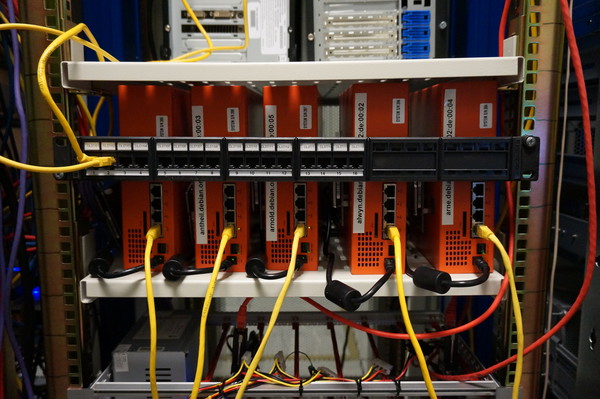
There is a single 40mm fan trying to provide cooling for the entire enclosure. When the units are placed horizontally and used intermittently this proves adequate. Unfortunately when the system are arranged vertically in a rack and run at full load continuously they often overheat and have to be restarted. In addition the small high speed fans need replacing frequently as their bearings wore out quickly.

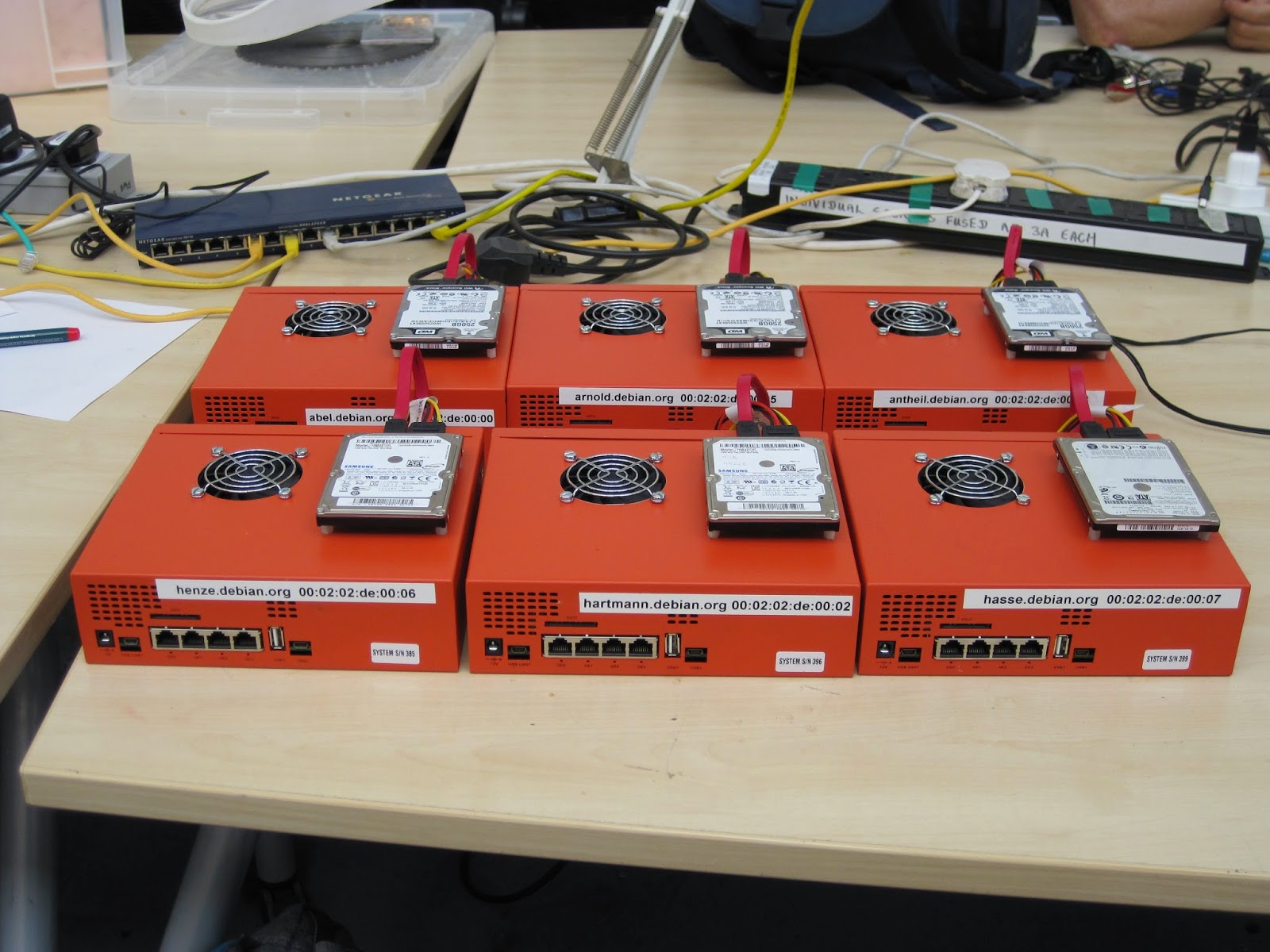
Debian ARM buildd systems - Photo from Steve McIntyreThis was obviously causing some issues for the ARM Debian ports which Steve wanted to rectify. After talking the problem through for a while we came to the conclusion we could use much larger 60mm fans to blow air directly through the top of the case onto the cpu heatsink.

Larger fans can be run much more slowly to move a similar volume of air to the smaller 40mm fans which gives a much longer service life.

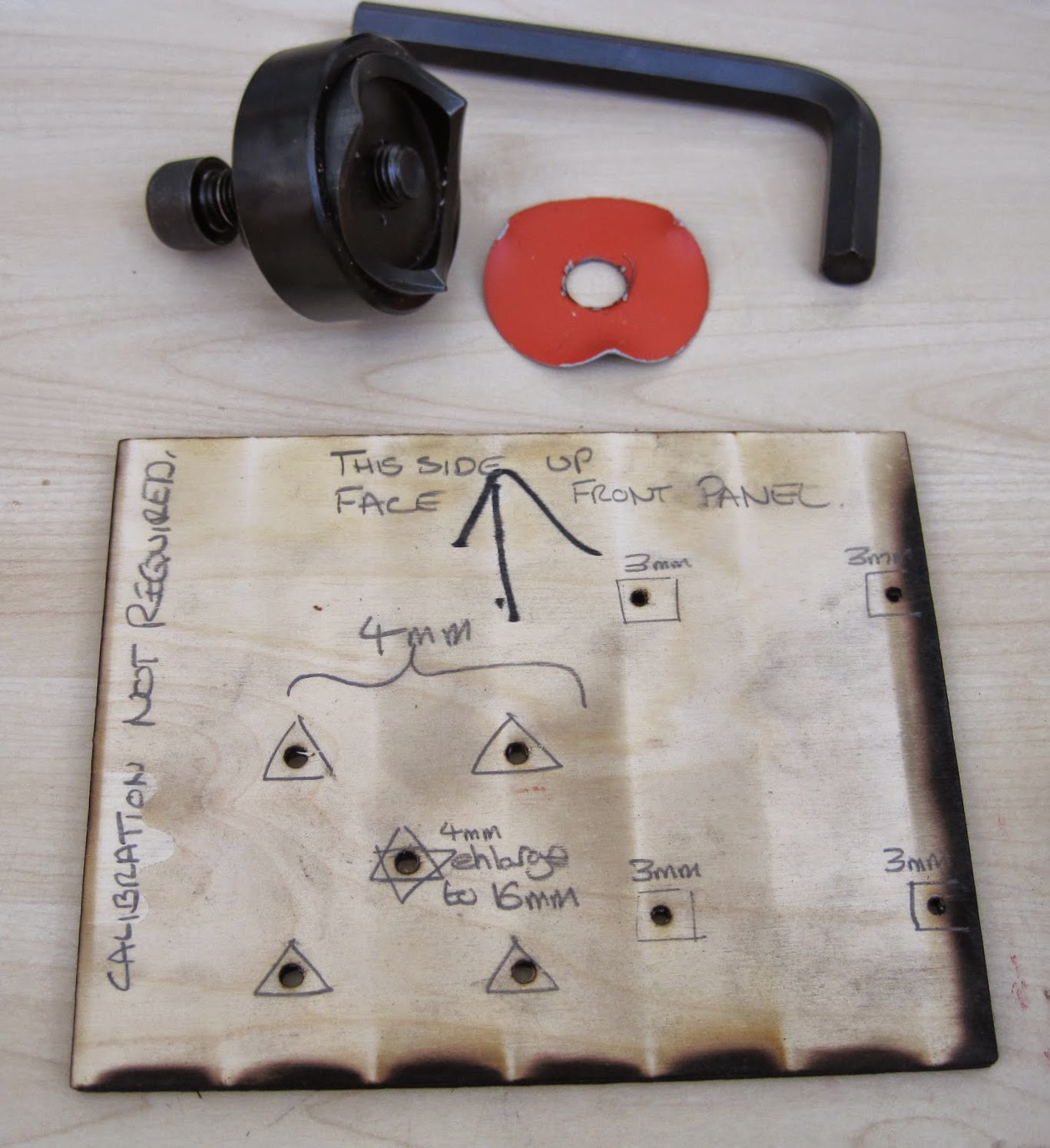
Hole punch and Drilling template
Steve proceeded to order enough parts to allow us to modify all the Debian systems, this worked out cheaper than a single "special" 40mm high volume fan.

I acquired a rather large steel hole punch, I chose this tool because it produces a much superior finish to a hole cutter and this project demanded a high level of finish (not to mention I loved having a valid excuse to own and use a huge allen key!)

If we had simply been modifying a single case I would have measured and marked up by hand. With the prospect of altering at least eight I laser cut a template from plywood which Andy Simpkins took great glee in excessively annotating.

We also used the opportunity to add bolt holes to securely attach the 2.5 inch SATA drives instead of using sticky pads.

Steve and I modified a single system to begin with both to check our alignment and the efficacy of the change. We were pleasantly surprised to discover that hoiby could now repeatedly do kernel compiles with all four cores flat out which was not possible before. The measured CPU temperature, which had previously been around 90 C, did not rise above 40 C

Steve and Andy on the assembly line
Steve, Andy and I then arranged a day where we took all the remaining units out of the rack at ARM, modified and returned them. We used the facilities at the Cambridge Makespace where I am a member to do the modifications.

I broke two 3mm drill bits and dulled a 4mm bit drilling all the holes, Roger Smith was good enough to loan us the use of his "Christmas tree bit" to ream the fan hole out to 16mm so we could thread the hole punch and cut the 60mm fan aperture out.

six modified systems ready to be re-racked.
We managed to get quite an assembly line going and, in my opinion, the results look pretty professional.

It has been several months since we did this work and these systems continue to run without issue. To complete the story we can see some graphs courtesy of the DSA munin instance.

CPU load on arnold.debian.org
You can clearly see the huge drop in temperature at the end of Week 25 despite the continuously high CPU load. Also there is only a single gap in the data after the changes (these indicate crashes where data was not recorded) where before there were frequent and extensive times where the systems were simply unusable.

CPU Temperature of arnold.debian.org
One reason I continue to enjoy Debian so much is the wide variety of ways in which I can contribute not only by maintaining my packages. Sometimes this kind of work does not receive the credit it deserves and hopefully highlights a small part of the frantic paddling that goes on under the serene surface of the Debian project to keep things "just working".

30 September 2014

Mario Lang: A simple C++11 concurrent workqueue

For a little toy project of mine (a wikipedia XML dump word counter) I wrote a little C++11 helper class to distribute work to all available CPU cores. It took me many years to overcome my fear of threading: In the past, whenever I toyed with threaded code, I ended up having a lot of deadlocks, and generally being confused. It appears that I finally have understood enough of this crazyness to be able to come up with the small helper class below.
The problem We want to spread work amongst all available CPU cores. There are no dependencies between items in our work queue. So every thread can just pick up and process an item as soon as it is ready.
The solution This simple implementation makes use of C++11 threading primitives, lambda functions and move semantics. The idea is simple: You provide a function at construction time which defines how to process one item of work. To pass work to the queue, simply call the function operator of the object, repeatedly. When the destructor is called (once the object reachs the end of its scope), all remaining items are processed and all background threads are joined. The number of threads defaults to the value of std::thread::hardware_concurrency(). This appears to work at least since GCC 4.9. Earlier tests have shown that std::thread::hardware_concurrency() always returned 1. I don't know when exactly GCC (or libstdc++, actually) started to support this, but at least since GCC 4.9, it is usable. Prerequisite on Linux is a mounted /proc. The number of maximum items per thread in the queue defaults to 1. If the queue is full, calls to the function operator will block. So the most basic usage example is probably something like:
int main()  
  typedef std::string item_type;
  distributor<item_type> process([](item_type &item)  
    // do work
   );
  while (/* input */) process(std::move(/* item */));
  return 0;
 
That is about as simple as it can get, IMHO. The code can be found in the GitHub project mentioned above. However, since the class template is relatively short, here it is.
#include <condition_variable>
#include <mutex>
#include <queue>
#include <stdexcept>
#include <thread>
#include <vector>
template <typename Type, typename Queue = std::queue<Type>>
class distributor: Queue, std::mutex, std::condition_variable  
  typename Queue::size_type capacity;
  bool done = false;
  std::vector<std::thread> threads;
public:
  template<typename Function>
  distributor( Function function
             , unsigned int concurrency = std::thread::hardware_concurrency()
             , typename Queue::size_type max_items_per_thread = 1
             )
  : capacity concurrency * max_items_per_thread 
   
    if (not concurrency)
      throw std::invalid_argument("Concurrency must be non-zero");
    if (not max_items_per_thread)
      throw std::invalid_argument("Max items per thread must be non-zero");
    for (unsigned int count  0 ; count < concurrency; count += 1)
      threads.emplace_back(static_cast<void (distributor::*)(Function)>
                           (&distributor::consume), this, function);
   
  distributor(distributor &&) = default;
  distributor &operator=(distributor &&) = delete;
  ~distributor()
   
     
      std::lock_guard<std::mutex> guard(*this);
      done = true;
      notify_all();
     
    for (auto &&thread: threads) thread.join();
   
  void operator()(Type &&value)
   
    std::unique_lock<std::mutex> lock(*this);
    while (Queue::size() == capacity) wait(lock);
    Queue::push(std::forward<Type>(value));
    notify_one();
   
private:
  template <typename Function>
  void consume(Function process)
   
    std::unique_lock<std::mutex> lock(*this);
    while (true)  
      if (not Queue::empty())  
        Type item   std::move(Queue::front())  ;
        Queue::pop();
        notify_one();
        lock.unlock();
        process(item);
        lock.lock();
        else if (done)  
        break;
        else  
        wait(lock);


 ;
If you have any comments regarding the implementation, please drop me a mail.

Dirk Eddelbuettel: Rcpp 0.11.3

A new release 0.11.3 of Rcpp is now on the CRAN network for GNU R, and an updated Debian package has been uploaded too. Rcpp has become the most popular way of enhancing GNU R with C++ code. As of today, 273 packages on CRAN depend on Rcpp for making analyses go faster and further. This release brings a fairly large number of continued enhancements, fixes and polishing to Rcpp. These were provided by a total of seven different contributors---which is a new record as well. See below for a detailed list of changes extracted from the NEWS file, but some highlights included in this release are One sore point, however, is that we missed that packages using Rcpp Modules appear to require a rebuild. We are sorry for the inconvenience; this has highlighted a shortcoming in our fairly robust and extensive tests. While we test our packages against all known CRAN dependents, such tests check for the ability to compile and run freshly and not whether previously built packages still run. We intend to augment our testing in this direction to avoid a repeat occurrence of such a misfeature.
Changes in Rcpp version 0.11.3 (2014-09-27)
  • Changes in Rcpp API:
    • The deprecation of RCPP_FUNCTION_* which was announced with release 0.10.5 last year is proceeding as planned, and the file macros/preprocessor_generated.h has been removed.
    • Timer no longer records time between steps, but times from the origin. It also gains a get_timers(int) methods that creates a vector of Timer that have the same origin. This is modelled on the Rcpp11 implementation and is more useful for situations where we use timers in several threads. Timer also gains a constructor taking a nanotime_t to use as its origin, and a origin method. This can be useful for situations where the number of threads is not known in advance but we still want to track what goes on in each thread.
    • A cast to bool was removed in the vector proxy code as inconsistent behaviour between clang and g++ compilations was noticed.
    • A missing update(SEXP) method was added thanks to pull request by Omar Andres Zapata Mesa.
    • A proxy for DimNames was added.
    • A no_init option was added for Matrices and Vectors.
    • The InternalFunction class was updated to work with std::function (provided a suitable C++11 compiler is available) via a pull request by Christian Authmann.
    • A new_env() function was added to Environment.h
    • The return value of range eraser for Vectors was fixed in a pull request by Yixuan Qiu.
  • Changes in Rcpp Sugar:
    • In ifelse(), the returned NA type was corrected for operator[].
  • Changes in Rcpp Attributes:
    • Include LinkingTo in DESCRIPTION fields scanned to confirm that C++ dependencies are referenced by package.
    • Add dryRun parameter to sourceCpp.
    • Corrected issue with relative path and R chunk use for sourceCpp.
  • Changes in Rcpp Documentation:
    • The Rcpp-FAQ vignette was updated with respect to OS X issues.
    • A new entry in the Rcpp-FAQ clarifies the use of licenses.
    • Vignettes build results no longer copied to /tmp to please CRAN.
    • The Description in DESCRIPTION has been shortened.
  • Changes in Rcpp support functions:
    • The Rcpp.package.skeleton() function will now use pkgKitten package, if available, to create a package which passes R CMD check without warnings. A new Suggests: has been added for pkgKitten.
    • The modules=TRUE case for Rcpp.package.skeleton() has been improved and now runs without complaints from R CMD check as well.
  • Changes in Rcpp unit test functions:
    • Functions from the RUnit package are now prefixed with RUnit::
    • The testRcppModule and testRcppClass sample packages now pass R CMD check --as-cran cleanly with NOTES or WARNINGS
Thanks to CRANberries, you can also look at a diff to the previous release As always, even fuller details are on the Rcpp Changelog page and the Rcpp page which also leads to the downloads page, the browseable doxygen docs and zip files of doxygen output for the standard formats. A local directory has source and documentation too. Questions, comments etc should go to the rcpp-devel mailing list off the R-Forge page.

This post by Dirk Eddelbuettel originated on his Thinking inside the box blog. Please report excessive re-aggregation in third-party for-profit settings.

28 September 2014

Ean Schuessler: RoboJuggy at JavaOne

A few months ago I was showing my friend Bruno Souza the work I had been doing with my childhood friend and robotics genius, David Hanson. I had been watching what David was going through in his process of creating life-like robots with the limited industrial software available for motor control. I had suggested to David that binding motors to Blender control structures was a genuinely viable possibility. David talked with his forward looking CEO, Jong Lee, and they were gracious enough to invite me to Hong Kong to make this exciting idea a reality. Working closely the HRI team (Vytas, Gabrielos, Fabien and Davide) with David s friend and collaborators at OpenCog (Ben Goertzel, Mandeep, David, Jamie, Alex and Samuel) a month long creative hack-fest yielded pretty amazing results. Bruno is an avid puppeteer, a global organizer of java user groups and creator of Juggy the Java Finch, mascot of Java users and user groups everywhere. We started talking about how cool it would be to have a robot version of Juggy. When I was in China I had spent a little time playing with Mark Tilden s RSMedia and various versions of David s hobby servo based emotive heads. Bruno and I did a little research into the ROS Java bindings for the Robot Operating System and decided that if we could make that part of the picture we had a great and fun idea for a JavaOne talk. Hunting and gathering I tracked down a fairly priced RSMedia in Alaska, Bruno put a pair of rubber Juggy puppet heads in the mail and we were on our way.
We had decided that we wanted RoboJuggy to be able to run about untethered and the new RaspberryPi B+ seemed like the perfect low power brain to make that happen. I like the Debian based Raspbian distributions but had lately started using the netinst Pi images. These get your Pi up and running in about 15 minutes with a nicely minimalistic install instead of a pile of dependencies you probably don t need. I d recommend anyone interested I m duplicating our work to stay their journey there: Raspbian UA Net Installer Robots seem like an embedded application but ROS only ships packages for Ubuntu. I was pleasantly surprised that there are very good instructions for building ROS from source on the Pi. I ended up following these instructions: Setting up ROS Hydro on the Raspberry Pi Building from source means that all your install ends up being isolated (in ROS speak) and your file locations and build instructions end up being subtly current. As explained in the linked article, this process is also very time consuming. One thing I would recommend once you get past this step is to use the UNIX dd command to back up your entire SD card to a desktop. This way if you make a mess of things in later steps you can restore your install to a pristine Raspbian+ROS install. If your SD drive was on /dev/sdb you might use something like this to do the job:
sudo dd bs=4M if=/dev/sdb   gzip > /home/your_username/image date +%d%m%y .gz
Getting Java in the mix Once you have your Pi all set up with minimal Raspbian and ROS you are going to want a Java VM. The Pi runs the ARM CPU so you need the corresponding version of Java. I tried getting things going initially with OpenJDK and I had some issues with that. I will work on resolving that in the future because I would like to have a 100% Free Software kit for this but since this was for JavaOne I also wanted JDK8, which isn t available in Debian yet. So, I downloaded the Oracle JDK8 package for ARM. Java 8 JDK for ARM At this point you are ready to start installing the ROS Java packages. I m pretty sure the way I did this initially is wrong but I was trying to reconcile the two install procedures for ROS Java and ROS Hydro for Raspberry Pi. I started by following these directions for ROS Java but with a few exceptions (you have to click the install from source link in the page to see the right stuff: Installing ROS Java on Hydro Now these instructions are good but this is a Pi running Debian and not an Ubuntu install. You won t run the apt-get package commands because those tools were already installed in your earlier steps. Also, this creates its own workspace and we really want these packages all in one workspace. You can apparently chain workspaces in ROS but I didn t understand this well enough to get it working so what I did was this:
> mkdir -p ~/rosjava 
> wstool init -j4 ~/rosjava/src https://raw.github.com/rosjava/rosjava/hydro/rosjava.rosinstall
> source ~/ros_catkin_ws/install_isolated/setup.bash > cd ~/rosjava # Make sure we've got all rosdeps and msg packages.
> rosdep update 
> rosdep install --from-paths src -i -y
and then copied the sources installed into ~/rosjava/src into my main ~/ros_catkin_ws/src. Once those were copied over I was able to run a standard build.
> catkin_make_isolated --install
Like the main ROS install this process will take a little while. The Java gradle builds take an especially long time. One thing I would recommend to speed up your workflow is to have an x86 Debian install (native desktop, QEMU instance, docker, whatever) and do these same build from source installs there. This will let you try your steps out on a much faster system before you try them out in the Pi. That can be a big time saver. Putting together the pieces Around this time my RSMedia had finally showed up from Alaska. At first I thought I had a broken unit because it would power up, complain about not passing system tests and then shut back down. It turns out that if you just put the D batteries in and miss the four AAs that it will kind of pretend to be working so watch for that mistake. Here is a picture of the RSMedia when it first came out of the box: wpid-20140911_142904.jpg Other parts were starting to roll in as well. The rubber puppet heads had made their way through Brazilian customs and my Pololu Mini Maestro 24 had also shown up as well as the my servo motors and pan and tilt camera rig. I had previously bought a set of 10 motors for goofing around so I bought the pan and tilt rig by itself for about $5(!) but you can buy a complete set for around $25 from a number of EBay stores. Complete pan and tilt rig with motors for $25 A bit more about the Pololu. This astonishing little motor controller costs about $25 and gives you control of 24 motors with an easy to use and high level serial API. It is probably also possible to control these servos directly from the Pi and eliminate this board but that will be genuinely difficult because of the real-time timing issues. For $25 this thing is a real gem and you won t regret buying it. Now it was time to start dissecting the RSMedia and getting control of its brain. Unfortunately a lot of great information about the RSMedia has floated away since it was in its heyday 5 years ago but there is still some solid information out there that we need to round up and preserve. A great resource is the SourceForge based website here at http://rsmediadevkit.sourceforge.net. That site has links to a number of useful sites. You will definitely want to check out their wiki. To disassemble the RSMedia I followed their instructions. I will say, it would be smart to take more pictures as you are going because they don t take as many as they should. I took pictures of each board and its associated connections as dismantled the unit and that helped me get things back together later. Another important note is that if all you want to do is solder onto the control board and not replace the head then its feasible to solder the board in place without completely disassembling the unit. Here are some photos of the dis-assembly: wpid-20140921_114742.jpg wpid-20140921_113054.jpg wpid-20140921_112619.jpg Now I also had to start adjusting the puppet head, building an armature for the motors to control it and hooking it into the robot. I need to take some more photos of the actual armature. I like to use cardboard for this kind of stuff because it is so fast to work with and relatively strong. One trick I have also learned about cardboard is that if you get something going with it and you need it to be a little more production strength you can paint it down with fiberglass resin from your local auto store. Once it dries it becomes incredibly tough because it soaks through the fibers of the cardboard and hardens around them. You will want to do this in a well ventilated area but its a great way to build super tough prototypes. Another prototyping trick I can suggest is using a combination of Velcro and zipties to hook things together. The result is surprisingly strong and still easy to take apart if things aren t working out. Velcro self-adhesive pads stick to rubber like magic and that is actually how I hooked the jaw servo onto the mask. You can see me torturing its first initial connection here: Since the puppet head had come all the way from Brazil I decided to cook some chicken hearts in the churrascaria style while I worked on them in the garage. This may sound gross but I m telling you, you need to try it! I soaked mine in soy sauce, Sriracha and chinese cooking wine. Delicious but I digress. wpid-20140920_191551.jpg As I was eating my chicken hearts I was also connecting the pan and tilt armature onto the puppet s jaw and eye assembly. It took me most of the evening to get all this going but by about one in the morning things were starting to look good! I only had a few days left to hack things together before JavaOne and things were starting to get tight. I had so much to do and had also started to run into some nasty surprises with the ROS Java control software. It turns out that ROS Java is less than friendly with ROS message structures that are not built in . I had tried to follow the provided instructions but was not (and still have not) been able to get that working. Using unofficial messages with ROS Java I still needed to get control of the RSMedia. Doing that required the delicate operation of soldering to its control board. On the board there are a set of pins that provide a serial interface to the ARM based embedded Linux computer that controls the robot. To do that I followed these excellent instructions: Connecting to the RSMedia Linux Console Port After some sweaty time bent over a magnifying glass I had success: wpid-20140921_143327.jpg I had previously purchased the USB-TTL232 accessory described in the article from Dallas awesome Tanner Electronics store in Dallas. If you are a geek I would recommend that you go there and say hi to its proprietor (and walking encyclopedia of electronics knowledge) Jim Tanner. It was very gratifying when I started a copy of minicom, set it to 115200, N, 8, 1, plugged in the serial widget to the RSMedia and booted it up. I was greeted with a clearly recognizable Linux startup and console prompt. At first I thought I had done something wrong because I couldn t get it to respond to commands but I quickly realized I had flow control turned on. Once turned off I was able to navigate around the file system, execute commands and have some fun. A little research and I found this useful resource which let me get all kinds of body movements going: A collection of useful commands for the RSMedia At this point, I had a usable set of controls for the body as well as the neck armature. I had a controller running the industry s latest and greatest robotics framework that could run on the RSMedia without being tethered to power and I had most of a connection to Java going. Now I just had to get all those pieces working together. The only problem is that time was running out and I only had a couple of days until my talk and still had to pack and square things away at work. The last day was spent doing things that I wouldn t be able to do on the road. My brother Erik (and fantastic artist) came over to help paint up the juggy head and fix the eyeball armature. He used a mix of oil paint, rubber cement which stuck to the mask beautifully. I bought battery packs for the USB Pi power and the 6v motor control and integrated them into a box that could sit below the neck armature. I fixed up a cloth neck sleeve that could cover everything. Luckily during all this my beautiful and ever so supportive girlfriend Becca had helped me get packed or I probably wouldn t have made it out the door. Welcome to San Francisco THIS ARTICLE IS STILL BEING WRITTEN

Jonathan Dowland: Puppet and filesystem mounts

Well, not long after writing my last post I've found some time to write up some of my puppet adventures, sooner than I imagined... Outside work, I sys-admin a VPS instance that is shared by a few friends. We recently embarked in a project to migrate to a different VPS instance and I took the opportunity to revisit how we managed home directories. I've got all the disk space allocated to the VM set up as LVM physical volumes. This has proven very useful for later expansion: we can do it all live. Each user on the VM may have one or more UNIX accounts that they use. Therefore, in the old scheme, for the jon user, we mounted an allocation of disk space at /home/jons, put the account home directories under it at e.g. /home/jons/jon, symlinked /home/jon -> /home/jons/jon for brevity, and set that as the home field in the passwd entry. This worked surprisingly well, but I was always uncomfortable with having a symlink in the home path (and some software was, too.) For the new machine, I decided to try bind mounts. Short story: they just work. However, the mtab (and df output) can look a little cluttered, and mount order becomes quite important. To manage the set-up, I wrote a few puppet snippets. First, a convenience definition to make the actual bind-mounts a little less verbose.
define bindmount($device)  
  mount   $name:
    device  => $device,
    ensure  => mounted,
    fstype  => 'none',
    options => 'bind',
    dump    => 0,
    pass    => 2,
    require => File[$device],
   
 
Once that was in place, we then needed to ensure that the directories to which the LV were to be mounted, and to where the user's home would be bind-mounted, actually exist; we also need to mount the underlying LV and set up the bind mount. The dependency chain is actually a graph, but with the majority of dependencies quite linear:
define bindmounthome()  
  file   ["/home/$ name s", "/home/$ name "]:
    ensure  => directory,
    -> # depended upon by
  mount   "/home/$ name s":
    device  => "LABEL=$ name ",
    ensure  => mounted,
    fstype  => 'ext4',
    options => 'defaults',
    dump    => 0,
    pass    => 2,
    -> # depended upon by
  bindmount   "/home/$ name ":
    device  => "/home/$ name s/$ name ",
   
  file   "/home/$ name s/$ name ":
    ensure  => directory,
    owner   => $name,
    group   => $name,
    mode    => 0701, # 0701/drwx-----x
    require => [User[$name], Group[$name], Mount["/home/$ name s"]],
   
 
That covers the underlying mounts and the "primary" accounts. However, the point of this exercise was to support the secondary accounts for each user. There's a bit of repetition here, and with some refactoring both this and the preceding bindmounthome definition could be a bit shorter, but I'm not sure whether that would be at the expense of legibility:
define seconduser($parent)  
  file   "/home/$ name ":
    ensure => directory,
    -> # depended upon by
  bindmount   "/home/$ name ":
    device => "/home/$ parent s/$ name ",
   
  file   "/home/$ parent s/$ name ":
    ensure  => directory,
    owner   => $name,
    group   => $name,
    mode    => 0701, # 0701/drwx-----x
    require => [User[$name], Group[$name], Mount["/home/$ parent s"]],
   
 
I had to re-read the above a couple of times just now to convince myself that I hadn't missed the dependencies between the mount invocations towards the bottom, but they're there: so, puppet will always run the mount for /home/jons before /home/jons/jon. Since puppet is writing to the fstab, this means that the ordering is correct and a sequential start-up will work. If you want anything cleverer than serialised, one-at-a-time mounting at boot, I think one would have to use something other than trusty-old fstab for the job. I'm planning to look at Systemd's mount unit type, but there's no rush as this particular host is still running sysvinit for the time being.

Benjamin Mako Hill: Community Data Science Workshops Post-Mortem

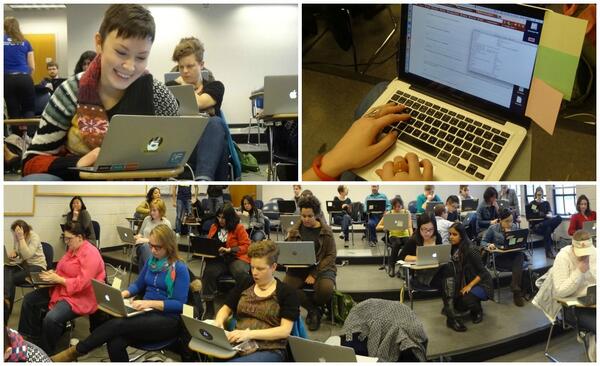
Earlier this year, I helped plan and run the Community Data Science Workshops: a series of three (and a half) day-long workshops designed to help people learn basic programming and tools for data science tools in order to ask and answer questions about online communities like Wikipedia and Twitter. You can read our initial announcement for more about the vision. The workshops were organized by myself, Jonathan Morgan from the Wikimedia Foundation, long-time Software Carpentry teacher Tommy Guy, and a group of 15 volunteer mentors who taught project-based afternoon sessions and worked one-on-one with more than 50 participants. With overwhelming interest, we were ultimately constrained by the number of mentors who volunteered. Unfortunately, this meant that we had to turn away most of the people who applied. Although it was not emphasized in recruiting or used as a selection criteria, a majority of the participants were women. The workshops were all free of charge and sponsored by the UW Department of Communication, who provided space, and the eScience Institute, who provided food. cdsw_combo_images-1The curriculum for all four session session is online: The workshops were designed for people with no previous programming experience. Although most our participants were from the University of Washington, we had non-UW participants from as far away as Vancouver, BC. Feedback we collected suggests that the sessions were a huge success, that participants learned enormously, and that the workshops filled a real need in the Seattle community. Between workshops, participants organized meet-ups to practice their programming skills. Most excitingly, just as we based our curriculum for the first session on the Boston Python Workshop s, others have been building off our curriculum. Elana Hashman, who was a mentor at the CDSW, is coordinating a set of Python Workshops for Beginners with a group at the University of Waterloo and with sponsorship from the Python Software Foundation using curriculum based on ours. I also know of two university classes that are tentatively being planned around the curriculum. Because a growing number of groups have been contacting us about running their own events based on the CDSW and because we are currently making plans to run another round of workshops in Seattle late this fall I coordinated with a number of other mentors to go over participant feedback and to put together a long write-up of our reflections in the form of a post-mortem. Although our emphasis is on things we might do differently, we provide a broad range of information that might be useful to people running a CDSW (e.g., our budget). Please let me know if you are planning to run an event so we can coordinate going forward.
25 September 2014

Aigars Mahinovs: Distributing third party applications via Docker?

Recently the discussions around how to distribute third party applications for "Linux" has become a new topic of the hour and for a good reason - Linux is becoming mainstream outside of free software world. While having each distribution have a perfectly packaged, version-controlled and natively compiled version of each application installable from a per-distribution repository in a simple and fully secured manner is a great solution for popular free software applications, this model is slightly less ideal for less popular apps and for non-free software applications. In these scenarios the developers of the software would want to do the packaging into some form, distribute that to end-users (either directly or trough some other channels, such as app stores) and have just one version that would work on any Linux distribution and keep working for a long while. For me the topic really hit at Debconf 14 where Linus voiced his frustrations with app distribution problems and also some of that was touched by Valve. Looking back we can see passionate discussions and interesting ideas on the subject from systemd developers (another) and Gnome developers (part2 and part3). After reading/watching all that I came away with the impression that I love many of the ideas expressed, but I am not as thrilled about the proposed solutions. The systemd managed zoo of btrfs volumes is something that I actually had a nightmare about. There are far simpler solutions with existing code that you can start working on right now. I would prefer basing Linux applications on Docker. Docker is a convenience layer on top of Linux cgroups and namespaces. Docker stores its images in a datastore that can be based on AUFS or btrfs or devicemapper or even plain files. It already has a semantic for defining images, creating them, running them, explicitly linking resources and controlling processes. Lets play a simple scenario on how third party applications should work on Linux. Third party application developer writes a new game for Linux. As his target he chooses one of the "application runtime" Docker images on Docker Hub. Let's say he chooses the latest Debian stable release. In that case he writes a simple Dockerfile that installs his build-dependencies and compiles his game in "debian-app-dev:wheezy" container. The output of that is a new folder containing all the compiled game resources and another Dockerfile - this one describes the runtime dependencies of the game. Now when a docker image is built from this compiled folder, it is based on "debian-app:wheezy" container that no longer has any development tools and is optimized for speed and size. After this build is complete the developer exports the Docker image into a file. This file can contain either the full system needed to run the new game or (after #8214 is implemented) just the filesystem layers with the actual game files and enough meta-data to reconstruct the full environment from public Docker repos. The developer can then distribute this file to the end user in the way that is comfortable for them. The end user would download the game file (either trough an app store app, app store website or in any other way) and import it into local Docker instance. For user convenience we would need to come with an file extension and create some GUIs to launch for double click, similar to GDebi. Here the user would be able to review what permissions the app needs to run (like GL access, PulseAudio, webcam, storage for save files, ...). Enough metainfo and cooperation would have to exist to allow desktop menu to detect installed "apps" in Docker and show shortcuts to launch them. When the user does so, a new Docker container is launched running the command provided by the developer inside the container. Other metadata would determine other docker run options, such as whether to link over a socket for talking to PulseAudio or whether to mount in a folder into the container to where the game would be able to save its save files. Or even if the application would be able to access X (or Wayland) at all. Behind the scenes the application is running from the contained and stable libraries, but talking to a limited and restricted set of system level services. Those would need to be kept backwards compatible once we start this process. On the sandboxing part, not only our third party application is running in a very limited environment, but also we can enhance our system services to recognize requests from such applications via cgroups. This can, for example, allow a window manager to mark all windows spawned by an application even if the are from a bunch of different processes. Also the window manager can now track all processes of a logical application from any of its windows. For updates the developer can simply create a new image and distribute the same size file as before, or, if the purchase is going via some kind of app-store application, the layers that actually changed can be rsynced over individually thus creating a much faster update experience. Images with the same base can share data, this would encourage creation of higher level base images, such as "debian-app-gamegl:wheezy" that all GL game developers could use thus getting a smaller installation package. After a while the question of updating abandonware will come up. Say there is is this cool game built on top of "debian-app-gamegl:wheezy", but now there was a security bug or some other issue that requires the base image to be updated, but that would not require a recompile or a change to the game itself. If this Docker proposal is realized, then either the end user or a redistributor can easily re-base the old Docker image of the game on a new base. Using this mechanism it would also be possible to handle incompatible changes to system services - ten years down the line AwesomeAudio replaces PulseAudio, so we create a new "debian-app-gamegl:wheezy.14" version that contains a replacement libpulse that actually talks to AwesomeAudio system service instead. There is no need to re-invent everything or push everything and now package management too into systemd or push non-distribution application management into distribution tools. Separating things into logical blocks does not hurt their interoperability, but it allows to recombine them in a different way for a different purpose or to replace some part to create a system with a radically different functionality. Or am I crazy and we should just go and sacrifice Docker, apt, dpkg, FHS and non-btrfs filesystems on the altar of systemd? P.S. You might get the impression that I dislike systemd. I love it! Like an init system. And I love the ideas and talent of the systemd developers. But I think that systemd should have nothing to do with application distribution or processes started by users. I am sometimes getting an uncomfortable feeling that systemd is morphing towards replacing the whole of System V jumping all the way to System D and rewriting, obsoleting or absorbing everything between the kernel and Gnome. In my opinion it would be far healthier for the community if all of these projects would developed and be usable separately from systemd, so that other solutions can compete on a level playing field. Or, maybe, we could just confess that what systemd is doing is creating a new Linux meta-distribution.

Gunnar Wolf: #bananapi On how compressed files should be used

I am among the lucky people who got back home from DebConf with a brand new computer: a Banana Pi. Despite the name similarity, it is not affiliated with the very well known Raspberry Pi, although it is a very comparable (although much better) machine: A dual-core ARM A7 system with 1GB RAM, several more on-board connectors, and same form-factor. I have not yet been able to get it to boot, even from the images distributed on their site (although I cannot complain, I have not devoted more than a hour or so to the process!), but I do have a gripe on how the images are distributed. I downloaded some images to play with: Bananian, Raspbian, a Scratch distribution, and Lubuntu. I know I have a long way to learn in order to contribute to Debian's ARM port, but if I can learn by doing... So, what is my gripe? That the three images are downloaded as archive files:
  1. 0 gwolf@mosca 9 ~/Download/banana$ ls -hl bananian-latest.zip \
  2. > Lubuntu_For_BananaPi_v3.1.1.tgz Raspbian_For_BananaPi_v3.1.tgz \
  3. > Scratch_For_BananaPi_v1.0.tgz
  4. -rw-r--r-- 1 gwolf gwolf 222M Sep 25 09:52 bananian-latest.zip
  5. -rw-r--r-- 1 gwolf gwolf 823M Sep 25 10:02 Lubuntu_For_BananaPi_v3.1.1.tgz
  6. -rw-r--r-- 1 gwolf gwolf 1.3G Sep 25 10:01 Raspbian_For_BananaPi_v3.1.tgz
  7. -rw-r--r-- 1 gwolf gwolf 1.2G Sep 25 10:05 Scratch_For_BananaPi_v1.0.tgz
Now... that is quite an odd way to distribute image files! Specially when looking at their contents:
  1. 0 gwolf@mosca 14 ~/Download/banana$ unzip -l bananian-latest.zip
  2. Archive: bananian-latest.zip
  3. Length Date Time Name
  4. --------- ---------- ----- ----
  5. 2032664576 2014-09-17 15:29 bananian-1409.img
  6. --------- -------
  7. 2032664576 1 file
  8. 0 gwolf@mosca 15 ~/Download/banana$ for i in Lubuntu_For_BananaPi_v3.1.1.tgz \
  9. > Raspbian_For_BananaPi_v3.1.tgz Scratch_For_BananaPi_v1.0.tgz
  10. > do tar tzvf $i; done
  11. -rw-rw-r-- bananapi/bananapi 3670016000 2014-08-06 03:45 Lubuntu_1404_For_BananaPi_v3_1_1.img
  12. -rwxrwxr-x bananapi/bananapi 3670016000 2014-08-08 04:30 Raspbian_For_BananaPi_v3_1.img
  13. -rw------- bananapi/bananapi 3980394496 2014-05-27 01:54 Scratch_For_BananaPi_v1_0.img
And what is bad about them? That they force me to either have heaps of disk space available (2GB or 4GB for each image) or to spend valuable time extracting before recording the image each time. Why not just compressing the image file without archiving it? That is,
  1. 0 gwolf@mosca 7 ~/Download/banana$ tar xzf Lubuntu_For_BananaPi_v3.1.1.tgz
  2. 0 gwolf@mosca 8 ~/Download/banana$ xz Lubuntu_1404_For_BananaPi_v3_1_1.img
  3. 0 gwolf@mosca 9 ~/Download/banana$ ls -hl Lubun*
  4. -rw-r--r-- 1 gwolf gwolf 606M Aug 6 03:45 Lubuntu_1404_For_BananaPi_v3_1_1.img.xz
  5. -rw-r--r-- 1 gwolf gwolf 823M Sep 25 10:02 Lubuntu_For_BananaPi_v3.1.1.tgz
Now, wouldn't we need to decompress said files as well? Yes, but thanks to the magic of shell redirections, we can just do it on the fly. That is, instead of having 3 4GB+1 2GB files sitting on my hard drive, I just need to have several files ranging between 145M and I guess ~1GB. Then, it's as easy as doing:
  1. 0 gwolf@mosca 8 ~/Download/banana$ dd if=<(xzcat bananian-1409.img.xz) of=/dev/sdd
And the result should be the same: A fresh new card with Bananian ready to fly. Right, right, people using these files need to have xz installed on their systems, but... As it stands now, I can suppose current prospective users of a Banana Pi won't fret about facing a standard Unix tool! (Yes, I'll forward this rant to the Banana people, it's not just bashing on my blog :-P ) [update] Several people (thanks!) have contacted me stating that I use a bashism: The <( ) construct is specific to Bash. If you want to do this with any other shell, it can be done with a simple pipe:
  1. $ xzcat bananian-1409.img.xz dd of=/dev/sdd
That allows for less piping to be done on the kernel, and is portable between different shells. Also, a possibility would be:
  1. $ xzcat bananian-1409.img.xz > /dev/sdd
Although that might not be desirable, as it avoids the block-by-block nature of dd. I'm not sure if it makes a realdifference, but it's worth saying :) And yes, some alternatives for not unarchiving the file Here in the blog, an anon commenter suggests (respectively, for zip and .tar.gz files):
  1. $ dd if=<(unzip -p bananian-latest.zip) of=/dev/sdd
  2. $ dd if=<(tar -xOf Lubuntu_For_BananaPi_v3.1.1.tgz) of=/dev/sdd
And a commenter by IRC suggests:
  1. $ paxtar -xOaf Raspbian_For_BananaPi_v3.1.tgz Raspbian_For_BananaPi_v3_1.img sudo dd bs=262144 of=/dev/
Thanks!

Russ Allbery: Review: Turn the Ship Around!

Review: Turn the Ship Around!, by L. David Marquet
Publisher: Portfolio
Copyright: 2012
ISBN: 1-101-62369-1
Format: Kindle
Pages: 272
Turn the Ship Around! (yes, complete with the irritating exclamation point in the title) is marketed to the business and management non-fiction market, which is clogged with books claiming to provide simple techniques to be a great manager or fix an organization. If you're like me, this is a huge turn-off. The presentation of the books is usually just shy of the click-bait pablum of self-help books. Many of the books are written by famous managers best known for doing horrible things to their staff (*cough* Jack Welch). It's hard to get away from the feeling that this entire class of books is an ocean of bromides covering a small core of outright evil. This book is not like that, and Marquet is not one of those managers. It can seem that way at times: it is presented in the format that caters to short attention span, with summaries of primary points at the end of every short chapter and occasionally annoying questions sprinkled throughout. I'm capable of generalizing information to my own life without being prompted by study questions, thanks. But that's just form. The core of this book is a surprisingly compelling story of Marquet's attempt to introduce a novel management approach into one of the most conservative and top-down of organizations: a US Navy nuclear submarine. I read this book as an individual employee, and someone who has no desire to ever be a manager. But I recently changed jobs and significantly disrupted my life because of a sequence of really horrible management decisions, so I have strong opinions about, at least, the type of management that's bad for employees. A colleague at my former employer recommended this book to me while talking about the management errors that were going on around us. It did such a good job of reinforcing my personal biases that I feel like I should mention that as a disclaimer. When one agrees with a book this thoroughly, one may not have sufficient distance from it to see the places where its arguments are flawed. At the start of the book, Marquet is assigned to take over as captain of a nuclear submarine that's struggling. It had a below-par performance rating, poor morale, and the worst re-enlistment rate in the fleet, and was not advancing officers and crew to higher ranks at anywhere near the level of other submarines. Marquet brought to this assignment some long-standing discomfort with the normal top-down decision-making processes in the Navy, and decided to try something entirely different: a program of radical empowerment, bottom-up decision-making, and pushing responsibility as far down the chain of command as possible. The result (as you might expect given that you can read a book about it) was one of the best-performing submarines in the fleet, with retention and promotion rates well above average. There's a lot in here about delegated decision-making and individual empowerment, but Turn the Ship Around! isn't only about that. Those are old (if often ignored) rules of thumb about how to manage properly. I think the most valuable part of this book is where Marquet talks frankly about his own thought patterns, his own mistakes, and the places where he had to change his behavior and attitude in order to make his strategy successful. It's one thing to say that individuals should be empowered; it's quite another to stop empowering them (which is still a top-down strategy) and start allowing them to be responsible. To extend trust and relinquish control, even though you're the one who will ultimately be held responsible for the performance of the people reporting to you. One of the problems with books like this is that they focus on how easy the techniques presented in the book are. Marquet does a more honest job in showing how difficult they are. His approach was not complex, but it was emotionally quite difficult, even though he was already biased in favor of it. The control, hierarchy, and authority parts of the book are the most memorable, but Marquet also talks about, and shows through specific examples from his command, some accompanying principles that are equally important. If everyone in an organization can make decisions, everyone has to understand the basis for making those decisions and understand the shared goals, which requires considerable communication and open discussion (particularly compared to a Navy ideal of an expert and taciturn captain). It requires giving people the space to be wrong, and requires empowering people to correct each other without blame. (There's a nice bit in here about the power of deliberate action, and while Marquet's presentation is more directly applicable to the sorts of physical actions taken in a submarine, I was immediately reminded of code review.) Marquet also has some interesting things to say about the power of, for lack of a better term, esprit de corps, how to create it, and the surprising power of acting like you have it until you actually develop it. As mentioned, this book is very closely in alignment with my own biases, so I'm not exactly an impartial reviewer. But I found it fascinating the degree to which the management situation I left was the exact opposite of the techniques presented in this book in nearly every respect. I found it quite inspiring during my transition period, and there are bits of it that I want to read again to keep some of the techniques and approaches fresh in my mind. There is a fair bit of self-help-style packaging and layout here, some of which I found irritating. If, like me, you don't like that style of book, you'll have to wade through a bit of it. I would have much preferred a more traditional narrative story from which I could draw my own conclusions. But it's more of a narrative than most books of this sort, and Marquet is humble enough to show his own thought processes, tensions, and mistakes, which adds a great deal to the presentation. I'm not sure how directly helpful this would be for a manager, since I've never been in that role, but it gave me a lot to think about when analyzing successful and unsuccessful work environments. Rating: 8 out of 10

24 September 2014

Laura Arjona: 10 short steps to contribute translations to free software for Android

This small guide assumes that you know how to create a public repository with git (or other version control system). Maybe some projects use other VCS, Subversion or whatever; the process would be similar although the commands will be different of course. If you don t want to use any VCS, you can just download the corresponding file, translate it, and send it by email or to the BTS of the project, but the commands required are very easy and you ll see soon that using git (or any VCS) is quite comfortable and less scary than what it seems. So, you were going to recommend a nice app that you use or found in F-Droid to your friend, but she does not understand English. Why not translating the app for her? And for everybody? It s a job that can be done in 15 minutes or so (Android apps have very short strings, few menus, and so). Let s go! 1.- Search the app in the F-Droid website You can do it going to the URL: https://f-droid.org/repository/browse/?fdfilter=wordofappname Example: https://f-droid.org/repository/browse/?fdfilter=pomodoro Then, open the details of the app, and learn where s the source code. 2.- Clone the source code If you have an account in that forge, fork/clone the project into your account, and then, clone your fork/clone in local. If you haven t got an account in that forge, clone the project in local. git clone URLofTheProjectOrYourClone 3.- In local, create a new branch, and checkout to it. cd nameofrepo git checkout -b Spanish 4.- Then, copy the /res/values folder into res/values-XX folder (where XX is your language code) cp ./res/values /res/values-es -R 5.- Translate Edit the strings.xml file that is in the res/values-XX folder, and change the English strings to your language (respect the XML format). 6.- Translate other files, or delete them If there are more files in that folder (e.g. arrays.xml ), review them to know if they have translatable strings. If yes, translate them. If not, delete the files. 7.- Commit When you are finished, commit your changes: git add res/values-es/* git commit -a (Message can be Spanish translation or so) 8.- Push your changes to your public repo If you didn t create a public clone of the repo in your forge, create a public repo and push your local stuff into there. git push --all 9.- Request a merge to the original repo (Using the web interface of the forge, if it is the same for the original repo and your clone, or sending an email or creating an issue and providing the URL of your repo). For example, open a new issue in the project s BTS Title: Spanish translation available for merging Body: Hi everybody. Thanks for your work in "nameofapp". I have completed a Spanish translation, it's available for review/merge in the Spanish branch of my repo: https://urlofyourclone Best regards 10.- Congratulations! Translations are new features, and having a new feature in your app for free is a great thing, so probably the app developer(s) will merge your translation soon. Share your joy with your friends, so they begin to use the app you translated, and maybe become translators too! Comments? You can comment on this post in this pump.io thread.
Filed under: Tools, Writings (translations) Tagged: Android, Contributing to libre software, English, Free Software, libre software, translations

Vincent Sanders: I wanted to go to Portland because it's a really good book town.

Plane at Heathrow terminal 5 taking me to America for Debconf 14Patti Smith is right, more than any other US city I have visited, Portland feels different. Although living in Cambridge, which sometimes feels like where books were invented, might give me a warped sense of a place.

Jo McIntyre getting on the tram at PDX
I have visited Portland a few times previously and I feel comfortable every time I arrive at PDX. Sure the place still suffers from the american obsession with the car but similar to New York you can rely on public transport to get about.

On this occasion my visit was for the Debian Conference which i was excited to attend having missed the previous one in Switzerland. This time the conference has changed its format to being 10 days long and mixing the developer time in with the more formal sessions.

The opening session gave Steve McIntyre and myself the opportunity to present a small token of our appreciation to Russ. The keynote speakers that afternoon were all very interesting both Stefano Zacchiroli and Gabriella Coleman giving food for thought on two very different subjects.

The sponsored accomodation rooms were plesent
Several conferences in the past have experienced issues with sponsored accommodation and food, I am very pleased to report that both were very good this time. The room I was in had a small kitchen area, en-suite bathroom, desks and most importantly comfortable beds.

Andy and Patty in the Ondine dining area
The food provision was in the form of a buffet in the Ondine facility. The menu was not greatly varied but catered to all requirements including vegetarian and gluten free diets.

Neil, Rob, Jo, Steve , Neil, Daniel and Andy dining under the planes
Some of us went on a visit to the Evergreen air and space museum to look at some rare aircraft and rockets. I can thoroughly recommend a visit if you are in the area.

These are just the highlights of the week though, the time in the hack-labs was productive with several practical achievements Including:
- Uploading new packages reducing the bug count
- Sorting out getting an updated key into the Debian keyring.

Overall I had a thoroughly enjoyable time and got a lot out of the conference this year. The new format suited me surprisingly well and as usual the social side was as valuable as the practical.

I hope the organisers have recovered enough to appreciate just how good a job they did and not get hung up on the small number of things that went wrong when the majority of things went perfectly to plan.

Next.

Previous.