Search Results: "ms"

15 July 2017

Junichi Uekawa: revisiting libjson-spirit.

revisiting libjson-spirit. I tried compiling a program that uses libjson-spirit and noticed that it still is broken. New programs compiled against the header does not link with the provided static library. Trying to rebuild it fixes it, but it uses compat version 8, and that needs to be fixed (trivially). hmm... actually code doesn't build anymore and there's multiple new upstream versions. ... and then I noticed that it was a stale copy already removed from Debian repository. What's a good C++ json implementation these days?

13 July 2017

Lucy Wayland: Basic Chilli Template

Amounts are to taste:
[Stage one]
Chopped red onion
Chopped garlic
Chopped fresh ginger
Chopped big red chillies (mild)
Chopped birds eye chillies (red or green, quite hot)
Chopped scotch bonnets (hot)
[Fry onion in some olive oil. When getting translucent, and rest of ingredients. May need to add some more oil. When the garlic is browning. On to stage two.]
[Stage two]
Some tins of chopped tomato
Some tomato puree
Some basil
Some thyme
Bay leaf optional
Some sliced mushroom
Some chopped capsicum pepper
Some kidney beans
Other beans optional (butter beans are nice)
Lentils optional (Pro tip: if adding lentils to adding lentils, especially red lentils, I recommend adding some garam masala as well. Lifts the flavour.)
Veggie mince optional
Pearled barley very optional
Stock (some reclaimed from swilling water around tom tims)
Water to keep topping up with if it get too sticky or dry
Dash of red wine optional
Worcester sauce optional
Any other flavouring you feel like optional (I quite often add random herbs or spices
[[Secret ingredient: a spoonful of Marmite]]
[Cook everything up together, but wait until there is enough fluid before you add the dry/sticky ingredients in.]
[Serve with carb of choice. I currently fond of using Ryvita as dipper instead of tortilla chips.]
[Also serve with a a cooler such as natural yogurt, soured cream or something else. You want more than one type of chilli in there to broaden the flavour. I use all three, plus occasionally others as well. If you are feeling masochistic you can go hotter than scotch bonnets, but I although you may get something of the same heat, I think you lose something in the flavour. BTW if you get the chance, of all the tortilla chips, I think blue corn ones are the best. Only seem to find them in health food shops. There you go. It s a Zen recipe, which is why I couldn t give you a link. You just do it until it looks right, feels right, tastes right. And with practice you get it better and better.

12 July 2017

Jose M. Calhariz: Crossgrading a minimal install of Debian 9

By testing the previous instructions for a full crosgrade I run into trouble. Here is the results of my tests to do a full crossgrade of a minimal installation of Debian inside a VM. First you need to install a 64bits kernel and boot with it. See my previous post on how to do it. Second you need to do a bootstrap of crossgrading:
 apt-get clean
 apt-get upgrade
 apt-get --download-only install dpkg:amd64 tar:amd64 apt:amd64 bash:amd64 dash:amd64 init:amd64
 dpkg --install /var/cache/apt/archives/*_amd64.deb
 dpkg --install /var/cache/apt/archives/*_amd64.deb
 dpkg --print-architecture
 dpkg --print-foreign-architectures
 apt-get --fix-broken --allow-remove-essential install
Third do a full crossgrade:
 apt-get install --allow-remove-essential $(dpkg --list   grep :i386   awk ' print $2 '   sed -e s/:i386// )
This procedure seams to be a little fragile, but worked most of the time for me.

Jose M. Calhariz: Crossgrading the kernel in Debian 9

I have a very old installation of 32bits Debian running in new hardware. Until now running a 64bits kernel was enough to use efficiently more than 4GiB of RAM. The only problem I found was the proprietary drivers from AMD/ATI and NVIDIA, that did not like this mixed environment and some problems with openafs, easilly solved with the help of the package maintainers of openafs. Crossgrading the Qemu/KVM to 64 bits did not pose a problem, so I have been running 64bits VMs for some time. But now the nouveau driver do not work with my new display adapter and I need to run tools from OpsCode not available as 32bits. So is time to do a CrossGrade. Finding some problems I can not recommend it to the inexperienced people. Is time investigate the issues and report bugreports to Debian were appropriate. If you run 32bits Debian installation you can easily install a 64bits kernel . The procedure is simple and well tested.
dpkg --add-architecture amd64
apt-get update
apt-get install linux-image-amd64:amd64
And reboot to test the new kernel. You can expect here more articles about crossgrading.

Sven Hoexter: environment variable names with dots and busybox 1.26.0 ash

In case you're for example using Alpine Linux 3.6 based docker images, and you've been passing through environment variable names with dots, you might miss them now in your actual environment. It seems that with busybox 1.26.0 the busybox ash got a lot stricter regarding validation of environment variable names and now you can no longer pass through variable names with dots in them. They just won't be there. If you've been running ash interactively you could not add them in the past, but until now you could do something like this in your Dockerfile
ENV foo.bar=baz
and later on accces a variable "foo.bar". bash still allows those invalid variable names and is way more tolerant. So to be nice to your devs, and still bump your docker image version, you can add bash and ensure you're starting your application with /bin/bash instead of /bin/sh inside of your container. Links

Francois Marier: Toggling Between Pulseaudio Outputs when Docking a Laptop

In addition to selecting the right monitor after docking my ThinkPad, I wanted to set the correct sound output since I have headphones connected to my Ultra Dock. This can be done fairly easily using Pulseaudio.

Switching to a different pulseaudio output To find the device name and the output name I need to provide to pacmd, I ran pacmd list-sinks:
2 sink(s) available.
...
  * index: 1
    name: <alsa_output.pci-0000_00_1b.0.analog-stereo>
    driver: <module-alsa-card.c>
...
    ports:
        analog-output: Analog Output (priority 9900, latency offset 0 usec, available: unknown)
            properties:
        analog-output-speaker: Speakers (priority 10000, latency offset 0 usec, available: unknown)
            properties:
                device.icon_name = "audio-speakers"
From there, I extracted the soundcard name (alsa_output.pci-0000_00_1b.0.analog-stereo) and the names of the two output ports (analog-output and analog-output-speaker). To switch between the headphones and the speakers, I can therefore run the following commands:
pacmd set-sink-port alsa_output.pci-0000_00_1b.0.analog-stereo analog-output
pacmd set-sink-port alsa_output.pci-0000_00_1b.0.analog-stereo analog-output-speaker

Listening for headphone events Then I looked for the ACPI event triggered when my headphones are detected by the laptop after docking. After looking at the output of acpi_listen, I found jack/headphone HEADPHONE plug. Combining this with the above pulseaudio names, I put the following in /etc/acpi/events/thinkpad-dock-headphones:
event=jack/headphone HEADPHONE plug
action=su francois -c "pacmd set-sink-port alsa_output.pci-0000_00_1b.0.analog-stereo analog-output"
to automatically switch to the headphones when I dock my laptop.

Finding out whether or not the laptop is docked While it is possible to hook into the docking and undocking ACPI events and run scripts, there doesn't seem to be an easy way from a shell script to tell whether or not the laptop is docked. In the end, I settled on detecting the presence of USB devices. I ran lsusb twice (once docked and once undocked) and then compared the output:
lsusb  > docked 
lsusb  > undocked 
colordiff -u docked undocked 
This gave me a number of differences since I have a bunch of peripherals attached to the dock:
--- docked  2017-07-07 19:10:51.875405241 -0700
+++ undocked    2017-07-07 19:11:00.511336071 -0700
@@ -1,15 +1,6 @@
 Bus 001 Device 002: ID 8087:8000 Intel Corp. 
 Bus 001 Device 001: ID 1d6b:0002 Linux Foundation 2.0 root hub
-Bus 003 Device 081: ID 0424:5534 Standard Microsystems Corp. Hub
-Bus 003 Device 080: ID 17ef:1010 Lenovo 
 Bus 003 Device 001: ID 1d6b:0003 Linux Foundation 3.0 root hub
-Bus 002 Device 041: ID xxxx:xxxx ...
-Bus 002 Device 040: ID xxxx:xxxx ...
-Bus 002 Device 039: ID xxxx:xxxx ...
-Bus 002 Device 038: ID 17ef:100f Lenovo 
-Bus 002 Device 037: ID xxxx:xxxx ...
-Bus 002 Device 042: ID 0424:2134 Standard Microsystems Corp. Hub
-Bus 002 Device 036: ID 17ef:1010 Lenovo 
 Bus 002 Device 002: ID xxxx:xxxx ...
 Bus 002 Device 004: ID xxxx:xxxx ...
 Bus 002 Device 001: ID 1d6b:0002 Linux Foundation 2.0 root hub
I picked 17ef:1010 as it appeared to be some internal bus on the Ultra Dock (none of my USB devices were connected to Bus 003) and then ended up with the following port toggling script:
#!/bin/bash
if /usr/bin/lsusb   grep 17ef:1010 > /dev/null ; then
    # docked
    pacmd set-sink-port alsa_output.pci-0000_00_1b.0.analog-stereo analog-output
else
    # undocked
    pacmd set-sink-port alsa_output.pci-0000_00_1b.0.analog-stereo analog-output-speaker
fi

11 July 2017

Andreas Bombe: PDP-8/e Replicated Overview

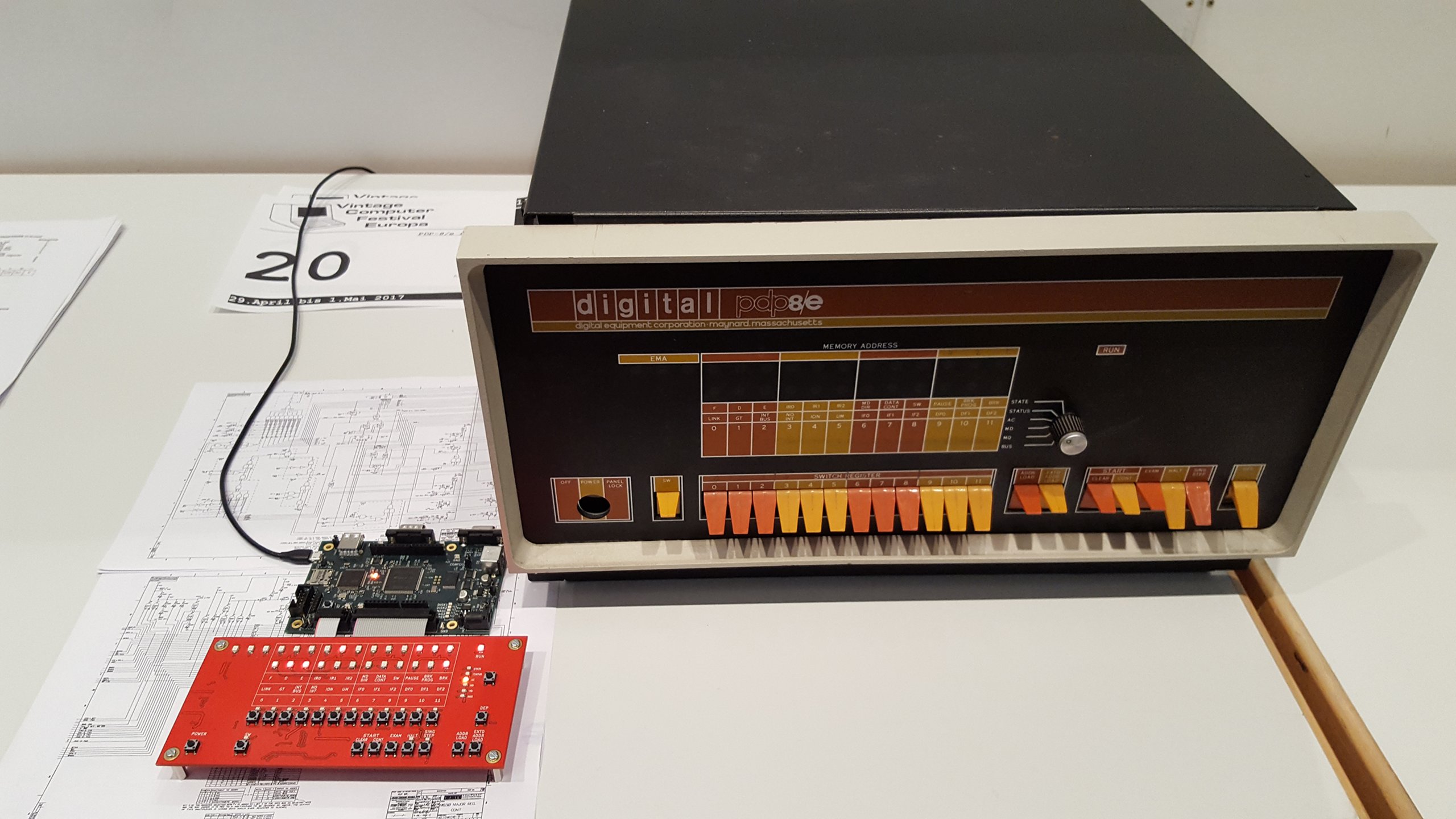
This is an overview of the hardware and internals of the PDP-8/e replica I m building.

The front panel board
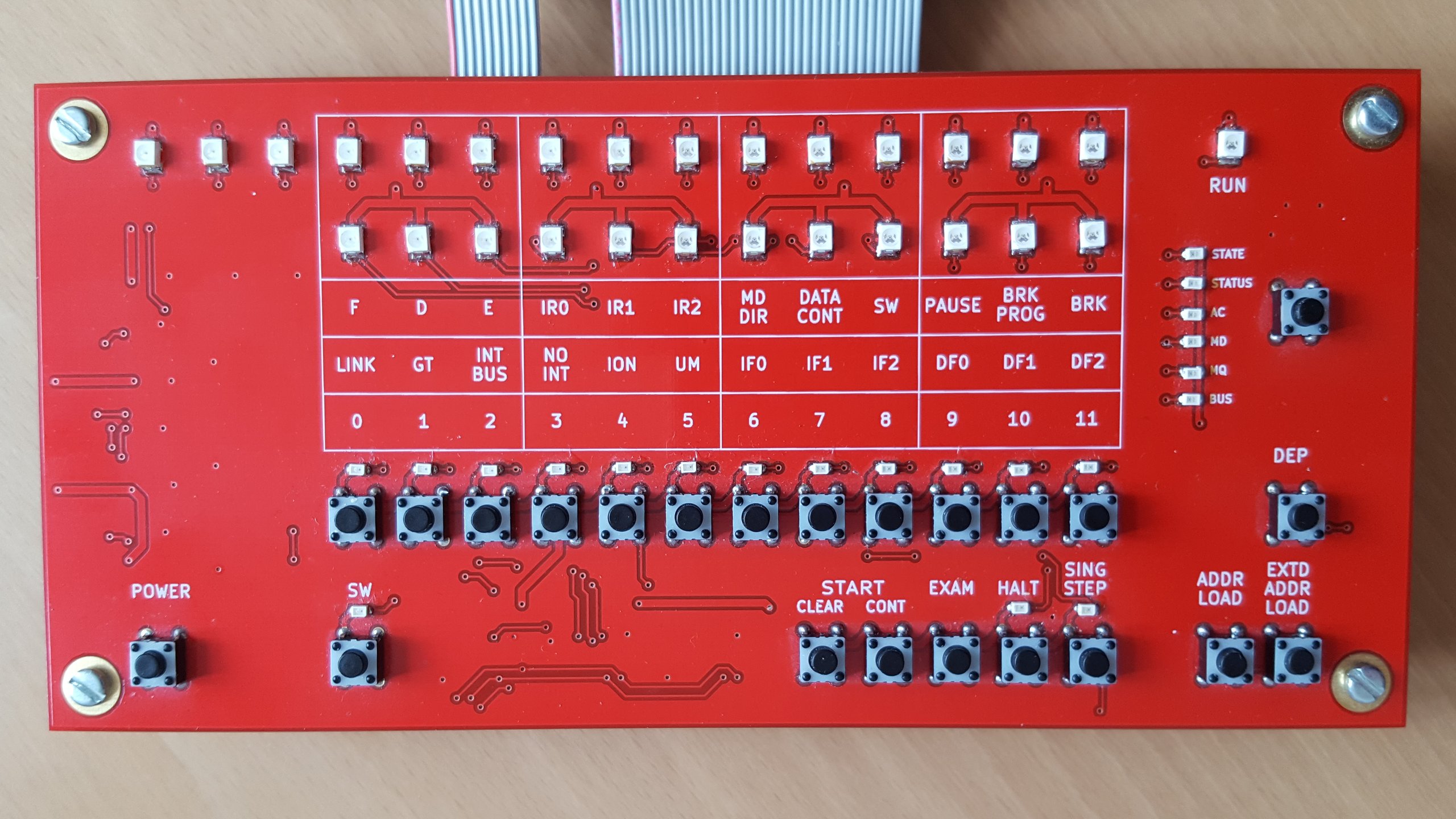
functional replica of the PDP-8/e front panel
If you know the original or remember the picture from the first post it is clear that this is a functional replica not aiming to be as pretty as those of the other projects I mentioned. I have reordered the switches into two rows to make the board more compact (which also means cheaper) without sacrificing usability. There s the two rows of display lights plus one run light the 8/e provides. The upper row is the address made up of 12 bits of memory address and 3 bits of extended memory address or field. Below are the 12 bits indicator which can show one data set out of six as selected by the user. All the switches of the original are implemented as more compact buttons1. While momentary switches are easily substituted by buttons, all buttons implementing two position switches toggle on/off with each press and they have a LED above that shows the current state. The six position rotary switch is implemented as a button cycling through all indicator displays together with six LEDs which show the active selection. Markings show the meaning of the indicator and switches as on the original, grouped in threes as the predominant numbering system for the PDPs was octal. The upper line shows the meaning for the state indicator, the middle for the status indicator and bit numbers for the rest. Note that on the PDP-8 and opposite to modern conventions, the most significant bit was numbered 0. I designed it as a pure front panel board without any PDP-8 simulation parts. The buttons and associated lights are controllable via SPI lines with a 3.3 V supply. The address and indicator lights have a separate common anode configuration with all cathodes individually available on a pin header without any resistors in the path, leaving voltage and current regulation up to the simulation board. This board is actually a few years old from a similar project where I emulated the PDP-8 in software on a microcontroller and the flexible design allowed me to reuse it unchanged.

The main board
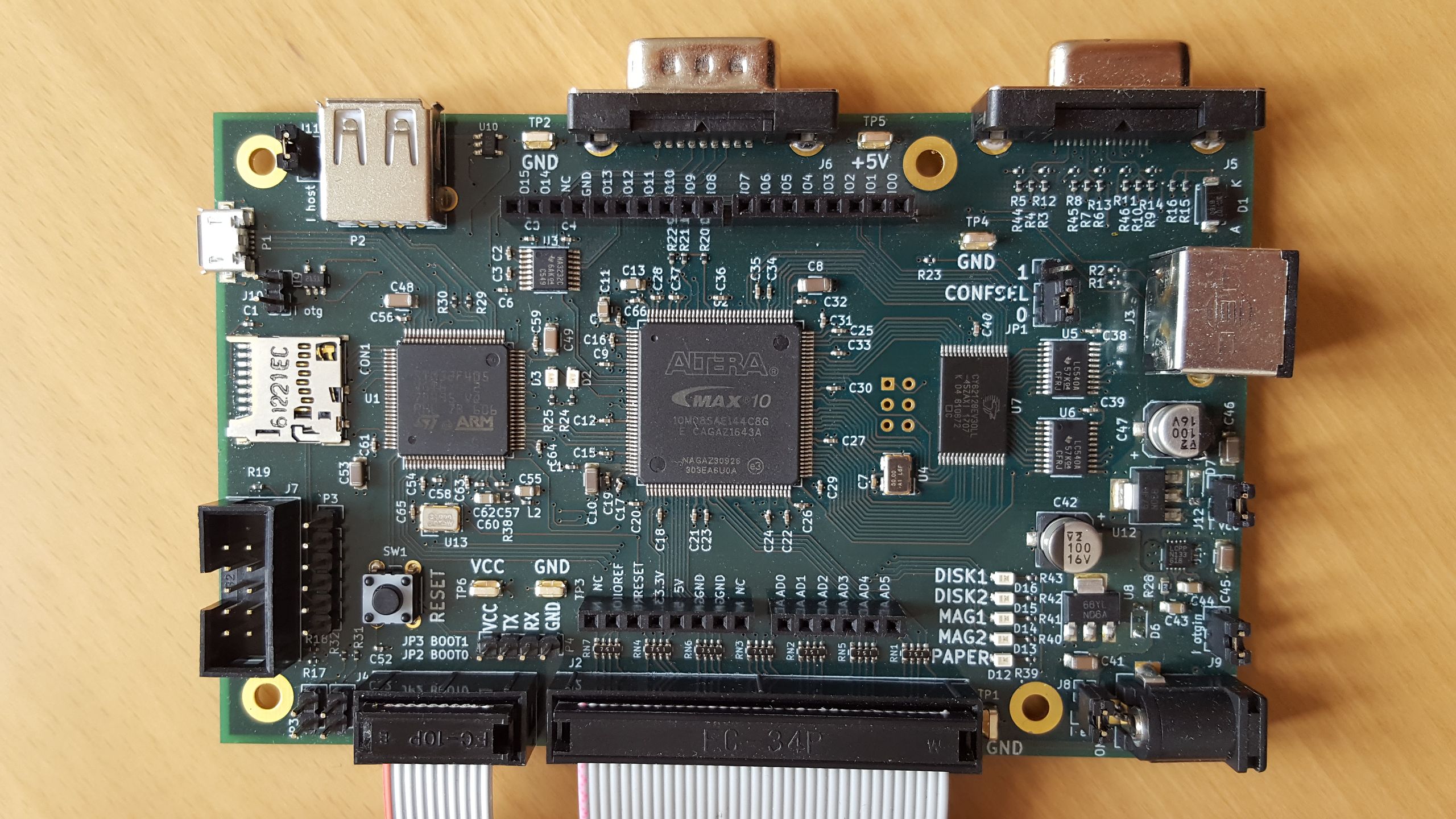
main board with CPU and peripherals of the replicated PDP-8/e
This is where the magic happens. You can see three big ICs on the board: On the left is the STM32F405 microcontroller (with ARM Cortex-M4 core), the bigger one in the middle is the Altera2 MAX 10 FPGA and finally to the right is the SRAM that is large enough to hold all the main memory of the 32 KW maximum expansion of the PDP-8/e. The two smaller chips to the right of that are just buffers that drive the front panel address LEDs, the small chip at the top left is a RS-232 level shifter. The idea behind this is that the PDP-8 and peripherals that are simple to directly implement, such as GPIO or a serial port, are fully on the FPGA. Other peripherals such as paper and magnetic tape and disks, which are after all not connected to real PDP-8 drives but disk images on a microSD, are implemented on the microcontroller interfacing with stub devices in the FPGA. Compared to implementing everything everything in the FPGA, the STM32F4 has the advantage of useful built in peripherals such as two host/device capable USB ports. 5 V tolerant I/O pins are very useful and simply not available in any FPGA. I have to admit that this board was a bit of a rush job in order to have something at all to show at the Vintage Computer Festival Europe 18.0. Given that it was my first time designing a board with a large microcontroller and the first time with an FPGA, it wasn t exactly my fastest progressing project either and I got basic functionality (front panel allows toggling in small programs and running them) working just in time. For various reasons the project hasn t progressed much since, so the following is still just plans, but plans for which the hardware was designed. Since the aim is to have a cycle accurate PDP-8/e implementation, digital I/O was always planned. Rather than defining my own header I have included Arduino R3 compatible headers (for 3.3 V compatible boards only) that have become a popular even outside the Arduino world for this purpose. The digital Arduino pins are connected directly to the FPGA and will be directly controllable by PDP-8 software. The downside of choosing the Arduino headers is that the original PDP-8 digital I/O interface is not a perfect match since it naturally has 12 lines whereas the Arduino has 15. The analog inputs are not connected to the FPGA, the documentation of the MAX10 s ADC in the EQFP package are not very encouraging. They are connected to the STM32 instead3. Another interface connected directly to the FPGA and that would be directly under PDP-8 control is a standard 9 pin RS-232 interface. RX, TX, CTS and RTS are connected and level-shifted between 3.3 V and RS-232 levels by a MAX3232. Besides the PDP-8, I also plan to implement a full video terminal on the board. The idea is that with a power supply, keyboard and monitor this board would form a complete system without the need of connecting another computer to act as a terminal. To that end, there is a VGA port attached to the FPGA with simple resistor network DACs for 9 bits color (RGB with 3 bits each). This is another spot where I left myself room to expand, for e.g. a VT220 you really only need one color in two brightness levels. Keyboards will be connected either via the PS/2 connector on the right or the USB-A host port at the top left. Last of the interface ports is the USB micro-AB port on the left, which for now I am using only for power supply. I mainly plan to use it to provide alternative or additional serial ports to the PDP-8 or to export the video terminal serial port for testing purposes. Other possible uses are access to the image files on the microSD and firmware updates. This has gotten rather long again, so I m stopping here and leave some implementation notes for another post.

  1. They are also much cheaper. Given the large number of switches, the savings are substantial. Additionaly the buttons are nicer to operate than long rows of tiny switches. [return]
  2. Or rather Intel now. At least Altera s web site, documentation and software have already been thoroughly rebranded, but the chips I got were produced prior to that. [return]
  3. That s not to say that the analog conversions on the STM32 are necessarily better than those of the MAX10 when you can t follow their guidelines, I have no comparisons. Certainly following the guidelines would have been prohibitive given how many pins usage they restrict. [return]

Rapha&#235;l Hertzog: Freexian s report about Debian Long Term Support, June 2017

A Debian LTS logoLike each month, here comes a report about the work of paid contributors to Debian LTS. Individual reports In May, about 161 work hours have been dispatched among 11 paid contributors. Their reports are available: Evolution of the situation The number of sponsored hours increased slightly with one new bronze sponsor and another silver sponsor is in the process of joining. The security tracker currently lists 49 packages with a known CVE and the dla-needed.txt file 54. The number of open issues is close to last month. Thanks to our sponsors New sponsors are in bold.

One comment Liked this article? Click here. My blog is Flattr-enabled.

10 July 2017

Markus Koschany: My Free Software Activities in June 2017

Welcome to gambaru.de. Here is my monthly report that covers what I have been doing for Debian. If you re interested in Java, Games and LTS topics, this might be interesting for you. Debian Games Debian Java + Android Debian LTS This was my sixteenth month as a paid contributor and I have been paid to work 16 hours on Debian LTS, a project started by Rapha l Hertzog. In that time I did the following: Misc Thanks for reading and see you next time.

Kees Cook: security things in Linux v4.12

Previously: v4.11. Here s a quick summary of some of the interesting security things in last week s v4.12 release of the Linux kernel: x86 read-only and fixed-location GDT
With kernel memory base randomization, it was stil possible to figure out the per-cpu base address via the sgdt instruction, since it would reveal the per-cpu GDT location. To solve this, Thomas Garnier moved the GDT to a fixed location. And to solve the risk of an attacker targeting the GDT directly with a kernel bug, he also made it read-only. usercopy consolidation
After hardened usercopy landed, Al Viro decided to take a closer look at all the usercopy routines and then consolidated the per-architecture uaccess code into a single implementation. The per-architecture code was functionally very similar to each other, so it made sense to remove the redundancy. In the process, he uncovered a number of unhandled corner cases in various architectures (that got fixed by the consolidation), and made hardened usercopy available on all remaining architectures. ASLR entropy sysctl on PowerPC
Continuing to expand architecture support for the ASLR entropy sysctl, Michael Ellerman implemented the calculations needed for PowerPC. This lets userspace choose to crank up the entropy used for memory layouts. LSM structures read-only
James Morris used __ro_after_init to make the LSM structures read-only after boot. This removes them as a desirable target for attackers. Since the hooks are called from all kinds of places in the kernel this was a favorite method for attackers to use to hijack execution of the kernel. (A similar target used to be the system call table, but that has long since been made read-only.) KASLR enabled by default on x86
With many distros already enabling KASLR on x86 with CONFIG_RANDOMIZE_BASE and CONFIG_RANDOMIZE_MEMORY, Ingo Molnar felt the feature was mature enough to be enabled by default. Expand stack canary to 64 bits on 64-bit systems
The stack canary values used by CONFIG_CC_STACKPROTECTOR is most powerful on x86 since it is different per task. (Other architectures run with a single canary for all tasks.) While the first canary chosen on x86 (and other architectures) was a full unsigned long, the subsequent canaries chosen per-task for x86 were being truncated to 32-bits. Daniel Micay fixed this so now x86 (and future architectures that gain per-task canary support) have significantly increased entropy for stack-protector. Expanded stack/heap gap
Hugh Dickens, with input from many other folks, improved the kernel s mitigation against having the stack and heap crash into each other. This is a stop-gap measure to help defend against the Stack Clash attacks. Additional hardening needs to come from the compiler to produce stack probes when doing large stack expansions. Any Variable Length Arrays on the stack or alloca() usage needs to have machine code generated to touch each page of memory within those areas to let the kernel know that the stack is expanding, but with single-page granularity. That s it for now; please let me know if I missed anything. The v4.13 merge window is open!

2017, Kees Cook. This work is licensed under a Creative Commons Attribution-ShareAlike 3.0 License.
Creative Commons License

9 July 2017

Steinar H. Gunderson: Nageru 1.6.1 released

I've released version 1.6.1 of Nageru, my live video mixer. Now that Solskogen is coming up, there's been a lot of activity on the Nageru front, but hopefully everything is actually coming together now. Testing has been good, but we'll see whether it stands up to the battle-hardening of the real world or not. Hopefully I won't be needing any last-minute patches. :-) Besides the previously promised Prometheus metrics (1.6.1 ships with a rather extensive set, as well as an example Grafana dashboard) and frame queue management improvements, a surprising late addition was that of a new transcoder called Kaeru (following the naming style of Nageru itself, from the japanese verb kaeru ( ) which means roughly to replace or excahnge iKnow! claims it can also mean convert , but I haven't seen support for this anywhere else). Normally, when I do streams, I just let Nageru do its thing and send out a single 720p60 stream (occasionally 1080p), usually around 5 Mbit/sec; less than that doesn't really give good enough quality for the high-movement scenarios I'm after. But Solskogen is different in that there's a pretty diverse audience when it comes to networking conditions; even though I have a few mirrors spread around the world (and some JavaScript to automatically pick the fastest one; DNS round-robin is really quite useless here!), not all viewers can sustain such a bitrate. Thus, there's also a 480p variant with around 1 Mbit/sec or so, and it needs to come from somewhere. Traditionally, I've been using VLC for this, but streaming is really a niche thing for VLC. I've been told it will be an increased focus for 4.0 now that 3.0 is getting out the door, but over the last few years, there's been a constant trickle of little issues that have been breaking my transcoding pipeline. My solution for this was to simply never update VLC, but now that I'm up to stretch, this didn't really work anymore, and I'd been toying around with the idea of making a standalone transcoder for a while. (You'd ask why not the ffmpeg(1) command-line client? , but it's a bit too centered around files and not streams; I use it for converting to HLS for iOS devices, but it has a nasty habit of I/O blocking real work, and its HTTP server really isn't meant for production work. I could survive the latter if it supported Metacube and I could feed it into Cubemap, but it doesn't.) It turned out Nageru had already grown most of the pieces I needed; it had video decoding through FFmpeg, x264 encoding with speed control (so that it automatically picks the best preset the machine can sustain at any given time) and muxing, audio encoding, proper threading everywhere, and a usable HTTP server that could output Metacube. All that was required was to add audio decoding to the FFmpeg input, and then replace the GPU-based mixer and GUI with a very simple driver that just connects the decoders to the encoders. (This means it runs fine on a headless server with no GPU, but it also means you'll get FFmpeg's scaling, which isn't as pretty or fast as Nageru's. I think it's an okay tradeoff.) All in all, this was only about 250 lines of delta, which pales compared to the ~28000 lines of delta that are between 1.3.1 (used for last Solskogen) and 1.6.1. It only supports a rather limited set of Prometheus metrics, and it has some limitations, but it seems to be stable and deliver pretty good quality. I've denoted it experimental for now, but overall, I'm quite happy with how it turned out, and I'll be using it for Solskogen. Nageru 1.6.1 is on its way into Debian, but it depends on a new version of Movit which needs to go through the NEW queue (a soname bump), so it might be a few days. In the meantime, I'll be busy preparing for Solskogen. :-)

8 July 2017

Urvika Gola: Outreachy Progress on Lumicall

unnamedLumicall 1.13.0 is released!  Through Lumicall, you can make encrypted calls and send messages using open standards. It uses the SIP protocol to inter-operate with other apps and corporate telephone systems. During the Outreachy Internship period I worked on the following issues :-

I researched on creating a white label version of Lumicall. Few ideas on how the white label build could be used..
  1. Existing SIP providers can use white label version of Lumicall to expand their business and launch SIP client. This would provide a one stop shop for them!!
  2. New SIP clients/developers can use Lumicall white label version to get the underlying working of making encrypted phone calls using SIP protocol, it will help them to focus on other additional functionalities they would like to include.
Documentation for implementing white labelling Link 1 and Link 2 Since Lumicall is majorly used to make encrypted calls, there was a need to designate quiet times and the phone will not make an audible ringing tone during that time & if the user has multiple SIP accounts, the user can set the silent mode functionality on one of them, maybe, the Work account.
Documentation for adding silent mode feature Link 1 and Link 2 Using Lumicall, users can send SIP messages across. Just to improve the UI a little, I added a 9 patch image in the message screen. A 9 patch image is created using 9 patch tools and are saved as imagename.9.png . The image will resize itself according to the text length and font size. Documentation for 9 patch image Link 9patch You can try the new version of Lumicall here ! and know more about Lumicall on a blog by Daniel Pocock.
Looking forward to your valuable feedback !!

6 July 2017

Thadeu Lima de Souza Cascardo: News on Debian on apexqtmo

I had been using my Samsung Galaxy S Relay 4G for almost three years when I decided to get a new phone. I would use this new phone for daily tasks and take the chance to get a new model for hacking in the future. My apexqtmo would still be my companion and would now be more available for real hacking. And so it also happened that its power button got stuck. It was not the first time, but now it would happen every so often, and would require me to disassemble it. So I managed to remove the plastic button and leave it with a hole so I could press the button with a screwdriver or a paperclip. That was the excuse I needed to get it to running Debian only. Though it's now always plugged on my laptop, I got the chance to hack on it on my scarce free time. As I managed to get a kernel I built myself running on it, I started fixing things like enabling devtmpfs. I didn't insist much on running systemd, though, and kept with System V. The Xorg issues were either on the server or the client, depending on which client I ran. I decided to give a chance to running the Android userspace on a chroot, but gave up after some work to get some firmware loaded. I managed to get the ALSA controls right after saving them inside a chroot on my CyanogenMod system. Then, restoring them on Debian allowed to play songs. Unfortunately, it seems I broke the audio jack when disassembling it. Otherwise, it would have been a great portable audio player. I even wrote a small program that would allow me to control mpd by swiping on the touchscreen. Then, as Debian release approached, I decided to investigate the framebuffer issue closely. I ended finding out that it was really a bug in the driver, and after fixing it, the X server and client crashes were gone. It was beautiful to get some desktop environment running with the right colors, get a calculator started and really using the phone as a mobile device. There are two lessons or findings here for me. The first one is that the current environments are really lacking. Even something like GPE can't work. The buttons are tiny, scrollbars are still the only way for scrolling, some of the time. No automatic virtual keyboards. So, there needs to be some investing in the existing environments, and maybe even the development of new environments for these kinds of devices. This was something I expected somehow, but it's still disappointing to know that we had so much of those developed in the past and now gone. I really miss Maemo. Running something like Qtopia would mean grabing a very old unmaintained software not available in Debian. There is still matchbox, but it's as subpar as the others I tested. The second lesson is that building a userspace to run on old kernels will still hit the problem of broken drivers. In my particular case, unless I wrote code for using Ion instead of the framebuffer, I would have had that problem. Or it would require me to add code to xorg-xserver that is not appropriate. Or fix the kernel drivers of available kernel sourcecodes. But this does not scale much more than doing the right thing and adding upstream support for these devices. So, I decided it was time I started working on upstream support for my device. I have it in progress and may send some upstream patches soon. I have USB and MMC/SDcard working fine. DRM is still a challenge, but thanks to Rob Clark, it's something I expect to get working soon, and after that, I would certainly celebrate. Maybe even consider starting the work on other devices a little sooner. Trying to review my post on GNU on smartphones, here is where I would put some of the status of my device and some extra notes. On Halium I am really glad people started this project. This was one of the things I criticized: that though Ubuntu Phone and FirefoxOS built on Android userspace, they were not easily portable to many devices out there. But as I am looking for a more pure GNU experience, let's call it that, Halium does not help much in that direction. But I'd like to see it flourish and allow people to use more OSes on more devices. Unfortunately, it suffers from similar problems as the strategy I was trying to go with. If you have a device with a very old kernel, you won't be able to run some of the latest userspace, even with Android userspace help. So, lots of devices would be left unsupported, unless we start working on some upstream support. On RYF Hardware My device is one of the worst out there. It's a modem that has a peripherical CPU. Much has already been said about Qualcomm chips being some of the least freedom-friendly. Ironically, it's some with the best upstream support, as far as I found out while doing this upstreaming work. Guess we'll have to wait for opencores, openrisc and risc-v to catch up here. Diversity Though I have been experimenting with Debian, the upstream work would sure benefit lots of other OSes out there, mainly GNU+Linux based ones, but also other non-GNU Linux based ones. Not so much for other kernels. On other options After the demise of Ubuntu Phone, I am glad to see UBports catching up. I hope the project is sustainable and produce more releases for more devices. Rooting This needs documentation. Most of the procedures rely on booting a recovery system, which means we are already past the root requirement. We simply boot our own system, then. However, for some debugging strategies, getting root on the OEM system is useful. So, try to get root on your system, but beware of malware out there. Booting Most of these devices will have their bootloaders in there. They may be unlocked, allowing unsigned kernels to be booted. Replacing these bootloaders is still going to be a challenge for another future phase. Though adding a second bootloader there, one that is freedom respecting, and that allows more control on that booting step to the user is something possible once you have some good upstream support. One could either use kexec for that, or try to use the same device tree for U-Boot, and use the knowledge of the device drivers for Linux on writing drivers for U-Boot, GRUB or Libreboot. Installation If you have root on your OEM system, this is something that could be worked on. Otherwise, there is magic-device-tool, whose approach is one that could be used. Kernels While I am working on adding Linux upstream support for my device, it would be wonderful to see more kernels supporting those gadgets. Hopefully, some of the device driver writing and reverse engineering could help with that, though I am not too much optimistic. But there is hope. Basic kernel drivers Adding the basic support, like USB and MMC, after clocks, gpios, regulators and what not, is the first step to a long road. But it would allow using the device as a board computer, under better control of the user. Hopefully, lots of eletronic garbage out there would have some use as control gadgets. Instead of buying a new board, just grab your old phone and put it to some nice use. Sensors, input devices, LEDs There are usually easy too. Some sensors may depend on your modem or some userspace code that is not that easily reverse engineered. But others would just require some device tree work, or some small input driver. Graphics Here, things may get complicated. Even basic video output is something I have some trouble with. Thanks to some other people's work, I have hope at least for my device. And using the vendor's linux source code, some framebuffer should be possible, even some DRM driver. But OpenGL or other 3D acceleration support requires much more work than that, and, at this moment, it's not something I am counting on. I am thankful for the work lots of people have been doing on this area, nonetheless. Wireless Be it Wifi or Bluetooth, things get ugly here. The vendor driver might be available. Rewriting it would take a long time. Even then, it would most likely require some non-free firmware loading. Using USB OTG here might be an option. Modem/GSM The work of the Replicant folks on that is what gives me some hope that it might be possible to get this working. Something I would leave to after I have a good interface experience in my hands. GPS Problem is similar to the Modem/GSM one, as some code lives in userspace, sometimes talking to the modem is a requirement to get GPS access, etc. Shells This is where I would like to see new projects, even if they work on current software to get them more friendly to these form factors. I consider doing some work there, though that's not really my area of expertise. Next steps For me, my next steps are getting what I have working upstream, keep working on DRM support, packaging GPE, then experimenting with some compositor code. In the middle of that, trying to get some other devices started. But documenting some of my work is something I realized I need to do more often, and this post is some try on that.

5 July 2017

Shirish Agarwal: Debian 9 release party at Co-hive

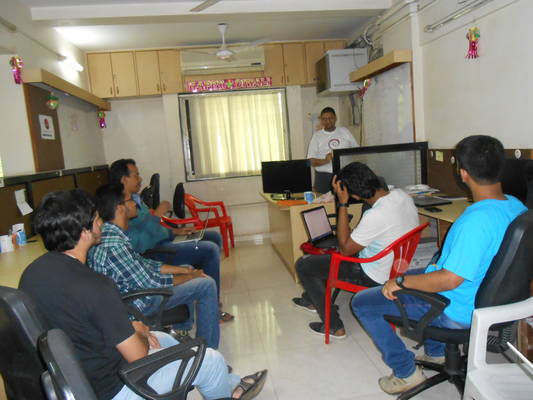
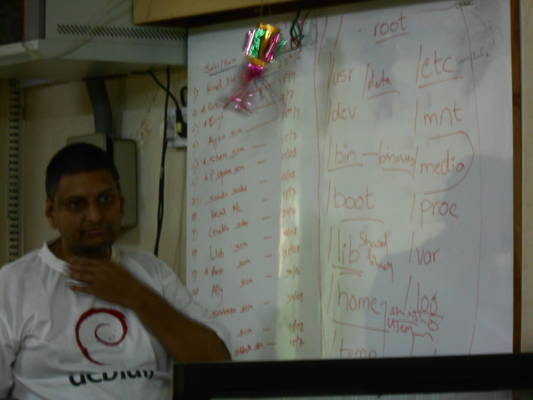
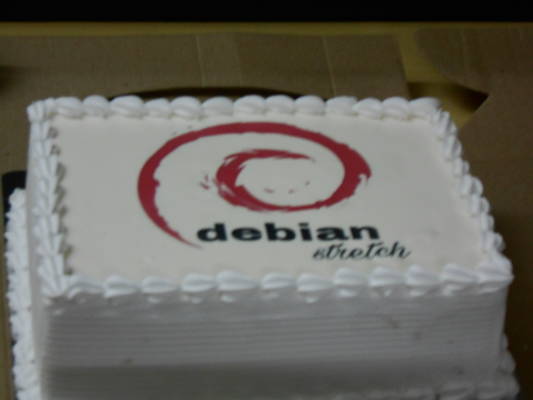
Dear all, This would be a biggish one so please have a chai/coffee or something stronger as it would take a while. I would start with attempt at some alcohol humor. While some people know that I have had a series of convulsive epileptic seizure I had shared bits about it in another post as well. Recovery is going through allopathic medicines as well as physiotherapy which I go to every alternate day. One of the exercises that I do in physiotherapy sessions is walk cross-legged on a line. While doing it today, it occurred to me that this is the same test that a Police inspector would do if they caught you drinking or are suspected of drunk driving. While some in the police force have now also have breath analyzer machines to determine alcohol content in the breath and body (and ways to deceive it are also there) the above exercise is still an integral part of examination. Now few of my friends who do drink have and had made expertise of walking on a line, while I due to this neurological disorder still have issues of walking on a line. So while I don t think of a drinking party in the near future (6 months at least), if I ever do get caught with a friend who is drunk (by association I would also be a suspect) by a policeman who doesn t have a breath analyzer machine, I could be in a lot of trouble. In addition if I tell him I have a neurological disorder I am bound to land up in a cell as he will think I m trying to make a fool of him. If you are able to picturize the situation, I m sure you will get a couple of laughs. Now coming to the release party, I was a bit apprehensive. It s been quite a while I had faced an audience and just coming out of illness didn t know how well or ill-prepared I would be for the session. I had forsaken/given up exercising two days earlier before the event as I wanted to have loose body, loose limbs all over. I also took a mild sedative (1mg) the day before just so I will have a fit night sleep and be able to focus all my energies on the big day. (I don t recommend sedatives unless the doctor prescribes) and I did have a doctor prescription so was able to have a nice sleep. I didn t do any Debian study as I hoped my somewhat long experience with both Ubuntu and Debian should help me. On the d-day, I had asked dhanesh (the organizer of the event) to accompany me from home to venue and back as I was unsure of the journey as it was around 9-10 kms. from my place and while I had been to the venue about couple of years back, I had just a mild remembrance of the place. Anyways, Dhanesh compiled with my request and together we reached the venue before the appointed 1500 hrs. As it was a Sunday I was unsure as how many people would turn up as people usually like to cozy up on a Sunday. Around 1530 hrs everybody showed up The whole group It included couple of co-organizers with most people being newbies so while I had thought of showing how to contribute via reporting bugs or putting up patches, had to set that aside and explain how things work in free software and open-source world. We didn t get into the debate of free vs open-source or free/open-source/open-core as that would have been counter-productive and probably confusing for newbies. We did however share the debian tree structure debian-tree-structure-discussion I was stumped by /var and /proc . I hadn t taken my lappy as it is expensive (a lenovo thinkpad I love very dearly) and I was unsure if I would be able to take care of it (weight wise). Dhanesh had told me that he had Debian on his lappy + zsh both of which are my favourites. While back at home I realized /var has been relegated to having apache/server logs and stuff like that, I do recall (vaguely) a thread on debian-devel about removing /var although that discussion went nowhere. One of the bugs that we hit early on is that nobody had enough space on their hdd to have Debian comfortably. It took a while to get an external hdd and push some of the content from somebody s lappy to the external drive to have space for the installation. I did share the /. /home, optional swap while Dhanesh helped by sharing about having a separate /boot partition as well which I had forgotten. I can t even begin to remember the number of times having a separate /boot partition has helped me in all of my systems. That done, we did try to install/show Debian 9 without network but were hit with #866629 so wasn t able to complete the installation. We had got the latest 9.0.1 as I had seen Steve s message about issues with the live images but even then we were hit with the above bug. As shared in the bug history, it might be a good idea to have the last couple of RC s (Release Candidate releases) as pre-release parties so people have a chance to report bugs and get them fixed. It was also nice to see Praveen raising the seriousness of the bug shared above. The next day I also filed #866971 as I had mistaken the release to be a regular release and not the live instance. I have pushed my rationale and hope the right thing happens. As installation takes a bit of time, we used the time to share about Google s Summer of Code and absence of Debian from GSoC this year. I should have directed them to an itfoss article I wrote sometime ago and also shared that Debian is also looking to having a similar apprenticeship within Debian itself. There were questions about why Debian would like to take the administrative overhead, my response was that it probably had to do with Debian wanting more control over the process. While Debian has had some great luck getting all number of seats that it asks for in GSoC, the ball is always in Google s court. Having that uncertainty off would be beneficial to Debian both in short-term as well as long-term. One interesting stat that was shared with me was that something akin to 89 students from India had been selected this year to GSoC even with the lower stipend and that is a far cry from the 10-15 students who are able to complete GSoC every year. Let s see what happens this year. One of the interesting fact/gossip I shared with them is that Google uses a modified/forked Debian internally which it probably would never release ever. There were quite a few queries about GSoC which resulted into how contributions are made and how git had become the master of all VCS (Version Control Systems). While I do have pet bugs about git (the biggest one being for places/countries having not big bandwidth git fails many a times while cloning). I *think* the bug has been reported enough times but haven t seen any improvements yet. There is a need of a solution like wget and wget -c so git just works even under the most trying circumstances (bandwidth wise) We also shared what a repo is and Dhanesh helpfully did a git shortlog to show people how commits are commented. It was from his official work so he couldn t show anything apart from the shortlog. I also shared how non-technical people can help with regard to documentation, artwork but didn t get into any concrete examples although wiki.debian.org would have been a good start. I also don t know if it s a fact or not but it seems/seemed that moinmoin (the current wiki solution used by debian) seems to have got sectional edit feature which I used sometime back. If moinmoin has got this feature then it is on par with mediawiki, although do know that mediawiki has lot more features going for it. Dhanesh did manage to install a Debian 8.0.7 (while 8.8.0 was the last release) which might have been better. The debian-installer (d-i) looks the same even though I know there are improvements with respect to UEFI and many updated components. There are and were many bugs which I wanted to share but didn t know if it was the right forum or not, for e.g. #597176 which probably needs improvements in other libraries along with the JPEG 2000 support #604859 all of which I m subscribed to. We also had a talk about code documentation and code readability, python (as almost everything in Debian is based on python) I had actually wanted to show metrics.debian.net but had seen it was down the day before and again checked to see it is down now as well, hence reported it, will hopefully come on Debian BTS some time soonish. The idea was to share that Debian does have/uses other programming languages as well and is only limited by people interested in a specific language and be willing to package and maintain packages in that specific programming language. As Dhanesh was part of Firefox OS and a Campus Ambassador we did discuss what went wrong in Firefox OS deployment and Firefox as a whole, specifically between the community and Mozilla the Corporation. In this there were lots that was lot that I wasn t able to share as had become tired otherwise would have shared that ncurses debian-installer interface although bit ugly to look at is still good as it has speech for visually differently abled people as well as people with poor sight. There is and was lots to share about Debian but was conscious that I might over-burden the audience and my stamina was also stretched. We also shared about automated builds bud didn t show either travis.debian.net or jeankins.debian.net We also had a small discussion about Artificial Intelligence, Robotics and how the outlook for people coming in Computer Science looks today. One thing I forgot to share we did do the cake-cutting together Dhanesh-Shirish cutting cake together Dhanesh is on the left while I m on the right. We did have a cute 3-4 year old boy as our guest as well bud didn t get good pictures of him. Lastly, the Debian cake itself Debian 9 cake We also talked about the kernel and subsystem maintainers and how Linus is the overlord. Look forward to comments. I am hoping Dhanesh might recollect some points that I might have missed/forgotten. Update 07/07/17 All programming languages stats. can be seen here
Filed under: Miscellenous Tagged: #alcohol humor, #co-hive, #crystal-gazing, #Debian bugs, #Debian cake, #Debian-release-party-9-pune, #live-installer, #moinmoin, #planet-debian, debian-installer, Pune

4 July 2017

Rapha&#235;l Hertzog: My Free Software Activities in June 2017

My monthly report covers a large part of what I have been doing in the free software world. I write it for my donors (thanks to them!) but also for the wider Debian community because it can give ideas to newcomers and it s one of the best ways to find volunteers to work with me on projects that matter to me. Debian LTS I was allocated 12 hours to work on security updates for Debian 7 Wheezy. During this time I did the following: Debian packaging Django. A last-minute update to Django in stretch before the release, I uploaded python-django 1:1.10.7-2 fixing two bugs (among which one was release critical) and filed the corresponding unblock request. schroot. I tried to prepare another last-minute update, this time for schroot. The goal was to fix the bash completion (#855283) and a problem encountered by the Debian sysadmins (#835104). Those issues are fixed in unstable/testing but my unblock request got turned into a post-release stretch update because the release managers wanted to give the package some more testing time in unstable. Even now, they are wondering whether they should accept the new systemd service file. live-build, live-config and live-boot. On live-build, I merged a patch to add a keyboard shortcut for the advanced option menu entry (#864386). For live-config, I uploaded version 5.20170623 to fix a broken boot sequence when you have multiple partitions (#827665). For live-boot, I uploaded version 1:20170623 to fix the path to udevadm (#852570) and avoiding a file duplication in the initrd (864385). zim. I packaged a release candidate (0.67~rc2) in Debian Experimental and started to use it. I quickly discovered two annoying regressions that I reported upstream (here and here). logidee-tools. This is a package I authored a long time ago and that I m no longer actively using. It does still work but I sometimes wonder if it still has real users. Anyway I wanted to quickly replace the broken dependency on pgf but I ended up converting the Subversion repository to Git and I also added autopkgtests. At least those tests will inform me when the package no longer works otherwise I would not notice since I m no longer using it. Bugs filed. I filed #865531 on lintian because the new check testsuite-autopkgtest-missing is giving some bad advice and probably does its check in a bad way. I also filed #865541 on sbuild because sbuild --apt-distupgrade can under some circumstances remove build-essential and break the build chroot. I filed an upstream ticket on publican to forward the request I received in #864648. Sponsorship. I sponsored a jessie update for php-tcpdf (#814030) and dolibarr 5.0.4+dfsg3-1 for unstable. I sponsored many other packages, but all in the context of the pkg-security team. pkg-security work Now that the Stretch freeze is over, the team became more active again and I have been overwhelmed with the number of packages to review and sponsor: I also updated hashcat to a new upstream release (3.6.0) and had to discuss with upstream about its weird versioning change. Looks like we will have to introduce an epoch to be able to get back in sync with upstream.  To be able to get in sync with Kali, I introduced an hashcat-meta source package (in contrib) providing hashcat-nvidia to make it easy to install hashcat for owners of NVidia hardware. Misc stuff Distro Tracker. I merged a small CSS fix from Aur lien Couderc (#858101) and added a missing constraint on the data model (found through an unexpected traceback that I received by email). I also updated the list of repositories shortly after the stretch release (#865070). Salt formulas. As part of my Kali work, I did setup a build daemon on Debian stretch host and I encountered a couple of issues with my Salt rules. I reported one against salt-formula (here) and I pushed updates for debootstrap-formula, apache-formula and schroot-formula. Thanks See you next month for a new summary of my activities.

No comment Liked this article? Click here. My blog is Flattr-enabled.

3 July 2017

Antoine Beaupr : My free software activities, June 2017

Debian Long Term Support (LTS) This is my monthly Debian LTS report. This time I worked on Mercurial, sudo and Puppet.

Mercurial remote code execution I issued DLA-1005-1 to resolve problems with the hg server --stdio command that could be abused by "remote authenticated users to launch the Python debugger, and consequently execute arbitrary code, by using --debugger as a repository name" (CVE-2017-9462). Backporting the patch was already a little tricky because, as is often the case in our line of work, the code had changed significantly in newer version. In particular, the commandline dispatcher had been refactored which made the patch non-trivial to port. On the other hand, mercurial has an extensive test suite which allowed me to make those patches in all confidence. I also backported a part of the test suite to detect certain failures better and to fix the output so that it matches the backported code. The test suite is slow, however, which meant slow progress when working on this package. I also noticed a strange issue with the test suite: all hardlink operations would fail. Somehow it seems that my new sbuild setup doesn't support doing hardlinks. I ended up building a tarball schroot to build those types of packages, as it seems the issue is related to the use of overlayfs in sbuild. The odd part is my tests of overlayfs, following those instructions, show that it does support hardlinks, so there maybe something fishy here that I misunderstand. This, however, allowed me to get a little more familiar with sbuild and the schroots. I also took this opportunity to optimize the builds by installing an apt-cacher-ng proxy to speed up builds, which will also be useful for regular system updates.

Puppet remote code execution I have issued DLA-1012-1 to resolve a remote code execution attack against puppetmaster servers, from authenticated clients. To quote the advisory: "Versions of Puppet prior to 4.10.1 will deserialize data off the wire (from the agent to the server, in this case) with a attacker-specified format. This could be used to force YAML deserialization in an unsafe manner, which would lead to remote code execution." The fix was non-trivial. Normally, this would have involved fixing the YAML parsing, but this was considered problematic because the ruby libraries themselves were vulnerable and it wasn't clear we could fix the problem completely by fixing YAML parsing. The update I proposed took the bold step of switching all clients to PSON and simply deny YAML parsing from the server. This means all clients need to be updated before the server can be updated, but thankfully, updated clients will run against an older server as well. Thanks to LeLutin at Koumbit for helping in testing patches to solve this issue.

Sudo privilege escalation I have issued DLA-1011-1 to resolve an incomplete fix for a privilege escalation issue (CVE-2017-1000368 from CVE-2017-1000367). The backport was not quite trivial as the code had changed quite a lot since wheezy as well. Whereas mercurial's code was more complex, it's nice to see that sudo's code was actually simpler and more straightforward in newer versions, which is reassuring. I uploaded the packages for testing and uploaded them a year later. I also took extra time to share the patch in the Debian bugtracker, so that people working on the issue in stable may benefit from the backported patch, if needed. One issue that came up during that work is that sudo doesn't have a test suite at all, so it is quite difficult to test changes and make sure they do not break anything.

Should we upload on fridays? I brought up a discussion on the mailing list regarding uploads on fridays. With the sudo and puppet uploads pending, it felt really ... daring to upload both packages, on a friday. Years of sysadmin work hardwired me to be careful on fridays; as the saying goes: "don't deploy on a friday if you don't want to work on the weekend!" Feedback was great, but I was surprised to find that most people are not worried worried about those issues. I have tried to counter some of the arguments that were brought up: I wonder if there could be a disconnection here between the package maintainer / programmer work and the sysadmin work that is at the receiving end of that work. Having myself to deal with broken updates in the past, I'm surprised this has never come up in the discussions yet, or that the response is so underwhelming. So far, I'll try to balance the need for prompt security updates and the need for stable infrastructure. One does not, after all, go without the other...

Triage I also did small fry triage: Hopefully some of those will come to fruitition shortly.

Other work My other work this month was a little all over the place.

Stressant Uploaded a new release (0.4.1) of stressant to split up the documentation from the main package, as the main package was taking up too much space according to grml developers. The release also introduces limited anonymity option, by blocking serial numbers display in the smartctl output.

Debiman Also did some small followup on the debiman project to fix the FAQ links.

Local server maintenance I upgraded my main server to Debian stretch. This generally went well, althought the upgrade itself took way more time than I would have liked (4 hours!). This is partly because I have a lot of cruft installed on the server, but also because of what I consider to be issues in the automation of major Debian upgrades. For example, I was prompted for changes in configuration files at seemingly random moments during the upgrade, and got different debconf prompts to answer. This should really be batched together, and unfortunately I had forgotten to use the home-made script I established when i was working at Koumbit which shortens the upgrade a bit. I wish we would improve on our major upgrade mechanism. I documented possible solutions for this in the AutomatedUpgrade wiki page, but I'm not sure I see exactly where to go from here. I had a few regressions after the upgrade:
  • the infrared remote control stopped working: still need to investigate
  • my home-grown full-disk encryption remote unlocking script broke, but upstream has a nice workaround, see Debian bug #866786
  • gdm3 breaks bluetooth support (Debian bug #805414 - to be fair, this is not a regression in stretch, it's just that I switched my workstation from lightdm to gdm3 after learning that the latter can do rootless X11!)

Docker and Subsonic I did my first (and late?) foray into Docker and containers. My rationale was that I wanted to try out Subsonic, an impressive audio server which some friends have shown me. Since Subsonic is proprietary, I didn't want it to contaminate the rest of my server and it seemed like a great occasion to try out containers to keep things tidy. Containers may also allow me to transparently switch to the FLOSS fork LibreSonic once the trial period is over. I have learned a lot and may write more about the details of that experience soon, for now you can look at the contributions I made to the unofficial Subsonic docker image, but also the LibreSonic one. Since Subsonic also promotes album covers as first-class citizens, I used beets to download a lot of album covers, which was really nice. I look forward to using beets more, but first I'll need to implement two plugins.

Wallabako I did a small release of wallabako to fix the build with the latest changes in the underlying wallabago library, which led me to ask upstream to make versionned releases. I also looked into creating a separate documentation site but it looks like mkdocs doesn't like me very much: the table of contents is really ugly...

Small fry That's about it! And that was supposed to be a slow month...

Ben Hutchings: Debian LTS work, June 2017

I was assigned 15 hours of work by Freexian's Debian LTS initiative and carried over 5 hours. I worked all 20 hours. I spent most of my time working - together with other Linux kernel developers - on backporting and testing several versions of the fix for CVE-2017-1000364, part of the "Stack Clash" problem. I uploaded two updates to linux and issued DLA-993-1 and DLA-993-2. Unfortunately the latest version still causes regressions for some applications, which I will be investigating this month. I also released a stable update on the Linux 3.2 longterm stable branch (3.2.89) and prepared another (3.2.90) which I released today.

2 July 2017

Ritesh Raj Sarraf: apt-offline 1.8.1 released

apt-offline 1.8.1 released. This is a bug fix release fixing some python3 glitches related to module imports. Recommended for all users. apt-offline (1.8.1) unstable; urgency=medium * Switch setuptools to invoke py3
* No more argparse needed on py3
* Fix genui.sh based on comments from pyqt mailing list
* Bump version number to 1.8.1 -- Ritesh Raj Sarraf <rrs@debian.org> Sat, 01 Jul 2017 21:39:24 +0545
What is apt-offline
Description: offline APT package manager
 apt-offline is an Offline APT Package Manager.
 .
 apt-offline can fully update and upgrade an APT based distribution without
 connecting to the network, all of it transparent to APT.
 .
 apt-offline can be used to generate a signature on a machine (with no network).
 This signature contains all download information required for the APT database
 system. This signature file can be used on another machine connected to the
 internet (which need not be a Debian box and can even be running windows) to
 download the updates.
 The downloaded data will contain all updates in a format understood by APT and
 this data can be used by apt-offline to update the non-networked machine.
 .
 apt-offline can also fetch bug reports and make them available offline.

Categories:

Keywords:

Like:

Junichi Uekawa: PLC network connection seems to be less reliable.

PLC network connection seems to be less reliable. Maybe it's too hot. Reconnecting it seems to make it better. Hmmm..

Next.

Previous.