Search Results: "ana"

23 July 2014

Matthew Palmer: Per-repo update hooks with gitolite

Gitolite is a popular way to manage collections of git repositories entirely from the command line it s configured using configuration stored in a git repo, which is nicely self-referential. Providing per-branch access control and a wide range of addons, it s quite a valuable system. In recent versions (3.6), it added support for configuring per-repository git hooks from within the gitolite-admin repo itself something which previously required directly jiggering around with the repo metadata on the filesystem. It allows you to chain multiple hooks together, too, which is a nice touch. You can, for example, define hooks for validate style guidelines , submit patch to code review and push to the CI server . Then for each repo you can pick which of those hooks to execute. It s neat. There s one glaring problem, though you can only use these chained, per-repo hooks on the pre-receive, post-receive, and post-update hooks. The update hook is special, and gitolite wants to make sure you never, ever forget it. You can hook into the update processing chain by using something called a virtual ref ; they re stored in a separate configuration directory, use a different syntax in the config file, and if you re trying to learn what they do, you ll spend a fair bit of time on them. The documentation describes VREFs as a mechanism to add additional constraints to a push . The association between that and the update hook is one you get to make for yourself. The interesting thing is that there s no need for this gratuitous difference in configuration methods between the different hooks. I wrote a very small and simple patch that makes the update hook configurable in exactly the same way as the other server-side hooks, with no loss of existing functionality. The reason I m posting it here is that I tried to submit it to the primary gitolite developer, and was told I m not touching the update hook [ ] I m not discussing this [ ] take it or leave it . So instead, I m publicising this patch for anyone who wants to locally patch their gitolite installation to have a consistent per-repo hook UI. Share and enjoy!

22 July 2014

Neil Williams: Validating ARMMP device tree blobs

I ve done various bits with ARMMP and LAVA on this blog already, usually waiting until I ve got all the issues ironed out before writing it up. However, this time I m just going to do a dump of where it s at, how it works and what can be done. I m aware that LAVA can seem mysterious at first, the package description has improved enormously recently, thanks to exposure in Debian: LAVA is a continuous integration system for deploying operating systems onto physical and virtual hardware for running tests. Tests can be simple boot testing, bootloader testing and system level testing, although extra hardware may be required for some system tests. Results are tracked over time and data can be exported for further analysis. The LAVA documentation has a glossary of terms like result bundle and all the documentation is also available in the lava-server-doc package. The goal is to validate the dtbs built for the Debian ARMMP kernel. One of the most accessible ways to get the ARMMP kernel onto a board for testing is tftp using the Debian daily DI builds. Actually using the DI initrd can come later, once I ve got a complete preseed config so that the entire install can be automated. (There are some things to sort out in LAVA too before a full install can be deployed and booted but those are at an early stage.) It s enough at first to download the vmlinuz which is common to all ARMMP deployments, supply the relevant dtb, partner those with a minimal initrd and see if the board boots. The first change comes when this process is compared to how boards are commonly tested in LAVA with a zImage or uImage and all/most of the modules already built in. Packaged kernels won t necessarily raise a network interface or see the filesystem without modules, so the first step is to extend a minimal initramfs to include the armmp modules.
apt install pax u-boot-tools
The minimal initramfs I selected is one often used within LAVA:
wget http://images.armcloud.us/lava/common/linaro-image-minimal-initramfs-genericarmv7a.cpio.gz.u-boot
It has a u-boot header added, as most devices using this would be using u-boot and this makes it easier to debug boot failures as the initramfs doesn t need to have the header added, it can simply be downloaded to a local directory and passed to the board as a tftp location. To modify it, the u-boot header needs to be removed. Rather than assuming the size, the u-boot tools can (indirectly) show the size:
$ ls -l linaro-image-minimal-initramfs-genericarmv7a.cpio.gz.u-boot
-rw-r--r-- 1 neil neil  5179571 Nov 26  2013 linaro-image-minimal-initramfs-genericarmv7a.cpio.gz.u-boot
$ mkimage -l linaro-image-minimal-initramfs-genericarmv7a.cpio.gz.u-boot 
Image Name:   linaro-image-minimal-initramfs-g
Created:      Tue Nov 26 22:30:49 2013
Image Type:   ARM Linux RAMDisk Image (gzip compressed)
Data Size:    5179507 Bytes = 5058.11 kB = 4.94 MB
Load Address: 00000000
Entry Point:  00000000
Referencing http://www.omappedia.com/wiki/Development_With_Ubuntu, the header size is the file size minus the data size listed by mkimage.
5179571 - 5179507 == 64
So, create a second file without the header:
dd if=linaro-image-minimal-initramfs-genericarmv7a.cpio.gz.u-boot of=linaro-image-minimal-initramfs-genericarmv7a.cpio.gz skip=64 bs=1
decompress it
gunzip linaro-image-minimal-initramfs-genericarmv7a.cpio.gz
Now for the additions
dget http://ftp.uk.debian.org/debian/pool/main/l/linux/linux-image-3.14-1-armmp_3.14.12-1_armhf.deb
(Yes, this process will need to be repeated when this package is rebuilt, so I ll want to script this at some point.)
dpkg -x linux-image-3.14-1-armmp_3.14.12-1_armhf.deb kernel-dir
cd kernel-dir
Pulling in the modules we need for most needs, comes thanks to a script written by the Xen folks. The set is basically disk, net, filesystems and LVM.
find lib -type d -o -type f -name modules.\*  -o -type f -name \*.ko  \( -path \*/kernel/lib/\* -o  -path \*/kernel/crypto/\* -o  -path \*/kernel/fs/mbcache.ko -o  -path \*/kernel/fs/ext\* -o  -path \*/kernel/fs/jbd\* -o  -path \*/kernel/drivers/net/\* -o  -path \*/kernel/drivers/ata/\* -o  -path \*/kernel/drivers/scsi/\* -o -path \*/kernel/drivers/md/\* \)   pax -x sv4cpio -s '%lib%/lib%' -d -w >../cpio
gzip -9f cpio
original Xen script (GPL-3+) I found it a bit confusing that i is used for extract by cpio, but that s how it is. Extract the minimal initramfs to a new directory:
sudo cpio -id < ../linaro-image-minimal-initramfs-genericarmv7a.cpio
Extract the new cpio into the same location. (Yes, I could do this the other way around and pipe the output of find into the already extracted location but that's for when I get a script to do this):
sudo cpio --no-absolute-filenames -id < ../ramfs/cpio
CPIO Manual Use newc format, the new (SVR4) portable format, which supports file systems having more than 65536 i-nodes. (4294967295 bytes)
(41M)
find .   cpio -H newc -o > ../armmp-image.cpio
... and add the u-boot header back:
mkimage -A arm -T ramdisk -C none -d armmp-image.cpio.gz debian-armmp-initrd.cpio.gz.u-boot
Now what? Now send the combination to LAVA and test it. Results bundle for a local LAVA test job using this technique. (18k) submission JSON - uses file:// references, so would need modification before being submitted to LAVA elsewhere. complete log of the test job (72k) Those familiar with LAVA will spot that I haven't optimised this job, it boots the ARMMP kernel into a minimal initramfs and then expects to find apt and other tools. Actual tests providing useful results would use available tools, add more tools or specify a richer rootfs. The tests themselves are very quick (the job described above took 3 minutes to run) and don't need to be run particularly often, just once per board type per upload of the ARMMP kernel. LAVA can easily run those jobs in parallel and submission can be automated using authentication tokens and the lava-tool CLI. lava-tool can be installed without lava-server, so can be used in hooks for automated submissions. Extensions That's just one DTB and one board. I have a range of boards available locally: * iMX6Q Wandboard (used for this test)
* iMX.53 Quick Start Board (needs updated u-boot)
* Beaglebone Black
* Cubie2
* CubieTruck
* arndale (no dtb?)
* pandaboard Other devices available could involve ARMv7 devices hosted at www.armv7.com and validation.linaro.org - as part of a thank you to the Debian community for providing the OS which is (now) running all of the LAVA infrastructure. That doesn't cover all of the current DTBs (and includes many devices which have no DTBs) so there is plenty of scope for others to get involved. Hopefully, the above will help get people started with a suitable kernel+dtb+initrd and I'd encourage anyone interested to install lava-server and have a go at running test jobs based on those so that we start to build data about as many of the variants as possible. (If anyone in DI fancies producing a suitable initrd with modules alongside the DI initrd for armhf builds, or if anyone comes up with a patch for DI to do that, it would help enormously.) This will at least help Debian answer the question of what the Debian ARMMP package can actually support. For help on LAVA, do read through the documentation and then come to us at #linaro-lava or the linaro-validation mailing list or file bugs in Debian: reportbug lava-server. , so you can ask me. I'm giving one talk on the LAVA software and there will be a BoF on validation and CI in Debian.

21 July 2014

Chris Lamb: Disabling internet for specific processes with libfiu

My primary usecase is to prevent testsuites and build systems from contacting internet-based services. This, at the very least, introduces an element of non-determinism and malicious code at worst. I use Alberto Bertogli's libfiu for this, specifically the fiu-run utility which part of the fiu-utils package on Debian and Ubuntu. Here's a contrived example, where I prevent Curl from talking to the internet:
$ fiu-run -x -c 'enable name=posix/io/net/connect' curl google.com
curl: (6) Couldn't resolve host 'google.com'
... and here's an example of it detecting two possibly internet-connecting tests:
$ fiu-run -x -c 'enable name=posix/io/net/connect' ./manage.py text
[..]
----------------------------------------------------------------------
Ran 892 tests in 2.495s
FAILED (errors=2)
Destroying test database for alias 'default'...

Note that libfiu inherits all the drawbacks of LD_PRELOAD; in particular, we cannot limit the child process that calls setuid binaries such as /bin/ping:
$ fiu-run -x -c 'enable name=posix/io/net/connect' ping google.com
PING google.com (173.194.41.65) 56(84) bytes of data.
64 bytes from lhr08s01.1e100.net (17.194.41.65): icmp_req=1 ttl=57 time=21.7 ms
64 bytes from lhr08s01.1e100.net (17.194.41.65): icmp_req=2 ttl=57 time=18.9 ms
[..]
Whilst it would certainly be more robust and flexible to use iptables such as allowing localhost and other local socket connections but disabling all others I gravitate towards this entirely userspace solution as it requires no setup and I can quickly modify it to block other calls on an ad-hoc basis. The list of other "modules" libfiu supports is viewable here.

Steve Kemp: An alternative to devilspie/devilspie2

Recently I was updating my dotfiles, because I wanted to ensure that media-players were "always on top", when launched, as this suits the way I work. For many years I've used devilspie to script the placement of new windows, and once I googled a recipe I managed to achieve my aim. However during the course of my googling I discovered that devilspie is unmaintained, and has been replaced by something using Lua - something I like. I'm surprised I hadn't realized that the project was dead, although I've always hated the configuration syntax it is something that I've used on a constant basis since I found it. Unfortunately the replacement, despite using Lua, and despite being functional just didn't seem to gell with me. So I figured "How hard could it be?". In the past I've written softare which iterated over all (visible) windows, and obviously I'm no stranger to writing Lua bindings. However I did run into a snag. My initial implementation did two things: This worked. This worked well. This worked too well. The problem I ran into was that if I wrote something like "Move window 'emacs' to desktop 2" that action would be applied, over and over again. So if I launched emacs, and then manually moved the window to desktop3 it would jump back! In short I needed to add a "stop()" function, which would cause further actions against a given window to cease. (By keeping a linked list of windows-to-ignore, and avoiding processing them.) The code did work, but it felt wrong to have an ever-growing linked-list of processed windows. So I figured I'd look at the alternative - the original devilspie used libwnck to operate. That library allows you to nominate a callback to be executed every time a new window is created. If you apply your magic only on a window-create event - well you don't need to bother caching prior-windows. So in conclusion : I think my code is better than devilspie2 because it is smaller, simpler, and does things more neatly - for example instead of a function to get geometry and another to set it, I use one. (e.g. "xy()" returns the position of a window, but xy(3,3) sets it.). kpie also allows you to run as a one-off job, and using the simple primitives I wrote a file to dump your windows, and their size/placement, which looks like this:
shelob ~/git/kpie $ ./kpie --single ./samples/dump.lua
-- Screen width : 1920
-- Screen height: 1080
..
if ( ( window_title() == "Buddy List" ) and
     ( window_class() == "Pidgin" ) and
     ( window_application() == "Pidgin" ) ) then
     xy(1536,24 )
     size(384,1032 )
     workspace(2)
end
if ( ( window_title() == "feeds" ) and
     ( window_class() == "Pidgin" ) and
     ( window_application() == "Pidgin" ) ) then
     xy(1,24 )
     size(1536,1032 )
     workspace(2)
end
..
As you can see that has dumped all my windows, along with their current state. This allows a simple starting-point - Configure your windows the way you want them, then dump them to a script file. Re-run that script file and your windows will be set back the way they were! (Obviously there might be tweaks required.) I used that starting-point to define a simple recipe for configuring pidgin, which is more flexible than what I ever had with pidgin, and suits my tastes. Bug-reports welcome.

Francois Marier: Creating a modern tiling desktop environment using i3

Modern desktop environments like GNOME and KDE involving a lot of mousing around and I much prefer using the keyboard where I can. This is why I switched to the Ion tiling window manager back when I interned at Net Integration Technologies and kept using it until I noticed it had been removed from Debian. After experimenting with awesome for 2 years and briefly considering xmonad , I finally found a replacement I like in i3. Here is how I customized it and made it play nice with the GNOME and KDE applications I use every day.

Startup script As soon as I log into my desktop, my startup script starts a few programs, including: Because of a bug in gnome-settings-daemon which makes the mouse cursor disappear as soon as gnome-settings-daemon is started, I had to run the following to disable the offending gnome-settings-daemon plugin:
dconf write /org/gnome/settings-daemon/plugins/cursor/active false

Screensaver In addition, gnome-screensaver didn't automatically lock my screen, so I installed xautolock and added it to my startup script:
xautolock -time 30 -locker "gnome-screensaver-command --lock" &
to lock the screen using gnome-screensaver after 30 minutes of inactivity. I can also trigger it manually using the following shortcut defined in my ~/.i3/config:
bindsym Ctrl+Mod1+l exec xautolock -locknow

Keyboard shortcuts While keyboard shortcuts can be configured in GNOME, they don't work within i3, so I added a few more bindings to my ~/.i3/config:
# volume control
bindsym XF86AudioLowerVolume exec /usr/bin/pactl set-sink-volume @DEFAULT_SINK@ -- '-5%'
bindsym XF86AudioRaiseVolume exec /usr/bin/pactl set-sink-volume @DEFAULT_SINK@ -- '+5%'
# brightness control
bindsym XF86MonBrightnessDown exec xbacklight -steps 1 -time 0 -dec 5
bindsym XF86MonBrightnessUp exec xbacklight -steps 1 -time 0 -inc 5
bindsym XF86AudioMute exec /usr/bin/pactl set-sink-mute @DEFAULT_SINK@ toggle
# show battery stats
bindsym XF86Battery exec gnome-power-statistics
to make volume control, screen brightness and battery status buttons work as expected on my laptop. These bindings require the following packages:

Keyboard layout switcher Another thing that used to work with GNOME and had to re-create in i3 is the ability to quickly toggle between two keyboard layouts using the keyboard. To make it work, I wrote a simple shell script and assigned a keyboard shortcut to it in ~/.i3/config:
bindsym $mod+u exec /home/francois/bin/toggle-xkbmap

Suspend script Since I run lots of things in the background, I have set my laptop to avoid suspending when the lid is closed by putting the following in /etc/systemd/login.conf:
HandleLidSwitch=lock
Instead, when I want to suspend to ram, I use the following keyboard shortcut:
bindsym Ctrl+Mod1+s exec /home/francois/bin/s2ram
which executes a custom suspend script to clear the clipboards (using xsel), flush writes to disk and lock the screen before going to sleep. To avoid having to type my sudo password every time pm-suspend is invoked, I added the following line to /etc/sudoers:
francois  ALL=(ALL)  NOPASSWD:  /usr/sbin/pm-suspend

Window and workspace placement hacks While tiling window managers promise to manage windows for you so that you can focus on more important things, you will most likely want to customize window placement to fit your needs better.

Working around misbehaving applications A few applications make too many assumptions about window placement and are just plain broken in tiling mode. Here's how to automatically switch them to floating mode:
for_window [class="VidyoDesktop"] floating enable
You can get the Xorg class of the offending application by running this command:
xprop   grep WM_CLASS
before clicking on the window.

Keeping IM windows on the first workspace I run Pidgin on my first workspace and I have the following rule to keep any new window that pops up (e.g. in response to a new incoming message) on the same workspace:
assign [class="Pidgin"] 1

Automatically moving workspaces when docking Here's a neat configuration blurb which automatically moves my workspaces (and their contents) from the laptop screen (eDP1) to the external monitor (DP2) when I dock my laptop:
# bind workspaces to the right monitors
workspace 1 output DP2
workspace 2 output DP2
workspace 3 output DP2
workspace 4 output DP2
workspace 5 output DP2
workspace 6 output eDP1
You can get these output names by running:
xrandr --display :0   grep " connected"
Finally, because X sometimes fail to detect my external monitor when docking/undocking, I also wrote a script to set the displays properly and bound it to the appropriate key on my laptop:
bindsym XF86Display exec /home/francois/bin/external-monitor

Keith Packard: Glamorous Intel

Reworking Intel Glamor The original Intel driver Glamor support was based on the notion that it would be better to have the Intel driver capture any fall backs and try to make them faster than Glamor could do internally. Now that Glamor has reasonably complete acceleration, and its fall backs aren t terrible, this isn t as useful as it once was, and because this uses Glamor in a weird way, we re making the Glamor code harder to maintain. Fixing the Intel driver to not use Glamor in this way took a bit of effort; the UXA support is all tied into the overall operation of the driver. Separating out UXA functions The first task was to just identify which functions were UXA-specific by adding _uxa to their names. A couple dozen sed runs and now a bunch of the driver is looking better. Next, a pile of UXA-specific functions were actually inside the non-UXA parts of the code. Those got moved out, and a new intel_uxa.h file was created to hold all of the definitions. Finally, a few non UXA-specific functions were actually in the uxa files; those got moved over to the generic code. Removing the Glamor paths in UXA Each one of the UXA functions had a little piece of code at the top like:
if (uxa_screen->info->flags & UXA_USE_GLAMOR)  
    int ok = 0;
    if (uxa_prepare_access(pDrawable, UXA_GLAMOR_ACCESS_RW))  
        ok = glamor_fill_spans_nf(pDrawable,
                      pGC, n, ppt, pwidth, fSorted);
        uxa_finish_access(pDrawable, UXA_GLAMOR_ACCESS_RW);
     
    if (!ok)
        goto fallback;
    return;
 
Pulling those out shrank the UXA code by quite a bit. Selecting Acceleration (or not) The intel driver only supported UXA before; Glamor was really just a slightly different mode for UXA. I switched the driver from using a bit in the UXA flags to having an accel variable which could be one of three options: I added ACCEL_NONE to give us a dumb frame buffer mode. That actually supports DRI3 so that we can bring up Mesa and run it under X before we have any acceleration code ready; avoiding a dependency loop when doing new hardware. All that it requires is a kernel that offers mode setting and buffer allocation. Initializing Glamor With UXA no longer supporting Glamor, it was time to plug the Glamor support into the top of the driver. That meant changing a bunch of the entry points to select appropriate Glamor or UXA functionality, instead of just calling into UXA. So, now we ve got lots of places that look like:
        switch (intel->accel)  
#if USE_GLAMOR
        case ACCEL_GLAMOR:
                if (!intel_glamor_create_screen_resources(screen))
                        return FALSE;
                break;
#endif
#if USE_UXA
        case ACCEL_UXA:
                if (!intel_uxa_create_screen_resources(screen))
                        return FALSE;
        break;
#endif
        case ACCEL_NONE:
                if (!intel_none_create_screen_resources(screen))
                        return FALSE;
                break;
         
Using a switch means that we can easily elide code that isn t wanted in a particular build. Of course accel is an enum, so places which are missing one of the required paths will cause a compiler warning. It s not all perfectly clean yet; there are piles of UXA-only paths still. Making It Build Without UXA The final trick was to make the driver build without UXA turned on; that took several iterations before I had the symbols sorted out appropriately. I built the driver with various acceleration options and then tried to count the lines of source code. What I did was just list the source files named in the driver binary itself. This skips all of the header files and the render program source code, and ignores the fact that there are a bunch of #ifdef s in the uxa directory selecting between uxa, glamor and none.
    Accel                    Lines          Size(B)
    -----------             ------          -------
    none                      7143            73039
    glamor                    7397            76540
    uxa                      25979           283777
    sna                     118832          1303904
    none legacy              14449           152480
    glamor legacy            14703           156125
    uxa legacy               33285           350685
    sna legacy              126138          1395231
The legacy addition supports i810-class hardware, which is needed for a complete driver. Along The Way, Enable Tiling for the Front Buffer While hacking the code, I discovered that the initial frame buffer allocated for the screen was created without tiling (!) because a few parameters that depend on the GTT size were not initialized until after that frame buffer was allocated. I haven t analyzed what effect this has on performance. Page Flipping and Resize Page flipping (or just flipping) means switching the entire display from one frame buffer to another. It s generally the fastest way of updating the screen as you don t have to copy any bits. The trick with flipping is that a client hands you a random pixmap and you need to stuff that into the KMS API. With UXA, that s pretty easy as all pixmaps are managed through the UXA API which knows which underlying kernel BO is tied with each pixmap. Using Glamor, only the underlying GL driver knows the mapping. Fortunately (?), we have the EGL Image extension, which lets us take a random GL texture and turn it into a file descriptor for a DMA-BUF kernel object. So, we have this cute little dance:
fd = glamor_fd_from_pixmap(screen,
                               pixmap,
                               &stride,
                               &size);
bo = drm_intel_bo_gem_create_from_prime(intel->bufmgr, fd, size);
    close(fd);
    intel_glamor_get_pixmap(pixmap)->bo = bo;
That last bit remembers the bo in some local memory so we don t have to do this more than once for each pixmap. glamorfdfrompixmap ends up calling eglCreateImageKHR followed by gbmbo_import and then a kernel ioctl to convert a prime handle into an fd. It s all quite round-about, but it does seem to work just fine. After I d gotten Glamor mostly working, I tried a few OpenGL applications and discovered flipping wasn t working. That turned out to have an unexpected consequence all full-screen applications would run flat-out, and not be limited to frame rate. Present recovers from a failed flip queue operation by immediately performing a CopyArea; not waiting for vblank. This needs to get fixed in Present by having it re-queued the CopyArea for the right time. What I did in the intel driver was to add a bunch more checks for tiling mode, pixmap stride and other things to catch pixmaps that were going to fail before the operation was queued and forcing them to fall back to CopyArea at the right time. The second adventure was with XRandR. Glamor has an API to fix up the screen pixmap for a new frame buffer, but that pulls the size of the frame buffer out of the pixmap instead of out of the screen. XRandR leaves the pixmap size set to the old screen size during this call; fixing that just meant getting the pixmap size set correctly before calling into glamor. I think glamor should get fixed to use the screen size rather than the pixmap size. Painting Root before Mode set The X server has generally done initialization in one order:
  1. Create root pixmap
  2. Set video modes
  3. Paint root window
Recently, we ve added a -background none option to the X server which causes it to set the root window background to none and have the driver fill in that pixmap with whatever contents were on the screen before the X server started. In a pre-Glamor world, that was done by hacking the video driver to copy the frame buffer console contents to the root pixmap as it was created. The trouble here is that the root pixmap is created long before the upper layers of the X server are ready for drawing, so you can t use the core rendering paths. Instead, UXA had kludges to call directly into the acceleration functions. What we really want though is to change the order of operations:
  1. Create root pixmap
  2. Paint root window
  3. Set video mode
That way, the normal root window painting operation will take care of getting the image ready before that pixmap is ever used for scanout. I can use regular core X rendering to get the original frame buffer contents into the root window, and even if we re not using -background none and are instead painting the root with some other pattern (like the root weave), I get that presented without an intervening black flash. That turned out to be really easy just delay the call to I830EnterVT (which sets the modes) until the server is actually running. That required one additional kludge I needed to tell the DIX level RandR functions about the new modes; the mode setting operation used during server init doesn t call up into RandR as RandR lists the current configuration after the screen has been initialized, which is when the modes used to be set. Calling xf86RandR12CreateScreenResources does the trick nicely. Getting the root window bits from fbcon, setting video modes and updating the RandR/Xinerama DIX info is now all done from the BlockHandler the first time it is called. Performance I ran the current glamor version of the intel driver with the master branch of the X server and there were not any huge differences since my last Glamor performance evaluation aside from GetImage. The reason is that UXA/Glamor never called Glamor s image functions, and the UXA GetImage is pretty slow. Using Mesa s image download turns out to have a huge performance benefit:
1. UXA/Glamor from April
2. Glamor from today
       1                 2                 Operation
------------   -------------------------   -------------------------
     50700.0        56300.0 (     1.110)   ShmGetImage 10x10 square 
     12600.0        26200.0 (     2.079)   ShmGetImage 100x100 square 
      1840.0         4250.0 (     2.310)   ShmGetImage 500x500 square 
      3290.0          202.0 (     0.061)   ShmGetImage XY 10x10 square 
        36.5          170.0 (     4.658)   ShmGetImage XY 100x100 square 
         1.5           56.4 (    37.600)   ShmGetImage XY 500x500 square 
     49800.0        50200.0 (     1.008)   GetImage 10x10 square 
      5690.0        19300.0 (     3.392)   GetImage 100x100 square 
       609.0         1360.0 (     2.233)   GetImage 500x500 square 
      3100.0          206.0 (     0.066)   GetImage XY 10x10 square 
        36.4          183.0 (     5.027)   GetImage XY 100x100 square 
         1.5           55.4 (    36.933)   GetImage XY 500x500 square
Running UXA from today the situation is even more dire; I suspect that enabling tiling has made CPU reads through the GTT even worse than before?
1: UXA today
2: Glamor today
       1                 2                 Operation
------------   -------------------------   -------------------------
     43200.0        56300.0 (     1.303)   ShmGetImage 10x10 square 
      2600.0        26200.0 (    10.077)   ShmGetImage 100x100 square 
       130.0         4250.0 (    32.692)   ShmGetImage 500x500 square 
      3260.0          202.0 (     0.062)   ShmGetImage XY 10x10 square 
        36.7          170.0 (     4.632)   ShmGetImage XY 100x100 square 
         1.5           56.4 (    37.600)   ShmGetImage XY 500x500 square 
     41700.0        50200.0 (     1.204)   GetImage 10x10 square 
      2520.0        19300.0 (     7.659)   GetImage 100x100 square 
       125.0         1360.0 (    10.880)   GetImage 500x500 square 
      3150.0          206.0 (     0.065)   GetImage XY 10x10 square 
        36.1          183.0 (     5.069)   GetImage XY 100x100 square 
         1.5           55.4 (    36.933)   GetImage XY 500x500 square
Of course, this is all just x11perf, which doesn t represent real applications at all well. However, there are applications which end up doing more GetImage than would seem reasonable, and it s nice to have this kind of speed up. Status I m running this on my crash box to get some performance numbers and continue testing it. I ll switch my desktop over when I feel a bit more comfortable with how it s working. But, I think it s feature complete at this point. Where s the Code As usual, the code is in my personal repository. It s on the glamor branch.
git://people.freedesktop.org/~keithp/xf86-video-intel  glamor

Andrew Pollock: [debian] Day 173: Investigation for bug #749410 and fixing my VMs

I have a couple of virt-manager virtual machines for doing DHCP-related work. I have one for the DHCP server and one for the DHCP client, and I have a private network between the two so I can simulate DHCP requests without messing up anything else. It works nicely. I got a bit carried away, and I use LVM to snapshots for the work I do, so that when I'm done I can throw away the virtual machine's disks and work with a new snapshot next time I want to do something. I have a cron job, that on a good day, fires up the virtual machines using the master logical volumes and does a dist-upgrade on a weekly basis. It seems to have varying degrees of success though. So I fired up my VMs to do some investigation of the problem for #749410 and discovered that they weren't booting, because the initramfs couldn't find the root filesystem. Upon investigation, the problem seemed to be that the logical volumes weren't getting activated. I didn't get to the bottom of why, but a manual activation of the logical volumes allowed the instances to continue booting successfully, and after doing manual dist-upgrades and kernel upgrades, they booted cleanly again. I'm not sure if I got hit by a passing bug in unstable, or what the problem was. I did burn about 2.5 hours just fixing everything up though. Then I realised that there'd been more activity on the bug since I'd last read it while I was on vacation, and half the investigation I needed to do wasn't necessary any more. Lesson learned. I haven't got to the bottom of the bug yet, but I had a fun day anyway.

20 July 2014

Laura Arjona: Upgrading my laptop to Debian Jessie

Some days ago I decided to upgrade my laptop from stable to testing. I had tried Jessie since several months, in my husband s laptop, but that was a fresh install, and a not-so-old laptop, and we have not much software installed there. In my netbook (Compaq Mini 110c), with stable, I already had installed Pumpa, Dianara and how-can-i-help from testing, and since the freeze is coming, I thought that I could full-upgrade and use Jessie from now on, and report my issues and help to diagnose or fix them, if possible, before the freeze. I keep Debian stable at work for my desktop and servers (well, some of them are still in oldstable, thanks LTS team!!), and I have testing in a laptop that I use as clonezilla/drbl server (but I had issues, next week I ll put some time on them and I ll write here my findings, and report bugs, if any). So! let s go. Here I write my experience and the issues that I found (very few! and not sure if they are bugs or configuration problems or what, I ll keep an eye on them). The upgrade I pointed my /etc/apt/sources.list to jessie, then apt-get update, then apt-get dist-upgrade. (With the servers I am much more careful, read the release notes, upgrade guides and so, or directly I go for a fresh install, but with my laptop, I am too lazy). I went to bed (wow, risky LArjona!) and when I got up for going to work, the laptop was waiting for me to accept to block root from ssh access, or restart some services, and so. Ok! the upgrade resumed but I have to go to work and I wanted my laptop! Since all the packages were already downloaded, I closed the lid (double risky LArjona!) unplugged it, put everything in my bag, and catched the bus in time :) At the bus, I opened again the lid of my laptop (crossing fingers!) and perfect, the laptop had suspended and returned back to life, and the upgrade just resumed with no problem. Wow! I love you Debian! After 15 minutes, I had to suspend again, since the bus arrived and I had to take the metro. In the metro, the upgrade resumed, and finished. I shutdown my laptop and arrive to work. Testing testing :) In a break for lunch, I opened my brand new laptop (the hardware is the same, but the software totally renewed, so it s brand new for me). I have to say that use xfce, with some GNOME/GTK apps installed (gedit, cheese, evince, XChat ) and some others that use Qt or are part of the KDE project (Okular, Kile, QtLinguist, Pumpa, Dianara). I don t know/care too much about desktops and tweaking my desktop: I just put the terminal and gedit in black background, Debian wallpaper is enough dark for me so ok, put the font size a bit smaller to better use my low-vertical-resolution, and that s all, I only go to configure something else if there s something that really annoys me. My laptop booted correctly and a nice, more modern LightDM was greeting me. I logged in and everything worked ok, except some issues that follow. Network Manager and WPA2-enterprise wireless connections I had to reconfigure some wireless connections in Network Manager. At the University we use WPA2-enterprise, TTLS + PAP. I had stored my username and password in the connection, and network manager seemed to remember the username but not the password. No problem, I said, and I wrote it when it asked, but the Save or OK button was greyed out. I could not click it. Then I went to edit the connections, and more or less the same, it seems that I could edit, but not save the (new) configuration. Finally, I removed the wireless connection and created it again, and everything worked as a charm. This, I had to do it with the two wireless in my University (both of them are WPA2-enterprise TTLS + PAP). At home, I have WPA2 personal, and I had no issues, everything worked ok. This problem is not appearing in a fresh install, since there are no old configs to keep. Adblock Plus not working any more I opened Iceweasel and I began to see ads in the webpages that I visited. What? I checked and Adblock plus was installed and activated I reinstalled the package xul-ext-adblock-plus and it worked again. Strange display in programs based on Qt When I opened Pumpa I noticed that the edges of the windows where too rough, as if it was not using a desktop theme. I asked to a friend that uses Plasma and he suggested to install qt4-qtconfig, and then, select a theme for my Qt apps. It worked like a charm, but I find strange that I didn t need it before in stable. Maybe the default xfce configuration from stable is setting a theme, and the new one is not setting it, and so, the Qt apps are left barefoot .
With qtconfig I chose a GTK+ Style GUI for my Qt apps and then, they looked similar to what I had in stable (frankly, I cannot say if it was similar or exactly the same , but I didn t find them strange as before, so I m fine). Strange display in programs from GNOME Well, this is not a Jessie problem, it s just that some programs adopted the new GNOME appearance, and since I m on xfce, not on GNOME, they look a bit strange (no menus integration, and so). I am not sure that I can run GNOME (fallback, classic?) in my 1 GB RAM laptop, I have to investigate if I can tweak it to use less memory, or what. I m not very tied to xfce, and in fact it does not look so light (well, on top of it, I don t run light programs, I run Iceweasel, Icedove, Libreoffice, and some others). At work I use GNOME in my desktop, but with GNOME shell, not the fallback or classic modes, so I m thinking about giving a chance to MATE or second chance to LXDE. We ll see. Issues when opening the lid (waking up from suspend) This is the most strange thing I found in the migration, and the most dangerous one, I think. As I said before, I don t tweak too much my desktop, if it works with the default configuration. I m not sure that I know the differences between suspend, hibernate, hard disks disconnections and so. When I was in stable, and I closed the lid of my laptop, it just shutdown the screen, then I heard something like the system going to suspend or whatever, and after some seconds, the harddisk and fans stop, the wireless led turns off, and the power led begins to blink. Ok. When I open the lid, then it was waking up itself (the power led stayed on, the wireless led turns on, and when I tap the touchpad or type anything, the screen was coming, with the xscreensaver asking for my password). Just sometimes, when the screen was turning on, I could see my desktop for less than a second, before xscreensaver turns the background black and asks for the password. Now since I migrated to Jessie, I m experiencing a different behavior. When I close the lid, the laptop behaves the same. When I open the lid, the laptop behaves the same, but when I type or tap the touchpad and xscreensaver comes to ask the password, before than I can type it, the laptop just suspends again (or hibernates, I m not sure), and I have to press the power button in order to bring it back to life (then I see the xscreensaver again asking for the password, I type it, and my desktop is there, the same as I left it when I closed the lid). Strange, isn t it? I have tried to suspend my laptop directly from the menu, and it comes to the same state in which I have to press the power button in order to bring it back to life, but then, no xscreensaver password is required (which is double strange, IMHO). Things I miss in Jessie Well, until now, the only thing I miss in Jessie is the software center. I rarely use it (I love apt) but I think it makes a good job in easing the installation of programs in Debian for people coming from other operative systems (specially after smartphones and their copied software stores became popular). I hope the maintainer can upload a new version before the freeze, and so, it enters in the release. I ll try to contact him. Update 2014/07/20: Julian Andres Klode, maintainer of software-center, just replied (see his comment below) and pointed to GNOME Software (gnome-packagekit) as alternative. I just installed and it looks neat and nice. I m very happy! TODO I have a Debian stable laptop at work (this one with xfce + GNOME), I ll try to upgrade it and see if I see the same problems that I notice in mine. Then, I ll check the corresponding packages to see if there are open bugs about them, and if not, report them to their maintainers. I have to review the wiki pages related to the Jessie Desktop theme selection, I think they wanted the wallpaper to be inside before the freeze. Maybe I can help in publicity about that, handle the votings and so. I like Joy, but it s time to change a bit, new fresh air into the room!
Filed under: My experiences and opinion Tagged: Contributing to libre software, Debian, English, Free Software, Moving into free software

19 July 2014

Vasudev Kamath: Stop messing with my settings Network Manager

I use a laptop with Atheros wifi card with ath9k driver. I use hostapd to convert my laptop wifi into AP (Access point) so I can share network with my Nexus 7 and Kindle. This has been working fine for quite some time till my recent update. After recent system update (I use Debian Sid), I couldn't for some reason convert my wifi into AP so my device can connect. I can't find anything in log nor in hostapd debug messages which is useful to trouble shoot the issue. Every time I start the laptop my wifi card will be blocked by RF-KILL and I have manually unblock (both hard and soft). The script which I use to convert my Wifi into AP is below
#Initial wifi interface configuration
ifconfig "$1" up 192.168.2.1 netmask 255.255.255.0
sleep 2
# start dhcp
sudo systemctl restart dnsmasq.service
iptables --flush
iptables --table nat --flush
iptables --delete-chain
iptables -t nat -A POSTROUTING -o "$2" -j MASQUERADE
iptables -A FORWARD -i "$1" -j ACCEPT
sysctl -w net.ipv4.ip_forward=1
#start hostapd
hostapd /etc/hostapd/hostapd.conf  &> /dev/null &
I tried rebooting the laptop and for some time I managed to convert my wifi into AP, I noticed at same time that Network Manager is not started once laptop is booted, yeah this also started happening after recent upgrade which I guess is the black magic of systemd. After some time I noticed wifi has went down and now I can't bring it up because its blocked by RF-KILL. After checking the syslog I noticed following lines.
Jul 18 23:09:30 rudra kernel: [ 1754.891060] IPv6: ADDRCONF(NETDEV_CHANGE): wlan0: link becomes ready
Jul 18 23:09:30 rudra NetworkManager[5485]: <info> (mon.wlan0): using nl80211 for WiFi device control
Jul 18 23:09:30 rudra NetworkManager[5485]: <info> (mon.wlan0): driver supports Access Point (AP) mode
Jul 18 23:09:30 rudra NetworkManager[5485]: <info> (mon.wlan0): new 802.11 WiFi device (driver: 'ath9k' ifindex: 10)
Jul 18 23:09:30 rudra NetworkManager[5485]: <info> (mon.wlan0): exported as /org/freedesktop/NetworkManager/Devices/8
Jul 18 23:09:30 rudra NetworkManager[5485]: <info> (mon.wlan0): device state change: unmanaged -> unavailable (reason 'managed') [10 20 2]
Jul 18 23:09:30 rudra NetworkManager[5485]: <info> (mon.wlan0): preparing device
Jul 18 23:09:30 rudra NetworkManager[5485]: <info> devices added (path: /sys/devices/pci0000:00/0000:00:1c.1/0000:04:00.0/net/mon.wlan0, iface: mon.wlan0)
Jul 18 23:09:30 rudra NetworkManager[5485]: <info> device added (path: /sys/devices/pci0000:00/0000:00:1c.1/0000:04:00.0/net/mon.wlan0, iface: mon.wlan0): no ifupdown configuration found.
Jul 18 23:09:33 rudra ModemManager[891]: <warn>  Couldn't find support for device at '/sys/devices/pci0000:00/0000:00:1c.1/0000:04:00.0': not supported by any plugin
Well I couldn't figure out much but it looks like NetworkManager has come up and after seeing interface mon.wlan0, a monitoring interface created by hostapd to monitor the AP goes mad and tries to do something with it. I've no clue what it is doing and don't have enough patience to debug that. Probably some expert can give me hints on this. So as a last resort I purged the NetworkManager completely from the system and settled back to good old wicd and rebooted the system. After reboot wifi card is happy and is not blocked by RF-KILL and now I can convert it AP and use it as long as I wish without any problems. Wicd is not a great tool but its good enough to get the job done and does only what is asked to it unlike the NetworkManager. So in short
NetworkManager please stop f***ing with my settings and stop acting oversmart.

17 July 2014

Daniel Pocock: MH17 and the elephant in the room

Just last week, air passengers were told of intrusive new checks on their electronic devices when flying. For years, passengers have also suffered bans on basic essentials like drinking water and excesses like the patting down of babies that even Jimmy Saville would find offensive. Of course, all this is being done for public safety. So if western leaders claim the safety and security of their citizens is really their number one priority, just how is it that a passenger aircraft can be flying through a war zone where two other planes were shot down this month? When it comes to aviation security, this really is the elephant in the room. The MH17 tragedy today demonstrates that terror always finds a way. It is almost like the terrorists can have their cake and eat it too: they force "free" countries to give up their freedoms and public decency and then they still knock the occasional plane out of the sky anyway. History in the making? It is 100 years since the assassination of Austrian Archduke Franz Ferdinand started World War I and just over 50 years since the Cuban missile crisis. Will this incident also achieve similar notoriety in history? The downing of MH17 may well have been a "mistake" but the casualties are real and very tragic indeed. I've flown with Malaysia Airlines many times, including the same route MH17 and feel a lot of sympathy for these people who have been affected.

Juliana Louback: Contribute a JSCommunicator Translation

To those who don t know, JSCommunicator is a SIP communication tool developed in HTML and JavaScript, currently supporting audio/video calls and SIP SIMPLE instant messaging. We ve recently added i18n internationalization support for English, Portuguese, Spanish, French and now Hebrew. We would like to have support for other languages and it s a pretty straightforward process to add a translation, so even if you do not have a tech background you can contribute! Setup First, create and account in Github. Github is a hosting service for git repositories and open source projects get to use Github for FREE! As a result, many open source project repositories are hosted on Github, including but not limited to JSCommunicator. Once you have created your git account, follow steps 1-4 in the section Setting up git listed in Github s setup tutorial. This will help you install git and configure anything you need. Fork Now fork the JSCommunicator repo. I really like the word fork . Great term. If this is your first fork, know that this will make a copy of the JSCommunicator repo and all its respective code to your Github account. Here s how we go about it:
  1. Sign in to Github
  2. Browse to https://github.com/JLouback/jscommunicator
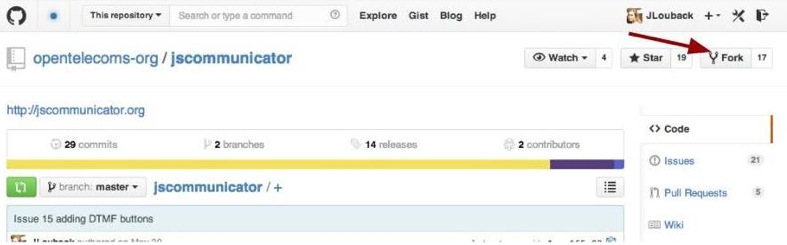
  3. Somewhere around the upper left corner, you will see a button labeled Fork . Click that.
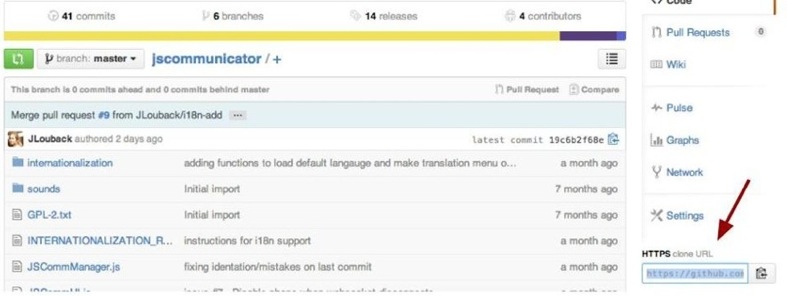
fork You should now have your own JSCommunicator repository on your Github account. On your main page select the tab Repositories . It should be the first on the list. The url will be https://github.com/YOUR-USERNAME/jscommunicator. My Github username is JLouback, so my jscommunicator repo can be found at https://github.com/JLouback/jscommunicator. Clone Now you should download all that code to your local machine so you can edit it. On your JSCommunicator page somewhere around the lower right corner you ll see a field entitled HTTPS clone URL: clone I don t know if this is correct, but you can just copy the URL on your browser too. I do that. Now on your terminal, navigate to the directory you d like to place your repository and enter
git clone https://github.com/YOUR-USERNAME/jscommunicator
The current directory should now have a folder named jscommunicator and in it is all the JSCommunicator code. Switch branches The JSCommunicator repo has a branch for the i18n support. A branch is basically a copy of the code that you can modify without changing the original code. It s great for adding new features, once everything is done and tested you can add the new feature to the original code. A more detailed explanation of branches can be found here. On the terminal, enter
cd jscommunicator
git branch -a
This will list all the branches in the repository, both local and remote. There should be a branch named remotes/origin/i18n-support . Switch to this branch by entering
git checkout --track origin/i18n-support
This will create a local branch named i18n-support with all the contents of the remote i18n-branch in https://github.com/opentelecoms-org/jscommunicator. Create a .properties file Now your jscommunicator directory will have some new files for the internationalization functionality. Among them you should find an INTERNATIONALIZATION_README file with instructions for adding a JSCommunicator translation. It s a less detailed version of this post, but it s worth a read in case I ve missed something here. Go to the directory internationalization . You ll see a few .properties files with different language codes. Choose the language of your preference for the translation base and make a copy of it in the internationalization directory. Your copy should be named Messages_LANGUAGECODE.properties . For example, the language code for german is de , so the german file should be named Messages_de.properties . If you re not sure about the code for your language, please check out this list of ISO 639-1 language codes so you re using the same code as (most) browsers. The .properties file is list of key-value pairs, a word or a few words joined by _ which is the key, the equals sign = then a word or phrase which is the value. Do not change anything to the left of the equals sign. Translate what is on the right of the equals sign. Modify available_languages.xml Go back to the root directory (jscommunicator) and open the file named available_languages.ruby . This .ruby has a series of language elements. At the end of the last </language> add a new language element with your language display name and code, copying the previous languge elements. You actually can put your language element anwhere, as long as it s after the ' and before the , as well as not cutting into any of the other language elements. Your display name should be the name of the language in its native language, for example for a french translation we ll put Fran ais (I think). And the code is the code we used for the .properties file. Here s how it should look:
<language>
    <display>Deutsch</display>
    <code>de</code>
</language>
Save your changes and voila! Test your work Once you ve made a .properties file, JSCommunicator will automatically load your translation if you ve set your browser preference to that language. If your browser preference is french, it will load the Messages_fr.properties. If your browser preference is a language we don t have a translation for (let s say german), JScommunicator will load the default Messages.properties file which is in english. The available_languages.ruby is used to build a language selection menu. If you add a language element without a corresponding .properties file, JSCommunicator will throw a JS error and load the default (english) translation. The same happens if you use different language codes in the .properties file name and the available_languages.ruby. The error won t disturb your use of JSCommunicator, it just won t load the language you selected. No harm, no foul. But if you want others to use your translation, do take care to do this correctly. If you read the INTERNATIONALIZATION_README, you will have seen that we need the jquery.i18n.properties.js file that s included in the .html pages. You can download that code here. Be sure to place it in the jscommunicator directory. This is only necessary if you want to see your addition at work, you don t need this file to contribute your translation. There are other 3rd party code dependencies to run JSCommunicator too as you may have noticed. Just creating the .properties file and adding a language element to available_languages.ruby, if done correctly, is enough to make a pull request. Commit Here s the part where we load all your local changes to your remote repository. In the terminal, navigate to the root directory (jscommunicator) and enter
git add internationalization/Messages_de.properties
git add available_languages.ruby
Of course, please replace Messages_de.properties with the name of your new .properties file. And mind you, we don t have a german translation yet! Then enter
git commit -m "German translation"
You can enter whatever you d like in the part, it s a good idea to explain what language you are adding. Now we can push the changes:
git push -u origin i18n-support
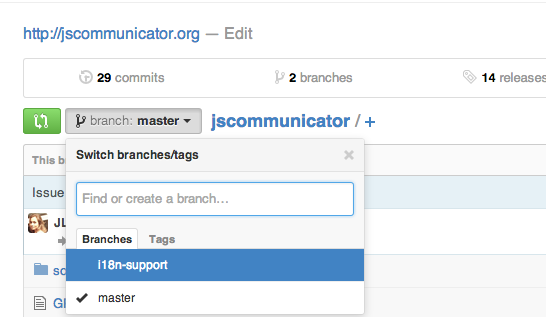
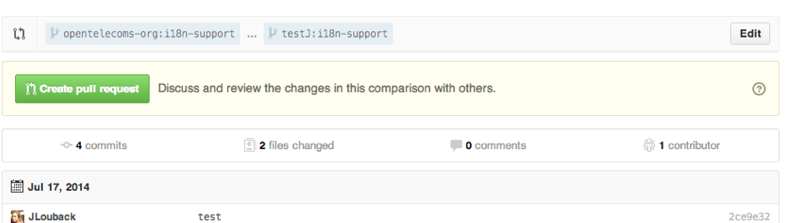
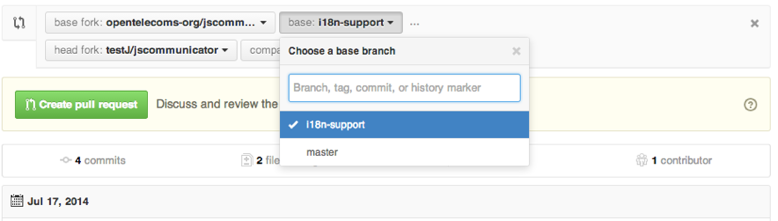
You should now see the changes you made in your Github account page at github.com/YOUR_USER/jscommunicator. The message you put in double quotations ( ) in the commit will be beside each modified file. This push also creates a new branch in your jscommunicator repository, now you will have a master and a i18n-support branch. Pull Now it s time to share your translation with everyone else if you feel so inclined. Your version of JSCommunicator has a new translation but not the official version. First navigate to you jscommunicator repo at github.com/YOUR_USER/jscommunicator and make sure you are on the i18n-branch as that will contain your changes. branches Click the green button directly to the left of the branch drop down menu shown above. This will create a pull request to add your new code to the official jscommunicator code. Once you click that button, you should see this: pull Make sure that the base repo (the first on the line above the green Create pull request button) is opentelecoms-org:i18n-support and not opentelecoms-org:master or another branch name. If it is, just click Edit on the right and you ll be able to select the branch from a dropdown like so: pullEdit If first repo is opentelecoms-org:i18n-support and the second is YOUR_USER:i18n-support and you ve verified (scroll down) that there are 2 files changed which are your new .properties file and the added element to the available_languages.xml, go ahead and press create pull request. It ll open a window with a text box you can add an explanation to with one final Create pull request button. Click that and you re done! You ve kindly contributed with a translation for JSCommunicator!
Russ Allbery: wallet 1.1

Wallet is the secure credential management infrastructure that we use at Stanford, primarily for keytabs but increasingly for any sort of security keys that have to be stored somewhere and retrieved by specific systems or people. The primary goal of this release is to add Duo support. This is currently somewhat preliminary, with only a single Duo integration object type that creates a UNIX integration. (Well, technically it can create any type of integration, but the integration information is returned in the format expected by the UNIX integration.) I expect a later release to rename all existing "duo" object types to "duo-unix" and add additional object types for the various other types of integrations that one wants to support, but that work will have to wait for another day. Since it's been over a year since the previous release, there are also other accumulated bug fixes and improvements. I also tried to merge or address as many issues or patches that had been sent to me over the past year as I could, although many larger patches or improvements had to be deferred. Highlights: There are also multiple other bug fixes and general improvements, such as using DateTime objects uniformly for all database access that involves date fields, and recording ACL renames in the ACL history table. Both the API and the database layer are still kind of a mess, and I'd love to rewrite them with the benefit of experience and more knowledge, but that's a project for another day. You can get the latest release from the wallet distribution page.

16 July 2014

Steve Kemp: So what can I do for Debian?

So I recently announced my intention to rejoin the Debian project, having been a member between 2002 & 2011 (inclusive). In the past I resigned mostly due to lack of time, and what has changed is that these days I have more free time - primarily because my wife works in accident & emergency and has "funny shifts". This means we spend many days and evenings together, then she might work 8pm-8am for three nights in a row, which then becomes Steve-time, and can involve lots of time browsing reddit, coding obsessively, and watching bad TV (currently watching "Lost Girl". Shades of Buffy/Blood Ties/similar. Not bad, but not great.) My NM-progress can be tracked here, and once accepted I have a plan for my activities: I believe this will be useful, even though there will be limits - I've no patience for PHP and will just ignore it, along with its ecosystem, for example. As progress today I reported #754899 / CVE-2014-4978 against Rawstudio, and discussed some issues with ITP: tiptop (the program seems semi-expected to be installed setuid(0), but if it is then it will allow arbitrary files to be truncated/overwritten via "tiptop -W /path/to/file" (ObRandom still waiting for a CVE identifier for #749846/TS-2867..) And now sleep.

Juliana Louback: Become an Open-source Contributor Video Conference

A couple weeks ago I was contacted by Yehuda Korotkin through one of the Debian mailing lists. Yehuda is a tech professor at one of Israel s leading colleges for women. He proposed a video conference to present the open source community to his class and explain how they can contribute to open source projects. I volunteered to participate and last Monday (July 14th 2014) we had our virtual meeting, which I hope was the first of many. Shauna G. also participated from Boston, making it a Israel - USA - Brazil meetup. Pretty impressive, eh? The conference was hosted on Google Hangouts, the video is available for viewing here. Run time is around 2.5 hours so to save you time I ve kindly posted a summary of the conference! To be frank, I look ghastly half the time so I d much prefer that you read this post. First there was a Q&A period which was more of a discussion panel, followed by a hands-on session where the girls made their first contribution to an open source project. Here s the gist of it: Q&A Hands on For the practical part of our conference, Yehuda s students contributed to Jscommunicator s Issue #5 which requests i18n support for major languages. JSCommunicator is a SIP communication tool developed in HTML and JavaScript, currently supporting audio/video calls and SIP SIMPLE instant messaging. First we set up Github in their local machines and forked the Jscommunicator repo. We learned the basic git commands needed to push changes to their remote repositories and to create a pull requests. This is explained in further detail here. At the end of the conference with nearly an hour overtime due to my tendency to be overly verbose, Yehuda s class made their first contribution with a Hebrew translation for Jscommunicator! All in all, it was great to virtually meet Yehuda and his epic students who all seemed very clever engineers. I m looking forward to our next meetup once I gain some time-management skills.

Rapha&#235;l Hertzog: Spotify migrate 5000 servers from Debian to Ubuntu

Or yet another reason why it s really important that we succeed with Debian LTS. Last year we heard of Dreamhost switching to Ubuntu because they can maintain a stable Ubuntu release for longer than a Debian stable release (and this despite the fact that Ubuntu only supports software in its main section, which misses a lot of popular software). Spotify Logo A few days ago, we just learned that Spotify took a similar decision:

A while back we decided to move onto Ubuntu for our backend server deployment. The main reasons for this was a predictable release cycle and long term support by upstream (this decision was made before the announcement that the Debian project commits to long term support as well.) With the release of the Ubuntu 14.04 LTS we are now in the process of migrating our ~5000 servers to that distribution.
This is just a supplementary proof that we have to provide long term support for Debian releases if we want to stay relevant in big deployments. But the task is daunting and it s difficult to find volunteers to do the job. That s why I believe that our best answer is to get companies to contribute financially to Debian LTS. We managed to convince a handful of companies already and July is the first month where paid contributors have joined the effort for a modest participation of 21 work hours (watch out for Thorsten Alteholz and Holger Levsen on debian-lts and debian-lts-announce). But we need to multiply this figure by 5 or 6 at least to make a correct work of maintaining Debian 6. So grab the subscription form and have a chat with your management. It s time to convince your company to join the initiative. Don t hesitate to get in touch if you have questions or if you prefer that I contact a representative of your company. Thank you!

5 comments Liked this article? Click here. My blog is Flattr-enabled.

Jon Dowland: Mac

My job exposes me to a large variety of computing systems and I regularly use Mac, Windows and Linux desktops. My main desktop environment at home and work has been Debian GNU/Linux for over 10 years. However every now and then I take a little "holiday" and use something else for a few weeks. Often I'm spurred on by some niggle or other on the GNOME desktop, or burn-out with whatever the current contentious issue of the moment is in Debian. Usually I switched to Windows and I used it as an excuse to play some computer games. Last November I had just such an excuse to take a holiday but this time I opted to go for Mac. I had a back-log of Mac issues to investigate at work anyway. I haven't looked back. It appears I have switched for good. I've been meaning to write about this for some time, but I couldn't quite get the words right. I doubted I could express my frustrations in a constructive, helpful way, even if I think that my experiences are useful and my discoveries valuable, perhaps I would put them across in a way that seemed inciteful rather than insightful. I wasn't sure anyone cared. Certainly the GNOME community doesn't seem interested in feedback. I turns out that one person that doesn't care is me: I didn't realise just how broken the F/OSS desktop is. The straw that broke the camel's back was the file manager replacing type-ahead find with a search but (to seemlessly switch metaphor) it turns out I'd been cut a thousand times already. I'm not just on the other side of the fence, I'm several fields away. Sometimes community people write about their concerns with whether they're going in the right direction, or how to tell the difference between legitimate complaints, trolls and whiners. When I look at conferences now, the sea of Thinkpads was replaced with a sea of Apple Macs a long time ago now, and the Thinkpads haven't come back. I'd suggest: don't worry about the whiners. Worry about the leavers. What does this mean for my Debian involvement? Well, you can't help but have noticed that I've done very little this year. I've written nearly exclusively about music so far. the good news is: I still regularly use Debian, and I still intend to stay involved, just not on the desktop. I'm essentially only maintaining two packages now, lhasa and squishyball. I might pick up a few more (possibly archivemail if the situation doesn't improve) but I'm happy with a low package load; I'd like to make sure the ones I do maintain are maintained well. The sum of all my Debian efforts this year have been to get these two (or three) ship-shape. I have a bunch of other things I'd like to achieve in Debian which are not packages, and a larger package load would just distract from them. (We really are too package-oriented in Debian).

13 July 2014

Russ Allbery: Review: Neptune's Brood

Review: Neptune's Brood, by Charles Stross
Series: Freyaverse #2
Publisher: Ace
Copyright: July 2013
ISBN: 1-101-62453-1
Format: Kindle
Pages: 325
Neptune's Brood is set in the same universe as Saturn's Children, but I wouldn't call it a sequel. It takes place considerably later, after substantial expansion of the robot civilization to the stars, and features entirely different characters (or, if there was overlap, I didn't notice). It also represents a significant shift in tone: while Saturn's Children is clearly a Heinlein pastiche and parody, Neptune's Brood takes its space opera more seriously. There is some situational humor assault auditors, for example but this book is played mostly straight, and I detected little or no Heinlein. This is Stross fleshing out his own space opera concept. This being Stross, that concept is not exactly conventional. This is a space opera about economics. Specifically, it's a space opera about interstellar economics, a debt pyramid, and a very interesting remapping of the continual growth requirements of capitalism to the outward expansion of colonization. The first-person protagonist comes from a "family" (as in Saturn's Children, the concept exists but involves rather more aggressive control of the instantiated "children") of bankers, but she is a forensic accountant and historian who specializes in analysis of financial scams. As you might expect, this is a significant clue about the plot. Neptune's Brood opens with Krina in search of her sister. She is supposed to be an itinerant scholar, moving throughout colonized space to spend some time with various scattered sisters, spreading knowledge and expanding her own. But it's clear from the start of the book that something else is going on, even before an assassin with Krina's face appears on her trail. Unfortunately, it takes roughly a third of the book to learn just what is happening beneath the surface, and most of that time is spent in a pointless interlude on a flying cathedral run by religious fanatics. The religion is a callback to Saturn's Children: robots who are trying to spread original humanity (the Fragiles) to the stars. This mostly doesn't go well, and is going particularly poorly for the ship that Krina works for passage on. But this is a brief gag that I thought went on much too long. The plot happens to Krina for this first section of the book rather than the other way around, little of lasting significance other than some character introductions occurs, and the Church itself, while playing a minor role in the later plot, is not worth the amount of attention that it gets. The best parts of the early book are the interludes in which Krina explains major world concepts to the reader. These are absolutely blatant infodumping, and I'm not sure how Stross gets away with them, but somehow he does, at least for me. They remind me of some of his blog posts, except tighter and fit into an interesting larger structure. Thankfully, once Krina finally arrives on Shin-Tethys, the plot improves considerably. There was a specific moment for me when the book became interesting: when Krina finds her sib's quarters in Shin-Tethys and analyzes what she finds there. It's the first significant thing in the book that she does rather than have done to her or thrust upon her, and she's a much better character when she's making decisions. This is also about the point where Stross starts fully explaining slow money, which is key to both the economics and the plot, and the plot starts to unwind its various mysteries and identify the motives of the players. Even then, Krina suffers from a lack of agency. Only at rare intervals does she get a chance to affect the story. Most of what she did of relevance to this book she did in the past, and while those descriptions of the backstory are interesting, they don't entirely make up for a passive protagonist. Thankfully, the other characters are varied and interesting enough, and the political machinations and cascading revelations captivating enough, that the last part of the book was very satisfying even with Krina on for the ride. This is a Stross novel, so it's full of two-dollar technical words mixed with technobabble. However, it shares with Saturn's Children the recasting of robots as the norm and fleshy humans as the exception, which means much of the technobabble is a straight substitution for our normal babble about meaty bodies and often works as an alienation technique. That makes it a bit more tolerable for me, although I still wished Stross would turn down the manic vocabulary in places. This bothers some people more than others; if you had no trouble with Accelerando, Neptune's Brood will pose no problems. I don't think the first section of this book was successful, but I liked the rest well enough to recommend it. If you like your space opera with a heavy dose of economics, a realistic attitude towards deep space exploration without faster-than-light technology, and a realistic perspective on the hostility of alien planets to Earth life, Neptune's Brood is a good choice. And any book that quotes David Graeber's Debt, and whose author has clearly paid attention to its contents, wins bonus points from me. Rating: 8 out of 10

12 July 2014

Matt Brown: GPG Key Management Rant

2014 and it s still annoyingly hard to find a reasonable GPG key management system for personal use All I want is to keep the key material isolated from any Internet connected host, without requiring me to jump through major inconvenience every time I want to use the key. An HSM/Smartcard of some sort is an obvious choice, but they all suck in their own ways:
* FSFE smartcard it s a smartcard, requires a reader, which are generally not particular portable compared to a USB stick.
* Yubikey Neo restricted to 2048 bits, doesn t allow imports of primary keys (only subkeys), so you either generate on device and have no backup, or maintain some off-device primary key with only subkeys on the Neo, negating the main benefits of it in the first place.
* Smartcard HSM similar problems to the Neo, plus not really supported by GPG well (needs 2.0 with specific supporting module version requirements).
* Cryptostick made by some Germans, sounds potentially great, but perpetually out of stock. Which leaves basically only the roll your own dm-crypt+LUKS usb stick approach. It obviously works well, and is what I currently use, but it s a bunch of effort to maintain, particularly if you decide, as I have, that the master key material can never touch a machine with a network connection. The implication is that you now need to keep an airgapped machine around, and maintain a set of subkeys that are OK for use on network connected machines to avoid going mad playing sneakernet for every package upload. The ideal device would be a USB form factor, supporting import of 4096 bit keys, across all GPG capabilities, but with all crypto ops happening on-device, so the key material never leaves the stick once imported. Ideally also cheap enough (e.g. ~100ish currency units) that I can acquire two for redundancy. As far as I can tell, such a device does not exist on this planet. It s almost enough to make a man give up on Debian and go live a life of peace and solitude with the remaining 99.9% of the world who don t know or care about this overly complicated mess of encryption we ve wrought for ourselves. end rant.

8 July 2014

Matthew Palmer: Doing Password Complexity Wrong

I just made an account on yet another web service. On the suggestion of my password manager, I attempted to use the password W:9[$X*F . It was rejected because Password must contain at least one non-alphabet character, one lowercase letter, one uppercase letter . OK, how about Passw0rd ? Yep, that s fine. Anyone want to guess which of those two passwords is going to fall victim to a brute-force attack first? Go on, don t be shy, take a wild shot in the dark!

6 July 2014

Russell Coker: Desktop Publishing is Wrong

When I first started using computers a word processor was a program that edited text. The most common and affordable printers were dot-matrix and people who wanted good quality printing used daisy wheel printers. Text from a word processor was sent to a printer a letter at a time. The options for fancy printing were bold and italic (for dot-matrix), underlines, and the use of spaces to justify text. It really wasn t much good if you wanted to include pictures, graphs, or tables. But if you just wanted to write some text it worked really well. When you were editing text it was typical that the entire screen (25 rows of 80 columns) would be filled with the text you were writing. Some word processors used 2 or 3 lines at the top or bottom of the screen to display status information. Some time after that desktop publishing (DTP) programs became available. Initially most people had no interest in them because of the lack of suitable printers, the early LASER printers were very expensive and the graphics mode of dot matrix printers was slow to print and gave fairly low quality. Printing graphics on a cheap dot matrix printer using the thin continuous paper usually resulted in damaging the paper a bad result that wasn t worth the effort. When LASER and Inkjet printers started to become common word processing programs started getting many more features and basically took over from desktop publishing programs. This made them slower and more cumbersome to use. For example Star Office/OpenOffice/LibreOffice has distinguished itself by remaining equally slow as it transitioned from running on an OS/2 system with 16M of RAM in the early 90 s to a Linux system with 256M of RAM in the late 90 s to a Linux system with 1G of RAM in more recent times. It s nice that with the development of PCs that have AMD64 CPUs and 4G+ of RAM we have finally managed to increase PC power faster than LibreOffice can consume it. But it would be nicer if they could optimise for the common cases. LibreOffice isn t the only culprit, it seems that every word processor that has been in continual development for that period of time has had the same feature bloat. The DTP features that made word processing programs so much slower also required more menus to control them. So instead of just having text on the screen with maybe a couple of lines for status we have a menu bar at the top followed by a couple of lines of toolbars , then a line showing how much width of the screen is used for margins. At the bottom of the screen there s a search bar and a status bar. Screen Layout By definition the operation of a DTP program will be based around the size of the paper to be used. The default for this is A4 (or Letter in the US) in a portrait layout (higher than it is wide). The cheapest (and therefore most common) monitors in use are designed for displaying wide-screen 16:9 ratio movies. So we have images of A4 paper with a width:height ratio of 0.707:1 displayed on a wide-screen monitor with a 1.777:1 ratio. This means that only about 40% of the screen space would be used if you don t zoom in (but if you zoom in then you can t see many rows of text on the screen). One of the stupid ways this is used is by companies that send around word processing documents when plain text files would do, so everyone who reads the document uses a small portion of the screen space and a large portion of the email bandwidth. Note that this problem of wasted screen space isn t specific to DTP programs. When I use the Google Keep website [1] to edit notes on my PC they take up a small fraction of the screen space (about 1/3 screen width and 80% screen height) for no good reason. Keep displays about 70 characters per line and 36 lines per page. Really every program that allows editing moderate amounts of text should allow more than 80 characters per line if the screen is large enough and as many lines as fit on the screen. One way to alleviate the screen waste on DTP programs is to use a landscape layout for the paper. This is something that all modern printers support (AFAIK the only printers you can buy nowadays are LASER and ink-jet and it s just a big image that gets sent to the printer). I tried to do this with LibreOffice but couldn t figure out how. I m sure that someone will comment and tell me I m stupid for missing it, but I think that when someone with my experience of computers can t easily figure out how to perform what should be a simple task then it s unreasonably difficult for the vast majority of computer users who just want to print a document. When trying to work out how to use landscape layout in LibreOffice I discovered the Web Layout option in the View menu which allows all the screen space to be used for text (apart from the menu bar, tool bars, etc). That also means that there are no page breaks! That means I can use LibreOffice to just write text, take advantage of the spelling and grammar correcting features, and only have screen space wasted by the tool bars and menus etc. I never worked out how to get Google Docs to use a landscape document or a single webpage view. That s especially disappointing given that the proportion of documents that are printed from Google Docs is probably much lower than most word processing or DTP programs. What I Want What I d like to have is a word processing program that s suitable for writing draft blog posts and magazine articles. For blog posts most of the formatting is done by the blog software and for magazine articles the editorial policy demands plain text in most situations, so there s no possible benefit of DTP features. The ability to edit a document on an Android phone and on a Linux PC is a good feature. While the size of a phone screen limits what can be done it does allow jotting down ideas and correcting mistakes. I previously wrote about using Google Keep on a phone for lecture notes [2]. It seems that the practical ability of Keep to edit notes on a PC is about limited to the notes for a 45 minute lecture. So while Keep works well for that task it won t do well for anything bigger unless Google make some changes. Google Docs is quite good for editing medium size documents on a phone if you use the Android app. Given the limitations of the device size and input capabilities it works really well. But it s not much good for use on a PC. I ve seen a positive review of One Note from Microsoft [3]. But apart from the fact that it s from Microsoft (with all the issues that involves) there s the issue of requiring another account. Using an Android phone requires a Gmail account (in practice for almost all possible uses if not in theory) so there s no need to get an extra account for Google Keep or Docs. What would be ideal is an Android editor that could talk to a cloud service that I run (maybe using WebDAV) and which could use the same data as a Linux-X11 application. Any suggestions?

Next.

Previous.