Russell Coker: Sony Ericsson Xperia X10i First Experience
I have just got a new Xperia X10i for my wife. It s with Virgin who use the Optus network. Optus apparently have better coverage than Three (who we have been using for 6.5 years) and Virgin offers the best deals they have good phones on low monthly rates and do nice things like selling most phones unlocked (the Xperia is one that comes unlocked).I chose the phone for use in system administration work. A large screen should be good for reading email and running a ssh client. Hopefully I will be able to use the phone s Wifi to provide mobile net access to a laptop for any problem that can t be solved on a tiny screen. My wife doesn t do much sysadmin work nowadays, but it ll save some effort if we can both use the same model of phone. Also according to Amobil.no the Xperia X10 is the second best phone for camera-phone functionality [1], and my wife would really like to take some good pictures with her phone (she loves the LG U990 Viewty that she has right now).ScreenOne major reason for choosing this phone is that it has the biggest and highest resolution of any phone that doesn t cost a huge amount of money. It does well in this regard, the screen is very good to look at. However it is apparently not particularly sensitive and we still have the protective cover on the screen which makes the swipe to unlock operation quite difficult. My wife generally likes to keep the protective plastic on such screens for a while to prevent damage, but she may take this off sooner than on other devices.Sony FoolishnessOne reason that this phone is cheaper than any other phone with similar specs is that it s made by Sony. Sony won t provide updates to Android 2.2 or better and they have their own stupid applications installed in an intrusive manner. The main screen of the phone has a large icon for the Sony Timescape program. If you choose a background image of a person s face then the Timescape logo is in the ideal location to obscure the person s eyes. Generally it s not desired to have the person in your phone background look like Zorro. Fortunately you can delete icons from the home screen, you just have to press and hold the icon until a trash-can appears at the bottom of the screen and then drag it to the trash.Phone BookThe core phone functionality is fairly important for a mobile phone. But it seems that every modern phone has some serious failings in this regard. The Xperia comes with a phone book that is reasonably good for managing contacts and partially coalesces multiple entries with the same name which is convenient as I somehow managed to import 3 copies of each entry in my wife s phone book. The down-side is that the multiple entries are still stored, so when it comes time to update someone s phone number my wife will have to separate the entries and then delete all but one of them, adding probably a minute of effort for each one. With 60 phone book entries that s probably an hour of wasted time during the course of her phone use.They really should do a time based analysis of phone use and optimise the UI for efficiently performing common tasks. I think that an ideal design would start off by asking the user to rate the importance of phone functionality, camera, facebook, twitter, etc and then give a UI that matches the important tasks. A device that has 384M of RAM, 1G of built-in Flash storage, and an 8G micro-SD card (which Virgin provided with the phone) should be able to offer a selection of UIs.CameraThe configuration for the camera allows some settings to be changed easily and others have to be changed through the advanced settings which requires one more button press and a few extra taps on the screen. One real stupidity is to have the phone light be in the advanced settings, so if the room happens to be a little darker than expected you suddenly need to go to a lot of extra effort to turn on the light.Finally it would be really good to be able to take a quick picture. I would like to be able to be able to press a combination of buttons and have it immediately take a picture regardless of what had been running before. Not press the main menu button, the camera icon (which I made a link from the home screen), wait a second for it to load, and then press the shutter button. Ideally I would like to press a combination of hardware buttons to have it immediately take a picture even when the screen is locked. I don t want to wait for the screen unlock process, sometimes the perfect shot is only available for a second.WifiIt doesn t support ad-hoc networks. This is really annoying for me as I don t own an access point and I don t plan to buy one just for a phone. My laptop (Thinkpad T61 with Intel Corporation PRO/Wireless 3945ABG [Golan]) doesn t seem to support running as an access point, and my EeePC 701 with an Atheros AR5001 has the same problem, here is the error message:# iwconfig wlan0 mode master essid x
Error for wireless request Set Mode (8B06) :
SET failed on device wlan0 ; Invalid argument.I have a cheap Realtec USB Wifi device that claims to support being an access point but just fails when I try it. So presumably it doesn t really support it but the driver is buggy.It seems that I may need to put a custom Android installation on it to get ad-hoc working.Also it s apparently necessary to root the Xperia to get Wifi tethering to work for providing net access to a laptop. So I guess I ll hacking it soon.Internet AccessThe Virgin web site couldn t help me set up the Internet access because I ported a phone number from another Telco. I had to use the phone number supplied by Virgin to login to their web site and the site then wanted to sent (probably SMS) the settings to my phone, but of course it couldn t SMS to that number as I ve got the Three number active. Presumably they were expecting that customers would setup Internet access before porting their old number.I phoned the Virgin tech support and used the settings they suggested, but it didn t work. Then I took the phone to a Virgin store and it started working after they rebooted it with no changes to settings. Just like Windows used to be. :(Email Access Default AppThe email setup defaults to port 143 IMAP access, so even when a mail server provides access on port 993 for IMAPS and on port 995 for POP3S probably most users will not use any encryption because their phone doesn t default to it. Also one annoying feature is that when I gave it the email address test@coker.com.au it decided to use test as the user-name for IMAP by default. It seems that a very large portion of the active email accounts nowadays are on systems that handle multiple domains and thus require the domain name in authentication, and a large portion of the remainder accept domain names even when they aren t required. Besides it s a lot easier to delete a domain name when it s not needed than to type it in when it is.The default hostname for sending and receiving mail is the domain name, if the MUA configuration program had checked the MX record it would have known that smtp.sws.net.au is a better default choice for the mail server. I ve now started the practice of creating a CNAME entry named m in every domain I run, so when someone is setting up a mobile phone they just have to add m. to the start of the default hostname to use for sending and receiving mail. By doing this I can probably save an average user at least 30 seconds of typing, which is particularly important if I happen to be talking them through the process!The MUA uses IMAP commands to load the text of the message without attachments and then loads attachments on demand, this will be handy for when people attach unreasonably large files. With IMAP caching and partial loads the core functionality seems OK, and some quick tests of standard but not commonly used IMAP functions such as noticing that mail has been deleted by another client seemed to work well. The performance of loading a new mailbox with 369 message was quite poor, I m not sure how much of this is due to the network connection and how much is due to the client implementation. This is a real concern for me as I typically have about 7,000 messages in my IMAP account and 3,000 unread messages most of which are in two folders.Another problem is the fact that there seems to be no way of searching in the list of messages, sorting/grouping by subject or sender, or showing unread messages. This makes the Xperia unsuitable for the task of reading mailing lists when on public transport. I would really like to be able to sort through a folder of mailing-list mail, delete messages that I don t need to keep and flag ones that need attention when I have the resources of a desktop system when I m on a tram or in other situations where a laptop can be inconvenient.One undeniable bug I discovered (as opposed to the missing features I listed) is that when a message has a line with a URL followed by many spaces it won t load correctly in the web browser, the spaces will be treated as part of the URL. I ve changed the default signature in my email to have a description followed by a URL to avoid triggering this bug. Presumably other Android phones are bug for bug compatible. :(Moxier MailThere is a complete set of email and calendaring applications preloaded from Moxier.com. The Moxier mail client uses company.com as an example domain name (they should use example.com does no-one read the RFCs?). It s nice that they verify the SSL certificate and display the details when it s not signed.Unfortunately Moxier doesn t support anything other than Exchange, and I can t delete it either as it s part of the base set of applications from Sony.SMSThe SMS application is supposedly conversation based. This doesn t seem like a benefit to me, it s a pity that there is no option to make it act more like every other SMS implementation I ve used over the last 12 years.BatteryThe battery is described as having a capacity of 1500mAh, for comparison a AA rechargeable batteries have capacities ranging from 1800mAh to 2800mAh. My first mobile phone had a rechargeable battery that took the same space as 4*AA batteries and the phone was designed to run on AA batteries if the main battery wasn t charged. I would like to have an Android phone that had a battery pack of similar size to at least 2*AA batteries, and 4*AA would be OK too.The Xperia battery was reported as being half discharged after playing with the phone for less than an hour. Basically when doing anything with the phone that is remotely intensive I need to have it plugged in. Unless of course I m using one of the star-chart applications LightsThere are two white leds in the gaps between the keys for Settings, Main-Menu, and Back on the front. They are quite bright and annoying to look into at night.SSHSSH was one of the reasons for getting an Android phone, but it was one of the last things I worked on because everything else was so much fun. I m currently using ConnectBot, it supports storing ssh host keys, generating a key-pair from random screen touches, locking and unlocking the key-pair (with a pass-phrase) and pasting the public key to an open window. All the basic functions just work although it s rather inconvenient to enter the CTRL keys.The next thing to investigate is a small and light Bluetooth keyboard. Using an external hardware keyboard will save me from the pain of entering CTRL keys (which is even worse than the pain of entering passwords that contain digits and mixed case). It will also allow me to type a lot faster and use the entire screen for the ssh session.Current Bug SummaryWifi doesn t do ad-hoc mode or tethering.MUA doesn t correctly handle URLs in messages if many spaces follow the URL and is also unsuitable for mailing list mail.Sometimes requires a reboot to make Internet access settings take affect.Camera light can t be easily turned on and off.This isn t too bad.ConclusionMost things do what I want. Once I get a MUA working with all my email, Wifi doing what I want, and a Bluetooth keyboard it ll be a fairly ideal mobile sysadmin terminal. I ll probably order one for myself this weekend.


 What s your biggest achievement within Debian?
Building lots and lots of kernels together with an growing uptake of the officially released linux images.
I joined the Debian kernel team shortly after Herbert Xu departed. I had been
upstream Maintainer of the linux-2.6 janitor project for almost a year brewing
hundreds of small cleanups with quilt in a tree named
 One of the common complains about Debian packaging is that it s hard to learn because, while there is quite a lot of high-quality documentation, it is often written more as a reference manual than as a tutorial: it s great if you already know everything and want to check some detail, but not so great if you want to learn everything from scratch.
I have been volunteered (i.e, someone decided I volunteered) for a Debian packaging tutorial at work, so I decided to give a try at tackling this issue. I also volunteered (voluntarily this time) for a similar talk at
 I just need to work more on bilocality. While I did find two geocaches,
one at the South/Noon Train Station (taalverwarringen ), one in the buurt
of the University, I did manage to miss the AW building completely and
utterly. Wow. Except, that Haiku guy came over to talk for a bit (nice).
And I drew. An Atari logo with swirl, for that weird stuff I recently have
been
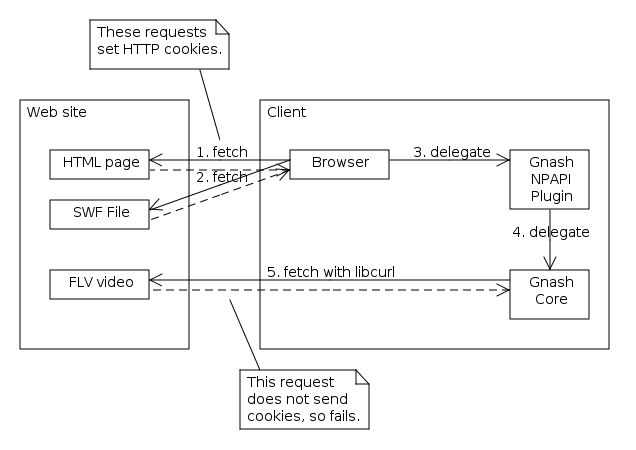 As of Gnash 0.8.8, a workaround was added, calling an NPAPI
function NPN_GetValueForURL to ask the web browser for the
relevant cookies. New diagram:
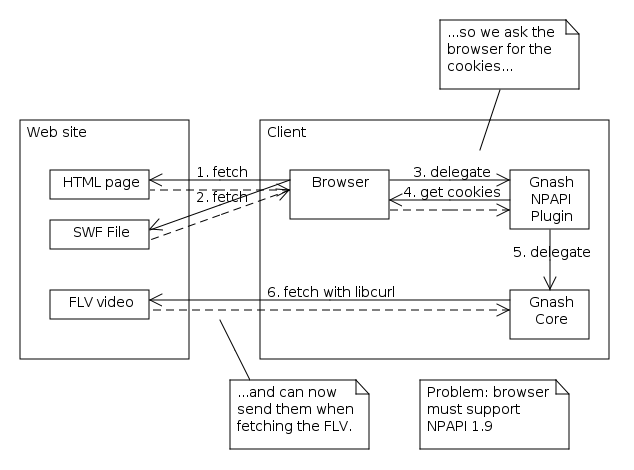 The downside is that this function was only added in NPAPI version
1.9. This means:
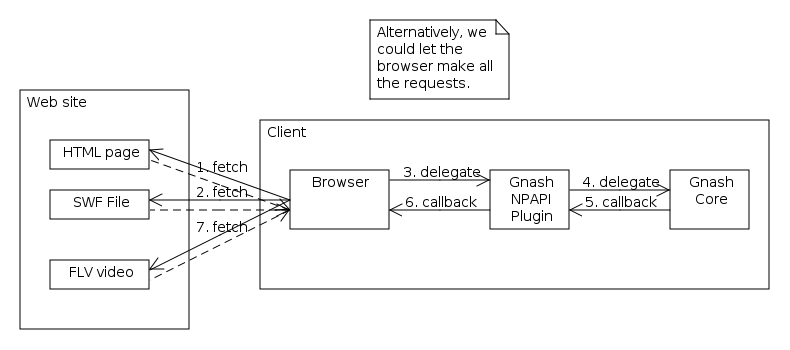 So, the good news is, this problem should almost certainly get
fixed over the coming Debian release cycle, if only because all the
browsers will get updated. In the meantime, disabling cookies (and
removing stale ones from YouTube) is a workaround.


 My first ever Linux installation was done in the late
nineties 1998 or thereabouts but was a RedHat 4.5
installation rather than a Debian one. The reason for that was fairly
simple: the Infomagick sixpack CD set that I'd bought contained RedHat,
Debian, and Slackware, but the RedHat installation was the only one that
could be installed directly from CD the other two required me to
write floppies and boot from those to start the installation, and I
wasn't very fond of that idea.
It was only a few years and a few broken RedHat upgrades later that I
saw the light and considered trying out this Debian thing that some of
my classmates were talking about. The fact that I'd just bought my own
computer (rather than having to compete for time with my siblings on my
parents' computer) was a good reason to do a fresh Linux installation.
I'd been planning to install Linux From Scratch, but as what was still
known as the LFS HOWTO told me you'd need a working Linux installation
to do that, I considered my options. Since I'd developed a strong
dislike of RedHat, I wasn't interested in doing another RedHat anymore.
So, I downloaded the most recent version of Debian at the time (Potato
Test Cycle III), wrote it to a CD, and installed. I've probably still got
the CD lying around somewhere.
A few months later, I found these "Linux Gazette" packages in the
archive, with the latest packaged issue being 47, but the latest
upstream version being much higher. Trying to figure out what was going
on, I mailed the maintainer, Adrian Bridgett, who encouraged me to take
over maintenance. Thus began my life of actively contributing to Open Source
software.
In November 2000, I applied to become a Debian Developer. In January
2001, Martin Michlmayr was assigned to be my AM. And in early February
2001, now just over ten years ago, I'd become a Debian Developer. Yes,
that was fast, and no, I probably wasn't really ready yet, at the
time.
Originally, I only cared much about these Linux Gazette packages.
But, as time went on, I started looking around, too. A friend passed me
an old Macintosh Centris 610. As I tried to install Debian on it, I
found that it didn't actually run very well. This turned out to be due
to it having a broken 68LC040 processor, so I bought me another
m68k-based mac, one with a full 68040 processor (a Centris 650). Thus I
became involved in the m68k port and buildd maintenance.
As these old machines came with 80MB or 250MB SCSI hard disks of
which I had none laying around, and a then-recent Debian installation
had minimum requirements of about 200MB, I was in need of network
storage to be able to do anything useful with the mac. NFS didn't work
as expected; the RTC implementation on m68k mac hardware was reverse
engineered and didn't work too well at the time, which meant that the
clock would run slower if the machine was under load, and that in turn
would mean that make would get confused about timestamps, since they
would suddenly appear to originate from the future (in NFS, it's the
server that assigns time stamps, not the client). There was a simple
solution, however; Pavel Macheck had written this neat 'Network Block
Device', which would let the client do its own filesystem on network
storage. Only it wasn't packaged; but then, that was
 So I guess I just drop Triaging for week 13, 14 and maybe 15
Now the bugs I triaged just before :
 Sponsoring a package means uploading a package for someone else (usually a new contributor starting out as package maintainer). This is an activity reserved to Debian Developer who are supposed to be knowledgeable about packaging. This article tries to document the process to ensure the sponsor is doing a reasonably good job according to Debian s standards.
Sponsoring a package in the Debian archive is not a trivial matter. It means that you verified the packaging and that it is of the level of quality that Debian strives to have. Let s have a look to what you can and should do when you re sponsoring a package.
Sponsoring the initial upload
Sponsoring a brand new package into Debian requires a thorough review of the Debian packaging. Building the package and testing the software is definitely not enough! You should open every file in the debian directory and look out for potential problems. Here s a checklist that you can use to perform the audit:

 So previously I talked about pictures. Having spent a while playing with some new lighting ideas I'll present three recent images:
 The
 Here comes the forth Debian XSF News issue! I usually try to keep
the items sorted chronologically (but grouped by topic when possible),
so if you re wondering about the current status of
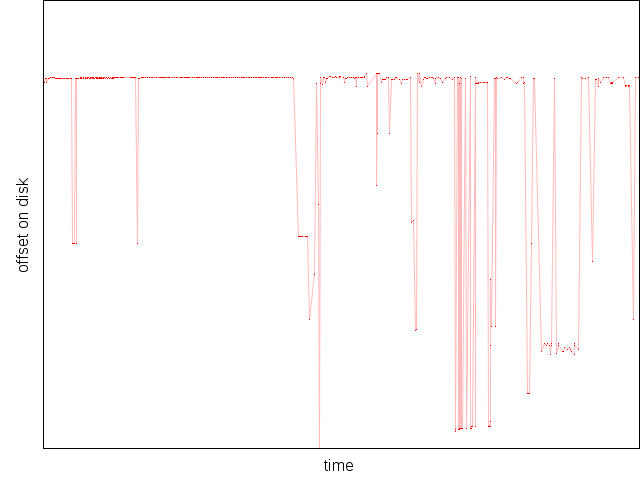 Zooming around the main location where most I/O happen, we can see the pattern is still bumpy:
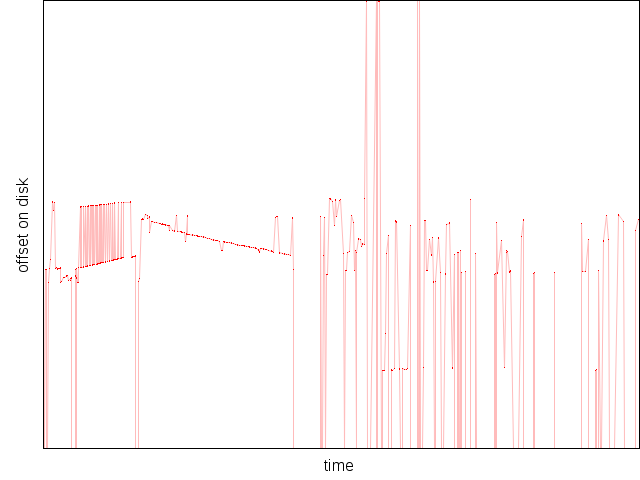 This somehow
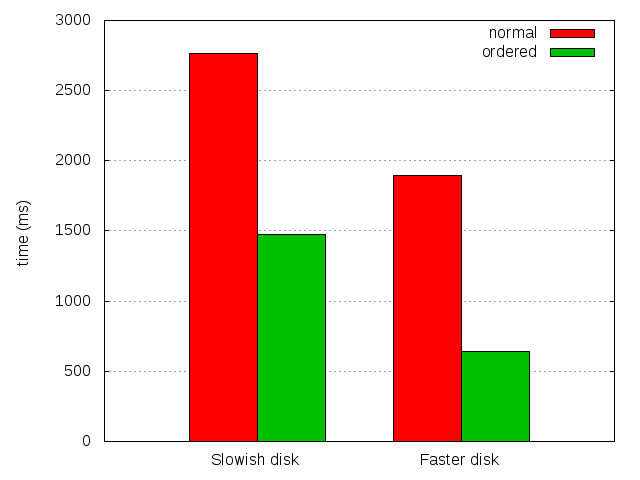 Disks seeks hurt. Badly.
 The last weeks before a Debian release are usually boring with respect to working on new stuff since unstable is pretty much closed to development. Now that the release is finished, this fun is back \o/
I have been in an upload frenzy since yesterday night and I have updated some packages in unstable: KOffice[1] and KOffice-l10n 2.3.1, yakuake, rsibreak and tintin++. Another of my packages, kid3, got magically updated itself in unstable before I had time to look at it, the magic of having active co-maintainers.
[1] Thanks for the gentle push to update this, Pino :)
I also emailed one of my upstream maintainers to ask him about the KDE 4 version of his application and he will likely make a release soon. One of the goals for wheezy is remove completely KDE 3 and Qt 3. If you are maintaining a KDE 3 or Qt 3 based application, we are about to start annoying you about this! See

 My questions are in bold, the rest is by Mike.
Who are you?
I am Mike Hommey. I am French, even if my name doesn t sound so.
I have been a GNU/Linux user since 1995, using Debian since 1999, and
started packaging in 2003. After a long time in the NM queue, I became
a DD in 2005.
The main reason I started being actively involved is quite selfish: I
wanted some things done, and I just did them. My first packages were
extensions for the Mozilla Suite, the old one that directly inherited
from Netscape Communicator. Later on, I wanted some of these extensions
to work with the new kid on the block: Phoenix; or maybe it was already
Firebird. By then, integrating extensions was a hassle, and the
mozilla-browser maintainer had come up with a script that would make it
easier for extension packages. So I ported that script for use with
Phoenix/Firebird and sent it to the BTS.
Then Phoenix/Firebird became Firefox, and it grew a real extension
manager. Except that is was entirely not suited for extensions installed
by the packaging system. So I made it work better. And made a few more
changes to make Firefox work better. All through patches or NMUs.
Then I became co-maintainer, then Firefox couldn t keep its name and
became Iceweasel, and, fast-forward until today, I m now taking care of
Iceweasel/Xulrunner and Iceape in stable, unstable, experimental and
an
 Somewhat motivated by Geoff Huston's keynote at linux.conf.au 2011, I've
decided to pull my finger out and make a foray into IPv6. My


