
pg_dirtyread
Earlier this week, I updated
pg_dirtyread
to work with
PostgreSQL 14.
pg_dirtyread is a PostgreSQL extension that allows reading "dead" rows from
tables, i.e. rows that have already been deleted, or updated. Of course that
works only if the table has not been cleaned-up yet by a VACUUM command or
autovacuum, which is PostgreSQL's garbage collection machinery.
Here's an example of pg_dirtyread in action:
# create table foo (id int, t text);
CREATE TABLE
# insert into foo values (1, 'Doc1');
INSERT 0 1
# insert into foo values (2, 'Doc2');
INSERT 0 1
# insert into foo values (3, 'Doc3');
INSERT 0 1
# select * from foo;
 id    t

  1   Doc1
  2   Doc2
  3   Doc3
(3 rows)
# delete from foo where id < 3;
DELETE 2
# select * from foo;
 id    t

  3   Doc3
(1 row)
Oops! The first two documents have disappeared.
Now let's use pg_dirtyread to look at the table:
# create extension pg_dirtyread;
CREATE EXTENSION
# select * from pg_dirtyread('foo') t(id int, t text);
 id    t

  1   Doc1
  2   Doc2
  3   Doc3
All three documents are still there, but only one of them is visible.
pg_dirtyread can also show PostgreSQL's system colums with the row location and
visibility information. For the first two documents, xmax is set, which means
the row has been deleted:
# select * from pg_dirtyread('foo') t(ctid tid, xmin xid, xmax xid, id int, t text);
 ctid    xmin   xmax   id    t

 (0,1)   1577   1580    1   Doc1
 (0,2)   1578   1580    2   Doc2
 (0,3)   1579      0    3   Doc3
(3 rows)
Undelete
Caveat:
I'm not promising any of the ideas quoted below will actually work in
practice. There are a few caveats and a good portion of intricate knowledge
about the PostgreSQL internals might be required to succeed properly. Consider
consulting your favorite PostgreSQL support channel for advice if you need to
recover data on any production system. Don't try this at work.
I always had plans to extend pg_dirtyread to include some "undelete" command to
make deleted rows reappear, but never got around to trying that. But rows can already be
restored by using the output of pg_dirtyread itself:
# insert into foo select * from pg_dirtyread('foo') t(id int, t text) where id = 1;
This is not a true "undelete", though - it just inserts new rows from the data
read from the table.
pg_surgery
Enter
pg_surgery,
which is a new PostgreSQL extension supplied with PostgreSQL 14. It contains
two functions to "perform surgery on a damaged relation". As a side-effect,
they can also make delete tuples reappear.
As I discovered now, one of the functions, heap_force_freeze(), works nicely
with pg_dirtyread. It takes a list of ctids (row locations) that it marks
"frozen", but at the same time as "not deleted".
Let's apply it to our test table, using the ctids that pg_dirtyread can read:
# create extension pg_surgery;
CREATE EXTENSION
# select heap_force_freeze('foo', array_agg(ctid))
    from pg_dirtyread('foo') t(ctid tid, xmin xid, xmax xid, id int, t text) where id = 1;
 heap_force_freeze

(1 row)
Et voil , our deleted document is back:
# select * from foo;
 id    t

  1   Doc1
  3   Doc3
(2 rows)
# select * from pg_dirtyread('foo') t(ctid tid, xmin xid, xmax xid, id int, t text);
 ctid    xmin   xmax   id    t

 (0,1)      2      0    1   Doc1
 (0,2)   1578   1580    2   Doc2
 (0,3)   1579      0    3   Doc3
(3 rows)
Disclaimer
Most importantly, none of the above methods will work if the data you just
deleted has already been purged by VACUUM or autovacuum. These actively zero
out reclaimed space. Restore from backup to get your data back.
Since both pg_dirtyread and pg_surgery operate outside the normal PostgreSQL
MVCC machinery, it's easy to create corrupt data using them. This includes
duplicated rows, duplicated primary key values, indexes being out of sync with
tables, broken foreign key constraints, and others.
You have been warned.
pg_dirtyread does not work (yet) if the deleted rows contain any
toasted
values. Possible other approaches include using
pageinspect
and
pg_filedump
to retrieve the ctids of deleted rows.
Please make sure you have working backups and don't need any of the above.
 A few scenarios have been problematic with git and I've now discovered
git worktrees which help with each.
A few scenarios have been problematic with git and I've now discovered
git worktrees which help with each.
 The following contributors got their Debian Developer accounts in the last two months:



 Over the last few years, I ve often wondered what the true power output of my
SDRs are. It s a question with a shocking amount of complexity in the
response, due to a number of factors (mostly Frequency). The ranges given in
spec sheets are often extremely vague, and if I m being honest with myself,
not incredibly helpful for being able to determine what specific filters and
amplifiers I ll need to get a clean signal transmitted.
Over the last few years, I ve often wondered what the true power output of my
SDRs are. It s a question with a shocking amount of complexity in the
response, due to a number of factors (mostly Frequency). The ranges given in
spec sheets are often extremely vague, and if I m being honest with myself,
not incredibly helpful for being able to determine what specific filters and
amplifiers I ll need to get a clean signal transmitted.
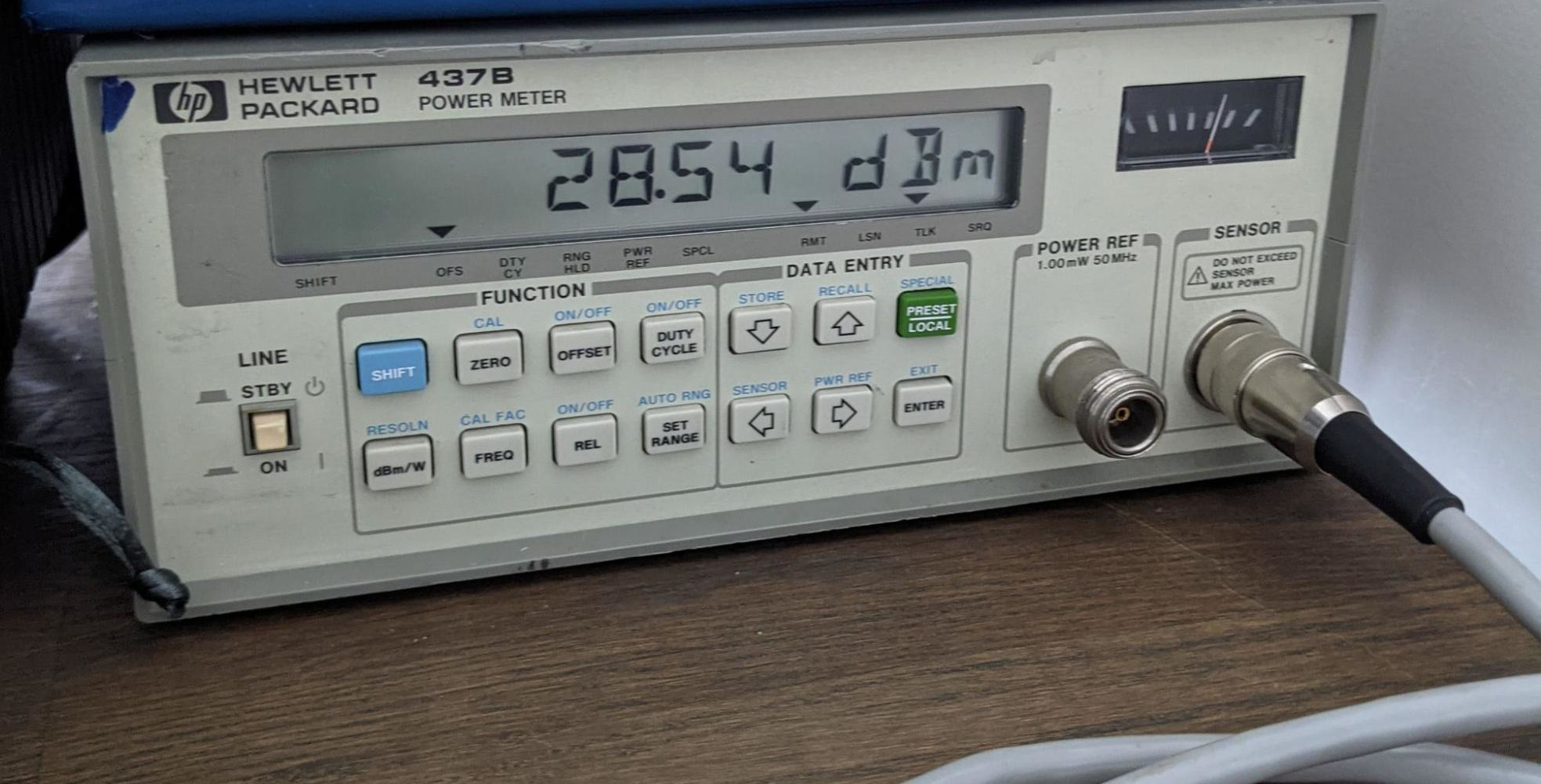 I bought an HP 437B, which is the cutting edge of 30 years ago, but still
accurate to within 0.01dBm. I paired this Power Meter with an Agilent 8481A
Power Sensor (-30 dBm to 20 dBm from 10MHz to 18GHz). For some of my radios, I
was worried about exceeding the 20 dBm mark, so I used a 20db attenuator while
I waited for a higher power power sensor. Finally, I was able to find a GPIB to
USB interface, and get that interface working with the GPIB Kernel driver on my
system.
With all that out of the way, I was able to write
I bought an HP 437B, which is the cutting edge of 30 years ago, but still
accurate to within 0.01dBm. I paired this Power Meter with an Agilent 8481A
Power Sensor (-30 dBm to 20 dBm from 10MHz to 18GHz). For some of my radios, I
was worried about exceeding the 20 dBm mark, so I used a 20db attenuator while
I waited for a higher power power sensor. Finally, I was able to find a GPIB to
USB interface, and get that interface working with the GPIB Kernel driver on my
system.
With all that out of the way, I was able to write 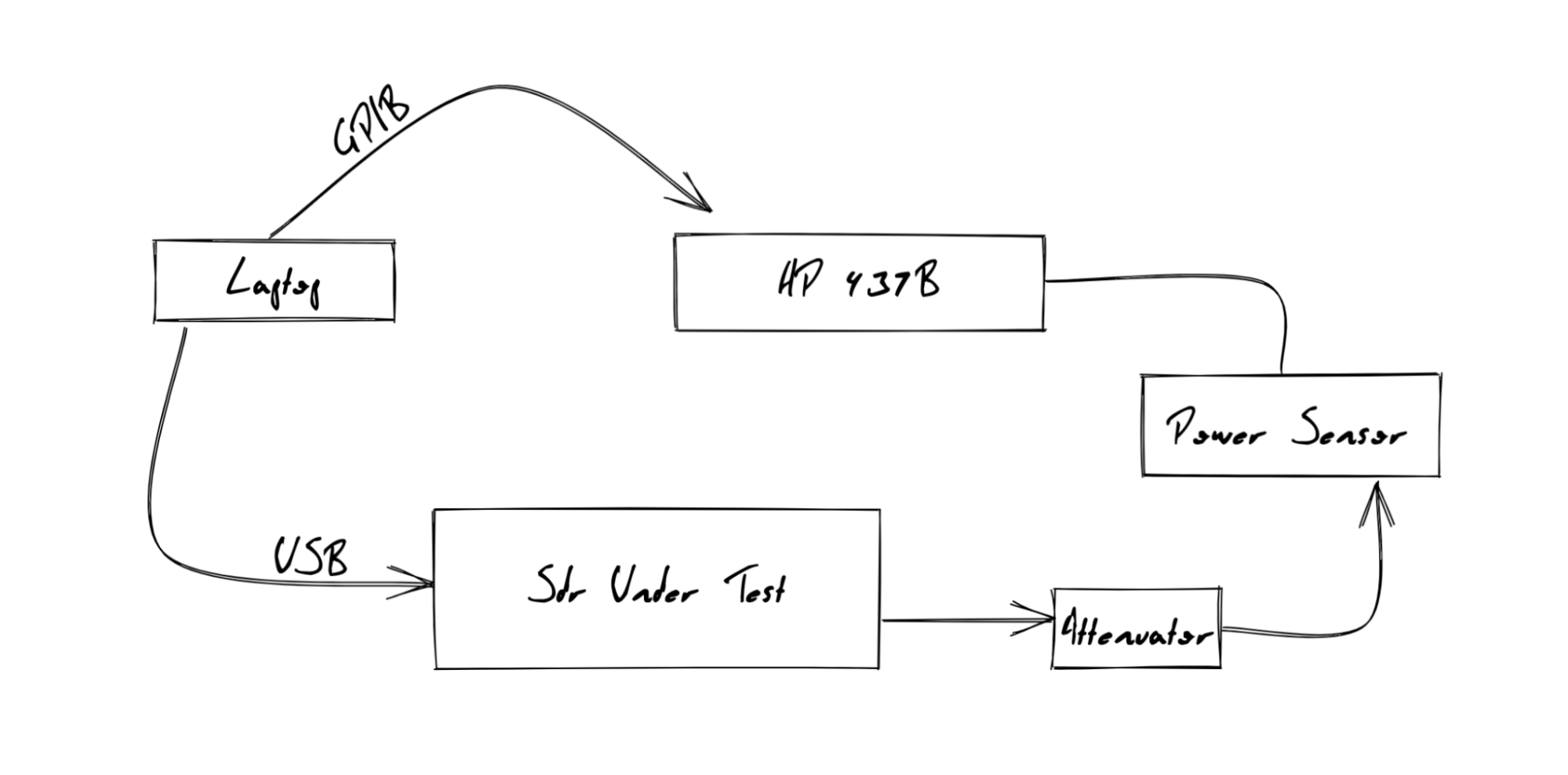
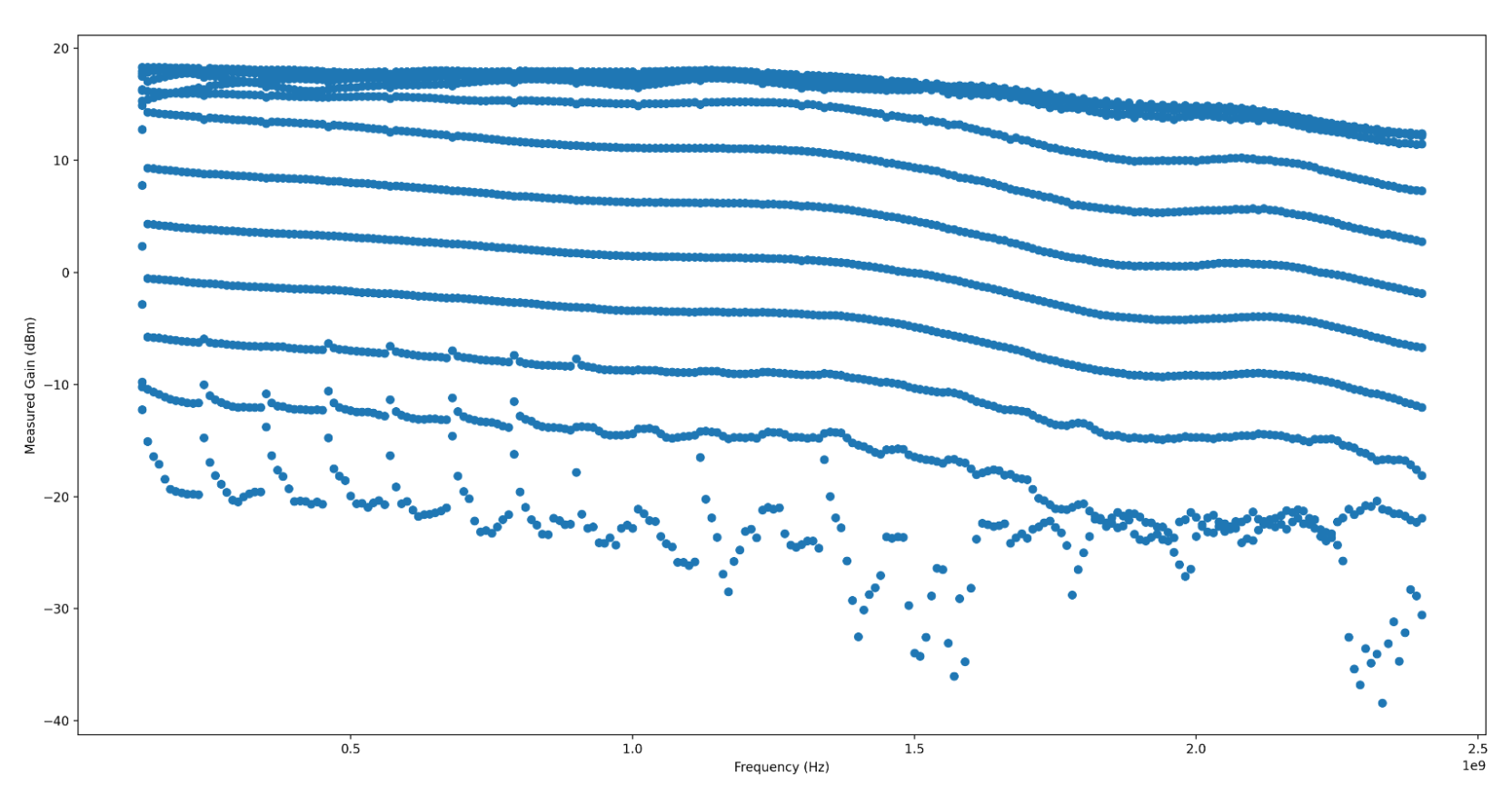
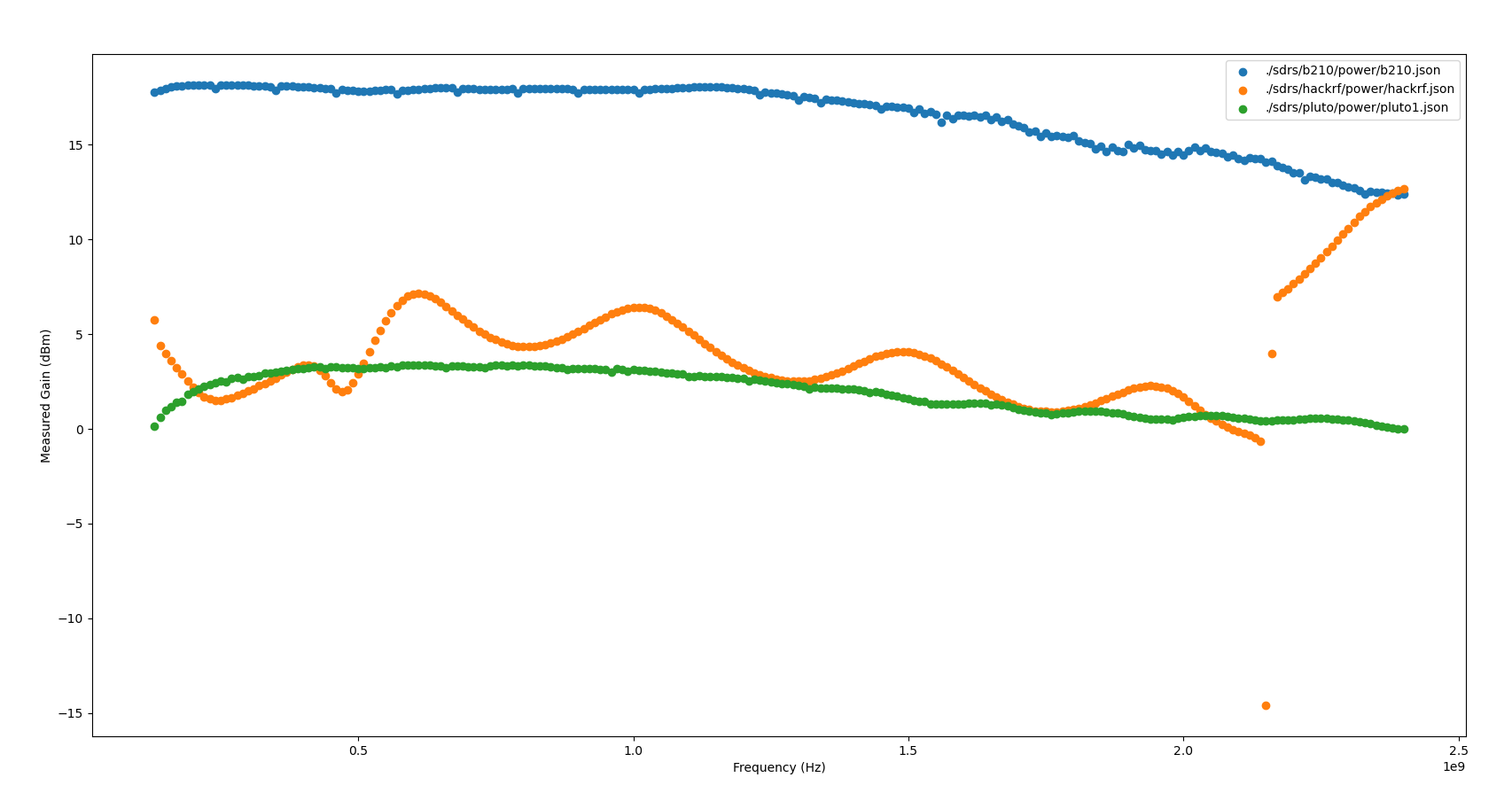
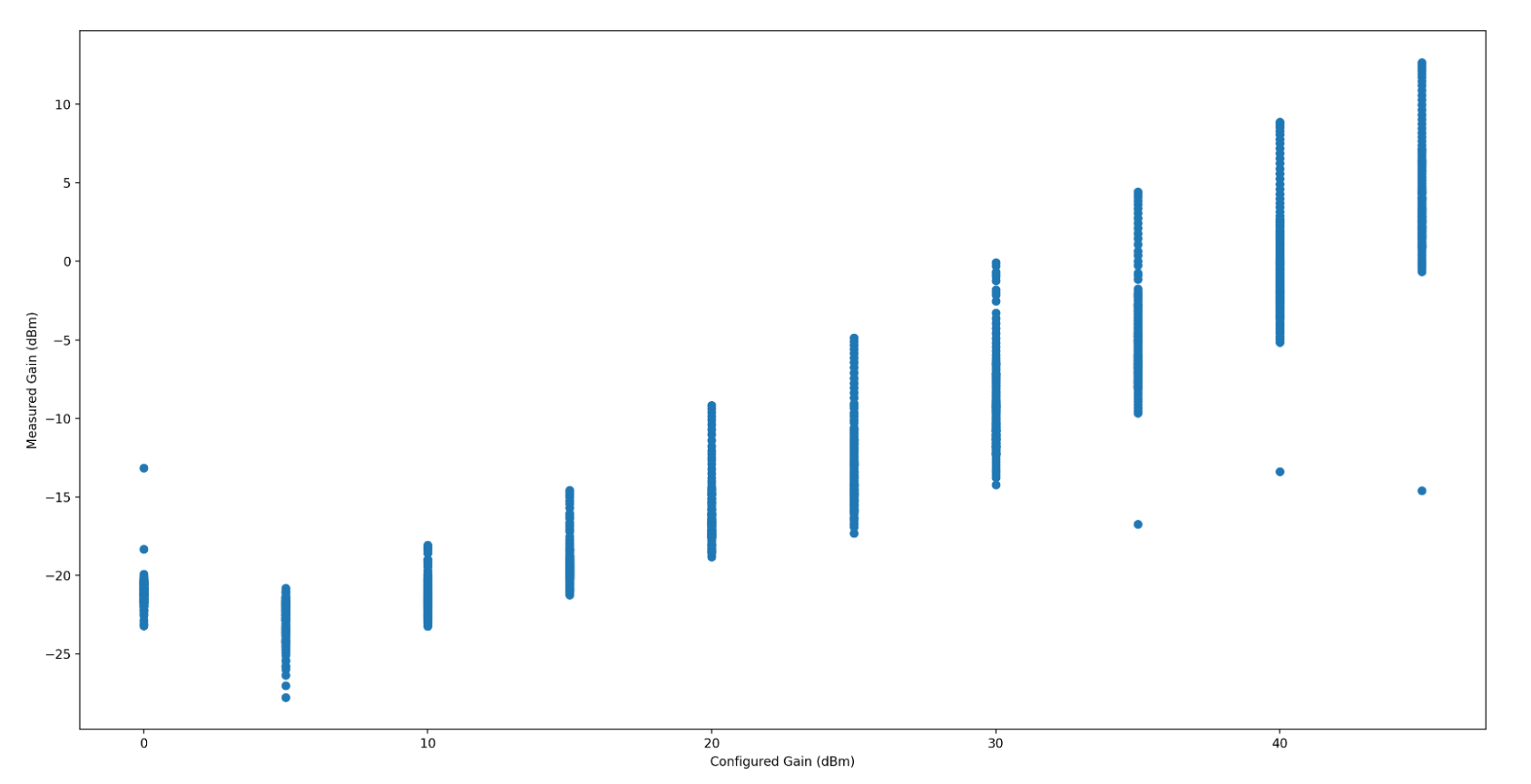 When looking at output power over the frequency range swept, the HackRF
contains a distinctive (and frankly jarring) ripple across the Frequency range,
with a clearly visible jump in gain somewhere around 2.1GHz. I have no idea
what is causing this massive jump in output gain, nor what is causing these
distinctive ripples. I d love to know more if anyone s familiar with HackRF s
RF internals!
When looking at output power over the frequency range swept, the HackRF
contains a distinctive (and frankly jarring) ripple across the Frequency range,
with a clearly visible jump in gain somewhere around 2.1GHz. I have no idea
what is causing this massive jump in output gain, nor what is causing these
distinctive ripples. I d love to know more if anyone s familiar with HackRF s
RF internals!
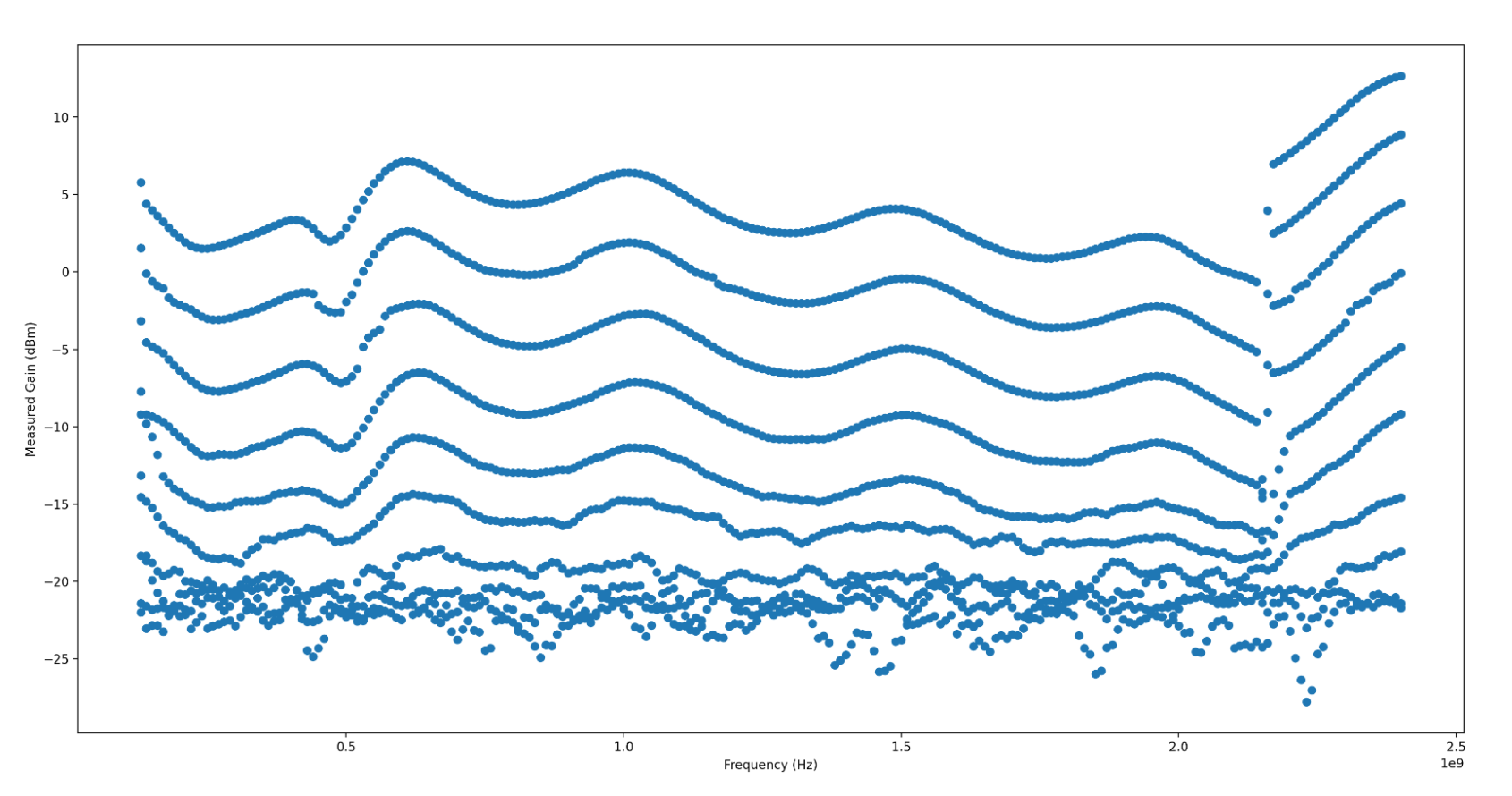
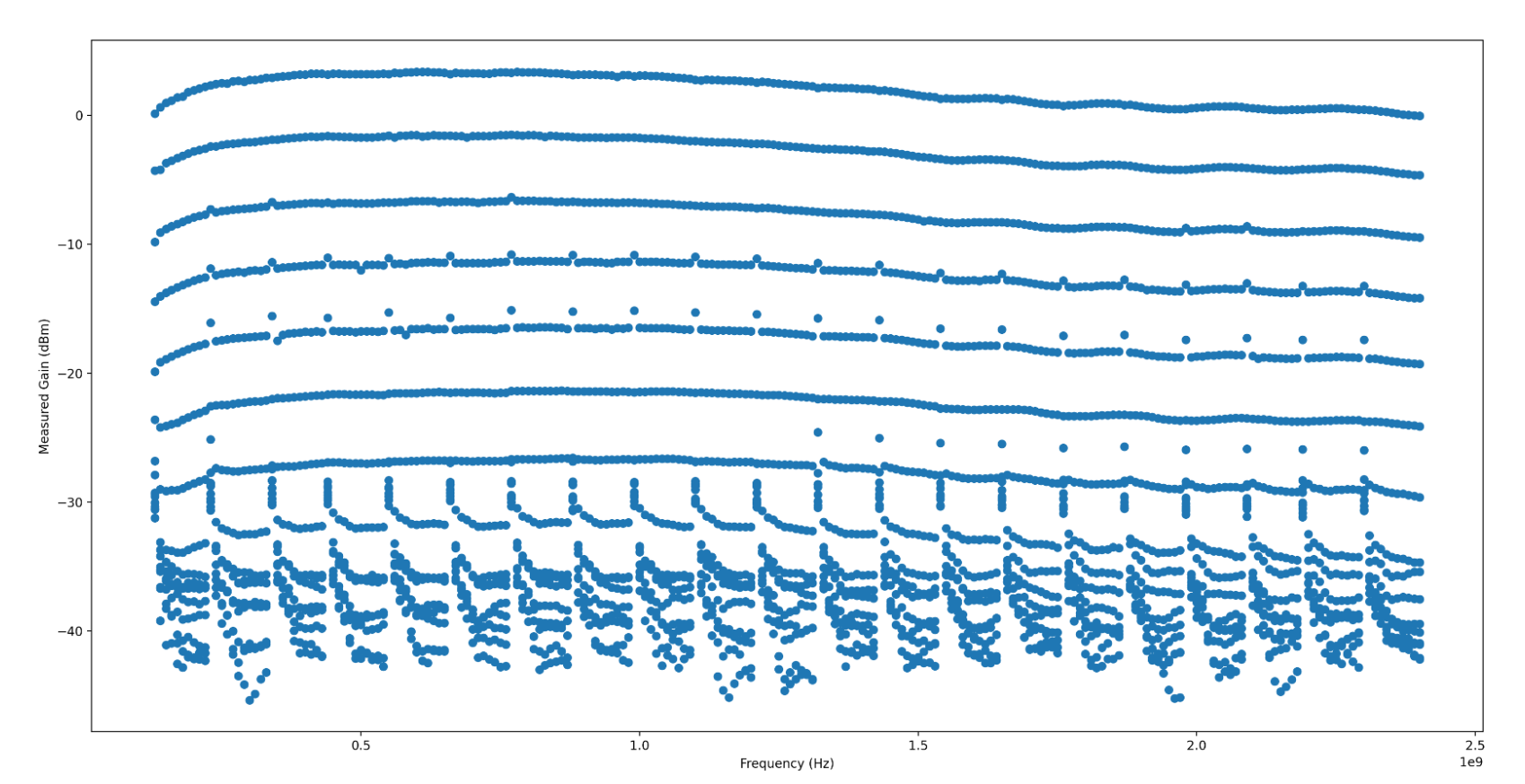
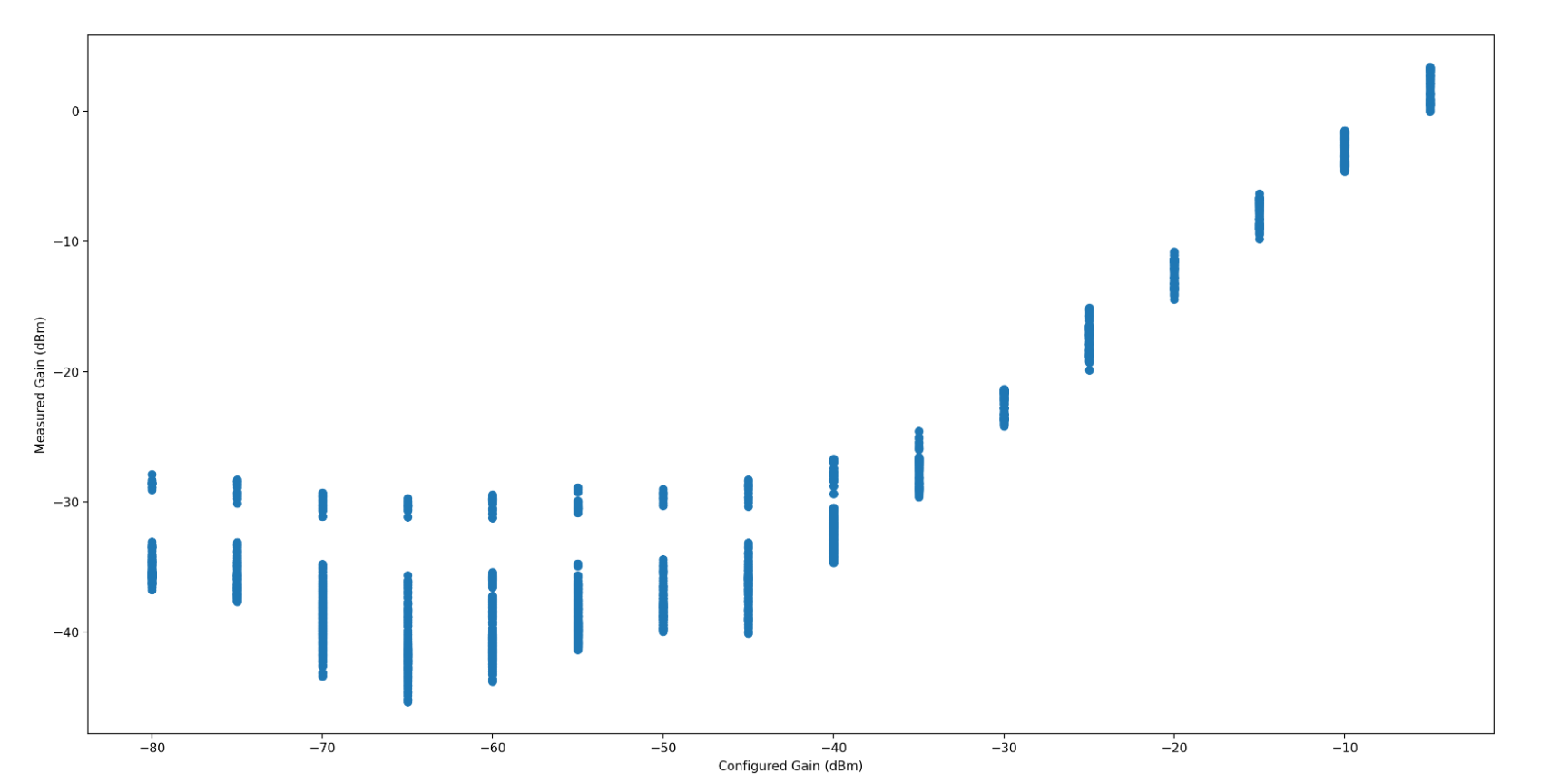 Generally, the power output is quite stable, and looks to have very even and
wideband gain control. There s a few artifacts, which I have not confidently
isolated to the SDR TX gain, noise (transmit artifacts such as intermodulation)
or to my test setup. They appear fairly narrowband, so I m not overly worried
about them yet. If anyone has any ideas what this could be, I d very much
appreciate understanding why they exist!
Generally, the power output is quite stable, and looks to have very even and
wideband gain control. There s a few artifacts, which I have not confidently
isolated to the SDR TX gain, noise (transmit artifacts such as intermodulation)
or to my test setup. They appear fairly narrowband, so I m not overly worried
about them yet. If anyone has any ideas what this could be, I d very much
appreciate understanding why they exist!
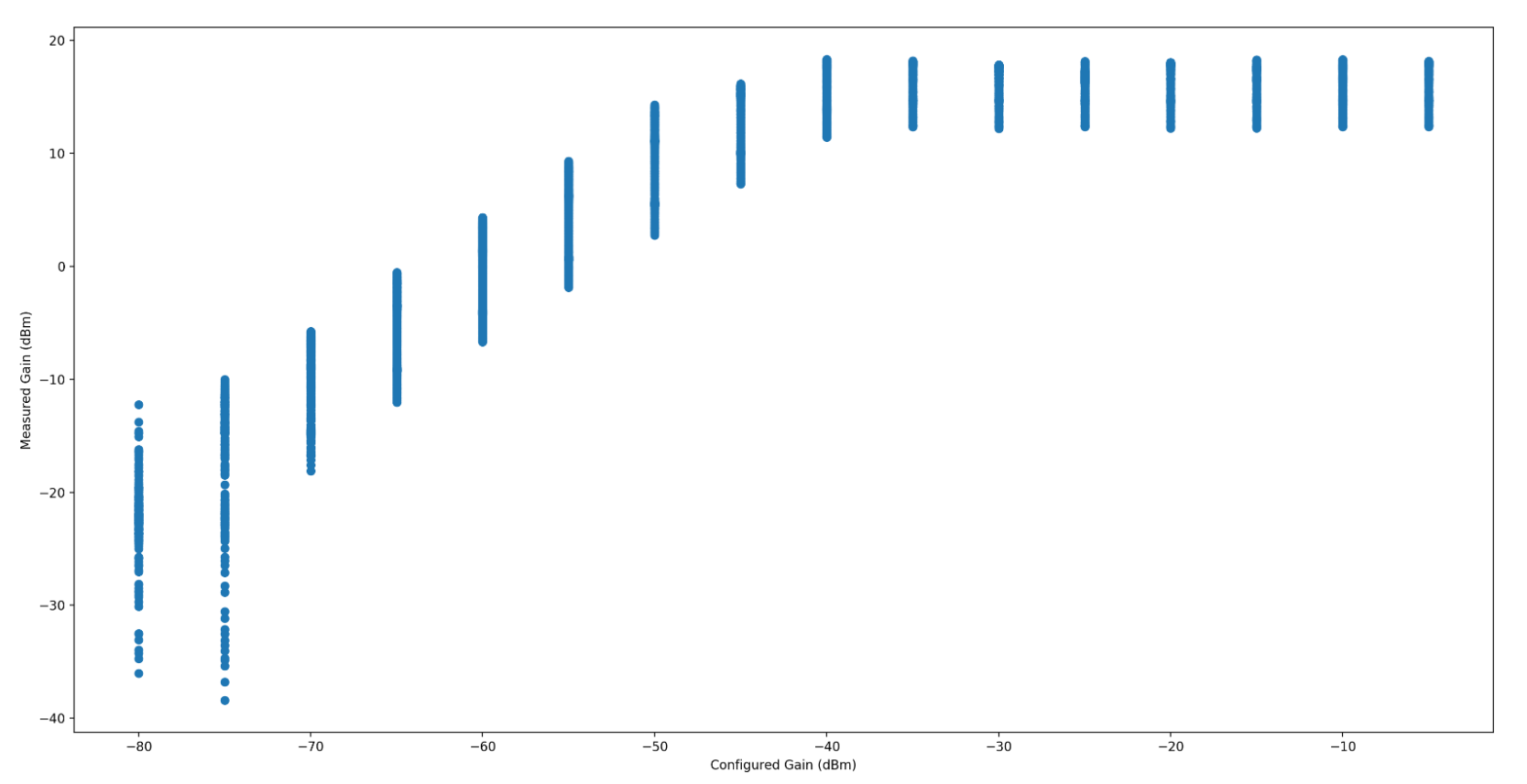 When the Gain is somewhere around the noise floor, the measured gain is
incredibly erratic, which throws the maximum standard deviation significantly.
I haven t isolated that to my test setup or the radio itself. I m inclined to
believe it s my test setup. The radio has a fairly even and wideband gain, and
so long as you re operating between -70dB to -55dB, fairly linear as well.
When the Gain is somewhere around the noise floor, the measured gain is
incredibly erratic, which throws the maximum standard deviation significantly.
I haven t isolated that to my test setup or the radio itself. I m inclined to
believe it s my test setup. The radio has a fairly even and wideband gain, and
so long as you re operating between -70dB to -55dB, fairly linear as well.
 Group photo of the Ruby Team in Brewberry Bar (Paris 2020)
 Here's a description of how my monthly external backups are managed at a
technical level. I didn't realise I hadn't written this all down anywhere yet.
What
Here's a description of how my monthly external backups are managed at a
technical level. I didn't realise I hadn't written this all down anywhere yet.
What



 Perl REGEX Problems courtesy of XKCD
 Grafana console showing the use of the label_replace function