Search Results: "xam"

9 December 2011

Alexander Reichle-Schmehl: RCBW (Release Critical Bugs of the Week) work flow addendum

Gregor Herrmann kindly posted his usual workflow for preparing non maintainer uploads (NMUs) fixing Release Critical bugs. I'd like to add, that it is usually a very good idea to also pts-subscribe to the package you uploaded, just in case you introduce some new bugs (see for #651452 or #651112 for examples of bugs I got to know after uploading NMUs). When subscribing you'll get copies of BTS activity, teesting migration and similar. You can either subscribe to that via the package tracking system at http://packages.qa.debian.org/<packagename> (see for example the iftop PTS) in the lower left box, or via the pts-subscribe command in the devscripts package. I prefer the later method, as that also creates a pts-unsubscribe job via at. But please know, that you need a working mail transfer agent as well as the tool at for that. Well, and it helps if you have a machine running most of the time ;)

Dirk Eddelbuettel: RInside 0.2.5

RInside 0.2.5 arrived on CRAN earlier today. RInside is a set of convenience classes which facilitate embedding of R inside of C++ applications and programs, using the classes and functions provided by the Rcpp R and C++ integration package. The big news for this release is that Windows applications once again run! James Bates gets full credit for noticing why Windows binaries died on startup, and provided a short patch which we (after some further simplicifcation) added. So for the first time since the 0.2.0 release, Windows users can just change into the examples/standard directory and issue a simple make -f Makefile.win, and the twelve example binaries will actually work. Yay, and kudos to James. The other main addition is a new examples directory examples/wt containing the web-application of the density estimation demo I had blogged about last week. By combining the Wt toolkit with RInside, we get C++ "web" applications containing R which is pretty nifty. The example otherwise follows the earlier Qt-based example of a standard desktop application with RInside. One minor snafu I just noticed is that I was overzealous with the .Rbuildignore file. By excluding the wt and qtbinaries, I also excluded their source files with the same name (up to the .cpp or .h ending). If you desire to run the examples, just grab these examples files from the SVN repo at R-Forge. All changes since the last release are summarized below:
0.2.5   2011-12-07
   o    Applied (somewhat simplified) patch by James Bates which restores
        RInside to working on Windows -- with a big Thank You! to James for
        fixing a long-standing bug we inadvertendly introduced right after
        0.2.0 almost two years ago
   o    New example embedding R inside a Wt (aka Webtoolkit, pronounced 
        'witty') application, mirroring the previous Qt application
   o    Qt example qtdensity now uses the new svg() device in base R; removed
        test for cairoDevice package as well as fallback png code
   o    Very minor fix to qmake.pro file for Qt app correcting link order
CRANberries also provides a short report with changes from the previous release. More information is on the RInside page. Questions, comments etc should go to the rcpp-devel mailing list off the Rcpp R-Forge page.

8 December 2011

Thomas Koch: On distributing binaries

Many software developers don't care about security. A typical Java developer downloads the Eclipse binary from eclipse.org, a website that doesn't even support https. He then continues to install binary eclipse plugins from several different web sites. Once development starts, maven continues to pull in hundreds of plugins and dependencies without checking their origin.
How do you still want to trust this machine with your private passwords or gpg key? I don't. Therefor I do java development at least in a chroot'ed environment. To make this point a bit less theoretic I've collected examples of compromised downloads or servers in recent months.
And another funny example, why you should not run sudo make install on any downloaded source code: The bumblebee rm -rf /usr disaster. Not so funny: 154 people killed in malware caused airplane crash. or Malware compromises USAF Predator drones
What's the morale? If you're a developer, then please get a gpg key, get it signed by many other developers and sign your release artifacts! And no, just publishing a SHA-1 or (god beware) MD5 hash of the artifact does not provide any security. It may just fool people to believe they'd be secure. (Google Code team, please fix this! Apache people, signing artifacts with gpg keys that don't have any signatures is at best useless!)
This blog post has been triggered by a post relating to the issue of binary incompatibilities between Scala versions. If I understand Josh Suereth correctly, he recommends to not worry about binary incompatibilities but to distribute libraries as source code and recompile them when necessary. AMEN! Please, make this a habbit in Scala land! If you then distribute source code in Git repositories you can make use of gpg signed tags.
And while you're at it, why not help your favorite linux distribution to package Scala stuff?

Dirk Eddelbuettel: Rcpp talk at Seattle RUG

Thanks to Zach and the Seattle R User Group for the invitation. Earlier this evening I gave a talk about R, C++ and our Rcpp package, focussing on the why, how, what, who, and "one more thing" higher-level aspects of extending R. This was supposed to be an hour long, and with the examples at the end went a little over, butat least nobody started to snore. The slides are now up at the top of my presentations page.

7 December 2011

Benjamin Mako Hill: Wide Scream

<object data="https://upload.wikimedia.org/wikipedia/commons/d/de/Aspect-ratio-4x3.svg" type="image/svg+xml"> https://upload.wikimedia.org/wikipedia/commons/d/de/Aspect-ratio-4x3.svg</object> <object data="https://upload.wikimedia.org/wikipedia/commons/f/f8/Aspect-ratio-16x9.svg" type="image/svg+xml"> https://upload.wikimedia.org/wikipedia/commons/f/f8/Aspect-ratio-16x9.svg</object> It seems that nearly all computer monitors have now switched from a 4:3 aspect ratio popular several years ago to a "wide screen" 16:10 and now mostly to an even wider 16:9. But screen sizes are usually measured by their diagonal length and those sizes have not changed. For example, before I had my Thinkpad X201, I had a X60 and a X35. They are similar laptops in the same product line with 12.1" screens. But 12.1" describes the size along the diagonal and the aspect ratio switched from 4:3 to 16:10 between the X60 and the X201. As the screen stretched out but maintained the same diagonal length, the area shrunk: from 453 square centimeters to 425. But screens are not only getting smaller, they are also getting less useful. The switch to wider aspect ratios is done so that people can watch wide screen movies while using a larger proportion of their screens. Of course, the vast majority of people's time on their laptops is not spent watching wide screen movies but in programs like browsers, word processors, and editors. Because most of our writing systems lay out documents from top to bottom, the tools we most frequently use to display (and then scroll through) the things we read primarily use vertical screen space -- the dimension that is shrinking. If you have a desktop monitor, you might rotate the whole thing 90 degrees and "solve" the problem. If you're on a laptop though (as I usually am) this is clearly not an option. I am not the first person to be annoyed by this trend. In fact, many recent desktop UI changes are designed to work around this issue. In the free software world, both Unity and GNOME 3 have made efforts to hide, merge, or otherwise get ride of title bars, menu bars, and panels that take up dwindling vertical space. I use Awesome which I've mostly set up to do two side-by-side terminals with very little in the way of menu bars. /copyrighteous/images/awesome_screenshot_2011-small.png Applications are the worst offenders and the solutions for those things that won't run in a terminal (or people that don't want to live there) are still lacking. I have been using Firefox's Tree Style Tab extension to move tabs to the side and hand-customized toolbars that squeeze everything I need (i.e., back, forward, stop, refresh, and URL bar) onto a single menu bar. /copyrighteous/images/iceweasel_menu_eg_screenshot_2011-small.png But the situation still drives me crazy. I'd love to hear what others are doing.

6 December 2011

Joachim Breitner: Guest lecture on Haskell performance

Today, I had some business in Bonn, so Janis Voigtl nder invited me to hold a guest lecture in his advanced functional programming course, maybe telling the students more about real world use of Haskell, given that he teaches mostly the theoretical foundations. I chose to discuss an experience I made while implementing SAT-Britney, namely that for the sake of good runtime and memory performance, it may be neither ideal to evaluate a list fully lazily, nor fully strict, but to have something in between. For the talk, I demonstrated this by a small example, showed how to use the GHCi debugger to get some insight in the evaluation order of things, how to benchmark the program and read the ghc statistics and a profiling chart, and finally how to get the most out of GHC s List Fusion. I wanted to also touch on QuickCheck, but skipped it to finish in time. The full text of my talk (including graphs) is available, but in German; if you want an English version convince your prof to invite me for a guest lecture as well. Afterwards I sat down with one of the students of the course, Helmut Grohne, who happened to take part in the Debian bug squashing party last weekend and had filed a release critical bug against the Haskell grammar generator frown (no better link available, homepage seems to be down) to debug the problem. It quickly became clear that the bug was introduced by me (can you spot it?) when trying to make it compile with a modern GHC slightly embarrassing for me.

Flattr this post

Craig Small: procps-ng 3.3.1 released

Procps-ng, the debian, Fedora and OpenSuSE fork of procps had another release today. This is a bugfix release that fixes some important bugs that have cropped up in 3.3.0 pgrep crashes, pgrep -u not finding processes and a problem with top forest view have all been fixed. An important addition to this release is that test scripts have now been added using the Dejagnu framework. This framework tests most of the programs that ship with procps-ng. There is only 100 tests so far and they are only tested for Linux architecture, but we expect to increase this test count and sophistication with each release. The test scripts even found long-present but unknown bugs in the package. For example, running ps with output flags around the signal masks work as expected in Linux, but fail on kFreeBSD. This is due to the unusual output of the relevant lines on that architecture. This is not a new bug, bug has been around for quite some time; noone ever noticed (or reported) it. The Debian package has already been built and uploaded to the master FTP server. Oh, and it is the first package with my new GPG key!

5 December 2011

Kees Cook: PGP key photo viewing

Handy command line arguments for gpg:
gpg --list-options show-photos --fingerprint 0xdc6dc026
This is nice to examine someone s PGP photo. You can also include it in --verify-options, depending on how/when you want to see the photo (for example, when doing key signings). If gpg doesn t pick the right photo viewer, you can override it with --photo-viewer 'eog %I' or similar.

2011, Kees Cook. This work is licensed under a Creative Commons Attribution-ShareAlike 3.0 License.
Creative Commons License

4 December 2011

Tanguy Ortolo: Concerning the good use of ITP

When someone wants to package a piece of software for Debian, he has to file an Intent to Package, by filing a special bug report against the pseudo-package wnpp (work-needing and prospective packages) with a title of ITP: software name . This way, we can synchronize our efforts, for instance if someone else wants to package the same piece of software. I have seen two recent examples of a misunderstanding of the correct use of such reports, so perhaps this reminder may be of some help for newcomers.While an Request for Package means that its author would like someone to package a piece of software, and ITP means that its author wants to package it himself and to have it integrated to Debian (in fact, an RFP also becomes an ITP when someone is willing to do the work). This means that the owner of an ITP bug is responsible for the corresponding work. Given that the ITP report is meant to inform others, that implies that he should document his progress by appending messages to the bug report. In particular, when something is blocking the work (typically a failure to find a sponsor), that should be indicated in the ITP report so that it does not appear as being abandoned. So, in a nutshell, when you have opened an ITP, do not expect someone to take it, to reply to it or whatever deus ex machina; you are now the owner of that bug, which means you are responsible of making it live and eventually closing it by sending your package to Debian. The progress of a packaging work should be documented, especially if it requires some specific help such as sponsoring, and the ITP report is the best place to do that since this is where interested people will look for status information.

Francois Marier: Optimising PNG files

I have written about using lossless optimisations techniques to reduce the size of images before, but I recently learned of a few other tools to further reduce the size of PNG images.

Basic optimisationWhile you could use Smush.it to manually optimise your images, if you want a single Open Source tool you can use in your scripts, optipng is the most effective one:
optipng -o9 image.png

Removing unnecessary chunksWhile not as effective as optipng in its basic optimisation mode, pngcrush can be used remove unnecessary chunks from PNG files:
pngcrush -q -rem gAMA -rem alla -rem text image.png image.crushed.png
Depending on the software used to produce the original PNG file, this can yield significant savings so I usually start with this.

Reducing the colour paletteWhen optimising images uploaded by users, it's not possible to know whether or not the palette size can be reduced without too much quality degradation. On the other hand, if you are optimising your own images, it might be worth trying this lossy optimisation technique.

For example, this image went from 7.2 kB to 5.2 kB after running it through pngnq:
pngnq -f -n 32 -s 3 image.png

Re-compressing final imageMost PNG writers use zlib to compress the final output but it turns out that there are better algorithms to do this.

Using AdvanceCOMP I was able to bring the same image as above from 5.1kB to 4.6kB:
advpng -z -4 image.png

When the source image is an SVGAnother thing I noticed while optimising PNG files is that rendering a PNG of the right size straight from an SVG file produces a smaller result than exporting a large PNG from that same SVG and then resizing the PNG to smaller sizes.

Here's how you can use Inkscape to generate an 80x80 PNG:
inkscape --without-gui --export-width=80 --export-height=80 --export-png=80.png image.svg

3 December 2011

Patrick Schoenfeld: Let me introduce DPKG::Log and dpkg-report

We have customers, which require a report about what we've done during maintenance windows. Usually this includes a report about upgrades, newly installed packages etc. and obviously everything we've done apart from that.
Till now we've prepared them manually. For a greater bunch of systems this is a big PITA, because to be somehow useful you have to collect the data for all systems and after that, prepare a report where you have:

Its also error-prone because humans make mistakes.

Perl to the rescue!
At least the part about generating a report about installed/upgraded/removed packages could be automated, because dpkg writes a well-formed logfile in /var/log/dpkg.log. But I noticed that there appearently is no library specialised at parsing that file. Its not a big deal, because the format of that file is really simple, but a proper library would be nice anyway.
And so I wrote such a library.
It basically takes a logfile, reads it line by line and stores each line parameterized into a generic object.

Its features include:

Based on that, I wrote another library DPKG::Log::Analyse, which takes a log, parses it with DPKG::Log and then extracts the more relevant information such as installed packages, upgraded packages, removed packages etc.

This, in turn, features:
- Info about newly installed packages
- Info about removed packages
- Info about upgraded packages
- Info about packages which got installed and removed again
- Info about packages which stayed halfinstalled or halfconfigured at the end of the logfile (or defined reporting period)


These libraries are already uploaded to CPAN and packaged for Debian.
They passed the NEW queue very quickly and are therefore available for Sid:

http://packages.debian.org/sid/libdpkg-log-perl

As an example use (and for my own use case, as stated above), I wrote dpkg-report, which uses the module and a Template::Toolkit based template to generate a report about what happened in the given logfile.
It currently misses some documentation, but it works somehow like this:

Report for a single host over the full log:
dpkg-report

Report for a single host for the last two days:
dpkg-report --last-two-days

Report for multiple hosts (and logfiles):
The script expects that each log file has the name <systemname>.dpkg.log so that it can guess the hostname from the system and can grab all such log files from a directory if a directory is specified as log-file arguments:</systemname>

dpkg-report --log-file /path/to/logs

This will generate a report about all systems without any merging.

Report for multiple hosts with merging:
dpkg-report --log-file /path/to/logs --merge

This will do the following:
A (fictive) report could look some what like this:

dpkg-Report for all:
------------------------
Newly Installed:
abc
Removed:
foo
Upgraded:
bar (0.99-12 - 1.00-1)
dpkg-Report for test*:
------------------------
Newly Installed:
blub
dpkg-Report for test1:
------------------------
Upgraded:
baz (1.0.0-1 -> 1.0.0-2)
dpkg-Report for test2:
------------------------
Upgraded:
zab (0.9.7 -> 0.9.8)

Currently this report generator is only included in the source package or in the git(hub) repository of the library. I wonder if it makes sense to let the source package build another binary package for it.
But its only a 238 lines perl script with a dependency on the perl library so I'm unsure if it warrants a new binary package. What do others think?

Steve Kemp: So I removed some more software from my host

Today I was idly performing some maintainence upon one of my hosts, and it crossed my mind to look beneath /etc in there I found:
/etc/python
/etc/python2.4
/etc/python2.5
/etc/python2.6
That made me look more closely at the contents of /etc - the following command output was surprising:
steve@steve:~$ ls /etc   wc -l
187
Is that average? Heavy? Light? I have no idea, but I purged a hell of a lot of software today. Now I have only python v2.6 although for some reason I still have:
python
python-apt
python-apt-common
python-central
python-minimal
python-support
python2.6
python2.6-minimal
I suspect I could drop the pything2.6-minimal package, but for the moment I'm done. I have to make pretty people look exceptional with my magical camera. Anyway as part of this cleanup I ran a quick sanity-check on which processes are running and I think, short of kernel processes, I'm as minimal as I can be. I understand the purpose and reason for every running service:
UID        PID  CMD
root         1  init [2]
pdnsd    14091  /usr/sbin/pdnsd --daemon -p /var/run/pdnsd.pid
root     14199  /usr/sbin/monit -c /etc/monit/monitrc -s /var/lib/monit/monit.state
root     14206  /usr/sbin/syslog-ng -p /var/run/syslog-ng.pid
root     14234  /usr/sbin/cron
102      14595  /usr/sbin/exim4 -bd -q30m
redis    14627  /usr/bin/redis-server /etc/redis/redis.conf
root     14637  /usr/sbin/sshd
These are basic services; I use monit to ensure those essential daemons keep running. The only oddity there is probably the local DNS cache, but it is useful if you run any kind of DNS blacklist-using service, for example.
root     14794  /sbin/getty -L ttyS0 9600 vt100
I need a serial console login for emergencies.
root     14796  runsv node-reverse-proxy
root     14797  /bin/sh ./run
root     14799  /opt/node/bin/node node-reverse-proxy.js --config ./rewrites.js
These three processes combine to run my reverse proxy which routes incoming HTTP requests to a number of local thttpd instances.
qpsmtpd  27309    /usr/bin/perl -Tw /usr/bin/qpsmtpd-prefork --port 25 --user qpsmtpd --pid-file /var/run/qpsmtpd/qpsmtpd.pid --detach
..
The perl SMTP daemon which runs my incoming mail, passing it to exim4 which listens upon 127.0.0.1:2525. You can read about my setup in the out-of-date writeup Chris & I put together.
 /usr/bin/memcached -m 64 -p 11211 -u root -l 127.0.0.1
Memory cache for transient items.
s-blog    thttpd -C /etc/thttpd/sites.enabled/blog.steve.org.uk
1030      thttpd -C /etc/thttpd/sites.enabled/edinburgh-portraits.com
s-hg      thttpd -C /etc/thttpd/sites.enabled/hg.steve.org.uk
s-ipv4    thttpd -C /etc/thttpd/sites.enabled/ipv4.steve.org.uk
s-ipv6    thttpd -C /etc/thttpd/sites.enabled/ipv6.steve.org.uk
s-kvm     thttpd -C /etc/thttpd/sites.enabled/kvm-hosting.org
...
One thttpd instance is launched for each distinct HTTP site my server runs. Each site runs under its own UID, with its own chrooted directory tree. This is important for security. Each local instance listens upon 127.0.0.1 - and the reverse proxy previously mentioned rewrites connections to the appropriate one.
1016     28812     /usr/bin/perl -I./lib/ -I./ /usr/local/bin/blogspam
My anti-spam filter for blog comments.
Here is my christmas challenge. Can you identify each service upon your host? Do you know why you're running what you're running? Me? I had no idea I had a dbus deamon running. Now I've purged it. Ha! ObQuote - "I owe everything to George Bailey. Help him, dear Father." - It's a wonderful life.

1 December 2011

Dirk Eddelbuettel: Wicked Webapps with R, err, Wt

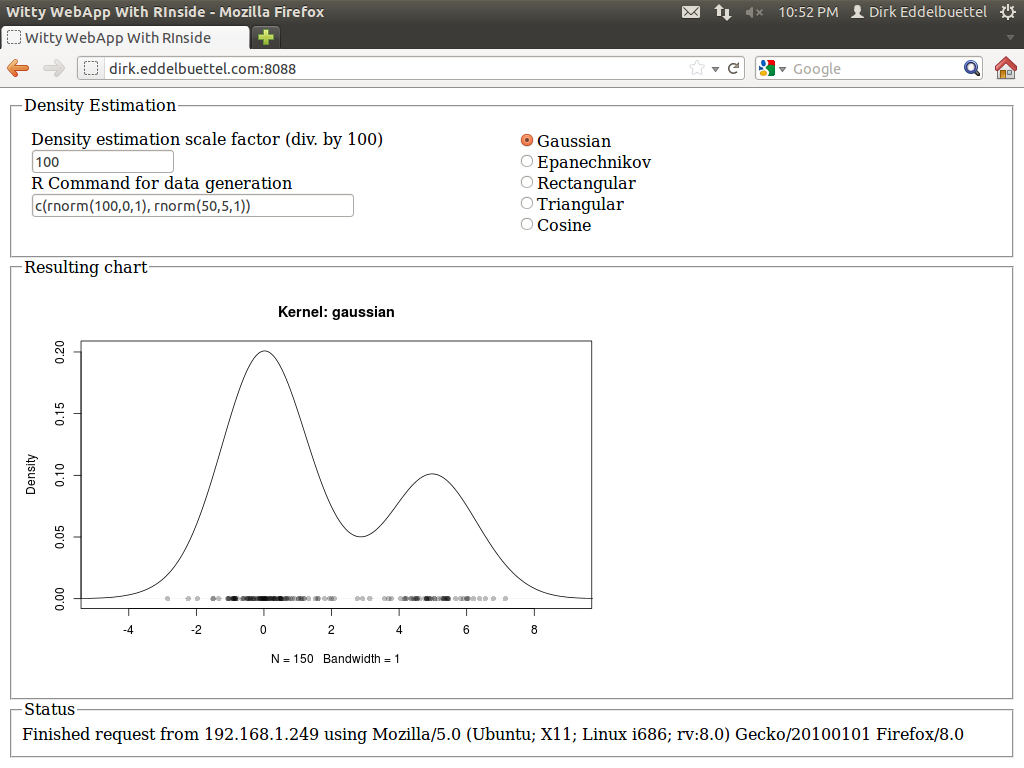
A few months ago, I had blogged about using R inside of Qt. This used our RInside package for embedding the statistical programming environment and language R inside of a C++ application, and further relies on our Rcpp package for R and C++ integration and object mapping. The example was simple yet powerful: a reimplementation of the standard GUI application of a standard density estimate. Here the user can pick a kernel density function from a selection, and also slide a bandwidth parameter. One nice addition was an entry field already populated with a simple expression for a mixture of Normals, allowing for arbitrary random distributions over which to estimate. The example is pretty (thanks to Qt), and was added to RInside with the last CRAN release 0.2.4. The blog post has a nice screenshot. I had long wondered how to do something similar 'on the web'. Web integration and application frameworks are of course a dime a dozen: Just about any language offers this, with more or less ease. But I wanted something simple yet powerful and fast. And I did not like the idea of a multi-tier app, or of a multi-language mix. I remember having seen something about a web-application framework not unlike Qt, and studying the very useful Wikipedia web application framework comparison I re-discovered Wt (pronounced "Witty"). So there it is, using C++ which brings us ample performance, the ability to connect to a number of libraries and applications (which is important in my quantitatively-minded workd) and avoid the whole multi-tier, multi-language combination. The Wt website has a few more good reason why this may be a suitable idea; the toolkit also offers a very decent amount of features and is amply documented with a fair number of examples. And after just a little bit poking around during two weekends, I now have the following webapp committed in the SVN repository of RInside, and it is all implemented in in less than two hundred (generously commented) lines of code. Example of embedding R via RInside into a Wt C++ application: density estimation for a mixture It is currently up and running at the address shown in the screenshot, so give it a go (though I may take it down at another point in time). I quite like it: The application is responsive: changes in the radio buttons (for the density), or the bandwidth, each trigger reestimation of the density, and a new and updated chart is displayed immediately with no noticeable delay---just like the desktop application did. Best of all, the code logic is essentially unchanged from the Qt-based app. Signals and slots related events to actions, the layout is in terms of standard GUI boxen and containers. And best of all, I did not have to write a line of html, javascript, css or ajax: it is all handled by the Wt toolkit. I was able to drive the app from an Android phone, my tablet, various computers around the house, and had a few friends poke a stick at it from afar. There is at one open issue. Wt launches new instances of the application object with each connection, which is a very clean model. That doesn't map perfectly with R (which is single-threaded) and RInside (which runs as a singleton for the same reason). So right now, each action sends its state back to the client. In other words, each clients own its parameters and well as vector of random numbers. Each new action sends these back to the app which passes it to R, launches the re-estimation and gets an updated chart back which is then shown by the the client. That is not perfect, and maybe a forking model as used by Simon's RServe would be better, though it would require a rewrite of RInside. Not sure if we get there anytime soon. And for simple applications not facing legions of concurrent users, the singleton should still work. It's a proof of concept at this point. Feedback welcome, and RInside and Rcpp questions should go to the rcpp-devel list as usual.

29 November 2011

Jon Dowland: mail archiving

I wrote a quick proof-of-concept script that can traverse my email (in local Maildir format) and detach all attachments: saving them to another location and replacing them with a text attachment which documents where they've gone. This reduces my work mailbox size substantially and allows for more space-efficient storage of the attachments (utilising all 8 bits of the byte, at the very least, but with the potential for compression to be added to the mix). It maintains the link between email and attachment, however, which is crucial if the method of discovery of the attachment in the future is to find the email. For this to be future proof, the path where the mail is saved needs to be. The best scheme I can think of involves dedicating a sub-domain to the problem and using a URI scheme which is guaranteed1 to be unique for the attachment, such as a hash-sum:
https://file.example.com/sha1/509c2fe2eba509e93987c3024a74d74583c274bd
I could finish up my script, set my my own personal infrastructure for this and convert my mailbox with a few hours more work. Before I do, I have two questions:

  1. within the practical limitations of hashing algorithms, at least.

Lior Kaplan: Translation status for LibreOffice 3.5.0 beta0

Following the good examples of Christian Perrier (Debian l10n leader), I m glad to publish translation status update for LibreOffice 3.5.0 beta0. Information is based on the documentation foundation pootle server. 9 languages at 100%: Catalan (ca), Danish (da), French (fr), Scottish Gaelic (gd), Portuguese (pt), Portuguese (Brazil) (pt_BR), Russian (ru), Slovenian (sl) and Chinese (China) (zh_CN). 15 languages at 99%: Asturian (ast), Bulgarian (bg), Breton (br), Welsh (cy), Belarusian (be), German (de), English (United Kingdom) (en_GB), Esperanto (eo), Estonian (et), Galician (gl), Latvian (lv), Norwegian Bokm l (nb), Polish (pl), Turkish (tr) and Slovak (sk). 1 languages at 98%: Hungarian (hu) 15 languages at 97%: Assamese (as), Czech (cs), Chinese (Taiwan) (ch_TW), Spanish (es), Basque (eu), Finnish (fi), Irish (ga), Gujarati (gu), Croatian (hr), Italian (it), Icelandic (is), Kannada (kn), Marathi (mr), Dutch (nl) andTelugu (te). 2 languages at 96%: Hebrew (he) and Japanese (ja). 1 languages at 95%: Vietnamese (vi) 5 languages at 94%: English (South Africa) (en_ZA), Indonesian (id), Khmer (km), Tamil (ta) and Uighur (ug). 4 languages at 93%: Arabic (ar), Bengali (bn), Catalan (Valencia) (ca_XV) and Korean (ko). 1 languages at 92%: Oriya (or). 1 languages at 91%: Swedish (sv). 1 languages at 90%: Greek (el). 11 languages between 80%-89%: Afrikaans (af), Bosnian (bs), Hindi (hi), Lithuanian (lt), Macedonian (mk), Burmese (my), Norwegian Nynorsk (nn), Occitan (oc), Oromo (om), Sinhala (si) and Ukrainian (uk). 11 languages between 70%-79%: (no list) 10 languages between 60%-69%: (no list) 13 languages between 50%-59%: (no list)
Filed under: LibreOffice

28 November 2011

Vincent Bernat: SSL/TLS & Perfect Forward Secrecy

Once the private key of some HTTPS web site is compromised, an attacker is able to build a man-in-the-middle attack to intercept and decrypt any communication with the web site. The first step against such an attack is the revocation of the associated certificate through a CRL or a protocol like OCSP. Unfortunately, the attacker could also have recorded past communications protected by this private key and therefore decrypt them. Forward secrecy allows today information to be kept secret even if the private key is compromised in the future. Achieving this property is usually costly and therefore, most web servers do not enable it on purpose. Google recently announced support of forward secrecy on their HTTPS sites. Adam Langley wrote a post with more details on what was achieved to increase efficiency of such a mechanism: with a few fellow people, he wrote an efficient implementation of some elliptic curve cryptography for OpenSSL.

Without forward secrecy To understand the problem when forward secrecy is absent, let s look at the classic TLS handshake when using a cipher suite like AES128-SHA. During this handshake, the server will present its certificate and both the client and the server will agree on a master secret. TLS full handshake This secret is built from a 48byte premaster secret generated and encrypted by the client with the public key of the server. It is then sent in a Client Key Exchange message to the server during the third step of the TLS handshake. The master secret is derived from this premaster secret and random values sent in clear-text with Client Hello and Server Hello messages. This scheme is secure as long as only the server is able to decrypt the premaster secret (with its private key) sent by the client. Let s suppose that an attacker records all exchanges between the server and clients during a year. Two years later, the server is decommissioned and sent for recycling. The attacker is able to recover the hard drive with the private key. She can now decrypt any session she recorded: the encrypted premaster secret sent by a client is decrypted with the private key and the master secret is derived from it. The attacker can now recover passwords and other sensitive information that can still be valuable today. The main problem lies in the fact that the private key is used for two purposes: authentication of the server and encryption of a shared secret. Authentication only matters while the communication is established, but encryption is expected to last for years.

Diffie-Hellman with discrete logarithm One way to solve the problem is to keep using the private key for authentication but uses an independent mechanism to agree on a shared secret. Hopefully, there exists a well-known protocol for this: the Diffie-Hellman key exchange. It is a method of exchanging keys without any prior knowledge. Here is how it works in TLS:
  1. The server needs to generate once (for example, with openssl dhparam command):
  2. The server picks a random integer a and compute g^a \mod p . After sending its regular Certificate message, it will also send a Server Key Exchange message (not included in the handshake depicted above) containing, unencrypted but signed with its private key for authentication purpose:
    • random value from the Client Hello message,
    • random value from the Server Hello message,
    • p , g ,
    • g^a\mod p=A .
  3. The client checks that the signature is correct. It also picks a random integer b and sends g^b \mod p=B in a Client Key Exchange message. It will also compute A^b\mod p=g^ ab \mod p which is the premaster secret from which the master secret is derived.
  4. The server will receive B and compute B^a\mod p=g^ ab \mod p which is the same premaster secret known by the client.
Again, the private key is only used for authentication purpose. An eavesdropper will only know p , g , g^a\mod p and g^b\mod p . Computing g^ ab \mod p from those values is the discrete logarithm problem for which there is no known efficient solution. Because the Diffie-Hellman exchange described above always uses new random values a and b , it is called Ephemeral Diffie-Hellman (EDH or DHE). Cipher suites like DHE-RSA-AES128-SHA use this protocol to achieve perfect forward secrecy1. To achieve a good level of security, parameters of the same size as the key are usually used (the security provided by the discrete logarithm problem is about the same as the security provided by factorisation of two large prime numbers) and therefore, the exponentiation operations are pretty slow as we can see in the benchmark below: Graphical comparison of speed with and without DHE

Diffie-Hellman with elliptic curves Fortunately, there exists another way to achieve a Diffie-Hellman key exchange with the help of elliptic curve cryptography which is based on the algebraic structure of elliptic curves over finite fields. To get some background on this, be sure to check first Wikipedia article on elliptic curves. Elliptic curve cryptography allows one to achieve the same level of security than RSA with smaller keys. For example, a 224bit elliptic curve is believed to be as secure as a 2048bit RSA key.

Some theory Diffie-Hellman key exchange described above can easily be translated to elliptic curves. Instead of defining p and g , you get some elliptic curve, y^2=x^3+\alpha x+\beta , a prime p and a base point G . All those parameters are public. In fact, while they can be generated by the server, this is a difficult operation and they are usually chosen among a set of published ones. The use of elliptic curves is an extension of TLS described in RFC 4492. Unlike with the classic Diffie-Hellman key exchange, the client and the server need to agree on the various paremeters. Most of this agreement is done inside Client Hello and Server Hello messages. While it is possible to define some arbitrary parameters, web browsers will only support a handful of predefined curves, usually NIST P-256, P-384 and P-521. From here, the key exchange with elliptic curves is pretty similar to the classic Diffie-Hellman one:
  1. The server picks a random integer a and compute aG which will be sent, unencrypted but signed with its private key for authentication purpose, in a Server Key Exchange message.
  2. The client checks that the signature is correct. It also picks a random integer b and sends bG in a Client Key Exchange message. It will also compute b\cdot aG=abG which is the premaster secret from which the master secret is derived.
  3. The server will receive bG and compute a\cdot bG=abG which is the same premaster secret known by the client.
An eavesdropper will only see aG and bG and won t be able to compute efficiently abG . Using ECDHE-RSA-AES128-SHA cipher suite (with P-256 for example) is already a huge speed improvement over DHE-RSA-AES128-SHA thanks to the reduced size of the various parameters involved. Web browsers only support a handful of well-defined elliptic curves, chosen to ease an efficient implementation. Bodo M ller, Emilia K sper and Adam Langley have provided 64bit optimized versions of NIST P-224, P-256 and P-521 for OpenSSL. To get even more details on the matter, you can read the end of the introduction on elliptic curves from Adam Langley, then a short paper from Emilia K sper which presents a 64bit optimized implementation of the NIST elliptic curve NIST P-224.

In practice First, keep in mind that elliptic curve cryptography is not supported by all browsers. Recent versions of Firefox and Chrome should handle NIST P-256, P-384 and P-521 but for most versions Internet Explorer, you are currently out of luck. Therefore, you need to keep accepting other cipher suites. You need a recent version of OpenSSL. Support for ECDHE cipher suites has been added in OpenSSL 1.0.0. Check with openssl ciphers ECDH that your version supports them. If you want to use the 64bit optimized version, you need to run a snapshot of OpenSSL 1.0.1, configured with enable-ec_nistp_64_gcc_128 option. A recent GCC is also required in this case. Next, you need to choose the appropriate cipher suites. If forward secrecy is an option for you, you can opt for ECDHE-RSA-AES128-SHA:AES128-SHA:RC4-SHA cipher suites which should be compatible with most browsers. If you really need forward secrecy, you may opt for ECDHE-RSA-AES128-SHA:DHE-RSA-AES128-SHA:EDH-DSS-DES-CBC3-SHA instead. Then, you need to ensure the order of cipher suites is respected. On nginx, this is done with ssl_prefer_server_ciphers on. On Apache, this is SSLHonorCipherOrder on. UPDATED: You need to check ECDHE support for your web server. For nginx, the support has been added in 1.0.6 and 1.1.0. The curve selected defaults to NIST P-256. You can specify another one with ssl_ecdh_curve directive. For Apache, it has been added in 2.3.3 and does not exist in the current stable branch. Adding support for ECDHE is quite easy. You can check how I added it in stud. This issue also exists for DHE cipher suites, in which case you also might have to specify DH parameters to use (generated with openssl dhparam) using some special directive or by appending the parameters to the certificate. Check Immerda Techblog article for more background about this point. The implementation of TLS session tickets may be incompatible with forward secrecy, depending on how they are implemented. When they are protected by a random key generated at the start of the server, the same key could be used for months. Some implementations2 may derive the key from the private key. In this case, forward secrecy is broken. If forward secrecy is a requirement for you, you need to either disable tickets or ensure that key rotation happens often. Check with openssl s_client -tls1 -cipher ECDH -connect 127.0.0.1:443 that everything works as expected.

Some benchmarks With the help of the micro-benchmark tool that I developed for my previous article, we can compare the efficiency of cipher suites providing forward secrecy: Speed comparison with/without DHE/ECDHE I have used a snapshot of OpenSSL 1.0.1 (2011/11/25). The optimized version of ECDHE is the one you get by using enable-ec_nistp_64_gcc_128 option when configuring OpenSSL. Let s focus on the server part. Enabling DHE-RSA-AES128-SHA cipher suite hinders the performance of TLS handshakes by a factor of 3. Using ECDHE-RSA-AES128-SHA instead only adds an overhead of 27%. However, if we use the 64bit optimized version, the cost is only 15%. The overhead is only per full TLS handshake. If 3 out of 4 of your handshakes are resumed, you need to adjust the numbers. Your mileage may vary but the computational cost for enabling perfect forward secrecy with an ECDHE cipher suite seems a small sacrifice for better security.

  1. Perfect forward secrecy is an enhanced version of forward secrecy. It assumes each exchanged key are independent and therefore a compromised key cannot be used to compromise another one.
  2. For example, this is the case of the implementation I have proposed for stud to enable sharing of tickets between multiple hosts.

Dirk Eddelbuettel: A Story of Life and Death. On CRAN. With Packages.

The Comprehensive R Archive Network, or CRAN for short, has been a major driver in the success and rapid proliferation of the R statistical language and environment. CRAN currently hosts around 3400 packages, and is growing at a rapid rate. Not too long ago, John Fox gave a keynote lecture at the annual R conference and provided a lot of quantitative insight into R and CRAN---including an estimate of an incredible growth rate of 40% as a near-perfect straight line on a log-log chart! So CRAN does in fact grow exponentially. (His talk morphed into this paper in the R Journal, see figure 3 for this chart.) The success of CRAN is due to a lot of hard work by the CRAN maintainers, lead for many years and still today by Kurt Hornik whose dedication is unparalleled. Even at the current growth rate of several packages a day, all submissions are still rigorously quality-controlled using strong testing features available in the R system. And for all its successes, and without trying to sound ungrateful, there have always been some things missing at CRAN. It has always been difficult to keep a handle on the rapidly growing archive. Task Views for particular fields, edited by volunteers with specific domain knowledge (including yours truly) help somewhat, but still cannot keep up with the flow. What is missing are regular updates on packages. What is also missing is a better review and voting system (and while Hadley Wickham mentored a Google Summer of Code student to write CRANtastic, it seems fair to say that this subproject didn't exactly take off either). Following useR! 2007 in Ames, I decided to do something and noodled over a first design on the drive back to Chicago. A weekend of hacking lead to CRANberries. CRANberries uses existing R functions to learn which packages are available right now, and compares that to data stored in a local SQLite database. This is enough to learn two things: First, which new packages were added since the last run. That is very useful information, and it feeds a website with blog subscriptions (for the technically minded: an RSS feed, at this URL). Second, it can also compare current versions numbers with the most recent stored version number, and thereby learns about updated packages. This too is useful, and also feeds a website and RSS stream (at this URL; there is also a combined one for new and updated packages.) CRANberries writes out little summaries for both new packages (essentially copying what the DESCRIPTION file contains), and a quick diffstat summary for updated packages. A static blog compiler munges this into static html pages which I serve from here, and creates the RSS feed data at the same time. All this has been operating since 2007. Google Reader tells me the the RSS feed averages around 137 posts per week, and has about 160 subscribers. It does feed to Planet R which itself redistributes so it is hard to estimate the absolute number of readers. My weblogs also indicate a steady number of visits to the html versions. The most recent innovation was to add tweeting earlier in 2011 under the @CRANberriesFeed Twitter handle. After all, the best way to address information overload and too many posts in our RSS readers surely is to ... just generate more information and add some Twitter noise. So CRANberries now tweets a message for each new package, and a summary message for each set of new packages (or several if the total length exceeds the 140 character limit). As of today, we have sent 1723 tweets to what are currently 171 subscribers. Tweets for updated packages were added a few months later. Which leads us to today's innovation. One feature which has truly been missing from CRAN was updates about withdrawn packages. Packages can be withdrawn for a number of reasons. Back in the day, CRAN carried so-called bundles carrying packages inside. Examples were VR and gregmisc. Both had long been split into their component packages, making VR and gregmisc part of the set of packages no longer on the top page of CRAN, but only its archive section. Other examples are packages such as Design, which its author Frank Harrell renamed to rms to match to title of the book covering its methodology. And then there are of course package for which the maintainer disappeared, or lost interest, or was unable to keep up with quality requirements imposed by CRAN. All these packages are of course still in the Archive section of CRAN. But how many packages did disappear? Well, compared to the information accumulated by CRANberries over the years, as of today a staggering 282 packages have been withdrawn for various reasons. And at least I would like to know more regularly when this happens, if only so I have a chance to see if the retired package is one the 120+ packages I still look after for Debian (as happened recently with two Rmetrics packages). So starting with the next scheduled run, CRANberries will also report removed packages, in its own subtree of the website and its own RSS feed (which should appear at this URL). I made the required code changes (all of about two dozen lines), and did some light testing. To not overwhelm us all with line noise while we catch up to the current steady state of packages, I have (temporarily) lowered the frequency with which CRANberries is called by cron. I also put a cap on the number of removed packages that are reported in each run. As always with new code, there may be a bug or two but I will try to catch up in due course. I hope this is of interest and use to others. If so, please use the RSS feeds in your RSS readers, and subscribe to the @CRANberriesFeed, And keep using CRAN, and let's all say thanks to Kurt, Stefan, Uwe, and everybody who is working on CRAN (or has been in the past).

27 November 2011

Craig Sanders: some more reasons to hate gnome shell

  1. Non-resizable configuration windows. I have a 1920 1200 screen but the window manager provides no way to resize windows like the System Settings window. Result is that the window is quite small and, worse, has a scroll bar for no good reason when another hundred or so vertical pixels would easily display everything. Even another 30 or so horizontal pixels would allow more icons per line under Hardware, reducing the number of lines, and again allowing the entire list of available settings to be displayed without a scroll bar. Instead, to see all of the options I have to scroll down. And these people call themselves user-interface and usability experts. It's not up to the gnome developers to decide that I never need to resize certain windows or certain kinds of windows. It's up to me to decide that. They're not at my desktop, using my screen. I am.
  2. No way to disable a shell extenstion from the command line. I installed the gnome-shell-extensions package and was trying out various extensions to see if they made gnome shell tolerable. Enabling one of them (i forget exactly which one), immediately displayed some "Oh no! Something has gone wrong. A problem has occured and the system can't recover. Please log out and try again." leaving me no option but to log out. An absolutely fucking useless error message. "Something" has gone wrong. A little fucking detail might help me to diagnose the problem and fix it. Like a trace of whatever the fuck it was doing when "Something went wrong". When i logged back in, it crashed again, with the same useless error screen. So, now I can't even log in to Gnome Shell. I've tried logging in to Fallback mode, but the Extensions tab is empty in gnome-tweak-tool (because, of course, nobody would want to configure Shell Extensions from fallback mode, would they?). I can't even find any way of listing which shell extensions are enabled, let alone disable one of them. Hell, I'd settle for disabling all of them, and then carefully re-enabling them one-by-one until I rediscovered the culprit.
  3. Oh, wait. I finally found /org/gnome/shell/enabled-extensions in dconf-editor. it's a text field with an array of items. so far, so good. The "editor" (and i use that term very loosely) for text fields is garbage. It can't even wrap lines so that it displays the whole field without a horizontal scroll bar probably my all-time least favourite user-interface element. Have gnome devs never heard of multi-line text-edit fields? Rather than fuck around with a crappy GUI editor, it's far easier to:
    $ dconf read /org/gnome/shell/enabled-extensions > /tmp/extensions
    $ vi /tmp/extensions
    $ dconf write /org/gnome/shell/enabled-extensions "$(cat /tmp/extensions)"
    
    I guess now it's time to log out from fallback mode to find out if I can log back in to Gnome Shell again. [ nope. didn't work ]
  4. Add non-resizable user-interface elements to item 1. above. So far, Gnome devs are doing a great job of regressing to the crap usability of the Windows GUI here s a useful rule of thumb for things like that: Every single window, every single user-interface element should be resizable and tweakable by the user. And the system should remember all user changes so that they don t have to waste a few minutes every time they run an app resizing things to suit their requirements. Gnome 2 mostly had that. Gnome 3 seems to have lost a large part of it along the way Second rule of thumb: If the user happens to replace their monitor or run it in a mode too small for the current settings, then they should revert to some sane default. Even better, it should remember the settings for each resolution choosing either sane defaults or the user s settings for the nearest similar resolution if the user hasn t created custom settings for that resolution yet.
  5. Lack of documentation. here's a good example:
    $ gnome-shell-extension-tool help
    Usage: gnome-shell-extension-tool [options]
    $ man gnome-shell-extension-tool
    No manual entry for gnome-shell-extension-tool
    See 'man 7 undocumented' for help when manual pages are not available.
    What more needs to be said? At least /usr/bin/dconf has built-in help. Which is great, since it doesn't have a man page either.
Update: About three hours of stuffing around later, and I ve finally got Gnome Shell running again. I have NFI what actually fixed it, it could have any one of the dozens of settings I fucked around with. Nor do i have any idea what the actual problem was. And after all that, the extensions I tried still don t make Gnome Shell tolerable. They make it less *intolerable* (bottom-panel extension in particular), but that s still a long way from being tolerable i m really trying hard to find some way to come to terms with Gnome 3. I ve been trying for months now. But every time I give it another trial, I just end up hating it even more I m glad I have more than one desktop machine to use, so i can experiment with odious shit like Gnome Shell without fucking up my main working environment. So it s back to my main desktop machine and gnome2. Eventually I ll have to upgrade that, but xfce4 is looking to be my best option. I already switched to xfce4 on my desktop machine at work last week, and it s pretty good certainly far better than the Gnome 3 fallback mode i ve been using there for the last 5 or 6 months. Thanks, Gnome devs you re making a fantastic advertisement for XFCE. I wouldn t have bothered trying it again if I hadn t been forced to. ps: before anyone says wait for Gnome 3.2, it s much better . Todays waste of time *was* using Gnome 3.2 some more reasons to hate gnome shell is a post from: Errata

26 November 2011

Andrew McMillan: CeBIT 2011 in (overdue) review

The German Linux Magazine runs a sponsored an "Open Source Lounge" at CeBIT each year. Last year I put in a proposal for DAViCal and it got accepted! With some airfare support from InternetNZ I got to showcase my Free Software project at the largest IT trade fair in the world.If you have an open source project to promote I can't recommend this highly enough. Below is a review of my experience at CeBIT early this year. This is long overdue for posting, and I'm prompted now because submissions are now open for the Open Source Project Lounge at CeBIT in 2012. Apply now.The German Linux Magazine runs a sponsored an "Open Source Lounge" at CeBIT each year. Last year I put in a proposal for DAViCal and it got accepted! With some airfare support from InternetNZ I got to showcase my Free Software project at the largest IT trade fair in the world. If you have an open source project to promote I can't recommend this highly enough. Below is a review of my experience at CeBIT early this year. This is long overdue for posting, and I'm prompted now because submissions are now open for the Open Source Project Lounge at CeBIT in 2012. Apply now.

CeBIT Hall 2 is an enormous space

DAViCal at CeBIT 2011 CeBIT in Hannover is said to be the largest trade fair in the world, attracting over 300,000 visitors during it's five days. Late last year a DAViCal user in Germany suggested that I apply for a free booth for DAViCal in the Linux New Media Open Source Project Lounge . When DAViCal was accepted, I realised I needed some funding to help me travel around the world to attend, so I applied for a grant from InternetNZ who were kind enough to agree to cover part of my travel costs, and I was on my way. Germany in March is cold, especially for me coming from Summer! My travel allowed for a couple of days in Germany before CeBIT because that was when I could get the cheapest flights, and I wanted to have a little time to recover from the journey. Everyone had warned me to pack my winter woollies, and they were definitely needed! I stayed with a friend in Hamburg for two days and on the the second day we walked through the frozen park, past the frozen lake and over the frozen streams to see the Attraktor Hackerspace in Hamburg Nord where the CCC also hold their meetings a very impressive hackerspace in a repurposed bank (including the vault :-) with several separated areas for talks, meetings and workplaces. The day before CeBIT I travelled to Hannover to take a look at my booth space, fetch exhibitor passes for myself and volunteers and generally prepare to do battle with the crowds. The following day the fair started and it was up at 6:30 to get ready and catch the 7:38 train out to the fairgrounds. Although the fair opens at 9:00 there was always something to do between eight o'clock or so when I arrived at my booth and when the attendees started wandering past.
I was fortunate to have two volunteers for my booth who were there all week, as well as a couple more who turned up on the first two days. Not only did this mean that I got to spend a few hours during the week actually wandering the fairgrounds, but that I had some knowledgeable native german speakers for the occasional visitor who could not speak English. DAViCal has been translated into a dozen languages, and there had been some extra work put in to update the German translation before CeBIT also. As well as showing DAViCal, I was also able to demonstrate a new project at the fair which was aCal - a CalDAV Calendar Client for Android which I had released into the market just a few days beforehand for a token sum (it is licensed GPL v3 or later and the source code is available on gitorious.org). Having the smartphone devices available was great for giving live demonstrations, and I used the timetable for events at the Open Source Forum across the aisle from the Open Source Lounge to populate a calendar that we shared among a variety of devices. The first day was really the calm before the storm, and we saw lots of people asking what we were about, and had some good conversations with people wanting to know more, or telling us they used the software and were very happy with it.
CeBIT closes the gates at 18:00 with the visitor supply drying up pretty quickly around then and the secret lives of the exhibitors are revealed with people starting to relax and joke, and beer or wine starting to come out and some booth parties kicking off... if you have the stamina! I didn't, so it was off back to the train, to Hildesheim, to dinner and to bed. That first day blurred into the next, and the next and by Friday I was starting to lose my voice with all the talking I had been doing. I was visited by a chap from Posnan University who are a DAViCal user and he invited me down to the Polish stand to tell me about what they do there, and he agreed that they would love to help get the Polish translation improved. Another DAViCal user turned up with some bavarian wheat beer and a special beer glass for it by way of thanks. In some spare moments I fixed a bug in aCal's handling of character sets and uploaded a new version, so that we could use umlauts in events. Many people came past to talk to us, some of whom want to help with them project or have ideas for interesting things to do with DAViCal, some were already users of DAViCal and some went away thinking that they would be in the future. The last day of CeBIT is a little different: it's a Saturday and the doors are opened to the public and the minimum age is lowered to allow children to attend the event. I had been warned that this day is a madhouse, and it did indeed seem to be so for many booths. For DAViCal it was probably quieter than the day before, I think perhaps because calendar server software is inherently less sexy than many of the other things on display. We still had plenty of great discussions with interested people nonetheless and to be honest I was fairly happy to be spared the further exhaustion that had been threatened. Sunday was spent recuperating: discovering that Hildesheim has a great little restaurant that does traditional german pancakes for breakfast and then wandering around the small city soaking in the sunshine that I'd seen through the windows outside all week. On Monday I caught the train to M nchengladbach to meet with an organisation that might provide support for DAViCal in Germany, but who hadn't been able to come to the fair to see me due to illness. I was encouraged to spend the night in Aachen a beautiful little city , which I did, arriving around sunset and I spent a couple more days before flying home being intensely antisocial to recover from the furious week beforehand. Is CeBIT worth it? CeBIT seemed to me to be quite a different business model, or perhaps on a different scale. I've seen trade fairs in New Zealand for other purposes, but not to showcase software and services in quite this way. To give an idea of it's scale, consider that I had a tiny booth in a hall that was probably four times the size of the TSB Arena, and CeBIT included around 20 such buildings , packed with exhibitors, with free buses to get around the campus, acres of multi-storey parking buildings, two train stations, and so on. The scale of the event is incredible.

Polish people are huge too, like these friendly DAViCal
users from Pozna University of Technology who
showed me all the cool toys they brought to CeBIT.

As a result of this scale, CeBIT boasts impressive visitor numbers, and while a visitor will usually attend with a specific area of interest in relation to their business they will also wander the fair to see other areas of more personal interest, or just to see what is around. Open Source is a specific area of interest to a significant percentage of business in Germany, and Deutsche Messe, the fair operators, recognise the value of having an open source area as a draw for visitors, with the primary open source area placed in Hall 2, directly off the main north entrance. Within the open source area, the Open Source Project Lounge , where DAViCal was located, is a series of booths sponsored by Linux New Media AG. Projects in the Open Source Lounge are selected by a jury of Linux New Media, Deutsche Messe and several community advisors, so as such there is a range of interesting projects on show and the draw of any given project has a flow-on effect to the others. As an example, at one point while briefly minding the adjacent stand for the OpenEmbedded project I was unable to help an inquiring visitor, but I was able to talk about DAViCal with him until the exhibitor returned to answer his question. His interest in DAViCal was definitely increased in this process, and I'm sure that many people came into our area of the lounge attracted by a specific exhibitor and moving on to see some of the others. Outside of this association with open source, however, CeBIT offers something which general free software events cannot: an association with mainstream software and services. This presentation of Open Source alongside IBM, SAP, HP, Oracle, Software AG, Apple, Microsoft and so forth makes inclusion at this event particularly valuable. Free software solutions can have good brand recognition within the open ecosystem itself and yet be practically unheard of outside it. Most traditional methods of communication with suppliers don't work well with Open Source projects: a request for proposal will sail silently by, unless noted by a related commercial entity. In general there is no sales department, and marketing is frequently a desultory hit or miss affair. The fair is different. The fair is about talking with people. While there is still plenty of collateral marketing with brochures, signs, presentations and giveaway knick-knacks those things are just there to bring people into range: the real action happens when you engage a person in conversation, and at that point a humble free software project can be on an equal footing with a larger booth staffed with eager young salesmen. Of course there are a number of places where free software can get a booth. Linuxtag is a German example where there are many booths for free software projects, linux.conf.au also offers booths to free software projects during it's more outreach Open Day and software freedom day events happen all around the world where booths are available, but the audience arriving at these events are all largely pre-sold on openness and free software. So in presenting this broad blend of people, in a way in which free software projects can present on a roughly equal footing with their commercial brethren, CeBIT is an opportunity not to be missed. The numbers speak for themselves, too: traffic to the DAViCal websites has increased by about 50% around CeBIT with 25% coming from Germany, but significant increases also from France, Netherlands, Italy, Switzerland and Poland. Traffic to the DAViCal wiki has doubled over the last 12 months in a steady increase to around 200,000 page views each month. This sudden increase to around 10000/day in March, with some days during CeBIT peaking at over 20000/day The Future I won't be returning to CeBIT to represent DAViCal in Hannover next year as the sponsored booth is pretty much a one-time thing and the costs involved in purchasing a booth for attendance at the fair are significant (around NZD$15000 for a small 3m x 2m stall). It's possible that I will return next year in a different capacity, as one of the larger stand organisers has confidentially indicated he will invite me to attend as part of an Open Source Apps area that he is considering running on his stand, somewhat along the lines of the Open Source Lounge . Time will tell, I guess, but if invited I think I would definitely go for that. I will definitely be suggesting to a few specific free software projects that they should apply for the Linux New Media opportunity when it comes around again. Koha is one project that immediately springs to mind, but of course there are many, many worthy free software projects and this opportunity seems to be little-understood outside of Germany.

Britta was unfailingly helpful and charming

If I do convince a project to apply, and they are successful, I will also try and give them some assistance and background knowledge to understand the fair, and how best they can take advantage of the opportunity it offers. Some basic tips would be: and finally... I would like to express my appreciation to InternetNZ for the grant to partially cover my travel costs to Hannover, making my attendance at this outstanding event much more achievable. My thanks also to Britta Wulfling who supported all of the projects in the Open Source Lounge. My friends Alexander & Meike in Hildesheim who supplied somewhere for me to recuperate, and accompanied me to the fair every day to run the Debian booth. Thanks also, of course, to the German Linux Magazine for selecting DAViCal for a free booth, and to Benny who pointed the opportunity out, encouraged me to apply, and came along and helped out for the whole week.

25 November 2011

Bernhard R. Link: checking buildd logs for common issues

Being tired of feeling embarrassed when noticing some warning in a buildd log only after having it uploaded and looking at the buildd logs of the other architectures, I've decided to write some little infrastructure to scan buildd logs for things that can be found in buildd logs. The result can be visited at https://buildd.debian.org/~brlink/. Note that it currently only has one real check (looking for E: Package builds NAME_all.deb when binary-indep target is not called.) yet and additionally two little warnings (dh_clean -k and dh_installmanpages deprecation output) which lintian could at catch just as well. The large size of the many logs to scan is a surprisingly small problem. (As some tests indicated it would only take a couple of minutes for a full scan, I couldn't help to run one full scan, only to learn afterwards that wb-team was doing the import of the new architectures at that time. Oops!) More surprising for me using small files to keep track of logs already scanned does not scale at all with the large number of source packages. File system overhead is gigantic and it makes the whole process needlessly IO bound. That problem was be easily solved using sqlite to track things done, though as buildd.debian.org doesn't have that installed yet, so no automatic updates yet. [Update: already installed, will be some semi-automatic days first, though anyway] The next thing to do is writing more checks, where I hope for some help from you: What kind of diagnostics do you know from buildd logs that you would like to be more prominently visible (hopefully soon on packages.qa.debian.org, wishlist item already filed)? Trivial target is everything that can be identified from regular expression applied to every line of the buildd log. For such cases the most complicated part is writing a short description of what this message means. (So if you sent me some suggestions, I'd be very happy to also get a short text suitable for that, together with the message to looks for and ideally some example package having that message in its buildd log). I'm also considering some more complicated tests. I'd really like to have something to test for packages being built multiple times to due Makefile errors and stuff like that.

Next.

Previous.