Riku Voipio: Dystopia of Things
 The Thing on Internet
 The Thing on Internet
 The recent AWS introduction of the Elastic File System gives you an automatic grow-and-shrink capability as an NFS mount, an exciting option that takes away the previous overhead in creating shared block file systems for EC2 instances.
However it should be noted that the same auto-management of capacity is not true in the EC2 instance s Elastic Block Store (EBS) block storage disks; sizing (and resizing) is left to the customer. With current 2015 EBS, one cannot simply increase the size of an EBS Volume as the storage becomes full; (as at June 2015) an EBS volume, once created, has fixed size. For many applications, that lack of resize function on its local EBS disks is not a problem; many server instances come into existence for a brief period, process some data and then get Terminated, so long term managment is not needed.
However for a long term data store on an instance (instead of S3, which I would recommend looking closely at from a durability and pricing fit), and where I want to harness the capacity to grow (or shrink) disk for my data, then I will need to leverage some slightly more advanced disk management. And just to make life interesting, I wish to do all this while the data is live and in-use, if possible.
Enter: Logical Volume Management, or LVM. It s been around for a long, long time: LVM 2 made a debut around 2002-2003 (2.00.09 was Mar 2004) and LVM 1 was many years before that so it s pretty mature now. It s a powerful layer that sits between your raw storage block devices (as seen by the operating system), and the partitions and file systems you would normally put on them.
In this post, I ll walk through the process of getting set up with LVM on Debian in the AWS EC2 environment, and how you d do some basic maintenance to add and remove (where possible) storage with minimal interruption.
Getting Started
First a little prep work for a new Debian instance with LVM.
As I d like to give the instance its own ability to manage its storage, I ll want to provision an IAM Role for EC2 Instances for this host. In the AWS console, visit IAM, Roles, and I ll create a new Role I ll name EC2-MyServer (or similar), and at this point I ll skip giving it any actual privileges (later we ll update this). As at this date, we can only associate an instance role/profile at instance launch time.
Now I launch a base image Debian EC2 instance launched with this IAM Role/Profile; the root file system is an EBS Volume. I am going to put data that I ll be managing on a separate disk from the root file system.
First, I need to get the LVM utilities installed. It s a simple package to install: the lvm2 package. From my EC2 instance I need to get root privileges (sudo -i) and run:
The recent AWS introduction of the Elastic File System gives you an automatic grow-and-shrink capability as an NFS mount, an exciting option that takes away the previous overhead in creating shared block file systems for EC2 instances.
However it should be noted that the same auto-management of capacity is not true in the EC2 instance s Elastic Block Store (EBS) block storage disks; sizing (and resizing) is left to the customer. With current 2015 EBS, one cannot simply increase the size of an EBS Volume as the storage becomes full; (as at June 2015) an EBS volume, once created, has fixed size. For many applications, that lack of resize function on its local EBS disks is not a problem; many server instances come into existence for a brief period, process some data and then get Terminated, so long term managment is not needed.
However for a long term data store on an instance (instead of S3, which I would recommend looking closely at from a durability and pricing fit), and where I want to harness the capacity to grow (or shrink) disk for my data, then I will need to leverage some slightly more advanced disk management. And just to make life interesting, I wish to do all this while the data is live and in-use, if possible.
Enter: Logical Volume Management, or LVM. It s been around for a long, long time: LVM 2 made a debut around 2002-2003 (2.00.09 was Mar 2004) and LVM 1 was many years before that so it s pretty mature now. It s a powerful layer that sits between your raw storage block devices (as seen by the operating system), and the partitions and file systems you would normally put on them.
In this post, I ll walk through the process of getting set up with LVM on Debian in the AWS EC2 environment, and how you d do some basic maintenance to add and remove (where possible) storage with minimal interruption.
Getting Started
First a little prep work for a new Debian instance with LVM.
As I d like to give the instance its own ability to manage its storage, I ll want to provision an IAM Role for EC2 Instances for this host. In the AWS console, visit IAM, Roles, and I ll create a new Role I ll name EC2-MyServer (or similar), and at this point I ll skip giving it any actual privileges (later we ll update this). As at this date, we can only associate an instance role/profile at instance launch time.
Now I launch a base image Debian EC2 instance launched with this IAM Role/Profile; the root file system is an EBS Volume. I am going to put data that I ll be managing on a separate disk from the root file system.
First, I need to get the LVM utilities installed. It s a simple package to install: the lvm2 package. From my EC2 instance I need to get root privileges (sudo -i) and run:
After a few moments, the package is installed. I ll choose a location that I want my data to live in, such as /opt/. I want a separate disk for this task for a number of reasons:apt update && apt install lvm2
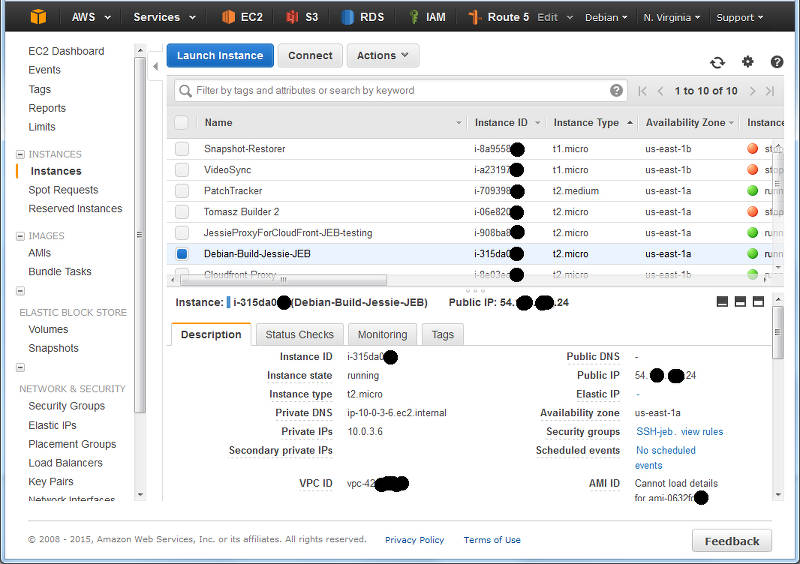 A (redacted) list of instance from the EC2 console.
The returned text is simply: us-east-1a . Time to navigate to Elastic Block Store , choose Volumes and click Create :wget -q -O - http://169.254.169.254/latest/meta-data/placement/availability-zone
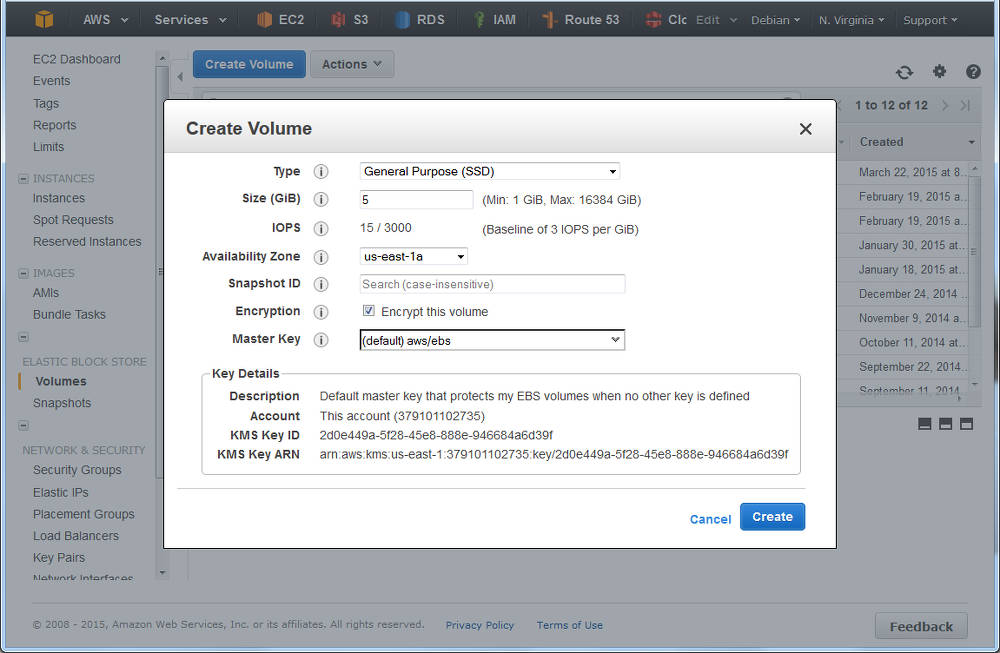 Creating a volume in AWS EC2: ensure the AZ is the same as your instance
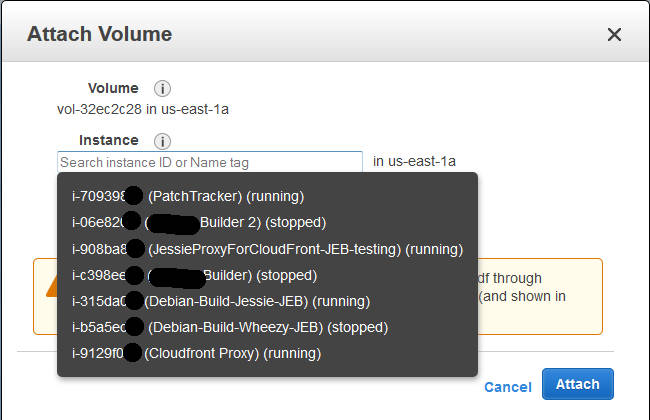 Attaching a volume to an instance: you ll be prompted for the compatible instances in the same AZ.
(Note the time-stamp in square brackets will be different). Previously at this juncture you would format the entire disk with your favourite file system, mount it in the desired location, and be done. But we re adding in LVM here between this raw device, and the filesystem we are yet to make . Marking the block device for LVM Our first operation with LVM is to put a marker on the volume to indicate it s being use for LVM so that when we scan the block device, we know what it s for. It s a really simple command:[1994151.231815] xvdg: unknown partition table
The device name above (/dev/xvdg) should correspond to the one we saw from the dmesg output above. The output of the above is rather straight forward:pvcreate /dev/xvdg
Checking our EBS Volume We can check on the EBS volume which LVM sees as a Physical Volume using the pvs command.Physical volume "/dev/xvdg" successfully created
Here we see the entire disk is currently unused. Creating our First Volume Group Next step, we need to make an initial LVM Volume Group which will use our Physical volume (xvdg). The Volume Group will then contain one (or more) Logical Volumes that we ll format and use. Again, a simple command to create a volume group by giving it its first physical device that it will use:# pvs PV VG Fmt Attr PSize PFree /dev/xvdg lvm2 --- 5.00g 5.00g
And likewise we can check our set of Volume Groups with vgs :# vgcreate OptVG /dev/xvdg Volume group "OptVG" successfully created
The Attribute flags here indicate this is writable, resizable, and allocating extents in normal mode. Lets proceed to make our (first) Logical Volume in this Volume Group:# vgs VG #PV #LV #SN Attr VSize VFree OptVG 1 0 0 wz--n- 5.00g 5.00g
You ll note that I have created our Logical Volume as almost the same size as the entire Volume Group (which is currently one disk) but I left some space unused: the reason for this comes down to keeping some space available for any jobs that LVM may want to use on the disk and this will be used later when we want to move data between raw disk devices. If I wanted to use LVM for Snapshots, then I d want to leave more space free (unallocated) again. We can check on our Logical Volume:# lvcreate -n OptLV -L 4.9G OptVG Rounding up size to full physical extent 4.90 GiB Logical volume "OptLV" created
The attribytes indicating that the Logical Volume is writeable, is allocating its data to the disk in inherit mode (ie, as the Volume Group is doing), and that it is active. At this stage you may also discover we have a device /dev/OptVG/OptLV, and this is what we re going to format and mount. But before we do, we should review what file system we ll use.# lvs LV VG Attr LSize Pool Origin Data% Meta% Move Log Cpy%Sync Convert OptLV OptVG -wi-a----- 4.90g
| Name | Shrink | Grow | Journal | Max File Sz | Max Vol Sz |
|---|---|---|---|---|---|
| btrfs | Y | Y | N | 16 EB | 16 EB |
| ext3 | Y off-line | Y | Y | 2 TB | 32 TB |
| ext4 | Y off-line | Y | Y | 16 TB | 1 EB |
| xfs | N | Y | Y | 8 EB | 8 EB |
| zfs* | N | Y | Y | 16 EB | 256 ZB |
And now mount this volume and check it out:# mkfs.ext4 /dev/OptVG/OptLV mke2fs 1.42.12 (29-Aug-2014) Creating filesystem with 1285120 4k blocks and 321280 inodes Filesystem UUID: 4f831d17-2b80-495f-8113-580bd74389dd Superblock backups stored on blocks: 32768, 98304, 163840, 229376, 294912, 819200, 884736 Allocating group tables: done Writing inode tables: done Creating journal (32768 blocks): done Writing superblocks and filesystem accounting information: done
Lastly, we want this to be mounted next time we reboot, so edit /etc/fstab and add the line:# mount /dev/OptVG/OptLV /opt/ # df -HT /opt Filesystem Type Size Used Avail Use% Mounted on /dev/mapper/OptVG-OptLV ext4 5.1G 11M 4.8G 1% /opt
With this in place, we can now start using this disk. I selected here not to update the filesystem every time I access a file or folder updates get logged as normal but access time is just ignored. Time to expand After some time, our 5 GB /opt/ disk is rather full, and we need to make it bigger, but we wish to do so without any downtime. Amazon EBS doesn t support resizing volumes, so our strategy is to add a new larger volume, and remove the older one that no longer suits us; LVM and ext4 s online resize ability will allow us to do this transparently. For this example, we ll decide that we want a 10 GB volume. It can be a different type of EBS volume to our original we re going to online-migrate all our data from one to the other. As when we created the original 5 GB EBS volume above, create a new one in the same AZ and attach it to the host (perhaps a /dev/xvdh this time). We can check the new volume is visible with dmesg again:/dev/OptVG/OptLV /opt ext4 noatime,nodiratime 0 0
And now we initalise this as a Physical volume for LVM:[1999786.341602] xvdh: unknown partition table
And then add this disk to our existing OptVG Volume Group:# pvcreate /dev/xvdh Physical volume "/dev/xvdh" successfully created
We can now review our Volume group with vgs, and see our physical volumes with pvs:# vgextend OptVG /dev/xvdh Volume group "OptVG" successfully extended
There are now 2 Physical Volumes we have a 4.9 GB filesystem taking up space, so 10.09 GB of unallocated space in the VG. Now its time to stop using the /dev/xvgd volume for any new requests:# vgs VG #PV #LV #SN Attr VSize VFree OptVG 2 1 0 wz--n- 14.99g 10.09g # pvs PV VG Fmt Attr PSize PFree /dev/xvdg OptVG lvm2 a-- 5.00g 96.00m /dev/xvdh OptVG lvm2 a-- 10.00g 10.00g
At this time, our existing data is on the old disk, and our new data is on the new one. Its now that I d recommend running GNU screen (or similar) so you can detach from this shell session and reconnect, as the process of migrating the existing data can take some time (hours for large volumes):# pvchange -x n /dev/xvdg Physical volume "/dev/xvdg" changed 1 physical volume changed / 0 physical volumes not changed
During the move, checking the Monitoring tab in the AWS EC2 Console for the two volumes should show one with a large data Read metric, and one with a large data Write metric clearly data should be flowing off the old disk, and on to the new. A note on disk throughput The above move was a pretty small, and empty volume. Larger disks will take longer, naturally, so getting some speed out of the process maybe key. There s a few things we can do to tweak this:# pvmove /dev/sdb1 /dev/sdd1 /dev/xvdg: Moved: 0.1% /dev/xvdg: Moved: 8.6% /dev/xvdg: Moved: 17.1% /dev/xvdg: Moved: 25.7% /dev/xvdg: Moved: 34.2% /dev/xvdg: Moved: 42.5% /dev/xvdg: Moved: 51.2% /dev/xvdg: Moved: 59.7% /dev/xvdg: Moved: 68.0% /dev/xvdg: Moved: 76.4% /dev/xvdg: Moved: 84.7% /dev/xvdg: Moved: 93.3% /dev/xvdg: Moved: 100.0%
So all 5 GB is now unused (compare to above, where only 96 MB was PFree). With that disk not containing data, I can tell LVM to remove the disk from the Volume Group:# pvs PV VG Fmt Attr PSize PFree /dev/xvdg OptVG lvm2 --- 5.00g 5.00g /dev/xvdh OptVG lvm2 a-- 10.00g 5.09g
Then I cleanly wipe the labels from the volume:# vgreduce OptVG /dev/xvdg Removed "/dev/xvdg" from volume group "OptVG"
If I really want to clean the disk, I could choose to use shred(1) on the disk to overwrite with random data. This can take a lng time Now the disk is completely unused and disassociated from the VG, I can return to the AWS EC2 Console, and detach the disk:# pvremove /dev/xvdg Labels on physical volume "/dev/xvdg" successfully wiped
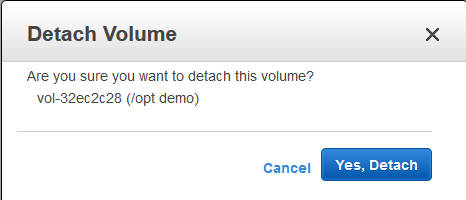 Detach an EBS volume from an EC2 instance
We now have 0.6GB free space on the physical volume (pvs confirms this). Finally, its time to expand out ext4 file system:# lvresize -L +4.5G /dev/OptVG/OptLV Size of logical volume OptVG/OptLV changed from 4.90 GiB (1255 extents) to 9.40 GiB (2407 extents). Logical volume OptLV successfully resized
And with df we can now see:# resize2fs /dev/OptVG/OptLV resize2fs 1.42.12 (29-Aug-2014) Filesystem at /dev/OptVG/OptLV is mounted on /opt; on-line resizing required old_desc_blocks = 1, new_desc_blocks = 1 The filesystem on /dev/OptVG/OptLV is now 2464768 (4k) blocks long.
Automating this The IAM Role I made at the beginning of this post is now going to be useful. I ll start by adding an IAM Policy to the Role to permit me to List Volumes, Create Volumes, Attach Volumes and Detach Volumes to my instance-id. Lets start with creating a volume, with a policy like this:# df -HT /opt/ Filesystem Type Size Used Avail Use% Mounted on /dev/mapper/OptVG-OptLV ext4 9.9G 12M 9.4G 1% /opt
This policy puts some restrictions on the volumes that this instance can create: only within the given Availability Zone (matching our instance), only GP2 SSD (no PIOPs volumes), and size no more than 250 GB. I ll add another policy to permit this instance role to tag volumes in this AZ that don t yet have a tag called InstanceId:"Version": "2012-10-17", "Statement": [ "Sid": "CreateNewVolumes", "Action": "ec2:CreateVolume", "Effect": "Allow", "Resource": "*", "Condition": "StringEquals": "ec2:AvailabilityZone": "us-east-1a", "ec2:VolumeType": "gp2" , "NumericLessThanEquals": "ec2:VolumeSize": "250" ]
Now that I can create (and then tag) volumes, this becomes a simple procedure as to what else I can do to this volume. Deleting and creating snapshots of this volume are two obvious options, and the corresponding policy:"Version": "2012-10-17", "Statement": [ "Sid": "TagUntaggedVolumeWithInstanceId", "Action": [ "ec2:CreateTags" ], "Effect": "Allow", "Resource": "arn:aws:ec2:us-east-1:1234567890:volume/*", "Condition": "Null": "ec2:ResourceTag/InstanceId": "true" ]
Of course it would be lovely if I could use a variable inside the policy condition instead of the literal string of the instance ID, but that s not currently possible. Clearly some of the more important actions I want to take are to attach and detach a volume to my instance:"Version": "2012-10-17", "Statement": [ "Sid": "CreateDeleteSnapshots-DeleteVolume-DescribeModifyVolume", "Action": [ "ec2:CreateSnapshot", "ec2:DeleteSnapshot", "ec2:DeleteVolume", "ec2:DescribeSnapshotAttribute", "ec2:DescribeVolumeAttribute", "ec2:DescribeVolumeStatus", "ec2:ModifyVolumeAttribute" ], "Effect": "Allow", "Resource": "*", "Condition": "StringEquals": "ec2:ResourceTag/InstanceId": "i-123456" ]
  "Version": "2012-10-17",
  "Statement": [

      "Sid": "Stmt1434114682836",
      "Action": [
        "ec2:AttachVolume"
      ],
      "Effect": "Allow",
      "Resource": "arn:aws:ec2:us-east-1:123456789:volume/*",
      "Condition":
        "StringEquals":
          "ec2:ResourceTag/InstanceID": "i-123456"


     ,

      "Sid": "Stmt1434114745717",
      "Action": [
        "ec2:AttachVolume"
      ],
      "Effect": "Allow",
      "Resource": "arn:aws:ec2:us-east-1:123456789:instance/i-123456"

  ]
Now with this in place, we can start to fire up the AWS CLI we spoke of. We ll let the CLI inherit its credentials form the IAM Instance Role and the polices we just defined.
and at this stage, the above manipulation of the raw block device with LVM can begin. Likewise you can then use the CLI to detach and destroy any unwanted volumes if you are migrating off old block devices.AZ= wget -q -O - http://169.254.169.254/latest/meta-data/placement/availability-zone Region= wget -q -O - http://169.254.169.254/latest/meta-data/placement/availability-zone rev cut -c 2- rev InstanceId= wget -q -O - http://169.254.169.254/latest/meta-data/instance-id VolumeId= aws ec2 --region $ Region create-volume --availability-zone $ AZ --volume-type gp2 --size 1 --query "VolumeId" --output text aws ec2 --region $ Region create-tags --resource $ VolumeID --tags Key=InstanceId,Value=$ InstanceId aws ec2 --region $ Region attach-volume --volume-id $ VolumeId --instance-id $ InstanceId
 Last weekend Hermann Zapf, one of the greatest font designers and typographers of our times, has passed away at the age of 96. Much has been written about his life, his immense sphere of influence, his excellent typefaces, and some of the links to other obituaries can be found here at the end. There is nothing of value I can contribute, but let Hermann Zapf speak for himself with a few images from two books by or dedicated to him.
 The books I have taken these photos from are:
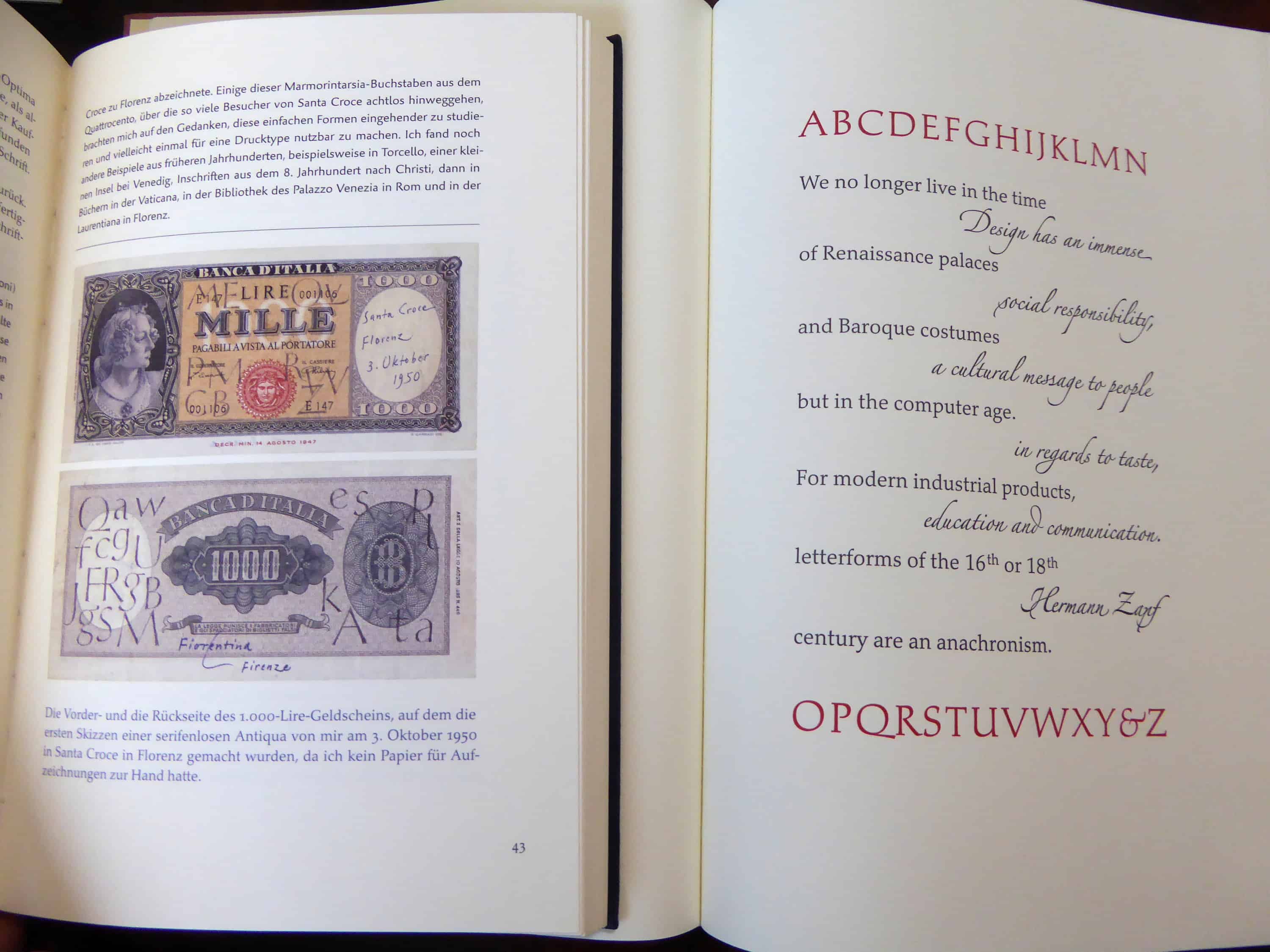 In his long life, Hermann Zapf has created a wide range of typefaces, some if which have become the main staple in the printing business, most notably Palatino, Janson, Optima, and Zapf Dingbats. But there are many more:
 While probably not as popular anymore as some years (decades?) ago, Palatino still is one of my favorite typefaces. I often wished to have the freedom to choose my own fonts for publications, but normally that doesn t happen. Palatino has found many offspring (or imitations?), and there are excellent renderings for use with (La)TeX, too.
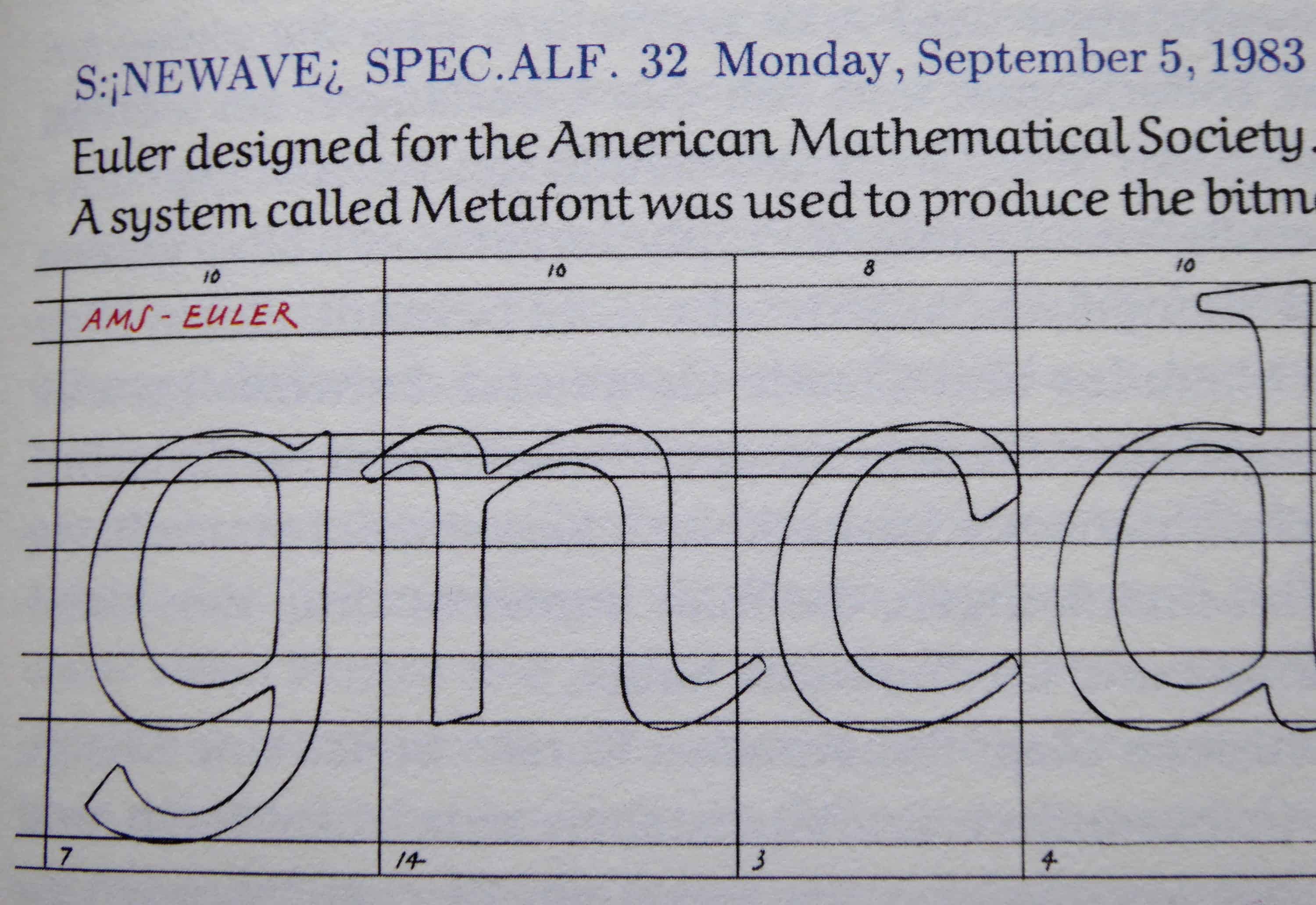
 Hermann Zapf also had connections with Don Knuth and the AMS (American Mathematical Society), and he designed for the AMS the Euler typeface, using Knuth s MetaFont program.
 Last weekend, when I heard of Hermann Zapf s death, I was at a conference at Tsukuba University. What a coincidence that all the signs in the building (floor numbers, indications, etc) were set
  in another of his great typefaces, the Optima. I had a strange feeling, and reset my presentation in Optima/Euler in honor of Hermann Zapf s great life.
Although I never met Hermann Zapf personally I missed the TeX conferences where he participated it was to a great extent his influence that years ago I got started in typography. Living a life like he did, dedicating himself to the beauty and expressiveness of letters, design, calligraphy, seems like a dream for me. But beauty can be found even in the strangest equation in mathematics, the queerest theorem in logic. While not all of us are as gifted as Hermann Zapf in creating beauty, we should strive to increase our ability to appreciate the beauty.
The beauty of letters is subtle, evasive, and needs training, that is practice, to be appreciated. Hermann Zapf taught us how even self-training can lead to excellence. His letters, which I meet every day, are a permanent reminder to strive for beauty and clarity, and never relent in our exercise.
Thanks Hermann Zapf.
in another of his great typefaces, the Optima. I had a strange feeling, and reset my presentation in Optima/Euler in honor of Hermann Zapf s great life.
Although I never met Hermann Zapf personally I missed the TeX conferences where he participated it was to a great extent his influence that years ago I got started in typography. Living a life like he did, dedicating himself to the beauty and expressiveness of letters, design, calligraphy, seems like a dream for me. But beauty can be found even in the strangest equation in mathematics, the queerest theorem in logic. While not all of us are as gifted as Hermann Zapf in creating beauty, we should strive to increase our ability to appreciate the beauty.
The beauty of letters is subtle, evasive, and needs training, that is practice, to be appreciated. Hermann Zapf taught us how even self-training can lead to excellence. His letters, which I meet every day, are a permanent reminder to strive for beauty and clarity, and never relent in our exercise.
Thanks Hermann Zapf.
 Links to tributes around the world
English
Linotype (Type foundry where Zapf started working)
Links to tributes around the world
English
Linotype (Type foundry where Zapf started working)
Zyne loading 6 of its 14 default modules
While updating the TeX Live package for Debian for the upcoming 2015 release, one of my aims was to convert as much as possible of the TeX configuration infrastructure to use dpkg triggers. We used the trigger mechanism already for the update of the font map configuration file (calls to updmap-sys), but till now neither for files installed into texmf trees, nor for format generation. In this blog I will describe the new management of all TeX related configuration files, while in the following one I will describe how things have been implemented with dpkg triggers. In due time this information will also be codified in the Debian TeX sub-policy.
 Let us start with recalling the different actions that have to be taken when TeX packages are installed, removed, or updated.
Required actions for TeX packages
Filename database
The simplest case are packages that only include files ment to be loaded while running TeX or Metafont or similar programs. In this case the file name database of TeX (and the one of ConTeXt) needs to be updated. Usually this is done by calling mktexlsr on the changed trees, plus, if ConTeXt is installed, running mtxrun --generate.
Font map activation
More complicated are font packages that provide PostScript fonts. These packages need to ship a so called map file which maps TeX font names to PostScript fonts names. Examples are lm.map which defines this mapping for the Latin Modern fonts. All these map files have to be collected in one or more updmap.cfg files, and then a call to updmap(-sys) is necessary to generate configuration files for dvips, pdftex, and some other programs.
Format and hyphenation definitions
Even more complicated is the case of additional hyphenation patterns and additional format definitions. At the moment, hyphenation patterns are only shipped from the TeX Live packages itself, but additional format definitions are already provided by other packages than the TeX Live ones. Again, in both cases all the different format and hyphenation pattern definitions must be combined, into configuration files fmtutil.cnf and several language.* files, respectively. After this some incantation of fmtutil(-sys) is necessary to update the format dumps of TeX.
Status up to Debian/TeX Live 2014
Up to now most of these actions are done in the postinstall script of the providing packages, generated by dh_installtex. The tex-common package shipped besides the program dh_installtex also postinstall and postrm snippets that took care of all the necessary steps, and ensuring that configuration succeeds even if some of the programs were missing.
While this worked quite nicely for many years, I saw several disadvantages:
Let us start with recalling the different actions that have to be taken when TeX packages are installed, removed, or updated.
Required actions for TeX packages
Filename database
The simplest case are packages that only include files ment to be loaded while running TeX or Metafont or similar programs. In this case the file name database of TeX (and the one of ConTeXt) needs to be updated. Usually this is done by calling mktexlsr on the changed trees, plus, if ConTeXt is installed, running mtxrun --generate.
Font map activation
More complicated are font packages that provide PostScript fonts. These packages need to ship a so called map file which maps TeX font names to PostScript fonts names. Examples are lm.map which defines this mapping for the Latin Modern fonts. All these map files have to be collected in one or more updmap.cfg files, and then a call to updmap(-sys) is necessary to generate configuration files for dvips, pdftex, and some other programs.
Format and hyphenation definitions
Even more complicated is the case of additional hyphenation patterns and additional format definitions. At the moment, hyphenation patterns are only shipped from the TeX Live packages itself, but additional format definitions are already provided by other packages than the TeX Live ones. Again, in both cases all the different format and hyphenation pattern definitions must be combined, into configuration files fmtutil.cnf and several language.* files, respectively. After this some incantation of fmtutil(-sys) is necessary to update the format dumps of TeX.
Status up to Debian/TeX Live 2014
Up to now most of these actions are done in the postinstall script of the providing packages, generated by dh_installtex. The tex-common package shipped besides the program dh_installtex also postinstall and postrm snippets that took care of all the necessary steps, and ensuring that configuration succeeds even if some of the programs were missing.
While this worked quite nicely for many years, I saw several disadvantages:
Map qag.map Map qbk.map Map qcr.map Map qcs.map Map qhv.map Map qpl.map Map qtm.map Map qzc.map |
aleph aleph - *aleph.ini lamed aleph language.dat *lambda.ini |
name=polish lefthyphenmin=2 righthyphenmin=2 file=loadhyph-pl.tex file_patterns=hyph-pl.pat.txt file_exceptions=hyph-pl.hyp.txt |
deb http://people.debian.org/~preining/TeX/ exp/ deb-src http://people.debian.org/~preining/TeX/ exp/ |
 Anyway, I hope to hear some feedback and installation reports.
Conclusion
While packaging has become easier for maintainers, and there is less clutter in /etc/texmf/, we now are depending on dpkg to call the tex-common triggers. Thus, if this happens rather often, then especially fmtutil-sys --all will be called several times. This is a slight regression from the previous setup, but paid off (IMNSHO) by the arguments given in the beginning.
That said, there will be of course a certain time of transition until the new setup has proven its merits, and bugs are ironed out. But having bugs that need to be mostly fixed only in one package, namely tex-common, seems like an easier task to me.
Enjoy.
Anyway, I hope to hear some feedback and installation reports.
Conclusion
While packaging has become easier for maintainers, and there is less clutter in /etc/texmf/, we now are depending on dpkg to call the tex-common triggers. Thus, if this happens rather often, then especially fmtutil-sys --all will be called several times. This is a slight regression from the previous setup, but paid off (IMNSHO) by the arguments given in the beginning.
That said, there will be of course a certain time of transition until the new setup has proven its merits, and bugs are ironed out. But having bugs that need to be mostly fixed only in one package, namely tex-common, seems like an easier task to me.
Enjoy.
 What happened about the reproducible
builds effort for this week:
Presentations
On May 26th,Holger Levsen presented reproducible builds in Debian at CCC Berlin for the Datengarten 52. The presentation was in German and the slides in English. Audio and video recordings are available.
Toolchain fixes
What happened about the reproducible
builds effort for this week:
Presentations
On May 26th,Holger Levsen presented reproducible builds in Debian at CCC Berlin for the Datengarten 52. The presentation was in German and the slides in English. Audio and video recordings are available.
Toolchain fixes
pyuic output imports in stable order. Original patch by Reiner Herrmann.zip or unzip.control.tar. The patch has also been submitted based on the main branch.
Daniel Kahn Gillmor proposed a patch to add support for externally-supplying build date to help2man. This sparkled a discussion about agreeing on a common name for an environment variable to hold the date that should be used. It seems opinions are converging on using SOURCE_DATE_UTC which would hold a ISO-8601 formatted date in UTC) (e.g. 2015-06-05T01:08:20Z). Kudos to Daniel, Brendan O'Dea, Ximin Luo for pushing this forward.
Lunar proposed a patch to Tar upstream adding a --clamp-mtime option as a generic solution for timestamp variations in tarballs which might also be useful for dpkg. The option changes the behavior of --mtime to only use the time specified if the file mtime is newer than the given time. So far, upstream is not convinced that it would make a worthwhile addition to Tar, though.
Daniel Kahn Gillmor reached out to the libburnia project to ask for help on how to make ISO created with xorriso reproducible. We should reward Thomas Schmitt with a model upstream trophy as he went through a thorough analysis of possible sources of variations and ways to improve the situation. Most of what is missing with the current version in Debian is available in the latest upstream version, but libisoburn in Debian needs help. Daniel backported the missing option for version 1.3.2-1.1.
akira submitted a new issue to Doxygen upstream regarding the timestamps added to the generated manpages.
Packages fixed
The following 49 packages became reproducible due to changes in their
build dependencies:
activemq-protobuf,
bnfc,
bridge-method-injector,
commons-exec,
console-data,
djinn,
github-backup,
haskell-authenticate-oauth,
haskell-authenticate,
haskell-blaze-builder,
haskell-blaze-textual,
haskell-bloomfilter,
haskell-brainfuck,
haskell-hspec-discover,
haskell-pretty-show,
haskell-unlambda,
haskell-x509-util,
haskelldb-hdbc-odbc,
haskelldb-hdbc-postgresql,
haskelldb-hdbc-sqlite3,
hasktags,
hedgewars,
hscolour,
https-everywhere,
java-comment-preprocessor,
jffi,
jgit,
jnr-ffi,
jnr-netdb,
jsoup,
lhs2tex,
libcolor-calc-perl,
libfile-changenotify-perl,
libpdl-io-hdf5-perl,
libsvn-notify-mirror-perl,
localizer,
maven-enforcer,
pyotherside,
python-xlrd,
python-xstatic-angular-bootstrap,
rt-extension-calendar,
ruby-builder,
ruby-em-hiredis,
ruby-redcloth,
shellcheck,
sisu-plexus,
tomcat-maven-plugin,
v4l2loopback,
vim-latexsuite.
The following packages became reproducible after getting fixed:
modified-by option.__DATE__ and __TIME__ macros from source.debian/changelog entry in manpage.debian/changelog entry.HTML_TIMESTAMP to NO in Doxygen configuration.HTML_TIMESTAMP to NO in Doxygen configuration.HTML_TIMESTAMP set to NO.$datetime from the file api_footer.html.$datetime from the file footer.html.$PATH. The second build will be done with a /i/capture/the/path added. (Holger Levsen)
Holger Levsen with the help of Alexander Couzens wrote extra job to test the reproducibility of coreboot. Thanks James McCoy for helping with certificate issues.
Mattia Rizollo made some more internal improvements.
strip-nondeterminism development
Andrew Ayer released strip-nondeterminism/0.008-1. This new version fixes the gzip handler so that it now skip adding a predetermined timestamp when there was none.
Holger Levsen sponsored the upload.
Documentation update
The pages about timestamps in manpages generated by Doxygen, GHC .hi files, and Jar files have been updated to reflect their status in upstream.
Markus Koschany documented an easy way to prevent Doxygen to write timestamps in HTML output.
Package reviews
83 obsolete
reviews have
been removed, 71 added and 48 updated this week.
Meetings
A meeting was held on 2015-06-03. Minutes and full logs are available.
It was agreed to hold such a meeting every two weeks for the time being. The time of the next meeting should be announced soon.
$ /usr/bin/ssl-cert-check -s enc.com.au -p 443
Host Status Expires Days
----------------------------------------------- ------------ ------------ ----
unable to load certificate
140364897941136:error:0906D06C:PEM routines:PEM_read_bio:no start line:pem_lib.c:701:Expecting: TRUSTED CERTIFICATE
unable to load certificate
139905089558160:error:0906D06C:PEM routines:PEM_read_bio:no start line:pem_lib.c:701:Expecting: TRUSTED CERTIFICATE
unable to load certificate
140017829234320:error:0906D06C:PEM routines:PEM_read_bio:no start line:pem_lib.c:701:Expecting: TRUSTED CERTIFICATE
unable to load certificate
140567473276560:error:0906D06C:PEM routines:PEM_read_bio:no start line:pem_lib.c:701:Expecting: TRUSTED CERTIFICATE
enc.com.au:443 Expired -2457182
$ echo ""   /usr/bin/openssl s_client -connect enc.com.au:443 CONNECTED(00000003)
140115756086928:error:14077438:SSL routines:SSL23_GET_SERVER_HELLO:tlsv1 alert internal error:s23_clnt.c:769:
---
no peer certificate available
---
No client certificate CA names sent
---
SSL handshake has read 7 bytes and written 345 bytes
---
New, (NONE), Cipher is (NONE)
Secure Renegotiation IS NOT supported
Compression: NONE
Expansion: NONE
No ALPN negotiated
---
$ echo ""   /usr/bin/openssl s_client -connect enc.com.au:443 -servername enc.com.au
CONNECTED(00000003)
depth=2 C = GB, ST = Greater Manchester, L = Salford, O = COMODO CA Limited, CN = COMODO ECC Certification Authority
verify error:num=20:unable to get local issuer certificate
---
(lots of good SSL type messages)
TLSSERVERNAME="FALSE"
$ ssl-cert-check -s enc.com.au -p https
Host Status Expires Days
----------------------------------------------- ------------ ------------ ----
enc.com.au:https Valid Sep 30 2015 114
| Series: | October Daye #4 |
| Publisher: | DAW |
| Copyright: | March 2011 |
| ISBN: | 1-101-50253-3 |
| Format: | Kindle |
| Pages: | 372 |
 There s a lot of things I d like to blog about. The last version of OpenStack, the OpenStack Liberty design summit, Kilo in the official jessie-backports repositories, etc. Maybe the most interesting part of this blog post is the last bit at the end, about a major change in the packaging workflow for OpenStack in Debian. Please read on
OpenStack release names reminder
There s a lot of things I d like to blog about. The last version of OpenStack, the OpenStack Liberty design summit, Kilo in the official jessie-backports repositories, etc. Maybe the most interesting part of this blog post is the last bit at the end, about a major change in the packaging workflow for OpenStack in Debian. Please read on
OpenStack release names reminder
 I've recently found myself explaining
 polkit (formerly PolicyKit) to one of
Collabora's clients, and thought that
blogging about the same topic might be useful for
other people who are confused by it;
so, here is why udisks2 and polkit are the way they are.
As always, opinions in this blog are my own, not Collabora's.
Privileged actions
Broadly, there are two ways a process can do something: it can do it
directly (i.e. ask the kernel directly), or it can use inter-process
communication to ask a service to do that operation on its behalf.
If it does it directly, the components that say whether it can succeed
are the Linux kernel's normal permissions checks
(DAC),
and if configured, AppArmor, SELinux or a similar
MAC layer.
All very simple so far.
Unfortunately, the kernel's relatively coarse-grained checks are not sufficient
to express the sorts of policies that exist on a desktop/laptop/mobile
system. My favourite example for this sort of thing is mounting filesystems.
If I plug in a USB stick with a FAT filesystem, it's reasonable to expect
my chosen user interface to either mount it automatically, or
let me press a button to mount it. Similarly, to avoid data loss, I
should be able to unmount it when I'm finished with it.
However, mounting and unmounting a USB stick is fundamentally the same
system call as mounting and unmounting any other filesystem - and if
ordinary users can do arbitrary mount system calls, they can cause all
sorts of chaos, for instance by mounting a filesystem that contains setuid
executables (privilege escalation), or umounting a critical OS filesystem
like /usr (denial of service). Something needs to arbitrate: you can mount
filesystems, but only under certain conditions .
The kernel developer motto for this sort of thing is mechanism, not policy :
they are very keen to avoid encoding particular environments' policies
(the sort of thing you could think of as business rules ) in the kernel,
because that makes it non-generic and hard to maintain. As a result,
direct mount/unmount actions are only allowed by privileged processes,
and it's up to user-space processes to arrange for a privileged process
to make the desired mount syscall.
Here are some other privileged actions which laptop/desktop users can
reasonably expect to just work , with or without requiring a sysadmin-like
(root-equivalent) user:
% ls -l /bin/mount
-rwsr-xr-x 1 root root 40000 May 22 11:37 /bin/mount
/etc/fstab to see whether the filesystem I'm
trying to mount has the user or users flag - then carries out the
mount system call.
There are a few obvious problems with this:
udisks2 is one such privileged daemon, which uses D-Bus as its IPC channel.
D-Bus is a commonly-used inter-process system; one of its
intended/designed uses is to let user processes and system services
communicate, especially this sort of communication between a privileged
daemon and its less-privileged clients.
People sometimes criticize D-Bus as not doing anything you couldn't do yourself
with some AF_UNIX sockets. Well, no, of course it doesn't - the important
bit of the reference implementation and the various interoperable
reimplementations consists of a daemon and some AF_UNIX sockets, and the
rest is
a simple matter of programming.
However, it's sufficient for most uses in its problem space, and is usually better than inventing your
own.
The advantage of D-Bus over doing your own thing is precisely that you
are not doing your own thing: good IPC design is hard, and D-Bus makes
some structural decisions so that fewer application
authors have to think about them. For instance, it has a central hub daemon
(the dbus-daemon, or message bus ) so that n communicating applications
don't need O(n ) sockets; it uses the dbus-daemon to provide a
total message ordering
so you don't have to think about message reordering; it has a distributed
naming model (which can also be used as a distributed mutex) so you don't
have to design that; it has a serialization format and a type system so you
don't have to design one of those; it has a framework for activating"
run-on-demand daemons so they don't have to use resources initially,
implemented using a setuid helper and/or systemd; and so on.
If you have religious objections to D-Bus, you can mentally replace
D-Bus with AF_UNIX or something and most of this article will
still be true.
Is this OK?
In either case - exec'ing a privileged helper, or submitting a request to a
privileged daemon via IPC - the privileged process has two questions that
it needs to answer before it does its work:
/bin/mount only executable by a particular group,
or only executable by certain AppArmor profiles, or similar. That works
up to a point, but cannot distinguish between physically-present and
not-physically-present users, or other facts that might be interesting
to your local security policy.
Similarly, in the IPC model, you can make certain communication channels
impossible, for instance by using dbus-daemon's ability to decide which
messages to deliver, or AF_UNIX sockets' filesystem permissions,
or a MAC framework like AppArmor.
Both of these are quite coarse-grained checks which don't really
understand the finer details of what is going on. If the answer to
"is this safe? is something of the form maybe, it depends on... ,
then they can't do the right thing: they must either let it through
and let the domain-specific privileged process do the check, or deny it
and lose potentially useful functionality.
For instance, in an AppArmor environment, some applications have absolutely no
legitimate reason to talk to udisks2, so the AppArmor policy can just
block it altogether. However, once again, this is a coarse-grained
check: the kernel has mechanism, not policy, and it doesn't know what
the service does or why. If the application does need to be able to talk
to the service at all, then finer-grained access control
(obeying some, but not all, requests) has to be the service's job.
dbus-daemon does have the ability to match messages in a relatively
fine-grained way, based on the object path, interface and member in
the message, as well as the routing information that it uses itself
(i.e. the source and destination). However, it is not clear that this
makes a great deal of sense conceptually: these are facts about the
mechanics of the IPC, not facts about the domain-specific request
(because the mechanics of the IPC are all that dbus-daemon understands).
For instance, taking the udisks2 example again, dbus-daemon can't
distinguish between an attempt to adjust mount options for a USB stick
(probably fine) and an attempt to adjust mount options for /usr (not good).
To have a domain-specific security policy, we need a domain-specific
component, for instance udisks2, to get involved. Unlike dbus-daemon,
udisks2 knows that not all disks are equal, knows which
categories make sense to distinguish, and can identify which categories
a particular disk is in. So udisks2 can make a more informed decision.
So, a naive approach might be to write a function in udisks2 that looks
something like this pseudocode:
may_i_mount_this_disk (user, disk, mount options)   boolean

    if (user is root   user is root-equivalent)
        return true;
    if (disk is not removable)
       return false;
    if (mount options are scary)
       return false;
    if (user is in  manipulate non-local disks  group)
        return true;
    if (user is not logged-in locally)
       return false;
    # https://en.wikipedia.org/wiki/Multiseat_configuration
    if (user is not logged-in on the same seat where the disk is
            plugged in)
       return false;
    return true;
Delegating the security policy to something central
The pseudocode security policy outlined above is reasonably
complicated already, and doesn't necessarily cover everything that you
might want to consider.
Meanwhile, not every system is the same. A general-purpose Linux
distribution like Debian might run on server/mainframe systems with only
remote users, personal laptops/desktops with one root-equivalent user,
locked-down corporate laptops/desktops, mobile devices and so on; these
systems should not necessarily all have the same security policy.
Another interesting factor is that for some privileged operations, you
might want to carry out interactive authorization: ask the requesting user
to confirm that the action (which might have come from a background
process) should take place (like Windows'
UAC),
or to prove that the person currently at the keyboard is the same as
the person who logged in by giving their password
(like sudo).
We could in principle write code for all of this in udisks2, and in
NetworkManager, and in systemd, ... - but that clearly doesn't scale,
particularly if you want the security policy to be configurable.
Enter polkit
(formerly PolicyKit), a system service for applying security policies
to actions.
The way polkit works is that the application does its domain-specific
analysis of the request - in the case of udisks2, whether the device to
be mounted is removable, whether the mount options are reasonable, etc. -
and converts it into an action. The action gives polkit a way to
distinguish between things that are conceptually different, without
needing to know the specifics. For instance, udisks2 currently divides
up filesystem-mounting into org.freedesktop.udisks2.filesystem-mount,
org.freedesktop.udisks2.filesystem-mount-fstab,
org.freedesktop.udisks2.filesystem-mount-system and
org.freedesktop.udisks2.filesystem-mount-other-seat.
The application also finds the identity of the user making the request.
Next, the application sends the action, the identity of the requesting
user, and any other interesting facts to polkit. As currently implemented,
polkit is a D-Bus service, so this is an IPC request via D-Bus.
polkit consults its database of policies in order to choose one of several
results:
polkit decide this? The first thing is that it reads the
machine-readable description of the actions, in /usr/share/polkit-1/actions,
which specifies a default policy. Next, it evaluates a local security policy
to see what that says. In the current version of polkit, the local security
policy is configured by writing JavaScript in /etc/polkit-1/rules.d
(local policy) and /usr/share/polkit-1/rules.d (OS-vendor defaults).
In older versions such as the one currently shipped in Debian unstable,
there was a plugin architecture; but in practice
nobody wrote plugins for it, and instead everyone used the
example local authority shipped with polkit, which was configured
via files in /etc/polkit-1/localauthority and
/etc/polkit-1/localauthority.d.
These policies can take into account useful facts like:
polkit.addRule(function(action, subject)
        if ((action.id == "org.freedesktop.locale1.set-locale"
             action.id == "org.freedesktop.locale1.set-keyboard"
             action.id == "org.freedesktop.hostname1.set-static-hostname"
             action.id == "org.freedesktop.hostname1.set-hostname"
             action.id == "org.gnome.controlcenter.datetime.configure") &&
            subject.local &&
            subject.active &&
            subject.isInGroup ("sudo"))
                    return polkit.Result.YES;

 );
sudo group may set the system locale, keyboard layout, hostname and time,
without needing to authenticate . A system administrator could of course
override that by dropping a higher-priority policy for some or all of these
actions into /etc/polkit-1/rules.d.
Summary
dbus-daemon)polkit evaluates a configurable policy to determine whether privileged
services should carry out requested actions
 I encourage anyone interested in debian development to get involved with the Reproducible Builds project. My own project is to try to diagnose (and hopefully provide patches for) two unreproducible packages a week. Maybe you can do one package a week? Reproducible Builds is another example of the kind of audacious project that I celebrated in my last blog post. It's a fun way to learn a little bit about different parts of the archive, and to help on an incrementally-improving process. My workflow below is meant to encourage folks to join in. The documentation on the wiki is certainly more authoritative (and will be more up-to-date in the future). My usual workflow is this:
 debcheckout clocIf that failed for some reason, I would use:
apt-get source cloc
Source: packagename
Version: packageversion
Tags: patch
Severity: wishlist
User: reproducible-builds@lists.alioth.debian.org
Usertags: closest-usertag
X-Debbugs-CC: reproducible-builds@lists.alioth.debian.org
When choosing the
closest usertag, i look at the "Usertagged bugs" block on the R-B continuous integration dashboard or the wiki documentation to see what makes sense.
 I don't often write about tools I use when for my daily software development
tasks. I recently realized that I really should start to share more often my
workflows and weapons of choice.
One thing that I have a hard time enduring while doing Python code reviews, is
people writing utility code that is not directly tied to the core of their
business. This looks to me as wasted time maintaining code that should be
reused from elsewhere.
So today I'd like to start with
retrying, a Python package that you
can use to retry anything.
It's OK to fail
I don't often write about tools I use when for my daily software development
tasks. I recently realized that I really should start to share more often my
workflows and weapons of choice.
One thing that I have a hard time enduring while doing Python code reviews, is
people writing utility code that is not directly tied to the core of their
business. This looks to me as wasted time maintaining code that should be
reused from elsewhere.
So today I'd like to start with
retrying, a Python package that you
can use to retry anything.
It's OK to fail


retry that you can use on top of any
function or method in Python to make it retry in case of failure. By default,
retry calls your function endlessly until it returns rather than raising an
error.
import random
from retrying import retry

@retry
def pick_one():
    if random.randint(0, 10) != 1:
        raise Exception("1 was not picked")
pick_one until 1 is returned by
random.randint.
retry accepts a few arguments, such as the minimum and maximum delays to use,
which also can be randomized. Randomizing delay is a good strategy to avoid
detectable pattern or congestion. But more over, it supports exponential delay,
which can be used to implement
exponential backoff, a
good solution for retrying tasks while really avoiding congestion. It's
especially handy for background tasks.
@retry(wait_exponential_multiplier=1000, wait_exponential_max=10000)
def wait_exponential_1000():
    print "Wait 2^x * 1000 milliseconds between each retry, up to 10 seconds, then 10 seconds afterwards"
    raise Exception("Retry!")
# Stop retrying after 30 seconds anyway
>>> @retry(wait_exponential_multiplier=1000, wait_exponential_max=10000, stop_max_delay=30000)
... def wait_exponential_1000():
...     print "Wait 2^x * 1000 milliseconds between each retry, up to 10 seconds, then 10 seconds afterwards"
...     raise Exception("Retry!")
...
>>> wait_exponential_1000()
Wait 2^x * 1000 milliseconds between each retry, up to 10 seconds, then 10 seconds afterwards
Wait 2^x * 1000 milliseconds between each retry, up to 10 seconds, then 10 seconds afterwards
Wait 2^x * 1000 milliseconds between each retry, up to 10 seconds, then 10 seconds afterwards
Wait 2^x * 1000 milliseconds between each retry, up to 10 seconds, then 10 seconds afterwards
Wait 2^x * 1000 milliseconds between each retry, up to 10 seconds, then 10 seconds afterwards
Wait 2^x * 1000 milliseconds between each retry, up to 10 seconds, then 10 seconds afterwards
Traceback (most recent call last):
  File "<stdin>", line 1, in <module>
  File "/usr/local/lib/python2.7/site-packages/retrying.py", line 49, in wrapped_f
    return Retrying(*dargs, **dkw).call(f, *args, **kw)
  File "/usr/local/lib/python2.7/site-packages/retrying.py", line 212, in call
    raise attempt.get()
  File "/usr/local/lib/python2.7/site-packages/retrying.py", line 247, in get
    six.reraise(self.value[0], self.value[1], self.value[2])
  File "/usr/local/lib/python2.7/site-packages/retrying.py", line 200, in call
    attempt = Attempt(fn(*args, **kwargs), attempt_number, False)
  File "<stdin>", line 4, in wait_exponential_1000
  Exception: Retry!
def retry_on_ioerror(exc):
    return isinstance(exc, IOError)

@retry(retry_on_exception=retry_on_ioerror)
def read_file():
    with open("myfile", "r") as f:
        return f.read()
retry will call the function passed as retry_on_exception with the
exception raised as first argument. It's up to the function to then return a
boolean indicating if a retry should be performed or not. In the example above,
this will only retry to read the file if an IOError occurs; if any other
exception type is raised, no retry will be performed.
The same pattern can be implemented using the keyword argument
retry_on_result, where you can provide a function that analyses the result
and retry based on it.
def retry_if_file_empty(result):
    return len(result) <= 0

@retry(retry_on_result=retry_if_file_empty)
def read_file():
    with open("myfile", "r") as f:
        return f.read()
IOError is raised, and the default behavior which triggers
retry on all exceptions kicks-in the retry is therefore performed.
That's it! retry is really a good and small library that you should leverage
rather than implementing your own half-baked solution!
| Series: | Hild #1 |
| Publisher: | Farrar, Straus and Giroux |
| Copyright: | 2013 |
| ISBN: | 0-374-28087-8 |
| Format: | Hardcover |
| Pages: | 539 |
 paultagskitchen:
Ingredients
Assembly Combine Soylent and Simple Syrup. Create what I m going to start to call Soylent Syrup . Enjoy that one, folks. Add ice to a rocks glass, pour Soylent Syrup over ice. Add Sherry, Vermouth and Campari. Stir. Garnish with an orange twist. Big thanks to Matthew Garrett for sparking this one.
- 1 tsp soylent
- 1 tsp simple syrup
- 1 oz Palo Cortado sherry
- oz Rosso Vermouth
- oz Campari
 Hi all,
After 4 release candidates, the FusionForge community is proud to
announce the new major Fusionforge 6.0 final release.
The major changes in this version are:
I have posted a view times (here and here) about how to get a multi-boot/multi-purpose USB stick working. Now that TAILS has seens a major upgrade, and Debian 8.0 Jessie has been released, I think it is time to update the procedure to reflect the latest releases. That turned out to be a painful experience, in particular since Debian removed support for any reasonable boot method.
Hi all,
After 4 release candidates, the FusionForge community is proud to
announce the new major Fusionforge 6.0 final release.
The major changes in this version are:
I have posted a view times (here and here) about how to get a multi-boot/multi-purpose USB stick working. Now that TAILS has seens a major upgrade, and Debian 8.0 Jessie has been released, I think it is time to update the procedure to reflect the latest releases. That turned out to be a painful experience, in particular since Debian removed support for any reasonable boot method. So going through these explanations one will end up with a usable USB stick that can boot you into TAILS, System Rescue CD, GNU Parted Live CD, but unfortunately not anymore to boot into an installation of Debian 8.0 Jessie installation. But the USB stick will still be usable as normal media.
Let us repeat some things from the original post concerning the wishlist and the main players:
I have a long wishlist of items a boot stick should fulfill
So going through these explanations one will end up with a usable USB stick that can boot you into TAILS, System Rescue CD, GNU Parted Live CD, but unfortunately not anymore to boot into an installation of Debian 8.0 Jessie installation. But the USB stick will still be usable as normal media.
Let us repeat some things from the original post concerning the wishlist and the main players:
I have a long wishlist of items a boot stick should fulfill
submenu "System Rescue CD 4.5.2 (via ISO) ---> "
  set isofile="/boot/iso/systemrescuecd-x86-4.5.2.iso"
  menuentry "SystemRescueCd (64bit, default boot options)"
        set gfxpayload=keep
        loopback loop (hd0,1)$isofile
        linux   (loop)/isolinux/rescue64 isoloop=$isofile
        initrd  (loop)/isolinux/initram.igz

  ...


submenu "GNU/Gnome Parted Live CD 0.22.0 (via ISO) ---> "
  set isofile="/boot/iso/gparted-live-0.22.0-1-i586.iso"
  menuentry "GParted Live (Default settings)"
    loopback loop (hd0,1)$isofile
    linux (loop)/live/vmlinuz boot=live username=user config components quiet noswap noeject  ip=  nosplash findiso=$isofile
    initrd (loop)/live/initrd.img

  ...
|
mkdir -p /usbstick/boot/tails cp -a ~/tails/live/* /usbstick/boot/tails/ |
submenu "TAILS Environment 1.4 ---> "
  menuentry "Tails64 Live System"
        linux   /boot/tails/vmlinuz2 boot=live live-media-path=/boot/tails config live-media=removable nopersistent noprompt timezone=Etc/UTC block.events_dfl_poll_msecs=1000 splash noautologin module=Tails  libata.force=noncq
        initrd  /boot/tails/initrd2.img

  ...
|
/boot/
    iso/
        gparted-live-0.22.0-1-i586.iso
        systemrescuecd-x86-4.5.2.iso
    tails/
        vmlinuz Tails.module initrd.img ....
    grub/
        fonts/
            lots of files
        locale/
            lots of files
        x86_64-efi/
            lots of files
        font.pf2
        grubenv
        grub.cfg            *this file we create in the next step!!*
/EFI
    BOOT/
BOOTX64.EFI |
submenu "Debian 8.0 Jessie NetInstall ---> "
    set isofile="/boot/iso/firmware-8.0.0-amd64-i386-netinst.iso"

    menuentry '64 bit Install'
        set background_color=black
        loopback loop (hd0,1)$isofile
        linux    (loop)/install.amd/vmlinuz iso-scan/ask_second_pass=true iso-scan/filename=$isofile vga=788 -- quiet
        initrd   (loop)/install.amd/initrd.gz

    ...
|
mkdir -p /usbstick/boot/debian cp -a ~/tails/install.amd /usbstick/boot/debian/ cp -a ~/tails/install.386 /usbstick/boot/debian/ |
submenu "Debian 8.0 Jessie NetInstall ---> "
  menuentry '64 bit Install'
    set background_color=black
    linux    /boot/debian/install.amd/vmlinuz vga=788 -- quiet
    initrd   /boot/debian/install.amd/initrd.gz

  ...
|
Next.