[options]
auth = no_ccache
account = no_ccache
session = no_ccache
[run]
authenticate = PAM_SUCCESS
acct_mgmt = PAM_SUCCESS
open_session = PAM_SUCCESS
close_session = PAM_SUCCESS
[prompts]
echo_off = Password: %p
[output]
INFO user %u authenticated as %u
That's a complete and fairly complex test. The test framework takes care
of running the listed entry points, passing them the given PAM
configuration, and checking the return status. It provides a conversation
function that checks the prompt and its type and replies with the text
after . As you can see, it supports some escapes that are
replaced by data passed into the test suite driver, in this case the
password to use for testing. And it checks the logging output, including
the priority level, and similarly supports escapes there.
Running simple tests is very easy and is doable with a tiny C program.
Here's a complete test program from pam-krb5, one that tests functionality
that doesn't require a valid password and hence doesn't need to do much
setup:
#include <config.h>
#include <portable/system.h>
#include <tests/fakepam/script.h>
int
main(void)
struct script_config config;
plan_lazy();
memset(&config, 0, sizeof(config));
config.user = "root";
run_script_dir("data/scripts/basic", &config);
return 0;
That's all there is to it. That finds every configuration file like the
above in the tests/data/scripts/basic directory in the package
source and runs through each one, checking the results, and outputing the
results as TAP output (the protocol used for the Perl test suite, and also
my C TAP Harness package).
There are, of course, other things that it can do: more substitutions,
setting the authtok in advance of calling the module, and a callback so
that one can inspect PAM state before the PAM session is shut down. I've
started writing some
documentation, although so far it primarily covers the configuration file
syntax and the headers are the best reference for the API.
The source code of the pam-krb5 package
are the best reference so far. The library itself is part of
rra-c-util and, like the rest of that
package, is designed to be copied into the package that uses it and built
alongside it so that it can be linked easily with the test programs.
It's worth noting that there isn't a way to use it to test installed PAM
modules that are already bound to the system libpam library. The way one
builds test programs currently is to link the test program with the
individual objects making up the PAM module and then link with this
library and the TAP library, since that ensures the right symbols are
called. But it may be possible to do something tricky using LD_PRELOAD if
anyone feels inspired.
$ cp -r /usr/share/doc/openvpn/examples/easy-rsa/2.0 /etc/openvpn/easy-rsa $ cd /etc/openvpn/easy-rsaIn the vars file change the KEY_SIZE variable from 1024 to 4096 for good measure:
export KEY_SIZE=4096Then, read in the vars file, clean old keys and certificates (if any) and create new ones:
$ . ./vars $ ./clean-all $ ./build-caYou'll now have the chance to enter some data such as country code (e.g. "DE"), state/province, locality, organization name, organizational unit name, common name, name, and email address. The values you choose don't really matter much (except for commonName, maybe, which could be your hostname or domain or such). Finally, the ca.key (root CA key) and ca.crt (root CA certificate) files will be created. Next, we'll create the server key:
$ ./build-key-server serverYou'll have to enter lots of info again (see above), commonName could be "server" or such this time. Upon "Sign the certificate? [y/n]" say y, as well as upon "1 out of 1 certificate requests certified, commit? [y/n]". Finally, the server.key and server.crt files will be created. Same procedure for creating a client key (I used "client1" as filename and commonName here):
$ ./build-key client1Next up we'll generate Diffie Hellman parameters (this will take a shitload of time due to keysize=4096, go drink some coffee):
$ ./build-dhWhen this step is done, you'll have a dh4096.pem file. As we want to use OpenVPN's "tls-auth" feature for perfect forward secrecy (it "adds an additional HMAC signature to all SSL/TLS handshake packets for integrity verification"), we'll have to generate a shared secret:
$ openvpn --genkey --secret ta.key $ mv ta.key keysSo much for creating keys. Now, we'll have to configure OpenVPN. Copy the default server config file and edit it:
$ cd /etc/openvpn $ cp /usr/share/doc/openvpn/examples/sample-config-files/server.conf.gz . $ gunzip server.conf.gzThe most important change in my setup is that I use port 443/TCP instead of the usual OpenVPN default of 1194/UDP. This increases the chances that you'll be able to use OpenVPN in almost all places, even in environments which firewall/block lots of stuff. Port 443/TCP (for https) will almost always be usable. I also uncommented the following line, which tells the client to use the VPN interface (usually tun0) per default, so that all the client's traffic (web browsing, DNS, and so on) goes over the VPN:
push "redirect-gateway def1 bypass-dhcp"Here's my server config file (comments and commented out lines stripped):
port 443 proto tcp dev tun ca /etc/openvpn/easy-rsa/keys/ca.crt cert /etc/openvpn/easy-rsa/keys/server.crt key /etc/openvpn/easy-rsa/keys/server.key # This file should be kept secret dh /etc/openvpn/easy-rsa/keys/dh4096.pem server 10.8.0.0 255.255.255.0 ifconfig-pool-persist ipp.txt push "redirect-gateway def1 bypass-dhcp" keepalive 10 120 tls-auth /etc/openvpn/easy-rsa/keys/ta.key 0 # This file is secret comp-lzo user nobody group nogroup persist-key persist-tun status openvpn-status.log log-append openvpn.log verb 3You can now start the OpenVPN server, e.g. via
$ /etc/init.d/openvpn restartServer firewall setup/changes: I'm running a custom iptables script on pretty much all of my boxes. Here's the relevant changes needed to allow the OpenVPN server to work properly. Basically, you need to enable IP forwarding, accept/forward tun0 traffic and setup masquerading (change "eth0" below, if needed):
echo 1 > /proc/sys/net/ipv4/ip_forward iptables -A INPUT -i tun+ -j ACCEPT iptables -A FORWARD -i tun+ -j ACCEPT iptables -A FORWARD -m state --state ESTABLISHED,RELATED -j ACCEPT iptables -t nat -F POSTROUTING iptables -t nat -A POSTROUTING -s 10.8.0.0/24 -o eth0 -j MASQUERADEMy firewall script gets run upon every reboot. If you don't use such a script, you could add the above stuff to your /etc/rc.local file. On the client: Install OpenVPN (apt-get install openvpn), then copy the default client config file and edit it:
$ cd /etc/openvpn $ cp /usr/share/doc/openvpn/examples/sample-config-files/client.conf .Change the parameters to match the server config (port 443/TCP, and so on) and use "tls-auth /etc/openvpn/ta.key 1" (note the "1" on the client, and the "0" on the server!). Replace xxx.xxx.xxx.xxx with the public IP address of your OpenVPN server. If it doesn't have a public, static IP address already, you can use services such as DynDNS, or (my preferred method), my ssh-based DIY poor man's dynamic DNS setup. Here's my full client config:
client dev tun proto tcp remote xxx.xxx.xxx.xxx 443 resolv-retry infinite nobind user nobody group nogroup persist-key ca /etc/openvpn/ca.crt cert /etc/openvpn/client1.crt key /etc/openvpn/client1.key ns-cert-type server tls-auth /etc/openvpn/ta.key 1 comp-lzo verb 3Now you only need to copy the required certificates and keys to the client (into /etc/openvpn): ca.crt, and ta.key. Do not copy the other, server-specific private keys and such to the client(s)! Also, the root CA key (ca.key) should not even be left on the server, but rather moved to some offline storage/box, so that it cannot fall into the wrong hands, e.g. in the case of a server compromise. I prefer to manually start the client on my laptop when needed, so I use AUTOSTART="none" in /etc/default/openvpn and then start the client via:
$ openvpn /etc/openvpn/client.confThat's it. Comments and suggestions for improving the setup and/or the security aspects of it are highly welcome!
"Static program analysis" is a technique whereby a program is
verified for errors without actually running it. Finding bugs manually
with a debugger and one's brain is tedious, so every shortcut that can
help you avoid having to do so is great.
There are some commercial tools available to do such analysis, some
of which are rather expensive; but there are also some open source tools
available to do similar things. One of these is built into clang, the C compiler of the
LLVM project.
Using it is fairly simple. Instead of compiling something with
'make', compile it with 'scan-build make'. This will
set the CC (and similar) environment variable(s) so that before the
compiler is ran, the clang static-analysis checker is run over the very
same source code. The output of this checker is an HTML file with your
source, but with comments added to explain the bugs which the tool
found.
What does that mean? well, let's look at an example,
shall we? <iframe height="500px" src="http://barbershop.grep.be/~wouter/scan-view-example#LN1493" width="80%"></iframe>
The iframe above contains one out of three reports produced by a
scan-build run over the nbd source code (if there's no
iframe, someone scrubbed some HTML in your RSS reader. Just follow the
link just above instead). The other two are 'dead assignments', which
might mean that I'm currently depending on some undefined behaviour
(which would be bad), or it might mean that I'm being overly cautious
(which makes my code future-proof, which would be good), or it might
mean something else I still need to investigate. But this one is
pretty interesting.
In the example, there are eight, numbered, comments in the source
code. The first seven show the code path which scan-build took through
my code before getting at the eighth comment; and the eighth is where
things go bad. In this case, when going through the function as shown,
we have a NULL pointer dereference.
When looking at the scan-build output, it's important to realize a
few things. First, the code path shown may be just one
of a number of possible code paths. For instance, the null pointer
dereference would still happen if the phase function parameter
would not contain the NEG_INIT bit with the client
pointer set to NULL. However, clang does not show these other code
paths; this is presumably an optimization ("if we've already shown that
this kind of bug is possible at a particular location through one code
path, don't bother recording future instances of that very same bug at
the exact same location through another code path"). This means that
sometimes, some of the branches shown may be completely irrelevant to
the bug at hand. In this particular case, in fact, it's possible to show
the bug with just the eighth comment; the first seven are in fact
totally irrelevant.
Second, the fact that the clang static analyser found a bug
does not mean that it's possible to crash the application. Yet.
In this particular case, the negotiate function will never be
called with the NEG_INIT or NEG_MODERN bits not set,
and with the client parameter set to NULL. That's an
implicit assertion; there are a few ways in which this function may be
called, but the client parameter may only be NULL if
NEG_INIT and NEG_MODERN are both set at the same
time.
Since nbd-server doesn't currently call the
negotiate function in that way, it is not currently possible to
crash the server by exploiting this bug. But that doesn't mean it won't
ever be possible, nor that there isn't a bug in the code. We
may assume that the above rules are true, but we never check
it. Adding an assertion to that effect should make sure that no future
change to the code will accidentally introduce that error and cause a
NULL pointer dereference.
Is this a silly and useless precautionary measure? Not really.
Usually, bugs happen in code not because someone wasn't thinking
straight, but because there's so much going on inside a piece of
software that it can be too much for any programmer to remember. If a
function assumes that its parameters are within a given subset
of all possible states, but does not check that this is in fact true,
then when (not if) some future change incorrectly introduces a state
that is outside of the assumed states, things will break. And that's
Bad(TM).
One of my side projects for these last months was to enroll on the online Introduction to AI class, with Peter Norvig and Sebastian Thrun, professors at Stanford. Through it I also learned about the Kahn Academy. I must say that getting to know these efforts made me feel similar to when I found Free Software: it s hard to believe that such great things exist!
I learned some really cool stuff, and was also introduced to the amazing work of Sebastian Thrun with self-driving cars, it was an awesome experience! Last weekend I took the final exam, and today I got the certificate of accomplishment. It was delivered as a signed PDF which can be checked with a certificate they provided, pretty neat. I m very happy, and motivated to enroll on more such courses in the future =). Now it s time to cool down, though. My vacations start today, and on the weekend I ll travel to the sunny Fortaleza, in northeastern Brazil, to enjoy some nice beaches and get some tan. See you next year!
A new release 0.9.8 of Rcpp
is now on CRAN and will also get into
Debian shortly (once I finish building R 2.14.1).
This release contains a few incremental changes.
Romain, sponsored by
by the Open Source Programs Office at Google, had released a new
package int64 bringing
larger integers to R, and this is now
supported by Rcpp
as well.
John Chambers contributed some code to have Reference Classes extend existing
C++ classes (typically brought in via Rcpp Modules).
Jelmer Ypma sent us a patch to add a Rcout device
not unlike cout, but aligned with R's io buffering.
We added some more unit tests, and made a few small fixes here or there.
The complete NEWS entry is below; more details are in the ChangeLog file in the package and on the
Rcpp Changelog page.
0.9.8 2011-12-21
o wrap now handles 64 bit integers (int64_t, uint64_t) and containers
of them, and Rcpp now depends on the int64 package (also on CRAN).
This work has been sponsored by the Google Open Source Programs
Office.
o Added setRcppClass() function to create extended reference classes
with an interface to a C++ class (typically via Rcpp Module) which
can have R-based fields and methods in addition to those from the C++.
o Applied patch by Jelmer Ypma which adds an output stream class
'Rcout' not unlike std::cout, but implemented via Rprintf to
cooperate with R and its output buffering.
o New unit tests for pf(), pnf(), pchisq(), pnchisq() and pcauchy()
o XPtr constructor now checks for corresponding type in SEXP
o Updated vignettes for use with updated highlight package
o Update linking command for older fastLm() example using external
Armadillo
Thanks to
CRANberries, you can also look at a
diff to the previous release 0.9.7.
As always, even fuller details are on the
Rcpp Changelog page and the
Rcpp page which also
leads to the downloads, the
browseable
doxygen docs and zip files of doxygen output for the standard formats.
A local directory has
source and documentation too.
Questions, comments etc should go to the
rcpp-devel mailing list
off the R-Forge page
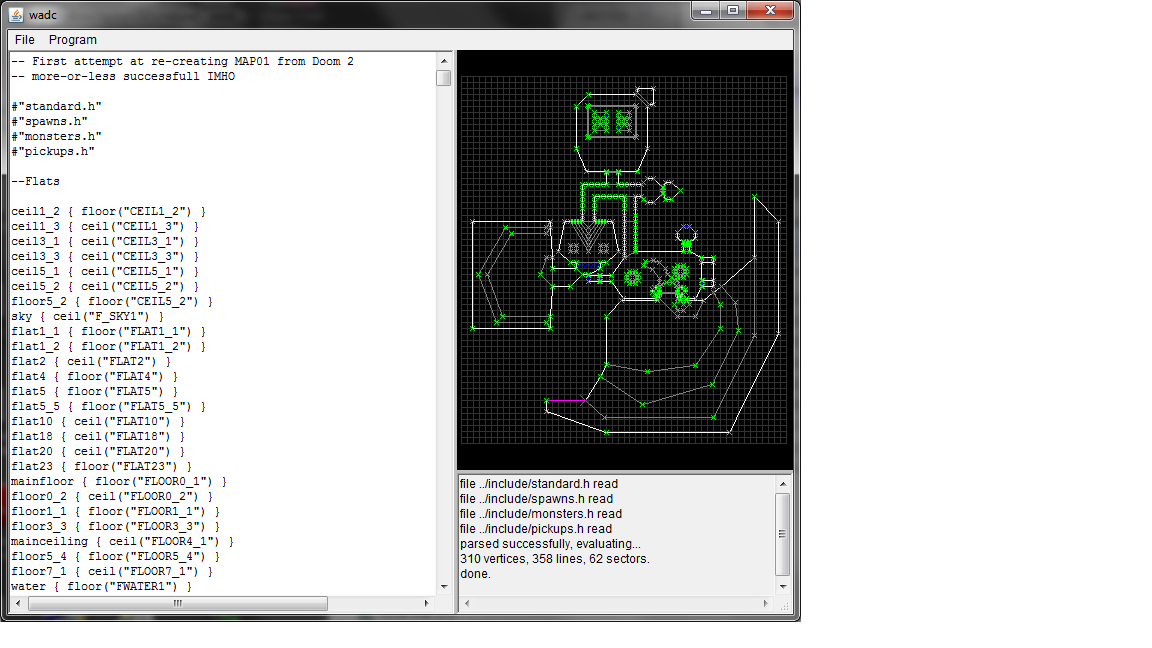
I'm happy to announce the release of wadc version 1.2.
WadC is a functional programming language for the composition of
Doom-format maps. Originally created by Wouter "Aardappel" van Oortmerssen,
I was granted permission to take over the project over a year ago, but didn't
get around to releasing anything until now.
This version adds a few functions that permit you to draw two-sided lines which
are textured and impassible: important for a lot of detailing techniques. You
can also create friendly monsters for Boom-compatible ports. There's a new
example demonstrating these features; plus a recreation of Doom 2's "entryway",
courtesy of
GreyGhost.
See WadC for a summary, or go straight to the
binaries or
source on github.
Discussions: reddit, doomworld.
Host zimbra
Hostname localhost
User zimbra
ForwardX11 yes
Now I can start zimbra with:
ssh zimbra ./zdesktop-launch
Skype was a little harder, since the skype client has to access the audio system. With pulseaudio, though, it's a snap. I copied /etc/pulse/default.pa to ~/.pulse/ and added the line:
load-module module-native-protocol-tcp auth-ip-acl=127.0.0.1
Then, I added /home/skype/.pulse/client.conf with the contents:
default-server = 127.0.0.1
[Note: Jamie Rollins and dkg have pointed out that this arrangement allows any user on my laptop to send arbitrary data to pulseaudio, running as my primay account. They suggested configuring pulseaudio to listen on a unix-domain socket, and then configuring pulseaudio to only permit access to users in a particular group.]
iceweasel is the most complicated. In addition to the pulseaudio trick, I had to make two other allowances.
First, there are a lot of processes that launch a web browser in a number of different ways (sometimes asking for a new session, other times adding a tab to an existing one, sometimes passing an URL as an argument, etc).
The one that I got the most stuck on was mutt. Sometimes I want to see how an HTML message looks in iceweasel. Via mailcap, mutt creates a temp file with the html content and then launches a web browser to view the file. As can be reasonably expected, this temp file is owned by my primary user, and only read-able by the owner. That means my iceweasel user can't read it.
Eventually, I decided the easiest way to deal with these various scenarios was to write a simple bash script to launch my web browser (see below). I registered it via update-alternatives, so most reasonable programs that want to launch a web browser will use it.
The second issue is that I use the monkeysphere xul plugin to verify TLS certificates, which requires iceweasel to communicate with my monkeysphere validation agent. My agent runs as my primary user and by default only responds to queries from my primary user.
Fortunately, monkeysphere is well-designed and can handle this situation. As you can see from my web launcher script, I pass MONKEYSPHEREVALIDATIONAGENTSOCKET=$MONKEYSPHEREVALIDATIONAGENTSOCKET when calling iceweasel. In addition, I added the following before I exec monkeysphere-validation-agent:
export MSVA_ALLOWED_USERS="iceweasel jamie"
With this simple infrastructure setup, it's possible to easily isolate future programs as well.
Lastly... here's the script for launching iceweasel.
#!/bin/bash
stdin=
new_session=no
url=
for arg in "$@"; do
if <span class="createlink"> "$arg" =~ ^-- </span>; then
if [ "$arg" = "--new-session" ]; then
new_session=yes
elif [ "$arg" = "--from-stdin" ]; then
stdin=yes
fi
else
url="$1"
fi
done
if [ "$stdin" = "yes" ]; then
temp=$(mktemp)
while read line; do
echo "$line" >> "$temp"
done
# it must be readable by the iceweasel user
chmod 755 "$temp"
url="file:///$temp"
fi
args=
if [ "$new_session" = "yes" ]; then
args="--no-remote -ProfileManager"
fi
if [ -n "$url" ]; then
args="$args '$url'"
fi
ssh iceweasel "MONKEYSPHERE_VALIDATION_AGENT_SOCKET=$MONKEYSPHERE_VALIDATION_AGENT_SOCKET iceweasel $args" &
[ -f "$temp" ] && sleep 5 && rm "$temp"
Comments by email...
Hi,
http://current.workingdirectory.net/posts/2011/privilege-separation/ has good intentions but afaik it does not improve security much. X applications can sniff your passwords and inject commands to your terminal emulators.
I personally use xpra to get a similar solution without the hazards of X. I've been using it for two months now both at work and home. There are still bugs but svn version is getting better all the time.
See for example my reply to
https://grepular.com/ProtectingaLaptopfromSimpleandSophisticated_Attacks
Timo
Etherpad is an excellent Open Source web application for collaborative text editing. Like Google Docs, it allows you to share documents with others through a secret URL or to set up private documents for which people need a login.git clone git://github.com/ether/pad.git etherpad
dpkg-buildpackage -us -uc
apt-get install --no-install-recommends dbconfig-common python-uno mysql-server
dpkg -i etherpad_1.1.deb
apt-get install --no-install-recommends -f
useHttpsUrls = true
customBrandingName = ExamplePad
customEmailAddress = etherpad@example.com
topdomains = etherpad.example.com,your.external.ip.address,127.0.0.1,localhost,localhost.localdomain
serverand then enable it and restart Nginx:
listen 443;
server_name etherpad.example.com *.etherpad.example.com;
add_header Strict-Transport-Security max-age=15768000;
ssl on;
ssl_certificate /etc/ssl/certs/etherpad.example.com.crt;
ssl_certificate_key /etc/ssl/certs/etherpad.example.com.pem;
ssl_session_timeout 5m;
ssl_session_cache shared:SSL:1m;
ssl_protocols TLSv1;
ssl_ciphers RC4-SHA:HIGH:!kEDH;
ssl_prefer_server_ciphers on;
access_log /var/log/nginx/etherpad.access.log;
error_log /var/log/nginx/etherpad.error.log;
location /
proxy_pass http://localhost:9000/;
proxy_set_header Host $host;
/etc/init.d/nginx restart
a2enmod proxy
a2enmod proxy_http
<VirtualHost *:443>
ServerName etherpad.example.com
ServerAlias *.etherpad.example.com
SSLEngine on
SSLCertificateFile /etc/apache2/ssl/etherpad.example.com.crt
SSLCertificateKeyFile /etc/apache2/ssl/etherpad.example.com.pem
SSLCertificateChainFile /etc/apache2/ssl/etherpad.example.com-chain.pem
SSLProtocol TLSv1
SSLHonorCipherOrder On
SSLCipherSuite RC4-SHA:HIGH:!kEDH
Header add Strict-Transport-Security: "max-age=15768000"
<Proxy>
Order deny,allow
Allow from all
</Proxy>
Alias /sitemap.xml /ep/tag/\?format=sitemap
Alias /static /usr/share/etherpad/etherpad/src/static
ProxyPreserveHost On
SetEnv proxy-sendchunked 1
ProxyRequests Off
ProxyPass / http://localhost:9000/
ProxyPassReverse / http://localhost:9000/
</VirtualHost>
a2ensite etherpad
apache2ctl configtest
apache2ctl graceful
127.0.0.1 localhost.(none) localhost.(none).fulldomain.example.comwhere fulldomain.example.com is the search base defined in /etc/resolv.conf.
sudo gem install heroku
The command heroku help will then show you all the possible invocations of the command line client, just to give you an idea of what you can do with it (everything).
Alright, that s not particularly interesting without an application to play with, is it? So let s create a new Sinatra application. In order to do that, we need a new directory containing a file like the following one:
# webapp.rb require 'rubygems' require 'sinatra' # Add other gems you might need here get '/' do "Your Sinatra app is working!" endAlso add a Gemfile with all the required dependencies, in our trivial example
sinatra is actually the only gem you need:
source :rubygems gem "sinatra"Lastly, you need a
config.ru file where you can require our newly created Ruby program and specify that it is a Sinatra application. In this example, the Ruby file is called webapp.rb.
require './webapp' run Sinatra::ApplicationA very useful program when developing a Sinatra application is shotgun.
gem install shotgun and you will be able to run your new shiny app by executing the command shotgun. While developing on your machine, shotgun will take care of reloading the application for every request, so that you don t have to restart the server after every modification to the source code.
Run bundle install to easily install all the required dependencies in your development environment, and shotgun to start the app locally. Pointing your browser to http://127.0.0.1:9393/ you can check if everything works as expected. If nothing went wrong, you can create a git repository to track changes to the source code:
git init git add . git commit -m "Initial commit"Perfect! Now, how do you create and deploy your application on Heroku?
heroku create git push heroku masterHeroku will automatically find out that you deployed a Sinatra application, it will install all the required dependencies and start serving requests. A few interesting commands you might want to run to see what s going on are
heroku info, heroku ps and heroku logs. The client also provides a command, heroku open, that opens your browser at the right production URL.
So, you now have a working application under revision control. Dependencies are handled by specifying them into the Gemfile, and the required gems can be installed locally using bundle. Shotgun is our friend when it comes to use the application for development purposes. A git push heroku master is all we need to deploy a new version of the code.
Of course there is way much more about Sinatra and Heroku than what I ve covered in this mini-intro. Please refer to the Sinatra Book and the Heroku Dev Center for more information!
sfdisk -d /dev/sda sfdisk /dev/second/sdbIn this case, it wasn't that easy. But I will come to that in a minute.
mdadm --zero-superblock /dev/sdb1mdadm --zero-superblock /dev/sdb2
mdadm --create /dev/md0 --level=1 --raid-devices=2 /dev/sdb1 missingmdadm --create /dev/md1 --level=1 --raid-devices=2 /dev/sdb2 missing
mount /dev/md0 /mnt/somewhere
mdadm --examine --scan >> /etc/mdadm/mdadm.conf
update-initramfs -uupdate-grubgrub-install /dev/sdb
pvcreate /dev/md1
vgextend <volgroup_name> /dev/md1</volgroup_name>
vgmove <volgroup_name> /dev/md1</volgroup_name>(Wait for it to complete... takes some time ;)
vgreduce <volgroup_name> /dev/sda2</volgroup_name>
mdadm --add /dev/md0 /dev/sda1mdadm --add /dev/md1 /dev/sda2
Device Boot Start End Blocks Id System
/dev/sdb1 2048 291154 144553+ fd Linux raid autodetect
/dev/sdb2 291160 625139334 312424087+ fd Linux raid autodetect
After some fight with qmake and lrelease/lupdate, I've finally managed to allow translations in GePeS. I see no clear reason why QML translating is that poorly supported within Qt tools, however with some hacks it seems to be doable.
As usual with my software, besides using sources (Qt's translation files in this case), you can use translation server to do online translation. As there are only few words to translate, I hope some languages will be translated soon. Of course to give you good example, I've completed Czech translation immediately :-).
Filed under: English Meego 0 comments Flattr this!
The route cache is a Linux kernel component enabling route lookups to
be faster by caching the results in some table and checking it before
issuing a regular lookup in the route tables. When using Linux as a
router, the inefficiency of the route cache can hinder the
performances of your box.
The documentation on this component is scarce and it is difficult to
find up-to-date bits on how the route cache works and how to tune
it. The book Understanding Linux Network Internals
from O Reilly is an exception and contains valuable information on how
the route cache works. Even if the book is targeted at 2.6.12, the
part on the route cache is still quite accurate. Unfortunately, it
fails to provide appropriate tips on how to monitor and tune the route cache.
I hope to provide here a concise view of the route cache, as it is
implemented in Linux 3.1. It is protocol-dependent1 and I
will cover only the IPv4 version here.
ip -s route show cache:
$ ip -s route show cache 198.51.100.7 from 203.0.113.2 via 192.0.2.1 dev eth1 cache used 7 age 2sec ipid 0x1fce rtt 131ms rttvar 45ms cwnd 10 198.51.100.17 from 203.0.113.15 via 192.0.2.1 dev eth1 cache used 3 age 0sec ipid 0xc3bd local 192.0.2.18 from 203.0.113.15 dev lo src 192.0.2.18 cache <local> used 154 age 1sec iif eth0
Once an entry has been added to the route cache, there are several
ways to remove it. Most entries are removed by the
garbage collector which will scan the route cache and remove
invalid and older entries. It will be triggered when the route cache
is full or at regular interval, once a certain threshold has been met.
sysctl.
rhash_entries is the size of the hash table4. If you
don t specify it on the kernel command line, it is computed
dynamically based on the memory available on your system. You can
view its value by looking at something like IP route cache hash
table entries: 262144 (order: 9, 2097152 bytes) in the kernel logs.net.ipv4.route.max_size is the maximum number of entries in
the route cache. Except under exceptional circumstances, this value
is never exceeded.net.ipv4.route.gc_elasticity is the target average length of a
chain in the route cache. The garbage collector will work harder
if this value is exceeded. This means that if you multiply this
value by the value of rhash_entries, you will get the target
average number of entries in the route cache.net.ipv4.route.gc_min_interval_ms is the minimum delay between
two runs of the garbage collector, except when the cache is
full. The default value should be fine.net.ipv4.route.gc_thresh is a threshold triggering the garbage
collector every net.ipv4.route.gc_min_interval_ms milliseconds.net.ipv4.route.gc_timeout is the base value to determine if an
entry is old enough to be removed or not. Whatever its value,
the garbage collector will attempt to remove the same number of
entries. However, this value could potentially influence its
efficiency. See below for more details on this.net.ipv4.route.secret_interval has been
removed in Linux 2.6.35; it was used to trigger an
asynchronous flush at fixed interval to avoid to fill the cache.net.ipv4.route.gc_interval has been
removed in Linux 2.6.38. It is still present until
Linux 3.2 but has no effect. It was used to trigger an asynchronous
cleanup of the route cache (but in a different way of what the
garbage collector does). The garbage collector is now considered
efficient enough for the job./proc/net/stat/rt_cache. The command
lnstat can print them nicely for you:
$ lnstat -s1 -i1 -c-1 -f rt_cache rt_cache rt_cache rt_cache rt_cache rt_cache rt_cache rt_cache rt_cache rt_cache rt_cache rt_cache rt_cache rt_cache rt_cache rt_cache rt_cache rt_cache entries in_hit in_slow_ in_slow_ in_no_ro in_brd in_marti in_marti out_hit out_slow out_slow gc_total gc_ignor gc_goal_ gc_dst_o in_hlist out_hlis tot mc ute an_dst an_src _tot _mc ed miss verflow _search t_search 3096848 42309 686 0 0 0 0 0 3 0 0 674 672 0 0 27644 8 3096984 41405 636 0 0 0 0 0 3 0 0 623 621 0 0 28189 8 3097160 42483 700 0 0 0 0 0 5 0 0 694 692 0 0 29506 12
lnstat outputs values in units per
second. Let s review some of those values:
rt_cache_entries is the number of entries in the route cache. You
should compare it with net.ipv4.route.max_size and ensure that
the cache is never full to avoid triggering the garbage
collector too often.rt_cache_in_hit and rt_cache_out_hit are the number of regular
lookups avoided because the result was found in the cache for
incoming and outgoing packets, respectively. When the system is a
router, most lookups only happen on the incoming side. You should
compare this value with rt_cache_in_slow_tot and
rt_cache_in_out_slow_tot which are the number of lookups in the
route tables. On this system, the efficiency of the route cache
is more than 98% which is quite good.rt_cache_gc_total is how often the garbage collector was
requested to be triggered while rt_cache_gc_ignored corresponds
to how often it was finally not run because it has already been
triggered shortly beforehand (less than
net.ipv4.route.gc_min_interval_ms milliseconds). The difference
between those two values should be very small to ensure that the
garbage collector does not run more a handful of times per second.rt_cache_gc_goal_miss is how often the garbage collector was not
able to fulfill its goal. This value should rarely be different of 0.rt_cache_gc_dst_overflow is how often the route cache is bigger
than the allowed maximum size. This should never happen except
when you try to shrink the cache.rt_cache_in_hlist_search and rt_cache_out_hlist_search is how
often a lookup in the cache had to look at the next entry in the
chain for the computed bucket: each time Linux has to follow the
next pointer in a cache entry, it increments one of those
counters. It is a clue on the average length of chains in the route
cache hash table. Compare those values with the number of cache
lookups (hit and miss).
rhash_entries is 1,048,576, as is
net.ipv4.route.gc_thresh. Therefore, the garbage collector was
requested to be run when the number of entries goes above this
level. Because the cache is not full, it is only really run twice per
seconds (the value of net.ipv4.gc_interval_ms is
500). net.ipv4.gc_elasticity is set to 3. This explains why the
garbage collector is aggressive when the number of entries reached 3,145,728.
As you can see, the efficiency is near 100% all the time. The
percentage of collisions is rt_cache_in_hlist_search ratio to the
sum of rt_cache_in_hit and rt_cache_in_slow_tot.
net.ipv4.route.max_size, rhash_entries and
net.ipv4.route.gc_elasticity. For example, if the route cache hash
table has 262,144 buckets, the maximum allowed number of entries in
the cache is 4,194,304 and net.ipv4.route.gc_elasticity is set to 8,
the memory usage will be 500 MB on average and 1 GB max. If this is
too much, you will need to lower some values.
Look at the previous section to compute the current efficiency of your
route cache. It should be above 90%. If you are dissatisfied with
that, you could increase the cache size.
If you want to double the number of entries, double
net.ipv4.route.max_size, net.ipv4.route.gc_thresh and
rhash_entries but keep net.ipv4.route.gc_elasticity to 8.
For the garbage collector to be efficient, the route cache should not
be filled too fast. The garbage collector should be able to cope with
this situation but this may impact performance because it needs to
walk several times the route cache to find entries to expire. Watching
gc_goal_miss may give you a hint about this: if this value starts to
be different of 0, lower net.ipv4.gc_timeout.
net.ipv4.route.gc_thresh. It is implemented in
rt_garbage_collect() function. It will do
nothing if it has been called less than
net.ipv4.route.gc_interval_ms milliseconds and the cache is not full
(more than net.ipv4.route.max_size entries).
rhash_entries and net.ipv4.gc_elasticity:
rhash_entries entries.
The first plot shows what would happen if about 2000 routes are added
per second with rhash_entries equal to 262,144 and
net.ipv4.route.gc_elasticity set to 8. When
net.ipv4.route.gc_threshold is met, the garbage collector has almost
no effect. However, when the number of entries reaches 2,097,152, the
garbage collector sets its goal to 262,144. From this point, the number
of entries oscillates around 2 millions entries.
On the second plot, rhash_entries is now equal to 1,048,576 but
net.ipv4.route.gc_elasticity has been set to 2. Therefore, the
aggressive part of the garbage collectors kicks at the same threshold
than for the previous plot. However, its goal is now four times larger
and the oscillations have a larger amplitude. The fact that the
aggressive part of the garbage collector kicks less often is nullified
by the fact that it needs to remove more entries each time. Because of
the slight impact on cache efficiency, it seems better to keep
net.ipv4.route.gc_elasticity around 8, or 4 if we want to keep
shorter chains (but there seems to be no improvement to do so).
The other plots show what happens when there is a sudden surge in the
number of routes added or when there is a pause.
rhash_entries,
net.ipv4.route.gc_elasticity and net.ipv4.route.gc_threshold
interact, let s look at net.ipv4.route.gc_timeout. Once the garbage
collector has set its goal and if it is positive, it needs to choose
which entries to remove from the cache.
It walks the hash table from the position of its last run and remove
entries until its goal is met. If the entry is not current anymore
(for example, the network interface associated to it has changed its
IP configuration), it is removed. Otherwise, the system looks at the
age of the entry and its position in the chain. If the entry is the
first in the chain, it is kept only if its age is below
net.ipv4.route.gc_timeout. If it is second, it is kept only if its
age is below half of net.ipv4.route.gc_timeout. If it is third, the
threshold is a quarter of net.ipv4.route.gc_timeout, and so on. The
garbage collector will favor short chains.
If after a full run of the hash table, the garbage collector was not
able to meet its goal, it will start again but will behave more
aggressively, as if net.ipv4.route.gc_timeout is set to half of its
value. It will do as many passes as necessary until its goal is met or
until there is no way to remove any entry (or until it has spent too
much time). Once the garbage collector has switched to this more
aggressive behavior, it will keep being aggressive for a few cycles
(a bit less for each cycle).
With a very large value of net.ipv4.route.gc_timeout, the garbage
collector will have a hard time to find entries to expire. It will
need to do several passes until it is able to expire some entries. On
the other hand, if you choose a very small value, the garbage
collector may remove entries that were just added, even if there are
older entries further in the hash table.
For a more in-depth coverage of how the route cache works, look at
chapter 33 of
Understanding Linux Network Internals. Just be
aware that multipath route caching has been removed (and was never
really used) and asynchronous cleanup (rt_periodic_timer) does not
exist anymore.
rhash_entries,
net.ipv4.route.gc_elasticity, net.ipv4.route.max_size and
net.ipv4.route.gc_threshold are related and should not be modified
independently. net.ipv4.route.gc_thresh should be below the product
of net.ipv4.route.gc_elasticity and rhash_entries while
net.ipv4.route.max_size should be above this value.
Linux exposes several interesting metrics related to the route
cache. Monitoring them allows one to watch the efficiency of the
route cache and may uncover some anomalies (garbage collector
running too often, difficulty to remove routes from the cache, ).
The route cache subsystem still evolves and some old behaviors have
been dismissed. The best documentation is, unfortunately, still the
code and other documentations tend to become obsolete. The IPv6
route cache is quite different of the one presented here. Don t
blindly apply the same tuning for IPv6.
rp_filter in Linux.
include/net/dst.h,
include/net/route.h and net/ipv4/route.c.
rhash_entries is rounded to the next
power of two and, internally, is stored as rt_hash_mask +
1.

Ben Hutchings, photo by Andrew Mc Millan, license CC-BY-2.0
Our biggest problem today is that we just don t have enough time to do all we want to.Raphael: It is widely known that Linux is maintained in a git repository. But the Debian kernel team is using Subversion. I believe a switch is planned. Why was not git used from the start? Ben: The linux-2.6 source package dates from the time when Linus made his first release using git. I wasn t part of the team back then so I don t know for sure why it was imported to Subversion. However, at that time hardly anyone knew how to use git, no-one had experience hosting public git repositories, and Alioth certainly didn t offer that option. Today there are no real blockers: everyone on the kernel team is familiar with using git; Alioth is ready to host it; we don t have per-architecture patches that would require large numbers of branches. But it still takes time to plan such a conversion for what is a relatively complex source package (actually a small set of related source packages). Raphael: What are your plans for Debian Wheezy? Ben: Something I ve already done, in conjunction with the installer team, is to start generating udebs from the linux-2.6 source package. The kernel and modules have to be repacked into lots of little udebs to avoid using too much memory during installation. The configuration for this used to be in a bunch of separate source packages; these could get out of step with the kernel build configuration and this would only be noticed some time later. Now we can update them both at the same time, they are effectively cross-checked on every upload, and the installer can always be built from the latest kernel version in testing or unstable. I think that we should be encouraging PC users to install the 64-bit build (amd64), but many users will still use 32-bit (i386) for backward compatibility or out of habit. On i386, we ve slightly reduced the variety of kernel flavours by getting rid of 686 and making 686-pae the default (previously this was called 686-bigmem ). This means that the NX security feature will be used on all systems that support it. It should also mean that the first i386 CD can have suitable kernel packages for all systems. I have been trying to work on providing a full choice of Linux Security Modules (LSMs). Despite their name, they cannot be built as kernel modules, so every enabled LSM is a waste of memory on the systems that don t use it. This is a significant concern for smaller Debian systems. My intent is to allow all unused LSMs to be freed at boot time so that we can happily enable all of them. I recently proposed to drop support for older x86 systems, starting with 486-class processors in wheezy. In general, this would allow the use of more compiler optimisations throughout userland and the kernel. However it seems that there isn t that much to be gained unless we also drop 586-class processors, and there are still quite a few of those in use. So I think this will have to wait. Uwe Kleine-K nig has been working to include real-time support (also known as PREEMPT_RT). This can provide low and very predictable I/O latency, which is useful for live audio synthesis, for example. It still requires a number of patches and a build configuration change, resulting in a separate binary package. We re currently only building that for 64-bit PCs. (You may notice this is missing for Linux 3.1, because the real-time developers skipped this release.) Raphael: What s the biggest problem of Debian? Ben: I think we try too hard to accommodate every possible option, without regard for the cost to developers and users in general. As an example, we now have sysvinit, file-rc, upstart and systemd all in testing. Daemon maintainers can t rely on any advanced features of upstart or systemd because we refuse to choose between them. And the decision to support the FreeBSD kernel means that we cannot choose upstart or systemd as the only option. So all daemon maintainers will have to maintain those baroque init scripts for the indefinite future. We really should be able to decide as a distribution that when one option is technically good and popular then it can be made the only option. But no-one really has the authority to do that, so we muddle along with the pretence that all the options are equally valid and functional, while none of them is supported as well as they should be.
We try too hard to accommodate every possible option, without regard for the cost to developers and users in general.We also try to build every package on every architecture, in general. I m quite sure there are many (package, architecture) combinations that have no users, ever. But if at some point that combination FTBFS, developers will waste time investigating and fixing that time that could have been spent working on bugs and features that users actually care about. Yes, sure, portability is good but you can t prove portability just by making a package compile on every architecture. This also applies to the selection of drivers for the kernel, by the way. Raphael: Is there someone in Debian that you admire for their contributions? Well, there are many people, but I will pick out just a few: Steve McIntyre, for his work as DPL to improve communication with the various Debian derivatives and to bring fresh blood into various core teams. Also for being a generous host for countless Debian social and bug-squashing events. Stefano Zacchiroli, for improving further on communications with both downstream and upstream projects, and for regularly exercising his power to lead discussions to the benefit of the project. Julien Cristau, for maintaining good humour while not only fighting against the tide of graphics driver regressions in X and the Linux kernel but also working on release management. Jonathan Nieder, for taking on the unglamorous and frustrating task of kernel bug triage as a non-maintainer and developing it to a fine art.
Subscribe to my newsletter to get my monthly summary of the Debian/Ubuntu news and to not miss further interviews. You can also follow along on Identi.ca, Google+, Twitter and Facebook .
4 comments Liked this article? Click here. My blog is Flattr-enabled.
# edit dpkg config with GUI (Tk or curses, or readline) cfg edit dpkg # just check the validity of the file, show warnings # and suggested fixes # does not modify the file cfg check dpkg # check the file, remove deprecated parameters, # migrate data to new parameters and save cfg migrate dpkg # like migrate, but also apply all suggested fixes cfg fix dpkg # like migrate and modify configuration # with command line argument cfg modify dpkg source format="quilt (3.0)" # access dpkg parameters through a fuse file # system. data are saved when fs is unmounted cfg fusefs dpkg fuse-dir # dump configuration data in config-model format cfg dump dpkg # list all available applications cfg list # more general synopsis cfg [ global_options ] command application [ options ] argumentsThis synopsis use dpkg as an example, but it could be used for any of the available models (e.g. ssh, lcdproc, multistrap ). The main question I have for you is: Is cfg name good ? I mean it s short, descriptive enough. But it s also quite ugly. Does anyone have a better idea ? And what do you think of the synopsis shown above ? Are the sub-command name descriptive enough ? All the best
Note Last version of Qt3, 3.3.8, was released in February 2007, with official support by Trolltech terminated later that year.
Qt4 was first released in 2005, and current stable series 4.7 released appeared in September 2010.
Install the tools:
sudo apt-get install debootstrap schroot
Choose a location with enough space (600 MB should be enough) and install a complete Debian squeeze installation with fslview:
sudo debootstrap --include=fslview squeeze /srv/chroots/squeeze http://ftp.us.debian.org/debian
Note
You might like to adjust the URL to a Debian mirror closer to you
Create schroot configuration file /etc/schroot/chroot.d/squeeze with the following content:
[squeeze]
description=Debian squeeze (6.x stable)
type=directory
directory=/srv/chroots/squeeze
users=YOURLOGIN
aliases=debian,default
At this point you should already be able to invoke any command within the chroot environment, so just create a little shell script /usr/local/bin/fslview, make it executable and be all set:
echo -e '#!/bin/sh\nschroot -p -c squeeze /usr/bin/fslview "$@"' > /usr/local/bin/fslview
chmod a+x /usr/local/bin/fslview
Note
You might need to become root for the above.
chroot-root: Enable NeuroDebian repository. Choose squeeze release and mirror of preference (remove sudo from provided cmdline).
chroot-root: Enable security and functionality updates:
sed -e 's,squeeze,squeeze-updates,g' /etc/apt/sources.list > /etc/apt/sources.list.d/updates.list
echo 'deb http://security.debian.org/ stable/updates main' > /etc/apt/sources.list.d/security.list
apt-get update
apt-get upgrade
Make fsl atlases accessible within the chroot environment. There are two ways and you must choose only one of them, otherwise you might damage your main system installation.
chroot-root: Install atlases packages in the chroot-ed environment:
apt-get install fsl-atlases
Alternatively you can bind-mount those directories with atlases installed on the main system within chroot. For that edit (as root on the main system) /etc/schroot/default/fstab and add following entries:
/usr/share/fsl/data/atlases /usr/share/fsl/data/atlases none rw,bind 0 0
/usr/share/data /usr/share/data none rw,bind 0 0
Note
Similarly you can bind-mount any other directory you would like to make visible in chroot. Just be careful to not overlap with system directories in chroot which already carry something.
/etc/rsyslogd.d/logger.conf as below I can point any new device to my log server and it will automatically create a new file for it. And since the dates are embedded into the filename, I get log rotation suitable for rsync-style backups for free.
$ModLoad imudp
$UDPServerRun 514 $ModLoad imtcp
$InputTCPServerRun 514 $template DynFile, /var/log/network-%HOSTNAME%-%$year%-%$month%-%$day%.log
:fromhost-ip, !isequal, 127.0.0.1 ?DynFile
:fromhost-ip, !isequal, 127.0.0.1 ~
master:/srv/leader/news/bits-from-the-DPL.*
Next.