Search Results: "sto"

16 June 2016

John Goerzen: Mud, Airplanes, Arduino, and Fun

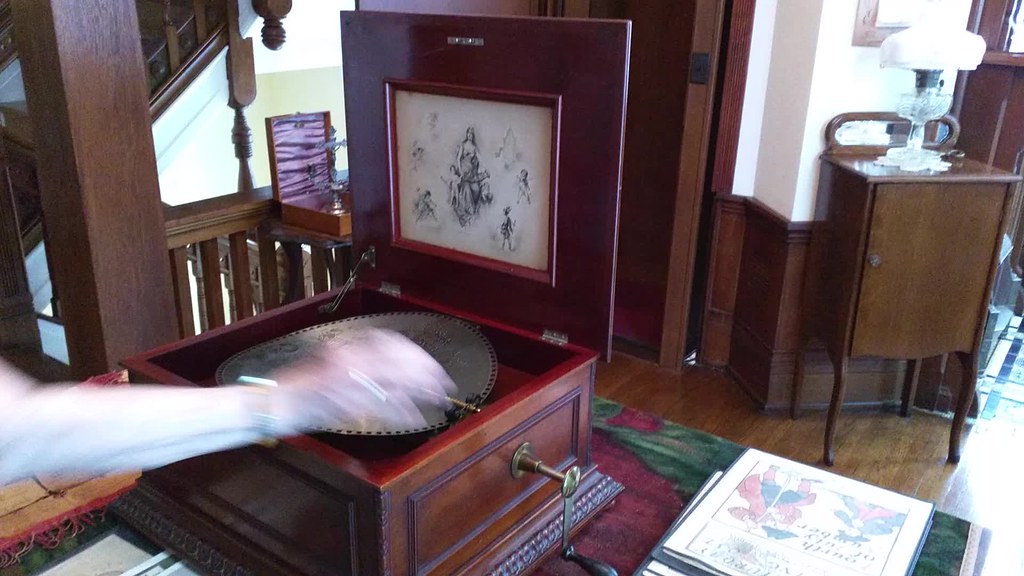
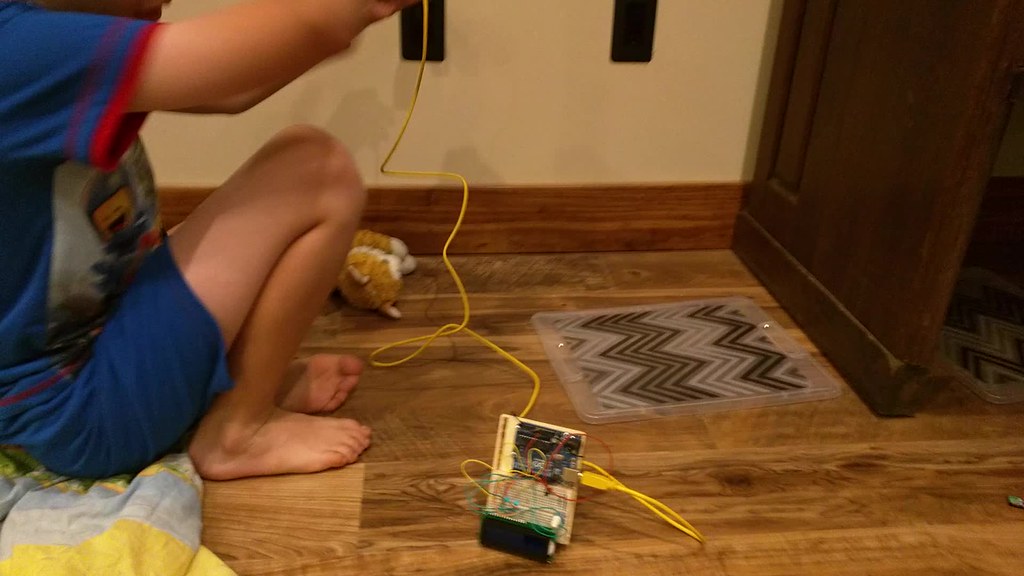
The last few weeks have been pretty hectic in their way, but I ve also had the chance to take some time off work to spend with family, which has been nice. Memorial Day: breakfast and mud For Memorial Day, I decided it would be nice to have a cookout for breakfast rather than for dinner. So we all went out to the fire ring. Jacob and Oliver helped gather kindling for the fire, while Laura chopped up some vegetables. Once we got a good fire going, I cooked some scrambled eggs in a cast iron skillet, mixed with meat and veggies. Mmm, that was tasty. Then we all just lingered outside. Jacob and Oliver enjoyed playing with the cats, and the swingset, and then . water. They put the hose over the slide and made a water slide (more mud slide maybe). IMG_7688 Then we got out the water balloon fillers they had gotten recently, and they loved filling up water balloons. All in all, we all just enjoyed the outdoors for hours. MVI_7738 Flying to Petit Jean, Arkansas Somehow, neither Laura nor I have ever really been to Arkansas. We figured it was about time. I had heard wonderful things about Petit Jean State Park from other pilots: it s rather unique in that it has a small airport right in the park, a feature left over from when Winthrop Rockefeller owned much of the mountain. And what a beautiful place it was! Dense forests with wonderful hiking trails, dotted with small streams, bubbling springs, and waterfalls all over; a nice lake, and a beautiful lodge to boot. Here was our view down into the valley at breakfast in the lodge one morning: IMG_7475 And here s a view of one of the trails: IMG_7576 The sunset views were pretty nice, too: IMG_7610 And finally, the plane we flew out in, parked all by itself on the ramp: IMG_20160522_171823 It was truly a relaxing, peaceful, re-invigorating place. Flying to Atchison Last weekend, Laura and I decided to fly to Atchison, KS. Atchison is one of the oldest cities in Kansas, and has quite a bit of history to show off. It was fun landing at the Amelia Earhart Memorial Airport in a little Cessna, and then going to three museums and finding lunch too. Of course, there is the Amelia Earhart Birthplace Museum, which is a beautifully-maintained old house along the banks of the Missouri River. IMG_20160611_134313 I was amused to find this hanging in the county historical society museum: IMG_20160611_153826 One fascinating find is a Regina Music Box, popular in the late 1800s and early 1900s. It operates under the same principles as those that you might see that are cylindrical. But I am particular impressed with the effort that would go into developing these discs in the pre-computer era, as of course the holes at the outer edge of the disc move faster than the inner ones. It would certainly take a lot of careful calculation to produce one of these. I found this one in the Cray House Museum: VID_20160611_151504 An Arduino Project with Jacob One day, Jacob and I got going with an Arduino project. He wanted flashing blue lights for his police station , so we disassembled our previous Arduino project, put a few things on the breadboard, I wrote some code, and there we go. Then he noticed an LCD in my Arduino kit. I hadn t ever gotten around to using it yet, and of course he wanted it immediately. So I looked up how to connect it, found an API reference, and dusted off my C skills (that was fun!) to program a scrolling message on it. Here is Jacob showing it off: VID_20160614_074802.mp4

15 June 2016

Reproducible builds folks: Reproducible builds: week 59 in Stretch cycle

What happened in the Reproducible Builds effort between June 5th and June 11th 2016: Media coverage Ed Maste gave a talk at BSDCan 2016 on reproducible builds (slides, video). GSoC and Outreachy updates Weekly reports by our participants: Documentation update - Ximin Luo proposed a modification to our SOURCE_DATE_EPOCH spec explaining FORCE_SOURCE_DATE. Some upstream build tools (e.g. TeX, see below) have expressed a desire to control which cases of embedded timestamps should obey SOURCE_DATE_EPOCH. They were not convinced by our arguments on why this is a bad idea, so we agreed on an environment variable FORCE_SOURCE_DATE for them to implement their desired behaviour - named generically, so that at least we can set it centrally. For more details, see the text just linked. However, we strongly urge most build tools not to use this, and instead obey SOURCE_DATE_EPOCH unconditionally in all cases. Toolchain fixes Packages fixed The following 16 packages have become reproducible due to changes in their build-dependencies: apertium-dan-nor apertium-swe-nor asterisk-prompt-fr-armelle blktrace canl-c code-saturne coinor-symphony dsc-statistics frobby libphp-jpgraph paje.app proxycheck pybit spip tircd xbs The following 5 packages are new in Debian and appear to be reproducible so far: golang-github-bowery-prompt golang-github-pkg-errors golang-gopkg-dancannon-gorethink.v2 libtask-kensho-perl sspace The following packages had older versions which were reproducible, and their latest versions are now reproducible again after being fixed: The following packages have become reproducible after being fixed: Some uploads have fixed some reproducibility issues, but not all of them: Patches submitted that have not made their way to the archive yet: Package reviews 68 reviews have been added, 19 have been updated and 28 have been removed in this week. New and updated issues: 26 FTBFS bugs have been reported by Chris Lamb, 1 by Santiago Vila and 1 by Sascha Steinbiss. diffoscope development strip-nondeterminism development disorderfs development tests.reproducible-builds.org Misc. Steven Chamberlain submitted a patch to FreeBSD's makefs to allow reproducible builds of the kfreebsd installer. Ed Maste committed a patch to FreeBSD's binutils to enable determinstic archives by default in GNU ar. Helmut Grohne experimented with cross+native reproductions of dash with some success, using rebootstrap. This week's edition was written by Ximin Luo, Chris Lamb, Holger Levsen, Mattia Rizzolo and reviewed by a bunch of Reproducible builds folks on IRC.

Andrew Shadura: Migrate to systemd without a reboot

Yesterday I was fixing an issue with one of the servers behind kallithea-scm.org: the hook intended to propagage pushes from Our Own Kallithea to Bitbucket stopped working. Until yesterday, that server was using Debian s flavour of System V init and djb s d montools to keep things running. To make the hook asynchronous, I wrote a service to be managed to d montools, so that concurrency issued would be solved by it. However, I didn t implement any timeouts, so when last week wget froze while pulling Weblate s hook, there was nothing to interrupt it, so the hook stopped working since d montools thought it s already running and wouldn t re-trigger it. Killing wget helped, but I decided I need to do something with it to prevent the situation from happening in the future. I ve been using systemd at work for the last year, so I am now confident I m happier with systemd than with d montools, so I decided to switch the server to systemd. Not surprisingly, I prepared unit files in about 5 minutes without having to look into the manuals again, while with d montools I had to check things every time I needed to change something. The tricky thing was the switch itself. It is a virtual server, presumably running in Xen, and I don t have access to the console, so if I bork break something, I need to summon Bradley Kuhn or someone from Conservancy, who s kindly donated the server to the project. In any case, I decided to attempt to upgrade without a reboot, so that I have more options to roll back my changes in the case things go wrong. After studying the manpages of both systemd s init and sysvinit s init, I realised I can install systemd as /sbin/init and ask already running System V init to re-exec. However, systemd s init can t talk to System V init, so before installing systemd I made a backup on it. It s also important to stop all running services (except probably ssh) to make sure systemd doesn t start second instances of each. And then: /tmp/init u and we re running systemd! A couple of additional checks, and it s safe to reboot. Only when I did all that I realised that in the case of systemd not working I d probably not be able to undo my changes if my connection interrupted. So, even though at the end it worked, probably it s not a good idea to perform such manipulations when you don t have an alternative way to connect to the server :)

Enrico Zini: On discomfort and new groups

I recenyly wrote:
When you get involved in a new community, such as Debian, find out early where, if that happens, you can find support, understanding, and help to make it stop.
Last night I asked a group of friends what do they do if they start feeling uncomfortable when they are alone in a group of people they don't know. Here are the replies: I think a lot of these point are good food for thought about barriers of entry, and about safety nets that a group has or might want to have.

Russ Allbery: Review: Matter

Review: Matter, by Iain M. Banks
Publisher: Orbit
Copyright: February 2008
ISBN: 0-316-00536-3
Format: Hardcover
Pages: 593
Sursamen is an Arithmetic, Mottled, Disputed, Multiply Inhabited, Multi-million Year Safe, and Godded Shellworld. It's a constructed world with multiple inhabitable levels, each lit by thermonuclear "suns" on tracks, each level supported above the last by giant pillars. Before the recorded history of the current Involved Species, a culture called the Veil created the shellworlds with still-obscure technology for some unknown purpose, and then disappeared. Now, they're inhabited by various transplants and watched over by a hierarchy of mentor and client species. In the case of Sursamen, both the Aultridia and the Oct claim jurisdiction (hence "Disputed"), and are forced into an uneasy truce by the Nariscene, a more sophisticated species that oversees them both. On Sursamen, on level eight to be precise, are the Sarl, a culture with an early industrial level of technology in the middle of a war of conquest to unite their level (and, they hope, the next level down). Their mentors are the Oct, who claim descendance from the mysterious Veil. The Deldeyn, the next level down, are mentored by the Aultridia, a species that evolved from a parasite on Xinthian Tensile Aranothaurs. Since a Xinthian, treated by the Sarl as a god, lives in the heart of Sursamen (hence "Godded"), tensions between the Sarl and the Aultridians run understandably high. The ruler of the Sarl had three sons and a daughter. The oldest was killed by the people he is conquering as Matter starts. The middle son is a womanizer and a fop who, as the book opens, watches a betrayal that he's entirely unprepared to deal with. The youngest is a thoughtful, bookish youth pressed into a position that he also is not well-prepared for. His daughter left the Sarl, and Sursamen itself, fifteen years previously. Now, she's a Special Circumstances agent for the Culture. Matter is the eighth Culture novel, although (like most of the series) there's little need to read the books in any particular order. The introduction to the Culture here is a bit scanty, so you'll have more background and understanding if you've read the previous novels, but it doesn't matter a great deal for the story. Sharp differences in technology levels have turned up in previous Culture novels (although the most notable example is a minor spoiler), but this is the first Culture novel I recall where those technological differences were given a structure. Usually, Culture novels have Special Circumstances meddling in, from their perspective, "inferior" cultures. But Sursamen is not in Culture space or directly the Culture's business. The Involved Species that governs Sursamen space is the Morthanveld: an aquatic species roughly on a technology level with the Culture themselves. The Nariscene are their client species; the Oct and Aultridia are, in turn, client species (well, mostly) of the Nariscene, while meddling with the Sarl and Deldeyn. That part of this book reminded me of Brin's Uplift universe. Banks's Involved Species aren't the obnoxious tyrants of Brin's universe, and mentoring doesn't involve the slavery of the Uplift universe. But some of the politics are a bit similar. And, as with Uplift, all the characters are aware, at least vaguely, of the larger shape of galactic politics. Even the Sarl, who themselves have no more than early industrial technology. When Ferbin flees the betrayal to try to get help, he ascends out of the shellworld to try to get assistance from an Involved species, or perhaps his sister (which turns out to be the same thing). Banks spends some time here, mostly through Ferbin and his servant (who is one of the better characters in this book), trying to imagine what it would be like to live in a society that just invented railroads while being aware of interstellar powers that can do practically anything. The plot, like the world on which it's set, proceeds on multiple levels. There is court intrigue within the Sarl, war on their level and the level below, and Ferbin's search for support and then justice. But the Sarl live in an artifact with some very mysterious places, including the best set piece in the book: an enormous waterfall that's gradually uncovering a lost city on the level below the Sarl, and an archaeological dig that proceeds under the Deldeyn and Sarl alike. Djan Seriy decides to return home when she learns of events in Sarl, originally for reasons of family loyalty and obligation, but she's a bit more in touch with the broader affairs of the galaxy, including the fact that the Oct are acting very strangely. There's something much greater at stake on Sursamen than tedious infighting between non-Involved cultures. As always with Banks, the set pieces and world building are amazing, the scenery is jaw-dropping, and I have some trouble warming to the characters. Dramatic flights across tower-studded landscapes seeking access to forbidden world-spanning towers largely, but don't entirely, make up for not caring about most of the characters for most of the book. This did change, though: although I never particularly warmed to Ferbin, I started to like his younger brother, and I really liked his sister and his servant by the end of the book. Unfortunately, the end of Matter is, if not awful, at least exceedingly abrupt. As is typical of Banks, we get a lot of sense of wonder but not much actual explanation, and the denouement is essentially nonexistent. (There is a coy epilogue hiding after the appendices, but it mostly annoyed me and provides only material for extrapolation about the characters.) Another SF author would have written a book about the Xinthian, the Veil, the purpose of the shellworlds, and the deep history of the galaxy. I should have known going in that Banks isn't that sort of SF author, but it was still frustrating. Still, Banks is an excellent writer and this is a meaty, complex, enjoyable story with some amazing moments of wonder and awe. If you like Culture novels in general, you will like this. If you like set-piece-heavy SF on a grand scale, such as Alastair Reynolds or Kim Stanley Robinson, you probably like this. Recommended. Rating: 8 out of 10

14 June 2016

Simon McVittie: GTK versioning and distributions

Allison Lortie has provoked a lot of comment with her blog post on a new proposal for how GTK is versioned. Here's some more context from the discussion at the GTK hackfest that prompted that proposal: there's actually quite a close analogy in how new Debian versions are developed. The problem we're trying to address here is the two sides of a trade-off: Historically, GTK has aimed to keep compatible within a major version, where major versions are rather far apart (GTK 1 in 1998, GTK 2 in 2002, GTK 3 in 2011, GTK 4 somewhere in the future). Meanwhile, fixing bugs, improving performance and introducing new features sometimes results in major changes behind the scenes. In an ideal world, these behind-the-scenes changes would never break applications; however, the world isn't ideal. (The Debian analogy here is that as much as we aspire to having the upgrade from one stable release to the next not break anything at all, I don't think we've ever achieved that in practice - we still ask users to read the release notes, even though ideally that wouldn't be necessary.) In particular, the perceived cost of doing a proper ABI break (a fully parallel-installable GTK 4) means there's a strong temptation to make changes that don't actually remove or change C symbols, but are clearly an ABI break, in the sense that an application that previously worked and was considered correct no longer works. A prominent recent example is the theming changes in GTK 3.20: the ABI in terms of functions available didn't change, but what happens when you call those functions changed in an incompatible way. This makes GTK hard to rely on for applications outside the GNOME release cycle, which is a problem that needs to be fixed (without stopping development from continuing). The goal of the plan we discussed today is to decouple the latest branch of development, which moves fast and sometimes breaks API, from the API-stable branches, which only get bug fixes. This model should look quite familiar to Debian contributors, because it's a lot like the way we release Debian and Ubuntu. In Debian, at any given time we have a development branch (testing/unstable) - currently "stretch", the future Debian 9. We also have some stable branches, of which the most recent are Debian 8 "jessie" and Debian 7 "wheezy". Different users of Debian have different trade-offs that lead them to choose one or the other of these. Users who value stability and want to avoid unexpected changes, even at a cost in terms of features and fixes for non-critical bugs, choose to use a stable release, preferably the most recent; they only need to change what they run on top of Debian for OS API changes (for instance webapps, local scripts, or the way they interact with the GUI) approximately every 2 years, or perhaps less often than that with the Debian-LTS project supporting non-current stable releases. Meanwhile, users who value the latest versions and are willing to work with a "moving target" as a result choose to use testing/unstable. The GTK analogy here is really quite close. In the new versioning model, library users who value stability over new things would prefer to use a stable-branch, ideally the latest; library users who want the latest features, the latest bug-fixes and the latest new bugs would use the branch that's the current focus of development. In practice we expect that the latter would be mostly GNOME projects. There's been some discussion at the hackfest about how often we'd have a new stable-branch: the fastest rate that's been considered is a stable-branch every 2 years, similar to Ubuntu LTS and Debian, but there's no consensus yet on whether they will be that frequent in practice. How many stable versions of GTK would end up shipped in Debian depends on how rapidly projects move from "old-stable" to "new-stable" upstream, how much those projects' Debian maintainers are willing to patch them to move between branches, and how many versions the release team will tolerate. Once we reach a steady state, I'd hope that we might have 1 or 2 stable-branched versions active at a time, packaged as separate parallel-installable source packages (a lot like how we handle Qt). GTK 2 might well stay around as an additional active version just from historical inertia. The stable versions are intended to be fully parallel-installable, just like the situation with GTK 1.2, GTK 2 and GTK 3 or with the major versions of Qt. For the "current development" version, I'd anticipate that we'd probably only ship one source package, and do ABI transitions for one version active at a time, a lot like how we deal with libgnome-desktop and the evolution-data-server family of libraries. Those versions would have parallel-installable runtime libraries but non-parallel-installable development files, again similar to libgnome-desktop. At the risk of stretching the Debian/Ubuntu analogy too far, the intermediate "current development" GTK releases that would accompany a GNOME release are like Ubuntu's non-LTS suites: they're more up to date than the fully stable releases (Ubuntu LTS, which has a release schedule similar to Debian stable), but less stable and not supported for as long. Hopefully this plan can meet both of its goals: minimize breakage for applications, while not holding back the development of new APIs.

12 June 2016

Iustin Pop: Elsa Bike Trophy 2016 my first bike race!

Elsa Bike Trophy 2016 my first bike race! So today, after two months of intermittent training using Zwift and some actual outside rides, I did my first bike race. Not of 2016, not of 2000+, but like ever. Which is strange, as I learned biking very young, and I did like to bike. But as it turned out, even though I didn't like running as a child, I did participate in a number of running events over the years, but no biking ones. The event Elsa Bike Trophy is a mountain bike event cross-country, not downhill or anything crazy; it takes part in Estavayer-le-Lac, and has two courses - one 60Km with 1'791m altitude gain, and a smaller one of 30Km with 845m altitude gain. I went, of course, for the latter. 845m is more than I ever did in a single ride, so it was good enough for a first try. The web page says that this smaller course est nerveux, technique et ne laisse que peu de r pit . I choose to think that's a bit of an exaggeration, and that it will be relatively easy (as I'm not too skilled technically). The atmosphere there was like for the running races, with the exception of bike stuff being sold, and people on very noisy rollers. I'm glad for my trainer which sounds many decibels quieter The long race started at 12:00, and the shorter one at 12:20. While waiting for the start I had to concerns in mind: whether I'm able to do the whole course (endurance), and whether it will be too cold (the weather kept moving towards rain). I had a small concern about the state of the course, as it was not very nice weather recently, but a small one. And then, after one hour plus of waiting, go! Racing, with a bit of "swimming" At first thing went as expected. Starting on paved roads, moving towards the small town exit, a couple of 14% climbs, then more flat roads, then a nice and hard 18% short climb (I'll never again complain about < 10%!), then entering the woods. It became quickly apparent that the ground in the forest was in much worse state than I feared. Much worse as in a few orders of magnitude. In about 5 minutes after entering the tree cover, my reasonably clean, reasonably light bike became a muddy, heavy monster. And the pace that until then went quite OK became walking pace, as the first rider that didn't manage to keep going up because the wheel turned out of the track blocked the one behind him, which had to stop, and repeat until we were one line (or two, depending on how wide the trail was) of riders walking their bikes up. While on dry ground walking your bike up is no problem, or hiking through mud with good hiking shoes is also no problem, walking up with biking shoes is a pain. Your foot slides and you waste half of your energy "swimming" in the mud. Once the climb is over, you get on the bike, and of course the pedals and cleats are full of heavy mud, so it takes a while until you can actually clip in. Here the trail version of SPD was really useful, as I could pedal reasonably well without being clipped-in, just had to be careful and push too hard. Then maybe you exit the trail and get on paved road, but the wheels are so full of mud that you still are very slow (and accelerate very slowly), until the shed enough of the mud to become somewhat more "normal". After a bit of this "up through mud, flat and shedding mud", I came upon the first real downhill section. I would have been somewhat confident in dry ground, but I got scared and got off my bike. Better safe than sorry was the thing for now. And after this is was a repetition of the above: climb, sometimes (rarely) on the bike, most times pushing the bike, fast flat sections through muddy terrain where any mistake of controlling the bike can send the front wheel flying due to the mud being highly viscous, slow flat sections through very liquid mud where it definitely felt like swimming, or any dry sections. My biggest fear, uphill/endurance, was unfounded. The most gains I made were on the dry uphills, where I had enough stamina to overtake. On flat ground I mostly kept order (i.e. neither being overtaken nor overtaking), but on downhill sections, I lost lots of time, and was overtaken a lot. Still, it was a good run. And then, after about 20 kilometres out of the 30, I got tired enough of getting off the bike, on the bike, and also tired mentally and not being careful enough, that I stopped getting off the bike on downhills. And the feeling was awesome! It was actually much much easier to flow through the mud and rocks and roots on downhill, even when it was difficult (for me) like 40cm drops (estimated), than doing it on foot, where you slide without control and the bike can come crashing down on you. It was a liberating feel, like finally having overcome the mud. I was soo glad to have done a one-day training course with Swiss Alpine Adventure, as it really helped. Thanks Dave! Of course, people were still overtaking me, but I also overtook some people (who were on foot; he he, I wasn't the only one it seems). And being easier, I had some more energy so I was able to push a bit harder on the flats and dry uphill sections. And then the remaining distance started shrinking, and the last downhill was over, I entered through familiar roads the small town, a passer-by cries "one kilometre left", I push hard (I mean, hard as I could after all the effort), and I reach the finish. Oh, and my other concern, the rain? Yes it did rain somewhat, and I was glad for it (I keep overheating); there was a single moment I felt cold, when exiting a nice cosy forest into a field where the wind was very strong headwind, of course. Lessons learned I did learn a lot in this first event. Results So, how did I do after all? As soon as I reached the finish and recovered my items, among which the phone, I checked the datasport page: I was rank 59/68 in my category. Damn, I hoped (and thought) I would do better. Similar % in the overall ranking for this distance. That aside, it was mighty fun. So much fun I'd do it again tomorrow! I forgot the awesome atmosphere of such events, even in the back of the rankings. And then, after I reach drive home and open on my workstation the datasport page, I get very confused: the overall number of participants was different. And the I realised: not everybody finished the race when I first checked (d'oh)! Final ranking: 59 out of 84 in my category, and 247/364 in the overall 30km rankings. That makes it 70% and 67% respectively, which matches somewhat with my usual running results a few years back (but a bit worse). It is in any case better than what I thought originally, yay! Also, Strava activity for some more statistics (note that my Garmin says it was not 800+ meters of altitude ): I'd embed a Veloviewer nice 3D-map but I can't seem to get the embed option, hmm TODO: train more endurance, train more technique, train in more various conditions!

Mario Lang: A Raspberry Pi Zero in a Handy Tech Active Star 40 Braille Display

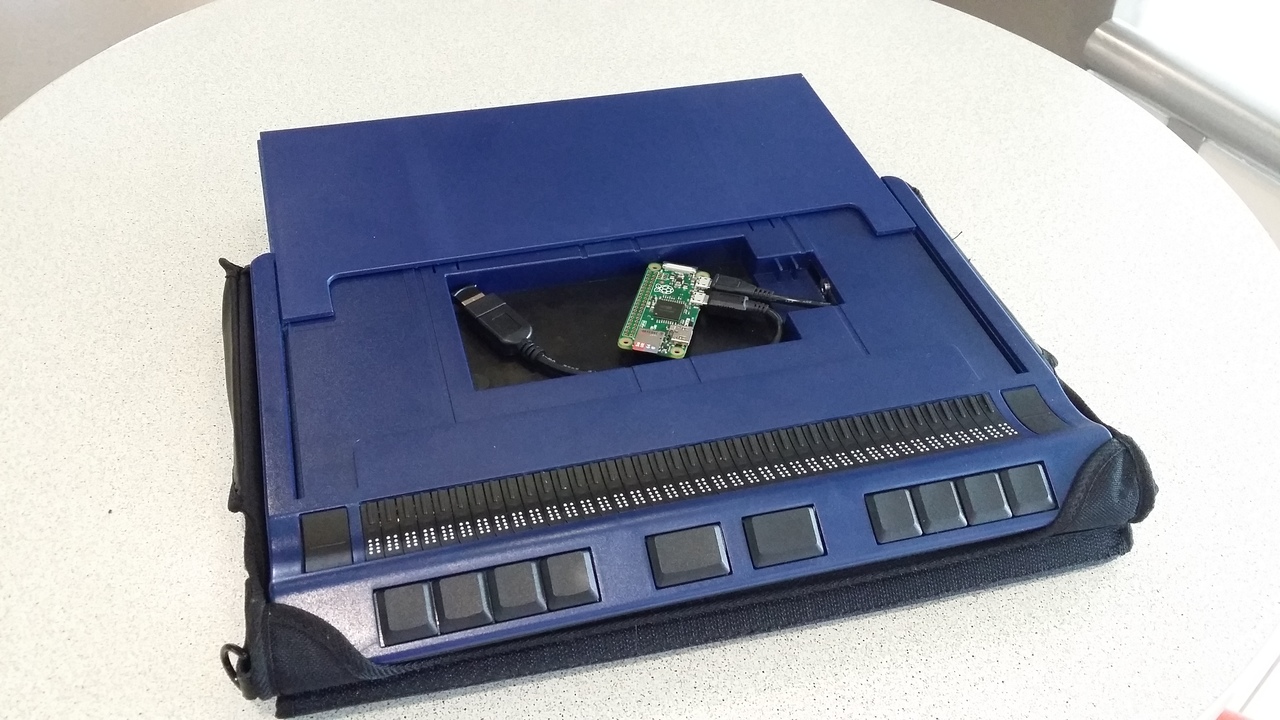
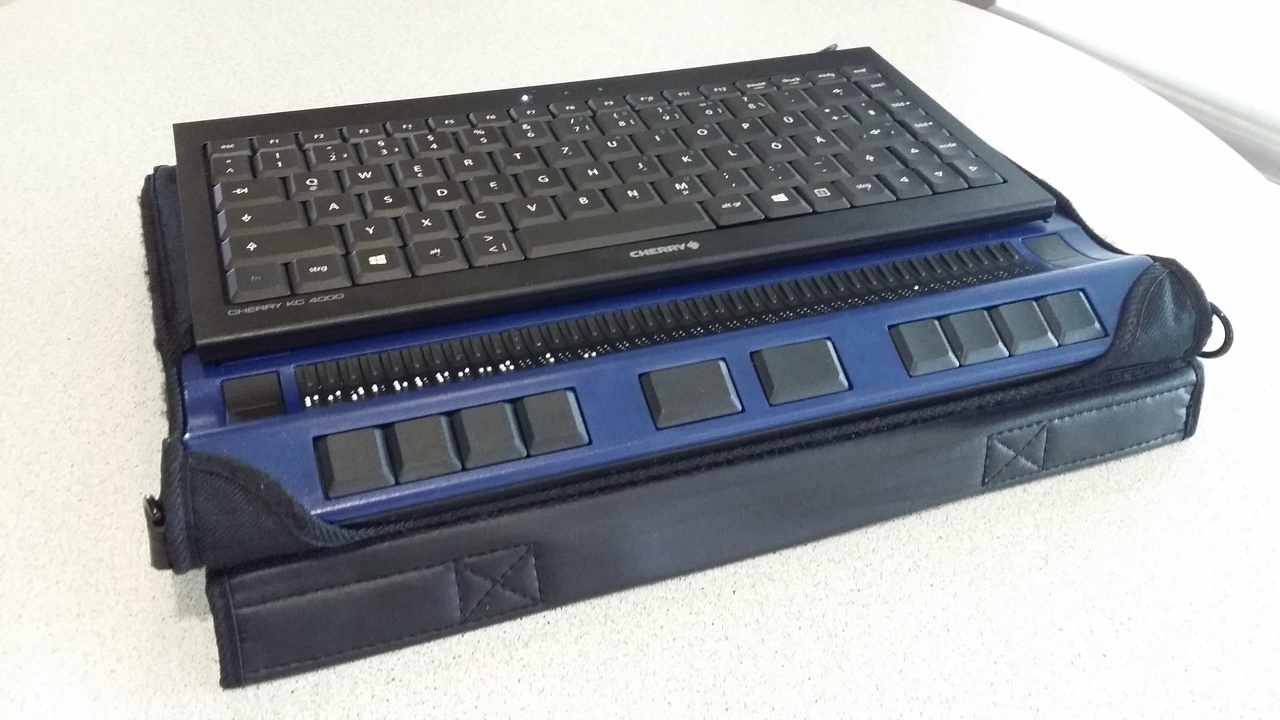
TL;DR: I put a $5 Raspberry Pi Zero, a Bluetooth USB dongle, and the required adapter cable into my new Handy Tech Active Star 40 braille display. An internal USB port provides the power. This has transformed my braille display into an ARM-based, monitorless, Linux laptop that has a keyboard and a braille display. It can be charged/powered via USB so it can also be run from a power bank or a solar charger, thus potentially being able to run for days, rather than just hours, without needing a standard wall-jack. [picture: a Raspberry Pi Zero embedded within an Active Star 40] [picture: a braille display with a keyboard on top and a Raspberry Pi Zero inside]
Some Background on Braille Display Form Factors Braille displays come in various sizes. There are models tailored for desktop use (with 60 cells or more), models tailored for portable use with a laptop (usually with 40 cells), and, nowadays, there are even models tailored for on-the-go use with a smartphone or similar (with something like 14 or 18 cells). Back in the old days, braille displays were rather massive. A 40-cell braille display was typically about the size of a 13" laptop. In modern times, manufacturers have managed to reduce the size of the internals such that a 40-cell display can be placed in front of a laptop or keyboard instead of placing the laptop on top of the braille display. While this is a nice achievement, I personally haven't found it to be very convenient because you now have to place two physically separate devices on your lap. It's OK if you have a real desk, but, at least in my opinion, if you try to use your laptop as its name suggests, it's actually inconvenient to use a small form factor, 40-cell display. For this reason, I've been waiting for a long-promised new model in the Handy Tech Star series. In 2002, they released the Handy Tech Braille Star 40, which is a 40-cell braille display with enough space to put a laptop directly on top of it. To accommodate larger laptop models, they even built in a little platform at the back that can be pulled out to effectively enlarge the top surface. Handy Tech has now released a new model, the Active Star 40, that has essentially the same layout but modernized internals. [picture: a plain Active Star 40] You can still pull out the little platform to increase the space that can be used to put something on top. [picture: an Active Star 40 with extended platform and a laptop on top] But, most conveniently, they've designed in an empty compartment, roughly the size of a modern smartphone, beneath the platform. The original idea was to actually put a smartphone inside, but this has turned out (at least to me) to not be very feasible. Fortunately, they thought about the need for electricity and added a Micro USB cable terminating within the newly created, empty compartment. My first idea was to put a conventional Raspberry Pi inside. When I received the braille display, however, we immediately noticed that a standard-sized rpi is roughly 3mm too high to fit into the empty compartment. Fortunately, though, a co-worker noticed that the Raspberry Pi Zero was available for order. The Raspberry Pi Zero is a lot thinner, and fits perfectly inside (actually, I think there's enough space for two, or even three, of them). So we ordered one, along with some accessories like a 64GB SDHC card, a Bluetooth dongle, and a Micro USB adapter cable. The hardware arrived a few days later, and was immediately bootstrapped with the assistance of very helpful friends. It works like a charm!
Technical Details The backside of the Handy Tech Active Star 40 features two USB host ports that can be used to connect devices such as a keyboard. A small form-factor, USB keyboard with a magnetic clip-on is included. When a USB keyboard is connected, and when the display is used via Bluetooth, the braille display firmware additionally offers the Bluetooth HID profile, and key press/release events received via the USB port are passed through to it. I use the Bluetooth dongle for all my communication needs. Most importantly, BRLTTY is used as a console screen reader. It talks to the braille display via Bluetooth (more precisely, via an RFCOMM channel). The keyboard connects through to Linux via the Bluetooth HID profile. Now, all that is left is network connectivity. To keep the energy consumption as low as possible, I decided to go for Bluetooth PAN. It appears that the tethering mode of my mobile phone works (albeit with a quirk), so I can actually access the internet as long as I have cell phone reception. Additionally, I configured a Bluetooth PAN access point on my desktop machines at home and at work, so I can easily (and somewhat more reliably) get IP connectivity for the rpi when I'm near one of these machines. I plan to configure a classic Raspberry Pi as a mobile Bluetooth access point. It would essentially function as a Bluetooth to ethernet adapter, and should allow me to have network connectivity in places where I don't want to use my phone.
BlueZ 5 and PAN It was a bit challenging to figure out how to actually configure Bluetooth PAN with BlueZ 5. I found the bt-pan python script (see below) to be the only way so far to configure PAN without a GUI. It handles both ends of a PAN network, configuring a server and a client. Once instructed to do so (via D-Bus) in client mode, BlueZ will create a new network device - bnep0 - once a connection to a server has been established. Typically, DHCP is used to assign IP addresses for these interfaces. In server mode, BlueZ needs to know the name of a bridge device to which it can add a slave device for each incoming client connection. Configuring an address for the bridge device, as well as running a DHCP server + IP Masquerading on the bridge, is usually all you need to do.
A Bluetooth PAN Access Point with Systemd I'm using systemd-networkd to configure the bridge device. /etc/systemd/network/pan.netdev:
[NetDev]
Name=pan
Kind=bridge
ForwardDelaySec=0
/etc/systemd/network/pan.network:
[Match]
Name=pan
[Network]
Address=0.0.0.0/24
DHCPServer=yes
IPMasquerade=yes
Now, BlueZ needs to be told to configure a NAP profile. To my surprise, there seems to be no way to do this with stock BlueZ 5.36 utilities. Please correct me if I'm wrong. Luckily, I found a very nice blog post, as well as an accommodating Python script that performs the required D-Bus calls. For convenience, I use a Systemd service to invoke the script and to ensure that its dependencies are met. /etc/systemd/system/pan.service:
[Unit]
Description=Bluetooth Personal Area Network
After=bluetooth.service systemd-networkd.service
Requires=systemd-networkd.service
PartOf=bluetooth.service
[Service]
Type=notify
ExecStart=/usr/local/sbin/pan
[Install]
WantedBy=bluetooth.target
/usr/local/sbin/pan:
#!/bin/sh
# Ugly hack to work around #787480
iptables -F
iptables -t nat -F
iptables -t mangle -F
iptables -t nat -A POSTROUTING -o eth0 -j MASQUERADE
exec /usr/local/sbin/bt-pan --systemd --debug server pan
This last file wouldn't be necessary if IPMasquerade= were supported in Debian right now (see #787480). After the obligatory systemctl daemon-reload and systemctl restart systemd-networkd, you can start your Bluetooth Personal Area Network with systemctl start pan.
Bluetooth PAN Client with Systemd Configuring the client is also quite easy to do with Systemd. /etc/systemd/network/pan-client.network:
[Match]
Name=bnep*
[Network]
DHCP=yes
/etc/systemd/system/pan@.service:
[Unit]
Description=Bluetooth Personal Area Network client
[Service]
Type=notify
ExecStart=/usr/local/sbin/bt-pan --debug --systemd client %I --wait
Now, after the usual configuration reloading, you should be able to connect to a specific Bluetooth access point with:
systemctl start pan@00:11:22:33:44:55
Pairing via the Command Line Of course, the server and client-side service configuration require a pre-existing pairing between the server and each of its clients. On the server, start bluetoothctl and issue the following commands:
power on
agent on
default-agent
scan on
scan off
pair XX:XX:XX:XX:XX:XX
trust XX:XX:XX:XX:XX:XX
Once you've set scan mode to on, wait a few seconds until you see the device you're looking for scroll by. Note its device address, and use it for the pair and (optional) trust commands. On the client, the sequence is essentially the same except that you don't need to issue the trust command. The server needs to trust a client in order to accept NAP profile connections from it without waiting for manual confirmation by the user. I'm actually not sure if this is the optimal sequence of commands. It might be enough to just pair the client with the server and issue the trust command on the server, but I haven't tried this yet.
Enabling Use of the Bluetooth HID Profile Essentially the same as above also needs to be done in order to use the Bluetooth HID profile of the Active Star 40 on Linux. However, instead of agent on, you need to issue the command agent KeyboardOnly. This explicitly tells bluetoothctl that you're specifically looking for a HID profile.
Configuring Bluetooth via the Command Line Feels Vague While I'm very happy that I actually managed to set all of this up, I must admit that the command-line interface to BlueZ feels a bit incomplete and confusing. I initially thought that agents were only for PIN code entry. Now that I've discovered that "agent KeyboardOnly" is used to enable the HID profile, I'm not sure anymore. I'm surprised that I needed to grab a script from a random git repository in order to be able to set up PAN. I remember, with earlier version of BlueZ, that there was a tool called pand that you could use to do all of this from the command-line. I don't seem to see anything like that for BlueZ 5 anymore. Maybe I'm missing something obvious?
Performance The data rate is roughly 120kB/s, which I consider acceptable for such a low power solution. The 1GHz ARM CPU actually feels sufficiently fast for a console/text-mode person like me. I'll rarely be using much more than ssh and emacs on it anyway.
Console fonts and screen dimensions The default dimensions of the framebuffer on the Raspberry Pi Zero are a bit unexpectedly strange. fbset reports that the screen dimension is 656x416 pixels (of course, no monitor connected). With a typical console font of 8x16, I got 82 columns and 26 lines. With a 40 cell braille display, the 82 columns are very inconvenient. Additionally, as a braille user, I would like to be able to view Unicode braille characters in addition to the normal charset on the console. Fortunately, Linux supports 512 glyphs, while most console fonts do only provide 256. console-setup can load and combine two 256-glyph fonts at once. So I added the following to /etc/default/console-setup to make the text console a lot more friendly to braille users:
SCREEN_WIDTH=80
SCREEN_HEIGHT=25
FONT="Lat15-Terminus16.psf.gz brl-16x8.psf"

Note

You need console-braille installed for brl-16x8.psf to be available.

Further Projects There's a 3.5mm audio jack inside the braille display as well. Unfortunately, there are no converters from Mini-HDMI to 3.5mm audio that I know of. It would be very nice to be able to use the sound card that is already built into the Raspberry Pi Zero, but, unfortunately, this doesn't seem possible at the moment. Alternatively, I'm looking at using a Micro USB OTG hub and an additional USB audio adapter to get sound from the Raspberry Pi Zero to the braille display's speakers. Unfortunately, the two USB audio adapters I've tried so far have run hot for some unknown reason. So I have to find some other chipset to see if the problem goes away. A little nuisance, currently, is that you need to manually power off the Raspberry, wait a few seconds, and then power down the braille display. Turning the braille display off cuts power delivery via the internal USB port. If this is accidentally done too soon then the Raspberry Pi Zero is shut down ungracefully (which is probably not the best way to do it). We're looking into connecting a small, buffering battery to the GPIO pins of the rpi, and into notifying the rpi when external power has dropped. A graceful, software-initiated shutdown can then be performed. You can think of it as being like a mini UPS for Micro USB.
The image If you are a happy owner of a Handy Tech Active Star 40 and would like to do something similar, I am happy to share my current (Raspbian Stretch based) image. In fact, if there is enough interest by other blind users, we might even consider putting a kit together that makes it as easy as possible for you to get started. Let me know if this could be of interest to you.
Thanks Thanks to Dave Mielke for reviewing the text of this posting. Thanks to Simon Kainz for making the photos for this article. And I owe a big thank you to my co-workers at Graz University of Technology who have helped me a lot to bootstrap really quickly into the rpi world.
P.S. My first tweet about this topic is just five days ago, and apart from the soundcard not working yet, I feel like the project is already almost complete! By the way, I am editing the final version of this blog posting from my newly created monitorless ARM-based Linux laptop via an ssh connection to my home machine.

11 June 2016

Shirish Agarwal: The road to debconf 2016, tourism and arts.

A longish blog post, please bear, a second part of the blog post would be published in few days from now. My fixed visa finally arrived, yeah:) But this story doesn t start here, it starts about a year back. While I have been contributing to Debian in my free time over the years, and sometimes paid time as well, I had never thought of going overseas as the experiences I knew from friends and relatives, it isn t easy to get all the permissions and paperwork done to say the least (bureaucracy @ work). But last year, when Debconf 15 was being launched, there are/were 2-3 friends of mine who are studying, doing their Ph.D. in some computer/web stuff, living in Germany currently that they goaded me to apply. The first few times I gave some standard excuses, but when they kept on for a while, just to shut them up I applied to the debconf team applying for food, accommodation and travel sponsorship. I didn t have high hopes as there obviously are many more talented peers around me who understand FOSS and Debian at a much more fundamental, philosophical as well as technical level than me. Much to my surprise though, about a month (and around two or three weeks just before the event was about to take place) I got the bursary/sponsorships for food, accommodation as well as travel. I was unsure that the remaining time was enough to get a visa hence declined that time around. That whole episode gave me the confidence that perhaps my application would be accepted if I applied again. Using my previous years understanding, decided to give it a shot again as this would also enable me to get a feel of visa bureaucracy as well as gain a bit of novice understanding about what factors go in choosing a flight and believe me the latter part proved to be pretty confusing. While the visa business seems easy, the form at least is easy and what they ask, it can be troublesome as far as visa-processing process is concerned. It took a better part of the month to get the visa which I needed. The in-between time is and can be a bit stressful as you have committed funds for travel i.e. the airline tickets and are in a limbo as you didn t know that if the visa is cancelled for some reason, your tickets would be refunded or not. A little history is needed and hopefully is helpful for anybody who s applying for a short-stay Visa in South Africa. Exactly, A month and day back I had applied for visa. The visa I had applied for is 17 days as the flights within my budget was for those days only. The visa I got was for 10 days only which was ending in the middle of the conference. I tried many avenues to get information and was told that I needed to write a correction letter telling/sharing the information about the correct time period and dates in BOLD with a heavier weight/point which is what I did and gave to VFS office without any further payment on my part. It took a bit more time than the first time around but the consulate co-operated. While I can understand the oversight as they probably get more visas requests along with special and urgent requests so such occurrences can happen. I am and was happy that there was a recourse rather than starting from scratch which probably would have made me more anxious due to the first experience . Apparently I was lucky that I had done with Qatar Airways as later came to know that there are other airways which don t refund money even after visa rejection . This information I got to know pretty late in the game otherwise I wouldn t have been much stressed. As had committed knew had to go the whole hog and whatever barriers are there, have overcome at least as far as the visa part/process is concerned. Now after few days, will probably start to worry about the actual travel, part nervousness, part excitement, nervousness as it will be an alien land, am obese so traveling economy on 787-8 and 777-300 ER will be tricky. The 787-8 will probably be a rough ride as it s a 9 hr. journey and the seat are a mere 18 , the cattle class as shared by one of our esteemed politicians. This blame has to do with Boeing 787 rather than anybody else. Hopefully, if there is a next time, would make better choices. Anyways,have selected an aisle seat so that will be able to walk every hr. or so to get the circulation in legs going as leg room in economy is not much from my domestic air travel experiences. If I do survive the travel, then will see South Africa and try to get some free time and explore South Africa and try to figure out how are they able to get one and half time tourists while we get around half figure for a whole year even though we are bigger (area-wise) to South Africa. I did find something positive for us as well, it s not all doldrums all around. Now, I had been thinking about if I know any South African music and movies. I had explored djembe while growing up in teens but other than that, not much. The only music I have heard is Harry Belafonte . So I hope to bring some Indian movies and music with me so that people if they have not explored Bollywood as well as Indian classical music could explore some of it, of course it will be pale imitation of what Sawai Gandharva Music Festival for instance gives. I also hope to hear and get some music and movies to learn more about South Africa.
Filed under: Miscellenous Tagged: #bollywood, #Debconf Germany 2015, #Debconf South Africa 2016, #Debconf15, #Debconf16, #djembe, #South-African consulate, music, tourism, visa

Paul Tagliamonte: It's all relative

As nearly anyone who's worked with me will attest to, I've long since touted nedbat's talk Pragmatic Unicode, or, How do I stop the pain? as one of the most foundational talks, and required watching for all programmers. The reason is because netbat hits on something bigger - something more fundamental than how to handle Unicode -- it's how to handle data which is relative. For those who want the TL;DR, the argument is as follows: Facts of Life:
  1. Computers work with Bytes. Bytes go in, Bytes go out.
  2. The world needs more than 256 symbols.
  3. You need both Bytes and Unicode
  4. You cannot infer the encoding of bytes.
  5. Declared encodings can be Wrong
Now, to fix it, the following protips:
  1. Unicode sandwich
  2. Know what you have
  3. TEST
Relative Data I've started to think more about why we do the things we do when we write code, and one thing that continues to be a source of morbid schadenfreude is watching code break by failing to handle Unicode right. It's hard! However, watching what breaks lets you gain a bit of insight into how the author thinks, and what assumptions they make. When you send someone Unicode, there are a lot of assumptions that have to be made. Your computer has to trust what you (yes, you!) entered into your web browser, your web browser has to pass that on over the network (most of the time without encoding information), to a server which reads that bytestream, and makes a wild guess at what it should be. That server might save it to a database, and interpolate it into an HTML template in a different encoding (called Mojibake), resulting in a bad time for everyone involved. Everything's awful, and the fact our computers can continue to display text to us is a goddamn miracle. Never forget that. When it comes down to it, when I see a byte sitting on a page, I don't know (and can't know!) if it's Windows-1252, UTF-8, Latin-1, or EBCDIC. What's a poem to me is terminal garbage to you. Over the years, hacks have evolved. We have magic numbers, and plain ole' hacks to just guess based on the content. Of course, like all good computer programs, this has lead to its fair share of hilarious bugs, and there's nothing stopping files from (validly!) being multiple things at the same time. Like many things, it's all in the eye of the beholder. Timezones Just like Unicode, this is a word that can put your friendly neighborhood programmer into a series of profanity laden tirades. Go find one in the wild, and ask them about what they think about timezone handling bugs they've seen. I'll wait. Go ahead. Rants are funny things. They're fun to watch. Hilarious to give. Sometimes just getting it all out can help. They can tell you a lot about the true nature of problems. It's funny to consider the isomorphic nature of Unicode rants and Timezone rants. I don't think this is an accident. U n i c o d e timezone Sandwich Ned's Unicode Sandwich applies -- As early as we can, in the lowest level we can (reading from the database, filesystem, wherever!), all datetimes must be timezone qualified with their correct timezone. Always. If you mean UTC, say it's in UTC. Treat any unqualified datetimes as "bytes". They're not to be trusted. Never, never, never trust 'em. Don't process any datetimes until you're sure they're in the right timezone. This lets the delicious inside of your datetime sandwich handle timezones with grace, and finally, as late as you can, turn it back into bytes (if at all!). Treat locations as tzdb entries, and qualify datetime objects into their absolute timezone (EST, EDT, PST, PDT) It's not until you want to show the datetime to the user again should you consider how to re-encode your datetime to bytes. You should think about what flavor of bytes, what encoding -- what timezone -- should I be encoding into? TEST Just like Unicode, testing that your code works with datetimes is important. Every time I think about how to go about doing this, I think about that one time that mjg59 couldn't book a flight starting Tuesday from AKL, landing in HNL on Monday night, because United couldn't book the last leg to SFO. Do you ever assume dates only go forward as time goes on? Remember timezones. Construct test data, make sure someone in New Zealand's +13:45 can correctly talk with their friends in Baker Island's -12:00, and that the events sort right. Just because it's Noon on New Years Eve in England doesn't mean it's not 1 AM the next year in New Zealand. Places a few miles apart may go on Daylight savings different days. Indian Standard Time is not even aligned on the hour to GMT (+05:30)! Test early, and test often. Memorize a few timezones, and challenge your assumptions when writing code that has to do with time. Don't use wall clocks to mean monotonic time. Remember there's a whole world out there, and we only deal with part of it. It's also worth remembering, as Andrew Pendleton pointed out to me, that it's possible that a datetime isn't even unique for a place, since you can never know if 2016-11-06 01:00:00 in America/New_York (in the tzdb) is the first one, or second one. Storing EST or EDT along with your datetime may help, though! Pitfalls Improper handling of timezones can lead to some interesting things, and failing to be explicit (or at least, very rigid) in what you expect will lead to an unholy class of bugs we've all come to hate. At best, you have confused users doing math, at worst, someone misses a critical event, or our security code fails. I recently found what I regard to be a pretty bad bug in apt (which David has prepared a fix for and is pending upload, yay! Thank you!), which boiled down to documentation and code expecting datetimes in a timezone, but accepting any timezone, and silently treating it as UTC. The solution is to hard-fail, which is an interesting choice to me (as a vocal fan of timezone aware code), but at the least it won't fail by misunderstanding what the server is trying to communicate, and I do understand and empathize with the situation the apt maintainers are in. Final Thoughts Overall, my main point is although most modern developers know how to deal with Unicode pain, I think there is a more general lesson to learn -- namely, you should always know what data you have, and always remember what it is. Understand assumptions as early as you can, and always store them with the data.

9 June 2016

Martin Pitt: autopkgtest 4.0: Simplified CLI, deprecating adt

Historically, the adt-run command line has allowed multiple tests; as a consequence, arguments like --binary or --override-control were position dependent, which confused users a lot (#795274, #785068, #795274, LP #1453509). On the other hand I don t know anyone or any CI system which actually makes use of the multiple tests on a single command line feature. The command line also was a bit confusing in other ways, like the explicit --built-tree vs. --unbuilt-tree and the magic / vs. // suffixes, or option vs. positional arguments to specify tests. The other long-standing confusion is the pervasive adt acronym, which is still from the very early times when autopkgtest was called autodebtest (this was changed one month after autodebtest s inception, in 2006!). Thus in some recent night/weekend hack sessions I ve worked on a new command line interface and consistent naming. This is now available in autopkgtest 4.0 in Debian unstable and Ubuntu Yakkety. You can download and use the deb package on Debian jessie and Ubuntu 14.04 LTS as well. (I will provide official backports after the first bug fix release after this got some field testing.) New autopkgtest command The adt-run program is now superseded by autopkgtest: README.running-tests got updated to the new CLI, as usual you can also read the HTML online. The old adt-run CLI is still available with unchanged behaviour, so it is safe to upgrade existing CI systems to that version. Image build tools All adt-build* tools got renamed to autopkgtest-build*, and got changed to build images prefixed with autopkgtest instead of adt . For example, adt-build-lxc ubuntu xenial now produces an autopkgtest-xenial container instead of adt-xenial. In order to not break existing CI systems, the new autopkgtest package contains symlinks to the old adt-build* commands, and when being called through them, also produce images with the old adt- prefix. Environment variables in tests Finally there is a set of environment variables that are exported by autopkgtest for using in tests and image customization tools, which now got renamed from ADT_* to AUTOPKGTEST_*: As these are being used in existing tests and tools, autopkgtest also exports/checks those under their old ADT_* name. So tests can be converted gradually over time (this might take several years). Feedback As usual, if you find a bug or have a suggestion how to improve the CLI, please file a bug in Debian or in Launchpad. The new CLI is recent enough that we still have some liberty to change it. Happy testing!

8 June 2016

Daniel Pocock: Working to pass GSoC

GSoC students have officially been coding since 23 May (about 2.5 weeks) and are almost half-way to the mid-summer evaluation (20 - 27 June). Students who haven't completed some meaningful work before that deadline don't receive payment and in such a large program, there is no possibility to give students extensions or let them try and catch up later. Every project and every student are different, some are still getting to know their environment while others have already done enough to pass the mid-summer evaluation. I'd like to share a few tips to help students ensure they don't inadvertently fail the mid-summer evaluation Kill electronic distractions As a developer of real-time communications projects, many people will find it ironic or hypocritical that this is at the top of my list. Switch off the mobile phone or put it in silent mode so it doesn't even vibrate. Research has suggested that physically turning it off and putting it out of sight has significant benefits. Disabling the voicemail service can be an effective way of making sure no time is lost listening to a bunch of messages later. Some people may grumble at first but if they respect you, they'll get into the habit of emailing you and waiting for you to respond when you are not working. Get out a piece of paper and make a list of all the desktop notifications on your computer, whether they are from incoming emails, social media, automatic updates, security alerts or whatever else. Then figure out how to disable them all one-by-one. Use email to schedule fixed times for meetings with mentors. Some teams/projects also have fixed daily or weekly times for IRC chat. For a development project like GSoC, it is not necessary or productive to be constantly on call for 3 straight months. Commit every day Habits are a powerful thing. Successful students have a habit of making at least one commit every day. The "C" in GSoC is for Code and commits are a good way to prove that coding is taking place. GSoC is not a job, it is like a freelance project. There is no safety-net for students who get sick or have an accident and mentors are not bosses, each student is expected to be their own boss. Although Google has started recommending students work full time, 40 hours per week, it is unlikely any mentors have any way to validate these hours. Mentors can look for a commit log, however, and simply won't be able to pass a student if there isn't code. There may be one day per week where a student writes a blog or investigates a particularly difficult bug and puts a detailed report in the bug tracker but by the time we reach the second or third week of GSoC, most students are making at least one commit in 3 days out of every 5. Consider working away from home/family/friends Can you work without anybody interrupting you for at least five or six hours every day? Do you feel pressure to help with housework, cooking, siblings or other relatives? Even if there is no pressure to do these things, do you find yourself wandering away from the computer to deal with them anyway? Do family, friends or housemates engage in social activities, games or other things in close proximity to where you work? All these things can make a difference between passing and failing. Maybe these things were tolerable during high school or university. GSoC, however, is a stepping stone into professional life and that means making a conscious decision to shut those things out and focus. Some students have the ability to manage these distractions well, but it is not for everybody. Think about how leading sports stars or musicians find a time and space to be "in the zone" when training or rehearsing, this is where great developers need to be too. Some students find the right space in a public library or campus computer lab. Some students have been working in hacker spaces or at empty desks in local IT companies. These environments can also provide great networking opportunities. Managing another summer job concurrently with GSoC It is no secret that some GSoC students have another job as well. Sometimes the mentor is aware of it, sometimes it has not been disclosed. The fact is, some students have passed GSoC while doing a summer job or internship concurrently but some have also failed badly in both GSoC and their summer job. Choosing one or the other is the best way to succeed, get the best results and maximize the quality of learning and community interaction. For students in this situation, now it is not too late to make the decision to withdraw from GSoC or the other job. If doing a summer job concurrently with GSoC is unavoidable, the chance of success can be greatly increased by doing the GSoC work in the mornings, before starting the other job. Some students have found that they actually finish more quickly and produce better work when GSoC is constrained to a period of 4 or 5 hours each morning and their other job is only in the afternoon. On the other hand, if a student doesn't have the motivation or energy to get up and work on GSoC before the other job then this is a strong sign that it is better to withdraw from GSoC now.

Jonathan Dowland: Some tools for working with Docker images

For developing complex, real-world Docker images, there are a number of tools that can make life easier. The first thing to realise is that the Dockerfile format is severely limited. At work, we have eventually outgrown it and it has been replaced with a structured YAML document that is processed into a Dockerfile by a tool called dogen. There are several advantages to this, but I'll point out two: firstly, having data about the image available in a structured format makes automatically deriving technical documentation very easy. Secondly, some of the quirks of Dockerfiles, such as the ADD command respecting the environment's umask, are worked around in the dogen tool. We have a large suite of integration tests that we run against images to make sure that we haven't introduced regressions during their development. The core of this is the Container Testing Framework, which makes use of the Behave system. Each command that is run in a Dockerfile generates a new docker image layer. In practice, this can mean a real-world image has a great number of layers underneath it. Docker-dot-com have resisted introducing layer squashing into their tools, but with both hard limits for layers in some of the storage backends, and performance issues for most of the rest, this is a very real issue. Marek Goldmann wrote a squashing tool that we use to control the number of intermediate layers that are introduced by our images. Finally, even with tools like dogen and ctf, we would like to be able to have more sophisticated tools than shell scripts for configuring images, both at image build time and container run time. We want to do this without introducing extra dependencies inside the images which will not otherwise be used for their operation. Ansible could be a solution for this, but there are practical issues with relying on it for runtime configuration in our situation. For that reason David Becvarik is designing and implementing Container Configuration Tool, or cct, a framework for performing configuration of containers written in Python.

Russell Coker: Sysadmin Skills and University Degrees

I think that a major deficiency in Computer Science degrees is the lack of sysadmin training. Version Control The first thing that needs to be added is the basics of version control. CVS (which is now regarded as obsolete) was initially released when I was in the first year of university. But SCCS and RCS had been in use for some time. I think that the people who designed my course were remiss in not adding any mention of version control (not even strategies for saving old versions of your work), one could say that they taught us about version control by letting us accidentally delete our assignments. :-# If a course is aimed at just teaching programmers (as most CS degrees are) then version control for group assignments should be a standard part of the course. Having some marks allocated for the quality of comments in the commit log would also be good. A modern CS degree should cover distributed version control, that means covering Git as it s the most popular distributed version control system nowadays. For people who want to work as sysadmins (as opposed to developers who run their own PCs) a course should have an optional subject for version control of an entire system. That includes tools like etckeeper for version control of system configuration and tools like Puppet for automated configuration and system maintenance. Dependencies It s quite reasonable for a CS degree to provide simplified problems for the students to solve so they can concentrate on one task. But in the real world the problems are more complex. One of the more difficult parts of managing real systems is dependencies. You have issues of header files etc at compile time and library versions at deployment. Often you need a program to run on systems with different versions of the OS which means making it compile for both and deal with differences in behaviour. There are lots of hacky things that people do to deal with dependencies in systems. People link compiled programs statically, install custom versions of interpreters in user home directories or /usr/local for daemons, and do many other things. These things can have bad consequences including data loss, system downtime, and security problems. It s not always wrong to do such things, but it s something that should only be done with knowledge of the potential consequences and a plan for mitigating them. A CS degree should teach the potential advantages and disadvantages of these options to allow graduates to make informed decisions. Backups I ve met many people who call themselves computer professionals and think that backups aren t needed. I ve seen production systems that were designed in a way that backups were impossible. The lack of backups is a serious problem for the entire industry. Some lectures about backups could be part of a version control subject in a general CS degree. For a degree that majors in Sysadmin at least one subject about backups is appropriate. For any backup (even backing up your home PC) you should have offsite backups to deal with fire damage, multiple backups of different ages (especially important now that encryption malware is a serious threat), and a plan for how fast you can restore things. The most common use of backups is to deal with the case of deleting the wrong file. Unfortunately this case seems to be the most rarely mentioned. Another common situation that should be covered is a configuration error that results in a system that won t boot correctly. It s a very common problem and one that can be solved quickly if you are prepared but which can take a long time if you aren t. For a Sysadmin course it is important to cover backups of systems in remote datacenters. Hardware A good CS degree should cover the process of selecting suitable hardware. Programmers often get to advise on the hardware used to run their code, especially at smaller companies. Reliability features such as RAID, ECC RAM, and clustering should be covered. Planning for upgrades is a very important part of this which is usually not taught. Not only do you need to plan for an upgrade without much downtime or cost but you also need to plan for what upgrades are possible. Next year will your system require hardware that is more powerful than you can buy next year? If so you need to plan for a cluster now. For a Sysadmin course some training about selecting cloud providers and remote datacenter hosting should be provided. There are many complex issues that determine whether it s most appropriate to use a cloud service, hosted virtual machines, hosted physical servers managed by the ISP, hosted physical servers purchased by the client, or on-site servers. Often a large system will involve 2 or more of those options, even some small companies use 3 or more of those options to try and provide the performance and reliability they need at a price they can afford. We Need Sysadmin Degrees Covering the basic coding skills takes a lot of time. I don t think we can reasonably expect a CS degree to cover all that and also give good coverage to sysadmin work. While some basic sysadmin skills are needed by every programmer I think we need to have separate majors for people who want a career in system administration. Sysadmins need some programming skills, but that s mostly scripting and basic debugging. Someone who s main job is as a sysadmin can probably expect to never make any significant change to a program that s more than 10,000 lines long. A large amount of the programming in a CS degree can be replaced by file a bug report for a sysadmin degree. This doesn t mean that sysadmins shouldn t be doing software development or that they aren t good at it. One noteworthy fact is that it appears that the most common job among developers of the Debian distribution of Linux is System Administration. Developing an OS involves some of the most intensive and demanding programming. But I think that more than a few people who do such work would have skipped a couple of programming subjects in favour of sysadmin subjects if they were given a choice. Suggestions Did I miss anything? What other sysadmin skills should be taught in a CS degree? Do any universities teach these things now? If so please name them in the comments, it is good to help people find universities that teach them what they want to learn and help them in their career.

Francois Marier: Simple remote mail queue monitoring

In order to monitor some of the machines I maintain, I rely on a simple email setup using logcheck. Unfortunately that system completely breaks down if mail delivery stops. This is the simple setup I've come up with to ensure that mail doesn't pile up on the remote machine.

Server setup The first thing I did on the server-side is to follow Sean Whitton's advice and configure postfix so that it keeps undelivered emails for 10 days (instead of 5 days, the default):
postconf -e maximal_queue_lifetime=10d
Then I created a new user:
adduser mailq-check
with a password straight out of pwgen -s 32. I gave ssh permission to that user:
adduser mailq-check sshuser
and then authorized my new ssh key (see next section):
sudo -u mailq-check -i
mkdir ~/.ssh/
cat - > ~/.ssh/authorized_keys

Laptop setup On my laptop, the machine from where I monitor the server's mail queue, I first created a new password-less ssh key:
ssh-keygen -t ed25519 -f .ssh/egilsstadir-mailq-check
cat ~/.ssh/egilsstadir-mailq-check.pub
which I then installed on the server. Then I added this cronjob in /etc/cron.d/egilsstadir-mailq-check:
0 2 * * * francois /usr/bin/ssh -i /home/francois/.ssh/egilsstadir-mailq-check mailq-check@egilsstadir mailq   grep -v "Mail queue is empty"
and that's it. I get a (locally delivered) email whenever the mail queue on the server is non-empty. There is a race condition built into this setup since it's possible that the server will want to send an email at 2am. However, all that does is send a spurious warning email in that case and so it's a pretty small price to pay for a dirt simple setup that's unlikely to break.

7 June 2016

Enrico Zini: You'll thank me later

I agree with this post by Matthew Garrett. I am quite convinced that most of the communities that I have known are vulnerable to people who are good manipulators of people. Also, in my experience, manipulation by negating, pushing, or reframing the boundaries of people tends not to be recognised as manipulation, let alone abusive behaviour. It's not about physically forcing people to do things that they don't want to do. It's about pushing people, again and again, wearing them out, making them feel like, despite their actual needs and wants, saying "yes" to you is the only viable way out. It can happen for sex, and it can happen for getting a patch merged. It can happen out of habit. It can happen for pretty much anything. Consent culture was not part of my education, and it was something I've had to discover for myself. I assume that to be a common experience, and that pushing against boundaries does happen, even without malicious intentions, on a regular basis. However, it is not ok. Take insisting. It is not the same as persisting. Persisting is what I do when I advocate for change. Persisting is what I do when the first version of my code segfaults. Insisting is what I do when a person says "no" to me and I don't want to accept it. Is it ok to insist that a friend, whom you think is sick, goes and gets help? Is it ok to insist that a friend, whom you think is sexually repressed, pushes through their boundaries to explore their sexuality with you? In both cases, one may say, or think, trust me, you'll thank me afterwards. In both cases, what if afterwards I have nothing to thank you for? I see a common pattern in you'll thank me afterwards situations. It can be in good faith, it can be creepy, it can be abusive, and most of the time, what it is, is dangerously unclear to most of the people involved. I think that in a community like Debian, at the level of personal interaction, Insisting is not ok. I think that in a community like Debian, at the level of personal interaction, "You'll thank me afterwards" is not ok. When I say it's not ok I mean that it should not happen. If it happens, people must be free to say "stop". If it doesn't stop, people must expect to be able to easily find support, understanding, and help to make it stop. Just like when people upload untested packages. Pushing against personal boundaries of people is not ok, and pushing against personal boundaries does happen. When you get involved in a new community, such as Debian, find out early where, if that happens, you can find support, understanding, and help to make it stop. If you cannot find any, or if the only thing you can find is people who say "it never happens here", consider whether you really want to be in that community.

Matthew Garrett: Be wary of heroes

Inspiring change is difficult. Fighting the status quo typically means being able to communicate so effectively that powerful opponents can't win merely by outspending you. People need to read your work or hear you speak and leave with enough conviction that they in turn can convince others. You need charisma. You need to be smart. And you need to be able to tailor your message depending on the audience, even down to telling an individual exactly what they need to hear to take your side. Not many people have all these qualities, but those who do are powerful and you want them on your side.

But the skills that allow you to convince people that they shouldn't listen to a politician's arguments are the same skills that allow you to convince people that they shouldn't listen to someone you abused. The ability that allows you to argue that someone should change their mind about whether a given behaviour is of social benefit is the same ability that allows you to argue that someone should change their mind about whether they should sleep with you. The visibility that gives you the power to force people to take you seriously is the same visibility that makes people afraid to publicly criticise you.

We need these people, but we also need to be aware that their talents can be used to hurt as well as to help. We need to hold them to higher standards of scrutiny. We need to listen to stories about their behaviour, even if we don't want to believe them. And when there are reasons to believe those stories, we need to act on them. That means people need to feel safe in coming forward with their experiences, which means that nobody should have the power to damage them in reprisal. If you're not careful, allowing charismatic individuals to become the public face of your organisation gives them that power.

There's no reason to believe that someone is bad merely because they're charismatic, but this kind of role allows a charismatic abuser both a great deal of cover and a great deal of opportunity. Sometimes people are just too good to be true. Pretending otherwise doesn't benefit anybody but the abusers.

comment count unavailable comments

6 June 2016

Olivier Gr goire: Community bounding + 2 weeks at GSoC!

Welcome in my first and second report!
The community was really good, I talked with a lot of people from all around the world. All that projects are just awesome and I am happy to be part of this.
For this first week, I provided a list of all information I need to pull in my client (this list is subject to change a little bit):
-Call ID
-Resolution of the camera of all the people connect to the call
-Percentage of loosing frame
-Bandwidth (upload + download)
-Name of Codecs using on the conversation
-Time to contact the other person
-The security level
-Performance using by Ring (RAM + CPU)
I am trying to figure out how work the Ring project.
-Understand the external exchange by using Wireshark to catch some important packages.
-Understand the internal exchange between the daemon and clients on the D-Bus by using Bustle
I created my architecture program on the daemon and the D-Bus. [1] You can call the method launchSmartInfo(int x) from the D-Bus (by using D-Feet for example). That will call SmartInfo signal all x ms. This signal can only push an int for the moment, but he will push all the information we want on the clients. I actually work on the Ring GNU Linux client. So I learn how work the QT and GTK+. [1]github/Gasuleg/Smartlnfo-Ring: I will stop update this repository because I will push my code on the Gerrit draft of Savoir Faire Linux. It's more easy for my team to do some commentary on that platform and it's free software)

Olivier Gr goire: Community bounding + 2 weeks at GSoC!

Welcome in my first and second report!
The community was really good, I talked with a lot of people from all around the world. All that projects are just awesome and I am happy to be part of this.
For this first week, I provided a list of all information I need to pull in my client (this list is subject to change a little bit):
-Call ID
-Resolution of the camera of all the people connect to the call
-Percentage of loosing frame
-Bandwidth (upload + download)
-Name of Codecs using on the conversation
-Time to contact the other person
-The security level
-Performance using by Ring (RAM + CPU)
I am trying to figure out how work the Ring project.
-Understand the external exchange by using Wireshark to catch some important packages.
-Understand the internal exchange between the daemon and clients on the D-Bus by using Bustle
I created my architecture program on the daemon and the D-Bus. [1] You can call the method launchSmartInfo(int x) from the D-Bus (by using D-Feet for example). That will call SmartInfo signal all x ms. This signal can only push an int for the moment, but he will push all the information we want on the clients. I actually work on the Ring GNU Linux client. So I learn how work the QT and GTK+. [1][https://github.com/Gasuleg/Smartlnfo-Ring](https://github.com/Gasuleg/Smartlnfo-Ring)(I will stop update this repository because I will push my code on the Gerrit draft of Savoir Faire Linux. It's more easy for my team to do some commentary on that platform and it's free software)

John Goerzen: How git-annex replaces Dropbox + encfs with untrusted providers

git-annex has been around for a long time, but I just recently stumbled across some of the work Joey has been doing to it. This post isn t about it s traditional roots in git or all the features it has for partial copies of large data sets, but rather for its live syncing capabilities like Dropbox. It takes a bit to wrap your head around, because git-annex is just a little different from everything else. It s sort of like a different-colored smell. The git-annex wiki has a lot of great information both low-level reference and a high-level 10-minute screencast showing how easy it is to set up. I found I had to sort of piece together the architecture between those levels, so I m writing this all down hoping it will benefit others that are curious. Ir you just want to use it, you don t need to know all this. But I like to understand how my tools work. Overview git-annex lets you set up a live syncing solution that requires no central provider at all, or can be used with a completely untrusted central provider. Depending on your usage pattern, this central provider could require only a few MBs of space even for repositories containing gigabytes or terabytes of data that is kept in sync. Let s take a look at the high-level architecture of the tool. Then I ll illustrate how it works with some scenarios. Three Layers Fundamentally, git-annex takes layers that are all combined in Dropbox and separates them out. There is the storage layer, which stores the literal data bytes that you are interested in. git-annex indexes the data in storage by a hash. There is metadata, which is for things like a filename-to-hash mapping and revision history. And then there is an optional layer, which is live signaling used to drive the real-time syncing. git-annex has several modes of operation, and the one that enables live syncing is called the git-annex assistant. It runs as a daemon, and is available for Linux/POSIX platforms, Windows, Mac, and Android. I ll be covering it here. The storage layer The storage layer simply is blobs of data. These blobs are indexed by a hash, and can be optionally encrypted at rest at remote backends. git-annex has a large number of storage backends; some examples include rsync, a remote machine with git-annex on it that has ssh installed, WebDAV, S3, Amazon Glacier, removable USB drive, etc. There s a huge list. One of the git-annex features is that each client knows the state of each storage repository, as well as the capability set of each storage repository. So let s say you have a workstation at home and a laptop you take with you to work or the coffee shop. You d like changes on one to be instantly recognized on another. With something like Dropbox or OwnCloud, every file in the set you want synchronized has to reside on a server in the cloud. With git-annex, it can be configured such that the server in the cloud only contains a copy of a file until every client has synced it up, at which point it gets removed. Think about it that is often what you want anyhow, so why maintain an unnecessary copy after it s synced everywhere? (This behavior is, of course, configurable.) git-annex can also avoid storing in the cloud entirely if the machines are able to reach each other directly at least some of the time. The metadata layer Metadata about your files includes a mapping from the file names to the storage location (based on hashes), change history, and information about the status of each machine that participates in the syncing. On your clients, git-annex stores this using git. This detail is very useful to some, and irrelevant to others. Some of the git-annex storage backends can support only storage (S3, for instance). Some can support both storage and metadata (rsync, ssh, local drives, etc.) You can even configure a backend to support only metadata (more on why that may be useful in a bit). When you are working with a git-backed repository for git-annex, it can hold data, metadata, or both. So, to have a working sync system, you must have a way to transport both the data and the metadata. The transport for the metadata is generally rsync or git, but it can also be XMPP in which Git changesets are basically wrapped up in XMPP presence messages. Joey says, however, that there are some known issues with XMPP servers sometimes dropping or reordering some XMPP messages, so he doesn t encourage that method currently. The live signaling layer So once you have your data and metadata, you can already do syncs via git annex sync --contents. But the real killer feature here will be automatic detection of changes, both on the local and the remote. To do that, you need some way of live signaling. git-annex supports two methods. The first requires ssh access to a remote machine where git-annex is installed. In this mode of operation, when the git-annex assistant fires up, it opens up a persistent ssh connection to the remote and runs the git-annex-shell over there, which notifies it of changes to the git metadata repository. When a change is detected, a sync is initiated. This is considered ideal. A substitute can be XMPP, and git-annex actually converts git commits into a form that can be sent over XMPP. As I mentioned above, there are some known reliability issues with this and it is not the recommended option. Encryption When it comes to encryption, you generally are concerned about all three layers. In an ideal scenario, the encryption and decryption happens entirely on the client side, so no service provider ever has any details about your data. The live signaling layer is encrypted pretty trivially; the ssh sessions are, of course, encrypted and TLS support in XMPP is pervasive these days. However, this is not end-to-end encryption; those messages are decrypted by the service provider, so a service provider could theoretically spy on metadata, which may include change times and filenames, though not the contents of files themselves. The data layer also can be encrypted very trivially. In the case of the dumb backends like S3, git-annex can use symmetric encryption or a gpg keypair and all that ever shows up on the server are arbitrarily-named buckets. You can also use a gcrypt-based git repository. This can cover both data and metadata and, if the target also has git-annex installed, the live signalling layer. Using a gcrypt-based git repository for the metadata and live signalling is the only way to accomplish live syncing with 100% client-side encryption. All of these methods are implemented in terms of gpg, and can support symmetric of public-key encryption. It should be noted here that the current release versions of git-annex need a one-character patch in order to fix live syncing with a remote using gcrypt. For those of you running jessie, I recommend the version in jessie-backports, which is presently 5.20151208. For your convenience, I have compiled an amd64 binary that can drop in over /usr/bin/git-annex if you have this version. You can download it and a gpg signature for it. Note that you only need this binary on the clients; the server can use the version from jessie-backports without issue. Putting the pieces together: some scenarios Now that I ve explained the layers, let s look at how they fit together. Scenario 1: Central server In this scenario, you might have a workstation and a laptop that sync up with each other by way of a central server that also has a full copy of the data. This is the scenario that most closely resembles Dropbox, box, or OwnCloud. Here you would basically follow the steps in the git-assistant screencast: install git-annex on a server somewhere, and point your clients to it. If you want full end-to-end encryption, I would recommend letting git-annex generate a gpg keypair for you, which you would then need to copy to both your laptop and workstation (but not the server). Every change you make locally will be synced to the server, and then from the server to your other PC. All three systems would be configured in the client transfer group. Scenario 1a: Central server without a full copy of the data In this scenario, everything is configured the same except the central server is configured with the transfer transfer group. This means that the actual data synced to it is deleted after it has been propagated to all clients. Since git-annex can verify which repository has received a copy of which data, it can easily enough delete the actual file content from the central server after it has been copied to all the clients. Many people use something like Dropbox or OwnCloud as a multi-PC syncing solution anyhow, so once the files have been synced everywhere, it makes sense to remove them from the central server. This is often a good ideal for people. There are some obvious downsides that are sometimes relevant. For instance, to add a third sync client, it must be able to initially copy down from one of the existing clients. Or, if you intend to access the data from a device such as a cell phone where you don t intend for it to have a copy of all data all the time, you won t have as convenient way to download your data. Scenario 1b: Split data/metadata central servers Imagine that you have a shell or rsync account on some remote system where you can run git-annex, but don t have much storage space. Maybe you have a cheap VPS or shell account somewhere, but it s just not big enough to hold your data. The answer to this would be to use this shell or rsync account for the metadata, but put the data elsewhere. You could, for instance, store the data in Amazon S3 or Amazon Glacier. These backends aren t capable of storing the git-annex metadata, so all you need is a shell or rsync account somewhere to sync up the metadata. (Or, as below, you might even combine a fully distributed approach with this.) Then you can have your encrypted data pushed up to S3 or some such service, which presumably will grow to whatever size you need. Scenario 2: Fully distributed Like git itself, git-annex does not actually need a central server at all. If your different clients can reach each other directly at least some of the time, that is good enough. Of course, a given client will not be able to do fully automatic live sync unless it can reach at least one other client, so changes may not propagate as quickly. You can simply set this up by making ssh connections available between your clients. git-annex assistant can automatically generate appropriate ~/.ssh/authorized_keys entries for you. Scenario 2a: Fully distributed with multiple disconnected branches You can even have a graph of connections available. For instance, you might have a couple machines at home and a couple machines at work with no ability to have a direct connection between them (due to, say, firewalls). The two machines at home could sync with each other in real-time, as could the two machines at work. git-annex also supports things like USB drives as a transport mechanism, so you could throw a USB drive in your pocket each morning, pop it in to one client at work, and poof both clients are synced up over there. Repeat when you get home in the evening, and you re synced there. The USB drive s repository can, of course, be of the transport type so data is automatically deleted from it once it s been synced everywhere. Scenario 3: Hybrid git-annex can support LAN sync even if you have a central server. If your laptop, say, travels around but is sometimes on the same LAN as your PC, git-annex can easily sync directly between the two when they are reachable, saving a round-trip to the server. You can assign a cost to each remote, and git-annex will always try to sync first to the lowest-cost path that is available. Drawbacks of git-annex There are some scenarios where git-annex with the assistant won t be as useful as one of the more traditional instant-sync systems. The first and most obvious one is if you want to access the files without the git-annex client. For instance, many of the other tools let you generate a URL that you can email to people, and then they can download files without any special client software. This is not directly possible with git-annex. You could, of course, make something like a public_html directory be managed with git-annex, but it wouldn t provide things like obfuscated URLs, password-protected sharing, time-limited sharing, etc. that you get with other systems. While you can share your repositories with others that have git-annex, you can t share individual subdirectories; for a given repository, it is all or nothing. The Android client for git-annex is a pretty interesting thing: it is mostly a small POSIX environment, providing a terminal, git, gpg, and the same web interface that you get on a standalone machine. This means that the git-annex Android client is fully functional compared to a desktop one. It also has a quick setup process for syncing off your photos/videos. On the other hand, the integration with the Android ecosystem is poor compared to most other tools. Other git-annex features git-annex has a lot to offer besides the git-annex assistant. Besides the things I ve already mentioned, any given git-annex repository including your client repository can have a partial copy of the full content. Say, for instance, that you set up a git-annex repository for your music collection, which is quite large. You want some music on your netbook, but don t have room for it all. You can tell git-annex to get or drop files from the netbook s repository without deleting them remotely. git-annex has quite a few ways to automate and configure this, including making sure that at least a certain number of copies of a file exist in your git-annex ecosystem. Conclusion I initially started looking at git-annex due to the security issues with encfs, and the difficulty with setting up ecryptfs in this way. (I had been layering encfs atop OwnCloud). git-annex certainly ticks the box for me security-wise, and obviously anything encrypted with encfs wasn t going to be shared with others anyhow. I ll be using git-annex more in the future, I m sure.

Next.

Previous.