Search Results: "ed"

17 March 2022

Gunnar Wolf: Speaking about the OpenPGP WoT on LibrePlanet this Saturday

So, LibrePlanet, the FSF s conference, is coming! I much enjoyed attending this conference in person in March 2018. This year I submitted a talk again, and it got accepted of course, given the conference is still 100% online, I doubt I will be able to go 100% conference-mode (I hope to catch a couple of other talks, but well, we are all eager to go back to how things were before 2020!)

Anyway, what is my talk about? My talk is titled Current challenges for the OpenPGP keyserver network. Is there a way forward?. The abstract I submitted follows:
Many free projects use OpenPGP encryption or signatures for various important tasks, like defining membership, authenticating participation, asserting identity over a vote, etc. The Web-of-Trust upon which its operation is based is a model many of us hold dear, allowing for a decentralized way to assign trust to the identity of a given person. But both the Web-of-Trust model and the software that serves as a basis for the above mentioned uses are at risk due to attacks on the key distribution protocol (not on the software itself!) With this talk, I will try to bring awareness to this situation, to some possible mitigations, and present some proposals to allow for the decentralized model to continue to thrive towards the future.
I am on the third semester of my PhD, trying to somehow keep a decentralized infrastructure for the OpenPGP Web of Trust viable and usable for the future. While this is still in the early stages of my PhD work (and I still don t have a solution to present), I will talk about what the main problems are and will sketch out the path I intend to develop. What is the relevance? Mainly, I think, that many free software projects use the OpenPGP Web of Trust for their identity definitions Are we anachronistic? Are we using tools unfit for this century? I don t think so. I think we are in time to fix the main sore spots for this great example of a decentralized infrastructure.

When is my talk scheduled? This Saturday, 2022.03.19, at
GMT / UTC time
19:25 20:10
Conference schedule time (EDT/GMT-4)
15:25 16:10
Mexico City time (GMT-6)
13:25 14:10

How to watch it? The streams are open online. I will be talking in the Saturn room, feel free to just appear there and watch! The FSF asks people to [register for the conference](https://my.fsf.org/civicrm/event/info?reset=1&id=99) beforehand, in order to be able to have an active participation (i.e. ask questions and that). Of course, you might be interested in other talks take a look at the schedule! LibrePlanet keeps a video archive of their past conferences, and this talk will be linked from there. Of course, I will link to the recording once it is online. Update: As of 2022.03.30, LibrePlanet has posted the videos for all of their talks, all linked from the program. And of course, for convenience, I copied the talk over here: Current challenges for the OpenPGP keyserver network. Is there a way forward?

Dirk Eddelbuettel: Rcpp 1.0.8.3: Hotfixing Hotfix

rcpp logo An even newer hot-fix release 1.0.8.3 of Rcpp follows the 1.0.8.2 release of a few days ago and got to CRAN this morning. A Debian upload will follow shortly, and Windows and macOS binaries will appear at CRAN in the next few days. This release again breaks with the six-months cycle started with release 1.0.5 in July 2020. When we addressed the CRAN request in 1.0.8.2 we forgot to dial testing down to their desired level (as three-part release numbers do automagically for us, whereas four-part do not). This is now taken care of, along with the hot-fix that was in 1.0.8.2 already. Rcpp has become the most popular way of enhancing R with C or C++ code. Right now, around 2522 packages on CRAN depend on Rcpp for making analytical code go faster and further, along with 239 in BioConductor. The full list of details for these two interim releases (and hence all changes accumulated since the last regular release, 1.0.8 in January) follows.

Changes in Rcpp hotfix release version 1.0.8.3 (2022-03-14)
  • Changes in Rcpp API:
    • Accomodate C++98 compilation by adjusting attributes.cpp (Dirk in #1193 fixing #1192)
    • Accomodate newest compilers replacing deprecated std::unary_function and std::binary_function with std::function (Dirk in #1202 fixing #1201 and CRAN request)
  • Changes in Rcpp Documentation:
    • Adjust one overflowing column (Bill Denney in #1196 fixing #1195)
  • Changes in Rcpp Deployment:
    • Accomodate four digit version numbers in unit test (Dirk)
    • Do not run complete test suite to limit test time to CRAN preference (Dirk)

Thanks to my CRANberries, you can also look at a diff to the previous release. Questions, comments etc should go to the rcpp-devel mailing list off the R-Forge page. Bugs reports are welcome at the GitHub issue tracker as well (where one can also search among open or closed issues); questions are also welcome under rcpp tag at StackOverflow which also allows searching among the (currently) 2843 previous questions. If you like this or other open-source work I do, you can sponsor me at GitHub.

This post by Dirk Eddelbuettel originated on his Thinking inside the box blog. Please report excessive re-aggregation in third-party for-profit settings.

Raphaël Hertzog: Freexian s report about Debian Long Term Support, February 2022

A Debian LTS logo
Every month we review the work funded by Freexian s Debian LTS offering. Please find the report for February below. Debian project funding Debian LTS contributors In February, 12 contributors were paid to work on Debian LTS, their reports are available below. If you re interested in participating in the LTS or ELTS teams, we welcome participation from the Debian community. Simply get in touch with Jeremiah or Rapha l if you are if you are interested in participating. Evolution of the situation In February we released 24 DLAs. The security tracker currently lists 61 packages with a known CVE and the dla-needed.txt file has 26 packages needing an update. You can find out more about the Debian LTS project via the following video:
Thanks to our sponsors Sponsors that joined recently are in bold.

16 March 2022

Michael Ablassmeier: python logging messages and exit codes

Everyone knows that an application exit code should change based on the success, error or maybe warnings that happened during execution. Lately i came along some python code that was structured the following way:
#!/usr/bin/python3
import sys
import logging
def warnme():
    # something bad happens
    logging.warning("warning")
    sys.exit(2)
def evil():
    # something evil happens
    logging.error("error")
    sys.exit(1)
def main():
    logging.basicConfig(
        level=logging.DEBUG,
    )   
    [..]
the situation was a little bit more complicated, some functions in other modules also exited the application, so sys.exit() calls were distributed in lots of modules an files. Exiting the application in some random function of another module is something i dont consider nice coding style, because it makes it hard to track down errors. I expect:

How to do better? As the application is using the logging module, we have a single point to collect warnings and errors that might happen accross all modules. This works by passing a custom handler to the logging module which tracks emitted messages. Heres an small example:
#!/usr/bin/python3
import sys
import logging
class logCount(logging.Handler):
    class LogType:
        def __init__(self):
            self.warnings = 0
            self.errors = 0
    def __init__(self):
        super().__init__()
        self.count = self.LogType()
    def emit(self, record):
        if record.levelname == "WARNING":
            self.count.warnings += 1
        if record.levelname == "ERROR":
            self.count.errors += 1
            
def infome():
    logging.info("hello world")
def warnme():
    logging.warning("help, an warning")
def evil():
    logging.error("yikes")
def main():
    EXIT_WARNING = 2
    EXIT_ERROR = 1
    counter = logCount()
    logging.basicConfig(
        level=logging.DEBUG,
        handlers=[counter, logging.StreamHandler(sys.stderr)],
    )
    infome()
    warnme()
    evil()
    if counter.count.errors != 0:
        raise SystemExit(EXIT_ERROR)
    if counter.count.warnings != 0:
        raise SystemExit(EXIT_WARNING)
if __name__ == "__main__":
    main()
python3 count.py ; echo $?
INFO:root:hello world
WARNING:root:help, an warning
ERROR:root:yikes
1
This also makes easy to define something like:
  • hey, got 2 warnings, change exit code to error?
  • got 3 warnings, but no strict passed, ingore those, exit with success!
  • etc..

15 March 2022

Russell Coker: Librem 5 First Impression

I just received the Purism Librem 5 that I paid for years ago (I think it was 2018). The process of getting the basic setup done was typical (choosing keyboard language, connecting to wifi, etc). Then I tried doing things. One thing I did was update to the latest PureOS release which gave me a list of the latest Debian packages installed which is nice. The first problem I found was the lack of notification when the phone is trying to do something. I d select to launch an app, nothing would happen, then a few seconds later it would appear. When I go to the PureOS app store and get a list of apps in a category nothing happens for ages (shows a blank list) then it might show actual apps, or it might not. I don t know what it s doing, maybe downloading a list of apps, if so it should display how many apps have had their summary data downloaded or how many KB of data have been downloaded so I know if it s doing something and how long it might take. Running any of the productivity applications requires a GNOME keyring, I selected a keyring password of a few characters and it gave a warning about having no password (does this mean it took 3 characters to be the same as 0 characters?). Then I couldn t unlock it later. I tried deleting the key file and creating a new one with a single character password and got the same result. I think that such keyring apps have little benefit, all processes in the session have the same UID and presumable can use ptrace to get data from each other s memory space. If the keyring program was SETGID and the directory used to store the keyring files was a system directory with execute access only for that group then it might provide some benefit (SETGID means that ptrace is denied). Ptrace is denied for the keyring but relying on a user space prompt for the passphrase to a file that the user can read seems of minimal benefit as a hostile process could read the file and prompt for the passphrase. This is probably more of a Debian issue, and I reproduced the keyring issue with my Debian workstation. The Librem 5 is a large phone (unusually thick by modern phone standards) and is rumoured to be energy hungry. When I tried charging it from the USB port on my PC (HP ML110 Gen9) the charge level went down. I used the same USB port and USB cable that I use to charge my Huawei Mate 10 Pro every day, so other phones can draw more power from that USB port and cable faster than they use it. The on-sceen keyboard for the Librem 5 is annoying, it doesn t have a TAB key and the cursor control keys are unreasonably small. The keyboard used by ConnectBot (the most popular SSH client for Android) is much better, it has it s own keys for CTRL, ESC, TAB, arrows, HOME, and END in addition to the regular on-screen keyboard. The Librem 5 comes with a terminal app by default which is much more difficult to use than it should be due to the lack of TAB filename completion etc. The phone has a specified temperature range of 0C to 35C, that s not great for Australia where even the cooler cities have summer temperatures higher than that. When charging on a fast charger (one that can provide energy faster than the phone uses it) the phone gets quite warm. It feels like more than 10C hotter than the ambient temperature, so I guess I can t charge it on Monday afternoon when the forecast is 31C! Maybe I should put a USB charger by my fridge with a long enough cable that I can charge a phone that s inside the fridge, seriously. Having switches to disable networking is a good security feature and designing the phone with separate components that can t interfere with each other is good too. There are reports that software fixes will reduce the electricity use which will alleviate the problems with charging and temperature. Most of my problems are clearly software related and therefore things that I can fix (in theory at least I don t have unlimited coding time). Overall this wasn t the experience I had hoped for after spending something like $700 and waiting about 4 years (so long that I can t easily find the records of how long and how much money). Getting It Working It seems that the PureOS app store app doesn t work properly. I can visit the app site and then select an app to install which then launches the app store app to do the install, which failed for every app I tried. Then I tried going to the terminal and running the following:
sudo bash
apt update
apt install openssh-server netcat
So I should be able to use APT to install everything I want and use the PureOS web site as a guide to what is expected to work on the phone. As an aside the PureOS apt repository appears to be a mirror or rebuild of the Debian/Bullseye arm64 archive without non-free components that they call Byzanteum. Then I could ssh to my phone via ssh purism@purism (after adding an entry to /etc/hosts with the name purism and a static entry in my DHCP configuration to match) and run sudo bash to get root. To be able to login to root directly I had to install a ssh key (root is setup to login without password) and run usermod --expiredate= root (empty string for expire date) to have direct root logins. I put the following in /etc/ssh/sshd_config.d/local.conf to restrict who can login (I added the users I want to the sshusers group). It also uses the ClientAlive checks because having sessions break due to IP address changes is really common with mobile devices and we don t want disconnected sessions taking up memory forever.
AllowGroups sshusers
PasswordAuthentication no
UseDNS no
ClientAliveInterval 60
ClientAliveCountMax 6
Notifications The GNOME notification system is used for notifications in the phone UI. So if you install the package libnotify-bin you get a utility notify-send that allows sending notifications from shell scripts. Final Result Now it basically works as a Debian workstation with a single-button mouse. So I just need to configure it as I would a Debian system and fix bugs along the way. Presumably any bug fixes I get into Debian will appear in PureOS shortly after the next Debian release.

Kunal Mehta: How to mirror the Russian Wikipedia with Debian and Kiwix

It has been reported that the Russian government has threatened to block access to Wikipedia for documenting narratives that do not agree with the official position of the Russian government. One of the anti-censorship strategies I've been working on is Kiwix, an offline Wikipedia reader (and plenty of other content too). Kiwix is free and open source software developed by a great community of people that I really enjoy working with. With threats of censorship, traffic to Kiwix has increased fifty-fold, with users from Russia accounting for 40% of new downloads! You can download copies of every language of Wikipedia for offline reading and distribution, as well as hosting your own read-only mirror, which I'm going to explain today. Disclaimer: depending on where you live it may be illegal or get you in trouble with the authorities to rehost Wikipedia content, please be aware of your digital and physical safety before proceeding. With that out of the way, let's get started. You'll need a Debian (or Ubuntu) server with at least 30GB of free disk space. You'll also want to have a webserver like Apache or nginx installed (I'll share the Apache config here). First, we need to download the latest copy of the Russian Wikipedia.
$ wget 'https://download.kiwix.org/zim/wikipedia/wikipedia_ru_all_maxi_2022-03.zim'
If the download is interrupted or fails, you can use wget -c $url to resume it. Next let's install kiwix-serve and try it out. If you're using Ubuntu, I strongly recommend enabling our Kiwix PPA first.
$ sudo apt update
$ sudo apt install kiwix-tools
$ kiwix-serve -p 3004 wikipedia_ru_all_maxi_2022-03.zim
At this point you should be able to visit http://yourserver.com:3004/ and see the Russian Wikipedia. Awesome! You can use any available port, I just picked 3004. Now let's use systemd to daemonize it so it runs in the background. Create /etc/systemd/system/kiwix-ru-wp.service with the following:
[Unit]
Description=Kiwix Russian Wikipedia
[Service]
Type=simple
User=www-data
ExecStart=/usr/bin/kiwix-serve -p 3004 /path/to/wikipedia_ru_all_maxi_2022-03.zim
Restart=always
[Install]
WantedBy=multi-user.target
Now let's start it and enable it at boot:
$ sudo systemctl start kiwix-ru-wp
$ sudo systemctl enable kiwix-ru-wp
Since we want to expose this on the public internet, we should put it behind a more established webserver and configure HTTPS. Here's the Apache httpd configuration I used:
<VirtualHost *:80>
        ServerName ru-wp.yourserver.com
        ServerAdmin webmaster@localhost
        DocumentRoot /var/www/html
        ErrorLog $ APACHE_LOG_DIR /error.log
        CustomLog $ APACHE_LOG_DIR /access.log combined
        <Proxy *>
                Require all granted
        </Proxy>
        ProxyPass / http://127.0.0.1:3004/
        ProxyPassReverse / http://127.0.0.1:3004/
</VirtualHost>
Put that in /etc/apache2/sites-available/kiwix-ru-wp.conf and run:
$ sudo a2ensite kiwix-ru-wp
$ sudo systemctl reload apache2
Finally, I used certbot to enable HTTPS on that subdomain and redirect all HTTP traffic over to HTTPS. This is an interactive process that is well documented so I'm not going to go into it in detail. You can see my mirror of the Russian Wikipedia, following these instructions, at https://ru-wp.legoktm.com/. Anyone is welcome to use it or distribute the link, though I am not committing to running it long-term. This is certainly not a perfect anti-censorship solution, the copy of Wikipedia that Kiwix provides became out of date the moment it was created, and the setup described here will require you to manually update the service when the new copy is available next month. Finally, if you have some extra bandwith, you can also help seed this as a torrent.

14 March 2022

Sam Hartman: Nostalgia for Blogging

Recently, I migrated this blog from Livejournal over to Dreamwidth. As part of the process, I was looking back at my blog entries from around 2007 or so.
I miss those days. I miss the days when blogging was more of an interactive community. Comments got exchanged, and at least among my circle of friends people wrote thoughtful, well-considered entries. There was introspection into what was going on in people's lives, as well as technical stuff, as well as just keeping up with people who were important in my life.
Today, we have some of the same thought going into things like Planet Debian, but it's a lot less interactive. Then we have things like Facebook, Twitter, and the more free alternatives. There's interactivity, but it feels like everything has to fit into the length of a single tweet. So it is a lot faster paced and a lot less considered. I find I don't belong to that fast-paced social media as much as I did to the blogs of old.

comment count unavailable comments

13 March 2022

Sam Hartman: Migrating to Dreamwidth

I am migrating my blog to Dreamwidth. I have a lot of fond memories of Livejournal over the years, and miss the world of blogging that was.
Over the years, Livejournal has become more commercial and has been less associated with my community values. I never left during the mass exoduses around TOS changes because while I saw things changing, the worst terms seemed in response to government regulation rather than the choices of the company. I know that if I were to look into US laws, I'd find several that I object to as well.
Ultimately, concerns around the current conflict and around the stability of Russia as a hosting location tipped the balance. I do not support the decisions of the Russian government, and regardless of whether Livejournal does support the conflict or not, stability is also a concern in platform selection.

12 March 2022

Dirk Eddelbuettel: RcppGSL 0.3.11: Small Maintenance

A new release 0.3.11 of RcppGSL is now on CRAN. The RcppGSL package provides an interface from R to the GNU GSL by relying on the Rcpp package. This release updates src/Makefile.ucrt to use the RTools42 libraries. Details follow from the NEWS file.

Changes in version 0.3.11 (2022-03-12)
  • The UCRT Makefile was updated
  • Minor edits to README.md were made

Courtesy of CRANberries, a summary of changes in the most recent release is also available. More information is on the RcppGSL page. Questions, comments etc should go to the issue tickets at the GitHub repo. If you like this or other open-source work I do, you can now sponsor me at GitHub.

This post by Dirk Eddelbuettel originated on his Thinking inside the box blog. Please report excessive re-aggregation in third-party for-profit settings.

Petter Reinholdtsen: Publish Hargassner wood chip boiler state to MQTT

Recently I had a look at a Hargassner wood chip boiler, and what kind of free software can be used to monitor and control it. The boiler can be connected to some cloud service via what the producer call an Internet Gateway, which seem to be a computer connecting to the boiler and passing the information gathered to the cloud. I discovered the boiler controller got an IP address on the local network and listen on TCP port 23 to provide status information as a text line of numbers. It also provide a HTTP server listening on port 80, but I have not yet figured out what it can do beside return an error code. If I am to believe various free software implementations talking to such boiler, the interpretation of the line of numbers differ between type of boiler and software version on the boiler. By comparing the list of numbers on the front panel of the boiler with the numbers returned via TCP, I have been able to figure out several of the numbers, but there are a lot left to understand. I've located several temperature measurements and hours running values, as well as oxygen measurements and counters. I decided to write a simple parser in Python for the values I figured out so far, and a simple MQTT injector publishing both the interpreted and the unknown values on a MQTT bus to make collecting and graphing simpler. The end result is available from the hargassner2mqtt project page on gitlab. I very much welcome patches extending the parser to understand more values, boiler types and software versions. I do not really expect very few free software developers got their hands on such unit to experiment, but it would be fun if others too find this project useful. As usual, if you use Bitcoin and want to show your support of my activities, please send Bitcoin donations to my address 15oWEoG9dUPovwmUL9KWAnYRtNJEkP1u1b.

Dirk Eddelbuettel: Rcpp 1.0.8.2: Hotfix release per CRAN request

rcpp logo A new hot-fix release 1.0.8.2 of Rcpp just got to CRAN. It will also be uploaded to Debian shortly, and Windows and macOS binaries will appear at CRAN in the next few days. This release breaks with the six-months cycle started with release 1.0.5 in July 2020 as CRAN desired an update to silence nags from the newest clang version which turned a little loud over a feature deprecated in C++11 (namely std::unary_function() and std::binary_function()). This was easy to replace with std::function() which we did. The release also contains a minor bugfix relative to 1.0.8 and C++98 builds, and minor correction to one pdf vignette. The release was fully tested by us and CRAN as usual against all reverse dependencies. Rcpp has become the most popular way of enhancing R with C or C++ code. Right now, around 2519 packages on CRAN depend on Rcpp for making analytical code go faster and further, along with 239 in BioConductor. The full list of details for this interim release follows.

Changes in Rcpp hotfix release version 1.0.8.2 (2022-03-10)
  • Changes in Rcpp API:
    • Accomodate C++98 compilation by adjusting attributes.cpp (Dirk in #1193 fixing #1192)
    • Accomodate newest compilers replacing deprecated std::unary_function and std::binary_function with std::function (Dirk in #1202 fixing #1201 and CRAN request)
  • Changes in Rcpp Documentation:
    • Adjust one overflowing column (Bill Denney in #1196 fixing #1195)
  • Changes in Rcpp Deployment:
    • Accomodate four digit version numbers in unit test (Dirk)

Thanks to my CRANberries, you can also look at a diff to the previous release. Questions, comments etc should go to the rcpp-devel mailing list off the R-Forge page. Bugs reports are welcome at the GitHub issue tracker as well (where one can also search among open or closed issues); questions are also welcome under rcpp tag at StackOverflow which also allows searching among the (currently) 2843 previous questions. If you like this or other open-source work I do, you can sponsor me at GitHub.

This post by Dirk Eddelbuettel originated on his Thinking inside the box blog. Please report excessive re-aggregation in third-party for-profit settings.

11 March 2022

Santiago Garc a Manti n: tcpping-nmap a substitute for tcpping based on nmap

I was about to setup a tcpping based monitoring on smokeping but then I discovered this was based on tcptraceroute which on Debian comes setuid root and the alternative is to use sudo, so, anyway you put it... this runs with root privileges.I didn't like what I saw, so, I said... couldn't we do this with nmap without needing root?And so I started to write a little script that could mimic what tcpping and tcptraceroute were outputing but using nmap.The result is tcpping-nmap which does this. The only little thing is that nmap only outputs miliseconds while the tcpping gets to microseconds.Hope you enjoy it :-)

Dirk Eddelbuettel: dtts 0.1.0 on CRAN: New Package

Leonardo and I are thrilled to announce the first CRAN release of dtts. The dtts package builds on top of both our nanotime package and the well-loved and widely-used data.table package by Matt, Arun, Jan, and numerous collaborators. In a very rough nutshell, you can think of dtts as combining both these potent ingredients to produce something not-entirely-unlike the venerable xts package by our friends Jeff and Josh but using highest-precision nanosecond increments rather than not-quite-microseconds or dates. The package is still somewhat rare and bare: it is mostly just alignment operators. But because of the power and genius of data.table not all that much more is needed because data.table gets us fifteen years of highly refined, tuned and tested code for data slicing, dicing, and aggregation. To which we now humbly add nanosecond-resolution indexing and alignment. The package had been simmering for some time, and does of course take advantage of (a lot of) earlier work by Leonardo on his ztsdb project. We look forward to user feedback and suggestions at the GitHub repo. If you like this or other open-source work I do, you can now sponsor me at GitHub.

This post by Dirk Eddelbuettel originated on his Thinking inside the box blog. Please report excessive re-aggregation in third-party for-profit settings.

10 March 2022

Holger Levsen: 20220310-Debian-Reunion-Hamburg-2022

Debian Reunion Hamburg 2022 from May 23 to 30 As last year there will be a Debian Reunion Hamburg 2022 event taking place at the same location as previous years, from May 23rd until the 30th. This is just a preliminary announcement to get the word out, that this event will happen, so you can ponder attending. The wiki page has more information and some fine folks have even already registered! A few things still need to be sorted out, eg a call for papers and a call for sponsors. If you want to help with that or have questions about the event, please reach out via #debconf-hamburg on irc.oftc.net or via the debconf-hamburg mailinglist. I'm very much looking forward to meet some of you again soon and getting to know some others for the first time! Yay. It's been a long time...

Michael Ablassmeier: fscom switch shell

fs.com s5850 and s8050 series type switches have a secret mode which lets you enter a regular shell from the switch cli, like so:
hostname # start shell
Password:
The command and password are not documented by the manufacturer, i wondered wether if its possible to extract that password from the firmware. After all: its my device, and i want to have access to all the features! Download the latest firmware image for those switch types and let binwalk do its magic:
$ wget https://img-en.fs.com/file/user_manual/s5850-and-s8050-series-switches-fsos-v7-2-5r-software.zip
binwalk FSOS-S5850-v7.2.5.r.bin  -e
This will extract an regular cpio archive, including the switch root FS:
$ file 2344D4 
2344D4: ASCII cpio archive (SVR4 with no CRC)
$ cpio --no-absolute-filenames -idv < 2344D4
The extracted files include the passwd file with hashes:
cat etc/passwd
root:$1$ZrdxfwMZ$1xAj.S6emtA7gWD7iwmmm/:0:0:root:/root:/bin/sh
nms:$1$nUbsGtA7$5omXOHPNK.ZzNd5KeekUq/:0:0:root:/ftp:/bin/sh
Let john do its job:
$ wget https://github.com/brannondorsey/naive-hashcat/releases/download/data/rockyou.txt
$ sudo john etc/passwd  --wordlist=rockyou.txt
<the_password>   (nms)
<the_password>   (root)
2g 0:00:04:03 100% 0.008220g/s 58931p/s 58935c/s 58935C/s nancy..!*!hahaha!*!
Thats it (wont reveal the password here, but well: its an easy one ;)) Now have fun poking around on your switches firmware:
hostname # start shell
Password: <the_password>
[root@hostname /mnt/flash]$ ps axw
  PID TTY      STAT   TIME COMMAND
    1 ?        Ss     0:29 init
    2 ?        S      0:06 [kthreadd]
 [..]
[root@hostname /mnt/flash]$ uname -a
Linux hostname 2.6.35-svn37723 #1 Thu Aug 22 20:43:19 CST 2019 ppc unknow
even tho the good things wont work, but i guess its time to update the firmware anyways:
[root@hostname /mnt/flash]$ tcpdump -pni vlan250
tcpdump: can't get TPACKET_V3 header len on packet socket: Invalid argument

9 March 2022

Jonathan Dowland: Broken webcam aspect ratio

picture of my Sony RX100-III camera Sony RX100-III, relegated to a webcam
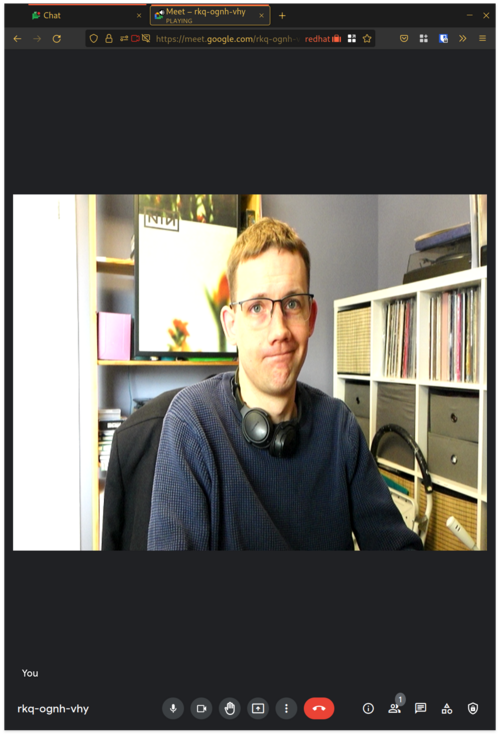
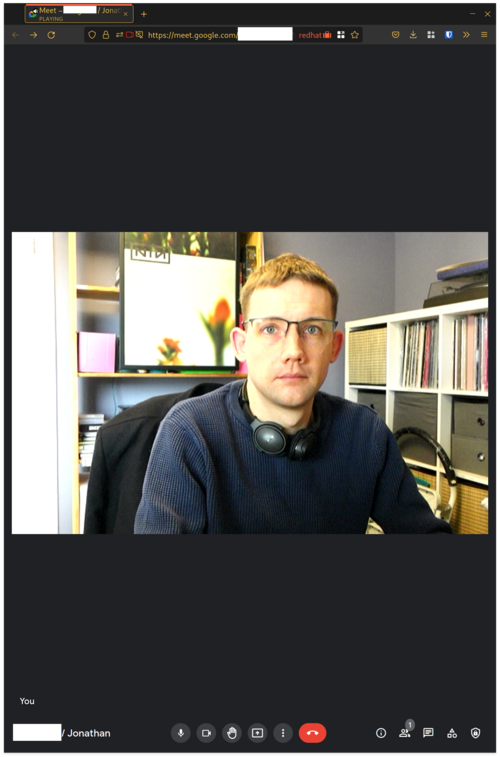
Sometimes I have remote meetings with Google Meet. Unlike the other video-conferencing services that I use (Bluejeans, Zoom), my video was stretched out of proportion under Google Meet with Firefox. I haven't found out why this was happening, but I did figure out a work-around. Thanks to Daniel Silverstone, Rob Kendrick, Gregor Herrmann and Ben Allen for pointing me in the right direction! Hardware The lovely Sony RX-100 mk3 that I bought in 2015 has spent most of its life languishing unused. During the Pandemic, once I was working from home all the time, I decided to press-gang it into service as a better-quality webcam. Newer models of this camera the mark 4 onwards have support for a USB mode called "PC Remote", which effectively makes them into webcams. Unfortunately my mark 3 does not support this, but it does have HDMI out, so I picked up a cheap "HDMI to USB Video Capture Card" from eBay. Video modes
Before: wrong aspect ratio Before: wrong aspect ratio
This device offers a selection of different video modes over a webcam interface. I used qv4l2 to explore the different modes. It became clear that the camera was outputting a signal at 16:9, but the modes on offer from the dongle were for a range of different aspect ratios. The picture for these other ratios was not letter or pillar-boxed, but stretched to fit. I also noticed that the modes which had the correct aspect ratio were at very low framerates: 1920x1080@5fps, 1360x768@8fps, 1280x720@10fps. It felt to me that I would look unnatural at such a low framerate. The most promising mode was close to the right ratio, 720x480 and 30 fps. Software
After: corrected aspect ratio After: corrected aspect ratio
My initial solution is to use the v4l2loopback kernel module, which provides a virtual loop-back webcam interface. I can write video data to it from one process, and read it back from another. Loading it as follows:
modprobe v4l2loopback exclusive_caps=1
The option exclusive_caps configures the module into a mode where it initially presents a write-only interface, but once a process has opened a file handle, it then switches to read-only for subsequent processes. Assuming there are no other camera devices connected at the time of loading the module, it will create /dev/video0.1 I experimented briefly with OBS Studio, the very versatile and feature-full streaming tool, which confirmed that I could use filters on the source video to fix the aspect ratio, and emit the result to the virtual device. I don't otherwise use OBS, though, so I achieve the same result using ffmpeg:
fmpeg -s 720x480 -i /dev/video1 -r 30 -f v4l2 -vcodec rawvideo \
    -pix_fmt yuyv422 -s 720x405 /dev/video0
The source options are to select the source video mode I want. The codec and pixel formats are to match what is being emitted (I determined that using ffprobe on the camera device). The resizing is triggered by supplying a different size to the -s parameter. I think that is equivalent to explicitly selecting a "scale" filter, and there might be other filters that could be used instead (to add pillar boxes for example). This worked just as well. In Google Meet, I select the Virtual Camera, and Google Meet is presented with only one video mode, in the correct aspect ratio, and no configurable options for it, so it can't misbehave. Future I'm planning to automate the loading (and unloading) of the module and starting the ffmpeg process in response to the real camera device being plugged or unplugged, using systemd events and services. (I don't leave the camera plugged in all the time due to some bad USB behaviour I've experienced if I do so.) If I get that working, I will write a follow-up.

  1. you can request a specific device name/number with another module option.

Dirk Eddelbuettel: RcppRedis 0.2.0: Major Updates

A new major release of RcppRedis arrived on CRAN today. RcppRedis is one of several packages connecting R to the fabulous Redis in-memory datastructure store (and much more). RcppRedis does not pretend to be feature complete, but it may do some things faster than the other interfaces, and also offers an optional coupling with MessagePack binary (de)serialization via RcppMsgPack. The package has carried production loads for several years now. This release integrates support for pub/sub, a popular messaging pattern in which one or more clients can subscribe to one or more channels . Whenever a client instances publishes, the Redis server immediately updates all clients listening on the given channel. This pattern is fairly common to transmit data to listeners. A there is a bit more to explain about this, I also added a brand-new vignette describing pub/sub with RcppRedis, along with another introductory vignette about Redis itself. We blogged about this exciting new feature and its particular use for market monitoring in R4 #36 recently too. The pub/sub feature was available in package rredis by Bryan Lewis and has now been ported over by Bryan in a truly elegant yet compact implementation. We placed the code for the pub/sub examples, both for a single symbol (SP 500) as well as for a set of (futures) symbols, into a new examples/ subdirectory. Other changes in this release are the removal of the build-dependency on Boost (or, rather, my BH package), an update to the included hiredis library (used if no system-wide version is found), and an updated to the UCRT build for R. That last one is a bit of a sore spot and nobody at CRAN deemed it necessary to tell me they were waiting for me to make this change; communication with the CRAN team can still be challenging (and I am being generous here). Anyway, the package is now on CRAN so all is well now, at long last. The detailed changes list follows.

Changes in version 0.2.0 (2022-03-08)
  • Two simple C++11 features remove needs for BH and lexical_cast() (Dirk in #45 addressing #44).
  • Redis pub/sub is now supported (Dirk in #43, Bryan in #46).
  • Bryan Lewis is now a coauthor.
  • Added pub/sub examples for single and multiple Globex symbols.
  • The included hiredis sources have been updated to release 1.0.2.
  • Two vignettes have been added to introduce Redis and to described a live market-monitoring application included in directory pubsub/.
  • The UCRT build was updated per a suggestion by Tomas.

Courtesy of CRANberries, there is also a diffstat report for this release. More information is on the RcppRedis page. If you like this or other open-source work I do, you can now sponsor me at GitHub.

This post by Dirk Eddelbuettel originated on his Thinking inside the box blog. Please report excessive re-aggregation in third-party for-profit settings.

Fran ois Marier: Using a Streamzap remote control with MythTV on Debian Bullseye

After upgrading my MythTV machine to Debian Bullseye and MythTV 31, my Streamzap remote control stopped working correctly: the up and down buttons were working, but the OK button wasn't. Here's the complete solution that made it work with the built-in kernel support (i.e. without LIRC).

Button re-mapping Since some of the buttons were working, but not others, I figured that the buttons were probably not mapped to the right keys. Inspired by these old v4l-utils-based instructions, I made my own custom keymap by by copying the original keymap:
cp /lib/udev/rc_keymaps/streamzap.toml /etc/rc_keymaps/
and then modifying it to adapt it to what MythTV needs. This is what I ended up with:
<span class="createlink"><a href="/blog.cgi?do=create&amp;from=posts%2Fusing-streamzap-remote-with-mythtv-debian-bullseye&amp;page=protocols" rel="nofollow">?</a>protocols</span>
name = "streamzap"
protocol = "rc-5-sz"
[protocols.scancodes]
0x28c0 = "KEY_0"
0x28c1 = "KEY_1"
0x28c2 = "KEY_2"
0x28c3 = "KEY_3"
0x28c4 = "KEY_4"
0x28c5 = "KEY_5"
0x28c6 = "KEY_6"
0x28c7 = "KEY_7"
0x28c8 = "KEY_8"
0x28c9 = "KEY_9"
0x28ca = "KEY_ESC"
0x28cb = "KEY_MUTE"
0x28cc = "KEY_UP"
0x28cd = "KEY_RIGHTBRACE"
0x28ce = "KEY_DOWN"
0x28cf = "KEY_LEFTBRACE"
0x28d0 = "KEY_UP"
0x28d1 = "KEY_LEFT"
0x28d2 = "KEY_ENTER"
0x28d3 = "KEY_RIGHT"
0x28d4 = "KEY_DOWN"
0x28d5 = "KEY_M"
0x28d6 = "KEY_ESC"
0x28d7 = "KEY_L"
0x28d8 = "KEY_P"
0x28d9 = "KEY_ESC"
0x28da = "KEY_BACK"
0x28db = "KEY_FORWARD"
0x28dc = "KEY_R"
0x28dd = "KEY_PAGEUP"
0x28de = "KEY_PAGEDOWN"
0x28e0 = "KEY_D"
0x28e1 = "KEY_I"
0x28e2 = "KEY_END"
0x28e3 = "KEY_A"
Note that the keycodes can be found in the kernel source code. With my own keymap in place at /etc/rc_keymaps/streamzap.toml, I changed /etc/rc_maps.cfg to have the kernel driver automatically use it:
--- a/rc_maps.cfg
+++ b/rc_maps.cfg
@@ -126,7 +126,7 @@
 *      rc-real-audio-220-32-keys real_audio_220_32_keys.toml
 *      rc-reddo                 reddo.toml
 *      rc-snapstream-firefly    snapstream_firefly.toml
-*      rc-streamzap             streamzap.toml
+*      rc-streamzap             /etc/rc_keymaps/streamzap.toml
 *      rc-su3000                su3000.toml
 *      rc-tango                 tango.toml
 *      rc-tanix-tx3mini         tanix_tx3mini.toml

Button repeat delay To adjust the delay before button presses are repeated, I followed these old out-of-date instructions on the MythTV wiki and put the following in /etc/udev/rules.d/streamzap.rules:
ACTION=="add", ATTRS idVendor =="0e9c", ATTRS idProduct =="0000", RUN+="/usr/bin/ir-keytable -s rc0 -D 1000 -P 250"
Note that the -d option has been replaced with -s in the latest version of ir-keytable. To check that the Streamzap is indeed detected as rc0 on your system, use this command:
$ ir-keytable 
Found /sys/class/rc/rc0/ with:
    Name: Streamzap PC Remote Infrared Receiver (0e9c:0000)
    Driver: streamzap
    Default keymap: rc-streamzap
...
Make sure you don't pass the -c to ir-keytable or else it will clear the keymap set via /etc/rc_maps.cfg, removing all of the button mappings.

7 March 2022

Ayoyimika Ajibade: Progress Report!! Modifying Expectations...

Wait! Just like yesterday when I was accepted as an Outreachy intern and the first half of the internship is finished . How time flies when you are having a good time As part of the requirements for the final application during the contribution period for the Outreachy internship, I needed to provide a timeline to achieve our goal on my outreachy task which is transitioning of dependencies in node16 and webpack5. Having consulted my mentors who implied that the packages depending on webpack and nodejs combined are so numerous that its impossible to finish all within a space of three months but we have steps to guide us through the entire process to achieve most of our goals which are As of this writing(though a little late ) we have successfully rebuilt all reverse dependencies of webpack5 and split them equally each for I and my co-intern for all Javascript modules as ruby packages also depend on webpack which is a total of 44 packages. Filed a bug report on Debian bug tracking system for failing packages, also the original maintainer or uploader of the package to the Debian archive mostly Debian developers also get a mail in references to the package bug report. Sometimes the uploader who also receives the bug report decides to help out to fix the package and forward the patch upstream if need be. We have also filed an issue to upstream repo mostly via github where some respond and create PR to solve those errors and others are plain aversive to the whole idea. PR from the upstream developer is cherry-picked and a patch is created by us to incorporate the code into our own working repository. some package upstream maintainer rejects such issues or doesn't respond, we take it upon ourselves to fix the package. The total number of packages that are successfully updated and ready to be merged is 10 packages while 12 packages remain on my own end to be updated. One of the most challenging packages to update so far was prop-type as its runs its large test suite using jest of a lower version 19.0.2 compared to that of Debian OS which is version 27.5.1 updating and migrating its API's and methods to use the Debian updated version is so challenging after several googling, testing out the solution from StackOverflow, trials, and errors, reading documentations we eventually made progress with the help of my mentor, co-intern and the whole community member. It's so crazy that when I got it working I said to myself. phew it's not rocket science why can I figure it out sooner than expected I initially proposed that I would be halfway done with the project by now, I guess the reason am not able to achieve some of our goals which are finishing up with the packages for webpack and moving to transition some of the nodejs packages at all is DEBUGGING. Yes DEBUGGING! where you never can predict what the solution is. is the problem coming from Debian? or dependencies of the package you are working on, upstream bug, or dependencies of dependencies of the package you are working on, so many questions to answer. You can't easily find a solution to a bug as it takes time to try out so many guesses more of an educated guess, or even try out all the solutions from stack overflow and still no viable progress. Obviously, you cannot really know about something to set up a plan for unless you get right into it. One way of doing this, if I have to start again is the truly understand how the javascript package work under the hood, how its handles different interaction between packages, some of its dos and don't of transpiling, bundling, testing, e.t.c I guess my unrealistic goals need to be modified because some drawback that was not envisaged popped up and I underestimated the complexity of the tasks, which will be reducing the number of packages to update in transitioning of nodejs from what I planned My major focus for the second half of the internship is to fix bugs and errors I discover, file bug reports for future bugs to seek help from co-maintainer or developers, file issues upstream and close those whose bugs are already resolved for the remaining 12 packages, and ultimately successfully uploading all reverse dependencies. Also diving into transitioning of nodejs16. Thanks for stopping by

6 March 2022

Dirk Eddelbuettel: nanotime 0.3.6 on CRAN: Updates

Leonardo and I are pleased to another update to our nanotime package bringing it to version 0.3.6 which landed on CRAN earlier today. nanotime relies on the RcppCCTZ package (as well as the RcppDate package for additional C++ operations) and offers efficient high(er) resolution time parsing and formatting up to nanosecond resolution, and the bit64 package for the actual integer64 arithmetic. Initially implemented using the S3 system, it has benefitted greatly from a rigorous refactoring by Leonardo who not only rejigged nanotime internals in S4 but also added new S4 types for periods, intervals and durations. This release corrects subsetting with %in% operator, integrates it better fit in the mixed S3/S4 setup, fixes a negative period parse, and updates class comparisons to rely on inherits(). The NEWS snippet has the full more details.

Changes in version 0.3.6 (2022-03-06)
  • Fix incorrect subsetting with operator %in% (Leonardo in #100 fixing #99).
  • Fix incorrect parsing for negative nanoperiod (Leonardo in #100 fixing #96).
  • Test for class via inherits() (Dirk).

Thanks to my CRANberries there is also a diff to the previous version. More details and examples are at the nanotime page; code, issue tickets etc at the GitHub repository and all documentation is provided at the nanotime documentation site. If you like this or other open-source work I do, you can now sponsor me at GitHub.

This post by Dirk Eddelbuettel originated on his Thinking inside the box blog. Please report excessive re-aggregation in third-party for-profit settings.

Next.

Previous.