Search Results: "ron"

21 September 2025

Dirk Eddelbuettel: rcppmlpackexamples 0.0.1 on CRAN: New Package

mlpack is a fabulous project providing countless machine learning algorithms in clean and performant C++ code as a header-only library. This gives both high performance and the ability to run the code in resource-constrained environment such as embedded systems. Bindings to a number of other languages are available, and an examples repo provides examples. The project also has a mature R package on CRAN which offers the various algorithms directly in R. Sometimes, however, one might want to use the header-only C++ code in another R package. How to do that was not well documented. A user alerted me by email to this fact a few weeks ago, and this lead to both an updated mlpack release at CRAN and this package. In short, we show via three complete examples how to access the mlpack code in C++ code in this package, offering a re-usable stanza to start a different package from. The only other (header-only) dependencies are provided by CRAN packages RcppArmadillo and RcppEnsmallen wrapping, respectively, the linear algebra and optimization libraries used by mlpack. Courtesy of my CRANberries, there is also a a new package note (no diffstat report yet). More detailed information is on the rcppmlpackexamples page, or the github repo.

This post by Dirk Eddelbuettel originated on his Thinking inside the box blog. If you like this or other open-source work I do, you can sponsor me at GitHub.

Joey Hess: cheap DIY solar fence design

A year ago I installed a 4 kilowatt solar fence. I'm revisiting it this Sun Day, to share the design, now that I have prooved it out.
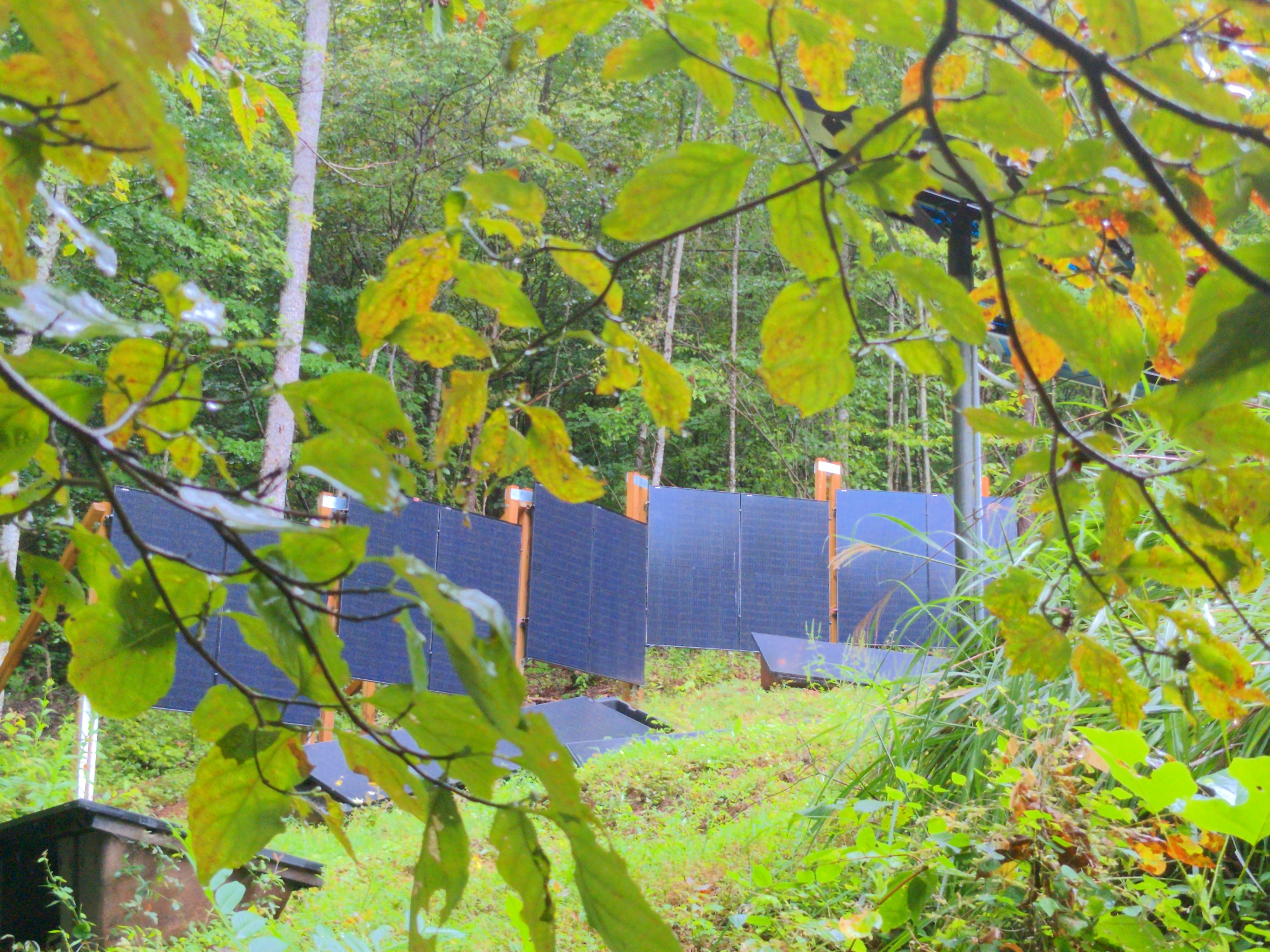
The solar fence and some other ground and pole mount solar panels, seen through leaves.
Solar fencing manufacturers have some good simple designs, but it's hard to buy for a small installation. They are selling to utility scale solar mostly. And those are installed by driving metal beams into the ground, which requires heavy machinery. Since I have experience with Ironridge rails for roof mount solar, I decided to adapt that system for a vertical mount. Which is something it was not designed for. I combined the Ironridge hardware with regular parts from the hardware store. The cost of mounting solar panels nowadays is often higher than the cost of the panels. I hoped to match the cost, and I nearly did. The solar panels cost $100 each, and the fence cost $110 per solar panel. This fence was significantly cheaper than conventional ground mount arrays that I considered as alternatives, and made a better use of a difficult hillside location. I used 7 foot long Ironridge XR-10 rails, which fit 2 solar panels per rail. (Longer rails would need a center post anyway, and the 7 foot long rails have cheaper shipping, since they do not need to be shipped freight.) For the fence posts, I used regular 4x4" treated posts. 12 foot long, set in 3 foot deep post holes, with 3x 50 lb bags of concrete per hole and 6 inches of gravel on the bottom.
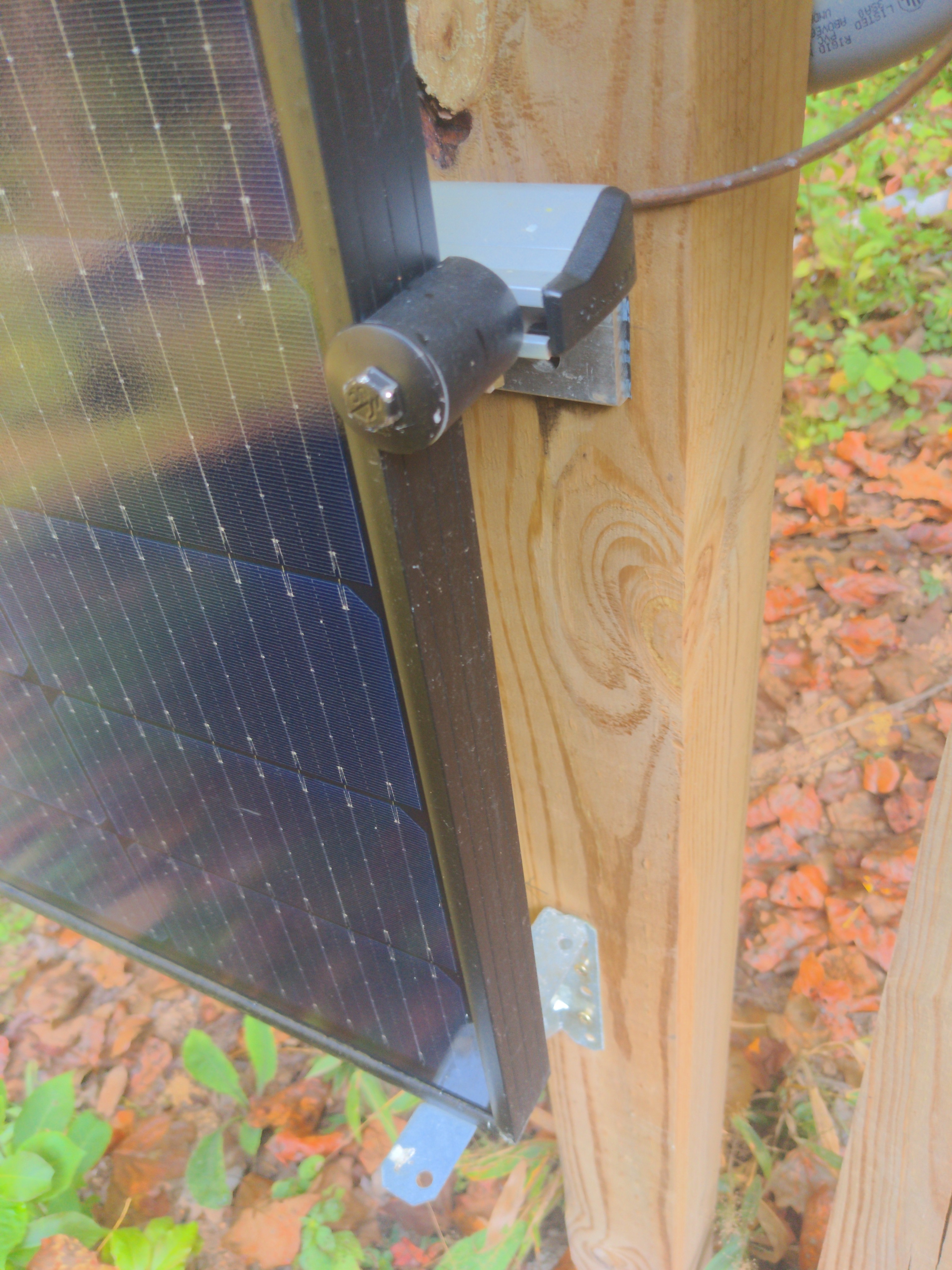
detail of how the rails are mounted to the posts, and the panels to the rails
To connect the Ironridge rails to the fence posts, I used the Ironridge LFT-03-M1 slotted L-foot bracket. Screwed into the post with a 5/8 x 3 inch hot-dipped galvanized lag screw. Since a treated post can react badly with an aluminum bracket, there needs to be some flashing between the post and bracket. I used Shurtape PW-100 tape for that. I see no sign of corrosion after 1 year. The rest of the Ironridge system is a T-bolt that connects the rail to the L-foot (part BHW-SQ-02-A1), and Ironridge solar panel fasteners (UFO-CL-01-A1 and UFO-STP-40MM-M1). Also XR-10 end caps and wire clips. Since the Ironridge hardware is not designed to hold a solar panel at a 90 degree angle, I was concerned that the panels might slide downward over time. To help prevent that, I added some additional support brackets under the bottom of the panels. So far, that does not seem to have been a problem though. I installed Aptos 370 watt solar panels on the fence. They are bifacial, and while the posts block the back partially, there is still bifacial gain on cloudy days. I left enough space under the solar panels to be able to run a push mower under them.
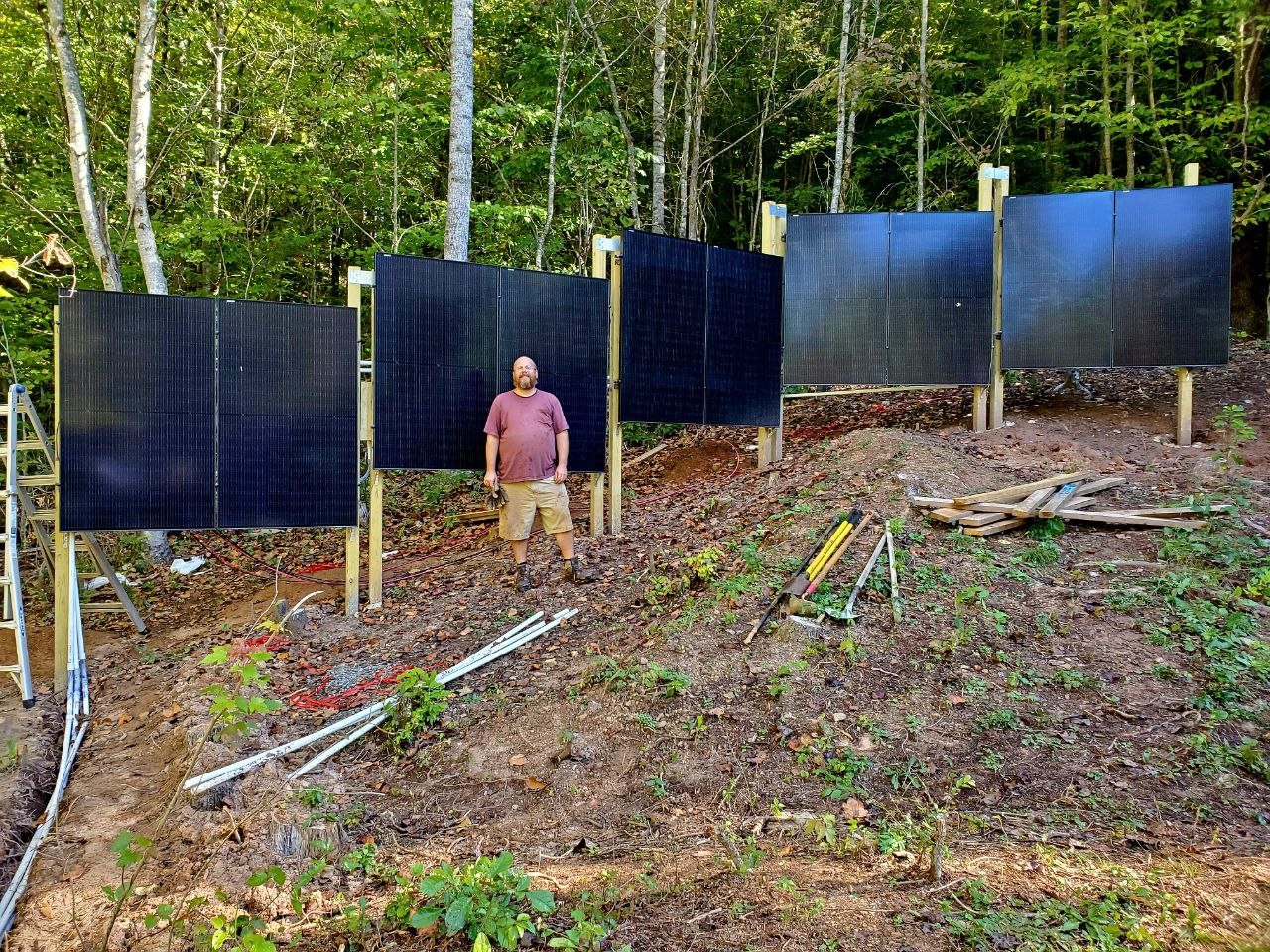
Me standing in front of the solar fence at end of construction
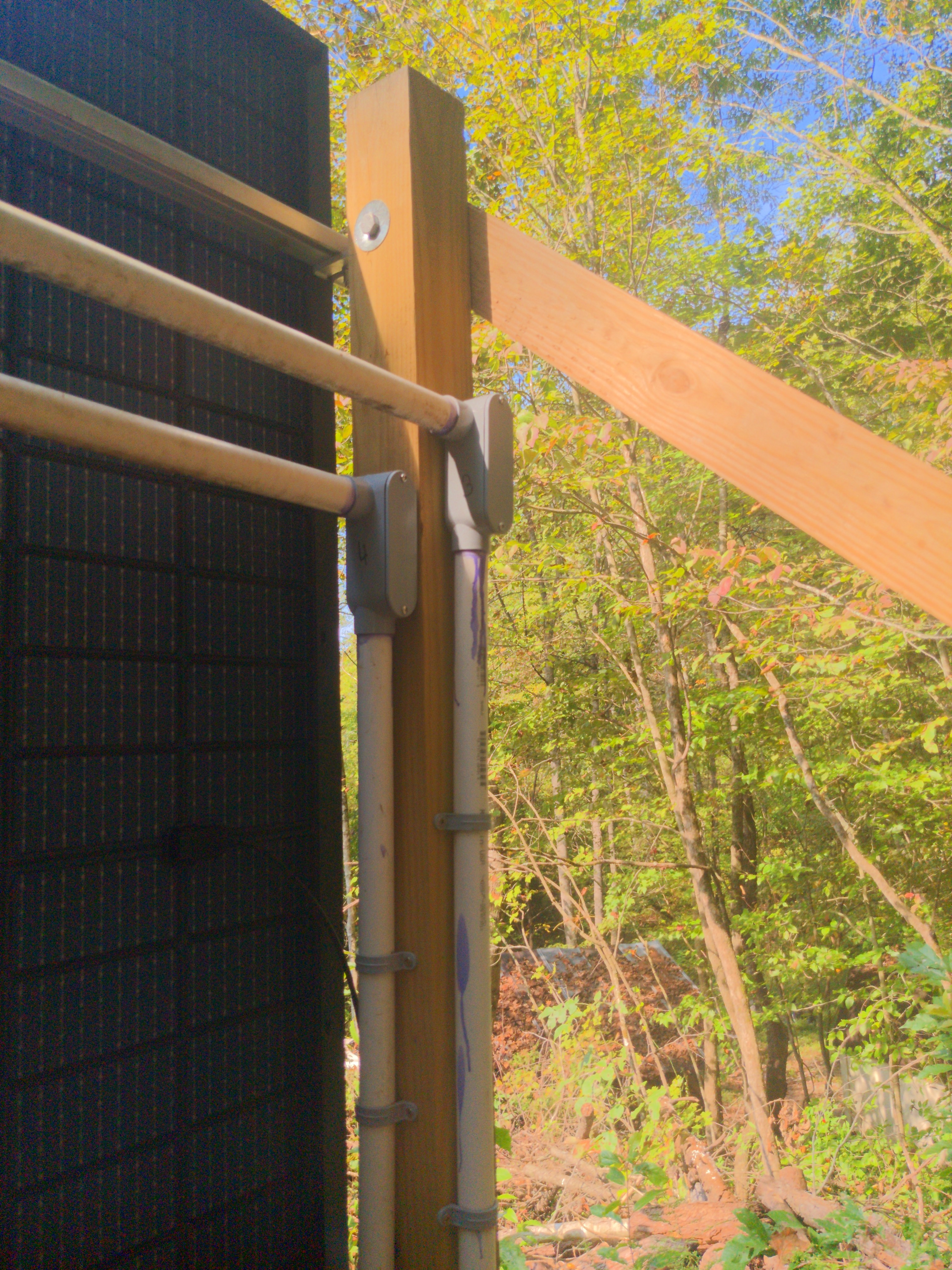
I put pairs of posts next to one-another, so each 7 foot segment of fence had its own 2 posts. This is the least elegant part of this design, but fitting 2 brackets next to one-another on a single post isn't feasible. I bolted the pairs of posts together with some spacers. A side benefit of doing it this way is that treated lumber can warp as it dries, and this prevented much twisting of the posts. Using separate posts for each segment also means that the fence can traverse a hill easily. And it does not need to be perfectly straight. In fact, my fence has a 30 degree bend in the middle. This means it has both south facing and south-west facing panels, so can catch the light for longer during the day. After building the fence, I noticed there was a slight bit of sway at the top, since 9 feet of wooden post is not entirely rigid. My worry was that a gusty wind could rattle the solar panels. While I did not actually observe that happening, I added some diagonal back bracing for peace of mind.
view of rear upper corner of solar fence, showing back bracing connection
Inspecting the fence today, I find no problems after the first year. I hope it will last 30 years, with the lifespan of the treated lumber being the likely determining factor. As part of my larger (and still ongoing) ground mount solar install, the solar fence has consistently provided great power. The vertical orientation works well at latitude 36. It also turned out that the back of the fence was useful to hang conduit and wiring and solar equipment, and so it turned into the electrical backbone of my whole solar field. But that's another story.. solar fence parts list
quantity cost per unit description
10 $27.89 7 foot Ironridge XR-10 rail
12 $20.18 12 foot treated 4x4
30 $4.86 Ironridge UFO-CL-01-A1
20 $0.87 Ironridge UFO-STP-40MM-M1
1 $12.62 Ironridge XR-10 end caps (20 pack)
20 $2.63 Ironridge LFT-03-M1
20 $1.69 Ironridge BHW-SQ-02-A1
22 $2.65 5/8 x 3 inch hot-dipped galvanized lag screw
10 $0.50 6 gravel per post
30 $6.91 50 lb bags of quickcrete
1 $15.00 Shurtape PW-100 Corrosion Protection Pipe Wrap Tape
N/A $30 other bolts and hardware (approximate)
$1100 total (Does not include cost of panels, wiring, or electrical hardware.)

20 September 2025

Thomas Goirand: Real-Time OpenStack Packaging Status with Event-Driven Automation

tl;dr: https://osbpo.debian.net/deb-status is now real-time updated and much better than it used to, helping the OpenStack packaging team be a way more efficient.
How it used to be For years, the Debian OpenStack team has relied on automated tools to track the status of OpenStack packages across Debian releases. Our goal has always been simple: transparency, efficiency, accuracy. We used to use a tool called os-version-checker, written by Michal Arbet, which generated a static status page at https://osbpo.debian.net/deb-status. It was functional and served us well but it had limitations: This meant that when a developer pushed a new package to salsa (the Debian GitLab instance) in the team s repository, the following would happen: For maintainers actively working on a new release, this delay was frustrating. You d fix a bug, push, build and still see your package marked as missing or out of date for minutes. You had no real-time feedback. This was also an annoyance for testing, because when fixing a bug, I often had to trigger the rsync manually in order to not wait for it, so I could do my tests. Now, osbpo is always up-to-date a few seconds after the build of the package. The New Way: Event-Driven, Real-Time Updates We ve rebuilt the system from the ground up to be fast, responsive, and event-driven. Now, the workflow is: The webhook on osbpo does: No more cron. No more waiting

How it works The central osbpo.debian.net server runs: Jenkins instances are configured to curl the webhook on successful build. The status page is generated by openstack-debian-release-manager, a new tool I ve packaged and deployed. The dashboard uses AJAX to load content dynamically (like when browsing from one release to another), with sorting, metadata, and real-time auto-refresh every 10 seconds. openstack-debian-release-manager is easy to deploy and configure, and will do most (if not all) of the needed configuration. Uploading it to Debian is probably not needed, and a bit over-kill, so I believe I ll just keep it in Salsa for the moment, unless there s a way to make it more generic so it can help someone else (another team?) in Debian.
Room for improvement There s still things I want to add. Namely: Special thanks to Michal Arbet for the original os-version-checker that served me for years, helping me to never forget a missing OpenStack package release.

19 September 2025

Dirk Eddelbuettel: RcppArmadillo 15.0.2-2 on CRAN: Transition to Armadillo 15

armadillo image Armadillo is a powerful and expressive C++ template library for linear algebra and scientific computing. It aims towards a good balance between speed and ease of use, has a syntax deliberately close to Matlab, and is useful for algorithm development directly in C++, or quick conversion of research code into production environments. RcppArmadillo integrates this library with the R environment and language and is widely used by (currently) 1261 other packages on CRAN, downloaded 41.4 million times (per the partial logs from the cloud mirrors of CRAN), and the CSDA paper (preprint / vignette) by Conrad and myself has been cited 647 times according to Google Scholar. This versions updates the 15.0.2-1 release from last week. Following fairly extensive email discussions with CRAN, we are now accelerating the transition to Armadillo. When C++14 or newer is used (which after all is the default since R 4.1.0 released May 2021, see WRE Section 1.2.4), or when opted into, the newer Armadillo is selected. If on the other hand either C++11 is still forced, or the legacy version is explicitly selected (which currently one package at CRAN does), then Armadillo 14.6.3 is selected. Most packages will not see a difference and automatically switch to the newer Armadillo. However, some packages will see one or two types of warning. First, if C++11 is still actively selected via for examples CXX_STD then CRAN will nudge a change to a newer compilation standard (as they have been doing for some time already). Preferably the change should be to simply remove the constraint and let R pick the standard based on its version and compiler availability. These days that gives us C++17 in most cases; see WRE Section 1.2.4 for details. (Some packages may need C++14 or C++17 or C++20 explicitly and can also do so.) Second, some packages may see a deprecation warning. Up until Armadillo 14.6.3, the package suppressed these and you can still get that effect by opting into that version by setting -DARMA_USE_LEGACY. (However this route will be sunset eventually too.) But one really should update the code to the non-deprecated version. In a large number of cases this simply means switching from using arma::is_finite() (typically called on a scalar double) to calling std::isfinite(). But there are some other cases, and we will help as needed. If you maintain a package showing deprecation warnings, and are lost here and cannot workout the conversion to current coding styles, please open an issue at the RcppArmadillo repository (i.e. here) or in your own repository and tag me. I will also reach out to the maintainers of a smaller set of packages with more than one reverse dependency. A few small changes have been made internal packaging and documentation, a small synchronization with upstream for two commits since the 15.0.2 release, as well as a link to the ldlasb2 repository and its demonstration regarding some ill-stated benchmarks done elsewhere. The detailed changes since the last CRAN release follow.

Changes in RcppArmadillo version 15.0.2-2 (2025-09-18)
  • Minor update to skeleton Makevars,Makevars.win
  • Update README.md to mention ldlasb2 repository
  • Minor documentation update (#487)
  • Synchronized with Armadillo upstream (#488)
  • Refine Armadillo version selection in coordination with CRAN maintainers to support transition towards Armadillo 15.0.*

Courtesy of my CRANberries, there is a diffstat report relative to previous release. More detailed information is on the RcppArmadillo page. Questions, comments etc should go to the rcpp-devel mailing list off the Rcpp R-Forge page.

This post by Dirk Eddelbuettel originated on his Thinking inside the box blog. If you like this or other open-source work I do, you can sponsor me at GitHub.

17 September 2025

John Goerzen: Installing and Using Debian With My Decades-Old Genuine DEC vt510 Serial Terminal

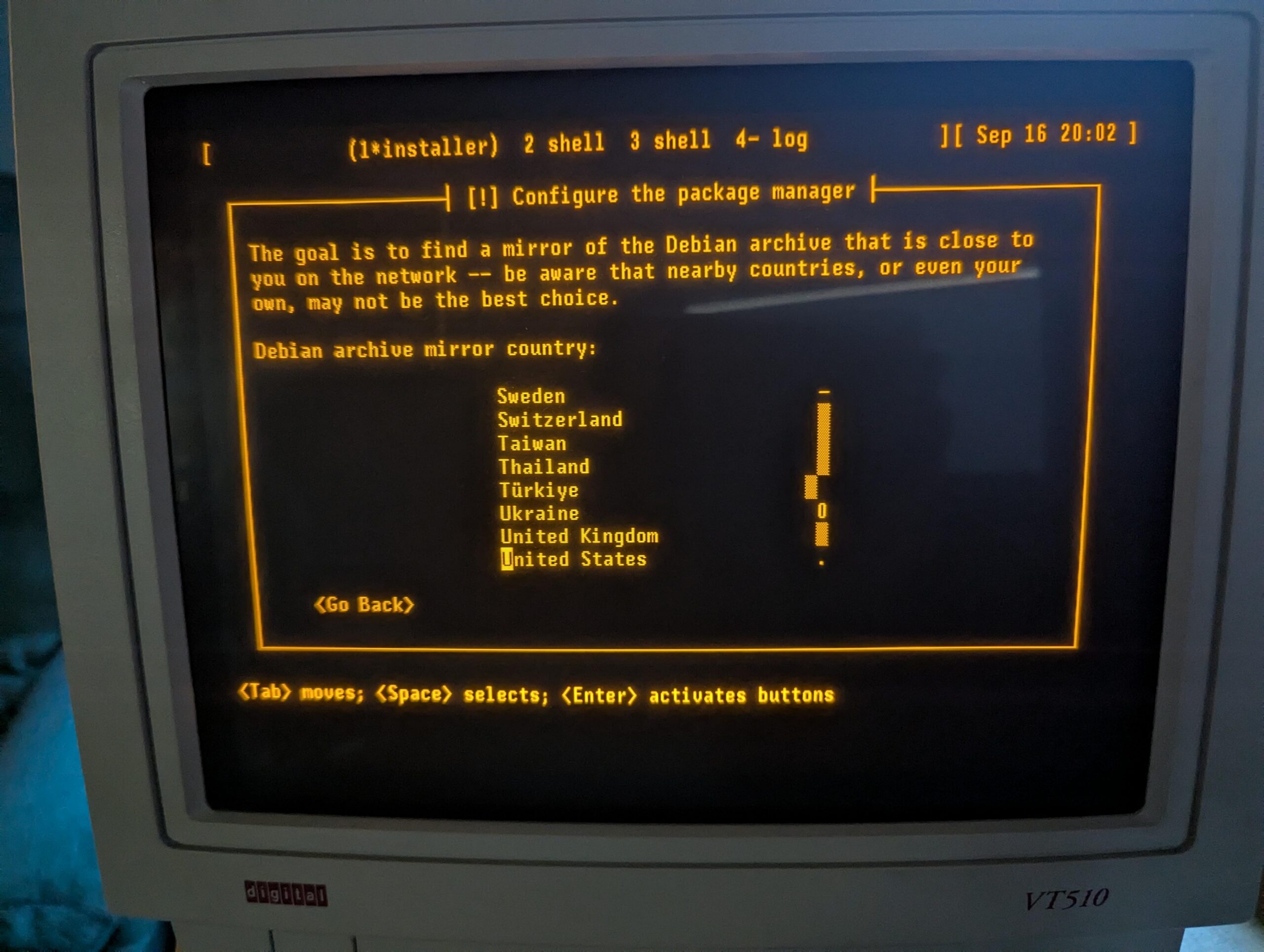
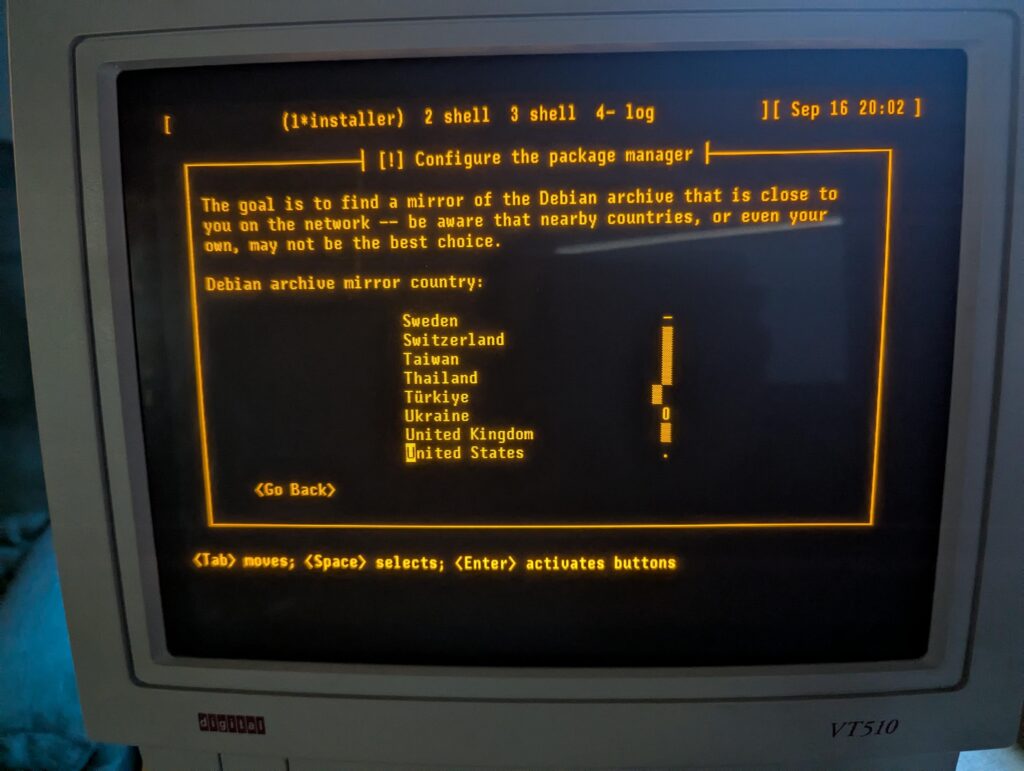
Six years ago, I was inspired to buy a DEC serial terminal. Since then, my collection has grown to include several DEC models, an IBM 3151, a Wyse WY-55, a Televideo 990, and a few others. When you are running a terminal program on Linux or MacOS, what you are really running is a terminal emulator. In almost all cases, the terminal emulator is emulating one of the DEC terminals in the vt100 through vt520 line, which themselves use a command set based on an ANSI standard. In short, you spend all day using a program designed to pretend to be the exact kind of physical machine I m using for this experiment! I have long used my terminals connected to a Raspberry Pi 4, but due to the difficulty of entering a root filesystem encryption password using a serial console on a Raspberry Pi, I am switching to an x86 Mini PC (with a N100 CPU). While I have used a terminal with the Pi, I ve never before used it as a serial console all the way from early boot, and I have never installed Debian using the terminal to run the installer. A serial terminal gives you a login prompt. A serial console gives you access to kernel messages, the initrd environment, and sometimes even the bootloader. This might be fun, I thought. I selected one of my vt510 terminals for this. It is one of my newer ones, having been built in 1993. But it has a key feature: I can remap Ctrl to be at the caps lock position, something I do on every other system I use anyhow. I could have easily selected an older one from the 1980s. A DEC vt510 terminal showing the Debian installer Kernel configuration To enable a serial console for Linux, you need to pass a parameter on the kernel command line. See the kernel documentaiton for more. I very frequently see instructions that are incomplete; they particularly omit flow control, which is most definitely needed for these real serial terminals. I run my terminal at 57600 bps, so the parameter I need is console=ttyS0,57600n8r. The r means to use hardware flow control (ttyS0 corresponds to the first serial port on the system; use ttyS1 or something else as appropriate for your situation). While booting the Debian installer, according to Debian s instructions, it may be useful to also add TERM=vt102 (the installer doesn t support the vt510 terminal type directly). The TERM parameter should not be specified on a running system after instlalation. Booting the Debian installer When you start the Debian installer, to get it into serial mode, you have a couple of options:
  1. You can use a traditional display and keyboard just long enough to input the kernel parameters described above
  2. You can edit the bootloader configuration on the installer s filesystem prior to booting from it
Option 1 is pretty easy. Option 2 is hard mode, but not that bad. On x86, the Debian installer boots in at least two different ways: it uses GRUB if you re booting under UEFI (which is most systems these days), or ISOLINUX if you are booting from the BIOS. If using GRUB, the file to edit on the installer image is boot/grub/grub.cfg. Near the top, add these lines:
serial --unit=0 --speed=57600 --word=8 --parity=no --stop=1
terminal_input console serial
terminal_output console serial
Unit 0 corresponds to ttyS0 as above. GRUB s serial command does not support flow control. If your terminal gets corrupted during the GRUB stage, you may need to configure it to a slower speed. Then, find the linux line under the Install menuentry. Edit it to insert console=ttyS0,57600n8r TERM=vt102 right after the vga=788. Save, unmount, and boot. You should see the GRUB screen displayed on your serial terminal. Select the Install option and the installer begins. If you are using BIOS boot, I m sure you can do something similar with the files in the isolinux directory, but haven t researched it. Now, you can install Debian like usual! Configuring the System I was pleasantly surprised to find that Debian s installer took care of many, but not all, of the things I want to do in order to make the system work nicely with a serial terminal. You can perform these steps from a chroot under the installer environment before a reboot, or later in the running system. First, while Debian does set up a getty (the program that displays the login prompt) on the serial console by default, it doesn t enable hardware flow control. So let s do that. Configuring the System: agetty with systemd Run systemctl edit serial-getty@ttyS0.service. This opens an editor that lets you customize the systemd configuration for a given service without having to edit the file directly. All you really need to do is modify the agetty command, so we just override it. At the top, in the designated area, write:
[Service]
ExecStart=
ExecStart=-/sbin/agetty --wait-cr -8 -h -L=always %I 57600 vt510
The empty ExecStart= line is necessary to tell systemd to remove the existing ExecStart command (otherwise, it will logically contain two ExecStart lines, which is an error). These arguments say: The systemd documentation refers to this page about serial consoles, which gives more background. However, I think it is better to use the systemctl edit method described here, rather than just copying the config file, since this lets things like new configurations with new Debian versions take effect. Configuring the System: Kernel and GRUB Your next stop is the /etc/default/grub file. Debian s installer automatically makes some changes here. There are three lines you want to change. First, near the top, edit GRUB_CMDLINE_LINUX_DEFAULT and add console=tty0 console=ttyS0,57600n8r. By specifying console twice, you allow output to go both to the standard display and to the serial console. By specifying the serial console last, you make it be the preferred one for things like entering the root filesystem password. Next, towards the bottom, make sure these two lines look like this:
GRUB_TERMINAL="console serial"
GRUB_SERIAL_COMMAND="serial --unit=0 --speed=57600 --word=8 --parity=no --stop=1"
Finally, near the top, you may want to raise the GRUB_TIMEOUT to somewhere around 10 to 20 seconds since things may be a bit slower than you re used to. Save the file and run update-grub. Now, GRUB will display on both your standard display and the serial console. You can edit the boot command from either. If you have a VGA or HDMI monitor attached, for instance, and need to not use the serial console, you can just edit the Linux command line in GRUB and remove the reference to ttyS0 for one boot. Easy! That s it. You now have a system that is fully operational from a serial terminal. My original article from 2019 has some additional hints, including on how to convert from UTF-8 for these terminals. Update 2025-09-17: It is also useful to set up proper locales. To do this, first edit /etc/locale.gen. Make sure to add, or uncomment:
en_US ISO-8859-1
en_US.IBM437 IBM437
en_US.UTF-8 UTF-8 
Then run locale-gen. Normally, your LANG will be set to en_us.UTF-8, which will select the appropriate encoding. Plain en_US will select ISO-8859-1, which you need for the vt510. Then, add something like this to your ~/.bashrc:
if [  tty  = "/dev/ttyS0" -o "$TERM" = "vt510" ]; then
        stty -iutf8
        # might add ixon ixoff
        export LANG=en_US
        export MANOPT="-E ascii"
        stty rows 25
fi
if [ "$TERM" = "screen" -o "$TERM" = "vt100" ]; then
    export LANG=en_US.utf8
fi
Finally, in my ~/.screenrc, I have this. It lets screen convert between UTF-8 and ISO-8859-1:
defencoding UTF-8
startup_message off
vbell off
termcapinfo * XC=B%, -,
maptimeout 5
bindkey -k ku stuff ^[OA
bindkey -k kd stuff ^[OB
bindkey -k kr stuff ^[OC
bindkey -k kl stuff ^[OD

15 September 2025

Sven Hoexter: HaProxy: Configuring SNI for a TLS Proxy

If you use HaProxy to e.g. terminate TLS on the frontend and connect via TLS to a backend, one has to take care of sending the SNI (server name indication) extension in the TLS handshake sort of manually. Even if you use host names to address the backend server, e.g.
server foobar foobar.example:2342 ssl verify required ca-file /etc/haproxy/ca/foo.crt
HaProxy will try to establish the connection without SNI. You manually have to enforce SNI here, e.g.
server foobar foobar.example:2342 ssl verify required ca-file /etc/haproxy/ca/foo.crt sni str(foobar.example)
The surprising thing here was that it requires an expression, so you can not just write sni foobar.example, you've to wrap it in an expression. The simplest one is making sure it's a string. Update: Might be noteworthy that you've to configure SNI for the health check separately, and in that case it's a string not an expression. E.g.
server foobar foobar.example:2342 check check-ssl check-sni foobar.example ssl verify required ca-file /etc/haproxy/ca/foo.crt sni str(foobar.example)
The ca-file is shared between the ssl context and the check-ssl.

Sven Hoexter: Google Cloud: When the Load Balancer Frontend Hands you an F

If someone hands you an IP:Port of a Google Cloud load balancer, and tells you to connect there with TLS, but all you receive in return is an F (and a few other bytes with none printable characters) on running openssl s_client -connect ..., you might be missing SNI (server name indication). Sadly the other side was not transparent enough to explain in detail which exact type of Google Cloud load balancer they used, but the conversation got more detailed and up to a working TLS connection when the missing -servername foobar.host.name was added. I could not find any sort of official documentation on the responses of the GFE (the frontend part) when TLS parameters do not match the expectations. Also you won't have anything in the logs, because logging at Google Cloud is a backend function, and as long as your requests do not reach the backend, there are no logs. That makes it rather unpleasant to debug such cases, when one end says "I do not see anything in the logs", and the other one says "you reject my connection and just reply F".

14 September 2025

Otto Kek l inen: Zero-configuration TLS and password management best practices in MariaDB 11.8

Featured image of post Zero-configuration TLS and password management best practices in MariaDB 11.8Locking down database access is probably the single most important thing for a system administrator or software developer to prevent their application from leaking its data. As MariaDB 11.8 is the first long-term supported version with a few new key security features, let s recap what the most important things are every DBA should know about MariaDB in 2025. Back in the old days, MySQL administrators had a habit of running the clumsy mysql-secure-installation script, but it has long been obsolete. A modern MariaDB database server is already secure by default and locked down out of the box, and no such extra scripts are needed. On the contrary, the database administrator is expected to open up access to MariaDB according to the specific needs of each server. Therefore, it is important that the DBA can understand and correctly configure three things:

  1. Separate application-specific users with granular permissions allowing only necessary access and no more.
  2. Distributing and storing passwords and credentials securely
  3. Ensuring all remote connections are properly encrypted
For holistic security, one should also consider proper auditing, logging, backups, regular security updates and more, but in this post we will focus only on the above aspects related to securing database access.

How encrypting database connections with TLS differs from web server HTTP(S) Even though MariaDB (and other databases) use the same SSL/TLS protocol for encrypting remote connections as web servers and HTTPS, the way it is implemented is significantly different, and the different security assumptions are important for a database administrator to grasp. Firstly, most HTTP requests to a web server are unauthenticated, meaning the web server serves public web pages and does not require users to log in. Traditionally, when a user logs in over a HTTP connection, the username and password were transmitted in plaintext as a HTTP POST request. Modern TLS, which was previously called SSL, does not change how HTTP works but simply encapsulates it. When using HTTPS, a web browser and a web server will start an encrypted TLS connection as the very first thing, and only once established, do they send HTTP requests and responses inside it. There are no passwords or other shared secrets needed to form the TLS connection. Instead, the web server relies on a trusted third party, a Certificate Authority (CA), to vet that the TLS certificate offered by the web server can be trusted by the web browser. For a database server like MariaDB, the situation is quite different. All users need to first authenticate and log in to the server before getting being allowed to run any SQL and getting any data out of the server. The database server and client programs have built-in authentication methods, and passwords are not, and have never been, sent in plaintext. Over the years, MySQL and its successor, MariaDB, have had multiple password authentication methods: the original SHA-1-based hashing, later double SHA-1-based mysql_native_password, followed by sha256_password and caching_sha256_password in MySQL and ed25519 in MariaDB. The MariaDB.org blog post by Sergei Golubchik recaps the history of these well. Even though most modern MariaDB installations should be using TLS to encrypt all remote connections in 2025, having the authentication method be as secure as possible still matters, because authentication is done before the TLS connection is fully established. To further harden the authentication agains man-in-the-middle attacks, a new password the authentication method PARSEC was introduced in MariaDB 11.8, which builds upon the previous ed25519 public-key-based verification (similar to how modern SSH does), and also combines key derivation with PBKDF2 with hash functions (SHA512,SHA256) and a high iteration count. At first it may seem like a disadvantage to not wrap all connections in a TLS tunnel like HTTPS does, but actually not having the authentication done in a MitM resistant way regardless of the connection encryption status allows a clever extra capability that is now available in MariaDB: as the database server and client already have a shared secret that is being used by the server to authenticate the user, it can also be used by the client to validate the server s TLS certificate and no third parties like CAs or root certificates are needed. MariaDB 11.8 was the first LTS version to ship with this capability for zero-configuration TLS. Note that the zero-configuration TLS also works on older password authentication methods and does not require users to have PARSEC enabled. As PARSEC is not yet the default authentication method in MariaDB, it is recommended to enable it in installations that use zero-configuration TLS encryption to maximize the security of the TLS certificate validation.

Why the root user in MariaDB has no password and how it makes the database more secure Relying on passwords for security is problematic, as there is always a risk that they could leak, and a malicious user could access the system using the leaked password. It is unfortunately far too common for database passwords to be stored in plaintext in configuration files that are accidentally committed into version control and published on GitHub and similar platforms. Every application or administrative password that exists should be tracked to ensure only people who need it know it, and rotated at regular intervals to ensure old employees etc won t be able to use old passwords. This password management is complex and error-prone. Replacing passwords with other authentication methods is always advisable when possible. On a database server, whoever installed the database by running e.g. apt install mariadb-server, and configured it with e.g. nano /etc/mysql/mariadb.cnf, already has full root access to the operating system, and asking them for a password to access the MariaDB database shell is moot, since they could circumvent any checks by directly accessing the files on the system anyway. Therefore, MariaDB, since version 10.4 stopped requiring the root user to enter a password when connecting locally, and instead checks using socket authentication whether the user is the operating-system root user or equivalent (e.g. running sudo). This is an elegant way to get rid of a password that was actually unnecessary to begin with. As there is no root password anymore, the risk of an external user accessing the database as root with a leaked password is fully eliminated. Note that socket authentication only works for local connections on the same server. If you want to access a MariaDB server remotely as the root user, you would need to configure a password for it first. This is not generally recommended, as explained in the next section.

Create separate database users for normal use and keep root for administrative use only Out of the box a MariaDB installation is already secure by default, and only the local root user can connect to it. This account is intended for administrative use only, and for regular daily use you should create separate database users with access limited to the databases they need and the permissions required. The most typical commands needed to create a new database for an app and a user the app can use to connect to the database would be the following:
sql
CREATE DATABASE app_db;
CREATE USER 'app_user'@'%' IDENTIFIED BY 'your_secure_password';
GRANT ALL PRIVILEGES ON app_db.* TO 'app_user'@'%';
FLUSH PRIVILEGES;
Alternatively, if you want to use the parsec authentication method, run this to create the user:
sql
CREATE OR REPLACE USER 'app_user'@'%'
 IDENTIFIED VIA parsec
 USING PASSWORD('your_secure_password');
Note that the plugin auth_parsec is not enabled by default. If you see the error message ERROR 1524 (HY000): Plugin 'parsec' is not loaded fix this by running INSTALL SONAME 'auth_parsec';. In the CREATE USER statements, the @'%' means that the user is allowed to connect from any host. This needs to be defined, as MariaDB always checks permissions based on both the username and the remote IP address or hostname of the user, combined with the authentication method. Note that it is possible to have multiple user@remote combinations, and they can have different authentication methods. A user could, for example, be allowed to log in locally using the socket authentication and over the network using a password. If you are running a custom application and you know exactly what permissions are sufficient for the database users, replace the ALL PRIVILEGES with a subset of privileges listed in the MariaDB documentation. For new permissions to take effect, restart the database or run FLUSH PRIVILEGES.

Allow MariaDB to accept remote connections and enforce TLS Using the above 'app_user'@'%' is not enough on its own to allow remote connections to MariaDB. The MariaDB server also needs to be configured to listen on a network interface to accept remote connections. As MariaDB is secure by default, it only accepts connections from localhost until the administrator updates its configuration. On a typical Debian/Ubuntu system, the recommended way is to drop a new custom config in e.g. /etc/mysql/mariadb.conf.d/99-server-customizations.cnf, with the contents:
[mariadbd]
# Listen for connections from anywhere
bind-address = 0.0.0.0
# Only allow TLS encrypted connections
require-secure-transport = on
For settings to take effect, restart the server with systemctl restart mariadb. After this, the server will accept connections on any network interface. If the system is using a firewall, the port 3306 would additionally need to be allow-listed. To confirm that the settings took effect, run e.g. mariadb -e "SHOW VARIABLES LIKE 'bind_address';" , which should now show 0.0.0.0. When allowing remote connections, it is important to also always define require-secure-transport = on to enforce that only TLS-encrypted connections are allowed. If the server is running MariaDB 11.8 and the clients are also MariaDB 11.8 or newer, no additional configuration is needed thanks to MariaDB automatically providing TLS certificates and appropriate certificate validation in recent versions. On older long-term-supported versions of the MariaDB server one would have had to manually create the certificates and configure the ssl_key, ssl_cert and ssl_ca values on the server, and distribute the certificate to the clients as well, which was cumbersome, so good it is not required anymore. In MariaDB 11.8 the only additional related config that might still be worth setting is tls_version = TLSv1.3 to ensure only the latest TLS protocol version is used. Finally, test connections to ensure they work and to confirm that TLS is used by running e.g.:
shell
mariadb --user=app_user --password=your_secure_password \
 --host=192.168.1.66 -e '\s'
The result should show something along:
--------------
mariadb from 11.8.3-MariaDB, client 15.2 for debian-linux-gnu (x86_64)
...
Current user: app_user@192.168.1.66
SSL: Cipher in use is TLS_AES_256_GCM_SHA384, cert is OK
...
If running a Debian/Ubuntu system, see the bundled README with zcat /usr/share/doc/mariadb-server/README.Debian.gz to read more configuration tips.

Should TLS encryption be used also on internal networks? If a database server and app are running on the same private network, the chances that the connection gets eavesdropped on or man-in-the-middle attacked by a malicious user are low. However, it is not zero, and if it happens, it can be difficult to detect or prove that it didn t happen. The benefit of using end-to-end encryption is that both the database server and the client can validate the certificates and keys used, log it, and later have logs audited to prove that connections were indeed encrypted and show how they were encrypted. If all the computers on an internal network already have centralized user account management and centralized log collection that includes all database sessions, reusing existing SSH connections, SOCKS proxies, dedicated HTTPS tunnels, point-to-point VPNs, or similar solutions might also be a practical option. Note that the zero-configuration TLS only works with password validation methods. This means that systems configured to use PAM or Kerberos/GSSAPI can t use it, but again those systems are typically part of a centrally configured network anyway and are likely to have certificate authorities and key distribution or network encryption facilities already set up. In a typical software app stac however, the simplest solution is often the best and I recommend DBAs use the end-to-end TLS encryption in MariaDB 11.8 in most cases. Hopefully with these tips you can enjoy having your MariaDB deployments both simpler and more secure than before!

12 September 2025

Freexian Collaborators: Using JavaScript in Debusine without depending on JavaScript (by Enrico Zini)

Debusine is a tool designed for Debian developers and Operating System developers in general. This posts describes our approach to the use of JavaScript, and some practical designs we came up with to integrate it with Django with minimal effort.

Debusine web UI and JavaScript Debusine currently has 3 user interfaces: a client on the command line, a RESTful API, and a Django-based Web UI. Debusine s web UI is a tool to interact with the system, and we want to spend most of our efforts in creating a system that works and works well, rather than chasing the latest and hippest of the frontend frameworks for the web. Also, Debian as a community has an aversion to having parts of the JavaScript ecosystem in the critical path of its core infrastructure, and in our professional experience this aversion is not at all unreasonable. This leads to having some interesting requirements for the web UI, that (rather surprisingly, one would think) one doesn t usually find advertised in many projects:
  • Straightforward to create and maintain.
  • Well integrated with Django.
  • Easy to package in Debian, with as little vendoring as possible, which helps mitigate supply chain attacks
  • Usable without JavaScript whenever possible, for progressive enhancement rather than core functionality.
The idea is to avoid growing the technical complexity and requirements of the web UI, both server-side and client-side, for functionality that is not needed for this kind of project, with tools that do not fit well in our ecosystem. Also, to limit the complexity of the JavaScript portions that we do develop, we choose to limit our JavaScript browser supports to the main browser versions packaged in Debian Stable, plus recent oldstable. This makes JavaScript easier to write and maintain, and it also makes it less needed, as modern HTML plus modern CSS interfaces can go a long way with less scripting interventions. We recently encoded JavaScript practices and tradeoffs in a JavaScript Practices chapter of Debusine s documentation.

How we use JavaScript From the start we built the UI using Bootstrap, which helps in having responsive layouts that can also work on mobile devices. When we started having large select fields, we introduced Select2 to make interaction more efficient, and which degrades gracefully to working HTML. Both Bootstrap and Select2 are packaged in Debian. Form validation is done server-side by Django, and we do not reimplement it client-side in JavaScript, as we prefer the extra round trip through a form submission to the risk of mismatches between the two validations. In those cases where a UI task is not at all possible without JavaScript, we can make its support mandatory as long as the same goal can be otherwise achieved using the debusine client command.

Django messages as Bootstrap toasts Django has a Messages framework that allows different parts of a view to push messages to the user, and it is useful to signal things like a successful form submission, or warnings on unexpected conditions. Django messages integrate well with Bootstrap toasts, which use a recognisable notification language, are nicely dismissible and do not invade the rest of the page layout. Since toasts require JavaScript to work, we added graceful degradation. to Bootstrap alerts Doing so was surprisingly simple: we handle the toasts as usual, and also render the plain alerts inside a <noscript> tag. This is precisely the intended usage of the <noscript> tag, and it works perfectly: toasts are displayed by JavaScript when it s available, or rendered as alerts when not. The resulting Django template is something like this:
<div aria-live="polite" aria-atomic="true" class="position-relative">
    <div class="toast-container position-absolute top-0 end-0 p-3">
     % for message in messages % 
        <div class="toast" role="alert" aria-live="assertive" aria-atomic="true">
            <div class="toast-header">
                <strong class="me-auto">  message.level_tag capfirst  </strong>
                <button type="button"
                        class="btn-close"
                        data-bs-dismiss="toast"
                        aria-label="Close"></button>
            </div>
            <div class="toast-body">  message  </div>
        </div>
     % endfor % 
    </div>
</div>
<!--   -->
 % if messages % 
<noscript>
     % for message in messages % 
        <div class="alert alert-primary" role="alert">
              message  
        </div>
     % endfor % 
</noscript>
 % endif % 
We have a webpage to test the result.

JavaScript incremental improvement of formsets Debusine is built around workspaces, which are, among other things, containers for resources. Workspaces can inherit from other workspaces, which act as fallback lookups for resources. This allows, for example, to maintain an experimental package to be built on Debian Unstable, without the need to copy the whole Debian Unstable workspace. A workspace can inherit from multiple others, which are looked up in order. When adding UI to configure workspace inheritance, we faced the issue that plain HTML forms do not have a convenient way to perform data entry of an ordered list. We initially built the data entry around Django formsets, which support ordering using an extra integer input field to enter the ordering position. This works, and it s good as a fallback, but we wanted something more appropriate, like dragging and dropping items to reorder them, as the main method of interaction. Our final approach renders the plain formset inside a <noscript> tag, and the JavaScript widget inside a display: none element, which is later shown by JavaScript code. As the workspace inheritance is edited, JavaScript serializes its state into <form type='hidden'> fields that match the structure used by the formset, so that when the form is submitted, the view performs validation and updates the server state as usual without any extra maintenance burden. Serializing state as hidden form fields looks a bit vintage, but it is an effective way of preserving the established data entry protocol between the server and the browser, allowing us to do incremental improvement of the UI while minimizing the maintenance effort.

More to come Debusine is now gaining significant adoption and is still under active development, with new features like personal archives coming soon. This will likely mean more user stories for the UI, so this is a design space that we are going to explore again and again in the coming future. Meanwhile, you can try out Debusine on debusine.debian.net, and follow its development on salsa.debian.org!

11 September 2025

John Goerzen: Performant Full-Disk Encryption on a Raspberry Pi, but Foiled by Twisty UARTs

In my post yesterday, ARM is great, ARM is terrible (and so is RISC-V), I described my desire to find ARM hardware with AES instructions to support full-disk encryption, and the poor state of the OS ecosystem around the newer ARM boards. I was anticipating buying either a newer ARM SBC or an x86 mini PC of some sort. More-efficient AES alternatives Always one to think, what if I didn t have to actually buy something , I decided to research whether it was possible to use encryption algorithms that are more performant on the Raspberry Pi 4 I already have. The answer was yes. From cryptsetup benchmark:
root@mccoy:~# cryptsetup benchmark --cipher=xchacha12,aes-adiantum-plain64 
# Tests are approximate using memory only (no storage IO).
#            Algorithm         Key        Encryption        Decryption
xchacha12,aes-adiantum        256b       159.7 MiB/s       160.0 MiB/s
xchacha20,aes-adiantum        256b       116.7 MiB/s       169.1 MiB/s
    aes-xts                   256b        52.5 MiB/s        52.6 MiB/s
With best-case reads from my SD card at 45MB/s (with dd if=/dev/mmcblk0 of=/dev/null bs=1048576 status=progress), either of the ChaCha-based algorithms will be fast enough. Great, I thought. Now I can just solve this problem without spending a dollar. But not so fast. Serial terminals vs. serial consoles My primary use case for this device is to drive my actual old DEC vt510 terminal. I have long been able to do that by running a getty for my FTDI-based USB-to-serial converter on /dev/ttyUSB0. This gets me a login prompt, and I can do whatever I need from there. This does not get me a serial console, however. The serial console would show kernel messages and could be used to interact with the pre-multiuser stages of the system that is, everything before the loging prompt. You can use it to access an emergency shell for repair, etc. Although I have long booted that kernel with console=tty0 console=ttyUSB0,57600, the serial console has never worked but I d never bothered investigating because the text terminal was sufficient. You might be seeing where this is going: to have root on an encrypted LUKS volume, you have to enter the decryption password in the pre-multiuser environment (which happens to be on the initramfs). So I started looking. First, I extracted the initrd with cpio and noticed that the ftdi_sio and usbserial modules weren t present. Added them to /etc/initramfs-tools/modules and rebooted; no better. So I found the kernel s serial console guide, which explicitly notes To use a serial port as console you need to compile the support into your kernel . Well, I have no desire to custom-build a kernel on a Raspberry Pi with MicroSD storage every time a new kernel comes out. I thought well I don t stricly need the kernel to know about the console on /dev/ttyUSB0 for this; I just need the password prompt which comes from userspace to know about it. So I looked at the initramfs code, and wouldn t you know it, it uses /dev/console. Looking at /proc/consoles on that system, indeed it doesn t show ttyUSB0. So even though it is possible to load the USB serial driver in the initramfs, there is no way to make the initramfs use it, because it only uses whatever the kernel recognizes as a console, and the kernel won t recognize this. So there is no way to use a USB-to-serial adapter to enter a password for an encrypted root filesystem. Drat. The on-board UARTs? I can hear you know: The Pi already has on-board serial support! Why not use that? Ah yes, the reason I don t want to use that is because it is difficult to use that, particularly if you want to have RTS/CTS hardware flow control (or DTR/DSR on these old terminals, but that s another story, and I built a custom cable to map it to RTS/CTS anyhow). Since you asked, I ll take you down this unpleasant path. The GPIO typically has only 2 pins for serial communication: 8 and 10, for TX and RX, respectively. But dive in and you get into a confusing maze of UARTs. The mini UART , the one we are mostly familiar with on the Pi, does not support hardware flow control. The PL011 does. So the natural question is: how do we switch to the PL011, and what pins does it use? Great questions, and the answer is undocumented, at least for the Pi 4. According to that page, for the Pi 4, the primary UART is UART1, UART1 is the mini UART, the secondary UART is not normally present on the GPIO connector and might be used by Bluetooth anyway, and there is no documented pin for RTS/CTS anyhow. (Let alone some of the other lines modems use) There are supposed to be /dev/ttyAMA* devices, but I don t have those. There s an enable_uart kernel parameter, which does things like stop the mini UART from changing baud rates every time the VPU changes clock frequency (I am not making this up!), but doesn t seem to control the PL011 UART selection. This page has a program to do it, and map some GPIO pins to RTS/CTS, in theory. Even if you get all that working, you still have the problem that the Pi UARTs (all of them of every type) is 3.3V and RS-232 is 5V, so unless you get a converter, you will fry your Pi the moment you connect it to something useful. So, you re probably looking at some soldering and such just to build a cable that will work with an iffy stack. So, I could probably make it work given enough time, but I don t have that time to spare working with weird Pi serial problems, so I have always used USB converters when I need serial from a Pi. Conclusion I bought a fanless x86 micro PC with a N100 chip and all the ports I might want: a couple of DB-9 serial ports, some Ethernet ports, HDMI and VGA ports, and built-in wifi. Done.

Christoph Berg: A Trip To Vienna With Surprises

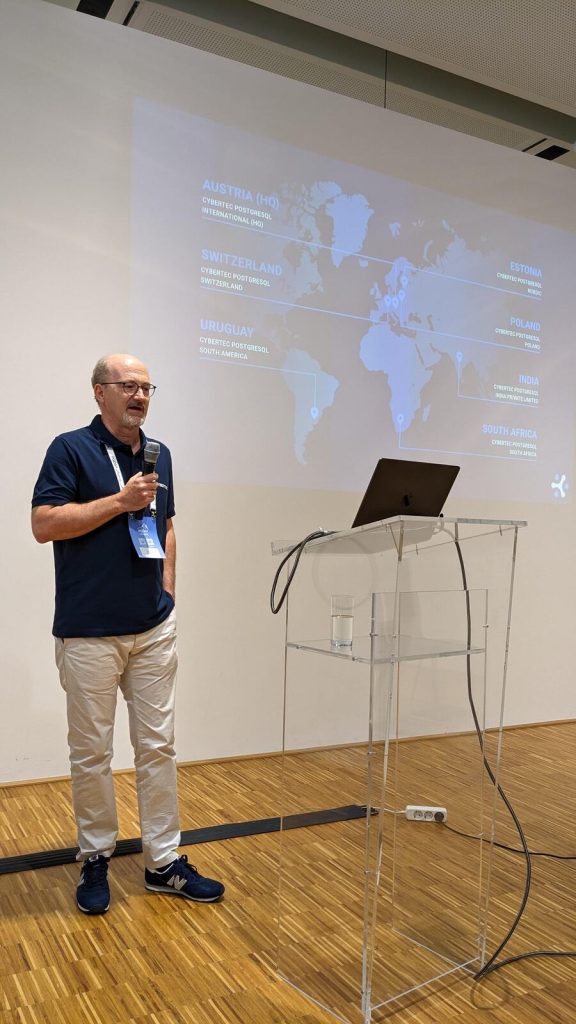
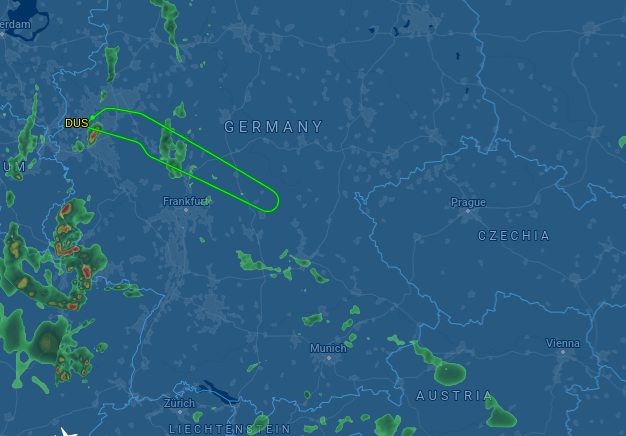
My trip to pgday.at started Wednesday at the airport in D sseldorf. I was there on time, and the plane started with an estimated flight time of about 90 minutes. About half an hour into the flight, the captain announced that we would be landing in 30 minutes - in D sseldorf, because of some unspecified technical problems. Three hours after the original departure time, the plane made another attempt, and we made it to Vienna.
On the plane I had already met Dirk Krautschick who had the great honor of bringing Slonik (in the form of a big extra bag) to the conference, and we took a taxi to the hotel. On the taxi, the next surprise happened: Hans-J rgen Sch nig unfortunately couldn't make it to the conference, and his talks had to be replaced. I had submitted a talk to the conference, but it was not accepted, and neither queued on the reserve list. But two speakers on the reserve list had cancelled, and another was already giving a talk in parallel to the slot that had to be filled, so Pavlo messaged me if I could hold the talk - well of course I could. Before, I didn't have any specific plans for the evening yet, but suddenly I was a speaker, so I joined the folks going to the speakers dinner at the Wiener Grill Haus two corners from the hotel. It was a very nice evening, chatting with a lot of folks from the PostgreSQL community that I had not seen for a while. Thursday was the conference day. The hotel was a short walk from the venue, the Apothekertrakt in Vienna's Schloss Sch nbrunn. The courtyard was already filled with visitors registering for the conference. Since I originally didn't have a talk scheduled, I had signed up to volunteer for a shift as room host. We got our badge and swag bag, and I changed into the "crew" T-shirt. The opening and sponsor keynotes took place in the main room, the Orangerie. We were over 100 people in the room, but apparently still not enough to really fill it, so the acoustics with some echo made it a bit difficult to understand everything. I hope that part can be improved for next time (which is planned to happen!). I was host for the Maximilian room, where the sponsor sessions were scheduled in the morning. The first talk was by our Peter Hofer, also replacing the absent Hans. He had only joined the company at the beginning of the same week, and was already tasked to give Hans' talk on PostgreSQL as Open Source. Of course he did well.
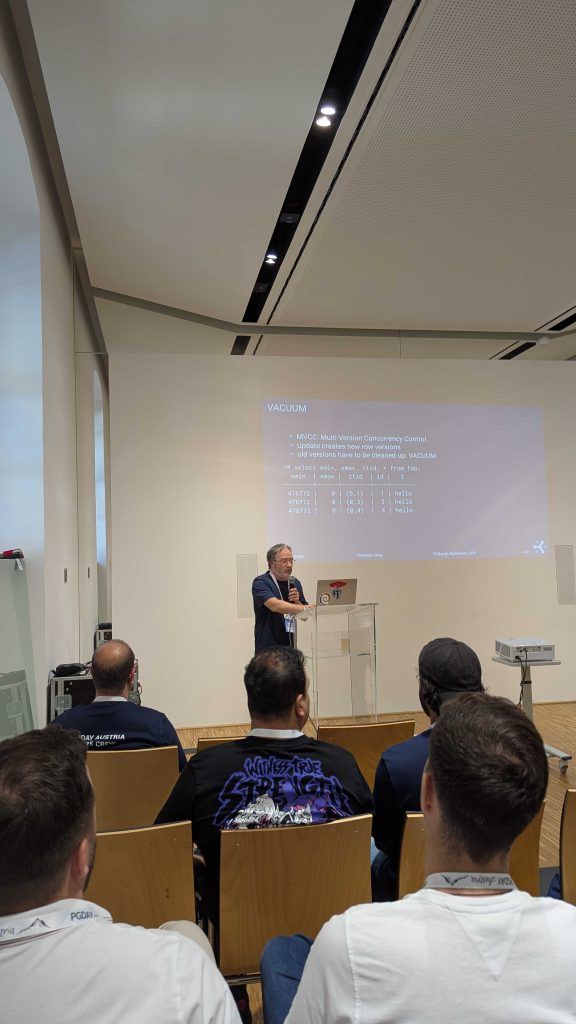
Next was Tanmay Sinha from Readyset. They are building a system that caches expensive SQL queries and selectively invalidates the cache whenever any data used by these queries changes. Whenever actually fixing the application isn't feasible, that system looks like an interesting alternative to manually maintaining materialized views, or perhaps using pg_ivm. After lunch, I went to Federico Campoli's Mastering Index Performance, but really spent the time polishing the slides for my talk. I had given the original version at pgconf.de in Berlin in May, and the slides were still in German, so I had to do some translating. Luckily, most slides are just git commit messages, so the effort was manageable. The next slot was mine, talking about Modern VACUUM. I started with a recap of MVCC, vacuum and freezing in PostgreSQL, and then showed how over the past years, the system was updated to be more focused (the PostgreSQL 8.4 visibility map tells vacuum which pages to visit), faster (12 made autovacuum run 10 times faster by default), less scary (14 has an emergency mode where freezing switches to maximum speed if it runs out of time; 16 makes freezing create much less WAL) and more performant (17 makes vacuum use much less memory). In summary, there is still room for the DBA to tune some knobs (for example, the default autovacuum_max_workers=3 isn't much), but the vacuum default settings are pretty much okay these days for average workloads. Specific workloads still have a whopping 31 postgresql.conf settings at their disposal just for vacuum.
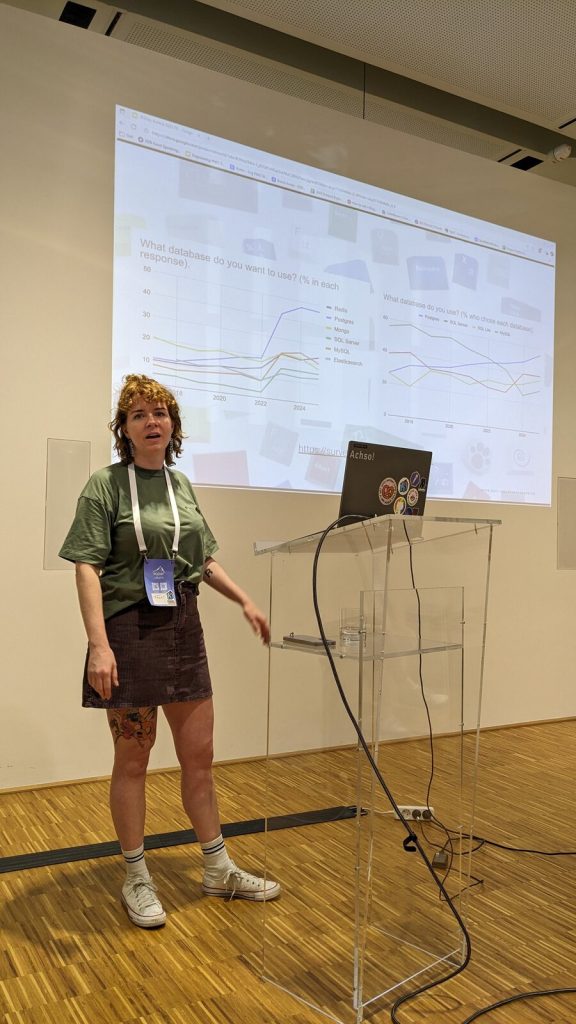
Right after my talk, there was another vacuum talk: When Autovacuum Met FinOps by Mayuresh Bagayatkar. He added practical advice on tuning the performance in cloud environments. Luckily, our contents did not overlap. After the coffee break, I was again room host, now for Floor Drees and Contributing to Postgres beyond code. She presented the various ways in which PostgreSQL is more than just the code in the Git repository: translators, web site, system administration, conference organizers, speakers, bloggers, advocates. As a member of the PostgreSQL Contributors Committee, I could only approve and we should closer cooperate in the future to make people's contributions to PostgreSQL more visible and give them the recognition they deserve.
That was already the end of the main talks and everyone rushed to the Orangerie for the lightning talks. My highlight was the Sheldrick Wildlife Trust. Tickets for the conference had included the option to donate for the elephants in Kenya, and the talk presented the trust's work in the elephant orphanage there. After the conference had officially closed, there was a bonus track: the Celebrity DB Deathmatch, aptly presented by Boriss Mejias. PostgreSQL, MongoDB, CloudDB and Oracle were competing for the grace of a developer. MongoDB couldn't stand the JSON workload, CloudDB was dismissed for handing out new invoices all the time, and Oracle had even brought a lawyer to the stage, but then lost control over a literally 10 meter long contract with too much fine print. In the end, PostgreSQL (played by Floor) won the love of the developer (played by our Svitlana Lytvynenko).
The day closed with a gathering at the Brandauer Schlossbr u - just at the other end of the castle ground, but still a 15min walk away. We enjoyed good beer and Kaiserschmarrn. I went back to the hotel a bit before midnight, but some extended that time quite some bit more. On Friday, my flight back was only in the afternoon, so I spent some time in morning in the Technikmuseum just next to the hotel, enjoying some old steam engines and a live demonstration of Tesla coils. This time, the flight actually went to the destination, and I was back in D sseldorf in the late afternoon.
In summary, pgday.at was a very nice event in a classy location. Thanks to the organizers for putting in all the work - and next year, Hans will hopefully be present in person! The post A Trip To Vienna With Surprises appeared first on CYBERTEC PostgreSQL Services & Support.

Freexian Collaborators: Monthly report about Debian Long Term Support, August 2025 (by Roberto C. S nchez)

Like each month, have a look at the work funded by Freexian s Debian LTS offering.

Debian LTS contributors In August, 21 contributors have been paid to work on Debian LTS, their reports are available:
  • Abhijith PA did 10.0h (out of 0.0h assigned and 14.0h from previous period), thus carrying over 4.0h to the next month.
  • Andrej Shadura did 12.0h (out of 9.0h assigned and 3.0h from previous period).
  • Bastien Roucari s did 20.0h (out of 19.75h assigned and 0.25h from previous period).
  • Ben Hutchings did 22.75h (out of 16.5h assigned and 6.25h from previous period).
  • Carlos Henrique Lima Melara did 10.0h (out of 10.0h assigned).
  • Chris Lamb did 18.0h (out of 18.0h assigned).
  • Daniel Leidert did 23.25h (out of 23.25h assigned).
  • Emilio Pozuelo Monfort did 23.25h (out of 23.25h assigned).
  • Guilhem Moulin did 15.0h (out of 15.0h assigned).
  • Jochen Sprickerhof did 11.0h (out of 6.0h assigned and 16.75h from previous period), thus carrying over 11.75h to the next month.
  • Lee Garrett did 16.25h (out of 0.0h assigned and 16.25h from previous period).
  • Lucas Kanashiro did 20.0h (out of 1.25h assigned and 18.75h from previous period).
  • Markus Koschany did 5.0h (out of 13.0h assigned and 9.75h from previous period), thus carrying over 17.75h to the next month.
  • Paride Legovini did 8.0h (out of 0.0h assigned and 8.0h from previous period).
  • Roberto C. S nchez did 7.5h (out of 11.75h assigned and 11.0h from previous period), thus carrying over 15.25h to the next month.
  • Santiago Ruano Rinc n did 13.5h (out of 7.25h assigned and 7.75h from previous period), thus carrying over 1.5h to the next month.
  • Stefano Rivera did 0.5h (out of 0.0h assigned and 3.0h from previous period), thus carrying over 2.5h to the next month.
  • Sylvain Beucler did 10.0h (out of 23.25h assigned), thus carrying over 13.25h to the next month.
  • Thorsten Alteholz did 22.75h (out of 22.75h assigned).
  • Tobias Frost did 4.0h (out of 0.0h assigned and 12.0h from previous period), thus carrying over 8.0h to the next month.
  • Utkarsh Gupta did 16.0h (out of 22.75h assigned), thus carrying over 6.75h to the next month.

Evolution of the situation In August, we released 27 DLAs. The month of August marked the release of Debian 13 (codename trixie ). This is worth noting because it brought with it the return of the customary fast development pace of Debian unstable, which included several contributions from LTS Team members. More on that below. Of the many security updates which were published (and a few non-security updates as well), some notable ones are highlighted here.
  • Notable security updates:
    • gnutls28 prepared by Adrian Bunk, fixes several potential denial of service vulnerabilities
    • apache2, prepared by Bastien Roucari s, fixes several vulnerabilities including a potential denial of service and SSL/TLS-related access control
    • mbedtls (original update, regression update) prepared by Andrej Shadura, fixes several potential denial of service and information disclosure vulnerabilities
    • openjdk-17, prepared by Emilio Pozuelo Monfort, fixes several vulnerabilities which could result in denial of service, information disclosure or weakened TLS connections
  • Notable non-security updates:
    • distro-info-data, prepared by Stefano Rivera, adds information concerning future Debian and Ubuntu releases
    • ca-certificates-java, prepared by Bastien Roucari s, fixes some bugs which could disrupt future updates
The LTS Team continues to welcome the collaboration of maintainers from across the Debian community. The contributions of maintainers from outside the LTS Team include: postgresql-13 (Christoph Berg), sope (Jordi Mallach), thunderbird (Carsten Schoenert), and iperf3 (Roberto Lumbreras). Finally, LTS Team members also contributed updates of the following packages:
  • redis (to stable), prepared by Chris Lamb
  • firebird3.0 (to oldstable and stable), prepared by Adrian Bunk
  • node-tmp (to oldstable, stable, and unstable), prepared by Adrian Bunk
  • openjpeg2 (to oldstable, stable, and unstable), prepared by Adrian Bunk
  • apache2 (to oldstable), prepared by Bastien Roucari s
  • unbound (to oldstable), prepared by Guilhem Moulin
  • luajit (to oldstable), prepared by Guilhem Moulin
  • golang-github-gin-contrib-cors (to oldstable and stable), prepared by Thorsten Alteholz
  • libcoap3 (to stable), prepared by Thorsten Alteholz
  • libcommons-lang-java and libcommons-lang3-java (both to unstable), prepared by Daniel Leidert
  • python-flask-cors (to oldstable), prepared by Daniel Leidert
The LTS Team would especially like to thank our many longtime friends and sponsors for their support and collaboration.

Thanks to our sponsors Sponsors that joined recently are in bold.

10 September 2025

John Goerzen: ARM is great, ARM is terrible (and so is RISC-V)

I ve long been interested in new and different platforms. I ran Debian on an Alpha back in the late 1990s and was part of the Alpha port team; then I helped bootstrap Debian on amd64. I ve got somewhere around 8 Raspberry Pi devices in active use right now, and the free NNCPNET Internet email service I manage runs on an ARM instance at a cloud provider. ARM-based devices are cheap in a lot of ways: they use little power and there are many single-board computers based on them that are inexpensive. My 8-year-old s computer is a Raspberry Pi 400, in fact. So I like ARM. I ve been looking for ARM devices that have accelerated AES (Raspberry Pi 4 doesn t) so I can use full-disk encryption with them. There are a number of options, since ARM devices are starting to go more mid-range. Radxa s ROCK 5 series of SBCs goes up to 32GB RAM. The Orange Pi 5 Max and Ultra have up to 16GB RAM, as does the Raspberry Pi 5. Pine64 s Quartz64 has up to 8GB of RAM. I believe all of these have the ARM cryptographic extensions. They re all small and most are economical. But I also dislike ARM. There is a terrible lack of standardization in the ARM community. They say their devices run Linux, but the default there is that every vendor has their own custom Debian fork, and quite likely kernel fork as well. Most don t maintain them very well. Imagine if you were buying x86 hardware. You might have to manage AcerOS, Dellbian, HPian, etc. Most of them have no security support (particularly for the kernel). Some are based on Debian 11 (released in 2021), some Debian 12 (released in 2023), and none on Debian 13 (released a month ago). That is exactly the situation we have on ARM. While Raspberry Pi 4 and below can run Debian trixie directly, Raspberry Pi has not bothered to upstream support for the Pi 5 yet, and Raspberry Pi OS is only based on Debian bookworm (released in 2023) and very explicitly does not support a key Debian feature: you can t upgrade from one Raspberry Pi OS release to the next, so it s a complete reinstall every 2 years instead of just an upgrade. OrangePiOS only supports Debian bookworm but notably, their kernel is mostly stuck at 5.10 for every image they have (bookworm shipped with 6.1 and bookworm-backports supports 6.12). Radxa has a page on running Debian on one specific board, they seem to actually not support Debian directly, but rather their fork Radxa OS. There s a different installer for every board; for instance, this one for the Rock 4D. Looking at it, I can see that it uses files from here and here, with custom kernel, gstreamer, u-boot, and they put zfs in main for some reason. From Pine64, the Quartz64 seems to be based on an ancient 4.6 or 4.19 kernel. Perhaps, though, one might be able to use Debian s Pine A64+ instructions on it. Trixie doesn t have a u-boot image for the Quartz64 but it does have device tree files for it. RISC-V seems to be even worse; not only do we have this same issue there, but support in trixie is more limited and so is performance among the supported boards. The alternative is x86-based mini PCs. There are a bunch based on the N100, N150, or Celeron. Many of them support AES-NI and the prices are roughly in line with the higher-end ARM units. There are some interesting items out there; for instance, the Radxa X4 SBC features both an N100 and a RP2040. Fanless mini PCs are available from a number of vendors. Companies like ZimaBoard have interesting options like the ZimaBlade also. The difference in power is becoming less significant; it seems the newer ARM boards need 20W or 30W power supplies, and that may put them in the range of the mini PCs. As for cost, the newer ARM boards need a heat sink and fan, so by the time you add SBC, fan, storage, etc. you re starting to get into the price range of the mini PCs. It is great to see all the options of small SBCs with ARM and RISC-V processors, but at some point you ve got to throw up your hands and go this ecosystem has a lot of problems and consider just going back to x86. I m not sure if I m quite there yet, but I m getting close. Update 2025-09-11: I found a performant encryption option for the Pi 4, but was stymied by serial console problems; see the update post.

9 September 2025

Sven Hoexter: debian/watch version 5 is a beauty

Kudos to yadd@ (and who else was involved to make that happen), for the new watch file v5 format. Especially templates for the big git hoster make it much nicer. Prepared two of my packages to switch on the next upload, exfatprogs tracking github releases and pflogsumm scraping a web page. That is much easier to read and less error prone.

John Goerzen: btrfs on a Raspberry Pi

I m something of a filesystem geek, I guess. I first wrote about ZFS on Linux 14 years ago, and even before I used ZFS, I had used ext2/3/4, jfs, reiserfs, xfs, and no doubt some others. I ve also used btrfs. I last posted about it in 2014, when I noted it has some advantages over ZFS, but also some drawbacks, including a lot of kernel panics. Since that comparison, ZFS has gained trim support and btrfs has stabilized. The btrfs status page gives you an accurate idea of what is good to use on btrfs. Background: Moving towards ZFS and btrfs I have been trying to move everything away from ext4 and onto either ZFS or btrfs. There are generally several reasons for that:
  1. The checksums for every block help detect potential silent data corruption
  2. Instant snapshots make consistent backups of live systems a lot easier, and without the hassle and wasted space of LVM snapshots
  3. Transparent compression and dedup can save a lot of space in storage-constrained environments
For any machine with at least 32GB of RAM (plus my backup server, which has only 8GB), I run ZFS. While it lacks some of the flexibility of btrfs, it has polish. zfs list -o space shows a useful space accounting. zvols can be behind VMs. With my project simplesnap, I can easily send hourly backups with ZFS, and I choose to send them over NNCP in most cases. I have a few VMs in the cloud (running Debian, of course) that I use to host things like this blog, my website, my gopher site, the quux NNCP public relay, and various other things. In these environments, storage space can be expensive. For that matter, so can RAM. ZFS is RAM-hungry, so that rules out ZFS. I ve been running btrfs in those environments for a few years now, and it s worked out well. I do async dedup, lzo or zstd compression depending on the needs, and the occasional balance and defrag. Filesystems on the Raspberry Pi I run Debian trixie on all my Raspberry Pis; not Raspbian or Raspberry Pi OS for a number of reasons. My 8-yr-old uses a Raspberry Pi 400 as her primary computer and loves it! She doesn t do web browsing, but plays Tuxpaint, some old DOS games like Math Blaster via dosbox, and uses Thunderbird for a locked-down email account. But it was SLOW. Just really, glacially, slow, especially for Thunderbird. My first step to address that was to get a faster MicroSD card to hold the OS. That was a dramatic improvement. It s still slow, but a lot faster. Then, I thought, maybe I could use btrfs with LZO compression to reduce the amount of I/O and speed things up further? Analysis showed things were mostly slow due to I/O, not CPU, constraints. The conversion Rather than use the btrfs in-place conversion from ext4, I opted to dar it up (like tar), run mkfs.btrfs on the SD card, then unpack the archive back onto it. Easy enough, right? Well, not so fast. The MicroSD card is 128GB, and the entire filesystem is 6.2GB. But after unpacking 100MB onto it, I got an out of space error. btrfs has this notion of block groups. By default, each block group is dedicated to either data or metadata. btrfs fi df and btrfs fi usage will show you details about the block groups. btrfs allocates block groups greedily (the ssd_spread mount option I use may have exacerbated this). What happened was it allocated almost the entire drive to data block groups, trying to spread the data across it. It so happened that dar archived some larger files first (maybe /boot), so btrfs was allocating data and metadata blockgroups assuming few large files. But then it started unpacking one of the directories in /usr with lots of small files (maybe /usr/share/locale). It quickly filled up the metadata block group, and since the entire SD card had been allocated to different block groups, I got ENOSPC. Deleting a few files and running btrfs balance resolved it; now it allocated 1GB to metadata, which was plenty. I re-ran the dar extract and now everything was fine. See more details on btrfs balance and block groups. This was the only btrfs problem I encountered. Benchmarks I timed two things prior to switching to btrfs: how long it takes to boot (measured from the moment I turn on the power until the moment the XFCE login box is displayed), and how long it takes to start Thunderbird. After switching to btrfs with LZO compression, somewhat to my surprise, both measures were exactly the same! Why might this be? It turns out that SD cards are understood to be pathologically bad with random read performance. Boot and Thunderbird both are likely doing a lot of small random reads, not large streaming reads. Therefore, it may be that even though I have reduced the total I/O needed, the impact is unsubstantial because the real bottleneck is the seeks across the disk. Still, I gain the better backup support and silent data corruption prevention, so I kept btrfs. SSD mount options and MicroSD endurance btrfs has several mount options specifically relevant to SSDs. Aside from the obvious trim support, they are ssd and ssd_spread. The documentation on this is vague and my attempts to learn more about it found a lot of information that was outdated or unsubstantiated folklore. Some reports suggest that older SSDs will benefit from ssd_spread, but that it may have no effect or even a harmful effect on newer ones, and can at times cause fragmentation or write amplification. I could find nothing to back this up, though. And it seems particularly difficult to figure out what kind of wear leveling SSD firmware does. MicroSD firmware is likely to be on the less-advanced side, but still, I have no idea what it might do. In any case, with btrfs not updating blocks in-place, it should be better than ext4 in the most naive case (no wear leveling at all) but may have somewhat more write traffic for the pathological worst case (frequent updates of small portions of large files). One anecdotal report I read and can t find anymore, somehow was from a person that had set up a sort of torture test for SD cards, with reports that ext4 lasted a few weeks or months before the MicroSDs failed, while btrfs lasted years. If you are looking for a MicroSD card, by the way, The Great MicroSD Card Survey is a nice place to start. For longevity: I mount all my filesystems with noatime already, so I continue to recommend that. You can also consider limiting the log size in /etc/systemd/journald.conf, running daily fstrim (which may be more successful than live trims in all filesystems). Conclusion I ve been pretty pleased with btrfs. The concerns I have today relate to block groups and maintenance (periodic balance and maybe a periodic defrag). I m not sure I d be ready to say put btrfs on the computer you send to someone that isn t Linux-savvy because the chances of running into issues are higher than with ext4. Still, for people that have some tech savvy, btrfs can improve reliability and performance in other ways.

8 September 2025

Dirk Eddelbuettel: RcppArmadillo 15.0.2-1 on CRAN: New Upstream, Some Changes

armadillo image Armadillo is a powerful and expressive C++ template library for linear algebra and scientific computing. It aims towards a good balance between speed and ease of use, has a syntax deliberately close to Matlab, and is useful for algorithm development directly in C++, or quick conversion of research code into production environments. RcppArmadillo integrates this library with the R environment and language and is widely used by (currently) 1279 other packages on CRAN, downloaded 41.2 million times (per the partial logs from the cloud mirrors of CRAN), and the CSDA paper (preprint / vignette) by Conrad and myself has been cited 644 times according to Google Scholar. Fairly shortly after the release of Armadillo 14.6.3 (which became our precedig release 14.6.3), Conrad released version 15.0.0 of Armadillo. It contains several breaking changes which made it unsuitable for CRAN as is. First, the minimum C++ standard was lifted to C++14. There are many good reasons for doing so, but doing it unannounced with no transition offered cannot work at CRAN. For (mostly historical) reasons (as C++11 was once a step up from even more archaic code) many packages still enforce C++11. These packages would break under Armadillo 15.0.0. With some reverse-dependency checks we quickly found that this would affect over 200 packages. Second, Armadillo frequently deprecates code and issues a warning offering a hint towards an improved / current alternative. That too is good practice, and recommended. But at CRAN a deprecation warning seen leads to NOTE and an unfixed NOTEs can lead to archival which is not great. For that reason, we had added a global muffler suppressing the deprecation warnings. This was now removed in C++14 (as one can rely on newer compiler attributes we cannot undo, whereas the old scheme just used macros). Again, not something we can do at CRAN. So I hatched the plan of offering both the final release under the previous state of the world, i.e. 14.6.3, along with 15.0.0. User could then opt-into 15.0.0 but have a fallback of 14.6.3 allowing all packages to coexist. The first idea was to turn the fallback on only if C++11 compilation was noticed. This lead still a lot of deprecation warnings meaning we had to more strongly default to 14.6.3 and only if users actively selected 15.0.* would they get it. This seemed to work. We were still faced with two hard failures. Turns out one was local to a since-archived package, the other reveal a bad interaction betweem Armadillo and gcc for complex variables and lead to bug fix 15.0.1. Which I wrapped and uploaded a week ago. Release 15.0.1 was quickly seen as only temporary because I overlooked two issues. Moving legacy and current into, respectively, a directory of that name meant to top-level include header armadillo remained. This broked a few use cases where packages use a direct #include <armadillo> (which we do not recommend as it may miss a few other settings we apply for the R case). The other is that an old test for limited LAPACK capabilities made noise in some builds (for example on Windows). As (current) R versions generally have sufficient LAPACK and BLAS, this too has been removed. We have tested and rested these changed extensively. The usual repository with the logs shows eight reverse-dependency runs each of which can take up to a day. This careful approach, together with pacing uploads at CRAN usually works. We got a NOTE for seven uploads in six months for this one, but a CRAN maintainer quickly advanced it, and the fully automated test showed no regression or other human intervention which is nice given the set of changes, and the over 1200 reverse dependencies. The changes since the last announced CRAN release 14.6.3 follow.

Changes in RcppArmadillo version 15.0.2-1 (2025-09-08)
  • Upgraded to Armadillo release 15.0.2-1 (Medium Roast)
    • Optionally use OpenMP parallelisation for fp16 matrix multiplication
    • Faster vectorisation of cube tubes
  • Provide a top-level include file armadillo as fallback (#480)
  • Retire the no-longer-needed check for insufficient LAPACK as R now should supply a sufficient libRlapack (when used) (#483)
  • Two potential narrowing warnings are avoided via cast

Changes in RcppArmadillo version 15.0.1-1 (2025-09-01)
  • Upgraded to Armadillo release 15.0.1-1 (Medium Roast)
    • Workaround for GCC compiler bug involving misoptimisation of complex number multiplication
  • This version contains both 'legacy' and 'current' version of Armadillo (see also below). Package authors should set a '#define' to select the 'current' version, or select the 'legacy' version (also chosen as default) if they must. See GitHub issue #475 for more details.
  • Updated DESCRIPTION and README.md

Changes in RcppArmadillo version 15.0.0-1 (2025-08-21) (GitHub Only)
  • Upgraded to Armadillo release 15.0.0-1 (Medium Roast)
    • C++14 is now the minimum required C++ standard
    • Aded preliminary support for matrices with half-precision fp16 element type
    • Added second form of cond() to allow detection of failures
    • Added repcube()
    • Added .freeze() and .unfreeze() member functions to wall_clock
    • Extended conv() and conv2() to accept the "valid" shape argument
  • Also includes Armadillo 14.6.3 as fallback for C++11 compilations
  • This new 'dual' setup had been rigorously tested with five interim pre-releases of which several received full reverse-dependency checks

Courtesy of my CRANberries, there is a diffstat report relative to previous release. More detailed information is on the RcppArmadillo page. Questions, comments etc should go to the rcpp-devel mailing list off the Rcpp R-Forge page.

This post by Dirk Eddelbuettel originated on his Thinking inside the box blog. If you like this or other open-source work I do, you can sponsor me at GitHub.

6 September 2025

John Goerzen: Dreams of Late Summer

Here on a summer night in the grass and lilac smell
Drunk on the crickets and the starry sky,
Oh what fine stories we could tell
With this moonlight to tell them by. A summer night, and you, and paradise,
So lovely and so filled with grace,
Above your head, the universe has hung its lights,
And I reach out my hand and touch your face.
I sit outside today, at the picnic table on our side porch. I was called out here; in late summer, the cicadas and insects of the plains are so loud that I can hear them from inside our old farmhouse. I sit and hear the call and response of buzzing cicadas, the chirp of crickets during their intermission. The wind rustles off and on through the treetops. And now our old cat has heard me, and she comes over, spreading tan cat hair across my screen. But I don t mind; I hear her purr as she comes over to relax nearby. Aside from the gentle clack of my keyboard as I type, I hear no sounds of humans. Occasionally I hear the distant drone of a small piston airplane, and sometimes the faint horn of a train, 6 miles away. As I look up, I see grass, the harvested wheat field, the trees, and our gravel driveway. Our road is on the other side of a hill. I see no evidence of it from here, but I know it s there. Maybe 2 or 3 vehicles will pass on a day like today; if they re tall delivery trucks, I ll see their roof glide silently down the road, and know the road is there. The nearest paved road is several miles away, so not much comes out here. I reflect of those times years ago, when this was grandpa s house, and the family would gather on Easter. Grandpa hid not just Easter eggs, but Easter bags all over the yard. This yard. Here s the tree that had a nice V-shaped spot to hide things in; there s the other hiding spot. I reflect on the wildlife. This afternoon, it s the insects that I hear. On a foggy, cool, damp morning, the birds will be singing from all the trees, the fog enveloping me with unseen musical joy. On a quiet evening, the crickets chirp and the coyotes howl in the distance. Now the old cat has found my lap. She sits there purring, tail swishing. 12 years ago when she was a kitten, our daughter hadn t yet been born. She is old and limps, and is blind in one eye, but beloved by all. Perfectly content with life, she stretches and relaxes. I have visited many wonderful cities in this world. I ve seen Aida at the Metropolitan Opera, taken trains all over Europe, wandered the streets of San Francisco and Brussels and Lindos, visited the Christmas markets in the lightly-snowy evenings in Regensburg, felt the rumble of the Underground beneath me in London. But rarely do the city people come here. Oh, some of them think they ve visited the country. But no, my friends, no; if you don t venture beyond the blacktop roads, you ve not experienced it yet. You ve not gone to a restaurant in town , recognized by several old friends. You ve not stopped by the mechanic the third generation of that family fixing cars that belong to yours who more often than not tells you that you don t need to fix that something just yet. You ve not sat outside, in this land where regular people each live in their own quiet Central Park. You ve not seen the sunset, with is majestic reds and oranges and purples and blues and grays, stretching across the giant iMax dome of the troposphere, suspended above the hills and trees to the west. You ve not visited the grocery store, with your car unlocked and keys in the ignition, unconcerned about vehicle theft. You ve not struggled with words when someone asks what city are you from and you lack the vocabulary to help them understand what it means when you say none . Out there in the land of paved roads and bright lights, the problems of the world churn. The problems near and far: a physical and mental health challenges with people we know, global problems with politics and climate. But here, this lazy summer afternoon, I forget about the land of the paved roads and bright lights. As it should be; they ve forgotten the land of the buzzing cicadas and muddy roads.
I believe in impulse, in all that is green,
In the foolish vision that comes out true.
I believe that all that is essential is unseen,
And for this lifetime, I believe in you. All of the lovers and the love they made:
Nothing that was between them was a mistake.
All that we did for love s sake,
Was not wasted and will never fade. All who have loved will be forever young
And walk in grandeur on a summer night
Along the avenue. They live in every song that is sung,
In every painting of pure light,
In every pas de deux. O love that shines from every star,
Love reflected in the silver moon;
It is not here, but it is not far.
Not yet, but it will be here soon.
No two days are alike. But this day comes whenever I pause to let it. May you find the buzzing cicadas and muddy roads near you, wherever you may be. Poetry from A Summer Night by Garrison Keillor

Reproducible Builds: Reproducible Builds in August 2025

Welcome to the August 2025 report from the Reproducible Builds project! Welcome to the latest report from the Reproducible Builds project for August 2025. These monthly reports outline what we ve been up to over the past month, and highlight items of news from elsewhere in the increasingly-important area of software supply-chain security. If you are interested in contributing to the Reproducible Builds project, please see the Contribute page on our website. In this report:

  1. Reproducible Builds Summit 2025
  2. Reproducible Builds and live-bootstrap at WHY2025
  3. DALEQ Explainable Equivalence for Java Bytecode
  4. Reproducibility regression identifies issue with AppArmor security policies
  5. Rust toolchain fixes
  6. Distribution work
  7. diffoscope
  8. Website updates
  9. Reproducibility testing framework
  10. Upstream patches

Reproducible Builds Summit 2025 Please join us at the upcoming Reproducible Builds Summit, set to take place from October 28th 30th 2025 in Vienna, Austria!** We are thrilled to host the eighth edition of this exciting event, following the success of previous summits in various iconic locations around the world, including Venice, Marrakesh, Paris, Berlin, Hamburg and Athens. Our summits are a unique gathering that brings together attendees from diverse projects, united by a shared vision of advancing the Reproducible Builds effort. During this enriching event, participants will have the opportunity to engage in discussions, establish connections and exchange ideas to drive progress in this vital field. Our aim is to create an inclusive space that fosters collaboration, innovation and problem-solving. If you re interesting in joining us this year, please make sure to read the event page which has more details about the event and location. Registration is open until 20th September 2025, and we are very much looking forward to seeing many readers of these reports there!

Reproducible Builds and live-bootstrap at WHY2025 WHY2025 (What Hackers Yearn) is a nonprofit outdoors hacker camp that takes place in Geestmerambacht in the Netherlands (approximately 40km north of Amsterdam). The event is organised for and by volunteers from the worldwide hacker community, and knowledge sharing, technological advancement, experimentation, connecting with your hacker peers, forging friendships and hacking are at the core of this event . At this year s event, Frans Faase gave a talk on live-bootstrap, an attempt to provide a reproducible, automatic, complete end-to-end bootstrap from a minimal number of binary seeds to a supported fully functioning operating system . Frans talk is available to watch on video and his slides are available as well.

DALEQ Explainable Equivalence for Java Bytecode Jens Dietrich of the Victoria University of Wellington, New Zealand and Behnaz Hassanshahi of Oracle Labs, Australia published an article this month entitled DALEQ Explainable Equivalence for Java Bytecode which explores the options and difficulties when Java binaries are not identical despite being from the same sources, and what avenues are available for proving equivalence despite the lack of bitwise correlation:
[Java] binaries are often not bitwise identical; however, in most cases, the differences can be attributed to variations in the build environment, and the binaries can still be considered equivalent. Establishing such equivalence, however, is a labor-intensive and error-prone process.
Jens and Behnaz therefore propose a tool called DALEQ, which:
disassembles Java byte code into a relational database, and can normalise this database by applying Datalog rules. Those databases can then be used to infer equivalence between two classes. Notably, equivalence statements are accompanied with Datalog proofs recording the normalisation process. We demonstrate the impact of DALEQ in an industrial context through a large-scale evaluation involving 2,714 pairs of jars, comprising 265,690 class pairs. In this evaluation, DALEQ is compared to two existing bytecode transformation tools. Our findings reveal a significant reduction in the manual effort required to assess non-bitwise equivalent artifacts, which would otherwise demand intensive human inspection. Furthermore, the results show that DALEQ outperforms existing tools by identifying more artifacts rebuilt from the same code as equivalent, even when no behavioral differences are present.
Jens also posted this news to our mailing list.

Reproducibility regression identifies issue with AppArmor security policies Tails developer intrigeri has tracked and followed a reproducibility regression in the generation of AppArmor policy caches, and has identified an issue with the 4.1.0 version of AppArmor. Although initially tracked on the Tails issue tracker, intrigeri filed an issue on the upstream bug tracker. AppArmor developer John Johansen replied, confirming that they can reproduce the issue and went to work on a draft patch. Through this, John revealed that it was caused by an actual underlying security bug in AppArmor that is to say, it resulted in permissions not (always) matching what the policy intends and, crucially, not merely a cache reproducibility issue. Work on the fix is ongoing at time of writing.

Rust toolchain fixes Rust Clippy is a linting tool for the Rust programming language. It provides a collection of lints (rules) designed to identify common mistakes, stylistic issues, potential performance problems and unidiomatic code patterns in Rust projects. This month, however, Sosth ne Gu don filed a new issue in the GitHub requesting a new check that would lint against non deterministic operations in proc-macros, such as iterating over a HashMap .

Distribution work In Debian this month: Lastly, Bernhard M. Wiedemann posted another openSUSE monthly update for their work there.

diffoscope diffoscope is our in-depth and content-aware diff utility that can locate and diagnose reproducibility issues. This month, Chris Lamb made the following changes, including preparing and uploading versions, 303, 304 and 305 to Debian:
  • Improvements:
    • Use sed(1) backreferences when generating debian/tests/control to avoid duplicating ourselves. [ ]
    • Move from a mono-utils dependency to versioned mono-devel mono-utils dependency, taking care to maintain the [!riscv64] architecture restriction. [ ]
    • Use sed over awk to avoid mangling dependency lines containing = (equals) symbols such as version restrictions. [ ]
  • Bug fixes:
    • Fix a test after the upload of systemd-ukify version 258~rc3. [ ]
    • Ensure that Java class files are named .class on the filesystem before passing them to javap(1). [ ]
    • Do not run jsondiff on files over 100KiB as the algorithm runs in O(n^2) time. [ ]
    • Don t check for PyPDF version 3 specifically; check for >= 3. [ ]
  • Misc:
    • Update copyright years. [ ][ ]
In addition, Martin Joerg fixed an issue with the HTML presenter to avoid crash when page limit is None [ ] and Zbigniew J drzejewski-Szmek fixed compatibility with RPM 6 [ ]. Lastly, John Sirois fixed a missing requests dependency in the trydiffoscope tool. [ ]

Website updates Once again, there were a number of improvements made to our website this month including:

Reproducibility testing framework The Reproducible Builds project operates a comprehensive testing framework running primarily at tests.reproducible-builds.org in order to check packages and other artifacts for reproducibility. In August, however, a number of changes were made by Holger Levsen, including:
  • reproduce.debian.net-related:
    • Run 4 workers on the o4 node again in order to speed up testing. [ ][ ][ ][ ]
    • Also test trixie-proposed-updates and trixie-updates etc. [ ][ ]
    • Gather seperate statistics for each tested release. [ ]
    • Support sources from all Debian suites. [ ]
    • Run new code from the prototype database rework branch for the amd64-pull184 pseudo-architecture. [ ][ ]
    • Add a number of helpful links. [ ][ ][ ][ ][ ][ ][ ][ ][ ]
    • Temporarily call debrebuild without the --cache argument to experiment with a new version of devscripts. [ ][ ][ ]
    • Update public TODO. [ ]
  • Installation tests:
    • Add comments to explain structure. [ ]
    • Mark more old jobs as old or dead . [ ][ ][ ]
    • Turn the maintenance job into a no-op. [ ]
  • Jenkins node maintenance:
    • Increase penalties if the osuosl5 or ionos7 nodes are down. [ ]
    • Stop trying to fix network automatically. [ ]
    • Correctly mark ppc64el architecture nodes when down. [ ]
    • Upgrade the remaining arm64 nodes to Debian trixie in anticipation of the release. [ ][ ]
    • Allow higher SSD temperatures on the riscv64 architecture. [ ]
  • Debian-related:
    • Drop the armhf architecture; many thanks to Vagrant for physically hosting the nodes for ten years. [ ][ ]
    • Add Debian forky, and archive bullseye. [ ][ ][ ][ ][ ][ ][ ]
    • Document the filesystem space savings from dropping the armhf architecture. [ ]
    • Exclude i386 and armhfr from JSON results. [ ]
    • Update TODOs for when Debian trixie and forky have been released. [ ][ ]
  • tests.reproducible-builds.org-related:
  • Misc:
    • Detect errors with openQA erroring out. [ ]
    • Drop the long-disabled openwrt_rebuilder jobs. [ ]
    • Use qa-jenkins-dev@alioth-lists.debian.net as the contact for jenkins.debian.net. [ ]
    • Redirect reproducible-builds.org/vienna25 to reproducible-builds.org/vienna2025. [ ]
    • Disable all OpenWrt reproducible CI jobs, in coordination with the OpenWrt community. [ ][ ]
    • Make reproduce.debian.net accessable via IPv6. [ ]
    • Ignore that the megacli RAID controller requires packages from Debian bookworm. [ ]
In addition,
  • James Addison migrated away from deprecated toplevel deb822 Python module in favour of debian.deb822 in the bin/reproducible_scheduler.py script [ ] and removed a note on reproduce.debian.net note after the release of Debian trixie [ ].
  • Jochen Sprickerhof made a huge number of improvements to the reproduce.debian.net statistics calculation [ ][ ][ ][ ][ ][ ] as well as to the reproduce.debian.net service more generally [ ][ ][ ][ ][ ][ ][ ][ ].
  • Mattia Rizzolo performed a lot of work migrating scripts to SQLAlchemy version 2.0 [ ][ ][ ][ ][ ][ ] in addition to making some changes to the way openSUSE reproducibility tests are handled internally. [ ]
  • Lastly, Roland Clobus updated the Debian Live packages after the release of Debian trixie. [ ][ ]

Upstream patches The Reproducible Builds project detects, dissects and attempts to fix as many currently-unreproducible packages as possible. We endeavour to send all of our patches upstream where appropriate. This month, we wrote a large number of such patches, including:

Finally, if you are interested in contributing to the Reproducible Builds project, please visit our Contribute page on our website. However, you can get in touch with us via:

3 September 2025

Enrico Zini: CAdES signatures on Debian

CAdES is a digital signature standard that is used and sometimes mandated, by the Italian Public Administration. To be able to do my job, I own a Carta Nazionale dei Servizi (CNS) with which I can generate legally binding signatures. Now comes the problem of finding a software to do it. Infocamere Firma4NG InfoCamere are distributing a software called Firma4NG, with a Linux option, which, I'm pleased to say, seems to work just fine. Autofirma AutoFirma is a Java software for digital signatures distributed by the Spanish government, which has a Linux version. It is licensed as GPL-2+ EUPL-1.1, and the source seems to be here. While my Spanish is decent I lack jargon for this specific field, and I didn't manage to make it work with my CNS. Autogram Andrej Shadura pointed me to Autogram, a Slovakian software for digital signatures, licensed under the EUPL-1.2. The interface is still only in Slovakian, so tried it but I didn't go very far in trying to make it work. OpenSSL In trixie, openssl is almost, but not quite, able to do it. Here's as far as I've got. Install opensc
apt install opensc
Test if you can access the smart card with:
pkcs11-tool --list-objects [-l]
You can find other pkcs11-tool examples here Set up a pkcs11 provider for openssl
apt install pkcs11-provider
Edit /etc/ssl/openssl.cnf:
[pkcs11_sect]
module = /usr/lib/x86_64-linux-gnu/ossl-modules/pkcs11.so
pkcs11-module-path = /usr/lib/x86_64-linux-gnu/pkcs11/opensc-pkcs11.so
default_algorithms = ALL
activate = 1
Test with openssl list -providers You can check if openssl can see keys on the card:
openssl pkey -in 'pkcs11:id=%01' -pubin -pubout -text
See PKCS11 URI documentation here. Install the PKCS11 engine for openssl
apt install libengine-pkcs11-openssl
It looks like providers replaced engines, and this would not be needed, but I couldn't find a way to convince openssl to work without this. Sign a document
openssl cms -nodetach -binary -cades -outform DER -in filename -out filename.p7m -sign -signer 'pkcs11:id=%01' -keyform engine -engine pkcs11
It verifies correctly using the Austrian verification system. All the Italian verification systems I tried, however, complain that, although the signature is valid, the certificate is emitted by an unqualified CA and the certificate revocation information cannot be found. PAdES When signing PDF files, the PAdES standard is sometimes accepted. LibreOffice is able to generate PAdES signatures using the "File / Digital signatures " menu, and provided the smart card is in the reader it is able to use it. Both LibreOffice and Okular can verify that the signature is indeed there. However, when trying to validate the signature using Italian validators, I get the same complaints about unqualified CAs and missing revocation information. Wall of shame Dike GoSign Infocert (now Tinexta) used to distribute a software called "Dike GoSign" that worked on Ubuntu, which I used on a completely isolated VM, and it was awful but it worked. I had to regenerate the VM for it, and discovered that the version they distribute now will refuse to work unless one signs in online with a Tinexta account. From the same company that asks you to install their own root certifiactes to use their digital signature system. Gross. Dropped. Aruba Sign Aruba used to distribute a software called Aruba Sign, which also worked on Ubuntu. Ubuntu support has been discontinued, and they now only offer support for Windows or Mac. Yuck. Dropped.

Ben Hutchings: FOSS activity in August 2025

Next.

Previous.