Search Results: "matrix"

16 July 2008

Chris Lamb: Nouveau nVidia drivers now available in Debian experimental

You can now try the “Nouveau” free software nVidia video drivers from Debian experimental. If you would like to try them: Editing your xorg.conf may be as simple as the replacing nvidia or nv with nouveau; nouveau won’t be chosen automatically over nv yet. If your xorg.conf has collected a lot of cruft over the years, see this wiki page for some pointers on what you can remove. For the status of the drivers with your particular card, please see upstream’s compatibility matrix. My experience has been positive; I have been using them for about two months on my dual-head 8600GT (NV50) setup with only a few small issues and a generally superior Gnometris experience. Some notes: Many thanks to:

22 June 2008

Sandro Tosi: Graph NEW and RC bugs from #d-d-c

I was on trains these days, so I got some time, and what's best then take xchat log of #d-d-c and print some graphs? well, there are tons best, but that's what I chose to do...

The script to generate the graph is here (I know, it's not beautiful, you can finds many points to improve it, etc etc) and the graph it generates is (run a couple of minutes ago):


Guess what's NEW and what's RC bugs :)

It lakes dates, legends or so; if someone is interested I can cron its generation (or lamby can take the script, it's Python+matplotlib, and use it somewhere).

23 May 2008

Axel Beckert: Favourite Linux Desktop Applications

foosel tagged me, whatever that means. Perhaps it’s the English word for “Stöckchen” (German for “small stick”) of which I always wondered how the English blogging part of the blogosphere is calling that kind of coercing blog posts… ;-) So these are the rules:
  1. blog a list with your favorite desktop Linux software (as many or few you want)
  2. add links to the software project’s websites
  3. post these rules
  4. tag three other Linux using bloggers
Interestingly splitbrain, who started the thing just calls it “Meme”, but to me memes are the same thing just without duress. ;-) So you want to know about what Linux desktop software I like and use, hmm? Desktop means GUI, doesn’t it? There are only a few GUI application I really use often since, as you probably know, X is primarily a terminal multiplexer and screen resolutions are compared by how many 80×25 xterms with fixed font you can get on one screen without overlapping. ;-) But to be honest: Although I’m more the command line guy hacking cryptic lines into windows with small fonts, there are a few thing where I don’t want to miss X and the GUI applications: For all things web – that means web browser, feed reader, etc. But then there is also a bunch of GUI software I use occasionally or as alternative tool to some text mode or command line software. WebX / Desktop Environment
  • xtrlock – the simplest tool to lock you desktop: The mouse turns into a lock and it only goes away if you enter the right password. No screen saver included though and everyone can see what’s on your desk. I like it though. Use it on low-end machines.
  • XScreenSaver and Really Slick Screensavers (GLX Port) – Configurable and command controllable screen saver daemon. Favourite modes: GLMatrix and Substrate from XScreenSaver and Lattice Sky Rocket and Hufo’s Smoke from RSS GLX.
  • xosview – my favourite system monitor since more than a decade.
  • TerminalsAudio and VideoEditing and DevelopingGraphicsChatOther ToolsGamesNon-Desktop Applications In case someone wonders about my mail client, Jabber client, IRC client, ICQ client, file manager, notes taking application, shell and versioning system – they’re all command line or text-mode applications: Who’s next? That’s difficult: Hmmm, I think I have to look in a different corner of my circle of friends. Hmm. Ah, now I know: And no, I don’t expect posts as comprehensive as mine. :-)

    4 May 2008

    Cameron Dale: Introducing apt-p2p: a new P2P apt downloader

    After many long months of planning and work, I have completed another peer-to-peer downloader for Debian. If you've been keeping track, that makes 2 now. This one is called apt-p2p, and as of yesterday it is available in unstable. The functionality is very similar to the first one I wrote, DebTorrent, so if you've used that one you should feel very comfortable. After installation you just add a localhost:9977 to the start of your sources.list entries (see the man page). The only difference is the port number (DebTorrent uses 9988 by default) and that you can use it on all your sources.list entries, whether they be deb, deb-src, official Debian archive, or any other archive. Then an apt-get update gets it started, and you can begin installing packages. Point your web browser to http://localhost:9977 to see what's going on. IMPORTANT: as with any P2P program, it works much better if you open a port through your NAT or firewall. Without this crucial step, you won't be able to share with any peers, and your lookup of peers to download from may take longer. Make sure to forward both TCP and UDP ports 9977, or whichever port you set in the config file. For more details, see the port forwarding section of the FAQ. The similarities with DebTorrent are all external, so let's look at how it differs from DebTorrent internally: Here's some technical details for those interested: Though I know it can be fast, I'm not yet sure if the peer lookup in the DHT will be quick enough to keep up with the downloading. All my tests so far show that it is, but until there are a number of peers out there trying it, I can't be sure. Also, I have some improvements in mind to enhance the speed, in particular the wait for a timeout to occur, so this may improve in the future. If you see a delay in downloading where apt seems to be stalled saying 'Waiting for headers', for now be patient and see what happens. It may be that apt-p2p is downloading in the background (it does this sometimes), or that it's waiting for a lookup in the DHT to complete. If it hangs for more than a minute, or there's errors in the log file, please file a bug so that I can look into it. Finally, for you DebTorrent fans don't worry, I haven't given up on it. Stay tuned for more info on it coming soon.

    24 March 2008

    Enrico Zini: Glitches in the Matrix

    Glitches in the Matrix Taiwanese license plate over German license plate with K nation code] Korean car with Taiwanese license plate (edited to anonymise it) over EU license plate with (Portuguese??) numbers on the right, and Korea as country code. 'Italian' pasta sold by British supermarked in Taiwan Italian pasta sold by a British supermarket, in Taiwan. Also, "Messicani" is not a kind of Italian pasta. Google for it, and you'll only find it mentioned in British websites.

    5 February 2008

    Lior Kaplan: Commercial companies and (the lack of) changelogs


    As a Debian maintainer, I got a habit of reading the changelog of packages I install or want/need to upgrade. My problems begin with these packages come from some commercial compay, as most of them don’t log their changes. Oracle’s OCFS2 RPMs have this “useful” changelog:
    * Fri Jun 23 2006 Sunil Mushran
    - Add largesmp * Sun Jan 25 2004 Manish Singh
    - Initial rpm spec file
    and
    * Fri Jan 28 2005 Manish Singh
    - Add ocfs2console * Sat Jan 22 2005 Manish Singh
    - Initial rpm spec
    That’s a start, but not very informative one. The packages were last updated on November 2007, the changelog doesn’t mention the various changes done on the packages. Skype’s Etch deb file has this changeog entry:
    skype (1.4.0.118-1) extra; urgency=low * Added Changelog for compliance with debian rules. – Skype Technologies <info@skype.net> Wed, 10 Aug 2005 17:50:14 +0300
    When I read that my reaction was “gee, thanks for the changlog”. I’m glad companies recognize the debian policy and comply to it, but let’s not forget the files is there to have some substance. Having a empty (or a place holder) changelog isn’t the real essence of the debian policy rule. These are just two examples I encountered, but these are also the companies who actually wrote a changlog. I see a lot of packages which have an empty changelog. I know companies work differently from community projects, what I fail to understand why don’t provide more information about their products. They all have “a support matrix”, tons of documentation and such, but when I want to know if I can install the new package easily - I don’t have this info, and usually the documentation doesn’t mention these technical changes. So, my message for the commercial companies: you have a lot to learn from community projects, especially for those companies what want to be a part of the free software world. We (the community) usually have a high standards and we expect you to keep them. I’m sure you’ll also benifit from these standards, if you’re not already enjoying it.

    24 January 2008

    Miriam Ruiz: Newer packages for Gnash - Not in Debian for the moment

    I’ve prepared newer packages for Gnash, and put them available online (source packages here). I cannot put them in Debian yet, due to license uncertainties. Gnash is GPLv3, and so is Konqueror’s plugin. KDE is a mixture of licenses ranging from GPLv2 only, LGPL, GPLv2 or above, BSD. Nothing GPL3 there anyway, AFAIK. Qt used to be GPLv2 only, and even though it seems to be GPLv2 or above now, I’ve been told that the version in Debian is still GPLv2 only. GPLv3 and GPLv2 only are not compatible, and thus Gnash cannot be legally distributed in Debian yet, so if anyone wants it before this is sorted out, no other choice than getting them from outside of the official repositories. Another possibility would be to package everything but Konqueror’s Kparts plugin for the moment.

    24 December 2007

    Erich Schubert: Training my AI

    Some time ago I've been working on an AI to classify web pages. I've spidered (and classified!) about half a million web pages I'm using for training.This totals to about 40.000 categories and 100.000 useful tokens. I need 8 bytes of storage - two float values - for each combination, which is a matrix of about 27 Gigabytes. I'm using mmap to map my data files into memory for convenient access. On a 64 bit system, I can keep them mmapped all the time.This results in the following funny top output:
      PID USER      PR  NI  VIRT  RES  SHR S %CPU %MEM    TIME+  COMMAND
    12443 erich     26  10 27.7g 309m  21m R  8.5 32.8  86:01.98 train
    
    So according to top, the process is using 27 GB of virtual memory. That is the data files, actually. The 300 MB resident memory is the training data it's processing. At this point, all my data has been converted to 32-bit integers, so this is already condensed down a bit.It's also obvious that ext3 supports sparse files - running "du" on my database directory currently gives 1.5 GB (it just has started filling the matrix), adding the "apparent size" switch gives 29G.I hope that when the training run has finally completed (ETA is a couple of days), the AI will actually be able to classify webpages somewhat reliably. :-) You can think of it like a huge bayesian spam filter. Except that I've added some boosting that should improve results, some computational improvements for speed and scaled it up to 40.000 categories instead of just "spam".Other uses I'm planning for the AI is automatic email filtering into multiple folders (best to be employed on Google GMail, where an email can have multiple labels, not just one folder), automatic document classification for document and knowledge management systems, etc. pp.[Update: I havn't yet decided if or when I'll release the code as GPL. Right now, the code could require some cleanups. And I'm considering to start a business around this datamining and classification stuff, so I might want to keep it closed for some time at least. The business will most likely be around integrating the code though, so a public release might well be possible.]

    11 November 2007

    Mart&iacute;n Ferrari: HP 530 review (with Ubuntu)

    Yesterday I bought a laptop for a friend, who also asked me to install Linux on it. Since she's not computer-savvy at all, I opted for an Ubuntu. I provide here a short description of the hardware and what to expect regarding compatibility for anyone about to buy one of these. Hardware description
    Model HP 530
    Part No. GU322AA
    CPU Intel(R) Core(TM) Duo CPU T2300 @ 1.66GHz (stepping 12) - 2 MiB cache
    CPU flags fpu vme de pse tsc msr pae mce cx8 apic sep mtrr pge mca cmov pat clflush dts acpi mmx fxsr sse sse2 ss ht tm pbe nx constant_tsc pni monitor est tm2 xtpr
    Screen 330 mm x 250 mm viewable area, "glossy" wide-screen. 1280x800 pixels.
    Video Intel Mobile 945GM/GMS/GME, 943/940GML Express Integrated Graphics Controller
    Audio Intel 82801G (ICH7 Family) HDA
    USB Intel 82801G (ICH7 Family) USB2 EHCI Controller
    Ethernet Intel 82562ET/EZ/GT/GZ - PRO/100 VE (LOM) Ethernet Controller Mobile
    WiFi Intel Corporation PRO/Wireless 3945ABG Network Connection
    Optical media Optiarc DVD RW AD-7560A
    Hard disk Fujitsu MHY2120BH, 112GiB, max UDMA/100
    Problems The only problems I had with the hardware were related to the sound card and the lid. The sound card had exactly the same problem as my Dell Inspiron 6400: it won't turn off the internal speakers when you plug something in the audio output jack. This is easily solved adding the following to /etc/modprobe.d/options: options snd-hda-intel enable=yes model=laptop The problem with the lid is that the screen didn't turn off when the lid closed. Just one time it did work, and stopped doing so after a reboot. Looking with acpi_listen, it seems that the acpi event isn't even generated. I don't know if this is a hardware or software problem. Also, some not very nice things should be noted about it: it has no independent media buttons for volume, suspend, etc.; only the WiFi transmitter kill and the power button, the rest needed a key chord. It has only two USB ports, which nowadays is incredibly few. No LEDs for hard dist, scroll lock or num lock. The audio jacks are on the front, which makes them very unsuitable for any straight plug. Although seldom used, it is nice to have the ability to turn the screen 180 , but this one can't do it. Finally, the battery is tiny: only four cells amounting 2 Ah of capacity. The power consumption seems a little better than my Dell: running on batteries, with low brightness, an idle GNOME desktop gave a reading of 820mA. Watching a movie from optical media in full screen ranged from 1 A to 1.3 A depending on the spinning of the media and the codec. Burning a DVD at 2x took 1.15 A The good After installing a Ubuntu 7.10, almost everything Just Worked . Of course it warned me about the non-free ipw3945 driver, but in seconds network-manager had connected to my home WLAN. Network manager could be a little more smart and turn off the WiFi transmitter when it's disabled by the user, but I guess that's not only an Ubuntu problem :). Most media keys worked out of the box, the WiFi kill switch worked OK, as did suspend to ram and to disk. Video acceleration and obligatory eye candy worked automatically. No problems either with burning a DVD, listening to music, watching a movie or connecting to my home network. The external aspect is not bad, the screen looks good, and the touch pad is very nice: just a matrix of dots over a surface that doesn't show any other sign of being an input method. In conclusion, it shows that it is a very cheap machine, but the drawbacks seem very few comparing to the good price. Tags: Planet Lugfi, Planet Debian, Tecnolog a

    Brice Goglin: Debian X.org notes - Upcoming Xserver 1.4.1, Intel 2.2 and friends

    Once ftp-master is back, several important X updates should arrive. The first one is a Xserver pre-1.4.1 snapshot (the official 1.4.1 is expected soon). It will bring many input fixes, for instance for broken LEDs (reported 12 times). Unfortunately, there are still some input bugs in there, for instance upstream bug #13114 which is kind of annoying (I can't play xmoto anymore). A new release of the Intel driver is coming soon. The first release candidate, 2.1.99, has been uploaded to experimental. The most noticable changes include some fix for VT switch and the support for some rare LVDS chipsets (ch701x). Also EXA is now enabled by default, which is good news since XAA had some bugs that won't ever be fixed (for instance when using XV in Compiz, see upstream bug #10912). Before 2.2 is released, we might get a fix for backlight support which got fixed on some boards while broken again on some others in the past (see upstream bug #11527). The new Mesa 7.0.2 release might be worth taking a look too since it brings many fixes, including a working __gluInvertMatrix() which should solve many GLU-related problems that have been reported, and some fixes for several Blender crashes. Not much activity on the xserver-xorg-video-ati side recently. But given how well it works these days, I am seriously thinking of uploading the next snapshot to unstable (1:6.6.193-3 didn't help a lot there).
    (Permanent link) 

    6 November 2007

    Manoj Srivastava: Manoj: Continuous Automated Build and Integration Environment

    One of the things I have been tasked to do in my current assignment is to create a dashboard of the status of various software components created by different contractors (participating companies) in the program. These software components are built by different development groups, utilizing unlike toolsets, languages and tools though I was able to get an agreement on the VCS (subversion yuck). Specifically, one should be able to tell which components pass pre-build checks, compile, can be installed, and pass unit and functional tests. There should be nightly builds, as well as builds whenever someone checks in code on the release branches. And, of course, the dashboard should be HTTP accessible, and be bright and, of course, shiny. My requirements were that since the whole project is not Java, there should be no dependencies on maven or ant or eclipse projects (or make, for that matter); that it should be able to do builds on multiple machines (license constraints restrict some software to Solaris or Windows), not suck up too much time from my real job (this is a service, if it is working well, you get no credit, if it fails, you are on the hot seat). And it should be something I can easily debug, so no esoteric languages (APL, haskell and Python :P) So, using continuous integration as a google search term, I found the comparison matrix at Damage Control I looked at anthill, and cruisecontrol, and the major drawback people seemed to think it had was that configuration was done by editing an XML file, as opposed to a (by some accounts, buggy) UI is not much of a factor for me. (See this). I also like the fact that it seems easier to plug in other components. I am uncomfortable with free software that has a commercial sibling; we have been burned once by UML software with those characteristics. Cruisecontrol, Damagecontrol, Tinderbox1 & tinderbox2, Continuum, and Sin match. I tried to see the demo versions; Sin s link led me to a site selling Myrtle Beach condo s, never a good sign. Continuum and Damagecontrol were currently down, so I could not do an evaluation. So, here are the ones I could get to with working demo pages: http://cclive.thoughtworks.com/ and http://tinderbox.mozilla.org/showbuilds.cgi?tree=SeaMonkey Cruisecontrol takes full control, checking things out of source control; and running the tests; which implies that all the software does build and run on the same machine this is not the case for me. Also, CC needs to publish the results/logs in XML; which seems to be a good fit for the java world; but might be a constraint for my use case. I like the tinderbox dashboard better, based on the information presented; but that is not a major issue. It also might be better suited for a distributed, open source development model; cruisecontrol seems slightly more centralized more on this below. cruisecontrol is certainly more mature; and we have some experience with it. Tinderbox has a client/server model, and communicates via EMAIL to a number of machines where the actual build/testing is done. This seems good. Then there is flamebox nice dashboard, derivative of tinderbox2; and seems pretty simple (perhaps too simple); and easily modifiable. However, none of these seemed right. There was too much of an assumption of a build and test model and few of them seemed to be a good fit for a distributed, Grid-based software development; so I continued looking. Cabie screen shot. I finally decided CABIE
    Continuous Automated Build and Integration Environment. Cabie is a multi-platform, multi-cm client/server based application providing both command line and web-based access to real time build monitoring and execution information. Cabie builds jobs based upon configuration information stored in MySQL and will support virtually any build that can be called from the command line. Cabie provides a centralized collection point for all builds providing web based dynamic access, the collector is SQL based and provides information for all projects under Cabie s control. Cabie can be integrated with bug tracking systems and test systems with some effort depending on the complexity of those systems. With the idea in mind that most companies create build systems from the ground up, Cabie was designed to not have to re-write scripted builds but instead to integrate existing build scripts into a smart collector. Cabie provides rapid email notification and RSS integration to quickly handle build issues. Cabie provides the ability to run builds in parallel, series, to poll jobs or to allow the use of scripted nightly builds. Cabie is perfect for agile development in an environment that requires multiple languages and tools. Cabie supports Perforce, Subversion and CVS. The use of a backend broker allows anyone with perl skills to write support for additional CM systems.
    The nice people at Yo Linux have provided a Tutorial for the process. I did have to make some changes to get things working (mostly in line with the changes recommended in the tutorial, but not exactly the same. I have sent the patches upstream, but upstream is not sure how much of it they can use, since there has been major progress since the last release. The upstream is nice and responsive, and have added support in unreleased versions for using virtual machines to run the builds in (they use that to do the solaris/windows builds), improved the web interface using (shudder) PHP, and and all kinds of neat stuff.

    14 October 2007

    John Goerzen: My New Printer

    Yesterday, Terah and I were in a store selling used items. I spotted a good deal: a used printer for $25. Here are some of its features: Here are some photos:
    img_3705.jpg
    img_3707.jpg
    img_3706.jpg

    27 August 2007

    Adrian von Bidder: Favorite movies

    Since I've never bloged about movies before, here's the “best of”, in more or less random order and from the top of my head. Not quite on the list, but still worth mentioning.

    17 July 2007

    Adrian von Bidder: HP and Debian

    I recently learned that HP updated their Debian compatibility matrix to include Debian 4.0 a.k.a etch (which is obviously great, and I hope more major vendors would include this type of compatibility information.) Clicking around, I find it somewhat funny that if you go to the certification information for Red Hat or Novell SuSE (now there's a great name slowly dying...), you'll find a Debian logo, a Red Flag logo and a Mandriva logo. But no Red Hat or Novell/SuSE logos. Do they want their customers to try Red Flag, Mandriva or Debian instead of the Big Two(tm)? Because on the Debian page, there's no Red Hat or Novell/SuSE logo...

    22 June 2007

    Edd Dumbill: Collecting minimal user information

    Web applications are in constant competition for a user's attention. Unlike shrink-wrap software, there's often no captive audience, and web apps must gently guide and woo users to help them to the best experience of the software. This is particularly true when considering the problem of collecting personal details from a user. Collect too little information, and your app might not be able to function effectively. Collect too much information, and you raise the barrier for participation with your application. Users may either not be bothered, be alarmed at the apparent intrusion into their privacy, or fill out bogus information.  One size doesn't fit all
    I originally stumbled on the issue in the development of Expectnation. The amount of information a conference speaker needs to give the organizers is significantly more than that of, say, a reviewer. An organizer will often want postal and phone details for a speaker, which are largely irrelevant to the review process. All conferences and events rely on the willingess of participants, so the path to participation needs to be as frictionless as possible.
    Thus, a one-size-fits-all personal details form didn't make sense for us. At best, we could have simply made more fields optional, but that would result in missing information that we really did need. Another solution would be to provide a dedicated personal details form per user type, e.g. different forms for speakers and reviewers. This is a non-starter, however, as users can take on many roles within a conference. So, we had a problem on our hands: different levels of interaction with our application requires different levels of personal information. We also had a second problem, which is that not all events and organizers want the same level of information. For example, a user group event is unlikely to need the same amount of information from speakers as an academic conference. Thus we have two axes on which the amount of information required varies: by role, and by event.  Our solution: progressive disclosure We concluded that we wanted to adhere to two principles in the collection of user information for Expectnation: The first objective was achieved by constructing a matrix of information items against user role, with the possible values of required, optional, unused for each item. We then achieved the second objective by allowing this matrix to be varied over each event. We've named this concept "progressive disclosure." What this means in practice is that a user is only ever asked for the information required to fulfil the roles they have within Expectnation. If they take on another role, they are asked for the additional information at that point, and not before. Implementation concerns Expectnation user disclosure editing
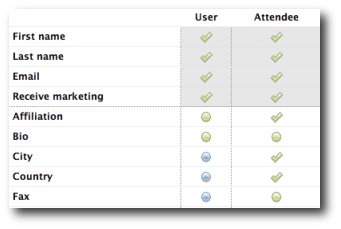
    Extract from disclosure level editing UI It would be untrue to say that progressive disclosure is simple to implement. A user in our system will have disclosure requirements that are the union of all of their roles in all of the events they attend. Within Ruby on Rails, this means the conventional validation logic is useless to us, as it only deals with static requirements. Secondly, disclosure requirements are expensive to compute, so we need to cache them, with the inevitable addition of issues such as cache invalidation. Beyond the data model issues, the user interface issues are, if anything, more troublesome. From an end-user's point of view, the difficulty arises when we need extra information from them, and presenting this in a way that makes sense. From the event organizer's point of view, we have the challenge of presenting a controlling user interface for rather a complex concept. Organizers must be able to change the level of required information either globally, or per-event. We opted for a grid presentation, an extract from which is shown in the screenshot in this article. Over time we'll be able to see how effective this interface is, and what we can do to improve it. Finally, we have chosen sensible defaults for all disclosure levels, as the best result would be that organizers have little need to reconfigure the settings in the first place. Making it look easy Because Expectnation is a general application for organizing events, rather than targetting one specific one, we've had to construct a framework for minimizing user information collection, as opposed to simple implementation of known scenarios. At the end of the day we have added a fairly complicated subsystem and an extra degree of complexity to our codebase. However, the result from the user's point of view is increased simplicity and a streamlined experience. Every time you embark on something that wide-reaching and complex, you have to ask yourself whether the feature is really worth it. In this case, though, the answer is a resounding "yes". The user is the most important factor in our software, and making their life easier in an unobtrusive manner is a priority.

    25 February 2007

    Andreas Metzler: being right is not better

    I try to evade reading/hearing/watching weather forecasts whenever possible, however I cannot escape them all time. If I do not I am usually annoyed. If you think about it that is not surprising, probabilities are against me. Usually I have preferences how I would like the weather to be to start with (Currently: A little bit below zero with snowfall from monday to thursday, snowfall stops on friday - to allow grooming - and sunshine with temperatures slightly below zero on the weekend.) and the weather forecast announces something else. Depending on the weather I get I end up with this frustration matrix
    wishforecastweatherfrustration
    aaano
    aabyes
    abayes(unprepared due to unfavorable forecast)
    abbyes
    The outcome is even worse than could be expected since the weather forecast itself is biased, announcing "possible snowfall of up to 30cm at 1000m elevation" even if there is just a 10% chance for more than 5cm.

    11 December 2006

    Matthew Palmer: We Are Living In a Computer Simulation

    Or, more accurately, this is what you get when you watch The Matrix while sucking down bottles of Nitrous Oxide. (Thanks to Two Second Memory for the link)

    8 December 2006

    Jonathan McDowell: Small World?

    Having been reading about Small World Phenomenon (which I've been calling Small World Syndrome for some time now, guess I'll have to change) the other day I was vaguely interested in LOST when I was pointed at it. It doesn't really help model the interconnectedness of the matrix as it's a tree structure AFAICT, but I think it's an fun idea with about as much point as most social networking sites and none of the claims to usefulness. :) I'd heard of Milgram before; my Mum did some stuff around Milgram's Experiment. SWP seems quite a different topic to me - are there similarities I'm missing or is it just the social psychologist equivalent of hacking on kernel code one day and a web app the next?

    3 September 2006

    Matthew Palmer: Music To Hack To -- The Belated Summary

    Back in the embarrassingly early part of this year, I wrote a blog entry on music that I liked to listen to whilst cutting code. I solicited feedback, and promised a followup. Technically, I didn't say when I'd be posting a summary, so I don't feel quite so bad about leaving it for 9 months before posting this followup. Firstly, Matthew Davidson gave a lengthy treatise on The Fall, whom I'd never heard of before, and actually haven't gotten around to listening to yet, either (shaaaaame!). It certainly must do the trick for him, though, because he says:
    I try to avoid programming wherever possible -- I know how it's done, and really appreciate it when it's done well, but I generally find doing it as much fun as a trip to the dentist. However, put a bit of the Fall on, and I find myself settling into a pretty productive groove without much trouble.
    Next up, Decklin Foster pointed me to where I could do my own research -- the Debian Developers group on last.fm. Although I've glanced at last.fm now and then, I've never really gotten into it much. I suppose I should harness the hive mind and find more music similar to that I already like -- you can only listen to your old favourites so many times in a row before they start to wear out. Apparently, my tastes in coding tunes isn't unique -- Roger Barnes shares my preference for the quick-paced abstract:
    When I'm coding though, I prefer something fast and electronic. I think this is for two reasons, one is the rhythm tends to get my mind going, and the lack of vocals means that there are no words disrupting my thoughts.
    As does François Beausoleil, who says:
    I have the same need as you for loud, fast and driving music. Personally, I've been listening to Born to be alive, the first Matrix's theme song, Confusion from New Order of the Blade soundtrack.
    Since the original Music To Hack To post, I've been listening primarily to the Chillits 2005 sets whilst coding. In the words of Boing Boing (where I originally found out about Chillits), "Every fall in Northern California, the Chillits music festival brings together a stunning line-up of DJs who spin mesmerizing sets of ambient and downtempo music under the sun and stars." The key word there is "ambient"; I'm not looking for something to listen to so much as I want backdrop to my other activities. The collection of laid-back and thumping tunes keeps a nice work/relax rhythm going while I'm coding. There are some immensely funny bits in some of the mixes, too, like the (hopefully) mock ad for speed ("The little blue diet pill you don't have to be overweight to need!"). Sometimes the tracks go into some area that bugs the shit out of me, which is when I exercise the skip feature of my music player, but most of it is pretty good at blocking out the world and letting you concentrate on the code at hand.

    31 July 2006

    Rob Bradford: Lots of laughs (and not so many)

    This weekend was quite a social razzmatazz. On Saturday night myself and two of the other interns I share an office with went to see the Laugh Olympics (they don’t appear to have a website) an English speaking improvisation show. In which the “Eastside” compete against their “Westside” counterparts in a series of improvisation sketches. The referee seeks various suggestions from the audience that are then incorporated into the act, all vaguely reminiscent of Radio 4 panel games. It was a fantastic experience (and very good value too, just 5), I intend to insist on taking everyone who comes to visit me to see it. It is on every Saturday, 9pm just off Rosenthaler Str. Full details can be found in the July edition of New Berlin Magazine. On Sunday we went to see Pirates of the Carribean at the Sony Center at Potsdamer Platz. It was rubbish. Don’t bother. It was just a setup for the third movie, very Matrixesque. After the film I cheered myself up by eating a Teutonic D ner, much much nicer than the British variety. And much much cheaper too ( 1.30- 2.80).

    Next.

    Previous.


