Search Results: "tin"

6 October 2021

Thomas Goirand: Infomaniak launches its public IaaS cloud with ground breaking prices

My employer, the biggest Swiss server hosting company, Infomaniak, has just opened registration for its new IaaS (Infrastructure as a Service) OpenStack-based public cloud. Well, in fact, it s been opened since a week or so. Previously, it was only in beta (during that beta period, we hosted (for free) the whole Debconf 21 infrastructure). Nothing really new in the market, except that it is by far cheaper than most (if not all) of its (OpenStack-based or not) competitors, including AWS, GCE or Azure. Also, everything is hosted in Switzerland, in our own data centers, where data protection is written in the law (and Infomaniak often advertises about data privacy: this is real here ). Not only Infomaniak is (by far ) the cheapest offer in the market (including a 300 CHF free tier: enough for our smallest VM for a full year), but we also have very good technical support, and the hardware we used is top notch: Some of our customers didn t even believe how we could do such pricing. Well, the reason is simple: most of our competitors are simply really overpriced, and are making too much money. Since we re late in the market, and that newer hardware (with many cores on a single server) makes is possible to increase density without too much over-commit, my bosses decided that since we could, we would be the cheapest! Hopefully, this will work as a good business strategy. All of that public cloud infrastructure has been setup with OpenStack Cluster Installer for which I m the main author, and that is fully in Debian. All of this is running on a plain, unmodified Debian Bullseye (well, with a few OpenStack packages a little bit more up-to-date, but really not much, and all of that is publicly available ). Last, choosing the cheapest and best offer is also a good action: it promotes OpenStack and cloud computing in Debian, which I believe is the least vendor locked-in IaaS solution.

Reproducible Builds: Reproducible Builds in September 2021

The goal behind reproducible builds is to ensure that no deliberate flaws have been introduced during compilation processes via promising or mandating that identical results are always generated from a given source. This allowing multiple third-parties to come to an agreement on whether a build was compromised or not by a system of distributed consensus. In these reports we outline the most important things that have been happening in the world of reproducible builds in the past month:
First mentioned in our March 2021 report, Martin Heinz published two blog posts on sigstore, a project that endeavours to offer software signing as a public good, [the] software-signing equivalent to Let s Encrypt . The two posts, the first entitled Sigstore: A Solution to Software Supply Chain Security outlines more about the project and justifies its existence:
Software signing is not a new problem, so there must be some solution already, right? Yes, but signing software and maintaining keys is very difficult especially for non-security folks and UX of existing tools such as PGP leave much to be desired. That s why we need something like sigstore - an easy to use software/toolset for signing software artifacts.
The second post (titled Signing Software The Easy Way with Sigstore and Cosign) goes into some technical details of getting started.
There was an interesting thread in the /r/Signal subreddit that started from the observation that Signal s apk doesn t match with the source code:
Some time ago I checked Signal s reproducibility and it failed. I asked others to test in case I did something wrong, but nobody made any reports. Since then I tried to test the Google Play Store version of the apk against one I compiled myself, and that doesn t match either.

BitcoinBinary.org was announced this month, which aims to be a repository of Reproducible Build Proofs for Bitcoin Projects :
Most users are not capable of building from source code themselves, but we can at least get them able enough to check signatures and shasums. When reputable people who can tell everyone they were able to reproduce the project s build, others at least have a secondary source of validation.

Distribution work Fr d ric Pierret announced a new testing service at beta.tests.reproducible-builds.org, showing actual rebuilds of binaries distributed by both the Debian and Qubes distributions. In Debian specifically, however, 51 reviews of Debian packages were added, 31 were updated and 31 were removed this month to our database of classified issues. As part of this, Chris Lamb refreshed a number of notes, including the build_path_in_record_file_generated_by_pybuild_flit_plugin issue. Elsewhere in Debian, Roland Clobus posted his Fourth status update about reproducible live-build ISO images in Jenkins to our mailing list, which mentions (amongst other things) that:
  • All major configurations are still built regularly using live-build and bullseye.
  • All major configurations are reproducible now; Jenkins is green.
    • I ve worked around the issue for the Cinnamon image.
    • The patch was accepted and released within a few hours.
  • My main focus for the last month was on the live-build tool itself.
Related to this, there was continuing discussion on how to embed/encode the build metadata for the Debian live images which were being worked on by Roland Clobus.
Ariadne Conill published another detailed blog post related to various security initiatives within the Alpine Linux distribution. After summarising some conventional security work being done (eg. with sudo and the release of OpenSSH version 3.0), Ariadne included another section on reproducible builds: The main blocker [was] determining what to do about storing the build metadata so that a build environment can be recreated precisely . Finally, Bernhard M. Wiedemann posted his monthly reproducible builds status report.

Community news On our website this month, Bernhard M. Wiedemann fixed some broken links [ ] and Holger Levsen made a number of changes to the Who is Involved? page [ ][ ][ ]. On our mailing list, Magnus Ihse Bursie started a thread with the subject Reproducible builds on Java, which begins as follows:
I m working for Oracle in the Build Group for OpenJDK which is primary responsible for creating a built artifact of the OpenJDK source code. [ ] For the last few years, we have worked on a low-effort, background-style project to make the build of OpenJDK itself building reproducible. We ve come far, but there are still issues I d like to address. [ ]

diffoscope diffoscope is our in-depth and content-aware diff utility. Not only can it locate and diagnose reproducibility issues, it can provide human-readable diffs from many kinds of binary formats. This month, Chris Lamb prepared and uploaded versions 183, 184 and 185 as well as performed significant triaging of merge requests and other issues in addition to making the following changes:
  • New features:
    • Support a newer format version of the R language s .rds files. [ ]
    • Update tests for OCaml 4.12. [ ]
    • Add a missing format_class import. [ ]
  • Bug fixes:
    • Don t call close_archive when garbage collecting Archive instances, unless open_archive definitely returned successfully. This prevents, for example, an AttributeError where PGPContainer s cleanup routines were rightfully assuming that its temporary directory had actually been created. [ ]
    • Fix (and test) the comparison of R language s .rdb files after refactoring temporary directory handling. [ ]
    • Ensure that RPM archives exists in the Debian package description, regardless of whether python3-rpm is installed or not at build time. [ ]
  • Codebase improvements:
    • Use our assert_diff routine in tests/comparators/test_rdata.py. [ ]
    • Move diffoscope.versions to diffoscope.tests.utils.versions. [ ]
    • Reformat a number of modules with Black. [ ][ ]
However, the following changes were also made:
  • Mattia Rizzolo:
    • Fix an autopkgtest caused by the androguard module not being in the (expected) python3-androguard Debian package. [ ]
    • Appease a shellcheck warning in debian/tests/control.sh. [ ]
    • Ignore a warning from h5py in our tests that doesn t concern us. [ ]
    • Drop a trailing .1 from the Standards-Version field as it s required. [ ]
  • Zbigniew J drzejewski-Szmek:
    • Stop using the deprecated distutils.spawn.find_executable utility. [ ][ ][ ][ ][ ]
    • Adjust an LLVM-related test for LLVM version 13. [ ]
    • Update invocations of llvm-objdump. [ ]
    • Adjust a test with a one-byte text file for file version 5.40. [ ]
And, finally, Benjamin Peterson added a --diff-context option to control unified diff context size [ ] and Jean-Romain Garnier fixed the Macho comparator for architectures other than x86-64 [ ].

Upstream patches The Reproducible Builds project detects, dissects and attempts to fix as many currently-unreproducible packages as possible. We endeavour to send all of our patches upstream where appropriate. This month, we wrote a large number of such patches, including:

Testing framework The Reproducible Builds project runs a testing framework at tests.reproducible-builds.org, to check packages and other artifacts for reproducibility. This month, the following changes were made:
  • Holger Levsen:
    • Drop my package rebuilder prototype as it s not useful anymore. [ ]
    • Schedule old packages in Debian bookworm. [ ]
    • Stop scheduling packages for Debian buster. [ ][ ]
    • Don t include PostgreSQL debug output in package lists. [ ]
    • Detect Python library mismatches during build in the node health check. [ ]
    • Update a note on updating the FreeBSD system. [ ]
  • Mattia Rizzolo:
    • Silence a warning from Git. [ ]
    • Update a setting to reflect that Debian bookworm is the new testing. [ ]
    • Upgrade the PostgreSQL database to version 13. [ ]
  • Roland Clobus (Debian live image generation):
    • Workaround non-reproducible config files in the libxml-sax-perl package. [ ]
    • Use the new DNS for the snapshot service. [ ]
  • Vagrant Cascadian:
    • Also note that the armhf architecture also systematically varies by the kernel. [ ]

Contributing If you are interested in contributing to the Reproducible Builds project, please visit our Contribute page on our website. However, you can get in touch with us via:

Dirk Eddelbuettel: littler 0.3.14: Updates

max-heap image The fifteenth release of littler as a CRAN package just landed, following in the now fifteen year history (!!) as a package started by Jeff in 2006, and joined by me a few weeks later. littler is the first command-line interface for R as it predates Rscript. It allows for piping as well for shebang scripting via #!, uses command-line arguments more consistently and still starts faster. It also always loaded the methods package which Rscript only started to do in recent years. littler lives on Linux and Unix, has its difficulties on macOS due to yet-another-braindeadedness there (who ever thought case-insensitive filesystems as a default were a good idea?) and simply does not exist on Windows (yet the build system could be extended see RInside for an existence proof, and volunteers are welcome!). See the FAQ vignette on how to add it to your PATH. A few examples are highlighted at the Github repo, as well as in the examples vignette. This release updates the helper scripts to download nighlies of RStudio Server and Desktop to their new naming scheme, adds a downloader for Quarto, extends the roxy.r wrapper with a new option, and updates the configure setting as requestion by CRAN and more. See the NEWS file entry below for more.

Changes in littler version 0.3.14 (2021-10-05)
  • Changes in examples
    • Updated RStudio download helper to changed file names
    • Added a new option to roxy.r wrapper
    • Added a downloader for Quarto command-line tool
  • Changes in package
    • The configure files were updated to the standard of autoconf version 2.69 following a CRAN request

My CRANberries provides a comparison to the previous release. Full details for the littler release are provided as usual at the ChangeLog page, and now also on the new package docs website. The code is available via the GitHub repo, from tarballs and now of course also from its CRAN page and via install.packages("littler"). Binary packages are available directly in Debian as well as soon via Ubuntu binaries at CRAN thanks to the tireless Michael Rutter. Comments and suggestions are welcome at the GitHub repo. If you like this or other open-source work I do, you can now sponsor me at GitHub.

This post by Dirk Eddelbuettel originated on his Thinking inside the box blog. Please report excessive re-aggregation in third-party for-profit settings.

4 October 2021

Raphaël Hertzog: Freexian s report about Debian Long Term Support, August 2021

A Debian LTS logo
Like each month, have a look at the work funded by Freexian s Debian LTS offering. Debian project funding In August, we put aside 2460 EUR to fund Debian projects. We received a new project proposal that got approved and there s an associated bid request if you feel like proposing yourself to implement this project. We re looking forward to receive more projects from various Debian teams! Learn more about the rationale behind this initiative in this article. Debian LTS contributors In August, 14 contributors have been paid to work on Debian LTS, their reports are available: Evolution of the situation In August we released 30 DLAs.

This is the first month of Jeremiah coordinating LTS contributors. We would like to thank Holger Levsen for his work on this role up to now.

Also, we would like to remark once again that we are constantly looking for new contributors. Please contact Jeremiah if you are interested! The security tracker currently lists 73 packages with a known CVE and the dla-needed.txt file has 29 packages needing an update. Thanks to our sponsors Sponsors that joined recently are in bold.

Paul Wise: FLOSS Activities September 2021

Focus This month I didn't have any particular focus. I just worked on issues in my info bubble.

Changes

Issues

Review

Administration
  • Debian BTS: reopened bugs closed by a spammer
  • Debian wiki: unblock IP addresses, approve accounts

Communication
  • Respond to queries from Debian users and contributors on the mailing lists and IRC

Sponsors The purple-discord/harmony/pyemd/librecaptcha/esprima-python work was sponsored by my employer. All other work was done on a volunteer basis.

3 October 2021

Ritesh Raj Sarraf: Human Society

In my past, I ve had experiences that have had me thinking. My experiences have been mostly in the South Asian Indian Sub-Continent, so may not be fair to generalize it.

Louis-Philippe V ronneau: ANC is not for me

Active noise cancellation (ANC) has been all the rage lately in the headphones and in-ear monitors market. It seems after Apple got heavily praised for their AirPods Pro, every somewhat serious electronics manufacturer released their own design incorporating this technology. The first headphones with ANC I remember trying on (in the early 2010s) were the Bose QuietComfort 15. Although the concept did work (they indeed cancelled some sounds), they weren't amazing and did a great job of convincing me ANC was some weird fad for people who flew often. The Sony WH-1000X M3 folded in their case As the years passed, chip size decreased, battery capacity improved and machine learning blossomed truly a perfect storm for the wireless ANC headphones market. I had mostly stayed a sceptic of this tech until recently a kind friend offered to let me try a pair of Sony WH-1000X M3. Having tested them thoroughly, I have to say I'm really tempted to buy them from him, as they truly are fantastic headphones1. They are very light, comfortable, work without a proprietary app and sound very good with the ANC on2 if a little bass-heavy for my taste3. The ANC itself is truly astounding and is leaps and bounds beyond what was available five years ago. It still isn't perfect and doesn't cancel ALL sounds, but transforms the low hum of the subway I find myself sitting in too often these days into a light *swoosh*. When you turn the ANC on, HVAC simply disappears. Most impressive to me is the way they completely cancel the dreaded sound of your footsteps resonating in your headphones when you walk with them. My old pair of Senheiser HD 280 Pro, with aftermarket sheepskin earpads I won't be keeping them though. Whilst I really like what Sony has achieved here, I've grown to understand ANC simply isn't for me. Some of the drawbacks of ANC somewhat bother me: the ear pressure it creates is tolerable, but is an additional energy drain over long periods of time and eventually gives me headaches. I've also found ANC accentuates the motion sickness I suffer from, probably because it messes up with some part of the inner ear balance system. Most of all, I found that it didn't provide noticeable improvements over good passive noise cancellation solutions, at least in terms of how high I have to turn the volume up to hear music or podcasts clearly. The human brain works in mysterious ways and it seems ANC cancelling a class of noises (low hums, constant noises, etc.) makes other noises so much more noticeable. People talking or bursty high pitched noises bothered me much more with ANC on than without. So for now, I'll keep using my trusty Senheiser HD 280 Pro4 at work and good in-ear monitors with Comply foam tips on the go.

  1. This blog post certainly doesn't aim to be a comprehensive review of these headphones. See Zeos' review if you want something more in-depth.
  2. As most ANC headphones, they don't sound as good when used passively through the 3.5mm port, but that's just a testament of how a great job Sony did of tuning the DSP.
  3. Easily fixed using an EQ.
  4. Retrofitted with aftermarket sheepskin earpads, they provide more than 32db of passive noise reduction.

2 October 2021

Fran ois Marier: Setting up a JMP SIP account on Asterisk

JMP offers VoIP calling via XMPP, but it's also possibly to use the VoIP using SIP. The underlying VoIP calling functionality in JMP is provided by Bandwidth, but their old Asterisk instructions didn't quite work for me. Here's how I set it up in my Asterisk server.

Get your SIP credentials After signing up for JMP and setting it up in your favourite XMPP client, send the following message to the cheogram.com gateway contact:
reset sip account
In response, you will receive a message containing:
  • a numerical username
  • a password (e.g. three lowercase words separated by spaces)

Add SIP account to your Asterisk config First of all, I added the following near the top of my /etc/asterisk/sip.conf:
[general]
register => username:three secret words@jmp.cbcbc7.auth.bandwidth.com:5008
The other non-default options I have set in [general] are:
context=public
allowoverlap=no
udpbindaddr=0.0.0.0
tcpenable=yes
tcpbindaddr=0.0.0.0
tlsenable=yes
transport=udp
srvlookup=no
vmexten=voicemail
relaxdtmf=yes
useragent=Asterisk PBX
tlscertfile=/etc/asterisk/asterisk.cert
tlsprivatekey=/etc/asterisk/asterisk.key
tlscapath=/etc/ssl/certs/
externhost=machinename.dyndns.org
localnet=192.168.0.0/255.255.0.0
Note that you can have more than one register line in your config if you use more than one SIP provider, but you must register with the server whether you want to receive incoming calls or not. Then I added a new blurb to the bottom of the same file:
[jmp]
type=peer
host=mp.cbcbc7.auth.bandwidth.com
port=5008
secret=three secret words
defaultuser=username
context=from-jmp
disallow=all
allow=ulaw
allow=g729
insecure=port,invite
canreinvite=no
dtmfmode=rfc2833
and for reference, here's the blurb for my Snom 300 SIP phone:
[1001]
; Snom 300
type=friend
qualify=yes
secret=password
encryption=no
context=full
host=dynamic
nat=no
directmedia=no
mailbox=1000@internal
vmexten=707
dtmfmode=rfc2833
call-limit=2
disallow=all
allow=g722
allow=ulaw
I checked that the registration was successful by running asterisk -r and then typing:
sip set debug on
before reloading the configuration using:
reload

Create Asterisk extensions to send and receive calls Once I got registration to work, I hooked this up with my other extensions so that I could send and receive calls using my JMP number. In /etc/asterisk/extensions.conf, I added the following:
[from-jmp]
include => home
exten => s,1,Goto(1000,1)
where home is the context which includes my local SIP devices and 1000 is the extension I want to ring. Then I added the following to enable calls to any destination within the North American Numbering Plan:
[pstn-jmp]
exten => _1NXXNXXXXXX,1,Set(CALLERID(all)=Francois Marier <5551231434>)
exten => _1NXXNXXXXXX,n,Dial(SIP/jmp/$ EXTEN )
exten => _1NXXNXXXXXX,n,Hangup()
exten => _NXXNXXXXXX,1,Set(CALLERID(all)=Francois Marier <5551231234>)
exten => _NXXNXXXXXX,n,Dial(SIP/jmp/1$ EXTEN )
exten => _NXXNXXXXXX,n,Hangup()
Here 5551231234 is my JMP phone number, not my bwsip numerical username. For reference, here's the rest of my dialplan in /etc/asterisk/extensions.conf:
[general]
static=yes
writeprotect=no
clearglobalvars=no
[public]
exten => _X.,1,Hangup(3)
[sipdefault]
exten => _X.,1,Hangup(3)
[default]
exten => _X.,1,Hangup(3)
[internal]
include => home
[full]
include => internal
include => pstn-jmp
exten => 707,1,VoiceMailMain(1000@internal)
[home]
; Internal extensions
exten => 1000,1,Dial(SIP/1001,20)
exten => 1000,n,Goto(in1000-$ DIALSTATUS ,1)
exten => 1000,n,Hangup
exten => in1000-BUSY,1,Hangup(17)
exten => in1000-CONGESTION,1,Hangup(3)
exten => in1000-CHANUNAVAIL,1,VoiceMail(1000@internal,su)
exten => in1000-CHANUNAVAIL,n,Hangup(3)
exten => in1000-NOANSWER,1,VoiceMail(1000@internal,su)
exten => in1000-NOANSWER,n,Hangup(16)
exten => _in1000-.,1,Hangup(16)

Firewall Finally, I opened a few ports in my firewall by putting the following in /etc/network/iptables.up.rules:
# SIP and RTP on UDP (jmp.cbcbc7.auth.bandwidth.com)
-A INPUT -s 67.231.2.13/32 -p udp --dport 5008 -j ACCEPT
-A INPUT -s 216.82.238.135/32 -p udp --dport 5008 -j ACCEPT
-A INPUT -s 67.231.2.13/32 -p udp --sport 5004:5005 --dport 10001:20000 -j ACCEPT
-A INPUT -s 216.82.238.135/32 -p udp --sport 5004:5005 --dport 10001:20000 -j ACCEPT

Outbound calls not working While the above setup works for me for inbound calls, it doesn't currently work for outbound calls. The hostname currently resolves to one of two IP addresses:
$ dig +short jmp.cbcbc7.auth.bandwidth.com
67.231.2.13
216.82.238.135
If I pin it to the first one by putting the following in my /etc/hosts file:
67.231.2.13 jmp.cbcbc7.auth.bandwidth.com
then I get a 486 error back from the server when I dial 1-555-456-4567:
<--- SIP read from UDP:67.231.2.13:5008 --->
SIP/2.0 486 Busy Here
Via: SIP/2.0/UDP 127.0.0.1:5060;branch=z9hG4bK03210a30
From: "Francois Marier" <sip:5551231234@127.0.0.1>
To: <sip:15554564567@jmp.cbcbc7.auth.bandwidth.com:5008>
Call-ID: 575f21f36f57951638c1a8062f3a5201@127.0.0.1:5060
CSeq: 103 INVITE
Content-Length: 0
On the other hand, if I pin it to 216.82.238.135, then I get a 600 error:
<--- SIP read from UDP:216.82.238.135:5008 --->
SIP/2.0 600 Busy Everywhere
Via: SIP/2.0/UDP 127.0.0.1:5060;branch=z9hG4bK7b7f7ed9
From: "Francois Marier" <sip:5551231234@127.0.0.1>
To: <sip:15554564567@jmp.cbcbc7.auth.bandwidth.com:5008>
Call-ID: 5bebb8d05902c1732c6b9f4776844c66@127.0.0.1:5060
CSeq: 103 INVITE
Content-Length: 0
If you have any idea what might be wrong here, or if you got outbound calls to work on Bandwidth.com, please leave a comment!

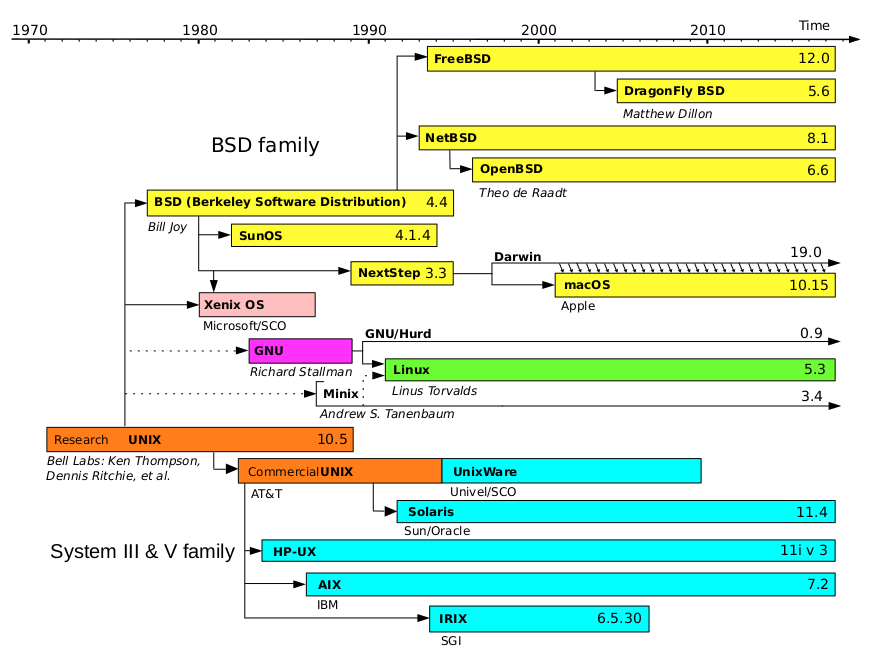
Anuradha Weeraman: On blood-lines, forks and survivors

The lineage of a classic operating system

Anuradha Weeraman: On blood-lines, forks and survivors

The lineage of a classic operating system

Jacob Adams: SSH Port Forwarding and the Command Cargo Cult

Someone is Wrong on the Internet If you look up how to only forward ports with ssh, you may come across solutions like this:
ssh -nNT -L 8000:example.com:80 user@bastion.example.com
Or perhaps this, if you also wanted to send ssh to the background:
ssh -NT -L 3306:db.example.com:3306 example.com &
Both of these use at least one option that is entirely redundant, and the second can cause ssh to fail to connect if you happen to be using password authentication. However, they seem to still persist in various articles about ssh port forwarding. I myself was using the first variation until just recently, and I figured I would write this up to inform others who might be still using these solutions. The correct option for this situation is not -nNT but simply -N, as in:
ssh -N -L 8000:example.com:80 user@bastion.example.com
If you want to also send ssh to the background, then you ll want to add -f instead of using your shell s built-in & feature, because you can then input passwords into ssh if necessary1 Honestly, that s the point of this article, so you can stop here if you want. If you re looking for a detailed explaination of what each of these options actually does, or if you have no idea what I m talking about, read on!

What is SSH Port Forwarding? ssh is a powerful tool for remote access to servers, allowing you to execute commands on a remote machine. It can also forward ports through a secure tunnel with the -L and -R options. Basically, you can forward a connection to a local port to a remote server like so:
ssh -L 8080:other.example.com:80 ssh.example.com
In this example, you connect to ssh.example.com and then ssh forwards any traffic on your local machine port 80802 to other.example.com port 80 via ssh.example.com. This is a really powerful feature, allowing you to jump3 inside your firewall with just an ssh server exposed to the world. It can work in reverse as well with the -R option, allowing connections on a remote host in to a server running on your local machine. For example, say you were running a website on your local machine on port 8080 but wanted it accessible on example.com port 804. You could use something like:
ssh -R 8080:example.com:80 example.com
The trouble with ssh port forwarding is that, absent any additional options, you also open a shell on the remote machine. If you re planning to both work on a remote machine and use it to forward some connection, this is fine, but if you just need to forward a port quickly and don t care about a shell at that moment, it can be annoying, especially since if the shell closes ssh will close the forwarding port as well. This is where the -N option comes in.

SSH just forwarding ports In the ssh manual page5, -N is explained like so:
Do not execute a remote command. This is useful for just forwarding ports.
This is all we need. It instructs ssh to run no commands on the remote server, just forward the ports specified in the -L or -R options. But people seem to think that there are a bunch of other necessary options, so what do those do?

SSH and stdin -n controls how ssh interacts with standard input, specifically telling it not to:
Redirects stdin from /dev/null (actually, prevents reading from stdin). This must be used when ssh is run in the background. A common trick is to use this to run X11 programs on a remote machine. For example, ssh -n shadows.cs.hut.fi emacs & will start an emacs on shadows.cs.hut.fi, and the X11 connection will be automatically for warded over an encrypted channel. The ssh program will be put in the background. (This does not work if ssh needs to ask for a password or passphrase; see also the -f option.)

SSH passwords and backgrounding -f sends ssh to background, freeing up the terminal in which you ran ssh to do other things.
Requests ssh to go to background just before command execution. This is useful if ssh is going to ask for passwords or passphrases, but the user wants it in the background. This implies -n. The recommended way to start X11 programs at a remote site is with something like ssh -f host xterm.
As indicated in the description of -n, this does the same thing as using the shell s & feature with -n, but allows you to put in any necessary passwords first.

SSH and pseudo-terminals -T is a little more complicated than the others and has a very short explanation:
Disable pseudo-terminal allocation.
It has a counterpart in -t, which is explained a little better:
Force pseudo-terminal allocation. This can be used to execute arbitrary screen-based programs on a remote machine, which can be very useful, e.g. when implementing menu services. Multiple -t options force tty allocation, even if ssh has no local tty.
As the description of -t indicates, ssh is allocating a pseudo-terminal on the remote machine, not the local one. However, I have confirmed6 that -N doesn t allocate a pseudo-terminal either, since it doesn t run any commands. Thus this option is entirely unnecessary.

What s a pseudo-terminal? This is a bit complicated, but basically it s an interface used in UNIX-like systems, like Linux or BSD, that pretends to be a terminal (thus pseudo-terminal). Programs like your shell, or any text-based menu system made in libraries like ncurses, expect to be connected to one (when used interactively at least). Basically it fakes as if the input it is given (over the network, in the case of ssh) was typed on a physical terminal device and do things like raise an interrupt (SIGINT) if Ctrl+C is pressed.

Why? I don t know why these incorrect uses of ssh got passed around as correct, but I suspect it s a form of cargo cult, where we use example commands others provide and don t question what they do. One stack overflow answer I read that provided these options seemed to think -T was disabling the local pseudo-terminal, which might go some way towards explaining why they thought it was necessary. I guess the moral of this story is to question everything and actually read the manual, instead of just googling it.
  1. Not that you SHOULD be using ssh with password authentication anyway, but people do.
  2. Only on your loopback address by default, so that you re not allowing random people on your network to use your tunnel.
  3. In fact, ssh even supports Jump Hosts, allowing you to automatically forward an ssh connection through another machine.
  4. I can t say I recommend a setup like this for anything serious, as you d need to ssh as root to forward ports less than 1024. SSH forwarding is not for permanent solutions, just short-lived connections to machines that would be otherwise inaccessible.
  5. Specifically, my source is the ssh(1) manual page in OpenSSH 8.4, shipped as 1:8.4p1-5 in Debian bullseye.
  6. I just forwarded ports with -N and then logged in to that same machine and looked at psuedo-terminal allocations via ps ux. No terminal is associated with ssh connections using just the -N option.

1 October 2021

Vincent Bernat: FRnOG #34: how we deployed a datacenter in one click

Here are the slides I presented for FRnOG #34 in October 2021. They are about automating the deployment of Blade s datacenters using Jerikan and Ansible. For more information, have a look at Jerikan+Ansible: a configuration management system for network.
The presentation, in French, was recorded. I have added English subtitles.1

  1. Good thing if you don t understand French as my diction was poor with a lot of fillers.

Russell Coker: Getting Started With Kali

Kali is a Debian based distribution aimed at penetration testing. I haven t felt a need to use it in the past because Debian has packages for all the scanning tools I regularly use, and all the rest are free software that can be obtained separately. But I recently decided to try it. Here s the URL to get Kali [1]. For a VM you can get VMWare or VirtualBox images, I chose VMWare as it s the most popular image format and also a much smaller download (2.7G vs 4G). For unknown reasons the torrent for it didn t work (might be a problem with my torrent client). The download link for it was extremely slow in Australia, so I downloaded it to a system in Germany and then copied it from there. I don t want to use either VMWare or VirtualBox because I find KVM/Qemu sufficient to do everything I want and they are in the Main section of Debian, so I needed to convert the image files. Some of the documentation on converting image formats to use with QEMU/KVM says to use a program called kvm-img which doesn t seem to exist, I used qemu-img from the qemu-utils package in Debian/Bullseye. The man page qemu-img(1) doesn t list the types of output format supported by the -O option and the examples returned by a web search show using -O qcow2 . It turns out that the following command will convert the image to raw format which is the format I prefer. I use BTRFS for storing all my VM images and that does all the copy-on-write I need.
qemu-img convert Kali-Linux-2021.3-vmware-amd64.vmdk ../kali
After converting it the file was 500M smaller than the VMWare files (10.2 vs 10.7G). Probably the Kali distribution file could be reduced in size by converting it to raw and then back to VMWare format. The Kali VMWare image is compressed with 7zip which has a good compression ratio, I waited almost 90 minutes for zstd to compress it with -19 and the result was 12% larger than the 7zip file. VMWare apparently likes to use an emulated SCSI controller, I spent some time trying to get that going in KVM. Apparently recent versions of QEMU changed the way this works and therefore older web pages aren t helpful. Also allegedly the SCSI emulation is buggy and unreliable (but I didn t manage to get it going so can t be sure). It turns out that the VM is configured to work with the virtio interface, the initramfs.conf has the configuration option MODULES=most which makes it boot on all common configurations (good work by the initramfs-tools maintainers). The image works well with the Spice display interface, so it doesn t capture my mouse, the window for the VM works the same way as other windows on my desktop and doesn t capture the mouse cursor. I don t know if this level of Spice integration is in Debian now, last time I tested it didn t work that way. I also downloaded Metasploitable [2] which is a VM image designed to be full of security flaws for testing the tools that are in Kali. Again it worked nicely after converting from VMWare to raw format. One thing to note about Metasploitable is that you must not make it available on the public Internet. My home network has NAT for IPv4 but all systems get public IPv6 addresses. It s usually nice that those things just work on VMs but not for this. So I added an iptables command to block IPv6 to /etc/rc.local. Conclusion Installing VMs for both these distributions was quite easy. Most of my time was spent downloading from a slow server, trying to get SCSI emulation working, working out how to convert image files, and testing different compression options. The time spent doing stuff once I knew what to do was very small. Kali has zsh as the default shell, it s quite nice. I ve been happy with bash for decades, but I might end up trying zsh out on other machines.

Junichi Uekawa: Garbage collecting with podman system prune.

Garbage collecting with podman system prune. Tells me it freed 20GB when it seems to have freed 4GB. Wondering where that discrepancy comes from.

Reproducible Builds (diffoscope): diffoscope 186 released

The diffoscope maintainers are pleased to announce the release of diffoscope version 186. This version includes the following changes:
[ Chris Lamb ]
* Don't call close_archive when garbage-collecting Archive instances unless
  open_archive returned successfully. This prevents, amongst others, an
  AttributeError traceback due to PGPContainer's cleanup routines assuming
  that its temporary directory had been created.
  (Closes: reproducible-builds/diffoscope#276)
* Ensure that the string "RPM archives" exists in the package description,
  regardless of whether python3-rpm is installed or not at build time.
[ Jean-Romain Garnier ]
* Fix the LVM Macho comparator for non-x86-64 architectures.
You find out more by visiting the project homepage.

30 September 2021

Dirk Eddelbuettel: RcppArmadillo 0.10.7.0.0 on CRAN: New Upstream

armadillo image Armadillo is a powerful and expressive C++ template library for linear algebra aiming towards a good balance between speed and ease of use with a syntax deliberately close to a Matlab. RcppArmadillo integrates this library with the R environment and language and is widely used by (currently) 912 other packages on CRAN. This new release brings us Armadillo 10.7.0 released this morning by Conrad. Leading up to this were three runs of reverse dependencies the first of which uncovered the need for a small PR for subview_cols support which Conrad kindly supplied. The full set of changes follows. We include the last interim release (sent as usual to the drat repo) as well.

Changes in RcppArmadillo version 0.10.7.0.0 (2021-09-30)
  • Upgraded to Armadillo release 10.7.0 (Entropy Maximizer)
    • faster handling of submatrix views accessed by X.cols(first_col,last_col)
    • faster handling of element-wise min() and max() in compound expressions
    • expanded solve() with solve_opts::force_approx option to force use of the approximate solver

Changes in RcppArmadillo version 0.10.6.2.0 (2021-08-05)
  • Upgraded to Armadillo release 10.6.2 (Keep Calm)
    • fix incorrect use of constexpr for handling fixed-size matrices and vectors
    • improved documentation
  • GitHub- and drat-only release

Courtesy of my CRANberries, there is a diffstat report relative to previous release. More detailed information is on the RcppArmadillo page. Questions, comments etc should go to the rcpp-devel mailing list off the R-Forge page. If you like this or other open-source work I do, you can sponsor me at GitHub.

This post by Dirk Eddelbuettel originated on his Thinking inside the box blog. Please report excessive re-aggregation in third-party for-profit settings.

Holger Levsen: 20210930-Debian-Reunion-Hamburg-2021

Debian Reunion Hamburg 2021 is almost over... The Debian Reunion Hamburg 2021 is almost over now, half the attendees have already left for Regensburg, while five remaining people are still busy here, though tonight there will be two concerts at the venue, plus some lovely food and more. Together with the day trip tomorrow (involving lots of water but hopefully not from above...) I don't expect much more work to be done, so that I feel comfortable publishing the following statistics now, even though I expect some more work will be done while travelling back or due to renewed energy from the event! So I might update these numbers later :-) Together we did: I think that's a pretty awesome and am very happy we did this event! Debian Reunion / MiniDebConf Hamburg 2022 - save the date, almost! Thus I think we should have another Debian event at Fux in 2022, and after checking suitable free dates with the venue I think what could work out is an event from Monday May 23rd until Sunday May 29th 2022. What do you think? For now these dates are preliminary. If you know any reasons why these dates could be less than optimal for such an event, please let me know. Assuming there's no feedback indicating this is a bad idea, the dates shall be finalized by November 1st 2021. Obviously assuming having physical events is still and again a thing! ;-)

29 September 2021

Ian Jackson: Rust for the Polyglot Programmer

Rust is definitely in the news. I'm definitely on the bandwagon. (To me it feels like I've been wanting something like Rust for many years.) There're a huge number of intro tutorials, and of course there's the Rust Book. A friend observed to me, though, that while there's a lot of "write your first simple Rust program" there's a dearth of material aimed at the programmer who already knows a dozen diverse languages, and is familiar with computer architecture, basic type theory, and so on. Or indeed, for the impatient and confident reader more generally. I thought I would have a go. Rust for the Polyglot Programmer is the result. Compared to much other information about Rust, Rust for the Polyglot Programmer is: After reading Rust for the Polyglot Programmer, you won't know everything you need to know to use Rust for any project, but should know where to find it. Thanks are due to Simon Tatham, Mark Wooding, Daniel Silverstone, and others, for encouragement, and helpful reviews including important corrections. Particular thanks to Mark Wooding for wrestling pandoc and LaTeX into producing a pretty good-looking PDF. Remaining errors are, of course, mine. Comments are welcome of course, via the Dreamwidth comments or Salsa issue or MR. (If you're making a contribution, please indicate your agreement with the Developer Certificate of Origin.)
edited 2021-09-29 16:58 UTC to fix Salsa link targe, and 17:01 and 17:21 to for minor grammar fixes


comment count unavailable comments

28 September 2021

Jonathan McDowell: Adding Zigbee to my home automation

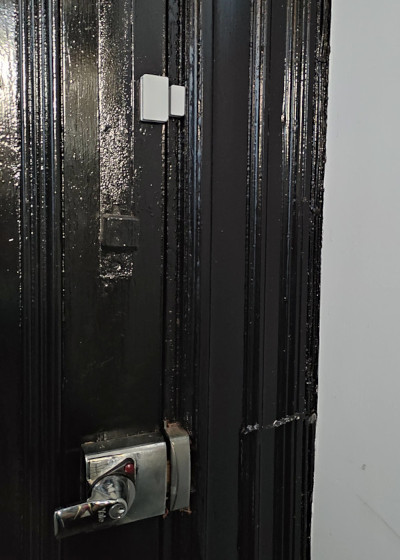
SonOff Zigbee Door Sensor My home automation setup has been fairly static recently; it does what we need and generally works fine. One area I think could be better is controlling it; we have access Home Assistant on our phones, and the Alexa downstairs can control things, but there are no smart assistants upstairs and sometimes it would be nice to just push a button to turn on the light rather than having to get my phone out. Thanks to the fact the UK generally doesn t have neutral wire in wall switches that means looking at something battery powered. Which means wifi based devices are a poor choice, and it s necessary to look at something lower power like Zigbee or Z-Wave. Zigbee seems like the better choice; it s a more open standard and there are generally more devices easily available from what I ve seen (e.g. Philips Hue and IKEA TR DFRI). So I bought a couple of Xiaomi Mi Smart Home Wireless Switches, and a CC2530 module and then ignored it for the best part of a year. Finally I got around to flashing the Z-Stack firmware that Koen Kanters kindly provides. (Insert rant about hardware manufacturers that require pay-for tool chains. The CC2530 is even worse because it s 8051 based, so SDCC should be able to compile for it, but the TI Zigbee libraries are only available in a format suitable for IAR s embedded workbench.) Flashing the CC2530 is a bit of faff. I ended up using the CCLib fork by Stephan Hadinger which supports the ESP8266. The nice thing about the CC2530 module is it has 2.54mm pitch pins so nice and easy to jumper up. It then needs a USB/serial dongle to connect it up to a suitable machine, where I ran Zigbee2MQTT. This scares me a bit, because it s a bunch of node.js pulling in a chunk of stuff off npm. On the flip side, it Just Works and I was able to pair the Xiaomi button with the device and see MQTT messages that I could then use with Home Assistant. So of course I tore down that setup and went and ordered a CC2531 (the variant with USB as part of the chip). The idea here was my test setup was upstairs with my laptop, and I wanted something hooked up in a more permanent fashion. Once the CC2531 arrived I got distracted writing support for the Desk Viking to support CCLib (and modified it a bit for Python3 and some speed ups). I flashed the dongle up with the Z-Stack Home 1.2 (default) firmware, and plugged it into the house server. At this point I more closely investigated what Home Assistant had to offer in terms of Zigbee integration. It turns out the ZHA integration has support for the ZNP protocol that the TI devices speak (I m reasonably sure it didn t when I first looked some time ago), so that seemed like a better option than adding the MQTT layer in the middle. I hit some complexity passing the dongle (which turns up as /dev/ttyACM0) through to the Home Assistant container. First I needed an override file in /etc/systemd/nspawn/hass.nspawn:
[Files]
Bind=/dev/ttyACM0:/dev/zigbee
[Network]
VirtualEthernet=true
(I m not clear why the VirtualEthernet needed to exist; without it networking broke entirely but I couldn t see why it worked with no override file.) A udev rule on the host to change the ownership of the device file so the root user and dialout group in the container could see it was also necessary, so into /etc/udev/rules.d/70-persistent-serial.rules went:
# Zigbee for HASS
SUBSYSTEM=="tty", ATTRS idVendor =="0451", ATTRS idProduct =="16a8", SYMLINK+="zigbee", \
	MODE="660", OWNER="1321926676", GROUP="1321926676"
In the container itself I had to switch PrivateDevices=true to PrivateDevices=false in the home-assistant.service file (which took me a while to figure out; yay for locking things down and then needing to use those locked down things). Finally I added the hass user to the dialout group. At that point I was able to go and add the integration with Home Assistant, and add the button as a new device. Excellent. I did find I needed a newer version of Home Assistant to get support for the button, however. I was still on 2021.1.5 due to upstream dropping support for Python 3.7 and not being prepared to upgrade to Debian 11 until it was actually released, so the version of zha-quirks didn t have the correct info. Upgrading to Home Assistant 2021.8.7 sorted that out. There was another slight problem. Range. Really I want to use the button upstairs. The server is downstairs, and most of my internal walls are brick. The solution turned out to be a TR DFRI socket, which replaced the existing ESP8266 wifi socket controlling the stair lights. That was close enough to the server to have a decent signal, and it acts as a Zigbee router so provides a strong enough signal for devices upstairs. The normal approach seems to be to have a lot of Zigbee light bulbs, but I have mostly kept overhead lights as uncontrolled - we don t use them day to day and it provides a nice fallback if the home automation has issues. Of course installing Zigbee for a single button would seem to be a bit pointless. So I ordered up a Sonoff door sensor to put on the front door (much smaller than expected - those white boxes on the door are it in the picture above). And I have a 4 gang wireless switch ordered to go on the landing wall upstairs. Now I ve got a Zigbee setup there are a few more things I m thinking of adding, where wifi isn t an option due to the need for battery operation (monitoring the external gas meter springs to mind). The CC2530 probably isn t suitable for my needs, as I ll need to write some custom code to handle the bits I want, but there do seem to be some ARM based devices which might well prove suitable

Holger Levsen: 20210928-Debian-Reunion-Hamburg-2021

Debian Reunion Hamburg 2021, klein aber fein / small but beautiful So the Debian Reunion Hamburg 2021 has been going on for not yet 48h now and it appears people are having fun, enjoying discussions between fellow Debian people and getting some stuff done as well. I guess I'll write some more about it once the event is over... Sharing android screens... For now I just want to share one little gem I learned about yesterday on the hallway track:
$ sudo apt install scrcpy
$ scrcpy
And voila, once again I can type on my phone with a proper keyboard and copy and paste URLs between the two devices. One can even watch videos on the big screen with it :) (This requires ADB debugging enabled on the phone, but doesn't require root access.)

Next.

Previous.