Antoine Beaupr : Mumble dreams
With everyone switching to remote tools for social distancing,
I've been using Mumble more and more. That's partly by choice -- I
don't like videoconferencing much, frankly -- and partly by
necessity: sometimes my web browser fails and Mumble is generally more
reliable.
Some friend on a mailing list recently asked "shouldn't we make Mumble
better?" and opened the door for me to go on a long "can I get a
pony?" email. Because I doubt anyone on that mailing list has the
time or capacity to actually fix those issues, I figured I would copy
this to a broader audience in the hope that someone else would pick
it up.
Why Mumble rocks
Before I go on with the UI critique, I should show why care: Mumble is
awesome.
When you do manage to configure it correctly, Mumble just works;
it's highly reliable. It uses little CPU, both on the client and the
server side, and can have rooms with tens if not hundreds of
participants. The server can be easily installed and configured:
there's a Debian package and resource requirements are minimal. It's
basically network-bound. There are at least three server
implementations, the official one called Murmur, the minimalist
umurmur and Grumble, a Go rewrite.
It has great quality: echo canceling, when correctly configured, is
solid and latency is minimal. It has "overlays" so you can use it
while gaming or demo'ing in full screen while still having an idea of
who's talking. It also supports positional audio for gaming that
integrates with popular games like Counterstrike or Half-Life.
It's moderately secure: it doesn't support end-to-end encryption, but
client/server communication is encrypted with TLS. It supports a
server password and some moderation mechanisms.
UI improvements
Mumble should be smarter about a bunch of things. Having all those
settings is nice for geeky control freaks, but it makes the
configuration absolutely unusable for most people. Hide most settings by
default, and make better defaults.
Specifically, those should be on by default:
- RNNoise
- echo cancellation (the proper "monitor" channels)
- pre-configured shortcut for PTT (Push To Talk) -- right-shift is my favorite
- "double-PTT" to hold it enabled
- be more silent by default (I understand why it would want to do
voice synthesis, but it would need to be much better at it before
it's default)
The echo test should be more accessible, one or two clicks away
from the main UI. I have only found out about that feature when
someone told me where to find it. This basically means to take it out
of the settings page and into its own dialog.
The basic UI should be much simpler. It could look something like
Jitsi: just one giant mute button with a list of speakers. Basically:
- Take that status bar and make it use the entire space of the main
window
- Push the chat and room list dialog to separate, optional dialog
(e.g. the room list could be a popup on login, but we don't need
to continuously see the damn thing)
- Show the name of the person talking in the main UI, along with
other speakers (Big Blue Button does this well: just a label that
fades away with time after a person talks)
Some features could be better explained. For example, the
"overlay" feature makes no sense at all for most users. It only makes
sense when you're a gamer and use Mumble alongside another full-screen
program, to show you who's talking.
Improved authentication. The current authentication systems in
Mumble are somewhat limited: the server can have a shared password to
get access to it, and from there it's pretty much free-for-all. There
are client certificates but those are hard to understand and the most
common usage scenario is that someone manages to configure it once,
forgets about it and then cannot login again with the same username.
It should be easier to get the audio right. Now, to be fair, this
is hard to do in any setup, and Mumble is only a part of this. There
are way too many moving parts in Linux for this to be easy: between
your hardware, ALSA drivers, Pulseaudio mixers and Mumble, too many
things can go wrong. So this is a general problem when doing
multimedia in general, and the Linux ecosystem in particular, but
Mumble is especially hard to configure in there.
Improved speaker stats. When you right-click on a user in Mumble,
you get detailed stats about the user: packet loss, latency,
bandwidth, codecs... It's pretty neat. But that is hard to parse for a
user. Jitsi, in contrast, shows a neat little "bar graph" (similar to
what you get on a cell phone) with a color code to show network
conditions for that user. Then you can drill down to show more
information. Having that info for the user would be really useful to
figure out which user is causing that echo or latency. Heck, while I'm
dreaming, we could do the same thing Jitsi and tell the user when we
detect too much noise on their side and suggest muting!
There's probably more UI issues, but at that point you have basically
rebuilt the entire user interface. This problem is hard to fix because
UX people are unlikely to have the skills required to hack at an (old)
Qt app, and C++ hackers are unlikely to have the best UX skills...
Missing features
Video. It has been on the roadmap since 2011, so I'm not
holding my breath. It is, obviously, the key feature missing from the
software when compared to other conferencing tools and it's nice to
see they are considering it. Screensharing and whiteboarding would
also be a nice addition. Unfortunately, all that is a huge undertaking
and it's unlikely to happen in the short term. And even if it does,
it's possible hard-core Mumble users would be really upset at the
change...
A good web app -- a major blocker to the adoption of Mumble is the
need for that complex app. If users could join just with a web
browser, adoption would be much easier. There is a web app called
mumble-web out there, but it seems to work only for listening as
there are numerous problems with recording: quality issues,
audio glitches, voice activation, voice
activation.. The CCC seems to be using that app to stream talk
translation, so that part supposedly works correctly.
Dial-in -- allow plain old telephones to call into
conferences. There seems to be a program called mumsi that can do
this, but it's unmaintained and it's unclear if any of the forks
work at all. Update: according to samba, mumsi works, but
sometimes freezes and needs to be restarted. Each SIP account shows up
as a bot that comes up when someone calls the number. It supports
multiple callers, although apparently mumsi crashes after a while
with 4 callers. A comment here also mentioned there's a fork that
mentions using a "pin" as well for dialing in.
Caveats
Now the above will probably not happen soon. Unfortunately, Mumble has
had trouble with their release process recently. It took them a long
time to even agree on releasing 1.3, and when they did agree, it took
them a long time again to actually do the release. There has been much
more activity on the Mumble client and web app recently, so
hopefully I will be proven wrong. The 1.3.1 release actually came
out recently(correction:) is actually being worked on,
which is encouraging.
All in all, mumble has some deeply ingrained UI limitations. it's
built like an app from the 1990, all the way down to the menu system
and "status bar" buttons. It's definitely not intuitive for a new user
and while there's an audio wizard that can help you get started, it
doesn't always work and can be confusing in itself.
I understand that I'm just this guy saying "please make this for me
ktxbye". I'm not writing this as a critic of Mumble: I love the little
guy, the underdog. Mumble has been around forever and it kicks
ass. I'm writing this in a spirit of solidarity, in the hope the
feedback can be useful and to provide useful guidelines on how things
could be improved. I wish I had the time to do this myself and
actually help the project beyond just writing, but unfortunately the
reality is I'm a poor UI designer and I have little time to contribute
to more software projects.
So hopefully someone could take those ideas and make Mumble even
greater. And if not, we'll just have to live with it.
Thanks to all the Mumble developers who, over all those years, managed
to make and maintain such an awesome product. You rock!
Update: a chat with Mumble folks
Update: it seems the idea of simplifying the Mumble interface will
take some time to sink in. After presenting this article in the
#mumble Freenode IRC channel, it became obvious that having a more
usable interface is not a priority. To put it in the words of a
participant in the channel:
If someone is too stupid to use a piece of software than they
should probably use something else or have someone capable of
critical thinking set it up for them. -- meep
So I guess "I'm with stupid": I do not believe we should make
software only for "smart" people because that leads to overly
complicated and over-engineered user interfaces that are needlessly
hard to use and configure. Mumble is actually an excellent example of
such programs: powerful software, but too hard to use to actually
reach critical mass.
Thankfully, meep is not a Mumble developer and does not actually
represent the official position of the Mumble project. A core
developer (not representing the project either) was
more nuanced:
The UI being not up to date is a matter of taste. The kind of UI you
are describing is the kind of UI I certainly don't want. More
gernally though I agree that the UI needs some rework and
especially: Flexibility so that each user can (ideally) make it
appear as (s)he wants. Before this can happen though, we'll have to
rewrite a fair bit of code as we'll have to separate backend and
frontend from one another. -- krzmbrzl
So this will take time. The fact that Qt seems to be moving back to
closed-source does not help the situation with Mumble's GUI
development, unfortunately. But the other hand, maybe it will provide
the necessary "kick" to write a new, simpler GUI.
- RNNoise
- echo cancellation (the proper "monitor" channels)
- pre-configured shortcut for PTT (Push To Talk) -- right-shift is my favorite
- "double-PTT" to hold it enabled
- be more silent by default (I understand why it would want to do voice synthesis, but it would need to be much better at it before it's default)
- Take that status bar and make it use the entire space of the main window
- Push the chat and room list dialog to separate, optional dialog (e.g. the room list could be a popup on login, but we don't need to continuously see the damn thing)
- Show the name of the person talking in the main UI, along with other speakers (Big Blue Button does this well: just a label that fades away with time after a person talks)
 Here's a blog post I wrote for the
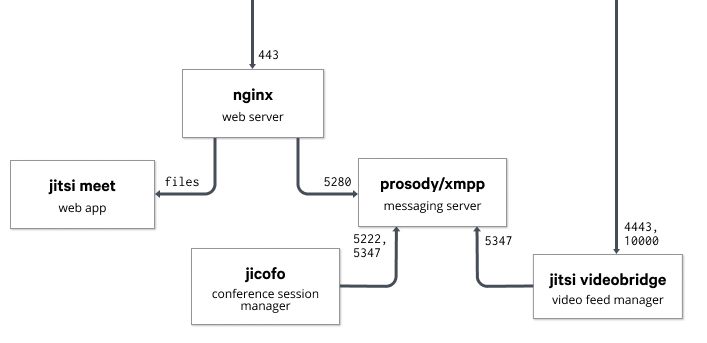 Getting started with the Jitsi Puppet module
First of all, you'll need a valid domain name and a server with decent
bandwidth. Jitsi has published a
 I have lately been using
 First of all, congratulations to all those who
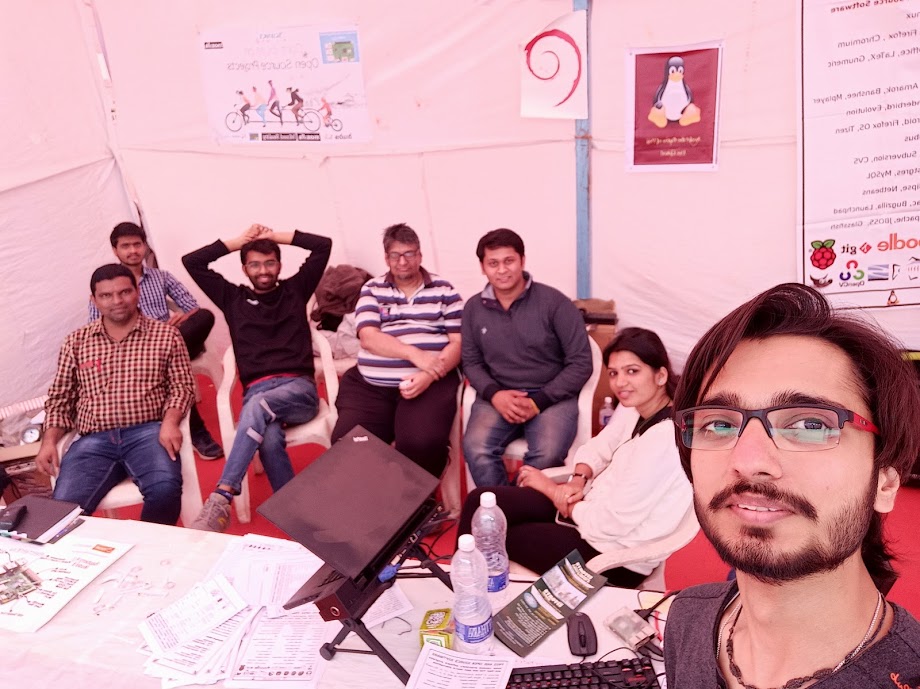
 . Of course in another stall few students had used RPI s as part of their projects so at times we did tell some of the newbies to go to those stalls and see and ask about those projects so they would have a much wider experience of things. The Mozilla people were pushing VR as well as Mozilla lite the browser for the mobile.
We also gossiped quite a bit. I shared about

 Further Switch game recommendations
Morphite is a first-person space exploration game, with a very distinctive
aesthetic, which reminds me a little bit of No Man's Sky. This is a fairly
child-friendly game of exploration and discovery. It also reminds me a little
bit of Frontier: First Encounters, the second sequel to Elite.


 Over the past few weeks things have been pretty hectic. Since I'm not working at the moment I'm mostly doing childcare instead. I need a break, now and again, so I've been sending our child to p iv koti two days a week with him home the rest of the time.
I love taking care of the child, because he's seriously awesome, but it's a hell of a lot of work when most of our usual escapes are unavailable. For example we can't go to the (awesome)
 Our good friend, Octavio M ndez Octagesimal , passed away due to
complications derived from COVID-2019.
Long-time free software supporter, very well known for his craft and
for his teaching with Blender. Great systems administrator. 45 year
old, father of two small girls, husband of our dear friend Claudia.
We are all broken. We will miss you.
For real, those that can still do it: Stay safe. Stay home.
 Update 2020-04-18: I have removed my QOwnNotes repository, since there is a OBS build by upstream that includes builds for Debian/unstable, testing, Buster. So no need for me. Please see
 To repeat a bit about
 I just had a weekend full of very successful serious geekery. On a whim I thought: Wouldn't it be nice if people could interact with my game



 I released version 2.1 of
 This waterfall is beside my yard. When it's running, I know my
 Before uploading stuff to Debian, I build in a clean chroot, and then
run piuparts, autopkgtest and lintian. For some of my packages this
can take around an hour on my laptop, which is fairly old. Normally I
don t mind waiting, but sometimes I want to put my laptop away, and
then it would be good for things to be faster. It occurred to me that
I could make use of my

 A new (upstream)
 For those in hurry: new binary packages that can be used on both Debian/testing and Debian/sid can be obtained for both i386 and amd64 archs here:
Debian/testing: