Search Results: "spa"

10 January 2015

Dirk Eddelbuettel: RcppClassic 0.9.6

A maintenance release of RcppClassic, now at version 0.9.6, went out to CRAN today. This package provides a maintained version of the otherwise deprecated first Rcpp API; no new projects should use it. No changes were in user-facing code. The Makevars file was change to accomodate a request by the CRAN Maintainer to keep it free of GNU Make extensions. At the same time, we overhauled the look and feel of the (very short) vignette. Build instructions were updated both in the vignette and in the included example package. Other accumulated changes since the last release were updates to the DESCRIPTION and NAMESPACE file as well two namespace-related R code updates. Courtesy of CRANberries, there is the set of changes relative to the previous release. Questions, comments etc should go to the rcpp-devel mailing list off the R-Forge page.

This post by Dirk Eddelbuettel originated on his Thinking inside the box blog. Please report excessive re-aggregation in third-party for-profit settings.

9 January 2015

Diego Escalante Urrelo: Link Pack #02

First sequel to my Link Pack series (I ll remove the quotes when it s LP#05): Link Pack #01. This time I m going for fewer articles, to try to keep things less overwhelming. There s no special theme, and I m actually leaving out some nice things I read recently. On the plus side, that means I have good material for a Link Pack #03. Also, I m gonna stick with Link Pack as a name, because it s good enough :-).
A Teenager s View on Social Media: Written by an actual teen
A well thought and realistic take on how social media is being used nowadays by teenagers. I have seen the patterns the author describes, and actually follow many of them. Does that mean I m still a teenager? It s interesting that the messaging and group-messaging part of the article is very US centric, or at least very US centric from my point of view. WhatsApp is the default messenger application south of the states, and fills the role of somewhere you can chat with people without having to give them your full personal information , that is, a place where you can chat with someone without running out of SMS and without adding them on Facebook (which would open them to stalk your whole profile and other friends). Some carriers in South Am rica offer unlimited plans for specific applications like WhatsApp. What Would Jesus Buy? (2007) Full movie
Reverend Billy Talen from the Church of Stop Shopping Gospel is trying to prevent the Shopocalypse from happening. It s an entertaining story of a group of funny guys and girls trying to share a message with comedy (that means A+ on my list). Simple and independent, a nice film. 13 Nutrition Lies That Made The World Sick And Fat
A pet peeve of mine. Nutrition is not really that complicated, but unfortunately there are a lot of myths that make people take really bad decisions. If you only read one thing in 2014 2015, read this.
Bottom Line: The low-fat, high-carb diet recommended by the mainstream nutrition organizations is a miserable failure and has been repeatedly proven to be ineffective. ( ) Bottom Line: Low-carb diets are the easiest, healthiest and most effective way to lose weight and reverse metabolic disease. It is pretty much a scientific fact at this point.
GM s hit and run: How a lawyer, mechanic, and engineer blew open the worst auto scandal in history
Cars are so complex nowadays, and dependent on electronics, that I m honestly afraid of them. I have made software for many years and I know how hard, impossible, it is to get things perfect . I can t imagine how hard it is for something so critical as brakes, steering wheels, etc. Even cameras can t get focus right some times, and it s been many many years.
Countless articles have been written about General Motors and its massive recalls earlier this year. What hasn t been fully told is how GM might have gotten away with multiple counts of consumercide were it not for the efforts of three men: a Georgia lawyer, a Mississippi mechanic, and a Florida engineer. ( ) Brooke Melton needn t have died that night. She was killed by a corporation s callous disregard for the safety of its customers, made worse by a regulatory agency reluctant to regulate.
The Long Game: Part 1 and The Long Game: Part 2
Two very short (less than 5 minutes) video essays about how notable people in the story of creativity are always celebrated without mentioning the boring years when they were nothing but losers. It s a fun little video, worth a watch for the idea and the interesting editing. It feels like someone really wanted to create these.

Chris Lamb: Uploading a large number of files to Amazon S3

I recently had to upload a large number (~1 million) of files to Amazon S3. My first attempts revolved around s3cmd (and subsequently s4cmd) but both projects seem to based around analysing all the files first rather than blindly uploading them. This not only requires a large amount of memory, non-trivial experimentation, fiddling and patching is also needed to avoid unnecessary stat(2) calls. I even tried a simple find xargs -P 5 s3cmd put [..] but I just didn't trust the error handling correctly. I finally alighted on s3-parallel-put, which worked out well. Here's a brief rundown on how to use it:
  1. First, change to your source directory. This is to ensure that the filenames created in your S3 bucket are not prefixed with the directory structure of your local filesystem whilst s3-parallel-put has a --prefix option, it is ignored if you pass a fully-qualified source, ie. one starting with a /.
  2. Run with --dry-run --limit=1 and check that the resulting filenames will be correct after all:
$ export AWS_ACCESS_KEY_ID=FIXME
$ export AWS_SECRET_ACCESS_KEY=FIXME
$ /path/to/bin/s3-parallel-put \
    --bucket=my-bucket \
    --host=s3.amazonaws.com \
    --put=stupid \
    --insecure \
    --dry-run --limit=1 \
    .
[..]
INFO:s3-parallel-put[putter-21714]:./yadt/profile.Profile/image/circle/807.jpeg -> yadt/profile.Profile/image/circle/807.jpeg
[..]
  1. Remove --dry-run --limit=1, and let it roll.

8 January 2015

Wouter Verhelst: ExtreMon example

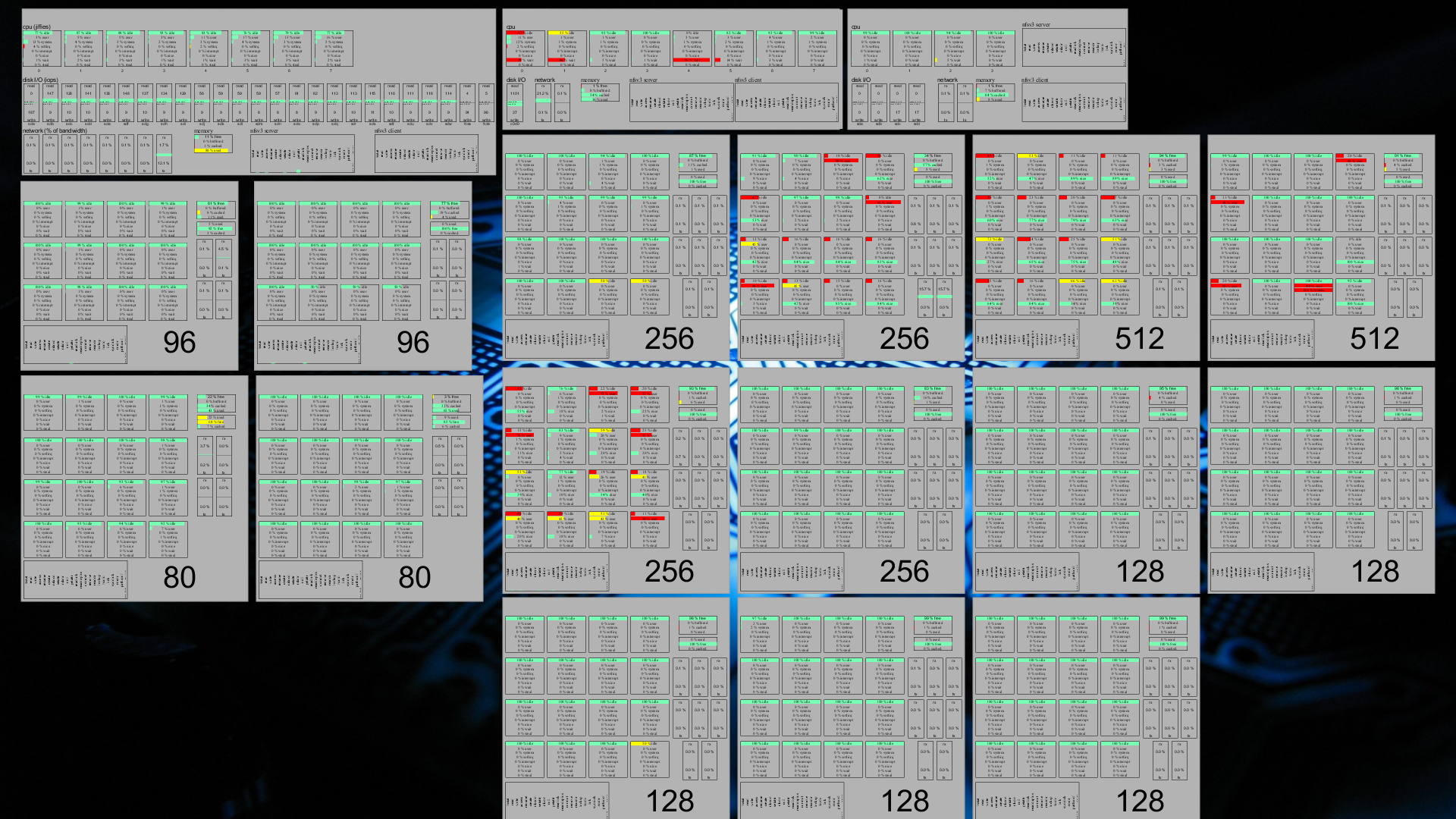
About a month ago, I blogged about extremon. As a reminder, ExtreMon is a monitoring tool that allows you to view things as they are happening, rather than with the ~5 minute delay that munin gives you, and also avoiding the quad-state limitation of Nagios' "good", "bad", "ugly", and "unknown" states. No, they're not really called that. Yes, I know you knew that. Anyway. In my blog post, I explained how you can set up ExtreMon, and I also set up a fairly limited demo version on my own server. But I have since realized that while it is functional, it doesn't actually show why ExtreMon is so great. In an effort to remedy that, I present you an example of what ExtreMon can do. Let's start with a screenshot of the ExtreMon console at the customer for which I spent time trying to figure out how to get it up and running: Click for full sized version. You'll note that even in that full-sized version, many things are unreadable. This is because the ExtreMon console allows one to move around (right mouse button drag for zoom; left mouse button drag for moving around; control+RMB for rotate; center mouse button to reset to default); so what matters is that everything fits on the screen, not whether it is all readable (if you need to read, you zoom). The image shows 18 rectangles. Each rectangle represents a single machine in this particular customer's HPC cluster. The top three rectangles are the cluster's file servers; the rest are its high performance nodes. You'll note that the left fileserver has 8 processor cores (top row), 8 network cards (bottom row, left part), and it also shows information on its memory usage (bottom row, small rectangle in the middle) as well as its NFS client and server procedure calls (bottom row, slightly larger rectangles to the right). This file server is the one on which I installed ZFS a while back; hence the large amount of disks visible in the middle row. The leftmost disk is the root filesystem (which is an ext4 off a hardware RAID1); the two rightmost "disks" are the PCIe-attached SSDs which are used for the ZFS L2ARC and write log. The other disks in this file server nicely show how ZFS does write load balancing over all its disks. The second file server has a hardware RAID1 on which it stores all its data; as such, there is only one disk graph there. It is also somewhat more limited in network, as it has only two NICs. It does, however, also have 8 cores. The last file server has no more than four processor cores; in addition, it also does not have a hardware RAID controller, so it must use software RAID over its four hard disks. This server is used for archival purposes, mostly, since it is insufficient for most anything else. As said, the other nodes are the "compute nodes", where the hard work is done. Most of these compute nodes have 16 cores each; two have 12 instead. When this particular screenshot was taken, four of the nodes (the ones showing red in their processor graphs) were hard at work; the others seem to have been mostly idling. In addition to the familiar memory, NFS (client only), network, and processor graphs, these nodes also show a "swap space" graph (just below the memory one), which seems fine for most nodes, except for the bottom left one (which shows a few bars that are coloured yellow rather than green). The green/yellow/red stuff is supposed to represent the "ok", "warning", "bad" states that would be familiar from Nagios. In this particular case, however, where "processor is busy all the time" is actually a wanted state, a low amount of idleness on the part of the processor isn't actually a problem, on the contrary. I did consider, therefore, to modify the ExtreMon configuration so that the processor graphs would not show red when the system was under high load; however, I found that differences in colour like this actually makes it more easy to see, at a glance, which machines are busy -- and that's one of the main reasons why we wanted to set this up. If you look carefully, you can find a particular processor core in the graph which shows 100% usage for "idle", "system", and "softirq", at the same time. Obviously that can't be the case, so there's a bug somewhere. Frank seems to believe it is a bug in CollectD; I haven't verified that. At any rate, though, this isn't usually a problem, due to the high update frequency of ExtreMon. The amount of data that's flowing through ExtreMon is amazing: Which renders a grand total of 2887 data points that are shown in this particular screenshot; and then I'm not even counting all the intermediate values, some of which also pass through ExtreMon. Nor am I counting the extra bits which have since been added (this screenshot is a few days old, now, and I'm still finetuning things). Yet even so, ExtreMon manages to update those values once every few seconds, in the worst case. As a result, the display isn't static for a moment, constantly moving and updating data so that what you see is never out of date for more than a second or two. Awesome.

Russell Coker: Conference Suggestions

LCA 2015 is next week so it seems like a good time to offer some suggestions for other delegates based on observations of past LCAs. There s nothing LCA specific about the advice, but everything is based on events that happened at past LCAs. Don t Oppose a Lecture Question time at the end of a lecture isn t the time to demonstrate that you oppose everything about the lecture. Discussion time between talks at a mini-conf isn t a time to demonstrate that you oppose the entire mini-conf. If you think a lecture or mini-conf is entirely wrong then you shouldn t attend. The conference organisers decide which lectures and mini-confs are worthy of inclusion and the large number of people who attend the conference are signalling their support for the judgement of the conference organisers. The people who attend the lectures and mini-confs in question want to learn about the topics in question and people who object should be silent. If someone gives a lecture about technology which appears to have a flaw then it might be OK to ask one single question about how that issue is resolved, apart from that the lecture hall is for the lecturer to describe their vision. The worst example of this was between talks at the Haecksen mini-conf last year when an elderly man tried at great length to convince me that everything about feminism is wrong. I m not sure to what degree the Haecksen mini-conf is supposed to be a feminist event, but I think it s quite obviously connected to feminism which is of course was why he wanted to pull that stunt. After he discovered that I was not going to be convinced and that I wasn t at all interested in the discussion he went to the front of the room to make a sexist joke and left. Consider Your Share of Conference Resources I ve previously written about the length of conference questions [1]. Question time after a lecture is a resource that is shared among all delegates. Consider whether you are asking more questions than the other delegates and whether the questions are adding benefit to other people. If not then send email to the speaker or talk to them after their lecture. Note that good questions can add significant value to the experience of most delegates. For example when a lecturer appears to be having difficulty in describing their ideas to the audience then good questions can make a real difference, but it takes significant skill to ask such questions. Dorm Walls Are Thin LCA is one of many conferences that is typically held at a university with dorm rooms offered for delegates. Dorm rooms tend to have thinner walls than hotel rooms so it s good to avoid needless noise at night. If one of your devices is going to make sounds at night please check the volume settings before you start it. At one LCA I was startled at about 2AM but the sound of a very loud porn video from a nearby dorm room, the volume was reduced within a few seconds, but it s difficult to get to sleep quickly after that sort of surprise. If you set an alarm then try to avoid waking other people. If you set an early alarm and then just get up then other people will get back to sleep, but pressing snooze repeatedly for several hours (as has been done in the past) is anti-social. Generally I think that an alarm should be at a low volume unless it is set for less than an hour before the first lecture in which case waking people in other dorm rooms might be doing them a favor. Phones in Lectures Do I need to write about this? Apparently I do because people keep doing it! Phones can be easily turned to vibrate mode, most people who I ve observed taking calls in LCA lectures have managed this but it s worth noting for those who don t. There are very few good reasons for actually taking a call when in a lecture. If the hospital calls to tell you that they have found a matching organ donor then it s a good reason to take the call, but I can t think of any other good example. Many LCA delegates do system administration work and get calls at all times of the day and night when servers have problems. But that isn t an excuse for having a conversation in the middle of the lecture hall while the lecture is in progress (as has been done). If you press the green button on a phone you can then walk out of the lecture hall before talking, it s expected that mobile phone calls sometimes have signal problems at the start of the call so no-one is going to be particularly surprised if it takes 10 seconds before you say hello. As an aside, I think that the requirement for not disturbing other people depends on the number of people who are there to be disturbed. In tutorials there are fewer people and the requirements for avoiding phone calls are less strict. In BoFs the requirements are less strict again. But the above is based on behaviour I ve witnessed in mini-confs and main lectures. Smoking It is the responsibility of people who consume substances to ensure that their actions don t affect others. For smokers that means smoking far enough away from lecture halls that it s possible for other delegates to attend the lecture without breathing in smoke. Don t smoke in the lecture halls or near the doorways. Also using an e-cigarette is still smoking, don t do it in a lecture hall. Photography Unwanted photography can be harassment. I don t think there s a need to ask for permission to photograp people who harass others or break the law. But photographing people who break the social agreement as to what should be done in a lecture probably isn t. At a previous LCA a man wanted to ask so many questions at a keynote lecture that he had a page of written notes (seriously), that was obviously outside the expected range of behaviour but probably didn t justify the many people who photographed him. A Final Note I don t think that LCA is in any way different from other conferences in this regard. Also I don t think that there s much that conference organisers can or should do about such things.

MJ Ray: Social Network Wishlist

All I want for 2015 is a Free/Open Source Software social network which is: Is this too much to ask for? Does it exist already?

6 January 2015

Steve Kemp: Here we go again.

Once upon a time I worked from home for seven years, for a company called Bytemark. Then, due to a variety of reasons, I left. I struck out for adventures and pastures new, enjoyed the novelty of wearing clothes every day, and left the house a bit more often. Things happened. A year passed. Now I'm working for Bytemark again, although there are changes and the most obvious one is that I'm working in a shared-space/co-working setup, renting a room in a building near my house instead of being in the house. Shame I have to get dressed, but otherwise it seems to be OK.

2 January 2015

Vincent Fourmond: Release 0.11 of ctioga2

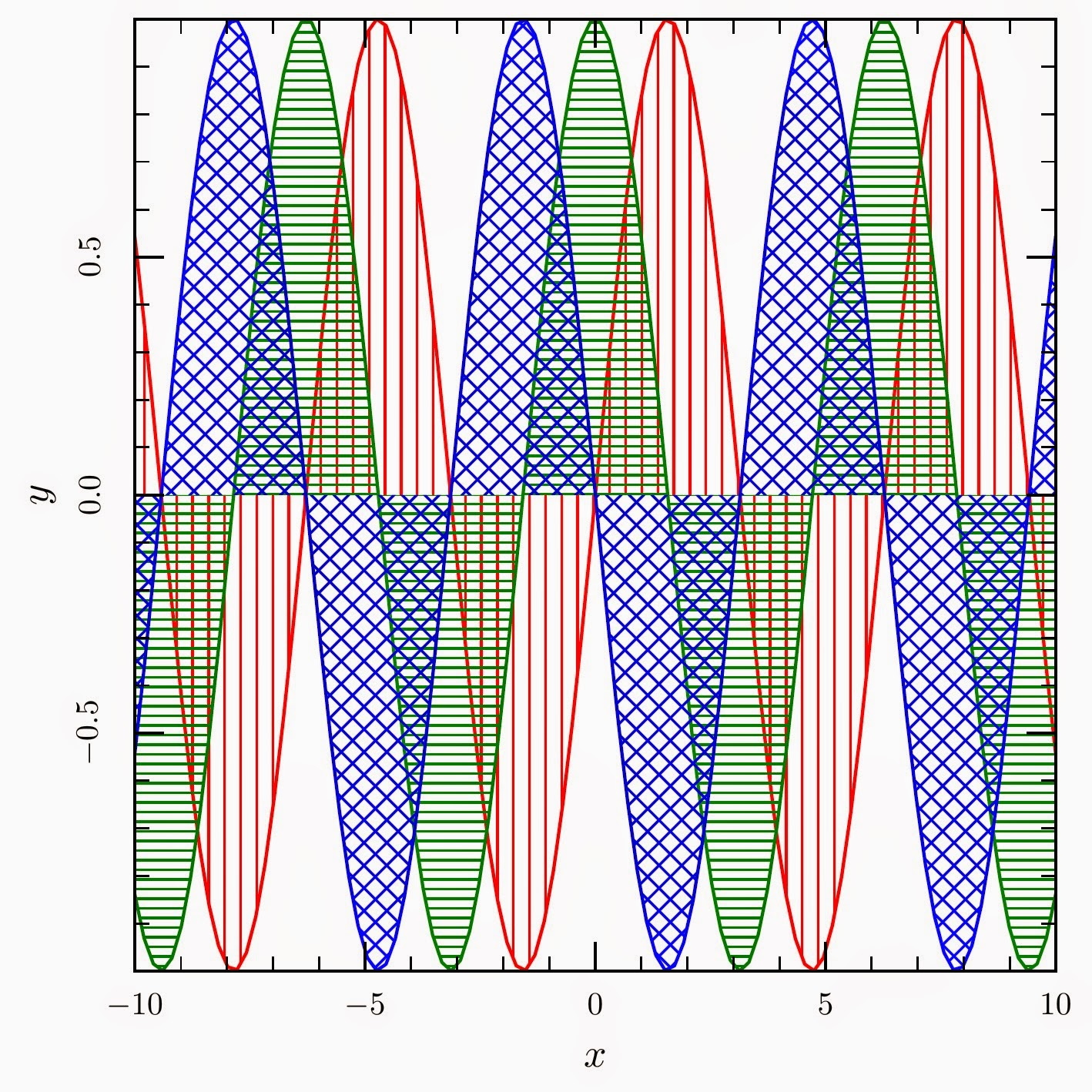
The new year is starting with a new release of ctioga2, with a lot of new features, such as:
The new release is of course available using rubygems:
~ gem update ctioga2
It can also be downloaded from sourceforge.The possibilities of the new styling system are particularly interesting, and I'm working on ways to make it more powerful, and providing series of default style files that anyone could use as they want. Among other future changes, I want to improve the position of ticks, especially when using non-linear axes, and add functions to draw vector fields (though this still needs some thinking). Enjoy, and a happy new year to everyone !

1 January 2015

Russ Allbery: 2014 Book Reading in Review

This year, after a series of catastrophically horrible and unethical management decisions, I walked away from my job of seventeen years and found a new job. As you might expect, reading wasn't the top priority for much of the year. I'm moderately surprised that I read as much as I did. The good side is that I'm now in a much better place both professionally and personally and no longer have to put up with draining and demoralizing nonsense happening on a regular basis. The downside for my review output is that the new job is more engrossing and is, in some ways, harder work, so I expect my reading totals going forward to stabilize somewhere below where they were in the past (although it's possible that the daily commute will change that equation somewhat). As mentioned last year, I had a feeling that something like this would happen (although not that it would be anywhere near this bad), so I had no specific reading goals for the year. Next year, I'm going to see how it goes for the first few months, and might then consider setting some goals if I want to encourage myself to take more time for reading. The below statistics are confined to the books I reviewed in 2014. I read three more books that I've not yet reviewed, partly because the end of the year isn't as packed with vacation as it was at Stanford. Those will be counted in 2014. Despite the low reading totals for the year, I read two 10 out of 10 books. My favorite book of the year was Ann Leckie's Ancillary Justice, which was one of the best science fiction novels I've ever read. Highly recommended if you like the space opera genre at all. A close second was my favorite non-fiction book of the year and the other 10 out of 10: Allie Brosh's collection Hyperbole and a Half. Those of you who have read her blog already know her brilliant and insightful style of humor. Those who haven't are in for a treat. I read a lot of non-fiction this year and not as much fiction, partly for mood reasons, so I don't have honorable mentions in the fiction department. In the non-fiction department, though, there are four more books worth mentioning. Cryptography Engineering, by Niels Ferguson, Bruce Schneier, and Tadayoshi Kohno, was the best technical book that I read last year, and a must-read for anyone who works on security or crypto software. David Graeber's Debt was the best political and economic book of the year and the book from which I learned the most. It changed the way that you think about debt and loans significantly. A close second, though, was David Roodman's Due Diligence, which is a must-read for anyone who has considered investing in microfinance or is curious about the phenomenon. We need more data-driven, thoughtful, book-length analysis like this in the world. Finally, The Knowledge, by Lewis Dartnell, is an entertaining and quixotic project. The stated goal of the book is to document the information required to rebuild civilization after a catastrophe, with hopefully fewer false starts and difficult research than was required the first time. I'm dubious about its usefulness for that goal, but it's a fascinating and entertaining book in its own right, full of detail about industrial processes and the history of manufacturing and construction that are otherwise hard to come by without extensive (and boring) research. Recommended, even if you're dubious about the efficacy of the project. The full analysis includes some additional personal reading statistics, probably only of interest to me.

Lars Wirzenius: The shape of a solution

Each software tool exists to solve some problem. For each problem, there are many possible solutions. Even when different programs basically do the same thing, they can have quite different shapes. As an example, this morning I was wondering if it would be possible for me to use notmuch to index my entire mail archive. For that, I needed to convert a number of mbox folders to Maildir format. That's a resonably easy problem, given access to suitable programming libraries, but there's an existing tool for that, called mb2md. Unfortunately, it has the wrong shape for my needs. mb2md doesn't just convert one mbox to one maildir. It's designed to for a mail admin converting all server-side mbox folders for a user into a corresponding structure of Maildir folders. This seems to be necessary when switching IMAP servers. That's a fairly specialised problem, and the program has been written to make it easy for a mail admin to do that. What I need is part of the problem solved by mb2md and indeed it can do just that part. However, the overall shape of mb2md is such that my part is hard to do. The incantation is quite unintuitive and requires careful reading of the documentation. The shape of a solution matters. mb2md could easily have been written in a way that provides a simple tool for the single folder conversion, and then a more complex tool for the mail admin's more complicated problem. This would have resulted in a much more general tool, and that would make it easier for more people to use it without much effort. Mail folder format conversions are a fairly esoteric thing to do. However, the lack of generality is a frequent issue with how programs are designed. It is easy to fall into the trap of writing a highly specialised tool, instead of taking a step back and making a more general purpose tool. The specialised tool will help a small number of people. The general tool will help many people. Examples of this are fairly common. Debian has a set of tools for making Debian live CDs; they are not quite able to make a bootable hard disk image as well (thus, vmdebootstrap). There's programs for computing cyclomatic complexity, which produce HTML reports, rather than something that can be processed by other programs without too much effort. There's tools for managing address books that are limited to specific cultures, e.g., by hardcoding assumptions of what a person's name looks like (thus, clab). One of my favourite examples is xargs, which by default does the wrong thing by assuming its input is whitespace delimited. Any whitespace, not just newlines. Any sensible use requires adding the -0 option, which makes xargs that much more tedious to use. Furthermore, I've often found that the more general tool is simpler. It's functional specification is simpler; it's implementation is simpler, and has fewer special cases; it's user experience is simpler. That's not always true, but often it is. Sometimes the general solution shape is not worth it. But it's always worth considering whether it might be. One of the parts of the Unix culture I really like is the preference for general tools that are easy to combine together.

30 December 2014

Michael Prokop: Installing Debian in UEFI mode with some stunts

For a recent customer setup of Debian/wheezy on a IBM x3630 M4 server we used my blog entry State of the art Debian/wheezy deployments with GRUB and LVM/SW-RAID/Crypto as a base. But this time we wanted to use (U)EFI instead of BIOS legacy boot. As usual we went for installing via Grml and grml-debootstrap. We started by dd-ing the Grml ISO to a USB stick ( dd grml64-full_2014.11.iso of=/dev/sdX bs=1M ). The IBM server couldn t boot from it though, as far as we could identify it seems to be related to a problem with the IBM server not being able to properly recognize USB sticks that are registering themselves as mass storage device instead of removable storage devices (you can check your device via the /sys/devices/ /removable setting). So we enabled Legacy Boot and USB Storage in the boot manager of the server to be able to boot Grml in BIOS/legacy mode from this specific USB stick. To install the GRUB boot loader in (U)EFI mode you need to be able to execute modprobe efivars . But our system was booted via BIOS/legacy and in that mode the modprobe efivars doesnt work. We could have used a different USB device for booting Grml in UEFI mode but because we are lazy sysadmins and wanted to save time we went for a different route instead: First of all we write the Grml 64bit ISO (which is (U)EFI capable out-of-the-box, also when dd-ing it) to the local RAID disk (being /dev/sdb in this example):
root@grml ~ # dd if=grml64-full_2014.11.iso of=/dev/sdb bs=1M
Now we should be able to boot in (U)EFI mode from the local RAID disk. To verify this before actually physically rebooting the system (and possibly getting into trouble) we can use qemu with OVMF:
root@grml ~ # apt-get update
root@grml ~ # apt-get install ovmf
root@grml ~ # qemu-system-x86_64 -bios /usr/share/qemu/OVMF.fd -hda /dev/sdb
The Grml boot splash comes up as expected, perfect. Now we actually reboot the live system and boot the ISO from the local disks in (U)EFI mode. Then we put the running Grml live system into RAM to not use and block the local disks any longer since we want to install Debian there. This can be achieved not just by the toram boot option, but also by executing grml2ram on-demand as needed from user space:
root@grml ~ # grml2ram
Now having the local disks available we verify that we re running in (U)EFI mode by executing:
root@grml ~ # modprobe efivars
root@grml ~ # echo $?
0
Great, so we can install the system in (U)EFI mode now. Starting with the according partitioning (/dev/sda being the local RAID disk here):
root@grml ~ # parted /dev/sda
GNU Parted 3.2
Using /dev/sda
Welcome to GNU Parted! Type 'help' to view a list of commands.
(parted) mklabel gpt
(parted) mkpart primary fat16 2048s 4095s
(parted) name 1 "EFI System"
(parted) mkpart primary 4096s 100%
(parted) name 2 "Linux LVM"
(parted) print
Model: IBM ServeRAID M5110 (scsi)
Disk /dev/sda: 9000GB
Sector size (logical/physical): 512B/4096B
Partition Table: gpt
Disk Flags:
  Number  Start   End     Size    File system  Name        Flags
   1      1049kB  2097kB  1049kB  fat16        EFI System
   2      2097kB  9000GB  9000GB               Linux LVM
(parted) quit
Information: You may need to update /etc/fstab.
Then setting up LVM with a logical volume for the root fs and installing Debian via grml-debootstrap on it:
root@grml ~ # pvcreate /dev/sda2
  Physical volume "/dev/sda2" successfully created
root@grml ~ # vgcreate vg0 /dev/sda2
  Volume group "vg0" successfully created
root@grml ~ # lvcreate -n rootfs -L16G vg0
  Logical volume "rootfs" created
root@grml ~ # grml-debootstrap --target /dev/mapper/vg0-rootfs --password secret --hostname foobar --release wheezy
[...]
Now finally set up the (U)EFI partition and properly install GRUB in (U)EFI mode:
root@grml ~ # mkfs.fat -F 16 /dev/sda1
mkfs.fat 3.0.26 (2014-03-07)
WARNING: Not enough clusters for a 16 bit FAT! The filesystem will be
misinterpreted as having a 12 bit FAT without mount option "fat=16".
root@grml ~ # mount /dev/mapper/vg0-rootfs /mnt
root@grml ~ # grml-chroot /mnt /bin/bash
Writing /etc/debian_chroot ...
(foobar)root@grml:/# mkdir -p /boot/efi
(foobar)root@grml:/# mount /dev/sda1 /boot/efi
(foobar)root@grml:/# apt-get install grub-efi-amd64
[...]
(foobar)root@grml:/# grub-install /dev/sda
Timeout: 10 seconds
BootOrder: 0003,0000,0001,0002,0004,0005
Boot0000* CD/DVD Rom
Boot0001* Hard Disk 0
Boot0002* PXE Network
Boot0004* USB Storage
Boot0005* Legacy Only
Boot0003* debian
Installation finished. No error reported.
(foobar)root@grml:/# ls /boot/efi/EFI/debian/
grubx64.efi
(foobar)root@grml:/# update-grub
[...]
(foobar)root@grml:/# exit
root@grml ~ # umount /mnt/boot/efi
root@grml ~ # umount /mnt/
root@grml ~ # vgchange -an
  0 logical volume(s) in volume group "vg0" now active
That s it. Now rebooting the system should bring you to your Debian installation running in (U)EFI mode. You can verify this before actually rebooting into the system by using the qemu/OVMF trick from above once again.

Benjamin Mako Hill: Consider the Redirect

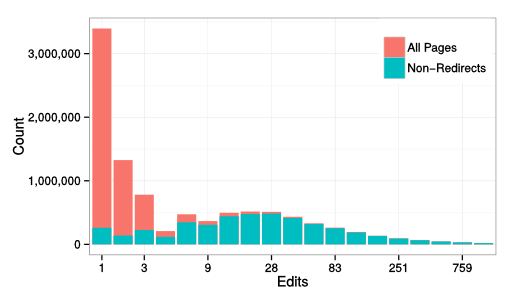
In wikis, redirects are special pages that silently take readers from the page they are visiting to another page. Although their presence is noted in tiny gray text (see the image below) most people use them all the time and never know they exist. Redirects exist to make linking between pages easier, they populate Wikipedia s search autocomplete list, and are generally helpful in organizing information. In the English Wikipedia, redirects make up more than half of all article pages. seattle_redirectOver the years, I ve spent some time contributing to to Redirects for Discussion (RfD). I think of RfD as like an ultra-low stakes version of Articles for Deletion where Wikipedians decide whether to delete or keep articles. If a redirect is deleted, viewers are taken to a search results page and almost nobody notices. That said, because redirects are almost never viewed directly, almost nobody notices if a redirect is kept either! I ve told people that if they want to understand the soul of a Wikipedian, they should spend time participating in RfD. When you understand why arguing about and working hard to come to consensus solutions for how Wikipedia should handle individual redirects is an enjoyable way to spend your spare time where any outcome is invisible you understand what it means to be a Wikipedian. That said, wiki researchers rarely take redirects into account. For years, I ve suspected that accounting for redirects was important for Wikipedia research and that several classes of findings were noisy or misleading because most people haven t done so. As a result, I worked with my colleague Aaron Shaw at Northwestern earlier this year to build a longitudinal dataset of redirects that can capture the dynamic nature of redirects. Our work was published as a short paper at OpenSym several months ago. It turns out, taking redirects into account correctly (especially if you are looking at activity over time) is tricky because redirects are stored as normal pages by MediaWiki except that they happen to start with special redirect text. Like other pages, redirects can be updated and changed over time are frequently are. As a result, taking redirects into account for any study that looks at activity over time requires looking at the text of every revision of every page. Using our dataset, Aaron and I showed that the distribution of edits across pages in English Wikipedia (a relationships that is used in many research projects) looks pretty close to log normal when we remove redirects and very different when you don t. After all, half of articles are really just redirects and, and because they are just redirects, these articles are almost never edited. edits_over_pagesAnother puzzling finding that s been reported in a few places and that I repeated myself several times is that edits and views are surprisingly uncorrelated. I ll write more about this later but the short version is that we found that a big chunk of this can, in fact, be explained by considering redirects. We ve published our code and data and the article itself is online because we paid the ACM s open access fee to ransom the article.

Steve Kemp: Reducing, or redirecting at least, charitable donations.

This is the time of year when there are lots of adverts shown on TV solicating donations for charities, which frequently end with the two words "thank you". I've always felt there were too many charities in the world, and that it was hard to half-heartedly give money to one charity this month, one the next, and still another next year. On that basis I decided long ago to give my money solely to three charities. If I had money that was spare, or I felt generous that month, I would give it to one of "my" charities. Any other appeals I just ignored (with minor exceptions for one-off events like tsunamis, etc). I won't claim credit for this idea, it came directly from my mom who does the same thing. I've given money to the same three charities for twenty years now. Maybe not thousands, but hopefully enough to be useful. Certainly more than I'd have given if my donation were split between more recipients. Now I'm changing. As of next year only one charitable organization will get my pennies. The other two haven't done anything bad, wrong, or failed/succeeded (sadly), but it feels better for me to stick to a single recipient. Happy Christmas. (Details shouldn't matter, but to answer the obvious question the charity I've kept is the RNLI.)

27 December 2014

Joey Hess: shell monad day 3

I have been hard at work on the shell-monad ever since it was born on Christmas Eve. It's now up to 820 lines of code, and has nearly comprehensive coverage of all shell features. Time to use it for something interesting! Let's make a shell script and a haskell program that both speak a simple protocol. This kind of thing could be used by propellor when it's deploying itself to a new host. The haskell program can ssh to a remote host and run the shell program, and talk back and forth over stdio with it, using the protocol they both speak. abstract beginnings First, we'll write a data type for the commands in the protocol.
data Proto
    = Foo String
      Bar
      Baz Integer
    deriving (Show)
Now, let's go type class crazy!
class Monad t => OutputsProto t where
    output :: Proto -> t ()
instance OutputsProto IO where
    output = putStrLn . fromProto
So far, nothing interesting; this makes the IO monad an instance of the OutputsProto type class, and gives a simple implementation to output a line of the protocol.
instance OutputsProto Script where
    output = cmd "echo" . fromProto
Now it gets interesting. The Script monad is now also a member of the OutputsProto. To output a line of the protocol, it just uses echo. Yeah -- shell code is a member of a haskell type class. Awesome -- most abstract shell code evar! Similarly, we can add another type class for monads that can input the protocol:
class Monad t => InputsProto t p where
    input :: t p
instance InputsProto IO Proto where
    input = toProto <$> readLn
instance InputsProto Script Var where
    input = do
        v <- newVar ()
        readVar v
        return v
While the IO version reads and deserializes a line back to a Proto, the shell script version of this returns a Var, which has the newly read line in it, not yet deserialized. Why the difference? Well, Haskell has data types, and shell does not ... speaking the protocol Now we have enough groundwork to write haskell code in the IO monad that speaks the protocol in arbitrary ways. For example:
protoExchangeIO :: Proto -> IO Proto
protoExchangeIO p = do
    output p
    input
fooIO :: IO ()
fooIO = do
    resp <- protoExchangeIO (Foo "starting up")
    -- etc
But that's trivial and uninteresting. Anyone who has read to here certianly knows how to write haskell code in the IO monad. The interesting part is making the shell program speak the protocol, including doing various things when it receives the commands.
foo :: Script ()
foo = do
    stopOnFailure True
    handler <- func (NamedLike "handler") $
        handleProto =<< input
    output (Foo "starting up")
    handler
    output Bar
    handler
handleFoo :: Var -> Script ()
handleFoo v = toStderr $ cmd "echo" "yay, I got a Foo" v
handleBar :: Script ()
handleBar = toStderr $ cmd "echo" "yay, I got a Bar"
handleBaz :: Var -> Script ()
handleBaz num = forCmd (cmd "seq" (Val (1 :: Int)) num) $
    toStderr . cmd "echo" "yay, I got a Baz"
serialization I've left out a few serialization functions. fromProto is used in both instances of OutputsProto. The haskell program and the script will both use this to serialize Proto.
fromProto :: Proto -> String
fromProto (Foo s) = pFOO ++ " " ++ s
fromProto Bar = pBAR ++ " "
fromProto (Baz i) = pBAZ ++ " " ++ show i
pFOO, pBAR, pBAZ :: String
(pFOO, pBAR, pBAZ) = ("FOO", "BAR", "BAZ")
And here's the haskell function to convert the other direction, which was also used earlier.
toProto :: String -> Proto
toProto s = case break (== ' ') s of
    (w, ' ':rest)
          w == pFOO -> Foo rest
          w == pBAR && null rest -> Bar
          w == pBAZ -> Baz (read rest)
          otherwise -> error $ "unknown protocol command: " ++ w
    (_, _) -> error "protocol splitting error"
We also need a version of that written in the Script monad. Here it is. Compare and contrast the function below with the one above. They're really quite similar. (Sadly, not so similar to allow refactoring out a common function..)
handleProto :: Var -> Script ()
handleProto v = do
    w <- getProtoCommand v
    let rest = getProtoRest v
    caseOf w
        [ (quote (T.pack pFOO), handleFoo =<< rest)
        , (quote (T.pack pBAR), handleBar)
        , (quote (T.pack pBAZ), handleBaz =<< rest)
        , (glob "*", do
            toStderr $ cmd "echo" "unknown protocol command" w
            cmd "false"
          )
        ]
Both toProto and handleProto split the incoming line apart into the first word, and the rest of the line, then match the first word against the commands in the protocol, and dispatches to appropriate actions. So, how do we split a variable apart like that in the Shell monad? Like this...
getProtoCommand :: Var -> Script Var
getProtoCommand v = trimVar LongestMatch FromEnd v (glob " *")
getProtoRest :: Var -> Script Var
getProtoRest v = trimVar ShortestMatch FromBeginning v (glob "[! ]*[ ]")
(This could probably be improved by using a DSL to generate the globs too..) conclusion And finally, here's a main to generate the shell script!
main :: IO ()
main = T.writeFile "protocol.sh" $ script foo
The pretty-printed shell script that produces is not very interesting, but I'll include it at the end for completeness. More interestingly for the purposes of sshing to a host and running the command there, we can use linearScript to generate a version of the script that's all contained on a single line. Also included below. I could easily have written the pretty-printed version of the shell script in twice the time that it took to write the haskell program that generates it and also speaks the protocol itself. I would certianly have had to test the hand-written shell script repeatedly. Code like for _x in $(seq 1 "$ _v#[!\ ]*[\ ] ") doesn't just write and debug itself. (Until now!) But, the generated scrpt worked 100% on the first try! Well, it worked as soon as I got the Haskell program to compile... But the best part is that the Haskell program and the shell script don't just speak the same protocol. They both rely on the same definition of Proto. So this is fairly close to the kind of type-safe protocol serialization that Fay provides, when compiling Haskell to javascript. I'm getting the feeling that I won't be writing too many nontrivial shell scripts by hand anymore! :) the complete haskell program Is here, all 99 lines of it. the pretty-printed shell program
#!/bin/sh
set -x
_handler ()   :
    _v=
    read _v
    case "$ _v%%\ * " in FOO) :
        echo 'yay, I got a Foo' "$ _v#[!\ ]*[\ ] " >&2
    : ;; BAR) :
        echo 'yay, I got a Bar' >&2
    : ;; BAZ) :
        for _x in $(seq 1 "$ _v#[!\ ]*[\ ] ")
        do :
            echo 'yay, I got a Baz' "$_x" >&2
        done
    : ;; *) :
        echo 'unknown protocol command' "$ _v%%\ * " >&2
        false
    : ;; esac
 
echo 'FOO starting up'
_handler
echo 'BAR '
_handler
the one-liner shell program
set -p; _handler ()   :;    _v=;    read _v;    case "$ _v%%\ * " in FOO) :;        echo 'yay, I got a Foo' "$ _v#[!\ ]*[\ ] " >&2;     : ;; BAR) :;        echo 'yay, I got a Bar' >&2;    : ;; BAZ) :;        for _x in $(seq 1 "$ _v#[!\ ]*[\ ] ");      do :;           echo 'yay, I got a Baz' "$_x" >&2;      done;   : ;; *) :;      echo 'unknown protocol command' "$ _v%%\ * " >&2;       false;  : ;; esac;  ; echo 'FOO starting up'; _handler; echo 'BAR '; _handler

26 December 2014

Sven Hoexter: on call one-liner: Who is sitting in my swap space?

A "nearly out of swap"-alarm during on call duty led me to quickly assemble a one-liner to grab a list of PIDs and the amount of memory swapped out from /proc/[pid]/smaps. That one-liner later got a bit polishing from my colleague H. to look like this:
for x in $(ps -eo pid h); do s=/proc/$ x /smaps; [ -e $ s  ] && awk -vp=$ x  'BEGIN   sum=0   /Swap:/   sum+=$2   END   if (sum!=0) print sum " PID " p ' $ s ; done   sort -rg
After I shared this one with some friends V. came up with a faster version (and properly formatted output :), that relies on the "VMSwap" value in /proc/[pid]/status. Since the one-liner above has to add up one "Swap" value per memory segment it's obvious why it's very slow on systems with many processes and a lot of memory.
awk 'BEGIN printf "%-7s %-16s %s (KB)\n", "PID","COMM","VMSWAP"   
if($1 == "Name:") n=$2 
if($1 == "Pid:") p=$2 
if($1 == "VmSwap:" && $2 != "0") printf "%-7s %-16s %s\n", p,n,$2   "sort -nrk3" 
 ' /proc/*/status
Drawback of this second version is that it relies on the "VmSwap" value which is only part of Linux 2.6.34 and later. It also ended up in the 2.6.32 based kernel of RHEL 6, so this one should work from RHEL 6 and Debian/wheezy onwards. The first version also works on RHEL 5 and Debian/squeeze since both have a (default) kernel with "CONFIG_PROC_PAGE_MONITOR" enabled, which is what you need to enable /proc/[pid]/smaps. Update: C.R. pointed out via mail that there is a versatile Python script smem. It's available in Debian and at least EPEL 6 and 7. Thanks for the hint. The usefulness of swap and why there is no automatic ressource assignment check and bookkeeping, based on calculations around things like the JVM -Xmx settings and other input, is a story on its own. There is room for improvement. A CMDB (Chapter 10.7) would be a starting point.

Ritesh Raj Sarraf: Linux Containers and Productization

Linux has improved many many things over the last couple of years. Of the many improvements, the one that I've started leveraging the most today, are Control Groups. In the past, when there was a need to build a prototype for a solution, we needed hardware. Then came the virtualization richness to Linux. It came in 2 major flavors, KVM (Full Virtualization) and Xen (Para Virtualization). Over the years, the difference of para vs full, for both the implementations, is almost none. KVM now has support for Para-Virtualizaiton, with para-virtualized drviers for most resource intensive tasks, like network and I/O. Similarly, Xen has Full Virtualization support with the help of Qemu-KVM. But, if you had to build a prototype implementation comprising of a multi node setup, virtualization could still be resource hungry. Otherwise too, if your focus was an application (say like a web framework), virtualization was an overkill. All thanks to Linux Containers, prototyping applicaiton based solutions, is now a breeze in Linux. The LXC project is very well designed, and well balanced, in terms of features (as compared to the recently introduced Docker implementation). From an application's point of view, linux containers provide virtualization for namespace, network and resources. Thus making more than 90% of your application's needs fulfilled. For some apps, where a dependency on the kernel is needed, linux containers will not serve the need. Beyond the defaults provided by the distribution, I like to create a base container with my customizations, as a template. This allows me to quickly create environements, without too much housekeeping to do for the initial setup. My base config, looks like:
rrs@learner:~$ sudo cat /var/lib/lxc/deb-template/config
[sudo] password for rrs:
# Template used to create this container: /usr/share/lxc/templates/lxc-debian
# Parameters passed to the template:
# For additional config options, please look at lxc.container.conf(5)
# CPU
lxc.cgroup.cpuset.cpus = 0,1
lxc.cgroup.cpu.shares = 1234
# Mem
lxc.cgroup.memory.limit_in_bytes = 2000M
lxc.cgroup.memory.soft_limit_in_bytes = 1500M
# Network
lxc.network.type = veth
lxc.network.hwaddr = 00:16:3e:0c:c5:d4
lxc.network.flags = up
lxc.network.link = lxcbr0
# Root file system
lxc.rootfs = /var/lib/lxc/deb-template/rootfs
# Common configuration
lxc.include = /usr/share/lxc/config/debian.common.conf
# Container specific configuration
lxc.mount = /var/lib/lxc/deb-template/fstab
lxc.utsname = deb-template
lxc.arch = amd64
# For apt
lxc.mount.entry = /var/cache/apt/archives var/cache/apt/archives none defaults,bind 0 0
23:07          
rrs@learner:~$
Some of the important settings to have in the templace are the mount point, to point to your local apt cache, and CPU and Memory limits. If there was one feature request to ask the LXC developers, I'd ask them to provide a util-lxc tools suite. Currently, to know the memory (soft/hard) allocation for the container, one needs to do the following:
rrs@learner:/sys/fs/cgroup/memory/lxc/deb-template$ cat memory.soft_limit_in_bytes memory.limit_in_bytes
1572864000
2097152000
23:21          
rrs@learner:/sys/fs/cgroup/memory/lxc/deb-template$ bc
bc 1.06.95
Copyright 1991-1994, 1997, 1998, 2000, 2004, 2006 Free Software Foundation, Inc.
This is free software with ABSOLUTELY NO WARRANTY.
For details type  warranty'.
1572864000/1024/1024
1500
quit
23:21          
rrs@learner:/sys/fs/cgroup/memory/lxc/deb-template$
Tools like lxc-cpuinfo, lxc-free would be much better. Finally, there's been a lot of buzz about Docker. Docker is an alternate product offering, like LXC, for Linux Containers. From what I have briefly looked at, docker doesn't seem to be providing any ground breaking new interface than what is already possible with LXC. It does take all the tidbit tools, and presents you with a unified docker interface. But other than that, I couldn't find it much appealing. And the assumption that the profiles should be pulled off the internet (Github ?) is not very exciting. I am hoping they do have other options, where dependence on the network is not really required.

Categories:

Keywords:

Ritesh Raj Sarraf: Linux Desktop in 2014

We are almost at the end of 2014. While 2014 has been a year with many mixed experiences, I think it does warrant one blog entry ;-) Recently, I've again started spending more time on Linux products / solutions, than spending time focused on a specfic subsystem. This change has been good. It has allowed me to re-cap all the advancements that have happened in the Linux world, umm... in the last 5 years. Once upon a time, the Linux kernel sucked on the Desktop. It led to many desktop improvement related initiatives. Many accepted in kernel, while others stood as it is (out-of-tree) still as of today. Over the years, there are many people that advocate for such out-of-tree features, for example the -ck patchset, claiming it has better performance. Most of the times, these are patches not carried by your distribution vendor, which leads you to alternate sources, if you want to try. Having some spare time, I tried the Alternative Kernel project. It is nothing but a bunch of patchsets, on top of the stock kernel. After trying it out, I must say that these patchsets are out-of-tree, for good. I hardly could make out any performance gain. But I did notice a considerable increase in the power consumption. On my stock Debian kernel, the power consumption lies around 15-18 W. That increased to 20+ W on the alternate kernels. I guess most advocates for the out-of-tree patchsets, only measure the 1-2% performance gain, where as completely neglect the fact that that kernel sleeps less often. But back to the generic Linux kernel performance problem...... Recently, in the last 2 years, the performance suckiness of the Linux kernel is hardly noticed. So what changed ? The last couple of years have seen a rise in high capacity RAM, at affordable consumer price. 8 - 16 GiB of RAM is common on laptops these days. If you go and look at the sucky bug report linked above, it is marked as closed, justified Working as Designed. The core problem with the bug reported, has to do with slow media. The Linux scheduler is (in?)efficient. It works hard to give you the best throughput and performance (for server workloads). I/O threads are a high priority task in the Linux kernel. Now map this scene to the typical Linux desktop. If you end up with doing too much buffered I/O, thus exhausting all your available cache, and trigger paging, you are in for some sweet experience. Given that the kernel highly priotizes I/O tasks, and if your underneath persistent storage device is slow (which is common if you have an external USB disk, or even an internal rotating magnetic disk), you end up blocking all your CPU cycles against the slow media. Which further leads to no available CPU cycles for your other desktop tasks. Hence, when you do I/O at such level, you find your desktop go terribly sluggish. It is not that your CPU is slow or in-capable. It is just that all your CPU slices are blocked. Blocked waiting for your write() to report a completion. So what exactly changed that we don't notice that problem any more ????
  1. RAM - Increase in RAM has led to more I/O be accommodated in cache. The best way to see this in action is to do a copy of a large file, something almost equivalent to the amount of RAM you have. But make sure it is less than the overall amount. For example, if you have 4 GiB of RAM, try copying a file of size 3.5 GiB in your graphical file manager. And at the same time, on the terminal, keep triggering the sync command. Check how long does it take for the sync to complete. By being able to cache large amount of data, the Linux kernel has been better at improving the overall performance in the eyes of the user.
  2. File System - But RAM is not alone. The file system has played a very important role too. Earlier, with ext3 file system, we had a commit interval of (5?) 30 seconds. That led to the above mentioned sync equivalent to get triggered every 30 secs. It was a safety measure to ensure, that at worst, you lose 30 secs worth of data. But it did hinder performance. With ext4, came delayed allocation. Delayed Allocation allowed the write() to return immediate while the data was in cache, and deferred the task of actual write() to the file system. This allowed for the allocator to find the best contiguous slot for the data to be written. Thus it improved the file system. It also brough corruption for some of the apps. :-)
  3. Solid State Drives - The file system and RAM alone aren't the sole factors that led to the drastic improvement in the overall experience of the Linux desktop. If you read through the bug report linked in this article, you'll find the core root cause to be slow persistent storage devices. Could the allocator have been improved (like Windows) to not be so pressing of the Linux desktop ? Maybe, yes. But that was a decision for the kernel devs and they believed (and believe) to keep those numbers to minimum. Thus for I/O, as for today, you have 3 schedulers and for CPU, just 1. What dramatically improved the overall Linux Desktop performance was the general availability of solid state devices. These device are real fast, which in effect made the write() calls return immediate, and did not block the CPU.
So, it was the advancement in both hardware and software that led to better overall desktop performance. Does the above mentioned bug still exist ? Yes. Its just that it is much harder to trigger it now. You'll have to ensure that you max out your cache and trigger paging. And then try to do ask for some CPU cycles. But it wasn't that back then we didn't use Linux on the desktop / laptop. It sure did suck more than, say, Windows. But hey, sometimes we have to eat our own dog food. Even then, there sure were some efforts to overcome the then limitations. The first and obvious one is the out-of-tree patchset. But ther were also some other efforts to improve the situation. The first such effort, that I can recollect, was ulatency. With Linux adding support for Control Groups, there were multiple avenues open on how to tackle and tame the resource starvation problem. The crux of the problem was that Linux gave way too much priority to the I/O tasks. I still wish Linux has a profile mechanism, where in on the kernel command line, we could specify what profile should Linux boot into. Anyways, with ulatency, we saw improvements in the Linux Desktop experience. ulatency had in-built policies to whitelist / blacklist a set of profiles. For example, KDE was a profile. Thus, ulatency would club all KDE processes into a group and give that group a higher precedence to ensure that it had its fair share of CPU cycles. Today, at almost the end of 2014, there are many more consumer of Linux's control groups. Prominent names would be: LXC and systemd. ulatency has hardly seen much development in the last year. Probably it is time for systemd to take over. systemd is expected to bring lots of features to the Linux world, thus bridging the (many) gap Linux has had on the desktop. It makes extensive use of Control Groups for a variety of (good) reasons, which has led it to be a linux-only product. I think it should have never marketed itself as the init daemon. It rather fits better when called as the System Management Daemon. The path to Linux Desktop looks much brighter in 2015 and beyond thanks to all the advancements that have happened so far. The other important players, who should be thanked are Mobile and Low Latency products (Android, ChromeBook), whose engagement to productize Linux has led to better features overall.

Categories:

Keywords:

Vasudev Kamath: Notes: LXC How-To

LXC - Linux Containers allows us to run multiple isolated Linux system under same control host. This will be useful for testing application without changing our existing system. To create an LXC container we use the lxc-create command, it can accepts the template option, with which we can choose the OS we would like to run under the virtual isolated environment. On a Debian system I see following templates supported
[vasudev@rudra: ~/ ]% ls /usr/share/lxc/templates
lxc-alpine*    lxc-archlinux*  lxc-centos*  lxc-debian*    lxc-fedora*  lxc-openmandriva*  lxc-oracle*  lxc-sshd*    lxc-ubuntu-cloud*
lxc-altlinux*  lxc-busybox*    lxc-cirros*  lxc-download*  lxc-gentoo*  lxc-opensuse*      lxc-plamo*   lxc-ubuntu*
For my application testing I wanted to create a Debian container for my By default the template provided by lxc package creates Debian stable container. This can be changed by passing the option to debootstrap after -- as shown below.
sudo MIRROR=http://localhost:9999/debian lxc-create -t debian \
     -f   container.conf -n container-name -- -r sid
-r switch is used to specify the release, MIRROR environment variable is used to choose the required Debian mirror. I wanted to use my own local approx installation, so I can save some bandwidth. container.conf is the configuration file used for creating the LXC, in my case it contains basic information on how container networking should b setup. The configuration is basically taken from LXC Debian wiki
lxc.utsname = aptoffline-dev
lxc.network.type = veth
lxc.network.flags = up
lxc.network.link = br0.1
lxc.network.name = eth0
lxc.network.ipv4 = 192.168.3.2/24
lxc.network.veth.pair = vethvm1
I'm using VLAN setup described in Debian wiki: LXC VLAN Networking page. Below is my interfaces file.
iface eth0.1 inet manual
iface br0.1  inet manual
   bridge_ports eth0.1
   bridge_fd 0
   bridge_maxwait 0
Before launching the LXC make sure you run below command
sudo ifup eth0.1
sudo ifup br0.1
# Also give ip to bridge in same subnet as lxc.network.ipv4
sudo ip addr add 192.168.3.1/24 dev br0.1
I'm giving ip address to bridge so that I can communicate with container from my control host, once it comes up. Now start the container using below command
sudo lxc-start -n container -d -c tty8
We are starting lxc in daemon mode and attaching it to console tty8. If you want, you can drop -d and -c option to start lxc in foreground. But its better you start it in background and attach using lxc-console command shown below.
sudo lxc-console -n container -t tty8
You can detach from console using Ctrl+a q combination and let lxc execute in background. Its also possible to simply ssh into the running container since we have enabled networking. Stopping the container should be done using lxc-stop command, but without -k switch (kill) this command never returned. Even with timeout container is not stopped.
sudo lxc-stop -n container
-r can be used for reboot of container. Since I couldn't get clean shutdown I normally attach the console and issue a halt command in container itself. Not sure if this is the right way, but it gets the thing done. I consider Linux container as a better alternative for spawning a virtual Linux environment instead of running a full blown VM like Virtualbox or VMware.

25 December 2014

Russ Allbery: C TAP Harness 3.2

This is a fairly minor release, mostly to have a release of files that I'm updating in rra-c-util. Most of the changes are typos and other cosmetic fixes. But I hate releasing a new version of something without a little bit of new functionality, so I implemented comment support in test lists. The runtests driver now ignores comments (lines starting with #) and blank lines in test list files, and leading whitespace in front of test names. You can get the latest version from the C TAP Harness distribution page.

24 December 2014

Chris Lamb: find(1), trailing slashes and symbolic links to directories

Here's a nice little "gotcha" in find(1). First, let's create a directory and a symlink to that directory. We'll add an empty file just underneath to illustrate what is going on:
$ mkdir a
$ ln -s a b
$ touch a/file
If we invoke find with a trailing slash, everything works as expected:
$ find a/
a/
a/file
$ find b/
b/
b/file
... but if we omit the trailing slash, find does not traverse the symlink:
$ find a
a
a/file
$ find b
b
This implies that any normal-looking invokation of find such as:
find /path/to/dir -name 'somefile.ext' ...
... is subtly buggy as it won't accomodate the sysadmin replacing that path with a symlink.
This is, of course, well-covered in the find(1) manpage (spoiler: the safest option is to specify -H, or simply to append the trailing slash), but I would still class this as a "gotcha" because of the subtle difference between the trailing and non-trailing slash variants. Putting it another way, it's completely reasonable that find doesn't follow symlinks, but when this behaviour based on the presence of the trailing slash a usually meaningless syntactic distinction it crosses the rubicon to being counter-intutive.

Next.

Previous.