Search Results: "ron"

16 August 2015

Lunar: Reproducible builds: week 16 in Stretch cycle

What happened in the reproducible builds effort this week: Toolchain fixes Valentin Lorentz sent a patch for ispell to initialize memory structures before dumping their content. In our experimental repository, qt4-x11 has been rebased on the latest version (Dhole), as was doxygen (akira). Packages fixed The following packages became reproducible due to changes in their build dependencies: backup-manager, cheese, coinor-csdp, coinor-dylp, ebook-speaker, freefem, indent, libjbcrypt-java, qtquick1-opensource-src, ruby-coffee-script, ruby-distribution, schroot, twittering-mode. The following packages became reproducible after getting fixed: Some uploads fixed some reproducibility issues but not all of them: Patches submitted which have not made their way to the archive yet: akira found another embedded code copy of texi2html in maxima. reproducible.debian.net Work on testing several architectures has continued. (Mattia/h01ger) Package reviews 29 reviews have been removed, 187 added and 34 updated this week. 172 new FTBFS reports were filled, 137 solely by Chris West (Faux). josch spent time investigating the issue with fonts in PDF files. Chris Lamb documented the issue affecting documentation generated by ocamldoc. Misc. Lunar presented a general Reproducible builds HOWTO talk at the Chaos Communication Camp 2015 in Germany on August 13th. Recordings are already available, as well as slides and script. h01ger and Lunar also used CCCamp15 as an opportunity to have discussions with members of several different projects about reproducible builds. Good news should be coming soon.

15 August 2015

Simon Kainz: DUCK challenge: week 6

Well, here are the stats for week 6 of the DUCK challenge: So we had 9 packages fixed and uploaded by 7 different uploaders. A big "Thank You" to you!! Since the start of this challenge, a total of 68 packages, were fixed. Here is a quick overview:
Week 1 Week 2 Week 3 Week 4 Week 5 Week 6 Week 7
# Packages 10 15 10 14 10 9 -
Total 10 25 35 49 59 68 -
The list of the fixed and updated packages is availabe here. I will try to update this ~daily. If I missed one of your uploads, please drop me a line. So, assuming that the current rate of packages fixed will be somewhat stable and there will be no additional regessions, the number of packages with issues should be down to 0 in about 209 weeks (~ 4 years ) I just arrived at DebConf15 in Heidelberg, and will try to find all of you who fixed & uploaded packages. If you are one of the guys and see me lingering around, please talk to me and get your lighter! The DUCK Challenge will run until the end of DebConf15, but as there might be some delay by my scripts detecting your upload, please contact my directly. Pevious articles are here: Week 1, Week 2, Week 3, Week 4, Week 5.

14 August 2015

Ben Hutchings: DebCamp 2015

I've now spent nearly at week in Heidelberg, attending DebCamp and working on 'kernel stuff'. It's been very sunny and warm here, sometimes uncomfortably so. I've been sitting in a outdoor hacklab - covered but otherwise open to the elements. Right now it is mild and raining, and quite comfortable here. Linux 3.2.71 Hot on the heels of Linux 3.2.70, I prepared another stable update for 3.2 which was announced today. I've now caught up with fixes in Linus's tree up to 4.2-rc5, though there are plenty of others still to consider. Kernel packaging in git I finally completed the scripts and configuration needed to convert the kernel team's Subversion repository to git, with most of the history of the relevant packages accurately represented. (Several packages are obsolete or had been separately moved to git.) Thanks to Subversion's flexibility with directory layout, this was quite challenging. There were a number of changes of layout in 2005-2006, tags that were copied from the wrong directory level, and merges that somehow didn't get recorded as such. I pushed the new git repositories onto Alioth on Tuesday and disabled writes to the packaging in Subversion. So far no-one's complained about breakage, so I think I got it all right. Autopkgtest for Linux I've been worried for a while that I have so little ability to test for regressions in the kernel. I am mostly reliant on getting bug reports on versions in experimental and unstable to prevent these from getting to testing and stable. However this doesn't help with stable updates for security or general bug fixes. The autopkgtest framework provides a way to (mostly) automatically test Debian packages, and I've been exploring how this can be used for the linux package. It already allows for tests that need a whole (virtual) machine to themselves and that may need to reboot the machine, so installing and running new kernel packages is fine. I don't want to have to reconfigure a boot loader, and there is no way to specify which boot loader should be used, so at least initially I'm using kexec to boot into the test kernel. The linux source tree includes a growing number of self-test programs which roughly follow a single spec, although the requirements for some of them (kernel and machine configuration) are not all clearly documented. So far, I have most of the tests passing on 4.2-rc6 under autopkgtest, a few failures that are expected given the kernel configuration we use, and several more failures that I don't yet understand. Once I have these self-tests integrated, I'd like to move on and add some separate test suites such as xfstests and LTP. Or I may add to the self-tests myself. liblockdep I reviewed the 2014 version of "What's new in the Linux kernel" in order to write the follow-up section at the start of this year's talk. Last year I mentioned liblockdep, a port of lockdep to userland that tests use of the pthreads locking APIs, which wasn't packaged. As this is part of the linux source tree, I probably should have worked on it myself. To avoid embarrassment right at the start of my talk, I worked to add liblockdep binary packages to the linux-tools source package. These are now in the binary-NEW queue, headed for experimental. As lockdep is sadly lacking in documentation and liblockdep seems to be missing the ability to explicitly define lock classes, I'm not sure how useful it will be. Packaging it should make it easier for people to try out, though. What's new in the Linux kernel I'm about half way through writing the 2015 version of this talk, which I'm due to give on Monday afternoon. This year I think I've avoided having to spend most of the preceding day preparing it, which was why I skipped the day trip last year.

Tiago Bortoletto Vaz: c3video for debconf #5

This is a follow-up to my previous post related the DebConf videoteam using a new software stack for the next conferences: http://acaia.ca/~tiago/posts/c3video-for-dc-take-4/. This is about the encoding step from C3TT, mostly done by the script named D-encoding. We can have many different encoding templates in the system. They're XSLT files which will generate the XML needed to create the local encoding commands. We can have more than one encoding template assigned for a conference.
/images/c3tt_encoding.png

XSLT encoding templates

A general comment: each meta ticket (say, the original ticket with meta info about the talk) will generate two children tickets over time, a recording one and a encoding one, with their own states. If things go wrong, a ingest ticket is created. More details can be checked here.
/images/c3tt_children_tickets.png

Children tickets

So I've got the proper encoded files in my Processing.Path.Output directory. The ticket is marked as encoded by the script. There's also a postencoding step, executed by E-postencoding. As I could understand, it's intended to be a general post-processing hook for encoded files. For instance, it can produces an audio file and make it available on Auphonic service. As we won't use that, we may want to set the property Processing.Auphonic.Enable to no. The next step starts from the operator side. Just going to the Releasing tab in the web interface, choosing the ticket to check and doing a quick review in the encoded file:
/images/c3tt_releasing.png

Releasing tab

Then, if everything looks fine, click Everthing's fine:
/images/c3tt_check.png

Check encoded file

From this point the ticket will be marked as checked and the next script (F-postprocessing) will take care of pushing the video(s)/audio(s) to the target place, as defined by Publishing.UploadTarget. I had to set myself the encoding template property EncodingProfile.Extension. We can optionally set Publishing.UploadOptions. (keep that in mind, seems not documented elsewhere) So I have now the first DebCamp encoded video file uploaded to an external host, entirely processed using the C3TT software stack. We may also want to use a very last script to release the videos (eg. as torrents, to different mirrors and other onlive services) if needed. This is script-G-release.pl, which unlike others, won't be run by the screen UI in the sequence. It has some parameters hardcoded on it, although code is very clear and ready to be hacked. It'll also mark the ticket as Released.
/images/c3tt_released.png

Released!

That's all for now! In summary: I've been able to install and set C3TT up during a few days in DebCamp, and will be playing with it during DebConf. In case things go well we'll probably be using this system as our video processing environment for the next events. We can access most CCC VoC software from https://github.com/voc. By having a look at what they're developing I feel that we (DebConf and CCC) share quite the same technical needs. And most important, the same spirit of community work for bringing part of the conference to those unable to attend. DebCamp was warm!

Neil Williams: The problem of SD mux

I keep being asked about automated bootloader testing and the phrase which crops up is SD mux hardware to multiplex SD card access (typically microSD). Each time, the questioner comes up with a simple solution which can be built over a weekend, so I ve decided to write out the actual objective, requirements and constraints to hopefully illustrate that this is not a simple problem and the solution needs to be designed to a fully scalable, reliable and maintainable standard. The objective Support bootloader testing by allowing fully automated tests to write a custom, patched, bootloader to the principal boot media of a test device, hard reset the board and automatically recover if the bootloader fails to boot the device by switching the media from the test device to a known working support device with full write access to overwrite everything on the card and write a known working bootloader. The environment 100 test devices, one SD mux each (potentially), in a single lab with support for all or any to be switched simultaneously and repeatedly (maybe a hundred times a day to and fro) with 99.99% reliability. The history First attempt was a simplistic solution which failed to operate reliably. Next attempt was a complex solution (LMP) which failed to operate as designed in a production environment (partially due to a reliance on USB) and has since suffered from a lack of maintenance. The most recent attempt was another simplistic solution which delivered three devices for test with only one usable and even that became unreliable in testing. The requirements (None of these are negotiable and all are born from real bugs or real failures of previous solutions in the above environment.)
  1. Ethernet yes, really. Physical, cat5/6 RJ45 big, bulky, ugly gigabit ethernet port. No wifi. This is not about design elegance, this is about scalability, maintenance and reliability. Must have a fully working TCP/IP stack with stable and reliable DHCP client. Stable, predictable, unique MAC addresses for every single board guaranteed. No dynamic MAC addresses, no hard coded MAC addresses which cannot be modified. Once modified, retain permanence of the required MAC address across reboots.
  2. No USB involement yes, really. The server writing to the media to recover a bricked device usually has only 2 USB ports but supports 20 devices. Powered hubs are not sufficiently reliable.
  3. Removable media only eMMC sounds useful but these are prototype development boards and some are already known to intermittently fry SD card controller chips causing permanent and irreversible damage to the SD card. If that happened to eMMC, the entire device would have to be discarded.
  4. Cable connections to the test device. This is a solved problem, the cables already exist due to the second attempt at a fix for this problem which resulted in a serviceable design for just the required cables. Do not consider any fixed connection, the height of the connector will never match all test device requirements and will be a constant source of errors when devices are moved around within the rack.
  5. Guaranteed unique, permanent and stable serial numbers for every device. With 100 devices in a lab, it is absolutely necessary that every single one is uniquely addressable.
  6. Interrogation there must be an interface for the control device to query the status of the SD mux and be assured that the results reflect reality at all times. The device must allow the control device to read and write to the media without requiring the test device to acknowledge the switch or even be powered on.
  7. No feature creep. There is no need to make this be able to switch ethernet or HDMI or GPIO as well as SD. Follow the software principle of pick one job and do it properly.
  8. Design for scalability this is not a hobbyist project, this is a serious task requiring genuine design. The problem is not simple, it is not acceptable to make a simple solution.
  9. Power the device must boot directly from power-on without requiring manual intervention of any kind and boot into a default safe mode where the media is only accessible to the control device. 5V power with a barrel connector is preferable definitely not power over USB. Device must raise the TCP/IP control interface automatically and be prepared to react to commands immediately that the interface is available.
  10. Software: some logic to prevent queued requests from causing repeated switching without any interval in between, e.g. if the device had to be power cycled.
  11. Ongoing support and maintenance of hardware, firmware and software. Test devices continue to develop and will require further changes or fixes as time goes on.
  12. Mounting holes sounds obvious but the board needs to be mounted in a sensible manner. Dangling off the end of a cat5 cable is not acceptable.
If any of those seem insurmountable or awkward or unappealing, please go back to the drawing board or leave well alone. Beyond the absolutes, there are other elements. The device is likely to need some kind of CPU and something ARM would be preferable, Cortex-M or Cortex-A if relevant, but creating a cape for a beaglebone-black is likely to be overkill. The available cables are short and the device will need to sit quite close to the test device. Test devices never put the SD card slot in the same place twice or in any location which is particularly accessible. Wherever possible, the components on the device should be commodity parts, replaceable and serviceable. The device would be best not densely populated there is no need for the device to be any particular size and overly small boards tend to be awkward to position correctly once cables are connected. There are limits, of course, so boards which end up bigger than typical test devices would seem excessive. So these are the reasons why we don t have automated bootloader testing and won t have it any time soon. If you ve got this far, maybe there is a design which meets all the criteria so contact me and let s see if this is a fixable problem after all.

Norbert Preining: QMapShack GPS and Maps on Linux

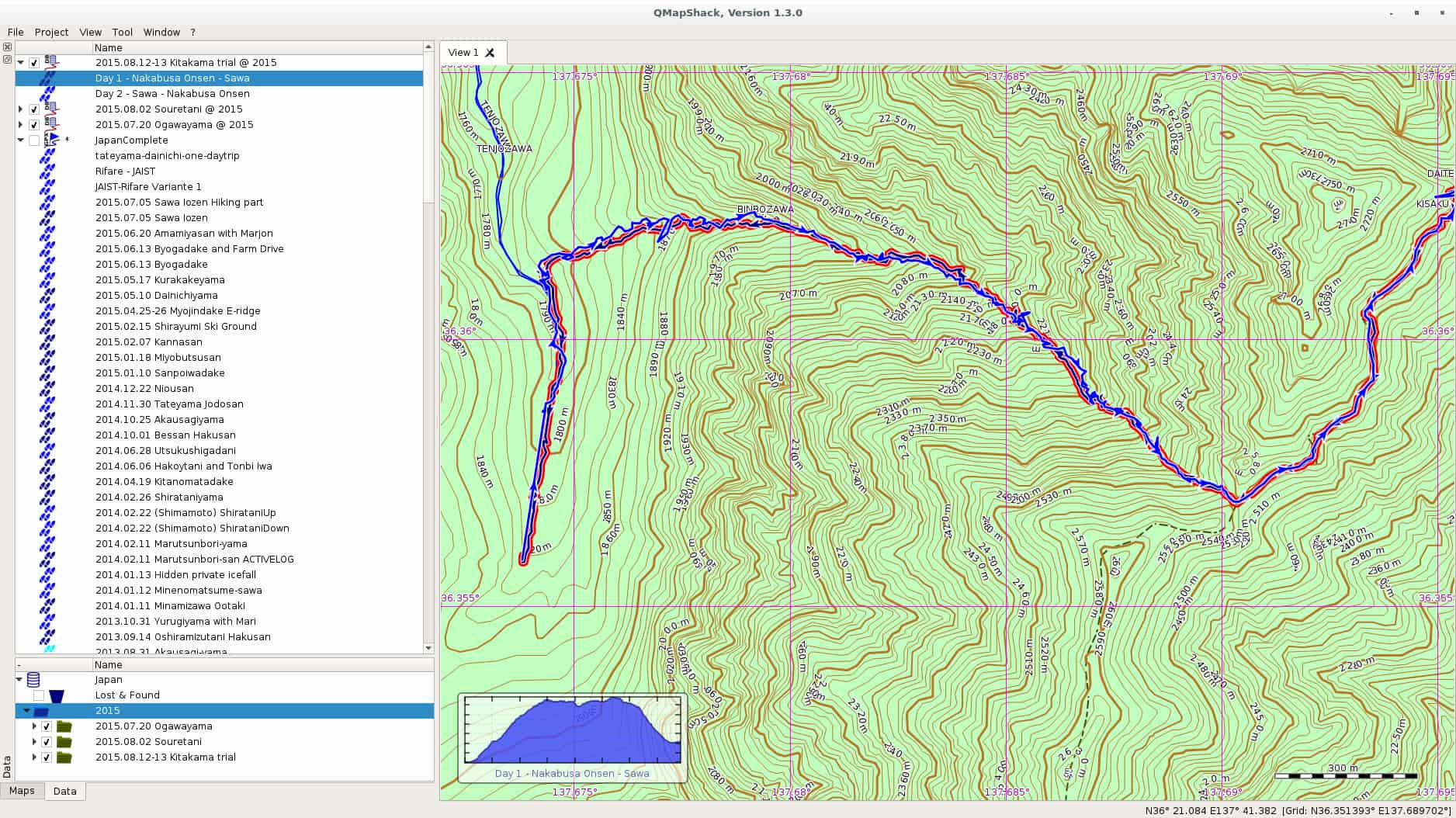
In one of the comments on my last post on Windows 10, a friendly reader from my home country pointed me at QMapShack as a replacement for QuoVadis. I have been using QuoVadis now for many many years, and it contains my mountaineering history all the way back. All the guiding work, all the track. QuoVadis is a great program, able to work with various commercial digital maps as well as GPS receivers. It only has one disadvantage, it doesn t work on Linux. QMapShack is very similar in the target audience, but very different in usage. The one big difference is of course the set of maps one can use with QMapShack. Fortunately, Garmin Maps are supported, and since all my maps regarding Japan are Garmin maps, I am now in the process to converting to QMapShack at least for my Japan GPS data. qmapshack Let us start with the program I was using since ages, and still are using, QuoVadis. QuoVadis is a great program, there is nothing to complain. It is extremely feature-rich, and above all it can work with many different maps. While working as mountain guide in Europe it was an essential tool for me. I could use the digital raster maps of Austria, Switzerland (SwissTOPO), Germany, France, Italy, as well as Garmin vector maps. For serious work as a professional it was indispensable for me. Unfortunately, it never worked on Linux. For some time I had a VirtualBox installation of Windows, but that was more a clutch than anything else. So for most of the GPS work I had to reboot my laptop to Windows, do my stuff there, and then switch back to Linux. QMapShack is far from as feature rich as QuoVadis, but as far as I see now, it does have enough features for me and my mountaineering in Japan. Dealing with GPS units is not a problem, this is the easy part. The difficult part are the digital maps. Fortunately, QMapShack supports Garmin vector maps, the only maps that are (as far as I know) available digitally for Japan. Getting used to QMapShack is a bit a challenge coming from QuoVadis, but the Wiki help pages allowed a quick start. Within short time I had maps set up. Next step was to download a data from my last weekend trip to Yarigadake, Kitakama-ridge (unfortunately we had to turn back due to rain). Connecting the unit and mounting it was already enough to show up in QMapShack, and allowed me to copy the tracks to my local database. Next I switched to Windows and exported some tracks from my Japan folder to a gpx file. After rebooting to Linux, I loaded the gpx file into QMapShack and without failure all the tracks and routes showed up, as it can be seen in the above screenshot (click on it to get a bigger version). Also the display of the Garmin map worked perfectly. Update: Please see the comment section for explanation of the necessary functions. QMapShack does provide similar functionality. Thanks to Oliver for pointing me at it! After some time of working there are a few functions from QuoVadis I am missing for now at QMapShack: Although these two functionalities are missing, all in all I am very happy for now with QMapShack. My next steps are: Finally, above all, I see a future where I do not need to reboot into Windows for doing my GPS work. For now I will import all the data into both applications, but if QMapShack holds its promises from the first day of usage, I am confident that this will not be necessary in future. Enjoy.

13 August 2015

Tiago Bortoletto Vaz: c3video for debconf #4

This is a follow-up to my previous post related the DebConf videoteam using a new software stack for the next conferences: http://acaia.ca/~tiago/posts/c3video-for-dc-take-3/. As mentioned before, C3TT provides a set of scripts which will work in background for most reviewing and video processing tasks. The first will just check if the talk is done and mark the related ticket as recorded. The second script, B-mount4cut, does a nice job by mounting a custom fuse filesystem providing the following files (more detailed explanation here: uncut.dv: full original dv file used as input file for the final trimming. project.kdenlive: Kdenlive project file for the operator. Once it's saved with the trim marks, fuse-vdv will do a parse on it and use the marks for cutting. cut.dv: contains only the frames between the trim marks extracted from project.kdenlive. cut-complete.dv: contains the frames between the trim marks extracted from project.kdenlive, plus a prepended intro and an appended video. Paths for these files should be previously set in the web interface as properties Processing.Path.Outro and Processing.Path.Intros. The outro file can be, for instance, an appended video file with a common thanks for sponsors. The intro files is usually an individual frame for each talk, being a colorful presentation poster. We can also set the intro duration in the Processing.Duration.Intro property. cut.wav: demuxed audio from cut.dv Note: in fact, fuse-vdv provides virtual video files as a concatenation of original input files, so avoiding copying large and redundant data. Ideally, these fuse mountpoints will be shared over the network for operators via glusterFS, but I'll skip that for now. After adding the trimming marks and saving the project using Kdenlive, the operator should go to the web interface and mark the ticket as cut:
/images/c3tt_cut.png

Mark ticket as cut

Note: I've been able to do the marks in Kdenlive using double-click in the video, then editing the crop start/end options. The buttons "[" and "]" didn't work in my Kdenlive version for some unknown reason. In the current DebConf video environment I had to make a link builder for translating the path/file names to the C3TT format. So, for the Amsterdam/2015-08-13/09:57:02.dv we should have a amsterdam-2015.08.13-09_57_02.dv symlink. From now the system will delivery the next tasks to C-cut-postprocessor script. This script will just check the marks from the Kdenlive project file and do the cutting job. So far it has worked perfectly here for the first video sessions in DebCamp, with zero hack in the original code, wow! Next post will be about the encoding script, named D-encoding.

Matthew Palmer: Your "Infrastructure as Code" is still code!

Whether you re a TDD zealot, or you just occasionally write a quick script to reproduce some bug, it s a rare coder who doesn t see value in some sort of automated testing. Yet, somehow, in all of the new-age Infrastructure as Code mania, we appear to have forgotten this, and the tools that are commonly used for implementing Infrastructure as Code have absolutely woeful support for developing your Infrastructure Code. I believe this has to change. At present, the state of the art in testing system automation code appears to be, spin up a test system, run the manifest/state/whatever, and then use something like serverspec or testinfra to SSH in and make sure everything looks OK . It s automated, at least, but it isn t exactly a quick process. Many people don t even apply that degree of rigour to their system config systems, and rely on manual testing, or even just doing it live! , to shake out the bugs they ve introduced. Speed in testing is essential. As the edit-build-test-debug cycle gets longer, frustration grows exponentially. If it takes two minutes to get a something went wrong report out of my tests, I m not going to run them very often. If I m not running my tests very often, then I m not likely to write tests much, and suddenly oops. Everything s on fire. In traditional software development, the unit tests are the backbone of the fast feedback cycle. You re running thousands of tests per second, ideally, and an entire test run might take 5-10 seconds. That s the sweet spot, where you can code and test in a rapid cycle of ever-increasing awesomeness. Interestingly, when I ask the users of most infrastructure management systems about unit testing, they either get a blank look on their face, or, at best, point me in the direction of the likes of Test Kitchen, which is described quite clearly as an integration platform, not a unit testing platform. Puppet has rspec-puppet, which is a pretty solid unit testing framework for Puppet manifests although it isn t widely used. Others, though nobody seems to have any ideas. The blank look is near-universal. If infrastructure developers want to be taken seriously, we need to learn a little about what s involved in the development part of the title we ve bestowed upon ourselves. This means knowing what the various types of testing are, and having tools which enable and encourage that testing. It also means things like release management, documentation, modularity and reusability, and considering backwards compatibility. All of this needs to apply to everything that is within the remit of the infrastructure developer. You don t get to hand-wave away any of this just because it s just configuration! . This goes double when your just configuration! is a hundred lines of YAML interspersed with templating directives (SaltStack, I m looking at you).

12 August 2015

Elena 'valhalla' Grandi: Printing a 2965 lines text file

Printing a 2965 lines text file

Let us image I have a reason https://people.debian.org/~anibal/ksp-dc15/ksp-dc15.html to print a text file that is 2965 lines long, is encoded in utf-8 (so a2ps and enscript don't work) and I don't want to destroy a whole forest for it.

I've started by using xelatex to get a nicely typeset A5 page with my file in a monospaced font: partecipants.tex

\documentclass[a5paper] article
\usepackage fontspec
\usepackage[left=1cm,right=1cm,top=0.8cm,bottom=1cm,foot=0.2cm] geometry
\usepackage listings

\lstset %
basicstyle=\ttfamily\scriptsize,
frame=none,
keepspaces=true,


\begin document
\lstinputlisting ksp-dc15.txt
\end document


This gets compiled into partecipants.pdf with


$ xelatex partecipants.tex


And resulted in 44 pages, 4 less than the 48 needed by a2ps, and printable on just 11 A4 sheets.

I wanted it to be easily manageable while walking around, taking notes into it while standing, so I decided to arrange it in booklet form:


$ pdfbook partecipants.pdf


The result, partecipants-book.pdf was printed (two sided, of course) folded and stitched in the middle.

I could have arranged it into signatures, but this would have required an additional sheet to bring the number of pages to a multiple of 16.

I know that there are electronic alternatives around, and I've also considered just carrying around the file and adding notes (to a copy?) with vim, but I'd trust a paper copy more.

Daniel Pocock: Recording live events like a pro (part 2: video)

In the first blog in this series, we looked at how to capture audio effectively for a range of different events. While recording audio appears less complicated than video, it remains fundamental to a good recording. For some types of event, like a speech or a debate, you can have quite a bad video with poor lighting and other defects but people will still be able to watch it if the audio is good. Therefore, if you haven't already looked at the previous blog, please do so now. As mentioned in the earlier blog, many people now have high quality equipment for recording both audio and video and a wide range of opportunities to use it, whether it is a talk at a conference, a wedding or making a Kickstarter video. The right camera for video recording The fundamental piece of equipment is the camera itself. You may have a DSLR camera that can record video or maybe you have a proper handheld video camera. The leading DSLR cameras, combined with a good lens, make higher quality recordings than many handheld video cameras. Unfortunately, although you pay good money to buy a very well engineered DSLR that could easily record many hours of video, most DSLRs are crippled to record a maximum of 30 minutes in one recording. This issue and some workarounds are discussed later in this blog. If you don't have any camera at all you need to think carefully about which type to buy. If you are only going to use it once you may want to consider renting or borrowing or asking for other people attending the event to bring whatever cameras they have to help make multiple recordings (the crowdsourcing solution). If you are a very keen photographer then you will probably have a preference for a DSLR. Accessories Don't just look at the cost of your camera and conclude that is all the budget you need. For professional quality video recording, you will almost certainly need some accessories. You may find they are overpriced at the retail store where you bought your camera, but you still need some of them, so have a look online.
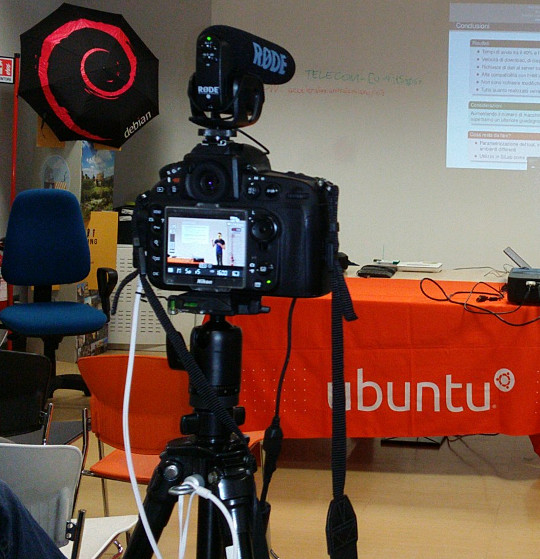
Recording a talk at a free software event with a Nikon D800 on a very basic tripod with Rode VideoMic Pro, headphones (white cable) and external power (black cable) If you want to capture audio with the camera and record it in the video file (discussed in more detail below), you will need to purchase a microphone that mounts on the camera. The built-in microphones on cameras are often quite bad, even on the most expensive cameras. If you are just using the built-in microphone for reference audio (to help with time synchronization when you combine different audio files with the video later) then the built-in microphone may be acceptable. Camera audio is discussed in more detail below. If your camera has a headphone socket, get some headphones for listening to the audio. Make sure you have multiple memory cards. Look carefully at the speed of the memory cards, slow ones are cheaper but they can't keep up with the speed of writing 1080p video. At a minimum, you should aim to buy memory cards that can handle one or two days worth of data for whatever it is you do. A tripod is essential for most types of video. If you use a particularly heavy camera or lens or if you are outdoors and it may be windy you will need a heavier tripod for stability. For video, it is very useful to have a tripod with a handle for panning left and right but if the camera will be stationary for the whole recording then the handle is not essential. Carrying at least one spare battery is another smart move. On one visit to the Inca Trail in Peru, we observed another member of our group hiking up and down the Andes with a brand new DSLR that they couldn't use because the battery was flat. For extended periods of recording, batteries will not be sufficient and you will need to purchase a mains power supply (PSU). These are available for most types of DSLR and video camera. The camera vendors typically design cameras with unusual power sockets so that you can only use a very specific and heavily overpriced PSU from the same company. Don't forget a surge protector too. There are various smartphone apps that allow you to remotely control the camera from the screen of your phone, such as the qDslrDashboard app. These often give a better preview than the screen built-in to the camera and may even allow you to use the touch screen to focus more quickly on a specific part of the picture. A regular USB cable is not suitable for this type of app, you need to buy a USB On-The-Go (OTG) cable.
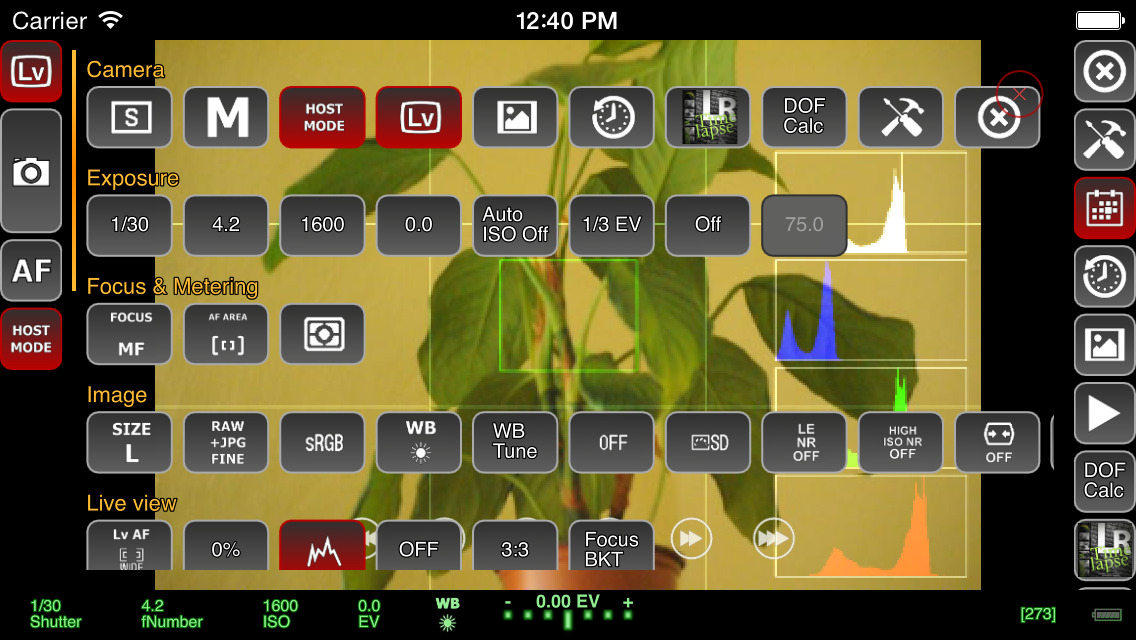
Screenshot of qDslrDashboard app on a smartphone, controlling a DSLR camera If you plan to copy the video from the camera to a computer at the event, you will need to make sure you have a fast memory card reader. The memory card readers in some laptops are quite slow and others can be quite fast so you may not need to buy an extra card reader. Camera audio Most cameras, including DSLRs, have a built-in microphone and a socket for connecting an external microphone. The built-in microphones obtain very poor quality sound. For many events, it is much better to have independent microphones, such as a lapel microphone attached to a smartphone or wireless transmitter. Those solutions are described in part one of this blog series. Nonetheless, there are still some benefits of capturing audio in the camera. The biggest benefit is the time synchronization: if you have audio recordings in other devices, you will need to align them with the video using post-production software. If the camera recorded an audio stream too, even if the quality is not very good, you can visualize the waveform on screen and use it to align the other audio recordings much more easily and precisely. If the camera will be very close to the people speaking then it may be acceptable to use a microphone mounted on the camera. This will be convenient for post-production because the audio will be synchronized with the video. It may still not be as good as a lapel microphone though, but the quality of these camera-mounted microphones is still far higher than the built-in microphones. I've been trying the Rode VideoMic Pro, it is definitely better than recording with the built-in microphone on the camera and also better than the built-in microphone on my phone. One problem that most people encounter is the sound of the lens autofocus mechanism being detected by the microphone. This occurs with both the built-in microphone and any other microphone you mount on the camera. A microphone mounted on top of the camera doesn't detect this noise with the same intensity as the built-in microphone but it is still present in the recordings. If using a camera-mounted microphone to detect the audio from an audience, you may need to have an omnidirectional microphone. Many camera-mounted microphones are directional and will not detect very much sound from the sides or behind the camera. When using any type of external microphone with the camera, it is recommend to disable automatic gain control (AGC) in the camera settings and then manually adjust the microphone sensitivity/volume level. Use headphones A final word on audio - most good cameras have an audio output socket. Connect headphones and wear them, to make sure you are always capturing audio. Otherwise, if the microphone's battery goes flat or if a wireless microphone goes out of range you may not notice. Choosing a lens The more light you get, the better. Bigger and more expensive lenses allow more light into the camera. Many of the normal lenses sold with a DSLR camera are acceptable but if it is a special occasion you may want to rent a more expensive lens for the day. If you already have a lens, it is a very good idea to test it in conditions similar to those you expect for the event you want to record. Recording duration limits Most DSLR cameras with video capability impose a 30 minute maximum recording duration This is basically the result of a friendly arrangement between movie studios and politicians to charge an extra tax on video recording technology and potentially make the movie studio bosses richer, supposedly justified by the fact that a tiny but exaggerated number of people use their cameras to record movies at the cinema. As a consequence, most DSLR manufacturers limit the duration of video recording so their product won't be subject to the tax, ensuring the retail price is lower and more attractive. On top of this, many DSLR cameras also have a 4GB file size limit if they use the FAT filesystem. Recording 1080p video at a high frame rate may hit the file size limit in 10 minutes, well before you encounter the 30 minute maximum recording duration. To deal with the file size issue, you can record at 720p instead of 1080p and use the frame rate 24fps. For events longer than 30 minutes or where you really want 1080p or a higher frame rate, there are some other options you can consider:
  • Buy or rent a proper video camera instead of using a DSLR camera
  • Using multiple cameras that can stop and be restarted at different times.
  • Manually stopping and restarting the camera if there are breaks in the event where it is safe to do so.
  • Use an app to control the camera and program it to immediately restart the recording each time it stops
  • Extract the raw output from the camera's HDMI socket and record into some other device or computer. There are several purpose-built devices
    that can be used this way with an embedded SSD for storage.
  • There are also some people distributing unofficial/alternative firmware images that remove the artificial 30 minute recording limit.
Camera settings There are many online tutorials and demonstration videos on YouTube that will help you optimize the camera settings for video. You may have already made recordings using the automatic mode. Adjusting some or all of the settings manually may help you create a more optimal recording. You will need to spend some time familiarizing yourself with the settings first. The first thing to check is white balance. This tells the camera the type of lighting in the location. If you set this incorrectly then the colours will be distorted. Many cameras have the ability to automatically set the white balance. For video, you may be able to change one or more settings that control the recording quality. These settings control the file compression ratio and image size. Typical image size settings are 720p and 1080p. Compression ratio may be controlled by a high/medium/low quality setting. Choosing the highest quality and biggest picture requires more space on the memory card and also means you reach the 4GB file size limit more quickly. A higher quality setting also implies a faster memory card is required, because the rate of megabytes per second written to the memory card is higher. Next you need to think about the frame rate. Events that involve fast moving subjects, such as sports, typically benefit from a higher frame rate. For other events it is quite acceptable to use 24 frames per second (fps). Higher frame rates also imply bigger file size and a requirement for a faster memory card. Once you have decided on the frame rate, the next thing to do is set the shutter speed. Use a shutter speed that is double the frame rate. For example, if using 24fps or 25fps, use a 1/50 shutter speed. The final two settings you need to adjust are the ISO and aperture. Set these based on the lighting conditions and extent to which the subjects are moving. For example, if the setting is dark or if you are trying to record fast moving subjects like athletes, vehicles or animals, use an ISO value of 800 or higher. Once you have chosen ISO, adjust the aperture to ensure the picture is sufficiently illuminated. Aperture also has a significant impact on the depth of field. Operating the camera: zoom and focus Many people use zoom lenses. It is not always necessary to change the zoom while recording a video, you can use software to zoom in and out on individual parts of the picture when editing it in post-production. If you do change the zoom while recording, it may be more difficult to maintain focus. Almost all lenses support manual focus (turning the focus ring by hand) and many support automatic focus. When shooting photographs with a DSLR, the mirror is down and the camera can use dedicated sensors for focus and light sensing. When shooting video, the mirror is up and the camera can not use the same focus sensors that are used in photography. Video recording uses a digital focussing algorithm based on contrast in the picture. If you take a lot of photos you are probably quite accustomed to the fast and precise autofocus for photography and you will notice that keeping a video in focus is more challenging. As mentioned already, one of the first things you can do to keep focus simple is to avoid zooming while recording. Record in a higher resolution than you require and then zoom with software later. Some people record using 4k resolution even when they only want to produce a 720p video, as they can digitally zoom in to different parts of the 4k recording without losing detail. If the subject is very stationary (people sitting at a desk for an interview is a typical example), you may be able to set the camera to manual focus and not change it at all while recording. If you choose to enable autofocus while recording, any built-in camera microphone or microphone mounted on the camera is likely to detect sounds from the motorized focus system. Ultimately, the autofocus mechanism is not accurate for all subjects and you may be unable to stop them moving around so you will need to change the focus manually while recording. It requires some practice to be able to do this quickly without overshooting the right focus. To make life more tricky, Nikon and Canon focus rings rotate in the opposite direction, so if you are proficient using one brand you may feel awkward if you ever have to use the other. A good way to practice this skill is to practice while in the car or on the train, pointing at different subjects outside the window and trying to stay in focus as you move from one subject to the next. Make a trial run Many events, from weddings right up to the Olympic Games opening ceremony, have a trial run the day before. One reason for that is to test the locations and settings of all the recording and broadcasting equipment. If a trial run isn't possible for your event, you may find some similar event to practice recording and test your equipment. For example, if you are planning to record a wedding, you could try and record a Sunday mass in the same church. Backup and duplicate the recordings before leaving the event If you only have one copy of the recordings and the equipment is stolen or damaged you may be very disappointed. Before your event, make a plan to duplicate the raw audio and video recordings so that several people can take copies away with them. Decide in advance who will be responsible for this, ensure there will be several portable hard disks and estimate how much time it will take to prepare the copies and factor this into the schedule. Conclusion All the products described can be easily purchased from online retailers. You may not need every accessory that is mentioned as it depends on the type of event you record. The total cost of buying or renting the necessary accessories may be as much as the cost of the camera itself so if you are new to this you may need to think carefully about making a budget with a spreadsheet to do it correctly. Becoming familiar with the camera controls and practicing the techniques for manual focus and zoom can take weeks or months. If you enjoy photography this can be time well spent but if you don't enjoy it then you may not want to commit the time necessary to make good quality video. Don't rule out options like renting equipment instead of buying it or crowdsourcing, asking several participants or friends to help make recordings with their own equipment. For many events, audio is far more indispensable than video and as emphasizing at the beginning of this article, it is recommended that you should be one hundred percent confident in your strategy for recording audio before you start planning to record video.

11 August 2015

Matthias Klumpp: AppStream/DEP-11 for everyone! (beta!)

One of the things we discussed at this year s Akademy conference is making AppStream work on Kubuntu.appstream-logo On Debian-based systems, we use a YAML-based implementation of AppStream, called DEP-11 . DEP-11 exists for historical reasons (the DEP-11 YAML format was a superset of AppStream once) and because YAML, unlike XML, is one accepted file format by the Debian FTPMasters team, who we want to have on board when adding support for AppStream. So I ve spent the last few days on setting up the DEP-11 generator for Kubuntu, as well as improving it greatly to produce more meaningful error messages and to generate better output. It became a bit slower in the process, but the greatly improved diagnostics data is worth it. For example, maintainers of Debian packages will now get a more verbose explanation of issues found with metadata in their packages, making them easier to fix for people who didn t get in contact with AppStream yet. At time, we generate AppStream metadata for Tanglu, Kubuntu and Debian, but so far only Tanglu makes real use of it by shipping it in a .deb package. Shipping the data as package is only a workaround though, for a proper implementation, the data will be downloaded by Apt. To achieve that, the data needs to reach the archive first, which is something that I can hopefully discuss and implement with the FTPMasters team of Debian at this year s Debconf. When this is done, the new metadata will automatically become available in tools like GNOME-Software or Muon Discover. How can I see if there are issues with my package? The dep11-generator tool will return HTML pages to show both the extracted metadata, as well as issues with it. You can find the information for the respective distribution here: Each issue tag will contain a detailed explanation of what went wrong. Errors generally lead to ignoring the metadata, so it will not be processed. Warnings usually concern things which might reduce the amount of metadata or make it less useful, while Info-type hints contain information on how to improve the metadata or make it more useful. Can I use the data already? Yes, you can. You just need to place the compressed YAML files in /var/cache/app-info/yaml and the icons in /var/cache/app-info/icons/<suite>-<component>/<size>, for example: /var/cache/app-info/icons/jessie-amd64/64 64 I think I found a bug in the generator In that case, please report the issue against the appstream-dep11 package at Debian, or file an issue at Github.. The only reason why I announce this feature now is to find remaining generator bugs, before officially announcing the feature on debian-devel-announce. When will this be officially announced? I want to give this feature a little bit more testing, and ideally have the integration into the archive ready, so people can see how the metadata looks like when rendered in GNOME-Software/Discover. I also want to write a bit more documentation to help Debian developers and upstreams to improve their metadata. Ideally, I also want to incorporate some feedback at Debconf when announcing full AppStream support in Debian. So take all the stuff you ve read above as a little sneak peek  Debconf15goingI will also give a talk at Debconf, titled AppStream, Limba, XdgApp Where we are going. The aim of this talk is to give an insight i tnto the new developments happening in the software distribution area, and what the goal of these different projects is (the talk should give an overview of what s in the oven and how it will impact Debian). So if you are interested, please drop by :-) Maybe setting up a BOF would also be a good idea.

10 August 2015

Matthias Klumpp: Akademy 2015

I am very late with this, but I still wanted to write a few words about Akademy 2015. First of all: It was an awesome conference! Meeting all the great people involved with KDE and seeing who I am working with (as in: face to face, not via email) was awesome. We had some very interesting discussions on a wide variety of topics, and also enjoyed quite some beer together. Particularly important to me was of course talking to Daniel Vr til who is working on XdgApp, and Aleix Pol of Muon Discover fame.
Also meeting with the other Kubuntu members was awesome I haven t seen some of them for about 3 years, and also met many cool people for the first time. My talk on AppStream/Limba went well, except that I got slightly confused by the timer showing that I had only 2 minutes left, after I had just completed the first half of my talk. It turned out that the timer was wrong  Another really nice aspect was to be able to get an insight into areas where I am usually not involved with, like visual design. It was really interesting to learn about the great work others are doing and to talk to people about their work and I also managed to scratch an itch in the Systemsettings application, where three categories had shown the same icon. Now Systemsettings looks like it is supposed to be, finally :-) The only thing I could maybe complain about was the weather, which was more Scotland/Wales like than Spanish but that didn t stop us at all, not even at the social event outside. So I actually don t complain  We also managed to discuss some new technical stuff, like AppStream for Kubuntu, and plenty of other things that I ll write about in a separate blog post. Generally, I got so many new impressions from this year s Akademy, that I could write a 10-pages long blogpost about it while still having to leave out things.

Kudos to the organizers of this Akademy, you did a fantastic job! I also want to thank the Ubuntu community for funding my flight, and the Kubuntu community for pushing me a little to attend :-). KDE is a great community with people driving the development of Free Software forward. The diversity of people, projects and ideas in KDE is a pleasure, and I am very happy to be part of this community. Akademy2015

Steve Kemp: A brief look at the weed file store

Now that I've got a citizen-ID, a pair of Finnish bank accounts, and have enrolled in a Finnish language-course (due to start next month) I guess I can go back to looking at object stores, and replicated filesystems. To recap my current favourite, despite the lack of documentation, is the Camlistore project which is written in Go. Looking around there are lots of interesting projects being written in Go, and so is my next one the seaweedfs, which despite its name is not a filesystem at all, but a store which is accessed via HTTP. Installation is simple, if you have a working go-lang environment:
go get github.com/chrislusf/seaweedfs/go/weed
Once that completes you'll find you have the executable bin/weed placed beneath your $GOPATH. This single binary is used for everything though it is worth noting that there are distinct roles: In our demo we'll have three hosts one, the master, two and three which are storage nodes. First of all we start the master:
root@one:~# mkdir /node.info
root@one:~# weed master -mdir /node.info -defaultReplication=001
Then on the storage nodes we start them up:
root@two:~# mkdir /data;
root@two:~# weed volume -dir=/data -max=1  -mserver=one.our.domain:9333
Then the second storage-node:
root@three:~# mkdir /data;
root@three:~# weed volume -dir=/data -max=1 -mserver=one.our.domain:9333
At this point we have a master to which we'll talk (on port :9333), and a pair of storage-nodes which will accept commands over :8080. We've configured replication such that all uploads will go to both volumes. (The -max=1 configuration ensures that each volume-store will only create one volume each. This is in the interest of simplicity.) Uploading content works in two phases: We'll do that like so:
laptop ~ $ curl -X POST http://one.our.domain:9333/dir/assign
 "fid":"1,06c3add5c3","url":"192.168.1.100:8080","publicUrl":"192.168.1.101:8080","count":1 
client ~ $ curl -X PUT -F file=@/etc/passwd  http://192.168.1.101:8080/1,06c3add5c3
 "name":"passwd","size":2137 
In the first command we call /dir/assign, and receive a JSON response which contains the IPs/ports of the storage-nodes, along with a "file ID", or fid. In the second command we pick one of the hosts at random (which are the IPs of our storage nodes) and make the upload using the given ID. If the upload succeeds it will be written to both volumes, which we can see directly by running strings on the files beneath /data on the two nodes. The next part is retrieving a file by ID, and we can do that by asking the master server where that ID lives:
client ~ $ curl http://one.our.domain:9333/dir/lookup?volumeId=1,06c3add5c3
 "volumeId":"1","locations":[
  "url":"192.168.1.100:8080","publicUrl":"192.168.1.100:8080" ,
  "url":"192.168.1.101:8080","publicUrl":"192.168.1.101:8080" 
] 
Or, if we prefer we could just fetch via the master - it will issue a redirect to one of the volumes that contains the file:
client ~$ curl http://one.our.domain:9333/1,06c3add5c3
<a href="http://192.168.1.100:8080/1,06c3add5c3">Moved Permanently</a>
If you follow redirections then it'll download, as you'd expect:
client ~ $ curl -L http://one.our.domain:9333/1,06c3add5c3
root:x:0:0:root:/root:/bin/bash
..
That's about all you need to know to decide if this is for you - in short uploads require two requests, one to claim an identifier, and one to use it. Downloads require that your storage-volumes be publicly accessible, and will probably require a proxy of some kind to make them visible on :80, or :443. A single "weed volume .." process, which runs as a volume-server can support multiple volumes, which are created on-demand, but I've explicitly preferred to limit them here. I'm not 100% sure yet whether it's a good idea to allow creation of multiple volumes or not. There are space implications, and you need to read about replication before you go too far down the rabbit-hole. There is the notion of "data centres", and "racks", such that you can pretend different IPs are different locations and ensure that data is replicated across them, or only within-them, but these choices will depend on your needs. Writing a thin middleware/shim to allow uploads to be atomic seems simple enough, and there are options to allow exporting the data from the volumes as .tar files, so I have no undue worries about data-storage. This system seems reliable, and it seems well designed, but people keep saying "I'm not using it in production because .. nobody else is" which is an unfortunate problem to have. Anyway, I like it. The biggest omission is really authentication. All files are public if you know their IDs, but at least they're not sequential ..

Mirco Bauer: Smuxi 1.0 "Finally" Release

And here we go again! We're proud to announce the new version of Smuxi, release 1.0 "Finally". During the development, 20 bug reports and 10 feature requests in 285 commits were worked on.

Finally 1.0 Smuxi is celebrating its 10th anniversary! 10 years ago, Mirco Bauer made the first commit to the Smuxi source code repository and is still very committed to it. He started the Gnosmirc project in 2005 when the only way a 24/7 "always-on" experience with IRC meant you had to use a console based IRC client like bitchx, irssi or epic combined with screen and SSH. This looks very practical at first and is a powerful Unix-ish way of accomplishing that job, but it has the big downside that it doesn't integrate with a desktop environment like GNOME. A bit later the Gnosmirc project was renamed to Smuxi when the new code architecture allowed other frontend implementations besides the GNOME one. The ncurses/STFL based text frontend was later implemented and is considered stable and useful enough for day to day use, but still has some rough edges. WinForms and WPF frontends also exist but need more work to reach a usable state. At this point Smuxi 1.0 contains all features that we could have imagined and even goes beyond with very advanced features like message patterns or language agnostic scripting.

Changes since Smuxi 0.11

Message Persistence One of the biggest drawbacks of the IRC protocol ever was that messages can't be retrieved from the IRC server because the IRC server is simply relaying messages to the connected clients. So, if an IRC client is freshly started and connects it starts to receive new messages, but all message you had received before are no longer available. This always made IRC in a way "volatile" unlike other communication systems like email where messages are relayed and stored on the client side. One common approach for IRC clients is to store log files in a text file. This is a simple feature and gives the user the possibility to read older conversations. Smuxi also supports text file logging like other IRC clients but it has a big user experience drawback as you need to open the file from the disk outside of the IRC client. In Smuxi 1.0 messages sent and received are now stored on the disk in a way they can automatically be retrieved/loaded when you restart Smuxi. It is like you have never closed Smuxi! This feature was already available in Smuxi for some time as a technical preview and it used the Db4o object database, but we were never happy about the performance neither with the stability so it always stayed an optional feature you need to enable. This year we tried a new message buffer backend using the famous SQLite database and it works much faster and stable as a rock. So finally we can enable this feature by default because it just works and enhanced your experience. We hope you enjoy it. Documentation of how you can change Smuxi message buffer backend and behavior can be found here. For instructions how to convert your existing db4o history to SQLite can be found in the "smuxi-message-buffer tool" section.

User Interface Enhancements
  • Synced message markers: the position of of the seen/unseen messages marker is pushed to the smuxi-server and remembered when the frontend reconnects. (Sebastian Poeplau)
  • Persistent message markers: the message marker position is also remembered across Smuxi(-server) restarts.
  • Message Counter: in addition to the highlight counter next to a chat new/unseen messages are also counted. This makes it easy to identify chats with much traffic.
  • Single application instance support. If you start Smuxi again from the menu it will bring the existing instance into the foreground. This makes the Ubuntu Messaging Menu much nicer.
  • The command/message entry is alignment with the messages. (Lex Berezhny)

Text Frontend Enhancements
  • The console background color can now be configured using: /config set STFL/Interface/TerminalBackgroundColor = #000000 (Ond ej Ho ek)
  • The text color contrast if nicks with the background is now ensured (Ond ej Ho ek) #1033
  • Messages containing images will not be skipped but their alternative text is shown instead (Ond ej Ho ek) #1035

New smuxi-message-buffer tool This is a new commandline tool that allows you to convert and export the message history of Smuxi message buffer files. This can be used to convert your existing Db4o history to SQLite like this for example:
for DB_DB4O in $HOME/.local/share/smuxi/buffers/*/*/*/*.db4o; do
    DB_SQLITE=$ DB_DB4O/.db4o/.sqlite3 
    smuxi-message-buffer convert $DB_DB4O $DB_SQLITE
done
Smuxi shouldn't be running when using this tool.

Scripting Enhancements

New Hook Points Smuxi 1.0 supports with the following new hook points:
  • engine/protocol-manager/on-presence-status-changed/ This hook point is raised when the presence status of a protocol manager changes. This happens for example when an IRC connection toggles the away state.
  • engine/session/on-event-message/ This hook point raises event messages that usually begin with "-!-". This can be useful to track state changes that are shown as a message without having a dedicated hook point for it.
  • engine/session/command-$cmd/ This hook point is raised on the engine side for commands, e.g. /some_command that isn't handled by the frontend or engine built-in commands. This is useful for commands that should be available for all frontends and isn't specific to the frontend environment.

New Plugins The following new plugins are supported by Smuxi 1.0:
  • topic-diff: Shows the word differences of the topic after topic changes. (meebey)
  • away-nick: Automatically appends and removes $AWAY_SUFFIX to/from the nick name when you go away using the /away command or by disconnecting all frontends from the smuxi-server. (meebey)
  • system-info: Shows system info. Includes system kernel version, distro name, and CPU vendor information. (AK0)
  • now-playing: This plugin is not new but was rewritten in Python to get rid of the spaghetti code monster which was written in Bash. (jamesaxl)

IRC Enhancements
  • NICKSERV support Notices from Nick/ChanServ are no longer shown on all channels as they like to send greeting messages and other spam which is annoying to see on all channels. #868
  • Automatic rejoin of channels protected with a key works as expected again
  • Connecting to irc.gitter.im is now supported. Gitter's IRCd implementation has a bug in the IRC protocol which is now tolerated.

Twitter Enhancements
  • The /search command shows tweets as live stream
  • Added /delete, /favorite and /unfavorite commands

Behind the Scenes
  • Re-licensed smuxi-common from GPLv2 to MIT/X11

Contributors Contributors to this release are the following people:
  • Mirco Bauer (199 commits)
  • Carlos Mart n Nieto (15 commits)
  • Andr s G. Aragoneses (14 commits)
  • Piotr Dr g (12 commits)
  • Ond ej Ho ek (11 commits)
  • Oliver Schneider (5 commits)
  • Calvin B (4 commits)
  • Victor Seva (3 commits)
  • Will Johansson (2 commits)
  • Sebastian Poeplau (2 commits)
  • Julian Taylor (2 commits)
  • James Axl (2 commits)
  • Daniel Mustieles (2 commits)
  • Christopher James Halse Rogers (2 commits)
  • . Uzun (1 commit)
  • Lex Berezhny (1 commit)
  • Kalle Kaitala (1 commit)
  • Jordi Mas (1 commit)
  • Joe Hansen (1 commit)
  • Jimmie Elvenmark (1 commit)
  • Dimitris Spingos (1 commit)
  • Dean Lee (1 commit)
  • Cl ment Bourgeois (1 commit)
  • Carlos Hernandez (1 commit)
Thank you very much for your contributions to Smuxi! Want this? Go here and grab it right now!

Posted Sun Aug 9 17:48:18 2015

Norbert Preining: Debian/TeX Live 2015.20150810-1

For those who are starving for some updates while the big gcc5 transitions brings the rest of Debian/sid to a halt, here is some fresh meat, a new TeX Live checkout. Nothing spectacular new here, just the usual big bunch of updates of and several new packages. Maybe worthwhile mentioning is that luasseq has been reincorporated into the TeX Live packages. Thanks to the maintainer for his work till now! Debian - TeX Live 2015 From the long list of changes let me pick one update and one new package: pgf has been updated to 3.0.1, which is just a small change in number, but incorporates 1.5 years of fixes, and the list of fixes is long. And a very interesting newcomer is pdfpagediff by C. V. Rad hakr ish nan. It allows visual comparison of two pdf files by overlaying them in a transparent way, making even slight changes in the layout immediately visible. Of course, these are not the only updates and newcomers, see the list below. Updated packages academicons, addlines, algorithms, archaic, babel, babel-estonian, biber, biblatex-source-division, bidi, bxjscls, chronology, cjk-ko, conteq, csplain, csquotes, curve2e, datatool, doclicense, dvips, eledmac, enotez, esami, eso-pic, etex-pkg, etoolbox, exsheets, fandol, fithesis, fontawesome, fontspec, forest, glossaries, greek-inputenc, jslectureplanner, kotex-oblivoir, kotex-utf, l3build, l3experimental, l3kernel, l3packages, latex, leadsheets, ledmac, lshort-english, luamplib, luasseq, luatexko, maths-symbols, media9, memoir, metrix, mhchem, minitoc, moderncv, modiagram, morefloats, mptopdf, msu-thesis, nameauth, ndsu-thesis, newpx, newtx, newtxsf, newtxtt, notes, ocgx2, pageslts, pdfpages, pdftex, pgf, phonrule, plain, polyglossia, pstricks, ptex, pxchfon, reflectgraphics, rsfso, sectionbox, siunitx, skrapport, standalone, tcolorbox, tetex, tex4ht, texfot, texinfo, texlive-scripts, todonotes, translations, tudscr, ucbthesis, unicode-math, xcharter, xgreek. New packages alertmessage, bewerbung, bidihl, bxpdfver, cloze, comicneue, copyedit, fcavtex, gradstudentresume, make4ht, mcf2graph, multiaudience, nmbib, pdfpagediff, quran, reledmac, roundrect, screenplay-pkg, shapes, tex4ebook. Enjoy.

9 August 2015

Thorsten Alteholz: My Debian Activities in July 2015

FTP assistant This month I marked 485 packages for accept, rejected 87 of them and had to send 18 emails to maintainers. The NEW-queue is below 100 again, but you hardworking fellows don t make a break, but start the GCC5 transition. This is so much fun :-) . Squeeze LTS This was my thirteens month that I did some work for the Squeeze LTS initiative, started by Raphael Hertzog at Freexian. This month I got assigned a workload of 15h and I spent again most of it to work on a new upload of php5. I finally prepared the patches for the CVEs and realized only then that the number of failed tests drastically increased. So return to beginning and checking why everything is broken now :-( . The patch for [DLA 269-1] was prepared by Mats Erik Andersson. This month I also had another term of doing frontdesk work. So I answered questions on the IRC channel and looked for CVEs that are important for Squeeze LTS or could be ignored. Other stuff This month I could finally finish the harminv transition and all affected packages migrated to testing meanwhile. I also uploaded a new version for pipexec. Donations Again, thanks alot to all donors. I really appreciate this and hope that everybody is pleased with my commitment. Don t hesitate to make suggestions for improvements.

Yves-Alexis Perez: WPS and Network Manager

So, everybody knows that WPS (Wi-Fi Protected Setup) is broken. But sometimes, you don't own the access point, and you'd just want the wireless to work. That happens for example when you're a guest in some place using an Orange Livebox and you don't have the WPA passphrase (usually because it's written somewhere you don't have access too, or because someone forgot to tell you). Liveboxes WPS is the press button thing: you press a button on the front for one second, then any device can connect in the next two minutes. That works fine with Android devices, for example, but it didn't work with my laptop and NetworkManager, which doesn't support WPS at all. Fortunately, the underlying piece of software (wpa_supplicant) does support WPS, and even the push button style. And you can nicely ask it to reveal the passphrase to you with the following trick.

  1. Disconnect NetworkManager from the network, disable the wireless link, stop it; just make sure wpa_supplicant is not running;
  2. Put a stub wpa_supplicant.conf file with only the following content:
    update_config=1
    
  3. Start wpa_supplicant in the foreground with your stub config file:
    wpa_supplicant -iwlan0 -c wpa_supplicant.conf
    
  4. Start wpa_cli
Inside wpa_cli:
  1. Scan the network:
    scan
    
  2. Get the results:
    scan_results
    
    and identity the bssid of the Livebox
  3. Press the WPS button on the Livebox
  4. Run
    wps_pbc <bssid>
    ; some text should appear in the wpa_cli window, and it should eventually connect successfully (at that point you can even run a dhclient on wlan0)
  5. Run
    save_config
    
The last command will update your stub configuration file, adding a new network block with the passphrase in the clear. You can then use that passphrase inside Network Manager if it's more convenient for you. There might be something easier, but at least it worked just fine for me during the holidays.

8 August 2015

Christoph Egger: What's wrong with the web? -- authentication

The problem One problem to solve when doing web authentication has always been one identity provider, so you don't have to remember which username (or email address) you used for that bugtracker you used three years ago or that website. And tie it to one login ideally. Five years ago this problem seemed to be basically solved. There was OpenID and while it may not have been great it worked. You could have your own provider, your institution (university, company, foss project, ..) could have one and you could use your university-provided ID for all university stuff. Today's state Looking at the problem again today and the situation seems to have changed. To the worse. A lot. People are actively removing OpenID support. There seemed to be a replacement with, at least, proper design goals: Mozilla's persona. However this seems to be a dead end, no-one (almost) actually supports it. Then there is what people call OAuth2. However there does not seem to be such a thing as OAuth2 at all, at least not for logging into websites. So for example phabricator supports 12 different OAuth2 systems. That includes Google, Facebook, Twitter, Amazon Github and a whole bunch of other services. Each with a different implementation in the webapp of course. And of course you can not just have your university/company/.. provide an OAuth2 service for you to use -- you would need to write yet another adapter on the (foreign) website to talk to your implementation and your provider. And the strange thing, people seem to still consider OAuth2 a replacement for OpenID while it does not even provide the core functionality of the older system. Plus there does not seem to be any awareness of that all together. Other features Now of course, OpenID is not (and never was) the ultimate answer to the web authentication problem. The most obvious problem being user tracking. Your identity provider will see every website you log into, will see when you log into it and even be able to log into that website with your credentials. Of course, this problem is fully inherited by OAuth2. And in contrast to OpenID you can no longer run your own provider whom you can fully trust and who already knows about your surfing habits (because it's actually you already). Mozilla's persona might have solved that, they at least intended to. But, again, persona seems quite dead.

Craig Small: Be careful with errno

I m getting close to releasing version 3.3.11 of procps. When it gets near that time, I generally browse again the Debian Bug Tracker for procps bugs. Bug number #733758 caught my eye. With the free command if you used the s option before the c option, the s option failed, seconds argument N failed where N was the number you typed in. The error should be for you trying to type letters for number of seconds. Seemed reasonably simple to test and simple to fix. Take me to the code The relevant code looks like this:
   case 's':
            flags  = FREE_REPEAT;
            args.repeat_interval = (1000000 * strtof(optarg, &amp;endptr));
            if (errno   optarg == endptr   (endptr &amp;&amp; *endptr))
                xerrx(EXIT_FAILURE, _("seconds argument  %s' failed"), optarg);
Seems pretty stock-standard sort of function. Use strtof() to convert the string into the float. You need to check both errno AND optarg == endptr because: At first I thought the logic was wrong, but tracing through it was fine. I then compiled free using the upstream git source, the program worked fine with s flag with no c flag. Doing a diff between the upstream HEAD and Debian s 3.3.10 source showed nothing obvious. I then shifted the upstream git to 3.3.10 too and re-compiled. The Debian source failed, the upstream parsed the s flag fine. I ran diff, no change. I ran md5sum, the hashes matched; what is going on here? I ll set when I want The man page says in the case of under/overflow ERANGE is stored in errno . What this means is if there isn t and under/overflow then errno is NOT set to 0, but its just not set at all. This is quite useful when you have a chain of functions and you just want to know something failed, but don t care what. Most of the time, you generally would have a Have I failed? test and then check errno for why. A typical example is socket calls where anything less than 0 means failure. You check the return value first and then errno. strtof() is one of those funny ones where most people check errno directly; its simpler than checking for +/- HUGE_VAL. You can see though that there are traps. What s the difference? OK, so a simple errno=0 above the call fixes it, but why would the Debian source tree have this failure and the upstream not? Even with the same code? The difference is how they are compiled. The upstream compiles free like this:
gcc -std=gnu99 -DHAVE_CONFIG_H -I. -include ./config.h -I./include -DLOCALEDIR=\"/usr/local/share/locale\" -Iproc -g -O2 -MT free.o -MD -MP -MF .deps/free.Tpo -c -o free.o free.c
mv -f .deps/free.Tpo .deps/free.Po
/bin/bash ./libtool --tag=CC --mode=link gcc -std=gnu99 -Iproc -g -O2 ./proc/libprocps.la -o free free.o strutils.o fileutils.o -ldl
libtool: link: gcc -std=gnu99 -Iproc -g -O2 -o .libs/free free.o strutils.o fileutils.o ./proc/.libs/libprocps.so -ldl
While Debian has some hardening flags:
gcc -std=gnu99 -DHAVE_CONFIG_H -I. -include ./config.h -I./include -DLOCALEDIR=\"/usr/share/locale\" -D_FORTIFY_SOURCE=2 -Iproc -g -O2 -fstack-protector-strong -Wformat -Werror=format-security -MT free.o -MD -MP -MF .deps/free.Tpo -c -o free.o free.c
mv -f .deps/free.Tpo .deps/free.Po
/bin/bash ./libtool --tag=CC --mode=link gcc -std=gnu99 -Iproc -g -O2 -fstack-protector-strong -Wformat -Werror=format-security ./proc/libprocps.la -Wl,-z,relro -o free free.o strutils.o fileutils.o -ldl
libtool: link: gcc -std=gnu99 -Iproc -g -O2 -fstack-protector-strong -Wformat -Werror=format-security -Wl,-z -Wl,relro -o .libs/free free.o strutils.o fileutils.o ./proc/.libs/libprocps.so -ldl
It s not the compiling of free itself that is doing it, but the library. Most likely something that is called before the strtof() is setting errno which this code then falls into. In fact if you run the upstream free linked to the Debian procps library it fails. Moral of the story is to set errno before the function is called if you are going to depend on it for checking if the function succeeded.

7 August 2015

Guido G nther: Debian work in July 2015

July was the third month I contributed to Debian LTS under the Freexian umbrella. In total I spent eight hours working on: Besides that I did CVE triaging of 11 CVEs to check if and how they affect oldoldstable security as part of my LTS front desk work.

Next.

Previous.