Search Results: "tim"

5 April 2020

Hideki Yamane: Zoom: You should hire an appropriate package maintainer

Through my daily job, sometimes I should use zoom for meetings and webinar but several resources indicate that they didn't pay enough security effort to their product, so I've decided to remove it from my laptop. However, I've found a weird message at that time.
The following packages will be REMOVED:
zoom*
0 upgraded, 0 newly installed, 1 to remove and 45 not upgraded.
After this operation, 269 MB disk space will be freed.
Do you want to continue? [Y/n] y
(Reading database ... 362466 files and directories currently installed.)
Removing zoom (3.5.374815.0324) ...
run post uninstall script, action is remove ...
current home is /root
Processing triggers for mime-support (3.64) ...
Processing triggers for gnome-menus (3.36.0-1) ...
Processing triggers for shared-mime-info (1.15-1) ...
Processing triggers for desktop-file-utils (0.24-1) ...
(Reading database ... 361169 files and directories currently installed.)
Purging configuration files for zoom (3.5.374815.0324) ...
run post uninstall script, action is purge ...
current home is /root
Wait. "current home is /root"? What did you do? Then I've extracted its package (ar -x zoom_amd64.deb; tar xvf contro.tar.xz; view post*)
#!/bin/bash
# Program:
# script to be run after package installation

echo "run post install script, action is $1..."

#ln -s -f /opt/zoom/ZoomLauncher /usr/bin/zoom

#$1 folder path
function remove_folder

if [ -d $1 ]; then
rm -rf $1
fi


echo current home is $HOME
remove_folder "$HOME/.cache/zoom"
(snip)
Ouch. When I run apt with sudo, $HOME is /root. So, their maintscript tried to remove files under /root! Did they do any tests? Even if it would work well, touch user's files under $Home is NOT a good idea...

And it seems that not only for .deb package but also .rpm package.


4 April 2020

Joey Hess: solar powered waterfall controlled by a GPIO port

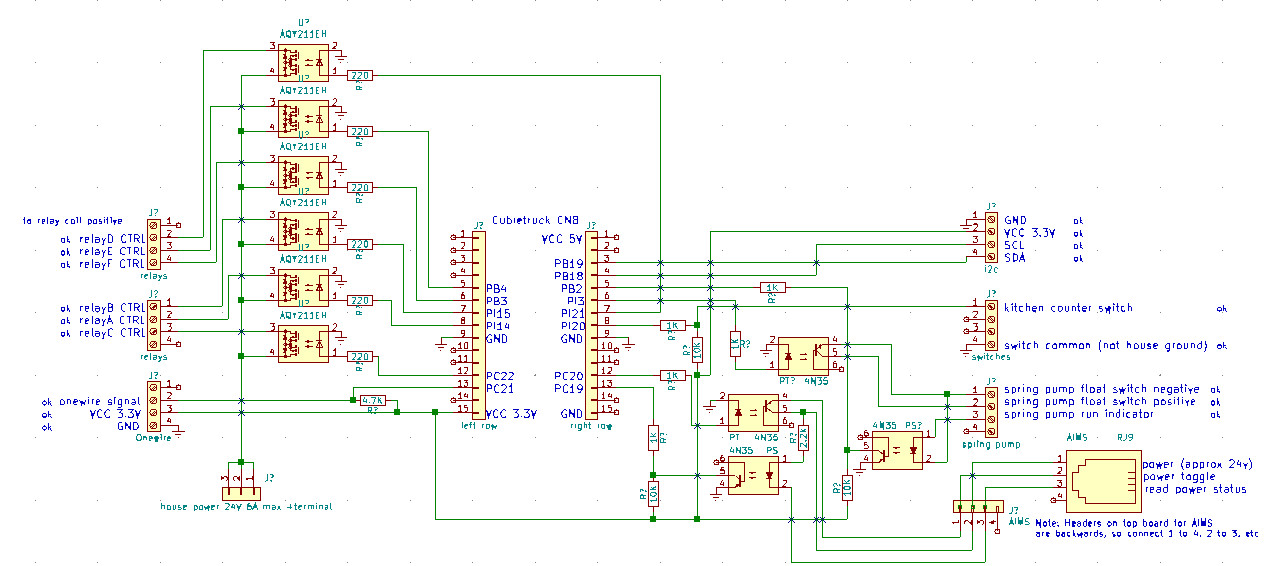
This waterfall is beside my yard. When it's running, I know my water tanks are full and the spring is not dry. Also it's computer controlled, for times when I don't want to hear it. I'll also use the computer control later on to avoid running the pump excessively and wearing it out, and for some safety features like not running when the water is frozen. This is a whole hillside of pipes, water tanks, pumps, solar panels, all controlled by a GPIO port. Easy enough; the pump controller has a float switch input and the GPIO drives a 4n35 optoisolator to open or close that circuit. Hard part will be burying all the cable to the pump. And then all the landscaping around the waterfall. There's a bit of lag to turning it on and off. It can take over an hour for it to start flowing, and around half an hour to stop. The water level has to get high enough in the water tanks to overcome some airlocks and complicated hydrodynamic flow stuff. Then when it stops, all that excess water has to drain back down. Anyway, enjoy my soothing afternoon project and/or massive rube goldberg machine, I certainly am.

Thorsten Alteholz: My Debian Activities in March 2020

FTP master This month I accepted 156 packages and rejected 26. The overall number of packages that got accepted was 203. Debian LTS This was my sixty ninth month that I did some work for the Debian LTS initiative, started by Raphael Hertzog at Freexian. This month my all in all workload has been 30h. During that time I did LTS uploads of: Also my work on graphicsmagic was accepted which resulted in: Further I sent debdiffs of weechat/stretch, weechat/buster, e2fsprogs/stretch to the corresponding maintainers but got no feedback yet. As there have been lots of no-dsa-CVEs accumulated for wireshark, I started to work on them but could not upload yet. Last but not least I did some days of frontdesk duties. Debian ELTS This month was the twenty first ELTS month. During my really allocated time I uploaded: I also did some days of frontdesk duties. Other stuff Unfortunately this month again strange things happened outside Debian and the discussions within Debian did not stop. Nonetheless I got some stuff done. I improved packaging of I sponsored uploads of Sorry to all people who also requested sponsoring, but sometimes things happen and your upload might be delayed. I uploaded new upstream versions of On my Go challenge I uploaded:
golang-github-dreamitgetit-statuscake, golang-github-ensighten-udnssdk, golang-github-apparentlymart-go-dump, golang-github-suapapa-go-eddystone, golang-github-joyent-gosdc, golang-github-nrdcg-goinwx, golang-github-bmatcuk-doublestar, golang-github-go-xorm-core, golang-github-svanharmelen-jsonapi, golang-github-goji-httpauth, golang-github-phpdave11-gofpdi

3 April 2020

Sean Whitton: Manifest to run Debian pre-upload tests on builds.sr.ht

Before uploading stuff to Debian, I build in a clean chroot, and then run piuparts, autopkgtest and lintian. For some of my packages this can take around an hour on my laptop, which is fairly old. Normally I don t mind waiting, but sometimes I want to put my laptop away, and then it would be good for things to be faster. It occurred to me that I could make use of my builds.sr.ht account to run these tests on more powerful hardware. This build manifest seems to work:
# BEGIN CONFIGURABLE
sources:
  - https://salsa.debian.org/perl-team/modules/packages/libgit-annex-perl.git
environment:
  source: libgit-annex-perl
  quilt:  auto
# END CONFIGURABLE
image: debian/unstable
packages:
  - autopkgtest
  - devscripts
  - dgit
  - lintian
  - piuparts
  - sbuild
tasks:
  - setup:  
      cd $source
      source_version=$(dpkg-parsechangelog -SVersion)
      echo "source_version=$source_version" >>~/.buildenv
      git deborig   origtargz
      sudo sbuild-createchroot --command-prefix=eatmydata --include=eatmydata unstable /srv/chroot/unstable-amd64-sbuild
      sudo sbuild-adduser $USER
  - build:  
      cd $source
      dgit --quilt=$quilt sbuild -d unstable --no-run-lintian
  - lintian:  
      lintian $ source _$ source_version _multi.changes
  - piuparts:  
      sudo piuparts --no-eatmydata --schroot unstable-amd64-sbuild $ source _$ source_version _multi.changes
  - autopkgtest:  
      autopkgtest $ source _$ source_version _multi.changes -- schroot unstable-amd64-sbuild
And here s my script.

Jonathan Dowland: Opinionated IkiWiki

For various personal projects and things, past and present (including my personal site) I use IkiWiki, which (by modern standards) is a bit of a pain to set up and maintain. For that reason I find it hard to recommend to people. It would be nice to fire up a snapshot of an existing IkiWiki instance to test what the outcome of some changes might be. That's cumbersome enough at the moment that I haven't bothered to do it more than once. Separately, some months ago I did a routine upgrade of Debian for the web server running this site, and my IkiWiki installation broke for the first time in ten years. I've never had issues like this before. For all of these reasons I've just dusted off an old experiment of mine now renamed Opinionated IkiWiki. It's IkiWiki in a container, configured to be usable out-of-the-box, with some opinionated configuration decisions made for you. The intention is you should be able to fire up this container and immediately have a useful IkiWiki instance to work from. It should hopefully be easier to clone an existing wiki content, configuration and all for experimentation. You can check out the source at GitHub, and grab container images from quay.io. Or fire one up immediately at http://127.0.0.1:8080 with something like
podman run --rm -ti -p 8080:8080 \
quay.io/jdowland/opinionated-ikiwiki:latest
This was a good excuse to learn about multi-stage container builds and explore quay.io. Feedback gratefully received: As GitHub issues, comments here, or mail.

Norbert Preining: KDE/Plasma updates for Debian sid/testing

I have written before about getting updated packages for KDE/Plasma on Debian. In the meantime I have moved all package building to the openSUSE Build Service, thus I am able to provide builds for Debian/testing, both i386 and amd64 architectures.
For those in hurry: new binary packages that can be used on both Debian/testing and Debian/sid can be obtained for both i386 and amd64 archs here: Debian/testing:
deb http://download.opensuse.org/repositories/home:/npreining:/debian-plasma/Debian_Testing  ./
Debian/unstable:
deb http://download.opensuse.org/repositories/home:/npreining:/debian-plasma/Debian_Unstable  ./
To make these repositories work out of the box, you need to import my OBS gpg key: obs-npreining.asc, best to download it and put the file into /etc/apt/trusted.gpg.d/obs-npreining.asc. The sources for the above binaries are available at the OBS site for the debian-plasma sub-project, but I will also try to keep them apt-get-able on my server as before:
deb-src https://www.preining.info/debian unstable kde
I have choosen the openSUSE build service because of its ease to push new packages, and automatic resolution of package dependencies within the same repository. No need to compile the packages myself, nor search for the correct order. I have also added a few new packages and updates (dolphin, umbrello, kwalletmanager, kompare, ), at the moment we are at 131 packages that got updated. If you have requests for update, drop me an email! Enjoy Norbert

2 April 2020

Ulrike Uhlig: Breaking the chain reaction of reactions to reactions

Sometimes, in our day-to-day-interactions, communication becomes disruptive, resembling a chain of reactions to reactions to reactions. Sometimes we lose the capacity to express our ideas and feelings. Sometimes communication just gets stuck, maybe conflict breaks out. When we see these same patterns over and over again, this might be due to the ever same roles that we adopt and play. Learnt in childhood, these roles are deeply ingrained in our adult selves, and acted out as unconscious scripts. Until we notice and work on them. This is a post inspired by contents from my mediation training. In the 1960s, Stephen Karpman has thought of a model of human communication that maps the destructive interactions which occur between people. This map is known as the drama triangle. Karpman defined three roles that interact with each other. We can play one role at work, and a different one at home, and another one with our children. Or we can switch from one role to the other in just one conversation. The three roles are: Does this sound familiar? "Involvement in an unhealthy drama triangle is not something another person is doing to you. It's something you are doing with another person or persons." Well, to be more precise, it's something that we are all doing to each other: "Drama triangles form when participants who are predispositioned to adopt the roles of a drama triangle come together over an issue." (quoted from: Escaping conflict and the Karpman Drama Triangle.) People act out these roles to meet personal (often unconscious) needs. But each of these roles is toxic in that it sees others as problems to react to. In not being able to see that we take on these roles, we keep the triangle going, like in a dispute in which one word provokes another until someone leaves, slamming the door. This is drama. When we are stuck in the drama triangle, no one wins because all three roles "cause pain", "perpetuate shame [and] guilt", and "keep people caught in dysfunctional behavior" (quoted from Lynne Namka: The Drama Triangle, Three Roles of Victim-hood). How to get out of the drama triangle Awareness. To get out of the triangle, it is foremost suggested to be aware of its existence. I agree, it helps. I see it everywhere now. Identifying one's role and starting to act differently. While we switch roles, we generally take on a preferred role that we act out most of the time, and that was learnt in childhood. (I found a test to identify one's common primary role in German.) But how do we act differently? We need to take another look at that uncanny triangle. From the drama triangle to the winner triangle I found it insightful to ask what benefit each role could potentially bring into the interaction.
Acey Choy has created the Winner triangle, in 1990, as an attempt to transform social interactions away from drama. Her winner triangle shifts our perceptions of the roles: the Victim becomes the Vulnerable, the Rescuer becomes the Caring, the Persecutor becomes the Assertive.
Persecutor            Rescuer       Assertive              Caring
I'm right.            I'm good.     I have needs.          I'm listening.
    ----------------------              ----------------------
    \                    /              \                    /
     \                  /                \                  /
      \                /                  \                /
       \              /                    \              /
        \            /                      \            /
         \          /                        \          /
          \        /                          \        /
           \      /                            \      /
            \    /                              \    /
             \  /                                \  /
              \/                                  \/
            Victim                            Vulnerable
            I'm blameless.                    I'm struggling.
Karpman Dreaded Drama Triangle            Choy's Winner Triangle
The Assertive "I have needs." has a calling, aims at change, initiates, and gives feedback. Skills to learn: The Assertive needs to learn to identify their needs, communicate them, and negotiate with others on eye level without shaming, punishing, or belittling them. The Assertive needs to learn to give constructive feedback, without dismissing others. (In the workplace, it could be helpful to have a space for this.) The Assertive could benefit from learning to use I-Statements. The Caring "I'm listening." shows good will and sensitivity, cares, is empathic and supportive. Skills to learn: The Caring needs to learn to respect the boundaries of others: trusting their abilities to think, problem solve and talk for themselves. Therefore, the Caring could benefit from improving their active listening skills. Furthermore the Caring needs to learn to identify and respect their own boundaries and not to do things only because it makes them feel better about themselves. The Vulnerable "I'm struggling." has the skill of seeing and naming problems. Skills to learn: The Vulnerable needs to learn to acknowledge their feelings and needs, practice self-awareness, and self-compassion. They need to untie their self-esteem from the validation of other people. They need to learn to take care of themselves, and to strengthen their problem solving and decision making skills. What has this got to do with autonomy and power structures? Each of these interactions is embedded in larger society, and, as said above, we learn these roles from childhood. Therefore, we perpetually reproduce power structures, and learnt behavior. I doubt that fixing this on an individual level is sufficient to transform our interactions outside of small groups, families or work places. Although that would be a good start. We can see that the triangle holds together because the Victim, seemingly devoid of a way to handle their own needs, transfers care of their needs to the Rescuer, thereby giving up on their autonomy. The Rescuer is provided by the Victim with a sense of autonomy, knowledge, and power, that only works while denying the Victim their autonomy. At the same time, the Persecutor denies everyone else's needs and autonomy, and feels powerful by dismissing others. I've recently mentioned the importance of autonomy in order to avoid burnout, and as a means to control one's own life. If the Rescuer can acknowledge being in the triangle, and give the Victim autonomy, by supporting them with compassion, empathy, and guidance, and at the same time respecting their own boundaries, we could find even more ways to escape the drama triangle. Notes My description of the roles was heavily inspired by the article Escaping Conflict and the Karpman Drama Triangle that has a lot more detail on how to escape the triangle, and how to recognize when we're moving into one of the roles. While the article is informing families living with a person suffering from a spectrum of Borderline Personality Disorder, the content applies to any dysfunctional interaction.

Mike Gabriel: Q: RoamingProfiles under GNU/Linux? What's your Best Practice?

This post is an open question to the wide range of GNU/Linux site admins out there. Possibly some of you have the joy of maintaining GNU/Linux also on user endpoint devices (i.e. user workstations, user notebooks, etc.), not only on corporate servers. TL;DR; In the context of a customer project, I am researching ways of mimicking (or inventing anew) a feature well known (and sometimes also well hated) from the MS Windows world: Roaming User Profiles. If anyone does have any input on that, please contact me (OFTC/Freenode IRC, Telegram, email). I am curious what your solution may be. The Use Case Scenario In my use case, all user machines shall be mobile (notebooks, convertibles, etc). The machines maybe on-site most of the time, but they need offline capabilities so that the users can transparently move off-site and continue their work. At the same time, a copy of the home directory (or the home directory itself) shall be stored on some backend fileservers (for central backups as well as for providing the possibility to the user to login to another machine and be up-and-running +/- out-of-the-box). The Vision Initial Login Ideally, I'd like to have a low level file system feature for this that handles it all. On corporate user logon (which must take place on-site and uses some LDAP database as backend), the user credentials get cached locally (and get re-mapped and re-cached with every on-site login later on), and the home directory gets mounted from a remote server at first. Shortly after having logged in everything in the user's home gets sync'ed to a local cache in the background without the user noticing. At the end of the sync a GUI user notification would be nice, e.g. like "All user data has been cached locally, you are good to go and leave off-site now with this machine." Moving Off-Site A day later, the user may be travelling or such, the user logs into the machine again, the machine senses being offline or on some alien (not corporate) network, but the user can just continue their work, all in local cache. Several days later, the same user with the same machine returns back to office, logs into the machine again, and immediately after login, all cached data gets synced back to the user's server filespace. Possible Conflict Policies Now there might be cases where the user has been working locally for a while and all the profile data received slight changes. The user might have had the possibility to log into other corporate servers from the alien network he*she is on and with that login, some user profile files probably will have gotten changed. Regarding client-server sync policies, one could now enforce a client-always-wins policy that leads to changes being dropped server-side once the user's mobile workstation returns back on-site. One could also set up a bi-directional sync policy for normal data files, but a client-always-wins policy for configuration files (.files and .folders). Etc.pp. Request for Feedback and Comments I could go on further and further with making up edges and corner cases of all this. We had a little discussion on this some days ago on the #debian-devel IRC channel already. Thanks to all contributors to that discussion. And again, if you have solved the above riddle on your site and are corporate-wise allowed to share the concept, I'd be happy about your feedback. Plese get in touch! light+love
Mike (aka sunweaver on the Fediverse and in Debian)

1 April 2020

Joachim Breitner: 30 years of Haskell

Vitaly Bragilevsky, in a mail to the GHC Steering Committee, reminded me that the first version of the Haskell programming language was released exactly 30 years ago. On April 1st. So that raises the question: Was Haskell just an April fool's joke that was never retracted?
The cover of the 1.0 Haskell report

The cover of the 1.0 Haskell report

My own first exposure to Haskell was in April 2005; the oldest piece of Haskell I could find on my machine is this part of a university assignment from April:
> pascal 1 = [1]
> pascal (n+1) = zipWith (+) (x ++ [0]) (0 : x) where x = pascal n
This means that I now have witnessed half of Haskell's existence. I have never regretted getting into Haskell, and every time I come back from having worked in other languages (which all have their merits too), I greatly enjoy the beauty and elegance of expressing my ideas in a lazy and strictly typed language with a concise syntax. I am looking forward to witnessing (and, to a very small degree, shaping) the next 15 years of Haskell.

Sylvain Beucler: Debian LTS and ELTS - March 2020

Debian LTS Logo Here is my transparent report for my work on the Debian Long Term Support (LTS) and Debian Extended Long Term Support (ELTS), which extend the security support for past Debian releases, as a paid contributor. In March, the monthly sponsored hours were split evenly among contributors depending on their max availability - I was assigned 30h for LTS (out of 30 max; all done) and 20h for ELTS (out of 20 max; I did 0). Most contributors claimed vulnerabilities by performing early CVE monitoring/triaging on their own, making me question the relevance of the Front-Desk role. It could be due to a transient combination of higher hours volume and lower open vulnerabilities. Working as a collective of hourly paid freelancers makes it more likely to work in silos, resulting in little interaction when raising workflow topics on the mailing list. Maybe we're reaching a point where regular team meetings will be benefical. As previously mentioned, I structure my work keeping the global Debian security in mind. It can be stressful though, and I believe current communication practices may deter such initiatives. ELTS - Wheezy LTS - Jessie Documentation/Scripts

Joey Hess: DIN distractions

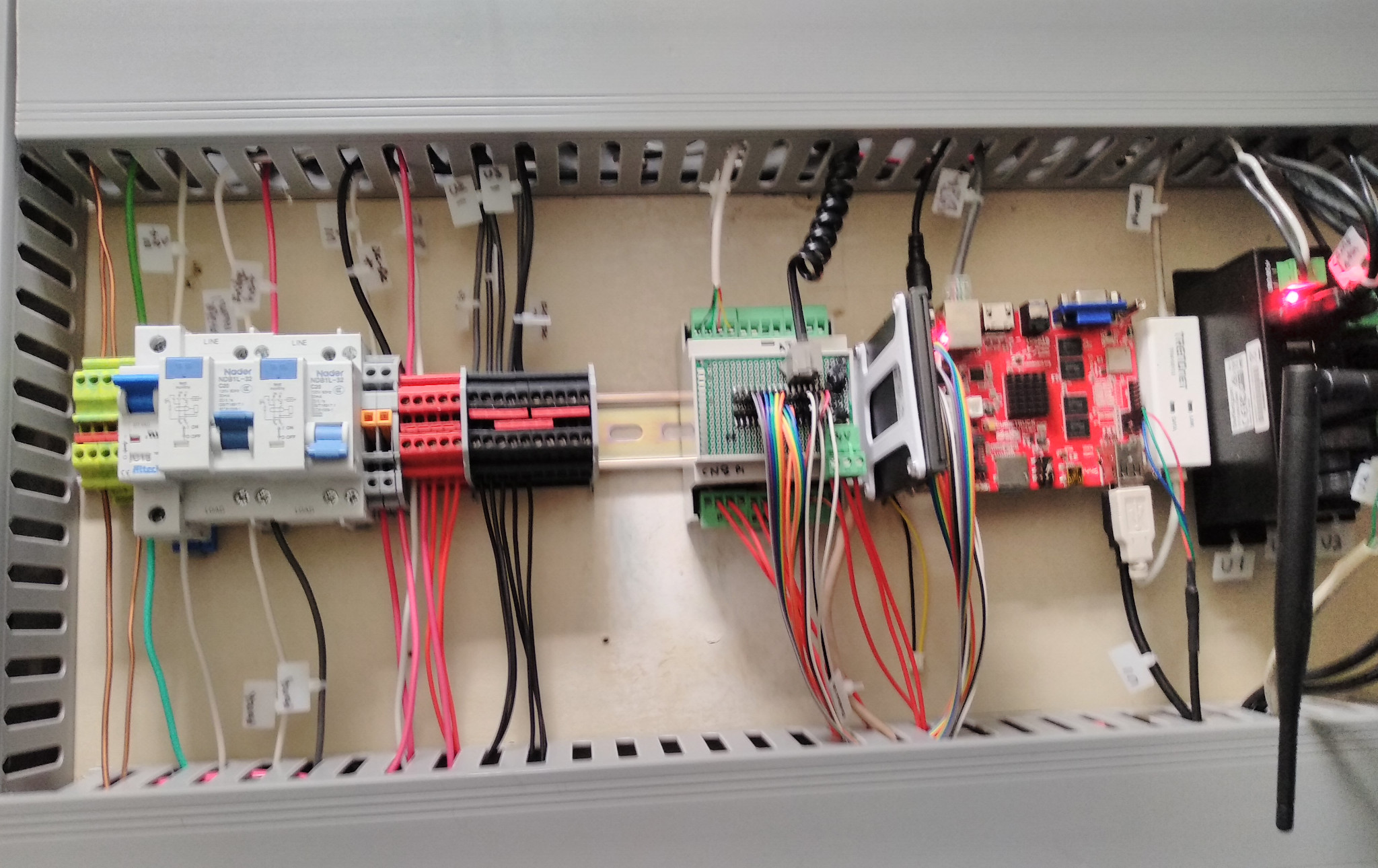
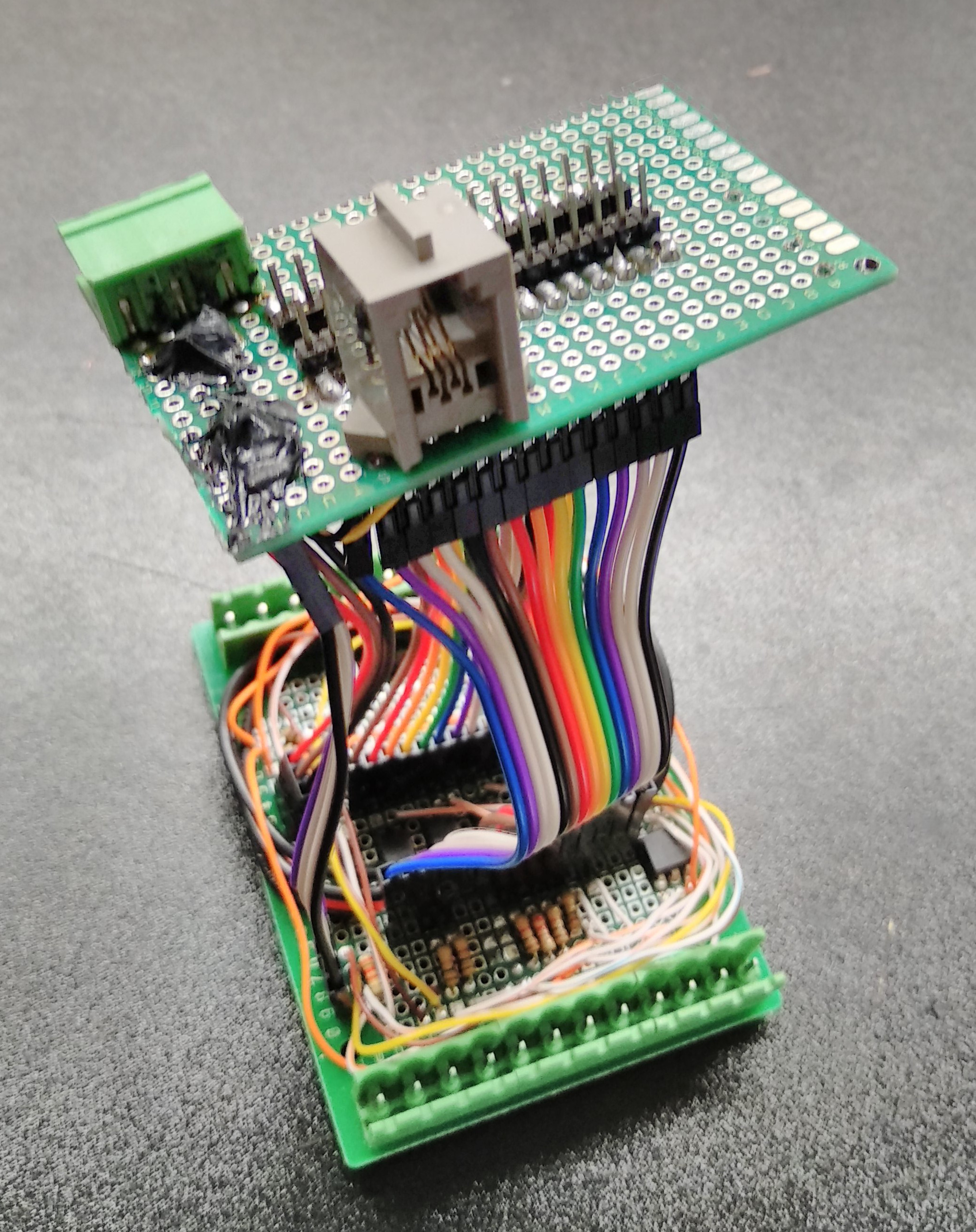
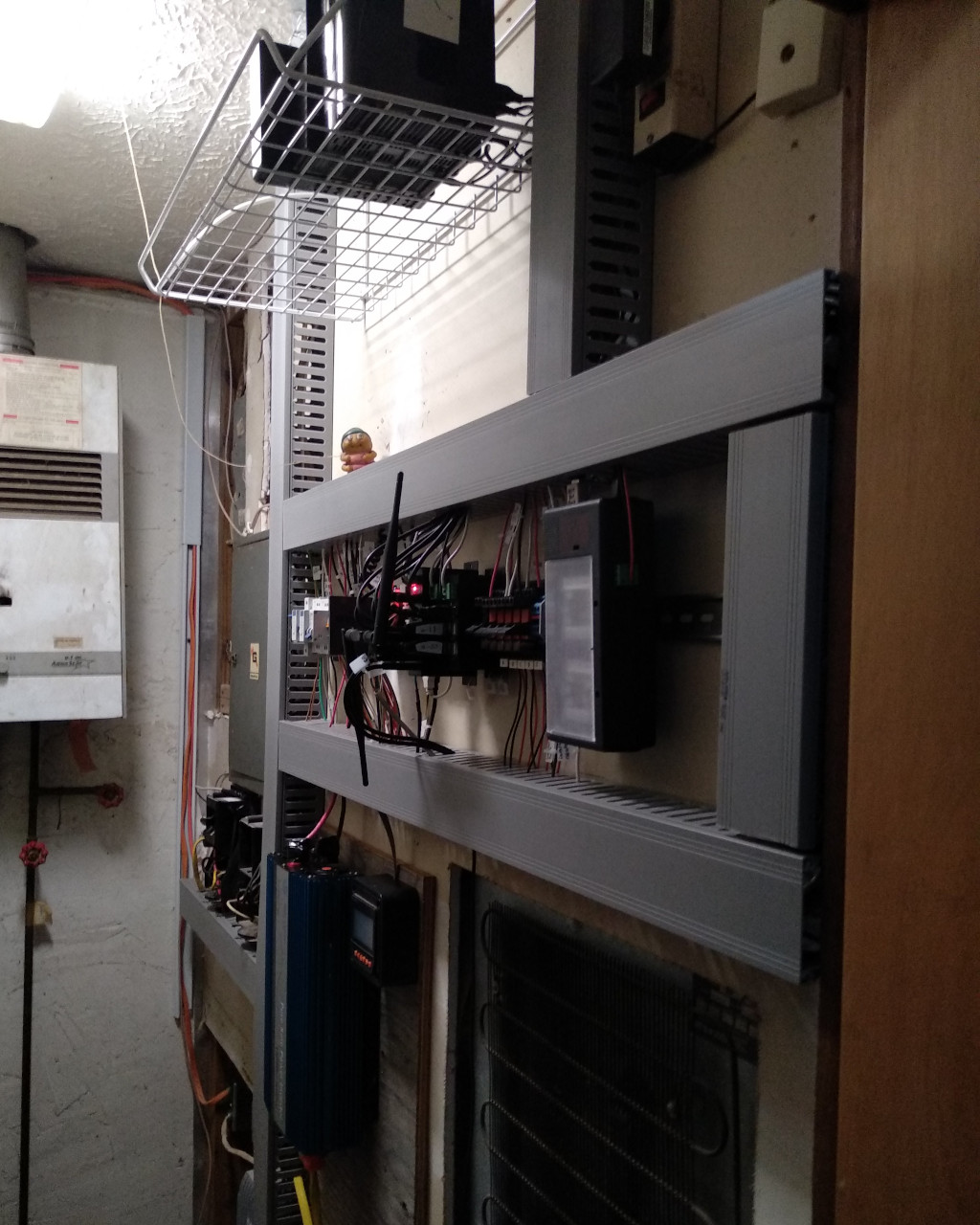
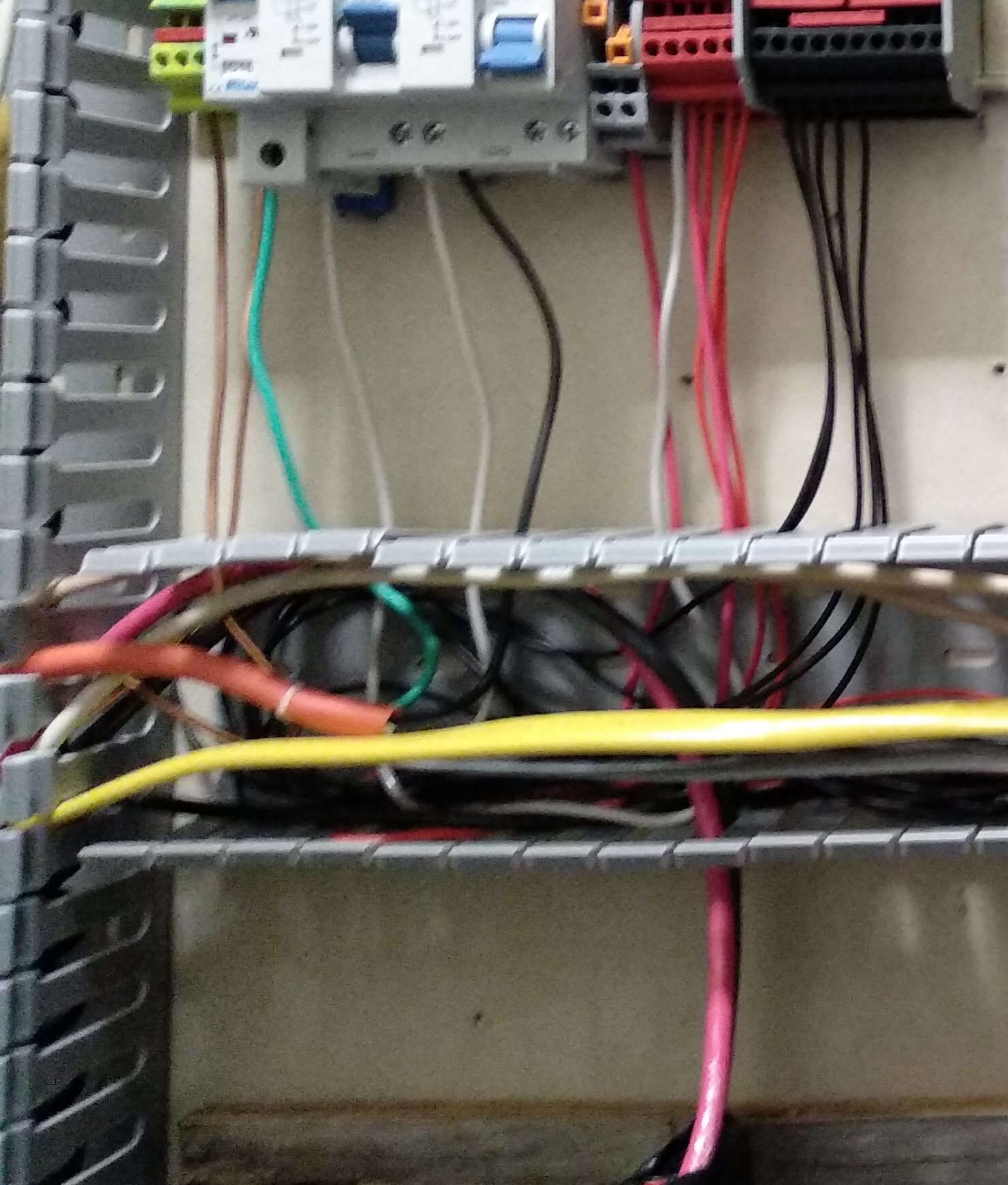
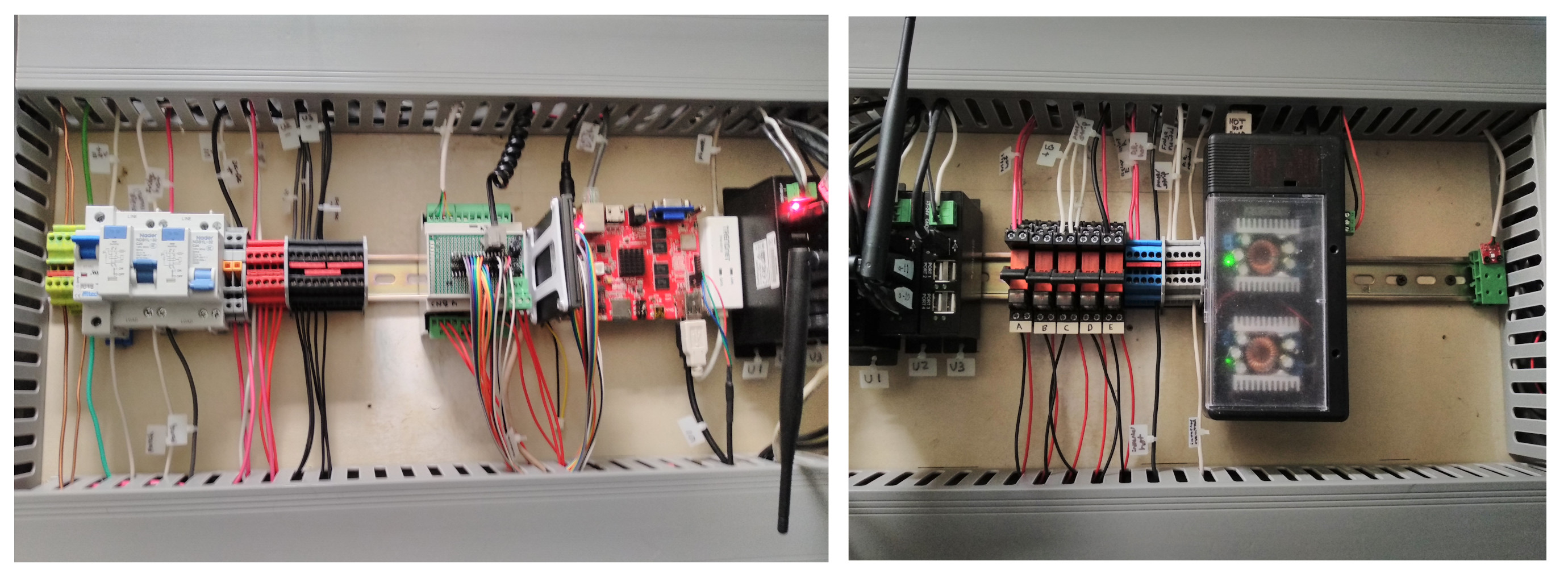
My offgrid house has an industrial automation panel. A row of electrical devices, mounted on a metal rail. Many wires neatly extend from it above and below, disappearing into wire gutters. I started building this in February, before covid-19 was impacting us here, when lots of mail orders were no big problem, and getting an unusual 3D-printed DIN rail bracket for a SSD was just a couple clicks. I finished a month later, deep into social isolation and quarentine, scrounging around the house for scrap wire, scavenging screws from unused stuff and cutting them to size, and hoping I would not end up in a "need just one more part that I can't get" situation. It got rather elaborate, and working on it was often a welcome distraction from the news when I couldn't concentrate on my usual work. I'm posting this now because people sometimes tell me they like hearing about my offfgrid stuff, and perhaps you could use a distraction too. The panel has my house's computer on it, as well as both AC and DC power distribution, breakers, and switching. Since the house is offgrid, the panel is designed to let every non-essential power drain be turned off, from my offgrid fridge to the 20 terabytes of offline storage to the inverter and satellite dish, the spring pump for my gravity flow water system, and even the power outlet by the kitchen sink. Saving power is part of why I'm using old-school relays and stuff and not IOT devices, the other reason is of course: IOT devices are horrible dystopian e-waste. I'm taking the utopian Star Trek approach, where I can command "full power to the vacuum cleaner!" Two circuit boards, connected by numerous ribbon cables, and clearly hand-soldered. The smaller board is suspended above the larger. An electrical schematic, of moderate complexity. At the core of the panel, next to the cubietruck arm board, is a custom IO daughterboard. Designed and built by hand to fit into a DIN mount case, it uses every GPIO pin on the cubietruck's main GPIO header. Making this board took 40+ hours, and was about half the project. It got pretty tight in there. This was my first foray into DIN rail mount, and it really is industrial lego -- a whole universe of parts that all fit together and are immensely flexible. Often priced more than seems reasonable for a little bit of plastic and metal, until you look at the spec sheets and the ratings. (Total cost for my panel was $400.) It's odd that it's not more used outside its niche -- I came of age in the Bay Area, surrounded by rack mount equipment, but no DIN mount equipment. Hacking the hardware in a rack is unusual, but DIN invites hacking. Admittedly, this is a second system kind of project, replacing some unsightly shelves full of gear and wires everywhere with something kind of overdone. But should be worth it in the long run as new gear gets clipped into place and it evolves for changing needs. Also, wire gutters, where have you been all my life? A cramped utility room with an entire wall covered with electronic gear, including the DIN rail, which is surrounded by wire gutters Detail of a wire gutter with the cover removed. Numerous large and small wires run along it and exit here and there. Finally, if you'd like to know what everything on the DIN rail is, from left to right: Ground block, 24v DC disconnect, fridge GFI, spare GFI, USB hub switch, computer switch, +24v block, -24v block, IO daughterboard, 1tb SSD, arm board, modem, 3 USB hubs, 5 relays, AC hot block, AC neutral block, DC-DC power converters, humidity sensor. Full width of DIN rail.

Russ Allbery: Review: A Grand and Bold Thing

Review: A Grand and Bold Thing, by Ann Finkbeiner
Publisher: Free Press
Copyright: August 2010
ISBN: 1-4391-9647-8
Format: Kindle
Pages: 200
With the (somewhat excessively long) subtitle of An Extraordinary New Map of the Universe Ushering In a New Era of Discovery, this is a history of the Sloan Digital Sky Survey. It's structured as a mostly chronological history of the project with background profiles on key project members, particularly James Gunn. Those who follow my blog will know that I recently started a new job at Vera C. Rubin Observatory (formerly the Large Synoptic Survey Telescope). Our goal is to take a complete survey of the night sky several times a week for ten years. That project is the direct successor of the Sloan Digital Sky Survey, and its project team includes many people who formerly worked on Sloan. This book (and another one, Giant Telescopes) was recommended to me as a way to come up to speed on the history of this branch of astronomy. Before reading this book, I hadn't understood how deeply the ready availability of the Sloan sky survey data had changed astronomy. Prior to the availability of that survey data, astronomers would develop theories and then try to book telescope time to make observations to test those theories. That telescope time was precious and in high demand, so was not readily available, and was vulnerable to poor weather conditions (like overcast skies) once the allocated time finally arrived. The Sloan project changed all of that. Its output was a comprehensive sky survey available digitally whenever and wherever an astronomer needed it. One could develop a theory and then search the Sloan Digital Sky Survey for relevant data and, for at least some types of theories, test that theory against the data without needing precious telescope time or new observations. It was a transformational change in astronomy, made possible by the radical decision, early in the project, to release all of the data instead of keeping it private to a specific research project. The shape of that change is one takeaway from this book. The other is how many problems the project ran into trying to achieve that goal. About a third of the way into this book, I started wondering if the project was cursed. So many things went wrong, from institutional politics through equipment failures to software bugs and manufacturing problems with the telescope mirror. That makes it all the more impressive how much impact the project eventually had. It's also remarkable just how many bad things can happen to a telescope mirror without making the telescope unusable. Finkbeiner provides the most relevant astronomical background as she tells the story so that the unfamiliar reader can get an idea of what questions the Sloan survey originally set out to answer (particularly about quasars), but this is more of a project history than a popular astronomy book. There's enough astronomy here for context, but not enough to satisfy curiosity. If you're like me, expect to have your curiosity piqued, possibly resulting in buying popular surveys of current astronomy research. (At least one review is coming soon.) Obviously this book is of special interest to me because of my new field of work, my background at a research university, and because it features some of my co-workers. I'm not sure how interesting it will be to someone without that background and personal connection. But if you've ever been adjacent to or curious about how large-scale science projects are done, this is a fascinating story. Both the failures and problems and the way they were eventually solved is different than how the more common stories of successful or failed companies are told. (It helps, at least for me, that the shared goal was to do science, rather than to make money for a corporation whose fortunes are loosely connected to those of the people doing the work.) Recommended if this topic sounds at all interesting. Rating: 7 out of 10

Paul Wise: FLOSS Activities March 2020

Changes

Issues

Review

Administration
  • Debian wiki: approve accounts

Communication

Sponsors The dh-make-perl feature requests, file bug report, File::Libmagic changes, autoconf-archive change, libpst work and the purple-discord upload were sponsored by my employer. All other work was done on a volunteer basis.

31 March 2020

Pau Garcia i Quiles: Uyuni 2020.03 released with enhanced Debian support!

Uyuni is a configuration and infrastructure management tool that saves you time and headaches when you have to manage and update tens, hundreds or even thousands of machines. Uyuni is a fork of Spacewalk that leverages Salt, Cobbler and containers to modernize it. Uyuni is the upstream for SUSE Manager (the main difference is support: with SUSE Manager you get it from SUSE; with Uyuni you get it from the community) and our development and feature discussion is done in the open. Last week we released Uyuni 2020.03, with much improved Debian support, coming from the community: we have got client tools (both the Salt stack and the traditional stack) for Debian 9 and 10, and bootstrapping support! In addition to that, Uyuni 2020.03 brings many other new features: While this version of Uyuni provides a much better experience for Debian sysadmins, we still have a lot of room for improvement: Do you want to help us with development, or just with feedback? Join our community on IRC, Gitter or the mailing lists. And check our user documentation, developer documentation and presentations. We are also participating in Google Summer of Code 2020. Hurry up and submit a proposal to provide Uyuni for Debian, and/or enhance Debian support!

Chris Lamb: Free software activities in March 2020

Here is my monthly update covering what I have been doing in the free software world during March 2020 (previous month): In addition, I did even more hacking on the Lintian static analysis tool for Debian packages, including:
Reproducible builds One of the original promises of open source software is that distributed peer review and transparency of process results in enhanced end-user security. However, whilst anyone may inspect the source code of free and open source software for malicious flaws, almost all software today is distributed as pre-compiled binaries. This allows nefarious third-parties to compromise systems by injecting malicious code into ostensibly secure software during the various compilation and distribution processes. The motivation behind the Reproducible Builds effort is to ensure no flaws have been introduced during this compilation process by promising identical results are always generated from a given source, thus allowing multiple third-parties to come to a consensus on whether a build was compromised. The initiative is proud to be a member project of the Software Freedom Conservancy, a not-for-profit 501(c)(3) charity focused on ethical technology and user freedom. Conservancy acts as a corporate umbrella allowing projects to operate as non-profit initiatives without managing their own corporate structure. If you like the work of the Conservancy or the Reproducible Builds project, please consider becoming an official supporter. This month, I: In our tooling, I also made the following changes to diffoscope, our in-depth and content-aware diff utility that can locate and diagnose reproducibility issues, including preparing and uploading version 138 to Debian: The Reproducible Builds project also operates a fully-featured and comprehensive Jenkins-based testing framework that powers tests.reproducible-builds.org. This month, I reworked the web-based package rescheduling tool to:
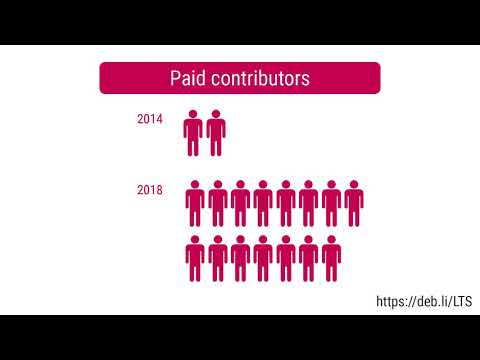
Debian LTS This month I have worked 18 hours on Debian Long Term Support (LTS) and 8 hours on its sister Extended LTS project. You can find out more about the Debian LTS project via the following video:
Debian Uploads For the Debian Privacy Maintainers team I requested that the pyptlib package be removed from the archive (#953429) as well as uploading onionbalance (0.1.8-6) to fix test failures under Pytest 3.x (#953535) and a new upstream release of nautilus-wipe. Finally, I sponsored an upload of bilibop (0.6.1) on behalf of Yann Amar.

Russell Coker: Links March 2020

Rolling Stone has an insightful article about why the Christian Right supports Trump and won t stop supporting him no matter what he does [1]. Interesting article about Data Oriented Architecture [2]. Quarantine Will normalise WFH and Recession will Denormalise Jobs [3]. I guess we can always hope that after a disaster we can learn to do things better than before. Tyre wear is worse than exhaust for small particulate matter [4]. We need better tyres and legal controls over such things. Scott Santens wrote an insightful article about the need for democracy and unconditional basic income [5]. In ancient Greece, work was regarded as a curse is an extreme position but strongly supported by evidence. In his essay In Praise of Idleness, Bertrand Russell wrote Modern methods of production have given us the possibility of ease and security for all; we have chosen, instead, to have overwork for some and starvation for others. Hitherto we have continued to be as energetic as we were before there were machines; in this we have been foolish, but there is no reason to go on being foolish forever. Cory Doctorow wrote an insightful article for Locus titled A Lever Without a Fulcrum Is Just a Stick about expansions to copyright laws [6]. One of his analogies is that giving a bullied kid more lunch money just allows the bullies to steal more money, with artists being bullied kids and lunch money being the rights that are granted under copyright law. The proposed solution includes changes to labor and contract law, presumably Cory will write other articles in future giving the details of his ideas in this regard. The Register has an amusing article about the trial of a former CIA employee on trial for being the alleged vault 7 leaker [7]. Both the prosecution and the defence are building their cases around the defendent being a jerk. The article exposes poor security and poor hiring practices in the CIA. CNN has an informative article about Finland s war on fake news [8]. As Finland has long standing disputes with Russia they have had more practice at dealing with fake news than most countries. The Times of Israel has an interesting article about how the UK used German Jews to spy on German prisoners of war [9]. Cory Doctorow wrote an insightful article Data is the New Toxic Waste about how collecting personal data isn t an asset, it s a liability [10]. Ulrike Uhlig wrote an insightful article about Control Freaks , analysing the different meanings of control, both positive and negative [11]. 538 has an informative article about the value of statistical life [12]. It s about $9M per person in the US, which means a mind-boggling amount of money should be spent to save the millions of lives that will be potentially lost in a natural disaster (like Coronavirus). NPR has an interesting interview about Crypto AG, the Swiss crypto company owned by the CIA [13]. I first learned of this years ago, it s not new, but I still learned a lot from this interview.

30 March 2020

Mike Gabriel: UBports: Packaging of Lomiri Operating Environment for Debian (part 02)

Before and during FOSDEM 2020, I agreed with the people (developers, supporters, managers) of the UBports Foundation to package the Unity8 Operating Environment for Debian. Since 27th Feb 2020, Unity8 has now become Lomiri. Recent Uploads to Debian related to Lomiri Over the past 7-8 weeks the packaging progress has been slowed down due to other projects I am working on in parallel. However, quite a few things have been achieved: The packages qtsystems, qtfeedback, and qtpim are no official Qt5 components, and so I had to package Git snapshots of them; with all implicit consequences regarding ABI and API compatibilities, possibly Debian-internal library transitions, etc. Esp. packaging qtsystems was pretty tricky due to a number of failing unit tests when the package had been built in a clean chroot (like it is the case on Debian's buildd infrastructure). I learned a lot about DBus and DBus mocking while working on all those unit tests to finally pass in chrooted builds. Unfortunately, the Lomiri App Launch component still needs more work due to (finally only) one unit test (jobs-systemd) not always passing. Sometimes, the test gets stucks and then fails after having reached a time out. I'll add it to my list of those unreproducible build failures I have recently seen in several GTest related unit test scenarios. Sigh... Credits A great thanks goes to Lisandro Perez Meyer from the Debian KDE/Qt Team for providing an intro and help on Qt Debian packaging and an intro on symbols handling with C++ projects. Another big thanks goes to Dmitry Shachnev from the Debian KDE/Qt Team for doing a sponsored upload [1] of qtpim (and also a nice package review). Also a big thanks goes to Marius Gripsgard for his work on forking the first Lomiri components on the UBports upstream side. Previous Posts about my Debian UBports Team Efforts References

Jonathan Dowland: ephemeral note-taking wins

Some further thoughts on ephemeral versus preserve-everything note-taking. Note-taking is about capturing ideas, thoughts, and processes. You want as little friction as possible when doing so: you don't want to be thinking the page is too small, or the paper drying up the ink too quickly so the pen doesn't move smoothly, or similar such things distracting from capturing what you are trying to capture. I used my PhD notebook as an example of a preserve-everything approach. A serious drawback of the notebook as the sole place to capture work is the risk that it will be damaged or lost. I periodically photograph all the pages and store those photos digitally, alongside other things relating to the work. Those other things include two different private wiki instances that I use to capture notes when I'm working at the computer, as well as several Git repositories (some public, some private) for source code, experiments, drafts of papers, etc. There's also a not-insignificant amount of email correspondence. There have been several train journeys and several meetings where I've grabbed a cheap, larger-format pad of paper and a box of Pound-shop felt-tip pens to sketch ideas, whiteboard-style. At the time it just seemed easier to capture what we were doing in that way, rather than try to do so into the notebook. So the notebook is neither canonical nor comprehensive. Ultimately it's really another example of ephemeral note-taking, and so I think the Ephemeral model wins out. Use whatever notebook or paper or envelope or window pane that is convenient and feels attractive at the time you need to capture something with the least amount of friction. Digitise that and store, catalogue, adjust, derive, etc. from that in the digital domain.

Mike Gabriel: Mailman3 - Call for Translations (@Weblate)

TL;DR; please help localizing Mailman3 [1]. You can find it on hosted Weblate [2].The next component releases are planned in 1-2 weeks from now. Thanks for your contribution! If you can't make it now, please consider working on Mailman3 translations at some later point of time. Thanks! Time has come for Mailman3 Over the last months I have found an interest in Mailman3. Given the EOL of Python2 in January 2020 and also being a heavy Mailman2 provider for various of my projects and also for customers, I felt it was time to look at Mailman2's successor: Mailman3 [1]. One great novelty in Mailman3 is the strict split up between backend (Mailman Core), and the frontend components (django-mailman3, Postorius, Hyperkitty). All three are Django applications. Postorius is the list management web frontend whereas Hyperkitty is an archive viewer. Other than in Mailman2, you can also drop list posts into Hyperkitty directly (instead of sending a mail to the list). This makes Hyperkitty also some sort of forum software with a mailing list core in the back. The django-mailman3 module knits the previous two together (and handles account management, login dialog, profile settings, etc.). Looking into Mailman3 Upstream Code Some time back in midst 2019 I decided to deploy Mailman3 at a customer's site and also for my own business (which still is the test installation). Living and working in Germany, my customers' demand often is a fully localized WebUI. And at that time, Mailman3 could not provide this. Many exposed parts of the Mailman3 components were still not localized (or not localizable). Together with my employee I put some hours of effort into providing merge requests, filing bug reports, request better Weblate integration (meaning: hosted Weblate), improving the membership scripting support, etc. It felt a bit like setting the whole i18n thing in motion. Call for Translations Over the past months I had to focus on other work and two days ago I was delighted that Abhilash Raj (one of the Mailman3 upstream maintainers) informed me (via closing one of the related bugs [3]) that Mailman3 is now fully integrated with the hosted Weblate service and a continous translation workflow is set to go. The current translation stati of the Mailman3 components are at ~ 10%. We can do better than this, I sense. So, if you are a non-native English speaker and feel like contributing to Mailman3, please visit the hosted Weblate site [2], sign up for an account (if you don't have one already), and chime in into the translation of one of the future mailing list software suites run by many FLOSS projects all around the globe. Thanks a lot for your help. As a side note, if you plan working on translating Mailman Core into your language (and can't find it in the list of supported languages), please request this new language via the Weblate UI. All other components have all available languages enabled by default. References:

Axel Beckert: How do you type on a keyboard with only 46 or even 28 keys?

Some of you might have noticed that I m into keyboards since a few years ago into mechanical keyboards to be precise. Preface It basically started with the Swiss Mechanical Keyboard Meetup (whose website I started later on) was held in the hackerspace of the CCCZH. I mostly used TKL keyboards (i.e. keyboards with just the for me useless number block missing) and tried to get my hands on more keyboards with Trackpoints (but failed so far). At some point a year or two ago, I looking into smaller keyboards for having a mechanical keyboard with me when travelling. I first bought a Vortex Core at Candykeys. The size was nice and especially having all layers labelled on the keys was helpful, but nevertheless I soon noticed that the smaller the keyboards get, the more important is, that they re properly programmable. The Vortex Core is programmable, but not the keys in the bottom right corner which are exactly the keys I wanted to change to get a cursor block down there. (Later I found out that there are possibilities to get this done, either with an alternative firmware and a hack of it or desoldering all switches and mounting an alternative PCB called Atom47.) 40% Keyboards So at some point I ordered a MiniVan keyboard from The Van Keyboards (MiniVan keyboards will soon be available again at The Key Dot Company), here shown with GMK Paperwork (also bought from and designed by The Van Keyboards):
The MiniVan PCBs are fully programmable with the free and open source firmware QMK and started to use that more and more instead of bigger keyboards. Layers With the MiniVan I learned the concepts of layers. Layers are similar to what many laptop keyboards do with the Fn key and to some extent also what the German standard layout does with the AltGr key: Layers are basically alternative key maps you can switch with a special key (often called Fn , Fn1 , Fn2 , etc., or especially if there are two additional layers Raise and Lower ). There are several concepts how these layers can be reached with these keys: My MiniVan Layout For the MiniVan, two additional layers suffice easily, but since I have a few characters on multiple layers and also have mouse control and media keys crammed in there, I have three additional layers on my MiniVan keyboards:

TRNS means transparent, i.e. use the settings from lower layers.
I also use a feature that allows me to mind different actions to a key depending if I just tap the key or if I hold it. Some also call this tap dance . This is especially very popular on the usually rather huge spacebar. There, the term SpaceFn has been coined, probably after this discussion on Geekhack. I use this for all my layer switching keys: With this layout I can type English texts as fast as I can type them on a standard or TKL layout. German umlauts are a bit more difficult because it requires 4 to 6 key presses per umlaut as I use the Compose key functionality (mapped to the Menu key between the spacebars and the cursor block. So to type an on my MiniVan, I have to:
  1. press and release Menu (i.e. Compose); then
  2. press and hold either Shift-Spacebar (i.e. Shift-Fn1) or Slash (i.e. Fn2), then
  3. press N for a double quote (i.e. Shift-Fn1-N or Fn2-N) and then release all keys, and finally
  4. press and release the base character for the umlaut, in this case Shift-A.
And now just use these concepts and reduce the amount of keys to 28: 30% and Sub-30% Keyboards In late 2019 I stumbled upon a nice little keyboard kit shop on Etsy which I (and probably most other people in the mechanical keyboard scene) didn t take into account for looking for keyboards called WorldspawnsKeebs. They offer mostly kits for keyboards of 40% size and below, most of them rather simple and not expensive. For about 30 you get a complete sub-30% keyboard kit (without switches and keycaps though, but that very common for keyboard kits as it leaves the choice of switches and key caps to you) named Alpha28 consisting of a minimal Acrylic case and a PCB and electronics set. This Alpha28 keyboard is btw. fully open source as the source code, (i.e. design files) for the hardware are published under a free license (MIT license) on GitHub. And here s how my Alpha28 looks like with GMK Mitolet (part of the GMK Pulse group-buy) key caps:
So we only have character keys, Enter (labelled Data as there was no 1u Enter key with that row profile in that key cap set; I ll also call it Data for the rest of this posting) and a small spacebar, not even modifier keys. The Default Alpha28 Layout The original key layout by the developer of the Alpha28 used the spacbar as Shift on hold and as space if just tapped, and the Data key switches always to the next layer, i.e. it switches the layer permanently on tap and not just on hold. This way that key rotates through all layers. In all other layers, V switches back to the default layer. I assume that the modifiers on the second layer are also on tap and apply to the next other normal key. This has the advantage that you don t have to bend your fingers for some key combos, but you have to remember on which layer you are at the moment. (IIRC QMK allows you to show that via LEDs or similar.) Kinda just like vi. My Alpha28 Layout But maybe because I m more an Emacs person, I dislike remembering states myself and don t bind bending my fingers. So I decided to develop my own layout using tap-or-hold and only doing layer switches by holding down keys:

A triangle means that the settings from lower layers are used, N/A means the key does nothing.
It might not be very obvious, but on the default layer, all keys in the bottom row and most keys on the row ends have tap-or-hold configurations. Basic ideasBottom row if holdOther rows if holdHow the keys are divided into layersUsing the Alpha28 This layout works surprisingly well for me. Only for Minus, Equal, Single Quote and Semicolon I still often have to think or try if they re on Layer 1 or 2 as on my 40%s (MiniVan, Zlant, etc.) I have them all on layer 1 (and in general one layer less over all). And for really seldom used keys like Insert, PrintScreen, ScrollLock or Pause, I might have to consult my own documentation. They re somewhere in the middle of the keyboard, either on layer 1, 2, or 3. ;-) And of course, typing umlauts takes even two keys more per umlaut as on the MiniVan since on the one hand Menu is not on the default layer and on the other hand, I don t have this nice shifted number row and actually have to also press Shift to get a double quote. So to type an on my Alpha, I have to:
  1. press and release Space-F (i.e. Fn1-F) for Menu (i.e. Compose); then
  2. press and hold A-Spacebar-L (i.e. Shift-Fn1-L) for getting a double quote, then
  3. press and release the base character for the umlaut, in this case L-A for Shift-A (because we can t use A for Shift as I can t hold a key and then press it again :-).
Conclusion If the characters on upper layers are not labelled like on the Vortex Core, i.e. especially on all self-made layouts, typing is a bit like playing that old children s game Memory: as soon as you remember (or your muscle memory knows) where some special characters are, typing gets faster. Otherwise, you start with trial and error or look the documentation. Or give up. ;-) Nevertheless, typing on a sub-30% keyboard like the Alpha28 is much more difficult and slower than on a 40% keyboard like the MiniVan. So the Alpha28 very likely won t become my daily driver while the MiniVan defacto is my already my daily driver. But I like these kind of challenges as others like the game Memory . So I ordered three more 30% and sub-30% keyboard kits and WorldspawnsKeebs for soldering on the upcoming weekend during the COVID19 lockdown: And if I at some point want to try to type with even fewer keys, I ll try a Butterstick keyboard with just 20 keys. It s a chorded keyboard where you have to press multiple keys at the same time to get one charcter: So to get an A from the missing middle row, you have to press Q and Z simultaneously, to get Escape, press Q and W simultaneously, to get Control, press Q, W, Z and X simultaneously, etc. And if that s not even enough, I already bought a keyboard kit named Ginny (or Ginni, the developer can t seem to decide) with just 10 keys from an acquaintance. Couldn t resist when offered his surplus kits. :-) It uses the ASETNIOP layout which was initially developed for on-screen keyboards on tablets.

Next.

Previous.