Search Results: "tb"

14 September 2010

Luca Falavigna: Invitation

lolcat Jokes off now, time to take it seriously ;)

Russell Coker: How to Start Learning Linux

I was asked for advice on how to start learning Linux. Rather than replying via email I m writing a blog post for future people who ask such questions and also to get comments from other people which may provide information I missed. Join a LUG The best thing to do is to start by joining your local Linux Users Group (LUG). Linux International maintains a list of LUGs that is reasonably comprehensive [1]. Even if there isn t a LUG near enough for you to attend meetings you can learn a lot from a mailing list of a LUG that s close to your region. There is usually no great reason not to join the mailing list of a LUG in a different region or country, but a local LUG is that the advice will often be tailored to issues such as the local prices of hardware and the practices of your government. Also note that Linux International doesn t list all LUGs, the MLUG group in Melbourne [2] and the BLUG group in Ballarat [3] aren t listed. Anyone who joins LUG (the group based in Melbourne, Victoria that I m a member of) will be advised of the smaller groups in the region if they ask on the list. As an aside it would probably make sense for the main LUV web page [4] to have links to local LUGs and to the LI page of users groups and for other LUGs to do the same. It s pretty common for a Google search to turn up the web site of a LUG that s near the ideal location but not quite right. Also it would be good if LUV could have a link to the Victorian Linux Users Group in Canada this should reduce the confusion a bit and they have a link to us [5]. Play with Linux Get a spare PC (with no important data) and try installing different distributions of Linux on it. Make sure that it never has anything particularly important so you can freely try things out without worrying about the risk of losing data. Part of the learning process usually involves breaking a system so badly that it needs to be reinstalled. Linux can run on really old hardware, an old system with 64M of RAM will do for learning (but 128M will really be preferred and 256M will be even better). Learn with other Beginners LUV has a very active beginners group, with a beginners mailing list and special beginners meetings. A group that has such things will be more helpful as you can easily learn from other people who are at a similar level to you. Also you can spend time learning Linux with friends, just spend a weekend with some friends who want to learn Linux and play with things you can often learn more by trying things than by reading books etc. Do some Programming One of the advantages of Linux (and other Free Software OSs) is that it comes with a full range of programming languages for free. You can get a much greater understanding of an OS by writing programs for it and a typical Linux distribution gives you all the tools you need. Any other Ideas? Does anyone have any other suggestions? Please leave a comment.

Kartik Mistry: More uninteresting updates!

* Gwibber in experimental. Expect: 2.31.93-1 by tonight. + It is still slow. In short, it sucks at moment. Report bugs to upstream. Any improvement for Debian packaging (I moved it to pysupport (Thanks to Filip Chabik) * Life sucks. Why? + Festival time. I ve developed allergy to noise.
+ 31++ today. Still not much sign of getting wiser. And, no gift to me from myself.
+ Laptop is becoming pain now. 4GB is not enough!

13 September 2010

Lucas Nussbaum: Debian Bugs Search using UDD

After a few hours of hacking, I came up with Debian Bugs Search. This Ultimate Debian Database tool enables to query different kinds of Debian bugs (especially RC bugs using a multi-criteria search. It is aimed at being a replacement for the unofficial RC Bugs tracker, which has some bugs and fails to display the correct status for some bugs (Debian Bugs Search sees 450 RC bugs affecting squeeze, vs 278 for the unofficial RC bugs tracker). While Debian Bugs Search still lacks some features that the unofficial RC bugs tracker has, it also brings some new features. The main advantage is that it makes it easy to find some classes of interesting bugs, for example: RC bugs affecting squeeze and sid, tagged patch, sorted by time of last change. Why weren t they fixed using the patch? RC bugs affecting squeeze and sid, tagged pending, sorted by time of last change. Why weren t they fixed by an upload if they were tagged pending a long time ago? Bugs affecting squeeze but not sid, and marked as done. Why didn t the fixed packages migrate to testing? I m open to suggestions of improvements, bug reports, or better, patches. Since it is UDD-based, it is quite easy to add more information. My own TODO list is:
- add popcon information (also enable sorting by popcon)
- add a way to display/hide additional columns (popcon, package s versions)

12 September 2010

Gregor Herrmann: RC bugs 2010/34 - 2010/36

I thought it's about time to write a short report on my RC bug squashing activities again; nothing spectacular, but maybe it motivats others *hint*

Robert Millan: Graphical installer for Debian GNU/kFreeBSD

Now that Debian s graphical installer flavour has migrated to X11, porting it to GNU/kFreeBSD became a low hanging fruit, so I shamelessly picked it up and here comes a version of Debian GNU/kFreeBSD installer with graphical support. Oh, and a screenshot too: Enjoy.

10 September 2010

Joey Hess: sunny day

I'm back in town. After approximatly 4 full days of use, the first battery bank dropped to 9 volts, my cutoff point for safe use. Which turned out to be below the safe use point of my laptop power adapter, which burnt out while I was busy listening to music and adding power-saving caching stuff to my mpd setup. Irony not appreciated, world. I decided to come back while the other bank is still relatively full.
my modest PV array
Hurrying downtown to grab lunch in between work on Branchable, I noticed it was a beautiful sunny day, and I realized that this makes such days even better, because besides enjoying them, I know I'll be enjoying the yield on chilly nights sometime later. Well, in theory. Actually, the very antique charge controller in the house was dead and bypassed, so I removed it. I called its manufacturer wondering if it could be refurbished, but they suggested it belonged in a museum. So I've ordered a new controller, a Xantrex C-35. Until that comes, pretty days like today will charge, or possibly over-charge the batteries, which will then drain back out at night.

Alexander Reichle-Schmehl: Release Critical Bug report for Week 36

The unofficial rc bug tracker currently knows about the following bugs:
In Total:420
Affecting Squeeze:301
Squeeze only:66
Remaining to be fixed in Squeeze:235
Of these 235 bugs, the following tags are set:
Pending in Squeeze:16
Patched in Squeeze:53
Duplicates in Squeeze:26
Contrib or non-free in Squeeze:10
Claimed in Squeeze:2
Delayed in Squeeze:8
Can fixed in a security Update:15
Otherwise fixed in Squeeze:19
Ignoring all the above (multiple tags possible), 133 bugs need to be fixed by Debian Contributers to get Debian 6.0 Squeeze released. However, with the view of the Release Managers, 254 need to be dealt with for the release to happen. Please see my older post for an explanation of the different numbers.

9 September 2010

Kartik Mistry: non-free (web) services

* I was thinking to move out of as many as non-free (FaiF) web services after reading mako s this post and now zack wrote about it with good explanations and reasons. What things I m using? And its replacement: - GMail [and related stuffs] (I don t own server/email setup, may be next year s plan?)
- Facebook (Big question here how will I keep touch with my wife?)
- LinkedIn (My profile there is crap, half baked. Can leave it without worry)
- Twitter (Identi.ca)
- Orkut (Already not using much)
- Github (Gitorious) Thank God. WordPress is amazing and free. I can keep in touch with this amazing blue pill virtual world with blog posts at least. Starting acting on the list from bottom-up. Lets see how far I can go.

Stefano Zacchiroli: yes we can

(... achieve Debian world domination without endorsing Facebook) Yes Raphael, we can.
Nobody said it would have been easy, to reach Total World Domination endorsing Free Software only, but that's not a reason to stop trying. I've recently stumbled upon a very nice article by Benjamin Mako Hill, titled Free Software Needs Free Tools, which I believe it's the best possible commentary to the proposal of having an official Debian Facebook page. Of course there is nothing wrong in having non-official, or let's call them "fan" pages, about Debian on Facebook. As a matter of fact we already have one, as you point out. And I also agree that it would be better to know who is behind that page. Individuals, including Debian Developers, are obviously free to use whatever media they please to spread the cause of Debian. After all, as individuals, each of us decide upon her own personal trade-offs (for instance, a trade-off of mine is to have both identi.ca and twitter accounts and to post only to the former with forwarding to the latter). There is no way to have an official Debian Facebook page and pretend that we are not, de facto, endorsing Facebook. That's why I believe having official Debian presence on Facebook, or on any other non Free Software platform, will just weaken our cause. It will send out the message that Free Software it's something which is good for others to use, but not necessarily for Debian as a project. That does not mean that we live under a rock and that we consider social networks useless to promote the Debian cause. It just mean that we should be picky in choosing social networks that respect our Free Software principles, as we are picky in choosing licenses that are DSFG-free. For instance, I'm glad to mention here that the Debian publicity team has recently obtained access to http://identi.ca/debian and will start using it soon. Subscribe! :-) PS This post also gives me a chance to comment on a so called "community page" of mine on Facebook. As I've briefly commented a few days ago I've nothing to do with that page. TTBOMK its content is just automatically injected from Wikipedia. The "Stefano Zacchiroli is on Facebook" claim on the upper left is true only in the sense that there are other people with my name on Facebook. IANAL, but such a claim (not the page in itself) will probably be considered an abusive advertisement in many countries around the world. update: re-word the identi.ca/debian paragraph, to better blend with surrounding text
update: mention "Debian" in heading

MJ Ray: Forthcoming Attractions

Members of our co-op will be attending: Further events are being planned. If you d like to suggest an event or arrange to meet at one of the above events, please contact us.

8 September 2010

Mirco Bauer: Smuxi 0.8 "Godsend" Release

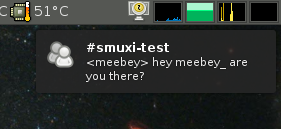
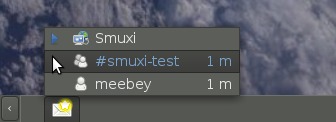
5 weeks after the 0.7.2.2 "Lovegood" release, I am very happy to announce the major feature release, 0.8 codenamed "Godsend". Major feature highlights of this release are desktop notifications (with full support of actions, icons, updates, append and sound), messaging menu / indicators (as provided by Ubuntu's Ayatana project) and working Twitter support with OAuth (basic auth was disabled by Twitter on 31st August). This version also fixes all bugs that were reported since the release of 0.7.2.2. Desktop Notifications
Messaging Menu
Further on, Smuxi comes with the following improvements in its user interface: Smuxi provides better connectivity and security by supporting: HTTP and SOCKS proxies as well as secure connections to IRC servers by using SSL with optional certificate validation. Last but not least, it comes with an enhanced Twitter experience by supporting the use of multiple Twitter accounts at the same time, reformatting tweets that contain newlines and showing the full retweet instead of a truncated version. Updated languages includes: French (Cl ment BOURGEOIS) and German (Bianca Mix) The #smuxi IRC channel can now also be found, in addition to OFTC, on other popular IRC networks such as freenode and GIMPnet. The messages on #smuxi are automatically relayed between the 3 IRC networks. If you like Smuxi and want to support it by making micro-donations, Smuxi is available on Flattr. There are also many other nice FOSS projects available on Flattr, see the Flattr-FOSS project. Smuxi is available for download from here. Binary Packages of Smuxi 0.8 are ready to be used by Debian/Experimental, Ubuntu/Maverick, Ubuntu/Lucid (via PPA), OpenSUSE, Foresight Linux, FreeBSD, and Windows.

7 September 2010

John Goerzen: Labor Day with Jacob and Oliver

Yesterday started out with Jacob and me going to a men/boys breakfast organized by my great uncle and some others. He s in his 80s and this is probably his last year doing this. It was out in the woods by the Little Arkansas River. They cooked up bacon, sausage, and eggs and it was a fun time. Jacob enjoyed throwing sticks in the river and sitting on some logs. Terah, meanwhile, went to Wichita with Oliver. So it was just Jacob and me when we got home. Jacob spent two hours playing rivers with me. A few weeks ago, he and I set this up outside. I found an old length of pipe on our property (my dad thinks it used to carry water from a well) and some cement blocks. I set it up on the blocks so that one end is higher than the other, and the lower end empties out at the top of a small dirt pile. Then I brought a water hose over to it, turned on the water at a very slow speed, and put the hose in the pipe. The result is a small stream of water coming out at the dirt pile. After it runs just a little while, the dirt is soft enough that you can dig out little channels, or rivers , with your fingers or a stick. Jacob enjoyed this the first time he played, but yesterday he really enjoyed it. We had a fork in the river, and he informed me that he would sit on his bank and I would sit on mine. He also wanted to give river food to his river (the fork closest to him). River food was loose dirt that he d pick up and sprinkle over the water, and watch it get carried on down. I spotted some random bug in the area once, and that bug got food too. I think Jacob and the bug disagreed about whether this was particularly helpful. Jacob enjoyed playing other games with the pipe. I had showed him that we could send things through the pipe, so he would take out the hose, stuff some dirt in one end, and then make sure I was watching to see if it came out the other end. He sometimes made a fountain by setting the hose on top of the cement blocks and watching the water drip down from level to level. Then later in the day, I introduced him to Tuxpaint. This is a painting program aimed at children. I had told him I had a painting game to show him a few days ago, but because he made some bad behavior choices, he had lost access to my computer for a few days. Anyhow, we tried it yesterday and wow he loved it. There was constant laughter and excitement. I first showed him how to select colors for the paintbrush. He quickly figured out how to make lines, change colors, and change brushes. Tuxpaint has sound effects for just about everything, which he loved too. Then we explored the interface together and I showed him the stamps feature, which lets you paste pre-made pictures into a drawing. Tuxpaint comes with dozens of these, on kid-friendly themes such as animals, cars, fire trucks, signs, etc. This he loved even more. Terah and Oliver got home about this time, and Oliver and Jacob both sat on my lap for a time, both laughing loudly each time Jacob discovered something new to paste into his picture. Of course, then Oliver tried to eat my keyboard and smash my monitor, but there you go.

C.J. Adams-Collier: Debian on Sheeva Plug internal NAND flash

After a bit of work, I got the sheeva plug working the way I wanted it to. First of all, I grabbed a spare 1G USB flash disk I had laying around and installed Debian squeeze to it by following tbm s instructions here: http://www.cyrius.com/debian/kirkwood/sheevaplug/install.html After debian was installed to the USB disk, I removed it from the plug and used dd on my laptop to create an image of the filesystem. I mounted the filesystem as a loopback device and created a jffs2 partition image from it after doing a bit of minor tweaking. I placed the USB disk back in the plug and booted to it. Using this intermediate filesystem and the mtd-tools package, I wrote the new jffs2 image to the NAND mtd device. I then modified the uboot environment to suit, saved, and now have a working setup. Detailed instructions are below. pre-requisites Connect the plug to your network with the rj-45/cat5 cable. Connect a USB flash drive to the plug. I used a 1G drive, but 512M should be sufficient. Install the tftpd package on a machine on your network. You ll also need screen on the machine that you use to connect to the plug s serial terminal. I ll assume these are the same host. You need the IP address of the tftp server. In this example, we will assume that the IP is 192.168.1.2 and that you will assign 192.168.1.200 to the plug. $ sudo apt-get install tftpd screen Place uImage, uInitrd, and uBoot in the /srv/tftp directory: $ sudo wget -O /srv/tftp/uImage http://www.cyrius.com/tmp/beta1/marvell/sheevaplug/uImage
$ sudo wget -O /srv/tftp/uInitrd http://www.cyrius.com/tmp/beta1/marvell/sheevaplug/uInitrd
$ sudo wget -O /srv/tftp/uBoot http://wp.colliertech.org/cj/wp-content/uploads/2010/09/07/uboot.bin Connecting to the serial console We are now ready to boot the plug. Note that you have to be quick with the screen command. I recommend you type it out and get ready to press the enter key. You have to interrupt the bootloader in order to enter the u-boot console. Attach the power and immediately enter the following command: $ screen -S sheeva /dev/ttyUSB0 cs8,ixoff,115200 If you did this right, you should see a prompt like this: Marvell>> update uboot As per tbm s instructions, you can now update the uboot if needed. Instructions for that are here: http://www.cyrius.com/debian/kirkwood/sheevaplug/uboot-upgrade.html I ll put them inline here for completeness.
Marvell>> setenv serverip 192.168.1.2 # IP of your TFTP server
Marvell>> setenv ipaddr 192.168.1.200 # IP of the plug
Marvell>> bubt uboot.bin
be sure to answer n to the question about env parameters. Now reset the device. Don t forget to interrupt the bootloader so we can get back to the prompt:
Marvell>> reset
Let the device know that you will be running a mainline kernel and set the arcNumber:
Marvell>> setenv mainlineLinux yes
Marvell>> setenv arcNumber 2097
Marvell>> saveenv
Marvell>> reset
Install Debian to the USB disk Interrupt the boot process once more. We are now ready to run the debian installer. I ll leave the details as an exercise for the reader. The following should put you into the installer, which you are probably quite familiar with by now. NB: I will assume that you will use a single ext3 partition for the entire system. This will make it easier to build a jffs2 image out of the resultant partition on the USB disk.
Marvell>> setenv serverip 192.168.1.2
Marvell>> setenv ipaddr 192.168.1.147
Marvell>> tftpboot 0x01100000 uInitrd
Marvell>> tftpboot 0x00800000 uImage
Marvell>> setenv bootargs console=ttyS0,115200n8 base-installer/initramfs-tools/driver-policy=most
Marvell>> bootm 0x00800000 0x01100000
build a jffs2 image Once the installation has completed, power down the plug and remove the USB disk. Put the USB disk in the machine you used to get the console on the plug and note what device the kernel assigns to it. In my case, it was given sdc, so debian is installed to /dev/sdc1. I will use these values for this example. If the filesystem was automatically mounted, unmount it. Create a disk image of the partition and mount it as a loopback device.
$ sudo umount /dev/sdc1
$ dd if=/dev/sdc1 of=/tmp/debian.img
$ mkdir /tmp/mnt
$ sudo mount -o loop /tmp/debian.img /tmp/mnt
You can now remove the USB disk and return it to the plug. Modify the /etc/fstab file. The root filesystem will be /dev/mtdblock2 and of fs type jffs2. My fstab file looks like the following:
proc            /proc           proc    defaults        0       0
/dev/mtdblock2 /               jffs2    errors=remount-ro 0       1
We can now create a jffs2 image from the mounted and altered fresh install:
$ sudo mkfs.jffs2 -l \
  -e 0x20000 \
  -X zlib \
  --eraseblock=128KiB \
  --pad \
  --output=/tmp/rootfs.jffs2 \
  --compression-mode=priority \
  -n \
  --squash \
  -r /tmp/mnt
write jffs2 to nand Now that we have an image to flash to the NAND, let s boot off of the USB disk. It should now be attached to the plug. Power on the plug and use screen to get a console. Interrupt the bootloader and enter the following commands:
Marvell>> setenv bootargs_console console=ttyS0,115200
Marvell>> setenv bootcmd_usb 'usb start; ext2load usb 0:1 0x01100000 /boot/uInitrd; ext2load usb 0:1 0x00800000 /boot/uImage'
Marvell>> setenv bootcmd 'setenv bootargs $(bootargs_console); run bootcmd_usb; bootm 0x00800000 0x01100000'
Marvell>> run bootcmd
Log in as root with the credentials you configured during the install. You will need to install a few packages in order to complete the nand flash. You can then ssh to the host on which you created the jffs2 image and cat it to stdout, piping this to nandwrite:
$ sudo apt-get install mtd-utils
$ ssh user@192.168.1.2 cat /tmp/rootfs.jffs2   sudo nandwrite /dev/mtd2 -p -
You now have a jffs2 image on the nand. Configure u-boot One more reboot to set u-boot s environment, and you will be done. Power down and remove the USB disk. Power on and get the serial console using screen. Break into the bootloader and enter the following commands:
Marvell>> setenv bootargs_console console=ttyS0,115200
Marvell>> setenv mtdpartitions mtdparts=orion_mtd:0x400000@0x100000(uImage),0x1fb00000@0x500000(rootfs)
Marvell>> setenv bootargs_root root=/dev/mtdblock2 rw rootfstype=jffs2
Marvell>> setenv bootcmd 'setenv bootargs $(bootargs_console) $(mtdpartitions) $(bootargs_root); nand read.e 0x00800000 0x00100000 0x00400000; bootm 0x00800000'
Marvell>> saveenv
Marvell>> reset
You should now be good to go.

Biella Coleman: Ireland

This summer of 2010 has been memorable. It started with a difficult period following the hospitalization and death of my mother, a series of very intense and equally memorable conferences catapulting me out of my funk and ending with a trip to Ireland, perhaps one of my most pleasant trips ever. I have always wanted to go there, as I have some good Irish friends and I was also quite attracted to the place due to its history, so when the opportunity came for me to go, I did not hesitate to book my ticket. I was not left disappointed in any way, shape or form, although since I barely experienced the gray, misty, and rainy weather Irish is famous for, my experience may admittedly be a bit skewed. These are some of things I did and some of my fragmented thoughts about Ireland and some photos, proof that the weather was UnIrish Ireland and The Irish: Well I can t as no one can speak of The Irish as if they were some unitary group but I did learn a lot about Irish history and managed hang out with a number Irish folks (even a family) and one thing that seems to mark Ireland as distinct, what makes it stand out from the rest of its Western European brothers and sisters, is the pervasive sense of history bleeding into the ambiance, perhaps because it is so tragic. The short version of the history, if you don t know it, is that the Irish, especially the Catholics, got repeatedly screwed by the British monarchs/rulers/planters/government/ for nearly a thousand years, the last five hundred of those being particularly harsh and ugly, a cycle of slight gains crushed by various forms of tyranny and violence at least until part of the country achieved independence (Northern Ireland is a bit of a different story). I may have gone a bit out of my way to learn about Irish history, more than I have done for any other place, but this historical consciousness seemed to be inescapable, precipitating into all sorts of conversations and places. To take one example, I went to see Gaelic Football, one of the two beloved national sports (the other being hurling), and the minute you learn anything about this sport, you learn that it is intimately bound with the Irish fight for independence and nationalism. The Irish are also very warm, kind, and outgoing. They also seem to curse an awful lot as well, so much so cursing is a bit of a national pastime, which yes, I (f*cking) loved as I tend to have a bit of a foul mouth myself, curbed I will admit, in recent years and in the classroom. It crept up in a lot of places but was most pronounced during the All Ireland Semi-Final Gaelic football game when the ladies (not lads, mind you) behind me were constantly yelling at the referee, hurling the c-word (rhymes with trunk) whenever they made a call they disagreed with. EASA/Maynooth.: I went to Ireland to attend the largest Anthropological meetings in Europe, and in specific an all day panel on digital anthropology, which seemed like a great opportunity given we are a a bit of a minority. The conference was impressively large with roughly 1200 attendees (can you believe there are that many anthropologists?), smoothly run, and the all-day panel on digital media was quite lively and I got to meet some really interesting folks. I was a tad sad to find out Maynooth is the only university in Ireland with an Anthropology department (for crying shame lads!!!) but at least it is located in a darn stunning university: the old quarters of the campus are strikingly beautiful. Anonymous: I have done some work on Anonymous and well when I found out there was going to be a raid/protest at the Church of Scientology (a pretty dismal, and run down church), I got in contact with Irish anon to let them know I was coming. Although someone first decapitated me (at least in character with their norms, right?), when I showed up in person, they were not only civil but really quite hospitable (greeting me with one of my favorite songs). Overall it was a great day. I was reminded of important differences among Anons (Irish Anon s take their anonymity pretty seriously, the New York Anons do not) and also good to experience the social life and metabolism of a protest, especially one attended by folks who have lost family to the church. Dublin: Since I stayed with my friend and his family in Dublin, this is where I spent most of my time. I was able to hook up with various friends, including one from graduate school who just got back from years of fieldwork in Rwanda and hearing about his experiences and stunning but stunningly sad project made me feel like mine in comparison was Child s Play (in fact, it really was). I got to see the Debian crew (many who work at Google) and I finally paid a visit to the office, which was exactly how I imagined it to be (good and abundant food, good lighting, lots of toys and bikes, lots of Star Wars posters.. Yep, it could have been in Silicon Valley). But I was surprised at the young age of the marketing and sales folks who were hanging in their lounge when I ran into them. In fact when I saw them I thought like I was looking at my freshman class or something! It was great to see the Debian folks (though no one I met was actually Irish), as well, one of my favorite things to do whenever I visit a foreign city. I walked my heart out in the city getting a blister in a shoe that I thought was blister proof and while not as picturesque as some other European cities, it has a ton of character and no shortage of Guinness and pubs (no surprise there). My favorite places/things were: The National Library (great exhibit on Yeats, but make sure to use the multi-media as that is where all the information is stuffed), St. Stephen s Park (overflowing with chubby ducks and lovely flowers), the prison Kilmainham Gaol (would not advise a visit if you are feeling in any way down, there is some heavy shit you learn during the tour), the simple stained glass that seemed pretty common, and finally the Long Room in Trinity Church, which you enter after the Book of Kells (I realized just how much I adore books when I visited this old library stuffed from floor to ceiling with old old old books). The West Coast: I did not think I was going to head out west but after hurricane Earl started its burst along the eastern Seaboard and I was able to change my ticket for free so I stayed a few more days. I went to the Burren and the Cliffs of Moher both totally stunning, really majestic. As is often the case with these type of these natural wonders, I am often left elated and awed but such strikingly wondrous places also seem to subsequently spur a more melancholic state of mind and heart. Friends, Family, and Dogs: While in Dublin I stayed with my friend A. and his extremely hospitable family, which included, a brother, a father, and three Irish mutts, one of which, Buster (pitt bull/lab mix), pretty much stole my heart. Buster s true love, is food, so much so he almost poised himself to death a little while back snorting down something he shouldn t have costing the family a pretty penny to save him. My friend no longer lives there but came from Berlin and it was a real treat to not only spend days layered upon each other with a friend (it has been an awful long since I have done that outside of conferences) but also meet his family. You learn a lot about your friends that way and in this case, there is some serious and I mean serious intellectual jousting that happens, sometimes bordering on warfare but generally it plays out in more contained, civil and fascinating fashion. Now I understand why my friend is armed with seemingly endless knowledge: it was needed for purposes of defense at home. So in essence, a great, great trip and a fantastic way to end a memorable summer and transition into what I hope will be a bit of a monkish (I call it monk mode) period for this academic year. I am (so so so) fortunate enough to have a fellowship at the Institute for Advanced Study and am going to try my darnest to take advantage of the fact I am not teaching (Hell Yes!) and hide away and accomplish all that I have set out to do.

6 September 2010

Ingo Juergensmann: Problems with IPv6 and Bridging/Xen

I've been using IPv6 on my rootserver for some time now. Last week I migrated to a new rootserver and copied my domU/VM instances over to the new hardware. Everything is working fine so far - except IPv6. The network setup is the same as on the old server: the external interface is eth0. The domU/VMs are hooked up to a bridge, called xenbr0. There's another bridge for internal communication: xenbr1. The dom0/Xen host itself seems reachable via IPv6. The /48 subnet is provided by Sixxs and is using a static 6-to-4 tunnel. But the VMs are not reliable reachable, although it is setup in the same way as it was on the old server and where it was working like a charme. The configs of the hosts are these:
Xen dom0
config old server new server
System Debian Etch
2.6.18-6-xen-amd64
linux-image-2.6.18-6-xen-amd64
linux-modules-2.6.18-6-xen-amd64
xen-hypervisor-3.0.3-1-amd64
xen-ioemu-3.0.3-1
xen-linux-system-2.6.18-6-xen-amd64
xen-tools
xen-utils-3.0.3-1
xen-utils-common
Debian Squeeze
2.6.32-5-xen-amd64
libxenstore3.0
linux-image-2.6.32-5-xen-amd64
xen-hypervisor-4.0-amd64
xen-linux-system-2.6.32-5-xen-amd64
xen-tools
xen-utils-4.0
xen-utils-common
xenstore-utils
xenwatch
/etc/sysctl.conf net.ipv4.ip_forward=1
net.ipv6.conf.all.forwarding=1
net.ipv4.conf.default.proxy_arp=1
net.ipv4.ip_forward=1
net.ipv4.ip_syncookies=1
net.ipv4.conf.all.rp_filter=1
net.ipv4.icmp_echo_ignore_broadcasts=1
/etc/xen/xend-config.sxp (network-script network-route)
(vif-script vif-bridge)
(dom0-min-mem 196)
(dom0-cpus 0)
(vif-script vif-bridge)
(network-script network-route)
(dom0-min-mem 196)
(enable-dom0-ballooning yes)
(total_available_memory 0)
(dom0-cpus 2)
(vncpasswd '')
/etc/network/interfaces # device: eth0
auto eth0
iface eth0 inet static
address 85.10.209.30
broadcast 85.10.209.31
netmask 255.255.255.224
up route add -net 85.10.209.0 netmask 255.255.255.224 gw 85.10.209.1 eth0 true
up ip route add 85.10.209.0/28 via 85.10.209.1 src 85.10.209.30 true
up route add default gw 85.10.209.1 true

auto xenbr0
iface xenbr0 inet static
address 85.10.209.30
netmask 255.255.255.224
pre-up brctl addbr xenbr0
up route add -net 78.47.85.144/29 dev xenbr0 true
up ip -6 r a 2001:6f8:90e:145::1/64 via 2001:6f8:90e:1:216:3eff:fe55:197c dev xenbr0 true
up ip -6 r a 2001:6f8:90e:146::1/64 via 2001:6f8:90e:1:216:3eff:fe2f:481d dev xenbr0 true
up ip -6 r a 2001:6f8:90e:147::1/64 via 2001:6f8:90e:1:216:3eff:fe60:68be dev xenbr0 true
up ip -6 r a 2001:6f8:90e:a100::1/64 via 2001:6f8:90e:1:216:3eff:fe70:be dev xenbr0 true

auto xenbr1
iface xenbr1 inet static
address 192.168.x.254
netmask 255.255.255.0
pre-up brctl addbr xenbr1
# some internal IPv4 routing


auto sixxs
iface sixxs inet6 v4tunnel
address 2001:6f8:900:c6e::2
netmask 64
endpoint 212.224.0.188
local 85.10.209.30
ttl 64
up ip link set mtu 1280 dev sixxs true
up ip route add default via 2001:6f8:900:c6e::1 dev sixxs true
up ip -6 route flush dev eth0 true
up ip -6 r a 2001:6f8:90e::/48 dev xenbr0 true
down ip -6 route flush dev sixxs true
# device: eth0
auto eth0
iface eth0 inet static
address 178.63.83.84
broadcast 178.63.83.127
netmask 255.255.255.192
gateway 178.63.83.65
# default route to access subnet
up route add -net 178.63.83.64 netmask 255.255.255.192 gw 178.63.83.65 eth0

auto xenbr0
iface xenbr0 inet static
address 178.63.83.84
netmask 255.255.255.192
pre-up brctl addbr xenbr0
up route add -host 178.63.83.104 dev xenbr0 true
up route add -host 178.63.83.105 dev xenbr0 true
up route add -host 178.63.83.106 dev xenbr0 true
up ip route add 178.63.123.128/26 dev xenbr0 true
up ip -6 r a 2001:6f8:90e:145::1/64 via 2001:6f8:90e:1:216:3eff:fe89:6c31 dev xenbr0 true
up ip -6 r a 2001:6f8:90e:146::1/64 via 2001:6f8:90e:1:216:3eff:fedc:af5f dev xenbr0 true
up ip -6 r a 2001:6f8:90e:147::1/64 via 2001:6f8:90e:1:216:3eff:fe08:8f40 dev xenbr0 true
up ip -6 r a 2001:6f8:90e:a100::1/64 via 2001:6f8:90e:1:216:3eff:fe70:be dev xenbr0 true
auto xenbr1
iface xenbr1 inet static
address 192.168.x.254
netmask 255.255.255.0
pre-up brctl addbr xenbr1
# some internal IPv4 routing
auto sixxs
iface sixxs inet6 v4tunnel
address 2001:6f8:900:c6e::2
netmask 64
endpoint 212.224.0.188
local 178.63.83.84
ttl 64
up ip link set mtu 1280 dev sixxs true
up ip route add default via 2001:6f8:900:c6e::1 dev sixxs true
up ip -6 route flush dev eth0 true
up ip -6 r a 2001:6f8:90e::/48 dev xenbr0 true
down ip -6 route flush dev sixxs true
The config of one of the Xen domUs is this:
sample domU config
config old server new server
system Debian Lenny
2.6.18-6-xen-amd64
Debian Lenny
2.6.32-5-xen-amd64
/etc/sysctl.conf net.ipv4.conf.default.rp_filter=1
net.ipv4.tcp_syncookies=1
net.ipv4.conf.default.forwarding=1
net.ipv6.conf.default.forwarding=1
net.ipv4.conf.eth0.proxy_arp=1
net.ipv4.conf.default.proxy_arp=1
kernel.shmmax=268435456
net.ipv4.conf.default.rp_filter=1
net.ipv4.tcp_syncookies=1
net.ipv4.conf.default.forwarding=1
net.ipv4.conf.all.forwarding=1
net.ipv6.conf.default.forwarding=1
net.ipv4.conf.eth0.proxy_arp=1
net.ipv4.conf.default.proxy_arp=1
kernel.shmmax=268435456
/etc/network/interfaces # The primary network interface
auto eth0
iface eth0 inet static
address 78.47.85.145
netmask 255.255.255.248
up ip route add 85.10.209.0/27 dev eth0
up route add default gw 85.10.209.30 dev eth0
up ip -6 address add 2001:6f8:90e:145::1/64 dev eth0 true
up ip -6 route add default via 2001:6f8:90e:1::1 true
up iptables -t nat -A POSTROUTING -s 192.168.x.96/27 -o eth0 -j MASQUERADE true

iface eth0 inet6 static
address 2001:6f8:90e:145::1
netmask 64
gateway 2001:6f8:90e:1::1 auto eth1
iface eth1 inet static
address 192.168.x.1
netmask 255.255.255.0
# The primary network interface
auto eth0
iface eth0 inet static
address 178.63.83.104
gateway 178.63.83.84
netmask 255.255.255.192
broadcast 178.63.83.127
up ip -6 address add 2001:6f8:90e:145::1/64 dev eth0 true
up ip -6 route add default via 2001:6f8:90e:1::1 src 2001:6f8:90e:1:216:3eff:fe89:6c31 true
up iptables -t nat -A POSTROUTING -s 192.168.x.96/27 -o eth0 -j MASQUERADE true

iface eth0 inet6 static
address 2001:6f8:90e:145::1
netmask 64
gateway 2001:6f8:90e:1::1

auto eth1
iface eth1 inet static
address 192.168.x.1
netmask 255.255.255.0
The dom0 seems to be reachable via IPv6 just perfectly fine. When trying to reach the domU I see packets going through the xenbr0 bridge and reaching the domU eth0 interface. The ICMP6 echo request packets (proto 58) are unanswered there, no echo replies. Strange enough it seems to work from time to time, but mostly not. I've also tried to set a generic default route like ip -6 route add default dev eth0, but still no improvement. Did I miss something when migrating to the new server? Is there any mistake in the configs? Any suggestions are appreciated! :-) UPDATE:
This is a tcpdump from the domU, doing a ping from dom0:
07:35:29.308261 IP6 fe80::e46d:25ff:fe1f:317b > ip6-allnodes: ICMP6, router advertisement, length 56
07:35:29.329411 IP6 gate-hro.ip6.windfluechter.net > vserv.windfluechter.net: ICMP6, echo request, seq 45, length 64
07:35:30.329439 IP6 gate-hro.ip6.windfluechter.net > vserv.windfluechter.net: ICMP6, echo request, seq 46, length 64
07:35:30.451991 IP6 2001:418:4001:3::c657:b0c5 > vserv.windfluechter.net: ICMP6, echo request, seq 52836, length 64
07:35:30.481124 IP6 fe80::e46d:25ff:fe1f:317b > ff02::1:ff70:be: ICMP6, neighbor solicitation, who has 2001:6f8:90e:1:216:3eff:fe70:be, length 32
07:35:31.329906 IP6 gate-hro.ip6.windfluechter.net > vserv.windfluechter.net: ICMP6, echo request, seq 47, length 64
07:35:31.481645 IP6 fe80::e46d:25ff:fe1f:317b > ff02::1:ff70:be: ICMP6, neighbor solicitation, who has 2001:6f8:90e:1:216:3eff:fe70:be, length 32
07:35:32.329284 IP6 gate-hro.ip6.windfluechter.net > vserv.windfluechter.net: ICMP6, echo request, seq 48, length 64
07:35:32.481114 IP6 fe80::e46d:25ff:fe1f:317b > ff02::1:ff70:be: ICMP6, neighbor solicitation, who has 2001:6f8:90e:1:216:3eff:fe70:be, length 32
07:35:33.329951 IP6 gate-hro.ip6.windfluechter.net > vserv.windfluechter.net: ICMP6, echo request, seq 49, length 64
07:35:34.329705 IP6 gate-hro.ip6.windfluechter.net > vserv.windfluechter.net: ICMP6, echo request, seq 50, length 64
UPDATE #2:
The issue is finally solved. The solution can be found here.

Joey Hess: freedombox for a solar powered house

I'm swinging on the front porch shade, with happy wifi bars lit up on my laptop. A good network makes for a happy home, isn't that how the saying goes? (Maybe not yet.) Typically that's easy to achieve -- here it wasn't. The house is solar powered, the only connection to the outside is a phone line. So I needed a computer that would work in that environment, using minimal (12 volt) power, and getting the most out of the limited bandwidth while providing those happy wifi bars. At DebConf we learned that the name for these little home servers we have been building for years is "FreeDomBox". All right then, here's my latest FreedomBox build.
A typical inexplicable tangle of computer bits.
Since the solar house is in the sticks, the result is a server I call "stick".

5 September 2010

Jose Luis Rivas Contreras: Multiple -webkit-transition issue

While making a CSS layout for a client I had issues with transitions on WebKit-based browsers, I couldn t make it renderize more than one transition at the same time with the short -webkit-transition, the line was:
-webkit-transition: background-color .25s linear, shadow .25s linear;
Doesn t works on Safari 3 nor in Google Chrome 6 so I tried splitting out the lines to:
-webkit-transition-property: background-color, shadow;
-webkit-transition-duration:.25s, .25s;
-webkit-transition-timing-function: linear, linear;
And now it works! But it sucks, now I have to write three stupid lines instead of one for the same thing, something that works perfectly on Firefox4 and the draft says explicitly it should work, just:
-moz-transition: background-color .25s linear, shadow .25s linear;
Well, at least works

Kartik Mistry: Updates: Life and more

* It is same old life, apart from: + Guitar is going good. Learning first thing apart from computer in life ;) + Learning C++ and openFrameworks for helping friend for project. More details later.. * Packages: + I ve uploaded Gwibber 2 after waiting for ages to experimental now. Now, OAuth sucked life from all previous version of Gwibber stable version will not have twitter working. I m thinking what can be best solution for that. + Code::Blocks is with me now. I m talking to upstream to do better things with license issues. It will not make to stable, but backport version is planned. * Kavin: + Arr. He can reach to my any books, gadgets and even laptop.

3 September 2010

Alexander Reichle-Schmehl: Release Critical Bug report for Week 35

The unofficial rc bug tracker currently knows about the following bugs:
In Total:379
Affecting Squeeze:291
Squeeze only:65
Remaining to be fixed in Squeeze:226
Of these 226 bugs, the following tags are set:
Pending in Squeeze:14
Patched in Squeeze:43
Duplicates in Squeeze:21
Contrib or non-free in Squeeze:13
Claimed in Squeeze:2
Delayed in Squeeze:8
Can fixed in a security Update:14
Otherwise fixed in Squeeze:16
Ignoring all the above (multiple tags possible), 129 bugs need to be fixed by Debian Contributers to get Debian 6.0 Squeeze released. However, with the view of the Release Managers, 244 need to be dealt with for the release to happen. Please see my older post for an explanation of the different numbers.

Next.

Previous.